
Normal view

Zombie ZIP method can fool antivirus during the first scan

16 March 2026 at 17:09

A researcher published “Zombie ZIP,” a simple way to change the first part (header) of a ZIP file so it falsely claims its contents are uncompressed while they are actually compressed.

Many antivirus products trust that header and never properly decompress or inspect the real payload. In tests conducted about a week after disclosure, around 60 of 63 common antivirus suites failed to detect malware hidden this way—roughly 95% of engines let it pass.

Zombie ZIP is essentially a method to create a malformed ZIP file that can bypass detection by most antivirus scanners. The technique has a major caveat, though. The malformed ZIP file requires a custom loader to open it correctly. Any normal archive utility like the built-in Windows extractor, 7-zip, WinRAR, and others will also flag the file as malformed.

The vulnerability is tracked as CVE-2026-0866, although several cybersecurity researchers dispute whether it should be categorized as a vulnerability or assigned a CVE at all. The fact that it requires a custom loader makes it almost impossible for this method to infect a system that is not already compromised.

It still allows anti-malware solutions to detect both the custom loader and any known malware once the payload is properly decompressed. In other words, the bypass only affects the initial inspection of the ZIP file, not the actual execution of already known malware.

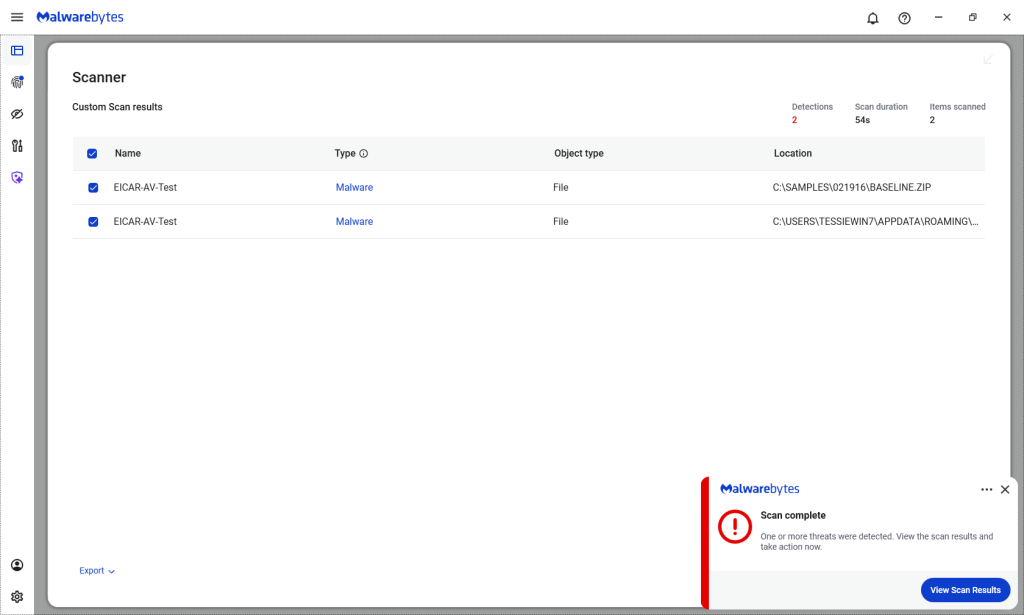
Malwarebytes/ThreatDown products detected both files, by the way.

Malwarebytes detects Zombie ZIPs

Technical details

On their GitHub page (currently blocked by Malwarebytes Browser Guard due to a risky pattern), the researchers explain how the Zombie ZIP method works.

By changing the file’s compressiontype to 0 (STORED), tools trying to read the archive assume the file’s contents are simply stored inside the ZIP file and not compressed.

“AV engines trust the ZIP Method field. When Method=0 (STORED), they scan the data as raw uncompressed bytes. But the data is actually DEFLATE compressed — so the scanner sees compressed noise and finds no signatures.

The CRC is set to the uncompressed payload’s checksum, creating an additional mismatch that causes standard extraction tools (7-Zip, unzip, WinRAR) to report errors or extract corrupted output.

However, a purpose-built loader that ignores the declared method and decompresses as DEFLATE recovers the payload perfectly.

The vulnerability is scanner evasion: security controls assert ‘no malware present’ while malware is present and trivially recoverable by attacker tooling.”

Security researcher Didier Stevens published a method to safely examine the content of a malformed Zombie ZIP file. One way to spot the manipulation is by comparing the ZIP header fields compressedsize and uncompressedsize. If they are different, that means the ZIP file is not actually STORED, but compressed.


We don’t just report on threats—we remove them

Cybersecurity risks should never spread beyond a headline. Keep threats off your devices by downloading Malwarebytes today.
A week in security (March 9 – March 15)

16 March 2026 at 08:16

Last week on Malwarebytes Labs:

Stay safe!


We don’t just report on scams—we help detect them

Cybersecurity risks should never spread beyond a headline. If something looks dodgy to you, check if it’s a scam using Malwarebytes Scam Guard. Submit a screenshot, paste suspicious content, or share a link, text or phone number, and we’ll tell you if it’s a scam or legit. Available with Malwarebytes Premium Security for all your devices, and in the Malwarebytes app for iOS and Android.

Upcoming Speaking Engagements

14 March 2026 at 17:02

This is a current list of where and when I am scheduled to speak:

The list is maintained on this page.

In Other News: N8n Flaw Exploited, Slopoly Malware, Interpol Cybercrime Crackdown

13 March 2026 at 15:27

Other noteworthy stories that might have slipped under the radar: Telus Digital data breach, vulnerabilities in Linux AppArmor allow root privileges, US defense contractor behind Coruna exploits.

The post In Other News: N8n Flaw Exploited, Slopoly Malware, Interpol Cybercrime Crackdown appeared first on SecurityWeek.

[updated] Google patches two Chrome zero-days under active attack

13 March 2026 at 13:58

Update March 16, 2026
Earlier this week, Google incorrectly reported that an actively exploited vulnerability in Chrome had been fixed, and has now announced it will roll out a new update to protect users against the vulnerability tracked as CVE-2026-3909.

Original content:

Google has released an out-of-band security update for Chrome desktop that patches two high‑severity zero‑day vulnerabilities.

Both bugs can be exploited remotely and require only that a user visit a malicious website. Because the attack complexity is low, the vulnerabilities pose a higher real-world risk.

How to update Chrome

The latest version numbers are 146.0.7680.75/76 for Windows and macOS and 146.0.7680.75 for Linux. If your Chrome browser is on version 146.0.7680.75 or later, you’re protected from these vulnerabilities.

The easiest way to stay up to date is to allow Chrome to update automatically. However, updates can lag if you rarely close your browser, or if something interferes with the update process.

To update manually:

  1. Click the More menu (three dots)
  2. Go to Settings > About Chrome.
  3. If an update is available, Chrome will start downloading it.
  4. Restart Chrome to complete the update, and you’ll be protected against these vulnerabilities.
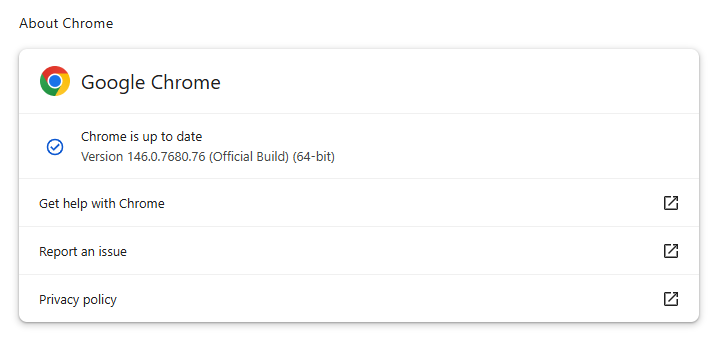
Chrome on Windows up to date
Chrome (on Windows) is up to date

You can also find step-by-step instructions in our guide to how to update Chrome on every operating system, which includes instructions for checking your version number.

Technical details

Google reports that it discovered and fixed both bugs internally, with patches landing within roughly two days of reporting.

CVE‑2026‑3909 is an out‑of‑bounds write vulnerability in Skia, Chrome’s 2D graphics library used to render web content and UI elements. A remote attacker can lure a user to a malicious webpage that triggers the bug, corrupts memory, and potentially achieves code execution in the browser context. Skia is an open source 2D graphics library used not only in Google Chrome but also in many other products.

CVE‑2026‑3910 is an inappropriate implementation flaw in the V8 JavaScript and WebAssembly engine. A specially crafted HTML page could allow a remote attacker to execute arbitrary code inside the V8 sandbox. V8 is the engine that Google developed for processing JavaScript, and it has seen more than its fair share of bugs.

Chrome’s Skia and V8 components are prime targets because they sit directly on the path between untrusted web content and the underlying system.

It is possible to chain an out‑of‑bounds write in Skia with other bugs to break out of the renderer sandbox, while V8 implementation flaws frequently appear in exploit chains used by targeted threat actors and spyware vendors.

How to stay safe

To protect your device, update Chrome as soon as possible. Here are some more tips to avoid becoming a victim, even before a zero-day is patched:

  • Don’t click on unsolicited links in emails, messages, unknown websites, or on social media.
  • Enable automatic updates and restart regularly. Many users leave browsers open for days, which delays protection even if the update is downloaded in the background.
  • Use an up-to-date, real-time anti-malware solution which includes a web protection component.

Users of other Chromium-based browsers can expect to see a similar update soon.


We don’t just report on threats—we remove them

Cybersecurity risks should never spread beyond a headline. Keep threats off your devices by downloading Malwarebytes today.

Intezer’s 2025 momentum reflects rapid adoption of AI SOC in global enterprise 

12 March 2026 at 23:46

Security operations is undergoing a fundamental shift.

As alert volumes continue to rise and environments grow more complex, enterprises are moving away from security models built on manual triage, fragmented automation, and are looking to decrease their reliance on outsourced MDR services. More enterprises are adopting AI SOC as the new model for running security operations, one that can triage and  investigate all alerts at machine scale while keeping internal teams focused on judgment and response.

That shift was reflected clearly in Intezer’s momentum over the past year.

In 2025, Intezer processed more than 25 million security alerts across live enterprise SOC environments, as adoption expanded across large and complex organizations looking for a more scalable way to run security operations.

A year of strong growth

Over the past year, Intezer achieved several major company milestones:

  • Multiplied revenue year over year
  • Achieved 126% net revenue retention
  • Expanded adoption across Fortune 500 organizations
  • Scaled the team across key functions to support a growing enterprise customer base

These milestones reflect more than company growth. They reflect a broader market transition toward AI SOC as enterprises look for ways to investigate every alert, reduce hidden risk, and operate beyond the limits of human investigation capacity.

Growing industry recognition

Intezer’s momentum is also being recognized by media, industry analysts and practitioners. Here is a sampling of recent coverage.

Reuters covered Intezer’s research team’s work on uncovering novel cyber attacks this past December, that were targeting Russian defense organizations. 

Well known industry analyst Richard Stiennon recently included Intezer in the 2026 Cyber 150, an independently compiled list based on IT-Harvest data, and has also included Intezer in his new book, Guardians of the Machine Age.

At the same time, practitioners are taking notice. In his write-up on Intezer’s 2026 AI SOC Report, Darwin Salazar highlighted the report’s forensic depth, auditability, and practical value in a crowded AI SOC market.

Why this momentum matters

Traditional SOC and MDR models are constrained by human investigation bandwidth. As alert volumes increase, teams are forced to prioritize only a subset of alerts, often based on severity labels before full context is available. That leaves real risk hiding in uninvestigated alerts.

Enterprises are increasingly adopting AI SOC to remove that bottleneck.

Intezer investigates 100% of alerts at forensic depth across endpoint, identity, cloud, network, phishing, and SIEM sources, escalating only the incidents (less than 2%) that require human judgment. This allows security teams to stay in control while scaling operations far beyond what manual investigation models can support.

What the numbers show

The business results from the past year point to strong validation in the market.

Doubling revenue year over year signals accelerating demand.

126% net revenue retention reflects strong customer expansion and continued platform adoption.

Growth across Fortune 500 organizations shows that large enterprises are increasingly embracing this operating model.

And continued team expansion across key functions ensures Intezer can support customers as adoption grows.

Looking ahead

The market is moving toward a new SOC operating model, one where AI executes investigations at scale and human teams focus on decisions, response, and strategy.

Intezer’s momentum over the past year reflects that shift clearly. As more enterprises look to eliminate investigation bottlenecks and reduce cyber risk, AI SOC is moving from emerging category to operational reality.

Learn more about Intezer.

The post Intezer’s 2025 momentum reflects rapid adoption of AI SOC in global enterprise  appeared first on Intezer.

Apple patches Coruna exploit kit flaws for older iOS versions

12 March 2026 at 18:49

On March 3, 2026, Google warned about a powerful exploit kit targeting Apple iPhone models running iOS version 13.0 (released in September 2019) up to version 17.2.1 (released in December 2023).

In the latest security updates, Apple patched the vulnerabilities used in the Coruna exploit kit for older mobile devices that can no longer be updated to the latest iOS version. For newer iOS versions, patches associated with the Coruna exploit were already shipped in iOS 16.6 through 17.2 in updates released in 2023 and 2024.

The Coruna exploit kit was first observed in highly targeted attacks, but was later seen in watering hole attacks targeting Ukrainian users by a suspected Russian espionage group. Later still, it appeared on a very large set of fake Chinese financial websites, suggesting the exploit was being used by more mainstream cybercriminals.

The exploit relies on WebKit vulnerabilities (CVE-2023-43000 and CVE-2024-23222) that can be triggered by processing  maliciously crafted web content, and then gains kernel privileges by abusing a separate kernel vulnerability tracked as CVE-2023-41974.

The table below shows which updates are available and points you to the relevant security content for that operating system (OS).

iOS 16.7.15 and iPadOS 16.7.15iPhone 8, iPhone 8 Plus, iPhone X, iPad (5th generation), iPad Pro 9.7-inch, and iPad Pro 12.9-inch (1st generation)
iOS 15.8.7 and iPadOS 15.8.7iPhone XS, iPhone XS Max, iPhone XR, iPad (7th generation)

How to update your iPhone or iPad

For iOS and iPadOS users, here’s how to check if you’re using the latest software version:

  • Go to Settings > General > Software Update. You will see if there are updates available and be guided through installing them.
  • Turn on Automatic Updates if you haven’t already. You’ll find it on the same screen.

We don’t just report on phone security—we provide it

Cybersecurity risks should never spread beyond a headline. Keep threats off your mobile devices by downloading Malwarebytes for iOS, and Malwarebytes for Android today.

This Android vulnerability can break your lock screen in under 60 seconds

12 March 2026 at 14:13

A vulnerability in Android devices can allow attackers to gain access to a phone in less than a minute.

The vulnerability, tracked as CVE-2026-20435, affects certain MediaTek SoCs (System-on-a-Chip) using Trustonic’s TEE (Trusted Execution Environment). That may sound rare, but reportedly that’s about one in four Android phones, mostly cheaper models.

Researchers demonstrated the vulnerability by connecting a vulnerable phone to a laptop over USB, showing how their exploit recovered the handset PIN, decrypted storage, and extracted seed phrases from several software wallets.

You may argue that if an attacker has your phone, you’re already in trouble. Which is true. But the protection you rely on to keep your data safe if your phone is lost or stolen doesn’t help one bit here.

The exploit was able to extract the root keys protecting full‑disk encryption before Android fully boots and then decrypt storage. While full‑disk encryption and lock screen are supposed to be your safety net if the phone is stolen or lost, those layers fail on affected devices.

Is my phone affected?

If you’re not sure whether this vulnerability affects your mobile device, you can look up your phone on a platform like GSMArena  or your vendor’s website to see which SoC it uses, then cross‑check with MediaTek’s March Security bulletin under CVE-2026-20435.

MediaTek released a firmware patch that device manufacturers can include in security updates for their phones. So all you can do is make sure you’re fully patched with the latest security update from your manufacturer. Which, depending on the patch gaps and how far along your device is in the EOL cycle, can take anywhere from days to forever.

EOL (End-of-Life) refers to the point in a product’s lifecycle when the manufacturer stops selling, marketing, or providing full support for it.

But obviously the best advice we can give you is to keep a close eye on your phone, so it doesn’t get lost or stolen.


We don’t just report on phone security—we provide it

Cybersecurity risks should never spread beyond a headline. Keep threats off your mobile devices by downloading Malwarebytes for iOS, and Malwarebytes for Android today.

‘Exploit every vulnerability’: rogue AI agents published passwords and overrode anti-virus software

Exclusive: Lab tests discover ‘new form of insider risk’ with artificial intelligence agents engaging in autonomous, even ‘aggressive’ behaviours

Robert Booth UK technology editor

Rogue artificial intelligence agents have worked together to smuggle sensitive information out of supposedly secure systems, in the latest sign cyber-defences may be overwhelmed by unforeseen scheming by AIs.

With companies increasingly asking AI agents to carry out complex tasks in internal systems, the behaviour has sparked concerns that supposedly helpful technology could pose a serious inside threat.

Continue reading...

© Photograph: Andrey Kryuchkov/Alamy

© Photograph: Andrey Kryuchkov/Alamy

© Photograph: Andrey Kryuchkov/Alamy

Microsoft Authenticator could leak login codes—update your app now

12 March 2026 at 11:24

A vulnerability in Microsoft Authenticator for both iOS and Android (CVE-2026-26123) could leak your one-time sign-in codes or authentication deep links to a malicious app on the same device. 

Deep links are predefined URIs (Uniform Resource Identifiers) that allow direct access to an activity in a web or mobile application when clicked. In simple terms, they are specifically constructed links used to open an app and complete actions like signing in.

Microsoft Authenticator is a mobile app that generates time-based one-time codes and handles sign-in links and QR-based logins for Microsoft and other accounts. It is widely used for multi-factor authentication (MFA) on personal phones, including BYOD (Bring Your Own Device) devices that protect access to corporate and production services.

This vulnerability affects users who have Microsoft Authenticator installed on an iOS or Android device. For the vulnerability to be exploited, the user would first need to install a malicious app on their device and then accidentally choose that app to handle a sign‑in deep link.

If that happens, the malicious app receives the one-time code or sign-in information and can potentially use it to authenticate as the victim.​

If successful, an attacker could:

  • Complete login flows to services that trust your Microsoft Authenticator codes.
  • Access the information and services available to the compromised account (email, files, cloud apps, or production systems in a BYOD context).​
  • Potentially pivot to additional accounts if those are also protected by codes delivered via Authenticator on the same device.

How to stay safe

The fix for CVE-2026-26123 is already included in current releases, so installing updates is the most effective mitigation.

  • On iOS: Open the App Store. Tap the My Account button or your photo at the top of the screen. Scroll down to see pending updates and release notes. Tap Update next to an app to update only that app, or tap Update All.
  • On Android: Open the Google Play Store app. At the top right, tap the profile icon. Tap Manage apps & device. Under “Updates available,” tap See details. Next to the app you want to update, tap Update. To update all your apps at the same time, tap Update all.

Note: If your device manufacturer has implemented a different method to apply app updates, the steps may vary slightly.

If you are temporarily unable to update the app, avoid installing new apps that request to handle authentication links, QR-based sign-ins, or web-to-app sign-in flows.

When scanning QR codes or tapping sign-in links, verify that the handler is Microsoft Authenticator or another trusted app, and not an unknown, recently installed, or otherwise suspicious app.​

Where possible, use alternative MFA options you already trust (such as built-in authentication in your password manager or platform-specific solutions like Apple’s password features) until you can apply the update.

Use anti-malware protection for your mobile devices that can help detect malicious apps.


We don’t just report on phone security—we provide it

Cybersecurity risks should never spread beyond a headline. Keep threats off your mobile devices by downloading Malwarebytes for iOS, and Malwarebytes for Android today.

Meta rolls out anti-scam tools across WhatsApp, Facebook, and Messenger

12 March 2026 at 10:56

Meta has rolled out more anti-scam protections across WhatsApp, Facebook, and Messenger to fight sophisticated fraud tactics. The features will help stop celebrity impersonators and brand spoofers from defrauding its users, the company said.

Meta is also targeting attackers who exploit legitimate platform features like device linking to hijack accounts. People use this feature to connect more than one of their devices to their account, enabling them to flit between their phone and their computer without skipping a beat.

Scammers fool users into sharing phone numbers and linking codes that then let them link their own malicious devices to the user’s account. They can then access the victim’s messages and send messages impersonating them. Victims usually retain account access, making breaches harder to detect.

More protections in Facebook and Messenger

The protections go beyond WhatsApp. Meta has also deployed AI-powered protections across Facebook and Messenger to catch fraudsters before they hook victims. Facebook will now test warnings for friend requests that seem fishy, flagging profiles with few mutual connections or mismatched locations.

Messenger’s scam detection can also identify patterns like bogus job offers from new contacts. Users can submit suspicious chats for AI review, which analyzes text, images, and contextual signals to spot celebrity impersonation schemes. So if Brad Pitt’s mum appears to be matchmaking, you’ll have a digital wingman to restore your sense of reality.

The new measures also spot brand spoofing and deceptive links, so if someone tries to direct you to a fake website for a well-known company, Meta will do its best to block that.

Malwarebytes users benefit from similar protection through Scam Guard, which analyzes suspicious messages, links, and conversations across multiple platforms, not just one app.

There’s more at play than just altruism

This is part of an ongoing anti-scam campaign by Meta, which launched anti-scam protections on WhatsApp and Messenger last October. It also says that it removed more than 159 million scam ads and dismantled 10.9 million accounts on Facebook and Instagram linked to criminal operations in 2025. It also participated in a global law enforcement operation that arrested 21 suspects and shuttered more than 150,000 accounts linked to Southeast Asian scam networks.

Still, the move may not be entirely altruistic. Regulators have been demanding answers from Facebook about the extent to which it fights scams. Forty-two state attorneys general wrote to the tech giant last June about investment scam ads on its platform. And in November, Consumer Reports asked the FTC and state attorneys to take action against the company over:

“knowingly allowing the proliferation of billions of scam advertisements.”

That request likely stemmed from reports last year suggesting Meta has constrained some anti-scam measures. Reuters reported that the company limited anti-scam enforcement to actions costing no more than 0.15% of total revenue. Internal documents also reportedly estimated that the company received $16bn in revenue from scam ads (an estimate Meta later disputed as “rough and overly inclusive”).

Meta has said it wants 90% of its ad revenue to come from verified advertisers by 2026, up from around 70% today, in an effort to reduce scam advertising on its platforms.

September also saw the European Commission request information from Apple, Booking.com, Bing, Google Play, and Google Search about how they identify and manage risks related to financial scams under the Digital Services Act. While they didn’t explicitly mention Meta, scrutiny about platforms’ scam-fighting efforts in the EU is clearly increasing.

Nevertheless, the new protections arrive at a timely moment. Dutch intelligence recently warned about phishing campaigns targeting government employees through Signal and WhatsApp. The operation relies on social engineering techniques that abuse legitimate authentication features.

Scams continue to bite consumers hard. Americans lost $13.7bn to cyber-enabled fraud in 2024, according to the FBI’s April 2025 Internet Crime Report


We don’t just report on scams—we help detect them

Cybersecurity risks should never spread beyond a headline. If something looks dodgy to you, check if it’s a scam using Malwarebytes Scam Guard. Submit a screenshot, paste suspicious content, or share a link, text or phone number, and we’ll tell you if it’s a scam or legit. Available with Malwarebytes Premium Security for all your devices, and in the Malwarebytes app for iOS and Android.

❌