The rise of GenAI has pushed social engineering and phishing to new levels. What once required manual effort can now be generated in seconds, resulting in hyper-personalized messages, cloned executive voices, and even realistic video impersonations. Deepfake incidents have already moved from online curiosity to real business risk, driving financial loss and operational disruption in organizations worldwide. On everyday collaboration platforms, verifying identity has become increasingly difficult. Real-time face and voice cloning remove many traditional warning signs, making scams harder to spot than ever. As the threat landscape shifts, organizations need modern defenses and smarter awareness programs designed for the realities of the AI era. Check Point Services has recently expanded its training portfolio to help […]
Fragmented products and solutions sprawled across multiple environments create significant visibility gaps, which attackers look for to exploit. To close these gaps, Check Point Services has now introduced CPR Act, an expert‑led unit that covers the entire security lifecycle with continuous intelligence, coordinated action, and clear outcomes. This unified approach eliminates blind spots and ensures that every phase of security feeds into the next, creating a connected and predictable defense. This elite team of experts brings top researchers, analysts, and responders together to provide organizations with a clear, research‑based insight to act decisively. It operates through four foundational pillars: Intelligence: […]
In a previous post, we walked through a practical example of how threat attribution helps in incident investigations. We also introduced the Kaspersky Threat Attribution Engine (KTAE) — our tool for making an educated guess about which specific APT group a malware sample belongs to. To demonstrate it, we used the Kaspersky Threat Intelligence Portal — a cloud-based tool that provides access to KTAE as part of our comprehensive Threat Analysis service, alongside a sandbox and a non-attributing similarity-search tool. The advantages of a cloud service are obvious: clients don’t need to invest in hardware, install anything, or manage any software. However, as real-world experience shows, the cloud version of an attribution tool isn’t for everyone…
First, some organizations are bound by regulatory restrictions that strictly forbid any data from leaving their internal perimeter. For the security analysts at these firms, uploading files to a third-party service is out of the question. Second, some companies employ hardcore threat hunters who need a more flexible toolkit — one that lets them work with their own proprietary research alongside Kaspersky’s threat intelligence. That’s why KTAE is available in two flavors: a cloud-based version and an on-prem deployment.
What are the on-prem KTAE advantages over the cloud version?
First off, the local version of KTAE ensures an investigation stays fully confidential. All the analysis takes place right in the organization’s internal network. The threat intelligence source is a database deployed inside the company perimeter; it is packed with the unique indicators and attribution data of every malicious sample known to our experts; and it also contains the characteristics pertaining to legitimate files to exclude false-positive detections. The database gets regular updates, but it operates one-way: no information ever leaves the client’s network.
Additionally, the on-prem version of KTAE gives experts the ability to add new threat groups to the database and link them to malware samples they discovered on their own. This means that subsequent attribution of new files will account for the data added by internal researchers. This allows experts to catalog their own unique malware clusters, work with them, and identify similarities.
What’s the purpose of an attribution plugin for a disassembler?
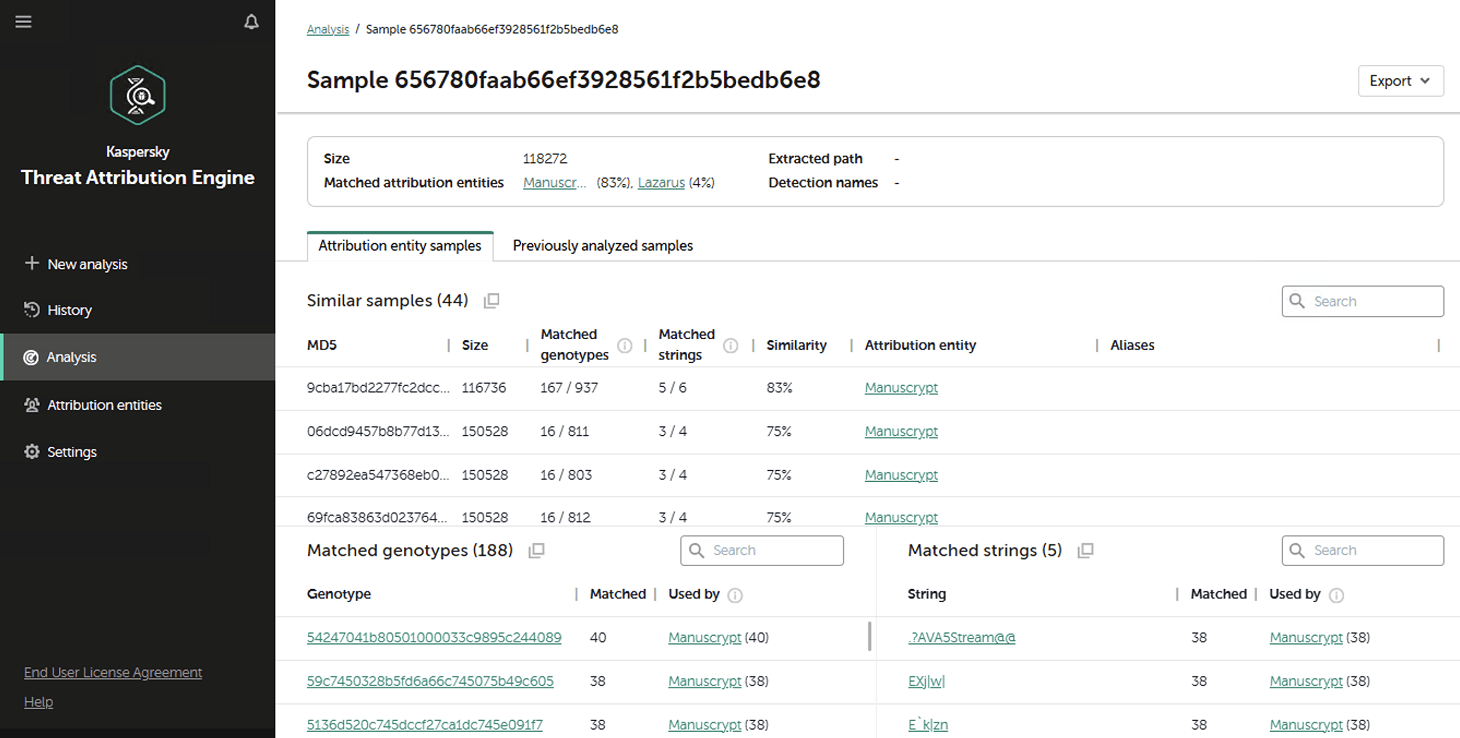
For a SOC analyst on alert triage, attributing a malicious file found in the infrastructure is straightforward: just upload it to KTAE (cloud or on-prem) and get a verdict, like Manuscrypt (83%). That’s sufficient for taking adequate countermeasures against that group’s known toolkit and assessing the overall situation. A threat hunter, however, might not want to take that verdict at face value. Alternatively, they might ask, “Which code fragments are unique across all the malware samples used by this group?” Here an attribution plugin for a disassembler comes in handy.
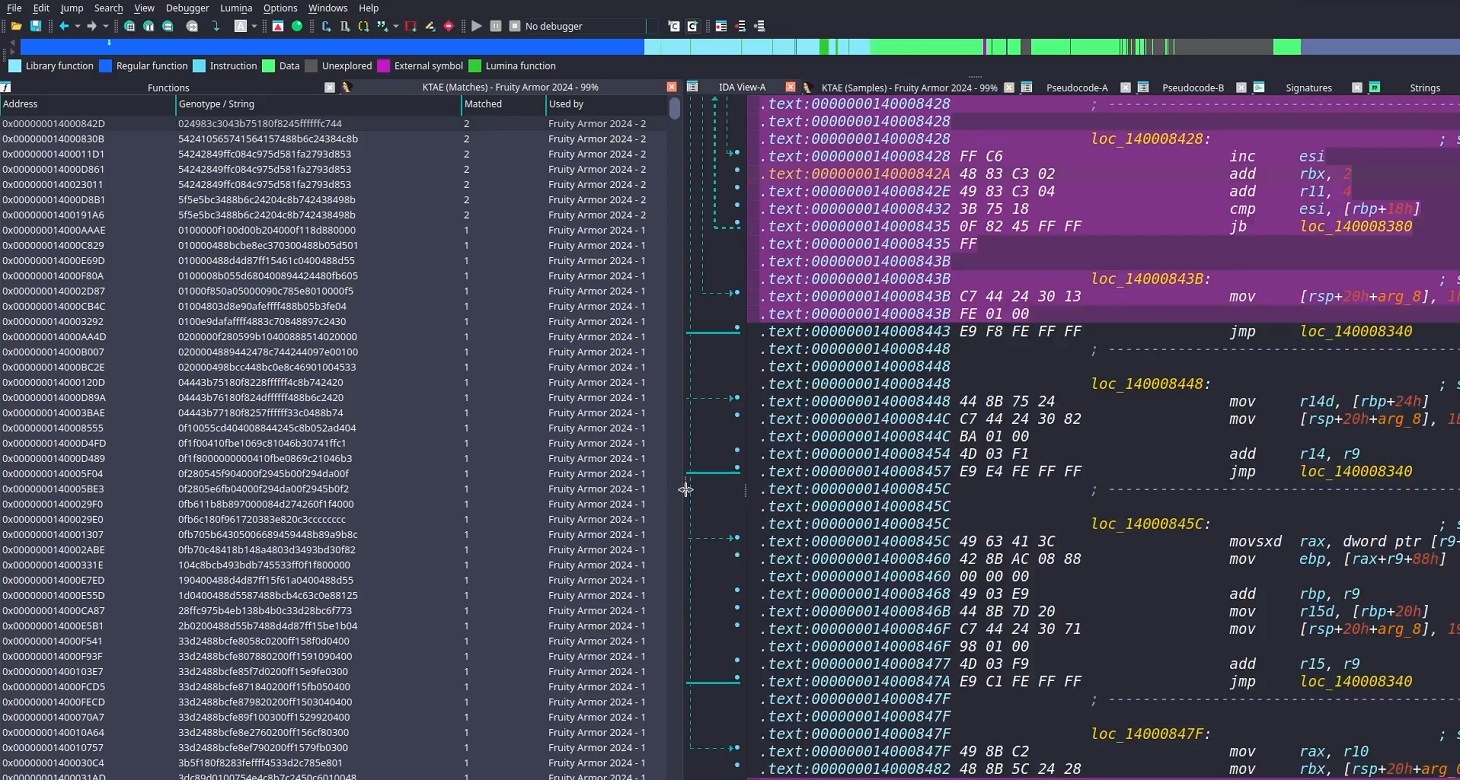
Inside the IDA Pro interface, the plugin highlights the specific disassembled code fragments that triggered the attribution algorithm. This doesn’t just allow for a more expert-level deep dive into new malware samples; it also lets Kaspersky researchers refine attribution rules on the fly. As a result, the algorithm — and KTAE itself — keeps evolving, making attribution more accurate with every run.
How to set up the plugin
The plugin is a script written in Python. To get it up and running you need IDA Pro. Unfortunately, it won’t work in IDA Free, since it lacks support for Python plugins. If you don’t have Python installed yet, you’d need to grab that, set up the dependencies (check the requirements file in our GitHub repository), and make sure IDA Pro environment variables are pointing to the Python libraries.
Next, you’d need to insert the URL for your local KTAE instance into the script body and provide your API token (which is available on a commercial basis) — just like it’s done in the example script described in the KTAE documentation.
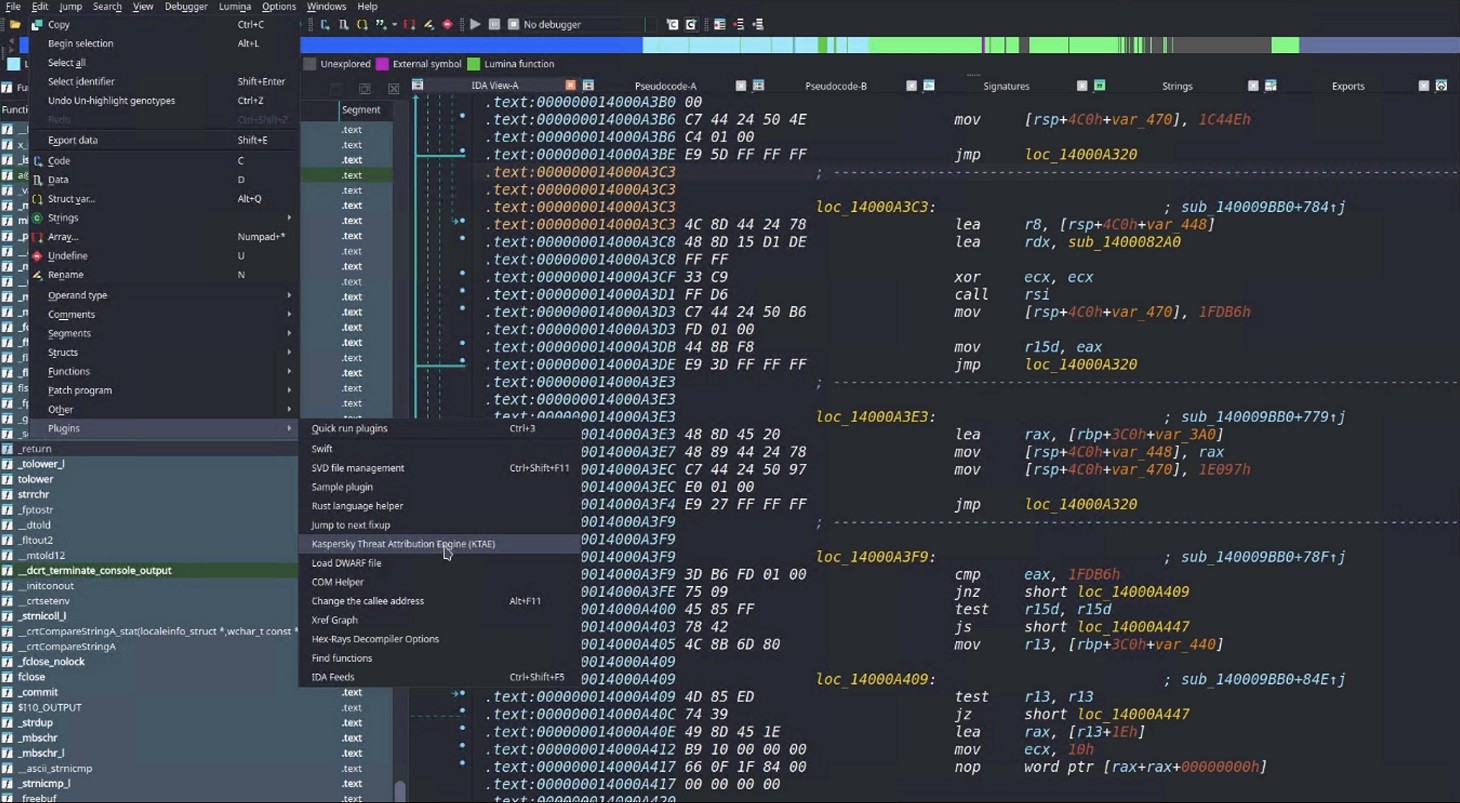
Then you can simply drop the script into your IDA Pro plugins folder and fire up the disassembler. If you’ve done it right, then, after loading and disassembling a sample, you’ll see the option to launch the Kaspersky Threat Attribution Engine (KTAE) plugin under Edit → Plugins:
How to use the plugin
When the plugin is installed, here’s what happens under the hood: the file currently loaded in IDA Pro is sent via API to the locally installed KTAE service, at the URL configured in the script. The service analyzes the file, and the analysis results are piped right back into IDA Pro.
On a local network, the script usually finishes its job in a matter of seconds (the duration depends on the connection to the KTAE server and the size of the analyzed file). Once the plugin wraps up, a researcher can start digging into the highlighted code fragments. A double-click leads straight to the relevant section in the assembly or binary code (Hex view) for analysis. These extra data points make it easy to spot shared code blocks and track changes in a malware toolkit.
By the way, this isn’t the only IDA Pro plugin the GReAT team has created to make life easier for threat hunters. We also offer another IDA plugin that significantly speeds up and streamlines the reverse-engineering process, and which, incidentally, was a winner in the IDA Plugin Contest 2024.
Palo Alto Networks, ServiceNow, and Bell Canada have come together in a strategic collaboration to build an innovative ServiceNow application that creates an automated bridge between world-class security operations and industry-leading service management.
Large enterprises need robust security at cloud speed, but operational complexity keeps getting in the way. Here’s what that looks like in practice:
Operations teams juggle multiple dashboards. When an issue surfaces, they are bouncing between the Prisma® SASE (secure access service edge) console to identify the incident, ServiceNow to log the case, and a customer support portal to escalate the issue. Every handoff inflates MTTR (mean time to resolution) and introduces room for error.
Customers are stuck in a deployment purgatory. Manual infrastructure configuration, connector setup, and mobile user onboarding can stretch on for weeks or months. Every day spent wrestling with configuration files is a day that value isn’t delivered.
Multi-tenant management doesn’t scale. If operational overhead grows linearly with each new tenant, the business model ultimately caps itself.
Bell Canada, through its innovative and security-first approach in the Canadian market, is a lighthouse partner that helped pioneer this innovation through its deep engagement with ServiceNow and a strategic partnership with Palo Alto Networks. With a strong focus on delivering exceptional customer value, Bell helped drive the vision for a simplified, scalable approach to SASE management.
Driven by their commitment to service excellence and customer outcomes, Bell worked closely with Palo Alto Networks and ServiceNow on this solution, accelerating customer time to value and simplifying operational complexity. Bell was among the first to champion this vision, acting as a market thought leader and helping shape a new standard for integrated SASE and service management outcomes in Canada.
Large Enterprises and Managed Service Providers can accelerate time to value by automating the entire lifecycle of Prisma SASE, from deployment to ongoing incident response through a newly launched Prisma SASE app on the ServiceNow store. The Prisma SASE app can accelerate MSP service delivery and management, significantly shrinking time to value and thereby positively impacting both top-line revenue and bottom-line EBITDA.
The Prisma SASE Platform Is Accelerating Value through Unified Automation and Platformization
Time to value (TTV) is one of the most critical metrics for IT teams helping customers move forward. With the Prisma SASE app, customers can go from implementation to go-live in just hours. There’s no need to build custom API integrations or take on technical debt for Day 0 to Day N operations. The app automates infrastructure setup, including ZTNA connectors and mobile user workflows, so providers can get their SASE offerings to market faster.
Optimizing Service Delivery through Unified Incident Lifecycle Management.
The joint solution eliminates swivel chair operations. Security and network administrators no longer need to toggle between the Prisma SASE console, ServiceNow and support portals. Incident ingestion and management now happen in one place. Incidents stay in sync, manual overhead drops, and mean time to resolution improves. For MSPs, there’s the added benefit: they can create Palo Alto Networks CSP (Customer Support Portal) tickets directly from the ServiceNow SASE app, making incident correlation and troubleshooting straightforward.
Drive Scalable Growth by Automating Cross-Instance Support with Service Exchange
ServiceNow’s Service Bridge is a major unlock for Managed Service Providers scaling their SASE offerings. It automates cross-instance support so critical security incidents and status updates flow between the MSP’s ServiceNow instance and the customer’s ServiceNow instance without manual sync work. This creates operational transparency and a better service experience for customers while MSPs can deliver faster without adding headcount or complexity.
Key Takeaways:
Rapid Time to Value: Shift from months of manual configuration to hours of automated deployment by leveraging out-of-the-box integrations that eliminate custom R&D and technical debt.
Unified Operational Excellence: Eliminate "swivel chair" management by unifying incident ingestion, ticket syncing and support portal escalation into a single ServiceNow interface, significantly reducing MTTR.
SASE at Scale: The Prisma SASE app provides a unified architecture that scales across tenants automatically, ensuring security keeps pace with business growth.
Take the Next Step
As you adopt SASE, take out the complexity of implementation with the Prisma SASE app.
Download the App: Visit the ServiceNow Store today and download the Prisma SASE app to start automating your deployment.
Meet Us at MWC: Are you heading to Barcelona forMobile World Congress (MWC)? Come see these integrations in action. Stop by the Palo Alto Networks booth (Hall 4, Stand D55) for a live demo and to chat with our experts about simplifying your SASE implementation.
Contact our sales team for any additional questions.

 Login
Login