
Normal view

February 2026 Patch Tuesday includes six actively exploited zero-days

11 February 2026 at 13:32

Microsoft releases important security updates on the second Tuesday of every month, known as “Patch Tuesday.” This month’s update patches fix 59 Microsoft CVE’s including six zero-days.

Let’s have a quick look at these six actively exploited zero-days.

Windows Shell Security Feature Bypass Vulnerability

CVE-2026-21510 (CVSS score 8.8 out of 10) is a security feature bypass in the Windows Shell. A protection mechanism failure allows an attacker to circumvent Windows SmartScreen and similar prompts once they convince a user to open a malicious link or shortcut file.

The vulnerability is exploited over the network but still requires on user interaction. The victim must be socially engineered into launching the booby‑trapped shortcut or link for the bypass to trigger. Successful exploitation lets the attacker suppress or evade the usual “are you sure?” security dialogs for untrusted content, making it easier to deliver and execute further payloads without raising user suspicion.

MSHTML Framework Security Feature Bypass Vulnerability

CVE-2026-21513 (CVSS score 8.8 out of 10) affects the MSHTML Framework, which is used by Internet Explorer’s Trident/embedded web rendering). It is classified as a protection mechanism failure that results in a security feature bypass over the network.

A successful attack requires the victim to open a malicious HTML file or a crafted shortcut (.lnk) that leverages MSHTML for rendering. When opened, the flaw allows an attacker to bypass certain security checks in MSHTML, potentially removing or weakening normal browser or Office sandbox or warning protections and enabling follow‑on code execution or phishing activity.

Microsoft Word Security Feature Bypass Vulnerability

CVE-2026-21514 (CVSS score 5.5 out of 10) affects Microsoft Word. It relies on untrusted inputs in a security decision, leading to a local security feature bypass.  

An attacker must persuade a user to open a malicious Word document to exploit this vulnerability. If exploited, the untrusted input is processed incorrectly, potentially bypassing Word’s defenses for embedded or active content—leading to execution of attacker‑controlled content that would normally be blocked.

Desktop Window Manager Elevation of Privilege Vulnerability

CVE-2026-21519 (CVSS score 7.8 out of 10) is a local elevation‑of‑privilege vulnerability in Windows Desktop Window Manager caused by type confusion (a flaw where the system treats one type of data as another, leading to unintended behavior).

A locally authenticated attacker with low privileges and no required user interaction can exploit the issue to gain higher privileges. Exploitation must be done locally, for example via a crafted program or exploit chain stage running on the target system. An attacker who successfully exploited this vulnerability could gain SYSTEM privileges.

Windows Remote Access Connection Manager Denial of Service Vulnerability

CVE-2026-21525 (CVSS score 6.2 out of 10) is a denial‑of‑service vulnerability in the Windows Remote Access Connection Manager service (RasMan).

An unauthenticated local attacker can trigger the flaw with low attack complexity, leading to a high impact on availability but no direct impact on confidentiality or integrity. This means they could crash the service or potentially the system, but not elevate privileges or execute malicious code.

Windows Remote Desktop Services Elevation of Privilege Vulnerability

CVE-2026-21533 (CVSS score 7.8 out of 10) is an elevation‑of‑privilege vulnerability in Windows Remote Desktop Services, caused by improper privilege management.

A local authenticated attacker with low privileges, and no required user interaction, can exploit the flaw to escalate privileges to SYSTEM and fully compromise confidentiality, integrity, and availability on the affected system. Successful exploitation typically involves running attacker‑controlled code on a system with Remote Desktop Services present and abusing the vulnerable privilege management path.

Azure vulnerabilities

Azure users are also advised to take note of two critical vulnerabilities with CVSS ratings of 9.8:

How to apply fixes and check you’re protected

These updates fix security problems and keep your Windows PC protected. Here’s how to make sure you’re up to date:

1. Open Settings

  • Click the Start button (the Windows logo at the bottom left of your screen).
  • Click on Settings (it looks like a little gear).

2. Go to Windows Update

  • In the Settings window, select Windows Update (usually at the bottom of the menu on the left).

3. Check for updates

  • Click the button that says Check for updates.
  • Windows will search for the latest Patch Tuesday updates.
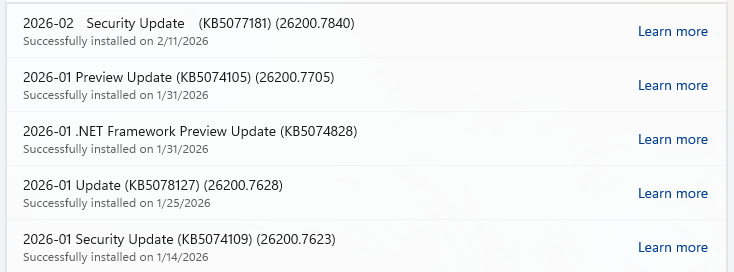
  • If you have selected automatic updates earlier, you may see this under Update history:
list of recent updates
  • Or you may see a Restart required message, which means all you have to do is restart your system and you’re done updating.
  • If not, continue with the steps below.

4. Download and Install

  • If updates are found, they’ll start downloading right away. Once complete, you’ll see a button that says Install or Restart now.
  • Click Install if needed and follow any prompts. Your computer will usually need a restart to finish the update. If it does, click Restart now.

5. Double-check you’re up to date

  • After restarting, go back to Windows Update and check again. If it says You’re up to date, you’re all set!
You're up to date

We don’t just report on threats—we remove them

Cybersecurity risks should never spread beyond a headline. Keep threats off your devices by downloading Malwarebytes today.

February 2026 Patch Tuesday includes six actively exploited zero-days

11 February 2026 at 13:32

Microsoft releases important security updates on the second Tuesday of every month, known as “Patch Tuesday.” This month’s update patches fix 59 Microsoft CVE’s including six zero-days.

Let’s have a quick look at these six actively exploited zero-days.

Windows Shell Security Feature Bypass Vulnerability

CVE-2026-21510 (CVSS score 8.8 out of 10) is a security feature bypass in the Windows Shell. A protection mechanism failure allows an attacker to circumvent Windows SmartScreen and similar prompts once they convince a user to open a malicious link or shortcut file.

The vulnerability is exploited over the network but still requires on user interaction. The victim must be socially engineered into launching the booby‑trapped shortcut or link for the bypass to trigger. Successful exploitation lets the attacker suppress or evade the usual “are you sure?” security dialogs for untrusted content, making it easier to deliver and execute further payloads without raising user suspicion.

MSHTML Framework Security Feature Bypass Vulnerability

CVE-2026-21513 (CVSS score 8.8 out of 10) affects the MSHTML Framework, which is used by Internet Explorer’s Trident/embedded web rendering). It is classified as a protection mechanism failure that results in a security feature bypass over the network.

A successful attack requires the victim to open a malicious HTML file or a crafted shortcut (.lnk) that leverages MSHTML for rendering. When opened, the flaw allows an attacker to bypass certain security checks in MSHTML, potentially removing or weakening normal browser or Office sandbox or warning protections and enabling follow‑on code execution or phishing activity.

Microsoft Word Security Feature Bypass Vulnerability

CVE-2026-21514 (CVSS score 5.5 out of 10) affects Microsoft Word. It relies on untrusted inputs in a security decision, leading to a local security feature bypass.  

An attacker must persuade a user to open a malicious Word document to exploit this vulnerability. If exploited, the untrusted input is processed incorrectly, potentially bypassing Word’s defenses for embedded or active content—leading to execution of attacker‑controlled content that would normally be blocked.

Desktop Window Manager Elevation of Privilege Vulnerability

CVE-2026-21519 (CVSS score 7.8 out of 10) is a local elevation‑of‑privilege vulnerability in Windows Desktop Window Manager caused by type confusion (a flaw where the system treats one type of data as another, leading to unintended behavior).

A locally authenticated attacker with low privileges and no required user interaction can exploit the issue to gain higher privileges. Exploitation must be done locally, for example via a crafted program or exploit chain stage running on the target system. An attacker who successfully exploited this vulnerability could gain SYSTEM privileges.

Windows Remote Access Connection Manager Denial of Service Vulnerability

CVE-2026-21525 (CVSS score 6.2 out of 10) is a denial‑of‑service vulnerability in the Windows Remote Access Connection Manager service (RasMan).

An unauthenticated local attacker can trigger the flaw with low attack complexity, leading to a high impact on availability but no direct impact on confidentiality or integrity. This means they could crash the service or potentially the system, but not elevate privileges or execute malicious code.

Windows Remote Desktop Services Elevation of Privilege Vulnerability

CVE-2026-21533 (CVSS score 7.8 out of 10) is an elevation‑of‑privilege vulnerability in Windows Remote Desktop Services, caused by improper privilege management.

A local authenticated attacker with low privileges, and no required user interaction, can exploit the flaw to escalate privileges to SYSTEM and fully compromise confidentiality, integrity, and availability on the affected system. Successful exploitation typically involves running attacker‑controlled code on a system with Remote Desktop Services present and abusing the vulnerable privilege management path.

Azure vulnerabilities

Azure users are also advised to take note of two critical vulnerabilities with CVSS ratings of 9.8:

How to apply fixes and check you’re protected

These updates fix security problems and keep your Windows PC protected. Here’s how to make sure you’re up to date:

1. Open Settings

  • Click the Start button (the Windows logo at the bottom left of your screen).
  • Click on Settings (it looks like a little gear).

2. Go to Windows Update

  • In the Settings window, select Windows Update (usually at the bottom of the menu on the left).

3. Check for updates

  • Click the button that says Check for updates.
  • Windows will search for the latest Patch Tuesday updates.
  • If you have selected automatic updates earlier, you may see this under Update history:
list of recent updates
  • Or you may see a Restart required message, which means all you have to do is restart your system and you’re done updating.
  • If not, continue with the steps below.

4. Download and Install

  • If updates are found, they’ll start downloading right away. Once complete, you’ll see a button that says Install or Restart now.
  • Click Install if needed and follow any prompts. Your computer will usually need a restart to finish the update. If it does, click Restart now.

5. Double-check you’re up to date

  • After restarting, go back to Windows Update and check again. If it says You’re up to date, you’re all set!
You're up to date

We don’t just report on threats—we remove them

Cybersecurity risks should never spread beyond a headline. Keep threats off your devices by downloading Malwarebytes today.

AI chat app leak exposes 300 million messages tied to 25 million users

9 February 2026 at 16:17

An independent security researcher uncovered a major data breach affecting Chat & Ask AI, one of the most popular AI chat apps on Google Play and Apple App Store, with more than 50 million users.

The researcher claims to have accessed 300 million messages from over 25 million users due to an exposed database. These messages reportedly included, among other things, discussions of illegal activities and requests for suicide assistance.

Behind the scenes, Chat & Ask AI is a “wrapper” app that plugs into various large language models (LLMs) from other companies, including OpenAI’s ChatGPT, Anthropic’s Claude, and Google’s Gemini. Users can choose which model they want to interact with.

The exposed data included user files containing their entire chat history, the models used, and other settings. But it also revealed data belonging to users of other apps developed by Codeway—the developer of Chat & Ask AI.

The vulnerability behind this data breach is a well-known and documented Firebase misconfiguration. Firebase is a cloud-based backend-as-a-service (BaaS) platform provided by Google that helps developers build, manage, and scale mobile and web applications.

Security researchers often refer to a set of preventable errors in how developers set up Google Firebase services, which leave backend data, databases, and storage buckets accessible to the public without authentication.

One of the most common Firebase misconfigurations is leaving Security Rules set to public. This allows anyone with the project URL to read, modify, or delete data without authentication.

This prompted the researcher to create a tool that automatically scans apps on Google Play and Apple App Store for this vulnerability—with astonishing results. Reportedly, the researcher, named Harry, found that 103 out of 200 iOS apps they scanned had this issue, collectively exposing tens of millions of stored files. 

To draw attention to the issue, Harry set up a website where users can see the apps affected by the issue. Codeway’s apps are no longer listed there, as Harry removes entries once developers confirm they have fixed the problem. Codeway reportedly resolved the issue across all of its apps within hours of responsible disclosure.

How to stay safe

Besides checking if any apps you use appear in Harry’s Firehound registry, there are a few ways to better protect your privacy when using AI chatbots.

  • Use private chatbots that don’t use your data to train the model.
  • Don’t rely on chatbots for important life decisions. They have no experience or empathy.
  • Don’t use your real identity when discussing sensitive subjects.
  • Keep shared information impersonal. Don’t use real names and don’t upload personal documents.
  • Don’t share your conversations unless you absolutely have to. In some cases, it makes them searchable.
  • If you’re using an AI that is developed by a social media company (Meta AI, Llama, Grok, Bard, Gemini, and so on), make sure you’re not logged in to that social media platform. Your conversations could be linked to your social media account, which might contain a lot of personal information.

Always remember that the developments in AI are going too fast for security and privacy to be baked into technology. And that even the best AIs still hallucinate.


We don’t just report on privacy—we offer you the option to use it.

Privacy risks should never spread beyond a headline. Keep your online privacy yours by using Malwarebytes Privacy VPN.

AI chat app leak exposes 300 million messages tied to 25 million users

9 February 2026 at 16:17

An independent security researcher uncovered a major data breach affecting Chat & Ask AI, one of the most popular AI chat apps on Google Play and Apple App Store, with more than 50 million users.

The researcher claims to have accessed 300 million messages from over 25 million users due to an exposed database. These messages reportedly included, among other things, discussions of illegal activities and requests for suicide assistance.

Behind the scenes, Chat & Ask AI is a “wrapper” app that plugs into various large language models (LLMs) from other companies, including OpenAI’s ChatGPT, Anthropic’s Claude, and Google’s Gemini. Users can choose which model they want to interact with.

The exposed data included user files containing their entire chat history, the models used, and other settings. But it also revealed data belonging to users of other apps developed by Codeway—the developer of Chat & Ask AI.

The vulnerability behind this data breach is a well-known and documented Firebase misconfiguration. Firebase is a cloud-based backend-as-a-service (BaaS) platform provided by Google that helps developers build, manage, and scale mobile and web applications.

Security researchers often refer to a set of preventable errors in how developers set up Google Firebase services, which leave backend data, databases, and storage buckets accessible to the public without authentication.

One of the most common Firebase misconfigurations is leaving Security Rules set to public. This allows anyone with the project URL to read, modify, or delete data without authentication.

This prompted the researcher to create a tool that automatically scans apps on Google Play and Apple App Store for this vulnerability—with astonishing results. Reportedly, the researcher, named Harry, found that 103 out of 200 iOS apps they scanned had this issue, collectively exposing tens of millions of stored files. 

To draw attention to the issue, Harry set up a website where users can see the apps affected by the issue. Codeway’s apps are no longer listed there, as Harry removes entries once developers confirm they have fixed the problem. Codeway reportedly resolved the issue across all of its apps within hours of responsible disclosure.

How to stay safe

Besides checking if any apps you use appear in Harry’s Firehound registry, there are a few ways to better protect your privacy when using AI chatbots.

  • Use private chatbots that don’t use your data to train the model.
  • Don’t rely on chatbots for important life decisions. They have no experience or empathy.
  • Don’t use your real identity when discussing sensitive subjects.
  • Keep shared information impersonal. Don’t use real names and don’t upload personal documents.
  • Don’t share your conversations unless you absolutely have to. In some cases, it makes them searchable.
  • If you’re using an AI that is developed by a social media company (Meta AI, Llama, Grok, Bard, Gemini, and so on), make sure you’re not logged in to that social media platform. Your conversations could be linked to your social media account, which might contain a lot of personal information.

Always remember that the developments in AI are going too fast for security and privacy to be baked into technology. And that even the best AIs still hallucinate.


We don’t just report on privacy—we offer you the option to use it.

Privacy risks should never spread beyond a headline. Keep your online privacy yours by using Malwarebytes Privacy VPN.

❌