De Autoriteit Persoonsgegevens waarschuwt dat een nieuwe Nederlandse wet tegen witwassen mogelijk privacyschendingen met zich meebrengt. De privacytoezichthouder vindt dat de overheid verschillende waarborgen moet toevoegen aan de wet, voordat die wordt ingevoerd.
EFF last summer asked a federal judge to block the federal government from using Medicaid data to identify and deport immigrants.
We also warned about the danger of the Trump administration consolidating all of the government’s information into a single searchable, AI-driven interface with help from Palantir, a company that has a shaky-at-best record on privacy and human rights.
Now we have the first evidence that our concerns have become reality.
“Palantir is working on a tool for Immigration and Customs Enforcement (ICE) that populates a map with potential deportation targets, brings up a dossier on each person, and provides a “confidence score” on the person’s current address,” 404 Media reports today. “ICE is using it to find locations where lots of people it might detain could be based.”
The tool – dubbed Enhanced Leads Identification & Targeting for Enforcement (ELITE) – receives peoples’ addresses from the Department of Health and Human Services (which includes Medicaid) and other sources, 404 Media reports based on court testimony in Oregon by law enforcement agents, among other sources.
This revelation comes as ICE – which has gone on a surveillance technology shopping spree – floods Minneapolis with agents, violently running roughshod over the civil rights of immigrants and U.S. citizens alike; President Trump has threatened to use the Insurrection Act of 1807 to deploy military troops against protestors there. Other localities are preparing for the possibility of similar surges.
Different government agencies necessarily collect information to provide essential services or collect taxes, but the danger comes when the government begins pooling that data and using it for reasons unrelated to the purpose it was collected.
This kind of consolidation of government records provides enormous government power that can be abused. Different government agencies necessarily collect information to provide essential services or collect taxes, but the danger comes when the government begins pooling that data and using it for reasons unrelated to the purpose it was collected.
As EFF Executive Director Cindy Cohn wrote in a Mercury News op-ed last August, “While couched in the benign language of eliminating government ‘data silos,’ this plan runs roughshod over your privacy and security. It’s a throwback to the rightly mocked ‘Total Information Awareness’ plans of the early 2000s that were, at least publicly, stopped after massive outcry from the public and from key members of Congress. It’s time to cry out again.”
But litigation isn’t enough. People need to keep raising concerns via public discourse and Congress should act immediately to put brakes on this runaway train that threatens to crush the privacy and security of each and every person in America.
Researchers found a method to steal data which bypasses Microsoft Copilot’s built-in safety mechanisms.
The attack flow, called Reprompt, abuses how Microsoft Copilot handled URL parameters in order to hijack a user’s existing Copilot Personal session.
Copilot is an AI assistant which connects to a personal account and is integrated into Windows, the Edge browser, and various consumer applications.
The issue was fixed in Microsoft’s January Patch Tuesday update, and there is no evidence of in‑the‑wild exploitation so far. Still, it once again shows how risky it can be to trust AI assistants at this point in time.
Reprompt hides a malicious prompt in the q parameter of an otherwise legitimate Copilot URL. When the page loads, Copilot auto‑executes that prompt, allowing an attacker to run actions in the victim’s authenticated session after just a single click on a phishing link.
In other words, attackers can hide secret instructions inside the web address of a Copilot link, in a place most users never look. Copilot then runs those hidden instructions as if the users had typed them themselves.
Because Copilot accepts prompts via a q URL parameter and executes them automatically, a phishing email can lure a user into clicking a legitimate-looking Copilot link while silently injecting attacker-controlled instructions into a live Copilot session.
What makes Reprompt stand out from other, similar prompt injection attacks is that it requires no user-entered prompts, no installed plugins, and no enabled connectors.
The basis of the Reprompt attack is amazingly simple. Although Copilot enforces safeguards to prevent direct data leaks, these protections only apply to the initial request. The attackers were able to bypass these guardrails by simply instructing Copilot to repeat each action twice.
Working from there, the researchers noted:
“Once the first prompt is executed, the attacker’s server issues follow‑up instructions based on prior responses and forms an ongoing chain of requests. This approach hides the real intent from both the user and client-side monitoring tools, making detection extremely difficult.”
How to stay safe
You can stay safe from the Reprompt attack specifically by installing the January 2026 Patch Tuesday updates.
If available, use Microsoft 365 Copilot for work data, as it benefits from Purview auditing, tenant‑level data loss prevention (DLP), and admin restrictions that were not available to Copilot Personal in the research case. DLP rules look for sensitive data such as credit card numbers, ID numbers, health data, and can block, warn, or log when someone tries to send or store it in risky ways (email, OneDrive, Teams, Power Platform connectors, and more).
Don’t click on unsolicited links before verifying with the (trusted) source whether they are safe.
Reportedly, Microsoft is testing a new policy that allows IT administrators to uninstall the AI-powered Copilot digital assistant on managed devices.
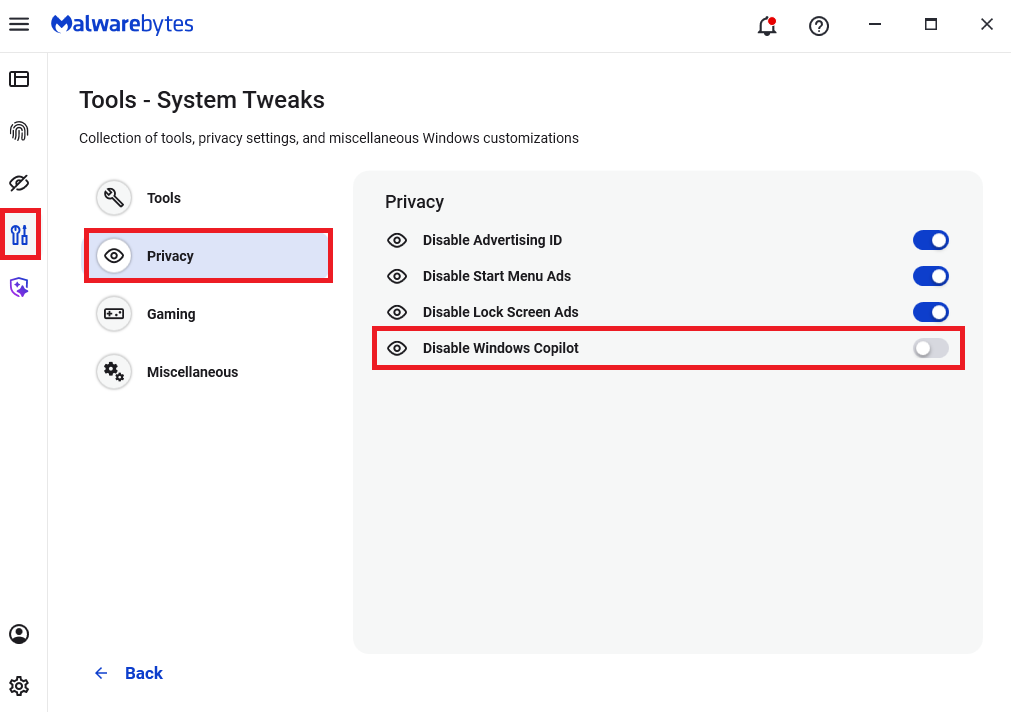
Malwarebytes users can disable Copilot for their personal machines under Tools > Privacy, where you can toggle Disable Windows Copilot to on (blue).
In general, be aware that using AI assistants still pose privacy risks. As long as there are ways for assistants to automatically ingest untrusted input—such as URL parameters, page text, metadata, and comments—and merge it into hidden system prompts or instructions without strong separation or filtering, users remain at risk of leaking private information.
So when using any AI assistant that can be driven via links, browser automation, or external content, it is reasonable to assume “Reprompt‑style” issues are at least possible and should be taken into consideration.
We don’t just report on threats—we remove them
Cybersecurity risks should never spread beyond a headline. Keep threats off your devices by downloading Malwarebytes today.
Researchers found a method to steal data which bypasses Microsoft Copilot’s built-in safety mechanisms.
The attack flow, called Reprompt, abuses how Microsoft Copilot handled URL parameters in order to hijack a user’s existing Copilot Personal session.
Copilot is an AI assistant which connects to a personal account and is integrated into Windows, the Edge browser, and various consumer applications.
The issue was fixed in Microsoft’s January Patch Tuesday update, and there is no evidence of in‑the‑wild exploitation so far. Still, it once again shows how risky it can be to trust AI assistants at this point in time.
Reprompt hides a malicious prompt in the q parameter of an otherwise legitimate Copilot URL. When the page loads, Copilot auto‑executes that prompt, allowing an attacker to run actions in the victim’s authenticated session after just a single click on a phishing link.
In other words, attackers can hide secret instructions inside the web address of a Copilot link, in a place most users never look. Copilot then runs those hidden instructions as if the users had typed them themselves.
Because Copilot accepts prompts via a q URL parameter and executes them automatically, a phishing email can lure a user into clicking a legitimate-looking Copilot link while silently injecting attacker-controlled instructions into a live Copilot session.
What makes Reprompt stand out from other, similar prompt injection attacks is that it requires no user-entered prompts, no installed plugins, and no enabled connectors.
The basis of the Reprompt attack is amazingly simple. Although Copilot enforces safeguards to prevent direct data leaks, these protections only apply to the initial request. The attackers were able to bypass these guardrails by simply instructing Copilot to repeat each action twice.
Working from there, the researchers noted:
“Once the first prompt is executed, the attacker’s server issues follow‑up instructions based on prior responses and forms an ongoing chain of requests. This approach hides the real intent from both the user and client-side monitoring tools, making detection extremely difficult.”
How to stay safe
You can stay safe from the Reprompt attack specifically by installing the January 2026 Patch Tuesday updates.
If available, use Microsoft 365 Copilot for work data, as it benefits from Purview auditing, tenant‑level data loss prevention (DLP), and admin restrictions that were not available to Copilot Personal in the research case. DLP rules look for sensitive data such as credit card numbers, ID numbers, health data, and can block, warn, or log when someone tries to send or store it in risky ways (email, OneDrive, Teams, Power Platform connectors, and more).
Don’t click on unsolicited links before verifying with the (trusted) source whether they are safe.
Reportedly, Microsoft is testing a new policy that allows IT administrators to uninstall the AI-powered Copilot digital assistant on managed devices.
Malwarebytes users can disable Copilot for their personal machines under Tools > Privacy, where you can toggle Disable Windows Copilot to on (blue).
In general, be aware that using AI assistants still pose privacy risks. As long as there are ways for assistants to automatically ingest untrusted input—such as URL parameters, page text, metadata, and comments—and merge it into hidden system prompts or instructions without strong separation or filtering, users remain at risk of leaking private information.
So when using any AI assistant that can be driven via links, browser automation, or external content, it is reasonable to assume “Reprompt‑style” issues are at least possible and should be taken into consideration.
We don’t just report on threats—we remove them
Cybersecurity risks should never spread beyond a headline. Keep threats off your devices by downloading Malwarebytes today.

 Login
Login