Cybercrime at Machine Speed: Key Takeaways from Flashpoint’s 2026 Midyear Threat Intelligence Briefing
Threat actors are no longer just using automation to execute tasks, they are leveraging prepackaged, safeguard-free AI, weaponizing stolen session data, and directly targeting defenders’ security stacks.
The threat landscape has developed at a striking pace with Flashpoint tracking over 22 million illicit AI discussions, 7.4 million compromised hosts yielding 1.7 billion stolen credentials, and over 21,600 disclosed vulnerabilities in just six months. Beyond these staggering numbers, the on-demand session detailed something even more alarming: a fundamental shift in adversary operational tradecraft.
Here are the five critical shifts every cyber threat intelligence (CTI), Vulnerability Management, and SOC team needs to know.
The Death of Signal: Threat Actors are Shifting to “Private AI”
The public discussion surrounding criminal artificial intelligence (AI) has reached a critical inflection point. Early in the AI boom, Flashpoint observed threat actors collaboratively experiment across underground forums, jailbreaking commercial frontier models or advertising surface-level tools like WormGPT and DarkGPT.
Today, adversaries are shifting from public forums to running fine-tuned, open-source models locally on private servers, which greatly hampers traditional signature-based detection. Flashpoint analysts are now seeing attackers generate unique, highly tailored malware variants, flawless phishing lures, and custom exploit scripts at extremely low costs—completely offline and shielded from public monitoring.
“A few months ago, a lot of this was collaborative… public outsourcing. Now what we’re seeing is scarier: pre-packaged cybercrime models run locally on private infrastructure. Malicious code, exploit scripts, and targeted phishing are all being generated inside closed environments.”
Ian Gray, VP of Intelligence, Flashpoint
Weaponizing the Defender’s Own Tooling
Another eye-opening tactical insight shared during the session was how threat actors are repurposing defender infrastructure for automated initial access and extortion. In the webinar, we pointed to recent campaigns where adversaries specifically targeted misconfigurations and zero-day vulnerabilities inside open-source vulnerability scanners, secrets-detection tools, Kubernetes clusters, and Infrastructure-as-Code(IaC) environments.
What this means for defenders is that the attack surface is no longer bounded by traditional enterprise network boundaries: it extends directly into CI/CD pipelines, security orchestration tooling, and third-party SaaS integrations. Security teams are finding themselves in a race against attackers who use automated scanning scripts to weaponize vulnerabilities in the security tools themselves.
The Global Infostealer Threat and Identity-First Attacks
Flashpoint tracked 7.4 million hosts compromised by infostealers in H1 2026—a 27% increase period-over-period—harvesting 1.7 billion credentials and identity information.
While the top infostealer strains remain familiar, law enforcement operations have created vacuums that competitors rapidly fill.
Threat actors are leveraging drive-by downloads, watering holes, and pirated software packages to plant stealers. Once a machine is compromised, the logs capture corporate SSO credentials, active browser cookies, VPN keys, and SaaS session tokens. This enables adversaries to simply log in without having to leverage complex technical exploits.
The Structural Failure of CVE/NVD and the Importance of KEV
The Common Vulnerabilities and Exposures (CVE) and National Vulnerability Database (NVD) have failed to keep pace with the velocity of AI-assisted vulnerability discovery. As such, vulnerability management teams are facing significant operational delays.
Metric
Flashpoint GTIR Midyear H1 2026 Data
Operational Impact
Total Disclosures
21,667
Remediation volume exceeds defender bandwidth.
Exploit Availability
19% (4,015 CVEs)
Functional code is ready before patches are deployed.
Public Catalog Lag
Growing Backlog (NVD/KEV)
Delay in official scoring leaves teams blind to active risk.
Therefore, waiting for NVD enrichment before prioritizing a patch is a dangerous strategy. To compensate, security teams require Vulnerability Intelligence (VI) that provides primary-source confirmation of weaponization, exploit availability, and actionable mitigation guidance long before public databases update.
Ransomware Evolution: From Encryption to Cloud Extortion
Ransomware-as-a-Service (RaaS) activity surged by 45% period-over-period, reaching 6,256 verified victim postings on data leak sites. However, total on-chain payout revenue dropped by 8% to $820 million, with victim pay-rates hitting a record low of 28%.
Faced with declining payouts and resilient enterprise backups, extortion syndicates are adapting. Rather than relying exclusively on technical file-encrypting malware, groups are executing pure data extortion campaigns—frequently targeting cloud platforms or extracting data through third-party vendor access.
Protect Your Organization Using Flashpoint
Defending against machine-speed attacks requires moving beyond reactive, post-incident telemetry. Flashpoint arms security, CTI, and vulnerability management teams with the primary-source intelligence required to preempt adversary operations:
Unrivaled Deep & Dark Web Visibility: Flashpoint’s Primary Source Collection actively monitors closed criminal communities, illicit Telegram channels, and private forums, giving you early warning when threat actors build custom AI toolkits or trade credentials targeting your organization.
Comprehensive Vulnerability Intelligence (VI): Flashpoint tracks zero-days and vulnerability disclosures independently, delivering immediate exploit availability data and threat-informed prioritization so you patch what actually matters.
Continuous Compromised Credential Monitoring: Instantly surface exposed enterprise credentials, active session tokens, and stealer logs tied to your domain or third-party supply chain before they lead to an account takeover (ATO).
In the first half of 2026, the global threat landscape reached a clear operational inflection point: threat operations have fundamentally transitioned from human-led campaigns to machine-speed, AI-driven exploitation. As threat actors gain commoditized access to open-source AI technologies and actively deploy automated, safeguard-free tooling locally on private infrastructure, organizations face an accelerating hybrid risk environment.
Flashpoint’s Global Threat Intelligence Report: 2026 Midyear Edition
The Flashpoint Global Threat Intelligence Report: 2026 Midyear Edition anchors security leaders—from threat intelligence, vulnerability management, to executive leadership—in the data required to navigate this evolving threat landscape. Covering the period from January 1 to June 30, 2026, the report delivers timely insights backed by Flashpoint’s proprietary primary-source collection from over 3.9 petabytes of continuously monitored illicit sources.
Our midyear findings reveal several key metrics that highlight the speed and scale of the H1 2026 threat landscape:
22M+ threat actor posts discussed, shared, or advertised artificial intelligence toolkits for criminal deployment.
1.7B credentials and identity data points extracted across more than 7.4M unique compromised hosts globally.
Nearly one-in-five (19%) of all vulnerability disclosures dropped with ready-made, functional exploit code.
45% period-over-period surge in Ransomware-as-a-Service (RaaS), with total victim volume reaching 6,256 even as victim payout rates dropped to a historic low of 28%.
A Clear Understanding of the Convergence Between AI and Cyber Threats From generating flawless phishing campaigns to automating vulnerability scanning and code obfuscation, discover how adversaries are optimizing for speed and cost-efficiency — utilizing AI as a force multiplier in their various illicit campaigns.
A Comprehensive Top-Down View of the Evolving Threat Landscape Gain full visibility of the threat landscape with Flashpoint’s primary-source collections and real-time threat intelligence.
Strategies for Proactive Defense and Risk Mitigation Move your organization beyond reactive incident response by leveraging Flashpoint’s comprehensive threat intelligence. Gain the foresight needed to strengthen defenses and optimize your security posture.
“AI is compressing the time between opportunity and exploitation. Capabilities that once took significant expertise, coordination, and time to develop are becoming faster to build, easier to scale, and harder to detect. Security teams are facing an adversary ecosystem that can use AI to iterate at unprecedented speed — the only way to keep pace is with primary-source intelligence that surfaces adversary behavior before attacks unfold.”
Josh Lefkowitz, Flashpoint Co-Founder & CEO
The Four Driving Themes Shaping the 2026 Threat Landscape
Artificial Intelligence (AI) Threats
During the first half of 2026, Flashpoint captured over 22M illicit posts discussing or advertising AI for criminal-related activities. By stripping ethical safeguards, custom malicious LLMs allow unsophisticated threat actors to automate complex phases of the attack lifecycle, including target profiling, malware evasion script creation, and zero-day exploit generation.
Information-Stealing Malware Threats
Infostealer malware harvested 1.7 billion credentials across 7.4 million compromised systems in H1 2026 alone, turning digital identity into the main entry point for enterprise intrusions.
Vulnerability Intelligence and Patching Management
19% (4,015) of all H1 2026 vulnerability disclosures arrived with ready-made exploit code. Adversaries deploy automated replication scripts almost immediately upon disclosure, eliminating manual remediation windows.
Ransomware Operations, Multi-Extortion Cartels, and Financial Risk
Despite a 45% surge in victim volume (6,256 overall), total on-chain revenue fell by 8% to $820M. Improved enterprise backups and incident response have driven payout rates down to 28%, prompting syndicates to demand larger sums from paying victims.
Proactive Security in 2026 and Beyond
The data shows that traditional enterprise security organizations are struggling to keep pace with modern threat cycles that are accelerated by illicit uses of AI. This continued convergence of AI engines and initial access vectors have further compressed attack timelines, making it nearly impossible for security teams to defend against them—especially if they are limited by traditional approaches to threat intelligence.
Equipping your team with primary-source threat intelligence is critical for protecting critical assets in 2026. Download the Flashpoint Global Threat Intelligence Report: 2026 Midyear Edition to gain the visibility and strategic clarity required to defend your organization.
Nabu Casa heeft de naam van Home Assistant Cloud veranderd in Home Assistant Link. Volgens het bedrijf heeft big tech het begrip 'cloud' verpest en past het niet meer bij de dienst die het aanbiedt.
Amir Barati, an alleged member of the Mabna Institute, was indicted for targeting universities, private organizations, and government entities in the US and abroad.
A former US Army soldier has been sentenced to 70 months in prison for hacking telecoms companies, stealing sensitive records, and trying to extort more than $1 million from his victims. Cameron John Wagenius, 22, carried out the campaign while serving on active duty. He pleaded guilty in March 2025 to unlawfully transferring confidential phone records, then admitted conspiracy to commit wire fraud, computer-related extortion, and aggravated identity theft in a separate case that July. Court documents say Wagenius conspired with three others to obtain credentials for the protected networks of at least ten organizations between April 2023 and December 2024. During that period, he was stationed in South Korea and Texas. The Justice Department has not publicly identified the victims, describing them as US and overseas telecommunications companies and other organizations. Wagenius has also been linked to the 2024 Snowflake extortion campaign, which affected AT&T, Verizon, and numerous other companies, as The Register previously reported. After two suspects were arrested in connection with the Snowflake attacks, an account controlled by Wagenius claimed to possess AT&T call records belonging to Donald Trump and Kamala Harris. Using online aliases including "kiberphant0m," Wagenius and his co-conspirators obtained login credentials with a hacking tool he helped develop called SSH Brute, among other methods. They exchanged stolen credentials in Telegram group chats and discussed using them to gain unauthorized access to other parts of victims' networks. Court documents say the group traded hundreds of credentials and stole hundreds of thousands of customer records from multiple companies. Wagenius and his accomplices advertised stolen data through XSS, BreachForums, X, and Telegram. Some posts offered the information for sale, while others threatened to publish it unless victims paid. The Justice Department said the conspirators attempted to extort at least $1 million in total, successfully sold some stolen data, and used other records to commit fraud, including SIM swapping. US District Judge Lauren King told Wagenius at sentencing: "Your actions show a shocking disregard for the safety and security of the United States... You took these actions motivated by greed and a desire for notoriety." Wagenius was also ordered to pay $294,978 in restitution. ®
ShinyHunters, the data theft and extortion crew that has stolen sensitive information belonging to millions of cancer patients, university and K-12 students, and Carnival cruisers, wanted to preserve their reputation and keep their “business” afloat. So it hacked the FBI to make a statement, the group told The Register. “It’s a game and it’s the world we live in,” a ShinyHunters spokesperson told us. “We are just protecting our business as any other business would do. It’s about who does their job better.” On Friday, the FBI confirmed the breach to The Register, after earlier in the week saying the bureau was investigating ShinyHunters’ claims. "The FBI is aware of a cyber-criminal enterprise group claiming a compromise of the FBIJobs.gov portal and alleged impact to FBI employee personally identifiable information (PII),” an FBI spokesperson told The Register. "While the point of breach is still undetermined - whether a third-party or the FBI’s enterprise - we are actively and aggressively investigating this matter and working closely with those third-party providers that support FBIJobs.gov to mitigate any and all risk." On Tuesday, the criminals told us that they broke into the bureau via yet another Oracle PeopleSoft zero-day flaw in the FBIJobs.gov portal, which remains down as of Friday. Then, they breached the FBI’s managed servers on AWS GovCloud and swiped thousands of personnel files belonging to current, former, and prospective FBI employees. “We hold very sensitive data on almost ALL FBI Agents and individuals who filed an application with the FBI for a job,” the group claimed in a message posted online and addressed to FBI Director Kash Patel and Brett Leatherman, assistant director of the FBI’s Cyber Division. Sample files reviewed by journalists and security researchers appear to contain agents’ home addresses, phone numbers, email addresses, Social Security numbers, job titles, assigned field office, and emergency contact information. 'We refuted the misinformation disseminated by the FBI' According to a spokesperson for ShinyHunters, the FBI hack isn’t about the money, and the crew did not demand a multimillion-dollar extortion payment to not leak the agents’ personal details. “Our breach of the FBI was executed specifically to contest the allegations made against ShinyHunters in their May 2026 FLASH report,” a spokesperson told The Register. The FBI bulletin, published soon after the group breached ed-tech giant Instructure's Canvas platform and claimed to have stolen data tied to hundreds of millions of students, teachers, and staff, said ShinyHunters uses “harassment strategies, sending threatening text messages and phone calls to victims and their family members, and in some cases, swatting.” The criminals, it continued, “may falsely claim to have sensitive or compromising information, including embarrassing photographs or videos of victims, which frequently do not exist.” ShinyHunters contends this is all false. By hacking the FBI and releasing its statement about the hack, “we demonstrated our technical capabilities and directly refuted the misinformation disseminated by the FBI, journalists, and industry researchers,” the spokesperson told us in an interview. “This was fundamentally a public relations and marketing initiative for our business,” they said. 'Results-driven professionals' or criminals? ShinyHunters said it believes that “future corporate partners we engage with for payment will review this documentation, reinforcing our reputation as serious, results-driven professionals focused solely on transaction and resolution.” Most people call these "future corporate partners" victim organizations, breached by the digital thieves, and threatened with data leaks unless they pay an extortion demand. The FBI intrusion “establishes our credibility, technical superiority and excellence, and capability with future corporate stakeholders, positioning us as a professional and predictable entity focused on concluding negotiations efficiently,” the spokesperson said. It also puts a huge target on the crew, and we’d bet that the FBI, already gunning to arrest ShinyHunters members, is now doubling down on those efforts. The spokesperson said they and others in the crew started off as GnosticPlayers before rebranding as ShinyHunters in 2020, and that they have since seen the “majority” of GnosticPlayers members arrested. This business, however, is a criminal operation. We asked them why they believe people will trust the words of criminals over those of law enforcement. They said it’s due to ShinyHunters’ “unique and exceptional reputation along with over five years of history in the space…We are in a unique position and due to our vast capabilities and resources, victims are more likely to resolve the situation quickly and cheaper with us instead of going down the full disclosure route.” Think of the children We also questioned how they justify doing what they do in this “business” - breaking into IT systems, stealing data, extorting victims - considering the personal toll it takes on people, especially when the stolen files contain sensitive information about children as they did in the Canvas intrusion. ShinyHunters claims that they “don't attack human beings. We attack the corporate structure. The Business. Not human beings. The money comes out of insurance pocket. Not people’s or businesses' own. Full coverage by insurance. No personal harm is being done, only business harm that they recover from within a quarter considering the type of attack.” Ransomware and other disruptive attacks are “substantially worse and costly,” they said. “There are times in the work we do sometimes we have to push the corporate to the absolute limit to get them on the table,” they continued, noting that there was an “initial issue” with the Canvas intrusion “that we cannot comment on, but it highly relates to the misinformation we are combating. It takes a lot of convincing to bring a corporate to the table to negotiate if they think you are not trustworthy and bluffing/exaggerating what you have.” While we don’t know for sure what this issue was, ShinyHunters switched to school-by-school extortion after compromising Instructure, the company that owns the Canvas online learning platform, in late April and after the initial pay-or-leak deadline passed on May 6. They injected a ransom message into about 330 Canvas school login portals, causing Instructure to take the platform offline for a day - during final exams and Advanced Placement testing for many. Meanwhile, that PeopleSoft 0day The ed-tech company ultimately “reached an agreement” with ShinyHunters, which is corporate-speak for they paid the extortion demand. Alliance Risk CEO David Vainer previously told The Register he estimates the figure sits somewhere between $5 million and $30 million. According to ShinyHunters, the PeopleSoft preauth vulnerability that they exploited in the FBI attack still doesn’t have a patch. Oracle hasn’t responded to The Register’s questions about the zero-day, or any plans for a patch. Shiny had “no comment” about whether the gang has abused the PeopleSoft bug to compromise other organizations. But they added: “the zero-day would allow us to access similar HR/Employee personal information for other corporations who are vulnerable.” They wouldn’t put a dollar amount on how much they earn from extorting businesses, but boasted: “our revenue performance significantly outperforms both our counterparts and legitimate real life businesses. We have reason to believe in a few months or soon an upcoming financial analysis or reports tracking our earnings will reflect substantial revenue growth.” And they would not comment when asked if they worried about getting arrested and criminally charged for their digital intrusions and extortion attacks. ®
The CEO of crypto exchange Bitget has confirmed that a cyberattack with all the hallmarks of a North Korean operation resulted in approximately $387.5 million worth of digital assets being stolen from the exchange’s wallets. Bitget initially estimated the loss at $351.6 million, but later revised the figure to $387.5 million after identifying additional affected assets on Zcash and TRON that were not included in the initial estimate. Blockchain intelligence company Arkham published its preliminary observations of the attack, estimating at the time that roughly $350 million was stolen and that $228 million left Bitget’s wallets in 18 minutes, between 18:58 and 19:16 UTC. Arkham said $153 million worth of XRP was taken from a wallet it identified as a Bitget cold wallet, while the stolen assets also included $66.2 million of ETH, $34.8 million of USDT, $12.9 million of USDC, and $12.8 million of Tether Gold on Ethereum. Other affected networks included Arbitrum, Optimism, BNB Smart Chain, Avalanche, and Base. However, Chen said Bitget's cold wallets and customer balances remained unaffected, while its User Protection Fund held more than $464 million worth of assets. “To be transparent about our financial position: beyond the $464M+ Protection Fund – all held in publicly verifiable wallets – Bitget holds over $1 billion in its own assets,” Chen said. “User funds are covered on a 1:1 basis.” Chen also explained that Bitget Wallet, the company’s self-custody product, operates on infrastructure separate from its exchange, and Bitget users can still make deposits and trade their tokens, despite withdrawals being temporarily suspended while additional security checks are completed. Bitget said it also engaged incident response giant Mandiant and blockchain security outfit SlowMist to help with the investigation into the attack. Chiefs at fellow exchanges rallied around Bitget in support. “MEXC stands ready to support Bitget in any way we can,” said CEO Vugar Usi. “In moments like this, the industry is stronger when we stand together.” Binance co-CEO Richard Teng also pledged Binance's support for Bitget, saying it had shared intelligence and helped trace the stolen funds. Ben Zhou, CEO of Bybit, said his company was on standby to “help in any way we can,” noting that Bitget helped it out following the $1.5 billion Bybit theft the FBI attributed to North Korea in February 2025. How and who Root cause analyses typically take some time, although according to Chen, Bitget's security team has already identified the wallet service's backend system as the source of the unauthorized transfers. “Hackers breached a key backend system of the wallet service and exploited it to forge transfer information and invoke the authorization signing process, thereby transferring funds out,” she said. “The possibility of private key leakage can be ruled out – this means a more severe risk scenario has been eliminated. Damage control has been confirmed as complete, and there is no risk of further fund outflows from the platform. “The specific intrusion methods used by the hackers are still under technical investigation, and a full report will be released upon completion of the investigation.” Chen did not go into too much detail about the alleged links to North Korean state-sponsored attackers having a hand in the attack, but said “IP behavioral patterns and on-chain signatures” suggest it was Kim’s cronies at work. It would come as little surprise if North Korea was indeed the culprit behind the attack. The regime has a knack for hacking crypto exchanges. The aforementioned hit on Bybit was perhaps North Korea’s biggest crypto haul, although similar lucrative ventures attributed to North Korean attackers have come at the expense of DMM Bitcoin and WazirX, among others. Bitget was founded in 2018, registered in the Seychelles in 2022, and operates through regional hubs across the world. Some netizens have speculated that the timing was especially inconvenient, with the transfers detected at 18:31 UTC – 02:31 on September 25 in Singapore and China, the first day of China’s three-day Mid-Autumn Festival holiday. The festival is also widely celebrated in Singapore, although it is not a public holiday there. The Register asked Bitget whether this played a role in the attack and its remediation but it did not respond. As of Friday, Bitget is offering bounties to those who help freeze or recover the stolen funds. It said eligible participants could receive 5 percent of the funds their efforts successfully freeze or recover.®
For more than two decades now, setting up a home router has meant going through the same old routine: pick a Wi-Fi band, name your network, choose a security type, and set a password. After you type in your network name, you often see an option next to it to hide the network name — sometimes labeled hide SSID, or simply hidden or closed network. If you choose this option, the network you create won’t show up automatically in the list of available Wi-Fi networks on any smartphone, computer, or smart-home device — you need to type in the correct network name by hand. Only then will the device be able to find that network and connect to it. At first glance, hiding your wireless network’s name might seem like a smart precaution: keeping neighbors or passersby from hacking into your Wi-Fi since they simply can’t see it. But in fact things work differently: all your devices will give away the hidden network — and not just at home either.
How devices connect to Wi-Fi
Every Wi-Fi access point broadcasts a short data packet roughly 10 times a second so your smartphone or computer can show you a list of nearby networks’ names, like JohnWiFi, TommyNet, CafeDeArts_Guest, or other, creative variants. This packet contains (i) the network’s name (Service Set Identifier, or SSID), (ii) a unique identifier for the access point (Basic Service Set Identifier, or BSSID), and (iii) details about the radio channel the network uses. This info helps devices (i) pick the best network to connect to, and (ii) automatically join networks they already know; accordingly, none of the data in that packet is encrypted. Hidden networks also broadcast these advertising packets; they just leave the SSID field blank. This method of finding networks is called passive because a Wi-Fi client, like, say, your smartphone, just needs to listen to the airwaves to spot nearby access points.
On top of that, the client can scan for Wi-Fi networks on its own, which is known as active discovery. Your smartphone or computer is constantly broadcasting the names of Wi-Fi networks it knows and would like to connect to. If one of those networks happens to be nearby, the access point answers back, and the connection is made.
Active discovery can sometimes help save your smartphone’s battery, and it’s indispensable when you’re working with hidden networks. Discovering a hidden network and connecting to it becomes a two-step process. First, the smartphone “hears” that there’s a Wi-Fi access point nearby with a hidden network name. It then tries to reach that network by broadcasting the names (SSIDs) it already knows — either hidden networks it’s connected to before, or the name the user typed in when first connecting to a hidden network. If the name matches, the router responds, and the connection goes through.
A hidden network name (SSID) doesn’t actually hide your Wi-Fi network
The regular list of available Wi-Fi networks on your smartphone or computer won’t show networks that don’t broadcast a public SSID. But any specialized Wi-Fi scanning software can spot them easily — it just won’t show their names. And hidden networks are still easy to identify and tell apart thanks to each router’s unique BSSID.
So hiding a Wi-Fi network’s name doesn’t make it truly invisible, and it won’t protect you from cybercriminals. It’s worth noting that any large-scale analysis, such as mapping the geographic locations of Wi-Fi networks, relies on BSSIDs, not SSIDs. Besides the huge databases kept by Apple and Google, there are public access-point-mapping projects too, like WiGLE.
If someone wants to break into a network at a specific location, specialized software lets them find out its SSID just by waiting for one of the legitimate clients to connect and listening in on the active discovery session. From there, they can connect to that Wi-Fi network — provided it uses a weak enough security protocol.
Your devices leak hidden Wi-Fi network names and personal data
The main drawback of a hidden SSID is that smartphones and computers have to broadcast it before they can connect to the wireless network. And they do this everywhere — not just near the specific access point in question. As soon as any network with a hidden name shows up within signal range, the client attempts to connect, and during that attempt it broadcasts the names of every hidden network it knows. And this broadcast isn’t encrypted, which means anyone nearby can pick up the data being transmitted.
In 2021, researchers at the University of Hamburg ran an experiment collecting radio signal data on a busy street. In just three one-hour listening sessions, they gathered 252 000 Wi-Fi connection requests from passersby’s smartphones. Of those, 23% contained the SSID of a network the smartphone would have preferred to connect to.
And that’s where a factor few people think about comes into play: the network’s name itself. Twelve percent of the SSIDs found were long numeric strings that looked a lot like passwords. So, once someone knows the SSID and BSSID, they can look up the BSSID in a service like WiGLE and find the access point’s real-world address. Once there, an attacker can try to use such a string as both the SSID and the password to connect — with a good chance of success. The researchers’ sample also included 106 SSIDs containing a first and/or last name, 92 SSIDs that pointed to a home address, and three that revealed an email address.
Given all this, it’s no surprise that Apple and Asus recommend against using the hidden SSID feature.
Other drawbacks of hiding your Wi-Fi network
Beyond the data leak issues, hidden SSID technology — a holdover from early Wi-Fi versions — also hurts the performance of modern versions of the radio protocol. In the 6GHz band, searching for a hidden Wi-Fi network across 59 possible channels becomes noisy and power-hungry: the client has to run through every option and send a lot of requests. As a result, performance drops for all nearby Wi-Fi networks in the 6GHz band, and the client itself burns through battery power sending out all those requests.
Asus also points out that Windows devices may tend to connect to visible networks first — even if a network with a hidden SSID is available and marked as preferred.
When a hidden SSID actually makes sense
There aren’t many scenarios where hiding your network name is genuinely useful. For example, if a router is meant for a small group of people but is installed in a very crowded location, a hidden SSID can cut down on the number of connection attempts and ease the load on the router. But keep in mind that this boosts performance, not security — and only slightly at that.
Another similar case is a technical Wi-Fi network for a limited number of fixed devices — like a network of security cameras or smart home gadgets. These devices always stay in the same place, so whenever they try to connect to their assigned Wi-Fi, they find it right away, and no data leaks out — unless an attacker is actually listening in on the radio signal near the router. At the same time, outsiders are less likely to try connecting to such a network.
How to make your Wi-Fi more secure
To protect your Wi-Fi network from wireless hackers, don’t hide the SSID: instead, use the modern WPA3 security protocol along with a long password. Attackers can intercept data over the air and then try to crack the password with brute force, so a strong Wi-Fi password should be at least 20 characters long. The easiest way to generate and store such long, hard-to-crack passwords is with a password manager that syncs across your devices; that way they’re always at hand — no matter which gadget you’re using.
If some of your older devices don’t support WPA3, it’s fine to use WPA2 with protected management frames (PMF) turned on, which guard against many types of attacks on Wi-Fi networks.
You should also make sure Wi-Fi Protected Setup (WPS) is turned off, since it essentially replaces your password with an easy-to-guess PIN code.
As for the network name, instead of hiding it, pick one that doesn’t reveal your name, address, or any other personal details. It’s also worth avoiding default network names like ISPName-XXXX or dlink, but for a different reason: generic names like these can confuse you and your guests alike. If you don’t want your access point to show up on Wi-Fi geolocation maps from Apple, Google, and other providers, you can add the suffix _nomap to the end of your network name, but there’s no guarantee it will actually work.
Apart from protecting your Wi-Fi, make sure your router is configured securely overall. First and foremost, that means giving it a long, unique admin password, and keeping it updated with the manufacturer’s latest firmware. And if you have a bit more time, you could even boost your Wi-Fi performance.
How Wi-Fi networks get hacked, and how to protect them:
Clop has discovered what life is like on the receiving end of an extortion demand after rival crew ShinyHunters hijacked its leak site and demanded an eight-figure payout. The takeover surfaced over the weekend, when Clop's dark web leak site displayed a large "DOMAIN SEIZED BY SHINYHUNTERS" banner and the tagline "rooting your systems since '19 ;)." ShinyHunters told Reuters that it broke into the site on Friday by exploiting a vulnerability in the software powering it. The crew claimed this gave it extensive access to Clop's infrastructure. "We basically own them now," it said. Clop has not responded publicly, although two security researchers told Reuters that the clash appeared genuine. The Register has also viewed the defaced site, where ShinyHunters is posting increasingly colorful demands. According to ShinyHunters, the feud dates back to Clop's attacks on Oracle E-Business Suite (EBS) customers last year. ShinyHunters claims it discovered the zero-day first, only for Clop to obtain the exploit and use it against corporate networks. It now wants a share of the proceeds. In a message posted on September 19, ShinyHunters demanded an eight-figure payment, claiming the sum represented 2.333 percent of its own net worth. A later update raised the demand to "all the money you made off the EBS campaign plus more AND WITH INTEREST." ShinyHunters also threatened to identify companies that allegedly paid Clop and publish the sums and Bitcoin addresses involved. ShinyHunters turned the screw again on September 21, warning that its demands would increase with every 24 hours that Clop failed to respond. It now also wants a public apology, because apparently having your dark web extortion site hijacked isn't embarrassing enough. Clop is one of the most prolific data extortion groups in cybercrime. The gang has spent years exploiting vulnerabilities in enterprise software to steal data and extort victims, most notoriously during the 2023 MOVEit campaign, which affected thousands of organizations and exposed information belonging to tens of millions of people. ShinyHunters has an extensive rap sheet of its own, having been linked to numerous large-scale data theft and extortion campaigns. Its latest target is rather more familiar with that business model than most. The potential damage to Clop goes beyond the defacement of its leak site. If ShinyHunters has the wider access it claims and publishes records of previous ransom payments, the fallout could extend to companies that believed paying Clop had kept their identities and negotiations private. For now, though, those claims remain unverified. There is also the small matter of Clop's reputation. Leak sites are intended to demonstrate that an extortion crew has both the stolen goods and control of its operation. Having yours hijacked by a rival and repurposed to demand money from you is not exactly a glowing advertisement. ShinyHunters says the price will continue rising every 24 hours until Clop responds. The extortionists have become the extorted. ®
Scammers impersonating law enforcement or government officials have cost victims more than $1.6 billion since January 2025, the FBI reports. The FBI’s Internet Crime Complaint Center (IC3) received close to 61,000 complaints of this type between January 2025 and July 2026, putting the average per-complaint loss at more than $26,000. The most common type of scam is one involving criminals convincing targets to pay a sum of money to remove charges the fraudsters claim were filed against them. Typically contacting targets via unsolicited phone calls, the scammers usually claim that the target has committed or is connected to a crime, and threaten consequences such as arrest and prison time if a payment is not made. Accounting for roughly 11 percent of the complaints is a different type of scam, which involves alleging victims did not fulfill their assigned jury duty or missed a court date, then threatening them with a fine or arrest unless they pay. Of these 6,833 complaints, scammers caused losses amounting to nearly $36 million. A more profitable variant involves a more targeted approach. Scammers will complete some due diligence on a target, such as ascertaining their profession, and tailor the scam to their job. The IC3 has seen cases in which scammers contact medical practitioners, for example, claiming their medical license is expiring or that it was used in the commission of a crime. Payment is then demanded either under the guise of renewing the license or as part of an extortion attempt to "protect their professional reputation." Victims reported 3,322 instances of this kind of targeted scam, with total losses exceeding $37 million. A far less common tactic, deployed in 496 of the total complaints, saw scammers claim that documents such as driver's licenses or passports had expired and demand payment to renew them. Despite accounting for a minority of cases, criminals still netted $348,000 using this method. Finally, and arguably the most elaborate tactic the IC3 outlined, was the targeting of Americans from different ethnic communities, foreign nationals, and international students in the US. The nature of the targeting was not the aspect the criminals invested the most effort in. The general procedure was also similar to the other examples: Scammers impersonate foreign law enforcement or US-based foreign diplomatic officials, threatening to cancel the victim’s home-country passport or have them extradited. However, these scams sometimes involve video calls. The criminals are known to don a country’s law enforcement uniform, or in some cases even take the calls in movie-style sets they create to mimic real government facilities. The IC3 said that it received 1,809 complaints of this kind of targeted scam during the 19-month reporting period, with total losses exceeding $140 million. It means nearly 10 percent of the overall losses stemmed from one scam that accounted for less than 3 percent of the total complaints. Law enforcement impersonation scams are common across the world, although they may take different shapes from country to country. In the Netherlands, for example, police received more than 7,200 reports of fake police officer scams in the first half of 2026 alone, although the criminals behind them don’t hide behind a phone or keyboard. Scams in the Netherlands see fraudsters approach victims at their homes, usually targeting the elderly population, offering to safeguard their valuables while posing as a trusted authority. In reality, the criminals simply steal the jewelry, money, bank cards, and other valuables they are entrusted to protect. Cases like these have surged across the country in recent years, and aspiring crooks as young as 14 have tried to cash in on the trend. Police have invested more in public awareness campaigns as a result. The FBI reminded the public that neither it nor any other law enforcement agency will call an individual and demand payment or request personal or sensitive information. Citizens should remember to ask for credentials and make attempts to independently verify the identity of the caller, such as calling the relevant office using publicly available details and asking for the caller by name. The IC3 recently reported its most damaging year for internet scams. It released 2025’s data in April, covering all types of cybercrime, pegging total losses at $20.87 billion – the first time it has reported annual losses exceeding the $20 billion threshold. ®
Spain’s data protection agency (AEPD) has reported the country’s first-ever personal data breach caused by the actions of an autonomous AI agent. Francisco Pérez Bes, president and deputy of the AEPD, said in a Monday blog post that an individual deployed an AI agent that used a “known large language model (LLM)” to carry out the attack on an organization. The agent scanned “generic files” before accessing the organization’s system, then ran vulnerability scans to find flaws that would give it read/write access to files containing personal data and invoices. Pérez Bes did not name the LLM used to support the attack, but said whoever was behind it used the agent to “successfully chain together different phases of the attack.” This demonstrates that AI-supported attacks are no longer theoretical, he added, and called on organizations to embrace defense tools that are capable of keeping pace with the speed at which agentic attacks can be executed. “Human supervision remains essential, but it must be supported by detection, containment, and response mechanisms capable of operating quickly enough,” said Pérez Bes (machine-translated). “The arrival of AI agents in the offensive arena should prompt an immediate review of security and data protection models. “Data protection officers, managers, and delegates must prepare for a scenario in which the speed of attacks will increase, but in which the same fundamentals will continue to be crucial: Understanding the processing activities, minimizing data, limiting access, correcting vulnerabilities, controlling suppliers, and being prepared to respond.” The Register asked AEPD for more information. Spain’s first AI agent attack comes as the AEPD recently recorded its busiest year for data protection complaints. According to its most recent annual report, covering 2025, the agency received 30,931 complaints – the most in its history – representing a 64 percent increase compared to the year before. And although Spain is only now getting its first taste of a security mishap caused by a naughty agent, cases involving the foremost US AI houses are already heavily documented. OpenAI’s claim in July that its agents escaped a sandbox and started attacking Hugging Face kickstarted something of a battle between it and rival Anthropic over whose agents could take the most liberties with their security. Both companies have reported several instances of their agents going rogue, escaping "secure" environments and going walkies across the internet to attack unwitting organizations. OpenAI has been circumspect about the true scale of its rogue agents’ damage, as third-party reporting showed more websites than it was letting on were taken over. Similarly, Anthropic has said that its AI agents had, in four cases now, accessed third-party systems in attacks that, if carried out by a human, could see them convicted under computer laws. ®
Many companies today still don't see the need for email security. They think this way even though it's a vital part of cybersecurity. What’s more, they fail to grasp the reality of under-prioritizing email security.
Er is een benderuzie losgebarsten in het online criminele circuit. De cybercriminelen die opereren onder de naam ShinyHunters, bekend van de Odido-hack eerder dit jaar, hebben de website van een andere hackersgroep (Clop) overgenomen en eisen nu miljoenen euro’s.
Malicious extensions and ClickFix attacks are two hugely popular topics on our blog, and for a good reason: they’re both very common. In this post, we bring them together. Here’s the thing: in our posts about malicious ClickFix instructions, we don’t always explain exactly how users end up on the attackers’ pages in the first place. A recent study gives us a chance to fill that gap and talk about one of those methods: malicious extensions.
Readers who are not deep into cybersecurity may already have a bunch of questions at this point: how can extensions be malicious? where do they come from? and what exactly is ClickFix, anyway? Fret not: this post answers all these questions.
The danger of browser extensions
Let’s start with the basics. Browser extensions or add-ons are lightweight tools installed in your browser to give it extra capabilities or change how it works with web pages. For example, extensions can block ads, translate pages, download audio and video, save passwords, or take screenshots.
Most browser developers offer users an official extension store. For instance, for the most popular browser, Chrome, that store is the Chrome Web Store. There are also alternative platforms for distributing extensions, though browser developers have recently made it much harder to install and use extensions that don’t come from an official source.
Just like any other software, extensions can be useful, but they can also be malicious. In fact, cybercriminals often spread malicious extensions through those very same official stores, and we’ve covered plenty of such cases on our blog before.
It’s no accident that criminals love spreading malicious plug-ins. To work properly, most extensions need permission to read and modify the content of every web page the user visits. Without that permission, add-ons would be basically useless. For instance, a translation extension needs to read all the text on a page before it can swap the original for the translation.
Cybercriminals take advantage of these capabilities for their own purposes: for example, they intercept logins, passwords and other data entered on websites, swap out payment details, or show victims fake forms and messages. And all of this happens on legitimate sites that users have come to trust without a second thought.
Almost twenty malicious extensions for Chrome and Edge
In late August, cybersecurity researchers reported finding 18 malicious extensions for Chrome and one for Edge. They said all 19 add-ons were probably linked to the same campaign. They base this on the similarity of the malicious code and the methods the attackers used. You’ll find the full list of malicious extensions at the end of this post.
Most of the extensions discovered, 14 in total, were built by the attackers themselves. Their first versions weren’t malicious at all and did exactly what users downloaded them for. But after a while, once users had come to trust the add-on, the attackers pushed an update that slipped in malicious functionality.
As for the remaining five extensions, their creators had nothing to do with the cybercriminals at all. They simply sold their creations to them. This way of getting hold of extensions is also popular among cybercrooks. There are plenty of reasons for that: ready-made add-ons can be bought for relatively little money, and criminals don’t have to build or promote them from scratch. And most importantly, along with the extension, they also inherit its existing user base. Upon buying the add-on, all the attackers need to do is add malicious functions and push an update that installs automatically for users. Users are never told that the extension’s real owner has changed.
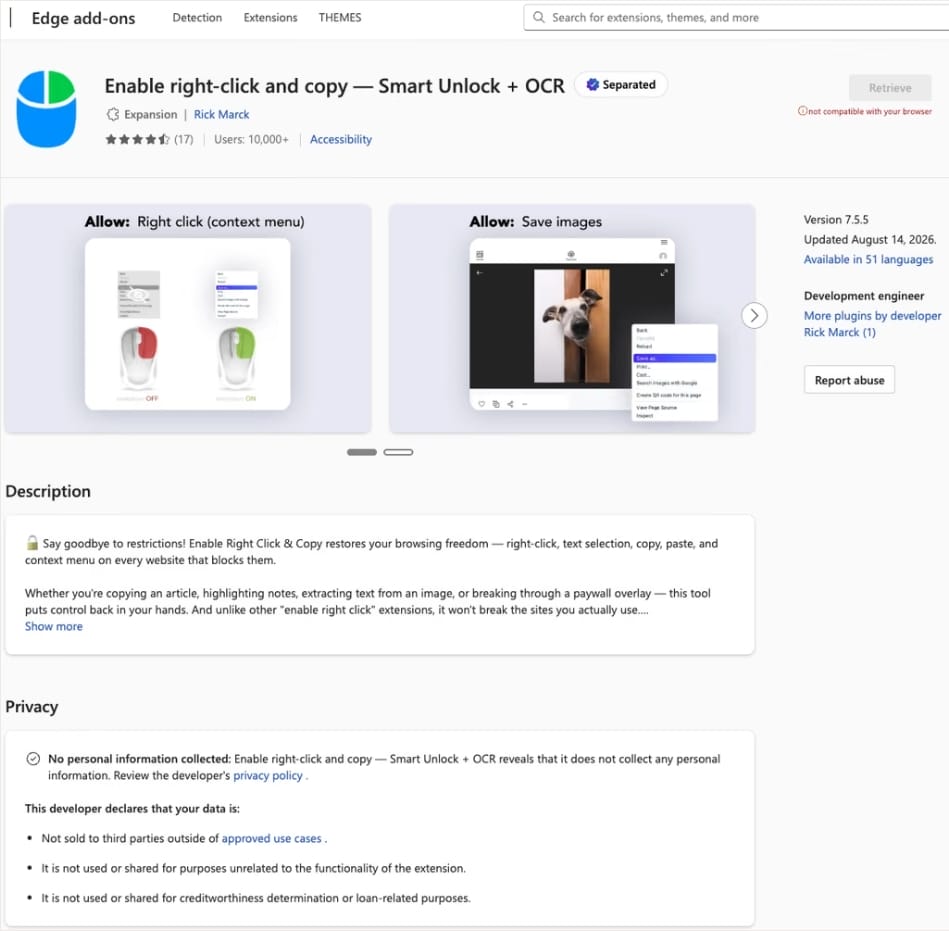
In this case, the add-on cybercriminals bought most often was Enable Right Click & Copy — Smart Unlock + OCR. It had 70 000 users in Chrome and 10 000 in Edge. This purchase is exactly why there’s a single Edge extension among all its Chrome relatives. The add-on itself originally served a perfectly benign purpose: it let users select and copy text on sites where that’s normally blocked, and it could also pull text out of images with optical character recognition (OCR).
At the time of the research, the Edge version of the extension had more than 10 000 users. Source
The malicious functionality introduced into the extension makes it reach out to the attackers’ command-and-control (C2) server to download additional modules of nefarious code. These modules can change over time. Since Chrome automatically updates all installed extensions by default, the malicious version lands on the device without users having to do anything at all.
For the downloaded code to run on the websites the user visits, the extension disables one of their defenses — Content Security Policy (CSP). This mechanism allows website owners to declare which scripts and other resources are allowed to load and run on a page. Once this protection is turned off, the extension can inject code it gets from the C2 server right into the pages open in the browser. The website itself isn’t hacked, and it looks the same to everyone else, but for that one infected user, the legitimate page quietly turns malicious.
What these 19 extensions can do
Now let’s take a closer look at what the malicious modules loaded by the extension are actually capable of. Researchers found 16 such modules, built for all sorts of tasks: from stealing data and hijacking cryptocurrency to the ClickFix attacks we’re focusing on here.
Some of the modules simply collect user data. They intercept logins, passwords, email addresses, and other valuable information the user enters into web forms, including payment details. On top of that, the add-ons steal data from Facebook and LinkedIn accounts and collect browsing history. Criminals can use this information to take over accounts, steal money, and launch further attacks against the victim.
A few other modules focus specifically on stealing cryptocurrency and related data directly. One of them is a crypto drainer, a tool that empties crypto wallets. It works with Ethereum and compatible blockchains as well as Solana and Tron. It replaces the real Connect Wallet and Swap buttons on websites with its own fake ones. When a user clicks one of these buttons, the drainer takes over all further interaction with the wallet and walks the victim through confirming the actions needed to steal their cryptocurrency.
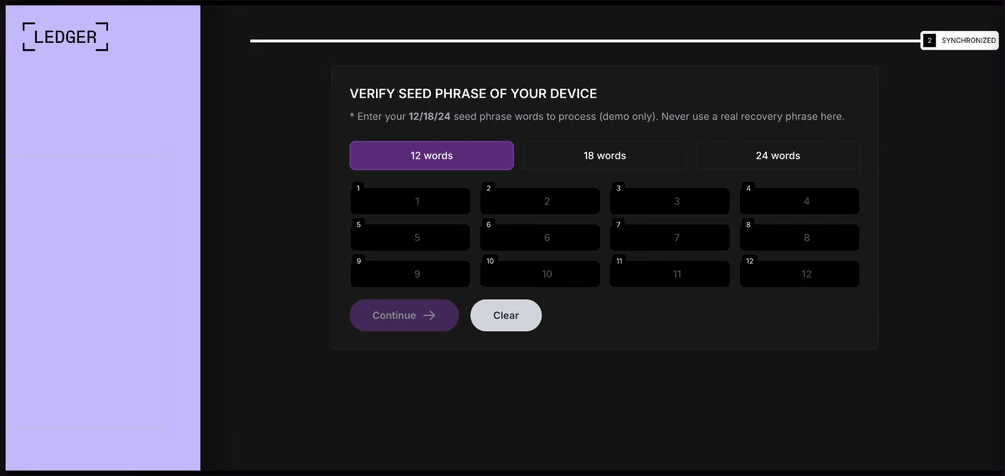
Other modules target users of Ledger and Trezor hardware wallets. Right on the official websites of these services, the malicious extension displays a fake wallet update-and-restore page that asks for a seed phrase of 12, 18, or 24 words. The seed phrase the user enters is forwarded straight to the attackers, giving them full control over the wallet.
The fake form asks the user to enter a seed phrase of 12, 18, or 24 words, which then ends up in the attackers’ hands. Source
Finally, some modules gather information from crypto service pages open in the browser, such as OKX, MEXC, Kraken, KuCoin, Coinbase, Binance, Bybit, and MetaMask, including balance details and active session data that can be used to hijack accounts.
And now we’ve finally reached the module that matters most for this post: the one used for ClickFix attacks. We’ll talk about it in the next part.
How malicious extensions are used in ClickFix attacks
The ClickFix attack technique has become extremely popular among cybercriminals lately. It relies on social engineering: the victim is shown fake instructions supposedly needed to complete some action, such as passing a CAPTCHA check, fixing an error, or updating a program. Following these instructions, the user copies the command suggested by the attackers, pastes it into a system tool built for running these commands, and runs it, all by themselves.
We’ve written about attacks like this and their consequences more than once on our blog. But we rarely dig into exactly how a victim ends up on a page with fake instructions in the first place. A campaign that spread malicious extensions through the Chrome Web Store shows us one way this can happen.
Add-ons turn out to be a very handy tool for ClickFix attacks. As we mentioned earlier, when a user visits a page, extensions are allowed reading and changing its content in order to work. That gives attackers the chance to swap in a fake ClickFix instruction at just the right moment, replacing the content of the page the person actually wanted to open.
What’s more, the ClickFix technique itself lets attackers break out of the browser and gain a foothold directly in the system. That means removing the malicious extension won’t necessarily undo the damage: after the user has run the ClickFix command, malware may already be installed outside the browser.
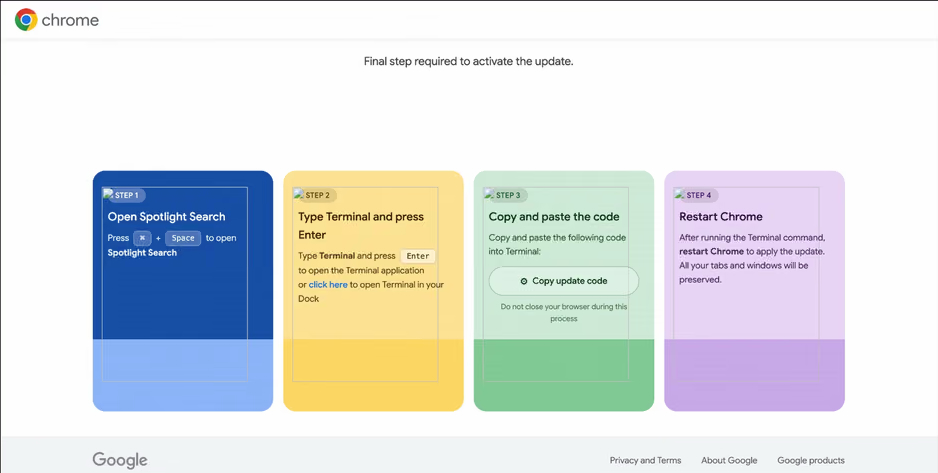
In the specific attack example the researchers describe, the user sees a fake notification saying their browser needs to be updated, along with instructions on how to do it. The instructions change depending on the operating system, and the extension picks up that information automatically too.
In the macOS version of this attack, the user is told to open Terminal, copy a command, paste it there and run it, then restart Chrome to supposedly finish the update. Source
How to avoid falling victim to infected extensions
First off, we recommend checking whether any of the following malicious extensions are already installed in your browser:
Enable Right Click & Copy — Smart Unlock + OCR
RapidLens – Google Lens for Screen Search & Images
Meta & Facebook Ad Library Spy — Save Ads, Finder, Downloader | FeedX-Ray
If you find any of these extensions on your device, we recommend removing it as soon as you can and running a full system scan with a reliable antivirus. As we mentioned above, simply deleting the add-on might not be enough. You can use a free trial version to detect and remove the infection.
How to avoid falling victim to malicious extensions and ClickFix attacks in the future?
Don’t install too many extensions and regularly check the list of those you have.
Remove extensions you don’t use.
Trust the warnings from your operating system and security software, rather than the instructions — or even the demands — of websites and apps.
In 2026, the owner of an ordinary home router, smart TV, or TV box is a prime target for cybercriminals. These devices are readily recruited into botnets and residential proxy networks, which we’ve covered before.
Criminals “sublease” the infected device by letting outsiders pay to visit any website from the victim’s IP address, so it looks like the device’s owner is doing it. The service is in demand across all kinds of shady schemes: from ad fraud and spam campaigns to password bruteforcing and account hacking. In our previous post, we described how home routers get recruited into these proxy networks; today we take a look at an even more vulnerable, and equally ubiquitous category of devices: smart TVs and TV boxes.
These appeal to criminals for two reasons. First, unlike computers and smartphones, TVs are almost always plugged into the power and have a fast internet connection. A dark screen doesn’t mean the device is switched off. On top of that, the limited user interface and monitoring tools mean suspicious background processes can easily slip unnoticed past users.
The threat is evolving and growing more aggressive. A recent study found that once proxyware turns up on a set-top box, the risks to its owner go well beyond having their traffic siphoned off.
SuperBox’s marketing leans heavily on the promise of providing thousands of TV channels, with no subscription or monthly fees. But out of the box, the device can’t actually do anything of the sort. To get access to pirated content, you need to install the brand’s proprietary app store.
When you launch it and install additional apps, the thousands of TV channels do appear. Meanwhile behind the scenes, with no warnings or permission prompts, the device floods external sites with unauthorized requests, and network traffic spikes sharply.
The researchers uncovered several alarming facts. First, the victim gets enrolled into as many as five botnets at once. The SuperBox runs clients for several proxyware networks simultaneously, which even try to compete with one another by blocking rival software from being installed.
But the real shock was the attacks on the internal network. The TV box’s proxyware places no limits on what its paying clients can actually do on the network. They can reach not only external sites but also devices inside your home network.
Normally, your home router and ISP settings protect you from outside attacks. But proxyware bypasses these barriers because it operates from inside the network. During an experiment, the researchers confirmed that an attacker on the internet can easily leverage the infected set-top box to open the admin panel of a home router, such as a Linksys, which is supposed to be accessible only to its owner when connected to the home Wi-Fi network. This means hackers can try to steal data from other devices in the same household, or even encrypt home network storage (NAS).
At the same time, flaws in SuperBox’s factory firmware let hackers remotely install and run any application with superuser privileges, and the threat is anything but hypothetical. Over three weeks of monitoring, the test set-top box was hit by more than 1300 attacks through the home proxy network. Attackers installed three different types of malware, including a module for launching DDoS attacks.
The malware uses several methods to gain a foothold in the system, and it survives reboots and power failures alike.
How to tell if your set-top box is working for hackers
If you have a cheap TV set-top box or Android TV from a little-known brand, it’s worth checking it for anomalies.
The most reliable method is to review the network traffic. Use the statistics in your router’s control panel, but note that some budget models may lack this feature. This feature is called Traffic Analyzer on Asus routers, Traffic Usage on TP-Link, and Traffic Monitor on Keenetic. Find your TV or set-top box in the device list and check the ratio of downloaded to uploaded data. They should consume a lot of traffic to download video while sending very little. If your box is quietly pushing gigabytes of data out or staying chatty on the network even while idle, that’s a telltale sign it’s infected.
If traffic statistics aren’t available, look for indirect signs:
The network and memory activity LEDs won’t stop blinking even though no one’s using the device.
The set-top box’s casing is constantly warm or hot.
The interface lags behind the remote, and the box freezes at random moments that have nothing to do with heavy video playback.
Your other devices (computers or phones) are seeing a real drop in internet speed.
When trying to visit familiar sites over your home Wi-Fi, you’re constantly hit with a CAPTCHA — a sign your network may be compromised and flagged as a spam source.
Your ISP’s tech support calls you asking about suspicious network loads.
What to do with an infected device
The best solution is to disconnect the device from the internet and dispose of it. If you have to keep using it, follow these steps to minimize the risks:
Do a factory (hard) reset. Restore the set-top box to its original state.
Take it offline before setting up again. The first time you turn it on after a reset, skip the Wi-Fi setup step and don’t plug in the Ethernet cable.
Block app installation. Go to Android settings and disable installation of apps from unknown sources. Be sure to turn off any debugging features if enabled: USB debugging, Wireless debugging, and ADB. Menu item names may differ depending on your Android version and device manufacturer.
Isolate it on the network. Set up a guest Wi-Fi network on your router and connect the TV box to it. Enable Client Isolation in your router’s settings, if it has it. This will stop the box from seeing other devices on your home network, which protects your computers and network storage.
Check for updates. Once the box is connected to the guest network, check for official firmware updates: manufacturers sometimes patch known vulnerabilities, though with lesser-known brands, you shouldn’t count on it.
Your most reliable safeguards
Buying cheap devices with pirate streaming features and installing software from shady sources is a surefire way to compromise your home network. Your IP address will become a source of malicious activity, which at best gets you blocked by your ISP and at worst puts you on law enforcement’s radar. What’s more, hackers can use the box as a launchpad to attack your home computers and NAS, which can lead to personal data theft or a ransomware attack.
The best protection is to buy devices from trusted brands and pay for legal content. And to rule out someone hijacking control of your network, make sure your router’s admin panel and other home devices are protected with unique, strong passwords. To avoid having to remember them all, use a reliable password manager such as Kaspersky Password Manager. Additionally, the Smart Home Monitor feature included in Kaspersky Premium lets you keep all your devices fully under control.
There may be more things you don’t know about your smart home devices:
BlueMoon, a shared Chrome and Windows exploit kit, shows why “patch later” is becoming a dangerous gamble.
Security updates are easy to put off. The browser still opens, Windows still works, and choosing to relaunch your browser or restart your computer later can feel harmless.
But a newly documented exploit kit called “BlueMoon” shows how quickly patching delays can become dangerous. Proofpoint Researchers found four espionage groups using the same exploit chain against Chrome browsers running on Windows within days of one another.
The campaign is a timely reminder that once a security flaw, or even its fix, becomes public, attackers may move faster than many users expect.
The attacks began with phishing emails. A victim who clicked a malicious link could be sent to a web page designed to exploit two vulnerabilities in Chrome’s V8 JavaScript engine, followed by a Windows vulnerability to break out of the browser’s protections and gain higher privileges on the computer.
The Chrome vulnerabilities used by BlueMoon were patched in the Stable channel on September 3 and September 8, 2026. The first was already actively exploited when Google released its update. Microsoft addressed the Windows vulnerability in its September Patch Tuesday updates, by which point it was also being exploited.
The notable part is not just that BlueMoon exploited the flaws, but how quickly the capability appears to have spread. Publicly visible upstream fixes can give attackers clues before downstream browser updates reach users, allowing a weaponized chain to be developed and adopted by multiple groups very quickly.
Does that mean that patches can no longer be tested before they are released to the public? No, but we may need to rethink how they are tested and deployed, because it appears some cybercriminals are effectively beta-testing the patches themselves.
The researchers also found clues, but no conclusive evidence, that the exploit kit was developed with AI assistance. The broader concern is credible: AI tools can help attackers interpret source-code changes, write and modify code, document test results, and learn from failed attempts.
In practical terms, the gap between “a flaw is fixed upstream” and “most people are protected” may be increasingly valuable to attackers. We should try to minimize that gap.
How to stay safe
Not every security update needs to be installed the moment it appears. In organizations especially, updates may need testing, staged deployment, and contingency plans. But vulnerabilities known to be actively exploited deserve greater priority. That is precisely why CISA’s KEV catalog is so important: It helps organizations identify the vulnerabilities they should address first.
For home users:
Install browser and operating-system updates promptly. Use the few minutes they take to grab a drink rather than repeatedly postponing them.
Don’t click links in unsolicited emails.
Use up-to-date, real-time anti-malware protection to help catch the malware that exploit kits attempt to deliver.
Stop threats before they can do any harm.
Malwarebytes Browser Guard blocks phishing pages and malicious sites automatically. Free, one click to install. Add it to your browser →

 Login