❌

Normal view

AWS Security Hub Extended: Why enterprise security products should sell themselves

20 May 2026 at 19:32

Our largest security services customers started the same way every customer does – with a click. They enabled Amazon GuardDuty, Amazon Inspector, AWS WAF, and AWS Security Hub, experienced the benefits in real time, and evaluated with transparent pay-as-you-go pricing. No RFP. No six-month evaluation. No multi-year commitment up front. Our field teams played a critical role in that growth, not by selling the first click, but by building the trusted relationships that turned early adoption into deep, long-term commitment. We believe customers should have this same frictionless adoption experience and flexibility for all best-in-class security products and that’s why we developed Security Hub Extended.

In our first post, we introduced Security Hub Extended, a significant expansion of Security Hub that brings together curated partner solutions in a single, unified experience. In our second post, we walked through how it works technically, including the onboarding flow, the pricing model, the unified operations layer built on the Open Cybersecurity Schema Framework (OCSF). In this post, I want to step back and talk about why we built it the way we did and why I believe the way enterprises discover, evaluate, and adopt security solutions is ready for a fundamental shift.

The shift

If you’ve ever tried to evaluate a new enterprise security product, you know the drill. Request a demo. Wait. Take the demo. Request a PoC. Wait for professional services (or your team to stop building) to set it up. Negotiate pricing, which isn’t published, so you’re starting blind. Loop in procurement. Sign a multi-year commitment. Then, months later, find out whether the product actually solves your problem in your unique environment.

Meanwhile, an ambitious security engineer on your team has already spun up an open-source tool, connected real data, and knows in two hours whether it’s going to work for your use cases. They didn’t need a slide deck. They needed a solution they could put their hands on.

A Fortune 500 CISO recently told me: β€œI spent 9 months procuring a security solution and it still doesn’t work the way the demo showed.” That frustration isn’t unique. It’s the norm.

This isn’t a criticism of the sales motion. Sales-led has evolved for good reason. Enterprise procurement is complex, products need customization, customers need support. I respect the craft and have poured a significant portion of my career into trying to perfect it. Even the most product-driven companies still need great sales, marketing, field enablement, and support.

It doesn’t change the fact that threats are evolving constantly, and defenders need the flexibility to discover and deploy new solutions as fast as the landscape shifts. Having the best solutions discoverable and deployable in that moment of need isn’t just a convenience, it’s a competitive advantage that customers are demanding. A new threat emerges, security teams have access to industry-leading solutions, and in a few clicks they’ve found their answer and are already seeing value. That’s the model every security company should be building toward.

What we’ve learned at AWS

At AWS, we’ve spent two decades learning what it takes to let customers adopt complex enterprise technology on their own terms, at massive scale. We haven’t always gotten it right, but we learn fast and adjust. The result is one of the largest cloud businesses in the world. I bring up that scale for one reason. It’s proof that complex, enterprise-grade technology can be adopted without requiring a traditional procurement gauntlet. Compute, storage, databases, AI/ML, networking, and yes, security β€” adopted all through a console, on each customer’s own timeline, and scaled when they were ready.

The proof is in the adoption

Amazon GuardDuty, Amazon Inspector, AWS Shield, AWS Security Hub are all available through the AWS Management Console. All pay-as-you-go. All activated with a click. Tens of thousands of customers rely on these security services today. When you make it easy to get started and deliver outcomes that earn confidence, expansion follows naturally.

These are sophisticated, enterprise-grade security solutions. And customers, from two-person startups to the world’s largest financial institutions, adopt them the same way. They try it, see the value, expand, and lean on the AWS team to go deeper.

We didn’t get here by accident, and we definitely didn’t get here without making mistakes. Building products that can be adopted and scaled on their own, without a sales engineer explaining away UX problems, without a solutions architect doing the first deployment, requires a different kind of product mindset. Time-to-value becomes your most important metric. Onboarding friction becomes your biggest enemy. Transparent pricing becomes non-negotiable. It’s hard. We’ve gotten a lot wrong along the way. And we’re still iterating.

But the results are clear. When customers adopt based on experience rather than commitment, they don’t just stay, they expand. They bring their teams. They become advocates. I’ve spent 15 years at AWS, the last 10 building security services like GuardDuty and Security Hub. When we launch a new security service or major feature, we consistently see rapid organic adoption at a pace that would be impossible through traditional sales cycles alone. These products are built to deliver value the moment customers turn them on and we make that as easy as we possibly can. That’s the scale a product-led motion unlocks.

Security Hub Extended

So, we asked ourselves: why can’t we build a similar approach that can expand to include industry leading partner solutions? Why can’t the CrowdStrikes, the Splunks, the Zscalers, and the fast-growing innovators solving tomorrow’s problems like Cyera, Noma, and 7AI also reach customers with the same frictionless motion that AWS services enjoy? Why can’t a security team that discovers a new threat on Monday have a proven solution deployed and delivering value by Tuesday? Our partners have built incredible products. What they haven’t always had is an avenue to put those products directly in the hands of the customers who need them most, at the moment they need them, at scale, in a way that feels as natural as turning on an AWS service. Not by replacing how our partners build or sell, but by giving them infrastructure that lets their products speak for themselves.

That’s what Security Hub Extended is. Security teams already using Security Hub can discover curated partner solutions right alongside their AWS security services. One click to evaluate, one click to deploy, pay-as-you-go pricing on your existing AWS bill with Enterprise Discount Program (EDP) discounts automatically applied. No separate procurement cycle. No long-term commitments required. Start fast, validate at scale, and commit for deeper discounts when you’re ready, versus making a three-year bet based on a few months of testing.

For customers, industry-leading enterprise security solutions become as easy to adopt as GuardDuty or WAF. For our partners, Security Hub Extended is a growth channel where the product leads and the customer experience mirrors what we’ve spent 20 years building at AWS. For the industry, it’s an invitation to reimagine what the relationship between a security product and a security practitioner can look like when you remove the friction standing between them.

But Security Hub Extended isn’t just a simpler way to buy security products. It’s a unified solution. When a customer enables a solution through Extended, we’re working toward an experience where AWS handles the rest. Sensors that deploy automatically across Amazon EC2, Amazon EKS, and AWS Fargate workloads using the same mechanism that powers GuardDuty Runtime Monitoring. IAM roles that provision across a customer’s Organization in one click. Resource inventory is automated from day one – S3 buckets, databases, AI workloads – without manual work.

Once enabled, solutions in Security Hub Extended emit findings in OCSF, automatically aggregated in Security Hub alongside findings from GuardDuty, Amazon Inspector, and every other AWS security service. Security Hub applies risk scoring and correlated risk analytics across all of them. AWS-native and third-party findings together, weighted and prioritized as a single view of your security posture. For example, an endpoint detection from CrowdStrike, correlated with a credential theft in GuardDuty, and a data access event from Cyera, produces an attack path that none of those solutions can produce alone. The correlation uses AWS context (IAM topology, VPC exposure, resource criticality) to improve the context of each attack path for security analysts. Deploying a solution through Security Hub Extended doesn’t add another pane of glass. It deepens the intelligence of the one you already have.

We’re also building toward automated response. Customers will be able to opt in to pre-built playbooks that take action through AWS-native services when a threat is detected, such as isolating compromised resources, revoking credentials, or containing active threats. The goal is detect-to-respond in seconds, not the hours it takes to context-switch across five consoles and two ticketing systems.

Where we are and where we’re headed

We’re still in the first inning β€” or Day 1, as we like to say at Amazon. We launched in February 2026 with 14 partners, now 21, spanning endpoint, identity, email, network, data, browser, cloud, AI, and security operations, and we’re continuously working backwards from customers as we operationalize for scale. We are building this because our customers asked for it. We’re learning alongside our partners and customers every week, identifying what works, what needs improvement, where the friction still lives, and iterating quickly.

We’re building and delivering at the speed of our customers. That means shipping fast, iterating faster, and not waiting for perfection. We’re not where we want to be just yet, and we need your feedback to get us there. What’s encouraging is that our partners aren’t waiting to be asked. They’re investing in this alongside us. Not because we’re demanding it, but because they see the same thing we do, that companies that make it effortless for customers to get started are the ones that will win at scale.

The early signals are encouraging. Customer response has exceeded our expectations, and the feedback we hear most often is that the procurement simplification and flexibility of pay-as-you-go with public pricing alone, even before the unified operations and data normalization benefits, is a meaningful differentiator.

If you’re a security leader: Security Hub Extended is live now. Log into Security Hub, look for the Security Hub Extended Plan (or visit the Security Hub Extended Pricing Page), and explore what’s available for your use cases. Start with what solves your most urgent problem. Pay-as-you-go, no commitment. Your team will tell you if it’s working in days, not months.

The vision is bigger than what’s live today, and we’re iterating fast. Share your feedback on AWS re:Post for Security Hub, reach out through contact AWS Support, or connect with me directly.


Michael Fuller

Michael Fuller

Michael has been with AWS for 16 years and led product for AWS Security Services for 11 years. Michael has 29 years in the industry and held several roles in product management, business development, and software development for IBM, Cisco, and Amazon. Michael has a Bachelor’s of Science in Computer Engineering from the University of Arizona and an MBA from the University of Washington.

Β 

Complimentary virtual training: Get hands-on with AWS Security Services

11 May 2026 at 19:58

If you’re looking to strengthen your organization’s security posture on Amazon Web Services (AWS) but aren’t sure where to start, then we’re here to help. Security Activation Days are complimentary, virtual, hands-on workshops designed to help you get practical experience with AWS security services in a single session.

What to expect

Each Security Activation Day is a 3–6 hour virtual workshop where you work directly with AWS security services in real-world scenarios. Through a combination of presentations, demos, and workshops, you will get hands-on practice guided by AWS security specialists either in your own environment or in an AWS-provided sandbox.

Topics rotate across the full spectrum of AWS security, identity, and governance services, including threat detection and response, identity and access management, network and application protection, data protection, and governance and compliance. You will leave with actionable knowledge you can apply to your workloads immediatelyβ€”not a to-do list of things to research later.

Who should attend

Security Activation Days are made for buildersβ€”security engineers, cloud architects, and DevOps teams who want to go deeper on specific AWS security capabilities. Whether you’re evaluating a service for the first time or looking to operationalize something you’ve already deployed, these sessions meet you where you are.

What attendees are saying

With over 6,400 attendees across 90 events so far in 2026, Security Activation Days consistently earn a 4.8 out of 5 satisfaction rating. Participants tell us the hands-on format is what makes the difference: there’s no substitute for actually configuring a service and seeing the results in real time.

How to register

We run Security Activation Days year-round across all time zones, with new sessions added regularly. Find a session, show up ready to learn, and start building today.

If you have feedback about this post, submit comments in the Comments section below.

Ashley Nelson

Ashley Nelson

Ashley is a Sr. WW Security Specialist at AWS, where she leads worldwide customer enablement programs for Security, Identity, and Governance services.

Security posture improvement in the AI era

1 May 2026 at 22:58

It’s only been a few weeks since Anthropic announced the Claude Mythos Preview model and launched Project Glasswing with AWS and other leading organizations. This has generated a lot of discussion about the future of cybersecurity and what the ever-increasing capabilities of foundation models mean to organizations.

As AWS CISO Amy Herzog pointed out in the Project Glasswing announcement, β€œAt AWS, we build defenses before threats emerge, from our custom silicon up through the technology stack. Security isn’t a phase for us; it’s continuous and embedded in everything we do.”

Read more from Amy about this in Building AI defenses at scale: Before the threats emerge.

While the discussion around the future of cybersecurity is important, the only thing we know for certain is that organizations need to be able to react quickly to the rapid changes AI is bringing to technology and business in general. And you can’t react quickly if your security fundamentals aren’t dialed in.

The security hygiene gap

It’s easy to assume you have the foundational security elements covered, or to overlook some completely. Basic security use cases like identity management, threat detection, vulnerability management, data protection, and network security can be inconsistently implemented across cloud environments. While AI is reshaping the security landscape, strong security fundamentals continue to be essential for every organization, regardless of size or industry.

These are the security basics that matter whether or not you’re adopting AI: patching consistently, enforcing least-privilege access, enabling logging and monitoring, encrypting data at rest and in transit, and reviewing security configurations regularly. When these fundamentals are in place, you’re better positioned to take advantage of AI-driven tools and respond to newly discovered vulnerabilities, wherever they come from.

While the concepts that drive security fundamentals are universal, implementing them in your environment is best done with an understanding of the context unique to your organization. That’s why we have a multitude of freely available materialsβ€”like the AWS Well-Architected Frameworkβ€”that you can use to help ask the right questions and implement changes in your environment. We also offer programs like the Security Health Improvement Program (SHIP) to help you improve your security posture through prescriptive guidance and continuous improvement.

What is the Security Health Improvement Program (SHIP)?

SHIP is a no-cost program available to every AWS customer, regardless of support tier. SHIP provides a proven, data-driven methodology to:

  • Assess your current security posture using data from your AWS environment
  • Identify specific opportunities to improve across 10 core security use cases
  • Build a prioritized action plan tailored to your environment
  • Establish a mechanism for continuous security improvement

The program is led by AWS Solutions Architects and Technical Account Managers who take you through a personalized report, contextualize findings for your environment, and help you build a prioritized action plan.

Why SHIP matters in the AI era

Project Glasswing highlights an important shift: AI-powered tools are accelerating the pace of vulnerability discovery, which means organizations need to be prepared to assess and respond to findings and changing situations faster than before. In addition to external factors, as organizations adopt AIβ€”whether deploying foundation models, building agentic workflows, or using AI-powered servicesβ€”how they implement their security controls must change as well. A strong security foundation is what makes confident AI adoption possible.

Here’s how SHIP helps:

Address foundational security gaps proactively

SHIP uses a data-driven methodology to identify opportunities to improve and optimize across 10 core security use cases: threat detection, cloud security posture management, application security testing, configuration management, access governance, vulnerability management, application protection, network security, encryption, and secrets management. The program includes a SHIP assessment to identify critical security findings related to your current security posture, so your team can build a prioritized roadmap for improvement tailored to your environment.

Establish the security baseline AI workloads require

Before you deploy your first model on Amazon Bedrock or build agentic workflows with Amazon Bedrock AgentCore, you need confidence that your underlying infrastructure follows security best practices. SHIP uses actual data from your environment to provide prescriptive, specific guidance rather than generic security recommendations. This is especially relevant as AI-driven vulnerability discovery tools become more widely available: organizations with strong baselines will be able to act on new findings quickly and effectively.

Build a mechanism for continuous security improvement

As AI capabilities evolve, organizations benefit from having a repeatable process to assess and strengthen their security posture over time. SHIP establishes the methodology and mechanisms for your team to continuously assess, prioritize, and improve. By building this operational capability, you’re strengthening your organization’s ability to adapt and contributing to broader industry resilience. As the cybersecurity community integrates AI into defense strategies, SHIP helps you maintain foundational best practices so you can adopt these innovations effectively and with confidence.

Getting started is straightforward

SHIP is available today, at no cost, to every AWS customer. Here’s how to get started:

  1. Talk to your AWS account team. Ask about scheduling a SHIP engagement, or request one directly on the SHIP page.
  2. Attend a SHIP Activation Day. AWS regularly hosts hands-on workshops where you can run the SHIP assessment with AWS Solutions Architects and start building your improvement plan.
  3. Explore the prescriptive guidance. Consult the AWS Well-Architected Framework – Security Lens for documentation, reference architectures, and implementation guides you can start using today.

Take the next step together

AWS is committed to being the most secure cloud, from our participation in Project Glasswing to the security embedded in every layer of our infrastructure. Security is a shared responsibility, and programs like SHIP give customers the tools, guidance, and support to strengthen their security foundations so they can build confidently, no matter what comes next.

Ready to improve your security posture? Contact your AWS account team to schedule a SHIP engagement, or visit the SHIP resources page to learn more.

Celeste Bishop

Celeste Bishop

Celeste is a Senior Security Specialist at AWS, based in Austin, Texas. Over the past five years, she has held a range of security-focused roles spanning field and product marketing, developer relations, and executive engagement. She partners closely with customers, security leaders, and field teams to help organizations operate securely in the cloud. Celeste holds a Bachelor’s in Economics from the University of Texas at Austin.

Optimize security operations through an AWS Security Hub POC

27 April 2026 at 20:55

April 27, 2026: This post was first published in September 2025 when the enhanced AWS Security Hub was in public preview. It has since been updated to reflect the general availability of Security Hub. This revision also provides a more detailed, step-by-step framework for planning your POC.


AWS Security Hub prioritizes your critical security issues and helps you respond at scale to protect your environment. The service sharpens findings through aggregation, correlation, and enrichment of AWS native security signals into actionable insights, enabling faster and more efficient response times. You can use these capabilities to gain visibility across your cloud environment through centralized management in a unified cloud security solution. Security Hub creates a cloud-native application protection platform (CNAPP) and through the AWS free trial, you can create a comprehensive proof of concept (POC) evaluation without significant upfront investment in time or resources.

In this blog post, we guide you through planning and implementation POC for Security Hub to assess the implementation, functionality, cost estimate, and value of Security Hub in your environment. We walk you through the following steps:

  1. Understand the value of Security Hub
  2. Determine success criteria for the POC
  3. Define Security Hub configuration
  4. Prepare for deployment
  5. Enable Security Hub
  6. Validate deployment

Understand the value of Security Hub

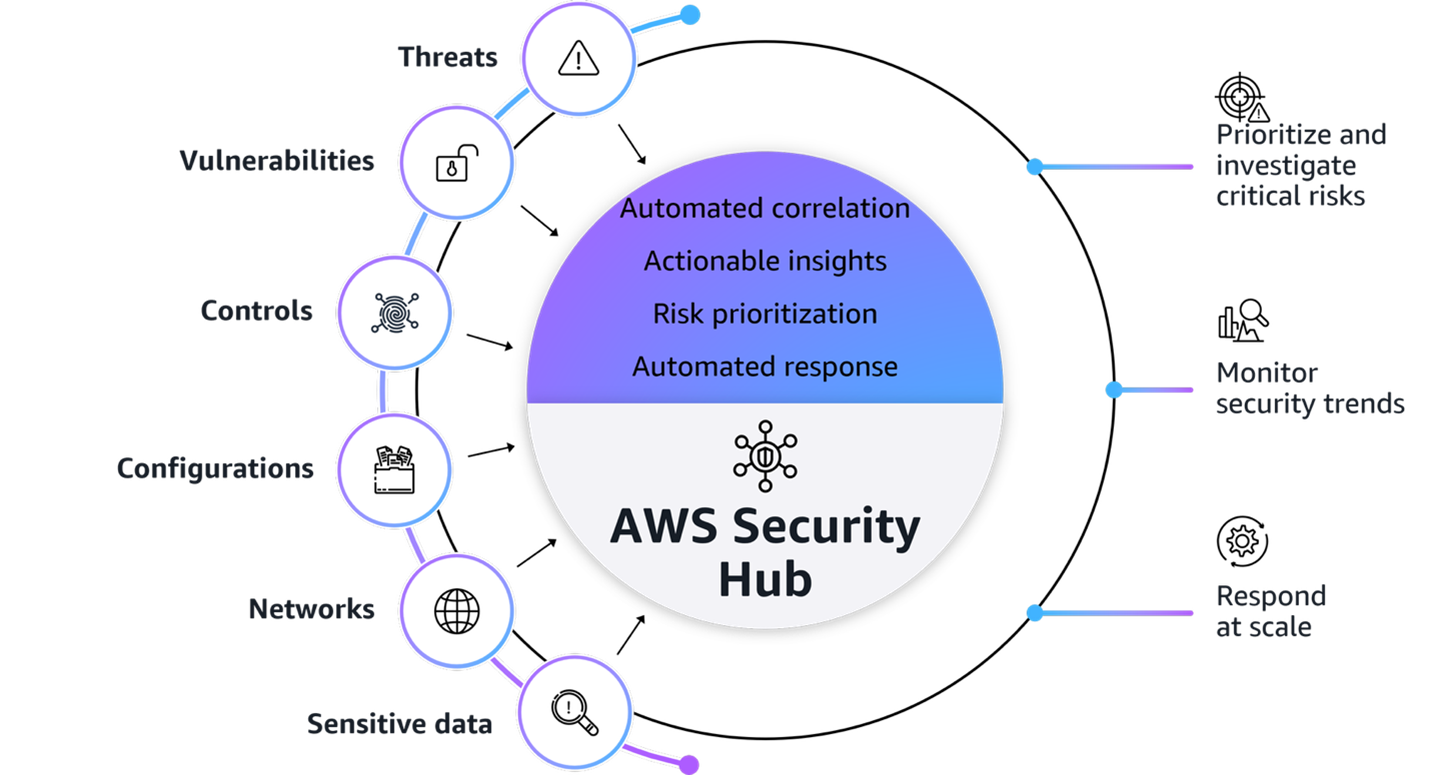
Figure1: AWS Security Hub overview

Figure 1: AWS Security Hub overview

Figure 1 provides a visualization of how Security Hub unifies signals from multiple AWS security services, partner solutions capabilities. The signals, which are ingested by Security Hub from multiple AWS security services and curated partner solutions include:

At its core, Security Hub provides four key capabilities in one unified solution:

  1. Unified security operations: Security Hub delivers a unified security operations experience, bringing your security signals into a single consolidated view and avoiding the need to switch between multiple security tools. This provides comprehensive visibility across your entire estate, including AWS, multi-cloud, and on-premises, so your security teams can efficiently detect, prioritize, and respond to potential security risks.
  2. Intelligent prioritization helps focus on what matters most: Security Hub helps you identify and prioritize critical security risks that might be missed when viewing findings in isolation. Security findings are correlated by analyzing resource relationships and signals from AWS security services and capabilities.
  3. Actionable insights guide security teams on next steps: Gain actionable insights through advanced analytics to transform correlated findings into clear, prioritized insights that highlight the most critical security risks in your environment. You can quickly understand potential impacts, visualize relationships, and identify which security issues pose the greatest risk to critical resources.
  4. Streamlined security response and automation capabilities: Security Hub enhances your security operations by enabling streamlined response capabilities. It seamlessly integrates with your existing ticketing systems to help facilitate efficient incident management.

With this integrated approach your security team can:

  • Investigate critical risks that need immediate attention from a single pane of glass
  • Monitor security trends and attack surface across your environments
  • Fix what really matters across the entire attack chain and path
  • Automate responses to streamline remediation

Understand the Open Cybersecurity Schema Framework

Security Hub uses the Open Cybersecurity Schema Framework (OCSF) to help standardize security data and analysis and enable better integration between security tools. This standardization helps simplify how security findings are structured and analyzed across your environment. This standardized data model enables seamless integration and data exchange across your security tooling, providing normalized and consistent data formats. When implementing your Security Hub POC, make sure that you’re familiar with the OCSF specifications Security Hub uses.

Additionally, confirm that any analytics or security information and event management (SIEM) tools you plan to integrate with support the OCSF data format to maximize the value of the consolidated security insights provided by Security Hub.

Determine success criteria

Establishing success criteria helps benchmark the outcomes of the POC with the goals of the business. Some example criteria and key performance indicators (KPI) include:

  • Alert consolidation metrics: Determine what resources you’re currently using to correlate security events and signals to understand their relationship. Review the process and note if it’s completed outside of AWS or through a SIEM. By setting a benchmark to reduce correlation overhead you can significantly improve efficiency and accelerate security investigations and posture improvement.
  • Response time improvements: Reducing your time to detect, investigate, and resolve security events and improve security posture is essential to streamlined security operations. Security Hub provides visualizations for potential attack paths that adversaries could use to exploit resources and helps assess the potential blast radius.
    • Reduced mean time to detect (MTTD) security incidents.
    • Reduced mean time to response (MTTR) for critical findings.
    • Reduced time to identify potentially affected resources in blast radius.
    • Increased accuracy of attack path analysis.
    • Number of controls implemented based on attack path insights (post investigation).
  • Automation capabilities: Having response playbooks as part of your incident management and response plan helps ensure comprehensive investigations lead to improved security posture. Review your automation capabilities to see if portions of or entire playbooks can be automated.
    • Potentially increased percentage of security findings automatically routed to the correct teams by using Jira Cloud, ServiceNow, or a third-party tool.
    • Reduced average time from detection to ticket creation.
  • Severity and risk classification: Review your organization’s inventory of assets to determine if it’s complete and if you can use telemetry to determine the severity level and associated risks.
    • Reduced time to identify critical resources and service coverage gaps affected by new vulnerabilities, threats, and misconfigurations.
    • Faster and more accurate severity label and risk calculation of findings.
    • Reduced time to identify service gap coverage.

After establishing your success criteria, it’s essential to evaluate organizational readiness and potential constraints that might impact your POC implementation. Begin by conducting a comprehensive assessment of your current environment: Determine if the foundational security services (GuardDuty, Amazon Inspector, Security Hub CSPM, and Macie) are enabled across your accounts, and identify your critical workloads and if there are any excessive attack surfaces.

Review your success criteria to make sure that your goals are realistic given your timeframe and potential constraints that are specific to your organization. For example:

  • Do you have full control over the configuration of AWS services that are deployed in an organization?
  • Do you have resources that can dedicate time to implement and test?
  • Is this time convenient for relevant stakeholders to evaluate the service?

Maximize your POC value through service activation

To get the most comprehensive evaluation of the capabilities of Security Hub, coordinate the activation of underlying security services to optimize the overlapping trial periods available at no additional cost. The following is a list of the underlying security services, and their free trial length:

  • Security Hub: 30-day trial (essential plan capabilities)
  • GuardDuty: 30-day trial (covers most protection plans except GuardDuty Malware Protection)
  • Security Hub CSPM: 30-day trial
  • Macie: 30-day trial
  • Amazon Inspector: 15-day trial

Consider enabling these services simultaneously so that you have at least two weeks of overlapping coverage to evaluate the full correlation and risk prioritization capabilities of Security Hub across each service. Optionally, if you want to conduct a POC with minimal configuration because of limitations, you can enable only Security Hub CSPM and Amazon Inspector during the initial POC phase to properly assess the results and data.

Note: Document your activation dates and trial expiration dates carefully. Create calendar reminders for trial end dates and schedule your key POC evaluation milestones to occur while services are active. This will help make sure that you can thoroughly assess the unified security operations capabilities of Security Hub when services are running at full capacity.

If you already have one or more of these underlying services enabled, you can proceed to enable the new Security Hub. To fully use the new Security Hub capabilities, particularly the exposure findings feature, specific service dependencies must be met, both Security Hub CSPM and Amazon Inspector are essential because they provide the telemetry needed for the Security Hub correlation engine and exposure findings. The combination enables Security Hub to deliver comprehensive risk analysis and prioritization by correlating configuration risks with runtime vulnerabilities. If you have other security services already enabled (such as GuardDuty or Macie), you can maintain these existing services while enabling Security Hub, and it will automatically begin incorporating their findings into its consolidated view, enhancing your overall security posture visualization.

Define your Security Hub configuration

After your success criteria have been established, you’re ready to plan your configuration. Some important decisions include:

  • Select a delegated administrator: From the AWS Organizations management account, you can set a delegated administrator for your organization. As a best practice, we recommend using the same delegated administrator across security services for consistent governance and according to our AWS Security Reference Architecture (AWS SRA).
  • Select accounts in scope: Define accounts you want to have Security Hub enabled for.
  • Define AWS Regions: Determine Regional restrictions or considerations.
  • Determine AWS service integrations: In addition to the core security capabilities of posture management and vulnerability management, Security Hub integrates signals from other AWS security services such as GuardDuty and Macie.
  • Define third-party integrations:
    • For ticketing, Security Hub integrates with popular service management systems such as Atlassian’s Jira Service Management Cloud and ServiceNow.
    • Partners who already support or intend to support the OCSF schema to receive findings from Security Hub include companies such as Arctic Wolf, CrowdStrike, DataBee, Datadog, DTEX Systems, Dynatrace, Fortinet, IBM, Netskope, Orca Security, Palo Alto Neworks, Rapid7, Securonix, SentinelOne, Sophos, Splunk, Sumo Logic, Tines, Trellix, Wiz, and Zscaler.
    • Service partners such as Accenture, Caylent, Deloitte, IBM, and Optiv can help you adopt Security Hub and the OCSF schema.
  • Use the Security Hub cost estimator: Use the Security Hub Cost Estimation Tool for a pre-enablement cost estimate based on your current spend on Amazon Inspector, Security Hub CSPM, and GuardDuty.

Prepare for deployment

After determining your success criteria and Security Hub configuration, identify stakeholders, desired state, and timeframe. Prepare for deployment by completing:

  • Project plan and timeline: Develop a project plan with defined success criteria, scope boundaries, key milestones, and realistic implementation timelines. Suggested timeline of events:
    • Before enablement:
      • Validate core security service configuration for GuardDuty, Amazon Inspector, Security Hub CSPM, and Macie
      • Request approvals for free trial from appropriate stakeholders
    • Day 0 – Enable the service, become comfortable with the Security Hub layout and begin training security personnel
    • Week 1 – Validate desired coverage of threat detection, vulnerability management, and posture management across accounts and Regions
    • Week 2 – Connect to IT service management (ITSM) tools and begin creating automations for critical workloads and resources
    • Week 3 – Execute a tabletop exercise in response to a selected exposure finding
    • Week 4 – Analyze trends of threats and exposures from day 1 through week 4
  • Identify stakeholders: Identify CISO, information security teams, SOC personnel, incident response teams, security engineers, finance, legal, compliance, external MSSPs, and business unit representatives.
  • Develop a RACI matric: Create a detailed RACI chart defining roles and responsibilities across the incident response lifecycle, facilitating accountability and proper communication channels.
  • Configure management account access: Secure authorization to delegate administrative access. For more information, see Permissions required to designate a delegated Security Hub administrator account.
  • Set up IAM roles and permissions: Use AWS Identity and Access Management (IAM) roles to implement role-based access controls aligned with the RACI chart, including case management, escalation, and read-only roles using AWS managed policies. For more information, see AWS Managed Policies

Enable Security Hub

AWS security services integrate with AWS Organizations to help you centrally manage Security Hub.

  1. If you haven’t already done so, enable Security Hub CSPM and Amazon Inspector at a minimum. Also enable any other AWS security services that you want to integrate with Security Hub.
  2. Enable Security Hub for your organization from the organization management account.
  3. If setting a delegated administrator for Security Hub, see Setting a delegated administrator account in Security Hub from the management account.

    Note: As a best practice, we recommend using the same delegated administrator across security services for consistent governance.

  4. Sign in to the delegated administrator with an IAM policy that gives you permission to enable and disable member accounts. With this policy, you will have granular control to decide what Regions you want enabled.
  5. Configure Security Hub plans for deployment. Security Hub comes with the Essentials, Threat Analytics, and Extended plans.
  6. Configure third-party integrations to create incidents or issues for Security Hub findings.

Note: After you enable Security Hub, exposure findings in your environment are created and analyzed immediately. However, it can take up to 6 hours to receive an exposure finding for a resource.

Validate deployment

The final step is to confirm that Security Hub is configured correctly and to evaluate the solution against your success criteria.

  • Validate policy: Verify that you have the correct permissions to manage member accounts and Regional restrictions are configured correctly.
  • Validate integrations: Verify that tickets with ServiceNow or Jira Cloud are working correctly by signing in to the AWS Management Console for Security hub and choosing Inventory in the navigation pane. Select Findings and verify there is a ticket ID in your finding.
  • Assess success criteria: Determine if you achieved the success criteria that you defined at the beginning of the project.

Conclusion

In this post, we showed you how to plan and implement an effective Security Hub POC. You learned how to do so through phases, including defining success criteria, configuring Security Hub, and validating that Security Hub meets your business needs. Take advantage of the trial periods to maximize your testing window without incurring significant costs. Throughout the POC, maintain focus on your predefined success criteria while remaining open to unexpected benefits or challenges that might arise. Maintain open communication with your AWS account team to address any questions or concerns to help you get the most out of your Security Hub POC experience.

Additional resources

If you have feedback about this post, submit comments in the Comments section below. If you have questions about this post, contact AWS Support.

Kyle Shields

Kyle Shields

Kyle is a Security Specialist Solutions Architect focused on threat detection and incident response at AWS. Today, he’s focused on helping enterprise AWS customers adopt and operationalize AWS Security Incident Response and improve their security posture.

Ahmed Adekunle

Ahmed is a Security Specialist Solutions Architect focused on detection and response services at AWS. Before AWS, his background was in business process management and AWS technology consulting, helping customers use cloud technology to transform their business. Outside of work, Ahmed enjoys playing soccer, supporting less privileged activities, traveling, and eating spicy food, specifically African cuisine.

Author

Marshall Jones

Marshall is a Worldwide Security Specialist Solutions Architect at AWS. His background is in AWS consulting and security architecture and focused on a variety of security domains including edge, threat detection, and compliance. Today, he’s focused on helping enterprise AWS customers adopt and operationalize AWS security services to increase security effectiveness and reduce risk.

A technical walkthrough of multicloud full-stack security using AWS Security Hub Extended

22 April 2026 at 18:31

Building on our recent announcement of AWS Security Hub Extended β€”our full-stack enterprise security offering β€” we want to show you how we’re simplifying security procurement and operations for your multicloud environments. Whether you’re a security architect evaluating solutions or a CISO looking to streamline vendor management, this post walks through the streamlined experience that transforms how you acquire, deploy, and manage end-to-end enterprise security solutions across endpoint, identity, email, network, data, browser, cloud, AI, and security operations. Security Hub Extended brings together AWS security services with carefully curated security partners. Delivering better outcomes together through unified procurement, billing, and operations that significantly reduce vendor management overhead so you can focus on what matters most: protecting your organization.

The challenge we’re addressing

Security teams today spend too much time on vendor management, evaluating services, negotiating contracts, and managing multiple billing cycles instead of focusing on what matters most: managing risk. But the procurement challenge runs even deeper. Until now, customers really only had one option: sign multi-year agreements based solely on proof-of-concept testing and estimated annual usage. This forces organizations to commit budget before they can validate whether a solution will work for them at scale.

AWS Security Hub Extended transforms this procurement model. Security Hub Extended offers customers the option to get started with pay-as-you-go pricing and no commitments, so they can move fast and validate solutions in their actual environment. After they’ve confirmed a solution works at scale, they can then align their vendor strategy and sign longer-term commitments for even more favorable pricing.

Security Hub Extended provides a curated set of carefully chosen partner solutions with competitive pricing, unified billing through your AWS account, and seamless integration. Our initial launch partners, selected by customers for their proven value, include 7AI, Britive, CrowdStrike, Cyera, Island, Noma, Okta, Oligo, Opti, Proofpoint, SailPoint, Splunk, Upwind, and Zscaler.

Getting started with Security Hub Extended

AWS Security Hub consolidates threat analytics from Amazon GuardDuty, vulnerability management from Amazon Inspector, and sensitive data discovery from Amazon Macie, correlating these signals with Security Hub Exposure findings to determine overall risk, reachability, and assumability. Security Hub Extended builds on this foundation by adding curated partner solutions, extending these unified security operations across your entire organization including multicloud, on-premises, and endpoint environments. If you’re already using Security Hub, you can navigate directly to the Extended plan section.

Getting started with Security Hub is straightforward. From the AWS Management Console, search for Security Hub to start the onboarding walkthrough. If you’re not already a Security Hub customer, you can quickly complete onboarding by designating an AWS organization delegated administrator (DA) account. You can then centrally enable and manage Security Hub across your entire organization’s accounts and AWS Regions from a single location (see Introduction to AWS Security Hub). After you’ve onboarded, navigate to the Extended plan section to add curated partner solutions.

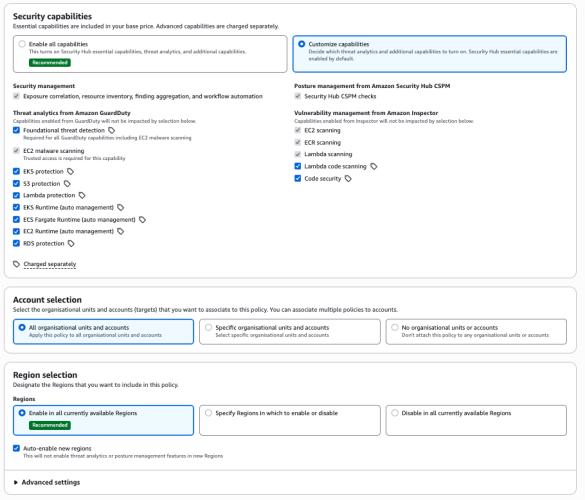
Figure 1- Security Hub centralized configuration

Figure 1: Security Hub centralized configuration

From this single interface, you can enable detection and response capabilities across your entire organization, provide granular configurations at the organizational unit or member account level, select specific Regions, and turn individual features on or off as needed.

Understanding risk through attack paths

The Security Hub risk correlation engine identifies potential exposures by correlating threats, vulnerabilities, and misconfigurations to reveal how they connect and could lead to compromise of critical resources.

Figure 2 - Security Hub exposure attack path visualization

Figure 2: Security Hub exposure attack path visualization

The attack path visualization in the preceding figure reveals critical insights including upstream root causes and blast radius, showing the potential impact if a threat actor exploits a vulnerability. You can use this visualization to focus on fixing the root cause rather than addressing symptoms. For example, updating one security group configuration can eliminate the entire attack path, cutting off all downstream exposure.

Accessing Security Hub Extended

You can find Security Hub Extended, shown in the following figure, in the left navigation pane under Management in your Security Hub delegated administrator (DA) account; Security Hub Extended will only be visible from the delegated administrator account. The Extended plan brings curated third-party security solutions directly into the Security Hub experience. Because Extended is built into Security Hub, there’s no separate console to manage. You discover, subscribe to, and operate curated partner solutions from the same place you manage enterprise security, delivering unified operations across your entire security estate.

Figure 3- Security Hub Extended partners

Figure 3: Security Hub Extended partners


Transparent, competitive pricing consolidated with Security Hub

Unlike traditional third-party engagements that require lengthy negotiations, private pricing deals, and multi-year commitments, Security Hub Extended offers complete pricing transparency. Every partner solution displays clear, competitive monthly pay-as-you-go rates billed directly with Security Hub requiring no commitments. For example, Cloud Security from Upwind costs $3.75 per resource per month, and Identity Security from Okta costs $20 per user per month.

All Security Hub Extended offerings are also eligible for AWS Enterprise Discount Program (EDP) discounts that will be applied automatically. If you have an existing AWS enterprise discount agreement, those discounts automatically apply to Security Hub Extended offerings, further reducing your effective costs. All partner solutions you deploy through Security Hub Extended appear on your consolidated AWS bill, no separate invoices or payment processes.

Streamlined onboarding

Adopting curated partner solutions through Security Hub Extended is straightforward. Choose View Product to initiate an automated workflow. Depending on the solution, you’ll either be directed to the partner onboarding console or provide information for the partner to guide you through their onboarding process tailored to your environment.

Billing begins only after you’re fully activated on the partner solution and starts automatically, no additional action is required to benefit from the unified billing. If you’re already using one of the curated partner solutions, transitioning to Security Hub Extended for consolidated billing and flexible pricing won’t disrupt your current services. Now, instead of receiving separate invoices for each partner in addition to Amazon Inspector, GuardDuty, and Security Hub CSPM you get one unified bill through Security Hub. This consolidates visibility to support better understanding of spend and to manage cost.

Unified operations

Security Hub Extended unifies security operations by consolidating findings from AWS and curated partner solutions. All findings use the Open Cybersecurity Schema Framework (OCSF) for consistency, without the need for complex data normalization, transformation, and extract, transform, and load (ETL) processes.

When you deploy solutions such as CrowdStrike, Noma, and Upwind alongside Splunk and 7AI through Security Hub Extended, security findings automatically flow into Security Hub and then seamlessly route to Splunk and 7AI. All in OCSF format so your security team can focus on responding to threats, not managing pipelines, so you can quickly identify and respond to security risks that span boundariesβ€”from endpoint compromises to cloud infrastructureβ€”without spending valuable time on manual integration work.

The full-stack security vision

Security Hub Extended represents a shift in how you discover, procure, and build comprehensive security programs. Instead of managing dozens of vendor relationships, negotiating separate contracts, agreeing to multi-year annual commitments, and integrating disparate tools, you now have one procurement process through AWS, one bill with transparent competitive pay-as-you-go pricing, one console for unified security operations, one support channel for AWS Enterprise Support customers, and one schema (OCSF) for all security findings. The result: reduced security risk, improved team productivity, and a more unified approach to security operations across your enterprise.

Get started

Try Security Hub Extended today and experience how simplified procurement and unified operations can transform your security program. Security Hub Extended is generally available globally in all AWS commercial Regions where Security Hub is available. We’ve also published a walk through video to further explain how Security Hub Extended works.

It’s still Day 1, but we’re iterating fast, so share your feedback with us on AWS re:Post for Security Hub or through your AWS Support contacts and watch for future blog posts on our progress.


Matt Meck

Matt Meck

Matt is a Worldwide Security Specialist at Amazon Web Services, based in New York, with 10 years of experience in the tech industry. For the past 4 years at AWS, he’s focused on Detection and Response, helping solve complex security challenges in the rapidly evolving security space. He works closely with product teams, customers, partners, and field teams to deliver effective security solutions.

Β 

Michael Fuller

Michael Fuller

Michael has been with AWS for 16 years and led product for AWS Security Services for 11 years. Michael has 29 years in the industry and held several roles in product management, business development, and software development for IBM, Cisco, and Amazon. Michael has a Bachelor’s of Science in Computer Engineering from the University of Arizona and an MBA from the University of Washington.

Β 

AWS Security Hub is expanding to unify security operations across multicloud environments

10 March 2026 at 15:51

After talking with many customers, one thing is clear: the security challenge has not gotten easier. Enterprises today operate across a complex mix of environments, including on-premises infrastructure, private data centers, and multiple clouds, often with tools that were never designed to work together. The result is enterprise security teams spend more time managing tools than managing risk, making it harder to stay ahead of threats across an increasingly complex environment.

At Amazon Web Service (AWS), we believe security should be simple, integrated, and built for the way enterprises actually operate. This belief is what drove us to reimagine AWS Security Hub, delivering full-stack security through a single experience, and this vision is driving our next chapter.

Building on a foundation of unified security

We transformed Security Hub into a unified security operations solution by bringing together AWS security services, including Amazon GuardDuty, Amazon Inspector, AWS Security Hub Cloud Security Posture Management (Security Hub CSPM), and Amazon Macie, into a single experience that automatically and continuously analyzes security signals across threats, vulnerabilities, misconfigurations, and sensitive data. Security Hub delivers a common foundation, bringing together findings from across your AWS environment so your security team spends less time translating signals and more time acting on them. Built on top of that foundation, a unified operations layer gives security teams near real-time risk analytics, automated analysis, and prioritized insights, helping them focus on what matters most, at scale.

We also introduced new capabilities (the Extended plan) that simplify how enterprises procure, deploy, and integrate a full-stack security solution across endpoint, identity, email, network, data, browser, cloud, AI, and security operations. Now, customers can use Security Hub to expand their security portfolio through a curated selection of AWS Partner solutions (at launch: 7AI, Britive, CrowdStrike, Cyera, Island, Noma, Okta, Oligo, Opti, Proofpoint, SailPoint, Splunk (a Cisco company), Upwind, and Zscaler), all through one unified experience. With AWS as the seller of record, you benefit from pay-as-you-go pricing, a single bill, and no long-term commitments. Our goal is simple: unified security, everywhere your enterprise operates.

Freedom to innovate, wherever your workloads are

At AWS, interoperability means giving customers the freedom to choose solutions that best suit their needs, and the ability to use them wherever their workloads run. But freedom to innovate across multicloud environments also means that it is critical to secure them consistently, and without adding operational complexity.

What’s coming for Security Hub

In the coming months, we are expanding Security Hub with new multicloud capabilities that extend unified security operations beyond AWS. The foundation of this expansion is a common data layer that unifies security signals from wherever your workloads run. On top of that, a unified policy and operations layer delivers consistent posture management, exposure analysis, and risk prioritization, so your security team operates from a single view of risk rather than a fragmented collection of consoles.

Security Hub will deliver unified risk analytics that surface critical risks across your multicloud estate. You’ll be able to manage cloud security posture with Security Hub CSPM checks that give you consistent posture visibility, and extend vulnerability management with expanded Amazon Inspector capabilities, including virtual machine scanning, container image scanning, and serverless scanning. Security Hub will also deliver external network scanning that enriches security findings with context about internet-facing exposure across your multicloud environment, including for resources not running in AWS.

The result is more comprehensive risk coverage across your enterprise. It’s about giving your security team a single, unified experience to detect and respond to risks, wherever you operate.

Security as a business enabler

The security leaders I speak with aren’t just asking for better tools. They’re asking for a way to get ahead of risk, not just manage it. They want security that keeps pace with the business, not security that slows it down.

That’s the vision behind AWS Security Hub: unified security through a single, integrated security operations experience, built on a common data foundation, powered by intelligent analytics, and delivered through a consistent operations layer, to help reduce security risk, improve team productivity, and strengthen security operations across AWS and beyond.

Our multicloud expansion is underway, and we are just getting started.

You can learn more at aws.amazon.com/security-hub, or visit us at the AWS booth (S-0466) at RSA Conference, March 23–26 in San Francisco.

Gee Rittenhouse Gee Rittenhouse
Gee is the Vice President of Security Services at AWS, overseeing key services including Security Hub, GuardDuty, and Inspector. He holds a PhD from MIT and brings extensive leadership experience across enterprise security and cloud. He previously served as CEO of Skyhigh Security and Senior Vice President and General Manager of Cisco’s Security Business Group, where he was responsible for Cisco’s worldwide cybersecurity business.

File integrity monitoring with AWS Systems Manager and Amazon Security LakeΒ 

27 January 2026 at 19:21

Customers need solutions to track inventory data such as files and software across Amazon Elastic Compute Cloud (Amazon EC2) instances, detect unauthorized changes, and integrate alerts into their existing security workflows.

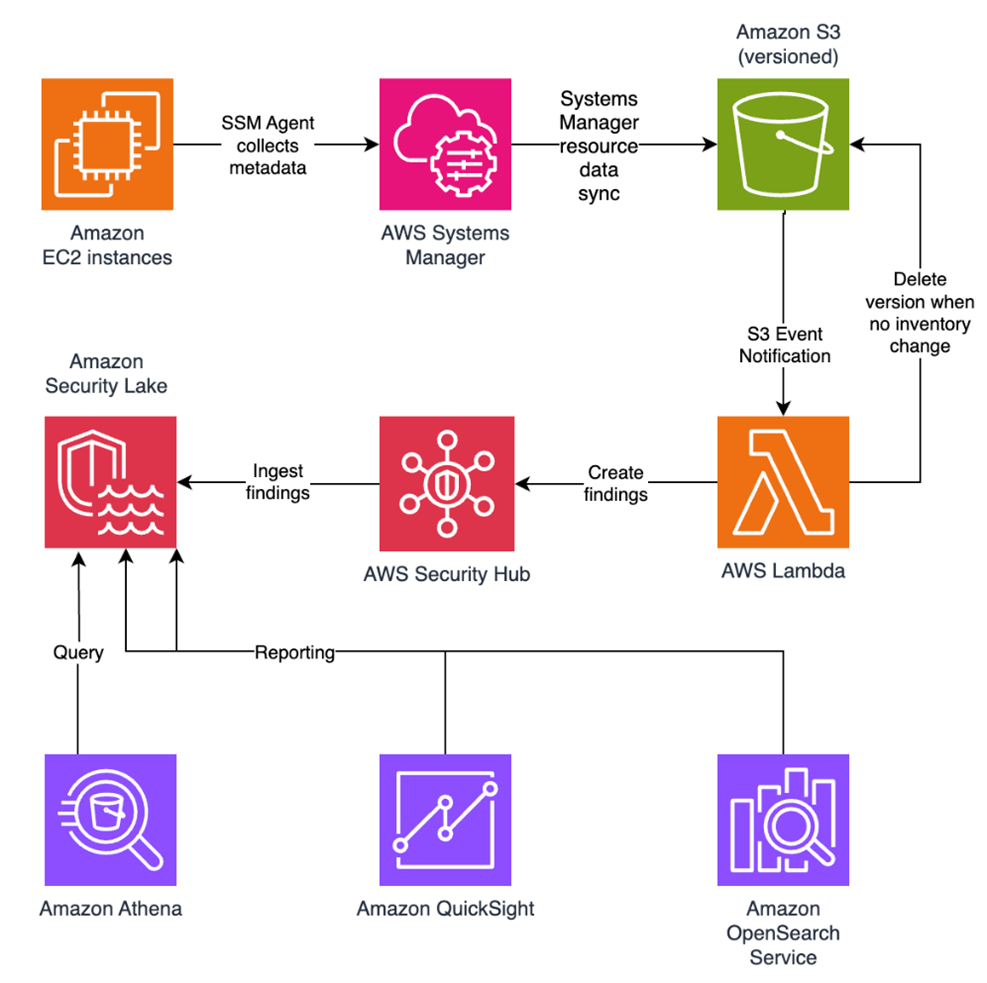
In this blog post, I walk you through a highly scalable serverless file integrity monitoring solution. It uses AWS Systems Manager Inventory to collect file metadata from Amazon EC2 instances. The metadata is sent through the Systems Manager Resource Data Sync feature to a versioned Amazon Simple Storage Service (Amazon S3) bucket, storing one inventory object for each EC2 instance. Each time a new object is created in Amazon S3, an Amazon S3 Event Notification triggers a custom AWS Lambda function. This Lambda function compares the latest inventory version with the previous one to detect file changes. If a file that isn’t expected to change has been created, modified, or deleted, the function creates an actionable finding in AWS Security Hub. Findings are then ingested by Amazon Security Lake in a standard OCSF format, which centralizes and normalizes the data. Finally, the data can be analyzed using Amazon Athena for one-time queries, or by building visual dashboards with Amazon QuickSight and Amazon OpenSearch Service. Figure 1 summarizes this flow:

Figure 1: File integrity monitoring workflow

Figure 1: File integrity monitoring workflow

This integration offers an alternative to the default AWS Config and Security Hub integration, which relies on limited data (for example, no file modification timestamps). The solution presented in this post provides control and flexibility to implement custom logic tailored to your operational needs and support security-related efforts.

This flexible solution can also be used with other Systems Manager Inventory metadata, such as installed applications, network configurations, or Windows registry entries, enabling custom detection logic across a wide range of operational and security use cases.

Now let’s build the file integrity monitoring solution.

Prerequisites

Before you get started, you need an AWS account with permissions to create and manage AWS resources such as Amazon EC2, AWS Systems Manager, Amazon S3, and Lambda.

Step 1: Start an EC2 instance

Start by launching an EC2 instance and creating a file that you will later modify to simulate an unauthorized change.

Create an AWS Identity and Access Management (IAM) role to allow the EC2 instance to communicate with Systems Manager:

  1. Open the AWS Management Console and go to IAM, choose Roles from the navigation pane, and then choose Create role.
  2. Under Trusted entity type, select AWS service, select EC2 as the use case, and choose Next.
  3. On the Add permissions page, search for and select the AmazonSSMManagedInstanceCore IAM policy, then choose Next.
  4. Enter SSMAccessRole as the role name and choose Create role.
  5. The new SSMAccessRole should now appear in your list of IAM roles:
Figure 2: Create an IAM role for communication with Systems Manager

Figure 2: Create an IAM role for communication with Systems Manager

Start an EC2 instance:

  1. Open the Amazon EC2 console and choose Launch Instance.
  2. Enter a Name, keep the default Linux Amazon Machine Image (AMI), and select an Instance type (for example, t3.micro).
  3. Under Advanced details:
    1. IAM instance profile, select the previously created SSMAccessRole
    2. Create a fictitious payment application configuration file in the /etc/paymentapp/ folder on the EC2 instance. Later, you will modify it to demonstrate a file-change event for integrity monitoring. To create this file during EC2 startup, copy and paste the following script into User data.
#!/bin/bash
mkdir -p /etc/paymentapp
echo "db_password=initial123" > /etc/paymentapp/config.yaml
Figure 3: Adding the application configuration file

Figure 3: Adding the application configuration file

  1. Leave the remaining settings as default, choose Proceed without key pair, and then select Launch Instance. A key pair isn’t required for this demo because you use Session Manager for access.

Step 2: Enable Security Hub and Security Lake

If Security Hub and Security Lake are already enabled, you can skip to Step 3.
To start, enable Security Hub, which collects and aggregates security findings. AWS Security Hub CSPM adds continuous monitoring and automated checks against best practices.

  1. Open the Security Hub console.
  2. Choose Security Hub CSPM from the navigation pane and then select Enable AWS Security Hub CSPM and choose Enable Security Hub CSPM at the bottom of the page.

Note: For this demo, you don’t need the Security standards options and can clear them.

Figure 4: Enable Security Hub CSP

Figure 4: Enable Security Hub CSP

Next, activate Security Lake to start collecting actionable findings from Security Hub:

  1. Open the Amazon Security Lake console and choose Get Started.
  2. Under Data sources, select Ingest specific AWS sources.
  3. Under Log and event sources, select Security Hub (you will use this only for this demo):
Figure 5: Select log and event sources

Figure 5: Select log and event sources

  1. Under Select Regions, choose Specific Regions and make sure you select the AWS Region that you’re using.
  2. Use the default option to Create and use a new service role.
  3. Choose Next and Next again, then choose Create.

Step 3: Configure Systems Manager Inventory and sync to Amazon S3

With Security Hub and Security Lake enabled, the next step is to enable Systems Manager Inventory to collect file metadata and configure a Resource Data Sync to export this data to S3 for analysis.

  1. Create an S3 bucket by carefully following the instructions in the section To create and configure an Amazon S3 bucket for resource data sync.
  2. After you created the bucket, enable versioning in the Amazon S3 console by opening the bucket’s Properties tab, choosing Edit under Bucket Versioning, selecting Enable, and saving your changes. Versioning causes each new inventory snapshot to be saved as a separate version, so that you can track file changes over time.

Note: In production, enable S3 server access logging on the inventory bucket to keep an audit trail of access requests, enforce HTTPS-only access, and enable CloudTrail data events for S3 to record who accessed or modified inventory files.

The next step is to enable Systems Manager Inventory and set up the resource data sync:

  1. In the Systems Manager console, go to Fleet Manager, choose Account management, and select Set up inventory.
  2. Keep the default values but deselect every inventory type except File. Set a Path to limit collection to the files relevant for this demo and your security requirements. Under File, set the Path to: /etc/paymentapp/.
Figure 6: Set the parameters and path

Figure 6: Set the parameters and path

  1. Choose Setup Inventory.
  2. In Fleet Manager, choose Account management and select Resource Data Syncs.
  3. Choose Create resource data sync, enter a Sync name, and enter the name of the versioned S3 bucket you created earlier.
  4. Select This Region and then choose Create.

Step 4: Implement the Lambda function

Next, complete the setup to detect changes and create findings. Each time Systems Manager Inventory writes a new object to Amazon S3, an S3 Event Notification triggers a Lambda function that compares the latest and previous object versions. If it finds created, modified, or deleted files, it creates a security finding. To accomplish this, you will create the Lambda function, set its environment variables, add the helper layer, and attach the required permissions.

The following is an example finding generated in AWS Security Finding Format (ASFF) and sent to Security Hub. In this example, you see a notification about a file change on the EC2 instance listed under the Resources section.

{
	...
"Id": "fim-i-0b8f40f4de065deba-2025-07-12T13:48:31.741Z",
	"AwsAccountId": "XXXXXXXXXXXX",
	"Types": [
		"Software and Configuration Checks/File Integrity Monitoring"
	],
	"Severity": {
		"Label": "MEDIUM"
	},
	"Title": "File changes detected via SSM Inventory",
	"Description": "0 created, 1 modified, 0 deleted file(s) on instance i-0b8f40f4de065deba",
	"Resources": [
		{
			"Type": "AwsEc2Instance",
			"Id": "i-0b8f40f4de065deba"
		}
	],
	...
}

Create the Lambda function

This function detects file changes, reports findings, and removes unused Amazon S3 object versions to reduce costs.

  1. Open the Lambda console and choose Create function in the navigation pane.
  2. For Function Name enter fim-change-detector.
  3. Select Author from scratch, enter a function name, select the latest Python runtime, and choose Create function.
  4. On the Code tab, paste the following main function and choose Deploy.
import boto3, os, json, re
from datetime import datetime, UTC
from urllib.parse import unquote_plus
from helpers import is_critical, load_file_metadata, is_modified, extract_instance_id

s3 = boto3.client('s3')
securityhub = boto3.client('securityhub')

CRITICAL_FILE_PATTERNS = os.environ["CRITICAL_FILE_PATTERNS"].split(",")
SEVERITY_LABEL = os.environ["SEVERITY_LABEL"]
	
def lambda_handler(event, context):
	# Safe event handling
	if "Records" not in event or not event["Records"]:
		return

	# Extract S3 event
	record = event['Records'][0]
	bucket = record['s3']['bucket']['name']
	key = unquote_plus(record['s3']['object']['key'])
	current_version = record['s3']['object'].get('versionId')
	if not current_version:
		return

	# Fetching the region name
	account_id = context.invoked_function_arn.split(":")[4]
	region = boto3.session.Session().region_name

	# Get object versions (latest first)
	versions = s3.list_object_versions(Bucket=bucket, Prefix=key).get('Versions', [])
	versions = sorted(versions, key=lambda v: v['LastModified'], reverse=True)

	# Find previous version
	idx = next((i for i,v in enumerate(versions) if v["VersionId"] == current_version), None)
	if idx is None or idx + 1 >= len(versions):
		return
	prev_version = versions[idx+1]["VersionId"]

	# Load both versions
	current = load_file_metadata(bucket, key, current_version)
	previous = load_file_metadata(bucket, key, prev_version)

	# Compare
	created = {p for p in set(current) - set(previous) if is_critical(p)}
	deleted = {p for p in set(previous) - set(current) if is_critical(p)}
	modified = {p for p in set(current) & set(previous) if is_critical(p) and is_modified(p, current, previous)}

	# Report if changes were found
	if created or deleted or modified:
		instance_id = extract_instance_id(bucket, key, current_version)
		now = datetime.now(UTC).isoformat(timespec='milliseconds').replace('+00:00', 'Z')
		finding = {
			"SchemaVersion": "2018-10-08",
			"Id": f"fim-{instance_id}-{now}",
			"ProductArn": f"arn:aws:securityhub:{region}:{account_id}:product/{account_id}/default",
			"AwsAccountId": account_id,
			"GeneratorId": "ssm-inventory-fim",
			"CreatedAt": now,
			"UpdatedAt": now,
			"Types": ["Software and Configuration Checks/File Integrity Monitoring"],
			"Severity": {"Label": SEVERITY_LABEL},
			"Title": "File changes detected via SSM Inventory",
			"Description": (
				f"{len(created)} created, {len(modified)} modified, "
				f"{len(deleted)} deleted file(s) on instance {instance_id}"
			),
			"Resources": [{"Type": "AwsEc2Instance", "Id": instance_id}]
		}
		securityhub.batch_import_findings(Findings=[finding])

	# No change – delete older S3 version
	else:
		if prev_version != current_version:
			try:
				s3.delete_object(Bucket=bucket, Key=key, VersionId=prev_version)
			except Exception as e:
				print(f"Delete previous S3 object version failed: {e}")

Note: In production, set Lambda reserved concurrency to prevent unbounded scaling, configure a dead letter queue (DLQ) to capture failed invocations, and optionally attach the function to an Amazon VPC for network isolation.

Configure environment variables

Configure the two required environment variables in the Lambda console. These two variables (one for critical paths to monitor and one for security finding severity) must be set or the function will fail.

  1. Open the Lambda console and choose Configuration and then select Environment variables.
  2. Choose Edit and then choose Add environment variable.
  3. Under Key, choose CRITICAL_FILE_PATTERNS
    1. Enter ^/etc/paymentapp/config.*$ as the value.
    2. Set the SEVERITY_LABEL to MEDIUM.
Figure 7: CRITICAL_FILE_PATTERNS and SEVERITY_LABEL configuration

Figure 7: CRITICAL_FILE_PATTERNS and SEVERITY_LABEL configuration

Set up permissions

The next step is to attach permissions to the Lambda function

  1. In your Lambda function, choose Configuration and then select Permissions.
  2. Under Execution role, select the role name that will lead to the role in IAM.
  3. Choose Add permissions and select Create inline policy. Select JSON view.
  4. Paste the following policy, and make sure to replace <bucket-name> with the name of your S3 bucket, and you also update <region> and <account-id> with your AWS Region and Account ID:
{
"Version": "2012-10-17",
"Statement": [
	{
		"Effect": "Allow",
		"Action": "securityhub:BatchImportFindings",
		"Resource": "arn:aws:securityhub:<region>:<account-id>:product/<account-id>/default"
	},
	{
		"Effect": "Allow",
		"Action": [
			"s3:GetObject",
			"s3:GetObjectVersion",
			"s3:ListBucketVersions",
			"s3:DeleteObjectVersion"
		],
		"Resource": [
			"arn:aws:s3:::<bucket-name>",
			"arn:aws:s3:::<bucket-name>/*"
			]
		}
	]
}
  1. To finalize, enter a Policy name and choose Create policy.

Add functions to the Lambda layer

For better modularity, add some helper functions to a Lambda layer. These functions are already referenced in the import section of the preceding Lambda function’s Python code. The helper functions check critical paths, load file metadata, compare modification times, and extract the EC2 instance ID.

Open AWS CloudShell from the top-right corner of the AWS console header, then copy and paste the following script and press Enter. It creates the helper layer and attaches it to your Lambda function.

#!/bin/bash
set -e
FUNCTION_NAME="fim-change-detector"
LAYER_NAME="fim-change-detector-layer"

mkdir -p python
cat > python/helpers.py << 'EOF'
import json, re, os
from dateutil.parser import parse as parse_dt
import boto3
s3 = boto3.client('s3')
CRITICAL_FILE_PATTERNS = os.environ.get("CRITICAL_FILE_PATTERNS", "").split(",")

def is_critical(path):
	return any(re.match(p.strip(), path) for p in CRITICAL_FILE_PATTERNS if p.strip())

def load_file_metadata(bucket, key, version_id):
	obj = s3.get_object(Bucket=bucket, Key=key, VersionId=version_id)
	data = {}
	for line in obj['Body'].read().decode().splitlines():
		if line.strip():
			i = json.loads(line)
			n, d, m = i.get("Name","").strip(), i.get("InstalledDir","").strip(), i.get("ModificationTime","").strip()
			if n and d and m: data[f"{d.rstrip('/')}/{n}"] = m
	return data

def is_modified(path, current, previous):
	try: return parse_dt(current[path]) != parse_dt(previous[path])
	except: return current[path] != previous[path]

def extract_instance_id(bucket, key, version_id):
	obj = s3.get_object(Bucket=bucket, Key=key, VersionId=version_id)
	for line in obj['Body'].read().decode().splitlines():
		if line.strip():
			r = json.loads(line)
			if "resourceId" in r: return r["resourceId"]
	return None
EOF

zip -r helpers_layer.zip python >/dev/null
LAYER_VERSION_ARN=$(aws lambda publish-layer-version \
	--layer-name "$LAYER_NAME" \
	--description "Helper functions for File Integrity Monitoring" \
	--zip-file fileb://helpers_layer.zip \
	--compatible-runtimes python3.13 \
	--query 'LayerVersionArn' \
	--output text)

aws lambda update-function-configuration \
	--function-name "$FUNCTION_NAME" \
	--layers "$LAYER_VERSION_ARN" >/dev/null
echo "Layer created and attached to the Lambda function."

Step 5: Set up S3 Event Notifications

Finally, set up S3 Event Notifications to trigger the Lambda function when new inventory data arrives.

  1. Open the S3 console and select the Systems Manager Inventory bucket that you created.
  2. Choose Properties and select Event notifications.
  3. Choose Create event notification.
    1. Enter an Event name.
    2. In the Prefix field, enter AWS%3AFile/ to limit Lambda triggers to file inventory objects only.
      Note: The prefix contains a : character, which must be URL-encoded as %3A.
    3. Under Event types, select Put.
    4. At the bottom, select your newly created Lambda function, and choose Save changes.

In this example, inventory collection runs every 30 minutes (48 times each day) but can be adjusted based on security requirements to optimize costs. The Lambda function is triggered once for each instance whenever a new inventory object is created. You can further reduce event volume by filtering EC2 instances through S3 Event Notification prefixes, enabling focused monitoring of high-value instances.

Step 6: Test the file change detection flow

Now that the EC2 instance is running and the sample configuration file /etc/paymentapp/config.yaml has been initialized, you’re ready to simulate an unauthorized change to test the file integrity monitoring setup.

  1. Open the Systems Manager console.
  2. Go to Session Manager and choose Start session.
  3. Select your EC2 instance and choose Start Session.
  4. Run the following command to modify the file:

echo β€œdb_password=hacked456" | sudo tee /etc/paymentapp/config.yaml

This simulates a configuration tampering event. During the next Systems Manager Inventory run, the updated metadata will be saved to Amazon S3.

To manually trigger this:

  1. Open the Systems Manager console and choose State Manager.
  2. Select your association and choose Apply association now to start the inventory update.
  3. After the association status changes to Success, check your SSM Inventory S3 bucket in the AWS:File folder and review the inventory object and its versions.
  4. Open the Security Hub console and choose Findings. After a short delay, you should see a new finding like the one shown in Figure 8:
Figure 8: View file change findings

Figure 8: View file change findings

Step 7: Query and visualize findings

While Security Hub provides a centralized view of findings, you can deepen your analysis using Amazon Athena to run SQL queries directly on the normalized Security Lake data in Amazon S3. This data follows the Open Cybersecurity Schema Framework (OCSF), which is a vendor-neutral standard that simplifies integration and analysis of security data across different tools and services.

The following is an example Athena query:

SELECT
	finding_info.desc AS description,
	class_uid AS class_id,
	severity AS severity_label,
	type_name AS finding_type,
	time_dt AS event_time,
	region,
	accountid
FROM amazon_security_lake_table_us_east_1_sh_findings_2_0

Note: Be sure to adjust the FROM clause for other Regions. Security Lake processes findings before they appear in Athena, so expect a short delay between ingestion and data availability.
You will see a similar result for the preceding query, shown in Figure 9:

Figure 9: Athena query result in the Amazon Athena query editor

Figure 9: Athena query result in the Amazon Athena query editor

Security Lake classifies this finding as an OCSF 2004 Class, Detection Finding. You can explore the full schema definitions at OCSF Categories. For more query examples, see the Security Lake query examples.
For visual exploration and real-time insights, you can integrate Security Lake with OpenSearch Service and QuickSight, both of which now offer extensive generative AI support. For a guided walkthrough using QuickSight, see How to visualize Amazon Security Lake findings with Amazon QuickSight.

Clean up

After testing the step-by-step guide, make sure to clean up the resources you created for this post to avoid ongoing costs.

  1. Terminate the EC2 instance
  2. Delete the Resource Data Sync and Inventory Association
  3. Remove the Lambda function.
  4. Disable Security Lake and Security Hub CSPM
  5. Delete IAM roles created for this post
  6. Delete the associated SSM Resource Data Sync and Security Lake S3 buckets.

Conclusion

In this post, you learned how to use Systems Manager Inventory to track file integrity, report findings to Security Hub, and analyze them using Security Lake.
You can access the full sample code to set up this solution in the AWS Samples repository.
While this post uses a single-account, single-Region setup for simplicity, Security Lake supports collecting data across multiple accounts and Regions using AWS Organizations. You can also use a Systems Manager resource data sync to send inventory data to a central S3 bucket.

Getting Started with Amazon Security Lake and Systems Manager Inventory provides guidance for enabling scalable, cloud-centric monitoring with full operational context.

Adam Nemeth Adam Nemeth
Adam is a Senior Solutions Architect and generative AI enthusiast at AWS, helping financial services customers by embracing the Day 1 culture and customer obsession of Amazon. With over 24 years of IT experience, Adam previously worked at UBS as an architect and has also served as a delivery lead, consultant, and entrepreneur. He lives in Switzerland with his wife and their three children.
❌