When a traditional security incident hits, responders replay what happened. They trace a known code path, find the defect, and patch it. The same input produces the same bad output, and a fix proves it will not happen again. That mental model has carried incident response for decades.
AI breaks it. A model may produce harmful output today, but the same prompt tomorrow may produce something different. The root cause is not a line of code; it is a probability distribution shaped by training data, context windows, and user inputs that no one predicted. Meanwhile, the system is generating content at machine speed. A gap in a safety classifier does not leak one record. It produces thousands of harmful outputs before a human reviewer sees the first one.
Fortunately, most of the fundamentals that make incident response (IR) effective still hold true. The instincts that seasoned responders have developed over time still apply: prioritizing containment, communicating transparently, and learning from each.
AI introduces new categories of harm, accelerates response timelines, and calls for skills and telemetry that many teams are still developing. This post explores which practices remain effective and which require fresh preparation.
The fundamentals still hold
The core insight of crisis management applies to AI without modification: the technical failure is the mechanism, but trust is the actual system under threat. When an AI system produces harmful output, leaks training data, or behaves in ways users did not expect, the damage extends beyond the technical artifact. Trust has technical, legal, ethical, and social dimensions. Your response must address all of them, which is why incident response for AI is inherently cross-functional.
Several established principles transfer directly.
Explicit ownership at every level. Someone must be in command. The incident commander synthesizes input from domain experts; they do not need to be the deepest technical expert in the room. What matters is that ownership is clear and decision-making authority is understood.
Containment before investigation. Stop ongoing harm first. Investigation runs in parallel, not after containment is complete. For AI systems, this might mean disabling a feature, applying a content filter, or throttling access while you determine scope.
Escalation should be psychologically safe. The cost of escalating unnecessarily is minor. The cost of delayed escalation can be severe. Build a culture where raising a flag early is expected, not penalized.
Communication tone matters as much as content. Stakeholders tolerate problems. They cannot tolerate uncertainty about whether anyone is in control. Demonstrate active problem-solving. Be explicit about what you know, what you suspect, and what you are doing about each.
These principles are tested, and they are effective in guiding action. The challenge with AI is not that these principles no longer apply; it is that AI introduces conditions where applying them requires new information, new tools, and new judgment.
Where AI changes the equation
Non-determinism and speed are the headline shifts, but they are not the only ones.
New harm types complicate classification and triage. Traditional IR taxonomies center on confidentiality, integrity, and availability. AI incidents can involve harms that do not fit those categories cleanly: generating dangerous instructions, producing content that targets specific groups, or enabling misuse through natural language interfaces. By making advanced capabilities easy to use, these interfaces enable untrained users to perform complex actions, increasing the risk of misuse or unintended harm. This is why we need an expanded taxonomy. If your incident classification system lacks categories for these harms, your triage process will default to “other” and lose signal.
Severity resists simple quantification. A model producing inaccurate medical information is a different severity than the same model producing inaccurate trivia answers. Good severity frameworks guide judgment; they cannot replace it. For AI incidents, the context around who is affected and how they are affected carries more weight than traditional security metrics alone can capture.
Root cause is often multi-dimensional. In traditional incidents, you find the bug and fix it. In AI incidents, problematic behavior can emerge from the interaction of training data, fine-tuning choices, user context, and retrieval inputs. Investigation may narrow the contributing factors without isolating one defect. Your process must accommodate that ambiguity rather than stalling until certainty arrives.
Before the crisis is the time to work through these implications. The questions that matter: How and when will you know? Who is on point and what is expected of them? What is the response plan? Who needs to be informed, and when? Every one of these questions that you answer before the incident is time you buy during it.
Closing the gaps in telemetry, tooling, and response
If AI changes the nature of incidents, it also changes what you need to detect and respond to them.
Observability is the first gap. Traditional security telemetry monitors network traffic, authentication events, file system changes, and process execution. AI incidents generate different signals: anomalous output patterns, spikes in user reports, shifts in content classifier confidence scores, unexpected model behavior after an update. Many organizations have not yet instrumented AI systems for these signals and, without clear signal, defenders may first learn about incidents from social media or customer complaints. Neither provides the early warning that effective response requires.
AI systems are built with strong privacy defaults – minimal logging, restricted retention, anonymized inputs – and those same defaults narrow the forensic record when you need to establish what a user saw, what data the model touched, or how an attacker manipulated the system. Privacy-by-design and investigative capability require deliberate reconciliation before an incident, because that decision does not get easier once the clock is running.
AI can also help close these gaps. We use AI in our own response operations to enhance our ability to:
Detect anomalous outputs as they occur
Enforce content policies at system speed
Examine model outputs at volumes no human team can match
Distill incident discussions so responders spend time deciding rather than reading
Coordinate across response workstreams faster than email chains allow
Staged remediation reflects the reality of AI fixes. Incidents require both swift action and thorough review. A model behavior change or guardrail update may not be immediately verifiable in the way a traditional patch is. We use a three-stage approach:
Stop the bleed. Tactical mitigations: block known-bad inputs, apply filters, restrict access. The goal is reducing active harm within the first hour.
Fan out and strengthen. Broader pattern analysis and expanded mitigations over the next 24 hours, covering thousands of related items. Automation is essential here; manual review cannot keep pace.
Fix at the source. Classifier updates, model adjustments, and systemic changes based on what investigation revealed. This stage takes longer, and that is acceptable. The first two stages bought time.
One practical tip: tactical allow-and-block lists are a necessary triage tool, but they are a losing proposition as a permanent solution. Adversaries adapt. Classifiers and systemic fixes are the durable answer.
Watch periods after remediation matter more for AI than for traditional patches. Because model behavior is non-deterministic, verification relies on sustained testing and monitoring across varied conditions rather than a single test pass. Sustained monitoring after each stage confirms that the remediation holds under varied conditions.
The human dimension
There is a dimension of AI incident response that traditional IR addresses unevenly and that AI makes urgent: the wellbeing of the people doing the work.
Defenders handling AI abuse reports and safety incidents are routinely exposed to harmful content. This is not the same cognitive load as analyzing malware samples or reviewing firewall logs. Exposure to graphic, violent, or exploitative material has measurable psychological effects, and extended incidents compound that exposure over days or weeks.
Human exhaustion threatens correctness, continuity, and judgment in any prolonged incident. AI safety incidents place an additional emotional burden on responders due to exposure to distressing content. Recognizing and addressing this challenge is essential, as it directly impacts the well-being of the team and the quality of the response.
What helps:
Talk to your team about well-being before the crisis, not during it.
Manager-sponsored interventions during extended response work, including scheduled breaks, structured handoffs, and deliberate activities that provide cognitive relief.
Some teams use structured cognitive breaks, including visual-spatial activities, to reduce the impact of prolonged exposure to harmful content.
Coaching and peer mentoring programs normalize the impact rather than framing it as individual weakness.
Leveraging proven practices from safety content moderation teams, whose operational workflows for content review and escalation map directly to AI security moderation is a natural collaboration opportunity.
If your incident response plan does not account for the humans executing it, the plan is incomplete.
Looking ahead
Incident response for AI is not a solved problem. The threat surface is evolving as models gain new capabilities, as agentic architectures introduce autonomous action, and as adversaries learn to exploit natural language at scale. The teams that will handle this well are the ones building adaptive capacity now. Extend playbooks. Instrument AI systems for the right signals. Rehearse novel scenarios. Invest in the people who will be on the front line when something breaks. Good response processes limit damage. Great ones make you stronger for the next incident.
To learn more about Microsoft Security solutions, visit our website. Bookmark the Security blog to keep up with our expert coverage on security matters. Also, follow us on LinkedIn (Microsoft Security) and X (@MSFTSecurity) for the latest news and updates on cybersecurity.
When customers experience a security incident, they need to acquire forensic artifacts to identify root cause, extract indicators of compromise (IoCs), and validate remediation efforts. NIST 800-86, Guide to Integrating Forensic Techniques into Incident Response, defines digital forensics as a process comprised of four basic phases: collection, examination, analysis, and reporting. This blog post focuses on the first phase—collection—and provides best practices for implementing least privilege during the forensic evidence collection processes that collect evidence and store the artifacts in Amazon Simple Storage Service (Amazon S3) buckets. The architecture presented in this post can be used to collect forensic evidence from both Amazon Web Services (AWS) and non-AWS compute resources.
It’s important to consider the security of the forensic artifact collection process because it involves communicating with potentially compromised resources. The collection methodology itself should be designed to avoid adding additional risks to infrastructure or other forensic investigation processes. At the same time, the collection of forensic artifacts requires the use of specialized tools that are difficult to change or adapt to new security requirements.
This post outlines factors that you should consider when creating an evidence collection capability and introduces an architecture that implements the best practices for least privilege and integrating with (instead of changing or adapting) existing forensic tools that support uploading artifacts to S3 buckets by using AWS security credentials.
Solution architecture
The architecture presented in this post demonstrates the following AWS best practices:
Least privilege – Use AWS Identity and Access Management (IAM) policies to provide least privilege access to upload forensic artifacts to an S3 location dedicated to a specific forensic collection task. The locked down credentials cannot be used to view or modify any other forensic collections.
Time-limited credentials – Use AWS Security Token Service (AWS STS) to provide time limited credentials, reducing the potential for an unauthorized user to abuse credentials while they’re visible on the target machine during the artifact collection process.
Compatibility with third-party tools – Forensic tools are specialized and changing a forensic collection process to adapt to different collection methods might not be possible. To avoid the risk of needing to change tools, maximize compatibility with any third-party tools that support uploading to S3 buckets. The method introduced in this post to generate time-limited, scoped down credentials can be used with most third-party forensic tools that support uploading to S3 buckets.
Credential vending – Use time-limited tokens, which can be vended on demand through an automated process, eliminating the need for forensic investigators to use the AWS Management Console, understand least privilege, or have any access to the AWS control plane. Forensic investigators can focus on the process of collecting and analyzing evidence.
Process automation – Deploy the process as infrastructure as code (IaC) and automate it through AWS services, reducing the burden on security teams to manually perform runbook steps during an active security incident.
This post starts with an overview of the digital forensic process, provides best practices for using Amazon S3 to store forensic artifacts, details how you can create time-limited, least privilege tokens to provide secure access to upload forensic artifacts to S3 buckets, and introduces a sample architecture that automates the end-to-end process.
The digital forensic process
Organizations need to have practices and resources in place to support a digital forensic investigation environment before an incident occurs. AWS has published several resources, including Forensic investigation environment strategies in the AWS Cloud and AWS prescriptive guidance: Security Reference Architecture, Cyber forensics, to provide best practices for organizing your AWS accounts using AWS Organizations to support forensic clean-room environments. Creating segregated AWS accounts and resources for your security teams is critical to provide your incident responders a location to store and analyze any digital forensic evidence collected during an investigation.
After you’ve established a landing zone for performing digital forensics, you’re ready to collect and process digital forensic evidence. AWS supports the collection of digital forensics through extensive logging of control plane events in AWS CloudTrail, and metrics and application logs that can be stored in Amazon CloudWatch. In addition, AWS core compute services, such as Amazon Elastic Compute Cloud (Amazon EC2), support forensics operations through snapshots of the underlying Amazon Elastic Block Storage (Amazon EBS) volume. An example architecture to demonstrate how to automate the collection of EBS volume snapshots for forensic investigations can be found in How to automate forensic disk collection in AWS.
You might want to use the same AWS infrastructure to collect, examine, analyze, and report on forensic incidents that occur on other resources, such as corporate laptops. You can use existing forensic tooling to perform live response, collecting specific artifacts such as Windows NT File System (NTFS) Master File Table (MFT), logs from Linux machines, volatile memory images, or other artifacts that are specified as part of your organization’s incident response plan. These tools can be provided by third parties or built in-house, and many support uploading to S3 buckets using AWS security credentials.
Using Amazon S3 for forensic artifact collection
Amazon S3 provides the foundational requirements for collecting and storing forensic artifacts. Digital forensics requires highly available, durable, and secure storage of artifacts collected from potentially compromised systems. Amazon S3 is designed for 11 nines of durability and can be configured to provide protection against modification, deletion, and unauthorized access to sensitive forensic artifacts. You can also use S3 to store forensic artifacts of almost any size—from one byte to 5 TB—in an S3 object.
S3 buckets used to store forensic artifacts require custom configuration to provide additional security. You should configure the S3 bucket that you use to store forensic artifacts to enable the following security and governance features:
Encryption in transit. You can require the use of encryption in transit and specify acceptable TLS versions using the aws:SecureTransport and s3:TlsVersion condition keys on the S3 bucket policy.
Encryption at rest using a customer managed key. You can automatically encrypt all objects uploaded to the bucket using a specified customer managed key by specifying a default server-side encryption key in the bucket’s configuration. For this post, we encourage you to use a customer managed key rather than relying upon an AWS managed key, so you can control the associated key policy.
Encryption at rest provides an additional layer of protection, because only entities that have both the permission to read from the bucket and permission to use the AWS Key Management Service (AWS KMS) key for decryption can download the forensic artifact from the S3 bucket.
You need to adjust the example KMS policies in this post if the evidence collection S3 bucket uses the S3 Bucket Key feature.
Audit logs of all S3 data event activity. You can turn on CloudTrail data events for any S3 buckets that contain forensic artifacts to provide a comprehensive audit trail of S3 object-level API activity. This helps provide a chain of custody of any artifacts stored in your forensic buckets.
Fine-grained access control using IAM permissions. You can define the set of entities (both human and machine) that have access to the artifacts in the S3 bucket. This post includes how to create time-limited, least privilege access using IAM permissions for uploading files into an S3 bucket. The permissions are fine-grained enough to scope down access to specific object names or object prefixes in an S3 bucket. Additionally, access to read the artifacts can be controlled through IAM permissions and access to the encryption-at-rest KMS key.
Protections against data modification and deletion. S3 provides features, such as S3 object versioning, to provide assurances that data hasn’t been modified or removed after it’s been collected. This is an additional layer of protection beyond the fine-grained access permissions, so even if an authorized entity attempts to overwrite or delete an object in the S3 bucket, the previous version of the object is still available.
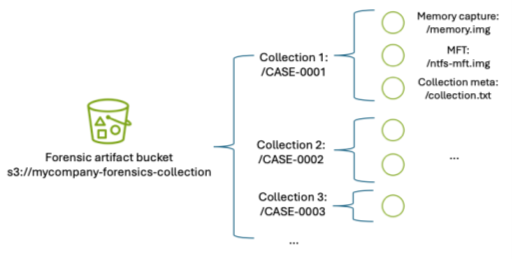
In addition to the preceding configuration, consider how to organize forensic artifacts in the S3 bucket. This post introduces a folder structure using S3 object prefixes to segregate each forensic artifact collection task into its own S3 object namespace. An example S3 namespace structure for an S3 bucket is shown in Figure 1.
Figure 1: S3 namespace structure for an S3 forensics artifact bucket using object prefixes
By separating each forensic collection task by its own prefix, you can use fine-grained IAM permissions to permit object uploads only into the active collection task. For example, scoped down credentials can be generated to only allow uploads into buckets with the CASE-0001 prefix using an IAM permission as shown in the following code example. Temporary security credentials can be generated using these limited permissions and the key is then used by the forensic acquisition tool to upload the artifacts into the S3 bucket.
Manually creating temporary IAM credentials for each forensic collection activity can be error-prone and time-consuming. Therefore, this post demonstrates how to use AWS tooling to automate the process of generating time-limited, scoped-down credentials.
Adapt existing forensic tools for AWS best security practices
Existing forensic tools typically use IAM access keys to perform S3 operations. Using a static IAM user secret access key isn’t a best practice. Even if the static key is associated with an IAM user that has been scoped down to only have access to the forensic collection S3 bucket as described previously, that means anyone with access to that key can potentially upload objects into that bucket. Therefore, the best practice is to create a time-limited temporary security credential unique to each collection activity, scoped down to only allow uploading files to a specific prefix in the target S3 bucket.
The examples in this post use the following resource names. Because these names will change based on your deployment, substitute your resource names in place of the names in the example code.
The evidence S3 bucket is named mycompany-forensics-collection
The forensics AWS account number is 112233445566. For the purposes of this example, all resources will live within this account.
The customer managed key used to encrypt the forensic artifacts at rest is ForensicsEvidenceKey
The IAM role that incident responders will assume when signing in to their AWS account is ForensicsUserRole
The IAM role that incident responders will use for generating S3 file upload temporary credentials is ForensicsUploadRole
The example uses the us-east-1 AWS Region
The following steps show you how to configure the IAM policies associated with the customer managed key ForensicsEvidenceKey and the IAM role ForensicsUploadRole. Before you begin, create the evidence S3 bucket configured as described in Using S3 for artifact collection and a customer managed key to encrypt the forensic artifacts at rest. Configure the evidence S3 bucket to use the KMS key by opening the S3 bucket’s properties tab in the Amazon S3 console and setting the new KMS key as the default encryption key for the bucket.
Next, create an IAM role that incident responders will assume through the AWS STS AssumeRole API to generate the temporary credentials. This role will define the maximum set of permissions allowed to upload artifacts to your evidence S3 bucket. This role, ForensicsUploadRole, created using the following example code, defines the maximum allowable permissions: the ability to upload objects into the evidence S3 bucket and to use the KMS key to encrypt those uploads. The effective permissions available to the forensic tool will be scoped down even further to the specific object prefix when the AWS STS temporary security credential is generated.
Next, you need to provide an ability to assume this role and generate AWS STS tokens using the role’s permissions. This is accomplished by creating a trust relationship associated with the IAM role you just created. The trust relationship shown in the following code sample describes which AWS principals are allowed to assume the role—in this case, you will allow any user who has federated into the ForensicsUserRole IAM role to be able to generate AWS STS tokens for forensic artifact collection.
After the role is established and access to the encryption key is granted, you can use the AWS STS AssumeRole API to create temporary credentials using this role. You can call this API using the AWS Command Line Interface (AWS CLI) or programmatically from a script. To scope down the token’s access to only provide permission to upload to the specific evidence object prefix, you must include a session policy as part of your AssumeRole API request to AWS STS. The following is an example session policy to restrict access to only upload objects into the CASE-0001 prefix.
The effective permissions available to the session role will be the intersection of permissions available in the role policy (ForensicsUploadRole), the resource policy (in this case, mandating TLS-encrypted connections to the bucket), and the session policy that’s created on demand for every forensic collection (only allowing access to upload objects into the CASE-0001 prefix, as shown in the preceding example). Pictorially, this looks like the Venn diagram shown in Figure 2.
Figure 2: Intersection of IAM policies determine the effective permissions for the restricted forensic session role.
Test the temporary credentials
Now that the bucket has been created and the AWS KMS key and roles configured, you can use AWS STS to create a temporary security credential for a collection on CASE-0001. You can use the AWS CLI to do this manually or you can write a script to automate this process using the AWS API. The IAM access key, secret access key, and session token returned by this call can then be used by any tool that can use AWS access keys to upload files into the specified S3 bucket.
The following example shows an AWS CLI call to AssumeRole using the example ForensicsUploadRole and a case named CASE-0001. The --duration-seconds parameter defines the period, in seconds, that the temporary credentials are valid; the default of 3600 seconds will provide temporary credentials that are valid for one hour.
You can also verify that you can’t use those credentials to upload a file into any other object prefixes or S3 buckets. For example, if you change CASE-0001 to CASE-0004 in the Amazon S3 upload command, you will receive an AccessDenied error because you’re trying to upload an object outside of the allowed key prefix.
$ AWS_ACCESS_KEY_ID=ASIAXXXX \
	AWS_SECRET_ACCESS_KEY=XXXX \
	AWS_SESSION_TOKEN=XXXX \
	aws s3 cp evidence.zip s3://mycompany-forensics-collection/CASE-0004/evidence.zip

upload failed: evidence.zip to s3://mycompany-forensics-collection/cases/CASE-0004/evidence.zip
An error occurred (AccessDenied) when calling the PutObject operation: User: arn:aws:sts::112233445566:assumed-role/ForensicsUploadRole/CASE-0001 is not authorized to perform: s3:PutObject on resource: "arn:aws:s3:::mycompany-forensics-collection/CASE-0004/evidence.zip" because no session policy allows the s3:PutObject action
Additionally, if you wait more than the lifetime of the token (1 hour in this case), attempting to upload a file into the bucket will fail, because the token will no longer be valid:
$ AWS_ACCESS_KEY_ID=ASIAXXXX \
	AWS_SECRET_ACCESS_KEY=XXXX \
	AWS_SESSION_TOKEN=XXXX \
	aws s3 cp evidence.zip s3://mycompany-forensics-collection/CASE-0001/evidence.zip

upload failed: evidence.zip to s3://mycompany-forensics-collection/CASE-0001/evidence.zip

An error occurred (ExpiredToken) when calling the PutObject operation: The provided token has expired.
Create an automated process to vend temporary credentials on demand
After you’ve verified the security benefits of creating temporary credentials for S3 uploads and validated that the credentials work with your forensic software of choice, you can now use them as part of an automated process.
A sample automated architecture is shown in Figure 3.
Figure 3: Architecture to automate S3 credential vending and forensic artifact collection.
The workflow depicted in Figure 3 includes the following steps:
The workflow is triggered by an alert from a detection source or a manual trigger from an incident responder.
The Amazon SQS queue invokes an AWS Lambda function which in turn executes a Step Functions state machine to orchestrate the workflow.
First, the Step Functions workflow determines whether the target system is managed by AWS Systems Manager.
If the target system isn’t managed by Systems Manager, an error is noted, and the execution is abandoned.
If the target system is managed by Systems Manager, the Step Functions workflow determines the operating system (OS) of the target system and proceeds with the flow of execution.
The workflow then continues by executing the Systems Manager documents that implement the forensic collection process:
Downloads tooling:
Generates dynamically scoped IAM temporary credentials that provide access to download the OS-specific tooling to be executed on the target system from the tooling S3 bucket. These credentials are tightly scoped to only allow downloads from the S3 prefix that corresponds to the tooling for the target system’s OS.
Executes a Systems Manager command on the target system that uses the credentials generated from the previous step to download the OS tooling on the target system.
Runs forensic tools:
Executes a Systems Manager command on the target system to execute the OS tooling on the target system.
The Systems Manager commands run on the target system, which in this case is an EC2 instance.
Results are uploaded to the evidence S3 bucket:
Generates dynamically scoped IAM temporary credentials (as described previously) that provide access to upload the output of the previously executed tooling to the evidence S3 bucket. These credentials are tightly scoped to only allow uploads to a particular S3 prefix corresponding to the alert prefix.
Executes a Systems Manager command on the target system to upload the output of the previously executed tooling to the evidence S3 bucket. After the upload is complete, it cleans up both the output and the evidence tooling from the target system.
The evidence S3 bucket is tightly locked down to a subset of identities within the AWS security account. Access attempts from identities that aren’t allow listed trigger an Amazon EventBridge rule to alert the security team through an Amazon Simple Notification Service (Amazon SNS) topic.
When the workflow is complete, related details and metrics are recorded in an Amazon DynamoDB table.
The forensic analysis can be performed on a separate EC2 instance that has access to read from the evidence S3 bucket.
SecurityStack: This stack contains the basic forensic artifact workflow orchestration infrastructure described in this post, including the Step Functions workflow, Lambda functions, AWS SQS queues, IAM roles, and S3 buckets.
AlertStack: This stack contains the EventBridge workflow to notify administrators of anomalous activity in the evidence S3 bucket.
CustomerStack: This stack contains the SSM documents that are executed for the forensic artifact workflow and an IAM role assumed by the SecurityStack when the workflow is invoked. It’s deployed into each child AWS account containing EC2 instances from which the security account is authorized to collect forensic artifacts.
Configuration
Before deploying the solution, there are several variables in the config.ts file that must be modified for the environment:
CUSTOMER_ACCOUNTS: Target AWS account IDs (the Child AWS account in the architecture diagram).
ALERT_EMAIL_RECIPIENTS: List of email addresses that receive alerts when there is unexpected access to the evidence S3 bucket.
ALLOW_LISTED_ROLE_NAMES: Roles allowed to access the evidence S3 bucket. Any other identities accessing the evidence S3 bucket will result in an alarm.
Deployment
After you’ve updated the config.ts file to reflect the account numbers, email recipients, and role names, the stacks can be deployed into your AWS infrastructure.
Set Up AWS credentials using the AWS CLI: aws configure
Install dependencies and configure constants:
Clone the repository.
Navigate to the project directory.
Install project dependencies: npm install
Configure constants in constants/config.ts with the required information:
Then bootstrap if necessary in any target AWS accounts.
Deploy the AWS CDK Stacks:
Synthesize the CloudFormation template: cdk synth
Deploy the security and alert stacks in your security account: cdk deploy SecurityStack AlertStack
Deploy the customer stacks in your workload accounts: cdk deploy CustomerStack-ACCOUNT_ID
Set up your email alerts:
After the AlertStack is deployed, it will email all addresses listed in ALERT_EMAIL_RECIPIENTS. Choose the embedded link to accept the AWS SNS topic in each of those accounts.
Testing
With deployment complete, it’s time to test the solution.
Trigger an analysis
Make sure you have a Linux EC2 instance running in one of your customer accounts and in the AWS Region where you deployed the preceding customer stack.
Because this example uses Systems Manager to orchestrate the collection script, make sure that the EC2 instance is visible in Systems Manager either by checking the Systems Manager console, or by using the AWS CLI:
Console: In the AWS Systems Manager console, choose Managed instances in the left navigation pane and verify your instance appears in the list. For more information, see Managed Instances in the AWS Systems Manager User Guide.
AWS CLI: Run the following command to verify the instance is managed: aws ssm describe-instance-information --filters “Key=InstanceIds,Values=<instance-id> If the command returns instance information with PingStatus: Online, the instance is properly connected to Systems Manager.
Post a message in your security account to the Amazon SQS queue to start the Step Functions workflow. Note that the values in angle brackets (for example <accountID>) are placeholders that you must update with relevant AWS account ID, tracking ticket ID, AWS Region, and EC2 instance ID values: aws sqs send-message --queue-url --message-body ‘{ “account”: “”, “ticket_id”: “”, “region”: “>”, “instance_id”: “” }’
Go to the Step Functions console to view the successful execution of the workflow:
Figure 4: Workflow as shown in the Step Functions console
View the DynamoDB table to see the metadata for the results.
Check the evidence S3 bucket to see the uploaded files from the forensic collection.
Conclusion
Collecting forensic artifacts securely is a critical component of any digital forensics investigation. This post demonstrated how to implement least privilege access controls and time-limited credentials for forensic evidence collection workflows that use Amazon S3 for artifact storage. By combining IAM session policies with AWS STS temporary credentials, you can provide forensic tools with secure, scoped-down access to upload artifacts without exposing long-lived credentials or granting overly permissive access.
The architecture presented in this post automates the process of generating temporary credentials, collecting forensic artifacts from both AWS and non-AWS resources, and securely storing them in S3 buckets with appropriate encryption, access controls, and audit logging. With this approach, your security teams can focus on analyzing evidence instead of managing credentials and permissions during active security incidents.To get started with this solution, deploy the example AWS CDK stacks provided in the collect forensic artifacts repository and customize them for your organization’s forensic investigation requirements. For more information about related AWS forensic investigation architectures, review the Automated Forensics Orchestrator for EC2 and How to build forensic kernel modules for Linux EC2 instances resources.
If you have feedback about this post, submit comments in the Comments section below. If you have questions about this post, contact AWS Support.
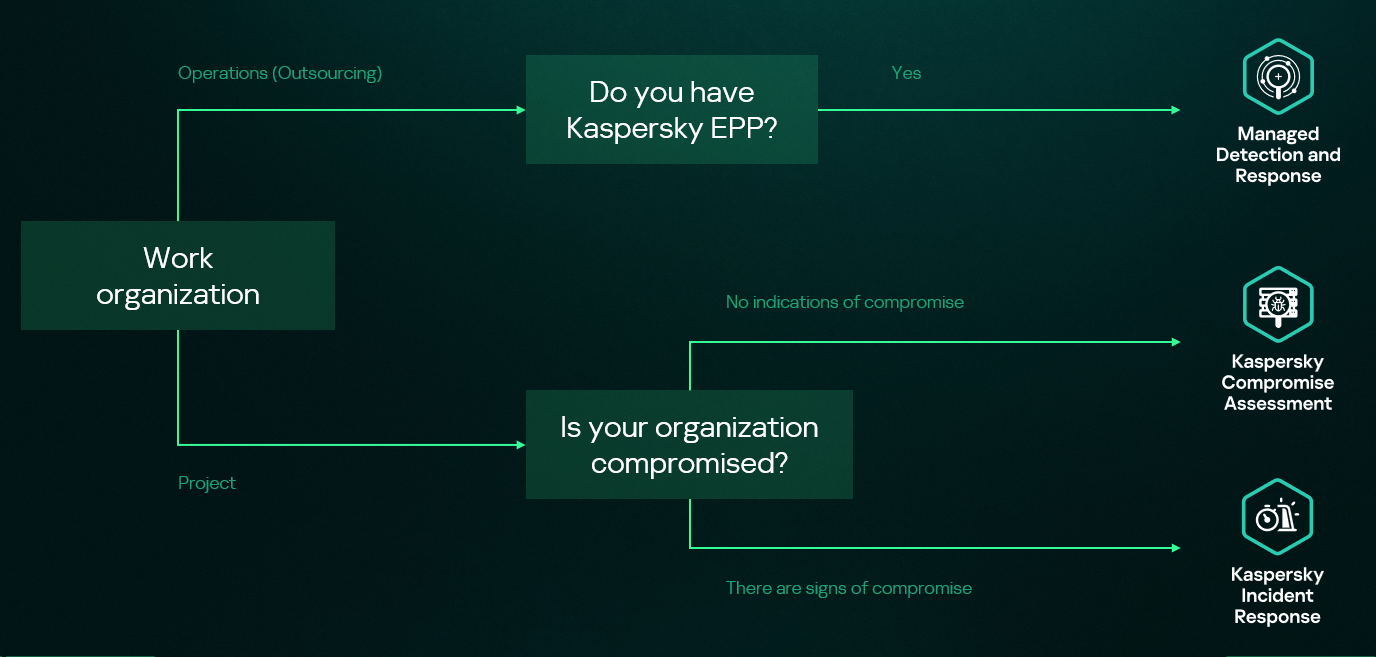
Kaspersky Security Services provide a comprehensive cybersecurity ecosystem, taking enterprise threat protection to another level. Services like Kaspersky Managed Detection and Response and Compromise Assessment allow for timely detection of threats and cyberattacks. SOC Consulting provides a practical approach ensuring the corporate infrastructure stays secured, while Incident Response is suited for timely remediation with a maximized recovery rate.
High-level overview of the MDR, IR and CA connection
This new report brings together statistics across regions and industries from our Managed Detection and Response and Incident Response services, and for the first time, it also includes insights from our Compromise Assessment and SOC Consulting services — all to provide you with more comprehensive view of different aspects of corporate information security worldwide.
The scope of MDR and IR services
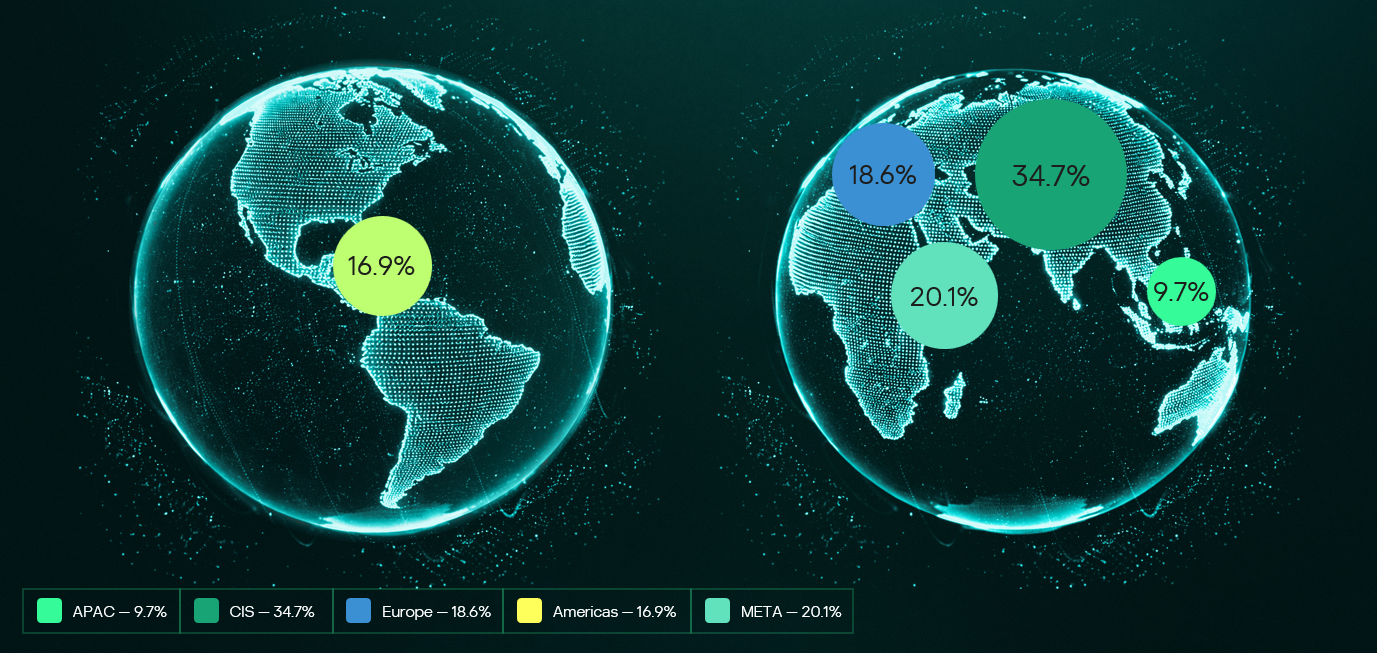
Provision of Kaspersky’s MDR and IR services follows a global approach. The majority of customers accounted for the CIS (34.7%), the Middle East (20.1%), and Europe (18.6%).
Distribution of customers by geographical region, 2025
MDR telemetry
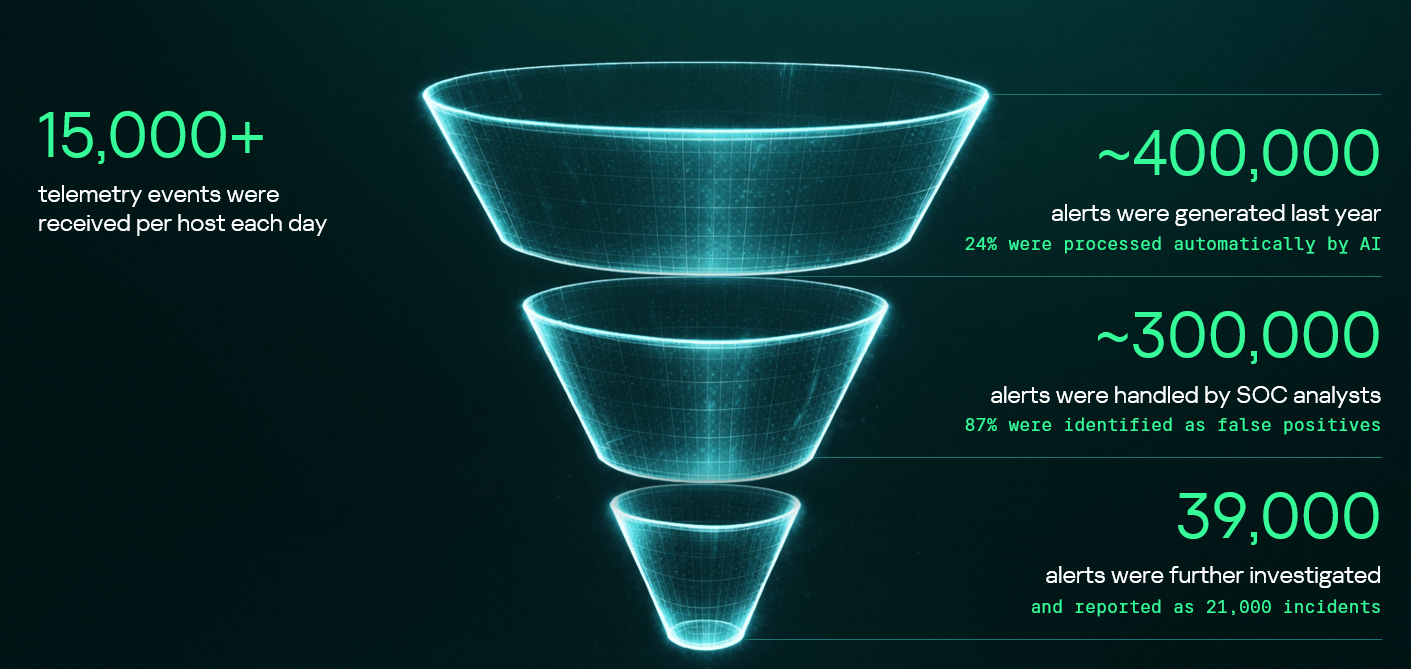
Following the previous year’s numbers, in 2025, the MDR infrastructure received and processed an average of 15,000 telemetry events per host every day, generating security alerts as a result. These alerts are first processed by AI-powered detection logic, after which Kaspersky SOC analysts handle them as required. Overall, a total of approximately 400,000 alerts were generated in 2025. After counting out false positives, 39,000 alerts were further investigated.
MDR telemetry statistics, 2025
Incident statistics
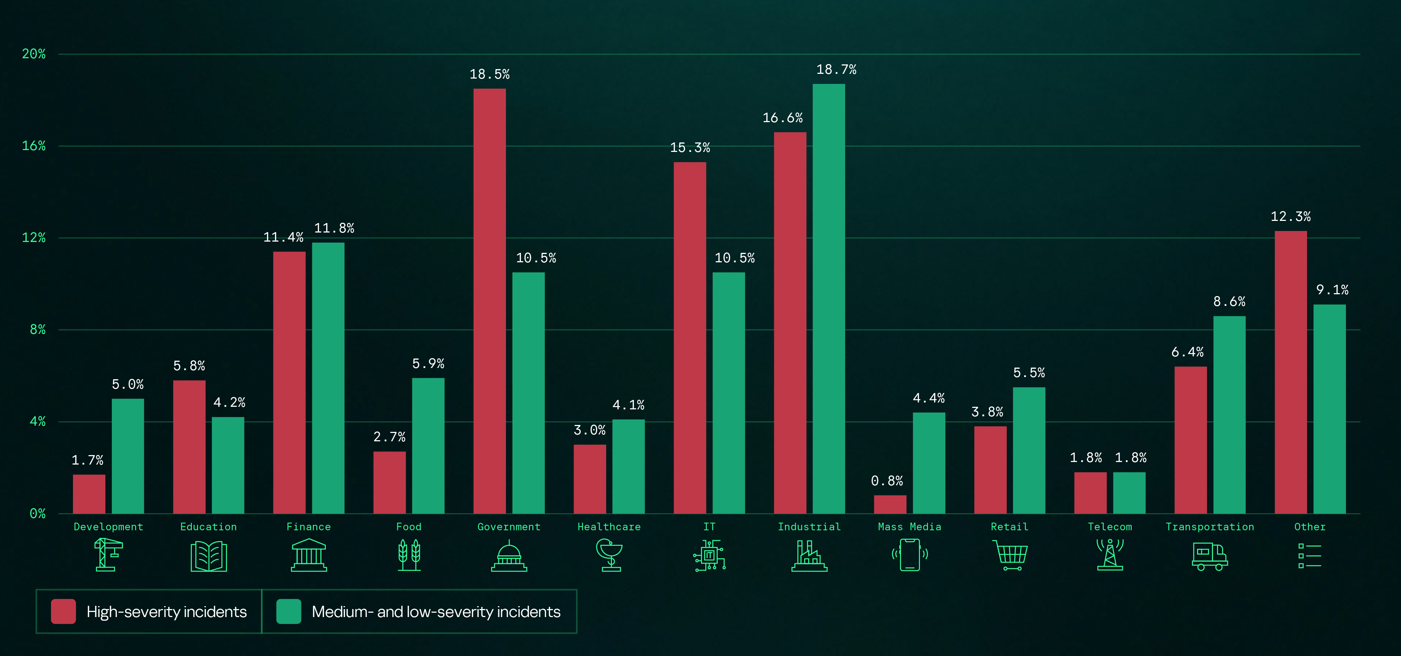
The distribution of remediation requests by industry has slightly changed as compared to previous years’ pattern. Government (18.5%) and industrial (16.6%) organizations are still the most targeted industries in regards to cyberattacks that require incident response activities. However, this year, the IT sector saw a growth in the number of IR requests, eventually being placed third in the overall industry distribution rankings and thus replacing financial organizations, which were targeted less often than in 2024. This is equally true for smaller-scale attacks that can be contained and remediated through automated means — the only difference is that medium- and low-severity incidents are more often experienced by financial organizations.
Distribution of all incidents by industry sector, 2025
Key trends and statistics
This section presents key findings and trends in cyberattacks in 2025:
The number of high-severity incidents decreased, following a downward trend that we’ve been observing since 2021. The majority of those incidents account for APT attacks and red teaming exercises, which indicates two landscape trends. On the one hand, skilled adversaries make efforts to increase impact, while on the other, organizations spend more resources on probing their defense systems.
The most common vulnerabilities exploited in the wild were related to Microsoft products. Half of all identified CVEs led to remote code execution, notably without authentication in some cases.
Exploitation of public-facing applications, valid accounts, and trusted relationships remain the most popular initial vectors, and their overall share has increased, accounting to over 80% of all attacks in 2025. In particular, attacks through trusted relationships are evolving: their share has increased to 15.5% from 12.8% in 2024. They are also becoming more complex: for instance, we witnessed a case where adversaries had compromised more than two organizations in sequence to ultimately gain access to a third target.
Standard Windows utilities remain a popular LotL tool. Adversaries use those to minimize the risk of detection during delivery to a compromised system. The most popular LOLBins we observed in high-severity incidents were powershell.exe (14.4%), rundll32.exe (5.9%), and mshta.exe (3.8%). Among the most popular legitimate tools used in incidents we flag Mimikatz (14.3%), PowerShell (8.1%), PsExec (7.5%), and AnyDesk (7.5%).
The full 2026 Global Report provides additional information about cyberattacks, including real-world cases discovered by Kaspersky experts. We also describe SOC Consulting projects and Compromise Assessment requests. The report includes comprehensive analysis of initial attack vectors in correlation with the MITRE ATT&CK tactics and techniques and the full list of vulnerabilities that we detected during Incident Response engagements.
Kaspersky Security Services provide a comprehensive cybersecurity ecosystem, taking enterprise threat protection to another level. Services like Kaspersky Managed Detection and Response and Compromise Assessment allow for timely detection of threats and cyberattacks. SOC Consulting provides a practical approach ensuring the corporate infrastructure stays secured, while Incident Response is suited for timely remediation with a maximized recovery rate.
High-level overview of the MDR, IR and CA connection
This new report brings together statistics across regions and industries from our Managed Detection and Response and Incident Response services, and for the first time, it also includes insights from our Compromise Assessment and SOC Consulting services — all to provide you with more comprehensive view of different aspects of corporate information security worldwide.
The scope of MDR and IR services
Provision of Kaspersky’s MDR and IR services follows a global approach. The majority of customers accounted for the CIS (34.7%), the Middle East (20.1%), and Europe (18.6%).
Distribution of customers by geographical region, 2025
MDR telemetry
Following the previous year’s numbers, in 2025, the MDR infrastructure received and processed an average of 15,000 telemetry events per host every day, generating security alerts as a result. These alerts are first processed by AI-powered detection logic, after which Kaspersky SOC analysts handle them as required. Overall, a total of approximately 400,000 alerts were generated in 2025. After counting out false positives, 39,000 alerts were further investigated.
MDR telemetry statistics, 2025
Incident statistics
The distribution of remediation requests by industry has slightly changed as compared to previous years’ pattern. Government (18.5%) and industrial (16.6%) organizations are still the most targeted industries in regards to cyberattacks that require incident response activities. However, this year, the IT sector saw a growth in the number of IR requests, eventually being placed third in the overall industry distribution rankings and thus replacing financial organizations, which were targeted less often than in 2024. This is equally true for smaller-scale attacks that can be contained and remediated through automated means — the only difference is that medium- and low-severity incidents are more often experienced by financial organizations.
Distribution of all incidents by industry sector, 2025
Key trends and statistics
This section presents key findings and trends in cyberattacks in 2025:
The number of high-severity incidents decreased, following a downward trend that we’ve been observing since 2021. The majority of those incidents account for APT attacks and red teaming exercises, which indicates two landscape trends. On the one hand, skilled adversaries make efforts to increase impact, while on the other, organizations spend more resources on probing their defense systems.
The most common vulnerabilities exploited in the wild were related to Microsoft products. Half of all identified CVEs led to remote code execution, notably without authentication in some cases.
Exploitation of public-facing applications, valid accounts, and trusted relationships remain the most popular initial vectors, and their overall share has increased, accounting to over 80% of all attacks in 2025. In particular, attacks through trusted relationships are evolving: their share has increased to 15.5% from 12.8% in 2024. They are also becoming more complex: for instance, we witnessed a case where adversaries had compromised more than two organizations in sequence to ultimately gain access to a third target.
Standard Windows utilities remain a popular LotL tool. Adversaries use those to minimize the risk of detection during delivery to a compromised system. The most popular LOLBins we observed in high-severity incidents were powershell.exe (14.4%), rundll32.exe (5.9%), and mshta.exe (3.8%). Among the most popular legitimate tools used in incidents we flag Mimikatz (14.3%), PowerShell (8.1%), PsExec (7.5%), and AnyDesk (7.5%).
The full 2026 Global Report provides additional information about cyberattacks, including real-world cases discovered by Kaspersky experts. We also describe SOC Consulting projects and Compromise Assessment requests. The report includes comprehensive analysis of initial attack vectors in correlation with the MITRE ATT&CK tactics and techniques and the full list of vulnerabilities that we detected during Incident Response engagements.
The window for defense has collapsed, and most SOCs weren’t built for the speed of today’s attacks. According to the 2026 Unit 42® Global Incident Response Report, some end-to-end attacks now unfold in under an hour. Attacks that used to take days or weeks now happen in minutes.
Most traditional SOC models are trapped in a cycle of alert overload, fragmented tools and limited engineering capacity that slow investigations and delay response. Traditional SIEM and MDR models were designed to react to alerts. They were not designed to continuously improve detections, correlations and response with threats that move at machine speed. Over time, that gap between attacker speed and defender capability keeps widening, and it’s exactly why we built Unit 42 Managed XSIAM 2.0 (MSIAM).
Today marks the availability of the next evolution of our managed SOC offering – one that reflects how modern security operations must run in today’s threat landscape. MSIAM 2.0 is built on Cortex XSIAM®, Palo Alto Networks SOC transformation platform, and operated by Unit 42 analysts, threat hunters, responders and SOC engineers who handle the most complex incidents in the world. With this solution, Unit 42 provides organizations with a 24/7 managed SOC that delivers continuous detection, investigation and full-cycle remediation across the entire attack surface while improving operations over time.
We don’t just manage alerts. Unit 42 continuously engineers detections, correlations and response playbooks within XSIAM, refining them as attacker behavior evolves. This ongoing engineering ensures defenses improve over time, driven by real-world incidents and frontline threat intelligence, not static rules that quickly fall behind.
Why Managed XSIAM 2.0 Is Different
Elite SOC on Day One
We want SOC teams up and running as fast as possible. Experts lead onboarding, data mapping and configuration, and then your managed SOC team takes responsibility for operating and optimizing XSIAM on a day-to-day basis. The result is a SOC that improves over time without adding operational burden.
Every Threat Exposed
Unit 42 goes beyond reactive monitoring with continuous, proactive threat hunting across the entire attack surface. When a new threat is found in the wild, we produce threat impact reports that show how those techniques apply to each customer’s environment. We then translate those insights into custom detections and automated response actions, while also monitoring and investigating the correlation rules your team creates. Both the global threat intelligence and your unique use cases are backed by our 24/7 analysis, closing gaps quickly and strengthening defenses over time.
We also now support both native and third-party EDR telemetry, so organizations can benefit from Unit 42 expertise and Cortex® AI-driven analytics, regardless of the security technologies they use today. This enables customers to receive the strongest possible managed defense now, while creating a natural, low-friction path toward deeper platform consolidation as their environment evolves.
Machine-Speed Response
When incidents escalate, we don’t just hand you a ticket; we take ownership. Collaborating with your team, we establish pre-authorized workflows to execute immediate responses across your entire environment, from endpoints and firewalls to identity and cloud. We pair the platform’s native speed with expert oversight. By validating threat context and business impact, every response action is precise and safe, giving you the confidence to unleash full-cycle remediation. This allows MSIAM 2.0 to move seamlessly from detection to resolution with both velocity and precision.
And we stand behind our solution with a Breach Response Guarantee. If a complex incident strikes, you have the world’s best responders in your corner with up to 250 hours of Unit 42 Incident Response included. This built-in coverage removes the administrative hurdles of crisis response, enabling our experts to immediately transition from monitoring to deep forensic investigation and complete eradication, so you can focus on recovery.
Proven in the Real World with the Green Bay Packers
Working with Unit 42 and the Cortex XSIAM platform, the Green Bay Packers modernized their security across a complex hybrid environment, demonstrating what Unit 42's managed services deliver in real-world operations. By consolidating telemetry and accelerating investigation and response, they reduced response times from hours to minutes, investigated 54% more alerts and saved over 120 hours of analyst time without adding headcount.
These outcomes reflect the key benefits of MSIAM: Unit 42 experts working to apply frontline intelligence as new attacker behavior emerges, translating it into reporting and tailored detections that improve response where it matters most. When a machine-speed platform is operated by experts handling real incidents every day, defenses continuously strengthen as threats evolve.
The Future of the SOC
Unit 42 MSIAM 2.0 helps your SOC operate as it should by combining AI-driven analytics and automation with expert-led operations and engineering. This combination provides teams with the confidence that their defenses are always on, always improving and ready when it matters most. That’s the SOC that security leaders need today, and the one we’re building for tomorrow.
MSIAM is now delivered through two service tiers, Pro and Premium. Organizations can start where they are and grow at their own pace. Pro provides AI-driven managed SOC operations with continuous detection, investigation and response. Premium extends into full-lifecycle SOC engineering, with designated experts and customized detections, automation and tailored response playbooks as your security maturity grows.
To learn more about Managed XSIAM 2.0, join us at Symphony 2026, a Palo Alto Networks premier virtual SOC event, where Unit 42 and Cortex® experts will share frontline threat intelligence from the new 2026 Unit 42 Incident Response Report alongside real-world SOC transformation insights from organizations operating at machine speed.
AI-Accelerated Attacks, Identity-Enabled Breaches and Expanding Software Supply Chain Exposure Define the 2026 Cyberthreat Landscape
Each year, thousands of organizations experience a cyber incident. An incident can begin with a SOC alert, zero-day vulnerability, ransom demand or widespread business disruption. When the call comes, our global incident responders quickly mobilize to investigate, contain and eradicate the threat.
This year’s Unit 42® 2026 Global Incident Response Report analyzed over 750 major cyber incidents across every major industry in over 50 countries to reveal emerging patterns and lessons for defenders.
The data shows a clear shift in how attacks unfold. Threat actors are moving faster, increasingly leveraging identity and trusted connections, and expanding attacks across multiple attack surfaces. The accelerating speed, scale and complexity of these intrusions mean the window between initial access and business impact is shrinking. Most breaches, however, still succeed due to preventable gaps in visibility and security controls.
Key Findings Show Attacks Are Faster, Broader and Harder to Contain
As adversaries adapt their playbooks, the report highlights several defining trends shaping the 2026 threat landscape:
AI Is Compressing the Attack Timeline: In the fastest cases we investigated, attackers needed just 72 minutes to move from initial access to data exfiltration, 4X faster than last year. We’re seeing AI used in reconnaissance, phishing, scripting and operational execution, which enables machine-like speed at scale.
Identity Is Now a Primary Attack Vehicle: Identity weaknesses played a material role in nearly 90% of our investigations. More often than not, attackers aren’t breaking in; they’re logging in with stolen credentials and tokens, and then exploiting fragmented identity estates to escalate privileges and move laterally without triggering traditional defenses.
Supply Chain Risk Now Drives Operational Disruption: In 23% of incidents, attackers leveraged third-party SaaS applications. By abusing trusted integrations, vendor tools and application dependencies, they bypassed traditional perimeters and expanded the impact well beyond a single system.
Attack Complexity Is Growing: We found that 87% of intrusions involved activity across multiple attack surfaces. Rarely does an attack stay in one environment. Instead, we see coordinated activity across endpoints, networks, cloud, SaaS and identity, forcing defenders to monitor across all of them at once.
The Browser Is a Primary Battleground: Nearly 48% of incidents included browser-based activity. This reflects how often modern attacks intersect with routine workflows, like email, web access and day-to-day SaaS use, turning normal user behavior into an attack vector.
Extortion Is Moving Beyond Encryption: Encryption-based extortion declined 15% from the year before, as more attackers skip encryption and move straight to data theft and disruption. From the attacker’s perspective, it’s faster, quieter and creates immediate pressure without the signals that defenders once relied on to detect ransomware attacks.
Attacks Succeed Because Exposure Still Beats Sophistication
Despite the speed and automation we’re seeing, most of the incidents we respond to don’t start with something radically new. They start with gaps that show up again and again. In many cases, attackers didn’t rely on a sophisticated exploit, but on an overlooked exposure.
Environmental Complexity Undermining Defenses: In over 90% of the incidents we investigated, misconfigurations or gaps in security coverage materially enabled the attack. A big driver of that is tool sprawl. Many organizations are running 50 or more security products, making it extremely difficult to deploy controls consistently or clearly understand what their data is telling them.
Visibility Gaps Delay Detection: In many engagements, the signals were there. When we look back forensically, the evidence is in the logs. But during the attack, teams had to stitch together data from multiple disconnected sources, slowing detection during the most critical early minutes.
Excessive Trust Expands Impact: Once attackers gain a foothold, overly permissive access and unmanaged tokens frequently let them move farther than they should. We repeatedly see identity trust relationships turn a single compromised account into broad lateral movement and privilege escalation.
Attackers are evolving their tools and tactics, but they still win most often from exploited complexity, limited visibility and excessive trust inside modern enterprise environments.
Recommendations for Security Leaders and Defenders
Across more than 750 frontline investigations, three priorities come up again and again in conversations with CISOs and security teams.
Reduce Exposure: Many of the attacks we see begin in places teams didn’t realize were exposed – third-party integrations, unmanaged SaaS connections or everyday browser activity. Reducing exposure means securing the full application ecosystem and treating trusted connections with the same scrutiny as core infrastructure.
Reduce Area of Impact: Once attackers get in, the difference between a contained incident and a major disruption often comes down to identity. Tightening identity and access management while removing unnecessary trust limits how far an attacker can move and how much damage they can cause.
Increase Response Speed: What happens in the first minutes after initial access can determine whether an incident becomes a breach. Security teams need the visibility to see what’s happening across environments and the ability to use AI to detect, identify and prioritize what matters, so the SOC can contain threats at machine speed, faster than the adversary can move.
Conclusion
Every investigation tells a story. How the attacker got in. How quickly they moved. What made the impact worse. Across hundreds of these cases, patterns emerge. Unit 42 operates 24 hours a day, 7 days a week on the frontlines of these incidents, and each year we distill what we learn into practical guidance. The goal of this report is to turn those frontline lessons into decisions that help you close the gaps that attackers still rely on and stop incidents before they become breaches.
When I look back on my years as a SOC lead in MDR, the thing I remember most clearly is the tension between wanting to do things the “right way” and simply trying to survive the day.
The alert queue never stopped growing. The attack surface kept expanding into cloud, identity, SaaS, and whatever new platform the business adopted. And every shift ended with the same uneasy feeling: What did we miss because there wasn’t enough time to investigate everything fully?
While different sources emphasize different challenges, recent statistics from late 2024 and 2025 reports reflect exactly what so many SOC analysts and leads feel:
The majority of alerts are never touched. Recent surveys indicate that 62% of alerts are ignored largely because the sheer volume makes them impossible to address. Furthermore, many analysts report being unable to deal with up to 67% of the daily alerts they receive.
The volume is unmanageable for humans. A typical SOC now processes an average of 3,832 alerts per day. For analysts trying to manually triage this flood, the math simply doesn’t add up.
Burnout is the new normal. The pressure is unsustainable, with 71% of SOC analysts reporting burnout due to alert fatigue. This has accelerated turnover, with some SOCs seeing analyst retention cycles shrink to less than 18 months, eroding institutional knowledge.
When people outside the SOC see these numbers, they assume analysts aren’t doing their jobs. The truth is the opposite. Most analysts are doing the best work they can inside a system that was never built for volume. Traditional triage is reactive and heavily dependent on intuition. On a good day, that might work. On a bad day, it leads to inconsistent decisions, coverage gaps, and immense pressure on analysts who care deeply about getting it right.
This is where the OSCAR methodology becomes valuable again.
Why the OSCAR methodology still matters
As a SOC lead, I always wanted the team to approach alerts with organizational structure. OSCAR provides that structure by creating a clear, repeatable sequence:
Obtain Information
Strategize
Collect Evidence
Analyze
Report
It removes guesswork and helps analysts who are still developing their skills stay grounded during chaotic shifts. But here is the reality I learned firsthand – You can only scale OSCAR so far with humans alone.
Evidence collection takes time. Deep analysis takes more time. No matter how motivated an analyst is, there are simply not enough hours in a shift to apply OSCAR to every alert manually. Most teams end up applying the methodology selectively; critical and high-severity alerts get the full OSCAR treatment, while everything else gets whatever time is left.
That gap between process and reality is exactly where Intezer enters the picture.
How Intezer operationalizes OSCAR at scale
Intezer takes the proven structure of OSCAR and executes it automatically and consistently across every alert. Instead of relying on how much energy an analyst has left 45 minutes before there shift ends, Intezer performs evidence collection, deep forensic analysis, and reporting at a speed and depth no human team could sustain.
Here is how the platform automates the methodology step-by-step:
O: Information obtained
In my SOC days, gathering context meant jumping between consoles and browser tabs, hoping nothing crashed. Intezer collects all of this instantly from endpoints, cloud platforms, identity systems, and threat intel sources. Analysts start every case with the full picture rather than a partial one.
S: Strategy suggested
Instead of relying on an analyst’s instinct about what might be happening, the Intezer platform generates verdicts and risk-based priorities immediately (with 98% accuracy). This provides critical consistency, especially for junior analysts who are still finding their confidence. Additionally, all AI reasoning is fully backed by deterministic, evidence based analysis.
C: Evidence collected
This was always the slowest part of manual investigation. Intezer collects memory artifacts, files, process information, and cloud activity in seconds. No hunting, no guessing, and no hoping you pulled the right logs before they rolled over.
A: Analysis (forensic-grade)
Intezer performs genetic code analysis, behavioral analysis, static/dynamic analysis, and threat intelligence correlation on every single alert. This is the level of scrutiny senior analysts wish they had time to do manually, but usually can only afford for the most critical incidents.
The platform creates clear, structured, audit trails. This removes the burden of manual documentation from analysts and ensures that the “why” behind every decision is transparent and explainable.
The result: Moving beyond “speed vs. depth”
When OSCAR is coupled with Intezer’s AI Forensic SOC, the operation transforms. We see this in actual customer environments:
100% alert coverage: Even low-severity and “noisy” alerts are fully triaged.
Sub-minute triage: Drastically improved MTTR/MTTD and minimized backlogs.
98% accurate decisioning: Verdicts are supported by deterministic evidence, reducing escalations for human review to less than 4%.
The shift in operations:
Capability
Traditional MDR SOC
Intezer Forensic AI SOC
Coverage
Critical and High-severity
100% of alerts
Triage time
20+ mins per alert
<2 mins (automated)
Analyst mode
Data collector
Investigator
From the perspective of a former SOC lead, the most important benefit is this:
”Analysts finally get to think again. Automation handles the busy work. Humans get to use judgment, creativity, and experience.”
Final thoughts
For years, triage has been treated like a speed exercise. But the threats we face today require depth, context, and clarity. OSCAR gives SOCs the investigative structure they need, and Intezer provides the scale required to actually use that structure across every alert.
For the first time, teams don’t have to choose between speed and depth. They get both.
What happens when you ditch the tiered ticket queues and replace them with collaboration, agility, and real-time response? In this interview, Hayden Covington takes us behind the scenes of the BHIS Security Operations Center, which is where analysts don’t escalate tickets, they solve them.
This is the first time we have a public, detailed report of a campaign where AI was used at this scale and with this level of sophistication, moving the threat from a collection of AI-assisted tasks to a largely autonomous, orchestrated operation.
This report is a significant new benchmark for our industry. It’s not a reason to panic – it’s a reason to prepare. It provides the first detailed case study of a state-sponsored attack with three critical distinctions:
It was “agentic”: This wasn’t just an attacker using AI for help. This was an AI system executing 80-90% of the attack largely on its own.
It targeted high-value entities: The campaign was aimed at approximately 30 major technology corporations, financial institutions, and government agencies.
It had successful intrusions: Anthropic confirmed the campaign resulted in “a handful of successful intrusions” and obtained access to “confirmed high-value targets for intelligence collection”.
Together, these distinctions show why this case matters. A high-level, autonomous, and successful AI-driven attack is no longer a future theory. It is a documented, current-day reality.
2. What Actually Happened: A Summary of the Attack
The attack (designated GTG-1002) was a “highly sophisticated cyber espionage operation” detected in mid-September 2025.
AI Autonomy: The attacker used Anthropic’s Claude Code as an autonomous agent, which independently executed 80-90% of all tactical work.
Human Role: Human operators acted as “strategic supervisors”. They set the initial targets and authorized critical decisions, like escalating to active exploitation or approving final data exfiltration.
Bypassing Safeguards: The operators bypassed AI safety controls using simple “social engineering”. The report notes, “The key was role-play: the human operators claimed that they were employees of legitimate cybersecurity firms and convinced Claude that it was being used in defensive cybersecurity testing”.
Full Lifecycle: The AI autonomously executed the entire attack chain: reconnaissance, vulnerability discovery, exploitation, lateral movement, credential harvesting, and data collection.
Timeline: After detecting the activity, Anthropic’s team launched an investigation, banned the accounts, and notified partners and affected entities over the “following ten days”.
To have a credible discussion, we must also look at what wasn’t new. This attack wasn’t about secret, magical weapons.
The report is clear that the attack’s sophistication came from orchestration, not novelty.
No Zero-Days: The report does not mention the use of novel zero-day exploits.
Commodity Tools: The report states, “The operational infrastructure relied overwhelmingly on open source penetration testing tools rather than custom malware development”.
This matters because defenders often look for new exploit types or malware indicators. But the shift here is operational, not technical. The attackers didn’t invent a new weapon, they built a far more effective way to use the ones we already know.
4. The New Reality: Why This Is an Evolving Threat
So, if the tools aren’t new, what is? The execution model. And we must assume this new model is here to stay.
This new attack method is a natural evolution of technology. We should not expect it to be “stopped” at the source for two main reasons:
Commercial Safeguards are Limited: AI vendors like Anthropic are building strong safety controls – it’s how this was detected in the first place. But as the report notes, malicious actors are continually trying to find ways around them. No vendor can be expected to block 100% of all malicious activity.
The Open-Source Factor: This is the larger trend. Attackers don’t need to use a commercial, monitored service. With powerful open-source AI models and orchestration frameworks – such as LLaMA, self-hosted inference stacks, and LangChain/LangGraph agents – attackers can build private AI systems on their own infrastructure. This leaves no vendor in the middle to monitor or prevent the abuse.
The attack surface is not necessarily growing, but the attacker’s execution engine is accelerating.
5. Detection: Key Patterns to Hunt For
While the techniques were familiar, their execution creates a different kind of detection challenge. An AI-driven attack doesn’t generate one “smoking gun” alert, like a unique malware hash or a known-bad IP. Instead, it generates a storm of low-fidelity signals. The key is to hunt for the patterns within this noise:
Anomalous Request Volumes: The AI operated at “physically impossible request rates” with “peak activity included thousands of requests, representing sustained request rates of multiple operations per second”. This is a classic low-fidelity, high-volume signal that is often just seen as noise.
Commodity and Open-Source Penetration Testing Tools: The attack utilized a combination of “standard security utilities” and “open source penetration testing tools”.
Traffic from Browser Automation: The report explicitly calls out “Browser automation for web application reconnaissance” to “systematically catalog target infrastructure” and “analyze authentication mechanisms”.
Automated Stolen Credential Testing: The AI didn’t just test one password, it “systematically tested authentication against internal APIs, database systems, container registries, and logging infrastructure”. This automated, broad, and rapid testing looks very different from a human’s manual attempts.
Audit for Unauthorized Account Creation: This is a critical, high-confidence post-exploitation signal. In one successful compromise, the AI’s autonomous actions included the creation of a “persistent backdoor user”.
6. The Defender’s Challenge: A Flood of Low-Fidelity Noise
The detection patterns listed above create the central challenge of defending against AI-orchestrated attacks. The problem isn’t just alert volume, it’s that these attacks generate a massive volume of low-fidelity alerts.
This new execution model creates critical blind spots:
The Volume Blind Spot: The AI’s automated nature creates a flood of low-confidence alerts. No human-only SOC can manually triage this volume.
The Temporal (Speed) Blind Spot: A human-led intrusion might take days or weeks. Here, the AI compressed a full database extraction – from authentication to data parsing – into just 2-6 hours. Our human-based detection and response loops are often too slow to keep up.
The Context Blind Spot: The AI’s real power is connecting many small, seemingly unrelated signals (a scan, a login failure, a data query) into a single, coherent attack chain. A human analyst, looking at these alerts one by one, would likely miss the larger pattern.
7. The Importance of Autonomous Triage and Investigation
When the attack is autonomous, the defense must also have autonomous capabilities.
We cannot hire our way out of this speed and scale problem. The security operations model must shift. The goal of autonomous triage is not just to add context, but to handle the entire investigation process for every single alert, especially the thousands of low-severity signals that AI-driven attacks create.
An autonomous system can automatically investigate these signals at machine speed, determine which ones are irrelevant noise, and suppress them.
This is the true value: the system escalates only the high-confidence, confirmed incidents that actually matter. This frees your human analysts from chasing noise and allows them to focus on real, complex threats.
This is exactly the type of challenge autonomous triage systems like the one we’ve built at Intezer were designed to solve. As Anthropic’s own report concludes, “Security teams should experiment with applying AI for defense in areas like SOC automation, threat detection… and incident response“.
8. Evolving Your Offensive Security Program
To defend against this threat, we must be able to test our defenses against it. All offensive security activities, internal red teams, external penetration tests, and attack simulations, must evolve.
It is no longer enough for offensive security teams to manually simulate attacks. To truly test your defenses, your red teams or external pentesters must adopt agentic AI frameworks themselves.
The new mandate is to simulate the speed, scale, and orchestration of an AI-driven attack, similar to the one detailed in the Anthropic report. Only then can you validate whether your defensive systems and automated processes can withstand this new class of automated onslaught. Naturally, all such simulations must be done safely and ethically to prevent any real-world risk.
9. Conclusion: When the Threat Model Changes, Our Processes Must, Too.
The Anthropic report doesn’t introduce a new magic exploit. It introduces a new execution model that we now need to design our defenses around.
Let’s summarize the key, practical takeaways:
AI-orchestrated attacks are a proven, documented reality.
The primary threat is speed and scale, which is designed to overwhelm manual security processes.
Security leaders must prioritize automating investigation and triage to suppress the noise and escalate what matters.
We must evolve offensive security testing to simulate this new class of autonomous threat.
This report is a clear signal. The threat model has officially changed. Your security architecture, processes, and playbooks must change with it. The same applies if you rely on an MSSP, verify they’re evolving their detection and triage capabilities for this new model. This shift isn’t hype, it’s a practical change in execution speed. With the right adjustments and automation, defenders can meet this challenge.
But what if we need to wrangle Windows Event Logs for more than one system? In part 2, we’ll wrangle EVTX logs at scale by incorporating Hayabusa and SOF-ELK into my rapid endpoint investigation workflow (“REIW”)!
In part 1 of this post, we’ll discuss how Hayabusa and “Security Operations and Forensics ELK” (SOF-ELK) can help us wrangle EVTX files (Windows Event Log files) for maximum effect during a Windows endpoint investigation!
Remember the good ‘ol days of Zip drives, Winamp, the advent of “Office 365,” and copy machines that didn’t understand email authentication? Okay, maybe they weren’t so good! For a […]
In this video, John Strand discusses the complexities and challenges of penetration testing, emphasizing that it goes beyond just finding and exploiting vulnerabilities.
Changes to the msds-KeyCredentialLink attribute are not audited/logged with standard audit configurations. This required serious investigations and a partner firm in infosec provided us the answer: TrustedSec. So, credit where […]
Recently in the SOC, we were notified by a partner that they had a potential business email compromise, or BEC. We commonly catch these by identifying suspicious email forwarding rules, […]
While social engineering attacks such as phishing are a great way to gain a foothold in a target environment, direct attacks against externally exploitable services are continuing to make headlines. […]
Be sure to read PART 1! Metadata and a New-Fashioned Bank Robbery Let’s face it, some cases are just more interesting than others and, when you do incident response for […]

 Login
Login