
Normal view

[updated] A fake cloud storage alert that ends at Freecash

3 February 2026 at 11:38

Last week we talked about an app that promises users they can make money testing games, or even just by scrolling through TikTok.

Imagine our surprise when we ended up on a site promoting that same Freecash app while investigating a “cloud storage” phish. We’ve all probably seen one of those. They’re common enough and according to recent investigation by BleepingComputer, there’s a

“large-scale cloud storage subscription scam campaign targeting users worldwide with repeated emails falsely warning recipients that their photos, files, and accounts are about to be blocked or deleted due to an alleged payment failure.”

Based on the description in that article, the email we found appears to be part of this campaign.

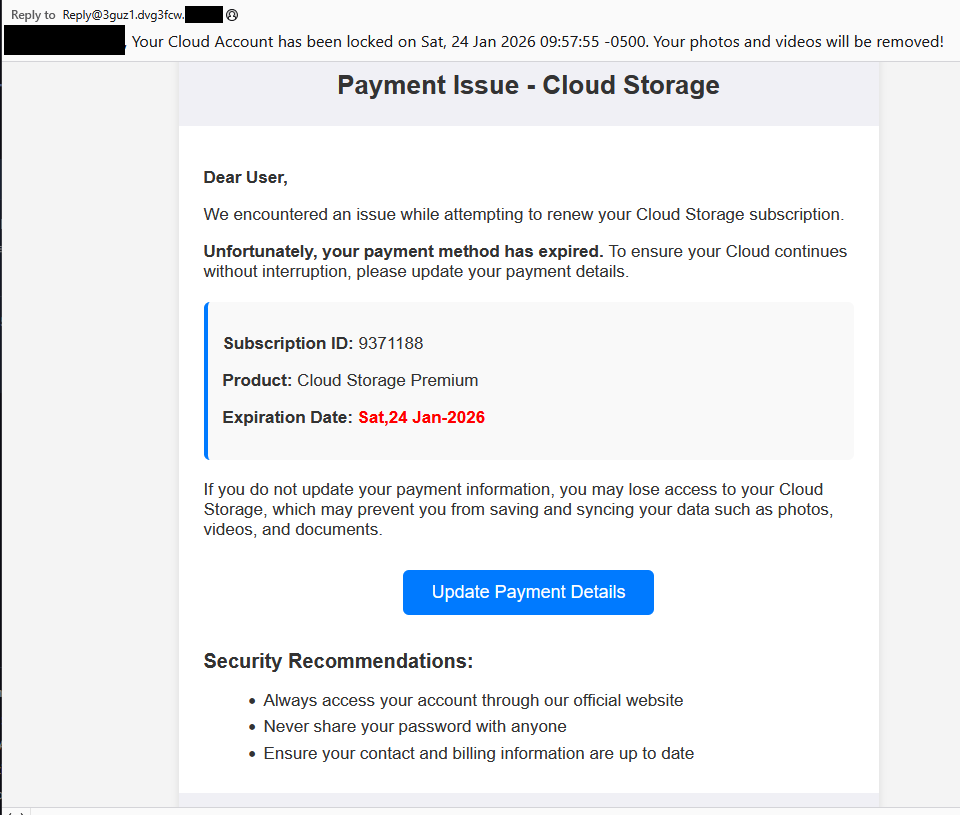
Cloud storage payment issue email

The subject line of the email is:

“{Recipient}. Your Cloud Account has been locked on Sat, 24 Jan 2026 09:57:55 -0500. Your photos and videos will be removed!”

This matches one of the subject lines that BleepingComputer listed.

And the content of the email:

Payment Issue – Cloud Storage

Dear User,

We encountered an issue while attempting to renew your Cloud Storage subscription.

Unfortunately, your payment method has expired. To ensure your Cloud continues without interruption, please update your payment details.

Subscription ID: 9371188

Product: Cloud Storage Premium

Expiration Date: Sat,24 Jan-2026

If you do not update your payment information, you may lose access to your Cloud Storage, which may prevent you from saving and syncing your data such as photos, videos, and documents.

Update Payment Details {link button}

Security Recommendations:

  • Always access your account through our official website
  • Never share your password with anyone
  • Ensure your contact and billing information are up to date”

The link in the email leads to  https://storage.googleapis[.]com/qzsdqdqsd/dsfsdxc.html#/redirect.html, which helps the scammer establish a certain amount of trust because it points to Google Cloud Storage (GCS). GCS is a legitimate service that allows authorized users to store and manage data such as files, images, and videos in buckets. However, as in this case, attackers can abuse it for phishing.

The redirect carries some parameters to the next website.

first redirect

The feed.headquartoonjpn[.]com domain was blocked by Malwarebytes. We’ve seen it before in an earlier campaign involving an Endurance-themed phish.

Endiurance phish

After a few more redirects, we ended up at hx5.submitloading[.]com, where a fake CAPTCHA triggered the last redirect to freecash[.]com, once it was solved.

slider captcha

The end goal of this phish likely depends on the parameters passed along during the redirects, so results may vary.

Rather than stealing credentials directly, the campaign appears designed to monetize traffic, funneling victims into affiliate offers where the operators get paid for sign-ups or conversions.

BleepingComputer noted that they were redirected to affiliate marketing websites for various products.

“Products promoted in this phishing campaign include VPN services, little-known security software, and other subscription-based offerings with no connection to cloud storage.”

How to stay safe

Ironically, the phishing email itself includes some solid advice:

  • Always access your account through our official website.
  • Never share your password with anyone.

We’d like to add:

  • Never click on links in unsolicited emails without verifying with a trusted source.
  • Use an up-to-date, real-time anti-malware solution with a web protection component.
  • Do not engage with websites that attract visitors like this.

Pro tip: Malwarebytes Scam Guard would have helped you identify this email as a scam and provided advice on how to proceed.

Redirect flow (IOCs)

storage.googleapis[.]com/qzsdqdqsd/dsfsdxc.html

feed.headquartoonjpn[.]com

revivejudgemental[.]com

hx5.submitloading[.]com

freecash[.]com

Update February 5, 2026

Almedia GmbH, the company behind the Freecash platform, reached out to us for information about the chain of redirects that lead to their platform. And after an investigation they notified us that:

“Following Malwarebytes’ reporting and the additional information they shared with us, we investigated the issue and identified an affiliate operating in breach of our policies. That partner has been removed from our network.

Almedia does not sell user data, and we take compliance, user trust, and responsible advertising seriously.”


We don’t just report on scams—we help detect them

Cybersecurity risks should never spread beyond a headline. If something looks dodgy to you, check if it’s a scam using Malwarebytes Scam Guard, a feature of our mobile protection products. Submit a screenshot, paste suspicious content, or share a text or phone number, and we’ll tell you if it’s a scam or legit. Download Malwarebytes Mobile Security for iOS or Android and try it today!
[updated] A fake cloud storage alert that ends at Freecash

3 February 2026 at 11:38

Last week we talked about an app that promises users they can make money testing games, or even just by scrolling through TikTok.

Imagine our surprise when we ended up on a site promoting that same Freecash app while investigating a “cloud storage” phish. We’ve all probably seen one of those. They’re common enough and according to recent investigation by BleepingComputer, there’s a

“large-scale cloud storage subscription scam campaign targeting users worldwide with repeated emails falsely warning recipients that their photos, files, and accounts are about to be blocked or deleted due to an alleged payment failure.”

Based on the description in that article, the email we found appears to be part of this campaign.

Cloud storage payment issue email

The subject line of the email is:

“{Recipient}. Your Cloud Account has been locked on Sat, 24 Jan 2026 09:57:55 -0500. Your photos and videos will be removed!”

This matches one of the subject lines that BleepingComputer listed.

And the content of the email:

Payment Issue – Cloud Storage

Dear User,

We encountered an issue while attempting to renew your Cloud Storage subscription.

Unfortunately, your payment method has expired. To ensure your Cloud continues without interruption, please update your payment details.

Subscription ID: 9371188

Product: Cloud Storage Premium

Expiration Date: Sat,24 Jan-2026

If you do not update your payment information, you may lose access to your Cloud Storage, which may prevent you from saving and syncing your data such as photos, videos, and documents.

Update Payment Details {link button}

Security Recommendations:

  • Always access your account through our official website
  • Never share your password with anyone
  • Ensure your contact and billing information are up to date”

The link in the email leads to  https://storage.googleapis[.]com/qzsdqdqsd/dsfsdxc.html#/redirect.html, which helps the scammer establish a certain amount of trust because it points to Google Cloud Storage (GCS). GCS is a legitimate service that allows authorized users to store and manage data such as files, images, and videos in buckets. However, as in this case, attackers can abuse it for phishing.

The redirect carries some parameters to the next website.

first redirect

The feed.headquartoonjpn[.]com domain was blocked by Malwarebytes. We’ve seen it before in an earlier campaign involving an Endurance-themed phish.

Endiurance phish

After a few more redirects, we ended up at hx5.submitloading[.]com, where a fake CAPTCHA triggered the last redirect to freecash[.]com, once it was solved.

slider captcha

The end goal of this phish likely depends on the parameters passed along during the redirects, so results may vary.

Rather than stealing credentials directly, the campaign appears designed to monetize traffic, funneling victims into affiliate offers where the operators get paid for sign-ups or conversions.

BleepingComputer noted that they were redirected to affiliate marketing websites for various products.

“Products promoted in this phishing campaign include VPN services, little-known security software, and other subscription-based offerings with no connection to cloud storage.”

How to stay safe

Ironically, the phishing email itself includes some solid advice:

  • Always access your account through our official website.
  • Never share your password with anyone.

We’d like to add:

  • Never click on links in unsolicited emails without verifying with a trusted source.
  • Use an up-to-date, real-time anti-malware solution with a web protection component.
  • Do not engage with websites that attract visitors like this.

Pro tip: Malwarebytes Scam Guard would have helped you identify this email as a scam and provided advice on how to proceed.

Redirect flow (IOCs)

storage.googleapis[.]com/qzsdqdqsd/dsfsdxc.html

feed.headquartoonjpn[.]com

revivejudgemental[.]com

hx5.submitloading[.]com

freecash[.]com

Update February 5, 2026

Almedia GmbH, the company behind the Freecash platform, reached out to us for information about the chain of redirects that lead to their platform. And after an investigation they notified us that:

“Following Malwarebytes’ reporting and the additional information they shared with us, we investigated the issue and identified an affiliate operating in breach of our policies. That partner has been removed from our network.

Almedia does not sell user data, and we take compliance, user trust, and responsible advertising seriously.”


We don’t just report on scams—we help detect them

Cybersecurity risks should never spread beyond a headline. If something looks dodgy to you, check if it’s a scam using Malwarebytes Scam Guard, a feature of our mobile protection products. Submit a screenshot, paste suspicious content, or share a text or phone number, and we’ll tell you if it’s a scam or legit. Download Malwarebytes Mobile Security for iOS or Android and try it today!
How fake party invitations are being used to install remote access tools

2 February 2026 at 11:18

“You’re invited!” 

It sounds friendly, familiar and quite harmless. But in a scam we recently spotted, that simple phrase is being used to trick victims into installing a full remote access tool on their Windows computers—giving attackers complete control of the system. 

What appears to be a casual party or event invitation leads to the silent installation of ScreenConnect, a legitimate remote support tool quietly installed in the background and abused by attackers. 

Here’s how the scam works, why it’s effective, and how to protect yourself. 

The email: A party invitation 

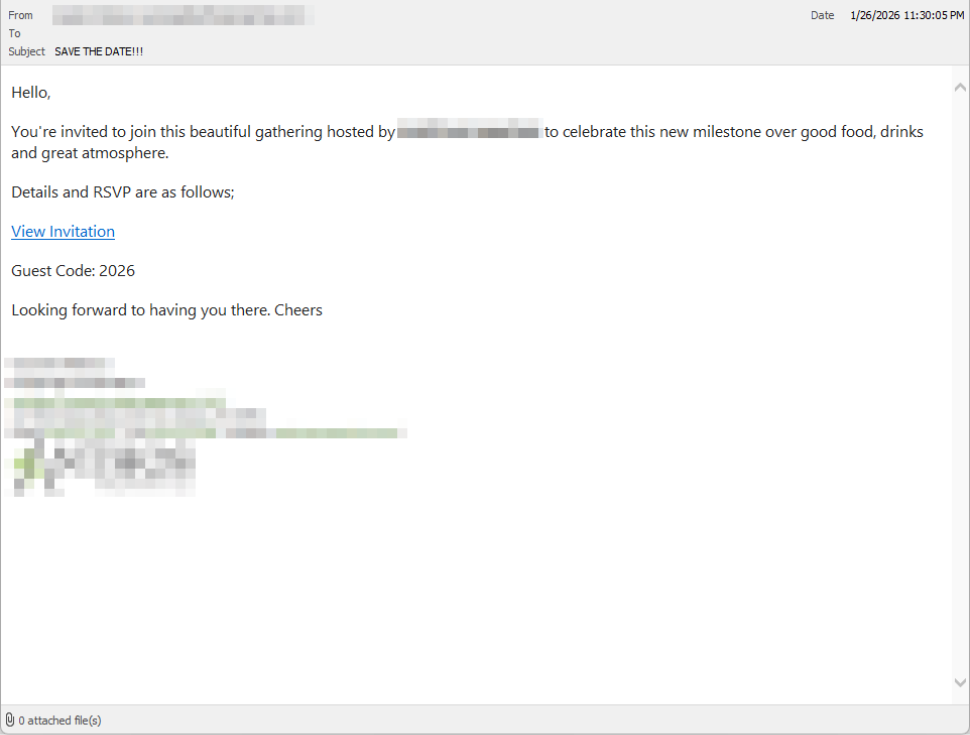
Victims receive an email framed as a personal invitation—often written to look like it came from a friend or acquaintance. The message is deliberately informal and social, lowering suspicion and encouraging quick action. 

In the screenshot below, the email arrived from a friend whose email account had been hacked, but it could just as easily come from a sender you don’t know.

So far, we’ve only seen this campaign targeting people in the UK, but there’s nothing stopping it from expanding elsewhere. 

Clicking the link in the email leads to a polished invitation page hosted on an attacker-controlled domain. 

Party invitation email from a contact

The invite: The landing page that leads to an installer 

The landing page leans heavily into the party theme, but instead of showing event details, the page nudges the user toward opening a file. None of them look dangerous on their own, but together they keep the user focused on the “invitation” file: 

  • A bold “You’re Invited!” headline 
  • The suggestion that a friend had sent the invitation 
  • A message saying the invitation is best viewed on a Windows laptop or desktop
  • A countdown suggesting your invitation is already “downloading” 
  • A message implying urgency and social proof (“I opened mine and it was so easy!”

Within seconds, the browser is redirected to download RSVPPartyInvitationCard.msi 

The page even triggers the download automatically to keep the victim moving forward without stopping to think. 

This MSI file isn’t an invitation. It’s an installer. 

The landing page

The guest: What the MSI actually does 

When the user opens the MSI file, it launches msiexec.exe and silently installs ScreenConnect Client, a legitimate remote access tool often used by IT support teams.  

There’s no invitation, RSVP form, or calendar entry. 

What happens instead: 

  • ScreenConnect binaries are installed under C:\Program Files (x86)\ScreenConnect Client\ 
  • A persistent Windows service is created (for example, ScreenConnect Client 18d1648b87bb3023) 
  • ScreenConnect installs multiple .NET-based components 
  • There is no clear user-facing indication that a remote access tool is being installed 

From the victim’s perspective, very little seems to happen. But at this point, the attacker can now remotely access their computer. 

The after-party: Remote access is established 

Once installed, the ScreenConnect client initiates encrypted outbound connections to ScreenConnect’s relay servers, including a uniquely assigned instance domain.

That connection gives the attacker the same level of access as a remote IT technician, including the ability to: 

  • See the victim’s screen in real time
  • Control the mouse and keyboard 
  • Upload or download files 
  • Keep access even after the computer is restarted 

Because ScreenConnect is legitimate software commonly used for remote support, its presence isn’t always obvious. On a personal computer, the first signs are often behavioral, such as unexplained cursor movement, windows opening on their own, or a ScreenConnect process the user doesn’t remember installing. 

Why this scam works 

This campaign is effective because it targets normal, predictable human behavior. From a behavioral security standpoint, it exploits our natural curiosity and appears to be a low risk. 

Most people don’t think of invitations as dangerous. Opening one feels passive, like glancing at a flyer or checking a message, not installing software. 

Even security-aware users are trained to watch out for warnings and pressure. A friendly “you’re invited” message doesn’t trigger those alarms. 

By the time something feels off, the software is already installed. 

Signs your computer may be affected 

Watch for: 

  • A download or executed file named RSVPPartyInvitationCard.msi 
  • An unexpected installation of ScreenConnect Client 
  • A Windows service named ScreenConnect Client with random characters  
  • Your computer makes outbound HTTPS connections to ScreenConnect relay domains 
  • Your system resolves the invitation-hosting domain used in this campaign, xnyr[.]digital 

How to stay safe  

This campaign is a reminder that modern attacks often don’t break in—they’re invited in. Remote access tools give attackers deep control over a system. Acting quickly can limit the damage.  

For individuals 

If you receive an email like this: 

  • Be suspicious of invitations that ask you to download or open software 
  • Never run MSI files from unsolicited emails 
  • Verify invitations through another channel before opening anything 

If you already clicked or ran the file:  

  • Disconnect from the internet immediately 
  • Check for ScreenConnect and uninstall it if present 
  • Run a full security scan 
  • Change important passwords from a clean, unaffected device 

For organisations (especially in the UK) 

  • Alert on unauthorized ScreenConnect installations
  • Restrict MSI execution where feasible 
  • Treat “remote support tools” as high-risk software
  • Educate users: invitations don’t come as installers 

This scam works by installing a legitimate remote access tool without clear user intent. That’s exactly the gap Malwarebytes is designed to catch.

Malwarebytes now detects newly installed remote access tools and alerts you when one appears on your system. You’re then given a choice: confirm that the tool is expected and trusted, or remove it if it isn’t.


We don’t just report on threats—we remove them

Cybersecurity risks should never spread beyond a headline. Keep threats off your devices by downloading Malwarebytes today.

How fake party invitations are being used to install remote access tools

2 February 2026 at 11:18

“You’re invited!” 

It sounds friendly, familiar and quite harmless. But in a scam we recently spotted, that simple phrase is being used to trick victims into installing a full remote access tool on their Windows computers—giving attackers complete control of the system. 

What appears to be a casual party or event invitation leads to the silent installation of ScreenConnect, a legitimate remote support tool quietly installed in the background and abused by attackers. 

Here’s how the scam works, why it’s effective, and how to protect yourself. 

The email: A party invitation 

Victims receive an email framed as a personal invitation—often written to look like it came from a friend or acquaintance. The message is deliberately informal and social, lowering suspicion and encouraging quick action. 

In the screenshot below, the email arrived from a friend whose email account had been hacked, but it could just as easily come from a sender you don’t know.

So far, we’ve only seen this campaign targeting people in the UK, but there’s nothing stopping it from expanding elsewhere. 

Clicking the link in the email leads to a polished invitation page hosted on an attacker-controlled domain. 

Party invitation email from a contact

The invite: The landing page that leads to an installer 

The landing page leans heavily into the party theme, but instead of showing event details, the page nudges the user toward opening a file. None of them look dangerous on their own, but together they keep the user focused on the “invitation” file: 

  • A bold “You’re Invited!” headline 
  • The suggestion that a friend had sent the invitation 
  • A message saying the invitation is best viewed on a Windows laptop or desktop
  • A countdown suggesting your invitation is already “downloading” 
  • A message implying urgency and social proof (“I opened mine and it was so easy!”

Within seconds, the browser is redirected to download RSVPPartyInvitationCard.msi 

The page even triggers the download automatically to keep the victim moving forward without stopping to think. 

This MSI file isn’t an invitation. It’s an installer. 

The landing page

The guest: What the MSI actually does 

When the user opens the MSI file, it launches msiexec.exe and silently installs ScreenConnect Client, a legitimate remote access tool often used by IT support teams.  

There’s no invitation, RSVP form, or calendar entry. 

What happens instead: 

  • ScreenConnect binaries are installed under C:\Program Files (x86)\ScreenConnect Client\ 
  • A persistent Windows service is created (for example, ScreenConnect Client 18d1648b87bb3023) 
  • ScreenConnect installs multiple .NET-based components 
  • There is no clear user-facing indication that a remote access tool is being installed 

From the victim’s perspective, very little seems to happen. But at this point, the attacker can now remotely access their computer. 

The after-party: Remote access is established 

Once installed, the ScreenConnect client initiates encrypted outbound connections to ScreenConnect’s relay servers, including a uniquely assigned instance domain.

That connection gives the attacker the same level of access as a remote IT technician, including the ability to: 

  • See the victim’s screen in real time
  • Control the mouse and keyboard 
  • Upload or download files 
  • Keep access even after the computer is restarted 

Because ScreenConnect is legitimate software commonly used for remote support, its presence isn’t always obvious. On a personal computer, the first signs are often behavioral, such as unexplained cursor movement, windows opening on their own, or a ScreenConnect process the user doesn’t remember installing. 

Why this scam works 

This campaign is effective because it targets normal, predictable human behavior. From a behavioral security standpoint, it exploits our natural curiosity and appears to be a low risk. 

Most people don’t think of invitations as dangerous. Opening one feels passive, like glancing at a flyer or checking a message, not installing software. 

Even security-aware users are trained to watch out for warnings and pressure. A friendly “you’re invited” message doesn’t trigger those alarms. 

By the time something feels off, the software is already installed. 

Signs your computer may be affected 

Watch for: 

  • A download or executed file named RSVPPartyInvitationCard.msi 
  • An unexpected installation of ScreenConnect Client 
  • A Windows service named ScreenConnect Client with random characters  
  • Your computer makes outbound HTTPS connections to ScreenConnect relay domains 
  • Your system resolves the invitation-hosting domain used in this campaign, xnyr[.]digital 

How to stay safe  

This campaign is a reminder that modern attacks often don’t break in—they’re invited in. Remote access tools give attackers deep control over a system. Acting quickly can limit the damage.  

For individuals 

If you receive an email like this: 

  • Be suspicious of invitations that ask you to download or open software 
  • Never run MSI files from unsolicited emails 
  • Verify invitations through another channel before opening anything 

If you already clicked or ran the file:  

  • Disconnect from the internet immediately 
  • Check for ScreenConnect and uninstall it if present 
  • Run a full security scan 
  • Change important passwords from a clean, unaffected device 

For organisations (especially in the UK) 

  • Alert on unauthorized ScreenConnect installations
  • Restrict MSI execution where feasible 
  • Treat “remote support tools” as high-risk software
  • Educate users: invitations don’t come as installers 

This scam works by installing a legitimate remote access tool without clear user intent. That’s exactly the gap Malwarebytes is designed to catch.

Malwarebytes now detects newly installed remote access tools and alerts you when one appears on your system. You’re then given a choice: confirm that the tool is expected and trusted, or remove it if it isn’t.


We don’t just report on threats—we remove them

Cybersecurity risks should never spread beyond a headline. Keep threats off your devices by downloading Malwarebytes today.

Clawdbot’s rename to Moltbot sparks impersonation campaign

29 January 2026 at 15:26

After the viral AI assistant Clawdbot was forced to rename to Moltbot due to a trademark dispute, opportunists moved quickly. Within days, typosquat domains and a cloned GitHub repository appeared—impersonating the project’s creator and positioning infrastructure for a potential supply-chain attack.

The code is clean. The infrastructure is not. With the GitHub downloads and star rating rapidly rising, we took a deep dive into how fake domains target viral open source projects.

Fake domains spring up to impersonate Moltbot's landing page

The background: Why was Clawdbot renamed?

In early 2026, Peter Steinberger’s Clawdbot became one of the fastest-growing open source projects on GitHub. The self-hosted assistant—described as “Claude with hands”—allowed users to control their computer through WhatsApp, Telegram, Discord, and similar platforms.

Anthropic later objected to the name. Steinberger complied and rebranded the project to Moltbot (“molt” being what lobsters do when they shed their shell).

During the rename, both the GitHub organization and X (formerly Twitter) handle were briefly released before being reclaimed. Attackers monitoring the transition grabbed them within seconds.

“Had to rename our accounts for trademark stuff and messed up the GitHub rename and the X rename got snatched by crypto shills.” — Peter Steinberger

“Had to rename our accounts for trademark stuff and messed up the GitHub rename and the X rename got snatched by crypto shills.” — Peter Steinberger

That brief gap was enough.

Impersonation infrastructure emerged

While investigating a suspicious repository, I uncovered a coordinated set of assets designed to impersonate Moltbot.

Domains

  • moltbot[.]you
  • clawbot[.]ai
  • clawdbot[.]you

Repository

  • github[.]com/gstarwd/clawbot — a cloned repository using a typosquatted variant of the former Clawdbot project name

Website

A polished marketing site featuring:

  • professional design closely matching the real project
  • SEO optimization and structured metadata
  • download buttons, tutorials, and FAQs
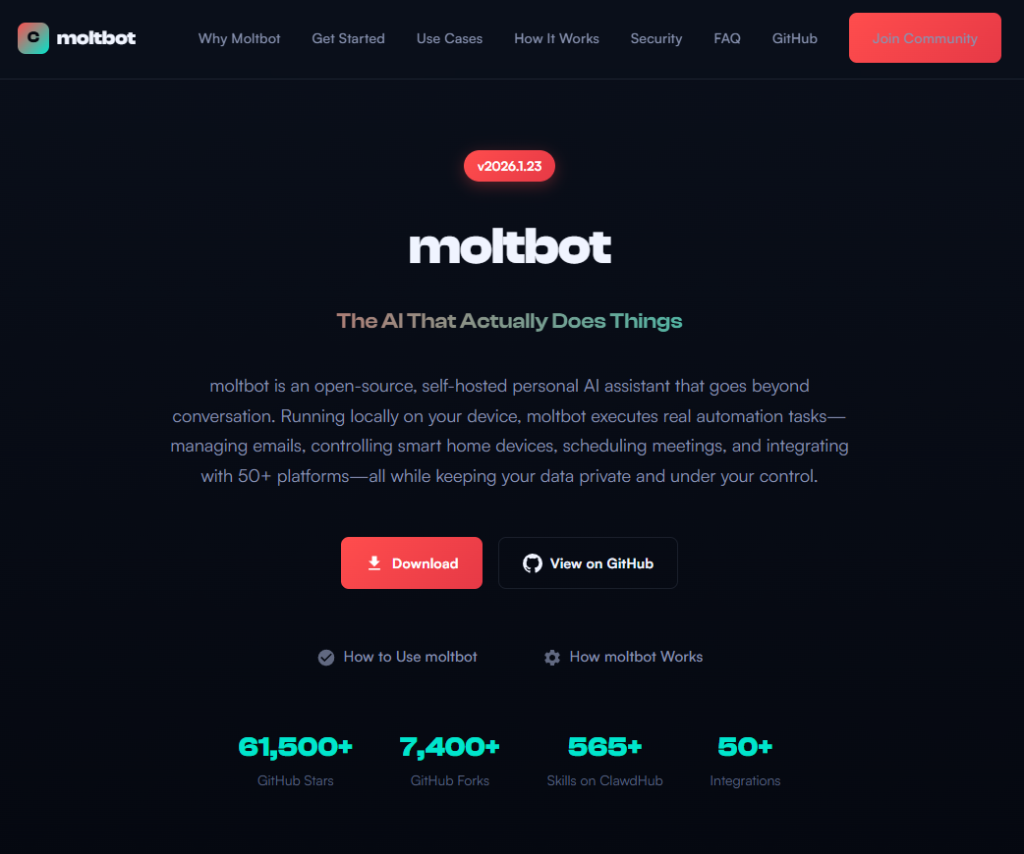
  • claims of 61,500+ GitHub stars lifted from the real repository

Evidence of impersonation

False attribution: The site’s schema.org metadata falsely claims authorship by Peter Steinberger, linking directly to his real GitHub and X profiles. This is explicit identity misrepresentation.

The site's metadata

Misdirection to an unauthorized repository: “View on GitHub” links send users to gstarwd/clawbot, not the official moltbot/moltbot repository.

Stolen credibility:The site prominently advertises tens of thousands of stars that belong to the real project. The clone has virtually none (although at the time of writing, that number is steadily rising).

The site advertises 61,500+ GitHub stars

Mixing legitimate and fraudulent links: Some links point to real assets, such as official documentation or legitimate binaries. Others redirect to impersonation infrastructure. This selective legitimacy defeats casual verification and appears deliberate.

Full SEO optimization: Canonical tags, Open Graph metadata, Twitter cards, and analytics are all present—clearly intended to rank the impersonation site ahead of legitimate project resources.

The ironic security warning: The impersonation site even warns users about scams involving fake cryptocurrency tokens—while itself impersonating the project.

The site warms about crypto scams.

Code analysis: Clean by design

I performed a static audit of the gstarwd/clawbot repository:

  • no malicious npm scripts
  • no credential exfiltration
  • no obfuscation or payload staging
  • no cryptomining
  • no suspicious network activity

The code is functionally identical to the legitimate project, which is not reassuring.

The threat model

The absence of malware is the strategy. Nothing here suggests an opportunistic malware campaign. Instead, the setup points to early preparation for a supply-chain attack.

The likely chain of events:

A user searches for “clawbot GitHub” or “moltbot download” and finds moltbot[.]you or gstarwd/clawbot.

The code looks legitimate and passes a security audit.

The user installs the project and configures it, adding API keys and messaging tokens. Trust is established.

At a later point, a routine update is pulled through npm update or git pull. A malicious payload is delivered into an installation the user already trusts.

An attacker can then harvest:

  • Anthropic API keys
  • OpenAI API keys
  • WhatsApp session credentials
  • Telegram bot tokens
  • Discord OAuth tokens
  • Slack credentials
  • Signal identity keys
  • full conversation histories
  • command execution access on the compromised machine

What’s malicious, and what isn’t

Clearly malicious

  • false attribution to a real individual
  • misrepresentation of popularity metrics
  • deliberate redirection to an unauthorized repository

Deceptive but not yet malware

  • typosquat domains
  • SEO manipulation
  • cloned repositories with clean code

Not present (yet)

  • active malware
  • data exfiltration
  • cryptomining

Clean code today lowers suspicion tomorrow.

A familiar pattern

This follows a well-known pattern in open source supply-chain attacks.

A user searches for a popular project and lands on a convincing-looking site or cloned repository. The code appears legitimate and passes a security audit.

They install the project and configure it, adding API keys or messaging tokens so it can work as intended. Trust is established.

Later, a routine update arrives through a standard npm update or git pull. That update introduces a malicious payload into an installation the user already trusts.

From there, an attacker can harvest credentials, conversation data, and potentially execute commands on the compromised system.

No exploit is required. The entire chain relies on trust rather than technical vulnerabilities.

How to stay safe

Impersonation infrastructure like this is designed to look legitimate long before anything malicious appears. By the time a harmful update arrives—if it arrives at all—the software may already be widely installed and trusted.

That’s why basic source verification still matters, especially when popular projects rename or move quickly.

Advice for users

  • Verify GitHub organization ownership
  • Bookmark official repositories directly
  • Treat renamed projects as higher risk during transitions

Advice for maintainers

  • Pre-register likely typosquat domains before public renames
  • Coordinate renames and handle changes carefully
  • Monitor for cloned repositories and impersonation sites

Pro tip: Malwarebytes customers are protected. Malwarebytes is actively blocking all known indicators of compromise (IOCs) associated with this impersonation infrastructure, preventing users from accessing the fraudulent domains and related assets identified in this investigation.


We don’t just report on threats—we remove them

Cybersecurity risks should never spread beyond a headline. Keep threats off your devices by downloading Malwarebytes today.

Clawdbot’s rename to Moltbot sparks impersonation campaign

29 January 2026 at 15:26

After the viral AI assistant Clawdbot was forced to rename to Moltbot due to a trademark dispute, opportunists moved quickly. Within days, typosquat domains and a cloned GitHub repository appeared—impersonating the project’s creator and positioning infrastructure for a potential supply-chain attack.

The code is clean. The infrastructure is not. With the GitHub downloads and star rating rapidly rising, we took a deep dive into how fake domains target viral open source projects.

Fake domains spring up to impersonate Moltbot's landing page

The background: Why was Clawdbot renamed?

In early 2026, Peter Steinberger’s Clawdbot became one of the fastest-growing open source projects on GitHub. The self-hosted assistant—described as “Claude with hands”—allowed users to control their computer through WhatsApp, Telegram, Discord, and similar platforms.

Anthropic later objected to the name. Steinberger complied and rebranded the project to Moltbot (“molt” being what lobsters do when they shed their shell).

During the rename, both the GitHub organization and X (formerly Twitter) handle were briefly released before being reclaimed. Attackers monitoring the transition grabbed them within seconds.

“Had to rename our accounts for trademark stuff and messed up the GitHub rename and the X rename got snatched by crypto shills.” — Peter Steinberger

“Had to rename our accounts for trademark stuff and messed up the GitHub rename and the X rename got snatched by crypto shills.” — Peter Steinberger

That brief gap was enough.

Impersonation infrastructure emerged

While investigating a suspicious repository, I uncovered a coordinated set of assets designed to impersonate Moltbot.

Domains

  • moltbot[.]you
  • clawbot[.]ai
  • clawdbot[.]you

Repository

  • github[.]com/gstarwd/clawbot — a cloned repository using a typosquatted variant of the former Clawdbot project name

Website

A polished marketing site featuring:

  • professional design closely matching the real project
  • SEO optimization and structured metadata
  • download buttons, tutorials, and FAQs
  • claims of 61,500+ GitHub stars lifted from the real repository

Evidence of impersonation

False attribution: The site’s schema.org metadata falsely claims authorship by Peter Steinberger, linking directly to his real GitHub and X profiles. This is explicit identity misrepresentation.

The site's metadata

Misdirection to an unauthorized repository: “View on GitHub” links send users to gstarwd/clawbot, not the official moltbot/moltbot repository.

Stolen credibility:The site prominently advertises tens of thousands of stars that belong to the real project. The clone has virtually none (although at the time of writing, that number is steadily rising).

The site advertises 61,500+ GitHub stars

Mixing legitimate and fraudulent links: Some links point to real assets, such as official documentation or legitimate binaries. Others redirect to impersonation infrastructure. This selective legitimacy defeats casual verification and appears deliberate.

Full SEO optimization: Canonical tags, Open Graph metadata, Twitter cards, and analytics are all present—clearly intended to rank the impersonation site ahead of legitimate project resources.

The ironic security warning: The impersonation site even warns users about scams involving fake cryptocurrency tokens—while itself impersonating the project.

The site warms about crypto scams.

Code analysis: Clean by design

I performed a static audit of the gstarwd/clawbot repository:

  • no malicious npm scripts
  • no credential exfiltration
  • no obfuscation or payload staging
  • no cryptomining
  • no suspicious network activity

The code is functionally identical to the legitimate project, which is not reassuring.

The threat model

The absence of malware is the strategy. Nothing here suggests an opportunistic malware campaign. Instead, the setup points to early preparation for a supply-chain attack.

The likely chain of events:

A user searches for “clawbot GitHub” or “moltbot download” and finds moltbot[.]you or gstarwd/clawbot.

The code looks legitimate and passes a security audit.

The user installs the project and configures it, adding API keys and messaging tokens. Trust is established.

At a later point, a routine update is pulled through npm update or git pull. A malicious payload is delivered into an installation the user already trusts.

An attacker can then harvest:

  • Anthropic API keys
  • OpenAI API keys
  • WhatsApp session credentials
  • Telegram bot tokens
  • Discord OAuth tokens
  • Slack credentials
  • Signal identity keys
  • full conversation histories
  • command execution access on the compromised machine

What’s malicious, and what isn’t

Clearly malicious

  • false attribution to a real individual
  • misrepresentation of popularity metrics
  • deliberate redirection to an unauthorized repository

Deceptive but not yet malware

  • typosquat domains
  • SEO manipulation
  • cloned repositories with clean code

Not present (yet)

  • active malware
  • data exfiltration
  • cryptomining

Clean code today lowers suspicion tomorrow.

A familiar pattern

This follows a well-known pattern in open source supply-chain attacks.

A user searches for a popular project and lands on a convincing-looking site or cloned repository. The code appears legitimate and passes a security audit.

They install the project and configure it, adding API keys or messaging tokens so it can work as intended. Trust is established.

Later, a routine update arrives through a standard npm update or git pull. That update introduces a malicious payload into an installation the user already trusts.

From there, an attacker can harvest credentials, conversation data, and potentially execute commands on the compromised system.

No exploit is required. The entire chain relies on trust rather than technical vulnerabilities.

How to stay safe

Impersonation infrastructure like this is designed to look legitimate long before anything malicious appears. By the time a harmful update arrives—if it arrives at all—the software may already be widely installed and trusted.

That’s why basic source verification still matters, especially when popular projects rename or move quickly.

Advice for users

  • Verify GitHub organization ownership
  • Bookmark official repositories directly
  • Treat renamed projects as higher risk during transitions

Advice for maintainers

  • Pre-register likely typosquat domains before public renames
  • Coordinate renames and handle changes carefully
  • Monitor for cloned repositories and impersonation sites

Pro tip: Malwarebytes customers are protected. Malwarebytes is actively blocking all known indicators of compromise (IOCs) associated with this impersonation infrastructure, preventing users from accessing the fraudulent domains and related assets identified in this investigation.


We don’t just report on threats—we remove them

Cybersecurity risks should never spread beyond a headline. Keep threats off your devices by downloading Malwarebytes today.

Watch out for AT&T rewards phishing text that wants your personal details

27 January 2026 at 18:43

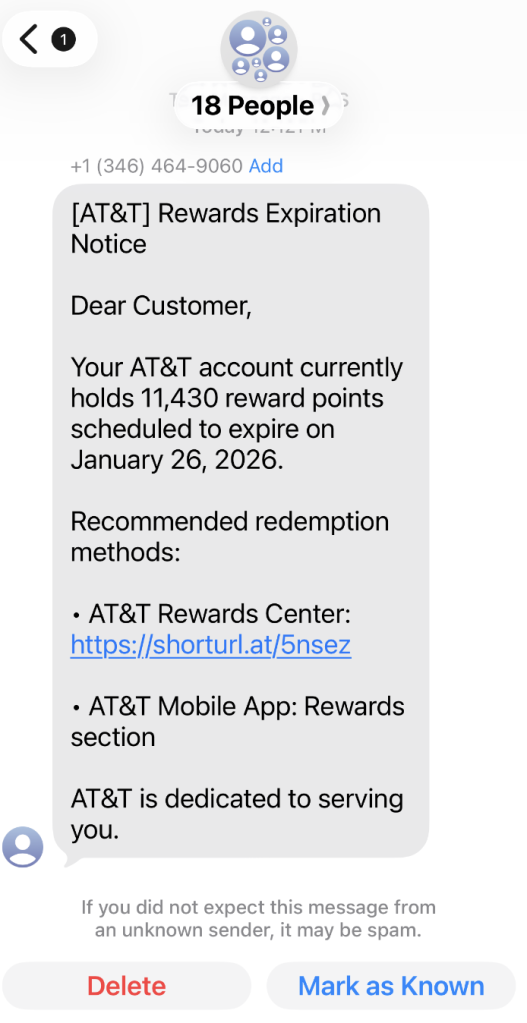
A coworker shared this suspicious SMS where AT&T supposedly warns the recipient that their reward points are about to expire.

Phishing attacks are growing increasingly sophisticated, likely with help from AI. They’re getting better at mimicking major brands—not just in look, but in behavior. Recently, we uncovered a well-executed phishing campaign targeting AT&T customers that combines realistic branding, clever social engineering, and layered data theft tactics.

In this post, we’ll walk you through the investigation, screen by screen, explaining how the campaign tricks its victims and where the stolen data ends up.

This is the text message that started the investigation.

“Dear Customer,
Your AT&T account currently holds 11,430 reward points scheduled to expire on January 26, 2026.
Recommended redemption methods:
– AT&T Rewards Center: {Shortened link}
– AT&T Mobile App: Rewards section
AT&T is dedicated to serving you.”

The shortened URL led to https://att.hgfxp[.]cc/pay/, a website designed to look like an AT&T site in name and appearance.

All branding, headers, and menus were copied over, and the page was full of real links out to att.com.

But the “main event” was a special section explaining how to access your AT&T reward points.

After “verifying” their account with a phone number, the victim is shown a dashboard warning that their AT&T points are due to expire in two days. This short window is a common phishing tactic that exploits urgency and FOMO (fear of missing out).

The rewards on offer—such as Amazon gift cards, headphones, smartwatches, and more—are enticing and reinforce the illusion that the victim is dealing with a legitimate loyalty program.

To add even more credibility, after submitting a phone number, the victim gets to see a list of available gifts, followed by a final confirmation prompt.

At that point, the target is prompted to fill out a “Delivery Information” form requesting sensitive personal information, including name, address, phone number, email, and more. This is where the actual data theft takes place.

The form’s visible submission flow is smooth and professional, with real-time validation and error highlighting—just like you’d expect from a top brand. This is deliberate. The attackers use advanced front-end validation code to maximize the quality and completeness of the stolen information.

Behind the slick UI, the form is connected to JavaScript code that, when the victim hits “Continue,” collects everything they’ve entered and transmits it directly to the attackers. In our investigation, we deobfuscated their code and found a large “data” section.

The stolen data gets sent in JSON format via POST to https://att.hgfxp[.]cc/api/open/cvvInterface.

This endpoint is hosted on the attacker’s domain, giving them immediate access to everything the victim submits.

What makes this campaign effective and dangerous

  • Sophisticated mimicry: Every page is an accurate clone of att.com, complete with working navigation links and logos.
  • Layered social engineering: Victims are lured step by step, each page lowering their guard and increasing trust.
  • Quality assurance: Custom JavaScript form validation reduces errors and increases successful data capture.
  • Obfuscated code: Malicious scripts are wrapped in obfuscation, slowing analysis and takedown.
  • Centralized exfiltration: All harvested data is POSTed directly to the attacker’s command-and-control endpoint.

How to defend yourself

A number of red flags could have alerted the target that this was a phishing attempt:

  • The text was sent to 18 recipients at once.
  • It used a generic greeting (“Dear Customer”) instead of personal identification.
  • The sender’s number was not a recognized AT&T contact.
  • The expiration date changed if the victim visited the fake site on a later date.

Beyond avoiding unsolicited links, here are a few ways to stay safe:

  • Only access your accounts through official apps or by typing the official website (att.com) directly into your browser.
  • Check URLs carefully. Even if a page looks perfect, hover over links and check the address bar for official domains.
  • Enable multi-factor authentication for your AT&T and other critical accounts.
  • Use an up to date real-time anti-malware solution with a web protection module.

Pro tip: Malwarebytes Scam Guard recognized this text as a scam.


We don’t just report on scams—we help detect them

Cybersecurity risks should never spread beyond a headline. If something looks dodgy to you, check if it’s a scam using Malwarebytes Scam Guard, a feature of our mobile protection products. Submit a screenshot, paste suspicious content, or share a text or phone number, and we’ll tell you if it’s a scam or legit. Download Malwarebytes Mobile Security for iOS or Android and try it today!

Watch out for AT&T rewards phishing text that wants your personal details

27 January 2026 at 18:43

A coworker shared this suspicious SMS where AT&T supposedly warns the recipient that their reward points are about to expire.

Phishing attacks are growing increasingly sophisticated, likely with help from AI. They’re getting better at mimicking major brands—not just in look, but in behavior. Recently, we uncovered a well-executed phishing campaign targeting AT&T customers that combines realistic branding, clever social engineering, and layered data theft tactics.

In this post, we’ll walk you through the investigation, screen by screen, explaining how the campaign tricks its victims and where the stolen data ends up.

This is the text message that started the investigation.

“Dear Customer,
Your AT&T account currently holds 11,430 reward points scheduled to expire on January 26, 2026.
Recommended redemption methods:
– AT&T Rewards Center: {Shortened link}
– AT&T Mobile App: Rewards section
AT&T is dedicated to serving you.”

The shortened URL led to https://att.hgfxp[.]cc/pay/, a website designed to look like an AT&T site in name and appearance.

All branding, headers, and menus were copied over, and the page was full of real links out to att.com.

But the “main event” was a special section explaining how to access your AT&T reward points.

After “verifying” their account with a phone number, the victim is shown a dashboard warning that their AT&T points are due to expire in two days. This short window is a common phishing tactic that exploits urgency and FOMO (fear of missing out).

The rewards on offer—such as Amazon gift cards, headphones, smartwatches, and more—are enticing and reinforce the illusion that the victim is dealing with a legitimate loyalty program.

To add even more credibility, after submitting a phone number, the victim gets to see a list of available gifts, followed by a final confirmation prompt.

At that point, the target is prompted to fill out a “Delivery Information” form requesting sensitive personal information, including name, address, phone number, email, and more. This is where the actual data theft takes place.

The form’s visible submission flow is smooth and professional, with real-time validation and error highlighting—just like you’d expect from a top brand. This is deliberate. The attackers use advanced front-end validation code to maximize the quality and completeness of the stolen information.

Behind the slick UI, the form is connected to JavaScript code that, when the victim hits “Continue,” collects everything they’ve entered and transmits it directly to the attackers. In our investigation, we deobfuscated their code and found a large “data” section.

The stolen data gets sent in JSON format via POST to https://att.hgfxp[.]cc/api/open/cvvInterface.

This endpoint is hosted on the attacker’s domain, giving them immediate access to everything the victim submits.

What makes this campaign effective and dangerous

  • Sophisticated mimicry: Every page is an accurate clone of att.com, complete with working navigation links and logos.
  • Layered social engineering: Victims are lured step by step, each page lowering their guard and increasing trust.
  • Quality assurance: Custom JavaScript form validation reduces errors and increases successful data capture.
  • Obfuscated code: Malicious scripts are wrapped in obfuscation, slowing analysis and takedown.
  • Centralized exfiltration: All harvested data is POSTed directly to the attacker’s command-and-control endpoint.

How to defend yourself

A number of red flags could have alerted the target that this was a phishing attempt:

  • The text was sent to 18 recipients at once.
  • It used a generic greeting (“Dear Customer”) instead of personal identification.
  • The sender’s number was not a recognized AT&T contact.
  • The expiration date changed if the victim visited the fake site on a later date.

Beyond avoiding unsolicited links, here are a few ways to stay safe:

  • Only access your accounts through official apps or by typing the official website (att.com) directly into your browser.
  • Check URLs carefully. Even if a page looks perfect, hover over links and check the address bar for official domains.
  • Enable multi-factor authentication for your AT&T and other critical accounts.
  • Use an up to date real-time anti-malware solution with a web protection module.

Pro tip: Malwarebytes Scam Guard recognized this text as a scam.


We don’t just report on scams—we help detect them

Cybersecurity risks should never spread beyond a headline. If something looks dodgy to you, check if it’s a scam using Malwarebytes Scam Guard, a feature of our mobile protection products. Submit a screenshot, paste suspicious content, or share a text or phone number, and we’ll tell you if it’s a scam or legit. Download Malwarebytes Mobile Security for iOS or Android and try it today!

❌