Normal view

WhisperPair exposes Bluetooth earbuds and headphones to tracking and eavesdropping

16 January 2026 at 14:08

WhisperPair is a set of attacks that lets an attacker hijack many popular Bluetooth audio accessories that use Google Fast Pair and, in some cases, even track their location via Google’s Find Hub network—all without requiring any user interaction.

Researchers at the Belgian University of Leuven revealed a collection of vulnerabilities they found in audio accessories that use Google’s Fast Pair protocol. The affected accessories are sold by 10 different companies: Sony, Jabra, JBL, Marshall, Xiaomi, Nothing, OnePlus, Soundcore, Logitech, and Google itself.

Google Fast Pair is a feature that makes pairing Bluetooth earbuds, headphones and similar accessories with Android devices quick and seamless, and syncs them across a user’s Google account.

The Google Fast Pair Service (GFPS) utilizes Bluetooth Low Energy (BLE) to discover nearby Bluetooth devices. Many big-name audio brands use Fast Pair in their flagship products, so the potential attack surface consists of hundreds of millions of devices.

The weakness lies in the fact that Fast Pair skips checking whether a device is in pairing mode. As a result, a device controlled by an attacker, such as a laptop, can trigger Fast Pair even when the earbuds are sitting in a user’s ear or pocket, then quickly complete a normal Bluetooth pairing and take full control.

What that control enables depends on the capabilities of the hijacked device. This can range from playing disturbing noises to recording audio via built-in microphones.

It gets worse if the attacker is the first to pair the accessory with an Android device. In that case, the attacker’s Owner Account Key–designating their Google account as the legitimate owner’s—to the accessory. If the Fast Pair accessory also supports Google’s Find Hub network, which many people use to locate lost items, the attacker may then be able to track the accessory’s location.

Google classified this vulnerability, tracked under CVE‑2025‑36911, as critical. However, the only real fix is a firmware or software update from the accessory manufacturer, so users need to check with their specific brand and install accessory updates, as updating the phone alone does not fix the issue.

How to stay safe

To find out whether your device is vulnerable, the researchers published a list and recommend keeping all accessories updated. The research team tested 25 commercial devices from 16 manufacturers using 17 different Bluetooth chipsets. They were able to take over the connection and eavesdrop on the microphone on 68% of the tested devices.​

These are the devices the researchers found to be vulnerable, but it’s possible that others are affected as well:

  • Anker soundcore Liberty 4 NC
  • Google Pixel Buds Pro 2​
  • JBL TUNE BEAM​
  • Jabra Elite 8 Active​
  • Marshall MOTIF II A.N.C.​
  • Nothing Ear (a)​
  • OnePlus Nord Buds 3 Pro​
  • Sony WF-1000XM5​
  • Sony WH-1000XM4​
  • Sony WH-1000XM5​
  • Sony WH-1000XM6​
  • Sony WH-CH720N​
  • Xiaomi Redmi Buds 5 Pro​

We don’t just report on phone security—we provide it

Cybersecurity risks should never spread beyond a headline. Keep threats off your mobile devices by downloading Malwarebytes for iOS, and Malwarebytes for Android today.

WhisperPair exposes Bluetooth earbuds and headphones to tracking and eavesdropping

16 January 2026 at 14:08

WhisperPair is a set of attacks that lets an attacker hijack many popular Bluetooth audio accessories that use Google Fast Pair and, in some cases, even track their location via Google’s Find Hub network—all without requiring any user interaction.

Researchers at the Belgian University of Leuven revealed a collection of vulnerabilities they found in audio accessories that use Google’s Fast Pair protocol. The affected accessories are sold by 10 different companies: Sony, Jabra, JBL, Marshall, Xiaomi, Nothing, OnePlus, Soundcore, Logitech, and Google itself.

Google Fast Pair is a feature that makes pairing Bluetooth earbuds, headphones and similar accessories with Android devices quick and seamless, and syncs them across a user’s Google account.

The Google Fast Pair Service (GFPS) utilizes Bluetooth Low Energy (BLE) to discover nearby Bluetooth devices. Many big-name audio brands use Fast Pair in their flagship products, so the potential attack surface consists of hundreds of millions of devices.

The weakness lies in the fact that Fast Pair skips checking whether a device is in pairing mode. As a result, a device controlled by an attacker, such as a laptop, can trigger Fast Pair even when the earbuds are sitting in a user’s ear or pocket, then quickly complete a normal Bluetooth pairing and take full control.

What that control enables depends on the capabilities of the hijacked device. This can range from playing disturbing noises to recording audio via built-in microphones.

It gets worse if the attacker is the first to pair the accessory with an Android device. In that case, the attacker’s Owner Account Key–designating their Google account as the legitimate owner’s—to the accessory. If the Fast Pair accessory also supports Google’s Find Hub network, which many people use to locate lost items, the attacker may then be able to track the accessory’s location.

Google classified this vulnerability, tracked under CVE‑2025‑36911, as critical. However, the only real fix is a firmware or software update from the accessory manufacturer, so users need to check with their specific brand and install accessory updates, as updating the phone alone does not fix the issue.

How to stay safe

To find out whether your device is vulnerable, the researchers published a list and recommend keeping all accessories updated. The research team tested 25 commercial devices from 16 manufacturers using 17 different Bluetooth chipsets. They were able to take over the connection and eavesdrop on the microphone on 68% of the tested devices.​

These are the devices the researchers found to be vulnerable, but it’s possible that others are affected as well:

  • Anker soundcore Liberty 4 NC
  • Google Pixel Buds Pro 2​
  • JBL TUNE BEAM​
  • Jabra Elite 8 Active​
  • Marshall MOTIF II A.N.C.​
  • Nothing Ear (a)​
  • OnePlus Nord Buds 3 Pro​
  • Sony WF-1000XM5​
  • Sony WH-1000XM4​
  • Sony WH-1000XM5​
  • Sony WH-1000XM6​
  • Sony WH-CH720N​
  • Xiaomi Redmi Buds 5 Pro​

We don’t just report on phone security—we provide it

Cybersecurity risks should never spread beyond a headline. Keep threats off your mobile devices by downloading Malwarebytes for iOS, and Malwarebytes for Android today.

Why iPhone users should update and restart their devices now

13 January 2026 at 13:55

If you were still questioning whether iOS 26+ is for you, now is the time to make that call.

Why?

On December 12, 2025, Apple patched two WebKit zero‑day vulnerabilities linked to mercenary spyware and is now effectively pushing iPhone 11 and newer users toward iOS 26+, because that’s where the fixes and new memory protections live. These vulnerabilities were primarily used in highly targeted attacks, but such campaigns are likely to expand over time.

WebKit powers the Safari browser and many other iOS applications, so it’s a big attack surface to leave exposed and isn’t limited to “risky” behavior. These vulnerabilities allowed an attacker to execute arbitrary code on a device after exploitation via malicious web content.

Apple has confirmed that attackers are already exploiting these vulnerabilities in the wild, making installation of the update a high‑priority security task for every user. Campaigns that start with diplomats, journalists, or executives often lead to tooling and exploits leaking or being repurposed, so “I’m not a target” is not a viable safety strategy.

Due to public resistance to new features like Liquid Glass, many iPhone users have not yet upgraded to iOS 26.2. Reports suggest adoption of iOS 26 has been unusually slow. As of January 2026, only about 4.6% of active iPhones are on iOS 26.2, and roughly 16% are on any version of iOS 26, leaving the vast majority on older releases such as iOS 18.

However, Apple only ships these fixes and newer protections, such as Memory Integrity Enforcement, on iOS 26+ for supported devices. Users on older, unsupported devices won’t be able to access these protections at all.

Another important factor in the upgrade cycle is restarting the device. What many people don’t realize is that when you restart your device, any memory-resident malware is flushed—unless it has somehow gained persistence, in which case it will return. High-end spyware tools tend to avoid leaving traces needed for persistence and often rely on users not restarting their devices.

Upgrading requires a restart, which makes this a win-win: you get the latest protections, and any memory-resident malware is flushed at the same time.

For iOS and iPadOS users, you can check if you’re using the latest software version, go to Settings > General > Software Update. It’s also worth turning on Automatic Updates if you haven’t already. You can do that on the same screen.

How to stay safe

The most important fix—however painful you may find it—is to upgrade to iOS 26.2. Not doing means missing an accumulating list of security fixes, leaving your device vulnerable to more and more newly found vulnerabilities.

 But here are some other useful tips:

  • Make it a habit to restart your device on a regular basis. The NSA recommends doing this weekly.
  • Do not open unsolicited links and attachments without verifying with the trusted sender.
  • Remember, Apple threat notifications will never ask users to click links, open files, install apps or ask for account passwords or verification code.
  • For Apple Mail users specifically, these vulnerabilities create risk when viewing HTML-formatted emails containing malicious web content.
  • Malwarebytes for iOS can help keep your device secure, with Trusted Advisor alerting you when important updates are available.
  • If you are a high-value target, or you want the extra level of security, consider using Apple’s Lockdown Mode.

We don’t just report on phone security—we provide it

Cybersecurity risks should never spread beyond a headline. Keep threats off your mobile devices by downloading Malwarebytes for iOS, and Malwarebytes for Android today.

Why iPhone users should update and restart their devices now

13 January 2026 at 13:55

If you were still questioning whether iOS 26+ is for you, now is the time to make that call.

Why?

On December 12, 2025, Apple patched two WebKit zero‑day vulnerabilities linked to mercenary spyware and is now effectively pushing iPhone 11 and newer users toward iOS 26+, because that’s where the fixes and new memory protections live. These vulnerabilities were primarily used in highly targeted attacks, but such campaigns are likely to expand over time.

WebKit powers the Safari browser and many other iOS applications, so it’s a big attack surface to leave exposed and isn’t limited to “risky” behavior. These vulnerabilities allowed an attacker to execute arbitrary code on a device after exploitation via malicious web content.

Apple has confirmed that attackers are already exploiting these vulnerabilities in the wild, making installation of the update a high‑priority security task for every user. Campaigns that start with diplomats, journalists, or executives often lead to tooling and exploits leaking or being repurposed, so “I’m not a target” is not a viable safety strategy.

Due to public resistance to new features like Liquid Glass, many iPhone users have not yet upgraded to iOS 26.2. Reports suggest adoption of iOS 26 has been unusually slow. As of January 2026, only about 4.6% of active iPhones are on iOS 26.2, and roughly 16% are on any version of iOS 26, leaving the vast majority on older releases such as iOS 18.

However, Apple only ships these fixes and newer protections, such as Memory Integrity Enforcement, on iOS 26+ for supported devices. Users on older, unsupported devices won’t be able to access these protections at all.

Another important factor in the upgrade cycle is restarting the device. What many people don’t realize is that when you restart your device, any memory-resident malware is flushed—unless it has somehow gained persistence, in which case it will return. High-end spyware tools tend to avoid leaving traces needed for persistence and often rely on users not restarting their devices.

Upgrading requires a restart, which makes this a win-win: you get the latest protections, and any memory-resident malware is flushed at the same time.

For iOS and iPadOS users, you can check if you’re using the latest software version, go to Settings > General > Software Update. It’s also worth turning on Automatic Updates if you haven’t already. You can do that on the same screen.

How to stay safe

The most important fix—however painful you may find it—is to upgrade to iOS 26.2. Not doing means missing an accumulating list of security fixes, leaving your device vulnerable to more and more newly found vulnerabilities.

 But here are some other useful tips:

  • Make it a habit to restart your device on a regular basis. The NSA recommends doing this weekly.
  • Do not open unsolicited links and attachments without verifying with the trusted sender.
  • Remember, Apple threat notifications will never ask users to click links, open files, install apps or ask for account passwords or verification code.
  • For Apple Mail users specifically, these vulnerabilities create risk when viewing HTML-formatted emails containing malicious web content.
  • Malwarebytes for iOS can help keep your device secure, with Trusted Advisor alerting you when important updates are available.
  • If you are a high-value target, or you want the extra level of security, consider using Apple’s Lockdown Mode.

We don’t just report on phone security—we provide it

Cybersecurity risks should never spread beyond a headline. Keep threats off your mobile devices by downloading Malwarebytes for iOS, and Malwarebytes for Android today.

pcTattletale founder pleads guilty as US cracks down on stalkerware

9 January 2026 at 16:41

Reportedly, pcTattletale founder Bryan Fleming has pleaded guilty in US federal court to computer hacking, unlawfully selling and advertising spyware, and conspiracy.

This is good news not just because we despise stalkerware like pcTattletale, but because it is only the second US federal stalkerware prosecution in a decade. It could could open the door to further cases against people who develop, sell, or promote similar tools.

In 2021, we reported that “employee and child-monitoring” software vendor pcTattletale had not been very careful about securing the screenshots it secretly captured from victims’ phones. A security researcher testing a trial version discovered that the app uploaded screenshots to an unsecured online database, meaning anyone could view them without authentication, such as a username and password.

In 2024, we revisited the app after researchers found it was once again leaking a database containing victim screenshots. One researcher discovered that pcTattletale’s Application Programming Interface (API) allowed anyone to access the most recent screen capture recorded from any device on which the spyware is installed. Another researcher uncovered a separate vulnerability that granted full access to the app’s backend infrastructure. That access allowed them to deface the website and steal AWS credentials, which turned out to be shared across all devices. As a result, the researcher obtained data about both victims and the customers who were doing the tracking.

This is no longer possible. Not because the developers fixed the problems, but because Amazon locked pcTattletale’s entire AWS infrastructure. Fleming later abandoned the product and deleted the contents of its servers.

However, Homeland Security Investigations had already started investigating pcTattletale in June 2021 and did not stop. A few things made Fleming stand out among other stalkerware operators. While many hide behind overseas shell companies, Fleming appeared to be proud of his work. And while others market their products as parental control or employee monitoring tools, pcTattletale explicitly promoted spying on romantic partners and spouses, using phrases such as “catch a cheater” and “surreptitiously spying on spouses and partners.” This made it clear the software was designed for non-consensual surveillance of adults.

Fleming is expected to be sentenced later this year.

Removing stalkerware

Malwarebytes, as one of the founding members of the Coalition Against Stalkerware, makes it a priority to detect and remove stalkerware-type apps from your device.

It is important to keep in mind, however, that removing stalkerware may alert the person spying on you that the app has been discovered. The Coalition Against Stalkerware outlines additional steps and considerations to help you decide the safest next move.

Because the apps often install under different names and hide themselves from users, they can be difficult to find and remove. That is where Malwarebytes can help you.

To scan your device:

  1. Open your Malwarebytes dashboard
  2. Start a Scan

The scan may take a few minutes.

 If malware is detected, you can choose one of the following actions:

  • Uninstall. The threat will be deleted from your device.
  • Ignore Always. The file detection will be added to the Allow List, and excluded from future scans. Legitimate files are sometimes detected as malware. We recommend reviewing scan results and adding files to Ignore Always that you know are safe and want to keep.
  • Ignore Once: The detection is ignored for this scan only. It will be detected again during your next scan.

Malwarebytes detects pcTattleTale as PUP.Optional.PCTattletale.


We don’t just report on threats—we remove them

Cybersecurity risks should never spread beyond a headline. Keep threats off your devices by downloading Malwarebytes today.

pcTattletale founder pleads guilty as US cracks down on stalkerware

9 January 2026 at 16:41

Reportedly, pcTattletale founder Bryan Fleming has pleaded guilty in US federal court to computer hacking, unlawfully selling and advertising spyware, and conspiracy.

This is good news not just because we despise stalkerware like pcTattletale, but because it is only the second US federal stalkerware prosecution in a decade. It could could open the door to further cases against people who develop, sell, or promote similar tools.

In 2021, we reported that “employee and child-monitoring” software vendor pcTattletale had not been very careful about securing the screenshots it secretly captured from victims’ phones. A security researcher testing a trial version discovered that the app uploaded screenshots to an unsecured online database, meaning anyone could view them without authentication, such as a username and password.

In 2024, we revisited the app after researchers found it was once again leaking a database containing victim screenshots. One researcher discovered that pcTattletale’s Application Programming Interface (API) allowed anyone to access the most recent screen capture recorded from any device on which the spyware is installed. Another researcher uncovered a separate vulnerability that granted full access to the app’s backend infrastructure. That access allowed them to deface the website and steal AWS credentials, which turned out to be shared across all devices. As a result, the researcher obtained data about both victims and the customers who were doing the tracking.

This is no longer possible. Not because the developers fixed the problems, but because Amazon locked pcTattletale’s entire AWS infrastructure. Fleming later abandoned the product and deleted the contents of its servers.

However, Homeland Security Investigations had already started investigating pcTattletale in June 2021 and did not stop. A few things made Fleming stand out among other stalkerware operators. While many hide behind overseas shell companies, Fleming appeared to be proud of his work. And while others market their products as parental control or employee monitoring tools, pcTattletale explicitly promoted spying on romantic partners and spouses, using phrases such as “catch a cheater” and “surreptitiously spying on spouses and partners.” This made it clear the software was designed for non-consensual surveillance of adults.

Fleming is expected to be sentenced later this year.

Removing stalkerware

Malwarebytes, as one of the founding members of the Coalition Against Stalkerware, makes it a priority to detect and remove stalkerware-type apps from your device.

It is important to keep in mind, however, that removing stalkerware may alert the person spying on you that the app has been discovered. The Coalition Against Stalkerware outlines additional steps and considerations to help you decide the safest next move.

Because the apps often install under different names and hide themselves from users, they can be difficult to find and remove. That is where Malwarebytes can help you.

To scan your device:

  1. Open your Malwarebytes dashboard
  2. Start a Scan

The scan may take a few minutes.

 If malware is detected, you can choose one of the following actions:

  • Uninstall. The threat will be deleted from your device.
  • Ignore Always. The file detection will be added to the Allow List, and excluded from future scans. Legitimate files are sometimes detected as malware. We recommend reviewing scan results and adding files to Ignore Always that you know are safe and want to keep.
  • Ignore Once: The detection is ignored for this scan only. It will be detected again during your next scan.

Malwarebytes detects pcTattleTale as PUP.Optional.PCTattletale.


We don’t just report on threats—we remove them

Cybersecurity risks should never spread beyond a headline. Keep threats off your devices by downloading Malwarebytes today.

The Truman Show Scam: Trapped in an AI-Generated Reality

8 January 2026 at 14:00

Executive Summary The OPCOPRO “Truman Show” operation is a fully synthetic, AI‑powered investment scam that uses legitimate Android and iOS apps from the official mobile app stores, and AI‑generated communities to steal money and identity data from victims. Instead of relying on malicious code, the attackers use social engineering. The attackers pull victims using phishing SMS/ads/Telegram into tightly-controlled WhatsApp and Telegram groups, where AI‑generated “experts” and synthetic peers simulate an institutional‑grade trading community for weeks before any money or personal details are requested. The mobile apps themselves contain no trading logic and act only as WebView shells connected to attacker‑controlled […]

The post The Truman Show Scam: Trapped in an AI-Generated Reality appeared first on Check Point Blog.

Malware in 2025 spread far beyond Windows PCs

29 December 2025 at 12:48

This blog is part of a series highlighting new and concerning trends we noticed over the last year. Trends matter because they almost always provide a good indication of what’s coming next.

If there’s one thing that became very clear in 2025, it’s that malware is no longer focused on Windows alone. We’ve seen some major developments, especially in campaigns targeting Android and macOS. Unfortunately, many people still don’t realize that protecting smartphones, tablets, and other connected devices is just as essential as securing their laptops.

Android

Banking Trojans on Android are not new, but their level of sophistication continues to rise. These threats continue to be a major problem in 2025, often disguising themselves as fake apps to steal credentials or stealthily take over devices. A recent wave of advanced banking Trojans, such as Herodotus, can mimic human typing behaviors to evade detection, highlighting just how refined these attacks have become. Android malware also includes adware that aggressively pushes intrusive ads through free apps, degrading both the user experience and overall security.

Several Trojans were found to use overlays, which are fake login screens appearing on top of real banking and cryptocurrency apps. They can read what’s on the screen, so when someone enters their username and password, the malware steals them.

macOS

One of the most notable developments for Mac users was the expansion of the notorious ClickFix campaign to macOS. Early in 2025, I described how criminals used fake CAPTCHA sites and a clipboard hijacker to provide instructions that led visitors ro infect their own machines with the Lumma infostealer.

ClickFix is the name researchers have since given to this type of campaign, where users are tricked into running malicious commands themselves. On macOS, this technique is being used to distribute both AMOS stealers and the Rhadamanthys infostealer.

Cross-platform

Malware developers increasingly use cross-platform languages such as Rust and Go to create malware that can run on Windows, macOS, Linux, mobile, and even Internet of Things (IoT) devices. This enables flexible targeting and expands the number of potential victims. Malware-as-a-Service (MaaS) models are on the rise, offering these tools for rent or purchase on underground markets, further professionalizing malware development and distribution.

Social engineering

iPhone users have been found to be more prone to scams and less conscious about mobile security than Android owners. That brings us to the first line of defense, which has nothing to do with the device or operating system you use: education.

Social engineering exploits human behavior, and knowing what to look out for makes you far less likely to fall for a scam.

Fake apps that turn out to be malware, malicious apps in the Play Store, sextortion, and costly romance scams all prey on basic human emotions. They either go straight for the money or deliver Trojan droppers as the first step toward infecting a device.

We’ve also seen consistent growth in Remote Access Trojan (RAT) activity, often used as an initial infection method. There’s also been a rise in finance-focused attacks, including cryptocurrency and banking-related targets, alongside widespread stealer malware driving data breaches.

What does this mean for 2026?

Taken together, these trends point to a clear shift. Cybercriminals are increasingly focusing on operating systems beyond Windows, combining advanced techniques and social engineering tailored specifically to mobile and macOS.


We don’t just report on threats—we remove them

Cybersecurity risks should never spread beyond a headline. Keep threats off your devices by downloading Malwarebytes today.

Malware in 2025 spread far beyond Windows PCs

29 December 2025 at 12:48

This blog is part of a series highlighting new and concerning trends we noticed over the last year. Trends matter because they almost always provide a good indication of what’s coming next.

If there’s one thing that became very clear in 2025, it’s that malware is no longer focused on Windows alone. We’ve seen some major developments, especially in campaigns targeting Android and macOS. Unfortunately, many people still don’t realize that protecting smartphones, tablets, and other connected devices is just as essential as securing their laptops.

Android

Banking Trojans on Android are not new, but their level of sophistication continues to rise. These threats continue to be a major problem in 2025, often disguising themselves as fake apps to steal credentials or stealthily take over devices. A recent wave of advanced banking Trojans, such as Herodotus, can mimic human typing behaviors to evade detection, highlighting just how refined these attacks have become. Android malware also includes adware that aggressively pushes intrusive ads through free apps, degrading both the user experience and overall security.

Several Trojans were found to use overlays, which are fake login screens appearing on top of real banking and cryptocurrency apps. They can read what’s on the screen, so when someone enters their username and password, the malware steals them.

macOS

One of the most notable developments for Mac users was the expansion of the notorious ClickFix campaign to macOS. Early in 2025, I described how criminals used fake CAPTCHA sites and a clipboard hijacker to provide instructions that led visitors ro infect their own machines with the Lumma infostealer.

ClickFix is the name researchers have since given to this type of campaign, where users are tricked into running malicious commands themselves. On macOS, this technique is being used to distribute both AMOS stealers and the Rhadamanthys infostealer.

Cross-platform

Malware developers increasingly use cross-platform languages such as Rust and Go to create malware that can run on Windows, macOS, Linux, mobile, and even Internet of Things (IoT) devices. This enables flexible targeting and expands the number of potential victims. Malware-as-a-Service (MaaS) models are on the rise, offering these tools for rent or purchase on underground markets, further professionalizing malware development and distribution.

Social engineering

iPhone users have been found to be more prone to scams and less conscious about mobile security than Android owners. That brings us to the first line of defense, which has nothing to do with the device or operating system you use: education.

Social engineering exploits human behavior, and knowing what to look out for makes you far less likely to fall for a scam.

Fake apps that turn out to be malware, malicious apps in the Play Store, sextortion, and costly romance scams all prey on basic human emotions. They either go straight for the money or deliver Trojan droppers as the first step toward infecting a device.

We’ve also seen consistent growth in Remote Access Trojan (RAT) activity, often used as an initial infection method. There’s also been a rise in finance-focused attacks, including cryptocurrency and banking-related targets, alongside widespread stealer malware driving data breaches.

What does this mean for 2026?

Taken together, these trends point to a clear shift. Cybercriminals are increasingly focusing on operating systems beyond Windows, combining advanced techniques and social engineering tailored specifically to mobile and macOS.


We don’t just report on threats—we remove them

Cybersecurity risks should never spread beyond a headline. Keep threats off your devices by downloading Malwarebytes today.

SMS Phishers Pivot to Points, Taxes, Fake Retailers

5 December 2025 at 00:02

China-based phishing groups blamed for non-stop scam SMS messages about a supposed wayward package or unpaid toll fee are promoting a new offering, just in time for the holiday shopping season: Phishing kits for mass-creating fake but convincing e-commerce websites that convert customer payment card data into mobile wallets from Apple and Google. Experts say these same phishing groups also are now using SMS lures that promise unclaimed tax refunds and mobile rewards points.

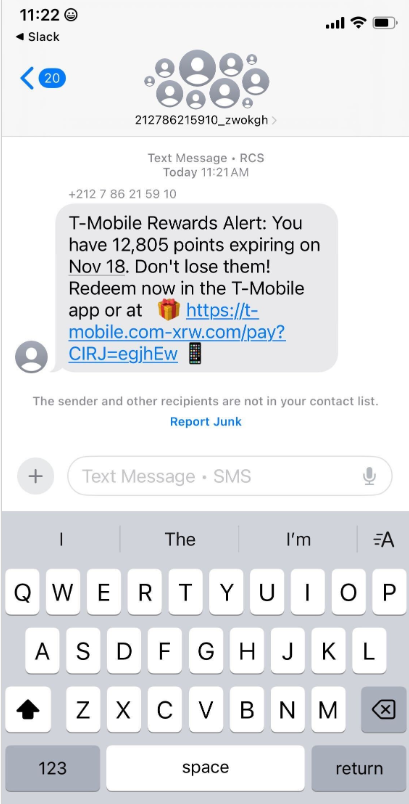
Over the past week, thousands of domain names were registered for scam websites that purport to offer T-Mobile customers the opportunity to claim a large number of rewards points. The phishing domains are being promoted by scam messages sent via Apple’s iMessage service or the functionally equivalent RCS messaging service built into Google phones.

An instant message spoofing T-Mobile says the recipient is eligible to claim thousands of rewards points.

The website scanning service urlscan.io shows thousands of these phishing domains have been deployed in just the past few days alone. The phishing websites will only load if the recipient visits with a mobile device, and they ask for the visitor’s name, address, phone number and payment card data to claim the points.

A phishing website registered this week that spoofs T-Mobile.

If card data is submitted, the site will then prompt the user to share a one-time code sent via SMS by their financial institution. In reality, the bank is sending the code because the fraudsters have just attempted to enroll the victim’s phished card details in a mobile wallet from Apple or Google. If the victim also provides that one-time code, the phishers can then link the victim’s card to a mobile device that they physically control.

Pivoting off these T-Mobile phishing domains in urlscan.io reveals a similar scam targeting AT&T customers:

An SMS phishing or “smishing” website targeting AT&T users.

Ford Merrill works in security research at SecAlliance, a CSIS Security Group company. Merrill said multiple China-based cybercriminal groups that sell phishing-as-a-service platforms have been using the mobile points lure for some time, but the scam has only recently been pointed at consumers in the United States.

“These points redemption schemes have not been very popular in the U.S., but have been in other geographies like EU and Asia for a while now,” Merrill said.

A review of other domains flagged by urlscan.io as tied to this Chinese SMS phishing syndicate shows they are also spoofing U.S. state tax authorities, telling recipients they have an unclaimed tax refund. Again, the goal is to phish the user’s payment card information and one-time code.

A text message that spoofs the District of Columbia’s Office of Tax and Revenue.

CAVEAT EMPTOR

Many SMS phishing or “smishing” domains are quickly flagged by browser makers as malicious. But Merrill said one burgeoning area of growth for these phishing kits — fake e-commerce shops — can be far harder to spot because they do not call attention to themselves by spamming the entire world.

Merrill said the same Chinese phishing kits used to blast out package redelivery message scams are equipped with modules that make it simple to quickly deploy a fleet of fake but convincing e-commerce storefronts. Those phony stores are typically advertised on Google and Facebook, and consumers usually end up at them by searching online for deals on specific products.

A machine-translated screenshot of an ad from a China-based phishing group promoting their fake e-commerce shop templates.

With these fake e-commerce stores, the customer is supplying their payment card and personal information as part of the normal check-out process, which is then punctuated by a request for a one-time code sent by your financial institution. The fake shopping site claims the code is required by the user’s bank to verify the transaction, but it is sent to the user because the scammers immediately attempt to enroll the supplied card data in a mobile wallet.

According to Merrill, it is only during the check-out process that these fake shops will fetch the malicious code that gives them away as fraudulent, which tends to make it difficult to locate these stores simply by mass-scanning the web. Also, most customers who pay for products through these sites don’t realize they’ve been snookered until weeks later when the purchased item fails to arrive.

“The fake e-commerce sites are tough because a lot of them can fly under the radar,” Merrill said. “They can go months without being shut down, they’re hard to discover, and they generally don’t get flagged by safe browsing tools.”

Happily, reporting these SMS phishing lures and websites is one of the fastest ways to get them properly identified and shut down. Raymond Dijkxhoorn is the CEO and a founding member of SURBL, a widely-used blocklist that flags domains and IP addresses known to be used in unsolicited messages, phishing and malware distribution. SURBL has created a website called smishreport.com that asks users to forward a screenshot of any smishing message(s) received.

“If [a domain is] unlisted, we can find and add the new pattern and kill the rest” of the matching domains, Dijkxhoorn said. “Just make a screenshot and upload. The tool does the rest.”

The SMS phishing reporting site smishreport.com.

Merrill said the last few weeks of the calendar year typically see a big uptick in smishing — particularly package redelivery schemes that spoof the U.S. Postal Service or commercial shipping companies.

“Every holiday season there is an explosion in smishing activity,” he said. “Everyone is in a bigger hurry, frantically shopping online, paying less attention than they should, and they’re just in a better mindset to get phished.”

SHOP ONLINE LIKE A SECURITY PRO

As we can see, adopting a shopping strategy of simply buying from the online merchant with the lowest advertised prices can be a bit like playing Russian Roulette with your wallet. Even people who shop mainly at big-name online stores can get scammed if they’re not wary of too-good-to-be-true offers (think third-party sellers on these platforms).

If you don’t know much about the online merchant that has the item you wish to buy, take a few minutes to investigate its reputation. If you’re buying from an online store that is brand new, the risk that you will get scammed increases significantly. How do you know the lifespan of a site selling that must-have gadget at the lowest price? One easy way to get a quick idea is to run a basic WHOIS search on the site’s domain name. The more recent the site’s “created” date, the more likely it is a phantom store.

If you receive a message warning about a problem with an order or shipment, visit the e-commerce or shipping site directly, and avoid clicking on links or attachments — particularly missives that warn of some dire consequences unless you act quickly. Phishers and malware purveyors typically seize upon some kind of emergency to create a false alarm that often causes recipients to temporarily let their guard down.

But it’s not just outright scammers who can trip up your holiday shopping: Often times, items that are advertised at steeper discounts than other online stores make up for it by charging way more than normal for shipping and handling.

So be careful what you agree to: Check to make sure you know how long the item will take to be shipped, and that you understand the store’s return policies. Also, keep an eye out for hidden surcharges, and be wary of blithely clicking “ok” during the checkout process.

Most importantly, keep a close eye on your monthly statements. If I were a fraudster, I’d most definitely wait until the holidays to cram through a bunch of unauthorized charges on stolen cards, so that the bogus purchases would get buried amid a flurry of other legitimate transactions. That’s why it’s key to closely review your credit card bill and to quickly dispute any charges you didn’t authorize.

How to Root Android Phones

By: BHIS
23 April 2025 at 16:06

This blog will cover how to root an AVD emulator and a physical Pixel 6. But before we cover those topics, let's cover what it is we will be doing and some of the pro/cons of rooting an Android phone.

The post How to Root Android Phones appeared first on Black Hills Information Security, Inc..

Embedding Meterpreter in Android APK

By: BHIS
15 October 2018 at 17:52

Joff Thyer// Mobile is everywhere these days. So many applications in our daily life are being migrated towards a cloud deployment whereby the front end technology is back to the […]

The post Embedding Meterpreter in Android APK appeared first on Black Hills Information Security, Inc..

❌