❌

Normal view

Widespread PHP Flaw May Cause Many Site Outages Today

21 October 2026 at 17:26

Expect to see quite a few websites serving error pages today: Nearly 70 percent of websites need to update their core software to fix a pair of vulnerabilities that allow an attacker to seize full control over affected servers. Experts say there are working exploits for the flaws, and that these critical bugs are already being exploited in the wild.

Image: Shutterstock.com, Sashkin.

The flaws at issue are present in PHP, the programming language that powers sites running on a large number of web publishing systems, including Drupal, Magento, Joomla and WordPress. Earlier today, PHP released an emergency security update to fix two critical bugs that can allow an attacker to execute code of their choosing on a vulnerable server.

Reuters reports that government websites in Europe and elsewhere went offline today after the PHP vulnerabilities were disclosed. Cloudflare said it has already detected some exploitation of the flaw, and that at 3:02 am (UTC) it implemented web application firewall rules to protect websites from attack traffic seeking to exploit the bugs, which could cause a denial of service condition, remote code execution, and data exposure.

OpenAI, which was involved in the vulnerability research and outreach, said β€œgiven the severity of these flaws and PHP’s widespread use, we consider this one of the most impactful security issues in recent memory.”

Censys, a company that tracks the technology used by Internet hosts, said a recent scan identified approximately 2.58 million Internet facing hosts and 54.9 million web properties running PHP.

Security experts at Wiz said every PHP version released in the last decade is affected by at least one of these vulnerabilities [full disclosure: Wiz is an advertiser on this blog].

β€œThese findings rank among the most severe vulnerabilities discovered in PHP, and arguably in software history,” reads a blog post published today by a team of researchers at Wiz, which was one of several organizations credited with discovering the vulnerabilities. β€œThe underlying flaws had been present for decades, but demonstrating their exploitability required an exceptionally complex chain of steps, at the edge of what human researchers could practically achieve. Frontier AI models substantially reduced that barrier, turning a longstanding flaw into an exploit.”

The Wiz researchers say it is likely the PHP vulnerabilities will be mass-exploited to install web-based backdoors or β€œweb shells,” which give attackers a web-based panel that allows them to remotely control infected sites. Wiz said that prior to the PHP bugs being publicly disclosed, the company worked with the PHP team, Calif and OpenAI to measure the size of the problem and coordinate patch verification and disclosure.

The PHP zero-day vulnerabilities are being tracked by their CVE numbers, CVE-2026-109618 and CVE-2026-109619, and they affect all web servers running PHP 5.4 or later. The bugs are fixed in PHP 8.5.12, 8.4.27, 8.3.36, and 8.2.35.

According to Wiz, PHP is so deeply embedded in many web applications that we are likely to see organizations struggling to patch these vulnerabilities for some time to come, comparing this PHP vulnerability pair with the Log4Shell weakness that emerged in 2021 β€” a widespread, severe-as-it-gets security flaw in Log4j, a popular Java logging framework.

β€œA vulnerability in core PHP reaches far beyond a single application,” the Wiz researchers wrote. β€œPHP runs across clouds, hosting providers, content-delivery networks and millions of independently managed servers. Reducing exposure before the technical details became public required coordinated work across that entire ecosystem.”

The SANS Internet Storm Center is keeping an eye on major software platforms that are shipping updates to deal with these PHP flaws. For example, Ubuntu just released updated PHP packages. For a technical deep-dive on these vulnerabilities that tells the timeline of the discovery of these bugs in a comic book style, check out this post from Calif, another technology company credited with finding the PHP flaws.

A snapshot of php2shell.censys.com, the website Censys set up to track the PHP vulnerabilities.

This is a fast-moving story. Updates will be noted here with timestamps.

Update, 2:30 pm ET: Add figures from Censys and a link to Calif’s writeup.

Microsoft Patches More Than 1,400 Security Flaws

14 October 2026 at 01:24

Microsoft today issued updates to fix more than 1,400 security vulnerabilities in its Windows operating systems and other software. Today’s epic patch batch dwarfs September’s record of nearly 1,000 fixes, which was already about ten times the normal monthly patch load from Redmond.

Just one of the weaknesses patched this week is considered a β€œzero day,” or already exploited in the wild. CVE-2026-96951 is a security feature bypass in the Windows Shell that affects Windows 10 and 11 systems, as well as some Server versions.

Windows 10 users might be wondering if they can still expect security updates after this month. Microsoft had been slated to stop shipping updates for Windows 10 systems in October 2025, but ended up adding another year of free updates after considerable pushback. A few months ago, Microsoft quietly extended that support for another year (until October 2027).

At least 78 of the flaws fixed this month are rated β€œcritical,” meaning they could be exploited with little or no action by the user, and most of those critical bugs allow an attacker to execute code of their choice on the vulnerable system.

While Microsoft said there are no signs anyone is exploiting it yet, a security feature bypass in the .NET Framework (CVE-2026-108398) was publicly disclosed prior to today, potentially giving attackers advance time to work out how to exploit the bug.

Satnam Narang at Tenable said the number of flaws fixed this month far surpasses the previous record-setting year 2020, when Microsoft patched 1,261 CVEs.

β€œWe’ve now crossed the 4,000 CVE mark with two months left to go,” he said.

Microsoft credits large language models for the high volume of bug discovery, and presumably AI gets credit for many of the patches used to fix these flaw. Meanwhile, security experts have been warning that these unusually large patch volleys from Microsoft are placing extra strain on corporate security teams, which often have to test individual updates before deploying them across a network to ensure the fixes don’t cause problems for other software.

Tyler Reguly, associate director of security research and development at Fortra, notes that just 26 Microsoft vulnerabilities appeared in the β€œKnown Exploited Vulnerabilities” (KEV) catalog maintained by the U.S. Cybersecurity & Infrastructure Security Agency (CISA) so far this year, and security teams would do well to prioritize patching those 26 vulnerabilities first.

β€œSecurity leaders should focus on exploitable risk, and ask whether their teams have the clarity, capacity and support to act,” Reguly said.

Which vulnerabilities deserve the most scrutiny in your organization? The folks at Cisco Talos have a useful roundup of the more noteworthy flaws that Microsoft fixed today, and of course the SANS Internet Storm Center has a reliable roundup that indexes vulnerabilities by severity, CVE number and affected software.

Threat Hunting on the Endpoint: Hunting Adversaries Where They Live

Here's the deal: when adversaries compromise your environment, they don't float around in abstract network flows. They execute on actual systems. They touch files, spawn processes, and mess with registries.

The premise of endpoint threat hunting is simple: if an adversary wants to accomplish anything meaningful, they must eventually execute code on a host. That execution leaves traces.

The Endpoint Advantage: Depth and Context

Endpoint hunting gives you deep, contextual visibility into adversary behavior. You're not inferring what happened from network packets; you're seeing exactly what processes ran, which files were touched, and what registry keys got modified.

Consider credential theft. An adversary running Mimikatz operates entirely in host memory and local file systems. Network detection might catch the tool's delivery, but it won't see the actual credential extraction. Endpoint telemetry captures the process execution, memory access patterns, and specific API callsβ€”providing detection plus meaningful context.

The endpoint also provides crucial user and process context that network data lacks. Suspicious PowerShell execution? Endpoint telemetry tells you which user ran it, what parent process spawned it, what command-line arguments were used, and what it created. This process tree visibility is fundamental to understanding adversary techniques and distinguishing malicious from legitimate activity.

Your Visibility Stack

Effective endpoint hunting requires comprehensive telemetry:

Sysmon is remarkably powerful. This free Microsoft utility generates detailed logs covering process creation, network connections, file changes, registry modifications, and more. When properly configured, it can provide serious, high-fidelity visibility without the EDR price tag.

PowerShell Script Block Logging captures actual commands executed in PowerShell sessions. Given how heavily adversaries rely on PowerShell, these logs are invaluable.

Windows Event Logs provide foundational telemetry. Universally available, they often contain the first indicators that something's off.

Velociraptor brings digital forensics and incident response to scale. This open-source tool lets you hunt across thousands of endpoints simultaneously, collecting artifacts and running detection queries in real-time.

Wazuh provides centralized collection and analysis of endpoint telemetry. While not as feature-rich as a commercial EDR, it aggregates logs from multiple sources, applies detection rules, and gives you a hunting interface across your environment.

EDR platforms have their place, but you don't need expensive tools to start hunting. OS-native telemetry and open-source tools get you remarkably far.

What Endpoint Hunting Misses

External C2 communications present major challenges for endpoint detections. While endpoint tools capture network connections made by processes, they don't deeply inspect connection content. An adversary using encrypted C2 channels generates connections that endpoint logs record, but the malicious nature is often only apparent through network traffic analysis.

Lateral movement patterns across your environment are tough from a purely endpoint perspective. Network monitoring provides this visibility more naturally.

Living Off the Land: The Real Challenge

Modern adversaries "live off the land," using legitimate system tools (PowerShell, WMI, certutil) for malicious purposes. These processes are inherently legitimate; that is, endpoint telemetry shows their execution, but distinguishing malicious from benign requires understanding normal patterns and identifying behavioral anomalies.

This is where endpoint hunting earns its keep. Automated signatures struggle with legitimate tools. But hunters who understand both legitimate uses and adversary abuse patterns can spot differences. Legitimate admins rarely use certutil to download files. PowerShell downloading from pastebin is unusual.

The endpoint's rich context (command-line parameters, parent processes, user context) provides the clues needed to distinguish malicious from benign.

The Endpoint Imperative

Despite limitations, endpoint threat hunting remains essential. Adversaries must execute code, access files, and modify systems. These actions occur on endpoints and generate endpoint artifacts.

The depth that endpoint data provides is unmatched. For detecting privilege escalation, credential theft, defense evasion, and persistence, endpoint hunting isn't just usefulβ€”it's necessary. These tactics involve no network activity that distinguishes them from legitimate behavior.

The question isn't whether to invest in endpoint threat hunting, but how comprehensively you can implement it. Because in the assumed breach world we inhabit, adversaries are executing on your systems right now. Endpoint hunting is how you find them.

GitLab dicht 12 jaar oud gat dat een 10 scoort op de CVSS-securityschaal

22 October 2026 at 14:45
GitLab bracht woensdag patches uit voor een kwetsbaarheid die al sinds 2014 in de code zit en die de hoogste score krijgt binnen het CVSS. Deze updates volgen net iets meer dan een week na kritieke patches voor GitLab. Gebruikers die deze ontwikkelsoftware zelf draaien, moeten snel updaten.

Microsoft Plugs Nearly 1,000 Security Holes

8 September 2026 at 23:44

Microsoft Corp. today issued updates to plug at least 974 security holes in its Windows operating systems and other software, by far its biggest single patch batch ever. Microsoft says artificial intelligence is helping to speed the discovery of vulnerabilities, but security experts warn that many organizations already are struggling to prioritize the more human-intensive endeavor of testing and deploying so many fixes each month.

Image: Shutterstock.com, Kirill Makarov.

This month’s patch bundle obliterates the software giant’s previous record set in July, when it released updates for at least 570 security vulnerabilities. September’s Patch Tuesday brings this year’s total to more than 2,600, more than twice Microsoft’s previous record-setting patch year in 2020 (1,245) and with three more months to go.

There are two β€œzero-day” flaws fixed this month that are being actively exploited: both CVE-2026-81963 and CVE-2026-85880 allow an attacker to elevate their privileges on Windows system.

Fully 113 of the bugs addressed today earned Microsoft’s β€œcritical” rating, meaning they could be abused by malware or miscreants to seize control over a vulnerable Windows machine with little or no help from the user.

Among the more serious critical flaws this month is CVE-2026-69730, a DNS weakness present in Windows Server 2012 onward and on Windows 10. Microsoft warns that an unauthenticated attacker could leverage this weakness simply by sending a specially crafted packet to an affected system, and that it is likely to be exploited.

Also scary is CVE-2026-69829, a critical, remote code execution flaw in the Windows Shell. This vulnerability has a CVSS base score of 9.8 (10 is the most severe), and can be exploited with low attack complexity, no privileges, and no user interaction.

Microsoft’s summary of the security updates released today. Image: msrc.microsoft.com.

Microsoft is hardly alone in shipping monster patch bundles lately. Many other large software companies, including Adobe, Cisco, Google, Mozilla and Oracle, all have recently credited AI-assisted research with increasing their patch cadence and volume (Google said today it is now going to ship security updates every two weeks).

Tyler Reguly, associate director of security research and development at Fortra, said one core challenge with deploying Windows updates is that they need to be tested before being installed across an organization because not all third-party software works seamlessly in the face of changes to the underlying operating system.

β€œIt’s time to put our CISOs and CSOs on notice,” Reguly said. β€œHow are you helping your teams through these difficult times? Do you have your teams deploy after hours and on weekends to avoid disruption to the business environment? Do you reward them for that effort? Time to dig into your budget and buy dinner for your teams that are working on Saturday to get patches rolled out before users return to work on Monday.”

Satnam Narang is senior staff research engineer at Tenable. Narang said it’s important to recognize that while the number of vulnerabilities being patched by Microsoft is rising, the number of flaws that can and will affect most organizations remains quite low.

β€œAI-assisted vulnerability discovery in 2026 is creating larger haystacks, but it isn’t finding more needles,” he said. β€œIt’s critical that organizations understand which vulnerabilities actually apply to them, whether they pose a threat by being reachable and exploitable, and prioritize remediation based on this risk context.”

Of course, regular Windows users don’t need to test patches before deploying them, but they still need to open Windows Update periodically or else assent to the program’s nag notices about pending updates. And at the rate these Windows patch releases are ballooning in size, it’s probably best not to let them pile up month after month.

Enterprise Windows admins will want to keep an eye on askwoody.com for news of any updates that appear to be causing problems. As always, the SANS Internet Storm Center has a per-patch breakdown ordered by severity and urgency.

Extend Amazon Bedrock Guardrails to Tool Interactions Using the Strands Agents SDK

27 August 2026 at 18:20

If you’re running AI agents in production, Amazon Bedrock Guardrails protects the model boundary. But your agents also invoke tools, fetch external data, and communicate with other systems. That data flows outside the model boundary, where model-level guardrails can’t reach.

You can extend guardrail coverage to those interactions using three validation checkpoints built with the Strands Agents SDK lifecycle hooks and Amazon Bedrock guardrails. You implement each checkpoint using a Strands life-cycle hook, which validates data at a critical trust boundary without changing your existing tools or agent logic.

Agents can communicate with other systems through the Model Context Protocol (MCP), a standard for connecting AI systems to data sources and tools. You will learn how to implement three validation checkpoints, scope different guardrails to specific tools, and scale them to other agents.

Extending guardrails beyond the model boundary

Amazon Bedrock Guardrails provides protection at the model boundary. Every model invocation is checked: the input prompt is validated before inference, and the model response is validated after inference. You can enforce guardrail use at the account level using AWS Identity and Access Management (IAM) policies, making guardrails mandatory for model calls across your account. You can further refine this by using Amazon Bedrock Guardrails input tagging to mark specific portions of the prompt for evaluation, so trusted content like system prompts can be skipped.

Guardrails cover what the model sees, but agents do more than call models. They invoke tools, pull data from external sources, communicate with MCP servers, and return results to users. These interactions happen outside the model boundary by design, because model-level guardrails focus on the prompts and responses the model itself handles. Adding validation at the tool boundary complements, rather than replaces, that model-level protection.

Model-level guardrails alone leave you exposed in four ways:

  • Tool parameters pass through unchecked. The model decides which tool to use and what parameters to pass. The agent then calls the tool with those parameters. No validation sits between the model’s decision and the tool’s execution. If the parameters inadvertently contain personally identifiable information (PII) or policy-violating content, the tool runs with that content.
  • External data enters without validation. Agents consume data from tool responses, MCP server outputs, and API calls. Without validation at the tool boundary, content from external sources can influence the agent’s behavior before model-level guardrails have a chance to evaluate it.
  • Misleading content can affect reasoning. An agent that retrieves inaccurate or misleading content from an external source might treat it as authoritative, producing skewed recommendations in lending, healthcare, or legal advice.
  • Multi-agent systems can spread bad data downstream. In multi-agent systems, a misconfigured or poorly designed upstream component can pass policy-violating content to downstream agents. Model-level guardrails at each agent’s boundary don’t inspect data flowing between agents at the tool layer.

Three validation checkpoints

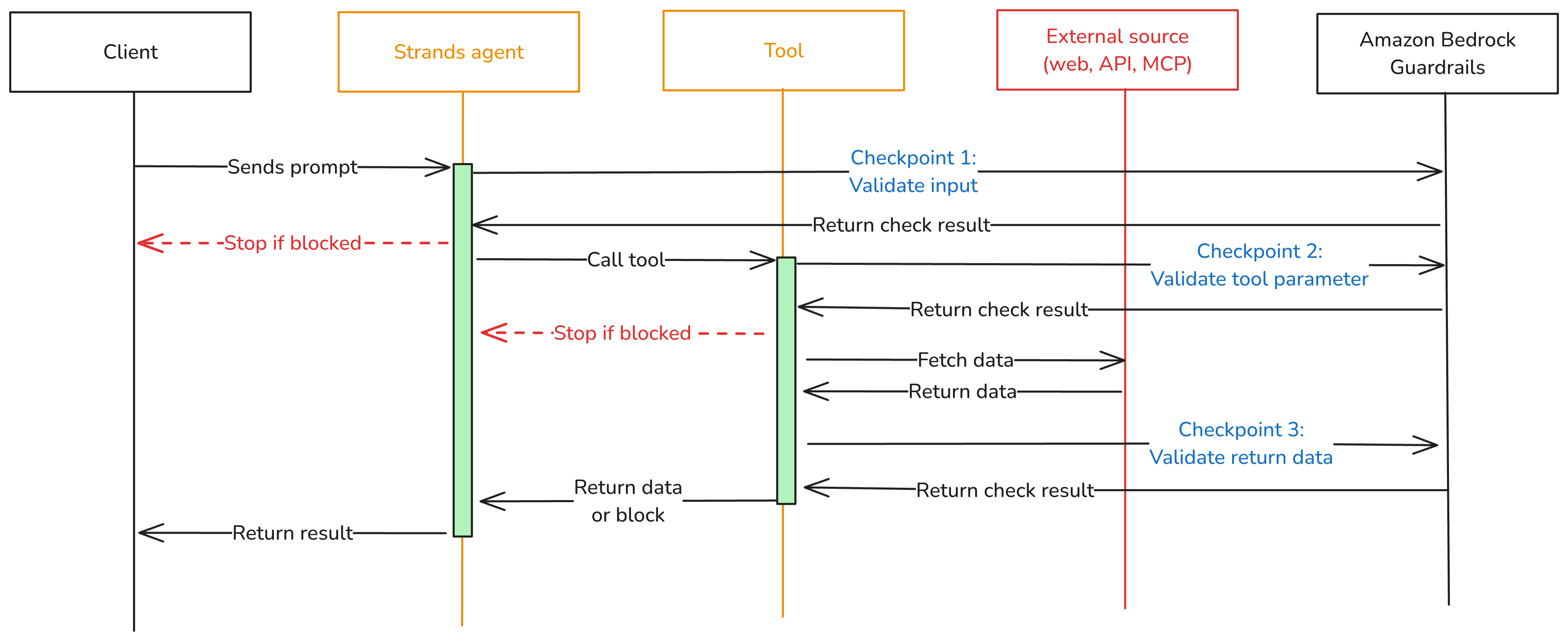
To close these gaps, add three validation checkpoints at each trust boundary where data crosses into or out of your agent as shown in Figure 1.

  • Checkpoint 1: Inbound data validation – Check data before it reaches the modelβ€”user input, data from other agents, MCP tool servers, and RAG pipelines. You catch policy-violating or biased content before it enters the model’s context window. In the Strands Agents SDK, you implement this using a BeforeInvocationEvent hook that fires before model inference or tool execution occurs. The hook inspects incoming messages and blocks the request if the content violates policies. The model doesn’t see blocked content.
  • Checkpoint 2: Tool interaction supervision – Before the agent calls a tool, a BeforeToolCallEvent hook checks the parameters it’s about to pass. This is the gap model-level guardrails don’t cover. The model has already decided what to send, but nothing has verified whether that content is safe to act on. If the hook flags the input, the call is canceled before the real-world action occurs.
  • Checkpoint 3: Outbound data validation – Validate results before returning them to the user or passing them to downstream systems. You need this most for tools that ingest external content, like a web search tool fetching web pages from sites outside your control. In Strands, an AfterToolCallEvent hook validates the tool’s return value and replaces it with a block message if the content violates policies.
Figure 1: Three validation checkpoints extend Amazon Bedrock Guardrails from the model boundary to the tool boundary.

Figure 1: Three validation checkpoints extend Amazon Bedrock Guardrails from the model boundary to the tool boundary.

You can adjust the validation intensity of each checkpoint:

  • At Checkpoint 1, use a full Amazon Bedrock guardrail with PII detection, content filtering, and topic enforcement.
  • Checkpoint 2 can be lighter. Configure a separate Amazon Bedrock guardrail with rules tailored to the specific tool being called, or run local checks like regex validation or schema enforcement.
  • For Checkpoint 3, focus on unwanted content detection for tool outputs that return external data.

Mix fast deterministic checks (regex, schema validation, allowlists) with AI-based guardrail evaluations. This keeps latency low.

Implementation

The implementation uses boto3, the AWS SDK for Python, to call the ApplyGuardrail API. The Strands Agents SDK exposes one life-cycle event per checkpoint. Here’s how to implement each one.

Prerequisites

This post assumes you already have a working Strands agent. Your agent should use least-privilege tool access, scoped system prompts, and validated business logic. If you’re starting from scratch, see Strands Agents SDK: A technical deep dive into agent architectures and observability for a step-by-step walk through of building and deploying a Strands agent with Amazon Bedrock Agent Core.

Before implementing the multi-checkpoint approach, you’ will need:

  1. An AWS account with access to Amazon Bedrock
  2. Amazon Bedrock Guardrails configured (see Creating a guardrail)
  3. Python 3.11 or later installed
  4. The Strands Agents SDK installed: pip install strands-agents
  5. AWS credentials configured with permissions for bedrock:ApplyGuardrail and bedrock:InvokeModel
  6. Your guardrail ID and version from the AWS Management Console for Amazon Bedrock (navigate to Guardrails, select your guardrail, and copy the ID)

Create the guardrail validation hook

The GuardrailHook class is a Strands HookProvider. It registers three callbacks, one for each lifecycle event. When Strands triggers an event, the matching callback runs validate_inbound checks user messages, validate_input checks tool parameters before execution, and validate_output checks tool results. All three use the shared _check method, which calls the Amazon Bedrock ApplyGuardrail API.

Create a guardrail_hook.py file and add this implementation. Use the optional tool_names parameter to scope a hook to specific tools, or pass None to apply it everywhere:

import boto3
from strands.hooks import HookProvider, HookRegistry
from strands.hooks.events import (
    BeforeInvocationEvent,
    BeforeToolCallEvent,
    AfterToolCallEvent,
)

class GuardrailHook(HookProvider):

    def __init__(self, guardrail_id, guardrail_version, region_name, tool_names=None):
        self.client = boto3.client("bedrock-runtime", region_name=region_name)
        self.guardrail_id = guardrail_id
        self.guardrail_version = guardrail_version
        self.tool_names = tool_names  # None = apply to all tools

    def register_hooks(self, registry: HookRegistry, **kwargs):
        registry.add_callback(BeforeInvocationEvent, self.validate_inbound)
        registry.add_callback(BeforeToolCallEvent, self.validate_input)
        registry.add_callback(AfterToolCallEvent, self.validate_output)

    def _check(self, content, source="INPUT"):
        """Call Bedrock ApplyGuardrail. Returns True if content is safe."""
        response = self.client.apply_guardrail(
            guardrailIdentifier=self.guardrail_id,
            guardrailVersion=self.guardrail_version,
            source=source,       # "INPUT" applies input policies; "OUTPUT" applies output policies
            content=[{"text": {"text": content}}],
        )
        return response["action"] != "GUARDRAIL_INTERVENED"

    # Checkpoint 1 β€” BeforeInvocationEvent
    # Validates user input before model inference or tool execution occurs.
    # The model does not see blocked content.
    async def validate_inbound(self, event: BeforeInvocationEvent):
        for msg in reversed(event.messages):
            if msg.get("role") == "user":
                for block in msg.get("content", []):
                    text = block.get("text", "")
                    if text and not self._check(text):
                        event.messages.clear()
                        event.messages.append({
                            "role": "user",
                            "content": [{"text": "Request blocked by safety guardrail."}],
                        })
                        return
                break

    # Checkpoint 2 β€” BeforeToolCallEvent
    # Validates tool input parameters before the tool executes.
    # Skips tools not in tool_names (if a filter is set).
    async def validate_input(self, event: BeforeToolCallEvent):
        if self.tool_names and event.tool_use.get("name") not in self.tool_names:
            return
        tool_input = event.tool_use.get("input", {})
        for param_value in tool_input.values():
            if isinstance(param_value, str) and not self._check(param_value):
                event.cancel_tool = "This request was blocked by a safety guardrail."
                return

    # Checkpoint 3 β€” AfterToolCallEvent
    # Validates tool output before it reaches the agent.
    # Skips tools not in tool_names (if a filter is set).
    async def validate_output(self, event: AfterToolCallEvent):
        if self.tool_names and event.tool_use.get("name") not in self.tool_names:
            return
        content_parts = [
            block["text"]
            for block in event.result.get("content", [])
            if "text" in block
        ]
        content = "\n".join(content_parts)
        if content and not self._check(content, source="OUTPUT"):
            event.result = {
                "toolUseId": event.result["toolUseId"],
                "status": "error",
                "content": [{"text": "Content blocked by safety guardrail."}],
            }

Define tools

Strands discovers tools through the @tool decorator. The decorator turns a plain Python function into a tool the model can call, using the function’s docstring and type hints as the tool’s contract. Here are two simple examples used in the registration sections below. A web search tool and a customer data tool:

from strands import tool

@tool
def web_search(query: str) -> str:
    """Search the web and return a result snippet."""
    # Replace with your actual search implementation
    return f"Search results for: {query}"

@tool
def get_customer_data(customer_id: str) -> str:
    """Retrieve customer record by ID."""
    # Replace with your actual data lookup implementation
    return f"Customer record for: {customer_id}"

If you don’t have existing tools, create a tools.py file and copy in the example code above.

Register the hook

Strands activates hooks through the hooks parameter on the Agent constructor. After being registered, the hook’s callbacks run automatically on every matching lifecycle event. No changes are needed in your tools or agent logic. For a single guardrail applied to all tools, create one hook instance and pass it to your agent:

from strands import Agent
from strands.models import BedrockModel
from guardrail_hook import GuardrailHook
from tools import web_search, get_customer_data # Example tools - replace with your tools

# Example model and region selection
model = BedrockModel(
    model_id="us.anthropic.claude-sonnet-4-5",
    region_name="us-east-1",
)

guardrail_hook = GuardrailHook(
    guardrail_id="your-guardrail-id",    # Copy it from the Amazon Bedrock console > Guardrails
    guardrail_version="1",               # Use "DRAFT" for testing
    region_name="us-east-1",             # Region where the guardrails are defined
)

agent = Agent(
    model=model,
    tools=[web_search, get_customer_data], # Example tools
    system_prompt="You are a helpful assistant.", # Example system prompt
    hooks=[guardrail_hook],  # Applied to all tool calls
)

Use different guardrails per tool

Different tools carry different risks. A web search tool fetches external content from untrusted sites and needs strict output filtering. A customer data tool returns internal records and might need PII detection configured differently. The tool_names parameter scopes a hook to specific tools. Strands still runs every registered hook on each event, but hooks skip the call when the tool name doesn’t match. Register one hook per guardrail:

from strands import Agent
from strands.models import BedrockModel
from guardrail_hook import GuardrailHook
from tools import web_search, get_customer_data # Example tools - replace with your tools

# Example model and region selection
model = BedrockModel(
    model_id="us.anthropic.claude-sonnet-4-5",
    region_name="us-east-1",
)
# Strict content filtering and PII detection for web search results
web_search_hook = GuardrailHook(
    guardrail_id="gr-websearch-id",      # Guardrail ID with content filtering + PII detection
    guardrail_version="1",               # Or set to DRAFT
    region_name="us-east-1",             # Change to your region
    tool_names={"web_search"},           # Only applies to the web_search tool
)

# PII detection for customer data β€” prevents sensitive records from leaking into tool parameters
customer_data_hook = GuardrailHook(
    guardrail_id="gr-customerdata-id",   # Guardrail ID with PII detection
    guardrail_version="1",               # Or set to DRAFT
    region_name="us-east-1",             # Change to your region
    tool_names={"get_customer_data"},    # Only applies to the get_customer_data tool
)

agent = Agent(
    model=model,
    tools=[web_search, get_customer_data],        # Example tools
    system_prompt="You are a helpful assistant.", # Example system prompt
    hooks=[web_search_hook, customer_data_hook],  # Each hook runs only for its assigned tools
)

Each guardrail is configured independently in the Amazon Bedrock console. You can match validation strictness to each tool’s risk level instead of applying one policy across your entire agent.

Test your implementation

Run a quick test with the preceding examples:

  1. Create a project folder and add the following files:
    1. guardrail_hook.py the GuardrailHook class
    2. tools.py the web_search and get_customer_data tool definitions as examples
    3. agent.py the agent setup from the Register the hook section
  2. In agent.py, add a test prompt at the end:
# Send a test prompt
response = agent("Search the web for the latest news on AI security.")
print(response)
  1. Update the guardrail IDs, AWS Region, and model ID in agent.py to match your configuration.
  2. Run the agent from your project folder: python agent.py

The guardrail hook runs at each checkpoint. If the prompt or any tool output is flagged, you’ll see the block message in the response instead of the tool result.

Use the hook across your organization

The GuardrailHook is a standalone HookProvider. Build it once, then attach it to Strands agents by passing it to the hooks parameter. The same hook package can be published as an internal library and consumed by

You can swap guardrail configurations or add checks like regex or schema validation without touching agent or tool code.

Conclusion

Amazon Bedrock Guardrails protects the model boundary, but agents also call tools, consume external data, and return results that never pass through model-level checks. The three validation checkpoints in this post close that gap using Strands Agents SDK lifecycle hooks: BeforeInvocationEvent validates user input, BeforeToolCallEvent validates tool parameters, and AfterToolCallEvent validates tool output. The same GuardrailHook class supports one shared guardrail or different guardrails scoped per tool, and deploys unchanged from local testing to Amazon Bedrock Agent Core Runtime.

To learn more, see:

If you have feedback about this post, submit comments in the Comments section below.


Stephan Traub

Stephan Traub

Stephan is a senior security consultant with AWS Professional Services, where he works closely with customers across different industries. A true technology enthusiast, Stephan is passionate about empowering customers to achieve a robust security posture within their cloud environments and AI workloads. When Stephan isn’t immersed in his AWS work, you can find him on the volleyball court or exploring the world with his family.

What Is a Website Attack Surface? A Beginner’s Guide to Reducing Risk

By: Sucuri
19 August 2026 at 22:06
What Is a Website Attack Surface? A Beginner’s Guide to Reducing Risk

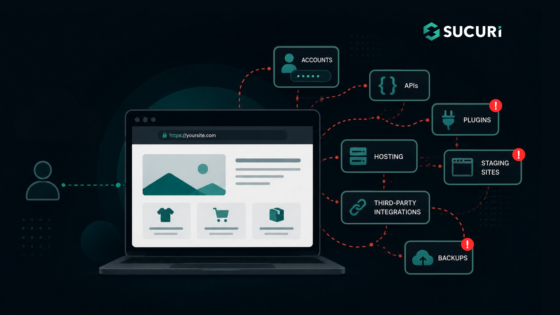
Each feature that you add to a website results in a new element that has to be managed.

The credentials are accepted by a login page, the data by a contact form, new code is introduced by a plugin, and an API is used to connect your website to another service. It is also possible that an old staging site or a forgotten backup may still be accessible from the internet.

The collection of these exposed components constitutes your website attack surface.

Continue reading What Is a Website Attack Surface? A Beginner’s Guide to Reducing Risk at Sucuri Blog.

Two Alleged β€˜TeamPCP’ Hackers Arrested in Australia

27 August 2026 at 13:04

Authorities in Australia have arrested two men believed to be members of TeamPCP, a prolific cybercrime and data extortion group blamed for perpetrating the longest running spree of software supply chain attacks ever.

In a statement released today, the Australian Federal Police (AFP) said two men from Western Australia, aged 21 and 23, were arrested in connection with a β€œsophisticated cybercrime syndicate that allegedly created malicious open-source software to rob thousands of global businesses.”

The AFP did not name the defendants, but KrebsOnSecurity learned the 21-year-old suspect’s real identity in June, and has been communicating with him ever since. This story includes interviews with TeamPCP’s self-described spokesperson, and examines clues left behind by the TeamPCP leader that likely led to his undoing.

TeamPCP vaulted onto the cybercrime scene in late 2025, embedding malicious code in hundreds of open source software tools and extorting victims for profit. Members of the group made headlines by compromising corporate cloud environments using a self-propagating worm dubbedΒ Shai-Hulud, which added malicious code to open source programs maintained by developers whose credentials at public code repositories like GitHub or NPM were phished or stolen.

Writing for Wired, journalist Andy Greenberg described TeamPCP’s core tactic as a kind of cyclical exploitation of software developers.

β€œThe hackers gain access to a network where an open source tool commonly used by coders is being developed,” Greenberg wrote in May. β€œThe hackers plant malware in the tool that ends up on other software developers’ machines, including some who are writing other tools intended to be used by coders. The malware allows TeamPCP’s hackers to steal credentials that let them publish malicious versions of those software development tools, too. The cycle repeats, and TeamPCP’s collection of breached networks grows.”

TeamPCP also has practiced something akin to cyclical recruitment. In May, the source code for the third iteration of Shai-Hulud was published online, and TeamPCP soon after launched a contest offering $1,000 in virtual currency to whichever participant could conduct the largest supply chain operation using the worm’s code. According to the contest rules, participants were scored based on the number of weekly and monthly downloads of packages they compromised β€” directly incentivizing them to target the most popular code libraries.

A screenshot of a message from TeamPCP’s Telegram account, announcing the supply chain hacking contest. Image: dataminr.com.

β€œTeamPCP has stated the competition is a recruiting opportunity and they intend to purchase all meaningful access harvested from participants’ campaigns,” the security firm Dataminr wrote. β€œThe $1,000 XMR (Monero) prize is a recruitment floor and has been dismissed by the actor as β€˜just like participation trophy,’ adding β€˜if you find something good you will be paid way more,’ confirming the contest’s true function as talent identification and malicious access acquisition at scale.”

In March, TeamPCP executed a supply chain attack targeting AI infrastructure by compromising the code for LiteLLM, an open source AI gateway that connects users to more than 100 different large language models. A recent analysis by the security firm CloudSEK found TeamPCPs attack on LiteLLM harvested cloud service keys and other secrets from more than 2,500 organizations, including many of the world’s top technology companies.

In May, TeamPCP claimed credit for compromising at least 3,800 code repositories at the Microsoft-owned GitHub, after a GitHub developer installed a code extension that was compromised by TeamPCP’s malware.

MEET THE CYBERCATS

Security experts say TeamPCP is less of a hacker group than an amalgamation of threat actors from multiple cybercriminal gangs who sometimes work together toward similar goals.

β€œIt is not a structured criminal crew with a single operator,” said Austin Larsen, a principal threat analyst with the Google Threat Intelligence Group. β€œIt is a peer community of individually-skilled actors, with one clear center of gravity.”

That center of gravity is George Prepakis, an accomplished security researcher and self-described exploit developer who operates the Twitter/X profile @kernelstub. Earlier this year, @kernelstub tweeted a public invite link to a Matrix chat server he created and dubbed β€œCybercats,” and TeamPCP and several other cybercrime entities have been using this server to communicate daily for the past several months.

A screenshot of the Matrix chat server β€œCybercats,” whose members used hacker handles associated with multiple distinct cybercrime groups that have occasionally collaborated on a series of supply chain and data ransom attacks over the past nine months.

Kernelstub, like other administrators in the Cybercats chat, has been using his Twitter/X profile name as his handle in these Matrix communications, frequently tweeting references to other members and to conversations taking place in the Cybercats chat. In a number of cases, the corresponding X accounts for members of the Cybercats chat taunted cybercrime victims publicly before the incidents were reported in the news media.

The Cybercats administrator listed at the top of the screenshot above β€” β€œBoxturtle” β€” is a close associate of TeamPCP who has been tweeting about the group’s conquests under the name @xpl0itrsturtle. This handle corresponds to a data breach broker active on Breachforums and Darkforums who has been selling data stolen in a wave of recent breaches at automobile manufacturers, including BMW Group, Audi, Honda, Mercedes-Benz, Volvo and Toyota, as well as data allegedly taken from Snapchat and SportRadar.

The data leak site for the extortion group or handle β€œxpl0itrs.”

The Cybercats administrator β€œSeesawSec” in the screenshot above is the alias of whoever is behind the cybercrime group known as Fulcrumsec, which recently claimed credit for data extortion attacks against the pharmaceutical giant Novo Nordisk, the data broker LexisNexis, and Avnet, a Fortune 500 distributor of electronic components.

The data leak site of Fulcrum Security, a.k.a. Fulcrumsec.

The Cybercats administrator β€œ@pcpcasper” also has been using a similar name on X to discuss TeamPCP’s attacks and victims. This person has an extensive message history on Telegram, where their messages and shared videos show @pcpcasper is an active and vocal member of the National Socialist Network, a neo-Nazi political organization based in Australia.

At one point in these chats, @pcpcasper shared videos and images of what they claimed was their cat, and several of those videos place this user in Western Australia. One source close to the investigation told KrebsOnSecurity that @pcpcasper was one of the two arrested, a claim supported by messages that @kernelstub posted online this morning.

The Cybercats member roster pictured above also features an administrator with the username β€œT,” which is short for the now-banned Twitter/X profile @pcpcats, the account operated by the self-described TeamPCP spokesperson who was arrested today. As we’ll see in a moment, @pcpcats also is from Western Australia.

By the time @kernelstub tweeted a public invite link to the Cybercats Matrix server, T/@pcpcats was posting only infrequently to the group chat, with other members often inquiring as to his whereabouts and well-being. The group’s collective concern related to @pcpcats’s tendency to blame his increasingly extended absences on the use of hallucinogens and other narcotics that kept him awake for days on end, but also caused him to crash in bed for several days after the highs wore off.

WHO IS THE TEAMPCP LEADER?

The Cybercats member @pcpcats has used multiple nicknames on the cybercrime forums, including EllisD25/LSD on Darkforums, BulkDMT on Breachstars, and Express on Breachforums. These accounts are linked because they all advertised the same Tox ID and/or Session ID as instant message contact handles in their cybercrime forum posts. BulkDMT was also known on the forums as DMT Host, which was a virtual private server (VPS) hosting service that was peddled on Darkforums and Breachstars.

DMT Host/EllisD25, posting on the English-language cybercrime community DarkForums in September 2025. Image: ke-la.com.

According to the cyber intelligence firm Intel 471, Express registered on Breachforums using the email address shitstickpp@gmail.com. Intel 471 finds Express posted on Breachforums across a two-month period in 2025 using four different Internet addresses located in South Africa. On July 30, 2025, Express announced on Breachforums they were selling access to 14 gigabytes of data stolen from South Africa’s State Information Technology Agency.

The threat intelligence platform Flashpoint recorded more than a year’s worth of messages from the TeamPCP leader’s alter ego on Telegram β€” Persy_PCP β€” Β who claimed they split their life living between two countries [full disclosure: Flashpoint is an advertiser on this blog]. β€œI have these [files] as well, problem is these are in another country,” Persy_PCP explained to another user inquiring about a stolen data set in November 2025.

Later that month, Persy_PCP complained, β€œMy whole country is racist and they want people like me dead.” Flashpoint records show BulkDMT shared in September 2025 that β€œthis country is going to fucking starve when they take the farmers land,” a likely reference to white landowners in South Africa who claim to be targeted by an ongoing genocide campaign.

This tracks with public reporting on TeamPCP. Cyberscoop reported in June that Google had traced TeamPCP’s residential and mobile Internet address connections to South Africa, β€œindicating the primary operator was located there during at least some of its attacks.”

BulkDMT also shared on the group chat at Breachforums that they were recovering from an addiction to methamphetamine. β€œMy life is kinda fucked rn [right now], but that’s fine and there isn’t really a point in pouring so much emotional energy into that fact, my parents had money but I unfortunately got really addicted to some things so I don’t get to benefit from that. As long as I continue to survive, stay sober, and move closer towards my goals that’s enough drive and meaning.”

The identity threat protection company SpyCloud finds shitstickpp@gmail.com shows up in the registration of an account called ChristmasSnow on the cybercrime community Raidforums in 2022. Nearly all of the Internet addresses used to access that account came from ISPs in Perth, Australia, SpyCloud found.

KrebsOnSecurity looked up all of those Perth IP addresses in passive DNS records maintained by DomainTools.com, and found one of them β€” 211.27.196.111 β€” for several years was used as a private file server by a family in Perth with the last name of Thomson. Those records show at least three hosts β€” ithomson.direct.quickconnect.to (a remote Synology server), kthomson0061.direct.quickconnect.to, and joshuawthomson39.myqnapcloud.com (a QNAP network storage device) β€” persisted at that address between 2022 and 2025.

Searching on β€œjoshuathomson39” in the breach tracking service Constella Intelligence reveals an account at the freight forwarding company kwe.com created in the name of Joshua Thomson from Perth, Australia. The open source intelligence platform Epieos finds the phone number attached to that kwe.com account was used to register a Facebook profile for Josh Thomson, which says his family includes a brother named Ruben, his father Ian, and his mom Cindy.

That Facebook profile also says Josh and his family are originally from Pietermaritzburg, in KwaZulu-Natal, South Africa, but currently living in Cottesloe, a beach-side suburb of Perth. A search in DomainTools for Ian Thomson and Australia unearthed five domains by the same registrant, including securecomputing.au, thomson.org.au, and thomsonfamily.net.au. Ian Thomson is a dentist in Cottesloe, and a biography says he graduated from The University of the Witwatersrand in Johannesburg, South Africa.

Constella finds a joshua@thomson.org.au registered a number of accounts online, but Josh doesn’t seem to have much of a connection to dodgy cybercrime forums. His brother Ruben, on the other hand, has quite the presence on these communities, dating back to at least 2018. Constella reports ruben@thomson.org.au frequently reused the password β€œjoshuathomson1,” and Constella further finds that password was used by just a handful of accounts, including yolosolo17@gmail.com and surfinup8@gmail.com.

According to Intel 471, surfinup8@gmail.com was used to register the user Yolosolo17 on the crime forum Altenen in 2018, and that user account was registered from the Perth address 110.141.230.15. On Altenen, Yolosolo17 advertised free web proxies, as well as the domain rubenthomson.com, which was at one point used to sell steeply discounted iPhones. DomainTools says rubenthomson.com was hosted at 110.141.230.15 and registered to surfinup8@gmail.com.

A cached copy of the domain rubenthomson.com from 2017 shows a login page underneath a banded stack of money. Image: archive.org.

SpyCloud reports 10.141.230.15 was used by the email address sheepstealing@gmail.com on Raidforums and surfinup8@gmail.com on Nulled, and that the same IP was used by the email addresses ian@thomsonfamily.net.au, jasper@yakuza.cc, and rubenthomson1@gmail.com. SpyCloud also shows that sheepstealing Gmail address is tied to the accounts Sheep420, YoloSolo117 and Yakuza.cc on Raidforums, and to the account β€œSheep Stealing” on Hackforums. Intel 471 says sheepstealing@gmail.com was used to register the account DingoFlour on Breachforums in October 2023, as well Sheepx on Altenen.

Epieos reports that ruben@securecomputing.au is tied to an Airbnb account for Ruben, who described himself as a Web developer who went to school at the University of Western Australia and was living outside the country. β€œHey, I’m Ruben, my friends call me Ellis. I’m a Perth creative who occasionally books rooms when visiting family and for photography.”

Epieos also finds sheepstealing@gmail.com registered an upwork.com profile under the name Ruben, who said his main skills are setting up secure server hosting solutions and PHP full-stack Web development.

β€œI’m familiar with Linux, working with relational databases (SQL),” the Upwork profile reads. β€œI also script in Python mainly for writing social media bots.”

The Upwork profile for Ruben Thomson in Cottesloe, Australia.

Epieos further discovered sheepstealing@gmail.com is connected to a Microsoft account for Ruben Thomson, and to a now-defunct GitHub account called XmasSnow/XmasSnowisBack that scammed people on the forums in 2022 by claiming to sell exclusive exploits for recently-released software patches (recall that shitstickpp@gmail.com was used to register a forum account named ChristmasSnow).

This same sheepstealing email address registered a Twitter/X account in 2026 called β€œGone Fishing” that lists its location as South Africa. That Gmail account also left several reviews for businesses listed on Google Maps over the past seven years, but all of those establishments are located on the west coast of Australia.

Business reviews in Western Australia left by the Google account sheepstealing at gmail.com.

The people search service Pipl finds a 21-year-old Ruben Thomson in Western Australia who has a phone number ending in 979. A lookup on that number at Epieos reveals it is connected to a TikTok account under the name Ellis, and to a PayPal account in the name of Ruben Thomson.

Finally, a search on the name Ruben Thomson from Cottesloe at the Australian government’s record of registered businesses finds he has incorporated or served as an official in multiple companies created since 2024, including Secure Computing Solutions, Tensor Industries, and another entity ironically named OPSEC Express. Recall that Express was BulkDMT’s nickname on Breachforums.

Australian companies connected to Ruben Thomson. Image: abr.business.gov.au.

It’s ironic because OPSEC is short for the term β€œoperational security,” which refers to techniques and behaviors used to obfuscate and compartmentalize one’s real-life identity online, and using your cybercrime handle as part of your own company name is very much the antithesis of that practice.

There is at least one other major opsec failure by Ruben that exposed a link to TeamPCP. In June 2025, someone using the name Ruben Thomson registered on HackerOne, a popular β€œbug bounty” program that seeks to reward and recognize researchers who agree to work with affected software vendors to help fix the flaws before publishing about their findings. What was Ruben Thomson’s chosen HackerOne username? Deadcatx3, a nickname that has been flagged by multiple security firms as an alias used by TeamPCP.

The HackerOne profile for β€œRuben Thomson” uses the nickname Deadcatx3, which multiple security firms have concluded is an alias used by TeamPCP. Image credit: flare.io.

INTERVIEW WITH ELLIS

In early July 2026, not long after having discovered clues about Ellis’s real life identity, KrebsOnSecurity interviewed the TeamPCP leader via Signal, where he was remarkably open about his activities and personal struggles [for the sake of simplicity, the TeamPCP spokesperson will be referred to from here on as Ellis].

Ellis claims he stopped doing cybercrime for TeamPCP in March 2026 β€” just before the attacks that compromised LiteLLM β€” and that at least one other individual has taken over the group’s leadership since then. Ellis shared that a year earlier he had just completed the latest in a series of detox and sobriety programs, and was two months sober when he reconnected with some old friends from the malware development scene.

β€œOne year ago I needed help monetizing some [GitHub credentials], I was two months sober and needed a distraction and something to keep busy as well as people to speak to,” Ellis said. β€œI had largely disconnected from my old circle, they had become very toxic and I needed to get away from the substances. Previously I had done some mass exploitation campaigns and grew up doing [malware development] and [capture the flag] contests. There were some friends who were also vending but had stopped a while, and one of them introduced me to some chats where I posted access for sale.”

Prior to that, Ellis said, he was homeless and hopping between β€œsome very unstable places.”

β€œBlackhatting is fun,” he said. β€œThere are actual rewards and incentives to learn and you grow with your team. Without qualifications, no employer will even take the time to hear you out.”

Ellis claims he’s earned a grand total of about $20,000 for his activities with TeamPCP, and that it was never about the money or fame for him. Asked whether his experiences with TeamPCP might prepare him for gainful employment in a legitimate IT job, Ellis said he doubted it.

β€œI am nowhere close to a skill level where I am comfortable, and this would take maybe half a decade of further experience,” he said. β€œI no longer have to choose between rent and food for that I’m grateful and so are the team members.”

Ellis expressed no remorse over his cybercrime activities, and said he was grateful for the friendships and relationships built throughout his engagement with TeamPCP. The young hacker also seemed resigned to his fate, and told KrebsOnSecurity that he’ll accept the consequences if he’s ever arrested.

β€œIf I’ve already been found out then its out of my control, I’ll make peace with that,” he said. β€œHonestly, I think someone like me needs a lot of help that prison just can’t provide. If I had the funds to study different parts of the field and closer guidance, this would have turned out differently. But that’s a pipe dream and we both know this.”

It is clear from reading Ellis’s posts to the group’s Matrix server chats that his struggles with sobriety are ongoing. On Thursday, June 25, Ellis told @kernelstub he was about to β€œtrip” with his β€œhomie.”

β€œWhat kind,” @kernelstub inquired.

β€œKetty and some DMT,” Ellis replied, referring to the dissociative anesthetic ketamine and dimethyltryptamine (DMT), a powerful psychedelic compound that is found naturally in some plants but is also synthetically produced in underground lab environments. β€œThere’s a little 2cb so we might throw that in the mix,” he continued, referring to another psychedelic compound by its chemical shorthand.

Roughly two weeks before his arrest, Ellis told KrebsOnSecurity he was ready to leave his life of crime behind and was prepared to turn himself in, but that in the meantime he was making plans to tie up loose ends.

Less than 24 hours later, the TeamPCP leader posted an image on Telegram showing a yellowish powdered substance in a baggie and on a scale, possibly synthetic DMT. The image shows the powder being weighed next to a series of small vape cartridges, two of which are open on the table in front of the photographer.

An image posted by the TeamPCP leader to Telegram, advertising his acquisition of some type of psychoactive substance, most likely a synthetic version of the powerful hallucinogen known as DMT.

The two defendants were arrested Wednesday morning. The AFP said the men face a combined 14 cybercrime offenses and are scheduled to appear in Perth Magistrates Court today.

Charlie Eriksen is a security researcher at Aikido Security who has closely followed TeamPCP’s cybercrime campaigns. Eriksen said TeamPCP are a good example of a new kind of threat actor that does not fit neatly into the usual categories.

β€œThey are not a state actor, not quite organized cybercrime, and not purely ideological,” he said. β€œTheir motivations seem to mix money, disruption, attention, and ideology.”

Eriksen said that historically there has always been a meaningful gap between reading about an attack technique and being able to reliably turn it into an operational campaign, but that large language models (LLMs) and artificial intelligence increasingly are helping threat actors to bypass that knowledge gap.

β€œYou had to understand the research, adapt the code, troubleshoot it, build infrastructure around it, and then repeat that process across different targets,” he said. β€œLLMs have compressed that gap significantly.”

According to Eriksen, this creates an environment where threat actors suddenly have the ability to operate at significant scale without having developed the operational discipline that traditionally accompanies that level of capability. Put another way, it sets the stage for cybercriminals who are capable enough to cause significant damage, but not necessarily careful enough to understand or care about the consequences.

β€œThey can be noisy, they can make mistakes,” he said. β€œThey can leave evidence everywhere. They can take risks that a professional criminal group or intelligence service would consider completely unacceptable. But that does not necessarily make them less dangerous. In some ways, it can make them more dangerous.”

In a recent blog post, Eriksen called TeamPCP’s Shai-Hulud worm the β€œbest thing to happen to supply chain security,” because it forced GitHub and other public coding platforms to erect new security safeguards.

In direct response to TeamPCP’s broad success at pushing poisoned versions of popular software packages, GitHub in late July introduced a three-day β€œcooldown” mechanism for Dependabot, the platform’s tool for auto-fetching newly shipped updates for any package dependencies. Cooldown periods are designed to help buy time for security tools and package maintainers to identify and remove any compromised versions. Other coding ecosystems like Python and various JavaScript platforms also added support for cooldown periods this year amid growing calls from security experts about the need for more widespread adoption of the safety feature.

Eriksen said TeamPCP’s legacy is that they achieved in the span of a few months what the supply chain security community has been unable to do for years.

β€œThey managed to wake up Microsoft to the fact that they had become negligent in terms of security,” Eriksen said. β€œBy compromising GitHub and stealing their source code, they humiliated Microsoft into action, making them finally act on what we had been asking them to do and take seriously for a while now.”

Update, 10:08 a.m. ET: A story this morning from ABC News in Australia confirms Ruben Ian Thomson of Cottesloe was one of the two arrested. The 23-year-old suspect thought to be @pcpcasper, Michael Gaebler, also was arrested in Perth. ABC News reports that Thomson was denied bail (Mr. Gaebler’s attorney reportedly did not request bail for his client), and that both men will be held in custody until their next court appearance on September 18.

Who’s Tracking You? Use This New Service to Find Out

14 August 2026 at 13:24

It can be daunting to determine who’s responsible for showing ads on the websites we visit, or who’s harvesting data from the mobile apps we use every day. That information is already semi-public, but it is not easily parsed and traditionally much of it has remained walled away in the hands of large advertising platforms. Not anymore: A powerful and free new service called DecryptAds scrapes and correlates this adtech data and makes it simple to quickly learn a great deal about the entities that are tracking you.

A Decryptads summary of the advertising partnerships declared by espn.com.

The newly launched decryptads.com says it is constantly scraping the files that websites and apps make publicly available to disclose the companies that are permitted to run ads or collect user data. These files include:

–ads.txt: all of the adtech companies and data brokers that may run ads or harvest data from the site;
–app-ads.txt: entities that can harvest data from or display ads on mobile and smart TV apps;
–buyers.json/sellers.json: the entities buying, selling or reselling ad inventory for a given site or app.

Zach Edwards is chief research officer for DecryptAds and a threat researcher at the security company Infoblox. Edwards said he and two other founders decided the service was needed because the adtech data in these files is generally only useful when it can be cross-referenced to build a more complete picture of the advertising ecosystem for each website or app.

β€œIt’s an adtech tool but we’re trying to approach adtech from a security perspective,” Edwards said. β€œIt’s really built for a lot of privacy and security use cases that have been dramatically underserved.”

Those use cases, he said, include tracking down the source of malicious ads that try to foist malware on targeted users, identifying ad networks located in adversarial nations, and detecting the fast growing swarms of AI-generated slop websites and apps. And as decryptads.com demonstrates, these potential security and privacy threats are near impossible to detect just by viewing a single apps.txt or app-ads.txt file.

β€œSupply-chain integrity issues rarely live in a single file,” the site explains. β€œThey show up as broken cross-references between ads.txt, app-ads.txt, and sellers.json files; as cloned declaration sets across unrelated domains; as seller removals that only make sense when viewed across exchanges; and even as supply paths in bid logs that never actually appear in any given publisher’s authorized-seller list.”

A search in DecryptAds for the hugely popular sports network espn.com reveals 143 ad partners and 19 registered data broker domains are listed within its ads.txt and app-ads.txt files. That data broker information is gradually becoming available because four states β€” California, Oregon, Texas and Vermont β€” have recently passed laws requiring data brokers to register if they buy or sell data on consumers from those states. DecryptAds reports that almost half of those data brokers are collecting geolocation data from espn.com visitors who aren’t blocking ads, while another three disclose that they collect device fingerprints and sensitive personal information.

A visual representation of the complex ad supply chain declared by espn.com. Image: decryptads.com.

HIGH-RISK AD PARTNERS

DecryptAds also makes it easy to learn the beneficiaries and national origins of the advertising firms lurking in apps and websites, displaying a conspicuous warning when adtech partners of an app or website are based in β€œgeo-risk” areas like China and Russia, or in countries with strong financial and political ties to both β€” such as Cyprus and the United Arab Emirates (UAE).

According to DecryptAds, espn.com works with four different advertising entities that are based in either Russia, China or the UAE, including the adtech firm Between Digital, which lists a New York address. However, the dossier on Between Digital flags them as a Russian firm, showing that their publisher offers (PDF) are processed through Alfa Bank, Russia’s largest private commercial bank and one of several financial institutions placed under U.S. sanctions in 2022 after Russia invaded Ukraine. KrebsOnSecurity sought comment from both Between Digital and the company’s founder, and will update this story in the event that either replies.

A search for several top U.S. military news websites β€” including armytimes.com, airforcetimes.com, defensenews.com, navytimes.com, marinecorpstimes.com and federaltimes.com β€” shows they all allow Between Digital to serve ads and track users, as well as two entities in the UAE and another in the ownership secrecy haven of Panama. DecryptAds reports that Between Digital is collecting ad data on approximately 55,000 partner websites.

The β€œGeo Risk” section of decryptads.com.

Pivoting on Between Digital’s app-ads.txt file reveals hundreds of domains featuring simple web-based games that are frequently interrupted by ads. Edwards said Between Digital’s own declarations show the company is listed as both a publisher and a reseller on approximately two-thirds of their portfolio.

β€œIt means they are basically playing both sides of the bidding equation, which creates opportunities to direct client spend at your owned and operated properties or client infrastructure, essentially creating opportunities for conflicts of interest,” Edwards told KrebsOnSecurity. β€œThe problem we have right now is that for years we’ve had almost no one policing these ads.txt and app-ads.txt files.”

The Opera Web browser remains quite popular, and probably many users are unaware that since 2016 it has been majority owned and controlled by the Chinese company Kunlun Tech (the operational headquarters of Opera remain in Oslo, Norway).

Opera.com’s profile at DecryptAds identifies 27 registered data brokers collecting information, including 15 adtech partners in the UAE, six in China, three in Cyprus, two in Russia and one each in Hong Kong and Ukraine. DecryptAds makes clear, however, that these companies represent just seven percent of the adtech partners specified in Opera.com’s ads.txt and app-ads.txt files.

LEGAL DOSSIERS

One feature of DecryptAds that sent this author down multiple hours-long research rabbit holes is its Legal Dossier lookup, which takes several minutes for each search but eventually churns out oodles of useful information about who owns a particular domain or app, when it was registered, and any aliases or relationships it may have to adtech companies and other websites or apps.

For example, last month KrebsOnSecurity wrote about researchers from Bitsight who found that an extremely popular line of TV streaming sticks called H96 quietly rent out each user’s Internet connection to strangers. Bitsight also discovered that when these devices aren’t being used to stream pirated video content, they are spoofing themselves as mobile phones clicking ads on AI-generated slop websites.

Bitsight concluded that the same Chinese companyΒ that made several of the malicious apps common to all of these H96 streaming sticks β€” the Fengwo Group β€” also also ran the network of ads and AI slop websites being clicked on by tens of thousands of these devices that are pretending to be mobile phones.

Examples of ad landing pages linked to the Fengwo Group. These sites were designed to show ads only to H96 devices that were spoofing their device type as mobile phones. Image: Bitsight.

A DecryptAds legal dossier on the (now dormant) Fengwo Group domain name for the AI slop website pictured on the left in the screenshot above (medicalbeautyhub dot com) shows it shares a seller ID (1674071) with a gaming website β€” giacoloredstones[.]com β€” which features yet another seller ID (103488000).

Pivoting on that latter seller ID reveals hundreds of active websites within Russia’s Yandex ad system featuring extremely low-quality games or simple utilities that pepper visitors with ads.

QUIET REMOVALS

Edwards said that when advertising networks suspect a given advertiser is engaged in unauthentic clicks or displaying malicious ads, very often those networks will quietly remove the offender from their list of approved partners without letting anyone else know about their suspicions.

This practice, he said, makes it easier for dodgy adtech firms to avoid accountability and continue victimizing others. To address that visibility gap, DecryptAds features a quiet removals feed that records and correlates all of the sellers.json removals across ad exchanges for the same seller domain or name.

A screenshot of the Quiet Removals Feed at decryptads.com.

β€œThe way the adtech industry works, someone will write a report about ad fraud and only share it with their own clients and they won’t make it public,” Edwards said. β€œThe ban is just removing them from the sellers.json file, but they told nobody. One day it was there, the next it was gone. So if you’re trying to navigate who is suspicious, that’s usually tough to do because there are a lot of adtech companies removing things all at once.”

MALVERTISING AND AI SLOP

Malvertising, the term given to the practice of inserting malicious ads that foist malware or redirect visitors to phishing pages, remains an all-too-frequent occurrence in the modern adtech industry. But Edwards said these malicious ads are far more commonly found now on newly generated AI slop websites than on high traffic destinations that typically employ a variety of technologies and third party tools to quickly flag bad ads.

β€œNone of these slop AI content farms are paying for that kind of protection,” he said. β€œThey’re just signing up the lowest quality partners, and it essentially becomes a greased rail to target the users of those sites with malicious ads. Most malvertising attacks don’t happen on espn.com or huffpost.com, but rather [on] some lower quality content farm and someone just went there because it came up in a search.”

Edwards said the AI slop websites are populated with machine-generated blog posts and images, and cover a wide array of themes from home improvement and decorating to food recipes, hunting, cars and consumer technology. He said organizations that get hit with malicious ads are often at a loss for what to do next, unaware that in most cases the answer is one of the entities listed inside the website’s ads.txt or app-ads.txt file.

β€œA lot of serious organizations are starting to understand that if we’re not breaking down this ad data, we’re not going to know who’s targeting government people with zero-click payloads on an almost daily basis,” he said.

Edwards maintains that truly getting a handle on the malvertising and AI slop problems will require more data-sharing by the major ad networks. Specifically, he says those platforms do not broadly share what’s known as the β€œsupply chain object” or SCO, structured data attached to each advertising bid request that lets buyers see every seller, reseller and intermediary involved in passing an ad impression from the publisher to the final buyer.

β€œThat SCO tells you who sold it or resold it, and who was the final entity that bought the impression that served that malware payload,” Edwards explained. β€œYou may see the malicious zero-click redirection, but without the supply chain object β€” which is only served server side β€” you won’t know who targeted your people with malware and won’t have a way to try and prevent it properly. But if we can encourage the adtech industry to expose that SCO, it will get easier to find the culprit behind any one bad ad.”

DecryptAds also offers an application programming interface (API) that allows researchers to automate queries and integrate the site’s functionality into popular AI platforms.

WHAT CAN YOU DO?

The only sane reaction to the examples described above is to block all online ads outright. This approach is broadly endorsed by security experts because it also makes it more difficult for adtech firms and data brokers to build detailed profiles on you and track your movements around the web and in the real world.

However, much depends on how you normally prefer to browse the Internet, and how much trust you place in third party browser plugins and extensions. For those primarily surfing via a regular desktop or laptop Web browser, uBlock Origin Lite is an excellent free and well-maintained open source option. uBlock Origin also should work with mobile browsers like Firefox, but apparently only on Android-based devices.

Adblock Plus is a decent option for iPhone and iPad users. For power users, Adblock and uBlock Origin both support custom blocking rules from easylist.to, which publishes a frequently updated list that removes most advertisements from webpages.

The well established browser extension NoScript blocks all non-approved Javascript code, and it generally does a fine job blocking most ads from loading. However, script blockers like NoScript may not be suitable for average users who don’t enjoy constantly having to referee which scripts should be allowed to load so that each site displays properly.

More technically inclined/adventuresome readers should strongly consider a hardware approach to blocking ads at the local network level, because that is easily the cheapest, most secure and scalable way to do it. A tiny, low-cost and broadly available computer known as a Raspberry Pi can be turned into a powerful ad blocker for all devices on a local network when fitted with a microSD memory card and a free program called Pi-hole. Once you’ve set it up properly and changed your router’s network settings to use the Pi-hole’s DNS sinkhole and DHCP servers, it should prevent ads from displaying on any devices connected to that network.

Bear in mind that ad blockers often do little to block ads and/or tracking that occurs from within mobile apps that users have chosen to install on their devices. Many websites now push users to install a mobile app, supposedly in order to more fully access and enjoy the site’s services and content. But in my experience, they’re not doing this because the user experience is somehow way better on the app (as LinkedIn tries to convince us non-app users several times a week via email). On the contrary, I find most mobile apps to be horribly designed, annoying, and/or completely unnecessary, and when given the option I will almost always choose to interact with a website or service directly in a Web browser.

No, the cold truth is that big web destinations tend to get pushy with their apps because they make it easier for these companies to keep you on their platforms longer and to collect (and in many cases resell) far more precise data about who, what and where their users are. Also, companies pushing customers the hardest to install mobile apps always seem to liberally opt everyone in to having their data used to train large language models these days. So be cautious about the apps you install on your mobile devices (including any smart TVs!), and poke around their listings at DecryptAds if you want to learn more about their privacy practices and any relationships they may have to adtech firms.

Microsoft Plugs Nearly 400 Security Holes

11 August 2026 at 23:28

Microsoft today released updates to remedy at least 398 security vulnerabilities in its Windows operating systems and supported software, including one weakness that is already being actively exploited and two others that were publicly detailed prior to today.

Image: Shutterstock, Mallika Home Studio.

August’s overstuffed bundle of patch joy from Microsoft did not eclipse its recording breaking release of more than 570 security updates last month, but it is double June’s then-record batch of nearly 200 fixes. Microsoft has attributed the recent patch deluge to vulnerability discoveries aided by artificial intelligence, and experts roundly agree that Windows users should get used to the idea of Patch Tuesdays (the second Tuesday of each month) covering hundreds of newly discovered security flaws.

Fully 42 of the 398 flaws that Microsoft patched today earned Redmond’s most-dire β€œcritical” rating, meaning they are severe enough that malware or malcontents could exploit them to gain remote control over a Windows computer with little to no help from the user.

The sole known β€œzero day” bug fixed by Microsoft this month is CVE-2026-68820, a privilege escalation weakness in a core Windows component called afd.sys, which the security firm Automox describes as β€œthe driver behind Windows socket connections on effectively every endpoint.”

β€œThis isn’t a front-door bug,” Automox’s Landon Miles wrote in a Patch Tuesday blog post. β€œIt’s step two in a chain: an attacker phishes their way into a low-privilege foothold, then uses the driver flaw to take the box. The 7.0 score reflects the high attack complexity, because race conditions are fiddly. The exploit has to be thrown over and over until the timing lands. Someone is clearly landing it anyway.”

CVE-2026-62832 is another privilege escalation flaw that Microsoft has labeled likely to be exploited; this flaw, in the Windows User Profile Service, may be related to the recent β€œLegacyHive” public disclosure from the prolific bug hunter known as Nightmare Eclipse. The other publicly disclosed flaw is CVE-2026-72971, a low-impact local tampering vulnerability that Microsoft reckons is unlikely to be exploited.

Other major software makers are likewise increasing their patch volumes and cadence thanks to AI, including Adobe which last month moved to twice-monthly security bulletins published on the 2nd and 4th Tuesday of each month. Cisco, Google, Mozilla and Oracle also are shipping updates far more frequently and abundantly.

By all accounts, AI is quite good at finding security holes in software. But for now at least, patching the resulting bugpocalypse remains a heavily human-centric endeavor, and the jury is still out on whether AI technologies will turn out to be as good at fixing vulnerabilities as they are at finding and exploiting them. This is an important question when one considers that these same AI technologies also are suggesting fixes for the vulnerabilities they find.

Researchers at 1Password recently examined what happens when different large language models (LLMs) generate vulnerability patches for newly disclosed, complex vulnerabilities. They found the LLMs produced patches that failed to fix the flaw or added a new weakness in the process (or both) more than half the time.

Ed Skoudis, president of the SANS Technology Institute, said his team has seen excellent results using AI to generate patches, provided there are humans in the loop to test the suggested fixes and push for iterative improvements.

β€œAI is rapidly becoming astonishingly good at finding vulnerabilities, but this research shows that fixing them is a very different problem,” Skoudis wrote in a SANS newsletter today. β€œDon’t expect one-shot AI patching to work reliably. Instead, iterate, test, challenge, improve, and verify. AI can be an extraordinary patching partner, but today it still needs a skilled human at the keyboard.”

Tyler Reguly at Fortra says while reports of Microsoft patching hundreds of vulnerabilities in one go have prompted some organizations to try to patch faster, it’s important to bear in mind that only one of the almost 400 bugs addressed today is known to be actively exploited. Reguly suggested security leaders check in with their teams to see how they’re handling the increasing workloads, which often involve testing fixes before deploying them in production environments.

β€œIf you’re a chief security officer talk to your teams about how they are shifting or modifying their workflows to better accommodate the patching shift that we’re seeing and support them across various organizational units by enabling the changes they want to see made,” Reguly said. β€œThere’s no need to rush these updates, no matter what various vendors and organizations try to tell you. You need to make sure that you are rolling out safe updates that will not negatively impact your systems.”

Speaking of the humans behind the keyboards, don’t neglect to backup your system and/or data before applying this month’s monster patch load. The day after each month’s Patch Tuesday is sometimes derisively referred to as Reboot Wednesday, but it generally doesn’t hurt to wait a few days to apply these huge update bundles because it sometimes takes a couple of days for the occasional misbehaving patch to get ironed out properly by Microsoft.

For a clickable, per-patch breakdown by severity and urgency, check out this roundup from the SANS Internet Storm Center.

KAPE 101: A Kroll Artifact Parser and Extractor Cheatsheet

Spend time performing forensic analysis on the Windows Operating System and you'll see a host of artifacts that can be used to identify adversary activity. From changes to the registry to the System Resource Utilization Monitor, Windows artifacts run deep. The challenge is locating, extracting, and parsing these artifacts in an efficient manner.

The post KAPE 101: A Kroll Artifact Parser and Extractor Cheatsheet appeared first on Black Hills Information Security, Inc..

Microsoft Patches a Record 570 Security Flaws

14 July 2026 at 21:22

Microsoft Corp. today released software updates to plug at least 570 security holes in its Windows operating systems and other software, almost triple the number of vulnerabilities the software giant fixed in its record-smashing Patch Tuesday release last month. Microsoft attributed the burgeoning patch counts to vulnerability discoveries aided by artificial intelligence.

A picture of a windows laptop in its updating stage, saying do not turn off the computer.

Nearly 60 of the bugs quashed in July’s Patch Tuesday earned a β€œcritical” severity rating, meaning miscreants or malware could use them to seize remote control over a Windows device with little or no help from the user. Microsoft also addressed three zero-day flaws, including two that are already being exploited in the wild.

Two of the zero-day weaknesses allow an attacker to elevate their user rights on a Windows system, as do approximately 250 other elevation of privilege flaws fixed this month; they include CVE-2026-56155 β€” an Active Directory Federation Services bug β€” and CVE-2026-56164, a Microsoft Sharepoint vulnerability.

CVE-2026-50661 is a security feature bypass in Windows BitLocker that could allow attackers to gain access to encrypted data if they have physical access to the device. Microsoft said this bug has been detailed publicly, but that it is not aware of any active exploitation.

In a blog post on July 9, Microsoft Executive Vice President Pavan Davuluri wrote that Windows users will notice β€œa higher volume of security updates included in each security release” as a result of AI aiding in the discovery of vulnerabilities.

β€œThe pace of vulnerability discovery is changing with advances in AI making it possible to find more issues, faster, across more code, with new mechanisms that can accelerate both discovery and analysis,” Davuluri wrote.

Jack Bicer, director of vulnerability research at Action1, called attention to CVE-2026-48561, a remote code execution flaw in Microsoft Copilot (with a 9.6 CVSS threat score) that allows an unauthorized attacker to execute code over the network. Microsoft says an attacker could exploit this bug by hosting a malicious website that causes Microsoft Edge for Android to automatically send crafted prompts to Copilot when a user visits the site.

As AI advances the state of vulnerability discovery and remediation, it is also making it easier for attackers to quickly devise working exploits for known software flaws. Microsoft has long labeled security bugs using its β€œexploitability index,” which is Redmond’s best guess as to how likely it is that attackers will be able to figure out a reliable way to exploit a given vulnerability.

But Satnam Narang, senior staff research engineer at Tenable, argues that Microsoft’s exploitability index needs to do a better job of shifting with the machine speed of discovery. For example, Microsoft originally gave this month’s SharePoint zero-day an exploitability rating of β€œless likely,” although the flaw was added to CISA’s Known Exploited Vulnerabilities list on July 1.

β€œAnthropic’s Red Team’s own findings for known vulnerabilities (n-days) revealed how fragile this system has become, with its Mythos Preview model being able to produce proof-of-concept exploits for 13 of 14 vulnerabilities that were rated β€˜Exploitation Less Likely’ or β€˜Exploitation Unlikely,'” Narang said. β€œWhat this means is that our way of looking at Patch Tuesday has changed, because the exploitability index is centered around humans, not AI tools, and as these tools continue to improve, defense needs to improve alongside it.”

Chris Goettl at Ivanti observed that the record patch numbers from Microsoft come as a number of other major software makers are increasing their patch cadence, including Adobe which announced today it is moving to twice-monthly security bulletins published on the 2nd and 4th Tuesday of each month (Adobe also cited AI for accelerating their patch cycles). Cisco, Mozilla and Oracle also are shipping updates more frequently, while Google’s patch batches in June 2026 totaled more than 900 security fixes, Goettl noted.

Backing up your Windows system and/or data is always a good idea before applying operating system updates. Given the volume of patches addressed this month it may be wise for end users to wait a few days before applying these fixes. It’s not uncommon for security patches to introduce system stability issues, and those chances probably increase quite a bit with the gigantic patch count released today.

Further reading:

Action1’s Patch Tuesday blog

Automox’s rundown

PCI Compliance Isn’t a Checkbox: How to Secure Ecommerce Checkouts Before Attackers Arrive

24 June 2026 at 01:11
PCI Compliance Isn’t a Checkbox: How to Secure Ecommerce Checkouts Before Attackers Arrive

A working checkout page is often the moment a business starts to feel real. The products are live, the cart is functional, payments are flowing, and orders are landing in your inbox. That is also when security shifts from a background concern to a real-world risk.

Once your website starts accepting credit card payments, it becomes part of a payment environment attackers actively look for.

That does not mean every small ecommerce store needs an enterprise security team.

Continue reading PCI Compliance Isn’t a Checkbox: How to Secure Ecommerce Checkouts Before Attackers Arrive at Sucuri Blog.

Introducing OAuth Support for AWS MCP Server

10 July 2026 at 01:43

You can now connect your agents to the AWS MCP Server using the same credentials and sign-in methods that you already use for connecting to the AWS Management Console or AWS Command Line Interface (AWS CLI) through a familiar browser-based experience powered by industry-standard OAuth. This new sign-in path supports AWS Identity and Access Management (IAM) federation, AWS IAM Identity Center, and root or IAM users.

In addition, AWS is introducing several new security and governance tools, including: new global condition keys for OAuth, token introspection and revocation, dynamic client registration, new AWS CloudTrail elements, and a new API for headless OAuth connectivity. All of this is compatible with your existing IAM configuration including permissions, roles, and federated access.

In this post, you’ll learn how to connect your agents to the AWS MCP Server, understand how AWS Sign-In authorizes agent access, and manage access using new security and governance capabilities.

How to connect an agent to the AWS MCP Server

This walkthrough uses Claude Code, but the same steps apply to any agent that supports Model Context Protocol (MCP) such as Kiro, Codex, and Gemini. See Setting up the AWS MCP Server for how to connect the AWS MCP Server to an agent.

Prerequisite permissions

To connect an agent to the AWS MCP Server, you’ll need the IAM permissions required for OAuth-based sign-in. The following AWS CLI command adds a managed policy with required permissions to your IAM role (remember to replace <MyRole> with your IAM role):

aws iam attach-role-policy \
  --role-name <MyRole> \
  --policy-arn arn:aws:iam::aws:policy/AWSMCPSignInOAuthAccessPolicy

Step 1: Configure the AWS MCP Server on your agent

Run the following command to add the AWS MCP Server endpoint to your agent’s configuration as shown in Figure 1:

claude mcp add --transport http aws-mcp https://aws-mcp.us-east-1.api.aws/mcp

Figure 1: Adding the AWS MCP Server endpoint to Claude Code

Figure 1: Adding the AWS MCP Server endpoint to Claude Code

Step 2: Review the authorization request

The first time your agent needs to access the AWS MCP Server, it opens a browser and redirects you to an AWS Sign-In page, shown in Figure 2. Authenticate as you would on AWS console or AWS CLI, review the authorization request, and approve access. You should receive an Authorization successful message.

Figure 2: Review authorization request

Figure 2: Review authorization request

Note that if you already have an active AWS Sign-In session (e.g., because you previously signed in to the console earlier in the day), you can reuse that session without needing to sign in again.

Step 3: Start using AWS tools

After connecting your agent to the AWS MCP Server, you can begin invoking tools provided by the server. To verify that Claude Code is connected to the AWS MCP Server, start Claude Code and run the following command:

/mcp

The command displays the configured MCP servers and confirms that the AWS MCP Server is connected and ready to use with your AWS credentials.

Figure 3 shows an example of a successful connection to the AWS MCP Server.

Figure 3: Verifying the AWS MCP Server connection in Claude Code

Figure 3: Verifying the AWS MCP Server connection in Claude Code

After the connection is established, you can ask Claude Code to invoke tools provided by the AWS MCP Server. For example, enter the following prompt:

Deploy a sample serverless web application into my development AWS account

Claude Code uses the AWS MCP Server to identify the active AWS account, confirm the target account, and describe the deployment it plans to perform before invoking AWS services on your behalf.

Figure 4 shows Claude Code confirming the active AWS account and outlining the resources that will be deployed.

Figure 4: Using Claude Code to deploy a sample serverless application through the AWS MCP Server

Figure 4: Using Claude Code to deploy a sample serverless application through the AWS MCP Server

Authorization models and how they work

AWS Sign-In supports two authorization models for connecting agents to the AWS MCP Server:

  • Interactive authorization for developers’ AI agents using browser based authentication
  • Non-interactive (headless) authorization for applications and AI agents that already have AWS credentials and don’t have access to a browser

Note that authorizing an agent allows it to access the AWS MCP Server on your behalf. It doesn’t grant the agent additional AWS permissions. Every request is still evaluated using your existing IAM policies, SCPs, RCPs, permission boundaries, and other organizational controls.

Interactive access

In the interactive case, the agent first discovers the AWS Sign-In OAuth server and then registers itself as an OAuth client using Dynamic Client Registration (DCR). It then redirects you to an AWS Sign-In page where you authenticate and authorize access (step 2 in the preceding section). After successful authorization, AWS Sign-In then issues short-lived access tokens and refresh tokens that authorize the agent to access the AWS MCP Server on your behalf. AWS Sign-In automatically manages token issuance and token refresh, enabling authorized agents to continue accessing the AWS MCP Server without requiring you to repeatedly sign in.

The interactive authorization model supports three distinct sign-in methods: native AWS IAM credentials for individual developers, managed access through AWS IAM Identity Center for enterprises, and seamless federated access via third-party providers like Okta and Ping Identity for larger organizations.

OAuth server metadata and DCR

Before an agent can request authorization, it must discover the AWS Sign-In OAuth endpoints and register itself as an OAuth client. AWS Sign-In supports OAuth metadata discovery and DCR, allowing supported agents to configure themselves automatically without requiring developers to manually provision OAuth client IDs and client secrets. When an agent connects to the AWS MCP Server for the first time, it retrieves the AWS MCP Server’s protected resource metadata (RFC 9728) and the AWS Sign-In OAuth metadata (RFC 8414). The agent then uses (RFC 7591) to register with AWS Sign-In, obtain a client ID, and initiate the standard OAuth authorization code flow.

AWS Sign-In supports OAuth discovery and DCR for agents running on local workstations and supported hosted environments. For the current list of supported agents and environments, see Supported redirect URIs for the AWS MCP Server.

Non-interactive access to the AWS MCP Server

Non-interactive (headless) authorization is for agents and applications that run without a browser or human in the loop, and thus don’t require interactive sign-in. This allows agents that already have AWS credentials to obtain OAuth access tokens and connect to the AWS MCP Server. The following is an example of how to obtain an access token.

aws signin create-oauth2-token-with-iam \ 
--grant-type client_credentials \ 
--resource aws-mcp.amazonaws.com \  
--region us-east-1 
{ 
"accessToken": "ASOA****************************************...", 
"tokenType": "Bearer", 
"expiresIn": 3600 
}

In the non-interactive case, AWS Sign-In implements the OAuth client credentials grant using AWS security credentials instead of a static client secret. Applications authenticate to the AWS Sign-In token endpoint using SigV4 creds, and AWS Sign-In returns a short-lived OAuth access token that can be used to access the AWS MCP Server.

Please note you may have to update the SDK and AWS CLI, please refer to CLI guide.

Managing OAuth access

AWS Sign-In extends the existing IAM authorization model with capabilities for governing OAuth access to the AWS MCP Server. Administrators can use familiar IAM policies together with new OAuth-specific controls.

Granting OAuth permissions

OAuth access is governed using IAM policies and requires the following IAM actions:

  • signin:AuthorizeOAuth2Access – Allows users to sign in interactively using the OAuth authorization code flow
  • signin:CreateOAuth2Token – Allows applications to obtain OAuth access tokens by exchanging authorization codes, refresh tokens, or using client credentials

When an application requests access, AWS Sign-In creates an OAuth authorization grant between the agent and the AWS MCP Server. This grant is represented as an IAM resource, which the preceding AWS Sign-In actions are authorized against.

arn:aws:signin:us-east-1:012345678910:service-principal/aws-mcp.amazonaws.com

OAuth authorization grants are represented as an IAM resource enabling administrators to use standard IAM policy constructs, including global condition keys, together with OAuth-specific condition keys to control how authorization grants are created and used.

Governing OAuth access

AWS Sign-In introduces OAuth-specific condition keys that allow administrators to govern how agents obtain OAuth authorization. The following examples demonstrate common governance patterns.

To restrict OAuth authorization to localhost:

In addition to accessing the AWS MCP Server with agents on your local workstation, AWS supports signing into the AWS MCP Server on select hosted providers through dynamic client registration. Click here to view the list of supported remote providers. Many organizations want to allow developers to authorize agents running on their local workstations while preventing OAuth tokens from being delivered to untrusted redirect URIs or using unsupported authorization flows. The following policy allows only the OAuth authorization code and refresh token flows for the AWS MCP server and restricts token delivery tolocalhost.

{
  "Version": "2012-10-17",
  "Statement": [
    {
      "Effect": "Allow",
      "Action": [
        "signin:AuthorizeOAuth2Access",
        "signin:CreateOAuth2Token"
      ],
      "Resource": "arn:aws:signin:*:*:service-principal/aws-mcp.amazonaws.com",
      "Condition": {
        "StringLike": {
          "signin:OAuthRedirectUri": "http://localhost:*"
        },
        "StringEquals": {
          "signin:OAuthGrantType": [
            "authorization_code",
            "refresh_token"
          ]
        }
      }
    }
  ]
}

To deny access for a specific OAuth session

Use the aws:SignInSessionArn global condition key to deny authorization associated with a specific sign-in session. This allows administrators to contain a suspicious or compromised authorization session without affecting other active sessions.

{
  "Version": "2012-10-17",
  "Statement": [
    {
      "Effect": "Deny",
      "Action": [
        "*"
      ],
      "Resource": "*",
      "Condition": {
        "ArnEquals": {
          "aws:SignInSessionArn": "arn:aws:signin:us-east-1:111122223333:session/abc123-example-session-id"
        }
      }
    }
  ]
}

These examples demonstrate common governance patterns. Additional IAM and SCP examples are available in the AWS Sign-In condition keys reference.

Revoking OAuth tokens

AWS Sign-In provides OAuth token introspection and token revocation APIs that allow administrators to build custom tools for token validation and revocation. Access to these APIs is controlled through the signin:IntrospectOAuth2Token and signin:RevokeOAuth2Token permissions. IAM principals with permissions are allowed to introspect and revoke tokens for the same account.

The introspection API can be used to determine whether a token is active and obtain information about the associated authorization. The revocation API allows administrators and security tools to revoke individual refresh tokens without affecting other active sessions. For example, if an organization needs to invalidate access for a specific OAuth authorization, account admins can revoke the associated refresh token without affecting other active sessions.

Monitoring OAuth activity

OAuth-related activities are recorded in AWS CloudTrail, including authorization requests, token issuance, token revocation, and token introspection events. CloudTrail logs also capture details such as the OAuth client, target the AWS MCP Server, redirect URI, authorization flow, and associated sign-in session. In addition, AWS API calls made using OAuth access tokens include the associated aws:SignInSessionArn context, allowing organizations to correlate API activity with the originating OAuth sign-in session.

This allows security teams to monitor OAuth usage, investigate authorization activity, detect anomalous behavior, and integrate OAuth events into existing auditing, compliance, and incident response workflows alongside other AWS activity.

Here’s a CloudTrail sample for an AuthorizeOAuth2Access event:

{
    "eventVersion": "1.11",
    "userIdentity": {
        "type": "AssumedRole",
        "principalId": "AROATJHQDX737YZP****:testuser",
        "arn": "arn:aws:sts::111111111111:assumed-role/Admin/testuser",
        "accountId": "111111111111",
        "sessionContext": {
            "sessionIssuer": {
                "type": "Role",
                "principalId": "AROA2IRT4N5U4RDHM2LG4",
                "arn": "arn:aws:iam::111111111111:role/Admin",
                "accountId": "111111111111",
                "userName": "Admin"
            },
            "attributes": {
                "creationDate": "2026-06-09T05:06:39Z",
                "mfaAuthenticated": "false"
            }
        }
    },
    "eventTime": "2026-06-09T05:09:00Z",
    "eventSource": "signin.amazonaws.com",
    "eventName": "AuthorizeOAuth2Access",
    "awsRegion": "us-west-2",
    "sourceIPAddress": "192.0.0.2",
    "userAgent": "Mozilla/5.0 (Macintosh; Intel Mac OS X 10_15_7) AppleWebKit/537.36 (KHTML, like Gecko) Chrome/149.0.0.0 Safari/537.36",
    "requestParameters": {
        "resource": "https://aws-mcp.us-west-2.api.aws/mcp",
        "redirect_uri": "http://127.0.0.1:60432/oauth/callback",
        "code_challenge_method": "S256",
        "client_id": "arn:aws:signin:us-west-2::external-client/dcr/609544da-aasa-49a4-ab11-c2r457fa999"
    },
    "responseElements": null,
    "additionalEventData": {
        "success": "true"
    },
    "requestID": "4fb4ff7b-6yu7-9090-78i9-9c0088a65134",
    "eventID": "bb05b222-31ec-4237-b8e7-8eb26d4fd48b",
    "readOnly": true,
    "eventType": "AwsApiCall",
    "managementEvent": true,
    "recipientAccountId": "111111111111",
    "eventCategory": "Management",
    "tlsDetails": {
        "tlsVersion": "TLSv1.3",
        "cipherSuite": "TLS_AES_128_GCM_SHA256",
        "clientProvidedHostHeader": "us-west-2.oauth.signin.aws"
    }
}

Here’s a CloudTrail sample for a CreateOAuth2Token event:

{
    "eventVersion": "1.11",
    "userIdentity": {
        "type": "AssumedRole",
        "principalId": "AROATJHQDX737YZP7****:testuser",
        "arn": "arn:aws:sts::111111111111:assumed-role/Admin/testuser",
        "accountId": "111111111111",
        "sessionContext": {
            "sessionIssuer": {
                "type": "Role",
                "principalId": "AROA2IRT4N5U4RDHM****",
                "arn": "arn:aws:iam::111111111111:role/Admin",
                "accountId": "111111111111",
                "userName": "Admin"
            },
            "attributes": {
                "creationDate": "2026-06-09T05:06:39Z",
                "mfaAuthenticated": "false"
            },
            "signInSessionArn":"arn:aws:signin:us-west-2:111111111111:session/daff060f-7871-5tg6-67yu-a07bbdabe61a"
            
        }
    },
    "eventTime": "2026-06-09T05:10:04Z",
    "eventSource": "signin.amazonaws.com",
    "eventName": "CreateOAuth2Token",
    "awsRegion": "us-west-2",
    "sourceIPAddress": "192.0.0.2",
    "userAgent": "curl/8.7.1",
    "requestParameters": {
        "resource": "https://aws-mcp.us-west-2.api.aws/mcp",
        "client_id": "arn:aws:signin:us-west-2::external-client/dcr/609544da-b3dd-49a4-ab11-c2e98d7fa999"
    },
    "responseElements": null,
    "additionalEventData": {
        "signInSessionArn": "arn:aws:signin:us-west-2:111111111111:session/daff060f-7871-5tg6-67yu-a07bbdabe61a",
        "grant_type": "refresh_token",
        "success": "true"
    },
    "requestID": "44d6d7ce-e4r5-4cbf-0909-bfb8a8295a76",
    "eventID": "f79cc63f-b383-4e3c-a1e5-97c7db1ab833",
    "readOnly": true,
    "eventType": "AwsApiCall",
    "managementEvent": true,
    "recipientAccountId": "111111111111",
    "eventCategory": "Management",
    "tlsDetails": {
        "tlsVersion": "TLSv1.3",
        "cipherSuite": "TLS_AES_128_GCM_SHA256",
        "clientProvidedHostHeader": "us-west-2.oauth.signin.aws"
    }
}

Additional audit events and logging details for calls made using OAuth access tokens to the AWS MCP Server can be found in Logging AWS MCP Server API calls using AWS CloudTrail.

Conclusion

AWS Sign-In support for OAuth enables you to securely connect to the AWS MCP Server using industry-standard authorization. This release simplifies application and agent integration with AWS while supporting your existing IAM setup, governance, and auditing capabilities.

To learn more, see Sign-In with OAuth 2.0 in the AWS Sign-In User Guide and Setting up the AWS MCP Server in the Agent Toolkit for AWS User Guide.

If you have feedback about this post, submit comments in the Comments section below.


Vaibhav Chowla

Vaibhav Chowla

Vaibhav is a Senior Technical Product Manager at AWS, specializing in AWS Identity products. He focuses on enhancing user authentication and security, helping customers of all sizes solve complex identity and access management (IAM) challenges. Outside of technology, Vaibhav enjoys traveling and exploring new cultures and cuisines.

Jaimin Bhatt

Jaimin Bhatt

Jaimin is a Principal Software Engineer at AWS. He works on AWS Identity and Access Management (IAM) across sign-in, threat detection, and the authentication and authorization that secures access to AWS. Jaimin is an active participant in multiple industry standards bodies. Previously, he led work on data perimeter controls for AWS Management Console sign-in, multi-session support for the console, a simplified AWS CLI sign-in experience, and the internal Amazon identity provider.

Ankur Joshi

Ankur Joshi

Ankur is a Software Development Manager on the AWS Identity Sign-In team. His team focuses on delivering secure and resilient authentication mechanisms and access controls for AWS customers.

Everyone’s Selling AI That Kills Pentesting. We Built One That Doesn’t.

What we built, Fusion AI, runs at about a third the cost of a traditional external pentest, a human tester still signs off on every finding, and it is not here to replace anybody.
We have been hearing that one a lot. So when Melisa from our Business Capture team sat down with Brian Fehrman and me for this episode of AI Security Ops, she started with, β€œWhat is this thing you built, and is it the same hype everyone else is selling?”

The post Everyone’s Selling AI That Kills Pentesting. We Built One That Doesn’t. appeared first on Black Hills Information Security, Inc..

SpaceX verklapt in beursdocument miljardenovername van Cursor-maker Anysphere

16 June 2026 at 13:31
SpaceX gaat AI-programmeertool Cursor overnemen, voor een bedrag van 60 miljard dollar. Dit staat in documenten die het nu beursgenoteerde ruimtevaartbedrijf indiende bij beurswaakhond SEC. Eerder sloten de twee bedrijven een samenwerking met koopoptie voor SpaceX.

A Record-Breaking Patch Tuesday for June 2026

10 June 2026 at 00:07

Microsoft today released software updates to plug nearly 200 security holes across its Windows operating systems and supported software, a record number of fixes for the company’s monthly Patch Tuesday cycle. Nearly three dozen of those bugs earned Microsoft’s most dire β€œcritical” rating, and exploit code for at least three of the weaknesses is now publicly available.

The software giant said in a blog post last month that both its engineers and the security community are increasing using artificial intelligence tools to find bugs, meaning this month’s heavy Patch Tuesday may start to become the norm, said Satnam Narang, senior staff research engineer at Tenable.

β€œSome surveys put AI usage among security professionals generally at 90%, so it’s unsurprising that this volume of patches may be the norm,” Narang said. β€œPandora’s proverbial box has been opened, and as more advanced AI models become available, we expect the norm to continue upward across the board, not just for Patch Tuesday.”

June’s zero-day bugs include CVE-2026-49160, a denial of service vulnerability affecting a range of web servers, including Microsoft Internet Information Services (IIS). Microsoft says the flaw was reported by OpenAI’s Codex.

Two of the zero-days addressed this month appear to stem from recent vulnerability disclosures by Nightmare Eclipse, the nickname chosen by a security researcher who has been dropping exploits for various Windows flaws. One of those, dubbed β€œGreenPlasma,” leverages an elevation of privilege weakness in the Windows Collaborative Translation Framework, the same framework patched today in CVE-2026-45586.

Nightmare Eclipse also last month released β€œYellowKey,” an exploit for a Windows BitLocker vulnerability that allows an attacker with physical access to view encrypted data, and CVE-2026-50507 is a patch for an elevation of privilege bug in BitLocker.

Microsoft received heavy blowback on social media last month after it said in a blog post that it was considering taking legal action against the security researcher. The company later clarified on Twitter/X that while it has no intention of pursuing legal actions against researchers, it would report them to authorities if they break the law. The advisories for CVE-2026-49160 and CVE-2026-50507 do not credit any researchers in the acknowledgement section, saying only that β€œMicrosoft recognizes the efforts of those in the security community who help us protect customers through coordinated vulnerability disclosure.”

Nightmare Eclipse claims to be a former employee of Microsoft, although Microsoft has not responded to questions about this claim. Rapid7 notes that a recent blog post by Nightmare Eclipse included an image of Albert Wesker, a character from the Resident Evil video game series who formerly worked as a researcher for a technology company before going rogue.

Nightmare Eclipse has pledged to release even more zero-day exploits for Windows in what they called a β€œbone shattering” drop planned for July 14 (the same day as next month’s Patch Tuesday). Immediately following the release of Microsoft patches today, the researcher published an exploit for what they claimed was a zero-day bug in Windows Defender.

While 200 vulnerabilities may be a record for Patch Tuesday, the actual number of security flaws Microsoft addressed this month is far higher, said Rapid7’s Adam Barnett.

β€œSo far this month, Microsoft has provided patches to address 360 browser vulnerabilities, which is an order of magnitude more than has been typical in any given month over the past few years,” Barnett wrote. β€œAs usual, browser [flaws] are not included in the Patch Tuesday count above. Indeed, the vast, and presumably sustained, uptick in the number of browser vulnerabilities has led to Microsoft no longer enumerating Chromium CVEs in the Security Update Guide.”

Microsoft also patched a zero-day vulnerability in Visual Studio Code that allows attackers to steal GitHub tokens with a single click. The company was forced to push a stopgap fix for the flaw on June 3, after a researcher published instructions showing how to exploit it. The researcher said they opted not to work with Microsoft because of a recent experience wherein Redmond silently patched a flaw they reported without offering credit or recognition.

Microsoft battled its own internal zero-day emergencies last week, after at least 72 of the company’s public code repositories were infected with a variant of the Shai-Hulud worm. Researchers found that all of the affected packages were connected to Microsoft official Azure Durable Task SDK, which got hit by the same Shai-Hulud worm in May.

Other major software makers are also shipping outsized update bundles this month. Adobe has released updates to fix a massive number of critical vulnerabilities across a range of products, including Adobe Experience Manager, Acrobat Reader and Cold Fusion. On June 3, Google resolved a whopping 429 vulnerabilities in its latest Chrome browser update (Chrome automatically downloads updates but installing them usually requires a complete restart of the browser).

As ever, please consider backing up your data before applying operating system updates, and drop a note in the comments if you run into any problems with this month’s patches.

Further reading:

Microsoft’s Security Update Guide

Action1’s Patch Tuesday breakdown

SANS Internet Storm Center notes on Patch Tuesday

❌