Today, in most countries around the world, virtually every reasonably large city is packed with video cameras. On the one hand, the idea, of course, is to “keep us safe”: to monitor security in the streets, improve road safety and enforce traffic rules, and so on. But there’s the other side of the coin — ubiquitous video surveillance creates both privacy risks and opportunities for unauthorized surveillance We’ve repeatedly posted on our blog about how to protect yourself from surveillance involving IP cameras.
There’s another problem, too: relying too heavily on video surveillance systems can also be dangerous. If your cameras aren’t adequately cyber-secure, attackers may be able to disable them remotely to be able to then enter physical areas supposedly protected by video surveillance without being detected. This issue is especially relevant to home and privately managed surveillance systems — large companies generally do a better job of securing their devices (although there are exceptions there as well).
Disabling or replacing a camera feed is an almost obligatory plot device in heist movies. But unfortunately, this isn’t just a screenwriter’s invention: our recent research uncovered a vulnerability that makes it possible to remotely disable IP cameras made by Intelbras — a popular camera manufacturer. Read on to learn what the problem is, and how to protect your surveillance systems; a detailed technical analysis of the vulnerability is available on our expert blog, Securelist.
When an update does more harm than good
A surveillance camera is essentially a fully-fledged mini-computer, and its firmware needs to be updated regularly. In this case, however, the vulnerability was hidden in the firmware update procedure itself.
Intelbras provides firmware update files on its official website. The firmware can be updated manually from an SD card, or over the local network via the web interface or mobile app. However, during a firmware update, the camera neither required (past tense; a patch has since been issued – see below) authentication nor validated the firmware file before starting the update. As a result, anyone connected to the same Wi-Fi network as the camera could send it an update request. When an update is initiated, the camera reboots, taking it offline for about a minute before it becomes available again. But if the requests are sent repeatedly in a loop, the camera can be kept offline indefinitely.
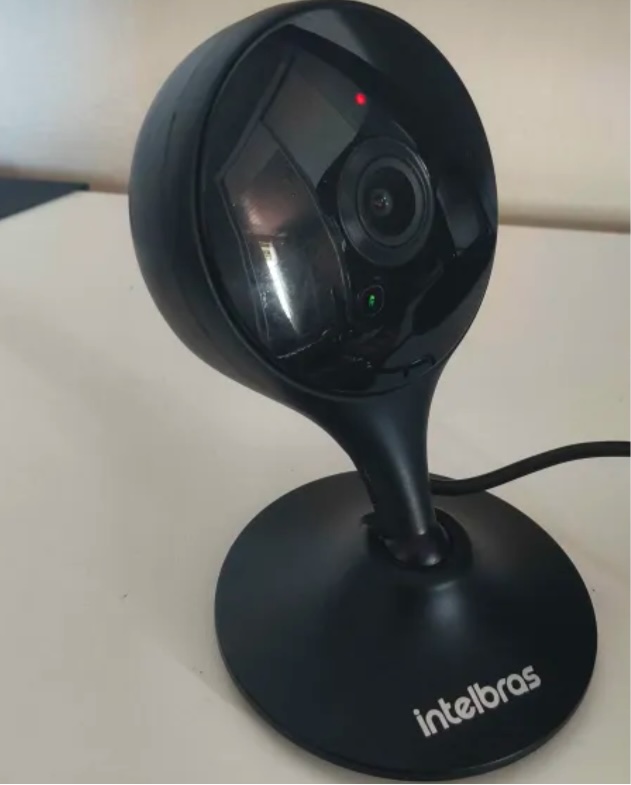
We investigated this vulnerability on an Intelbras iM3 C (iM3B-C) camera running firmware version v240927 — the latest available at the time of our research. The iM3 C is a smart Full-HD Wi-Fi camera designed for both home surveillance and as a baby monitor. According to Intelbras, the firmware for the iM3 C is also compatible with the iMX C, iM4 C, iM5 SC, iME 360 C, and iM7+ FC models.
Intelbras iM3 C smart Wi-Fi camera used for the investigation. Its firmware is also compatible with the iMX C, iM4 C, iM5 SC, iME 360 C, and iM7+ FC models. Source
This vulnerability has a medium severity rating. However, because of the large number of potentially affected users, the impact of successful exploitation could be significant. Intelbras Mibo Smart — Intelbras’s app for setting up and managing these camera models — has been downloaded more than four million times, with most of its users based in Brazil and elsewhere in Latin America.
How to secure your cameras and other smart devices
First and foremost, all Intelbras owners should update their camera firmware as soon as possible — and continue to do so regularly. More generally, it’s a good idea to secure your smart-home infrastructure in advance to reduce the risk posed by other potential vulnerabilities.
One of the simplest yet most important steps is to change the default settings on both your smart devices and your home network. Be sure to replace the factory-default passwords on all smart devices and on your router — default username/password combinations such as admin/admin or root/admin provide no meaningful protection.
Protect your home Wi-Fi with a strong password; otherwise, attackers could easily gain access to your local network.
Disable WPS on your router. WPS is designed to simplify network setup and authentication: you can connect by pressing dedicated buttons on the router and respective device, or by entering an eight-digit PIN. The problem is that this PIN can be brute-forced relatively easily, allowing an attacker to recover the key to your Wi-Fi network fairly quickly.
Use a strong, unique password for every account that can be used to manage your smart devices through official apps or websites. Where possible, enable two-factor authentication (2FA); the most secure option is generally to use one-time codes generated by authenticator apps. For generating and storing passwords, as well as creating one-time codes, it’s most convenient to use a password manager.
Put your IP cameras and other smart devices on a separate Wi-Fi network — isolating them from phones, laptops, tablets, NAS devices, and so on. Most modern routers can create at least two Wi-Fi networks (a primary and a guest network). Use the guest network for smart-home devices, but make sure it’s protected with a strong password. If your router supports multiple Wi-Fi networks, consider putting the cameras on a dedicated network of their own. That way, even if the cameras are compromised, attackers won’t be able to reach your other devices.
Use Smart Home Monitor, available in Kaspersky Plus and Kaspersky Premium. This feature shows all devices connected to your home network, lets you check their security status, and alerts you if an unknown device joins your home Wi-Fi.
More camera-security and smart-device tips and stories:
Yesterday, two critical vulnerabilities were disclosed in PHP, the scripting language used by many websites and online services: CVE-2026-109618 and CVE-2026-109619. Attackers can exploit them to remotely execute commands on any server running PHP, with no authentication required. The exploit has been dubbed PHP2Shell.
The PHP security team announced an upcoming emergency update on October 20 and released patches fixing the vulnerabilities the following day.
Nearly 70% of websites run on PHP, including services we use every day: wikis, online stores, smart devices with web interfaces, home network-attached storage (NAS), smart-home controllers, and much more.
Today, we explain how these vulnerabilities could affect you personally and what you can do to reduce the risks.
How the vulnerabilities can affect home users
Account and personal-data theft
The vulnerability allows an attacker to steal authentication tokens from server memory. These tokens essentially act like electronic passes — telling a website that the user has already signed in. As a result, an attacker may be able to access someone else’s account without entering a password or two-factor authentication code, putting messages, documents, delivery addresses, order histories, and other confidential information at risk.
Loss of files on home devices
If you have network-attached storage (NAS) or a video surveillance system at home that uses a vulnerable PHP version, it may also be at risk. Depending on what level of access they gain, attackers could potentially copy, delete or encrypt files they can access.
Malware infection
If an attacker gains access to a vulnerable website, they can use it in virtually any way they want: trick visitors into downloading a malicious file or clicking on a phishing link, display dangerous instructions, replace payment forms or login pages with malicious ones — the list goes on and on. As a result, someone visiting a legitimate website could not only lose access to their account, but also lose money or accidentally infect their device with malware.
Below are examples of services directly affected by the vulnerabilities.
Which services are affected by the PHP vulnerabilities
Jeedom
Jeedom is a smart-home platform that lets users control lighting, sensors, heating, blinds and home IoT devices. Attackers could abuse this in many ways: they could disable the alarm, track when the homeowner is away, access video from the door intercom, and more.
The developers confirmed that the new vulnerability affects their application, and have already released an emergency update — Jeedom 4.6.2. Users need to run the update twice for it to work. The developers say a fully fixed version for home users will be released in the coming days.
Websites we use every day
As mentioned above, PHP is used by roughly 70% of websites. This doesn’t mean every one of them is vulnerable: it depends on the PHP version in use and whether the site owners have already updated it. Many government websites in Europe have already suspended operations because of the new vulnerability.
Unfortunately, a website may still be vulnerable even if it appears to be working normally. An attacker could potentially take control of any legitimate website whose server hasn’t been patched yet. They could fake payment or login pages, host malicious files, or persuade users to download an “urgent update” that is actually malware.
Ordinary users have no reliable way to check whether such instructions or files are safe, so be sure to use reliable anti-phishing and antivirus protection. If you suspect that your data may have been stolen, check the active sessions in your account settings. If you spot suspicious activity or devices you don’t recognize, sign out of all active sessions and change your password. Use a password manager— it can generate a truly strong, unique password that you won’t have to memorize yourself.
Computer games
Bad news for gamers: some video games whose servers use PHP are also at risk. If you don’t want attackers to get hold of your accounts, be sure to update the passwords for your gaming platforms, stores and accounts.
To buy time for updates, some developers temporarily took their services offline. Final Fantasy XIV, Pokemon Champions, games from Bandai Namco Entertainment, Uma Musume: Pretty Derby, Granblue Fantasy, Shadowverse: Worlds Beyond, and many others went into emergency maintenance. Nintendo Switch Online and the GOG and Steam stores were also affected.
Unfortunately, there’ve also been more drastic consequences. Yesterday, the developers of World Questannounced that the game would shut down permanently after 15 years: it relied on outdated infrastructure that would have been extremely difficult and costly to fix. For the same reason, the mobile game Please Save My Pandemonium! shut down after more than ten years of operation.
Home network-attached storage (NAS)
“Home clouds” have become popular in recent years for good reason: many users prefer to keep backups of their data at home rather than online. A number of companies make NAS devices, and at least three — QNAP, Synology and ASUSTOR — have said the vulnerabilities affect their products. An update has also been released for Unraid, an operating system for home servers, network storage and media servers.
QNAP
The manufacturer confirmed that the vulnerabilities affect several versions of its NAS operating systems — QTS and QuTS hero — as well as applications including QuMagie, Note Station 3 and certain versions of QVR Surveillance. A successful attack could put photos, documents, notes and camera recordings at risk.
At the time of publication of this blogpost, QNAP is still preparing updates, so the main priority is to temporarily disconnect NAS from the internet. QNAP recommends disabling port forwarding on the router — to prevent NAS from automatically opening ports — and allowing access to the management panel only from the home network or through a VPN.
Synology
Both vulnerabilities have been officially confirmed in PHP packages 7.3, 7.4, and 8.0–8.4, as well as in Mail Station and Synology Calendar. Fixes have already been released for PHP, starting from version 7.4, as well as for Mail Station and Synology Calendar. PHP 7.3 won’t be fixed. The company separately notes that the PHP component built into its operating system cannot be reached from outside the device, so the risk of attack is very low.
ASUSTOR
ASUSTOR also officially confirmed both vulnerabilities, and immediately removed PHP 7, 7.3, 7.4, and 8.1 packages from App Central. The company recommends immediately backing up your data, removing older PHP packages, and using PHP 8.3 or 8.4.
Unraid
In today’s operating-system update, PHP was upgraded to version 8.4.27 with fixes for the vulnerabilities. The developers recommend that all users update to Unraid 7.3.4. Containers with their own PHP installation must be updated separately: the new PHP version in the operating system doesn’t replace PHP inside containers.
At the time of publication, we haven’t found public confirmation from other major manufacturers (such as TerraMaster, UGREEN, Buffalo, or Western Digital) that their devices are affected by these vulnerabilities — only user discussions on forums.
But the fact that only some NAS manufacturers have confirmed the problem so far doesn’t guarantee that your devices are safe — especially if they’re fairly old or come from a lesser-known or defunct manufacturer. In that case, first disconnect the devices from the internet while keeping them accessible only on the local network, and then investigate whether they’re vulnerable.
Nextcloud cloud storage
Nextcloud is a free, open-source platform for creating your own cloud storage, serving as an alternative to Google Drive, Dropbox, and Microsoft OneDrive. It lets you store and synchronize files across devices, share them with other users, and work with documents, photos, calendars and contacts. The data can be stored on your own server or NAS rather than on a third-party company’s servers.
If you store important data in Nextcloud, check how your cloud instance is configured. If you use Nextcloud All-in-One, update to version 14.4.1 where the vulnerability has already been fixed.
If your Nextcloud installation is configured differently, you need to update PHP yourself on the device or server.
How to protect your devices and data
Use phishing and malware protection. Our security solution automatically blocks phishing pages and malware, even when attackers place them on legitimate websites.
Keep an eye on updates. If you have network-attached storage, a smart-home system, a home server, a media server, or any other device with a web interface, first check the manufacturer’s website and install all available updates. If no update is available yet, temporarily disable internet access to the device.
Use strong passwords. Most people reuse the same password, or variations of it, across multiple websites. If an attacker finds one of those passwords on a vulnerable server, they may be able to compromise your other accounts as well. We recommend generating and storing strong, unique passwords in Kaspersky Password Manager so you don’t have to remember your credentials yourself. Be sure to enable two-factor authentication on all important accounts — ideally using one-time codes generated by the same password manager.
Keep an offline backup of important files. Don’t rely on cloud storage alone — make sure you keep a backup of all important documents on both a hard drive and an external device. For more information on how to make backups properly, see our article The internet remembers not quite everything.
What other risks can your home devices face? Read our articles:
For more than two decades now, setting up a home router has meant going through the same old routine: pick a Wi-Fi band, name your network, choose a security type, and set a password. After you type in your network name, you often see an option next to it to hide the network name — sometimes labeled hide SSID, or simply hidden or closed network. If you choose this option, the network you create won’t show up automatically in the list of available Wi-Fi networks on any smartphone, computer, or smart-home device — you need to type in the correct network name by hand. Only then will the device be able to find that network and connect to it. At first glance, hiding your wireless network’s name might seem like a smart precaution: keeping neighbors or passersby from hacking into your Wi-Fi since they simply can’t see it. But in fact things work differently: all your devices will give away the hidden network — and not just at home either.
How devices connect to Wi-Fi
Every Wi-Fi access point broadcasts a short data packet roughly 10 times a second so your smartphone or computer can show you a list of nearby networks’ names, like JohnWiFi, TommyNet, CafeDeArts_Guest, or other, creative variants. This packet contains (i) the network’s name (Service Set Identifier, or SSID), (ii) a unique identifier for the access point (Basic Service Set Identifier, or BSSID), and (iii) details about the radio channel the network uses. This info helps devices (i) pick the best network to connect to, and (ii) automatically join networks they already know; accordingly, none of the data in that packet is encrypted. Hidden networks also broadcast these advertising packets; they just leave the SSID field blank. This method of finding networks is called passive because a Wi-Fi client, like, say, your smartphone, just needs to listen to the airwaves to spot nearby access points.
On top of that, the client can scan for Wi-Fi networks on its own, which is known as active discovery. Your smartphone or computer is constantly broadcasting the names of Wi-Fi networks it knows and would like to connect to. If one of those networks happens to be nearby, the access point answers back, and the connection is made.
Active discovery can sometimes help save your smartphone’s battery, and it’s indispensable when you’re working with hidden networks. Discovering a hidden network and connecting to it becomes a two-step process. First, the smartphone “hears” that there’s a Wi-Fi access point nearby with a hidden network name. It then tries to reach that network by broadcasting the names (SSIDs) it already knows — either hidden networks it’s connected to before, or the name the user typed in when first connecting to a hidden network. If the name matches, the router responds, and the connection goes through.
A hidden network name (SSID) doesn’t actually hide your Wi-Fi network
The regular list of available Wi-Fi networks on your smartphone or computer won’t show networks that don’t broadcast a public SSID. But any specialized Wi-Fi scanning software can spot them easily — it just won’t show their names. And hidden networks are still easy to identify and tell apart thanks to each router’s unique BSSID.
So hiding a Wi-Fi network’s name doesn’t make it truly invisible, and it won’t protect you from cybercriminals. It’s worth noting that any large-scale analysis, such as mapping the geographic locations of Wi-Fi networks, relies on BSSIDs, not SSIDs. Besides the huge databases kept by Apple and Google, there are public access-point-mapping projects too, like WiGLE.
If someone wants to break into a network at a specific location, specialized software lets them find out its SSID just by waiting for one of the legitimate clients to connect and listening in on the active discovery session. From there, they can connect to that Wi-Fi network — provided it uses a weak enough security protocol.
Your devices leak hidden Wi-Fi network names and personal data
The main drawback of a hidden SSID is that smartphones and computers have to broadcast it before they can connect to the wireless network. And they do this everywhere — not just near the specific access point in question. As soon as any network with a hidden name shows up within signal range, the client attempts to connect, and during that attempt it broadcasts the names of every hidden network it knows. And this broadcast isn’t encrypted, which means anyone nearby can pick up the data being transmitted.
In 2021, researchers at the University of Hamburg ran an experiment collecting radio signal data on a busy street. In just three one-hour listening sessions, they gathered 252 000 Wi-Fi connection requests from passersby’s smartphones. Of those, 23% contained the SSID of a network the smartphone would have preferred to connect to.
And that’s where a factor few people think about comes into play: the network’s name itself. Twelve percent of the SSIDs found were long numeric strings that looked a lot like passwords. So, once someone knows the SSID and BSSID, they can look up the BSSID in a service like WiGLE and find the access point’s real-world address. Once there, an attacker can try to use such a string as both the SSID and the password to connect — with a good chance of success. The researchers’ sample also included 106 SSIDs containing a first and/or last name, 92 SSIDs that pointed to a home address, and three that revealed an email address.
Given all this, it’s no surprise that Apple and Asus recommend against using the hidden SSID feature.
Other drawbacks of hiding your Wi-Fi network
Beyond the data leak issues, hidden SSID technology — a holdover from early Wi-Fi versions — also hurts the performance of modern versions of the radio protocol. In the 6GHz band, searching for a hidden Wi-Fi network across 59 possible channels becomes noisy and power-hungry: the client has to run through every option and send a lot of requests. As a result, performance drops for all nearby Wi-Fi networks in the 6GHz band, and the client itself burns through battery power sending out all those requests.
Asus also points out that Windows devices may tend to connect to visible networks first — even if a network with a hidden SSID is available and marked as preferred.
When a hidden SSID actually makes sense
There aren’t many scenarios where hiding your network name is genuinely useful. For example, if a router is meant for a small group of people but is installed in a very crowded location, a hidden SSID can cut down on the number of connection attempts and ease the load on the router. But keep in mind that this boosts performance, not security — and only slightly at that.
Another similar case is a technical Wi-Fi network for a limited number of fixed devices — like a network of security cameras or smart home gadgets. These devices always stay in the same place, so whenever they try to connect to their assigned Wi-Fi, they find it right away, and no data leaks out — unless an attacker is actually listening in on the radio signal near the router. At the same time, outsiders are less likely to try connecting to such a network.
How to make your Wi-Fi more secure
To protect your Wi-Fi network from wireless hackers, don’t hide the SSID: instead, use the modern WPA3 security protocol along with a long password. Attackers can intercept data over the air and then try to crack the password with brute force, so a strong Wi-Fi password should be at least 20 characters long. The easiest way to generate and store such long, hard-to-crack passwords is with a password manager that syncs across your devices; that way they’re always at hand — no matter which gadget you’re using.
If some of your older devices don’t support WPA3, it’s fine to use WPA2 with protected management frames (PMF) turned on, which guard against many types of attacks on Wi-Fi networks.
You should also make sure Wi-Fi Protected Setup (WPS) is turned off, since it essentially replaces your password with an easy-to-guess PIN code.
As for the network name, instead of hiding it, pick one that doesn’t reveal your name, address, or any other personal details. It’s also worth avoiding default network names like ISPName-XXXX or dlink, but for a different reason: generic names like these can confuse you and your guests alike. If you don’t want your access point to show up on Wi-Fi geolocation maps from Apple, Google, and other providers, you can add the suffix _nomap to the end of your network name, but there’s no guarantee it will actually work.
Apart from protecting your Wi-Fi, make sure your router is configured securely overall. First and foremost, that means giving it a long, unique admin password, and keeping it updated with the manufacturer’s latest firmware. And if you have a bit more time, you could even boost your Wi-Fi performance.
How Wi-Fi networks get hacked, and how to protect them:
A researcher found that Yarbo yard robots came with a host of vulnerabilities which, among others, allowed an attacker to harvest WiFi passwords.
Security researcher Andreas Makris found he could remotely hijack thousands of Yarbo yard robots worldwide, and proved it by having his mower run him over. The root cause was a cluster of “legacy” design choices: every robot shared the same hardcoded root password, remote tunnels were left open, and Message Queuing Telemetry Transport (MQTT) messaging was so weakly protected that once you had one device, you effectively had the worldwide fleet.
An attacker could pull GPS coordinates, email addresses, and Wi‑Fi passwords, turn cameras into remote spying tools, and even re‑arm the mower after someone hit the emergency stop.
All of this was enabled by a persistent backdoor tunnel that users could neither see nor meaningfully control. The risks fell into three very different buckets:
A heavy mower with remotely controllable blades and an emergency stop that can be bypassed is a real-world safety hazard.
Exposed telemetry meant attackers could map where devices were, see who owned them, and in some reports even view camera feeds.
Network abuse through shared root credentials meant compromised robots could scan local networks, steal more data, or be folded into a botnet.
Yarbo’s public response is unusually detailed for a consumer Internet of Things (IoT) vendor. It’s also refreshingly blunt in admitting that the researcher’s core findings were accurate. The company temporarily disabled the remote diagnostic tunnels, reset root passwords, locked down unauthenticated endpoints, and began ripping out unnecessary legacy access paths.
More importantly, Yarbo promises structural changes:
Unique per‑device credentials.
Over-the-Air (OTA) credential rotation.
Audited, allowlist‑based remote diagnostics.
Dedicated security contact, with a possible bug bounty to follow.
That is the sort of long‑term security hygiene we rarely see spelled out this clearly after an IoT fiasco.
From a disclosure and remediation standpoint, Yarbo is doing many things right: crediting the researcher, apologizing, prioritizing fixes, and explaining both short‑term patches and long‑term architectural changes in human language. For buyers of connected devices with blades, that level of transparency is a positive precedent.
But Yarbo has explicitly chosen to keep a remote access tunnel, although wrapped in better controls and logs, instead of offering users the option to remove or fully opt out of it.
How to secure IoT devices
The vulnerabilities uncovered in the Yarbo case present an almost a live-action demo of what the IoT CybersecurityImprovement Act is trying to prevent in US government deployments. While the Act doesn’t apply to Yarbo directly, its National Institute of Standards and Technology (NIST)-driven requirements map neatly onto what went wrong here.
So, it’s still up to users to make sure you:
Change the default credentials.
Check if the vendor will make updates available and how easy it is to install them before buying an IoT product. And then install the updates when available.
If you can, put your IoT devices on a separate network. Use a guest Wi‑Fi or separate VLAN when available.
Disable what you don’t need. Turn off UPnP, remote access, cloud control, and unnecessary services if you’re not actively using them.
If your router or security suite logs connections from IoT devices, skim those logs for odd spikes or unknown destinations.
Let’s face it, an incognito window can only do so much.
Breaches, dark web trading, credit fraud. Malwarebytes Identity Theft Protection monitors for all of it, alerts you fast, and comes with identity theft insurance.
Russia's current isolation from the Olympics may lead to increased cyberthreats targeting the 2026 Winter Games. We discuss the potential threat picture.
Accelerating the Migration to the Post-Quantum Era
The promise of quantum computing brings an unprecedented paradox. While it will unlock revolutionary breakthroughs in science, materials discovery and medicine, it simultaneously poses an existential threat to the mathematical foundations of modern cybersecurity.
For decades, the global economy has relied on public key cryptography to safeguard everything from personal privacy to national security. This cryptography is built on mathematical problems that are computationally infeasible for classical computers to solve but that quantum computers can solve efficiently, rendering today’s cryptographic protocols obsolete.
Using Shor’s algorithm, a sufficiently powerful quantum computer could factor the large prime numbers that underpin public key cryptography, in minutes. These are tasks that would take today’s most advanced supercomputers a millennium to crack. This capability would effectively turn our strongest digital defenses into open doors, creating a period of vulnerability leading up to Q-Day – the day today’s encryption is broken.
The Migration Crisis: Why Traditional Strategies Fail
For CISOs and technical leaders, the transition to post-quantum cryptography (PQC) is not a simple patch-and-deploy exercise. It is a multiyear transformation that requires updating cryptography across every device, application, certificate and infrastructure component in the enterprise.
Most enterprises today are constrained by cryptographic debt – years of accumulated, undocumented and deprecated encryption protocols buried deep within legacy applications, third-party software libraries and unmanaged IoT devices. This creates a vast and largely invisible attack surface that traditional vulnerability scanners were never designed to detect.
The challenge is compounded by the absence of a unified source of truth. Existing tools offer a fragmented "outside-in" view of the environment. They may identify devices on the network, but they lack visibility into cryptographic libraries embedded within live traffic. Without a real-time Cryptographic Bill of Materials (CBOM), security teams are forced to rely on manual, point-in-time audits that become outdated almost immediately. Spreadsheets cannot scale to this problem.
This visibility gap makes it impossible to prioritize remediation, leaving sensitive data exposed to harvest now, decrypt later (HNDL) attacks. In these attacks, adversaries intercept and store encrypted data today with the intent of unlocking it once quantum computing capabilities mature.
Operationally, traditional migration approaches are equally unworthy. Manually updating cryptography across thousands of global endpoints and branch offices often requires disruptive rip and replace strategies that threaten uptime and demand specialized expertise that is in extremely short supply. Organizations need a way to bridge today’s classical infrastructure with a quantum-resilient future without disrupting business operations or exhausting IT resources.
At Palo Alto Networks, we believe global enterprises cannot afford to wait. Our new Quantum-Safe Security solution is designed to remove these operational roadblocks by making cryptographic discovery, risk assessment and transition both continuous and actionable. We empower enterprises to gain real-time visibility into cryptographic risk and begin building agentic resilience at enterprise scale by integrating with existing security and infrastructure systems, including security information and event management (SIEM), load balancers, endpoint detection and response (EDR), as well as Application Vulnerability Management (AVM) tools.
The Four Stages of Cryptographic Inventory & Remediation
Palo Alto Networks Quantum-Safe Security is built around four foundational stages.
1. Continuous Discovery through Ecosystem Ingestion
Visibility is the first line of defense, but in a complex enterprise, true visibility requires more than a periodic scan. It requires continuous, high-fidelity ingestion of cryptographic intelligence across the environment.
Our solution acts as a central nervous system for your cryptographic posture, ingesting telemetry and logs directly from PAN-OS NGFW and Prisma® Access, enriched with data from a broad ecosystem of third-party security solutions, simplifying Day 0 onboarding. By leveraging your existing network infrastructure as sensors, we provide a comprehensive view of the cryptographic behavior of all assets without the operational friction of deploying new software.
To eliminate blind spots, we go beyond our own telemetry to ingest critical information from your existing systems you rely on. This includes syncing with configuration management database (CMDB) and asset management platforms to align cryptographic data with business inventories, integrating with EDR and access control solutions to monitor endpoint behavior, and aggregating data from network clouds and log platforms. The result is a unified intelligence layer that reflects how cryptography is actually used across the enterprise.
By synthesizing these data streams, we deliver a multidimensional view of cryptographic exposure:
Discovery – Identification of every application, user device, infrastructure component and IoT device.
Behavior – Analysis of traffic metadata, including protocols, key exchangemechanisms, encryption algorithms, hashes, certificates and tunnels.
Context – Precise attribution of hardware models, cryptographic libraries (such as deprecated OpenSSL versions), and browser versions in use.
2. Risk Assessment & Prioritization
Not all data is created equal, and a successful migration requires a surgical focus on where the exposure is most acute. Our Quantum Safe Security solution quantifies risk by correlating cryptographic strength with business criticality, providing a clear, prioritized view of current risk and where remediation matters most.
Assets are categorized into strategic zones, starting with immediate exposure risks caused by deprecated protocols that are vulnerable to classical exploitation today. From there, the solution addresses long-term harvest now, decrypt later threats. As threat models evolve, the risk engine is designed to expand to emerging vectors like identity and authentication integrity, anticipating risks such as “Trust Now, Forge Later" attacks that could undermine digital trust at scale.
At the same time, the solution validates and tracks quantum-secure assets that have successfully transitioned to post-quantum or hybrid-PQC algorithms. By correlating this intelligence with business criticality and data shelf-life, security leaders can make informed decisions. For example, a crown jewel asset containing data that must remain confidential for a decade or more, is flagged as a high HNDL risk today and elevated to the top of the migration queue.
3. Comprehensive Remediation
Moving from a vulnerable state to quantum resilience is a structured journey. Our comprehensive remediation framework guides organizations through three critical stages, supported by automated workflows and prioritized recommendations at every step.
Current State to Quantum Ready: The first stage focuses on infrastructure modernization. Usingcontinuous discovery insights, the solution provides hardware and software recommendations required to support next-generation cryptographic protocols. An asset reaches a Quantum Ready state once it has the underlying hardware and OS capabilities to support post-quantum algorithms, even if those protocols are not yet activated.
Quantum Ready to Quantum-Safe: Transitioning to a Quantum-safe state requires activation and configuration of post-quantum defenses. Our solution provides data configuration and certificate compliance guidance to enable PQC/Hybrid-PQC algorithms to be correctly implemented across the estate.
Virtual Patching via Cipher Translation: For all current and especially legacy systems or IoT devices that cannot be upgraded, we provide an accelerated path to quantum-safety. Through Cipher Translation, the infrastructure acts as a proxy, providing agentic remediation that reencrypts vulnerable traffic into quantum-safe standards (such as ML-KEM) in real-time at the network edge. This approach instantly moves legacy assets from a high-risk current state to a Quantum-safe posture without a single line of code change.
4. Governance: Continuous Crypto-Hygiene & Global Compliance
Quantum readiness is not a one-time event; it is a strategic enterprise transformation that requires continuous oversight to prevent the re-emergence of vulnerabilities. Our governance framework provides the guardrails for your migration through two critical layers of management:
Continuous Crypto-Hygiene & Ongoing Management: Maintaining high-fidelity visibility is essential to preventing the accumulation of "crypto-debt." Our solution automates real-time mapping of all cryptographic dependencies, ensuring your CBOM remains dynamic and accurate as your environment evolves. Furthermore, we introduce Active Drift Detection, which automatically detects and can even block the use of weak or noncompliant ciphers in real-time, preventing developers or third-party services from accidentally introducing insecure protocols.
Global Crypto-Compliance Enforcement & Reporting: As regulatory pressure from governments (like the US Commercial National Security Algorithm Suite 2.0) mounts, organizations must demonstrate measurable progress. Our solution will provide Automated Framework Auditing, offering continuous, native mapping of your environment against global standards, including NIST, FIPS 140-3, and DORA.
Architecting a Quantum-Resilient Enterprise
The transition to quantum-safe security is far more than a technical upgrade. It represents a fundamental shift in how organizations protect the longevity and integrity of their digital assets. Achieving quantum resilience is a multiyear effort that requires both advanced technology and strategic partnership.
That's why Palo Alto Networks has established Integrated Quantum Practices, bringing together technology, partners and professional services to help organizations navigate the complexity of this transition with confidence. By combining deep cryptographic visibility with intelligent, agentic remediation, organizations can systematically retire their cryptographic debt and build resilience into their security architecture over time.
This proactive approach does more than mitigate emerging risk. It establishes a foundation of digital trust that is resilient against the threats of tomorrow, enabling your most sensitive intellectual property to remain secure for its entire shelf life, even as cryptographic standards evolve.
Secure Your First-Mover Advantage: The Quantum Readiness Assessment
Don’t let the complexity of the quantum transition stall your organization’s progress. Begin your path to resilience with a Quantum Readiness Assessment, a focused engagement to clarify current exposure and identify the most critical areas for action. To go deeper, watch the Quantum-Safe Summit on demand for expert perspectives on cryptographic risk and quantum readiness.
The Palo Alto Networks Quantum-Safe Security solution is expected to be generally available to customers on January 30, 2026, with additional integration enhancements planned for April 2026.
Forward-Looking Statements
This blog contains forward-looking statements that involve risks, uncertainties and assumptions, including, without limitation, statements regarding the benefits, impact or performance or potential benefits, impact or performance of our products and technologies or future products and technologies. These forward-looking statements are not guarantees of future performance, and there are a significant number of factors that could cause actual results to differ materially from statements made in this [blog. We identify certain important risks and uncertainties that could affect our results and performance in our most recent Annual Report on Form 10-K, our most recent Quarterly Report on Form 10-Q, and our other filings with the U.S. Securities and Exchange Commission from time-to-time, each of which are available on our website at investors.paloaltonetworks.com and on the SEC's website at www.sec.gov. All forward-looking statements in this blog are based on information available to us as of the date hereof, and we do not assume any obligation to update the forward-looking statements provided to reflect events that occur or circumstances that exist after the date on which they were made.
The intersection and evolution of operational technology (OT) and information technology (IT), as well as the cybersecurity risks associated with both are becoming increasingly critical business challenges for organisations of all sizes, across all geographies.
As digital transformation expands into OT environments, convergence with IT systems is inevitable. This convergence may generate exciting business opportunities, such as creating new sources of income and improving business outcomes, but it also presents new cybersecurity risks and complexities, for which many industry leaders are not prepared.
Why Is OT/IT Convergence So Complex?
There are many overlapping forces driving the OT and IT worlds together, creating a hairball of complexity from varying sources:
People: OT and IT communities are historically different in many ways (technological, operational, regulatory and culturally) and have different priorities and focuses.
Technology: The age of technology in OT environments means that legacy equipment and machinery are often incompatible with the latest IT software, increasing their vulnerability to cyberthreats.
Mindsets: Historically, ‘secure by design’ has not been a focus in OT. System uptime and employee safety have traditionally been prioritised over cybersecurity in OT environments, unlike IT where cybersecurity is ingrained.
Understanding the Risk and Impact
OT/IT cybersecurity is a strategic issue, not just a technical requirement, and it must be designed into systems as early as possible. The consequences of not acting from the start far outweigh any advantages gained by disregarding the issue.
This is particularly true for critical infrastructure, such as water purification systems, power grids, air traffic control systems, communications networks and battlefield command-and-control systems, all of which are open to potential cybersecurity risk. Always assume that your adversaries are willing to exploit your Achilles heel when it comes to securing OT/IT systems.
Key Attention Areas in OT/IT Convergence
All senior business leaders should consider the following areas with OT/IT convergence and cybersecurity:
Mindset: Industry leaders need the right mindset to balance cybersecurity best practices with a seemingly endless number of new devices and data sources caused by OT/IT convergence.
Technology: Technologies, such as artificial intelligence, machine learning and cloud computing, represent both opportunities and threats in the world of OT/IT cybersecurity. Modern technology systems must be built with tomorrow’s security risks in mind.
Compliance: The NIS Directive and its follow-on NIS2 Directive outline the responsibility for organisations to take reasonable steps toward a solid cybersecurity posture. This applies to the increasingly digital OT world because of the classification of many OT systems as a critical infrastructure.
Teams: Organisations need to recognise and confront the cultural silo separating OT and IT teams in order to reduce complexity, promote collaboration and achieve a reliable, frictionless state of OT/IT cybersecurity.
The cloud, data and device proliferation: When digital OT systems are infected, the attacks easily and quickly move laterally over a mesh of intersecting networks, carrying ‘digital germs’ with them. The risk here is high, particularly with the huge proliferation of devices and data from converged workloads in the cloud.
The future: There is a growing urgency from business stakeholders to make OT systems more digitally driven to ensure agility and efficiency. Boards that are now prioritising OT/IT cybersecurity are making a strong statement about the business implications to this strategy.
Next Steps
To help you understand and prepare for the cybersecurity risks inherent at the intersection of OT and IT, we have captured insights and recommendations from forward-thinking industry experts in a new guide: Executive Edge: Peer Insights - Complexity at the intersection of IT and OT.
This Peer Insights guide for C-suite executives explores how to streamline security, reduce complexity, and anticipate threats across the IT/OT environment, ultimately helping you drive change within your organisation.
David Fletcher// My wife and I recently purchased a 2016 Ford Flex to replace an aging version of the same make and model that met an untimely fate. During the […]
Chevy Swanson // I got my start in InfoSec through a few competitions during my time in high school. My team and I were fortunate to have a supportive school and […]
Lawrence Hoffman // It’s been one of those crazy busy weeks. I always feel like I didn’t get enough time to read articles, surf Reddit, and attempt to keep up […]

 Login