
❌

Normal view

Study on the Wi-Fi security situation in Mexico | Kaspersky official blog

By: GReAT
2 June 2026 at 14:00

One of the biggest football (soccer) events of this summer is the World Cup 2026. The tournament is co-hosted by three countries: the U.S., Canada, and Mexico. Unfortunately, events of this scale attract not just fans, but also scammers from all over the globe. We’ve already covered how cybercriminals are prepping for the World Cup online, and today we’re talking about digital security for fans on the ground in Mexico.

The country will host 13 matches and welcome millions of tourists. They’ll be staying in hotels, heading to games, checking out restaurants, navigating airports, and visiting popular tourist spotsΒ β€” and everywhere they go, the temptation to connect to public Wi-Fi will be high.

We’ve surveyed more than 84 500 (!) public Wi-Fi access points in Mexico City, Guadalajara, and Monterrey β€” and we have a lot to share about their security. Spoiler alert: many networks are still using outdated security standards, so you really shouldn’t go on vacation without reliable protection and an eSIM.

What and how we tested

Walking across Mexico looking for public Wi-Fi access points would have been a bit tough, though that’s exactly what we did for a similar Wi-Fi security survey in Paris. You can check out the results of that in our post, How safe is Wi-Fi in Paris?

This time the mission was far more demanding: mapping the wireless landscape of three major metropolises. That’s why we went wardrivingΒ β€” scanning for and logging wireless networks from a moving vehicle while equipped with a smartphone or laptop. It’s similar to searching for Wi-Fi on your phone, where the device constantly listens for nearby networks. Except instead of connecting to them, we just collect data about them.

All information was used strictly for passive observation and infrastructure analysis. Beyond receiving publicly broadcast service information, the experts of Kaspersky’s Global Research and Analysis Team (GReAT) didn’t attempt to authenticate, intercept traffic, exploit systems, or otherwise interact with the wireless networks they discovered. Mobile access points deployed in cars and on mobile devices were excluded from the sample.

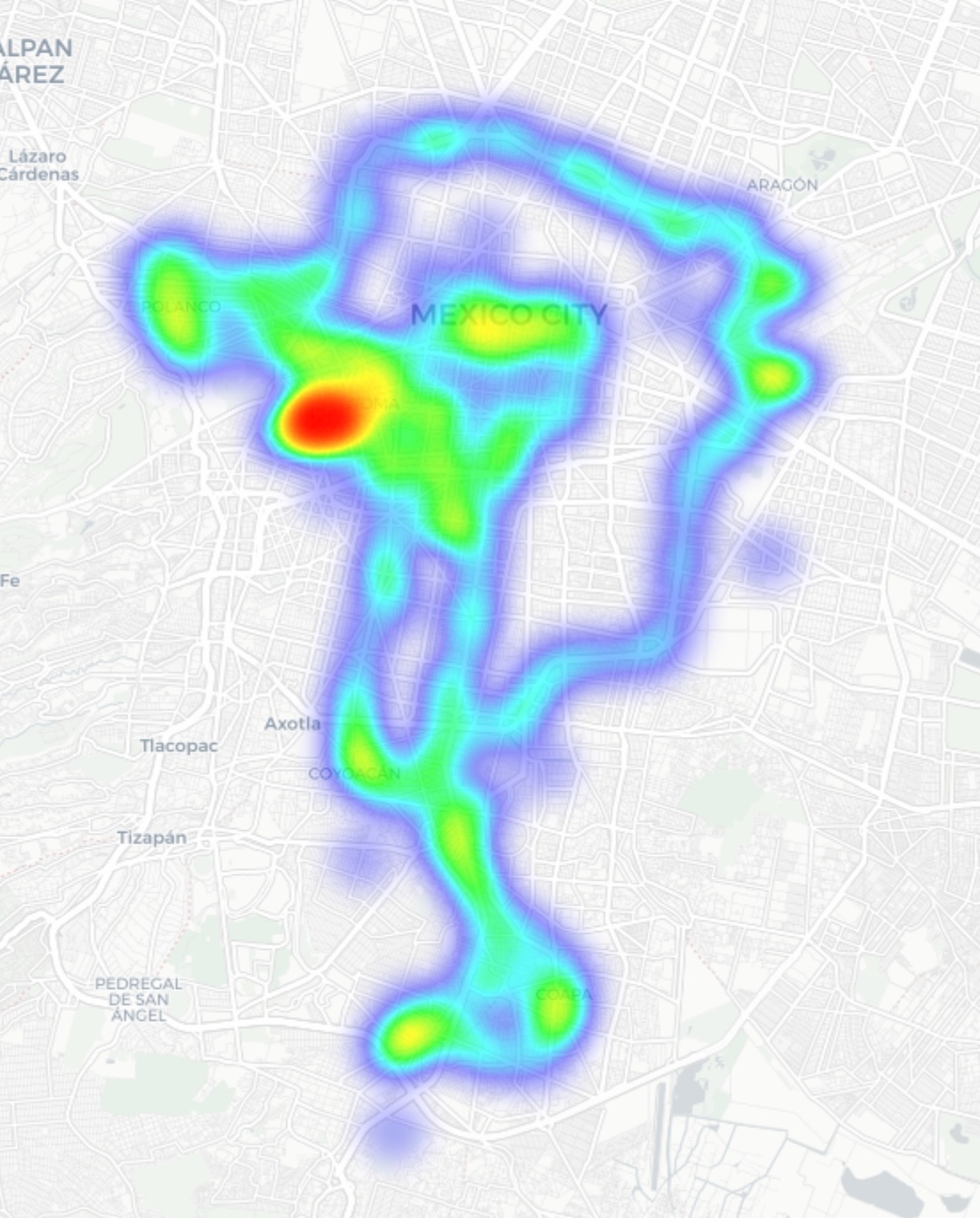
Our main target was Mexico City β€” the capital and one of the most densely populated cities in Latin America. We took a drive through popular tourist spots: Mexico City Stadium, Mexico City International Airport, ZΓ³calo, Paseo de la Reforma, Colonia Roma, La Condesa, Polanco, CoyoacΓ‘n.

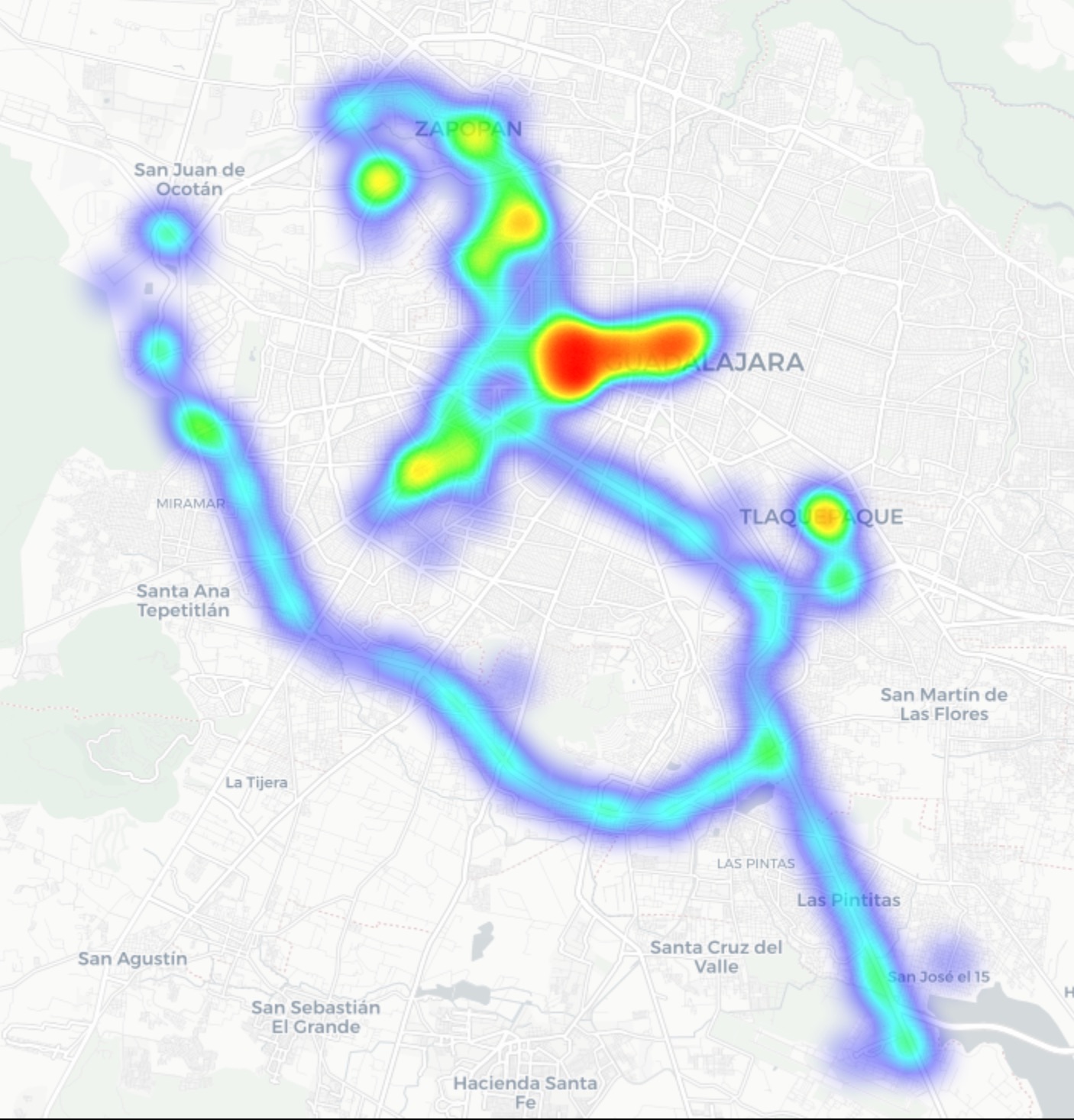
In Guadalajara and Monterrey, we drove similar routes: stadiums, main avenues, airports, and popular neighborhoods. Below you can see a heatmap of the areas we covered, ranging from red for areas with the highest density of public access points, through yellow and green, to blue for the lowest concentration.

Heatmap showing the locations of all Wi-Fi access points we covered in Mexico City
Heatmap showing the locations of all Wi-Fi access points we covered in Guadalajara
Heatmap showing the locations of all Wi-Fi access points we covered in Monterrey
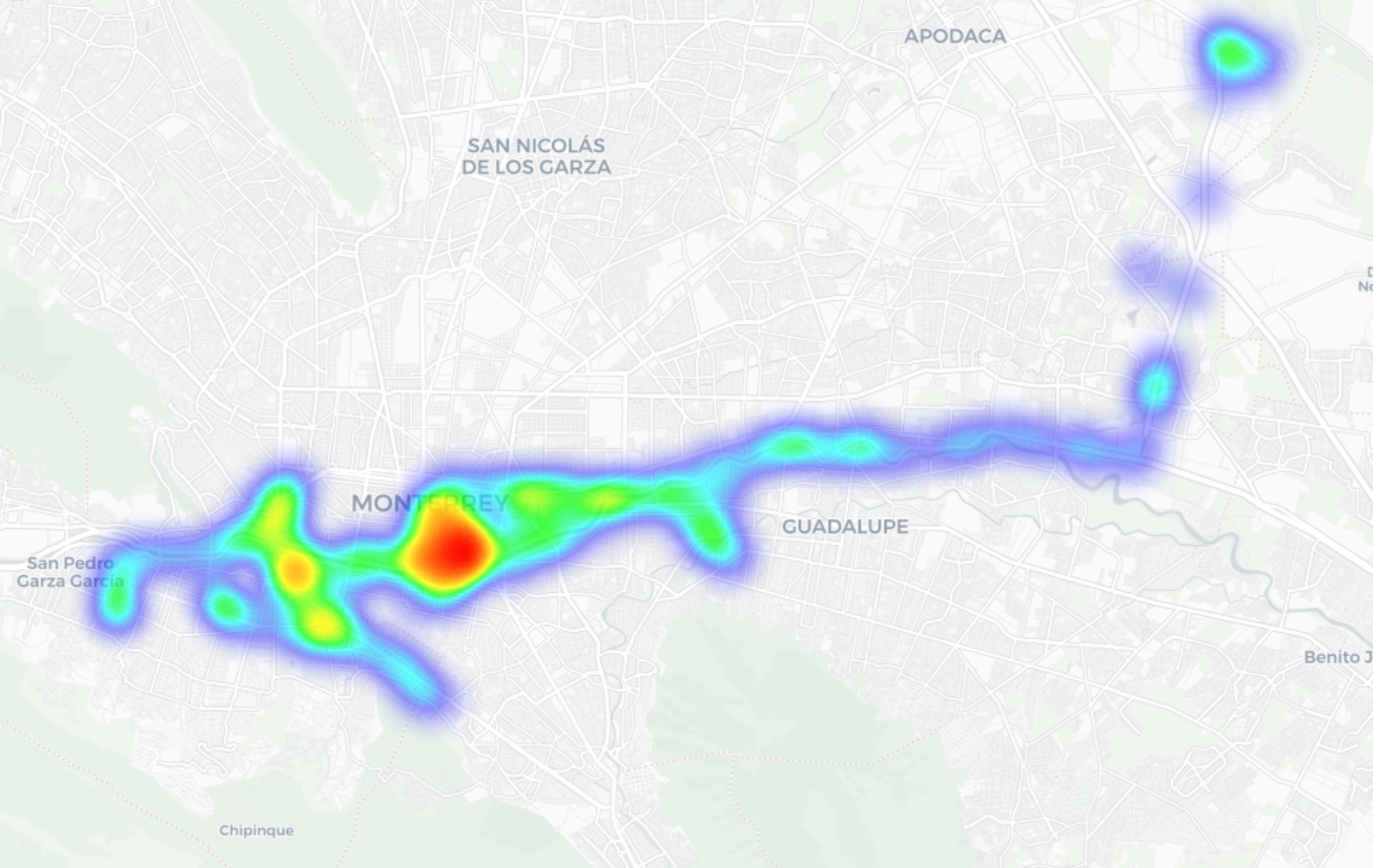

We used passive radio reconnaissance to log 84Β 500 signals and 69Β 500 unique network identifiers across these three cities. The majority of the signals were caught in Mexico City (61.4%), followed by Guadalajara (23.6%) and Monterrey (14.8%).

What we analyzed:

  • Wireless network identifiers (SSIDs): the names that show up in your list of available Wi-Fi networks
  • Information that can be gleaned from these identifiers
  • Default router configurations and how ISPs deploy their networks
  • Frequencies used and signal characteristics
  • Channel load and radio frequency spectrum usage
  • Wireless network security configurations:
    • Open and insecure networks
    • Networks with WPS enabled
    • Secure networks (WPA2/WPA3) with WPS activated

You can find the full version of the study on the Securelist blog.

Telltale public Wi-Fi access point names

Network names (SSIDs) can tell you a lot by unintentionally revealing information about hardware manufacturers, ISPs, deployment methods, and whether an access point belongs to a business or a private user.

About 34% of the public Wi-Fi networks we logged didn’t bother changing their names at all, either sticking with the factory SSIDs from the router manufacturers or using standard naming conventions from their ISPs. For attackers, this can be a pretty solid hint, since this kind of network name lets them know which provider owns a given access point, what hardware is being used, and how it’s likely configured by default.

Another troubling nuance is the large number of Wi-Fi networks (over 30%) that use the access point’s MAC address (BSSID) as the visible network name. The first few bytes of a BSSID contain an Organizationally Unique Identifier (OUI), which gives away the router’s manufacturer. This is a useful lead for bad actors: they can find out who made the hardware and test for vulnerabilities specific to that brand’s models.

Is Mexican Wi-Fi well-protected?

An access point secured with WPA2/WPA3 can be considered more or less safe. All other authentication mechanisms yield much weaker results. We grouped the public Wi-Fi networks into four categories:

  • Secure (WPA2/WPA3)
  • Unsecured (open/WEP)
  • Weak (WPA)
  • Undetermined

The results are roughly the same across all three cities: about 82% of all analyzed access points are protected by secure standards. The outdated and insecure WPA protocol was practically nonexistent. However, more than 10% of the access points turned out to be completely unsecured. Connecting to these networks carries the risk of traffic interception and hidden surveillance.

But security isn’t evaluated by WPA protocols alone. We also checked for the presence of WPS, the infamous feature for quickly connecting to a network without entering a password, which is highly vulnerable to attacks. It turned out that WPS is enabled on nearly half (47%) of the access points in Mexico City, 43% in Guadalajara, and 41% in Monterrey. On average, 45% of the access points are potentially vulnerable to WPS-related attacksΒ β€” sacrificing security for the sake of convenience.

What’s more, this feature frequently remained active even on seemingly secure WPA2/WPA3 networksΒ β€” about half of them utilized WPS. This shows that having WPA2/WPA3 is still not enough to consider a Wi-Fi access point safe, as additional features like WPS can still leave the door open to attacks.

What else every tourist needs to know

Digital risks on a trip aren’t limited to public Wi-Fi alone, especially now that many are shifting away from public Wi-Fi to an eSIM. There are still plenty of threats in crowded places: public USB chargers, QR codes with swapped links, NFC and Bluetooth attacks, and, of course, social engineering tactics. Let’s break it all down.

Charging stations. Public USB chargers can also be dangerous: bad actors could potentially gain access to the data on your device or try to install malware. We covered these attacks in detail in our post, Data theft during smartphone charging.

Dangerous QR codes. Criminals can plant phishing QR codes in popular tourist spots. The pretexts can vary wildly; for instance, ads for team-specific fan β€œevents”, or links supposedly offering discounts or restaurant menus. In reality, any QR code posted on the street can be considered insecure by default, and you shouldn’t scan them with your smartphone unless you have a QR code threat analyzerΒ installed.

Fake broadcasts, tickets, and betting pools. Earlier, we described cases where bad actors were distributing malware via fake IPTV apps to capitalize on the WC26 hype. Remember, even if you plan to watch the tournament from home, you still need to stay alert and not trust the first sites that pop up advertising free broadcasts, offering betting pools, or promising unbelievably generous payouts.

NFC and Bluetooth attacks. Leaving Bluetooth enabled in crowded places can also cause problems: someone might try to discover your device, track you, or initiate an unwanted pairing request. NFC services with contactless payments create additional risks tooΒ β€” especially when paying in sketchy spots.

How to protect yourself and your devices

Despite the prevalence of secure WPA2/WPA3 public Wi-Fi access points in Mexico City, Guadalajara, and Monterrey, our study shows that public Wi-Fi networks remain vulnerable. It’s also important to remember that attackers can create fake networksΒ β€” so-called evil twinsΒ β€” disguised as legitimate public Wi-Fi in airports, hotels, cafΓ©s, and tourist spots.

For the average user, it’s practically impossible to tell how safe a specific access point is when trying to connect. That’s why the safest option is to use cellular data to access the internet β€” completely eliminating the need for Wi-Fi. Besides, there’s no need to research the nuances of local laws, rates, and other cellular details for every country you plan to visit; you can just buy a global eSIM online in two clicks. We explained how to make the entire process hassle-free in our post, Internet on the go with Kaspersky eSIM Store.

If you still plan on connecting to public Wi-Fi, always use a VPN to secure your device and data when connecting to unfamiliar β€” especially unsecured β€” Wi-Fi networks. This creates an encrypted tunnel between your device and the VPN server, making it impossible to intercept your data along the way. Haven’t picked a VPN yet? Try Kaspersky VPN Secure Connection, which is included with both Kaspersky Premium and Kaspersky Plus subscriptions.

Now, if you still plan to attend the World Cup without any cybersecurity solution, at least follow these basic rules of digital hygiene:

  • Don’t use public USB chargers
  • Don’t send sensitive information over connections that aren’t secure
  • Don’t log in to banking, email, or social media accounts over unsecured Wi-Fi
  • Turn off Bluetooth and NFC while walking around in crowded places
  • Don’t trust QR codes posted on the street
  • Connect to public Wi-Fi only when absolutely necessary

What else to read to make sure cheering for your favorite team isn’t only exciting, but also safe:


Kickstarter draait strengere regels voor seksuele crowdfundprojecten terug

20 May 2026 at 13:17
Kickstarter draait zijn nieuwe beleid over nsfw-content terug. Het bedrijf voerde eerder deze maand strengere regels in voor crowdfundprojecten met seksuele inhoud. Dat deed Kickstarter naar eigen zeggen door druk vanuit de betaalverwerker Stripe.

A Bridge to Somewhere: How to Link Your Mastodon, Bluesky, or Other Federated Accounts

1 May 2026 at 16:52

One of the central promises of open social media services is interoperabilityβ€”the idea that wherever you personally decide to post doesn’t require others to be there just to follow what you have to say. Think of it like a radio broadcast: you want to reach people and don't care where they are or what device they're using. For example, in theory, a Bluesky user can follow someone on Mastodon or Threads without having to create a Mastodon or Threads account. But these systems are still a work in progress, and you might need to tweak a few things to get it working correctly.

Right now, broadcasting your message across social platforms can be a funky experience at best, deliberately broken up by oligopolists. The idea of the open web was baked into the internet via protocols like HTML and RSS that made it easy for anyone to visit a website or follow most blogs. The fact social media isn’t similarly open reflects an intentional choice to privatize the internet.Β 

Bridging and managing your posts so they’re viewable outside a singular source is part of the broader philosophy of POSSE, short for Post Own Site Syndicate Elsewhere (sometimes its Post Own Site, Share Everywhere). Instead of managing several accounts across different services, you post once to one primary site (which might be your personal website, or just one social media account), then set it up so it automatically publishes everywhere else. This way, it doesn’t matter where you or your audience is, and they're not walled off by account registration requirements.Β 

We’ll come back around to POSSE at the end of this post, but for now, let’s assume you just want your current main open social media account to actually have a chance to reach the most people it can.Β 

Why Post to the Open Social Web

Because the Fediverse and ATmosphere use different protocols, we need to use a third-party tool so accounts can communicate with each other. For that, we’ll need a bridge. As the name suggests, a bridge can connect one social media account to another, so you can post once and spread your message across several places. This isn’t just some niche concept: major blogging platforms like Wordpress and Ghost integrate posting to the Fediverse.

Bridging is an important facet of POSSE, but also something more people should consider, even if they don’t run their own websites. For example, if you don’t want to create a Threads account just to interact with your one friend who uses that platform, you shouldn’t have to. The good news is, you don’t. There are several bridging services, like Fedisky, RSS Parrot, and pinhole, but Bridgy Fed is currently the simplest to use, so we’ll focus on that.Β 

How to Post to Bluesky from Mastodon

From your Mastodon account (or other Fediverse account, for simplicity’s sake we’ll stick to Mastodon throughout), search for the username @bsky.brid.gy@bsky.brid.gy and follow that account. Once you do, the account will follow you back and you’ll be bridged and people can find you from their Bluesky account. You should also get a DM with your bridged username. If you don’t see the @bsky.brid.gy@bsky.brid.gy user when you search, your Mastodon instance may be blocking the bridging tool.Β 

Threads users who have enabled Fediverse sharing will be able to find you with your standard Mastodon username (ie, @your_user_name@mastodon.social), but if they haven’t enabled sharing, they will not be able to see your account. While this search is still a beta feature, you might find it easier to share the full URL, which would look like this: https://www.threads.net/fediverse_profile/@your_user_name@mastodon.social

People on Bluesky can find you by: Either searching for your Mastodon username, or if that doesn’t work, @your_user_name.instance.ap.brid.gy. For example, if your username is @eff@mastodon.social, it would appear as @eff.mastodon.social.ap.brid.gy.

an example of a mastodon user profile viewed from threads

An example of a Mastodon username from the Bluesky web client.

How to Post to Mastodon and Bluesky from Threads

Yes, Threads is technically on the Fediverse, and you can bridge your Threads account to Mastodon or Bluesky (unless you’re in Europe, where the feature is disabled), but it’s a different process than on Bluesky and Mastodon.

  • Open Settings > Account > Fediverse Sharing and set the option to β€œOn.” This will make your posts visible to Mastodon (or other Fediverse) users, and vice versa.Β 
  • Once the Fediverse sharing is enabled, you’ll likely need to wait a week, then you can bridge to Bluesky. Search for and follow the @bsky.brid.gy@bsky.brid.gy account (it may take some digging to find it, but if that doesn’t work you can try visiting the profile page directly.Β 

People on Mastodon (or other Fediverse accounts) and Bluesky can find you by: Mastodon users can find you at, @your_threads_username@threads.net while Bluesky users will find you at, @your_threads_username.threads.net.ap.brid.gy (seriously, that will be the username). Note that some Mastodon instances may block Threads users entirely.

an example of a threads post viewed from mastodon

An example of a Threads username from the Mastodon web client.

an example of a threads user profile viewed from bluesky

An example of a Threads username from the Bluesky web client.

How to Post to Mastodon and Threads from Bluesky

From your Bluesky (or other ATProto) account, search for the username,Β β€œ@ap.brid.gy” and follow that account. Once you do, the account will follow you back and you’ll be bridged, so people can follow you from Mastodon or other Fediverse accounts. You should also get a DM with your bridged username.

People on Mastodon (or other Fediverse account) and Threads can find you by: Your username will appear as @your_bluesky_username@bsky.brid.gy. For example, if your Bluesky username is @eff@bsky.social, it would appear as @eff.bksy.social@bsky.brid.gy.

an example of a bluesky user profile viewed from mastofon

An example of a Bluesky username from the Mastodon web client.

How to Post Everywhere from Your Own Website

You can bridge more than social media accounts. If you have your own website, you can bridge that too (as long as it supports microformats and webmention, or an Atom or RSS feed. If you have a blog, there’s a good chance you’re already good to go). When you do so, the bridged account will either post the full text (or image) of whatever you post to your personal site, or a link to that content,Β  depending on how your website is set up. You’ll also probably want to log into your Bridgy user page so you can manage the account.Β 

Where people can find your bridged account: Usually, a user can just search for your website’s URL on their decentralized social network of choice, or enter it on the Bridgy Fed page. But if that doesn’t work, they can try @yourdomain.com@web.brid.gy from Mastodon or @yourdomain.com.web.brid.gy from Bluesky.

an example of a website profile viewed from mastodon

An example of a bridged website username in the Mastodon web client.

How Your Account Username Looks on Each Platform

Β  Β Examples of how each social media username looks on other platforms

You’re Bound to Run Into Some Quirks

  • Sometimes messages take a little while to crossover between networks, and sometimes they don't crossover at all.
  • You can’t log into a bridged account like a regular account, but Bridgy Fed does provide some tools to see incoming notifications and recent activity in case they’re not coming through properly.
  • ActivityPub and ATProto don’t have the same feature set, so you will have certain capabilities for one account you might not have in another. For example, you can edit posts on Mastodon, but not on Bluesky. If you edit a post that’s bridged from Mastodon to Bluesky, the Bluesky post will not be updated.Β 
  • Replies can sometimes get lost, especially if the person (or people) replying to you doesn’t have sharing turned on.
  • Ownership of accounts can get weird. For example, if you post to your own website and use a tool like Wordpress or Ghost for federation (more info below), you don’t necessarily get access to a β€œnormal” social media account, with a standard login and password.
  • And more! This is still a work in progress that has some technical quirks, but it’s improving all the time, and it’s best to keep telling yourself that troubleshooting is part of the fun.

Other Cool Stuff You Can Do

As mentioned up top, there’s a lot more you can do, and an increasing number of tools are making this process simpler. Bridgy Fed is one way to post to more places from a single account, but it’s far from the only way to do so. Here are just a few examples.

  • Micro.blog is a paid service where you can blog from your own domain name, then post automatically to Mastodon, Bluesky, Threads, Tumblr, Nostr, LinkedIn, Medium, Pixelfed, and Flickr.
  • Ghost is a blogging and newsletter platform that offers direct integration with the Fediverse, as well as support for Bluesky. Wordpress offers the option to join the Fediverse through a community plugin. Other newsletter platforms, like Buttondown, also have plans for federation.Β 
  • Surf.social is a landing page and social media utility where you can show off all your various accounts (Federated or not). From the reader point of view, you can follow one publications numerous types of posts in one place. For example, 404 Media’s Surf.social feed includes its YouTube feed, podcast feed, and its journalist’s social media posts.
  • If you think these new handles are a bit ugly, you can use a custom domain for Bluesky or fediverse account from your website.Β 

Of course, there are plenty of other tools, blogging platforms, and other utilities out there to help facilitate posting and bridging accounts, with new ones coming along every day.Β 

With proper support, time, and effort, eventually we will all be able to seamlessly interact across platforms, take our follows and followers to other services when a platform no longer suits our needs, and interact with a variety of web content regardless of what platform hosts it. Until then, we still need to do some DIY work, support the services we want to succeed, and push for more platforms and services to support federated protocols.

Correction: an earlier version of this blog was missing the full Bluesky username in the account username chart.

The Open Social Web Needs Section 230 to Survive

28 April 2026 at 22:59

If you want to overthrow Big Tech, you’ll need Section 230. The paradigm shift being built with the Open Social Web can put communities back in control of social media infrastructure, and finally end our dependency on enshitified corporate giants. But while these incumbents can overcome multimillion-dollar lawsuits, the small host revolution could be picked off one by one without the protections offered by 230.

The internet as we know it is built on Section 230, a law from the 90s thatΒ generally says internet users are legally responsible for their own speech β€” not the services hosting their speech. The purpose of 230 was to enable diverse forums for speech online, which defined the early internet. These scattered online communities have since been largely captured by a handful of multi-billion dollar companies thatΒ found profit in controlling your voice online. While critics are rightly concerned about this new corporate influence and surveillance, some look to diminishing Section 230 as the nuclear option to regain control.Β 

The thing is, that would be a huge gift to Big Tech, and detrimental to our best shot at actually undermining corporate and state control of speech online.Β 

Dethroning Big Tech

We’re fed up with legacy social media trapping us in walled gardens, where the world's biggest companies like Google and Meta call the shots. Our communities, and our voices, are being held hostage as billionaires’ platforms surveil, betray, and censor us. We’re not alone in this frustration, and fortunately, people are collaborating globally to build another way forward: the Open Social Web.Β 

This new infrastructure puts the public’s interest first by reclaiming the principles of interoperability and decentralization from the early internet. In short, it puts protocols over platforms and lets people own their connections with others. Whether you choose a Fediverse app like Mastodon or an ATmosphere app like Bluesky, your audience and community stay within reach. It’s a vision of social media akin to our lives offline: you decide who to be in touch with and how, and no central authority can threaten to snuff out those connections. It’s social media for humans, not advertisers and authoritarians.

Behind that vision is a beautiful mess of protocols bringing open social media to life. Each protocol is a unique language for applications, determining how and where messages are sent. While this means there is great variety to these projects, it also means everyone who spins up a server, develops an app, or otherwise hosts others’ speech has skin in the game when it comes to defending Section 230.

What exactly is Section 230?

Section 230 protects freedom of expression online by protecting US intermediaries thatΒ make the internet work. Passed in 1996 to preserve new bubbling communities online, 230 enshrined important protections for free expression and the ability to block or filter speech you don’t want on your site. One portion is credited as the β€œ26 words that created the internet”:

β€œNo provider or user of an interactive computer service shall be treated as the publisher or speaker of any information provided by another information content provider.” 

In other words, this bipartisan law recognizes that speech online relies on intermediaries β€” services thatΒ deliver messages between users β€” and holding them potentially liable for any message they deliver would only stifle that speech. Intuitively, when harmful speech occurs, the speaker should be the one held accountable. The effect is that most civil suits against users and services based on others' speech can quickly be dismissed, avoiding the most expensive parts of civil litigation.Β 

Section 230 was never a license to host anything online, however. It does not protect companies that create illegal or harmful content. Nor does Section 230 protect companies from intellectual property claims.Β 

What Section 230 has enabled is the freedom and flexibility for online communities to self-organize. Without the specter of one bad actor exposing the host(s) to serious legal threats, intermediaries can moderate how they see fit or even defer to volunteers within these communities.

Why the Open Social Web Needs Section 230

The superpower of decentralized systems like the Fediverse is the ability for thousands of small hosts to each shoulder some of the burdens of hosting. No single site can assert itself as a necessary intermediary for everyone; instead, all must collaborate to ensure messages reach the intended audience. The result is something superior to any one design or mandate. It is an ecosystem that is greater than the sum of its parts, resilient to disruptions, and enables free experimentation with different approaches to community governance.

The open social web’s kryptonite though, is the liability participants can face as intermediaries. A greater potential for liability comes with more interference from powerful interests in the form of legal threats, more monetary costs, and less space for nuance in moderation. And in practice, participants may simply stop hosting to avoid those risks. The end result is only the biggest and most resourced options can survive.

This isn’t just about the hosts in the Open Social Web, like Mastodon instances or Bluesky PDSes. In the U.S., Section 230’s protections extend to internet users when they distribute another person’s speech. For example, Section 230 protects a user who forwards an email with a defamatory statement. On the open social web, that means when you pass along a message to others through sharing, boosting, and quoting, you’re not liable for the other user’s speech. The alternative would be a web where one misclick could open you up to a defamation lawsuit.

Section 230 also applies to the infrastructure stack, too, like Internet service providers, content delivery networks, and domain or hosting providers. Protections even extend to the new experimental infrastructures of decentralized mesh networks.

Beyond the existential risks to the feasibility of indie decentralized projects in the United States, weakening 230 protections would also make services worse. Being able to customize your social media experience from highly-curated to totally laissez-faire in the open social web is only possible when the law allows space for private experiments in moderation approaches. The algorithmically driven firehose forced on users by antiquated social media giants is driven by the financial interests of advertisers, and would only be more tightly controlled in a post-230 world.

Defending 230

Laws aimed at changing 230 protections put decentralized projects like the open social web in a uniquely precarious position. That is why we urge lawmakers to take careful consideration of these impacts. It is also why the proponents and builders of a better web must be vigilant defenders of the legal tools that make their work possible.Β 

The open social web embodies what we are protecting with Section 230. It’s our best chance at building a truly democratic public interest internet, where communities are in control.

Copyright and DMCA Best Practices for Fediverse Operators

21 April 2026 at 20:28

People building the future of the social web β€” interoperable and decentralized β€” need to protect themselves against copyright liability. Like anyone who creates and operates platforms for user-uploaded content, the hosts of the decentralized social web can take preventive measures to reduce their legal exposure when a user posts material that violates someone’s copyright.

This post gives an overview of the steps to take. It’s meant for operators of Mastodon and other ActivityPub servers, Bluesky hosts, RSS mirrors, and other decentralized social media protocols, and developers of apps for those protocols β€” but it will apply to other hosts as well. This isn’t legal advice, and can’t substitute for a consultation with a lawyer about your specific circumstances. It focuses on U.S. law β€” the law may impose different requirements elsewhere. Still, we hope it helps you get started with confidence.

Why should I care? Copyright’s Sword of Damocles

In some circumstances, the operator of a platform that handles user content can be legally responsible for content that infringes copyright. That can happen when the platform operator is directly involved in copying or distributing the copyrighted material, when they promote or knowingly assist the infringement, or when they benefit financially from infringement while being in a position to supervise it. But these judge-made rules are often difficult and uncertain to apply in practice β€” and the penalties for being found on the wrong side of the law can be severe. Copyright’s β€œstatutory damages” regime allows for massive, unpredictable financial liability. That’s why it’s important to limit your risk.

For Server Operators: Limiting Risk with the DMCA Safe Harbors

If you run a social network server, the safe harbor provisions of the Digital Millennium Copyright Act (DMCA)Β are an important way to limit your liability risk. The DMCA shields server operators from nearly all forms of copyright liability that can result from β€œstorage at the direction of a user” β€” in other words, hosting user-uploaded content. But to qualify for this protection, there are steps a server operator has to take.

1. Designate A Contact To Receive Copyright Infringement Notices

First, you’ll need to provide contact information for someone who can receive infringement notices (a β€œdesignated agent”). That information needs to be posted in at least two places: on your server in a place visible to users (such as a β€œDMCA” page or post, or as part of your Terms of Service), and in the U.S. Copyright Office’s β€œDesignated Agent Directory.” To post that information to the directory, you have to create an account at https://www.copyright.gov/dmca-directory/Β and pay a small fee. The directory listings expire after three years, and once expired, your safe harbor protection goes away, so it’s important to keep that listing current.

2. Respond Promptly to Notices and Counter-notices

When you receive infringement notices, it’s important to respond to them promptly. Notices are supposed to identify the copyright holder, the copyrighted work they claim was infringed, and the post they claim is infringing. By deleting or disabling access to the posted material, you protect yourself from liability with respect to that material.

The theory behind Section 512 is that hosts don’t have to be in a position of deciding whether a post infringes someone’s copyright β€” it’s up to the poster, the rights holder, and potentially a court to decide that. A host who takes down posts whenever they receive an infringement notice is well-protected. But it’s equally important to recognize that hosts aren’t required to take down content in response to every notice. Infringement notices are frequently wrong, misguided, or abusive, or simply incomplete. Hosts who want to stand up for their users’ speech can choose to disregard infringement notices that seem suspect. While this risks losing the automatic protection of the safe harbor in each instance, it can still be done safely with careful preparation, ideally using a plan crafted with help from a lawyer. Bear in mind that people sending false notices, including by failing to consider whether a post is a fair use before asking a host to take it down, can be liable for damages under the DMCA.

The DMCA also allows the person who posted the material to send a β€œcounter-notification” asserting that they really did have the right to post and that there’s no copyright infringement. Responding to counter-notifications is a good way for a host to demonstrate that they look out for their users. When a host receives a counter-notification, they should forward it on to the person who sent the original takedown notice and let them know that the post will be restored in 10 business days. Then, after that waiting period has elapsed, the host can restore the posted material. Just like with infringement notices, a host isn’t required to honor a counter-notification that appears to be fraudulent, but there’s no penalty for honoring it anyway.

3. Have A Repeat Infringer Policy

The next requirement is to have a policy of terminating the accounts of β€œsubscribers and account holders” who are β€œrepeat infringers” in β€œappropriate circumstances,” and to carry out that policy. Yes, that’s a vague requirement. It doesn’t require a β€œthree strikes” policy or any other sports analogy. It just needs to be reasonable. Be sure your policy is spelled out in your website terms or β€œDMCA” page.

4. Don’t Ignore Known Infringement

Hosts need to take down user posts whenever the host actually knows that the post is infringing. In other words, a host isn’t protected if they ignore takedown notices based on technicalities in the notices, or if they learn about the infringement some other way. But hosts don’t need to actively look for infringement on their servers β€” only to act when someone notifies them.

5. Don’t Encourage Infringement

Finally, make sure that nothing you post or advertise actively encourages copyright infringement. For example, don’t post examples of users uploading copyrighted music or video without permission, or insinuate that your server is a good place for infringing content.

There are some other technicalities in the DMCA that can affect the safe harbor, which is why it’s always a good idea to consult with a lawyer. But following these steps will help protect you when you run a social media server β€” or any other kind of user-uploaded content platform.

Booking.com warns customers of hack that exposed their data

Undisclosed number of names and contact and reservation details accessed in latest cybercrime attempt

The accommodation reservation website Booking.com has suffered a data breach with β€œunauthorised parties” gaining access to customers’ details.

The platform said it β€œnoticed some suspicious activity involving unauthorised third parties being able to access some of our guests’ booking information”.

Continue reading...

Β© Photograph: CrocusPhotography/Alamy

Β© Photograph: CrocusPhotography/Alamy

Β© Photograph: CrocusPhotography/Alamy

Microsoft dicht Windows 11-lek dat hackers via server code laat uitvoeren

16 March 2026 at 07:56
Microsoft heeft een hotpatch uitgebracht voor Windows 11 om drie kwetsbaarheden te dichten waardoor aanvallers op afstand code kunnen uitvoeren. De gaten zijn al gedicht in de Patch Tuesday-update van 10 maart en worden nu ook als hotpatch aangeboden.

Amazon Prime Video haalt in VS 4k uit goedkoper advertentieabonnement

15 March 2026 at 09:49
Amerikaanse Amazon Prime Video-gebruikers kunnen vanaf 10 april alleen nog 4k-streams kijken bij het duurdere advertentievrije abonnement. Dat duurdere abonnement gaat dan Ultra heten. Deze wijziging geldt nog niet voor Europa, maar als het succesvol blijkt, ligt het voor de hand dat Europese klanten dit straks ook krijgen.

Podcasts kijken of luisteren: Apple laat gebruikers naadloos wisselen

17 February 2026 at 08:49
Apple geeft de Podcasts-app meer mogelijkheden voor videopodcasts in de eerste bèta van iOS 26.4. Zo is het mogelijk om naadloos over te schakelen tussen video en audio en kunnen gebruikers videopodcasts downloaden om offline te bekijken.

Apple verwijdert iTunes-verlanglijsten en adviseert migratie naar Apple TV

11 February 2026 at 20:06
Apple verwijdert de iTunes-verlanglijsten voor films en series. Volgens onder meer MacRumors is Apple begonnen met het informeren van klanten over de beΓ«indiging van de functie. Apple adviseert klanten om hun oude lijsten over te zetten naar het Apple TV-platform.

Telenet mag netwerk geen 'fiber' noemen, waarom mag Ziggo-'glasvezel-kabel' wel?

5 February 2026 at 12:49
De Belgische provider Telenet mag in reclames woorden als 'fiber' en 'glasvezel' niet langer gebruiken, terwijl de Nederlandse kabelaar VodafoneZiggo zijn netwerk al jaren aanduidt als 'glasvezel-kabel'. Waarom mag dat dan wel? De crux zit in het woord 'kabel'.

Firefox 148 krijgt toggle om alle AI-functies uit te schakelen

2 February 2026 at 17:17
Firefox 148 krijgt een toggle om alle AI-functies uit te schakelen, zo blijkt uit de bètaversie van de browser. De ontwikkelaars hebben in het instellingenmenu een nieuw tabblad met AI-instellingen toegevoegd. Daar kunnen gebruikers ook alle AI-functies uitschakelen.
❌