Not every cybersecurity practitioner thinks it’s worth the effort to figure out exactly who’s pulling the strings behind the malware hitting their company. The typical incident investigation algorithm goes something like this: analyst finds a suspicious file → if the antivirus didn’t catch it, puts it into a sandbox to test → confirms some malicious activity → adds the hash to the blocklist → goes for coffee break. These are the go-to steps for many cybersecurity professionals — especially when they’re swamped with alerts, or don’t quite have the forensic skills to unravel a complex attack thread by thread. However, when dealing with a targeted attack, this approach is a one-way ticket to disaster — and here’s why.
If an attacker is playing for keeps, they rarely stick to a single attack vector. There’s a good chance the malicious file has already played its part in a multi-stage attack and is now all but useless to the attacker. Meanwhile, the adversary has already dug deep into corporate infrastructure and is busy operating with an entirely different set of tools. To clear the threat for good, the security team has to uncover and neutralize the entire attack chain.
But how can this be done quickly and effectively before the attackers manage to do some real damage? One way is to dive deep into the context. By analyzing a single file, an expert can identify exactly who’s attacking his company, quickly find out which other tools and tactics that specific group employs, and then sweep infrastructure for any related threats. There are plenty of threat intelligence tools out there for this, but I’ll show you how it works using our Kaspersky Threat Intelligence Portal.
A practical example of why attribution matters
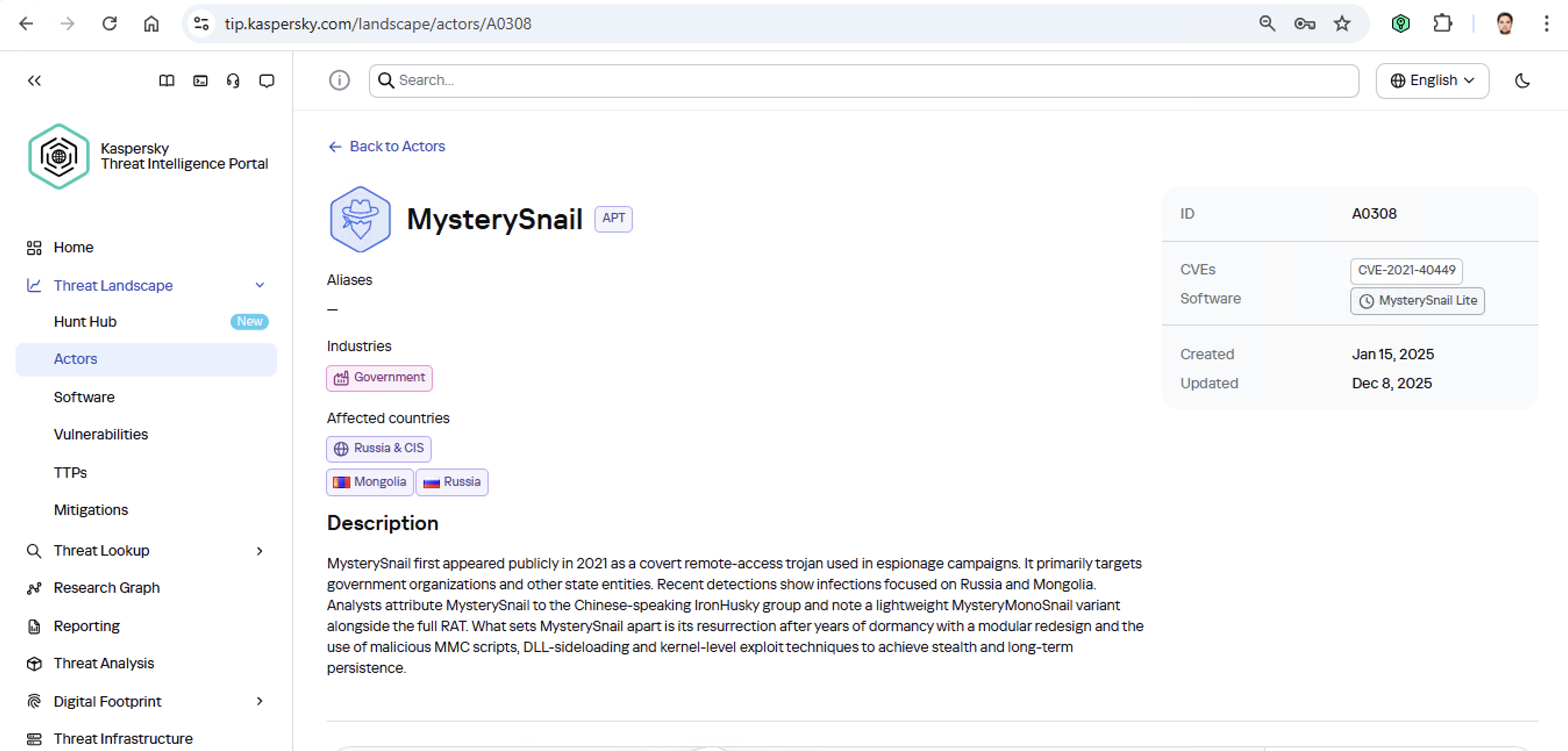
Let’s say we upload a piece of malware we’ve discovered to a threat intelligence portal, and learn that it’s usually being used by, say, the MysterySnail group. What does that actually tell us? Let’s look at the available intel:
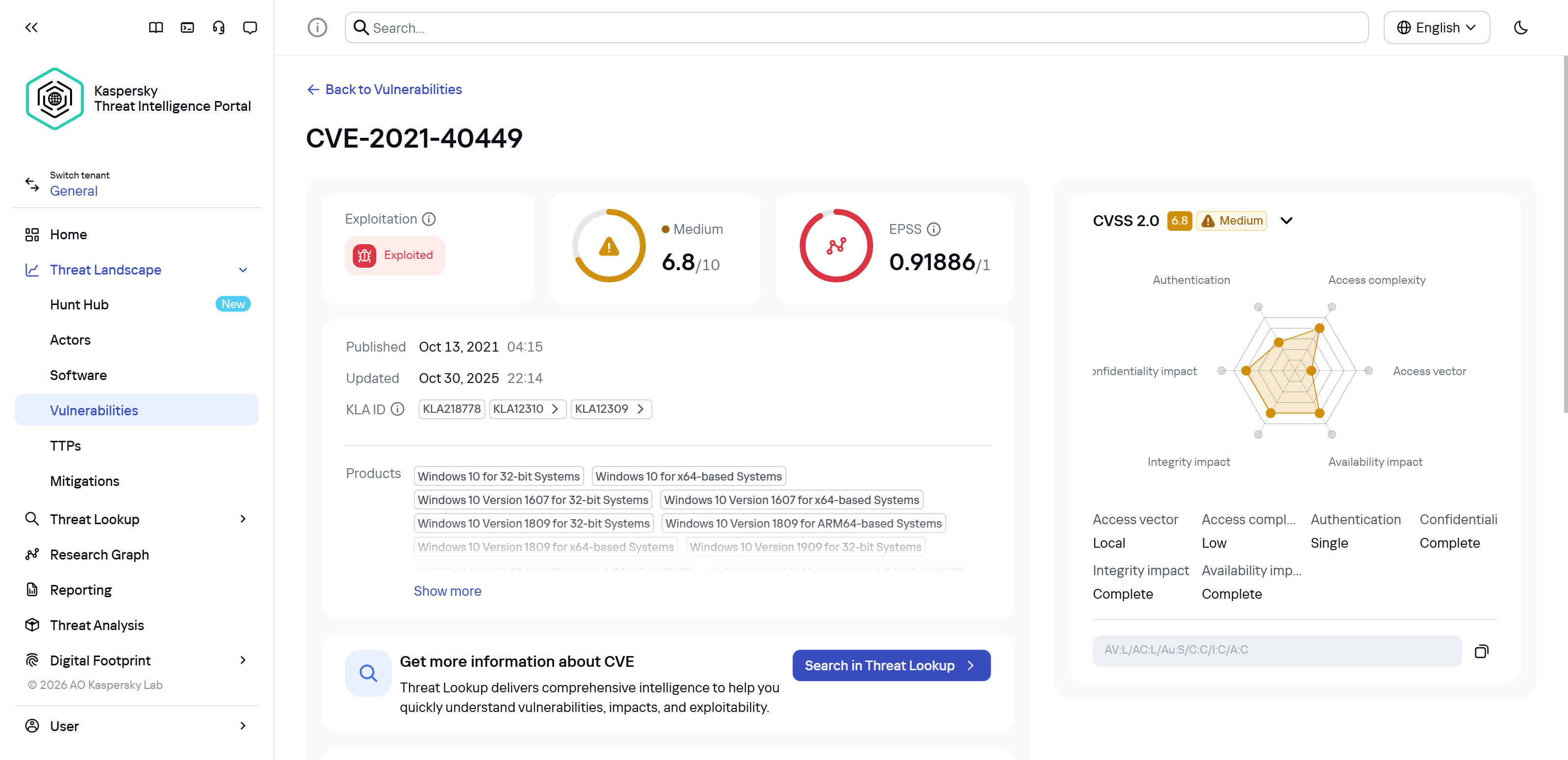
First off, these attackers target government institutions in both Russia and Mongolia. They’re a Chinese-speaking group that typically focuses on espionage. According to their profile, they establish a foothold in infrastructure and lay low until they find something worth stealing. We also know that they typically exploit the vulnerability CVE-2021-40449. What kind of vulnerability is that?
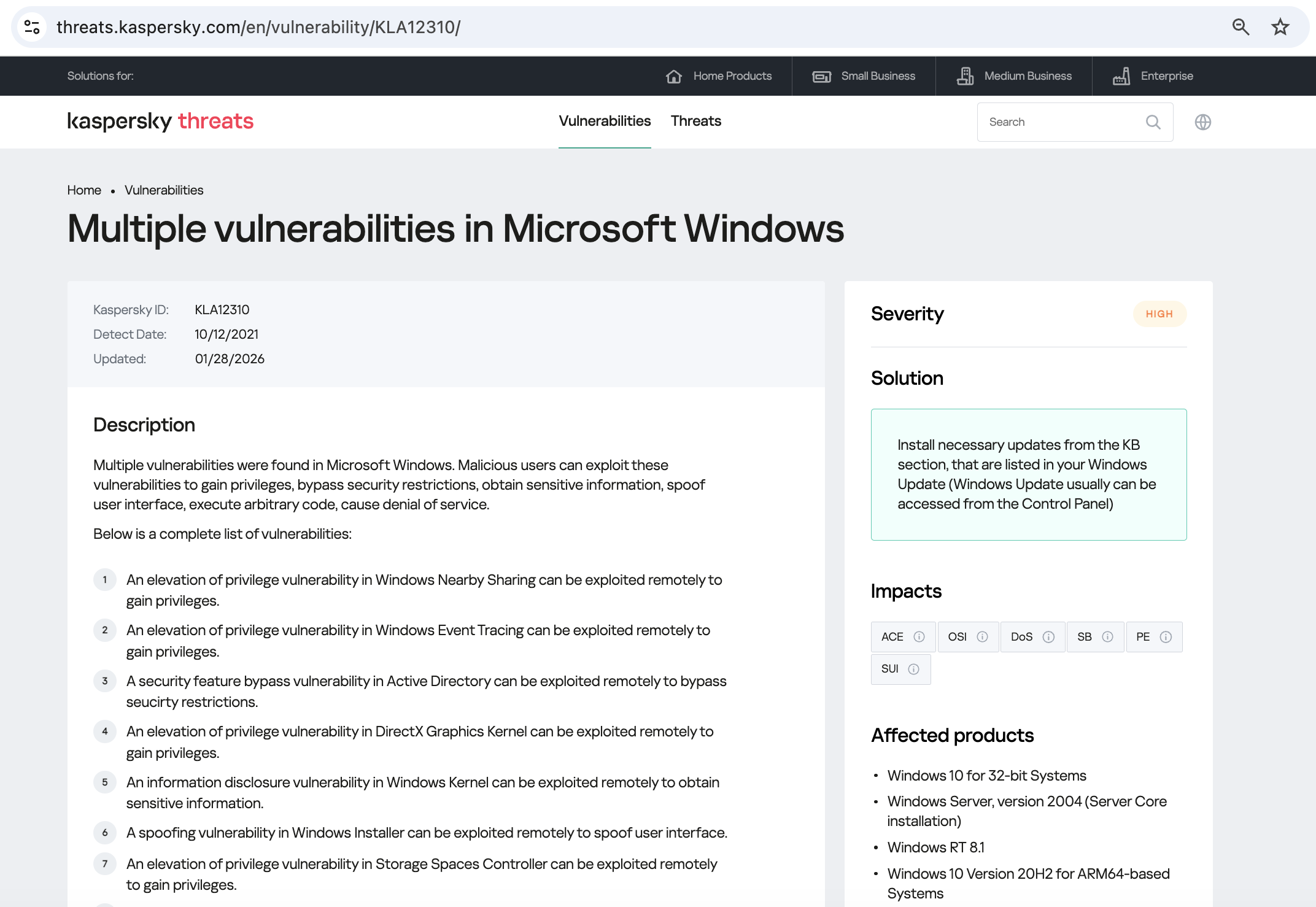
As we can see, it’s a privilege escalation vulnerability — meaning it’s used after hackers have already infiltrated the infrastructure. This vulnerability has a high severity rating and is heavily exploited in the wild. So what software is actually vulnerable?
Got it: Microsoft Windows. Time to double-check if the patch that fixes this hole has actually been installed. Alright, besides the vulnerability, what else do we know about the hackers? It turns out they have a peculiar way of checking network configurations — they connect to the public site 2ip.ru:
So it makes sense to add a correlation rule to SIEM to flag that kind of behavior.
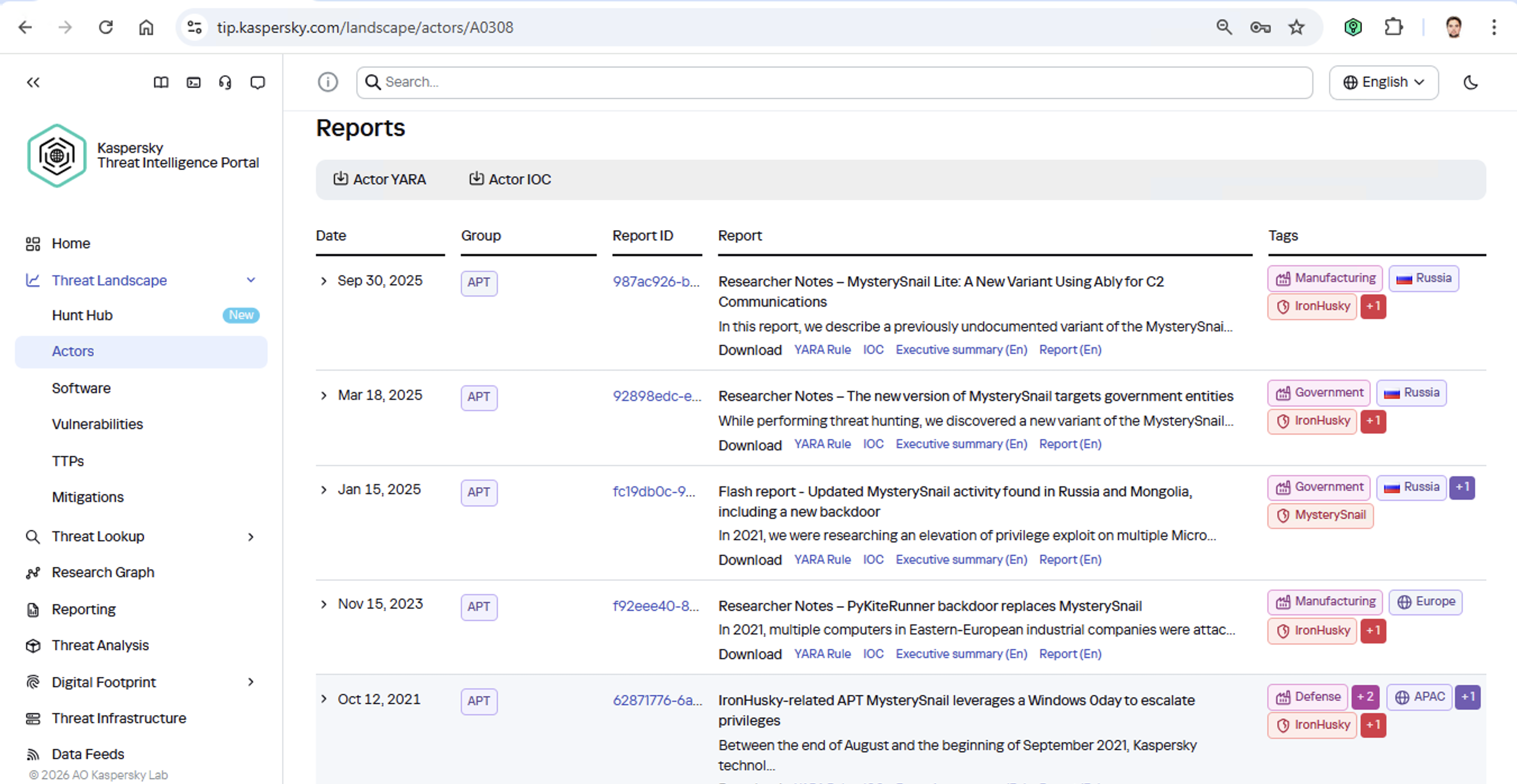
Now’s the time to read up on this group in more detail and gather additional indicators of compromise (IoCs) for SIEM monitoring, as well as ready-to-use YARA rules (structured text descriptions used to identify malware). This will help us track down all the tentacles of this kraken that might have already crept into corporate infrastructure, and ensure we can intercept them quickly if they try to break in again.
Kaspersky Threat Intelligence Portal provides a ton of additional reports on MysterySnail attacks, each complete with a list of IoCs and YARA rules. These YARA rules can be used to scan all endpoints, and those IoCs can be added into SIEM for constant monitoring. While we’re at it, let’s check the reports to see how these attackers handle data exfiltration, and what kind of data they’re usually hunting for. Now we can actually take steps to head off the attack.
And just like that, MysterySnail, the infrastructure is now tuned to find you and respond immediately. No more spying for you!
Malware attribution methods
Before diving into specific methods, we need to make one thing clear: for attribution to actually work, the threat intelligence provided needs a massive knowledge base of the tactics, techniques, and procedures (TTPs) used by threat actors. The scope and quality of these databases can vary wildly among vendors. In our case, before even building our tool, we spent years tracking known groups across various campaigns and logging their TTPs, and we continue to actively update that database today.
With a TTP database in place, the following attribution methods can be implemented:
Dynamic attribution: identifying TTPs through the dynamic analysis of specific files, then cross-referencing that set of TTPs against those of known hacking groups
Technical attribution: finding code overlaps between specific files and code fragments known to be used by specific hacking groups in their malware
Dynamic attribution
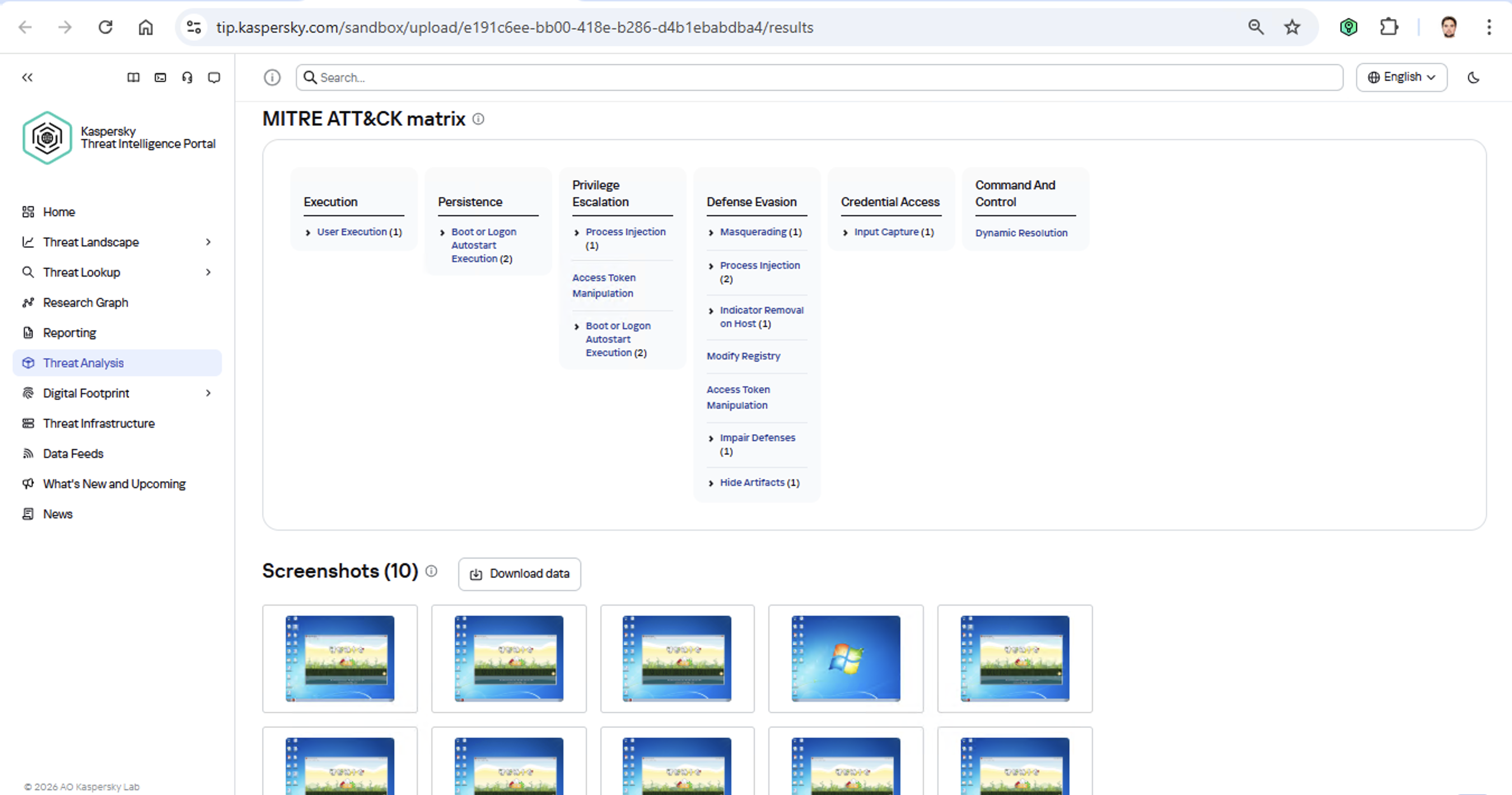
Identifying TTPs during dynamic analysis is relatively straightforward to implement; in fact, this functionality has been a staple of every modern sandbox for a long time. Naturally, all of our sandboxes also identify TTPs during the dynamic analysis of a malware sample:
The core of this method lies in categorizing malware activity using the MITRE ATT&CK framework. A sandbox report typically contains a list of detected TTPs. While this is highly useful data, it’s not enough for full-blown attribution to a specific group. Trying to identify the perpetrators of an attack using just this method is a lot like the ancient Indian parable of the blind men and the elephant: blindfolded folks touch different parts of an elephant and try to deduce what’s in front of them from just that. The one touching the trunk thinks it’s a python; the one touching the side is sure it’s a wall, and so on.
Technical attribution
The second attribution method is handled via static code analysis (though keep in mind that this type of attribution is always problematic). The core idea here is to cluster even slightly overlapping malware files based on specific unique characteristics. Before analysis can begin, the malware sample must be disassembled. The problem is that alongside the informative and useful bits, the recovered code contains a lot of noise. If the attribution algorithm takes this non-informative junk into account, any malware sample will end up looking similar to a great number of legitimate files, making quality attribution impossible. On the flip side, trying to only attribute malware based on the useful fragments but using a mathematically primitive method will only cause the false positive rate to go through the roof. Furthermore, any attribution result must be cross-checked for similarities with legitimate files — and the quality of that check usually depends heavily on the vendor’s technical capabilities.
Kaspersky’s approach to attribution
Our products leverage a unique database of malware associated with specific hacking groups, built over more than 25 years. On top of that, we use a patented attribution algorithm based on static analysis of disassembled code. This allows us to determine — with high precision, and even a specific probability percentage — how similar an analyzed file is to known samples from a particular group. This way, we can form a well-grounded verdict attributing the malware to a specific threat actor. The results are then cross-referenced against a database of billions of legitimate files to filter out false positives; if a match is found with any of them, the attribution verdict is adjusted accordingly. This approach is the backbone of the Kaspersky Threat Attribution Engine, which powers the threat attribution service on the Kaspersky Threat Intelligence Portal.
How China’s “Walled Garden” is Redefining the Cyber Threat Landscape
In our latest webinar, Flashpoint unpacks the architecture of the Chinese threat actor cyber ecosystem—a parallel offensive stack fueled by government mandates and commercialized hacker-for-hire industry.
For years, the global cybersecurity community has operated under the assumption that technical information was a matter of public record. Security research has always been openly discussed and shared through a culture of global transparency. Today, that reality has fundamentally shifted. Flashpoint is witnessing a growing opacity—a “Walled Garden”—around Chinese data. As a result, the competence of Chinese threat actors and APTs has reached an industrialized scale.
In Flashpoint’s recent on-demand webinar, “Mapping the Adversary: Inside the Chinese Pentesting Ecosystem,” our analysts explain how China’s state policies surrounding zero-day vulnerability research have effectively shut out the cyber communities that once provided a window into Chinese tradecraft. However, they haven’t disappeared. Rather, they have been absorbed by the state to develop a mature, self-sustaining offensive stack capable of targeting global infrastructure.
Understanding the Walled Garden: The Shift from Disclosure to Nationalization
The “Walled Garden” is a direct result of a Chinese regulatory turning point in 2021: the Regulations on the Management of Security Vulnerabilities (RMSV). While the gradual walling off of China’s data is the cumulative result of years of implementing regulatory and policy strategies, the 2021 RMSV marks a critical turning point that effectively nationalized China’s vulnerability research capabilities. Under the RMSV, any individual or organization in China that discovers a new flaw must report it to the Ministry of Industry and Information Technology (MIIT) within 48 hours. Crucially, researchers are prohibited from sharing technical details with third parties—especially foreign entities—or selling them before a patch is issued.
It is important to note that this mandate is not limited to Chinese-based software or hardware; it applies to any vulnerability discovered, as long as the discoverer is a Chinese-based organization or national. This effectively treats software vulnerabilities as a national strategic resource for China. By centralizing this data, the Chinese government ensures it has an early window into zero-day exploits before the global defensive community.
For defenders, this means that by the time a vulnerability is public, there is a high probability it has already been analyzed and potentially weaponized within China’s state-aligned apparatus.
The Indigenous Kill Chain: Reconnaissance Beyond Shodan
Flashpoint analysts have observed that within this Walled Garden, traditional Western reconnaissance tools are losing their effectiveness. Chinese threat actors are utilizing an indigenous suite of cyberspace search engines that create a dangerous information asymmetry, allowing them to peer at defender infrastructure while shielding their own domestic base from Western scrutiny.
While Shodan remains the go-to resource for security teams, Flashpoint has seen Chinese threat actors favor three IoT search engines that offer them a massive home-field advantage:
FOFA: Specializes in deep fingerprinting for middleware and Chinese-specific signatures, often indexing dorks for new vulnerabilities weeks before they appear in the West.
Zoomai: Built for high-speed automation, offering APIs that integrate with AI systems to move from discovery to verified target in minutes.
360 Quake: Provides granular, real-time mapping through a CLI with an AI engine for complex asset portraits.
In the full session, we demonstrate exactly how Chinese operators use these tools to fuse reconnaissance and exploitation into a single, automated step—a capability most Western EDRs aren’t yet tuned to detect.
Building a State-Aligned Offensive Stack
Leveraging their knowledge of vulnerabilities and zero-day exploits, the illicit Chinese ecosystem is building tools designed to dismantle the specific technologies that power global corporate data centers and business hubs.
In the webinar, our analysts explain purpose-built cyber weapons designed to hunt VMware vCenter servers that support one-click shell uploads via vulnerabilities like Log4Shell. Beyond the initial exploit, Flashpoint highlights the rising use of Behinder (Ice Scorpion)—a sophisticated web shell management tool. Behinder has become a staple for Chinese operators because it encrypts command-and-control (C2) traffic, allowing attackers to evade conventional inspection and deep packet analytics.
Strengthen Your Defenses Against the Chinese Offensive Stack with Flashpoint
By understanding this “Walled Garden” architecture, defenders can move beyond generic signatures and begin to hunt for the specific TTPs—such as high-entropy C2 traffic and proprietary Chinese scanning patterns—that define the modern Chinese threat actor.
How can Flashpoint help? Flashpoint’s cyber threat intelligence platform cuts through the generic feed overload and delivers unrivaled primary-source data, AI-powered analysis, and expert human context.
Mandiant is tracking a significant expansion and escalation in the operations of threat clusters associated with ShinyHunters-branded extortion. As detailed in our companion report,'Vishing for Access: Tracking the Expansion of ShinyHunters-Branded SaaS Data Theft', these campaigns leverage evolved voice phishing (vishing) and victim-branded credential harvesting to successfully compromise single sign-on (SSO) credentials and enroll unauthorized devices into victim multi-factor authentication (MFA) solutions.
This activity is not the result of a security vulnerability in vendors' products or infrastructure. Instead, these intrusions rely on the effectiveness of social engineering to bypass identity controls and pivot into cloud-based software-as-a-service (SaaS) environments.
This post provides actionable hardening, logging, and detection recommendations to help organizations protect against these threats. Organizations responding to an active incident should focus on rapid containment steps, such as severing access to infrastructure environments, SaaS platforms, and the specific identity stores typically used for lateral movement and persistence. Long-term defense requires a transition toward phishing-resistant MFA, such as FIDO2 security keys or passkeys, which are more resistant to social engineering than push-based or SMS authentication.
Containment
Organizations responding to an active or suspected intrusion by these threat clusters should prioritize rapid containment to sever the attacker’s access to prevent further data exfiltration. Because these campaigns rely on valid credentials rather than malware, containment must prioritize the revocation of session tokens and the restriction of identity and access management operations.
Immediate Containment Actions
Revoke active sessions: Identify and disable known compromised accounts and revoke all active session tokens and OAuth authorizations across IdP and SaaS platforms.
Restrict password resets: Temporarily disable or heavily restrict public-facing self-service password reset portals to prevent further credential manipulation. Do not allow the use of self-service password reset for administrative accounts.
Pause MFA registration: Temporarily disable the ability for users to register, enroll, or join new devices to the identity provider (IdP).
Limit remote access: Restrict or temporarily disable remote access ingress points, such as VPNs, or Virtual Desktops Infrastructure (VDI), especially from untrusted or non-compliant devices.
Enforce device compliance: Restrict access to IdPs and SaaS applications so that authentication can only originate from organization-managed, compliant devices and known trusted egress locations.
Implement 'shields up' procedures: Inform the service desk of heightened risk and shift to manual, high-assurance verification protocols for all account-related requests. In addition, remind technology operations staff not to accept any work direction via SMS messages from colleagues.
During periods of heightened threat activity, Mandiant recommends that organizations temporarily route all password and MFA resets through a rigorous manual identity verification protocol, such as the live video verification described in the Hardening section of this post. When appropriate, organizations should also communicate with end-users, HR partners, and other business units to stay on high-alert during the initial containment phase. Always report suspicious activity to internal IT and Security for further investigation.
1. Hardening
Defending against threat clusters associated with ShinyHunters-branded extortion begins with tightening manual, high-risk processes that attackers frequently exploit, particularly password resets, device enrollments, and MFA changes.
Help Desk Verification
Because these campaigns often target human-driven workflows through social engineering, vishing, and phishing, organizations should implement stronger, layered identity verification processes for support interactions, especially for requests involving account changes such as password resets or MFA modifications. Threat actors have also been known to impersonate third-party vendors to voice phish (vish) help desks and persuade staff to approve or install malicious SaaS application registrations.
As a temporary measure during heightened risk, organizations should require verification that includes the caller’s identity, a valid ID, and a visual confirmation that the caller and ID match.
To implement this, organizations should require help desk personnel to:
Require a live video call where the user holds a physical government ID next to their face. The agent must visually verify the match.
Confirm the name on the ID matches the employee’s corporate record.
Require out-of-band approval from the user's known manager before processing the reset.
Reject requests based solely on employee ID, SSN, or manager name. ShinyHunters possess this data from previous breaches and may use it to verify their identity.
If the user calls the helpdesk for a password reset, never perform the reset without calling the user back at a known good phone number to prevent spoofing.
If a live video call is not possible, require an alternative high-assurance path. It may be required for the user to come in person to verify their identity.
Optionally, after a completed interaction, the help desk agent can send an email to the user’s manager indicating that the change is complete with a picture from the video call of the user who requested the change on camera.
Special Handling for Third-Party Vendor Requests
Mandiant has observed incidents where attackers impersonate support personnel from third-party vendors to gain access. In these situations, the standard verification principals may not be applicable.
Under no circumstances should the Help Desk move forward with allowing access. The agent must halt the request and follow this procedure:
End the inbound call without providing any access or information
Independently contact the company's designated account manager for that vendor using trusted, on-file contact information
Require explicit verification from the account manager before proceeding with any request
End User Education
Organizations should educate end users on best practices especially when being reached out directly without prior notice.
Conduct internal Vishing and Phishing exercises to validate end user adoption of security best practices.
Educate that passwords should not be shared, regardless of who is asking for it.
Encourage users to exercise extreme caution when being requested to reset their own passwords and MFA; especially during off-business hours.
If they are unsure of the person or number they are being contacted by, have them cease all communications and contact a known support channel for guidance.
Identity & Access Management
Organizations should implement a layered series of controls to protect all types of identities. Access to cloud identity providers (IdPs), cloud consoles, SaaS applications, document and code repositories should be restricted since these platforms often become the control plane for privilege escalation, data access, and long-term persistence.
This can be achieved by:
Limiting access to trusted egress points and physical locations
Review and understand what “local accounts” exist within SaaS platforms:
Ensure any default username/passwords have been updated according to the organization’s password policy.
Limit the use of ‘local accounts’ that are not managed as part of the organization’s primary centralized IdP.
Reducing the scope of non-human accounts (access keys, tokens, and non-human accounts)
Where applicable, organizations should implement network restrictions across non-human accounts.
Activity correlating to long-lived tokens (OAuth / API) associated with authorized / trusted applications should be monitored to detect abnormal activity.
Limit access to organization resources from managed and compliant devices only. Across managed devices:
Implement device posture checks via the Identity Provider.
Block access from devices with prolonged inactivity.
Block end users ability to enroll personal devices.
Where access from unmanaged devices is required, organizations should:
Limit non-managed devices to web only views.
Disable ability to download/store corporate/business data locally on unmanaged personal devices.
Limit session durations and prompt for re-authentication with MFA.
Rapid enhancement to MFA methods, such as:
Removal of SMS, phone call, push notification, and/or email as authentication controls.
Requiring strong, phishing resistant MFA methods such as:
Authenticator apps that require phishing resistant MFA (FIDO2 Passkey Support may be added to existing methods such as Microsoft Authenticator.)
FIDO2 security keys for authenticating identities that are assigned privileged roles.
Enforce multi-context criteria to enrich the authentication transaction.
Examples include not only validating the identity, but also specific device and location attributes as part of the authentication transaction.
For organizations that leverage Google Workspace, these concepts can be enforced by using context-aware access policies.
For organizations that leverage Microsoft Entra ID, these concepts can be enforced by using a Conditional Access Policy.
For organizations that leverage Okta, these concepts can be enforced by using Okta policies and rules.
Attackers are consistently targeting non-human identities due to the limited number of detections around them, lack of baseline of normal vs abnormal activity, and common assignment of privileged roles attached to these identities. Organizations should:
Identify and track all programmatic identities and their usage across the environment, including where they are created, which systems they access, and who owns them.
Centralize storage in a secrets manager (cloud-native or third-party) and prevent credentials from being embedded in source code, config files, or CI/CD pipelines.
Restrict authentication IPs for programmatic credentials so they can only be used from trusted third-party or internal IP ranges wherever technically feasible.
Transition to workload identity federation: Where feasible, replace long-lived static credentials (such as AWS access keys or service account keys) with workload identity federation mechanisms (often based on OIDC). This allows applications to authenticate using short-lived, ephemeral tokens issued by the cloud provider, dramatically reducing the risk of credential theft from code repositories and file systems.
Enforce strict scoping and resource binding by tying credentials to specific API endpoints, services, or resources. For example, an API key should not simply have “read” access to storage, but be limited to a particular bucket or even a specific prefix, minimizing blast radius if it is compromised.
Baseline expected behavior for each credential type (typical access paths, destinations, frequency, and volume) and integrate this into monitoring and alerting so anomalies can be quickly detected and investigated.
Enable Okta ThreatInsight to automatically block IP addresses identified as malicious.
Restrict Super Admin access to specific network zones (corporate VPN).
Microsoft Entra ID
Implement common Conditional Access Policies to block unauthorized authentication attempts and restrict high-risk sign-ins.
Configure risk-based policies to trigger password changes or MFA when risk is detected.
Restrict who is allowed to register applications in Entra ID and require administrator approval for all application registrations.
Google Workspace
Use Context-Aware Access levels to restrict Google Drive and Admin Console access based on device attributes and IP address.
Enforce 2-Step Verification (2SV) for all Google Workspace users.
Use Advanced Protection to protect high-risk users from targeted phishing, malware, and account hijacking.
Infrastructure and Application Platforms
Infrastructure and application platforms such as Cloud consoles and SaaS applications are frequent targets for credential harvesting and data exfiltration. Protecting these systems typically requires implementing the previously outlined identity controls, along with platform-specific security guardrails, including:
Restrict management-plane access so it’s only reachable from the organization’s network and approved VPN ranges.
Scan for and remediate exposed secrets, including sensitive credentials stored across these platforms.
Enforce device access controls so access is limited to managed, compliant devices.
Monitor configuration changes to identify and investigate newly created resources, exposed services, or other unauthorized modifications.
Implement logging and detections to identify:
Newly created or modified network security group (NSG) rules, firewall rules, or publicly exposed resources that enable remote access.
Creation of programmatic keys and credentials (e.g., access keys).
Disable API/CLI access for non-essential users by restricting programmatic access to those who explicitly require it for management-plane operations.
Platform Specifics
GCP
Configure security perimeters with VPC Service Controls (VPC-SC) to prevent data from being copied to unauthorized Google Cloud resources even if they have valid credentials. Set additional guardrails with organizational policies and deny policies applied at the organization level. This stops developers from introducing misconfigurations that could be exploited by attackers. For example, enforcing organizational policies like “iam.disableServiceAccountKeyCreation” will prevent generating new unmanaged service account keys that can be easily exfiltrated.
Apply IAM Conditions to sensitive role bindings. Restrict roles so they only activate if the resource name starts with a specific prefix or if the request comes during specific working hours. This limits the blast radius of a compromised credential.
AWS
Apply Service Control Policies (SCPs) at the root level of the AWS Organization that limit the attack surface of AWS services. For example, deny access in unused regions, block creation of IAM access keys, and prevent deletion of backups, snapshots, and critical resources.
Define data perimeters through Resource Control Policies (RCPs) that restrict access to sensitive resources (like S3 buckets) to only trusted principals within your organization, preventing external entities from accessing data even with valid keys.
Implement alerts on common reconnaissance commands such as GetCallerIdentity API calls originating from non-corporate IP addresses. This is often the first reconnaissance command an attacker runs to verify their stolen keys.
Azure
Enforce Conditional Access Policies (CAPs) that block access to administrative applications unless the device is "Microsoft Entra hybrid joined" and "Compliant." This prevents attackers from accessing resources using their own tools or devices.
Eliminate standing admin access and require Just-In-Time (JIT) through Privileged Identity Management (PIM) for elevation for roles such as Global Administrator, mandating an approval workflow and justification for each activation.
Enforce the use of Managed Identities for Azure resources accessing other services. This removes the need for developers to handle or rotate credentials for service principals, eliminating the static key attack vector.
Source Code Management
Enforce Single Sign-On (SSO) with SCIM for automated lifecycle management and mandate FIDO2/WebAuthn to neutralize phishing. Additionally, replace broad access tokens with short-lived, Fine-Grained Personal Access Tokens (PATs) to enforce least privilege.
Prevent credential leakage by enabling native "Push Protection" features or implementing blocking CI/CD workflows (such as TruffleHog) that automatically reject commits containing high-entropy strings before they are merged.
Mitigate the risk of malicious code injection by requiring cryptographic commit signing (GPG/S/MIME) and mandating a minimum of two approvals for all Pull Requests targeting protected branches.
Conduct scheduled historical scans to identify and purge latent secrets that evaded preventative controls, ensuring any compromised credentials are immediately rotated and forensically investigated.
Modern SaaS intrusions rarely rely on payloads or technical exploits. Instead, Mandiant consistently observes attackers leveraging valid access (frequently gained via vishing or MFA bypass) to abuse native SaaS capabilities such as bulk exports, connected apps, and administrative configuration changes.
Without clear visibility into these environments, detection becomes nearly impossible. If an organization cannot track which identity authenticated, what permissions were authorized, and what data was exported, they often remain unaware of a campaign until an extortion note appears.
This section focuses on ensuring your organization has the necessary visibility into identity actions, authorizations, and SaaS export behaviors required to detect and disrupt these incidents before they escalate.
Identity Provider
If an adversary gains access through vishing and MFA manipulation, the first reliable signals will appear in the SSO control plane, not inside a workstation. In this example, the goal is to ensure Okta and Entra ID ogs identify who authenticated, what MFA changes occurred, and where access originated from.
MFA lifecycle events (enrollment/activation and changes to authentication factors or devices)
Administrative identity events that capture security-relevant actions (e.g., changes that affect authentication posture)
Entra ID
Authentication events
Audit logs for MFA changes / authentication method
Audit logs for security posture changes that affect authentication
Conditional Access policy changes
Changes to Named Locations / trusted locations
What “Good” Looks Like Operationally
You should be able to quickly identify:
Authentication factor, device enrollment activity, and the user responsible
Source IP, geolocation, (and ASN if available) associated with that enrollment
Whether access originated from the organization’s expected egress and identify access paths
Platform
Google Workspace Logging
Defenders should ensure they have visibility into OAuth authorizations, mailbox deletion activity (including deletion of security notification emails), and Google Takeout exports.
What You Need in Place Before Logging
Correct edition + investigation surfaces available: Confirm your Workspace edition supports the Audit and investigation tool and the Security Investigation tool (if you plan to use it).
Correct admin privileges: Ensure the account has Audit & Investigation privilege (to access OAuth/Gmail/Takeout log events) and Security Center privilege.
If you need Gmail message content: Validate edition + privileges allow viewing message content during investigations.
Activity observed by Mandiant includes the use of Salesforce Data Loader and large-scale access patterns that won’t be visible if only basic login history logs are collected. Additional Salesforce telemetry that captures logins, configuration changes, connected app/API activity, and export behavior is needed to investigate SaaS-native exfiltration. Detailed implementation guidance for these visibility gaps can be found in Mandiant’s Targeted Logging and Detection Controls for Salesforce.
What You Need in Place Before Logging
Entitlement check (must-have)
Most security-relevant Salesforce logs are gated behind Event Monitoring, delivered through Salesforce Shield or the Event Monitoring add-on. Confirm you are licensed for the event types you plan to use for detection.
Choose the collection method that matches your operations
Use real-time event monitoring (RTEM) if you need near real-time detection.
Use event log files (ELF) if you need predictable batch exports for long-term storage and retrospective investigations.
Use event log objects (ELO) if you require queryable history via Salesforce Object Query Language (often requires Shield/add-on).
Enable the events you intend to detect on
Use Event Manager to explicitly turn on the event categories you plan to ingest, and ensure the right teams have access to view and operationalize the data (profiles/permission sets).
Threat Detection and Enhanced Transaction Security
If your environment uses Threat Detection or ETS, verify the event types that feed those controls and ensure your log ingestion platform doesn’t omit the events you expect to alert on.
What to Enable and Ingest into the SIEM
Authentication and access
LoginHistory (who logged in, when, from where, success/failure, client type)
LoginEventStream (richer login telemetry where available)
Administrative/configuration visibility
SetupAuditTrail (changes to admin and security configurations)
API and export visibility
ApiEventStream (API usage by users and connected apps)
Threat actors often pivot from compromised SSO providers into additional SaaS platforms, including DocuSign and Atlassian. Ingesting audit logs from these platforms into a SIEM environment enables the detection of suspicious access and large-scale data exfiltration following an identity compromise.
What You Need in Place Before Logging
You need tenant-level admin permissions to access and configure audit/event logging.
Confirm your plan/subscriptions include the audit/event visibility you are trying to collect (Atlassian org audit log capabilities can depend on plan/Guard tier; DocuSign org-level activity monitoring is provided via DocuSign Monitor).
API access (If you are pulling logs programmatically): Ensure the tenant is able to use the vendor’s audit/event APIs (DocuSign Monitor API; Atlassian org audit log API/webhooks depending on capability).
Retention reality check: Validate the platform’s native audit-log retention window meets your investigation needs.
What to Enable and Ingest into the SIEM
DocuSign (audit/monitoring logs)
Authentication events (successful/failed sign-ins, SSO vs password login if available)
API token and app activity (API token created/revoked, OAuth app connected, marketplace app install/uninstall)
Source context (source IP/geolocation, user agent/client type)
Microsoft 365 Audit Logging
Mandiant has observed threat actors leveraging PowerShell to download sensitive data from SharePoint and OneDrive as part of this campaign. To detect the activity, it is necessary to ingest M365 audit telemetry that records file download operations along with client context (especially the user agent).
What You Need in Place Before Logging
Microsoft Purview Audit is available and enabled: Your tenant must have Microsoft Purview Audit turned on and usable (Audit “Standard” vs “Premium” affects capabilities/retention).
Correct permissions to view/search audit: Assign the compliance/audit roles required to access audit search and records.
SharePoint/OneDrive operations are present in the Unified Audit Log: Validate that SharePoint/OneDrive file operations are being recorded (this is where operations like file download/access show up).
Client context is captured: Confirm audit records include UserAgent (when provided by the client) so you can identify PowerShell-based access patterns in SharePoint/OneDrive activity.
User agent/client identifier (to surface WindowsPowerShell-style user agents)
User identity, source IP, geolocation
Target resource details
3. Detections
The following detections target behavioral patterns Mandiant has identified in ShinyHunters related intrusions. In these scenarios, attackers typically gain initial access by compromising SSO platforms or manipulating MFA controls, then leverage native SaaS capabilities to exfiltrate data and evade detection.The following use cases are categorized by area of focus, including Identity Providers and Productivity Platforms.
Note: This activity is not the result of a security vulnerability in vendors' products or infrastructure. Instead, these intrusions rely on the effectiveness of ShinyHunters related intrusions.
Implementation Guidelines
These rules are presented as YARA-L pseudo-code to prioritize clear detection logic and cross-platform portability. Because field names, event types, and attribute paths vary across environments, consider the following variables:
Ingestion Source: Differences in how logs are ingested into Google SecOps.
Parser Mapping: Specific UDM (Unified Data Model) mappings unique to your configuration.
Telemetry Availability: Variations in logging levels based on your specific SaaS licensing.
Reference Lists: Curated allowlists/blocklists the organization will need to create to help reduce noise and keep alerts actionable.
Note: Mandiant recommends testing these detections prior to deployment by validating the exact event mappings in your environment and updating the pseudo-fields to match your specific telemetry.
Okta
MFA Device Enrollment or Changes (Post-Vishing Signal)
Detects MFA device enrollment and MFA life cycle changes that often occur immediately after a social-engineered account takeover. When this alert is triggered, immediately review the affected user’s downstream access across SaaS applications (Salesforce, Google Workspace, Atlassian, DocuSign, etc.) for signs of large-scale access or data exports.
Why this is high-fidelity: In this intrusion pattern, MFA manipulation is a primary “account takeover” step. Because MFA lifecycle events are rare compared to routine logins, any modification occurring shortly after access is gained serves as a high-fidelity indicator of potential compromise.
Key signals
Okta system Log MFA lifecycle events (enroll/activate/deactivate/reset)
Optional: proximity to password reset, recovery, or sign-in anomalies (same user, short window)
Pseudo-code (YARA-L)
events:
$mfa.metadata.vendor_name = "Okta"
$mfa.metadata.product_event_type in ( "okta.user.mfa.factor.enroll", "okta.user.mfa.factor.activate",  "okta.user.mfa.factor.deactivate", "okta.user.mfa.factor.reset_all" )
$u= $mfa.principal.user.userid
$t_mfa = $mfa.metadata.event_timestamp

$ip = coalesce($mfa.principal.ip, $mfa.principal.asset.ip)
$ua = coalesce($mfa.network.http.user_agent, $mfa.extracted.fields["userAgent"], "")

$reset.metadata.vendor_name = "Okta"
$reset.metadata.product_event_type in (
"okta.user.password.reset",  "okta.user.account.recovery.start" )
$t_reset = $reset.metadata.event_timestamp

$auth.metadata.vendor_name = "Okta"
$auth.metadata.product_event_type in ("okta.user.authentication.sso", "okta.user.session.start")
$t_auth = $auth.metadata.event_timestamp

match:
$u over 30m

condition:
// Always alert on MFA lifecycle change
$mfa and
// Optional sequence tightening (enrichment only, not mandatory):
// If reset/auth exists in the window, enforce it happened before the MFA change.
(
(not $reset and not $auth) or
(($reset and $t_reset < $t_mfa) or ($auth and $t_auth < $t_mfa))
)
Suspicious admin.security Actions from Anonymized IPs
Alert on Okta admin/security posture changes when the admin action occurs from suspicious network context (proxy/VPN-like indicators) or immediately after an unusual auth sequence.
Why this is high-fidelity: Admin/security control changes are low volume and can directly enable persistence or reduce visibility.
“Anonymized” network signal: VPN/proxy ASN, “datacenter” reputation, TOR list, etc.
Actor uses unusual client/IP for admin activity
Reference lists
VPN_TOR_ASNS (proxy/VPN ASN list)
Pseudo-code (YARA-L)
events:
$a.metadata.vendor_name = "Okta"
$a.metadata.product_event_type in ("okta.system.policy.update","okta.system.security.change","okta.user.session.clear","okta.user.password.reset","okta.user.mfa.reset_all")
userid=$a.principal.user.userid
// correlate with a recent successful login for the same actor if available
$l.metadata.vendor_name = "Okta"
$l.metadata.product_event_type = "okta.user.authentication.sso"
userid=$l.principal.user.userid

match:
userid over 2h

condition:
$a and $l
Google Workspace
OAuth Authorization for ToogleBox Recall
Detects OAuth/app authorization events for ToogleBox recall (or the known app identifier), indicating mailbox manipulation activity.
Why this is high-fidelity: This is a tool-specific signal tied to the observed “delete security notification emails” behavior.
Optional: privileged user context (e.g., admin, exec assistant)
Pseudo-code (YARA-L)
events:
$e.metadata.vendor_name = "Google Workspace"
$e.metadata.product_event_type in ("gws.oauth.grant", "gws.token.authorize") // placeholders
// match app name OR app id if you have it
(lower($e.target.application) contains "tooglebox" or
lower($e.target.application) contains "recall")
condition:
$e
Gmail Deletion of Okta Security Notification Email
events:
$start.metadata.vendor_name = "Google Workspace"
$start.metadata.product_event_type = "gws.takeout.export.start"
$user = $start.principal.user.userid
$job  = $start.target.resource.id   // if available; otherwise remove job join

$done.metadata.vendor_name = "Google Workspace"
$done.metadata.product_event_type  = "gws.takeout.export.complete"
$bytes = coalesce($done.target.file.size, $done.extensions.bytes_exported)

match:
// takeout can take hours; don't use 10m here, adjust accordingly
$start.principal.user.userid = $done.principal.user.userid over 24h
// if you have a job/export id, this makes it *much* cleaner
$start.target.resource.id = $done.target.resource.id
condition:
$start and $done and
$start.metadata.event_timestamp < $done.metadata.event_timestamp and
$bytes >= 500000000   // 500MB start point; tune
not ($u in %TAKEOUT_ALLOWED_USERS) // OPTIONAL: remove if you don't maintain it
Cross-SaaS
Attempted Logins from Known Campaign Proxy/IOC Networks
Detects authentication attempts across SaaS/SSO providers originating from IPs/ASNs associated with the campaign.
Why this is high-fidelity: These IPs and ASNs lack legitimate business overlap; matches indicate direct interaction between compromised credentials and known adversary-controlled infrastructure.
events:
$e.metadata.product_event_type in (
      "okta.login.attempt", "workday.sso.login.attempt",
      "gws.login.attempt",  "salesforce.login.attempt",
      "atlassian.login.attempt", "docusign.login.attempt"
    )
(
      $e.principal.ip in %SHINYHUNTERS_PROXY_IPS or
      $e.principal.ip.asn in %VPN_TOR_ASNS
)

condition:
$e
Identity Activity Outside Normal Business Hours
Detects identity events occurring outside normal business hours, focusing on high-risk actions (sign-ins, password reset, new MFA enrollment and/or device changes).
Why this is high-fidelity: A strong indication of abnormal user behavior when also constrained to sensitive actions and users who rarely perform them.
Key signals
User sign-ins, password resets, MFA enrollment, device registrations
Timestamp bucket: late evening / friday afternoon / weekends
Pseudo-code (YARA-L)
events:
$e.metadata.vendor_name = "Okta"
$e.metadata.product_event_type in ("okta.user.password.reset","okta.user.mfa.factor.activate","okta.user.mfa.factor.reset_all") // PLACEHOLDER
outside_business_hours($e.metadata.event_timestamp, "America/New_York")
// Include the business hours your organization functions in
$u = $e.principal.user.userid

condition:
$e
Successful Sign-in From New Location and New MFA Method
Detects a successful login that is simultaneously from a new geolocation and uses a newly registered MFA method.
Why this is high-fidelity: This pattern represents a compound condition that aligns with MFA manipulation and unfamiliar access context.
Key signals
Successful authentication
New geolocation compared to user baseline
New factor method compared to user baseline (or recent MFA enrollment)
Optional sequence: MFA enrollment occurs after login
Pseudo-code (YARA-L)
events:
$login.metadata.vendor_name = "Okta"
$login.metadata.product_event_type = "okta.login.success"
$u = $login.principal.user.userid
$geo = $login.principal.location.country
$t_l = $login.metadata.event_timestamp
$m = $login.security_result.auth_method // if present; otherwise join to factor event

condition:
$login and
first_seen_country_for_user($u, $geo) and
first_seen_factor_for_user($u, $m)
Multiple MFA Enrollments Across Different Users From the Same Source IP
Detects the same source IP enrolling/changing MFA for multiple users in a short window.
Why this is high-fidelity:This pattern mirrors a known social engineering tactic where threat actors manipulate help desk admins to enroll unauthorized devices into a victim’s MFA - spanning multiple users from the same source address
Web/DNS Access to Credential Harvesting, Portal Impersonation Domains
Detects DNS queries or HTTP referrers matching brand and SSO/login keyword lookalike patterns.
Why this is high-fidelity: Captures credential-harvesting infrastructure patterns when you have network telemetry.
Key signals
DNS question name or HTTP referrer/URL
Regex match for brand + SSO keywords
Exclusions for your legitimate domains
Reference lists
Allowlist (small) of legitimate domains (optional)
Pseudo-code (YARA-L)
events:
$event.metadata.event_type in ("NETWORK_HTTP", "NETWORK_DNS")
// pick ONE depending on which log source you're using most
// DNS:
$domain = lower($event.network.dns.questions.name)
// If you’re using HTTP instead, swap the line above to:
// $domain = lower($event.network.http.referring_url)

condition:
regex_match($domain, ".*(yourcompany(my|sso|internal|okta|access|azure|zendesk|support)|(my|sso|internal|okta|access|azure|zendesk|support)yourcompany).*"
)
and not regex_match($domain, ".*yourcompany\\.com.*")
and not regex_match($domain, ".*okta\\.yourcompany\\.com.*")
Microsoft 365
M365 SharePoint/OneDrive: FileDownloaded with WindowsPowerShell User Agent
Detects SharePoint/OneDrive downloads with PowerShell user-agent that exceed a byte threshold or count threshold within a short window.
Why this is high-fidelity: PowerShell-driven SharePoint downloading and burst volume indicates scripted retrieval.
Key signals
FileDownloaded/FileAccessed
User agent contains PowerShell
Bytes transferred OR number of downloads in window
Timestamp window (ordering implicit) and min<max check
Pseudo-code (YARA-L)
events:
  $e.metadata.vendor_name = "Microsoft"
  (
    $e.target.application = "SharePoint" or
    $e.target.application = "OneDrive"
  )
  $e.metadata.product_event_type = /FileDownloaded|FileAccessed/
  $e.network.http.user_agent = /PowerShell/ nocase
  $user = $e.principal.user.userid
  $bytes = coalesce($e.target.file.size, $e.extensions.bytes_transferred)
  $ts = $e.metadata.event_timestamp

match:
  $user over 15m

condition:
  // keep your PowerShell constraint AND require volume
  $e and (sum($bytes) >= 500000000 or count($e) >= 20) and min($ts) < max($ts)
M365 SharePoint: High Volume Document FileAccessed Events
Detects SharePoint document file access events that exceed a count threshold and minimum unique file types within a short window.
Why this is high-fidelity: Burst volume may indicate scripted retrieval or usage of the Open-in-App feature within SharePoint.
Key signals
FileAccessed
Filtering on common document file types (e.g., PDF)
Detects SharePoint queries for files relating to strings of interest, such as sensitive documents, clear-text credentials, and proprietary information.
Why this is high-fidelity: Multiple searches for strings of interest by a single account occurs infrequently. Generally, users will search for project or task specific strings rather than general labels (e.g., “confidential”).
Key signals
SearchQueryPerformed
Filtering on strings commonly associated with sensitive or privileged information
Mandiant has identified an expansion in threat activity that uses tactics, techniques, and procedures (TTPs) consistent with prior ShinyHunters-branded extortion operations. These operations primarily leverage sophisticated voice phishing (vishing) and victim-branded credential harvesting sites to gain initial access to corporate environments by obtaining single sign-on (SSO) credentials and multi-factor authentication (MFA) codes. Once inside, the threat actors target cloud-based software-as-a-service (SaaS) applications to exfiltrate sensitive data and internal communications for use in subsequent extortion demands.
Google Threat Intelligence Group (GTIG) is currently tracking this activity under multiple threat clusters (UNC6661, UNC6671, and UNC6240) to enable a more granular understanding of evolving partnerships and account for potential impersonation activity. While this methodology of targeting identity providers and SaaS platforms is consistent with our prior observations of threat activity preceding ShinyHunters-branded extortion, the breadth of targeted cloud platforms continues to expand as these threat actors seek more sensitive data for extortion. Further, they appear to be escalating their extortion tactics with recent incidents including harassment of victim personnel, among other tactics.
This activity is not the result of a security vulnerability in vendors' products or infrastructure. Instead, it continues to highlight the effectiveness of social engineering and underscores the importance of organizations moving towards phishing-resistant MFA where possible. Methods such as FIDO2 security keys or passkeys are resistant to social engineering in ways that push-based or SMS authentication are not.
In incidents spanning early to mid-January 2026, UNC6661 pretended to be IT staff and called employees at targeted victim organizations claiming that the company was updating MFA settings. The threat actor directed the employees to victim-branded credential harvesting sites to capture their SSO credentials and MFA codes, and then registered their own device for MFA. The credential harvesting domains attributed to UNC6661 commonly, but not exclusively, use the format <companyname>sso.com or <companyname>internal.com and have often been registered with NICENIC.
In at least some cases, the threat actor gained access to accounts belonging to Okta customers. Okta published a report about phishing kits targeting identity providers and cryptocurrency platforms, as well as follow-on vishing attacks. While they associate this activity with multiple threat clusters, at least some of the activity appears to overlap with the ShinyHunters-branded operations tracked by GTIG.
After gaining initial access, UNC6661 moved laterally through victim customer environments to exfiltrate data from various SaaS platforms (log examples in Figures 2 through 5). While the targeting of specific organizations and user identities is deliberate, analysis suggests that the subsequent access to these platforms is likely opportunistic, determined by the specific permissions and applications accessible via the individual compromised SSO session. These compromises did not result from security vulnerabilities in the vendors' products or infrastructure.
In some cases, they have appeared to target specific types of information. For example, the threat actors have conducted searches in cloud applications for documents containing specific text including "poc," "confidential," "internal," "proposal," "salesforce," and "vpn" or targeted personally identifiable information (PII) stored in Salesforce. Additionally, UNC6661 may have targeted Slack data at some victims' environments, based on a claim made in a ShinyHunters-branded data leak site (DLS) entry.
In at least one incident where the threat actor gained access to an Okta customer account, UNC6661 enabled the ToogleBox Recall add-on for the victim's Google Workspace account, a tool designed to search for and permanently delete emails. They then deleted a "Security method enrolled" email from Okta, almost certainly to prevent the employee from identifying that their account was associated with a new MFA device.
In at least one case, after conducting the initial data theft, UNC6661 used their newly obtained access to compromised email accounts to send additional phishing emails to contacts at cryptocurrency-focused companies. The threat actor then deleted the outbound emails, likely in an attempt to obfuscate their malicious activity.
GTIG attributes the subsequent extortion activity following UNC6661 intrusions to UNC6240, based on several overlaps, including the use of a common Tox account for negotiations, ShinyHunters-branded extortion emails, and Limewire to host samples of stolen data. In mid-January 2026 extortion emails, UNC6240 outlined what data they allegedly stole, specifying a payment amount and destination BTC address, and threatening consequences if the ransom was not paid within 72 hours, which is consistent with prior extortion emails (Figure 6). They also provided proof of data theft via samples hosted on Limewire. GTIG also observed extortion text messages sent to employees and received reports of victim websites being targeted with distributed denial-of-service (DDoS) attacks.
Notably, in late January 2026 a new ShinyHunters-branded DLS named "SHINYHUNTERS" emerged listing several alleged victims who may have been compromised in these most recent extortion operations. The DLS also lists contact information (shinycorp@tutanota[.]com, shinygroup@onionmail[.]com) that have previously been associated with UNC6240.
Figure 6: Ransom note extract
Similar Activity Conducted by UNC6671
Also beginning in early January 2026, UNC6671 conducted vishing operations masquerading as IT staff and directing victims to enter their credentials and MFA authentication codes on a victim-branded credential harvesting site. The credential harvesting domains used the same structure as UNC6661, but were more often registered using Tucows. In at least some cases, the threat actors have gained access to Okta customer accounts. Mandiant has also observed evidence that UNC6671 leveraged PowerShell to download sensitive data from SharePoint and OneDrive. While many of these TTPs are consistent with UNC6661, an extortion email stemming from UNC6671 activity was unbranded and used a different Tox ID for further contact. The threat actors employed aggressive extortion tactics following UNC6671 intrusions, including harassment of victim personnel. The extortion tactics and difference in domain registrars suggests that separate individuals may be involved with these sets of activity.
This recent activity is similar to prior operations associated with UNC6240, which have frequently used vishing for initial access and have targeted Salesforce data. It does, however, represent an expansion in the number and type of targeted cloud platforms, suggesting that the associated threat actors are modifying their operations to gather more sensitive data for extortion operations. Further, the use of a compromised account to send phishing emails to cryptocurrency-related entities suggests that associated threat actors may be building relationships with potential victims to expand their access or engage in other follow-on operations. Notably, this portion of the activity appears operationally distinct, given that it appears to target individuals instead of organizations.
Indicators of Compromise (IOCs)
To assist the wider community in hunting and identifying activity outlined in this blog post, we have included indicators of compromise (IOCs) in a free GTI Collection for registered users.
Phishing Domain Lure Patterns
Threat actors associated with these clusters frequently register domains designed to impersonate legitimate corporate portals. At time of publication all identified phishing domains have been added to Chrome Safe Browsing. These domains typically follow specific naming conventions using a variation of the organization name:
Many of the network indicators identified in this campaign are associated with commercial VPN services or residential proxy networks, including Mullvad, Oxylabs, NetNut, 9Proxy, Infatica, and nsocks. Mandiant recommends that organizations exercise caution when using these indicators for broad blocking and prioritize them for hunting and correlation within their environments.
IOC
ASN
Association
24.242.93[.]122
11427
UNC6661
23.234.100[.]107
11878
UNC6661
23.234.100[.]235
11878
UNC6661
73.135.228[.]98
33657
UNC6661
157.131.172[.]74
46375
UNC6661
149.50.97[.]144
201814
UNC6661
67.21.178[.]234
400595
UNC6661
142.127.171[.]133
577
UNC6671
76.64.54[.]159
577
UNC6671
76.70.74[.]63
577
UNC6671
206.170.208[.]23
7018
UNC6671
68.73.213[.]196
7018
UNC6671
37.15.73[.]132
12479
UNC6671
104.32.172[.]247
20001
UNC6671
85.238.66[.]242
20845
UNC6671
199.127.61[.]200
23470
UNC6671
209.222.98[.]200
23470
UNC6671
38.190.138[.]239
27924
UNC6671
198.52.166[.]197
395965
UNC6671
Google Security Operations
Google Security Operations customers have access to these broad category rules and more under the Okta, Cloud Hacktool, and O365 rule packs. A walkthrough for operationalizing these findings within the Google Security Operations is available in Part Three of this series. The activity discussed in the blog post is detected in Google Security Operations under the rule names:
Okta Admin Console Access Failure
Okta Super or Organization Admin Access Granted
Okta Suspicious Actions from Anonymized IP
Okta User Assigned Administrator Role
O365 SharePoint Bulk File Access or Download via PowerShell
O365 SharePoint High Volume File Access Events
O365 SharePoint High Volume File Download Events
O365 Sharepoint Query for Proprietary or Privileged Information
O365 Deletion of MFA Modification Notification Email
The Five Phases of the Threat Intelligence Lifecycle: A Strategic Guide
The threat intelligence lifecycle is a fundamental framework for all fraud, physical, and cybersecurity programs. It is useful whether a program is mature and sophisticated or just starting out.
What is the Core Purpose of the Threat Intelligence Lifecycle?
The threat intelligence lifecycle is a foundational framework for all fraud, physical security, and cybersecurity programs at every stage of maturity. It provides a structured way to understand how intelligence is defined, built, and applied to support real-world decisions.
At a high level, the lifecycle outlines how organizations move from questions to insight to action. Rather than focusing on tools or outputs alone, it emphasizes the practices required to produce intelligence that is relevant, timely, and trusted. This iterative, adaptable methodology consists of five stages that guide how intelligence requirements are set, how information is collected and analyzed, how insight reaches decision-makers, and how priorities are continuously refined based on feedback and changing risk conditions.
The Five Phases of the Threat Intelligence Lifecycle
Key Objectives at Each Phase of the Threat Intelligence Lifecycle
Requirements & Tasking: Define what intelligence needs to answer and why. This phase establishes clear priorities tied to business risk, assets, and stakeholder needs, providing direction for all downstream intelligence activity.
Collection & Discovery: Gather relevant information from internal and external sources and expand visibility as threats evolve. This includes identifying new sources, closing visibility gaps, and ensuring coverage aligns with defined intelligence requirements.
Analysis & Prioritization: Transform collections into insight by connecting signals, context, and impact. Analysts assess relevance, likelihood, and business significance to determine which threats, actors, or exposures matter most.
Dissemination & Action: Deliver intelligence in formats that reach the right stakeholders at the right time. This phase ensures intelligence informs operations, response, and decision-making, not just reporting.
Feedback & Retasking: Continuously review outcomes, stakeholder input, and changing threats to refine requirements and adjust collection and analysis. This feedback loop keeps the intelligence program aligned with real-world risk and operational needs.
PHASE 1: Requirements & Tasking
The first phase of the threat intelligence lifecycle is arguably the most important because it defines the purpose and direction of every activity that follows. This phase focuses on clearly articulating what intelligence needs to answer and why.
As an initial step, organizations should define their intelligence requirements, often referred to as Priority Intelligence Requirements (PIRs). In public sector contexts, these may also be called Essential Elements of Information (EEIs). Regardless of terminology, the goal is the same: establish clear, stakeholder-driven questions that intelligence is expected to support.
Effective requirements are tied directly to business risk and operational outcomes. They should reflect what the organization is trying to protect, the threats of greatest concern, and the decisions intelligence is meant to inform, such as reducing operational risk, improving efficiency, or accelerating detection and response.
This process often resembles building a business case, and that’s intentional. Clearly defined requirements make it easier to align intelligence efforts with organizational priorities, establish meaningful key performance indicators (KPIs), and demonstrate the value of intelligence over time.
In many organizations, senior leadership, such as the Chief Information Security Officer (CISO or CSO), plays a key role in shaping requirements by identifying critical assets, defining risk tolerance, and setting expectations for how intelligence should support decision-making.
Key Considerations in Phase 1
— Which assets, processes, or people present the highest risk to the organization?
— What decisions should intelligence help inform or accelerate?
— How should intelligence improve efficiency, prioritization, or response across teams?
— Which downstream teams or systems will rely on these intelligence outputs?
PHASE 2: Collection & Discovery
The Collection & Discovery phase focuses on building visibility into the threat environments most relevant to your organization. Both the breadth and depth of collection matter. Too little visibility creates blind spots; too much unfocused data overwhelms teams with noise and false positives.
At this stage, organizations determine where and how intelligence is collected, including the types of sources monitored and the mechanisms used to adapt coverage as threats evolve. This can include visibility into phishing activity, compromised credentials, vulnerabilities and exploits, malware tooling, fraud schemes, and other adversary behaviors across open, deep, and closed environments.
Effective programs increasingly rely on Primary Source Collection, or the ability to collect intelligence directly from original sources based on defined requirements, rather than consuming static, vendor-defined feeds. This approach enables teams to monitor the environments where threats originate, coordinate, and evolve—and to adjust collection dynamically as priorities shift.
Discovery extends collection beyond static source lists. Rather than relying solely on predefined feeds, effective programs continuously identify new sources, communities, and channels as threat actors shift tactics, platforms, and coordination methods. This adaptability is critical for surfacing early indicators and upstream activity before threats materialize internally.
The processing component of this phase ensures collected data is usable. Raw inputs are normalized, structured, translated, deduplicated, and enriched so analysts can quickly assess relevance and move into analysis. Common processing activities include language translation, metadata extraction, entity normalization, and reduction of low-signal content.
Key Considerations in Phase 2
— Where do you lack visibility into emerging or upstream threat activity?
— Are your collection methods adaptable as threat actors and platforms change?
— Do you have the ability to collect directly from primary sources based on your own intelligence requirements, rather than relying on fixed vendor feeds?
— How effectively can you access and monitor closed or high-risk environments?
— Is collected data structured and enriched in a way that supports efficient analysis?
PHASE 3: Analysis & Prioritization
The Analysis & Prioritization phase focuses on transforming processed data into meaningful intelligence that supports real decisions. This is where analysts connect signals across sources, enrich raw findings with context, assess credibility and relevance, and determine why a threat matters to the organization.
Effective analysis evaluates activity, likelihood, impact, and business relevance. Analysts correlate threat actor behavior, infrastructure, vulnerabilities, and targeting patterns to understand exposure and prioritize response. This step is critical for moving from information awareness to actionable insight.
As artificial intelligence and machine learning continue to mature, they increasingly support this phase by accelerating enrichment, correlation, translation, and pattern recognition across large datasets. When applied thoughtfully, AI helps analysts scale their work and improve consistency, while human expertise remains essential for judgment, context, and prioritization especially for high-risk or ambiguous threats.
This phase delivers clarity and a defensible view of what requires attention first and why.
Key Considerations in Phase 3
— Which threats pose the greatest risk based on likelihood, impact, and business relevance?
— How effectively are analysts correlating signals across sources, assets, and domains?
— Where can automation or AI reduce manual effort without sacrificing analytic rigor?
— Are analysis outputs clearly prioritized to support downstream action?
PHASE 4: Dissemination & Action
Once analysis and prioritization are complete, intelligence must be delivered in a way that enables action. The Dissemination & Action phase focuses on translating finished intelligence into formats that are clear, relevant, and aligned to how different stakeholders make decisions.
This phase is dedicated to ensuring the right information reaches the right teams at the right time. Effective dissemination considers audience, urgency, and operational context, whether intelligence is supporting detection engineering, incident response, fraud prevention, vulnerability remediation, or executive decision-making.
Finished intelligence should include clear assessments, confidence levels, and recommended actions. These recommendations may inform incident response playbooks, ransomware mitigation steps, patch prioritization, fraud controls, or monitoring adjustments. The goal is to remove ambiguity and enable stakeholders to act decisively.
Ultimately, intelligence only delivers value when it drives outcomes. In this phase, stakeholders evaluate the intelligence provided and determine whether, and how, to act on it.
Key Considerations in Phase 4
— Who needs this intelligence, and how should it be delivered to support timely decisions?
— Are findings communicated with appropriate context, confidence, and clarity?
— Do outputs include clear recommendations or actions tailored to the audience?
— Is intelligence integrated into operational workflows, not just distributed as static reports?
PHASE 5: Feedback & Retasking
The Feedback & Retasking phase closes the intelligence lifecycle loop by ensuring intelligence remains aligned to real-world needs as threats, priorities, and business conditions change. Rather than treating intelligence delivery as an endpoint, this phase focuses on evaluating impact and continuously refining what the intelligence function is working on and why.
Once intelligence has been acted on, stakeholders assess whether it was timely, relevant, and actionable. Their feedback informs updates to requirements, collection priorities, analytic focus, and delivery methods. Mature programs use this input to adjust tasking in near real time, ensuring intelligence efforts remain focused on the threats that matter most.
Improvements at this stage often center on shortening retasking cycles, reducing low-value outputs, and strengthening alignment between intelligence producers and decision-makers. Over time, this creates a more adaptive and responsive intelligence function that evolves alongside the threat landscape.
Key Considerations in Phase 5
— How frequently are intelligence priorities reviewed and updated?
— Which intelligence outputs led to decisions or action—and which did not?
— Are stakeholders able to provide structured feedback on relevance and impact?
— How quickly can requirements, sources, or analytic focus be adjusted based on new threats or business needs?
— Does the feedback loop actively improve future intelligence collection, analysis, and delivery?
Assessing Your Threat Intelligence Lifecycle in Practice
Understanding the threat intelligence lifecycle is one thing. Knowing how effectively it operates inside your organization today is another.
Most teams don’t struggle because they lack intelligence activities; they struggle because those activities aren’t consistently aligned, operationalized, or adapted as needs change. Requirements may be defined in one area, while collection, analysis, and dissemination evolve unevenly across teams like CTI, vulnerability management, fraud, or physical security.
The assessment maps directly to the lifecycle outlined above, evaluating how intelligence functions across five core dimensions:
Requirements & Tasking – How clearly intelligence priorities are defined and tied to real business risk
Collection & Discovery – Whether visibility is broad, deep, and adaptable as threats evolve
Analysis & Prioritization – How effectively analysts connect signals, context, and impact
Dissemination & Action – How intelligence reaches operations and decision-makers
Feedback & Retasking – How frequently priorities are reviewed and adjusted
Based on responses, organizations are mapped to one of four stages—Developing, Maturing, Advanced, or Leader—reflecting how intelligence actually flows across the lifecycle today.
Teams can apply insights by function or workflow, using the results to identify where intelligence is working well, where friction exists, and where targeted changes will have the greatest impact. Each participant also receives a companion guide with practical guidance, including strategic priorities, immediate actions, and a 90-day planning framework to help translate lifecycle insight into execution.
Flashpoint’s comprehensive threat intelligence platform supports intelligence teams across every phase of the threat intelligence lifecycle, from defining clear requirements and expanding visibility into relevant threat ecosystems, to analysis, prioritization, dissemination, and continuous retasking as conditions change.
Schedule a demo to see how Flashpoint delivers actionable intelligence, analyst expertise, and workflow-ready outputs that help teams identify, prioritize, and respond to threats with greater clarity and confidence—so intelligence doesn’t just inform awareness, but drives timely, measurable action across the organization.
Frequently Asked Questions (FAQs)
What are the five phases of the threat intelligence lifecycle?
The threat intelligence lifecycle consists of five repeatable phases that describe how intelligence moves from intent to action:
Together, these phases ensure that intelligence is driven by real business needs, grounded in relevant visibility, enriched with context, delivered to decision-makers, and continuously refined as threats and priorities change.
Phase
Primary Objective
Requirements & Tasking
Defining intelligence priorities and tying them to real business risk
Collection & Discovery
Gathering data from relevant sources and expanding visibility as threats evolve
Analysis & Prioritization
Connecting signals, context, and impact to determine what matters most
Dissemination & Action
Delivering intelligence to operations and decision-makers in usable formats
Feedback & Retasking
Reviewing outcomes and adjusting priorities, sources, and focus over time
How do intelligence requirements guide security operations?
Intelligence requirements—often formalized as Priority Intelligence Requirements (PIRs)—define the specific questions intelligence teams must answer to support the business. They provide the north star for what to collect, analyze, and report on.
Clear requirements help teams:
Focus: Reduce noise by prioritizing intelligence aligned to real risk
Measure: Track whether intelligence outputs are driving decisions or action
Align: Ensure security, fraud, physical security, and risk teams are working toward shared outcomes
Without clear requirements, intelligence efforts often default to reactive collection and generic reporting that struggle to deliver impact.
Why is the feedback phase of the intelligence lifecycle necessary for a proactive defense?
Feedback & Retasking turns the intelligence lifecycle from a linear process into a continuous improvement loop. It ensures intelligence stays aligned with changing threats, business priorities, and operational needs.
Through regular review and stakeholder input, teams can:
Identify which intelligence outputs led to action and which did not
Retire low-value sources or reporting formats
Adjust requirements, collection, and analysis as new threats emerge
This phase is essential for moving from static reporting to intelligence-led operations, where priorities evolve in near real time and intelligence continuously improves its relevance and impact.
This week Google and partners took action to disrupt what we believe is one of the largest residential proxy networks in the world, the IPIDEA proxy network. IPIDEA’s proxy infrastructure is a little-known component of the digital ecosystem leveraged by a wide array of bad actors.
This disruption, led by Google Threat Intelligence Group (GTIG) in partnership with other teams, included three main actions:
Took legal action to take down domains used to control devices and proxy traffic through them.
Shared technical intelligence on discovered IPIDEA software development kits (SDKs) and proxy software with platform providers, law enforcement, and research firms to help drive ecosystem-wide awareness and enforcement. These SDKs, which are offered to developers across multiple mobile and desktop platforms, surreptitiously enroll user devices into the IPIDEA network. Driving collective enforcement against these SDKs helps protect users across the digital ecosystem and restricts the network's ability to expand.
These efforts to help keep the broader digital ecosystem safe supplement the protections we have to safeguard Android users on certified devices. We ensured Google Play Protect, Android’s built-in security protection, automatically warns users and removes applications known to incorporate IPIDEA SDKs, and blocks any future install attempts.
We believe our actions have caused significant degradation of IPIDEA’s proxy network and business operations, reducing the available pool of devices for the proxy operators by millions. Because proxy operators share pools of devices using reseller agreements, we believe these actions may have downstream impact across affiliated entities.
Dizzying Array of Bad Behavior Enabled by Residential Proxies
In contrast to other types of proxies, residential proxy networks sell the ability to route traffic through IP addresses owned by internet service providers (ISPs) and used to provide service to residential or small business customers. By routing traffic through an array of consumer devices all over the world, attackers can mask their malicious activity by hijacking these IP addresses. This generates significant challenges for network defenders to detect and block malicious activities.
A robust residential proxy network requires the control of millions of residential IP addresses to sell to customers for use. IP addresses in countries such as the US, Canada, and Europe are considered especially desirable. To do this, residential proxy network operators need code running on consumer devices to enroll them into the network as exit nodes. These devices are either pre-loaded with proxy software or are joined to the proxy network when users unknowingly download trojanized applications with embedded proxy code. Some users may knowingly install this software on their devices, lured by the promise of “monetizing” their spare bandwidth. When the device is joined to the proxy network, the proxy provider sells access to the infected device’s network bandwidth (and use of its IP address) to their customers.
While operators of residential proxies often extol the privacy and freedom of expression benefits of residential proxies, Google Threat Intelligence Group’s (GTIG) research shows that these proxies are overwhelmingly misused by bad actors. IPIDEA has become notorious for its role in facilitating several botnets: its software development kits played a key role in adding devices to the botnets, and its proxy software was then used by bad actors to control them. This includes the BadBox2.0 botnet we took legal action against last year, and the Aisuru and Kimwolf botnets more recently. We also observe IPIDEA being leveraged by a vast array of espionage, crime, and information operations threat actors. In a single seven day period in January 2026, GTIG observed over 550 individual threat groups that we track utilizing IP addresses tracked as IPIDEA exit nodes to obfuscate their activities, including groups from China, DPRK, Iran and Russia. The activities included access to victim SaaS environments, on-premises infrastructure, and password spray attacks. Our research has found significant overlaps between residential proxy network exit nodes, likely because of reseller and partnership agreements, making definitive quantification and attribution challenging.
In addition, residential proxies pose a risk to the consumers whose devices are joined to the proxy network as exit nodes. These users knowingly or unknowingly provide their IP address and device as a launchpad for hacking and other unauthorized activities, potentially causing them to be flagged as suspicious or blocked by providers. Proxy applications also introduce security vulnerabilities to consumers’ devices and home networks. When a user’s device becomes an exit node, network traffic that they do not control will pass through their device.This means bad actors can access a user’s private devices on the same network, effectively exposing security vulnerabilities to the internet. GTIG’s analysis of these applications confirmed that IPIDEA proxy did not solely route traffic through the exit node device, they also sent traffic to the device, in order to compromise it. While proxy providers may claim ignorance or close these security gaps when notified, enforcement and verification is challenging given intentionally murky ownership structures, reseller agreements, and diversity of applications.
The IPIDEA Proxy Network
Our analysis of residential proxy networks found that many well-known residential proxy brands are not only related but are controlled by the actors behind IPIDEA. This includes the following ostensibly independent proxy and VPN brands:
360 Proxy (360proxy\.com)
922 Proxy (922proxy\.com)
ABC Proxy (abcproxy\.com)
Cherry Proxy (cherryproxy\.com)
Door VPN (doorvpn\.com)
Galleon VPN (galleonvpn\.com)
IP 2 World (ip2world\.com)
Ipidea (ipidea\.io)
Luna Proxy (lunaproxy\.com)
PIA S5 Proxy (piaproxy\.com)
PY Proxy (pyproxy\.com)
Radish VPN (radishvpn\.com)
Tab Proxy (tabproxy\.com)
The same actors that control these brands also control several domains related to Software Development Kits (SDKs) for residential proxies. These SDKs are not meant to be installed or executed as standalone applications, rather they are meant to be embedded into existing applications. The operators market these kits as ways for developers to monetize their applications, and offer Android, Windows, iOS, and WebOS compatibility. Once developers incorporate these SDKs into their app, they are then paid by IPIDEA usually on a per-download basis.
Figure 1: Advertising from PacketSDK, part of the IPIDEA proxy network
Once the SDK is embedded into an application, it will turn the device it is running on into an exit node for the proxy network in addition to providing whatever the primary functionality of the application was. These SDKs are the key to any residential proxy network—the software they get embedded into provides the network operators with the millions of devices they need to maintain a healthy residential proxy network.
While many residential proxy providers state that they source their IP addresses ethically, our analysis shows these claims are often incorrect or overstated. Many of the malicious applications we analyzed in our investigation did not disclose that they enrolled devices into the IPIDEA proxy network. Researchers have previously found uncertified and off-brand Android Open Source Project devices, such as television set top boxes, withhidden residential proxy payloads.
The following SDKs are controlled by the same actors that control the IPIDEA proxy network:
Castar SDK (castarsdk\.com)
Earn SDK (earnsdk\.io)
Hex SDK (hexsdk\.com)
Packet SDK (packetsdk\.com)
Command-and-Control Infrastructure
We performed static and dynamic analysis on software that had SDK code embedded in it as well as standalone SDK files to identify the command-and-control (C2) infrastructure used to manage proxy exit nodes and route traffic through them. From the analysis we observed that EarnSDK, PacketSDK, CastarSDK, and HexSDK have significant overlaps in their C2 infrastructure as well as code structure.
Overview
The infrastructure model is a two-tier system:
Tier One: Upon startup, the device will choose from a set of domains to connect to. The device sends some diagnostic information to the Tier One server and receives back a data payload that includes a set of Tier Two nodes to connect to.
Tier Two: The application will communicate directly with an IP address to periodically poll for proxy tasks. When it receives a proxy task it will establish a new dedicated connection to the Tier Two IP address and begin proxying the payloads it receives.
Figure 2: Two-tier C2 system
Tier One C2 Traffic
The device diagnostic information can be sent as HTTP GET query string parameters or in the HTTP POST body, depending on the domain and SDK. The payload sent includes a key parameter, which may be a customer identifier used to determine who gets paid for the device enrollment.
Figure 3: Sample device information send to Tier One server
The response from the Tier One server includes some timing information as well as the IP addresses of the Tier Two servers that this device should periodically poll for tasking.
Figure 4: Sample response received from the Tier One Server
Tier Two C2 Traffic
The Tier Two servers are sent as connect and proxy pairs. In all analyses the pairs have been IP addresses, not domains. In our analysis, the pairs are the same IP address but different ports. The connect port is used to periodically poll for new proxy tasking. This is performed by sending TCP packets with encoded JSON payloads.
Figure 6: Sample proxy tasking from the Tier Two server
The device will then establish a connection to the proxy port of the same Tier Two server and send the connection ID, indicating that it is ready to receive data payloads.
8a9bd7e7a806b2cc606b7a1d8f495662|ok
Figure 7: Sample data sent from device to the Tier Two proxy port
The Tier Two server will then immediately send data payloads to be proxied. The device will extract the TCP data payload, establish a socket connection to the specified FQDN and send the payload, unmodified, to the destination.
Overlaps in Infrastructure
The SDKs each have their own set of Tier One domains. This comes primarily from analysis of standalone SDK files.
PacketSDK
http://{random}.api-seed.packetsdk\.xyz
http://{random}.api-seed.packetsdk\.net
http://{random}.api-seed.packetsdk\.io
CastarSDK
dispatch1.hexsdk\.com
cfe47df26c8eaf0a7c136b50c703e173\.com
8b21a945159f23b740c836eb50953818\.com
31d58c226fc5a0aa976e13ca9ecebcc8\.com
HexSDK
Download requests to files from the Hex SDK website redirect to castarsdk\.com. The SDKs are exactly the same.
EarnSDK
The EarnSDK JAR package for Android has strong overlaps with the other SDK brands analyzed. Earlier published samples contained the Tier One C2 domains:
holadns\.com
martianinc\.co
okamiboss\.com
Of note, these domains were observed as part of the BadBox2.0 botnet and were sinkholed in our earlier litigation. Pivoting off these domains and other signatures, we identified some additional domains used as Tier One C2 domains:
v46wd6uramzkmeeo\.in
6b86b273ff34fce1\.online
0aa0cf0637d66c0d\.com
aa86a52a98162b7d\.com
442fe7151fb1e9b5\.com
BdRV7WlBszfOTkqF\.uk
Tier Two Nodes
Our analysis of various malware samples and the SDKs found a single shared pool of Tier Two servers. As of this writing there were approximately 7,400 Tier Two servers. The number of Tier Two nodes changes on a daily basis, consistent with a demand-based scaling system. They are hosted in locations around the globe, including the US. This indicates that despite different brand names and Tier One domains, the different SDKs in fact manage devices and proxy traffic through the same infrastructure.
Shared Sourcing of Exit Nodes
Trojanized Software Distribution
The IPIDEA actors also control domains that offer free Virtual Private Network services. While the applications do seem to provide VPN functionality, they also join the device to the IPIDEA proxy network as an exit node by incorporating Hex or Packet SDK. This is done without clear disclosures to the end user, nor is it the primary function of the application.
Galleon VPN (galleonvpn\.com)
Radish VPN (radishvpn\.com)
Aman VPN (defunct)
Trojanized Windows Binaries
We identified a total of 3,075 unique Windows PE file hashes where dynamic analysis recorded a DNS request to at least one Tier One domain. A number of these hashes were for the monetized proxy exit node software, PacketShare. Our analysis also uncovered applications masquerading as OneDriveSync and Windows Update. These trojanized Windows applications were not distributed directly by the IPIDEA actors.
Android Application Analysis
We identified over 600 applications across multiple download sources with code connecting to Tier One C2 domains. These apps were largely benign in function (e.g., utilities, games, and content) but utilized monetization SDKs that enabled IPIDEA proxy behavior.
Our Actions
This week we took a number of steps designed to comprehensively dismantle as much of IPIDEA’s infrastructure as possible.
Protecting Devices
We took legal action to take down the C2 domains used by bad actors to control devices and proxy traffic. This protects consumer devices and home networks by disrupting the infrastructure at the source.
To safeguard the Android ecosystem, we enforced our platform policies against trojanizing software, ensuring Google Play Protect on certified Android devices with Google Play services automatically warns users and removes applications known to incorporate IPIDEA software development kits (SDKs), and blocks any future install attempts.
Limiting IPIDEA’s Distribution
We took legal action to take down the domains used to market IPIDEA’s products, including proxy software and software development kits, across their various brands.
Coordinating with Industry Partners
We’ve shared our findings with industry partners to enable them to take action as well. We’ve worked closely with other firms, including Spur and Lumen’s Black Lotus Labs to understand the scope and extent of residential proxy networks and the bad behavior they often enable. We partnered with Cloudflare to disrupt IPIDEA’s domain resolution, impacting their ability to command and control infected devices and market their products.
Call to Action
While we believe our actions have seriously impacted one of the largest residential proxy providers, this industry appears to be rapidly expanding, and there are significant overlaps across providers. As our investigation shows, the residential proxy market has become a "gray market" that thrives on deception—hijacking consumer bandwidth to provide cover for global espionage and cybercrime. More must be done to address the risks of these technologies.
Empowering and Protecting the Consumer
Residential proxies are an understudied area of risk for consumers, and more can be done to raise awareness. Consumers should be extremely wary of applications that offer payment in exchange for "unused bandwidth" or "sharing your internet." These applications are primary ways for illicit proxy networks to grow, and could open security vulnerabilities on the device’s home network. We urge users to stick to official app stores, review permissions for third-party VPNs and proxies, and ensure built-in security protections like Google Play Protect are active.
Consumers should be careful when purchasing connected devices, such as set top boxes, to make sure they are from reputable manufacturers. For example, to help you confirm whether or not a device is built with the official Android TV OS and Play Protect certified, our Android TV websiteprovides the most up-to-date list of partners. You can also takethese stepsto check if your Android device is Play Protect certified.
Proxy Accountability and Policy Reform
Residential proxy providers have been able to flourish under the guise of legitimate businesses. While some providers may indeed behave ethically and only enroll devices with the clear consent of consumers, any claims of "ethical sourcing" must be backed by transparent, auditable proof of user consent. Similarly, app developers have a responsibility to vet the monetization SDKs they integrate.
Industry Collaboration
We encourage mobile platforms, ISPs, and other tech platforms to continue sharing intelligence and implementing best practices to identify illicit proxy networks and limit their harms.
Indicators of Compromise (IOCs)
To assist the wider community in hunting and identifying activity outlined in this blog post, we have included a comprehensive list of indicators of compromise (IOCs) in a GTI Collection for registered users.
The Google Threat Intelligence Group (GTIG) has identified widespread, active exploitation of the critical vulnerability CVE-2025-8088 in WinRAR, a popular file archiver tool for Windows, to establish initial access and deliver diverse payloads. Discovered and patched in July 2025, government-backed threat actors linked to Russia and China as well as financially motivated threat actors continue to exploit this n-day across disparate operations. The consistent exploitation method, a path traversal flaw allowing files to be dropped into the Windows Startup folder for persistence, underscores a defensive gap in fundamental application security and user awareness.
In this blog post, we provide details on CVE-2025-8088 and the typical exploit chain, highlight exploitation by financially motivated and state-sponsored espionage actors, and provide IOCs to help defenders detect and hunt for the activity described in this post.
To protect against this threat, we urge organizations and users to keep software fully up-to-date and to install security updates as soon as they become available. After a vulnerability has been patched, malicious actors will continue to rely on n-days and use slow patching rates to their advantage. We also recommend the use of Google Safe Browsing and Gmail, which actively identifies and blocks files containing the exploit.
Vulnerability and Exploit Mechanism
CVE-2025-8088 is a high-severity path traversal vulnerability in WinRAR that attackers exploit by leveraging Alternate Data Streams (ADS). Adversaries can craft malicious RAR archives which, when opened by a vulnerable version of WinRAR, can write files to arbitrary locations on the system. Exploitation of this vulnerability in the wild began as early as July 18, 2025, and the vulnerability was addressed by RARLAB with the release of WinRAR version 7.13 shortly after, on July 30, 2025.
The exploit chain often involves concealing the malicious file within the ADS of a decoy file inside the archive. While the user typically views a decoy document (such as a PDF) within the archive, there are also malicious ADS entries, some containing a hidden payload while others are dummy data.
The payload is written with a specially crafted path designed to traverse to a critical directory, frequently targeting the Windows Startup folder for persistence. The key to the path traversal is the use of the ADS feature combined with directory traversal characters.
For example, a file within the RAR archive might have a composite name like innocuous.pdf:malicious.lnk combined with a malicious path: ../../../../../Users/<user>/AppData/Roaming/Microsoft/Windows/Start Menu/Programs/Startup/malicious.lnk.
When the archive is opened, the ADS content (malicious.lnk) is extracted to the destination specified by the traversal path, automatically executing the payload the next time the user logs in.
State-Sponsored Espionage Activity
Multiple government-backed actors have adopted the CVE-2025-8088 exploit, predominantly focusing on military, government, and technology targets. This is similar to the widespread exploitation of a known WinRAR bug in 2023, CVE-2023-38831, highlighting that exploits for known vulnerabilities can be highly effective, despite a patch being available.
Figure 1: Timeline of notable observed exploitation
Russia-Nexus Actors Targeting Ukraine
Suspected Russia-nexus threat groups are consistently exploiting CVE-2025-8088 in campaigns targeting Ukrainian military and government entities, using highly tailored geopolitical lures.
UNC4895 (CIGAR): UNC4895 (also publicly reported as RomCom) is a dual financial and espionage-motivated threat group whose campaigns often involve spearphishing emails with lures tailored to the recipient. We observed subjects indicating targeting of Ukrainian military units. The final payload belongs to the NESTPACKER malware family (externally known as Snipbot).
Figure 2: Ukrainian language decoy document from UNC4895 campaign
APT44 (FROZENBARENTS): This Russian APT group exploits CVE-2025-8088 to drop a decoy file with a Ukrainian filename, as well as a malicious LNK file that attempts further downloads.
TEMP.Armageddon (CARPATHIAN): This actor, also targeting Ukrainian government entities, uses RAR archives to drop HTA files into the Startup folder. The HTA file acts as a downloader for a second stage. The initial downloader is typically contained within an archive packed inside an HTML file. This activity has continued through January 2026.
Turla (SUMMIT): This actor adopted CVE-2025-8088 to deliver the STOCKSTAY malware suite. Observed lures are themed around Ukrainian military activities and drone operations.
China-Nexus Actors
A PRC-based actor is exploiting the vulnerability to deliver POISONIVY malware via a BAT file dropped into the Startup folder, which then downloads a dropper.
Financially Motivated Activity
Financially motivated threat actors also quickly adopted the vulnerability to deploy commodity RATs and information stealers against commercial targets.
A group that has targeted entities in Indonesia using lure documents used this vulnerability to drop a .cmd file into the Startup folder. This script then downloads a password-protected RAR archive from Dropbox, which contains a backdoor that communicates with a Telegram bot command and control.
A group known for targeting the hospitality and travel sectors, particularly in LATAM, is using phishing emails themed around hotel bookings to eventually deliver commodity RATs such as XWorm and AsyncRAT.
A group targeting Brazilian users via banking websites delivered a malicious Chrome extension that injects JavaScript into the pages of two Brazilian banking sites to display phishing content and steal credentials.
In December and January 2026, we have continued to observe malware being distributed by cyber crime exploiting CVE-2025-8088, including commodity RATS and stealers.
The Underground Exploit Ecosystem: Suppliers Like "zeroplayer"
The widespread use of CVE-2025-8088 by diverse actors highlights the demand for effective exploits. This demand is met by the underground economy where individuals and groups specialize in developing and selling exploits to a range of customers. A notable example of such an upstream supplier is the actor known as "zeroplayer," who advertised a WinRAR exploit in July 2025.
The WinRAR vulnerability is not the only exploit in zeroplayer’s arsenal. Historically, and in recent months, zeroplayer has continued to offer other high-priced exploits that could potentially allow threat actors to bypass security measures. The actor’s advertised portfolio includes the following among others:
In November 2025, zeroplayer claimed to have a sandbox escape RCE zero-day exploit for Microsoft Office advertising it for $300,000.
In late September 2025, zeroplayer advertised a RCE zero-day exploit for a popular, unnamed corporate VPN provider; the price for the exploit was not specified.
Starting in mid-October 2025, zeroplayer advertised a zero-day Local Privilege Escalation (LPE) exploit for Windows listing its price as $100,000.
In early September 2025, zeroplayer advertised a zero-day exploit for a vulnerability that exists in an unspecified drive that would allow an attacker to disable antivirus (AV) and endpoint detection and response (EDR) software; this exploit was advertised for $80,000.
zeroplayer’s continued activity as an upstream supplier of exploits highlights the continued commoditization of the attack lifecycle. By providing ready-to-use capabilities, actors such as zeroplayer reduce the technical complexity and resource demands for threat actors, allowing groups with diverse motivations—from ransomware deployment to state-sponsored intelligence gathering—to leverage a diverse set of capabilities.
Conclusion
The widespread and opportunistic exploitation of CVE-2025-8088 by a wide range of threat actors underscores its proven reliability as a commodity initial access vector. It also serves as a stark reminder of the enduring danger posed by n-day vulnerabilities. When a reliable proof of concept for a critical flaw enters the cyber criminal and espionage marketplace, adoption is instantaneous, blurring the line between sophisticated government-backed operations and financially motivated campaigns. This vulnerability’s rapid commoditization reinforces that a successful defense against these threats requires immediate application patching, coupled with a fundamental shift toward detecting the consistent, predictable post-exploitation TTPs.
Indicators of Compromise (IOCs)
To assist the wider community in hunting and identifying activity outlined in this blog post, we have included indicators of compromise (IOCs) in a GTI Collection for registered users.
Understanding how threat hunting differs from reactive security provides a deeper understanding of the role, while hinting at how it will evolve in the future.
Between 2024 and 2026, Flashpoint analysts have observed the financial sector as a top target of threat actors, with 406 publicly disclosed victims falling prey to ransomware attacks alone—representing seven percent of all ransomware victim listings during that period.
However, ransomware is just one piece of the complex threat actor puzzle. The financial sector is also grappling with threats stemming from sophisticated Advanced Persistent Threat (APT) groups, the risks associated with third-party compromises, the illicit trade in initial access credentials, the ever-present danger of insider threats, and the emerging challenge of deepfake and impersonation fraud.
Why Finance?
The financial sector has long been one of the most attractive targets for threat actors, consistently ranking among the most targeted industries globally.
These institutions manage massive volumes of sensitive data—from high-value financial transactions and confidential customer information to vast sums of capital, making them especially lucrative for threat actors seeking financial gain. Additionally, the urgency and criticality of financial operations increases the chances that victim organizations will succumb to extortion and ransom demands.
Even beyond direct financial incentives, the financial sector remains an attractive target due to its deep interconnectivity with other industries.This means that malicious actors may simply target financial institutions to gain information about another target organization, as a single data breach can have far-reaching and cascading consequences for involved partners and third parties.
The Threat Actors Targeting the Financial Sector
To understand the complexities of the financial threat landscape, organizations need a comprehensive understanding of the key players involved. The following threat actors represent some of the most prominent and active groups targeting the financial sector between April 2024 and April 2025:
Active since March 2023, Akira has demonstrated increasingly sophisticated tactics and has targeted a significant number of victims across various sectors. Between April 2024 and April 2025, they targeted 34 organizations within the financial sector. Evidence suggests a potential link to the defunct Conti ransomware group. Akira commonly gains initial access through compromised credentials, Virtual Private Network (VPN) vulnerabilities, and Remote Desktop Protocol (RDP). They employ a double extortion model, exfiltrating data before encryption.
LockBit Ransomware
A long-standing and highly prolific RaaS group operating since at least September 2019, LockBit continued to be a major threat to the financial sector, claiming 29 publicly disclosed victims between April 2024 and April 2025. LockBit utilizes various initial access methods, including phishing, exploitation of known vulnerabilities, and compromised remote services.
Most notably, in June 2024, LockBit claimed it gained access to the US Federal Reserve, stating that they exfiltrated 33 TB of data. However, Flashpoint analysts found that the data posted on the Federal Reserve listing appears to belong to another victim, Evolve Bank & Trust.
FIN7
This financially motivated threat actor group, originating from Eastern Europe and active since at least 2015, focuses on stealing payment card data. They employ social engineering tactics and create elaborate infrastructure to achieve their goals, reportedly generating over $1 billion USD in revenue between 2015 and 2021. Their targets within the financial sector include interbank transfer systems (SWIFT, SAP), ATM infrastructure, and point-of-sale (POS) terminals. Initial access is often gained through phishing and exploiting public-facing applications.
Scattering Spider
Emerging in 2022, Scattered Spider has quickly become known for its rapid exploitation of compromised environments, particularly targeting financial services, cryptocurrency services, and more. They are notorious for using SMS phishing and fake Okta single sign-on pages to steal credentials and move laterally within networks. Their primary motivation is financial gain.
Lazarus Group
This advanced persistent threat (APT) group, backed by the North Korean government, has demonstrated a broad range of targets, including cryptocurrency exchanges and financial institutions. Their campaigns are driven by financial profit, cyberespionage, and sabotage. Lazarus Group employs sophisticated spear-phishing emails, malware disguised in image files, and watering-hole attacks to gain initial access.
Top Attack Vectors Facing the Financial Sector
Between April 2024 and April 2025, our analysts observed 6,406 posts pertaining to financial sector access listings within Flashpoint’s forum collections. How are these prolific threat actor groups gaining a foothold into financial data and systems? Examining Flashpoint intelligence, malicious actors are capitalizing on third-party compromises, initial access brokers, insider threats, amongst other attack vectors:
Third-Party Compromise
Ransomware attacks targeting third-party vendors can have a direct and significant impact on financial institutions through data exposure and compromised credentials. The Clop ransomware gang’s exploitation of the MOVEit vulnerability in December 2024 serves as a stark reminder of this risk.
Initial Access Brokers (IABs)
Initial Access Brokers specialize in gaining initial access to networks and selling these access credentials to other threat groups, including ransomware operators. Their tactics include phishing, the use of information-stealing malware, and exploiting RDP credentials, posing a significant risk to financial entities. Between April 2024 and April 2025, analysts observed 6,406 posts pertaining to financial sector access listings within Flashpoint’s forum collections.
Insider Threat
Malicious insiders, whether recruited or acting independently, can provide direct access to sensitive data and systems within financial institutions. Telegram has emerged as a prominent platform for advertising and recruiting insider services targeting the financial sector.
Deepfake and Impersonation
The increasing sophistication and accessibility of AI tools are enabling new forms of fraud. Deepfakes can bypass traditional security measures by creating convincing audio and video impersonations. While still evolving, this threat vector, along with other impersonation tactics like BEC and vishing, presents a growing concern for the financial sector. Within the past year, analysts observed 1,238 posts across fraud-related Telegram channels discussing impersonation of individuals working for financial institutions.
Defend Against Financial Threats Using Flashpoint
The financial sector remains a high-value target, facing a persistent and evolving array of threats. Understanding the tactics, techniques, and procedures (TTPs) of these top threat actors, as well as the broader threat landscape, is crucial for financial institutions to develop and implement effective security strategies.
Flashpoint is proud to offer a dedicated threat intelligence solution for banks and financial institutions. Our platform combines comprehensive data collection, AI-powered analysis, and expert human insight to deliver actionable intelligence, safeguarding your critical assets and operations. Request a demo today to see how our intelligence can empower your security team.
Insider Threats: Turning 2025 Intelligence into a 2026 Defense Strategy
In this post, we break down the 91,321 instances of insider activity observed by Flashpoint in 2025, examine the top five cases that defined the year, and provide the technical and behavioral red flags your team needs to monitor in 2026.
Every organization houses sensitive assets that threat actors actively seek. Whether it is proprietary trade secrets, intellectual property, or the personally identifiable information (PII) of employees and customers, these datasets are the lifeblood of the modern enterprise—and highly lucrative commodities within the illicit underground.
In 2025, Flashpoint observed 91,321 instances of insider recruiting, advertising, and threat actor discussions involving insider-related illicit activity. This underscores a critical reality—it is far more efficient for threat actors to recruit an “insider” to circumvent multi-million dollar security stacks than it is to develop a complex exploit from the outside.
An insider threat, any individual with authorized access, possesses the unique ability to bypass traditional security gates. Whether driven by financial gain, ideological grievances, or simple human error, insiders can potentially compromise a system with a single keystroke. To protect our customers from this internal risk, Flashpoint monitors the illicit forums and marketplaces where these threats are being solicited.
In this post, we unpack the evolving insider threat landscape and what it means for your security strategy in 2026. By analyzing the volume of recruitment activity and the specific industries being targeted, organizations can move from a reactive posture to a proactive defense.
By the Numbers: Mapping the 2025 Insider Threat Landscape
Last year, Flashpoint collected and researched:
91,321 posts of insider solicitation and service advertising
On average, 1,162 insider-related posts were published per month, with Telegram continuing to be one of the most prominent mediums for insiders and threat actors to identify and collaborate with each other. Analysts also identified instances of extortionist groups targeting employees at organizations to financially motivate them to become insiders.
Insider Threat Landscape by Industry
The telecommunications industry observed the most insider-related activity in 2025. This is due to the industry’s central role in identity verification and its status as the primary target for SIM swapping—a fraudulent technique where threat actors convince employees of a mobile carrier to link a victim’s phone number to a SIM card controlled by the attacker. This allows the threat actor to receive all the victim’s calls and texts, allowing them to bypass SMS-based two-factor authentication.
Insider Threat data from January 1, 2025 to November 24, 2025
Flashpoint analysts identified 12,783 notable posts where the level of detail or the specific target was particularly concerning.
Top Industries for Insiders Advertising Services (Supply):
Telecom
Financial
Retail
Technology
Top Industries for Threat Actors Soliciting Access (Demand):
Technology
Financial
Telecom
Retail
6 Notable Insider Threat Cases of 2025
The following cases highlight the variety of ways insiders impacted enterprise systems this year, ranging from intentional fraud to massive technical oversights.
Type of Incident
Description
Malicious
Approximately nine employees accessed the personal information of over 94,000 individuals, making illegal purchases using changed food stamp cards.
Nonmalicious
An unprotected database belonging to a Chinese IoT firm leaked 2.7 billion records, exposing 1.17 TB of sensitive data and plaintext passwords.
Malicious
An insider at a well-known cybersecurity organization was terminated after sharing screenshots of internal dashboards with the Scattered Lapsus$ Hunters threat actor group.
Malicious
An employee working for a foreign military contractor was bribed to pass confidential information to threat actors.
Malicious
A third-party contractor for a cryptocurrency firm sold customer data to threat actors and recruited colleagues into the scheme, leading to the termination of 300 employees and the compromise of 69,000 customers.
Malicious
Two contractors accessed and deleted sensitive documents and dozens of databases belonging to the Internal Revenue Service and US General Services Administration.
Catching the Warning Signs Early
Potential insiders often display technical and nontechnical behavior before initiating illicit activity. Although these actions may not directly implicate an employee, they can be monitored, which may lead to inquiries or additional investigations to better understand whether the employee poses an elevated risk to the organization.
Flashpoint has identified the following nontechnical warning signs associated with insiders:
Behavioral indicators: Observable actions that deviate from a known baseline of behaviors. These can be observed by coworkers or management or through technical indicators. Behavioral indicators can include increasingly impulsive or erratic behavior, noncompliance with rules and policies, social withdrawal, and communications with competitors.
Financial changes: Significant and overlapping changes in financial standing—such as significant debt, financial troubles, or sudden unexplained financial gain—could indicate a potential insider threat. In the case of financial distress, an employee can sell their services to other threat actors via forums or chat services, thus creating additional funding streams while seeming benign within their organization.
Abnormal access behavior: Resistance to oversight, unjustified requests for sensitive information beyond the employee’s role, or the employee being overprotective of their access privileges might indicate malicious intent.
Separation on bad terms: Employees who leave an organization under unfavorable circumstances pose an increased insider threat risk, as they might want to seek revenge by exploiting whatever access they had or might still possess after leaving.
Odd working hours: Actors may leverage atypical after-hours work to pursue insider threat activity, as there is less monitoring. By sticking to an atypical schedule, threat actors maintain a cover of standard work activity while pursuing illicit activity simultaneously.
Unusual overseas travel: Unusual and undocumented overseas travel may indicate an employee’s potential recruitment by a foreign state or state-sponsored actor. Travel might be initiated to establish contact and pass sensitive information while avoiding raising suspicions in the recruit’s home country.
The following are technical warning signs:
Unauthorized devices: Employees using unauthorized devices for work pose an insider threat, whether they have malicious intent or are simply putting themselves at higher risk of human error. Devices that are not controlled and monitored by the organization fall outside of its scope of operational security, while still carrying all of the sensitive data and configuration of the organization.
Abnormal network traffic: An unusual increase in network traffic or unexplained traffic patterns associated with the employee’s device that differ from their normal network activity could indicate malicious intent. This includes network traffic employing unusual protocols, using uncommon ports, or an overall increase in after-hours network activity.
Irregular access pattern: Employees accessing data outside the scope of their job function may be testing and mapping the limits of their access privileges to restricted areas of information as they evaluate their exfiltration capabilities for their planned illicit actions.
Irregular or mass data download: Unexpected changes in an employee’s data handling practices, such as irregular large-scale downloads, unusual data encryption, or uncharacteristic or unauthorized data destinations, are significant indicators of an insider threat.
Insider Threats: What to Expect in 2026
As 2026 unfolds, insider threat actors will continue to be a major threat to organizations. Ransomware groups and initial access threat actors will continue recruiting interested insiders and exploiting human vulnerabilities through social engineering tactics. Following Telegram’s recent bans on many illicit groups and channels, Flashpoint assesses that threat actors are likely to migrate to different platforms, such as Signal, where encrypted chats make their activity harder to monitor.
As AI technologies continue to advance, organizations will be better equipped to identify and mitigate insider risks. At the same time, threat actors will likely increasingly abuse AI and other tools to access sensitive information. Is your organization equipped to spot the warning signs? Request a demo to learn more and to mitigate potential risk from within your organization.
Mandiant is publicly releasing a comprehensive dataset of Net-NTLMv1 rainbow tables to underscore the urgency of migrating away from this outdated protocol. Despite Net-NTLMv1 being deprecated and known to be insecure for over two decades—with cryptanalysis dating back to 1999—Mandiant consultants continue to identify its use in active environments. This legacy protocol leaves organizations vulnerable to trivial credential theft, yet it remains prevalent due to inertia and a lack of demonstrated immediate risk.
By releasing these tables, Mandiant aims to lower the barrier for security professionals to demonstrate the insecurity of Net-NTLMv1. While tools to exploit this protocol have existed for years, they often required uploading sensitive data to third-party services or expensive hardware to brute-force keys. The release of this dataset allows defenders and researchers to recover keys in under 12 hours using consumer hardware costing less than $600 USD. This initiative highlights the amplified impact of combining Mandiant's frontline expertise with Google Cloud's resources to eliminate entire classes of attacks.
This post details the generation of the tables, provides access to the dataset for community use, and outlines critical remediation steps to disable Net-NTLMv1 and prevent authentication coercion attacks.
Background
Net-NTLMv1 has been widely known to be insecure since at least 2012, following presentations at DEFCON 20, with cryptanalysis of the underlying protocol dating back to at least 1999. On Aug. 30, 2016, Hashcat added support for cracking Data Encryption Standard (DES) keys using known plaintext, further democratizing the ability to attack this protocol. Rainbow tables are almost as old, with the initial paper on rainbow tables published in 2003 by Philippe Oechslin, citing an earlier iteration of a time-memory trade-off from 1980 by Martin Hellman.
Essentially, if an attacker can obtain a Net-NTLMv1 hash without Extended Session Security (ESS) for the known plaintext of 1122334455667788, a cryptographic attack, referred to as a known plaintext attack (KPA), can be applied. This guarantees recovery of the key material used. Since the key material is the password hash of the authenticating Active Directory (AD) object—user or computer—the attack results can quickly be used to compromise the object, often leading to privilege escalation.
A common chain attackers use is authentication coercion from a highly privileged object, such as a domain controller (DC). Recovering the password hash of the DC machine account allows for DCSync privileges to compromise any other account in AD.
Dataset Release
The unsorted dataset can be downloaded using gsutil -m cp -r gs://net-ntlmv1-tables/tables . or through the Google Cloud Research Dataset portal.
The SHA512 hashes of the tables can be checked by first downloading the checksums gsutil -m cp gs://net-ntlmv1-tables/tables.sha512 . then checked by sha512sum -c tables.sha512. The password cracking community has already created derivative work and is also hosting the ready to use tables.
Use of the Tables
Once a Net-NTLMv1 hash has been obtained, the tables can be used with historical or modern reinventions of rainbow table searching software such as rainbowcrack (rcrack), or RainbowCrack-NG on central processing units (CPUs) or a fork of rainbowcrackalack on graphics processing units (GPUs). The Net-NTLMv1 hash needs to be preprocessed to the DES components using ntlmv1-multi as shown in the next section.
Obtaining a Net-NTLMv1 Hash
Most attackers will use Responder with the --lm and --disable-ess flags and set the authentication to a static value of 1122334455667788 to only allow for connections with Net-NTLMv1 as a possibility. Attackers can then wait for incoming connections or coerce authentication using a tool such as PetitPotam or DFSCoerce to generate incoming connections from DCs or lower privilege hosts that are useful for objective completion. Responses can be cracked to retrieve password hashes of either users or computer machine accounts. A sample workflow for an attacker is shown below in Figure 1, Figure 2, and Figure 3.
Figure 1: DFSCoerce against a DC
Figure 2: Net-NTLMv1 hash obtained for DC machine account
Figure 3: Parse Net-NTLMv1 hash to DES parts
Figure 4 illustrates the processing of the Net-NTLMv1 hash to the DES ciphertexts.
Figure 4: Net-NTLMv1 hash to DES ciphertexts
An attacker then takes the split-out ciphertexts to crack the keys used based on the known plaintext of 1122334455667788 with the steps of loading the tables shown in Figure 5 and cracking results in Figure 6 and Figure 7.
Figure 5: Loading DES components for cracking
Figure 6: First hash cracked
Figure 7: Second hash cracked and run statistics
An attacker can then calculate the last remaining key with ntlmv1-multi once again, or look it up with twobytes, to recreate the full NT hash for the DC account with the last key part shown in Figure 8.
Figure 8: Calculate remaining key
The result can be checked with hashcat's NT hash shucking mode, -m 27000, as shown in Figure 9.
Figure 9: Keys checked with hash shucking
An attacker can then use the hash to perform a DCSync attack targeting a DC and authenticating as the now compromised machine account. The attack flow uses secretsdump.py from the Impacket toolsuite and is shown in Figure 10.
Figure 10: DCSync attack performed
Remediation
Organizations should immediately disable the use of Net-NTLMv1.
As these are local to the computer configurations, attackers canandhave set the configuration to a vulnerable state to then fix the configuration after their attacks have completed with local administrative access. Monitoring and alerting of when and where Net-NTLMv1 is used is needed in addition to catching these edge cases.
Filter Event Logs for Event ID 4624: "An Account was successfully logged on." > "Detailed Authentication Information" > "Authentication Package" > "Package Name (NTLM only)", if "LM" or "NTLMv1" is the value of this attribute, LAN Manager or Net-NTLMv1 was used.
Related Reading
This project was inspired by and referenced the following research published to blogs, social media, and code repositories.
Mandiant is releasing AuraInspector, a new open-source tool designed to help defenders identify and audit access control misconfigurations within the Salesforce Aura framework.
Salesforce Experience Cloud is a foundational platform for many businesses, but Mandiant Offensive Security Services (OSS) frequently identifies misconfigurations that allow unauthorized users to access sensitive data including credit card numbers, identity documents, and health information. These access control gaps often go unnoticed until it is too late.
This post details the mechanics of these common misconfigurations and introduces a previously undocumented technique using GraphQL to bypass standard record retrieval limits. To help administrators secure their environments, we are releasing AuraInspector, a command-line tool that automates the detection of these exposures and provides actionable insights for remediation.
Aura is a framework used in Salesforce applications to create reusable, modular components. It is the foundational technology behind Salesforce's modern UI, known as Lightning Experience. Aura introduced a more modern, single-page application (SPA) model that is more responsive and provides a better user experience.
As with any object-relational database and developer framework, a key security challenge for Aura is ensuring that users can only access data they are authorized to see. More specifically, the Aura endpoint is used by the front-end to retrieve a variety of information from the backend system, including Object records stored in the database. The endpoint can usually be identified by navigating through an Experience Cloud application and examining the network requests.
To date, a real challenge for Salesforce administrators is that Salesforce objects sharing rules can be configured at multiple levels, complexifying the identification of potential misconfigurations. Consequently, the Aura endpoint is one of the most commonly targeted endpoints in Salesforce Experience Cloud applications.
The most interesting aspect of the Aura endpoint is its ability to invoke aura-enabled methods, depending on the privileges of the authenticated context. The message parameter of this endpoint can be used to invoke the said methods. Of particular interest is the getConfigData method, which returns a list of objects used in the backend Salesforce database. The following is the syntax used to call this specific method.
Certain components in a Salesforce Experience Cloud application will implicitly call certain Aura methods to retrieve records to populate the user interface. This is the case for the serviceComponent://ui.force.components.controllers. lists.selectableListDataProvider.SelectableListDataProviderController/ ACTION$getItems Aura method. Note that these Aura methods are legitimate and do not pose a security risk by themselves; the risk arises when underlying permissions are misconfigured.
In a controlled test instance, Mandiant intentionally misconfigured access controls to grant guest (unauthenticated) users access to all records of the Account object. This is a common misconfiguration encountered during real-world engagements. An application would normally retrieve object records using the Aura or Lightning frameworks. One method is using getItems. Using this method with specific parameters, the application can retrieve records for a specific object the user has access to. An example of request and response using this method are shown in Figure 2.
Figure 2: Retrieving records for the Account object
However, there is a constraint to this typical approach. Salesforce only allows users to retrieve at most 2,000 records at a given time. Some objects may have several thousand records, limiting the number of records that could be retrieved using this approach. To demonstrate the full impact of a misconfiguration, it is often necessary to overcome this limit.
Testing revealed a sortBy parameter available on this method. This parameter is valuable because changing the sort order allows for the retrieval of additional records that were initially inaccessible due to the 2,000 record limit. Moreover, it is possible to obtain an ascending or descending sort order for any parameter by adding a - character in front of the field name. The following is an example of an Aura message that leverages the sortBy parameter.
The response where the Name field is sorted in descending order is displayed in Figure 3.
Figure 3: Retrieving more records for the Account object by sorting results
For built-in Salesforce objects, there are several fields that are available by default. For custom objects, in addition to custom fields, there are a few default fields such as CreatedBy and LastModifiedBy, which can be filtered on. Filtering on various fields facilitates the retrieval of a significantly larger number of records. Retrieving more records helps security researchers demonstrate the potential impact to Salesforce administrators.
Action Bulking
To optimize performance and minimize network traffic, the Salesforce Aura framework employs a mechanism known as "boxcar'ing". Instead of sending a separate HTTP request for every individual server-side action a user initiates, the framework queues these actions on the client-side. At the end of the event loop, it bundles multiple queued Aura actions into a single list, which is then sent to the server as part of a single POST request.
Without using this technique, retrieving records can require a significant number of requests, depending on the number of records and objects. In that regard, Salesforce allows up to 250 actions at a time in one request by using this technique. However, sending too many actions can quickly result in a Content-Length response that can prevent a successful request. As such, Mandiant recommends limiting requests to 100 actions per request. In the following example, two actions are bulked to retrieve records for both the UserFavorite objects and the ProcessInstanceNode object:
This can be cumbersome to perform manually for many actions. This feature has been integrated into the AuraInspector tool to expedite the process of identifying misconfigured objects.
Record Lists
A lesser-known component is Salesforce's Record Lists. This component, as the name suggests, provides a list of records in the user interface associated with an object to which the user has access. While the access controls on objects still govern the records that can be viewed in the Record List, misconfigured access controls could allow users access to the Record List of an object.
Using the ui.force.components.controllers.lists. listViewPickerDataProvider.ListViewPickerDataProviderController/ ACTION$getInitialListViews Aura method, it is possible to check if an object has an associating record list component attached to it. The Aura message would appear as follows:
If the response contains an array of list views, as shown in Figure 4, then a Record List is likely present.
Figure 4: Excerpt of response for the getInitialListViews method
This response means there is an associating Record List component to this object and it may be accessible. Simply navigating to /s/recordlist/<object>/Default will show the list of records, if access is permitted. An example of a Record List can be seen in Figure 5. The interface may also provide the ability to create or modify existing records.
Figure 5: Default Record List view for Account object
Home URLs
Home URLs are URLs that can be browsed to directly. On multiple occasions, following these URLs led Mandiant researchers to administration or configuration panels for third-party modules installed on the Salesforce instance. They can be retrieved by authenticated users with the ui.communities.components.aura.components.communitySetup.cmc. CMCAppController/ACTION$getAppBootstrapData Aura method as follows:
In the returned JSON response, an object named apiNameToObjectHomeUrls contains the list of URLs. The next step is to browse to each URL, verify access, and assess whether the content should be accessible. It is a straightforward process that can lead to interesting findings. An example of usage is shown in Figure 6.
Figure 6: List of home URLs returned in response
During a previous engagement, Mandiant identified a Spark instance administration dashboard accessible to any unauthenticated user via this method. The dashboard offered administrative features, as seen in Figure 7.
Figure 7: Spark instance administration dashboard
Using this technique, Salesforce administrators can identify pages that should not be accessible to unauthenticated or low-privilege users. Manually tracking down these pages can be cumbersome as some pages are automatically created when installing marketplace applications.
Self-Registration
Over the last few years, Salesforce has increased the default security on Guest accounts. As such, having an authenticated account is even more valuable as it might give access to records not accessible to unauthenticated users. One solution to prevent authenticated access to the instance is to prevent self-registration. Self-registration can easily be disabled by changing the instance's settings. However, Mandiant observed cases where the link to the self-registration page was removed from the login page, but self-registration itself was not disabled. Salesforce confirmed this issue has been resolved.
Aura methods that expose the self-registration status and URL are highly valuable from an adversary's perspective. The getIsSelfRegistrationEnabled and getSelfRegistrationUrl methods of the LoginFormController controller can be used as follows to retrieve this information:
By bulking the two methods, two responses are returned from the server. In Figure 8, self-registration is available as shown in the first response, and the URL is returned in the second response.
Figure 8: Response when self-registration is enabled
This removes the need to perform brute forcing to identify the self-registration page; one request is sufficient. The AuraInspector tool verifies whether self-registration is enabled and alerts the researcher. The goal is to help Salesforce administrators determine whether self-registration is enabled or not from an external perspective.
GraphQL: Going Beyond the 2,000 Records Limit
Salesforce provides a GraphQL API that can be used to easily retrieve records from objects that are accessible via the User Interface API from the Salesforce instance. The GraphQL API itself is well documented by Salesforce. However, there is no official documentation or research related to the GraphQL Aura controller.
Figure 9: GraphQL query from the documentation
This lack of documentation, however, does not prevent its use. After reviewing the REST API documentation, Mandiant constructed a valid request to retrieve information for the GraphQL Aura controller. Furthermore, this controller was available to unauthenticated users by default. Using GraphQL over the known methods offers multiple advantages:
Standardized retrieval of records and information about objects
Improved pagination, allowing for the retrieval of all records tied to an object
Built-in introspection, which facilitates the retrieval of field names
Support for mutations, which expedites the testing of write privileges on objects
From a data retrieval perspective, the key advantage is the ability to retrieve all records tied to an object without being limited to 2,000 records. Salesforce confirmed this is not a vulnerability; GraphQL respects the underlying object permissions and does not provide additional access as long as access to objects is properly configured. However, in the case of a misconfiguration, it helps attackers access any amount of records on the misconfigured objects. When using basic Aura controllers to retrieve records, the only way to retrieve more than 2,000 records is by using sorting filters, which does not always provide consistent results. Using the GraphQL controller enables the consistent retrieval of the maximum number of records possible. Other options to retrieve more than 2,000 records are the SOAP and REST APIs, but those are rarely accessible to non-privileged users.
One limitation of the GraphQL Controller is that it can only retrieve records for User Interface API (UIAPI) supported objects. As explained in the associated Salesforce GraphQL API documentation, this encompasses most objects as the "User Interface API supports all custom objects and external objects and many standard objects."
Since there is no documentation on the GraphQL Aura controller itself, the API documentation was used as a reference. The API documentation provides the following example to interact with the GraphQL API endpoint:
This provides the same capabilities as the GraphQL API without requiring API access. The endCursor, hasNextPage, and hasPreviousPage fields were added in the response to facilitate pagination. The requests and response can be seen in Figure 10.
Figure 10: Response when using the GraphQL Aura Controller
The records would be returned with the fields queried and a pageInfo object containing the cursor. Using the cursor, it is possible to retrieve the next records. In the aforementioned example, only one record was retrieved for readability, but this can be done in batches of 2,000 records by setting the first parameter to 2000. The cursor can then be used as shown in Figure 11.
Figure 11: Retrieving next records using the cursor
Here, the cursor is a Base64-encoded string indicating the latest record retrieved, so it can easily be built from scratch. With batches of 2,000 records, and to retrieve the items from 2,000 to 4,000, the message would be:
In the example, the cursor, set in the after parameter, is the base64 for v1:1999. It tells Salesforce to retrieve items after 1999. Queries can be much more complex, involving advanced filtering or join operations to search for specific records. Multiple objects can also be retrieved in one query. Though not covered in detail here, the GraphQL controller can also be used to update, create, and delete records by using mutation queries. This allows unauthenticated users to perform complex queries and operations without requiring API access.
Remediation
All of the issues described in this blogpost stem from misconfigurations, specifically on objects and fields. At a high level, Salesforce administrators should take the following steps to remediate these issues:
Audit Guest User Permissions: Regularly review and apply the principle of least privilege to unauthenticated guest user profiles. Follow Salesforce security best practices for guest users object security. Ensure they only have read access to the specific objects and fields necessary for public-facing functionality.
Secure Private Data for Authenticated Users: Review sharing rules and organization-wide defaults to ensure that authenticated users can only access records and objects they are explicitly granted permission to.
Disable Self-Registration: If not required, disable the self-registration feature to prevent unauthorized account creation.
Follow Salesforce Security Best Practices: Implement the security recommendations provided by Salesforce, including the use of their Security Health Check tool.
Salesforce offers a comprehensive Security Guide that details how to properly configure objects sharing rules, field security, logging, real-time event monitoring and more.
All-in-One Tool: AuraInspector
To aid in the discovery of these misconfigurations, Mandiant is releasing AuraInspector. This tool automates the techniques described in this post to help identify potential shortcomings. Mandiant also developed an internal version of the tool with capabilities to extract records; however, to avoid misuse, the data extraction capability is not implemented in the public release. The options and capabilities of the tool are shown in Figure 12.
Figure 12: Help message of the AuraInspector tool
The AuraInspector tool also attempts to automatically discover valuable contextual information, including:
Aura Endpoint: Automatically identifying the Aura endpoint for further testing.
Home and Record List URLs: Retrieving direct URLs to home pages and record lists, offering insights into the user's navigation paths and accessible data views.
Self-Registration Status: Determining if self-registration is enabled and providing the self-registration URL when enabled.
All operations performed by the tool are strictly limited to reading data, ensuring that the targeted Salesforce instances are not impacted or modified. AuraInspector is available for download now.
Detecting Salesforce Instances
While Salesforce Experience Cloud applications often make obvious requests to the Aura endpoint, there are situations where an application's integration is more subtle. Mandiant often observes references to Salesforce Experience Cloud applications buried in large JavaScript files. It is recommended to look for references to Salesforce domains such as:
*.vf.force.com
*.my.salesforce-sites.com
*.my.salesforce.com
The following is a simple Burp Suite Bcheck that can help identify those hidden references:
metadata:
    language: v2-beta
    name: "Hidden Salesforce app detected"
    description: "Salesforce app might be used by some functionality of the application"
    tags: "passive"
    author: "Mandiant"

given response then
    if ".my.site.com" in {latest.response} or ".vf.force.com" in {latest.response} or ".my.salesforce-sites.com" in {latest.response} or ".my.salesforce.com" in {latest.response} then
        report issue:
            severity: info
            confidence: certain
            detail: "Backend Salesforce app detected"
            remediation: "Validate whether the app belongs to the org and check for potential misconfigurations"
    end if
Note that this is a basic template that can be further fine-tuned to better identify Salesforce instances using other relevant patterns.
The following is a representative UDM query that can help identify events in Google SecOps associated with POST requests to the Aura endpoint for potential Salesforce instances:
target.url = /\/aura$/ AND
network.http.response_code = 200 AND
network.http.method = "POST"
Note that this is a basic UDM query that can be further fine-tuned to better identify Salesforce instances using other relevant patterns.
Mandiant Services
Mandiant Consulting can assist organizations in auditing their Salesforce environments and implementing robust access controls. Our experts can help identify misconfigurations, validate security postures, and ensure compliance with best practices to protect sensitive data.
Acknowledgements
This analysis would not have been possible without the assistance of the Mandiant Offensive Security Services (OSS) team. We also appreciate Salesforce for their collaboration and comprehensive documentation.
Why Effective CTEM Must be an Intelligence-Led Program
Continuous Threat Exposure Management (CTEM) is a continuous program and operational framework, not a single pre-boxed platform. Flashpoint believes that effective CTEM must be intelligence-led, using curated threat intelligence as the operational core to prioritize risk and turn exposure data into defensible decisions.
Continuous Threat Exposure Management (CTEM) is Not a Product
Since Gartner’s introduction of CTEM as a framework in 2022, cybersecurity vendors have engaged in a rapid “productization” race. This has led to inconsistent market definitions, with a variety of vendors from vulnerability scanners to Attack Surface Management (ASM) providers now claiming to be an “exposure management” solution.
The current approach to productizing CTEM is flawed. There is no such thing as a single “exposure management platform.” The enterprise reality is that most enterprises buy three or more products just to approximate what CTEM promises in theory. Even with these technologies, organizations still require heavy lifting with people, process, and custom integrations to actually make it work.
The Exposure Stack: When One Platform Becomes Three (or More)
A functional CTEM approach typically requires multiple platforms or tools, including:
Continuous Penetration/Exploitation Testing & Attack Path Analysis for continuous pentesting, attack path validation, and hands-on exposure validation.
Vulnerability and Exposure Management for vulnerability scanning, exposure scoring, and asset risk views.
Intelligence for deep, curated vulnerability, compromised credentials, card fraud, and other forms of intelligence that goes far beyond the scope of technology-based “management platforms”.
In some cases, organizations may also use an ASM vendor for shadow IT discovery, a CMDB for asset context, and ticketing integrations to drive remediation. This multi-platform model is the rule, not the exception. And that raises a hard truth: if you need three or more products, plus a dedicated team to implement CTEM, you need an intelligence-led CTEM program.
CTEM is an Operational Discipline, Not a Single Product
The narrative that CTEM can be packaged into a single product breaks down for three critical reasons:
1. CTEM is a Program, Not a Platform
You cannot buy a capability that requires full-stack asset visibility, contextualized threat actor data, real-world validation, and remediation orchestration from one tool. Each component spans a different domain of expertise and data. A vulnerability scanner, alone, cannot validate exploitability, a pentest service has a tough time scaling to daily monitoring, and generic threat intelligence feeds cannot provide critical business context.
However, CTEM requires orchestration of all these components in one operational loop. No single product delivers this comprehensively out of the box; this is why CTEM must be viewed as a continuous program, not a one-size-fits-all product.
2. Human Expertise is Irreplaceable
Vendors often advertise automation, however, key intelligence functions are still powered by and reliant on human analysis. Even with best-in-class AI tools in place, security teams are depending on human insights for:
Triaging noisy CVE lists
Cross-referencing exposure data with asset inventories
Manually validating if risks are real
Prioritizing based on threat intelligence and internal context
Writing custom logic and integrations to bridge platforms together
In other words, exposure management today still relies on human insights and expertise. So while vendors advertise “automation and intelligence,” what they’re really delivering is a starting point. Ultimately, AI is a force multiplier for threat analysts, not a replacement.
3. Risk Without Intelligence Is Just Data
Most platforms treat exposure like a math problem. But real risk isn’t just CVSS (Common Vulnerability Scoring System) scores or asset counts, it requires answering critical, intelligence-based questions:
How likely is this vulnerability to be exploited, and what’s the impact if it is?
How likely is this misconfiguration to be exploited, and what is its impact?
How likely is this compromised credential to be used by a threat actor, and what is the potential impact?
These answers require intelligence, not just data. Best-in-class intelligence provides security teams with confirmed exploit activity in the wild, context around attacker usage in APT (Advanced Persistent Threat) campaigns, and detailed metadata for prioritization where CVSS fails. That is why Flashpoint intelligence is leveraged by over 800 organizations as the operational core of exposure management, turning exposure data into defensible decisions.
CTEM Productization vs. CTEM Reality
If your risk strategy requires continuous penetration and exploit testing, vulnerability management, threat intelligence, and manual prioritization and validation, you’re not buying CTEM; you’re building it. At Flashpoint, we’re helping organizations build CTEM the right way: driven by intelligence, and powered by integrations and AI.
The Intelligence-Led Future of Exposure Management
Flashpoint treats CTEM for what it really is, as a program that must be constructed intelligently, iteratively, and contextually.
That means:
Using threat and vulnerability intelligence to drive what actually gets prioritized
Treating scanners, ASM platforms, and pentesting as inputs, not outcomes
Building processes where intelligence, context, and validation inform exposure decisions, not just ticket creation
Investing in platform interconnectivity, not just feature checklists
Using Flashpoint’s intelligence collections, organizations can achieve intelligence-led exposure management, with threat and vulnerability intelligence working together to provide context and actionable insights in a continuous, prioritized loop. This empowers security teams to build and scale their own CTEM programs, which is the only realistic approach in a cybersecurity landscape where no single platform can do it all.
Achieve Elite Operation Control Over Your CTEM Program Using Flashpoint
If you’re evaluating exposure management tools, ask yourself:
What happens when we find a critical vulnerability and how do we know it matters?
Can this platform correlate attacker behavior with our asset landscape?
Does it validate risk or just report it?
How many other tools will we need to buy just to complete the picture?
The answers may surprise you. At Flashpoint, we’re helping organizations build CTEM the right way, driven by intelligence, powered by integration, and grounded in reality. Request a demo today and see how best-in-class intelligence is the key to achieving an effective CTEM program.
“The Justice Department announced two indictments in the Central District of California charging Ukrainian national Victoria Eduardovna Dubranova, 33, also known as Vika, Tory, and SovaSonya, for her role in conducting cyberattacks and computer intrusions against critical infrastructure and other victims around the world, in support of Russia’s geopolitical interests. Dubranova was extradited to the United States earlier this year on an indictment charging her for her actions supporting CyberArmyofRussia_Reborn (CARR). Today, Dubranova was arraigned on a second indictment charging her for her actions supporting NoName057(16) (NoName). Dubranova pleaded not guilty in both cases, and is scheduled to begin trial in the NoName matter on Feb. 3, 2026 and in the CARR matter on April 7, 2026.”
“As described in the indictments, the Russian government backed CARR and NoName by providing, among other things, financial support. CARR used this financial support to access various cybercriminal services, including subscriptions to distributed denial of service-for-hire services. NoName was a state-sanctioned project administered in part by an information technology organization established by order of the President of Russia in October 2018 that developed, along with other co-conspirators, NoName’s proprietary distributed denial of service (DDoS) program.”
Cyber Army of Russia Reborn
“According to the indictment, CARR, also known as Z-Pentest, was founded, funded, and directed by the Main Directorate of the General Staff of the Armed Forces of the Russian Federation (GRU). CARR claimed credit for hundreds of cyberattacks against victims worldwide, including attacks against critical infrastructure in the United States, in support of Russia’s geopolitical interests. CARR regularly posted on Telegram claiming credit for its attacks and published photos and videos depicting its attacks. CARR primarily hacked industrial control facilities and conducted DDoS attacks. CARR’s victims included public drinking water systems across several states in the U.S., resulting in damage to controls and the spilling of hundreds of thousands of gallons of drinking water. CARR also attacked a meat processing facility in Los Angeles in November 2024, spoiling thousands of pounds of meat and triggering an ammonia leak in the facility. CARR has attacked U.S. election infrastructure during U.S. elections, and websites for U.S. nuclear regulatory entities, among other sensitive targets.”
“An individual operating as ‘Cyber_1ce_Killer,’ a moniker associated with at least one GRU officer instructed CARR leadership on what kinds of victims CARR should target, and his organization financed CARR’s access to various cybercriminal services, including subscriptions to DDoS-for-hire services. At times, CARR had more than 100 members, including juveniles, and more than 75,000 followers on Telegram.”
NoName057(16)
“NoName was covert project whose membership included multiple employees of The Center for the Study and Network Monitoring of the Youth Environment (CISM), among other cyber actors. CISM was an information technology organization established by order of the President of Russia in October 2018 that purported to, among other things, monitor the safety of the internet for Russian youth.”
“According to the indictment, NoName claimed credit for hundreds of cyberattacks against victims worldwide in support of Russia’s geopolitical interests. NoName regularly posted on Telegram claiming credit for its attacks and published proof of victim websites being taken offline. The group primarily conducted DDoS cyberattacks using their own proprietary DDoS tool, DDoSia, which relied on network infrastructure around the world created by employees of CISM.”
“NoName’s victims included government agencies, financial institutions, and critical infrastructure, such as public railways and ports. NoName recruited volunteers from around the world to download DDoSia and used their computers to launch DDoS attacks on the victims that NoName leaders selected. NoName also published a daily leaderboard of volunteers who launched the most DDoS attacks on its Telegram channel and paid top-ranking volunteers in cryptocurrency for their attacks.” (Source: US Department of Justice)
The Infostealer Gateway: Uncovering the Latest Methods in Defense Evasion
In this post, we analyze the evolving bypass tactics threat actors are using to neutralize traditional security perimeters and fuel the global surge in infostealer infections.
Infostealer-driven credential theft in 2025 has surged, with Flashpoint observing a staggering 800% increase since the start of the year. With over 1.8 billion corporate and personal accounts compromised, the threat landscape finds itself in a paradox: while technical defenses have never been more advanced, the human attack surface has never been more vulnerable.
Information-stealing malware has become the most scalable entry point for enterprise breaches, but to truly defend against them, organizations must look beyond the malware itself. As teams move into 2026 security planning, it is critical to understand the deceptive initial access vectors—the latest tactics Flashpoint is seeing in the wild—that threat actors are using to manipulate users and bypass modern security perimeters.
Here are the latest methods threat actors are leveraging to facilitate infections:
1. Neutralizing Mark of the Web (MotW) via Drag-and-Drop Lures
Mark of the Web (MotW) is a critical Windows defense feature that tags files downloaded from the internet as “untrusted” by adding a hidden NTFS Alternate Data Stream (ADS) to the file. This tag triggers “Protected View” in Microsoft Office programs and prompts Windows SmartScreen warnings when a user attempts to execute an unknown file.
Flashpoint has observed a new social engineering method to bypass these protections through a simple drag-and-drop lure. Instead of asking a user to open a suspicious attachment directly, which would trigger an immediate MotW warning, threat actors are instead instructing the victim to drag the malicious image or file from a document onto their desktop to view it. This manual interaction is highly effective for two reasons:
Contextual Evasion: By dragging the file out of the document and onto the desktop, the file is executed outside the scope of the Protected View sandbox.
Metadata Stripping: In many instances, the act of dragging and dropping an embedded object from a parent document can cause the operating system to treat the newly created file as a local creation, rather than an internet download. This effectively strips the MotW tag and allows malicious code to run without any security alerts.
2. Executing Payloads via Vulnerabilities and Trusted Processes
Flashpoint analysts uncovered an illicit thread detailing a proof of concept for a client-side remote code execution (RCE) in the Google Web Designer for Windows, which was first discovered by security researcher Bálint Magyar.
Google Web Designer is an application used for creating dynamic ads for the Google Ads platform. Leveraging this vulnerability, attackers would be able to perform remote code execution through an internal API using CSS injection by targeting a configuration file related to ads documents.
Within this thread, threat actors were specifically interested in the execution of the payload using the chrome.exe process. This is because using chrome.exe to fetch and execute a file is likely to bypass several security restrictions as Chrome is already a trusted process. By utilizing specific command-line arguments, such as the –headless flag, threat actors showed how to force a browser to initiate a remote connection in the background without spawning a visible window. This can be used in conjunction with other malicious scripts to silently download additional payloads onto a victim’s systems.
3. Targeting Alternative Softwares as a Path of Least Resistance
As widely-used software becomes more hardened and secure, threat actors are instead pivoting to targeting lesser-known alternatives. These tools often lack robust macro-protections. By targeting vulnerabilities in secondary PDF viewers or Office alternatives, attackers are seeking to trick users into making remote server connections that would otherwise be flagged as suspicious.
Understanding the Identity Attack Surface
Social engineering is one of the driving factors behind the infostealer lifecycle. Once an initial access vector is successful, the malware immediately begins harvesting the logs that fuel today’s identity-based digital attacks.
As detailed in The Proactive Defender’s Guide to Infostealers, the end goal is not just a password. Instead, attackers are prioritizing session cookies, which allow them to perform session hijacking. By importing these stolen cookies into anti-detect browsers, they bypass Multi-Factor Authentication and step directly into corporate environments, appearing as a legitimate, authenticated user.
Understanding how threat actors weaponize stolen data is the first step toward a proactive defense. For a deep dive into the most prolific stealer strains and strategies for managing the identity attack surface, download The Proactive Defender’s Guide to Infostealers today.
Surfacing Threats Before They Scale: Why Primary Source Collection Changes Intelligence
This blog explores how Primary Source Collection (PSC) enables intelligence teams to surface emerging fraud and threat activity before it reaches scale.
Spend enough time investigating fraud and threat activity, and a familiar pattern emerges. Before a tactic shows up at scale—before credential stuffing floods login pages or counterfeit checks hit customers—there is almost always a quieter formation phase. Threat actors test ideas, trade techniques, and refine playbooks in small, often closed communities before launching coordinated campaigns.
The signals are there. The challenge is that most organizations never see them.
For years, intelligence programs have leaned heavily on static feeds: prepackaged streams of indicators, alerts, and reports delivered on a fixed cadence. These feeds validate what is already known, but they rarely surface what is still taking shape. They are designed to summarize activity after it has matured, not to discover it while it is still evolving.
Meanwhile, the real innovation in fraud and threat ecosystems happens elsewhere in invite-only Telegram channels, dark web marketplaces, and regional-language forums that update in real time. By the time a static feed flags a new technique, it is often already widespread.
This disconnect has consequences. When intelligence arrives too late, teams are left responding to impact rather than shaping outcomes.
How Threats Actually Evolve
Fraudsters and threat actors do not work in isolation, they collaborate. In closed forums and encrypted channels, one actor experiments with a new login bypass, another tests two-factor authentication evasion, and a third packages those ideas into a tool or service. What begins as a handful of screenshots or code snippets quickly becomes a repeatable process.
These shared processes often take the form of playbooks that act as step-by-step guides that document how to execute a fraud scheme or exploit a weakness. Once a playbook begins circulating, scale is inevitable. Techniques that started as limited tests turn into thousands of coordinated attempts almost overnight.
Every intelligence or fraud analyst has experienced the moment when an unfamiliar tactic suddenly overwhelms detection systems. The frustrating reality is that the warning signs were often visible weeks earlier, they simply never made it into the static feeds teams were relying on.
Why Static Collection Falls Short
Static collection creates a sense of coverage, but that coverage is often shallow. Sources are fixed. Cadence is slow. Context is stripped away.
A feed might tell you that a domain, handle, or email address is associated with a known tactic, but not how that tactic was developed, who is promoting it, or whether it has any relevance to your organization’s specific exposure. You are seeing the exhaust, not the engine.
This lag matters. The window between a tactic being tested in a small community and being deployed at scale is often the most valuable moment for intervention. Miss that window, and response becomes exponentially more expensive.
As threats accelerate and collaboration among adversaries increases, intelligence programs that depend solely on static inputs struggle to keep pace.
A Different Model: Primary Source Collection
Primary Source Collection (PSC) changes how intelligence is gathered by starting with the questions that matter most and collecting directly from the original environments where those answers exist.
Rather than relying on a predefined list of sources or vendor-determined priorities, PSC begins with a defined intelligence requirement. Collection is then shaped around that requirement, directing analysts to the forums, marketplaces, and channels where relevant activity is actively unfolding.
This means monitoring closed communities advertising check alteration services. It means observing invite-only groups trading identity fraud tutorials. It means collecting original posts, screenshots, files, and discussions while they are still part of an active conversation instead of weeks later in summarized form. When actors begin discussing a new bypass technique or sharing proof-of-concept screenshots, that is the moment to act, not weeks later when the same method is being resold across marketplaces.
Primary Source Collection provides that window. It surfaces the conversations, artifacts, and early indicators that reveal what is coming next and gives teams the time they need to intervene before campaigns scale.
This does not replace analytics, automation, or baseline monitoring. It strengthens them by feeding earlier, richer insight into downstream systems. It ensures that detection and response are informed by how threats are actually developing, not just how they appear after the fact.
In one case, a financial institution using this approach identified counterfeit checks featuring its brand being advertised in underground marketplaces weeks before customers began reporting losses. By collecting directly from those spaces, analysts flagged the images, traced sellers, and alerted internal teams early enough to prevent further exploitation.
That is what early warning looks like when collection is aligned with purpose.
Making Intelligence Taskable
One of the most important shifts enabled by Primary Source Collection is tasking.
Traditional intelligence programs operate like autopilot. They deliver a steady stream of data, but that stream reflects the provider’s priorities rather than the organization’s evolving needs. Analysts spend valuable time triaging irrelevant information while emerging risks go unnoticed.
In classified intelligence environments, this problem has long been addressed through tasking. Every collection effort begins with a clearly defined requirement and priorities drive collection, not the other way around.
PSC applies that same discipline to open-source and commercial intelligence. Teams define Priority Intelligence Requirements (PIRs), such as identifying actors testing bypass methods for specific login flows, and immediately direct collection toward those needs. As priorities change, tasking changes with them.
This transforms intelligence from a passive stream into an operational capability. Analysts are no longer waiting for someone else’s update cycle. They are shaping visibility in real time, testing hypotheses, validating concerns, and uncovering tactics before they mature.
For leadership, this provides something more valuable than indicators: confidence that critical developments are not happening just out of sight.
How Taskable Collection Works in Practice
A taskable Primary Source Collection framework is dynamic by design. As stakeholder priorities shift due to a new campaign, incident, or geopolitical development, collection pivots immediately.
In practice, this approach includes:
Source discovery: Identifying new, relevant sources as they emerge, using a combination of analyst expertise and automated tooling.
Secure access: Entering closed or restricted spaces safely and ethically through controlled environments and vetted identities.
Direct collection: Capturing original content directly from threat actor environments, including posts, images, and files.
Processing and enrichment: Applying techniques such as optical character recognition, entity extraction, and metadata tagging to transform raw material into usable intelligence.
Delivery and collaboration: Routing outputs into investigative workflows or directly to stakeholders to accelerate response.
Intelligence can then mirror the agility of modern threats instead of lagging behind them.
Why This Shift Matters Now
Threat and fraud operations are moving faster than ever. Barriers to entry are lower. Tooling is more accessible. Collaboration rivals legitimate software development cycles.
Defenders cannot afford to move slower than the adversaries they are trying to stop.
Primary Source Collection is how intelligence teams keep pace. It aligns collection with mission needs, enables real-time tasking, and delivers insight early enough to change outcomes instead of just documenting them.
The signals have always been there. What has changed is the ability to surface them while they still matter.
By Troy Wojewoda During a recent Breach Assessment engagement, BHIS discovered a highly stealthy and persistent intrusion technique utilized by a threat actor to maintain Command-and-Control (C2) within the client’s […]

 Login
Login