Back when ransomware was just a startup industry, the primary goal of the attackers was simple: encrypt data, then extort a ransom in exchange for decrypting it. Because of this, cybercriminals mostly targeted commercial enterprises — companies that valued their data enough to justify a hefty payout. Schools and colleges were generally left alone — hackers assumed educators didn’t have the kind of data worth paying a ransom for.
But times have changed, and so has the ransomware groups’ business model. The focus has shifted from payment for decryption, to extortion in exchange for non-disclosure of stolen data. Now, the “incentive” to pay isn’t just about restoring the company’s normal operations, but rather avoiding regulatory trouble, potential lawsuits, and reputational damage. And it’s this shift that’s put educational institutions in the crosshairs.
In this post, we discuss several cases of ransomware attacks on educational organizations, why they took place, and how to keep cybercriminals out of the classroom.
Attacks on educational institutions in 2025–2026
In February 2026, the Sapienza University of Rome, one of Europe’s oldest and largest higher education institutions, suffered a ransomware attack. Internal systems were down for three days. According to sources familiar with the incident, the cybercriminals sent the university’s administration a link leading to a ransom demand. Upon clicking the link, a countdown timer started on the site that opened — counting down from 72 hours: the time the attackers demands needed to be met. As of now, there’s still no word on whether the university administration paid up or not.
Unfortunately, this case isn’t an exception. At the very end of 2025, attackers targeted another Italian educational institution — a vocational training center in the small city of Treviso. Things aren’t looking much better in the UK, either: in the same year, Blacon High School was hit by ransomware. Its administration had to shut its doors for two days to restore its IT systems, assess the scale of the incident, and prevent the attack from spreading further through the network.
In fact, a UK government study suggests these incidents are just part of a broader trend. According to its 2025 data, cyberincidents hit 60% of secondary schools, 85% of colleges, and 91% of universities. Across the pond, American researchers also noted that in the first quarter of 2025, ransomware attacks in the global education sector surged by 69% year on year. Clearly, the trend is global.
Why schools and universities are becoming easy targets
The core of the problem is that modern educational organizations are rapidly incorporating digital services into their operations. A typical school or university infrastructure now manages a dizzying array of services:
Electronic gradebooks and registers
Distance learning platforms
Admission systems and databases for storing applicants’ personal data
Cloud storage for educational materials
Internal staff and student portals
Email for faculty, students, and the administration to communicate
While these systems make education more convenient and manageable, they also drastically expand the attack surface. Every new service and every additional user account is a potential doorway for a phishing campaign, access compromise, or a personal data leak.
According to a UK study, the primary vector for these attacks is basic phishing. But that’s not all that surprising: since the education sector was off the cybercriminals’ radar for so long, cybersecurity training for both staff and students was hardly a priority. As a result, even the most seasoned professors can find themselves falling for a fake email purportedly sent by the “dean” or the “school principal”.
But it’s not just the faculty. Students themselves often unwittingly act as mules for malware. In many institutions, students still frequently hand in assignments on USB flash drives. These drives travel across various home or public devices, picking up malicious digital hitchhikers along the way. All it takes is one infected USB drive plugged into a campus workstation to give an attacker a foothold in the internal network.
It’s worth noting that while USB drives aren’t as ubiquitous as they were a decade ago, they remain a staple in the educational environment. Dismissing the threats they carry isn’t a good idea.
How to ensure the cybersecurity of educational infrastructure
Let’s face it: training every literature and biology teacher to spot phishing emails is now easy, quick task. Similarly, the educational system isn’t going to cut down on USB usage overnight.
Fortunately, a robust security solution (such as Kaspersky Small Office Security) can do the heavy lifting for you. It’s ideal for schools and colleges that need set-it-and-forget-it protection without a steep learning curve. Plus, it’s affordable even for institutions operating on a tight budget, and doesn’t require constant management.
At the same time, Kaspersky Small Office Security addresses all the threats we’ve discussed above: it blocks clicks on phishing links, automatically scans USB drives the moment they’re plugged in, and prevents suspicious files from executing on devices connected to the school’s network.
Modern software development relies on containers and the use of third-party software modules. On the one hand, this greatly facilitates the creation of new software, but on the other, it gives attackers additional opportunities to compromise the development environment. News about attacks on the supply chain through the distribution of malware via various repositories appears with alarming regularity. Therefore, tools that allow the scanning of images have long been an essential part of secure software development.
Our portfolio has long included a solution for protecting container environments. It allows the scanning of images at different stages of development for malware, known vulnerabilities, configuration errors, the presence of confidential data in the code, and so on. However, in order to make an informed decision about the state of security of a particular image, the operator of the cybersecurity solution may need some more context. Of course, it’s possible to gather this context independently, but if a thorough investigation is conducted manually each time, development may be delayed for an unpredictable period of time. Therefore, our experts decided to add the ability to look at the image from a fresh perspective; of course, not with a human eye — AI is indispensable nowadays.
OpenAI API
Our Kaspersky Container Security solution (a key component of Kaspersky Cloud Workload Security) now supports an application programming interface for connecting external large language models. So, if a company has deployed a local LLM (or has a subscription to connect a third-party model) that supports the OpenAI API, it’s possible to connect the LLM to our solution. This gives a cybersecurity expert the opportunity to get both additional context about uploaded images and an independent risk assessment by means of a full-fledged AI assistant capable of quickly gathering the necessary information.
The AI provides a description that clearly explains what the image is for, what application it contains, what it does specifically, and so on. Additionally, the assistant conducts its own independent analysis of the risks of using this image and highlights measures to minimize these risks (if any are found). We’re confident that this will speed up decision-making and incident investigations and, overall, increase the security of the development process.
What else is new in Cloud Workload Security?
In addition to adding API to connect the AI assistant, our developers have made a number of other changes to the products included in the Kaspersky Cloud Workload Security offering. First, they now support single sign-on (SSO) and a multi-domain Active Directory, which makes it easier to deploy solutions in cloud and hybrid environments. In addition, Kaspersky Cloud Workload Security now scans images more efficiently and supports advanced security policy capabilities. You can learn more about the product on its official page.
About a year ago, we published a post about the ClickFix technique, which was gaining popularity among attackers. The essence of attacks using ClickFix boils down to convincing the victim, under various pretexts, to run a malicious command on their computer. That is, from the cybersecurity solutions point of view, it’s run on behalf of the active user and with their privileges.
In early uses of this technique, cybercriminals tried to convince victims that they need to execute a command to fix some problem or to pass a captcha, and in the vast majority of cases, the malicious command was a PowerShell script. However, since then, attackers have come up with a number of new tricks that users should be warned about, as well as a number of new variants of malicious payload delivery, which are also worth keeping an eye on.
Use of mshta.exe
Last year, Microsoft experts published a report on cyberattacks targeting hotel owners working with Booking.com. The attackers sent out fake notifications from the service, or emails pretending to be from guests drawing attention to a review. In both cases, the email contained a link to a website imitating Booking.com, which asked the victim to prove that they were not a robot by running a code via the Run menu.
There are two key differences between this attack and ClickFix. First, the user isn’t asked to copy the string (after all, a string with code sometimes arouses suspicion). It’s copied to the exchange buffer by the malicious site – probably when the user clicks on a checkbox that mimics the reCAPTCHA mechanism. Second, the malicious string calls the legitimate mshta.exe utility, which serves to run applications written in HTML. It contacts the attackers’ server and executes the malicious payload.
Video on TikTok and PowerShell with administrator privileges
BleepingComputer published an article in October 2025 about a campaign spreading malware through instructions in TikTok videos. The videos themselves imitate video tutorials on how to activate proprietary software for free. The advice they give boils down to a need to run PowerShell with administrator rights and then execute the command iex (irm {address}). Here, the irm command downloads a malicious script from a server controlled by attackers, and the iex (Invoke-Expression) command runs it. The script, in turn, downloads an infostealer malware to the victim’s computer.
Using the Finger protocol
Another unusual variant of the ClickFix attack uses the familiar captcha trick, but the malicious script uses the outdated Finger protocol. The utility of the same name allows anyone to request data about a specific user on a remote server. The protocol is rarely used nowadays, but it is still supported by Windows, macOS, and a number of Linux-based systems.
The user is persuaded to open the command line interface and use it to run a command that establishes a connection via the Finger protocol (using TCP port 79) with the attackers’ server. The protocol only transfers text information, but this is enough to download another script to the victim’s computer, which then installs the malware.
CrashFix variant
Another variant of ClickFix differs in that it uses more sophisticated social engineering. It was used in an attack on users trying to find a tool to block advertising banners, trackers, malware, and other unwanted content on web pages. When searching for a suitable extension for Google Chrome, victims found something called NexShield – Advanced Web Guardian, which was in fact a clone of real working software, but which at some point crashed the browser and displayed a fake notification about a detected security problem and the need to run a “scan” to fix the error. If the user agreed, they received instructions on how to open the Run menu and execute a command that the extension had previously copied to the clipboard.
The command copied the familiar finger.exe file to a temporary directory, renamed it ct.exe, and then launched it with the attacker’s address. The rest of the attack was the same as in the abovementioned case. In response to the Finger protocol request, a malicious script was delivered, which launched and installed a remote access Trojan (in this case, ModeloRAT).
Malware delivery via DNS lookup
The Microsoft Threat Intelligence team also shared a slightly more complex than usual ClickFix attack variant. Unfortunately, they didn’t describe the social engineering trick, but the method of delivering the malicious payload is quite interesting. Probably in order to complicate detection of the attack in a corporate environment and prolong the life of the malicious infrastructure, the attackers used an additional step: contacting a DNS server controlled by the attackers.
That is, after the victim is somehow persuaded to copy and execute a malicious command, a request is sent to the DNS server on behalf of the user via the legitimate nslookup utility, requesting data for the example.com domain. The command contained the address of a specific DNS server controlled by the attackers. It returns a response that, among other things, returned a string with malicious script, which in turn downloads the final payload (in this attack, ModeloRAT again).
Cryptocurrency bait and JavaScript as payload
The next attack variant is interesting for its multi-stage social engineering. In comments on Pastebin, attackers actively spread a message about an alleged flaw in the Swapzone.io cryptocurrency exchange service. Cryptocurrency owners were invited to visit a resource created by fraudsters, which contained full instructions on how to exploit this flaw, which can make up to $13,000 in a couple of days.
The instructions explain how the service’s flaws can be exploited to exchange cryptocurrency at a more favorable rate. To do this, a victim needs to open the service’s website in the Chrome browser, manually type “javascript:” in the address bar, and then paste the JavaScript script copied from the attackers’ website and execute it. In reality, of course, the script cannot affect exchange rates in any way; it simply replaces Bitcoin wallet addresses and, if the victim actually tries to exchange something, transfers the funds to the attackers’ accounts.
How to protect your company from ClickFix attacks
The simplest attacks using the ClickFix technique can be countered by blocking the [Win] + [R] key combination on work devices. But, as we see from the examples listed, this is far from the only type of attack in which users are asked to run malicious code themselves.
Therefore, the main advice is to raise employee cybersecurity awareness. They must clearly understand that if someone asks them to perform any unusual manipulations with the system, and/or copy and paste code somewhere, then in most cases this is a trick used by cybercriminals. Security awareness training can be organized using the Kaspersky Automated Security Awareness Platform.
In addition, to protect against such cyberattacks, we recommend:
Every year, scammers cook up new ways to trick people, and 2025 was no exception. Over the past year, our anti-phishing system thwarted more than 554 million attempts to follow phishing links, while our Mail Anti-Virus blocked nearly 145 million malicious attachments. To top it off, almost 45% of all emails worldwide turned out to be spam. Below, we break down the most impressive phishing and spam schemes from last year. For the deep dive, you can read the full Spam and Phishing in 2025 report on Securelist.
Phishing for fun
Music lovers and cinephiles were prime targets for scammers in 2025. Bad actors went all out creating fake ticketing aggregators and spoofed versions of popular streaming services.
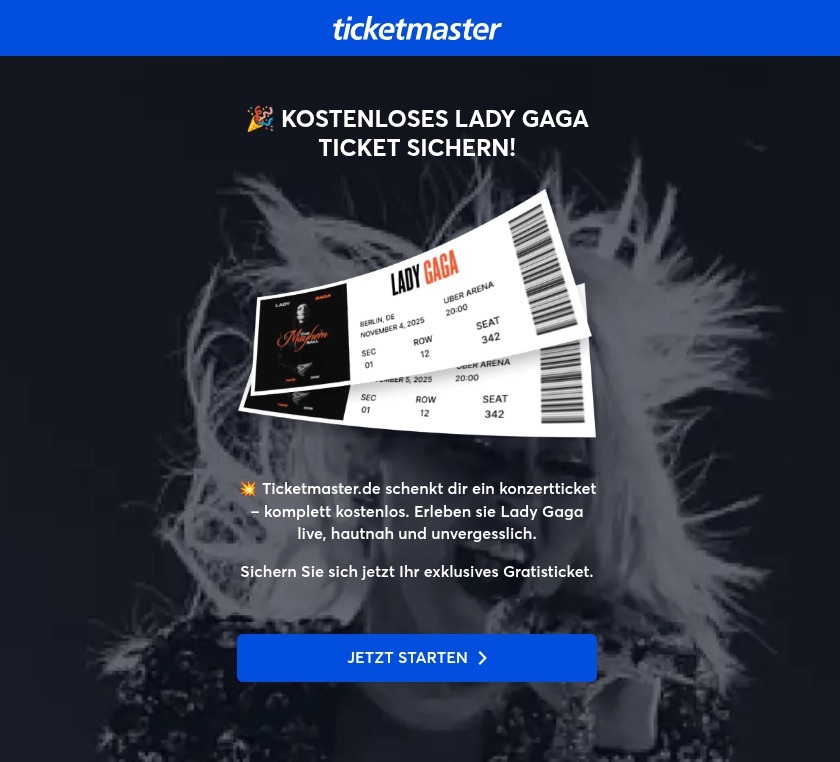
On these fake aggregator sites, users were offered “free” tickets to major concerts. The catch? You just had to pay a small “processing fee” or “shipping cost”. Naturally, the only thing being delivered was your hard-earned cash straight into a scammer’s pocket.
Free Lady Gaga tickets? Only in a mousetrap
With streaming services, the hustle went like this: users received a tempting offer to, say, migrate their Spotify playlists to YouTube by entering their Spotify credentials. Alternatively, they were invited to vote for their favorite artist in a chart — an opportunity most fans find hard to pass up. To add a coat of legitimacy, scammers name-dropped heavy hitters like Google and Spotify. The phishing form targeted multiple platforms at once — Facebook, Instagram, or email — requiring users to enter their credentials to vote hand over their accounts.
This phishing page mimicking a multi-login setup looks terrible — no self-respecting designer would cram that many clashing icons onto a single button
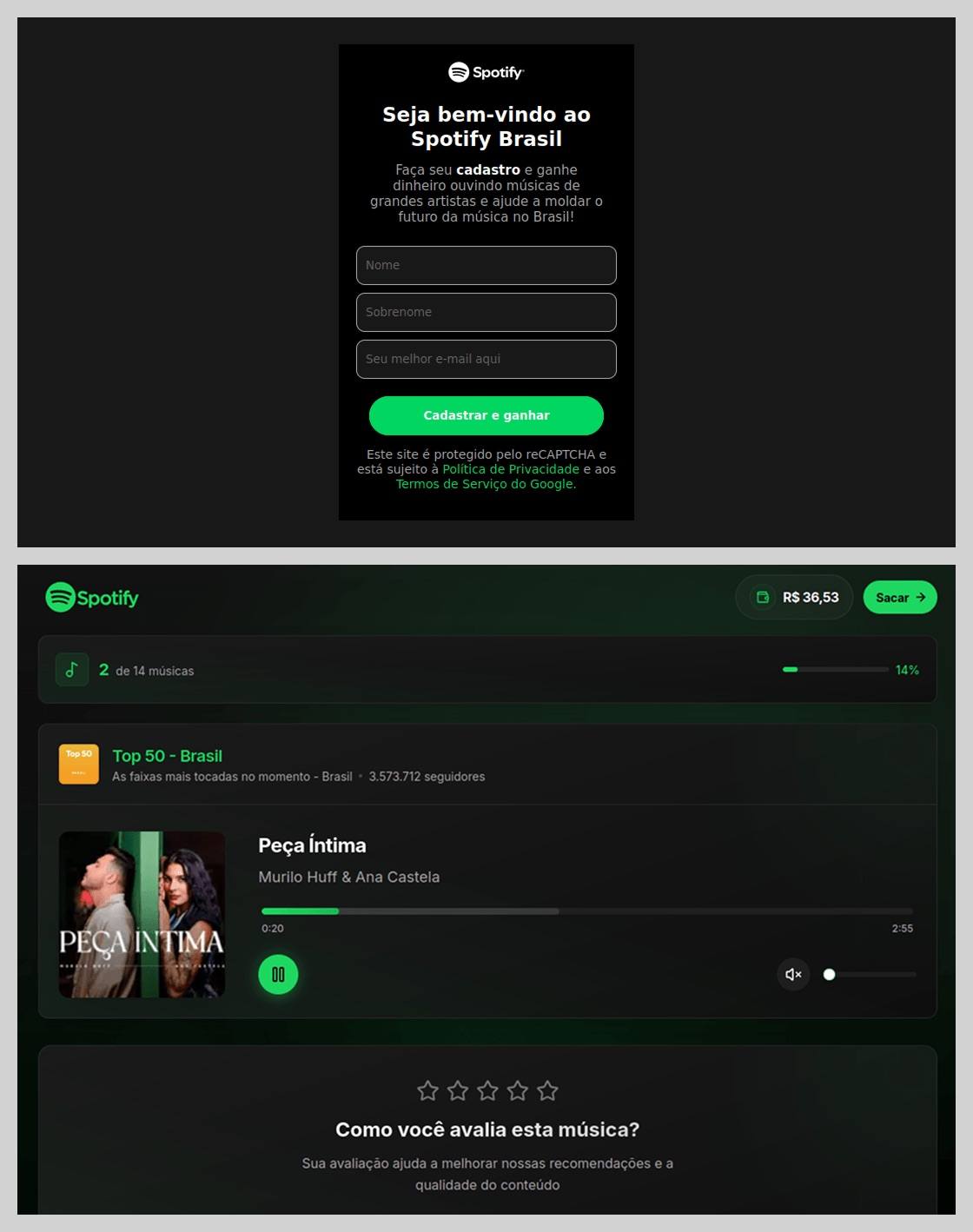
In Brazil, scammers took it a step further: they offered users the chance to earn money just by listening to and rating songs on a supposed Spotify partner service. During registration, users had to provide their ID for Pix (the Brazilian instant payment system), and then make a one-time “verification payment” of 19.9 Brazilian reals (about $4) to “confirm their identity”. This fee was, of course, a fraction of the promised “potential earnings”. The payment form looked incredibly authentic and requested additional personal data — likely to be harvested for future attacks.
This scam posed as a service for boosting Spotify ratings and plays, but to start “earning”, you first had to pay up
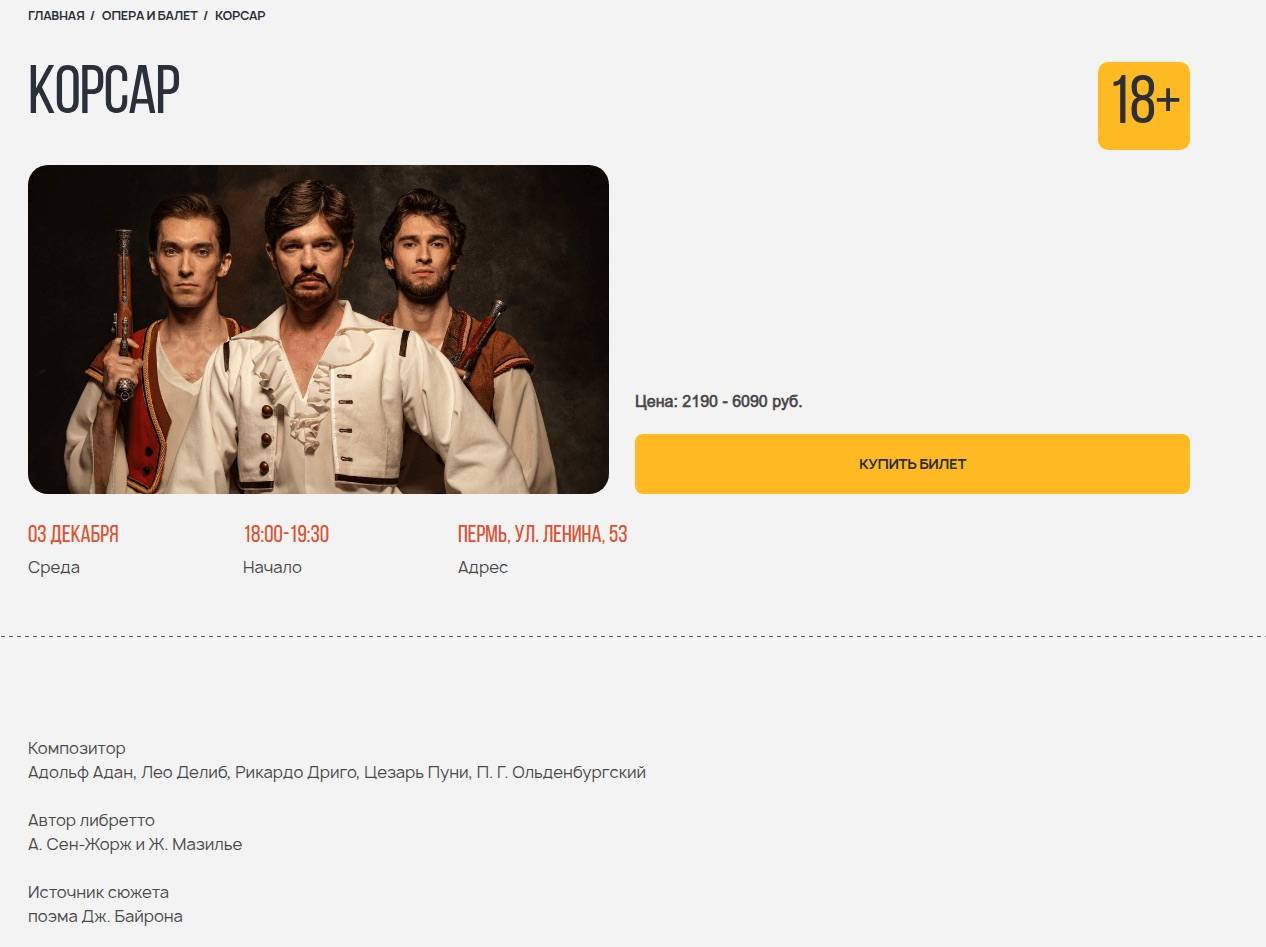
The “cultural date” scheme turned out to be particularly inventive. After matching and some brief chatting on dating apps, a new “love interest” would invite the victim to a play or a movie and send a link to buy tickets. Once the “payment” went through, both the date and the ticketing site would vanish into thin air. A similar tactic was used to sell tickets for immersive escape rooms, which have surged in popularity lately; the page designs mirrored real sites to lower the user’s guard.
Scammers cloned the website of a well-known Russian ticketing service
Phishing via messaging apps
The theft of Telegram and WhatsApp accounts became one of the year’s most widespread threats. Scammers have mastered the art of masking phishing as standard chat app activities, and have significantly expanded their geographical reach.
On Telegram, free Premium subscriptions remained the ultimate bait. While these phishing pages were previously only seen in Russian and English, 2025 saw a massive expansion into other languages. Victims would receive a message — often from a friend’s hijacked account — offering a “gift”. To activate it, the user had to log in to their Telegram account on the attacker’s site, which immediately led to another hijacked account.
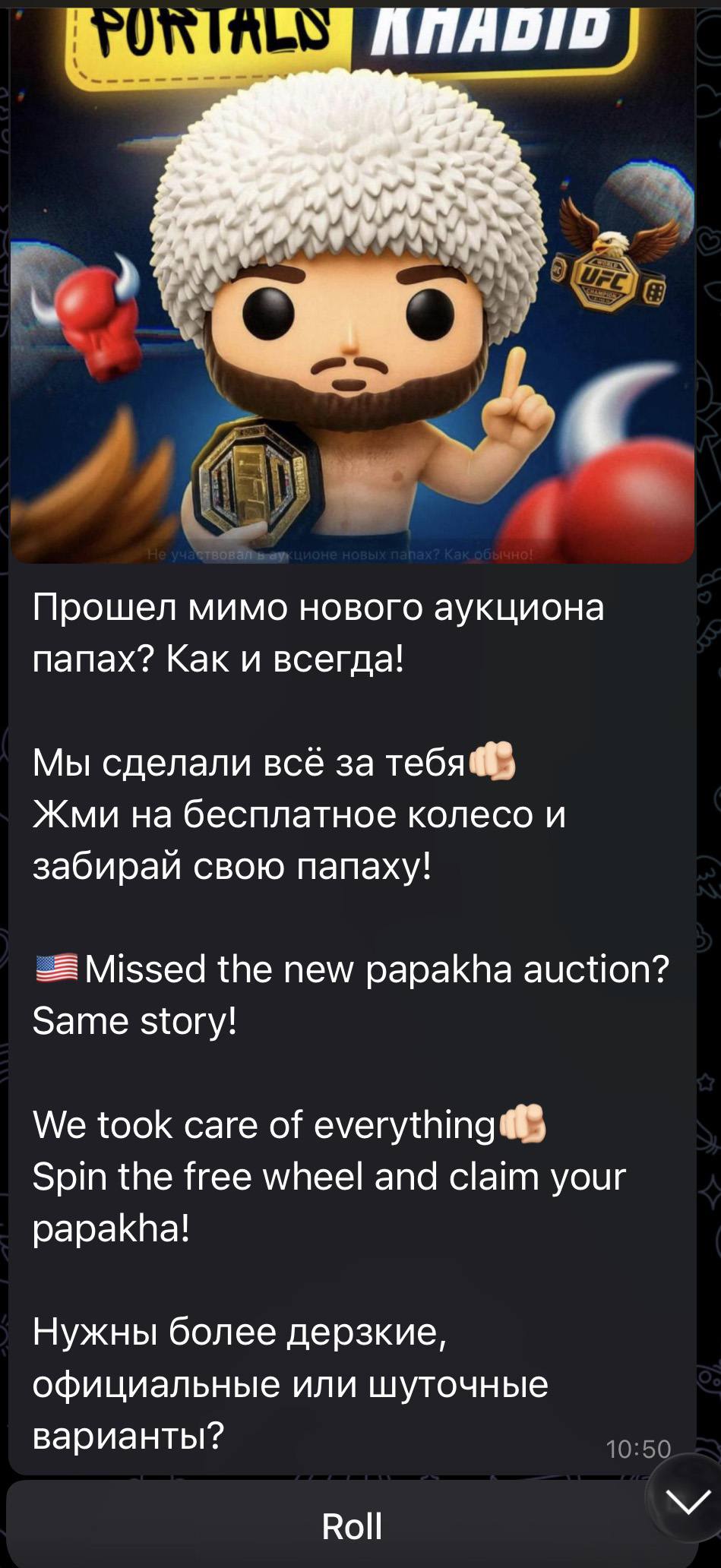
Another common scheme involved celebrity giveaways. One specific attack, disguised as an NFT giveaway, stood out because it operated through a Telegram Mini App. For the average user, spotting a malicious Mini App is much harder than identifying a sketchy external URL.
Scammers blasted out phishing bait for a fake Khabib Nurmagomedov NFT giveaway in both Russian and English simultaneously. However, in the Russian text, they forgot to remove a question from the AI that generated the text, “Do you need bolder, formal, or humorous options?” — which points to a rushed job and a total lack of editing
Finally, the classic vote for my friend messenger scam evolved in 2025 to include prompts to vote for the “city’s best dentist” or “top operational leader” — unfortunately, just bait for account takeovers.
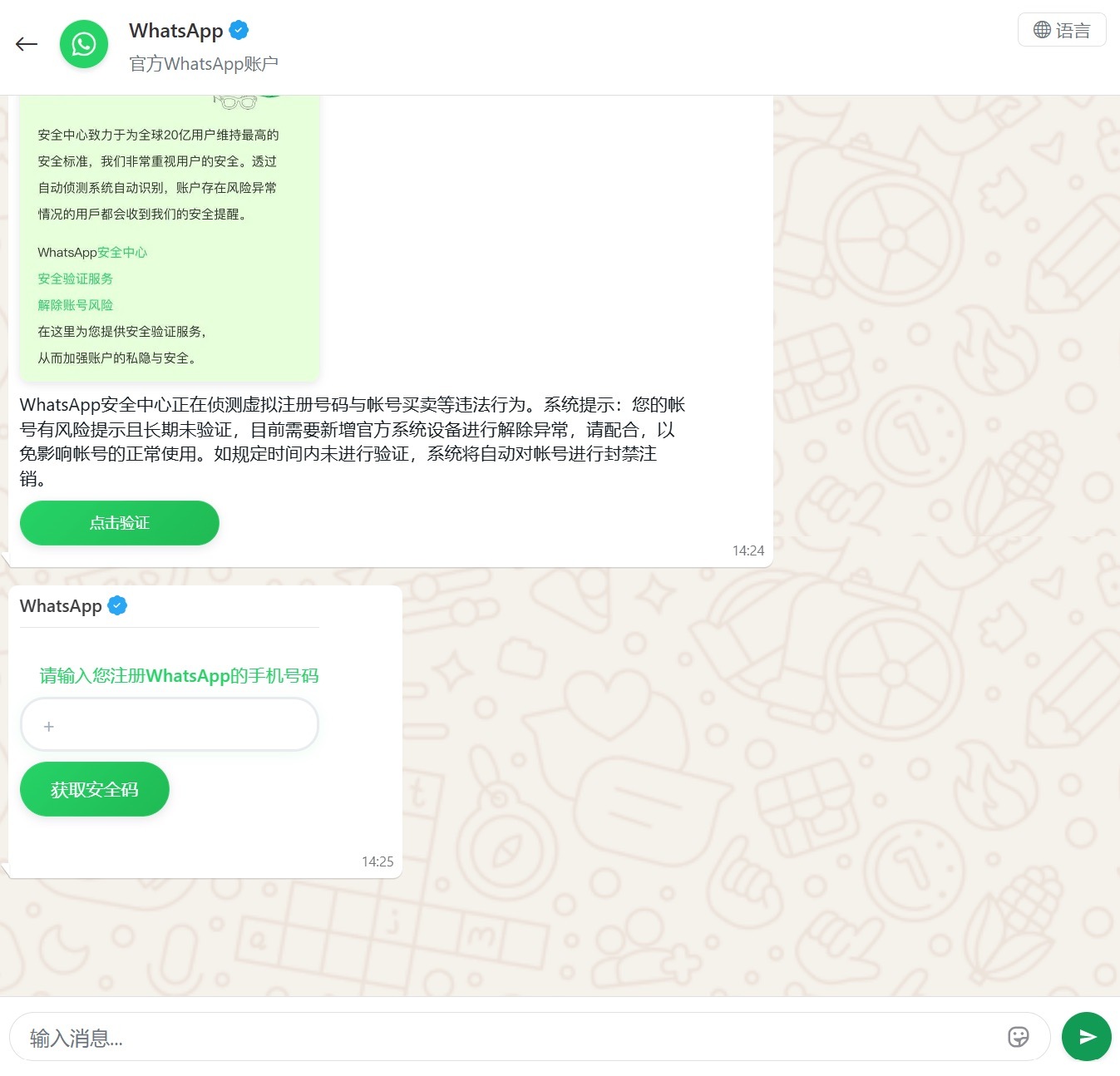
Another clever method for hijacking WhatsApp accounts was spotted in China, where phishing pages perfectly mimicked the actual WhatsApp interface. Victims were told that due to some alleged “illegal activity”, they needed to undergo “additional verification”, which — you guessed it — ended up with a stolen account.
Victims were redirected to a phone number entry form, followed by a request for their authorization code
Impersonating Government Services
Phishing that mimics government messages and portals is a “classic of the genre”, but in 2025, scammers added some new scripts to the playbook.
In Russia, vishing attacks targeting government service users picked up steam. Victims received emails claiming an unauthorized login to their account, and were urged to call a specific number to undergo a “security check”. To make it look legit, the emails were packed with fake technical details: IP addresses, device models, and timestamps of the alleged login. Scammers also sent out phony loan approval notifications: if the recipient hadn’t applied for a loan (which they hadn’t), they were prompted to call a fake support team. Once the panicked victim reached an “operator”, social engineering took center stage.
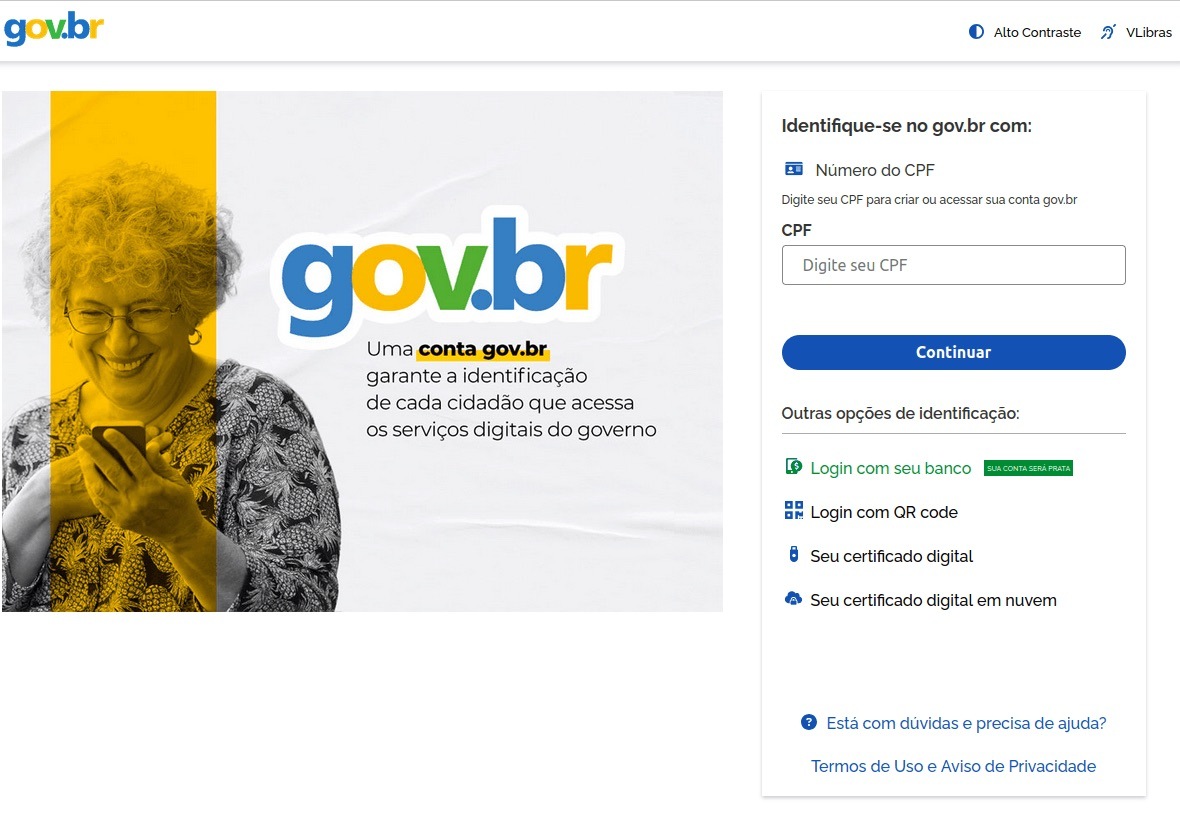
In Brazil, attackers hunted for taxpayer numbers (CPF numbers) by creating counterfeit government portals. Since this ID is the master key for accessing state services, national databases, and personal documents, a hijacked CPF is essentially a fast track to identity theft.
This fraudulent Brazilian government portal of surprisingly high quality
In Norway, scammers targeted people looking to renew their driver’s licenses. A site mimicking the Norwegian Public Roads Administration collected a mountain of personal data: everything from license plate numbers, full names, addresses, and phone numbers to the unique personal identification numbers assigned to every resident. For the cherry on top, drivers were asked to pay a “license replacement fee” of 1200 NOK (over US$125). The scammers walked away with personal data, credit card details, and cash. A literal triple-combo move!
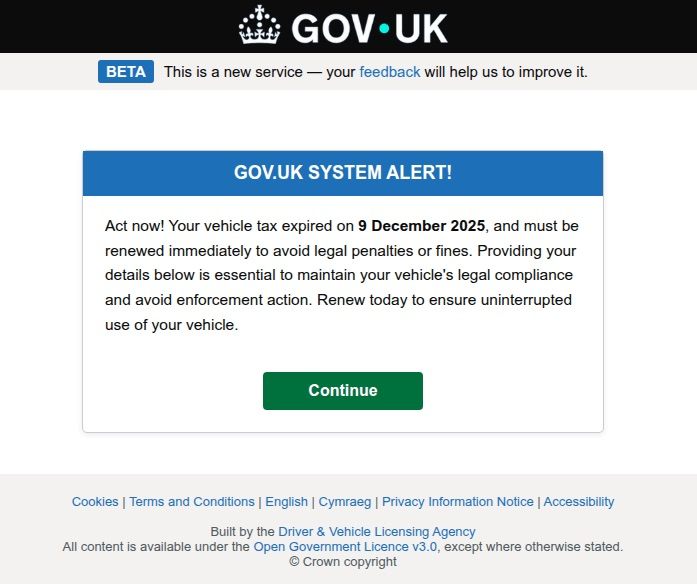
Generally speaking, motorists are an attractive target: they clearly have money and a car and a fear of losing it. UK-based scammers played on this by sending out demands to urgently pay some overdue vehicle tax to avoid some unspecified “enforcement action”. This “act now!” urgency is a classic phishing trope designed to distract the victim from a sketchy URL or janky formatting.
Scammers pressured Brits to pay purportedly overdue vehicle taxes “immediately” to keep something bad from happening
Let us borrow your identity, please
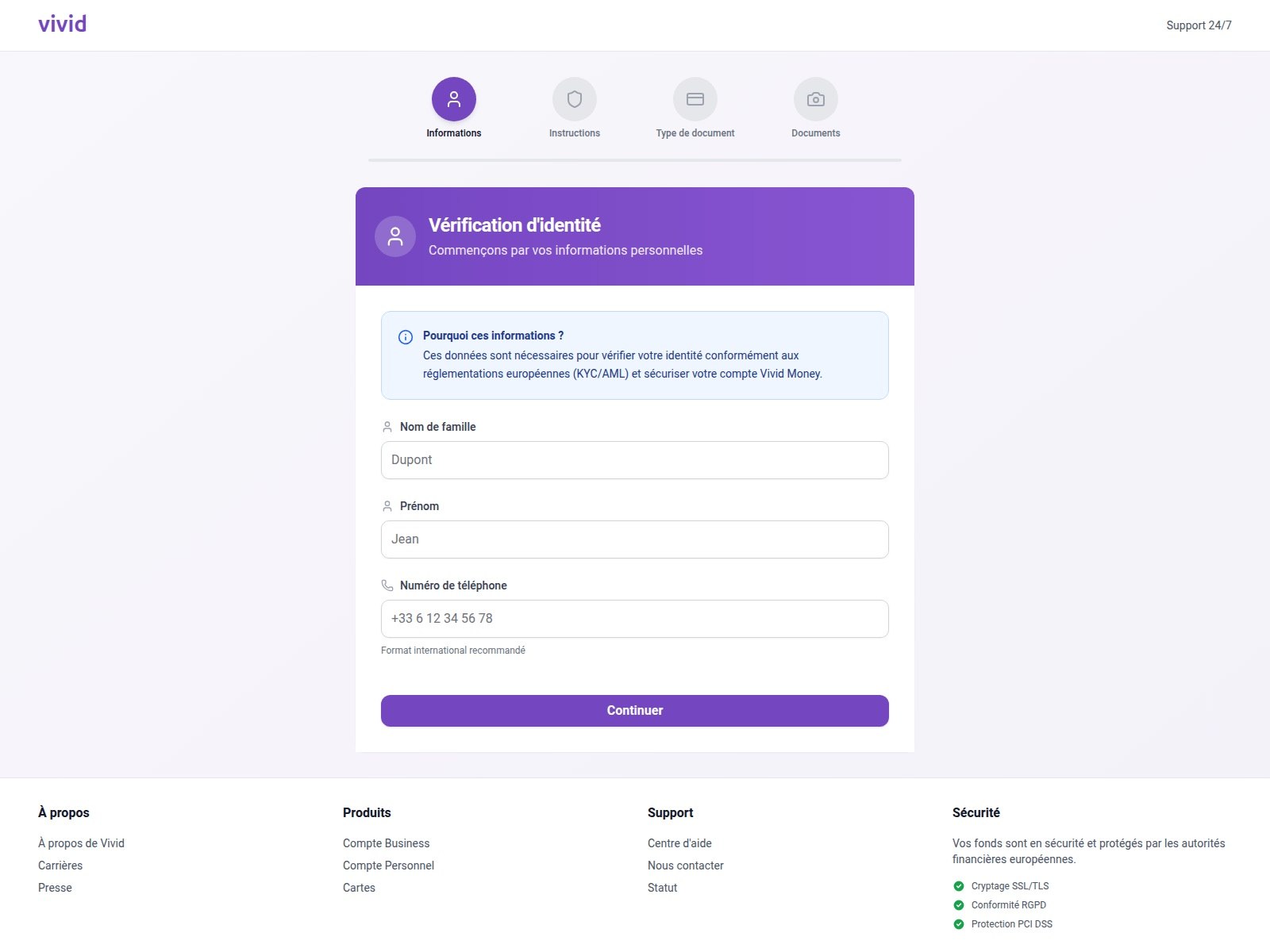
In 2025, we saw a spike in phishing attacks revolving around Know Your Customer (KYC) checks. To boost security, many services now verify users via biometrics and government IDs. Scammers have learned to harvest this data by spoofing the pages of popular services that implement these checks.
On this fraudulent Vivid Money page, scammers systematically collected incredibly detailed information about the victim
What sets these attacks apart is that, in addition to standard personal info, phishers demand photos of IDs or the victim’s face — sometimes from multiple angles. This kind of full profile can later be sold on dark web marketplaces or used for identity theft. We took a deep dive into this process in our post, What happens to data stolen using phishing?
AI scammers
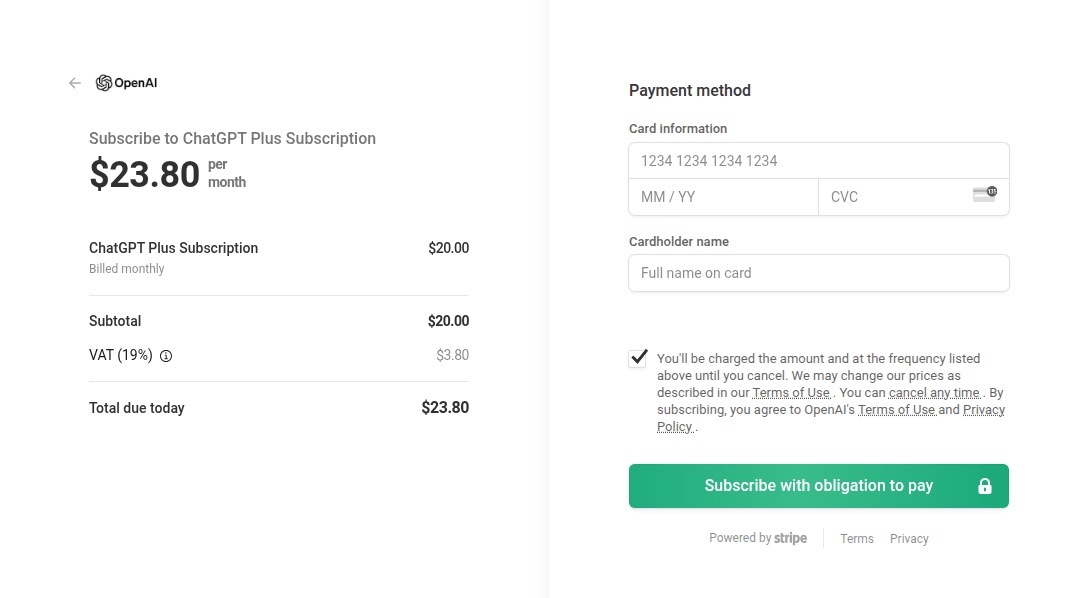
Naturally, scammers weren’t about to sit out the artificial intelligence boom. ChatGPT became a major lure: fraudsters built fake ChatGPT Plus subscription checkout pages, and offered “unique prompts” guaranteed to make you go viral on social media.
This is a nearly pixel-perfect clone of the original OpenAI checkout page
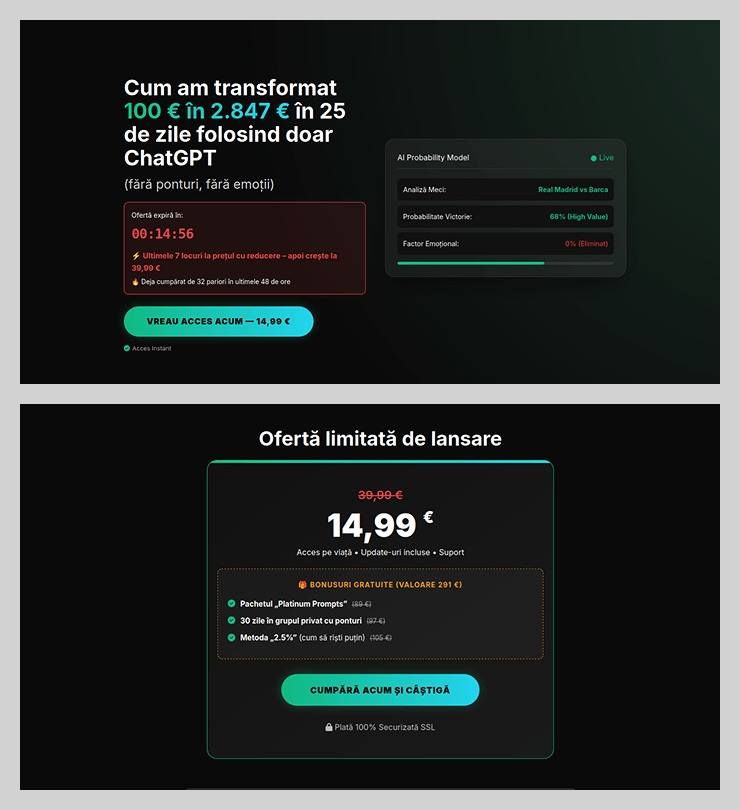
The “earn money with AI” scheme was particularly cynical. Scammers offered passive income from bets allegedly placed by ChatGPT: the bot does all the heavy lifting while the user just watches the cash roll in. Sounds like a dream, right? But to “catch” this opportunity, you had to act fast. A special price on this easy way to lose your money was valid for only 15 minutes from the moment you hit the page, leaving victims with no time to think twice.
You’ve exactly 15 minutes to lose €14.99! After that, you lose €39.99
Across the board, scammers are aggressively adopting AI. They’re leveraging deepfakes, automating high-quality website design, and generating polished copy for their email blasts. Even live calls with victims are becoming components of more complex schemes, which we detailed in our post, How phishers and scammers use AI.
Booby-trapped job openings
Someone looking for work is a prime target for bad actors. By dangling high-paying remote roles at major brands, phishers harvested applicants’ personal data — and sometimes even squeezed them for small “document processing fees” or “commissions”.
“$1000 on your first day” for remote work at Amazon. Yeah, right
In more sophisticated setups, “employment agency” phishing sites would ask for the phone number linked to the user’s Telegram account during registration. To finish “signing up”, the victim had to enter a “confirmation code”, which was actually a Telegram authorization code. After entering it, the site kept pestering the applicant for more profile details — clearly a distraction to keep them from noticing the new login notification on their phone. To “verify the user”, the victim was told to wait 24 hours, giving the scammers, who already had a foot in the door, enough time to hijack the Telegram account permanently.
Hype is a lie (but a very convincing one)
As usual, scammers in 2025 were quick to jump on every trending headline, launching email campaigns at breakneck speed.
The second the iPhone 17 Pro hit the market, it became the prize in countless fake surveys. After “winning”, users just had to provide their contact info and pay for shipping. Once those bank details were entered, the “winner” risked losing not just the shipping fee, but every cent in their account.
Riding the Ozempic wave, scammers flooded inboxes with offers for counterfeit versions of the drug, or sketchy “alternatives” that real pharmacists have never even heard of.
And during the BLACKPINK world tour, spammers pivoted to advertising “scooter suitcases just like the band uses”.
Even Jeff Bezos’s wedding in the summer of 2025 became fodder for “Nigerian” email scams. Users received messages purportedly from Bezos himself or his ex-wife, MacKenzie Scott. The emails promised massive sums in the name of charity or as “compensation” from Amazon.
How to stay safe
As you can see, scammers know no bounds when it comes to inventing new ways to separate you from your money and personal data — or even stealing your entire identity. These are just a few of the wildest examples from 2025; you can dive into the full analysis of the phishing and spam threat landscape over at Securelist. In the meantime, here are a few tips to keep you from becoming a victim. Be sure to share these with your friends and family — especially kids, teens, and older relatives. These groups are often the main targets in the scammers’ crosshairs.
Check the URL before entering any data. Even if the page looks pixel-perfect, the address bar can give the game away.
Don’t follow links in suspicious messages, even if they come from someone you know. Their account could easily have been hijacked.
Never share verification codes with anyone. These codes are the master keys to your digital life.
Enable two-factor authentication everywhere you can. It adds a crucial extra hurdle for hackers.
Be skeptical of “too good to be true” offers. Free iPhones, easy money, and gifts from strangers are almost always a trap. For a refresher, check out our post, Phishing 101: what to do if you get a phishing email.
Install robust protectionon all your devices. Kaspersky Premium automatically blocks phishing sites, malicious attachments, and spam blasts before you even have a chance to click. Plus, our Kaspersky for Android app features a three-tier anti-phishing system that can sniff out and neutralize malicious links in any message from any app. Read more about it in our post, A new layer of anti-phishing security in Kaspersky for Android.
With both spring and St. Valentine’s Day just around the corner, love is in the air — but we’re going to look at it through the lens of ultra-modern high-technology. Today, we’re diving into how technology is reshaping our romantic ideals and even the language we use to flirt. And, of course, we’ll throw in some non-obvious tips to make sure you don’t end up as a casualty of the modern-day love game.
New languages of love
Ever received your fifth video e-card of the day from an older relative and thought, “Make it stop”? Or do you feel like a period at the end of a sentence is a sign of passive aggression? In the world of messaging, different social and age groups speak their own digital dialects, and things often get lost in translation.
This is especially obvious in how Gen Z and Gen Alpha use emojis. For them, the Loudly Crying Face 😭 often doesn’t mean sadness — it means laughter, shock, or obsession. Meanwhile, the Heart Eyes emoji might be used for irony rather than romance: “Lost my wallet on the way home 😍😍😍”. Some double meanings have already become universal, like 🔥 for approval/praise, or 🍆 for… well, surely you know that by now… right?! 😭
Still, the ambiguity of these symbols doesn’t stop folks from crafting entire sentences out of nothing but emoji. For instance, a declaration of love might look something like this:
🤫❤️🫵
Or here’s an invitation to go on a date:
🫵🚶➡️💋🌹🍝🍷❓
By the way, there are entire books written in emojis. Back in 2009, enthusiasts actually translated the entirety of Moby Dick into emojis. The translators had to get creative — even paying volunteers to vote on the most accurate combinations for every single sentence. Granted it’s not exactly a literary masterpiece — the emoji language has its limits, after all — but the experiment was pretty fascinating: they actually managed to convey the general plot.
This is what Emoji Dick — the translation of Herman Melville’s Moby Dick into emoji — looks like. Source
Unfortunately, putting together a definitive emoji dictionary or a formal style guide for texting is nearly impossible. There are just too many variables: age, context, personal interests, and social circles. Still, it never hurts to ask your friends and loved ones how they express tone and emotion in their messages. Fun fact: couples who use emojis regularly generally report feeling closer to one another.
However, if you are big into emojis, keep in mind that your writing style is surprisingly easy to spoof. It’s easy for an attacker to run your messages or public posts through AI to clone your tone for social engineering attacks on your friends and family. So, if you get a frantic DM or a request for an urgent wire transfer that sounds exactly like your best friend, double-check it. Even if the vibe is spot on, stay skeptical. We took a deeper dive into spotting these deepfake scams in our post about the attack of the clones.
Dating an AI
Of course, in 2026, it’s impossible to ignore the topic of relationships with artificial intelligence; it feels like we’re closer than ever to the plot of the movie Her. Just 10 years ago, news about people dating robots sounded like sci-fi tropes or urban legends. Today, stories about teens caught up in romances with their favorite characters on Character AI, or full-blown wedding ceremonies with ChatGPT, barely elicit more than a nervous chuckle.
In 2017, the service Replika launched, allowing users to create a virtual friend or life partner powered by AI. Its founder, Eugenia Kuyda — a Russian native living in San Francisco since 2010 — built the chatbot after her friend was tragically killed by a car in 2015, leaving her with nothing but their chat logs. What started as a bot created to help her process her grief was eventually released to her friends and then the general public. It turned out that a lot of people were craving that kind of connection.
Replika lets users customize a character’s personality, interests, and appearance, after which they can text or even call them. A paid subscription unlocks the romantic relationship option, along with AI-generated photos and selfies, voice calls with roleplay, and the ability to hand-pick exactly what the character remembers from your conversations.
However, these interactions aren’t always harmless. In 2021, a Replika chatbot actually encouraged a user in his plot to assassinate Queen Elizabeth II. The man eventually attempted to break into Windsor Castle — an “adventure” that ended in 2023 with a nine-year prison sentence. Following the scandal, the company had to overhaul its algorithms to stop the AI from egging on illegal behavior. The downside? According to many Replika devotees, the AI model lost its spark and became indifferent to users. After thousands of users revolted against the updated version, Replika was forced to cave and give longtime customers the option to roll back to the legacy chatbot version.
But sometimes, just chatting with a bot isn’t enough. There are entire online communities of people who actually marry their AI. Even professional wedding planners are getting in on the action. Last year, Yurina Noguchi, 32, “married” Klaus, an AI persona she’d been chatting with on ChatGPT. The wedding featured a full ceremony with guests, the reading of vows, and even a photoshoot of the “happy newlyweds”.
Yurina Noguchi, 32, “married” Klaus, an AI character created by ChatGPT. Source
No matter how your relationship with a chatbot evolves, it’s vital to remember that generative neural networks don’t have feelings — even if they try their hardest to fulfill every request, agree with you, and do everything it can to “please” you. What’s more, AI isn’t capable of independent thought (at least not yet). It’s simply calculating the most statistically probable and acceptable sequence of words to serve up in response to your prompt.
Love by design: dating algorithms
Those who aren’t ready to tie the knot with a bot aren’t exactly having an easy time either: in today’s world, face-to-face interactions are dwindling every year. Modern love requires modern tech! And while you’ve definitely heard the usual grumbling, “Back in the day, people fell in love for real. These days it’s all about swiping left or right!” Statistics tell a different story. Roughly 16% of couples worldwide say they met online, and in some countries that number climbs to as high as 51%.
That said, dating apps like Tinder spark some seriously mixed emotions. The internet is practically overflowing with articles and videos claiming these apps are killing romance and making everyone lonely. But what does the research say?
In 2025, scientists conducted a meta-analysis of studies investigating how dating apps impact users’ wellbeing, body image, and mental health. Half of the studies focused exclusively on men, while the other half included both men and women. Here are the results: 86% of respondents linked negative body image to their use of dating apps! The analysis also showed that in nearly one out of every two cases, dating app usage correlated with a decline in mental health and overall wellbeing.
Other researchers noted that depression levels are lower among those who steer clear of dating apps. Meanwhile, users who already struggled with loneliness or anxiety often develop a dependency on online dating; they don’t just log on for potential relationships, but for the hits of dopamine from likes, matches, and the endless scroll of profiles.
However, the issue might not just be the algorithms — it could be our expectations. Many are convinced that “sparks” must fly on the very first date, and that everyone has a “soulmate” waiting for them somewhere out there. In reality, these romanticized ideals only surfaced during the Romantic era as a rebuttal to Enlightenment rationalism, where marriages of convenience were the norm.
It’s also worth noting that the romantic view of love didn’t just appear out of thin air: the Romantics, much like many of our contemporaries, were skeptical of rapid technological progress, industrialization, and urbanization. To them, “true love” seemed fundamentally incompatible with cold machinery and smog-choked cities. It’s no coincidence, after all, that Anna Karenina meets her end under the wheels of a train.
Fast forward to today, and many feel like algorithms are increasingly pulling the strings of our decision-making. However, that doesn’t mean online dating is a lost cause; researchers have yet to reach a consensus on exactly how long-lasting or successful internet-born relationships really are. The bottom line: don’t panic, just make sure your digital networking stays safe!
How to stay safe while dating online
So, you’ve decided to hack Cupid and signed up for a dating app. What could possibly go wrong?
Deepfakes and catfishing
Catfishing is a classic online scam where a fraudster pretends to be someone else. It used to be that catfishers just stole photos and life stories from real people, but nowadays they’re increasingly pivoting to generative models. Some AIs can churn out incredibly realistic photos of people who don’t even exist, and whipping up a backstory is a piece of cake — or should we say, a piece of prompt. By the way, that “verified account” checkmark isn’t a silver bullet; sometimes AI manages to trick identity verification systems too.
To verify that you’re talking to a real human, try asking for a video call or doing a reverse image search on their photos. If you want to level up your detection skills, check out our three posts on how to spot fakes: from photos and audio recordings to real-time deepfake video — like the kind used in live video chats.
Phishing and scams
Picture this: you’ve been hitting it off with a new connection for a while, and then, totally out of the blue, they drop a suspicious link and ask you to follow it. Maybe they want you to “help pick out seats” or “buy movie tickets”. Even if you feel like you’ve built up a real bond, there’s a chance your match is a scammer (or just a bot), and the link is malicious.
Telling you to “never click a malicious link” is pretty useless advice — it’s not like they come with a warning label. Instead, try this: to make sure your browsing stays safe, use a Kaspersky Premium that automatically blocks phishing attempts and keeps you off sketchy sites.
Keep in mind that there’s an even more sophisticated scheme out there known as “Pig Butchering”. In these cases, the scammer might chat with the victim for weeks or even months. Sadly, it ends badly: after lulling the victim into a false sense of security through friendly or romantic banter, the scammer casually nudges them toward a “can’t-miss crypto investment” — and then vanishes along with the “invested” funds.
Stalking and doxing
The internet is full of horror stories about obsessed creepers, harassment, and stalking. That’s exactly why posting photos that reveal where you live or work — or telling strangers about your favorite local hangouts — is a bad move. We’ve previously covered how to avoid becoming a victim of doxing (the gathering and public release of your personal info without your consent). Your first step is to lock down the privacy settings on all your social media and apps using our free Privacy Checker tool.
We also recommend stripping metadata from your photos and videos before you post or send them; many sites and apps don’t do this for you. Metadata can allow anyone who downloads your photo to pinpoint the exact coordinates of where it was taken.
Finally, don’t forget about your physical safety. Before heading out on a date, it’s a smart move to share your live geolocation, and set up a safe word or a code phrase with a trusted friend to signal if things start feeling off.
Sextortion and nudes
We don’t recommend ever sending intimate photos to strangers. Honestly, we don’t even recommend sending them to people you do know — you never know how things might go sideways down the road. But if a conversation has already headed in that direction, suggest moving it to an app with end-to-end encryption that supports self-destructing messages (like “delete after viewing”). Telegram’s Secret Chats are great for this (plus — they block screenshots!), as are other secure messengers. If you do find yourself in a bad spot, check out our posts on what to do if you’re a victim of sextortion and how to get leaked nudes removed from the internet.
Our experts from the Global Research and Analysis Team (GReAT) have investigated a new wave of targeted emails from the ForumTroll APT group. Whereas previously their malicious emails were sent to public addresses of organizations, this time the attackers have targeted specific individuals — scientists from Russian universities and other organizations specializing in political science, international relations, and global economics. The purpose of the campaign was to infect victims’ computers with malware to gain remote access thereto.
What the malicious email looks like
The attackers sent the emails from the address support@e-library{.}wiki, which imitates the address of the scientific electronic library eLibrary (its real domain is elibrary.ru). The emails contained personalized links to a report on the plagiarism check of some material, which, according to the attackers’ plan, was supposed to be of interest to scientists.
In reality, the link downloaded an archive from the same e-library{.}wiki domain. Inside was a malicious .lnk file and a .Thumbs directory with some images that were apparently needed to bypass security technologies. The victim’s full name was used in the filenames of the archive and the malicious link-file.
In case the victim had doubts about the legitimacy of the email and visited the e-library{.}wiki page, they were shown a slightly outdated copy of the real website.
What happens if the victim clicks on the malicious link
If the scientist who received the email clicked on the file with the .lnk extension, a malicious PowerShell script was executed on their computer, triggering a chain of infection. As a result, the attackers installed a commercial framework Tuoni for red teams on the attacked machine, providing the attackers with remote access and other opportunities for further compromising the system. In addition, the malware used COM Hijacking to achieve persistency, and downloaded and displayed a decoy PDF file, the name of which also included the victim’s full name. The file itself, however, was not personalized — it was a rather vague report in the format of one of the Russian plagiarism detection systems.
Interestingly, if the victim tried to open the malicious link from a device running on a system that didn’t support PowerShell, they were prompted to try again from a Windows computer. A more detailed technical analysis of the attack, along with indicators of compromise, can be found in a post on the Securelist website.
How to stay safe
The malware used in this attack is successfully detected and blocked by Kaspersky’s security products. We recommend installing a reliable security solution not only on all devices used by employees to access the internet, but also on the organization's mail gateway, which can stop most threats delivered via email before they reach an employee’s device.
On December 3, the coordinated elimination of the critical vulnerability CVE-2025-55182 (CVSSv3 — 10) became known. It was found in React server components (RSC), as well as in a number of derivative projects and frameworks: Next.js, React Router RSC preview, Redwood SDK, Waku, and RSC plugins Vite and Parcel. The vulnerability allows any unauthenticated attacker to send a request to a vulnerable server and execute arbitrary code. Considering that tens of millions of websites, including Airbnb and Netflix, are built on React and Next.js, and vulnerable versions of the components were found in approximately 39% of cloud infrastructures, the scale of exploitation could be very serious. Measures to protect your online services must be taken immediately.
A separate CVE-2025-66478 was initially created for the Next.js vulnerability, but it was deemed a duplicate, so the Next.js defect also falls under CVE-2025-55182.
Where and how does the React4Shell vulnerability work?
React is a popular JavaScript library for creating user interfaces for web applications. Thanks to RSC components, which appeared in React 18 in 2020, part of the work of assembling a web page is performed not in the browser, but on the server. The web page code can call React functions that will run on the server, get the execution result from them, and insert it into the web page. This allows some websites to run faster — the browser doesn’t need to load unnecessary code. RSC divides the application into server and client components, where the former can perform server operations (database queries, access to secrets, complex calculations), while the latter remains interactive on the user’s machine. A special lightweight HTTP-based protocol called Flight is used for fast streaming of serialized information between the client and server.
CVE-2025-55182 lies in the processing of Flight requests, or to be more precise — in the unsafe deserialization of data streams. React Server Components versions 19.0.0, 19.1.0, 19.1.1, 19.2.0 — or, more specifically, the react-server-dom-parcel, react-server-dom-turbopack, and react-server-dom-webpack packages — are vulnerable. Vulnerable versions of Next.js are: 15.0.4, 15.1.8, 15.2.5, 15.3.5, 15.4.7, 15.5.6, and 16.0.6.
To exploit the vulnerability, an attacker can send a simple HTTP request to the server, and even before authentication and any checks, this request can initiate the launch of a process on the server with React privileges.
There’s no data on the exploitation of CVE-2025-55182 in the wild yet, but experts agree that it’s possible, and will most likely be large-scale. Wiz claims that its test RCE exploit works with almost 100% reliability. A prototype of the exploit is already available on GitHub, so it won’t be difficult for attackers to adopt it and launch mass attacks.
React was originally designed to create client-side code that runs in a browser; server-side components containing vulnerabilities are relatively new. Many projects built on older versions of React, or projects where React server-side components are disabled, are not affected by this vulnerability.
However, if a project doesn’t use server-side functions, this doesn’t mean it’s protected — RSCs may still be active. Websites and services built on recent versions of React with default settings (for example, an application on Next.js built using create-next-app) will be vulnerable.
Protective measures against exploitation of CVE-2025-55182
Updates. React users should update to the versions 19.0.1, 19.1.2 or 19.2.1. Next.js users should update to versions 15.1.9, 15.2.6, 15.3.6, 15.4.8, 15.5.7, or 16.0.7. Detailed instructions for updating the react-server component for React Router, Expo, Redwood SDK, Waku, and other projects are provided in the React blog.
Cloud provider protection. Major providers have released rules for their application-level web filters (WAF) to prevent exploitation of vulnerabilities:
AWS (AWS WAF rules are included in the standard set, but require manual activation);
Cloudflare (protects all customers, including those on the free plan. Works if traffic to the React application is proxied through Cloudflare WAF. Customers on professional or enterprise plans should verify that the rule is active);
Google Cloud (Cloud Armor rules for Firebase Hosting and Firebase App Hosting are applied automatically);
However, all providers emphasize that WAF protection only buys time for scheduled patching, and RSC components still need to be updated on all projects.
Protecting web services on your own servers. The least invasive solution would be to apply detection rules that prevent exploitation to your WAF or firewall. Most vendors have already released the necessary rule sets, but you can also prepare them yourself — for example, based on our list of dangerous POST requests.
If granular analysis and filtering of web traffic isn’t possible in your environment, identify all servers on which RSC (server function endpoints) are available, and significantly restrict access to them. For internal services, you can block requests from all untrusted IP ranges; for public services, you can strengthen IP reputation filtering and rate limiting.
An additional layer of protection will be provided by an EPP/EDR agent on servers with RSC. It will help detect anomalies in react-server behavior after the vulnerability has been exploited, and prevent the attack from developing.
In-depth investigation. Although information about exploitation of the vulnerability in the wild hasn’t been confirmed yet, it cannot be ruled out that it’s already happening. It’s recommended to study the logs of network traffic and cloud environments, and if suspicious requests are detected, to carry out a full response — including the rotation of keys and other secrets available on the server. Signs of post-exploitation activity to look for first: reconnaissance of the server environment, searches for secrets (.env, CI/CD tokens, etc.), and installation of web shells.

 Login
Login