Living off the AI isn’t a hypothetical but a natural continuation of the tradecraft we’ve all been defending against, now mapped onto assistants, agents, and MCP.
Cyber and Physical Risks Targeting the 2026 Winter Olympics
In this post we analyze the multi-vector threat landscape of the 2026 Winter Olympics, examining how the Games’ dispersed geographic footprint and high digital complexity create unique potential for cyber sabotage and physical disruptions.
The Milano-Cortina 2026 Winter Olympics represent a historic milestone as the first Games co-hosted by two major cities. However, the event’s expansive geographic footprint—covering 22,000 square kilometers across northern Italy—presents a complex security environment. From the metropolitan centers of Milan to the alpine peaks of Cortina d’Ampezzo, security forces are contending with a multi-vector threat landscape.
Kinetic and Physical Security Challenges
The geographically dispersed nature of the Milano-Cortina 2026 Winter Games also creates unique physical security challenges. Because venues are spread across thousands of square kilometers of the Alps, securing transit corridors and ensuring rapid emergency response across different Italian regions—including Lombardy, Veneto, and Trentino—is an incredible logistical hurdle. New tunnels, increased train services, and extended bus routes have been welcomed but create new potential targets for physical disruption by threat actors or protestors.
Terrorist and Extremist Threats
Flashpoint has not identified any terrorist or extremist threats to the Winter Olympic Games. However, lone threat actors in support of international terrorist organizations or domestic violence extremists remain a persistent threat due to the large number of attendees expected and the media attention that this event will attract.
Authorities in northern Italy are investigating a series of sabotage attacks on the national railway network that coincided with the opening of the 2026 Winter Olympic Games. The coordinated incidents—which included arson at a track switch, severed electrical cables, and the discovery of a rudimentary explosive device—caused delays of over two hours and temporarily disabled the vital transport hub of Bologna.
Protests
Flashpoint analysts identified several protests targeting the 2026 Winter Olympics:
US Presence and ICE Backlash: Hundreds of demonstrators have participated in protests in central Milan to demand that US ICE agents withdraw from security roles at the upcoming Winter Olympics.
Anti-Olympic and Environmental Activism: The most organized opposition comes from the Unsustainable Olympics Committee. They have already staged marches in Milan and Cortina, with more planned for February.
Pro-Palestinian Groups: Organizations such as BDS Italia are actively campaigning to boycott the games, demanding that Israel not be permitted to participate. Other pro-Palestinian groups have attempted to disrupt the Torch Relay in several cities and are expected to hold flash mob-style demonstrations in Milan’s Piazza del Duomo during the Opening Ceremony.
Labor Strikes: Italy frequently experiences transport strikes, which often fall on Fridays. Because the Opening Ceremony is on Friday, February 6, unions are leveraging this for maximum impact. An International Day of Protest has been coordinated by port and dock workers across the Mediterranean for February 6.
On February 7, a massive protest of approximately 10,000 people near the Olympic Village in Milan descended into violence as a peaceful march against the Winter Games ended in clashes with Italian police. While the majority of demonstrators initially focused on the environmental destruction caused by Olympic infrastructure, a smaller group of masked protestors engaged security forces with flares, stones, and firecrackers.
Cyber Threats Facing the 2026 Winter Olympics
The Milano-Cortina 2026 Winter Olympics will be among the most digitally complex global events, making it a prime target for cyberattacks. The greatest risks stem from familiar tactics such as phishing, spoofed websites, and business email compromise, which exploit human trust rather than technical flaws. With billions of viewers and a vast network of cloud services, vendors, and connected systems, the games create an expansive attack surface under intense operational pressure.
Italy blocked a series of cyberattacks targeting its foreign ministry offices, including one in Washington, as well as Winter Olympics websites and hotels in Cortina d’Ampezzo, with officials attributing the attempts to Russian sources. Foreign Minister Antonio Tajani confirmed the attacks were prevented just days before the Games’ official opening, which began with curling matches on February 4.
Past Olympic Games show a clear pattern of heightened cyber activity, including phishing campaigns, distributed denial-of-service (DDoS) attacks, ransomware, and online scams targeting both organizers and the public. A mix of cybercriminals, advanced persistent threats, and hacktivists is expected to exploit the event for financial gain, espionage, or publicity. Experts emphasize that improving security awareness, verifying digital interactions, and strengthening supply chain defenses are critical, as the most damaging incidents often arise from ordinary threats amplified by scale and urgency.
Staying Safe at the 2026 Winter Games
The security success of Milano-Cortina 2026 relies on the integration of real-time intelligence, advanced technological safeguards, and public vigilance. As the Games proceed, the intersection of cyber-sabotage and physical protest remains the most likely source of operational disruption.
To stay safe at this year’s Games, participants should:
Download Official Apps: Install the Milano Cortina 2026 Ground Transportation App and the Atm Milano app for real-time updates on transit, road closures, and “guaranteed” travel windows during strikes.
Plan Around Friday Strikes: Be aware that transport strikes (Feb 6, 13, and 20) typically guarantee services only between 6:00 AM – 9:00 AM and 6:00 PM – 9:00 PM. Plan your venue transfers accordingly.
Secure Your Digital Footprint: Avoid public Wi-Fi at major venues. Use a VPN and ensure Multi-Factor Authentication (MFA) is active on all your ticketing and banking accounts.
Stay Clear of Protests: While most demonstrations are expected to be peaceful, they can cause sudden police cordons and transit delays.
Respect the Drone Ban: Unauthorized drones are strictly prohibited over Milan and venue clusters. Leave yours at home to avoid heavy fines or interception by security units.
Stay Safe Using Flashpoint
While there are no current indications of imminent threats of extreme violence targeting the Milano-Cortina 2026 Winter Olympics, the event’s vast geographic footprint and digital complexity demand constant vigilance. Securing an event that spans 22,000 square kilometers requires more than just a physical presence; it necessitates a multi-faceted approach that bridges the gap between digital and kinetic risks.
To effectively navigate the intersection of cyber-sabotage, civil unrest, and logistical challenges, organizations and attendees must adopt a comprehensive strategy that integrates real-time intelligence with proactive security measures. Download Flashpoint’s Physical Safety Event Checklist to learn more.
In this post we introduce a new free assessment designed to pinpoint intelligence gaps, top strategic priorities for progress, and prioritized practical actions to drive real impact.
Many organizations today have some form of threat intelligence. Far fewer have a threat intelligence function that is structured, measurable, and trusted across the business. Experienced security professionals know that volume does not equal value—having more feeds, more alerts, or more dashboards doesn’t automatically translate into better intelligence. In reality, teams need clear visibility into the source of their intelligence data, how it aligns to their most important risks, and whether it’s actually influencing decisions.
Without this baseline, organizations struggle to answer fundamental questions:
Are we collecting intelligence that reflects our real risk exposure?
Are we missing upstream threats—or over-prioritizing noise?
Is our intelligence tailored to our environment, or largely generic?
Is it reaching the right teams at the right moment to drive action?
These blind spots create friction across security operations—and make it difficult to improve with confidence.
How is Your Intelligence Working Across Your Environment?
That’s why Flashpoint created the Threat Intelligence Capability Assessment out of a simple observation: the most successful intelligence functions aren’t defined by the size of their budget or the number of feeds they ingest. They are defined by how intelligence flows across the full threat intelligence lifecycle:
Requirements & Tasking: How clear are your intelligence priorities, and how directly are they tied to real business risk?
Collection & Discovery: Is your visibility broad, deep, and flexible enough to keep pace with changing threats?
Analysis & Prioritization: How effectively are signals, context, and impact being connected to inform decisions?
Dissemination & Action: Is intelligence reaching the teams and leaders who need it, when they need it?
Feedback & Retasking: How consistently are priorities reviewed, refined, and adjusted based on outcomes?
By examining each stage independently, our assessment reveals where intelligence accelerates decisions and where it quietly breaks down.
Why This Assessment is Different
Most maturity assessments focus on inputs: tooling, headcount, or abstract maturity labels.
Flashpoint’s Threat Intelligence Capability Assessment takes a different approach. It evaluates how intelligence actually functions across the full intelligence lifecycle— from requirements and tasking through feedback and retasking—and what that means in practice for day-to-day operations.
Rather than stopping at a score, the assessment helps organizations:
Understand what their stage means in real operational terms
Identify constraints and patterns that may be limiting impact
Focus on top strategic priorities for progress
Take immediate, practical actions to strengthen intelligence workflows
Apply a 90-day planning framework to turn insight into execution
Critically, The Threat Intelligence Capability Assessment is grounded in operational reality, not vendor theory, and is designed to be applied by function, recognizing that intelligence maturity is rarely uniform across an organization.
“As cyber threats grow in scale, complexity, and impact, organizations need a clear understanding of how effectively intelligence supports their ability to detect high-priority risks and respond with speed. This assessment helps teams move beyond a score to understand what’s holding them back, where to focus next, and how to turn intelligence into action.”
Josh Lefkowitz, CEO and co-founder of Flashpoint
Where Do You Stand?
This assessment isn’t about simply measuring where you are today—it’s about identifying holding you back, and where targeted improvements can deliver the greatest return.
After taking Flashpoint’s quick 5 minute assessment, security leaders can evaluate each component of their intelligence program—such as SOCs (Security Operations Center), vulnerability teams, fraud teams, and physical security—and benchmark them to surface potential gaps and needed improvements. Whether your program is at the developing, maturing, advanced, or leader stage, the goal is the same: to move from intelligence as a supporting activity to intelligence as a driver of proactive operations.
Developing: The early stages of building a dedicated intelligence function. Work is largely reactive—driven primarily by escalations or stakeholder questions—and may be reliant on open sources, vendor feeds, internal alerts, or ad-hoc investigations.
Maturing: Processes have moved beyond reactive workflows and are beginning to operate with a consistent structure. There are documented priority intelligence requirements and teams are intentionally building depth across sources, workflows, and reporting.
Advanced: In this stage, intelligence functions shape how your organization understands, prioritizes, and responds to threats. Requirements are well-defined, visibility spans multiple layers of the threat ecosystem, and analysts apply structured tradecraft that produces actionable intelligence.
Leader: Intelligence functions are a core component of organizational risk strategy. Outputs are trusted and used across the business to inform high-stakes decisions, shape long-range planning, and provide early warning across cyber, fraud, physical, brand, and geopolitical domains.
A Practical Roadmap, Not a Judgment
No matter which stage you are currently in, advancing an intelligence function requires deeper visibility into relevant ecosystems, stronger analytic rigor, and the ability to act on intelligence at the moment it matters. To move the needle, organizations need clear requirements, direct visibility into where threats originate, structured tradecraft, and intelligence that drives decisions.
Flashpoint helps teams accelerate progress with the data, expertise, and workflows that strengthen intelligence programs at every stage—without requiring a new operational model. Take the assessment now to see where your intelligence program stands. Or, learn more about how Flashpoint helps intelligence teams progress faster, reduce fragmentation, and sustain momentum toward intelligence-led operations, delivered through the Flashpoint Ignite Platform.
The phrase "artificial intelligence" has been around for a long time, covering everything from computers with "brains"—think Data from Star Trek or Hal 9000 from 2001: A Space Odyssey—to the autocomplete function that too often has you sending emails to the wrong person. It's a term that sweeps a wide array of uses into it—some well-established, others still being developed.
Recent news shows us a rapidly expanding catalog of potential harms that may result from companies pushing AI into every new feature and aspect of public life—like the automation of bias that follows from relying on a backward-looking technology to make consequential decisions about people's housing, employment, education, and so on. Complicating matters, the computation needed for some AI services requires vast amounts of water and electricity, leading to sometimes difficult questions about whether the increased fossil fuel use or consumption of water is justified.
We are also inundated with advertisements and exhortations to use the latest AI-powered apps, and with hype insisting AI can solve any problem.
Obscured by this hype, there are some real examples of AI proving to be a helpful tool. For example, machine learning is especially useful for scientists looking at everything from the inner workings of our biology to cosmic bodies in outer space. AI tools can also improve accessibility for people with disabilities, facilitate police accountability initiatives, and more. There are reasons why these problems are amenable to machine learning and why excitement over these uses shouldn’t translate into a perception that just any language model or AI technology possesses expert knowledge or can solve whatever problem it’s marketed as solving.
EFF has long fought for sensible, balanced tech policies because we’ve seen how regulators can focus entirely on use cases they don’t like (such as the use of encryption to hide criminal behavior) and cause enormous collateral harm to other uses (such as using encryption to hide dissident resistance). Similarly, calls to completely preempt state regulation of AI would thwart important efforts to protect people from the real harms of AI technologies. Context matters. Large language models (LLMs) and the tools that rely on them are not magic wands—they are general-purpose technologies. And if we want to regulate those technologies in a way that doesn’t shut down beneficial innovations, we have to focus on the impact(s) of a given use or tool, by a given entity, in a specific context. Then, and only then, can we even hope to figure out what to do about it.
So let’s look at the real-world landscape.
AI’s Real and Potential Harms
Thinking ahead about potential negative uses of AI helps us spot risks. Too often, the corporations developing AI tools—as well as governments that use them—lose sight of the real risks, or don’t care. For example, companies and governments use AI to do all sorts of things that hurt people, fromprice collusion tomass surveillance. AI should never be part of a decision about whether a person will bearrested,deported,placed into foster care, or denied access to important government benefits likedisability payments ormedical care.
There is too much at stake, and governments have a duty to make responsible, fair, and explainable decisions, which AI can’t reliably do yet. Why? Because AI tools are designed to identify and reproduce patterns in data that they are “trained” on. If you train AI on records of biased government decisions, such as records of past arrests, it will “learn” to replicate those discriminatory decisions.
And simply having a human in the decision chain will not fix this foundational problem. Studies have shown that having a human “in the loop”doesn’t adequately correct for AI bias, both because the human tends to defer to the AI and because the AI can provide cover for a biased human to ratify decisions that agree with their biases and override the AI at other times.
These biases don’t just arise in obvious contexts, like when a government agency is making decisions about people. It can also arise in equally life-affecting contexts like medical care. Whenever AI is used for analysis in a context withsystemic disparities and whenever the costs of an incorrect decision fall on someone other than those deciding whether to use the tool. For example, dermatology has historically underserved people of color because of a focus on white skin, with the resulting bias affectingAI tools trained on the existing and biased image data.
These kinds of errors are difficult to detect and correct because it’s hard or even impossible to understand how an AI tool arrives at individual decisions. These tools can sometimes find and apply patterns that a human being wouldn't even consider, such as basing diagnostic decisions on which hospital a scan was done at. Or determining that malignant tumors are the ones where there is a ruler next to them—something that a human would automatically exclude from their evaluation of an image. Unlike a human, AI does not know that the ruler is not part of the cancer.
Auditing and correcting for these kinds of mistakes is vital, but in some cases, might negate any sort of speed or efficiency arguments made in favor of the tool. We all understand that the more important a decision is, the more guardrails against disaster need to be in place. For many AI tools, those don't exist yet. Sometimes, the stakes will be too high to justify the use of AI. In general, the higher the stakes, the less this technology should be used.
We also need to acknowledge the risk of over-reliance on AI, at least as it is currently being released. We've seen shades of a similar problem before online (see: "Dr. Google"), but the speed and scale of AI use—and the increasing market incentive to shoe-horn “AI” into every business model—have compounded the issue.
Moreover, AI may reinforce a user’s pre-existing beliefs—even if they’re wrong or unhealthy. Many users may not understand how AI works, what it is programmed to do, and how to fact check it. Companies have chosen to release these tools widely without adequate information about how to use them properly and what their limitations are. Instead they market them as easy and reliable. Worse, some companies also resist transparency in the name of trade secrets and reducing liability, making it harder for anyone to evaluate AI-generated answers.
Other considerations may weigh against AI uses are its environmental impact and potential labor market effects. Delving into these is beyond the scope of this post, but it is an important factor in determining if AI is doing good somewhere and whether any benefits from AI are equitably distributed.
Research into the extent of AI harms and means of avoiding them is ongoing, but it should be part of the analysis.
AI’s Real and Potential Benefits
However harmful AI technologies can sometimes be, in the right hands and circumstances, they can do things that humans simply can’t. Machine learning technology has powered search tools for over a decade. It’s undoubtedly useful for machines to help human experts pore through vast bodies of literature and data to find starting points for research—things that no number of research assistants could do in a single year. If an actual expert is involved and has a strong incentive to reach valid conclusions, the weaknesses of AI are less significant at the early stage of generating research leads. Many of the following examples fall into this category.
Machine learning differs from traditional statistics in that the analysis doesn’t make assumptions about what factors are significant to the outcome. Rather, the machine learning process computes which patterns in the data have the most predictive power and then relies upon them, often using complex formulae that are unintelligible to humans. These aren’t discoveries of laws of nature—AI is bad at generalizing that way and coming up with explanations. Rather, they’re descriptions of what the AI has already seen in its data set.
To be clear, we don't endorse any products and recognize initial results are not proof of ultimate success. But these cases show us the difference between something AI can actually do versus what hype claims it can do.
Researchers areusing AI todiscover better alternatives to today’s lithium-ion batteries, which require large amounts of toxic, expensive, and highly combustible materials. Now, AI israpidly advancing battery development: by allowing researchers to analyze millions of candidate materials and generate new ones. New battery technologies discovered with the help of AI have a long way to go before they can power our cars and computers, but this field has come further in the past few years than it had in a long time.
AI Advancements in Scientific and Medical Research
AI tools can also help facilitate weather prediction. AI forecasting models are less computationally intensive and often more reliable than traditional tools based on simulating the physical thermodynamics of the atmosphere. Questions remain, though about how they will handleespecially extreme events or systemic climate changes over time.
For example:
The National Oceanic and Atmospheric Administration has developednew machine learning models to improve weather prediction, including a first-of-its-kind hybrid system that uses an AI model in concert with a traditional physics-based model to deliver more accurate forecasts than either model does on its own. to augment its traditional forecasts, with improvements in accuracy when the AI model is used in concert with the physics-based model.
Several models were used to forecast a recent hurricane. Google DeepMind’s AI system performed the best, even beating official forecasts from the U.S. National Hurricane Center (which now uses DeepMind’s AI model).
Researchers are using AI to help develop new medical treatments:
Deep learning tools, like theNobel Prize-winning modelAlphaFold, are helping researchers understand protein folding. Over 3 million researchers have used AlphaFold to analyze biological processes and design drugs that target disease-causing malfunctions in those processes.
Researchers used AI to identify a new treatment for idiopathic pulmonary fibrosis, a progressive lung disease with few treatment options. The new treatment has successfully completed a Phase IIa clinical trial. Such drugs still need to be proven safe and effective in larger clinical trials and gain FDA approval before they can help patients, but this new treatment for pulmonary fibrosis could be the first to reach that milestone.
Machine learning has been used for years to aid in vaccine development—including the development of the firstCOVID-19 vaccines––accelerating the process by rapidly identifying potential vaccine targets for researchers to focus on.
AI Uses for Accessibility and Accountability
AI technologies can improve accessibility for people with disabilities. But, as with many uses of this technology, safeguards are essential. Many toolslack adequate privacy protections, aren’t designed for disabled users, and can even harbor bias against people with disabilities. Inclusive design, privacy, and anti-bias safeguards are crucial. But here are two very interesting examples:
AI voice generators aregiving people their voices back, after losing their ability to speak. For example, while serving in Congress,Rep. Jennifer Wexton developed a debilitating neurological condition that left her unable to speak. She used her cloned voice to deliver a speech from the floor of the House of Representatives advocating for disability rights.
Those who are blind or low-vision, as well as those who are deaf or hard-of-hearing, have benefited from accessibility tools while also discussing their limitations and drawbacks. At present, AI tools often provide information in amore easily accessible format than traditional web search tools and many websites that are difficult to navigate for users that rely on a screen reader. Other tools can help blind and low vision users navigate and understand the world around them by providing descriptions of their surroundings. While these visual descriptions may not always be as good as the ones a human may provide, they can still be useful in situations when users can’t or don’t want to ask another human to describe something. For more on this, check out our recent podcast episode on “Building the Tactile Internet.”
When there is a lot of data to comb through, as with police accountability, AI is very useful for researchers and policymakers:
The Human Rights Data Analysis Group used LLMs toanalyze millions of pages of records regarding police misconduct. This is essentially the reverse of harmful use cases relating to surveillance; when the power to rapidly analyze large amounts of data is used by the public to scrutinize the state there is a potential to reveal abuses of power and, given the power imbalance, very little risk that undeserved consequences will befall those being studied.
An EFF client,Project Recon, used an AI system to review massive volumes of transcripts of prison parole hearings to identify biased parole decisions. This innovative use of technology to identify systemic biases, including racial disparities, is the type of AI use we should support and encourage.
It is not a coincidence that the best examples of positive uses of AI come in places where experts, with access to infrastructure to help them use the technology and the requisite experience to evaluate the results, are involved. Moreover, academic researchers are already accustomed to explaining what they have done and being transparent about it—and it has been hard won knowledge that ethics are a vital step in work like this.
Nor is it a coincidence that other beneficial uses involve specific, discrete solutions to problems faced by those whose needs are often unmet by traditional channels or vendors. The ultimate outcome is beneficial, but it is moderated by human expertise and/or tailored to specific needs.
Context Matters
It can be very tempting—and easy—to make a blanket determination about something, especially when the stakes seem so high. But we urge everyone—users, policymakers, the companies themselves—to cut through the hype. In the meantime, EFF will continue to work against the harms caused by AI while also making sure that beneficial uses can advance.
Each year, the Super Bowl draws one of the largest live audiences of any global sporting event, with tens of thousands of spectators attending in person and more than 100 million viewers expected to watch worldwide. Super Bowl LX, taking place on February 8, 2026 at Levi’s Stadium, will feature the Seattle Seahawks and the New England Patriots, with Bad Bunny headlining the halftime show and Green Day performing during the opening ceremony.
Beyond the game itself, the Super Bowl represents one of the most influential commercial and media stages in the world, with major brands investing in some of the most expensive advertising time of the year. The scale, visibility, and economic significance of the event make it an attractive target for threat actors seeking attention, disruption, or financial gain, underscoring the need for heightened security awareness.
Cybersecurity Considerations
At this time, Flashpoint has not observed any specific cyber threats targeting Super Bowl LX. Despite the absence of overt threats, it remains possible that threat actors may attempt to obtain personal information—including financial and credit card details—through scams, malware, phishing campaigns, or other opportunistic cyber activity.
High-profile events such as the Super Bowl have historically been leveraged as bait for cyber campaigns targeting fans and attendees rather than league infrastructure. In October 2024, the online store of the Green Bay Packers was hacked, exposing customers’ financial details. Previous incidents also include the February 2022 “BlackByte” ransomware attack that targeted the San Francisco 49ers in the lead-up to Super Bowl LVI.
Although Flashpoint has not identified any credible calls for large-scale cyber campaigns against Super Bowl LX at this time, analysts assess that cyber activity—if it occurs—is more likely to focus on fraud, impersonation, and social engineering directed at ticket holders, travelers, and high-profile attendees.
Online Sentiment
Flashpoint is currently monitoring online sentiment ahead of Super Bowl LX. At the time of publishing, analysts have identified pockets of increasingly negative online chatter related primarily to allegations of federal immigration enforcement activity in and around the event, as well as broader political and social tensions surrounding the Super Bowl.
Online discussions include calls for protests and boycotts tied to perceived Immigration and Customs Enforcement (ICE) involvement, as well as controversy surrounding halftime and opening ceremony performers. While sentiment toward the game itself and associated events remains largely positive, Flashpoint continues to monitor for escalation in rhetoric that could translate into real-world activity.
Potential Physical Threats
Protests and Boycotts
Flashpoint analysts have identified online chatter promoting protests in the Bay Area in response to allegations that Immigration and Customs Enforcement (ICE) agents will conduct enforcement operations in and around Super Bowl LX. A planned protest is scheduled to take place near Levi’s Stadium on February 8, 2026, during game-day hours.
At this time, Flashpoint has not identified any calls for violence or physical confrontation associated with these actions. However, analysts cannot rule out the possibility that demonstrations could expand or relocate, potentially causing localized disruptions near the venue or surrounding infrastructure if protesters gain access to restricted areas.
In addition, Flashpoint has identified online calls to boycott the Super Bowl tied to both the alleged ICE presence and controversy surrounding the event’s halftime and opening ceremony performers. Flashpoint has not identified any chatter indicating that players, NFL personnel, or affiliated organizations plan to boycott or disrupt the game or related events.
Terrorist and Extremist Threats
Flashpoint has not identified any direct or credible threats to Super Bowl LX or its attendees from violent extremists or terrorist groups at this time. However, as with any high-profile sporting event, lone actors inspired by international terrorist organizations or domestic violent extremist ideologies remain a persistent risk due to the scale of attendance and global media attention.
Super Bowl LX is designated as a SEAR-1 event, necessitating extensive interagency coordination and heightened security measures. Law enforcement presence is expected to be significant, with layered security protocols, strict access control points, and comprehensive screening procedures in place throughout Levi’s Stadium and surrounding areas. Contingency planning for crowd management, emergency response, and evacuation scenarios is ongoing.
Mitigation Strategies and Executive Protection
Given the absence of specific, identified threats, mitigation strategies for key personnel attending Super Bowl LX focus on general best practices. Security teams tasked with executive protection should remove sensitive personal information from online sources, monitor open-source and social media channels, and establish targeted alerts for potential threats or emerging protest activity.
Physical security teams and protected individuals should also familiarize themselves with venue layouts, emergency exits, nearby medical facilities, and law enforcement presence, and remain alert to changes in crowd dynamics or protest activity in the vicinity of the event.
The nearest medical facilities are:
O’Connor Hospital (Santa Clara Valley Healthcare)
Kaiser Permanente Santa Clara Medical Center
Santa Clara Valley Medical Center
Valley Health Center Sunnyvale
Several of these facilities offer 24/7 emergency services and are located within a short driving distance of the stadium.
The primary law enforcement facility near the venue is:
Santa Clara Police Department
As a SEAR-1 event, extensive coordination is expected among local, state, and federal law enforcement agencies throughout the Bay Area.
Stay Safe Using Flashpoint
Although there are no indications of any credible, immediate threats to Super Bowl LX or attendees at this time, it is imperative to be vigilant and prepared. Protecting key personnel in today’s threat environment requires a multi-faceted approach. To effectively bridge the gap between online and offline threats, organizations must adopt a comprehensive strategy that incorporates open source intelligence (OSINT) and physical security measures. Download Flashpoint’s Physical Safety Event Checklist to learn more.
The United Kingdom's data protection authority launched a formal investigation into X and its Irish subsidiary over reports that the Grok AI assistant was used to generate nonconsensual sexual images. [...]
French prosecutors have raided X's offices in Paris on Tuesday as part of a criminal investigation into the platform's Grok AI tool, widely used to generate sexually explicit images. [...]
More than 230 malicious packages for the personal AI assistant OpenClaw (formerly known as Moltbot and ClawdBot) have been published in less than a week on the tool's official registry and on GitHub. [...]
Not every cybersecurity practitioner thinks it’s worth the effort to figure out exactly who’s pulling the strings behind the malware hitting their company. The typical incident investigation algorithm goes something like this: analyst finds a suspicious file → if the antivirus didn’t catch it, puts it into a sandbox to test → confirms some malicious activity → adds the hash to the blocklist → goes for coffee break. These are the go-to steps for many cybersecurity professionals — especially when they’re swamped with alerts, or don’t quite have the forensic skills to unravel a complex attack thread by thread. However, when dealing with a targeted attack, this approach is a one-way ticket to disaster — and here’s why.
If an attacker is playing for keeps, they rarely stick to a single attack vector. There’s a good chance the malicious file has already played its part in a multi-stage attack and is now all but useless to the attacker. Meanwhile, the adversary has already dug deep into corporate infrastructure and is busy operating with an entirely different set of tools. To clear the threat for good, the security team has to uncover and neutralize the entire attack chain.
But how can this be done quickly and effectively before the attackers manage to do some real damage? One way is to dive deep into the context. By analyzing a single file, an expert can identify exactly who’s attacking his company, quickly find out which other tools and tactics that specific group employs, and then sweep infrastructure for any related threats. There are plenty of threat intelligence tools out there for this, but I’ll show you how it works using our Kaspersky Threat Intelligence Portal.
A practical example of why attribution matters
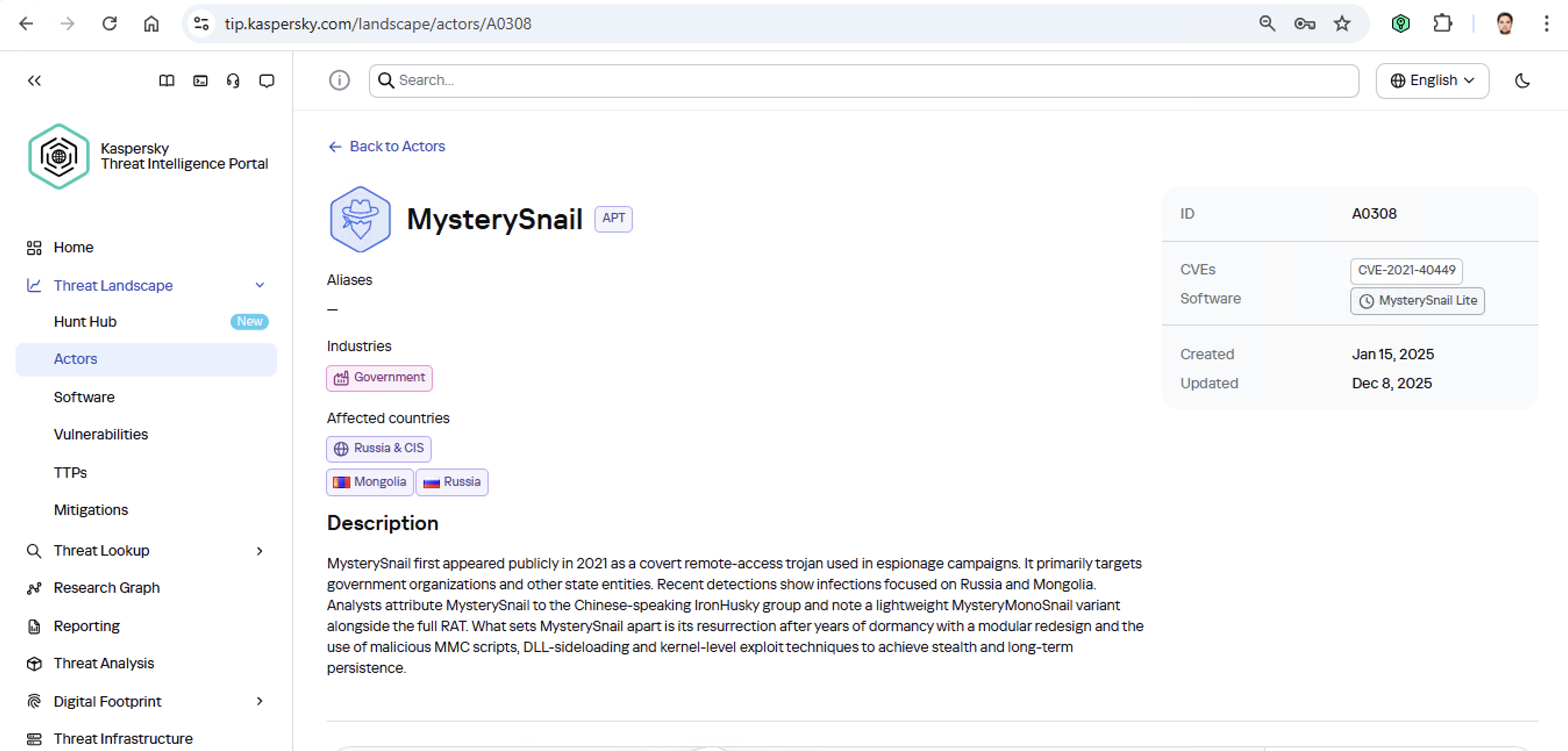
Let’s say we upload a piece of malware we’ve discovered to a threat intelligence portal, and learn that it’s usually being used by, say, the MysterySnail group. What does that actually tell us? Let’s look at the available intel:
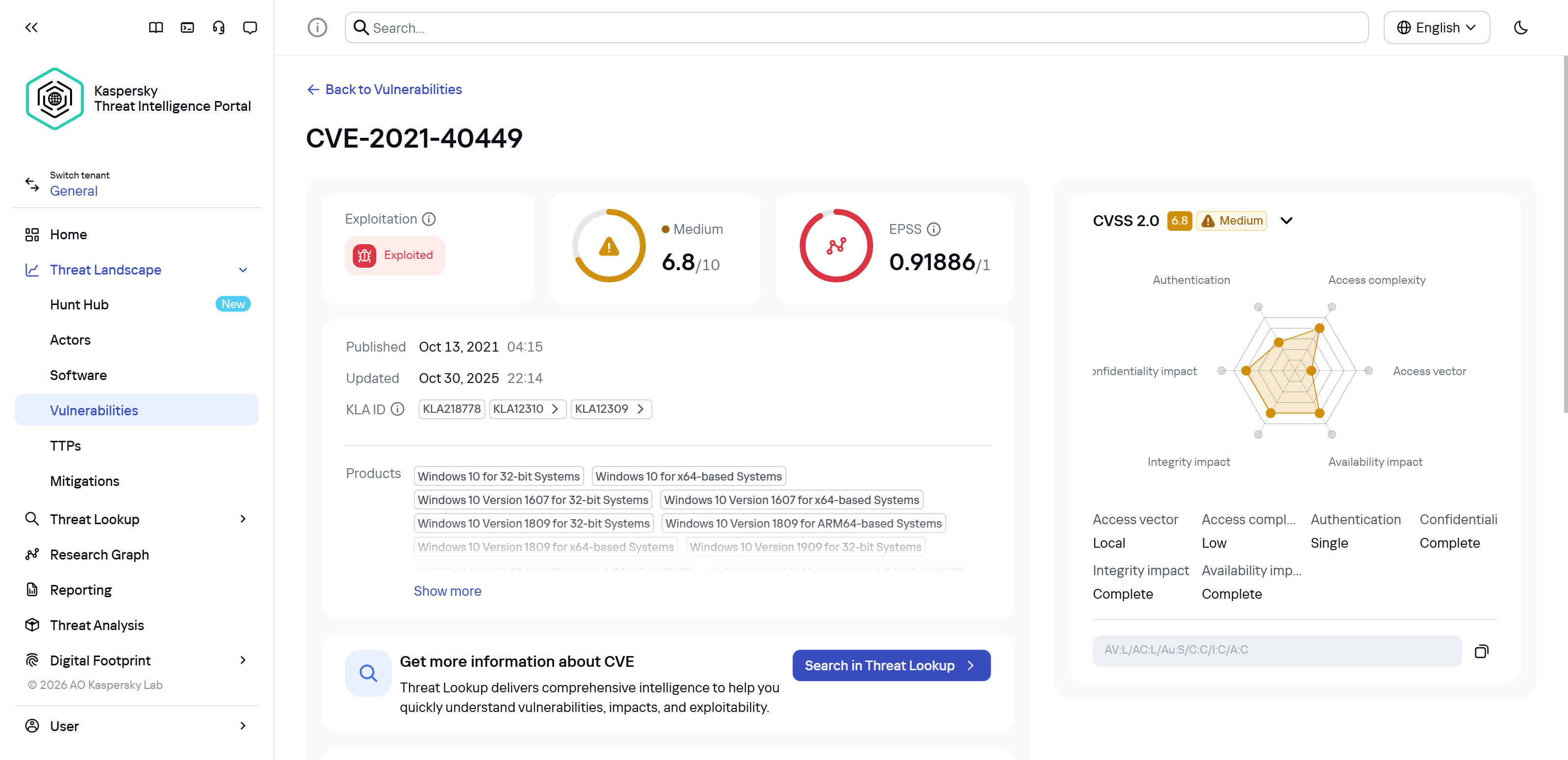
First off, these attackers target government institutions in both Russia and Mongolia. They’re a Chinese-speaking group that typically focuses on espionage. According to their profile, they establish a foothold in infrastructure and lay low until they find something worth stealing. We also know that they typically exploit the vulnerability CVE-2021-40449. What kind of vulnerability is that?
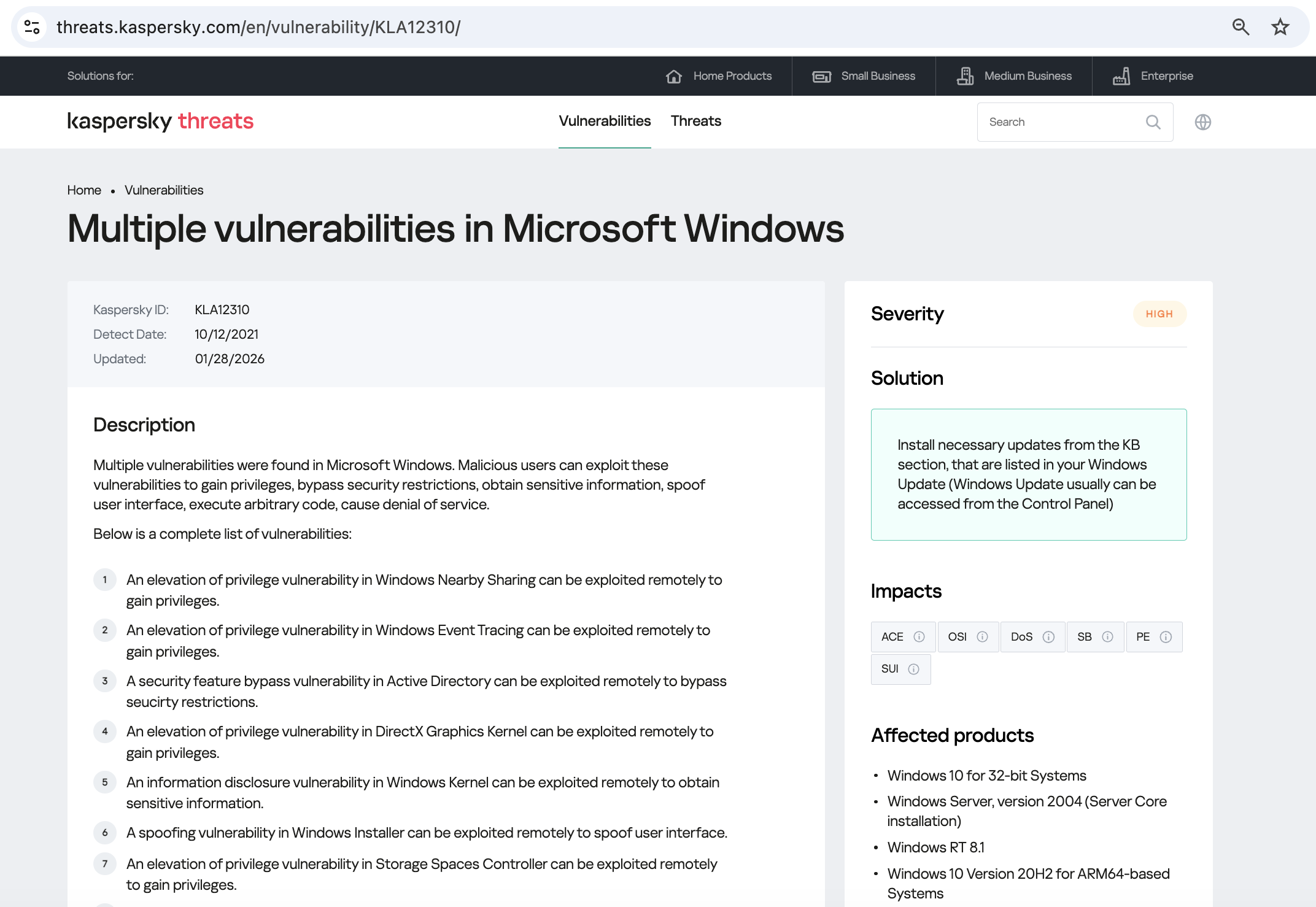
As we can see, it’s a privilege escalation vulnerability — meaning it’s used after hackers have already infiltrated the infrastructure. This vulnerability has a high severity rating and is heavily exploited in the wild. So what software is actually vulnerable?
Got it: Microsoft Windows. Time to double-check if the patch that fixes this hole has actually been installed. Alright, besides the vulnerability, what else do we know about the hackers? It turns out they have a peculiar way of checking network configurations — they connect to the public site 2ip.ru:
So it makes sense to add a correlation rule to SIEM to flag that kind of behavior.
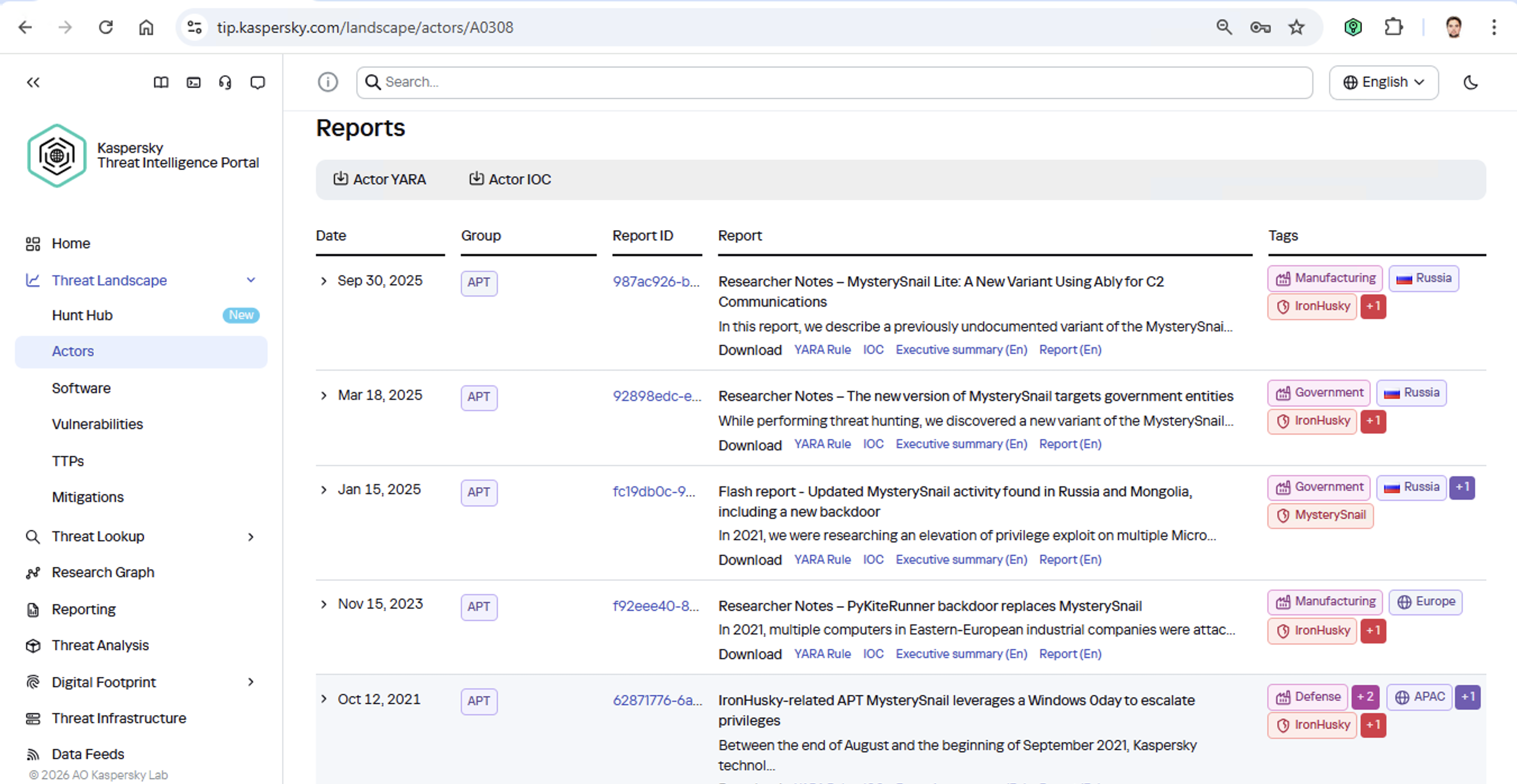
Now’s the time to read up on this group in more detail and gather additional indicators of compromise (IoCs) for SIEM monitoring, as well as ready-to-use YARA rules (structured text descriptions used to identify malware). This will help us track down all the tentacles of this kraken that might have already crept into corporate infrastructure, and ensure we can intercept them quickly if they try to break in again.
Kaspersky Threat Intelligence Portal provides a ton of additional reports on MysterySnail attacks, each complete with a list of IoCs and YARA rules. These YARA rules can be used to scan all endpoints, and those IoCs can be added into SIEM for constant monitoring. While we’re at it, let’s check the reports to see how these attackers handle data exfiltration, and what kind of data they’re usually hunting for. Now we can actually take steps to head off the attack.
And just like that, MysterySnail, the infrastructure is now tuned to find you and respond immediately. No more spying for you!
Malware attribution methods
Before diving into specific methods, we need to make one thing clear: for attribution to actually work, the threat intelligence provided needs a massive knowledge base of the tactics, techniques, and procedures (TTPs) used by threat actors. The scope and quality of these databases can vary wildly among vendors. In our case, before even building our tool, we spent years tracking known groups across various campaigns and logging their TTPs, and we continue to actively update that database today.
With a TTP database in place, the following attribution methods can be implemented:
Dynamic attribution: identifying TTPs through the dynamic analysis of specific files, then cross-referencing that set of TTPs against those of known hacking groups
Technical attribution: finding code overlaps between specific files and code fragments known to be used by specific hacking groups in their malware
Dynamic attribution
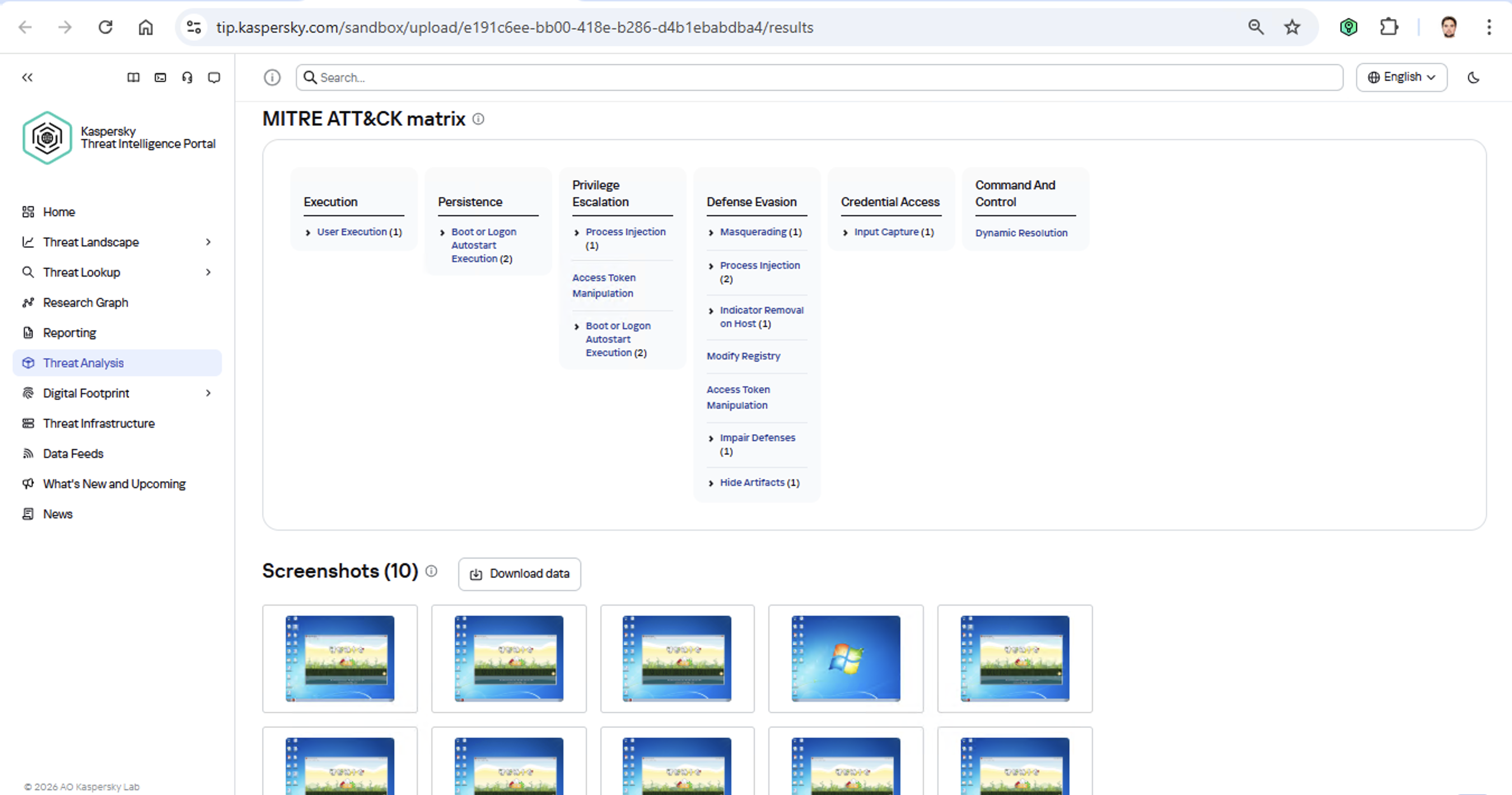
Identifying TTPs during dynamic analysis is relatively straightforward to implement; in fact, this functionality has been a staple of every modern sandbox for a long time. Naturally, all of our sandboxes also identify TTPs during the dynamic analysis of a malware sample:
The core of this method lies in categorizing malware activity using the MITRE ATT&CK framework. A sandbox report typically contains a list of detected TTPs. While this is highly useful data, it’s not enough for full-blown attribution to a specific group. Trying to identify the perpetrators of an attack using just this method is a lot like the ancient Indian parable of the blind men and the elephant: blindfolded folks touch different parts of an elephant and try to deduce what’s in front of them from just that. The one touching the trunk thinks it’s a python; the one touching the side is sure it’s a wall, and so on.
Technical attribution
The second attribution method is handled via static code analysis (though keep in mind that this type of attribution is always problematic). The core idea here is to cluster even slightly overlapping malware files based on specific unique characteristics. Before analysis can begin, the malware sample must be disassembled. The problem is that alongside the informative and useful bits, the recovered code contains a lot of noise. If the attribution algorithm takes this non-informative junk into account, any malware sample will end up looking similar to a great number of legitimate files, making quality attribution impossible. On the flip side, trying to only attribute malware based on the useful fragments but using a mathematically primitive method will only cause the false positive rate to go through the roof. Furthermore, any attribution result must be cross-checked for similarities with legitimate files — and the quality of that check usually depends heavily on the vendor’s technical capabilities.
Kaspersky’s approach to attribution
Our products leverage a unique database of malware associated with specific hacking groups, built over more than 25 years. On top of that, we use a patented attribution algorithm based on static analysis of disassembled code. This allows us to determine — with high precision, and even a specific probability percentage — how similar an analyzed file is to known samples from a particular group. This way, we can form a well-grounded verdict attributing the malware to a specific threat actor. The results are then cross-referenced against a database of billions of legitimate files to filter out false positives; if a match is found with any of them, the attribution verdict is adjusted accordingly. This approach is the backbone of the Kaspersky Threat Attribution Engine, which powers the threat attribution service on the Kaspersky Threat Intelligence Portal.
OpenAI previously confirmed that it's testing ads in ChatGPT for free and $8 Go accounts, and now we're seeing early signs of that rollout, at least on Android. [...]
OpenAI has confirmed that it's retiring ChatGPT's most popular model called GPT-4o and several other models, including GPT-5 Instant, GPT-5 Thinking, GPT-4.1, GPT-4.1 mini, and o4-mini. [...]
A U.S. federal jury has convicted Linwei Ding, a former software engineer at Google, for stealing AI supercomputer data from his employer and secretly sharing it with Chinese tech firms. [...]
How China’s “Walled Garden” is Redefining the Cyber Threat Landscape
In our latest webinar, Flashpoint unpacks the architecture of the Chinese threat actor cyber ecosystem—a parallel offensive stack fueled by government mandates and commercialized hacker-for-hire industry.
For years, the global cybersecurity community has operated under the assumption that technical information was a matter of public record. Security research has always been openly discussed and shared through a culture of global transparency. Today, that reality has fundamentally shifted. Flashpoint is witnessing a growing opacity—a “Walled Garden”—around Chinese data. As a result, the competence of Chinese threat actors and APTs has reached an industrialized scale.
In Flashpoint’s recent on-demand webinar, “Mapping the Adversary: Inside the Chinese Pentesting Ecosystem,” our analysts explain how China’s state policies surrounding zero-day vulnerability research have effectively shut out the cyber communities that once provided a window into Chinese tradecraft. However, they haven’t disappeared. Rather, they have been absorbed by the state to develop a mature, self-sustaining offensive stack capable of targeting global infrastructure.
Understanding the Walled Garden: The Shift from Disclosure to Nationalization
The “Walled Garden” is a direct result of a Chinese regulatory turning point in 2021: the Regulations on the Management of Security Vulnerabilities (RMSV). While the gradual walling off of China’s data is the cumulative result of years of implementing regulatory and policy strategies, the 2021 RMSV marks a critical turning point that effectively nationalized China’s vulnerability research capabilities. Under the RMSV, any individual or organization in China that discovers a new flaw must report it to the Ministry of Industry and Information Technology (MIIT) within 48 hours. Crucially, researchers are prohibited from sharing technical details with third parties—especially foreign entities—or selling them before a patch is issued.
It is important to note that this mandate is not limited to Chinese-based software or hardware; it applies to any vulnerability discovered, as long as the discoverer is a Chinese-based organization or national. This effectively treats software vulnerabilities as a national strategic resource for China. By centralizing this data, the Chinese government ensures it has an early window into zero-day exploits before the global defensive community.
For defenders, this means that by the time a vulnerability is public, there is a high probability it has already been analyzed and potentially weaponized within China’s state-aligned apparatus.
The Indigenous Kill Chain: Reconnaissance Beyond Shodan
Flashpoint analysts have observed that within this Walled Garden, traditional Western reconnaissance tools are losing their effectiveness. Chinese threat actors are utilizing an indigenous suite of cyberspace search engines that create a dangerous information asymmetry, allowing them to peer at defender infrastructure while shielding their own domestic base from Western scrutiny.
While Shodan remains the go-to resource for security teams, Flashpoint has seen Chinese threat actors favor three IoT search engines that offer them a massive home-field advantage:
FOFA: Specializes in deep fingerprinting for middleware and Chinese-specific signatures, often indexing dorks for new vulnerabilities weeks before they appear in the West.
Zoomai: Built for high-speed automation, offering APIs that integrate with AI systems to move from discovery to verified target in minutes.
360 Quake: Provides granular, real-time mapping through a CLI with an AI engine for complex asset portraits.
In the full session, we demonstrate exactly how Chinese operators use these tools to fuse reconnaissance and exploitation into a single, automated step—a capability most Western EDRs aren’t yet tuned to detect.
Building a State-Aligned Offensive Stack
Leveraging their knowledge of vulnerabilities and zero-day exploits, the illicit Chinese ecosystem is building tools designed to dismantle the specific technologies that power global corporate data centers and business hubs.
In the webinar, our analysts explain purpose-built cyber weapons designed to hunt VMware vCenter servers that support one-click shell uploads via vulnerabilities like Log4Shell. Beyond the initial exploit, Flashpoint highlights the rising use of Behinder (Ice Scorpion)—a sophisticated web shell management tool. Behinder has become a staple for Chinese operators because it encrypts command-and-control (C2) traffic, allowing attackers to evade conventional inspection and deep packet analytics.
Strengthen Your Defenses Against the Chinese Offensive Stack with Flashpoint
By understanding this “Walled Garden” architecture, defenders can move beyond generic signatures and begin to hunt for the specific TTPs—such as high-entropy C2 traffic and proprietary Chinese scanning patterns—that define the modern Chinese threat actor.
How can Flashpoint help? Flashpoint’s cyber threat intelligence platform cuts through the generic feed overload and delivers unrivaled primary-source data, AI-powered analysis, and expert human context.
Mandiant is tracking a significant expansion and escalation in the operations of threat clusters associated with ShinyHunters-branded extortion. As detailed in our companion report,'Vishing for Access: Tracking the Expansion of ShinyHunters-Branded SaaS Data Theft', these campaigns leverage evolved voice phishing (vishing) and victim-branded credential harvesting to successfully compromise single sign-on (SSO) credentials and enroll unauthorized devices into victim multi-factor authentication (MFA) solutions.
This activity is not the result of a security vulnerability in vendors' products or infrastructure. Instead, these intrusions rely on the effectiveness of social engineering to bypass identity controls and pivot into cloud-based software-as-a-service (SaaS) environments.
This post provides actionable hardening, logging, and detection recommendations to help organizations protect against these threats. Organizations responding to an active incident should focus on rapid containment steps, such as severing access to infrastructure environments, SaaS platforms, and the specific identity stores typically used for lateral movement and persistence. Long-term defense requires a transition toward phishing-resistant MFA, such as FIDO2 security keys or passkeys, which are more resistant to social engineering than push-based or SMS authentication.
Containment
Organizations responding to an active or suspected intrusion by these threat clusters should prioritize rapid containment to sever the attacker’s access to prevent further data exfiltration. Because these campaigns rely on valid credentials rather than malware, containment must prioritize the revocation of session tokens and the restriction of identity and access management operations.
Immediate Containment Actions
Revoke active sessions: Identify and disable known compromised accounts and revoke all active session tokens and OAuth authorizations across IdP and SaaS platforms.
Restrict password resets: Temporarily disable or heavily restrict public-facing self-service password reset portals to prevent further credential manipulation. Do not allow the use of self-service password reset for administrative accounts.
Pause MFA registration: Temporarily disable the ability for users to register, enroll, or join new devices to the identity provider (IdP).
Limit remote access: Restrict or temporarily disable remote access ingress points, such as VPNs, or Virtual Desktops Infrastructure (VDI), especially from untrusted or non-compliant devices.
Enforce device compliance: Restrict access to IdPs and SaaS applications so that authentication can only originate from organization-managed, compliant devices and known trusted egress locations.
Implement 'shields up' procedures: Inform the service desk of heightened risk and shift to manual, high-assurance verification protocols for all account-related requests. In addition, remind technology operations staff not to accept any work direction via SMS messages from colleagues.
During periods of heightened threat activity, Mandiant recommends that organizations temporarily route all password and MFA resets through a rigorous manual identity verification protocol, such as the live video verification described in the Hardening section of this post. When appropriate, organizations should also communicate with end-users, HR partners, and other business units to stay on high-alert during the initial containment phase. Always report suspicious activity to internal IT and Security for further investigation.
1. Hardening
Defending against threat clusters associated with ShinyHunters-branded extortion begins with tightening manual, high-risk processes that attackers frequently exploit, particularly password resets, device enrollments, and MFA changes.
Help Desk Verification
Because these campaigns often target human-driven workflows through social engineering, vishing, and phishing, organizations should implement stronger, layered identity verification processes for support interactions, especially for requests involving account changes such as password resets or MFA modifications. Threat actors have also been known to impersonate third-party vendors to voice phish (vish) help desks and persuade staff to approve or install malicious SaaS application registrations.
As a temporary measure during heightened risk, organizations should require verification that includes the caller’s identity, a valid ID, and a visual confirmation that the caller and ID match.
To implement this, organizations should require help desk personnel to:
Require a live video call where the user holds a physical government ID next to their face. The agent must visually verify the match.
Confirm the name on the ID matches the employee’s corporate record.
Require out-of-band approval from the user's known manager before processing the reset.
Reject requests based solely on employee ID, SSN, or manager name. ShinyHunters possess this data from previous breaches and may use it to verify their identity.
If the user calls the helpdesk for a password reset, never perform the reset without calling the user back at a known good phone number to prevent spoofing.
If a live video call is not possible, require an alternative high-assurance path. It may be required for the user to come in person to verify their identity.
Optionally, after a completed interaction, the help desk agent can send an email to the user’s manager indicating that the change is complete with a picture from the video call of the user who requested the change on camera.
Special Handling for Third-Party Vendor Requests
Mandiant has observed incidents where attackers impersonate support personnel from third-party vendors to gain access. In these situations, the standard verification principals may not be applicable.
Under no circumstances should the Help Desk move forward with allowing access. The agent must halt the request and follow this procedure:
End the inbound call without providing any access or information
Independently contact the company's designated account manager for that vendor using trusted, on-file contact information
Require explicit verification from the account manager before proceeding with any request
End User Education
Organizations should educate end users on best practices especially when being reached out directly without prior notice.
Conduct internal Vishing and Phishing exercises to validate end user adoption of security best practices.
Educate that passwords should not be shared, regardless of who is asking for it.
Encourage users to exercise extreme caution when being requested to reset their own passwords and MFA; especially during off-business hours.
If they are unsure of the person or number they are being contacted by, have them cease all communications and contact a known support channel for guidance.
Identity & Access Management
Organizations should implement a layered series of controls to protect all types of identities. Access to cloud identity providers (IdPs), cloud consoles, SaaS applications, document and code repositories should be restricted since these platforms often become the control plane for privilege escalation, data access, and long-term persistence.
This can be achieved by:
Limiting access to trusted egress points and physical locations
Review and understand what “local accounts” exist within SaaS platforms:
Ensure any default username/passwords have been updated according to the organization’s password policy.
Limit the use of ‘local accounts’ that are not managed as part of the organization’s primary centralized IdP.
Reducing the scope of non-human accounts (access keys, tokens, and non-human accounts)
Where applicable, organizations should implement network restrictions across non-human accounts.
Activity correlating to long-lived tokens (OAuth / API) associated with authorized / trusted applications should be monitored to detect abnormal activity.
Limit access to organization resources from managed and compliant devices only. Across managed devices:
Implement device posture checks via the Identity Provider.
Block access from devices with prolonged inactivity.
Block end users ability to enroll personal devices.
Where access from unmanaged devices is required, organizations should:
Limit non-managed devices to web only views.
Disable ability to download/store corporate/business data locally on unmanaged personal devices.
Limit session durations and prompt for re-authentication with MFA.
Rapid enhancement to MFA methods, such as:
Removal of SMS, phone call, push notification, and/or email as authentication controls.
Requiring strong, phishing resistant MFA methods such as:
Authenticator apps that require phishing resistant MFA (FIDO2 Passkey Support may be added to existing methods such as Microsoft Authenticator.)
FIDO2 security keys for authenticating identities that are assigned privileged roles.
Enforce multi-context criteria to enrich the authentication transaction.
Examples include not only validating the identity, but also specific device and location attributes as part of the authentication transaction.
For organizations that leverage Google Workspace, these concepts can be enforced by using context-aware access policies.
For organizations that leverage Microsoft Entra ID, these concepts can be enforced by using a Conditional Access Policy.
For organizations that leverage Okta, these concepts can be enforced by using Okta policies and rules.
Attackers are consistently targeting non-human identities due to the limited number of detections around them, lack of baseline of normal vs abnormal activity, and common assignment of privileged roles attached to these identities. Organizations should:
Identify and track all programmatic identities and their usage across the environment, including where they are created, which systems they access, and who owns them.
Centralize storage in a secrets manager (cloud-native or third-party) and prevent credentials from being embedded in source code, config files, or CI/CD pipelines.
Restrict authentication IPs for programmatic credentials so they can only be used from trusted third-party or internal IP ranges wherever technically feasible.
Transition to workload identity federation: Where feasible, replace long-lived static credentials (such as AWS access keys or service account keys) with workload identity federation mechanisms (often based on OIDC). This allows applications to authenticate using short-lived, ephemeral tokens issued by the cloud provider, dramatically reducing the risk of credential theft from code repositories and file systems.
Enforce strict scoping and resource binding by tying credentials to specific API endpoints, services, or resources. For example, an API key should not simply have “read” access to storage, but be limited to a particular bucket or even a specific prefix, minimizing blast radius if it is compromised.
Baseline expected behavior for each credential type (typical access paths, destinations, frequency, and volume) and integrate this into monitoring and alerting so anomalies can be quickly detected and investigated.
Enable Okta ThreatInsight to automatically block IP addresses identified as malicious.
Restrict Super Admin access to specific network zones (corporate VPN).
Microsoft Entra ID
Implement common Conditional Access Policies to block unauthorized authentication attempts and restrict high-risk sign-ins.
Configure risk-based policies to trigger password changes or MFA when risk is detected.
Restrict who is allowed to register applications in Entra ID and require administrator approval for all application registrations.
Google Workspace
Use Context-Aware Access levels to restrict Google Drive and Admin Console access based on device attributes and IP address.
Enforce 2-Step Verification (2SV) for all Google Workspace users.
Use Advanced Protection to protect high-risk users from targeted phishing, malware, and account hijacking.
Infrastructure and Application Platforms
Infrastructure and application platforms such as Cloud consoles and SaaS applications are frequent targets for credential harvesting and data exfiltration. Protecting these systems typically requires implementing the previously outlined identity controls, along with platform-specific security guardrails, including:
Restrict management-plane access so it’s only reachable from the organization’s network and approved VPN ranges.
Scan for and remediate exposed secrets, including sensitive credentials stored across these platforms.
Enforce device access controls so access is limited to managed, compliant devices.
Monitor configuration changes to identify and investigate newly created resources, exposed services, or other unauthorized modifications.
Implement logging and detections to identify:
Newly created or modified network security group (NSG) rules, firewall rules, or publicly exposed resources that enable remote access.
Creation of programmatic keys and credentials (e.g., access keys).
Disable API/CLI access for non-essential users by restricting programmatic access to those who explicitly require it for management-plane operations.
Platform Specifics
GCP
Configure security perimeters with VPC Service Controls (VPC-SC) to prevent data from being copied to unauthorized Google Cloud resources even if they have valid credentials. Set additional guardrails with organizational policies and deny policies applied at the organization level. This stops developers from introducing misconfigurations that could be exploited by attackers. For example, enforcing organizational policies like “iam.disableServiceAccountKeyCreation” will prevent generating new unmanaged service account keys that can be easily exfiltrated.
Apply IAM Conditions to sensitive role bindings. Restrict roles so they only activate if the resource name starts with a specific prefix or if the request comes during specific working hours. This limits the blast radius of a compromised credential.
AWS
Apply Service Control Policies (SCPs) at the root level of the AWS Organization that limit the attack surface of AWS services. For example, deny access in unused regions, block creation of IAM access keys, and prevent deletion of backups, snapshots, and critical resources.
Define data perimeters through Resource Control Policies (RCPs) that restrict access to sensitive resources (like S3 buckets) to only trusted principals within your organization, preventing external entities from accessing data even with valid keys.
Implement alerts on common reconnaissance commands such as GetCallerIdentity API calls originating from non-corporate IP addresses. This is often the first reconnaissance command an attacker runs to verify their stolen keys.
Azure
Enforce Conditional Access Policies (CAPs) that block access to administrative applications unless the device is "Microsoft Entra hybrid joined" and "Compliant." This prevents attackers from accessing resources using their own tools or devices.
Eliminate standing admin access and require Just-In-Time (JIT) through Privileged Identity Management (PIM) for elevation for roles such as Global Administrator, mandating an approval workflow and justification for each activation.
Enforce the use of Managed Identities for Azure resources accessing other services. This removes the need for developers to handle or rotate credentials for service principals, eliminating the static key attack vector.
Source Code Management
Enforce Single Sign-On (SSO) with SCIM for automated lifecycle management and mandate FIDO2/WebAuthn to neutralize phishing. Additionally, replace broad access tokens with short-lived, Fine-Grained Personal Access Tokens (PATs) to enforce least privilege.
Prevent credential leakage by enabling native "Push Protection" features or implementing blocking CI/CD workflows (such as TruffleHog) that automatically reject commits containing high-entropy strings before they are merged.
Mitigate the risk of malicious code injection by requiring cryptographic commit signing (GPG/S/MIME) and mandating a minimum of two approvals for all Pull Requests targeting protected branches.
Conduct scheduled historical scans to identify and purge latent secrets that evaded preventative controls, ensuring any compromised credentials are immediately rotated and forensically investigated.
Modern SaaS intrusions rarely rely on payloads or technical exploits. Instead, Mandiant consistently observes attackers leveraging valid access (frequently gained via vishing or MFA bypass) to abuse native SaaS capabilities such as bulk exports, connected apps, and administrative configuration changes.
Without clear visibility into these environments, detection becomes nearly impossible. If an organization cannot track which identity authenticated, what permissions were authorized, and what data was exported, they often remain unaware of a campaign until an extortion note appears.
This section focuses on ensuring your organization has the necessary visibility into identity actions, authorizations, and SaaS export behaviors required to detect and disrupt these incidents before they escalate.
Identity Provider
If an adversary gains access through vishing and MFA manipulation, the first reliable signals will appear in the SSO control plane, not inside a workstation. In this example, the goal is to ensure Okta and Entra ID ogs identify who authenticated, what MFA changes occurred, and where access originated from.
MFA lifecycle events (enrollment/activation and changes to authentication factors or devices)
Administrative identity events that capture security-relevant actions (e.g., changes that affect authentication posture)
Entra ID
Authentication events
Audit logs for MFA changes / authentication method
Audit logs for security posture changes that affect authentication
Conditional Access policy changes
Changes to Named Locations / trusted locations
What “Good” Looks Like Operationally
You should be able to quickly identify:
Authentication factor, device enrollment activity, and the user responsible
Source IP, geolocation, (and ASN if available) associated with that enrollment
Whether access originated from the organization’s expected egress and identify access paths
Platform
Google Workspace Logging
Defenders should ensure they have visibility into OAuth authorizations, mailbox deletion activity (including deletion of security notification emails), and Google Takeout exports.
What You Need in Place Before Logging
Correct edition + investigation surfaces available: Confirm your Workspace edition supports the Audit and investigation tool and the Security Investigation tool (if you plan to use it).
Correct admin privileges: Ensure the account has Audit & Investigation privilege (to access OAuth/Gmail/Takeout log events) and Security Center privilege.
If you need Gmail message content: Validate edition + privileges allow viewing message content during investigations.
Activity observed by Mandiant includes the use of Salesforce Data Loader and large-scale access patterns that won’t be visible if only basic login history logs are collected. Additional Salesforce telemetry that captures logins, configuration changes, connected app/API activity, and export behavior is needed to investigate SaaS-native exfiltration. Detailed implementation guidance for these visibility gaps can be found in Mandiant’s Targeted Logging and Detection Controls for Salesforce.
What You Need in Place Before Logging
Entitlement check (must-have)
Most security-relevant Salesforce logs are gated behind Event Monitoring, delivered through Salesforce Shield or the Event Monitoring add-on. Confirm you are licensed for the event types you plan to use for detection.
Choose the collection method that matches your operations
Use real-time event monitoring (RTEM) if you need near real-time detection.
Use event log files (ELF) if you need predictable batch exports for long-term storage and retrospective investigations.
Use event log objects (ELO) if you require queryable history via Salesforce Object Query Language (often requires Shield/add-on).
Enable the events you intend to detect on
Use Event Manager to explicitly turn on the event categories you plan to ingest, and ensure the right teams have access to view and operationalize the data (profiles/permission sets).
Threat Detection and Enhanced Transaction Security
If your environment uses Threat Detection or ETS, verify the event types that feed those controls and ensure your log ingestion platform doesn’t omit the events you expect to alert on.
What to Enable and Ingest into the SIEM
Authentication and access
LoginHistory (who logged in, when, from where, success/failure, client type)
LoginEventStream (richer login telemetry where available)
Administrative/configuration visibility
SetupAuditTrail (changes to admin and security configurations)
API and export visibility
ApiEventStream (API usage by users and connected apps)
Threat actors often pivot from compromised SSO providers into additional SaaS platforms, including DocuSign and Atlassian. Ingesting audit logs from these platforms into a SIEM environment enables the detection of suspicious access and large-scale data exfiltration following an identity compromise.
What You Need in Place Before Logging
You need tenant-level admin permissions to access and configure audit/event logging.
Confirm your plan/subscriptions include the audit/event visibility you are trying to collect (Atlassian org audit log capabilities can depend on plan/Guard tier; DocuSign org-level activity monitoring is provided via DocuSign Monitor).
API access (If you are pulling logs programmatically): Ensure the tenant is able to use the vendor’s audit/event APIs (DocuSign Monitor API; Atlassian org audit log API/webhooks depending on capability).
Retention reality check: Validate the platform’s native audit-log retention window meets your investigation needs.
What to Enable and Ingest into the SIEM
DocuSign (audit/monitoring logs)
Authentication events (successful/failed sign-ins, SSO vs password login if available)
API token and app activity (API token created/revoked, OAuth app connected, marketplace app install/uninstall)
Source context (source IP/geolocation, user agent/client type)
Microsoft 365 Audit Logging
Mandiant has observed threat actors leveraging PowerShell to download sensitive data from SharePoint and OneDrive as part of this campaign. To detect the activity, it is necessary to ingest M365 audit telemetry that records file download operations along with client context (especially the user agent).
What You Need in Place Before Logging
Microsoft Purview Audit is available and enabled: Your tenant must have Microsoft Purview Audit turned on and usable (Audit “Standard” vs “Premium” affects capabilities/retention).
Correct permissions to view/search audit: Assign the compliance/audit roles required to access audit search and records.
SharePoint/OneDrive operations are present in the Unified Audit Log: Validate that SharePoint/OneDrive file operations are being recorded (this is where operations like file download/access show up).
Client context is captured: Confirm audit records include UserAgent (when provided by the client) so you can identify PowerShell-based access patterns in SharePoint/OneDrive activity.
User agent/client identifier (to surface WindowsPowerShell-style user agents)
User identity, source IP, geolocation
Target resource details
3. Detections
The following detections target behavioral patterns Mandiant has identified in ShinyHunters related intrusions. In these scenarios, attackers typically gain initial access by compromising SSO platforms or manipulating MFA controls, then leverage native SaaS capabilities to exfiltrate data and evade detection.The following use cases are categorized by area of focus, including Identity Providers and Productivity Platforms.
Note: This activity is not the result of a security vulnerability in vendors' products or infrastructure. Instead, these intrusions rely on the effectiveness of ShinyHunters related intrusions.
Implementation Guidelines
These rules are presented as YARA-L pseudo-code to prioritize clear detection logic and cross-platform portability. Because field names, event types, and attribute paths vary across environments, consider the following variables:
Ingestion Source: Differences in how logs are ingested into Google SecOps.
Parser Mapping: Specific UDM (Unified Data Model) mappings unique to your configuration.
Telemetry Availability: Variations in logging levels based on your specific SaaS licensing.
Reference Lists: Curated allowlists/blocklists the organization will need to create to help reduce noise and keep alerts actionable.
Note: Mandiant recommends testing these detections prior to deployment by validating the exact event mappings in your environment and updating the pseudo-fields to match your specific telemetry.
Okta
MFA Device Enrollment or Changes (Post-Vishing Signal)
Detects MFA device enrollment and MFA life cycle changes that often occur immediately after a social-engineered account takeover. When this alert is triggered, immediately review the affected user’s downstream access across SaaS applications (Salesforce, Google Workspace, Atlassian, DocuSign, etc.) for signs of large-scale access or data exports.
Why this is high-fidelity: In this intrusion pattern, MFA manipulation is a primary “account takeover” step. Because MFA lifecycle events are rare compared to routine logins, any modification occurring shortly after access is gained serves as a high-fidelity indicator of potential compromise.
Key signals
Okta system Log MFA lifecycle events (enroll/activate/deactivate/reset)
Optional: proximity to password reset, recovery, or sign-in anomalies (same user, short window)
Pseudo-code (YARA-L)
events:
$mfa.metadata.vendor_name = "Okta"
$mfa.metadata.product_event_type in ( "okta.user.mfa.factor.enroll", "okta.user.mfa.factor.activate",  "okta.user.mfa.factor.deactivate", "okta.user.mfa.factor.reset_all" )
$u= $mfa.principal.user.userid
$t_mfa = $mfa.metadata.event_timestamp

$ip = coalesce($mfa.principal.ip, $mfa.principal.asset.ip)
$ua = coalesce($mfa.network.http.user_agent, $mfa.extracted.fields["userAgent"], "")

$reset.metadata.vendor_name = "Okta"
$reset.metadata.product_event_type in (
"okta.user.password.reset",  "okta.user.account.recovery.start" )
$t_reset = $reset.metadata.event_timestamp

$auth.metadata.vendor_name = "Okta"
$auth.metadata.product_event_type in ("okta.user.authentication.sso", "okta.user.session.start")
$t_auth = $auth.metadata.event_timestamp

match:
$u over 30m

condition:
// Always alert on MFA lifecycle change
$mfa and
// Optional sequence tightening (enrichment only, not mandatory):
// If reset/auth exists in the window, enforce it happened before the MFA change.
(
(not $reset and not $auth) or
(($reset and $t_reset < $t_mfa) or ($auth and $t_auth < $t_mfa))
)
Suspicious admin.security Actions from Anonymized IPs
Alert on Okta admin/security posture changes when the admin action occurs from suspicious network context (proxy/VPN-like indicators) or immediately after an unusual auth sequence.
Why this is high-fidelity: Admin/security control changes are low volume and can directly enable persistence or reduce visibility.
“Anonymized” network signal: VPN/proxy ASN, “datacenter” reputation, TOR list, etc.
Actor uses unusual client/IP for admin activity
Reference lists
VPN_TOR_ASNS (proxy/VPN ASN list)
Pseudo-code (YARA-L)
events:
$a.metadata.vendor_name = "Okta"
$a.metadata.product_event_type in ("okta.system.policy.update","okta.system.security.change","okta.user.session.clear","okta.user.password.reset","okta.user.mfa.reset_all")
userid=$a.principal.user.userid
// correlate with a recent successful login for the same actor if available
$l.metadata.vendor_name = "Okta"
$l.metadata.product_event_type = "okta.user.authentication.sso"
userid=$l.principal.user.userid

match:
userid over 2h

condition:
$a and $l
Google Workspace
OAuth Authorization for ToogleBox Recall
Detects OAuth/app authorization events for ToogleBox recall (or the known app identifier), indicating mailbox manipulation activity.
Why this is high-fidelity: This is a tool-specific signal tied to the observed “delete security notification emails” behavior.
Optional: privileged user context (e.g., admin, exec assistant)
Pseudo-code (YARA-L)
events:
$e.metadata.vendor_name = "Google Workspace"
$e.metadata.product_event_type in ("gws.oauth.grant", "gws.token.authorize") // placeholders
// match app name OR app id if you have it
(lower($e.target.application) contains "tooglebox" or
lower($e.target.application) contains "recall")
condition:
$e
Gmail Deletion of Okta Security Notification Email
events:
$start.metadata.vendor_name = "Google Workspace"
$start.metadata.product_event_type = "gws.takeout.export.start"
$user = $start.principal.user.userid
$job  = $start.target.resource.id   // if available; otherwise remove job join

$done.metadata.vendor_name = "Google Workspace"
$done.metadata.product_event_type  = "gws.takeout.export.complete"
$bytes = coalesce($done.target.file.size, $done.extensions.bytes_exported)

match:
// takeout can take hours; don't use 10m here, adjust accordingly
$start.principal.user.userid = $done.principal.user.userid over 24h
// if you have a job/export id, this makes it *much* cleaner
$start.target.resource.id = $done.target.resource.id
condition:
$start and $done and
$start.metadata.event_timestamp < $done.metadata.event_timestamp and
$bytes >= 500000000   // 500MB start point; tune
not ($u in %TAKEOUT_ALLOWED_USERS) // OPTIONAL: remove if you don't maintain it
Cross-SaaS
Attempted Logins from Known Campaign Proxy/IOC Networks
Detects authentication attempts across SaaS/SSO providers originating from IPs/ASNs associated with the campaign.
Why this is high-fidelity: These IPs and ASNs lack legitimate business overlap; matches indicate direct interaction between compromised credentials and known adversary-controlled infrastructure.
events:
$e.metadata.product_event_type in (
      "okta.login.attempt", "workday.sso.login.attempt",
      "gws.login.attempt",  "salesforce.login.attempt",
      "atlassian.login.attempt", "docusign.login.attempt"
    )
(
      $e.principal.ip in %SHINYHUNTERS_PROXY_IPS or
      $e.principal.ip.asn in %VPN_TOR_ASNS
)

condition:
$e
Identity Activity Outside Normal Business Hours
Detects identity events occurring outside normal business hours, focusing on high-risk actions (sign-ins, password reset, new MFA enrollment and/or device changes).
Why this is high-fidelity: A strong indication of abnormal user behavior when also constrained to sensitive actions and users who rarely perform them.
Key signals
User sign-ins, password resets, MFA enrollment, device registrations
Timestamp bucket: late evening / friday afternoon / weekends
Pseudo-code (YARA-L)
events:
$e.metadata.vendor_name = "Okta"
$e.metadata.product_event_type in ("okta.user.password.reset","okta.user.mfa.factor.activate","okta.user.mfa.factor.reset_all") // PLACEHOLDER
outside_business_hours($e.metadata.event_timestamp, "America/New_York")
// Include the business hours your organization functions in
$u = $e.principal.user.userid

condition:
$e
Successful Sign-in From New Location and New MFA Method
Detects a successful login that is simultaneously from a new geolocation and uses a newly registered MFA method.
Why this is high-fidelity: This pattern represents a compound condition that aligns with MFA manipulation and unfamiliar access context.
Key signals
Successful authentication
New geolocation compared to user baseline
New factor method compared to user baseline (or recent MFA enrollment)
Optional sequence: MFA enrollment occurs after login
Pseudo-code (YARA-L)
events:
$login.metadata.vendor_name = "Okta"
$login.metadata.product_event_type = "okta.login.success"
$u = $login.principal.user.userid
$geo = $login.principal.location.country
$t_l = $login.metadata.event_timestamp
$m = $login.security_result.auth_method // if present; otherwise join to factor event

condition:
$login and
first_seen_country_for_user($u, $geo) and
first_seen_factor_for_user($u, $m)
Multiple MFA Enrollments Across Different Users From the Same Source IP
Detects the same source IP enrolling/changing MFA for multiple users in a short window.
Why this is high-fidelity:This pattern mirrors a known social engineering tactic where threat actors manipulate help desk admins to enroll unauthorized devices into a victim’s MFA - spanning multiple users from the same source address
Web/DNS Access to Credential Harvesting, Portal Impersonation Domains
Detects DNS queries or HTTP referrers matching brand and SSO/login keyword lookalike patterns.
Why this is high-fidelity: Captures credential-harvesting infrastructure patterns when you have network telemetry.
Key signals
DNS question name or HTTP referrer/URL
Regex match for brand + SSO keywords
Exclusions for your legitimate domains
Reference lists
Allowlist (small) of legitimate domains (optional)
Pseudo-code (YARA-L)
events:
$event.metadata.event_type in ("NETWORK_HTTP", "NETWORK_DNS")
// pick ONE depending on which log source you're using most
// DNS:
$domain = lower($event.network.dns.questions.name)
// If you’re using HTTP instead, swap the line above to:
// $domain = lower($event.network.http.referring_url)

condition:
regex_match($domain, ".*(yourcompany(my|sso|internal|okta|access|azure|zendesk|support)|(my|sso|internal|okta|access|azure|zendesk|support)yourcompany).*"
)
and not regex_match($domain, ".*yourcompany\\.com.*")
and not regex_match($domain, ".*okta\\.yourcompany\\.com.*")
Microsoft 365
M365 SharePoint/OneDrive: FileDownloaded with WindowsPowerShell User Agent
Detects SharePoint/OneDrive downloads with PowerShell user-agent that exceed a byte threshold or count threshold within a short window.
Why this is high-fidelity: PowerShell-driven SharePoint downloading and burst volume indicates scripted retrieval.
Key signals
FileDownloaded/FileAccessed
User agent contains PowerShell
Bytes transferred OR number of downloads in window
Timestamp window (ordering implicit) and min<max check
Pseudo-code (YARA-L)
events:
  $e.metadata.vendor_name = "Microsoft"
  (
    $e.target.application = "SharePoint" or
    $e.target.application = "OneDrive"
  )
  $e.metadata.product_event_type = /FileDownloaded|FileAccessed/
  $e.network.http.user_agent = /PowerShell/ nocase
  $user = $e.principal.user.userid
  $bytes = coalesce($e.target.file.size, $e.extensions.bytes_transferred)
  $ts = $e.metadata.event_timestamp

match:
  $user over 15m

condition:
  // keep your PowerShell constraint AND require volume
  $e and (sum($bytes) >= 500000000 or count($e) >= 20) and min($ts) < max($ts)
M365 SharePoint: High Volume Document FileAccessed Events
Detects SharePoint document file access events that exceed a count threshold and minimum unique file types within a short window.
Why this is high-fidelity: Burst volume may indicate scripted retrieval or usage of the Open-in-App feature within SharePoint.
Key signals
FileAccessed
Filtering on common document file types (e.g., PDF)
Detects SharePoint queries for files relating to strings of interest, such as sensitive documents, clear-text credentials, and proprietary information.
Why this is high-fidelity: Multiple searches for strings of interest by a single account occurs infrequently. Generally, users will search for project or task specific strings rather than general labels (e.g., “confidential”).
Key signals
SearchQueryPerformed
Filtering on strings commonly associated with sensitive or privileged information
Mandiant has identified an expansion in threat activity that uses tactics, techniques, and procedures (TTPs) consistent with prior ShinyHunters-branded extortion operations. These operations primarily leverage sophisticated voice phishing (vishing) and victim-branded credential harvesting sites to gain initial access to corporate environments by obtaining single sign-on (SSO) credentials and multi-factor authentication (MFA) codes. Once inside, the threat actors target cloud-based software-as-a-service (SaaS) applications to exfiltrate sensitive data and internal communications for use in subsequent extortion demands.
Google Threat Intelligence Group (GTIG) is currently tracking this activity under multiple threat clusters (UNC6661, UNC6671, and UNC6240) to enable a more granular understanding of evolving partnerships and account for potential impersonation activity. While this methodology of targeting identity providers and SaaS platforms is consistent with our prior observations of threat activity preceding ShinyHunters-branded extortion, the breadth of targeted cloud platforms continues to expand as these threat actors seek more sensitive data for extortion. Further, they appear to be escalating their extortion tactics with recent incidents including harassment of victim personnel, among other tactics.
This activity is not the result of a security vulnerability in vendors' products or infrastructure. Instead, it continues to highlight the effectiveness of social engineering and underscores the importance of organizations moving towards phishing-resistant MFA where possible. Methods such as FIDO2 security keys or passkeys are resistant to social engineering in ways that push-based or SMS authentication are not.
In incidents spanning early to mid-January 2026, UNC6661 pretended to be IT staff and called employees at targeted victim organizations claiming that the company was updating MFA settings. The threat actor directed the employees to victim-branded credential harvesting sites to capture their SSO credentials and MFA codes, and then registered their own device for MFA. The credential harvesting domains attributed to UNC6661 commonly, but not exclusively, use the format <companyname>sso.com or <companyname>internal.com and have often been registered with NICENIC.
In at least some cases, the threat actor gained access to accounts belonging to Okta customers. Okta published a report about phishing kits targeting identity providers and cryptocurrency platforms, as well as follow-on vishing attacks. While they associate this activity with multiple threat clusters, at least some of the activity appears to overlap with the ShinyHunters-branded operations tracked by GTIG.
After gaining initial access, UNC6661 moved laterally through victim customer environments to exfiltrate data from various SaaS platforms (log examples in Figures 2 through 5). While the targeting of specific organizations and user identities is deliberate, analysis suggests that the subsequent access to these platforms is likely opportunistic, determined by the specific permissions and applications accessible via the individual compromised SSO session. These compromises did not result from security vulnerabilities in the vendors' products or infrastructure.
In some cases, they have appeared to target specific types of information. For example, the threat actors have conducted searches in cloud applications for documents containing specific text including "poc," "confidential," "internal," "proposal," "salesforce," and "vpn" or targeted personally identifiable information (PII) stored in Salesforce. Additionally, UNC6661 may have targeted Slack data at some victims' environments, based on a claim made in a ShinyHunters-branded data leak site (DLS) entry.
In at least one incident where the threat actor gained access to an Okta customer account, UNC6661 enabled the ToogleBox Recall add-on for the victim's Google Workspace account, a tool designed to search for and permanently delete emails. They then deleted a "Security method enrolled" email from Okta, almost certainly to prevent the employee from identifying that their account was associated with a new MFA device.
In at least one case, after conducting the initial data theft, UNC6661 used their newly obtained access to compromised email accounts to send additional phishing emails to contacts at cryptocurrency-focused companies. The threat actor then deleted the outbound emails, likely in an attempt to obfuscate their malicious activity.
GTIG attributes the subsequent extortion activity following UNC6661 intrusions to UNC6240, based on several overlaps, including the use of a common Tox account for negotiations, ShinyHunters-branded extortion emails, and Limewire to host samples of stolen data. In mid-January 2026 extortion emails, UNC6240 outlined what data they allegedly stole, specifying a payment amount and destination BTC address, and threatening consequences if the ransom was not paid within 72 hours, which is consistent with prior extortion emails (Figure 6). They also provided proof of data theft via samples hosted on Limewire. GTIG also observed extortion text messages sent to employees and received reports of victim websites being targeted with distributed denial-of-service (DDoS) attacks.
Notably, in late January 2026 a new ShinyHunters-branded DLS named "SHINYHUNTERS" emerged listing several alleged victims who may have been compromised in these most recent extortion operations. The DLS also lists contact information (shinycorp@tutanota[.]com, shinygroup@onionmail[.]com) that have previously been associated with UNC6240.
Figure 6: Ransom note extract
Similar Activity Conducted by UNC6671
Also beginning in early January 2026, UNC6671 conducted vishing operations masquerading as IT staff and directing victims to enter their credentials and MFA authentication codes on a victim-branded credential harvesting site. The credential harvesting domains used the same structure as UNC6661, but were more often registered using Tucows. In at least some cases, the threat actors have gained access to Okta customer accounts. Mandiant has also observed evidence that UNC6671 leveraged PowerShell to download sensitive data from SharePoint and OneDrive. While many of these TTPs are consistent with UNC6661, an extortion email stemming from UNC6671 activity was unbranded and used a different Tox ID for further contact. The threat actors employed aggressive extortion tactics following UNC6671 intrusions, including harassment of victim personnel. The extortion tactics and difference in domain registrars suggests that separate individuals may be involved with these sets of activity.
This recent activity is similar to prior operations associated with UNC6240, which have frequently used vishing for initial access and have targeted Salesforce data. It does, however, represent an expansion in the number and type of targeted cloud platforms, suggesting that the associated threat actors are modifying their operations to gather more sensitive data for extortion operations. Further, the use of a compromised account to send phishing emails to cryptocurrency-related entities suggests that associated threat actors may be building relationships with potential victims to expand their access or engage in other follow-on operations. Notably, this portion of the activity appears operationally distinct, given that it appears to target individuals instead of organizations.
Indicators of Compromise (IOCs)
To assist the wider community in hunting and identifying activity outlined in this blog post, we have included indicators of compromise (IOCs) in a free GTI Collection for registered users.
Phishing Domain Lure Patterns
Threat actors associated with these clusters frequently register domains designed to impersonate legitimate corporate portals. At time of publication all identified phishing domains have been added to Chrome Safe Browsing. These domains typically follow specific naming conventions using a variation of the organization name:
Many of the network indicators identified in this campaign are associated with commercial VPN services or residential proxy networks, including Mullvad, Oxylabs, NetNut, 9Proxy, Infatica, and nsocks. Mandiant recommends that organizations exercise caution when using these indicators for broad blocking and prioritize them for hunting and correlation within their environments.
IOC
ASN
Association
24.242.93[.]122
11427
UNC6661
23.234.100[.]107
11878
UNC6661
23.234.100[.]235
11878
UNC6661
73.135.228[.]98
33657
UNC6661
157.131.172[.]74
46375
UNC6661
149.50.97[.]144
201814
UNC6661
67.21.178[.]234
400595
UNC6661
142.127.171[.]133
577
UNC6671
76.64.54[.]159
577
UNC6671
76.70.74[.]63
577
UNC6671
206.170.208[.]23
7018
UNC6671
68.73.213[.]196
7018
UNC6671
37.15.73[.]132
12479
UNC6671
104.32.172[.]247
20001
UNC6671
85.238.66[.]242
20845
UNC6671
199.127.61[.]200
23470
UNC6671
209.222.98[.]200
23470
UNC6671
38.190.138[.]239
27924
UNC6671
198.52.166[.]197
395965
UNC6671
Google Security Operations
Google Security Operations customers have access to these broad category rules and more under the Okta, Cloud Hacktool, and O365 rule packs. A walkthrough for operationalizing these findings within the Google Security Operations is available in Part Three of this series. The activity discussed in the blog post is detected in Google Security Operations under the rule names:
Okta Admin Console Access Failure
Okta Super or Organization Admin Access Granted
Okta Suspicious Actions from Anonymized IP
Okta User Assigned Administrator Role
O365 SharePoint Bulk File Access or Download via PowerShell
O365 SharePoint High Volume File Access Events
O365 SharePoint High Volume File Download Events
O365 Sharepoint Query for Proprietary or Privileged Information
O365 Deletion of MFA Modification Notification Email
The Five Phases of the Threat Intelligence Lifecycle: A Strategic Guide
The threat intelligence lifecycle is a fundamental framework for all fraud, physical, and cybersecurity programs. It is useful whether a program is mature and sophisticated or just starting out.
What is the Core Purpose of the Threat Intelligence Lifecycle?
The threat intelligence lifecycle is a foundational framework for all fraud, physical security, and cybersecurity programs at every stage of maturity. It provides a structured way to understand how intelligence is defined, built, and applied to support real-world decisions.
At a high level, the lifecycle outlines how organizations move from questions to insight to action. Rather than focusing on tools or outputs alone, it emphasizes the practices required to produce intelligence that is relevant, timely, and trusted. This iterative, adaptable methodology consists of five stages that guide how intelligence requirements are set, how information is collected and analyzed, how insight reaches decision-makers, and how priorities are continuously refined based on feedback and changing risk conditions.
The Five Phases of the Threat Intelligence Lifecycle
Key Objectives at Each Phase of the Threat Intelligence Lifecycle
Requirements & Tasking: Define what intelligence needs to answer and why. This phase establishes clear priorities tied to business risk, assets, and stakeholder needs, providing direction for all downstream intelligence activity.
Collection & Discovery: Gather relevant information from internal and external sources and expand visibility as threats evolve. This includes identifying new sources, closing visibility gaps, and ensuring coverage aligns with defined intelligence requirements.
Analysis & Prioritization: Transform collections into insight by connecting signals, context, and impact. Analysts assess relevance, likelihood, and business significance to determine which threats, actors, or exposures matter most.
Dissemination & Action: Deliver intelligence in formats that reach the right stakeholders at the right time. This phase ensures intelligence informs operations, response, and decision-making, not just reporting.
Feedback & Retasking: Continuously review outcomes, stakeholder input, and changing threats to refine requirements and adjust collection and analysis. This feedback loop keeps the intelligence program aligned with real-world risk and operational needs.
PHASE 1: Requirements & Tasking
The first phase of the threat intelligence lifecycle is arguably the most important because it defines the purpose and direction of every activity that follows. This phase focuses on clearly articulating what intelligence needs to answer and why.
As an initial step, organizations should define their intelligence requirements, often referred to as Priority Intelligence Requirements (PIRs). In public sector contexts, these may also be called Essential Elements of Information (EEIs). Regardless of terminology, the goal is the same: establish clear, stakeholder-driven questions that intelligence is expected to support.
Effective requirements are tied directly to business risk and operational outcomes. They should reflect what the organization is trying to protect, the threats of greatest concern, and the decisions intelligence is meant to inform, such as reducing operational risk, improving efficiency, or accelerating detection and response.
This process often resembles building a business case, and that’s intentional. Clearly defined requirements make it easier to align intelligence efforts with organizational priorities, establish meaningful key performance indicators (KPIs), and demonstrate the value of intelligence over time.
In many organizations, senior leadership, such as the Chief Information Security Officer (CISO or CSO), plays a key role in shaping requirements by identifying critical assets, defining risk tolerance, and setting expectations for how intelligence should support decision-making.
Key Considerations in Phase 1
— Which assets, processes, or people present the highest risk to the organization?
— What decisions should intelligence help inform or accelerate?
— How should intelligence improve efficiency, prioritization, or response across teams?
— Which downstream teams or systems will rely on these intelligence outputs?
PHASE 2: Collection & Discovery
The Collection & Discovery phase focuses on building visibility into the threat environments most relevant to your organization. Both the breadth and depth of collection matter. Too little visibility creates blind spots; too much unfocused data overwhelms teams with noise and false positives.
At this stage, organizations determine where and how intelligence is collected, including the types of sources monitored and the mechanisms used to adapt coverage as threats evolve. This can include visibility into phishing activity, compromised credentials, vulnerabilities and exploits, malware tooling, fraud schemes, and other adversary behaviors across open, deep, and closed environments.
Effective programs increasingly rely on Primary Source Collection, or the ability to collect intelligence directly from original sources based on defined requirements, rather than consuming static, vendor-defined feeds. This approach enables teams to monitor the environments where threats originate, coordinate, and evolve—and to adjust collection dynamically as priorities shift.
Discovery extends collection beyond static source lists. Rather than relying solely on predefined feeds, effective programs continuously identify new sources, communities, and channels as threat actors shift tactics, platforms, and coordination methods. This adaptability is critical for surfacing early indicators and upstream activity before threats materialize internally.
The processing component of this phase ensures collected data is usable. Raw inputs are normalized, structured, translated, deduplicated, and enriched so analysts can quickly assess relevance and move into analysis. Common processing activities include language translation, metadata extraction, entity normalization, and reduction of low-signal content.
Key Considerations in Phase 2
— Where do you lack visibility into emerging or upstream threat activity?
— Are your collection methods adaptable as threat actors and platforms change?
— Do you have the ability to collect directly from primary sources based on your own intelligence requirements, rather than relying on fixed vendor feeds?
— How effectively can you access and monitor closed or high-risk environments?
— Is collected data structured and enriched in a way that supports efficient analysis?
PHASE 3: Analysis & Prioritization
The Analysis & Prioritization phase focuses on transforming processed data into meaningful intelligence that supports real decisions. This is where analysts connect signals across sources, enrich raw findings with context, assess credibility and relevance, and determine why a threat matters to the organization.
Effective analysis evaluates activity, likelihood, impact, and business relevance. Analysts correlate threat actor behavior, infrastructure, vulnerabilities, and targeting patterns to understand exposure and prioritize response. This step is critical for moving from information awareness to actionable insight.
As artificial intelligence and machine learning continue to mature, they increasingly support this phase by accelerating enrichment, correlation, translation, and pattern recognition across large datasets. When applied thoughtfully, AI helps analysts scale their work and improve consistency, while human expertise remains essential for judgment, context, and prioritization especially for high-risk or ambiguous threats.
This phase delivers clarity and a defensible view of what requires attention first and why.
Key Considerations in Phase 3
— Which threats pose the greatest risk based on likelihood, impact, and business relevance?
— How effectively are analysts correlating signals across sources, assets, and domains?
— Where can automation or AI reduce manual effort without sacrificing analytic rigor?
— Are analysis outputs clearly prioritized to support downstream action?
PHASE 4: Dissemination & Action
Once analysis and prioritization are complete, intelligence must be delivered in a way that enables action. The Dissemination & Action phase focuses on translating finished intelligence into formats that are clear, relevant, and aligned to how different stakeholders make decisions.
This phase is dedicated to ensuring the right information reaches the right teams at the right time. Effective dissemination considers audience, urgency, and operational context, whether intelligence is supporting detection engineering, incident response, fraud prevention, vulnerability remediation, or executive decision-making.
Finished intelligence should include clear assessments, confidence levels, and recommended actions. These recommendations may inform incident response playbooks, ransomware mitigation steps, patch prioritization, fraud controls, or monitoring adjustments. The goal is to remove ambiguity and enable stakeholders to act decisively.
Ultimately, intelligence only delivers value when it drives outcomes. In this phase, stakeholders evaluate the intelligence provided and determine whether, and how, to act on it.
Key Considerations in Phase 4
— Who needs this intelligence, and how should it be delivered to support timely decisions?
— Are findings communicated with appropriate context, confidence, and clarity?
— Do outputs include clear recommendations or actions tailored to the audience?
— Is intelligence integrated into operational workflows, not just distributed as static reports?
PHASE 5: Feedback & Retasking
The Feedback & Retasking phase closes the intelligence lifecycle loop by ensuring intelligence remains aligned to real-world needs as threats, priorities, and business conditions change. Rather than treating intelligence delivery as an endpoint, this phase focuses on evaluating impact and continuously refining what the intelligence function is working on and why.
Once intelligence has been acted on, stakeholders assess whether it was timely, relevant, and actionable. Their feedback informs updates to requirements, collection priorities, analytic focus, and delivery methods. Mature programs use this input to adjust tasking in near real time, ensuring intelligence efforts remain focused on the threats that matter most.
Improvements at this stage often center on shortening retasking cycles, reducing low-value outputs, and strengthening alignment between intelligence producers and decision-makers. Over time, this creates a more adaptive and responsive intelligence function that evolves alongside the threat landscape.
Key Considerations in Phase 5
— How frequently are intelligence priorities reviewed and updated?
— Which intelligence outputs led to decisions or action—and which did not?
— Are stakeholders able to provide structured feedback on relevance and impact?
— How quickly can requirements, sources, or analytic focus be adjusted based on new threats or business needs?
— Does the feedback loop actively improve future intelligence collection, analysis, and delivery?
Assessing Your Threat Intelligence Lifecycle in Practice
Understanding the threat intelligence lifecycle is one thing. Knowing how effectively it operates inside your organization today is another.
Most teams don’t struggle because they lack intelligence activities; they struggle because those activities aren’t consistently aligned, operationalized, or adapted as needs change. Requirements may be defined in one area, while collection, analysis, and dissemination evolve unevenly across teams like CTI, vulnerability management, fraud, or physical security.
The assessment maps directly to the lifecycle outlined above, evaluating how intelligence functions across five core dimensions:
Requirements & Tasking – How clearly intelligence priorities are defined and tied to real business risk
Collection & Discovery – Whether visibility is broad, deep, and adaptable as threats evolve
Analysis & Prioritization – How effectively analysts connect signals, context, and impact
Dissemination & Action – How intelligence reaches operations and decision-makers
Feedback & Retasking – How frequently priorities are reviewed and adjusted
Based on responses, organizations are mapped to one of four stages—Developing, Maturing, Advanced, or Leader—reflecting how intelligence actually flows across the lifecycle today.
Teams can apply insights by function or workflow, using the results to identify where intelligence is working well, where friction exists, and where targeted changes will have the greatest impact. Each participant also receives a companion guide with practical guidance, including strategic priorities, immediate actions, and a 90-day planning framework to help translate lifecycle insight into execution.
Flashpoint’s comprehensive threat intelligence platform supports intelligence teams across every phase of the threat intelligence lifecycle, from defining clear requirements and expanding visibility into relevant threat ecosystems, to analysis, prioritization, dissemination, and continuous retasking as conditions change.
Schedule a demo to see how Flashpoint delivers actionable intelligence, analyst expertise, and workflow-ready outputs that help teams identify, prioritize, and respond to threats with greater clarity and confidence—so intelligence doesn’t just inform awareness, but drives timely, measurable action across the organization.
Frequently Asked Questions (FAQs)
What are the five phases of the threat intelligence lifecycle?
The threat intelligence lifecycle consists of five repeatable phases that describe how intelligence moves from intent to action:
Together, these phases ensure that intelligence is driven by real business needs, grounded in relevant visibility, enriched with context, delivered to decision-makers, and continuously refined as threats and priorities change.
Phase
Primary Objective
Requirements & Tasking
Defining intelligence priorities and tying them to real business risk
Collection & Discovery
Gathering data from relevant sources and expanding visibility as threats evolve
Analysis & Prioritization
Connecting signals, context, and impact to determine what matters most
Dissemination & Action
Delivering intelligence to operations and decision-makers in usable formats
Feedback & Retasking
Reviewing outcomes and adjusting priorities, sources, and focus over time
How do intelligence requirements guide security operations?
Intelligence requirements—often formalized as Priority Intelligence Requirements (PIRs)—define the specific questions intelligence teams must answer to support the business. They provide the north star for what to collect, analyze, and report on.
Clear requirements help teams:
Focus: Reduce noise by prioritizing intelligence aligned to real risk
Measure: Track whether intelligence outputs are driving decisions or action
Align: Ensure security, fraud, physical security, and risk teams are working toward shared outcomes
Without clear requirements, intelligence efforts often default to reactive collection and generic reporting that struggle to deliver impact.
Why is the feedback phase of the intelligence lifecycle necessary for a proactive defense?
Feedback & Retasking turns the intelligence lifecycle from a linear process into a continuous improvement loop. It ensures intelligence stays aligned with changing threats, business priorities, and operational needs.
Through regular review and stakeholder input, teams can:
Identify which intelligence outputs led to action and which did not
Retire low-value sources or reporting formats
Adjust requirements, collection, and analysis as new threats emerge
This phase is essential for moving from static reporting to intelligence-led operations, where priorities evolve in near real time and intelligence continuously improves its relevance and impact.

 Login
Login