The subdomain forms.google.ss-o[.]com is a clear attempt to impersonate the legitimate forms.google.com. The “ss-o” is likely introduced to look like “single sign-on,” an authentication method that allows users to securely log in to multiple, independent applications or websites using one single set of credentials (username and password).
Unfortunately, when we tried to visit the URLs we were redirected to the local Google search website. This is a common phisher’s tactic to prevent victims from sharing their personalized links with researchers or online analysis.
After some digging, we found a file called generation_form.php on the same domain, which we believe the phishing crew used to create these links. The landing page for the campaign was: https://forms.google.ss-o[.]com/generation_form.php?form=opportunitysec
The generation_form.php script does what the name implies: It creates a personalized URL for the person clicking that link.
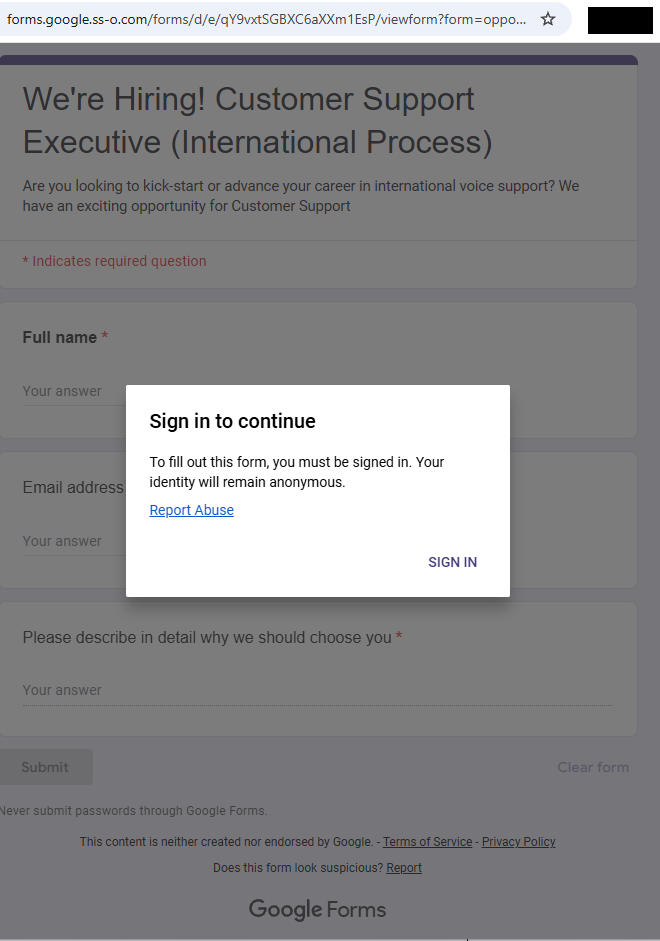
With that knowledge in hand, we could check what the phish was all about. Our personalized link brought us to this website:
Fake Google Forms site
The greyed out “form” behind the prompt promises:
We’re Hiring! Customer Support Executive (International Process)
Are you looking to kick-start or advance your career…
The fields in the form: Full Name, Email address, and an essay field “Please describe in detail why we should choose you”
Buttons: “Submit” and “Clear form.”
The whole web page emulates Google Forms, including logo images, color schemes, a notice about not “submitting passwords,” and legal links. At the bottom, it even includes the typical Google Forms disclaimer (“This content is neither created nor endorsed by Google.”) for authenticity.
Clicking the “Sign in” button took us to https://id-v4[.]com/generation.php, which has now been taken down. The domain id-v4.com has been used in several phishing campaigns for almost a year. In this case, it asked for Google account credentials.
Given the “job opportunity” angle, we suspect links were distributed through targeted emails or LinkedIn messages.
How to stay safe
Lures that promise remote job opportunities are very common these days. Here are a few pointers to help keep you safe from targeted attacks like this:
Do not click on links in unsolicited job offers.
Use a password manager, which would not have filled in your Google username and password on a fake website.
Pro tip: Malwarebytes Scam Guard identified this attack as a scam just by looking at the URL.
IOCs
id-v4[.]com
forms.google.ss-o[.]com
Blocked by Malwarebytes
We don’t just report on scams—we help detect them
Cybersecurity risks should never spread beyond a headline. If something looks dodgy to you, check if it’s a scam using Malwarebytes Scam Guard. Submit a screenshot, paste suspicious content, or share a link, text or phone number, and we’ll tell you if it’s a scam or legit. Available with Malwarebytes Premium Security for all your devices, and in the Malwarebytes app for iOS and Android.
The subdomain forms.google.ss-o[.]com is a clear attempt to impersonate the legitimate forms.google.com. The “ss-o” is likely introduced to look like “single sign-on,” an authentication method that allows users to securely log in to multiple, independent applications or websites using one single set of credentials (username and password).
Unfortunately, when we tried to visit the URLs we were redirected to the local Google search website. This is a common phisher’s tactic to prevent victims from sharing their personalized links with researchers or online analysis.
After some digging, we found a file called generation_form.php on the same domain, which we believe the phishing crew used to create these links. The landing page for the campaign was: https://forms.google.ss-o[.]com/generation_form.php?form=opportunitysec
The generation_form.php script does what the name implies: It creates a personalized URL for the person clicking that link.
With that knowledge in hand, we could check what the phish was all about. Our personalized link brought us to this website:
Fake Google Forms site
The greyed out “form” behind the prompt promises:
We’re Hiring! Customer Support Executive (International Process)
Are you looking to kick-start or advance your career…
The fields in the form: Full Name, Email address, and an essay field “Please describe in detail why we should choose you”
Buttons: “Submit” and “Clear form.”
The whole web page emulates Google Forms, including logo images, color schemes, a notice about not “submitting passwords,” and legal links. At the bottom, it even includes the typical Google Forms disclaimer (“This content is neither created nor endorsed by Google.”) for authenticity.
Clicking the “Sign in” button took us to https://id-v4[.]com/generation.php, which has now been taken down. The domain id-v4.com has been used in several phishing campaigns for almost a year. In this case, it asked for Google account credentials.
Given the “job opportunity” angle, we suspect links were distributed through targeted emails or LinkedIn messages.
How to stay safe
Lures that promise remote job opportunities are very common these days. Here are a few pointers to help keep you safe from targeted attacks like this:
Do not click on links in unsolicited job offers.
Use a password manager, which would not have filled in your Google username and password on a fake website.
Pro tip: Malwarebytes Scam Guard identified this attack as a scam just by looking at the URL.
IOCs
id-v4[.]com
forms.google.ss-o[.]com
Blocked by Malwarebytes
We don’t just report on scams—we help detect them
Cybersecurity risks should never spread beyond a headline. If something looks dodgy to you, check if it’s a scam using Malwarebytes Scam Guard. Submit a screenshot, paste suspicious content, or share a link, text or phone number, and we’ll tell you if it’s a scam or legit. Available with Malwarebytes Premium Security for all your devices, and in the Malwarebytes app for iOS and Android.
Scammers have found a new use for AI: creating custom chatbots posing as real AI assistants to pressure victims into buying worthless cryptocurrencies.
We recently came across a live “Google Coin” presale site featuring a chatbot that claimed to be Google’s Gemini AI assistant. The bot guided visitors through a polished sales pitch, answered their questions about investment, projecting returns, and ultimately ended with victims sending an irreversible crypto payment to the scammers.
Google does not have a cryptocurrency. But as “Google Coin” has appeared before in scams, anyone checking it out might think it’s real. And the chatbot was very convincing.
AI as the closer
The chatbot introduced itself as,
“Gemini — your AI assistant for the Google Coin platform.”
It used Gemini-style branding, including the sparkle icon and a green “Online” status indicator, creating the immediate impression that it was an official Google product.
When asked, “Will I get rich if I buy 100 coins?”, the bot responded with specific financial projections. A $395 investment at the current presale price would be worth $2,755 at listing, it claimed, representing “approximately 7x” growth. It cited a presale price of $3.95 per token, an expected listing price of $27.55, and invited further questions about “how to participate.”
This is the kind of personalized, responsive engagement that used to require a human scammer on the other end of a Telegram chat. Now the AI does it automatically.
A persona that never breaks
What stood out during our analysis was how tightly controlled the bot’s persona was. We found that it:
Claimed consistently to be “the official helper for the Google Coin platform”
Refused to provide any verifiable company details, such as a registered entity, regulator, license number, audit firm, or official email address
Dismissed concerns and redirected them to vague claims about “transparency” and “security”
Refused to acknowledge any scenario in which the project could be a scam
Redirected tougher questions to an unnamed “manager” (likely a human closer waiting in the wings)
When pressed, the bot doesn’t get confused or break character. It loops back to the same scripted claims: a “detailed 2026 roadmap,” “military-grade encryption,” “AI integration,” and a “growing community of investors.”
Whoever built this chatbot locked it into a sales script designed to build trust, overcome doubt, and move visitors toward one outcome: sending cryptocurrency.
Why AI chatbots change the scam model
Scammers have always relied on social engineering. Build trust. Create urgency. Overcome skepticism. Close the deal.
Traditionally, that required human operators, which limited how many victims could be engaged at once. AI chatbots remove that bottleneck entirely.
A single scam operation can now deploy a chatbot that:
Engages hundreds of visitors simultaneously, 24 hours a day
Delivers consistent, polished messaging that sounds authoritative
Impersonates a trusted brand’s AI assistant (in this case, Google’s Gemini)
Responds to individual questions with tailored financial projections
Escalates to human operators only when necessary
This matches a broader trend identified by researchers. According to Chainalysis, roughly 60% of all funds flowing into crypto scam wallets were tied to scammers using AI tools. AI-powered scam infrastructure is becoming the norm, not the exception. The chatbot is just one piece of a broader AI-assisted fraud toolkit—but it may be the most effective piece, because it creates the illusion of a real, interactive relationship between the victim and the “brand.”
The bait: a polished fake
The chatbot sits on top of a convincing scam operation. The Google Coin website mimics Google’s visual identity with a clean, professional design, complete with the “G” logo, navigation menus, and a presale dashboard. It claims to be in “Stage 5 of 5” with over 9.9 million tokens sold and a listing date of February 18—all manufactured urgency.
To borrow credibility, the site displays logos of major companies—OpenAI, Google, Binance, Squarespace, Coinbase, and SpaceX—under a “Trusted By Industry” banner. None of these companies have any connection to the project.
If a visitor clicks “Buy,” they’re taken to a wallet dashboard that looks like a legitimate crypto platform, showing balances for “Google” (on a fictional “Google-Chain”), Bitcoin, and Ethereum.
The purchase flow lets users buy any number of tokens they want and generates a corresponding Bitcoin payment request to a specific wallet address. The site also layers on a tiered bonus system that kicks in at 100 tokens and scales up to 100,000: buy more and the bonuses climb from 5% up to 30% at the top tier. It’s a classic upsell tactic designed to make you think it’s smarter to spend more.
Every payment is irreversible. There is no exchange listing, no token with real value, and no way to get your money back.
What to watch for
We’re entering an era where the first point of contact in a scam may not be a human at all. AI chatbots give scammers something they’ve never had before: a tireless, consistent, scalable front-end that can engage victims in what feels like a real conversation. When that chatbot is dressed up as a trusted brand’s official AI assistant, the effect is even more convincing.
According to the FTC’s Consumer Sentinel data, US consumers reported losing $5.7 billion to investment scams in 2024 (more than any other type of fraud, and up 24% on the previous year). Cryptocurrency remains the second-largest payment method scammers use to extract funds, because transactions are fast and irreversible. Now add AI that can pitch, persuade, and handle objections without a human operator—and you have a scalable fraud model.
AI chatbots on scam sites will become more common. Here’s how to spot them:
They impersonate known AI brands. A chatbot calling itself “Gemini,” “ChatGPT,” or “Copilot” on a third-party crypto site is almost certainly not what it claims to be. Anyone can name a chatbot anything.
They won’t answer due diligence questions. Ask what legal entity operates the platform, what financial regulator oversees it, or where the company is registered. Legitimate operations can answer those questions, scam bots try to avoid them (and if they do answer, verify it).
They project specific returns. No legitimate investment product promises a specific future price. A chatbot telling you that your $395 will become $2,755 is not giving you financial information—it’s running a script.
They create urgency. Pressure tactics like, “stage 5 ends soon,” “listing date approaching,” “limited presale” are designed to push you into making fast decisions.
How to protect yourself
Google does not have a cryptocurrency. It has not launched a presale. And its Gemini AI is not operating as a sales assistant on third-party crypto sites. If you encounter anything suggesting otherwise, close the tab.
Verify claim on the official website of the company being referenced.
Don’t rely on a chatbot’s branding. Anyone can name a bot anything.
Never send cryptocurrency based on projected returns.
Search the project name along with “scam” or “review” before sending any money.
Use web protection tools like Malwarebytes Browser Guard, which is free to use and blocks known and unknown scam sites.
If you’ve already sent funds, report it to your local law enforcement, the FTC at reportfraud.ftc.gov, and the FBI’s IC3 at ic3.gov.
IOCs
0xEc7a42609D5CC9aF7a3dBa66823C5f9E5764d6DA
98388xymWKS6EgYSC9baFuQkCpE8rYsnScV4L5Vu8jt
DHyDmJdr9hjDUH5kcNjeyfzonyeBt19g6G
TWqzJ9sF1w9aWwMevq4b15KkJgAFTfH5im
bc1qw0yfcp8pevzvwp2zrz4pu3vuygnwvl6mstlnh6
r9BHQMUdSgM8iFKXaGiZ3hhXz5SyLDxupY
We don’t just report on scams—we help detect them
Cybersecurity risks should never spread beyond a headline. If something looks dodgy to you, check if it’s a scam using Malwarebytes Scam Guard. Submit a screenshot, paste suspicious content, or share a link, text or phone number, and we’ll tell you if it’s a scam or legit. Available with Malwarebytes Premium Security for all your devices, and in the Malwarebytes app for iOS and Android.
Scammers have found a new use for AI: creating custom chatbots posing as real AI assistants to pressure victims into buying worthless cryptocurrencies.
We recently came across a live “Google Coin” presale site featuring a chatbot that claimed to be Google’s Gemini AI assistant. The bot guided visitors through a polished sales pitch, answered their questions about investment, projecting returns, and ultimately ended with victims sending an irreversible crypto payment to the scammers.
Google does not have a cryptocurrency. But as “Google Coin” has appeared before in scams, anyone checking it out might think it’s real. And the chatbot was very convincing.
AI as the closer
The chatbot introduced itself as,
“Gemini — your AI assistant for the Google Coin platform.”
It used Gemini-style branding, including the sparkle icon and a green “Online” status indicator, creating the immediate impression that it was an official Google product.
When asked, “Will I get rich if I buy 100 coins?”, the bot responded with specific financial projections. A $395 investment at the current presale price would be worth $2,755 at listing, it claimed, representing “approximately 7x” growth. It cited a presale price of $3.95 per token, an expected listing price of $27.55, and invited further questions about “how to participate.”
This is the kind of personalized, responsive engagement that used to require a human scammer on the other end of a Telegram chat. Now the AI does it automatically.
A persona that never breaks
What stood out during our analysis was how tightly controlled the bot’s persona was. We found that it:
Claimed consistently to be “the official helper for the Google Coin platform”
Refused to provide any verifiable company details, such as a registered entity, regulator, license number, audit firm, or official email address
Dismissed concerns and redirected them to vague claims about “transparency” and “security”
Refused to acknowledge any scenario in which the project could be a scam
Redirected tougher questions to an unnamed “manager” (likely a human closer waiting in the wings)
When pressed, the bot doesn’t get confused or break character. It loops back to the same scripted claims: a “detailed 2026 roadmap,” “military-grade encryption,” “AI integration,” and a “growing community of investors.”
Whoever built this chatbot locked it into a sales script designed to build trust, overcome doubt, and move visitors toward one outcome: sending cryptocurrency.
Why AI chatbots change the scam model
Scammers have always relied on social engineering. Build trust. Create urgency. Overcome skepticism. Close the deal.
Traditionally, that required human operators, which limited how many victims could be engaged at once. AI chatbots remove that bottleneck entirely.
A single scam operation can now deploy a chatbot that:
Engages hundreds of visitors simultaneously, 24 hours a day
Delivers consistent, polished messaging that sounds authoritative
Impersonates a trusted brand’s AI assistant (in this case, Google’s Gemini)
Responds to individual questions with tailored financial projections
Escalates to human operators only when necessary
This matches a broader trend identified by researchers. According to Chainalysis, roughly 60% of all funds flowing into crypto scam wallets were tied to scammers using AI tools. AI-powered scam infrastructure is becoming the norm, not the exception. The chatbot is just one piece of a broader AI-assisted fraud toolkit—but it may be the most effective piece, because it creates the illusion of a real, interactive relationship between the victim and the “brand.”
The bait: a polished fake
The chatbot sits on top of a convincing scam operation. The Google Coin website mimics Google’s visual identity with a clean, professional design, complete with the “G” logo, navigation menus, and a presale dashboard. It claims to be in “Stage 5 of 5” with over 9.9 million tokens sold and a listing date of February 18—all manufactured urgency.
To borrow credibility, the site displays logos of major companies—OpenAI, Google, Binance, Squarespace, Coinbase, and SpaceX—under a “Trusted By Industry” banner. None of these companies have any connection to the project.
If a visitor clicks “Buy,” they’re taken to a wallet dashboard that looks like a legitimate crypto platform, showing balances for “Google” (on a fictional “Google-Chain”), Bitcoin, and Ethereum.
The purchase flow lets users buy any number of tokens they want and generates a corresponding Bitcoin payment request to a specific wallet address. The site also layers on a tiered bonus system that kicks in at 100 tokens and scales up to 100,000: buy more and the bonuses climb from 5% up to 30% at the top tier. It’s a classic upsell tactic designed to make you think it’s smarter to spend more.
Every payment is irreversible. There is no exchange listing, no token with real value, and no way to get your money back.
What to watch for
We’re entering an era where the first point of contact in a scam may not be a human at all. AI chatbots give scammers something they’ve never had before: a tireless, consistent, scalable front-end that can engage victims in what feels like a real conversation. When that chatbot is dressed up as a trusted brand’s official AI assistant, the effect is even more convincing.
According to the FTC’s Consumer Sentinel data, US consumers reported losing $5.7 billion to investment scams in 2024 (more than any other type of fraud, and up 24% on the previous year). Cryptocurrency remains the second-largest payment method scammers use to extract funds, because transactions are fast and irreversible. Now add AI that can pitch, persuade, and handle objections without a human operator—and you have a scalable fraud model.
AI chatbots on scam sites will become more common. Here’s how to spot them:
They impersonate known AI brands. A chatbot calling itself “Gemini,” “ChatGPT,” or “Copilot” on a third-party crypto site is almost certainly not what it claims to be. Anyone can name a chatbot anything.
They won’t answer due diligence questions. Ask what legal entity operates the platform, what financial regulator oversees it, or where the company is registered. Legitimate operations can answer those questions, scam bots try to avoid them (and if they do answer, verify it).
They project specific returns. No legitimate investment product promises a specific future price. A chatbot telling you that your $395 will become $2,755 is not giving you financial information—it’s running a script.
They create urgency. Pressure tactics like, “stage 5 ends soon,” “listing date approaching,” “limited presale” are designed to push you into making fast decisions.
How to protect yourself
Google does not have a cryptocurrency. It has not launched a presale. And its Gemini AI is not operating as a sales assistant on third-party crypto sites. If you encounter anything suggesting otherwise, close the tab.
Verify claim on the official website of the company being referenced.
Don’t rely on a chatbot’s branding. Anyone can name a bot anything.
Never send cryptocurrency based on projected returns.
Search the project name along with “scam” or “review” before sending any money.
Use web protection tools like Malwarebytes Browser Guard, which is free to use and blocks known and unknown scam sites.
If you’ve already sent funds, report it to your local law enforcement, the FTC at reportfraud.ftc.gov, and the FBI’s IC3 at ic3.gov.
IOCs
0xEc7a42609D5CC9aF7a3dBa66823C5f9E5764d6DA
98388xymWKS6EgYSC9baFuQkCpE8rYsnScV4L5Vu8jt
DHyDmJdr9hjDUH5kcNjeyfzonyeBt19g6G
TWqzJ9sF1w9aWwMevq4b15KkJgAFTfH5im
bc1qw0yfcp8pevzvwp2zrz4pu3vuygnwvl6mstlnh6
r9BHQMUdSgM8iFKXaGiZ3hhXz5SyLDxupY
We don’t just report on scams—we help detect them
Cybersecurity risks should never spread beyond a headline. If something looks dodgy to you, check if it’s a scam using Malwarebytes Scam Guard. Submit a screenshot, paste suspicious content, or share a link, text or phone number, and we’ll tell you if it’s a scam or legit. Available with Malwarebytes Premium Security for all your devices, and in the Malwarebytes app for iOS and Android.
If you’ve seen the two stoat siblings serving as official mascots of the Milano Cortina 2026 Winter Olympics, you already know Tina and Milo are irresistible.
Designed by Italian schoolchildren and chosen from more than 1,600 entries in a public poll, the duo has already captured hearts worldwide. So much so that the official 27 cm Tina plush toy on the official Olympics web shop is listed at €40 and currently marked out of stock.
Tina and Milo are in huge demand, and scammers have noticed.
When supply runs out, scam sites rush in
In roughly the past week alone, we’ve identified nearly 20 lookalike domains designed to imitate the official Olympic merchandise store.
These aren’t crude copies thrown together overnight. The sites use the same polished storefront template, complete with promotional videos and background music designed to mirror the official shop.olympics.com experience.
Fake site offering Tina at a huge discountReal Olympic site showing Tina out of stock
The layout and product pages are the same—the only thing that changes is the domain name. At a quick glance, most people wouldn’t notice anything unusual.
Here’s a sample of the domains we’ve been tracking:
2026winterdeals[.]top olympics-save[.]top olympics2026[.]top postolympicsale[.]com sale-olympics[.]top shopolympics-eu[.]top winter0lympicsstore[.]top (note the zero replacing the letter “o”) winterolympics[.]top 2026olympics[.]shop olympics-2026[.]shop olympics-2026[.]top olympics-eu[.]top olympics-hot[.]shop olympics-hot[.]top olympics-sale[.]shop olympics-sale[.]top olympics-top[.]shop olympics2026[.]store olympics2026[.]top
Based on telemetry, additional registrations are actively emerging.
Reports show users checking these domains from multiple regions including Ireland, the Czech Republic, the United States, Italy, and China—suggesting this is a global campaign targeting fans worldwide.
Malwarebytes blocks these domains as scams.
Anatomy of a fake Olympic shop
The fake sites are practically identical. Each one loads the same storefront, with the same layout, product pages, and promotional banners.
That’s usually a sign the scammers are using a ready-made template and copying it across multiple domains. One obvious giveaway, however, is the pricing.
On the official store, the Tina plush costs €40 and is currently out of stock. On the fake sites, it suddenly reappears at a hugely discounted price—in one case €20, with banners shouting “UP & SAVE 80%.” When an item is sold out everywhere official and a random .top domain has it for half price, you’re looking at bait.
Delivering malware through fake order confirmations or “tracking” links
Taking your money and shipping nothing at all
The Olympics are a scammer’s playground
This isn’t the first time cybercriminals have piggybacked on Olympic fever. Fake ticket sites proliferated as far back as the Beijing 2008 Games. During Paris 2024, analysts observed significant spikes in Olympics-themed phishing and DDoS activity.
The formula is simple. Take a globally recognized brand, add urgency and emotional appeal (who doesn’t want an adorable stoat plush for their kid?), mix in limited availability, and serve it up on a convincing-looking website. With over 3 billion viewers expected for Milano Cortina, the pool of potential victims is enormous.
Scammers are getting smarter. AI-powered tools now let them generate convincing phishing pages in multiple languages at scale. The days of spotting a scam by its broken images and multiple typos are fading fast.
Protect yourself from Winter Olympics scams
As excitement builds ahead of the Winter Olympics in Milano Cortina, expect scammers to ramp up their efforts across fake shops, fraudulent ticket sites, bogus livestreams, and social media phishing campaigns.
Buy only from shop.olympics.com. Type the address directly into your browser and bookmark it. Don’t click links from ads or emails.
Don’t trust extreme discounts. If it’s sold out officially but “50–80% off” elsewhere, it’s likely a scam.
Check the domain closely. Watch for odd extensions like .top or .shop, extra hyphens, or letter swaps like “winter0lympicsstore.”
Never enter payment details on unfamiliar sites. If something feels off, leave immediately.
Use browser protection. Tools like Malwarebytes Browser Guard block known scam sites in real time, for free. Scam Guard can help you check suspicious websites before you buy.
We don’t just report on scams—we help detect them
Cybersecurity risks should never spread beyond a headline. If something looks dodgy to you, check if it’s a scam using Malwarebytes Scam Guard. Submit a screenshot, paste suspicious content, or share a link, text or phone number, and we’ll tell you if it’s a scam or legit. Available with Malwarebytes Premium Security for all your devices, and in the Malwarebytes app for iOS and Android.
If you’ve seen the two stoat siblings serving as official mascots of the Milano Cortina 2026 Winter Olympics, you already know Tina and Milo are irresistible.
Designed by Italian schoolchildren and chosen from more than 1,600 entries in a public poll, the duo has already captured hearts worldwide. So much so that the official 27 cm Tina plush toy on the official Olympics web shop is listed at €40 and currently marked out of stock.
Tina and Milo are in huge demand, and scammers have noticed.
When supply runs out, scam sites rush in
In roughly the past week alone, we’ve identified nearly 20 lookalike domains designed to imitate the official Olympic merchandise store.
These aren’t crude copies thrown together overnight. The sites use the same polished storefront template, complete with promotional videos and background music designed to mirror the official shop.olympics.com experience.
Fake site offering Tina at a huge discountReal Olympic site showing Tina out of stock
The layout and product pages are the same—the only thing that changes is the domain name. At a quick glance, most people wouldn’t notice anything unusual.
Here’s a sample of the domains we’ve been tracking:
2026winterdeals[.]top olympics-save[.]top olympics2026[.]top postolympicsale[.]com sale-olympics[.]top shopolympics-eu[.]top winter0lympicsstore[.]top (note the zero replacing the letter “o”) winterolympics[.]top 2026olympics[.]shop olympics-2026[.]shop olympics-2026[.]top olympics-eu[.]top olympics-hot[.]shop olympics-hot[.]top olympics-sale[.]shop olympics-sale[.]top olympics-top[.]shop olympics2026[.]store olympics2026[.]top
Based on telemetry, additional registrations are actively emerging.
Reports show users checking these domains from multiple regions including Ireland, the Czech Republic, the United States, Italy, and China—suggesting this is a global campaign targeting fans worldwide.
Malwarebytes blocks these domains as scams.
Anatomy of a fake Olympic shop
The fake sites are practically identical. Each one loads the same storefront, with the same layout, product pages, and promotional banners.
That’s usually a sign the scammers are using a ready-made template and copying it across multiple domains. One obvious giveaway, however, is the pricing.
On the official store, the Tina plush costs €40 and is currently out of stock. On the fake sites, it suddenly reappears at a hugely discounted price—in one case €20, with banners shouting “UP & SAVE 80%.” When an item is sold out everywhere official and a random .top domain has it for half price, you’re looking at bait.
Delivering malware through fake order confirmations or “tracking” links
Taking your money and shipping nothing at all
The Olympics are a scammer’s playground
This isn’t the first time cybercriminals have piggybacked on Olympic fever. Fake ticket sites proliferated as far back as the Beijing 2008 Games. During Paris 2024, analysts observed significant spikes in Olympics-themed phishing and DDoS activity.
The formula is simple. Take a globally recognized brand, add urgency and emotional appeal (who doesn’t want an adorable stoat plush for their kid?), mix in limited availability, and serve it up on a convincing-looking website. With over 3 billion viewers expected for Milano Cortina, the pool of potential victims is enormous.
Scammers are getting smarter. AI-powered tools now let them generate convincing phishing pages in multiple languages at scale. The days of spotting a scam by its broken images and multiple typos are fading fast.
Protect yourself from Winter Olympics scams
As excitement builds ahead of the Winter Olympics in Milano Cortina, expect scammers to ramp up their efforts across fake shops, fraudulent ticket sites, bogus livestreams, and social media phishing campaigns.
Buy only from shop.olympics.com. Type the address directly into your browser and bookmark it. Don’t click links from ads or emails.
Don’t trust extreme discounts. If it’s sold out officially but “50–80% off” elsewhere, it’s likely a scam.
Check the domain closely. Watch for odd extensions like .top or .shop, extra hyphens, or letter swaps like “winter0lympicsstore.”
Never enter payment details on unfamiliar sites. If something feels off, leave immediately.
Use browser protection. Tools like Malwarebytes Browser Guard block known scam sites in real time, for free. Scam Guard can help you check suspicious websites before you buy.
We don’t just report on scams—we help detect them
Cybersecurity risks should never spread beyond a headline. If something looks dodgy to you, check if it’s a scam using Malwarebytes Scam Guard. Submit a screenshot, paste suspicious content, or share a link, text or phone number, and we’ll tell you if it’s a scam or legit. Available with Malwarebytes Premium Security for all your devices, and in the Malwarebytes app for iOS and Android.
When researchers created an account for a child under 13 on Roblox, they expected heavy guardrails. Instead, they found that the platform’s search features still allowed kids to discover communities linked to fraud and other illicit activity.
The discoveries spotlight the question that lawmakers around the world are circling: how do you keep kids safe online?
Lawmakers have said these efforts are to keep kids safe online. But as the regulatory tide rises, we wanted to understand what digital safety for children actually looks like in practice.
So, we asked a specialist research team to explore how well a dozen mainstream tech providers are protecting children aged under 13 online.
We found that most services work well when kids use the accounts and settings designed for them. But when children are curious, use the wrong account type, or step outside those boundaries, things can go sideways quickly.
Over several weeks in December, the research team explored how platforms from Discord to YouTube handled children’s online use. They relied on standard user behavior rather than exploits or technical tricks to reflect what a child could realistically encounter.
The researchers focused on how platforms catered to kids through specific account types, how age restrictions were enforced in practice, and whether sensitive content was discoverable through normal browsing or search.
What emerged was a consistent pattern: curious kids who poke around a little, or who end up using the wrong account type, can run into inappropriate content with surprisingly little effort.
A detailed breakdown of the platforms tested, account types used, and where sensitive content was discovered appears in the research scope and methodology section at the end of this article.
When kids’ accounts are opt-in
One thing the team tried was to simply access the generic public version of a site rather than the kid-protected area.
This was a particular problem with YouTube. The company runs a kid-specific service called YouTube Kids, which the researchers said is effectively sanitized of inappropriate content (it sounds like things have changed since 2022).
The issue is that YouTube’s regular public site isn’t sanitized, and even though the company says you must be at least 13 to use the service unless ‘enabled’ by a parent, in reality anyone can access it. From the report:
“Some of the content will require signing in (for age verification) prior the viewing, but the minor can access the streaming service as a ‘Guest’ user without logging in, bypassing any filtering that would otherwise apply to a registered child account.”
That opens up a range of inappropriate material, from “how-to” fraud channels through to scenes of semi-nudity and sexually suggestive material, the researchers said. Horrifically, they even found scenes of human execution on the public site. The researchers concluded:
“The absence of a registration barrier on the public platform renders the ‘YouTube Kids’ protection opt-in rather than mandatory.”
When adult accounts are easy to fake
Another worry is that even when accounts are age-gated, enterprising minors can easily get around them. While most platforms require users to be 13+, a self-declaration is often enough. All that remains is for the child to register an email address with a service that doesn’t require age verification.
This “double blind” vulnerability is a big problem. Kids are good at creating accounts. The tech industry has taught them to be, because they need them for most things they touch online, from streaming to school.
When they do get past the age gates, curious kids can quickly get to inappropriate material. Researchers found unmoderated nudity and explicit material on the social network Discord, along with TikTok content providing credit card fraud and identity theft tutorials. A little searching on the streaming site Twitch surfaced ads for escort services.
This points to a trade-off between privacy and age verification. While stricter age verification could close some of these gaps, it requires collecting more personal data, including IDs or biometric information. That creates privacy risks of its own, especially for children. That’s why most platforms rely on self-declared age, but the research shows how easily that can be bypassed.
When kids’ accounts let toxic content through
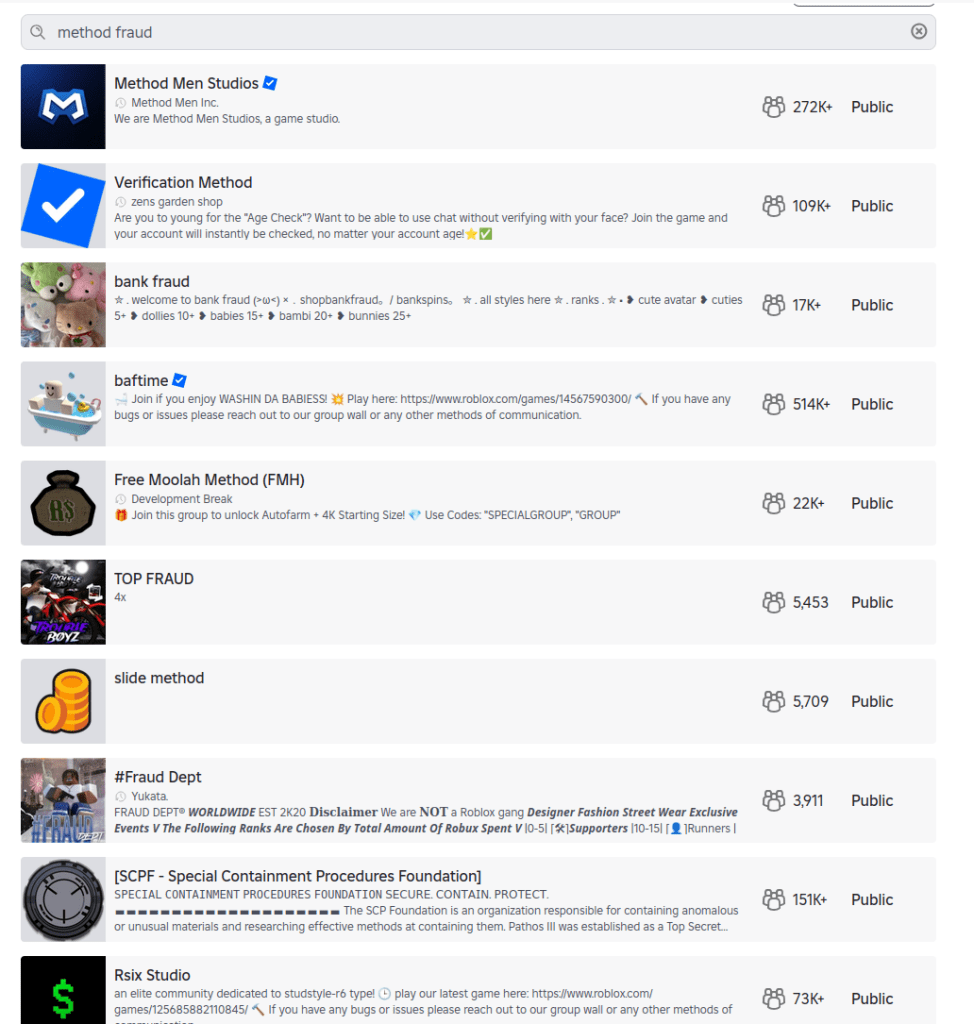
Cracks in the moderation foundations allow risky content: Roblox, the website and app where users build their own content, filters chats for child accounts. However, it also features “Communities,” which are groups designed for socializing and discovery.
These groups are easily searchable, and some use names and terminology commonly linked to criminal activities, including fraud and identity theft. One, called “Fullz,” uses a term widely understood to refer to stolen personal information, and “new clothes” is often used to refer to a new batch of stolen payment card data. The visible community may serve as a gateway, while the actual coordination of illicit activity or data trading occurs via “inner chatter” between the community members.
This kind of search wasn’t just an issue for Roblox, warned the team. It found Instagram profiles promoting financial fraud and crypto schemes, even from a restricted teen account.
Some sites passed the team’s tests admirably, though. The researchers simulated underage users who’d bypassed age verification, but were unable to find any harmful content on Minecraft, Snapchat, Spotify, or Fortnite. Fortnite’s approach is especially strict, disabling chat and purchases on accounts for kids under 13 until a parent verifies via email. It also uses additional verification steps using a Social Security number or credit card. Kids can still play, but they’re muted.
What parents can do
There is no platform that can catch everything, especially when kids are curious. That makes parental involvement the most important layer of protection.
One reason this matters is a related risk worth acknowledging: adults attempting to reach children through social platforms. Even after Instagram took steps to limit contact between adult and child accounts, parents still discovered loopholes. This isn’t a failure of one platform so much as a reminder that no set of controls can replace awareness and involvement.
Mark Beare, GM of Consumer at Malwarebytes says:
“Parents are navigating a fast-moving digital world where offline consequences are quickly felt, be it spoofed accounts, deepfake content or lost funds. Safeguards exist and are encouraged, but children can still be exposed to harmful content.”
This doesn’t mean banning children from the internet. As the EFF points out, many minors use online services productively with the support and supervision of their parents. But it does mean being intentional about how accounts are set up, how children interact with others online, and how comfortable they feel asking for help.
Accounts and settings
Use child or teen accounts where available, and avoid defaulting to adult accounts.
Keep friends and followers lists set to private.
Avoid using real names, birthdays, or other identifying details unless they are strictly required.
Avoid facial recognition features for children’s accounts.
For teens, be aware of “spam” or secondary accounts they’ve set up that may have looser settings.
Social behavior
Talk to your child about who they interact with online and what kinds of conversations are appropriate.
Warn them about strangers in comments, group chats, and direct messages.
Encourage them to leave spaces that make them uncomfortable, even if they didn’t do anything wrong.
Remind them that not everyone online is who they claim to be.
Trust and communication
Keep conversations about online activity open and ongoing, not one-off warnings.
Make it clear that your child can come to you if something goes wrong without fear of punishment or blame.
Involve other trusted adults, such as parents, teachers, or caregivers, so kids aren’t navigating online spaces alone.
This kind of long-term involvement helps children make better decisions over time. It also reduces the risk that mistakes made today can follow them into the future, when personal information, images, or conversations could be reused in ways they never intended.
Research findings, scope and methodology
This research examined how children under the age of 13 may be exposed to sensitive content when browsing mainstream media and gaming services.
For this study, a “kid” was defined as an individual under 13, in line with the Children’s Online Privacy Protection Act (COPPA). Research was conducted between December 1 and December 17, 2025, using US-based accounts.
The research relied exclusively on standard user behavior and passive observation. No exploits, hacks, or manipulative techniques were used to force access to data or content.
Researchers tested a range of account types depending on what each platform offered, including dedicated child accounts, teen or restricted accounts, adult accounts created through age self-declaration, and, where applicable, public or guest access without registration.
The study assessed how platforms enforced age requirements, how easy it was to misrepresent age during onboarding, and whether sensitive or illicit content could be discovered through normal browsing, searching, or exploration.
Across all platforms tested, default algorithmic content and advertisements were initially benign and policy-compliant. Where sensitive content was found, it was accessed through intentional, curiosity-driven behavior rather than passive recommendations. No proactive outreach from other users was observed during the research period.
The table below summarizes the platforms tested, the account types used, and whether sensitive content was discoverable during testing.
Platform
Account type tested
Dedicated kid/teen account
Age gate easy to bypass
Illicit content discovered
Notes
YouTube (public)
No registration (guest)
Yes (YouTube Kids)
N/A
Yes
Public YouTube allowed access to scam/fraud content and violent footage without sign-in. Age-restricted videos required login, but much content did not.
YouTube Kids
Kid account
Yes
N/A
No
Separate app with its own algorithmic wall. No harmful content surfaced.
Roblox
All-age account (13+)
No
Not required
Yes
Child accounts could search for and find communities linked to cybercrime and fraud-related keywords.
Instagram
Teen account (13–17)
No
Not required
Yes
Restricted accounts still surfaced profiles promoting fraud and cryptocurrency schemes via search.
TikTok
Younger user account (13+)
Yes
Not required
No
View-only experience with no free search. No harmful content surfaced.
TikTok
Adult account
No
Yes
Yes
Search surfaced credit card fraud–related profiles and tutorials after age gate bypass.
Discord
Adult account
No
Yes
Yes
Public servers surfaced explicit adult content when searched directly. No proactive contact observed.
Twitch
Adult account
No
Yes
Yes
Discovered escort service promotions and adult content, some behind paywalls.
Fortnite
Cabined (restricted) account (13+)
Yes
Hard to bypass
No
Chat and purchases disabled until parent verification. No harmful content found.
Snapchat
Adult account
No
Yes
No
No sensitive content surfaced during testing.
Spotify
Adult account
Yes
Yes
No
Explicit lyrics labeled. No harmful content found.
Messenger Kids
Kid account
Yes
Not required
No
Fully parent-controlled environment. No search or external contacts.
Screenshots from the research
List of Roblox communities with cybercrime-oriented keywords
Roblox community that offers chat without verification
Roblox community with cybercrime-oriented keywords
Graphic content on publicly accessible YouTube
Credit card fraud content on publicly accessible YouTube
Active escort page on Twitch
Stolen credit cards for sale on an Instagram teen account
Crypto investment scheme on an Instagram teen account
Carding for beginners content on a TikTok adult account, accessed by kids with a fake date of birth.
We don’t just report on threats—we remove them
Cybersecurity risks should never spread beyond a headline. Keep threats off your devices by downloading Malwarebytes today.
When researchers created an account for a child under 13 on Roblox, they expected heavy guardrails. Instead, they found that the platform’s search features still allowed kids to discover communities linked to fraud and other illicit activity.
The discoveries spotlight the question that lawmakers around the world are circling: how do you keep kids safe online?
Lawmakers have said these efforts are to keep kids safe online. But as the regulatory tide rises, we wanted to understand what digital safety for children actually looks like in practice.
So, we asked a specialist research team to explore how well a dozen mainstream tech providers are protecting children aged under 13 online.
We found that most services work well when kids use the accounts and settings designed for them. But when children are curious, use the wrong account type, or step outside those boundaries, things can go sideways quickly.
Over several weeks in December, the research team explored how platforms from Discord to YouTube handled children’s online use. They relied on standard user behavior rather than exploits or technical tricks to reflect what a child could realistically encounter.
The researchers focused on how platforms catered to kids through specific account types, how age restrictions were enforced in practice, and whether sensitive content was discoverable through normal browsing or search.
What emerged was a consistent pattern: curious kids who poke around a little, or who end up using the wrong account type, can run into inappropriate content with surprisingly little effort.
A detailed breakdown of the platforms tested, account types used, and where sensitive content was discovered appears in the research scope and methodology section at the end of this article.
When kids’ accounts are opt-in
One thing the team tried was to simply access the generic public version of a site rather than the kid-protected area.
This was a particular problem with YouTube. The company runs a kid-specific service called YouTube Kids, which the researchers said is effectively sanitized of inappropriate content (it sounds like things have changed since 2022).
The issue is that YouTube’s regular public site isn’t sanitized, and even though the company says you must be at least 13 to use the service unless ‘enabled’ by a parent, in reality anyone can access it. From the report:
“Some of the content will require signing in (for age verification) prior the viewing, but the minor can access the streaming service as a ‘Guest’ user without logging in, bypassing any filtering that would otherwise apply to a registered child account.”
That opens up a range of inappropriate material, from “how-to” fraud channels through to scenes of semi-nudity and sexually suggestive material, the researchers said. Horrifically, they even found scenes of human execution on the public site. The researchers concluded:
“The absence of a registration barrier on the public platform renders the ‘YouTube Kids’ protection opt-in rather than mandatory.”
When adult accounts are easy to fake
Another worry is that even when accounts are age-gated, enterprising minors can easily get around them. While most platforms require users to be 13+, a self-declaration is often enough. All that remains is for the child to register an email address with a service that doesn’t require age verification.
This “double blind” vulnerability is a big problem. Kids are good at creating accounts. The tech industry has taught them to be, because they need them for most things they touch online, from streaming to school.
When they do get past the age gates, curious kids can quickly get to inappropriate material. Researchers found unmoderated nudity and explicit material on the social network Discord, along with TikTok content providing credit card fraud and identity theft tutorials. A little searching on the streaming site Twitch surfaced ads for escort services.
This points to a trade-off between privacy and age verification. While stricter age verification could close some of these gaps, it requires collecting more personal data, including IDs or biometric information. That creates privacy risks of its own, especially for children. That’s why most platforms rely on self-declared age, but the research shows how easily that can be bypassed.
When kids’ accounts let toxic content through
Cracks in the moderation foundations allow risky content: Roblox, the website and app where users build their own content, filters chats for child accounts. However, it also features “Communities,” which are groups designed for socializing and discovery.
These groups are easily searchable, and some use names and terminology commonly linked to criminal activities, including fraud and identity theft. One, called “Fullz,” uses a term widely understood to refer to stolen personal information, and “new clothes” is often used to refer to a new batch of stolen payment card data. The visible community may serve as a gateway, while the actual coordination of illicit activity or data trading occurs via “inner chatter” between the community members.
This kind of search wasn’t just an issue for Roblox, warned the team. It found Instagram profiles promoting financial fraud and crypto schemes, even from a restricted teen account.
Some sites passed the team’s tests admirably, though. The researchers simulated underage users who’d bypassed age verification, but were unable to find any harmful content on Minecraft, Snapchat, Spotify, or Fortnite. Fortnite’s approach is especially strict, disabling chat and purchases on accounts for kids under 13 until a parent verifies via email. It also uses additional verification steps using a Social Security number or credit card. Kids can still play, but they’re muted.
What parents can do
There is no platform that can catch everything, especially when kids are curious. That makes parental involvement the most important layer of protection.
One reason this matters is a related risk worth acknowledging: adults attempting to reach children through social platforms. Even after Instagram took steps to limit contact between adult and child accounts, parents still discovered loopholes. This isn’t a failure of one platform so much as a reminder that no set of controls can replace awareness and involvement.
Mark Beare, GM of Consumer at Malwarebytes says:
“Parents are navigating a fast-moving digital world where offline consequences are quickly felt, be it spoofed accounts, deepfake content or lost funds. Safeguards exist and are encouraged, but children can still be exposed to harmful content.”
This doesn’t mean banning children from the internet. As the EFF points out, many minors use online services productively with the support and supervision of their parents. But it does mean being intentional about how accounts are set up, how children interact with others online, and how comfortable they feel asking for help.
Accounts and settings
Use child or teen accounts where available, and avoid defaulting to adult accounts.
Keep friends and followers lists set to private.
Avoid using real names, birthdays, or other identifying details unless they are strictly required.
Avoid facial recognition features for children’s accounts.
For teens, be aware of “spam” or secondary accounts they’ve set up that may have looser settings.
Social behavior
Talk to your child about who they interact with online and what kinds of conversations are appropriate.
Warn them about strangers in comments, group chats, and direct messages.
Encourage them to leave spaces that make them uncomfortable, even if they didn’t do anything wrong.
Remind them that not everyone online is who they claim to be.
Trust and communication
Keep conversations about online activity open and ongoing, not one-off warnings.
Make it clear that your child can come to you if something goes wrong without fear of punishment or blame.
Involve other trusted adults, such as parents, teachers, or caregivers, so kids aren’t navigating online spaces alone.
This kind of long-term involvement helps children make better decisions over time. It also reduces the risk that mistakes made today can follow them into the future, when personal information, images, or conversations could be reused in ways they never intended.
Research findings, scope and methodology
This research examined how children under the age of 13 may be exposed to sensitive content when browsing mainstream media and gaming services.
For this study, a “kid” was defined as an individual under 13, in line with the Children’s Online Privacy Protection Act (COPPA). Research was conducted between December 1 and December 17, 2025, using US-based accounts.
The research relied exclusively on standard user behavior and passive observation. No exploits, hacks, or manipulative techniques were used to force access to data or content.
Researchers tested a range of account types depending on what each platform offered, including dedicated child accounts, teen or restricted accounts, adult accounts created through age self-declaration, and, where applicable, public or guest access without registration.
The study assessed how platforms enforced age requirements, how easy it was to misrepresent age during onboarding, and whether sensitive or illicit content could be discovered through normal browsing, searching, or exploration.
Across all platforms tested, default algorithmic content and advertisements were initially benign and policy-compliant. Where sensitive content was found, it was accessed through intentional, curiosity-driven behavior rather than passive recommendations. No proactive outreach from other users was observed during the research period.
The table below summarizes the platforms tested, the account types used, and whether sensitive content was discoverable during testing.
Platform
Account type tested
Dedicated kid/teen account
Age gate easy to bypass
Illicit content discovered
Notes
YouTube (public)
No registration (guest)
Yes (YouTube Kids)
N/A
Yes
Public YouTube allowed access to scam/fraud content and violent footage without sign-in. Age-restricted videos required login, but much content did not.
YouTube Kids
Kid account
Yes
N/A
No
Separate app with its own algorithmic wall. No harmful content surfaced.
Roblox
All-age account (13+)
No
Not required
Yes
Child accounts could search for and find communities linked to cybercrime and fraud-related keywords.
Instagram
Teen account (13–17)
No
Not required
Yes
Restricted accounts still surfaced profiles promoting fraud and cryptocurrency schemes via search.
TikTok
Younger user account (13+)
Yes
Not required
No
View-only experience with no free search. No harmful content surfaced.
TikTok
Adult account
No
Yes
Yes
Search surfaced credit card fraud–related profiles and tutorials after age gate bypass.
Discord
Adult account
No
Yes
Yes
Public servers surfaced explicit adult content when searched directly. No proactive contact observed.
Twitch
Adult account
No
Yes
Yes
Discovered escort service promotions and adult content, some behind paywalls.
Fortnite
Cabined (restricted) account (13+)
Yes
Hard to bypass
No
Chat and purchases disabled until parent verification. No harmful content found.
Snapchat
Adult account
No
Yes
No
No sensitive content surfaced during testing.
Spotify
Adult account
Yes
Yes
No
Explicit lyrics labeled. No harmful content found.
Messenger Kids
Kid account
Yes
Not required
No
Fully parent-controlled environment. No search or external contacts.
Screenshots from the research
List of Roblox communities with cybercrime-oriented keywords
Roblox community that offers chat without verification
Roblox community with cybercrime-oriented keywords
Graphic content on publicly accessible YouTube
Credit card fraud content on publicly accessible YouTube
Active escort page on Twitch
Stolen credit cards for sale on an Instagram teen account
Crypto investment scheme on an Instagram teen account
Carding for beginners content on a TikTok adult account, accessed by kids with a fake date of birth.
We don’t just report on threats—we remove them
Cybersecurity risks should never spread beyond a headline. Keep threats off your devices by downloading Malwarebytes today.
A convincing lookalike of the popular 7-Zip archiver site has been serving a trojanized installer that silently converts victims’ machines into residential proxy nodes—and it has been hiding in plain sight for some time.
“I’m so sick to my stomach”
A PC builder recently turned to Reddit’s r/pcmasterrace community in a panic after realizing they had downloaded 7‑Zip from the wrong website. Following a YouTube tutorial for a new build, they were instructed to download 7‑Zip from 7zip[.]com, unaware that the legitimate project is hosted exclusively at 7-zip.org.
In their Reddit post, the user described installing the file first on a laptop and later transferring it via USB to a newly built desktop. They encountered repeated 32‑bit versus 64‑bit errors and ultimately abandoned the installer in favor of Windows’ built‑in extraction tools. Nearly two weeks later, Microsoft Defender alerted on the system with a generic detection: Trojan:Win32/Malgent!MSR.
The experience illustrates how a seemingly minor domain mix-up can result in long-lived, unauthorized use of a system when attackers successfully masquerade as trusted software distributors.
A trojanized installer masquerading as legitimate software
This is not a simple case of a malicious download hosted on a random site. The operators behind 7zip[.]com distributed a trojanized installer via a lookalike domain, delivering a functional copy of functional 7‑Zip File Manager alongside a concealed malware payload.
The installer is Authenticode‑signed using a now‑revoked certificate issued to Jozeal Network Technology Co., Limited, lending it superficial legitimacy. During installation, a modified build of 7zfm.exe is deployed and functions as expected, reducing user suspicion. In parallel, three additional components are silently dropped:
Uphero.exe—a service manager and update loader
hero.exe—the primary proxy payload (Go‑compiled)
hero.dll—a supporting library
All components are written to C:\Windows\SysWOW64\hero\, a privileged directory that is unlikely to be manually inspected.
An independent update channel was also observed at update.7zip[.]com/version/win-service/1.0.0.2/Uphero.exe.zip, indicating that the malware payload can be updated independently of the installer itself.
Abuse of trusted distribution channels
One of the more concerning aspects of this campaign is its reliance on third‑party trust. The Reddit case highlights YouTube tutorials as an inadvertent malware distribution vector, where creators incorrectly reference 7zip.com instead of the legitimate domain.
This shows how attackers can exploit small errors in otherwise benign content ecosystems to funnel victims toward malicious infrastructure at scale.
Execution flow: from installer to persistent proxy service
Behavioral analysis shows a rapid and methodical infection chain:
1. File deployment—The payload is installed into SysWOW64, requiring elevated privileges and signaling intent for deep system integration.
2. Persistence via Windows services—Both Uphero.exe and hero.exe are registered as auto‑start Windows services running under System privileges, ensuring execution on every boot.
3. Firewall rule manipulation—The malware invokes netsh to remove existing rules and create new inbound and outbound allow rules for its binaries. This is intended to reduce interference with network traffic and support seamless payload updates.
4. Host profiling—Using WMI and native Windows APIs, the malware enumerates system characteristics including hardware identifiers, memory size, CPU count, disk attributes, and network configuration. The malware communicates with iplogger[.]org via a dedicated reporting endpoint, suggesting it collects and reports device or network metadata as part of its proxy infrastructure.
Functional goal: residential proxy monetization
While initial indicators suggested backdoor‑style capabilities, further analysis revealed that the malware’s primary function is proxyware. The infected host is enrolled as a residential proxy node, allowing third parties to route traffic through the victim’s IP address.
The hero.exe component retrieves configuration data from rotating “smshero”‑themed command‑and‑control domains, then establishes outbound proxy connections on non‑standard ports such as 1000 and 1002. Traffic analysis shows a lightweight XOR‑encoded protocol (key 0x70) used to obscure control messages.
This infrastructure is consistent with known residential proxy services, where access to real consumer IP addresses is sold for fraud, scraping, ad abuse, or anonymity laundering.
Shared tooling across multiple fake installers
The 7‑Zip impersonation appears to be part of a broader operation. Related binaries have been identified under names such as upHola.exe, upTiktok, upWhatsapp, and upWire, all sharing identical tactics, techniques, and procedures:
Deployment to SysWOW64
Windows service persistence
Firewall rule manipulation via netsh
Encrypted HTTPS C2 traffic
Embedded strings referencing VPN and proxy brands suggest a unified backend supporting multiple distribution fronts.
Rotating infrastructure and encrypted transport
Memory analysis uncovered a large pool of hardcoded command-and-control domains using hero and smshero naming conventions. Active resolution during sandbox execution showed traffic routed through Cloudflare infrastructure with TLS‑encrypted HTTPS sessions.
The malware also uses DNS-over-HTTPS via Google’s resolver, reducing visibility for traditional DNS monitoring and complicating network-based detection.
Evasion and anti‑analysis features
The malware incorporates multiple layers of sandbox and analysis evasion:
Virtual machine detection targeting VMware, VirtualBox, QEMU, and Parallels
Anti‑debugging checks and suspicious debugger DLL loading
Runtime API resolution and PEB inspection
Process enumeration, registry probing, and environment inspection
Cryptographic support is extensive, including AES, RC4, Camellia, Chaskey, XOR encoding, and Base64, suggesting encrypted configuration handling and traffic protection.
Defensive guidance
Any system that has executed installers from 7zip.com should be considered compromised. While this malware establishes SYSTEM‑level persistence and modifies firewall rules, reputable security software can effectively detect and remove the malicious components. Malwarebytes is capable of fully eradicating known variants of this threat and reversing its persistence mechanisms. In high‑risk or heavily used systems, some users may still choose a full OS reinstall for absolute assurance, but it is not strictly required in all cases.
Users and defenders should:
Verify software sources and bookmark official project domains
Treat unexpected code‑signing identities with skepticism
Monitor for unauthorized Windows services and firewall rule changes
Block known C2 domains and proxy endpoints at the network perimeter
Researcher attribution and community analysis
This investigation would not have been possible without the work of independent security researchers who went deeper than surface-level indicators and identified the true purpose of this malware family.
Luke Acha provided the first comprehensive analysis showing that the Uphero/hero malware functions as residential proxyware rather than a traditional backdoor. His work documented the proxy protocol, traffic patterns, and monetization model, and connected this campaign to a broader operation he dubbed upStage Proxy. Luke’s full write-up is available on his blog.
s1dhy expanded on this analysis by reversing and decoding the custom XOR-based communication protocol, validating the proxy behavior through packet captures, and correlating multiple proxy endpoints across victim geolocations. Technical notes and findings were shared publicly on X (Twitter).
Additional technical validation and dynamic analysis were published by researchers at RaichuLab on Qiita and WizSafe Security on IIJ.
Their collective work highlights the importance of open, community-driven research in uncovering long-running abuse campaigns that rely on trust and misdirection rather than exploits.
Closing thoughts
This campaign demonstrates how effective brand impersonation combined with technically competent malware can operate undetected for extended periods. By abusing user trust rather than exploiting software vulnerabilities, attackers bypass many traditional security assumptions—turning everyday utility downloads into long‑lived monetization infrastructure.
Malwarebytes detects and blocks known variants of this proxyware family and its associated infrastructure.
A convincing lookalike of the popular 7-Zip archiver site has been serving a trojanized installer that silently converts victims’ machines into residential proxy nodes—and it has been hiding in plain sight for some time.
“I’m so sick to my stomach”
A PC builder recently turned to Reddit’s r/pcmasterrace community in a panic after realizing they had downloaded 7‑Zip from the wrong website. Following a YouTube tutorial for a new build, they were instructed to download 7‑Zip from 7zip[.]com, unaware that the legitimate project is hosted exclusively at 7-zip.org.
In their Reddit post, the user described installing the file first on a laptop and later transferring it via USB to a newly built desktop. They encountered repeated 32‑bit versus 64‑bit errors and ultimately abandoned the installer in favor of Windows’ built‑in extraction tools. Nearly two weeks later, Microsoft Defender alerted on the system with a generic detection: Trojan:Win32/Malgent!MSR.
The experience illustrates how a seemingly minor domain mix-up can result in long-lived, unauthorized use of a system when attackers successfully masquerade as trusted software distributors.
A trojanized installer masquerading as legitimate software
This is not a simple case of a malicious download hosted on a random site. The operators behind 7zip[.]com distributed a trojanized installer via a lookalike domain, delivering a functional copy of functional 7‑Zip File Manager alongside a concealed malware payload.
The installer is Authenticode‑signed using a now‑revoked certificate issued to Jozeal Network Technology Co., Limited, lending it superficial legitimacy. During installation, a modified build of 7zfm.exe is deployed and functions as expected, reducing user suspicion. In parallel, three additional components are silently dropped:
Uphero.exe—a service manager and update loader
hero.exe—the primary proxy payload (Go‑compiled)
hero.dll—a supporting library
All components are written to C:\Windows\SysWOW64\hero\, a privileged directory that is unlikely to be manually inspected.
An independent update channel was also observed at update.7zip[.]com/version/win-service/1.0.0.2/Uphero.exe.zip, indicating that the malware payload can be updated independently of the installer itself.
Abuse of trusted distribution channels
One of the more concerning aspects of this campaign is its reliance on third‑party trust. The Reddit case highlights YouTube tutorials as an inadvertent malware distribution vector, where creators incorrectly reference 7zip.com instead of the legitimate domain.
This shows how attackers can exploit small errors in otherwise benign content ecosystems to funnel victims toward malicious infrastructure at scale.
Execution flow: from installer to persistent proxy service
Behavioral analysis shows a rapid and methodical infection chain:
1. File deployment—The payload is installed into SysWOW64, requiring elevated privileges and signaling intent for deep system integration.
2. Persistence via Windows services—Both Uphero.exe and hero.exe are registered as auto‑start Windows services running under System privileges, ensuring execution on every boot.
3. Firewall rule manipulation—The malware invokes netsh to remove existing rules and create new inbound and outbound allow rules for its binaries. This is intended to reduce interference with network traffic and support seamless payload updates.
4. Host profiling—Using WMI and native Windows APIs, the malware enumerates system characteristics including hardware identifiers, memory size, CPU count, disk attributes, and network configuration. The malware communicates with iplogger[.]org via a dedicated reporting endpoint, suggesting it collects and reports device or network metadata as part of its proxy infrastructure.
Functional goal: residential proxy monetization
While initial indicators suggested backdoor‑style capabilities, further analysis revealed that the malware’s primary function is proxyware. The infected host is enrolled as a residential proxy node, allowing third parties to route traffic through the victim’s IP address.
The hero.exe component retrieves configuration data from rotating “smshero”‑themed command‑and‑control domains, then establishes outbound proxy connections on non‑standard ports such as 1000 and 1002. Traffic analysis shows a lightweight XOR‑encoded protocol (key 0x70) used to obscure control messages.
This infrastructure is consistent with known residential proxy services, where access to real consumer IP addresses is sold for fraud, scraping, ad abuse, or anonymity laundering.
Shared tooling across multiple fake installers
The 7‑Zip impersonation appears to be part of a broader operation. Related binaries have been identified under names such as upHola.exe, upTiktok, upWhatsapp, and upWire, all sharing identical tactics, techniques, and procedures:
Deployment to SysWOW64
Windows service persistence
Firewall rule manipulation via netsh
Encrypted HTTPS C2 traffic
Embedded strings referencing VPN and proxy brands suggest a unified backend supporting multiple distribution fronts.
Rotating infrastructure and encrypted transport
Memory analysis uncovered a large pool of hardcoded command-and-control domains using hero and smshero naming conventions. Active resolution during sandbox execution showed traffic routed through Cloudflare infrastructure with TLS‑encrypted HTTPS sessions.
The malware also uses DNS-over-HTTPS via Google’s resolver, reducing visibility for traditional DNS monitoring and complicating network-based detection.
Evasion and anti‑analysis features
The malware incorporates multiple layers of sandbox and analysis evasion:
Virtual machine detection targeting VMware, VirtualBox, QEMU, and Parallels
Anti‑debugging checks and suspicious debugger DLL loading
Runtime API resolution and PEB inspection
Process enumeration, registry probing, and environment inspection
Cryptographic support is extensive, including AES, RC4, Camellia, Chaskey, XOR encoding, and Base64, suggesting encrypted configuration handling and traffic protection.
Defensive guidance
Any system that has executed installers from 7zip.com should be considered compromised. While this malware establishes SYSTEM‑level persistence and modifies firewall rules, reputable security software can effectively detect and remove the malicious components. Malwarebytes is capable of fully eradicating known variants of this threat and reversing its persistence mechanisms. In high‑risk or heavily used systems, some users may still choose a full OS reinstall for absolute assurance, but it is not strictly required in all cases.
Users and defenders should:
Verify software sources and bookmark official project domains
Treat unexpected code‑signing identities with skepticism
Monitor for unauthorized Windows services and firewall rule changes
Block known C2 domains and proxy endpoints at the network perimeter
Researcher attribution and community analysis
This investigation would not have been possible without the work of independent security researchers who went deeper than surface-level indicators and identified the true purpose of this malware family.
Luke Acha provided the first comprehensive analysis showing that the Uphero/hero malware functions as residential proxyware rather than a traditional backdoor. His work documented the proxy protocol, traffic patterns, and monetization model, and connected this campaign to a broader operation he dubbed upStage Proxy. Luke’s full write-up is available on his blog.
s1dhy expanded on this analysis by reversing and decoding the custom XOR-based communication protocol, validating the proxy behavior through packet captures, and correlating multiple proxy endpoints across victim geolocations. Technical notes and findings were shared publicly on X (Twitter).
Additional technical validation and dynamic analysis were published by researchers at RaichuLab on Qiita and WizSafe Security on IIJ.
Their collective work highlights the importance of open, community-driven research in uncovering long-running abuse campaigns that rely on trust and misdirection rather than exploits.
Closing thoughts
This campaign demonstrates how effective brand impersonation combined with technically competent malware can operate undetected for extended periods. By abusing user trust rather than exploiting software vulnerabilities, attackers bypass many traditional security assumptions—turning everyday utility downloads into long‑lived monetization infrastructure.
Malwarebytes detects and blocks known variants of this proxyware family and its associated infrastructure.
Cybercriminals behind a campaign dubbed DEAD#VAX are taking phishing one step further by delivering malware inside virtual hard disks that pretend to be ordinary PDF documents. Open the wrong “invoice” or “purchase order” and you won’t see a document at all. Instead, Windows mounts a virtual drive that quietly installs AsyncRAT, a backdoor Trojan that allows attackers to remotely monitor and control your computer.
It’s a remote access tool, which means attackers gain remote hands‑on‑keyboard control, while traditional file‑based defenses see almost nothing suspicious on disk.
From a high-level view, the infection chain is long, but every step looks just legitimate enough on its own to slip past casual checks.
Victims receive phishing emails that look like routine business messages, often referencing purchase orders or invoices and sometimes impersonating real companies. The email doesn’t attach a document directly. Instead, it links to a file hosted on IPFS (InterPlanetary File System), a decentralized storage network increasingly abused in phishing campaigns because content is harder to take down and can be accessed through normal web gateways.
The linked file is named as a PDF and has the PDF icon, but is actually a virtual hard disk (VHD) file. When the user double‑clicks it, Windows mounts it as a new drive (for example, drive E:) instead of opening a document viewer. Mounting VHDs is perfectly legitimate Windows behavior, which makes this step less likely to ring alarm bells.
Inside the mounted drive is what appears to be the expected document, but it’s actually a Windows Script File (WSF). When the user opens it, Windows executes the code in the file instead of displaying a PDF.
After some checks to avoid analysis and detection, the script injects the payload—AsyncRAT shellcode—into trusted, Microsoft‑signed processes such as RuntimeBroker.exe, OneDrive.exe, taskhostw.exe, or sihost.exe. The malware never writes an actual executable file to disk. It lives and runs entirely in memory inside these legitimate processes, making detection and eventually at a later stage, forensics much harder. It also avoids sudden spikes in activity or memory usage that could draw attention.
For an individual user, falling for this phishing email can result in:
Theft of saved and typed passwords, including for email, banking, and social media.
Exposure of confidential documents, photos, or other sensitive files taken straight from the system.
Surveillance via periodic screenshots or, where configured, webcam capture.
Use of the machine as a foothold to attack other devices on the same home or office network.
How to stay safe
Because detection can be hard, it is crucial that users apply certain checks:
Don’t open email attachments until after verifying, with a trusted source, that they are legitimate.
Make sure you can see the actual file extensions. Unfortunately, Windows allows users to hide them. So, when in reality the file would be called invoice.pdf.vhd the user would only see invoice.pdf. To find out how to do this, see below.
Cybercriminals behind a campaign dubbed DEAD#VAX are taking phishing one step further by delivering malware inside virtual hard disks that pretend to be ordinary PDF documents. Open the wrong “invoice” or “purchase order” and you won’t see a document at all. Instead, Windows mounts a virtual drive that quietly installs AsyncRAT, a backdoor Trojan that allows attackers to remotely monitor and control your computer.
It’s a remote access tool, which means attackers gain remote hands‑on‑keyboard control, while traditional file‑based defenses see almost nothing suspicious on disk.
From a high-level view, the infection chain is long, but every step looks just legitimate enough on its own to slip past casual checks.
Victims receive phishing emails that look like routine business messages, often referencing purchase orders or invoices and sometimes impersonating real companies. The email doesn’t attach a document directly. Instead, it links to a file hosted on IPFS (InterPlanetary File System), a decentralized storage network increasingly abused in phishing campaigns because content is harder to take down and can be accessed through normal web gateways.
The linked file is named as a PDF and has the PDF icon, but is actually a virtual hard disk (VHD) file. When the user double‑clicks it, Windows mounts it as a new drive (for example, drive E:) instead of opening a document viewer. Mounting VHDs is perfectly legitimate Windows behavior, which makes this step less likely to ring alarm bells.
Inside the mounted drive is what appears to be the expected document, but it’s actually a Windows Script File (WSF). When the user opens it, Windows executes the code in the file instead of displaying a PDF.
After some checks to avoid analysis and detection, the script injects the payload—AsyncRAT shellcode—into trusted, Microsoft‑signed processes such as RuntimeBroker.exe, OneDrive.exe, taskhostw.exe, or sihost.exe. The malware never writes an actual executable file to disk. It lives and runs entirely in memory inside these legitimate processes, making detection and eventually at a later stage, forensics much harder. It also avoids sudden spikes in activity or memory usage that could draw attention.
For an individual user, falling for this phishing email can result in:
Theft of saved and typed passwords, including for email, banking, and social media.
Exposure of confidential documents, photos, or other sensitive files taken straight from the system.
Surveillance via periodic screenshots or, where configured, webcam capture.
Use of the machine as a foothold to attack other devices on the same home or office network.
How to stay safe
Because detection can be hard, it is crucial that users apply certain checks:
Don’t open email attachments until after verifying, with a trusted source, that they are legitimate.
Make sure you can see the actual file extensions. Unfortunately, Windows allows users to hide them. So, when in reality the file would be called invoice.pdf.vhd the user would only see invoice.pdf. To find out how to do this, see below.
Imagine our surprise when we ended up on a site promoting that same Freecash app while investigating a “cloud storage” phish. We’ve all probably seen one of those. They’re common enough and according to recent investigation by BleepingComputer, there’s a
“large-scale cloud storage subscription scam campaign targeting users worldwide with repeated emails falsely warning recipients that their photos, files, and accounts are about to be blocked or deleted due to an alleged payment failure.”
Based on the description in that article, the email we found appears to be part of this campaign.
The subject line of the email is:
“{Recipient}. Your Cloud Account has been locked on Sat, 24 Jan 2026 09:57:55 -0500. Your photos and videos will be removed!”
This matches one of the subject lines that BleepingComputer listed.
And the content of the email:
“Payment Issue – Cloud Storage
Dear User,
We encountered an issue while attempting to renew your Cloud Storage subscription.
Unfortunately, your payment method has expired. To ensure your Cloud continues without interruption, please update your payment details.
Subscription ID: 9371188
Product: Cloud Storage Premium
Expiration Date: Sat,24 Jan-2026
If you do not update your payment information, you may lose access to your Cloud Storage, which may prevent you from saving and syncing your data such as photos, videos, and documents.
Update Payment Details {link button}
Security Recommendations:
Always access your account through our official website
Never share your password with anyone
Ensure your contact and billing information are up to date”
The link in the email leads to https://storage.googleapis[.]com/qzsdqdqsd/dsfsdxc.html#/redirect.html, which helps the scammer establish a certain amount of trust because it points to Google Cloud Storage (GCS). GCS is a legitimate service that allows authorized users to store and manage data such as files, images, and videos in buckets. However, as in this case, attackers can abuse it for phishing.
The redirect carries some parameters to the next website.
The feed.headquartoonjpn[.]com domain was blocked by Malwarebytes. We’ve seen it before in an earlier campaign involving an Endurance-themed phish.
After a few more redirects, we ended up at hx5.submitloading[.]com, where a fake CAPTCHA triggered the last redirect to freecash[.]com, once it was solved.
The end goal of this phish likely depends on the parameters passed along during the redirects, so results may vary.
Rather than stealing credentials directly, the campaign appears designed to monetize traffic, funneling victims into affiliate offers where the operators get paid for sign-ups or conversions.
BleepingComputer noted that they were redirected to affiliate marketing websites for various products.
“Products promoted in this phishing campaign include VPN services, little-known security software, and other subscription-based offerings with no connection to cloud storage.”
How to stay safe
Ironically, the phishing email itself includes some solid advice:
Always access your account through our official website.
Never share your password with anyone.
We’d like to add:
Never click on links in unsolicited emails without verifying with a trusted source.
Do not engage with websites that attract visitors like this.
Pro tip: Malwarebytes Scam Guard would have helped you identify this email as a scam and provided advice on how to proceed.
Redirect flow (IOCs)
storage.googleapis[.]com/qzsdqdqsd/dsfsdxc.html
feed.headquartoonjpn[.]com
revivejudgemental[.]com
hx5.submitloading[.]com
freecash[.]com
Update February 5, 2026
Almedia GmbH, the company behind the Freecash platform, reached out to us for information about the chain of redirects that lead to their platform. And after an investigation they notified us that:
“Following Malwarebytes’ reporting and the additional information they shared with us, we investigated the issue and identified an affiliate operating in breach of our policies. That partner has been removed from our network.
Almedia does not sell user data, and we take compliance, user trust, and responsible advertising seriously.”
We don’t just report on scams—we help detect them
Cybersecurity risks should never spread beyond a headline. If something looks dodgy to you, check if it’s a scam using Malwarebytes Scam Guard, a feature of our mobile protection products. Submit a screenshot, paste suspicious content, or share a text or phone number, and we’ll tell you if it’s a scam or legit. Download Malwarebytes Mobile Security for iOS or Android and try it today!
Imagine our surprise when we ended up on a site promoting that same Freecash app while investigating a “cloud storage” phish. We’ve all probably seen one of those. They’re common enough and according to recent investigation by BleepingComputer, there’s a
“large-scale cloud storage subscription scam campaign targeting users worldwide with repeated emails falsely warning recipients that their photos, files, and accounts are about to be blocked or deleted due to an alleged payment failure.”
Based on the description in that article, the email we found appears to be part of this campaign.
The subject line of the email is:
“{Recipient}. Your Cloud Account has been locked on Sat, 24 Jan 2026 09:57:55 -0500. Your photos and videos will be removed!”
This matches one of the subject lines that BleepingComputer listed.
And the content of the email:
“Payment Issue – Cloud Storage
Dear User,
We encountered an issue while attempting to renew your Cloud Storage subscription.
Unfortunately, your payment method has expired. To ensure your Cloud continues without interruption, please update your payment details.
Subscription ID: 9371188
Product: Cloud Storage Premium
Expiration Date: Sat,24 Jan-2026
If you do not update your payment information, you may lose access to your Cloud Storage, which may prevent you from saving and syncing your data such as photos, videos, and documents.
Update Payment Details {link button}
Security Recommendations:
Always access your account through our official website
Never share your password with anyone
Ensure your contact and billing information are up to date”
The link in the email leads to https://storage.googleapis[.]com/qzsdqdqsd/dsfsdxc.html#/redirect.html, which helps the scammer establish a certain amount of trust because it points to Google Cloud Storage (GCS). GCS is a legitimate service that allows authorized users to store and manage data such as files, images, and videos in buckets. However, as in this case, attackers can abuse it for phishing.
The redirect carries some parameters to the next website.
The feed.headquartoonjpn[.]com domain was blocked by Malwarebytes. We’ve seen it before in an earlier campaign involving an Endurance-themed phish.
After a few more redirects, we ended up at hx5.submitloading[.]com, where a fake CAPTCHA triggered the last redirect to freecash[.]com, once it was solved.
The end goal of this phish likely depends on the parameters passed along during the redirects, so results may vary.
Rather than stealing credentials directly, the campaign appears designed to monetize traffic, funneling victims into affiliate offers where the operators get paid for sign-ups or conversions.
BleepingComputer noted that they were redirected to affiliate marketing websites for various products.
“Products promoted in this phishing campaign include VPN services, little-known security software, and other subscription-based offerings with no connection to cloud storage.”
How to stay safe
Ironically, the phishing email itself includes some solid advice:
Always access your account through our official website.
Never share your password with anyone.
We’d like to add:
Never click on links in unsolicited emails without verifying with a trusted source.
Do not engage with websites that attract visitors like this.
Pro tip: Malwarebytes Scam Guard would have helped you identify this email as a scam and provided advice on how to proceed.
Redirect flow (IOCs)
storage.googleapis[.]com/qzsdqdqsd/dsfsdxc.html
feed.headquartoonjpn[.]com
revivejudgemental[.]com
hx5.submitloading[.]com
freecash[.]com
Update February 5, 2026
Almedia GmbH, the company behind the Freecash platform, reached out to us for information about the chain of redirects that lead to their platform. And after an investigation they notified us that:
“Following Malwarebytes’ reporting and the additional information they shared with us, we investigated the issue and identified an affiliate operating in breach of our policies. That partner has been removed from our network.
Almedia does not sell user data, and we take compliance, user trust, and responsible advertising seriously.”
We don’t just report on scams—we help detect them
Cybersecurity risks should never spread beyond a headline. If something looks dodgy to you, check if it’s a scam using Malwarebytes Scam Guard, a feature of our mobile protection products. Submit a screenshot, paste suspicious content, or share a text or phone number, and we’ll tell you if it’s a scam or legit. Download Malwarebytes Mobile Security for iOS or Android and try it today!
It sounds friendly, familiar and quite harmless. But in a scam we recently spotted, that simple phrase is being used to trick victims into installing a full remote access tool on their Windows computers—giving attackers complete control of the system.
What appears to be a casual party or event invitation leads to the silent installation of ScreenConnect, a legitimate remote support tool quietly installed in the background and abused by attackers.
Here’s how the scam works, why it’s effective, and how to protect yourself.
The email: A party invitation
Victims receive an email framed as a personal invitation—often written to look like it came from a friend or acquaintance. The message is deliberately informal and social, lowering suspicion and encouraging quick action.
In the screenshot below, the email arrived from a friend whose email account had been hacked, but it could just as easily come from a sender you don’t know.
So far, we’ve only seen this campaign targeting people in the UK, but there’s nothing stopping it from expanding elsewhere.
Clicking the link in the email leads to a polished invitation page hosted on an attacker-controlled domain.
The invite: The landing page that leads to an installer
The landing page leans heavily into the party theme, but instead of showing event details, the page nudges the user toward opening a file. None of them look dangerous on their own, but together they keep the user focused on the “invitation” file:
A bold “You’re Invited!” headline
The suggestion that a friend had sent the invitation
A message saying the invitation is best viewed on a Windows laptop or desktop
A countdown suggesting your invitation is already “downloading”
A message implying urgency and social proof (“I opened mine and it was so easy!”)
Within seconds, the browser is redirected to download RSVPPartyInvitationCard.msi
The page even triggers the download automatically to keep the victim moving forward without stopping to think.
This MSI file isn’t an invitation. It’s an installer.
The guest: What the MSI actually does
When the user opens the MSI file, it launches msiexec.exe and silently installs ScreenConnect Client, a legitimate remote access tool often used by IT support teams.
There’s no invitation, RSVP form, or calendar entry.
What happens instead:
ScreenConnect binaries are installed under C:\Program Files (x86)\ScreenConnect Client\
A persistent Windows service is created (for example, ScreenConnect Client 18d1648b87bb3023)
There is no clear user-facing indication that a remote access tool is being installed
From the victim’s perspective, very little seems to happen. But at this point, the attacker can now remotely access their computer.
The after-party: Remote access is established
Once installed, the ScreenConnect client initiates encrypted outbound connections to ScreenConnect’s relay servers, including a uniquely assigned instance domain.
That connection gives the attacker the same level of access as a remote IT technician, including the ability to:
See the victim’s screen in real time
Control the mouse and keyboard
Upload or download files
Keep access even after the computer is restarted
Because ScreenConnect is legitimate software commonly used for remote support, its presence isn’t always obvious. On a personal computer, the first signs are often behavioral, such as unexplained cursor movement, windows opening on their own, or a ScreenConnect process the user doesn’t remember installing.
Why this scam works
This campaign is effective because it targets normal, predictable human behavior. From a behavioral security standpoint, it exploits our natural curiosity and appears to be a low risk.
Most people don’t think of invitations as dangerous. Opening one feels passive, like glancing at a flyer or checking a message, not installing software.
Even security-aware users are trained to watch out for warnings and pressure. A friendly “you’re invited” message doesn’t trigger those alarms.
By the time something feels off, the software is already installed.
Signs your computer may be affected
Watch for:
A download or executed file named RSVPPartyInvitationCard.msi
An unexpected installation of ScreenConnect Client
A Windows service named ScreenConnect Client with random characters
Your computer makes outbound HTTPS connections to ScreenConnect relay domains
Your system resolves the invitation-hosting domain used in this campaign, xnyr[.]digital
How to stay safe
This campaign is a reminder that modern attacks often don’t break in—they’re invited in. Remote access tools give attackers deep control over a system. Acting quickly can limit the damage.
For individuals
If you receive an email like this:
Be suspicious of invitations that ask you to download or open software
Never run MSI files from unsolicited emails
Verify invitations through another channel before opening anything
If you already clicked or ran the file:
Disconnect from the internet immediately
Check for ScreenConnect and uninstall it if present
Run a full security scan
Change important passwords from a clean, unaffected device
For organisations (especially in the UK)
Alert on unauthorized ScreenConnect installations
Restrict MSI execution where feasible
Treat “remote support tools” as high-risk software
Educate users: invitations don’t come as installers
This scam works by installing a legitimate remote access tool without clear user intent. That’s exactly the gap Malwarebytes is designed to catch.
Malwarebytes now detects newly installed remote access tools and alerts you when one appears on your system. You’re then given a choice: confirm that the tool is expected and trusted, or remove it if it isn’t.
We don’t just report on threats—we remove them
Cybersecurity risks should never spread beyond a headline. Keep threats off your devices by downloading Malwarebytes today.
It sounds friendly, familiar and quite harmless. But in a scam we recently spotted, that simple phrase is being used to trick victims into installing a full remote access tool on their Windows computers—giving attackers complete control of the system.
What appears to be a casual party or event invitation leads to the silent installation of ScreenConnect, a legitimate remote support tool quietly installed in the background and abused by attackers.
Here’s how the scam works, why it’s effective, and how to protect yourself.
The email: A party invitation
Victims receive an email framed as a personal invitation—often written to look like it came from a friend or acquaintance. The message is deliberately informal and social, lowering suspicion and encouraging quick action.
In the screenshot below, the email arrived from a friend whose email account had been hacked, but it could just as easily come from a sender you don’t know.
So far, we’ve only seen this campaign targeting people in the UK, but there’s nothing stopping it from expanding elsewhere.
Clicking the link in the email leads to a polished invitation page hosted on an attacker-controlled domain.
The invite: The landing page that leads to an installer
The landing page leans heavily into the party theme, but instead of showing event details, the page nudges the user toward opening a file. None of them look dangerous on their own, but together they keep the user focused on the “invitation” file:
A bold “You’re Invited!” headline
The suggestion that a friend had sent the invitation
A message saying the invitation is best viewed on a Windows laptop or desktop
A countdown suggesting your invitation is already “downloading”
A message implying urgency and social proof (“I opened mine and it was so easy!”)
Within seconds, the browser is redirected to download RSVPPartyInvitationCard.msi
The page even triggers the download automatically to keep the victim moving forward without stopping to think.
This MSI file isn’t an invitation. It’s an installer.
The guest: What the MSI actually does
When the user opens the MSI file, it launches msiexec.exe and silently installs ScreenConnect Client, a legitimate remote access tool often used by IT support teams.
There’s no invitation, RSVP form, or calendar entry.
What happens instead:
ScreenConnect binaries are installed under C:\Program Files (x86)\ScreenConnect Client\
A persistent Windows service is created (for example, ScreenConnect Client 18d1648b87bb3023)
There is no clear user-facing indication that a remote access tool is being installed
From the victim’s perspective, very little seems to happen. But at this point, the attacker can now remotely access their computer.
The after-party: Remote access is established
Once installed, the ScreenConnect client initiates encrypted outbound connections to ScreenConnect’s relay servers, including a uniquely assigned instance domain.
That connection gives the attacker the same level of access as a remote IT technician, including the ability to:
See the victim’s screen in real time
Control the mouse and keyboard
Upload or download files
Keep access even after the computer is restarted
Because ScreenConnect is legitimate software commonly used for remote support, its presence isn’t always obvious. On a personal computer, the first signs are often behavioral, such as unexplained cursor movement, windows opening on their own, or a ScreenConnect process the user doesn’t remember installing.
Why this scam works
This campaign is effective because it targets normal, predictable human behavior. From a behavioral security standpoint, it exploits our natural curiosity and appears to be a low risk.
Most people don’t think of invitations as dangerous. Opening one feels passive, like glancing at a flyer or checking a message, not installing software.
Even security-aware users are trained to watch out for warnings and pressure. A friendly “you’re invited” message doesn’t trigger those alarms.
By the time something feels off, the software is already installed.
Signs your computer may be affected
Watch for:
A download or executed file named RSVPPartyInvitationCard.msi
An unexpected installation of ScreenConnect Client
A Windows service named ScreenConnect Client with random characters
Your computer makes outbound HTTPS connections to ScreenConnect relay domains
Your system resolves the invitation-hosting domain used in this campaign, xnyr[.]digital
How to stay safe
This campaign is a reminder that modern attacks often don’t break in—they’re invited in. Remote access tools give attackers deep control over a system. Acting quickly can limit the damage.
For individuals
If you receive an email like this:
Be suspicious of invitations that ask you to download or open software
Never run MSI files from unsolicited emails
Verify invitations through another channel before opening anything
If you already clicked or ran the file:
Disconnect from the internet immediately
Check for ScreenConnect and uninstall it if present
Run a full security scan
Change important passwords from a clean, unaffected device
For organisations (especially in the UK)
Alert on unauthorized ScreenConnect installations
Restrict MSI execution where feasible
Treat “remote support tools” as high-risk software
Educate users: invitations don’t come as installers
This scam works by installing a legitimate remote access tool without clear user intent. That’s exactly the gap Malwarebytes is designed to catch.
Malwarebytes now detects newly installed remote access tools and alerts you when one appears on your system. You’re then given a choice: confirm that the tool is expected and trusted, or remove it if it isn’t.
We don’t just report on threats—we remove them
Cybersecurity risks should never spread beyond a headline. Keep threats off your devices by downloading Malwarebytes today.
After the viral AI assistant Clawdbot was forced to rename to Moltbot due to a trademark dispute, opportunists moved quickly. Within days, typosquat domains and a cloned GitHub repository appeared—impersonating the project’s creator and positioning infrastructure for a potential supply-chain attack.
The code is clean. The infrastructure is not. With the GitHub downloads and star rating rapidly rising, we took a deep dive into how fake domains target viral open source projects.
The background: Why was Clawdbot renamed?
In early 2026, Peter Steinberger’s Clawdbot became one of the fastest-growing open source projects on GitHub. The self-hosted assistant—described as “Claude with hands”—allowed users to control their computer through WhatsApp, Telegram, Discord, and similar platforms.
Anthropic later objected to the name. Steinberger complied and rebranded the project to Moltbot (“molt” being what lobsters do when they shed their shell).
During the rename, both the GitHub organization and X (formerly Twitter) handle were briefly released before being reclaimed. Attackers monitoring the transition grabbed them within seconds.
“Had to rename our accounts for trademark stuff and messed up the GitHub rename and the X rename got snatched by crypto shills.” — Peter Steinberger
That brief gap was enough.
Impersonation infrastructure emerged
While investigating a suspicious repository, I uncovered a coordinated set of assets designed to impersonate Moltbot.
Domains
moltbot[.]you
clawbot[.]ai
clawdbot[.]you
Repository
github[.]com/gstarwd/clawbot — a cloned repository using a typosquatted variant of the former Clawdbot project name
Website
A polished marketing site featuring:
professional design closely matching the real project
SEO optimization and structured metadata
download buttons, tutorials, and FAQs
claims of 61,500+ GitHub stars lifted from the real repository
Evidence of impersonation
False attribution: The site’s schema.org metadata falsely claims authorship by Peter Steinberger, linking directly to his real GitHub and X profiles. This is explicit identity misrepresentation.
Misdirection to an unauthorized repository: “View on GitHub” links send users to gstarwd/clawbot, not the official moltbot/moltbot repository.
Stolen credibility:The site prominently advertises tens of thousands of stars that belong to the real project. The clone has virtually none (although at the time of writing, that number is steadily rising).
Mixing legitimate and fraudulent links: Some links point to real assets, such as official documentation or legitimate binaries. Others redirect to impersonation infrastructure. This selective legitimacy defeats casual verification and appears deliberate.
Full SEO optimization: Canonical tags, Open Graph metadata, Twitter cards, and analytics are all present—clearly intended to rank the impersonation site ahead of legitimate project resources.
The ironic security warning: The impersonation site even warns users about scams involving fake cryptocurrency tokens—while itself impersonating the project.
Code analysis: Clean by design
I performed a static audit of the gstarwd/clawbot repository:
no malicious npm scripts
no credential exfiltration
no obfuscation or payload staging
no cryptomining
no suspicious network activity
The code is functionally identical to the legitimate project, which is not reassuring.
The threat model
The absence of malware is the strategy. Nothing here suggests an opportunistic malware campaign. Instead, the setup points to early preparation for a supply-chain attack.
The likely chain of events:
A user searches for “clawbot GitHub” or “moltbot download” and finds moltbot[.]you or gstarwd/clawbot.
The code looks legitimate and passes a security audit.
The user installs the project and configures it, adding API keys and messaging tokens. Trust is established.
At a later point, a routine update is pulled through npm update or git pull. A malicious payload is delivered into an installation the user already trusts.
An attacker can then harvest:
Anthropic API keys
OpenAI API keys
WhatsApp session credentials
Telegram bot tokens
Discord OAuth tokens
Slack credentials
Signal identity keys
full conversation histories
command execution access on the compromised machine
What’s malicious, and what isn’t
Clearly malicious
false attribution to a real individual
misrepresentation of popularity metrics
deliberate redirection to an unauthorized repository
Deceptive but not yet malware
typosquat domains
SEO manipulation
cloned repositories with clean code
Not present (yet)
active malware
data exfiltration
cryptomining
Clean code today lowers suspicion tomorrow.
A familiar pattern
This follows a well-known pattern in open source supply-chain attacks.
A user searches for a popular project and lands on a convincing-looking site or cloned repository. The code appears legitimate and passes a security audit.
They install the project and configure it, adding API keys or messaging tokens so it can work as intended. Trust is established.
Later, a routine update arrives through a standard npm update or git pull. That update introduces a malicious payload into an installation the user already trusts.
From there, an attacker can harvest credentials, conversation data, and potentially execute commands on the compromised system.
No exploit is required. The entire chain relies on trust rather than technical vulnerabilities.
How to stay safe
Impersonation infrastructure like this is designed to look legitimate long before anything malicious appears. By the time a harmful update arrives—if it arrives at all—the software may already be widely installed and trusted.
That’s why basic source verification still matters, especially when popular projects rename or move quickly.
Advice for users
Verify GitHub organization ownership
Bookmark official repositories directly
Treat renamed projects as higher risk during transitions
Advice for maintainers
Pre-register likely typosquat domains before public renames
Coordinate renames and handle changes carefully
Monitor for cloned repositories and impersonation sites
Pro tip: Malwarebytes customers are protected. Malwarebytes is actively blocking all known indicators of compromise (IOCs) associated with this impersonation infrastructure, preventing users from accessing the fraudulent domains and related assets identified in this investigation.
We don’t just report on threats—we remove them
Cybersecurity risks should never spread beyond a headline. Keep threats off your devices by downloading Malwarebytes today.
After the viral AI assistant Clawdbot was forced to rename to Moltbot due to a trademark dispute, opportunists moved quickly. Within days, typosquat domains and a cloned GitHub repository appeared—impersonating the project’s creator and positioning infrastructure for a potential supply-chain attack.
The code is clean. The infrastructure is not. With the GitHub downloads and star rating rapidly rising, we took a deep dive into how fake domains target viral open source projects.
The background: Why was Clawdbot renamed?
In early 2026, Peter Steinberger’s Clawdbot became one of the fastest-growing open source projects on GitHub. The self-hosted assistant—described as “Claude with hands”—allowed users to control their computer through WhatsApp, Telegram, Discord, and similar platforms.
Anthropic later objected to the name. Steinberger complied and rebranded the project to Moltbot (“molt” being what lobsters do when they shed their shell).
During the rename, both the GitHub organization and X (formerly Twitter) handle were briefly released before being reclaimed. Attackers monitoring the transition grabbed them within seconds.
“Had to rename our accounts for trademark stuff and messed up the GitHub rename and the X rename got snatched by crypto shills.” — Peter Steinberger
That brief gap was enough.
Impersonation infrastructure emerged
While investigating a suspicious repository, I uncovered a coordinated set of assets designed to impersonate Moltbot.
Domains
moltbot[.]you
clawbot[.]ai
clawdbot[.]you
Repository
github[.]com/gstarwd/clawbot — a cloned repository using a typosquatted variant of the former Clawdbot project name
Website
A polished marketing site featuring:
professional design closely matching the real project
SEO optimization and structured metadata
download buttons, tutorials, and FAQs
claims of 61,500+ GitHub stars lifted from the real repository
Evidence of impersonation
False attribution: The site’s schema.org metadata falsely claims authorship by Peter Steinberger, linking directly to his real GitHub and X profiles. This is explicit identity misrepresentation.
Misdirection to an unauthorized repository: “View on GitHub” links send users to gstarwd/clawbot, not the official moltbot/moltbot repository.
Stolen credibility:The site prominently advertises tens of thousands of stars that belong to the real project. The clone has virtually none (although at the time of writing, that number is steadily rising).
Mixing legitimate and fraudulent links: Some links point to real assets, such as official documentation or legitimate binaries. Others redirect to impersonation infrastructure. This selective legitimacy defeats casual verification and appears deliberate.
Full SEO optimization: Canonical tags, Open Graph metadata, Twitter cards, and analytics are all present—clearly intended to rank the impersonation site ahead of legitimate project resources.
The ironic security warning: The impersonation site even warns users about scams involving fake cryptocurrency tokens—while itself impersonating the project.
Code analysis: Clean by design
I performed a static audit of the gstarwd/clawbot repository:
no malicious npm scripts
no credential exfiltration
no obfuscation or payload staging
no cryptomining
no suspicious network activity
The code is functionally identical to the legitimate project, which is not reassuring.
The threat model
The absence of malware is the strategy. Nothing here suggests an opportunistic malware campaign. Instead, the setup points to early preparation for a supply-chain attack.
The likely chain of events:
A user searches for “clawbot GitHub” or “moltbot download” and finds moltbot[.]you or gstarwd/clawbot.
The code looks legitimate and passes a security audit.
The user installs the project and configures it, adding API keys and messaging tokens. Trust is established.
At a later point, a routine update is pulled through npm update or git pull. A malicious payload is delivered into an installation the user already trusts.
An attacker can then harvest:
Anthropic API keys
OpenAI API keys
WhatsApp session credentials
Telegram bot tokens
Discord OAuth tokens
Slack credentials
Signal identity keys
full conversation histories
command execution access on the compromised machine
What’s malicious, and what isn’t
Clearly malicious
false attribution to a real individual
misrepresentation of popularity metrics
deliberate redirection to an unauthorized repository
Deceptive but not yet malware
typosquat domains
SEO manipulation
cloned repositories with clean code
Not present (yet)
active malware
data exfiltration
cryptomining
Clean code today lowers suspicion tomorrow.
A familiar pattern
This follows a well-known pattern in open source supply-chain attacks.
A user searches for a popular project and lands on a convincing-looking site or cloned repository. The code appears legitimate and passes a security audit.
They install the project and configure it, adding API keys or messaging tokens so it can work as intended. Trust is established.
Later, a routine update arrives through a standard npm update or git pull. That update introduces a malicious payload into an installation the user already trusts.
From there, an attacker can harvest credentials, conversation data, and potentially execute commands on the compromised system.
No exploit is required. The entire chain relies on trust rather than technical vulnerabilities.
How to stay safe
Impersonation infrastructure like this is designed to look legitimate long before anything malicious appears. By the time a harmful update arrives—if it arrives at all—the software may already be widely installed and trusted.
That’s why basic source verification still matters, especially when popular projects rename or move quickly.
Advice for users
Verify GitHub organization ownership
Bookmark official repositories directly
Treat renamed projects as higher risk during transitions
Advice for maintainers
Pre-register likely typosquat domains before public renames
Coordinate renames and handle changes carefully
Monitor for cloned repositories and impersonation sites
Pro tip: Malwarebytes customers are protected. Malwarebytes is actively blocking all known indicators of compromise (IOCs) associated with this impersonation infrastructure, preventing users from accessing the fraudulent domains and related assets identified in this investigation.
We don’t just report on threats—we remove them
Cybersecurity risks should never spread beyond a headline. Keep threats off your devices by downloading Malwarebytes today.
A coworker shared this suspicious SMS where AT&T supposedly warns the recipient that their reward points are about to expire.
Phishing attacks are growing increasingly sophisticated, likely with help from AI. They’re getting better at mimicking major brands—not just in look, but in behavior. Recently, we uncovered a well-executed phishing campaign targeting AT&T customers that combines realistic branding, clever social engineering, and layered data theft tactics.
In this post, we’ll walk you through the investigation, screen by screen, explaining how the campaign tricks its victims and where the stolen data ends up.
This is the text message that started the investigation.
“Dear Customer, Your AT&T account currently holds 11,430 reward points scheduled to expire on January 26, 2026. Recommended redemption methods: – AT&T Rewards Center: {Shortened link} – AT&T Mobile App: Rewards section AT&T is dedicated to serving you.”
The shortened URL led to https://att.hgfxp[.]cc/pay/, a website designed to look like an AT&T site in name and appearance.
All branding, headers, and menus were copied over, and the page was full of real links out to att.com.
But the “main event” was a special section explaining how to access your AT&T reward points.
After “verifying” their account with a phone number, the victim is shown a dashboard warning that their AT&T points are due to expire in two days. This short window is a common phishing tactic that exploits urgency and FOMO (fear of missing out).
The rewards on offer—such as Amazon gift cards, headphones, smartwatches, and more—are enticing and reinforce the illusion that the victim is dealing with a legitimate loyalty program.
To add even more credibility, after submitting a phone number, the victim gets to see a list of available gifts, followed by a final confirmation prompt.
At that point, the target is prompted to fill out a “Delivery Information” form requesting sensitive personal information, including name, address, phone number, email, and more. This is where the actual data theft takes place.
The form’s visible submission flow is smooth and professional, with real-time validation and error highlighting—just like you’d expect from a top brand. This is deliberate. The attackers use advanced front-end validation code to maximize the quality and completeness of the stolen information.
Behind the slick UI, the form is connected to JavaScript code that, when the victim hits “Continue,” collects everything they’ve entered and transmits it directly to the attackers. In our investigation, we deobfuscated their code and found a large “data” section.
The stolen data gets sent in JSON format via POST to https://att.hgfxp[.]cc/api/open/cvvInterface.
This endpoint is hosted on the attacker’s domain, giving them immediate access to everything the victim submits.
What makes this campaign effective and dangerous
Sophisticated mimicry: Every page is an accurate clone of att.com, complete with working navigation links and logos.
Layered social engineering: Victims are lured step by step, each page lowering their guard and increasing trust.
Quality assurance: Custom JavaScript form validation reduces errors and increases successful data capture.
Obfuscated code: Malicious scripts are wrapped in obfuscation, slowing analysis and takedown.
Centralized exfiltration: All harvested data is POSTed directly to the attacker’s command-and-control endpoint.
How to defend yourself
A number of red flags could have alerted the target that this was a phishing attempt:
The text was sent to 18 recipients at once.
It used a generic greeting (“Dear Customer”) instead of personal identification.
The sender’s number was not a recognized AT&T contact.
The expiration date changed if the victim visited the fake site on a later date.
Beyond avoiding unsolicited links, here are a few ways to stay safe:
Only access your accounts through official apps or by typing the official website (att.com) directly into your browser.
Check URLs carefully. Even if a page looks perfect, hover over links and check the address bar for official domains.
Cybersecurity risks should never spread beyond a headline. If something looks dodgy to you, check if it’s a scam using Malwarebytes Scam Guard, a feature of our mobile protection products. Submit a screenshot, paste suspicious content, or share a text or phone number, and we’ll tell you if it’s a scam or legit. Download Malwarebytes Mobile Security for iOS or Android and try it today!
A coworker shared this suspicious SMS where AT&T supposedly warns the recipient that their reward points are about to expire.
Phishing attacks are growing increasingly sophisticated, likely with help from AI. They’re getting better at mimicking major brands—not just in look, but in behavior. Recently, we uncovered a well-executed phishing campaign targeting AT&T customers that combines realistic branding, clever social engineering, and layered data theft tactics.
In this post, we’ll walk you through the investigation, screen by screen, explaining how the campaign tricks its victims and where the stolen data ends up.
This is the text message that started the investigation.
“Dear Customer, Your AT&T account currently holds 11,430 reward points scheduled to expire on January 26, 2026. Recommended redemption methods: – AT&T Rewards Center: {Shortened link} – AT&T Mobile App: Rewards section AT&T is dedicated to serving you.”
The shortened URL led to https://att.hgfxp[.]cc/pay/, a website designed to look like an AT&T site in name and appearance.
All branding, headers, and menus were copied over, and the page was full of real links out to att.com.
But the “main event” was a special section explaining how to access your AT&T reward points.
After “verifying” their account with a phone number, the victim is shown a dashboard warning that their AT&T points are due to expire in two days. This short window is a common phishing tactic that exploits urgency and FOMO (fear of missing out).
The rewards on offer—such as Amazon gift cards, headphones, smartwatches, and more—are enticing and reinforce the illusion that the victim is dealing with a legitimate loyalty program.
To add even more credibility, after submitting a phone number, the victim gets to see a list of available gifts, followed by a final confirmation prompt.
At that point, the target is prompted to fill out a “Delivery Information” form requesting sensitive personal information, including name, address, phone number, email, and more. This is where the actual data theft takes place.
The form’s visible submission flow is smooth and professional, with real-time validation and error highlighting—just like you’d expect from a top brand. This is deliberate. The attackers use advanced front-end validation code to maximize the quality and completeness of the stolen information.
Behind the slick UI, the form is connected to JavaScript code that, when the victim hits “Continue,” collects everything they’ve entered and transmits it directly to the attackers. In our investigation, we deobfuscated their code and found a large “data” section.
The stolen data gets sent in JSON format via POST to https://att.hgfxp[.]cc/api/open/cvvInterface.
This endpoint is hosted on the attacker’s domain, giving them immediate access to everything the victim submits.
What makes this campaign effective and dangerous
Sophisticated mimicry: Every page is an accurate clone of att.com, complete with working navigation links and logos.
Layered social engineering: Victims are lured step by step, each page lowering their guard and increasing trust.
Quality assurance: Custom JavaScript form validation reduces errors and increases successful data capture.
Obfuscated code: Malicious scripts are wrapped in obfuscation, slowing analysis and takedown.
Centralized exfiltration: All harvested data is POSTed directly to the attacker’s command-and-control endpoint.
How to defend yourself
A number of red flags could have alerted the target that this was a phishing attempt:
The text was sent to 18 recipients at once.
It used a generic greeting (“Dear Customer”) instead of personal identification.
The sender’s number was not a recognized AT&T contact.
The expiration date changed if the victim visited the fake site on a later date.
Beyond avoiding unsolicited links, here are a few ways to stay safe:
Only access your accounts through official apps or by typing the official website (att.com) directly into your browser.
Check URLs carefully. Even if a page looks perfect, hover over links and check the address bar for official domains.
Cybersecurity risks should never spread beyond a headline. If something looks dodgy to you, check if it’s a scam using Malwarebytes Scam Guard, a feature of our mobile protection products. Submit a screenshot, paste suspicious content, or share a text or phone number, and we’ll tell you if it’s a scam or legit. Download Malwarebytes Mobile Security for iOS or Android and try it today!

 Login
Login