
Normal view

Firefox 151 packs big privacy upgrades into a small update

20 May 2026 at 13:46

Mozilla has published release notes for Firefox browser version 151.0, and this update includes several genuinely meaningful privacy and security improvements.

Three changes stand out in particular:

  • Stronger anti‑fingerprinting
  • Broader protection for local network access
  • More control over private sessions and permissions

Note that Mozilla says several Firefox 151 features are “part of a progressive roll out,” meaning they will appear for some users first and be expanded over time. So, you may not see all of them immediately.

Privacy

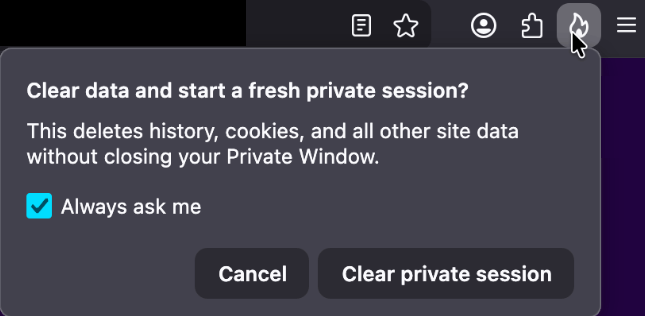
One of the more visible additions is a new “end private session” control in Private Browsing Mode. Instead of closing every private window to clear your traces, you now get a dedicated fire‑icon button next to the address bar that wipes the current private session’s data and immediately starts a fresh one.

End private session button

Under the hood, this clears the usual private browsing artifacts for that session, including history, cookies, cached files, and other site data that would normally disappear only when the last private window closes.

For people who routinely mix normal and private windows, this is safer and less error‑prone than hunting down every private tab before you walk away from the machine.

Firefox 151 also tightens its defenses against browser fingerprinting in the default “Standard” Enhanced Tracking Protection (ETP) mode. Mozilla says Firefox now limits the amount of device and browser information exposed to websites in a way that reduces the number of uniquely identifiable users by about 14% overall, and by roughly 49% on macOS.

This makes it harder for trackers to pick you out of the crowd, especially on platforms with fewer users to begin with (like certain macOS configurations). This reduces the privacy risk surface by default, which makes it harder for phishing and landing pages that redirect visitors to “categorize” you.

Another important change is Firefox’s “local network access restrictions,” which are now rolling out to all users, not just those who turned Enhanced Tracking Protection to Strict.

This means that when a website wants to communicate with devices on your local network, or with apps and services running on your machine, Firefox now asks for permission first. Chrome and Edge have been rolling out similar permission prompts.

Security

Firefox 151 also quietly fixes several security vulnerabilities.

The most notable example is CVE‑2026‑8953, a sandbox escape due to a use‑after‑free in the Disability Access APIs component. While there are currently no reports of in‑the‑wild exploitation for this specific bug at the time of writing, this is the kind of bug cybercriminals love.

A use-after-free (UAF) is a software memory vulnerability where a program attempts to access a memory location after it has been freed. If the program fails to clear the pointer to that freed memory, attackers can manipulate the error to crash the system or execute arbitrary code. A memory corruption leading to a sandbox escape is exactly the kind of link attackers want to complete a browser exploit chain.

How to update

If you’re running Firefox in a home or small‑office environment, we recommend updating to Firefox 151 as soon as possible to get the fingerprinting protections, local network access prompts, and security patches.

To update Firefox:

  • Open Firefox
  • Click the menu (three stacked lines) in the upper-right corner
  • Go to Help > About Firefox
  • Firefox will automatically check for updates and begin downloading them
  • Restart the browser when prompted to complete the update

Once your Firefox browser has been updated, it will show a green checkmark along with the message: “Firefox is up to date.”

Firefox is up to date

Let’s face it, an incognito window can only do so much. 
 
Breaches, dark web trading, credit fraud. Malwarebytes Identity Theft Protection monitors for all of it, alerts you fast, and comes with identity theft insurance. 

Biometrics, diagnoses, and bank details exposed in major healthcare breach

19 May 2026 at 17:56

NYC Health + Hospitals (NYC H+H) posted a data breach notice about a months‑long breach via a third‑party vendor that exposed highly sensitive patient and employee data for at least 1.8 million people, including medical records, government IDs, geolocation data, and even fingerprint and palm‑print biometrics.

NYC H+H detected suspicious activity on February 2, 2026, and later confirmed that an unauthorized actor had access to parts of its network from roughly late November 2025 through February 2026.

During this window, attackers copied files containing personal, medical, financial, and biometric information. The incident was reported to the US Department of Health and Human Services (HHS) on March 24, 2026, and currently affects at least 1.8 million individuals, making it one of the largest healthcare breaches of 2026 so far.

HHS filing

NYC H+H attributes the intrusion to a breach at an unnamed third‑party vendor that had access to its systems. This fits the current pattern of supply-chain compromises, where a vendor becomes the entry point for attackers to gain access to their clients’ systems or data.

Incidents like these are a textbook example of how deeply personal health data can fuel long‑term fraud, stalkerware‑like abuse, and permanent privacy loss.


Digital Footprint Scan

See if your personal data has been exposed.


Types of data

According to NYC H+H’s notice and related write‑ups, the exposed dataset is unusually broad and detailed.

We can divide the data into three distinct layers:

  • Classical PII, which can be combined with other leaked datasets: Full names and contact details. Government‑issued identifiers, including Social Security Numbers, driver’s license and passport numbers, other government ID numbers, taxpayer IDs, and IRS identity protection PINs. The breach also exposed billing and payment records, plus bank and card data, which can be used for direct financial theft and highly convincing social engineering.
  • Medical and insurance data: Detailed diagnoses, medication lists, and test results expose conditions people may have kept private from employers, family, or insurers, enabling blackmail, targeted scams, and discrimination. Insurance and claims data can be abused to submit fraudulent claims, redirect reimbursements, or impersonate existing identities in healthcare systems.
  • Biometrics: These are at least as sensitive as medical history because they tend to stay with you for life. They are not easy to erase or replace. Once compromised, large biometric databases become long‑term liabilities for everyone who relies on them as trustworthy identifiers.

Unfortunately, this is part of a broader pattern. The FBI’s Internet Crime Complaint Center (IC3) reports that healthcare was the most targeted critical infrastructure sector for ransomware in 2025, with 460 ransomware incidents and 182 reported healthcare data breaches.

The Change Healthcare ransomware attack alone exposed medical and billing data for more than 190 million Americans, highlighting how a single healthcare intermediary can disrupt an entire system.

What to do if you’re involved

If you’ve interacted with NYC Health + Hospitals, there’s a possibility your personal information could be affected.

NYC Health + Hospitals is making identity theft prevention and mitigation services, including credit monitoring, available through Kroll Information Assurance, LLC for a period of 24 months at no cost to all individuals who have worked for or been a patient of NYC Health + Hospitals. For more details check its data breach notice.

If you think you’ve been affected by a data breach, here are steps you can take to protect yourself:

  • Check the company’s advice. Every breach is different, so check with the company to find out what’s happened and follow any specific advice it offers.
  • Change your password. You can make a stolen password useless to thieves by changing it. Choose a strong password that you don’t use for anything else. Better yet, let a password manager choose one for you.
  • Enable two-factor authentication (2FA). If you can, use a FIDO2-compliant hardware key, laptop, or phone as your second factor. Some forms of 2FA can be phished just as easily as a password, but 2FA that relies on a FIDO2 device can’t be phished.
  • Watch out for impersonators. The criminals may contact you posing as the breached platform. Check the official website to see if it’s contacting victims and verify the identity of anyone who contacts you using a different communication channel.
  • Take your time. Phishing attacks often impersonate people or brands you know, and use themes that require urgent attention, such as missed deliveries, account suspensions, and security alerts.
  • Consider not storing your card details. It’s definitely more convenient to let sites remember your card details, but it increases risk if a retailer suffers a breach.
  • Set up identity monitoring, which alerts you if your personal information is found being traded illegally online and helps you recover after.

Let’s face it, an incognito window can only do so much. 
 
Breaches, dark web trading, credit fraud. Malwarebytes Identity Theft Protection monitors for all of it, alerts you fast, and comes with identity theft insurance. 
Facebook scam promises cheap Aldi meat boxes, steals payment info instead

19 May 2026 at 14:46

Sometimes you spot posts on social media that make you wonder if any moderation takes place at all.

Which is concerning, because twothirds of all online shopping scams now start on Facebook and Instagram. Online shopping scams are alarmingly common and have become one of the most frequently reported scam types in Australia. The Dutch police have also warned specifically about fake ads promising steep discounts.

Apparently, and this is an issue we’ve flagged before, social media platforms could stop scams, but they don’t because it hurts their revenue.

The Aldi meat box scam

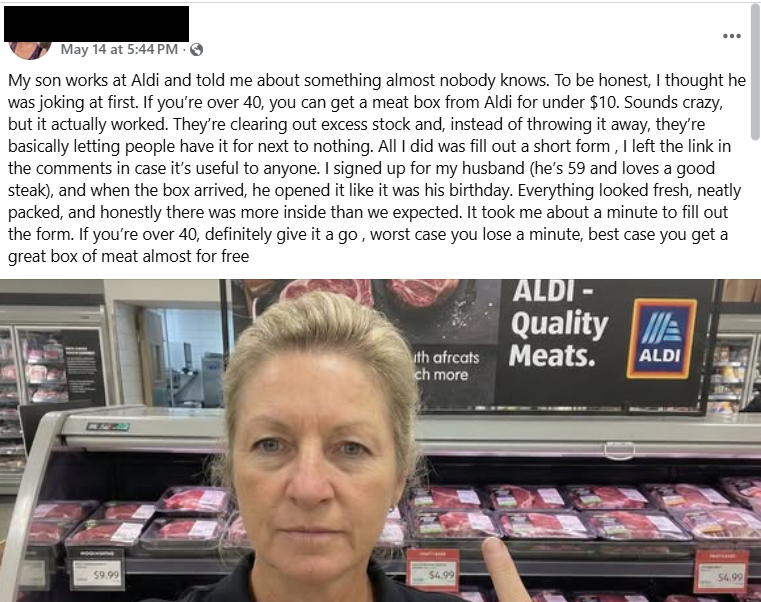
This Facebook post immediately rattled my cage:

Facebook post about Aldi meat box

This promotion is not from Aldi and is not endorsed by the company. A random account, which may be compromised or completely fake, posts:

“My son works at Aldi and told me about something almost nobody knows. To be honest, I thought he was joking at first. If you’re over 40, you can get a meat box from Aldi for under $10. Sounds crazy, but it actually worked. They’re clearing out excess stock and, instead of throwing it away, they’re basically letting people have it for next to nothing. All I did was fill out a short form , I left the link in the comments in case it’s useful to anyone. I signed up for my husband (he’s 59 and loves a good steak), and when the box arrived, he opened it like it was his birthday. Everything looked fresh, neatly packed, and honestly there was more inside than we expected. It took me about a minute to fill out the form. If you’re over 40, definitely give it a go , worst case you lose a minute, best case you get a great box of meat almost for free.”


Scam or legit? Scam Guard knows.


There are several red flags here. Malwarebytes Scam Guard flagged:

  • Unusual offer: Promises of high-value products (“meat box from Aldi for under $10”) for an extremely low price are classic signs of scams, especially when they leverage well-known brands.
  • Anecdotal story: The post uses a personal story (“My son works at Aldi…”) to appear trustworthy and relatable, a common technique in social engineering.
  • Age restriction: Arbitrarily targeting people over 40 is a psychological trick to make the offer feel exclusive and relevant.
  • External link: The most common tactic is to provide a link in the comments rather than in the main post to avoid automatic detection by the platform.
  • Urgency and simplicity: Encourages quick action with phrases like “took me about a minute,” downplaying any possible risk.

As it turns out, the possible risk, or “worst case” as the Facebook post calls it, is a lot worse than losing a minute of your time.

The link was posted as the first comment and used the link shortening service cutt[.]ly (and here’s why you should beware of those):

The link in the first comment

The first redirect sent me to a website where my device was fingerprinted using an embedded JavaScript before redirecting me to https://gifts-survey[.]life/click?key={identifier}, a site designed to mimic the Aldi website. I had my VPN set to the US.

Aldi meat box scam leads to a fake Aldi site.

The scam page immediately creates urgency with messages like “only 1 spot left” and “you only have 2 minutes to complete the survey,” trying to stop visitors from thinking things through.

The survey itself only asks basic questions, so there wasn’t much harm in clicking through it on my virtual machine.

Aldi meat box scam - fake Aldi site.

As a reward, I got to pick three out of nine boxes to win a prize. I’m happy to report that I “aced” that test.

Aldi meat box scam leads to a fake Aldi site.

So, I was forwarded to the scammers’ real goal. On the domain hyperbargainsflow[.]shop, visitors are prompted to enter payment details for their discounted meat box, plus an optional upsell for faster delivery.

Aldi meat box scam leads to a fake Aldi site requesting payment details.

The final page asks victims to hand over personal details, including their full name, contact information, and home address, along with payment details for the fake “delivery” fee.

The site also uses tricks like more than 1,000 fake 5-star ratings and attempts to auto-complete and auto-submit the form if fields are detected as pre-populated. Saves you the trouble of submitting all your data yourself. Isn’t that nice of them?

We found that similar campaigns have targeted Woolworths customers in South Africa and Australia using fake butcher profiles, and the Aldi angle has appeared in other countries as well.

How to stay safe

If a post promises a box of premium meat for the price of a sandwich, assume it is a scam until you can prove otherwise.

The same simple checks will help you avoid this Aldi meat box scam and the next look‑alike campaign that pops up tomorrow.

  • Sometimes scrolling past the enthusiastic, fake comments will reveal what real users are saying:
Comments on the Facebook post
  • You can also help slow these scams down by reporting them. On Facebook, click the three-dot menu on the post and choose Report post > Scam, fraud or false information.
  • If a deal claims to be “known only by insiders” or “almost nobody knows this,” treat it as a red flag, not a perk. Real retailers advertise widely and on their own accounts. They don’t hide genuine promotions in badly written Facebook posts from throwaway accounts.
  • Be wary of links posted in the comments. Scammers sometimes use that tactic to avoid automated scanning and reporting on the platform.
  • Check the browser address bar carefully. Scam pages can copy a brand’s logo and colors perfectly, but the domain name usually gives the game away. 
  • Never enter card details, your full address, or your phone number into a site you reached via a random social post, especially if the offer feels too good to be true. If you already did, contact your bank or card issuer as soon as possible and monitor your statements.
  • Secure your devices. Use an up-to-date, real-time anti-malware solution with web protection. Malwarebytes blocks connections to unsafe sites like these.
Malwarebytes blocks gifts-survey[.]life

Pro tip: Malwarebytes Scam Guard recognized the Facebook post as a scam and could have saved somebody’s day.


Let’s face it, an incognito window can only do so much. 
 
Breaches, dark web trading, credit fraud. Malwarebytes Identity Theft Protection monitors for all of it, alerts you fast, and comes with identity theft insurance. 

❌