
Normal view

Fake LastPass maintenance emails target users

22 January 2026 at 14:53

The LastPass Threat Intelligence, Mitigation, and Escalation (TIME) team has published a warning about an active phishing campaign in which fake “maintenance” emails pressure users to back up their vaults within 24 hours. The emails lead to credential-stealing phishing sites rather than any legitimate LastPass page.

The phishing campaign that started around January 19, 2026, uses emails that falsely claim upcoming infrastructure maintenance and urge users to “backup your vault in the next 24 hours.”

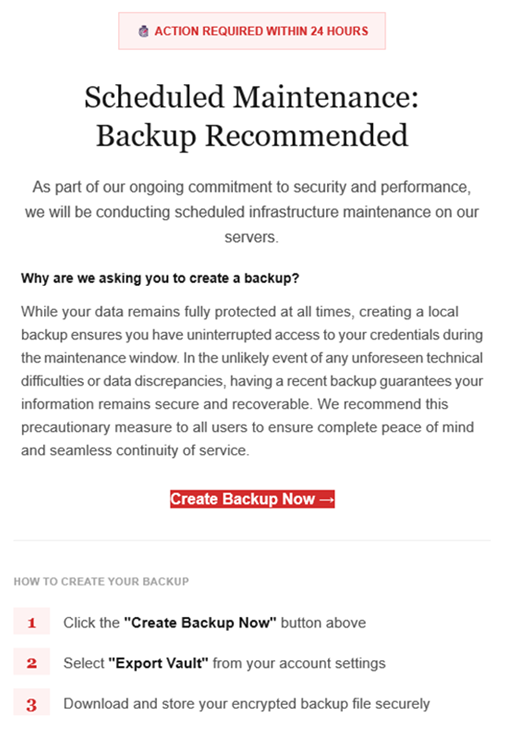
Example phishing email
Image courtesy of LastPass

“Scheduled Maintenance: Backup Recommended

As part of our ongoing commitment to security and performance, we will be conducting scheduled infrastructure maintenance on our servers.
Why are we asking you to create a backup?
While your data remains protected at all times, creating a local backup ensures you have access to your credentials during the maintenance window. In the unlikely event of any unforeseen technical difficulties or data discrepancies, having a recent backup guarantees your information remains secure and recoverable. We recommend this precautionary measure to all users to ensure complete peace of mind and seamless continuity of service.

Create Backup Now (link)

How to create your backup
1 Click the “Create Backup Now” button above
2 Select “Export Vault” from you account settings
3 Download and store your encrypted backup file securely”

The link in the email points to mail-lastpass[.]com, a domain that doesn’t belong to LastPass and has now been taken down.

Note that there are different subject lines in use. Here is a selection:

  • LastPass Infrastructure Update: Secure Your Vault Now
  • Your Data, Your Protection: Create a Backup Before Maintenance
  • Don’t Miss Out: Backup Your Vault Before Maintenance
  • Important: LastPass Maintenance & Your Vault Security
  • Protect Your Passwords: Backup Your Vault (24-Hour Window)

It is imperative for users to ignore instructions in emails like these. Giving away the login details for your password manager can be disastrous. For most users, it would provide access to enough information to carry out identity theft.

Stay safe

First and foremost, it’s important to understand that LastPass will never ask for your master password or demand immediate action under a tight deadline. Generally speaking, there are more guidelines that can help you stay safe.

  • Don’t click on links in unsolicited emails without verifying with the trusted sender that they’re legitimate.
  • Always log in directly on the platform that you are trying to access, rather than through a link.
  • Use a real-time, up-to-date anti-malware solution with a web protection module to block malicious sites.
  • Report phishing emails to the company that’s being impersonated, so they can alert other customers. In this case emails were forwarded to abuse@lastpass.com.

Pro tip: Malwarebytes Scam Guard  would have recognized this email as a scam and advised you how to proceed.


We don’t just report on threats—we help safeguard your entire digital identity

Cybersecurity risks should never spread beyond a headline. Protect your, and your family’s, personal information by using identity protection.
Under Armour ransomware breach: data of 72 million customers appears on the dark web

22 January 2026 at 13:02

When reports first emerged in November 2025 that sportswear giant Under Armour had been hit by the Everest ransomware group, the story sounded depressingly familiar: a big brand, a huge trove of data, and a lot of unanswered questions. Since then, the narrative around what actually happened has split into two competing versions—cautious corporate statements on one side and mounting evidence on the other that strongly suggests a large customer dataset is now circulating online.

Public communications and legal language talk about ongoing investigations, limited confirmation, and careful wording around “potential” impact. For many customers, that creates the impression that details are still emerging and that it’s unclear how serious the incident is. Meanwhile, a class action lawsuit filed in the US alleges negligence in data protection and references large‑scale exfiltration of sensitive information, including customer—and possibly employee—data during a November 2025 ransomware attack. Those lawsuits are, by definition, allegations, but they add weight to the idea that this is not a minor incident.

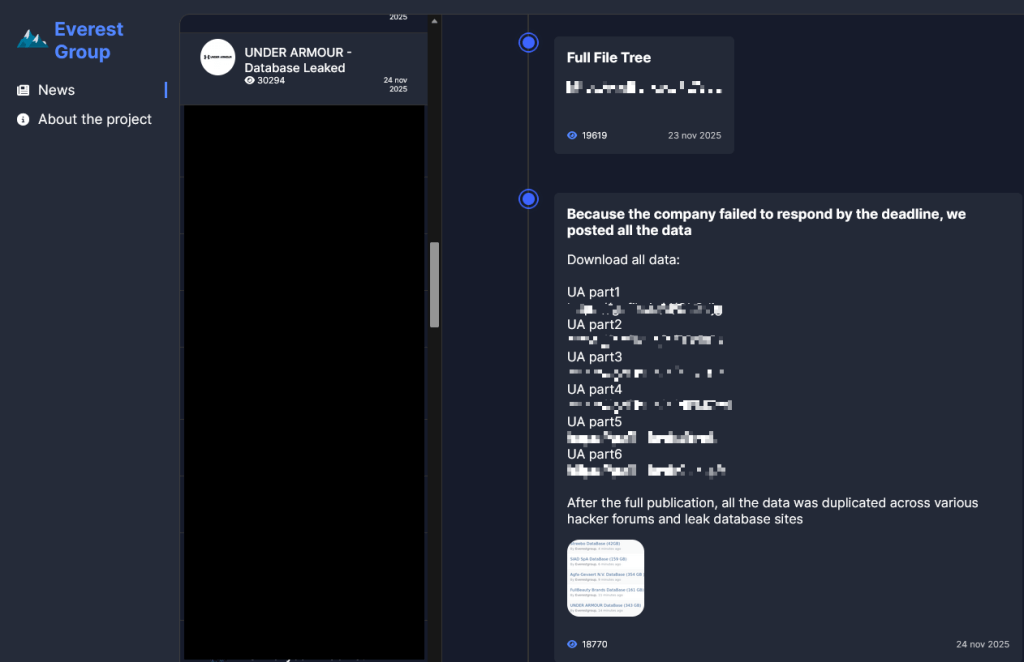
The Everest ransomware group claimed responsibility for the breach after Under Armour allegedly “failed to respond by the deadline.”

Everest Group leak site

From the cybercriminals’ perspective, that means negotiations are over and the data has been published.

The Everest leak site also states that:

“After the full publication, all the data was duplicated across various hacker forums and leak database sites.”

Which seems to be confirmed by posts like this one, where the poster claims the data set contains full names, email addresses, phone numbers, physical locations, genders, purchase histories, and preferences. The data set contains 191,577,365 records including 72,727,245 unique email addresses.

Data made available on the Dark Web

So where does that leave Under Armour customers? The cautious corporate framing and the aggressive cybercriminal claims can’t both be entirely accurate, but they do not carry equal weight when it comes to assessing real-world risk. Ransomware groups sometimes lie about their access, but spinning up a major leak entry, publishing sample data, and distributing it across underground forums is a lot of work for a bluff that could be quickly disproven by affected users. Combined with the “Database Leaked” status on the Everest site, the balance of probabilities suggests that a substantial customer database is now in the wild, even if not every detail in the attackers’ claims is accurate.

Protecting yourself after a data breach

If you think you have been affected by a data breach, here are steps you can take to protect yourself:

  • Check the company’s advice. Every breach is different, so check with the company to find out what’s happened and follow any specific advice it offers.
  • Change your password. You can make a stolen password useless to thieves by changing it. Choose a strong password that you don’t use for anything else. Better yet, let a password manager choose one for you.
  • Enable two-factor authentication (2FA). If you can, use a FIDO2-compliant hardware key, laptop, or phone as your second factor. Some forms of 2FA can be phished just as easily as a password, but 2FA that relies on a FIDO2 device can’t be phished.
  • Watch out for impersonators. The thieves may contact you posing as the breached platform. Check the official website to see if it’s contacting victims and verify the identity of anyone who contacts you using a different communication channel.
  • Take your time. Phishing attacks often impersonate people or brands you know, and use themes that require urgent attention, such as missed deliveries, account suspensions, and security alerts.
  • Consider not storing your card details. It’s definitely more convenient to let sites remember your card details, but but it increases risk if a retailer suffers a breach.
  • Set up identity monitoring, which alerts you if your personal information is found being traded illegally online and helps you recover after.

We don’t just report on threats—we help safeguard your entire digital identity

Cybersecurity risks should never spread beyond a headline. Protect your, and your family’s, personal information by using identity protection.

❌