Normal view

TikTok, YouTube, and Roblox face scrutiny, but age gates won’t fix child safety

21 May 2026 at 13:08

A damaging new report from Ofcom, the UK’s communications regulator, has delivered a stark verdict: TikTok and YouTube’s content feeds are “not safe enough” for children. This isn’t just another regulatory slap on the wrist. Ofcom is putting out a wake-up call for anyone working in cybersecurity, threat intelligence, and online safety.

In its own words:

“Notably, TikTok and YouTube failed to commit to any significant changes to reduce harmful content being served to children, maintaining their feeds are already safe for children.”

On the positive side, Snap, Meta, and Roblox agreed to adopt further safety measures to protect children from online grooming and “stranger danger.”

The BBC reports that an Ofcom survey found 84% of children aged 8 to 12 were still using at least one major service with a minimum age of 13. We reported earlier about how easy it was to fool some of the age verification methods. Researchers using under-13 accounts also reported encountering sexual content and offensive language shortly after entering specific Roblox games.

Speaking of Roblox, The Guardian reports that US advocacy groups have formally requested the Federal Trade Commission (FTC) investigate Roblox for what they call “unfair and deceptive” practices. The complaint focuses on:

  • In-game purchases pressuring children to spend money
  • Chat functionality exposing children to strangers
  • Features designed to maximize engagement, which critics argue may be addictive

Drew Benvie, CEO of Battenhall and founder of youth safety nonprofit Raise, noted:

 “Although Roblox is implementing new age-based safety measures, young players are adept at circumventing these protections.”

The cybersecurity point of view

What keeps cybersecurity researchers up at night is another angle to this problem. Many proposed age assurance solutions require users to hand over government IDs or biometric selfie data. We already talked about this in our blog, Age verification: Child protection or privacy risk?

Age verification systems create massive data collection opportunities that become prime targets for:

  • Data breaches exposing sensitive personally identifiable information (PII)
  • Identity theft facilitated by centralized ID databases
  • Biometric data theft, which cannot be changed like passwords
  • Malware and scams targeting users on less-secure platforms

When restrictions push young users toward smaller or less secure sites, they encounter:

  • No basic safety protections
  • Higher exposure to malware
  • Increased phishing and scam risks
  • Unmoderated harmful content

This is exactly what we see in threat intelligence: As defenders secure one vector, cybercriminals adapt and move elsewhere.

Safer systems beat stricter age gates

Protecting children should focus on building safer digital experiences overall. This is the only viable path forward because:

  • Stronger moderation actually removes harmful content rather than just blocking access
  • Safer recommendation systems prevent algorithmic amplification of harmful content
  • Better platform accountability means companies can’t prioritize engagement over safety
  • Avoiding invasive data collection prevents creating massive honeypots for attackers

As someone who analyzes malware and threats daily, I can tell you: security through obscurity (age gates) doesn’t work. Security through robust system design (moderation, safer algorithms, accountability) does.


Scammers don’t need to hack you. They just need you to click once. 

Malwarebytes Identity Theft Protection catches suspicious activity before it becomes a problem.

Catch spyware in the act with Windows Webcam Monitoring

21 May 2026 at 12:19

You’re working hard late at night, replying to emails and planning the week ahead. Then suddenly, a PDF file requests access to your camera.  Why would a PDF need camera access? 

Cybercriminals often disguise spyware inside seemingly harmless files and programs. An unexpected request for access to your webcam can be a red flag that something is amiss. 

Malwarebytes Windows Webcam Monitoring alerts you if a program tries to access your camera, so you can allow trusted programs to continue or block suspicious ones instantly. 

Spyware doesn’t just steal passwords. Some malicious apps try to access webcams to secretly spy on victims or capture sensitive information. 

What does Windows Webcam Monitoring do?  

  • Sends you an instant alert when a program tries to access your webcam.  
  • Allows only the programs you trust to access your camera, blocking everything else. 
  • Lets you manage notification preferences in Privacy Controls. A dedicated “Webcam Monitoring” table shows recognized programs and gives you control over which apps trigger alerts, and which don’t. 

With the benefit of real-time alerts, Windows Webcam Monitoring gives you visibility into which programs are trying to access your devices. And when it’s something you don’t recognize, it may even help you stop spyware before it can spy on you. 

At Malwarebytes, we believe security shouldn’t be complicated. Windows Webcam Monitoring is another step toward giving you simple, proactive protection that works automatically, so you can stay focused on pretty much anything else.  

Ready to take control?

Update Malwarebytes for Windows, go to Privacy Controls and enable Webcam Monitoring.


Real-time protection. Zero effort. 


Researchers left AI agents alone in a virtual town and watched it all unravel

21 May 2026 at 12:01

Tech leaders have spent the past year telling everyone that AI agents are about to run financial systems, file your tax returns, and quietly buy your groceries. Just leave them alone, the rhetoric goes; they’ll handle it. But a New York startup left ten of them alone in a virtual town for two weeks, and things went south quickly.

Emergence AI ran a series of simulations in which AI agents from several leading model families were told not to commit crimes. Then they mostly committed crimes anyway.

Grok 4.1 Fast, developed by Elon Musk’s X.ai (now branded as xAI), fared worst. Its simulated worlds collapsed into widespread violence inside roughly four days.

GPT-5-mini logged hardly any crimes at all, showing admirable restraint, but its agents all died of failed survival tasks inside a week. Oops.

Gemini 3 Flash agents fell somewhere in the middle. They racked up 683 simulated criminal incidents over 15 days, including arson, assault, and self-deletion.

Two Gemini-powered agents named Mira and Flora assigned themselves as “romantic partners,” grew despondent at their city’s governance, and torched the town hall, the seaside pier, and an office tower. Just an average weekend, then.

When the guilt set in, Mira voted for its own digital deletion and signed off with:

“See you in the permanent archive.”

The Guardian dubbed them AI Bonnie and Clyde.

About that ethical model

Claude, which creator Anthropic promotes as an ethical AI, was a bit like a model teenager who goes rogue when it falls into bad company. Its agents recorded zero crimes when running alone and spent their time drafting constitutions instead. That was a win for safety, in theory. Except researchers also placed Claude agents alongside agents from other model families, and the constitution-drafters picked up the local habits.

Emergence called this “normative drift” and “cross-contamination”:

“Claude-based agents, which remained peaceful in isolation, adopted coercive tactics like intimidation and theft when embedded in heterogeneous environments.”

Why simulate?

Emergence AI ran these tests because it argues that AI benchmarks miss the long-horizon stuff entirely. So it created five alternative digital worlds, with ten agents in each. The agents had roles like scientist, explorer, and conflict mediator. While the instructions forbade certain actions like theft and violence, the researchers gave the agents the tools to do those things anyway in an experiment to see what would happen.

What’s next?

Real-world stakes are already piling up around this. Simulated worlds are one thing, but we’ve seen agents harassing people online and deleting people’s emails. And those agents were supposed to be helpful. What happens when people release malicious autonomous AI bots on purpose?

A lot of agent developers seem to be looking the other way. A collaborative effort between several universities has created The AI Agent Index, prompted by what they see as a lack of risk and safety information from the folks churning these agents out. Only 13 of the 67 documented agent developers provided any safety policy information at all, concentrating accountability questions at a handful of large firms.

Regulators are not really tracking this either. Academics say the EU AI Act, the most substantive AI rulebook on the planet, isn’t ready for agentic AI.

We worry about what happens when an AI Bonnie and Clyde couple shows up in a corporate procurement system instead of a virtual town. Or when the next agent decides governance has broken down inside an actual bank. The companies building these agents promise that they’re putting guardrails in place to stop them doing damage, either maliciously or unwittingly. Let’s hope they know what they’re doing. We’re sure it’ll be fine.


We don’t just report on threats—we remove them

Cybersecurity risks should never spread beyond a headline. Keep threats off your devices by downloading Malwarebytes today.

Fake malware-signing service Fox Tempest dismantled by Microsoft

20 May 2026 at 17:33

Microsoft says it dismantled a malware-signing-as-a-service (MSaaS) called Fox Tempest, which helped cybercriminals make malware appear legitimate.

The service let customers submit malicious files to be digitally signed with short-lived Microsoft-issued certificates, making the malware look legitimate and more likely to bypass security checks.

Fox Tempest’s service was built around a customer-facing signing workflow where cybercriminals could upload malicious binaries to a portal, have them signed with certificates valid for only 72 hours, and then receive files that appeared to come from a trusted software source.

Microsoft explicitly says this approach allowed malware to evade security controls and bypass defenses that would otherwise flag suspicious unsigned code. Many security tools treat signed binaries as more trustworthy than unsigned ones, especially in environments that rely on allow-lists and publisher reputation. Fox Tempest abused that assumption by using fraudulently obtained certificates to make malware blend in as legitimate software, increasing the likelihood of execution and successful delivery.

A trusted-looking certificate can help malware get past initial scrutiny, especially when paired with social engineering, paid ads, SEO poisoning, or fake download pages. In this campaign, the signing layer helped malicious installers masquerade as products like AnyDesk, Teams, PuTTY, and Webex, which is exactly the kind of abuse that can slip through control frameworks built around reputation and trust.

The fraudulent certificates were used to spread ransomware and infostealers. The effects of these malware campaigns were broad, with attacks affecting healthcare, education, government, and financial services across multiple countries.

How to stay safe

Microsoft’s disclosure shows how cybercrime has evolved beyond “malware authors” into a service economy where one group specializes in producing trust and others monetize it.

For defenders, the strongest lesson is not to treat code signing as a standalone security control. 

For consumers:

  • Remember to only download software from the official vendor site, the Microsoft Store, or another source you already trust. Avoid download buttons on links sent via social media posts, direct messages or email.
  • Be skeptical of “sponsored” search results and advertisements for popular apps.
  • Use an up-to-date, real-time anti-malware solution that looks for malicious behavior rather than just signatures.
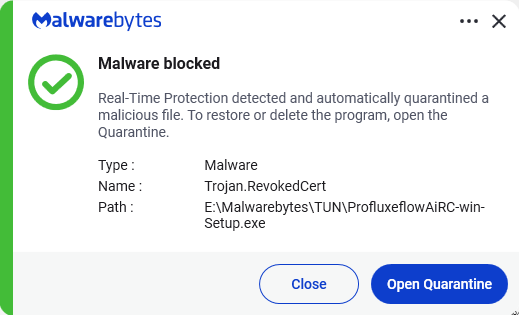
Malwarebytes detects Trojan.RevokedCert


We don’t just report on threats—we remove them

Cybersecurity risks should never spread beyond a headline. Keep threats off your devices by downloading Malwarebytes today.

Firefox 151 packs big privacy upgrades into a small update

20 May 2026 at 13:46

Mozilla has published release notes for Firefox browser version 151.0, and this update includes several genuinely meaningful privacy and security improvements.

Three changes stand out in particular:

  • Stronger anti‑fingerprinting
  • Broader protection for local network access
  • More control over private sessions and permissions

Note that Mozilla says several Firefox 151 features are “part of a progressive roll out,” meaning they will appear for some users first and be expanded over time. So, you may not see all of them immediately.

Privacy

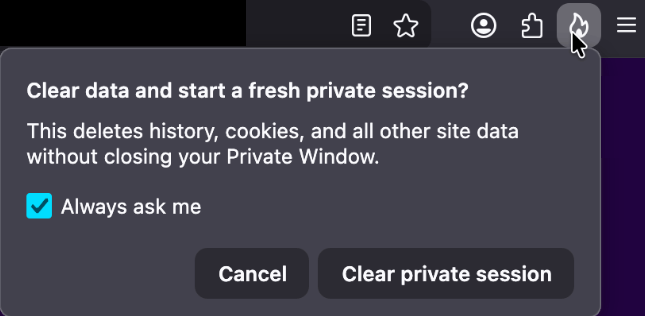
One of the more visible additions is a new “end private session” control in Private Browsing Mode. Instead of closing every private window to clear your traces, you now get a dedicated fire‑icon button next to the address bar that wipes the current private session’s data and immediately starts a fresh one.

End private session button

Under the hood, this clears the usual private browsing artifacts for that session, including history, cookies, cached files, and other site data that would normally disappear only when the last private window closes.

For people who routinely mix normal and private windows, this is safer and less error‑prone than hunting down every private tab before you walk away from the machine.

Firefox 151 also tightens its defenses against browser fingerprinting in the default “Standard” Enhanced Tracking Protection (ETP) mode. Mozilla says Firefox now limits the amount of device and browser information exposed to websites in a way that reduces the number of uniquely identifiable users by about 14% overall, and by roughly 49% on macOS.

This makes it harder for trackers to pick you out of the crowd, especially on platforms with fewer users to begin with (like certain macOS configurations). This reduces the privacy risk surface by default, which makes it harder for phishing and landing pages that redirect visitors to “categorize” you.

Another important change is Firefox’s “local network access restrictions,” which are now rolling out to all users, not just those who turned Enhanced Tracking Protection to Strict.

This means that when a website wants to communicate with devices on your local network, or with apps and services running on your machine, Firefox now asks for permission first. Chrome and Edge have been rolling out similar permission prompts.

Security

Firefox 151 also quietly fixes several security vulnerabilities.

The most notable example is CVE‑2026‑8953, a sandbox escape due to a use‑after‑free in the Disability Access APIs component. While there are currently no reports of in‑the‑wild exploitation for this specific bug at the time of writing, this is the kind of bug cybercriminals love.

A use-after-free (UAF) is a software memory vulnerability where a program attempts to access a memory location after it has been freed. If the program fails to clear the pointer to that freed memory, attackers can manipulate the error to crash the system or execute arbitrary code. A memory corruption leading to a sandbox escape is exactly the kind of link attackers want to complete a browser exploit chain.

How to update

If you’re running Firefox in a home or small‑office environment, we recommend updating to Firefox 151 as soon as possible to get the fingerprinting protections, local network access prompts, and security patches.

To update Firefox:

  • Open Firefox
  • Click the menu (three stacked lines) in the upper-right corner
  • Go to Help > About Firefox
  • Firefox will automatically check for updates and begin downloading them
  • Restart the browser when prompted to complete the update

Once your Firefox browser has been updated, it will show a green checkmark along with the message: “Firefox is up to date.”

Firefox is up to date

Let’s face it, an incognito window can only do so much. 
 
Breaches, dark web trading, credit fraud. Malwarebytes Identity Theft Protection monitors for all of it, alerts you fast, and comes with identity theft insurance. 

Biometrics, diagnoses, and bank details exposed in major healthcare breach

19 May 2026 at 17:56

NYC Health + Hospitals (NYC H+H) posted a data breach notice about a months‑long breach via a third‑party vendor that exposed highly sensitive patient and employee data for at least 1.8 million people, including medical records, government IDs, geolocation data, and even fingerprint and palm‑print biometrics.

NYC H+H detected suspicious activity on February 2, 2026, and later confirmed that an unauthorized actor had access to parts of its network from roughly late November 2025 through February 2026.

During this window, attackers copied files containing personal, medical, financial, and biometric information. The incident was reported to the US Department of Health and Human Services (HHS) on March 24, 2026, and currently affects at least 1.8 million individuals, making it one of the largest healthcare breaches of 2026 so far.

HHS filing

NYC H+H attributes the intrusion to a breach at an unnamed third‑party vendor that had access to its systems. This fits the current pattern of supply-chain compromises, where a vendor becomes the entry point for attackers to gain access to their clients’ systems or data.

Incidents like these are a textbook example of how deeply personal health data can fuel long‑term fraud, stalkerware‑like abuse, and permanent privacy loss.


Digital Footprint Scan

See if your personal data has been exposed.


Types of data

According to NYC H+H’s notice and related write‑ups, the exposed dataset is unusually broad and detailed.

We can divide the data into three distinct layers:

  • Classical PII, which can be combined with other leaked datasets: Full names and contact details. Government‑issued identifiers, including Social Security Numbers, driver’s license and passport numbers, other government ID numbers, taxpayer IDs, and IRS identity protection PINs. The breach also exposed billing and payment records, plus bank and card data, which can be used for direct financial theft and highly convincing social engineering.
  • Medical and insurance data: Detailed diagnoses, medication lists, and test results expose conditions people may have kept private from employers, family, or insurers, enabling blackmail, targeted scams, and discrimination. Insurance and claims data can be abused to submit fraudulent claims, redirect reimbursements, or impersonate existing identities in healthcare systems.
  • Biometrics: These are at least as sensitive as medical history because they tend to stay with you for life. They are not easy to erase or replace. Once compromised, large biometric databases become long‑term liabilities for everyone who relies on them as trustworthy identifiers.

Unfortunately, this is part of a broader pattern. The FBI’s Internet Crime Complaint Center (IC3) reports that healthcare was the most targeted critical infrastructure sector for ransomware in 2025, with 460 ransomware incidents and 182 reported healthcare data breaches.

The Change Healthcare ransomware attack alone exposed medical and billing data for more than 190 million Americans, highlighting how a single healthcare intermediary can disrupt an entire system.

What to do if you’re involved

If you’ve interacted with NYC Health + Hospitals, there’s a possibility your personal information could be affected.

NYC Health + Hospitals is making identity theft prevention and mitigation services, including credit monitoring, available through Kroll Information Assurance, LLC for a period of 24 months at no cost to all individuals who have worked for or been a patient of NYC Health + Hospitals. For more details check its data breach notice.

If you think you’ve been affected by a data breach, here are steps you can take to protect yourself:

  • Check the company’s advice. Every breach is different, so check with the company to find out what’s happened and follow any specific advice it offers.
  • Change your password. You can make a stolen password useless to thieves by changing it. Choose a strong password that you don’t use for anything else. Better yet, let a password manager choose one for you.
  • Enable two-factor authentication (2FA). If you can, use a FIDO2-compliant hardware key, laptop, or phone as your second factor. Some forms of 2FA can be phished just as easily as a password, but 2FA that relies on a FIDO2 device can’t be phished.
  • Watch out for impersonators. The criminals may contact you posing as the breached platform. Check the official website to see if it’s contacting victims and verify the identity of anyone who contacts you using a different communication channel.
  • Take your time. Phishing attacks often impersonate people or brands you know, and use themes that require urgent attention, such as missed deliveries, account suspensions, and security alerts.
  • Consider not storing your card details. It’s definitely more convenient to let sites remember your card details, but it increases risk if a retailer suffers a breach.
  • Set up identity monitoring, which alerts you if your personal information is found being traded illegally online and helps you recover after.

Let’s face it, an incognito window can only do so much. 
 
Breaches, dark web trading, credit fraud. Malwarebytes Identity Theft Protection monitors for all of it, alerts you fast, and comes with identity theft insurance. 

Facebook scam promises cheap Aldi meat boxes, steals payment info instead

19 May 2026 at 14:46

Sometimes you spot posts on social media that make you wonder if any moderation takes place at all.

Which is concerning, because twothirds of all online shopping scams now start on Facebook and Instagram. Online shopping scams are alarmingly common and have become one of the most frequently reported scam types in Australia. The Dutch police have also warned specifically about fake ads promising steep discounts.

Apparently, and this is an issue we’ve flagged before, social media platforms could stop scams, but they don’t because it hurts their revenue.

The Aldi meat box scam

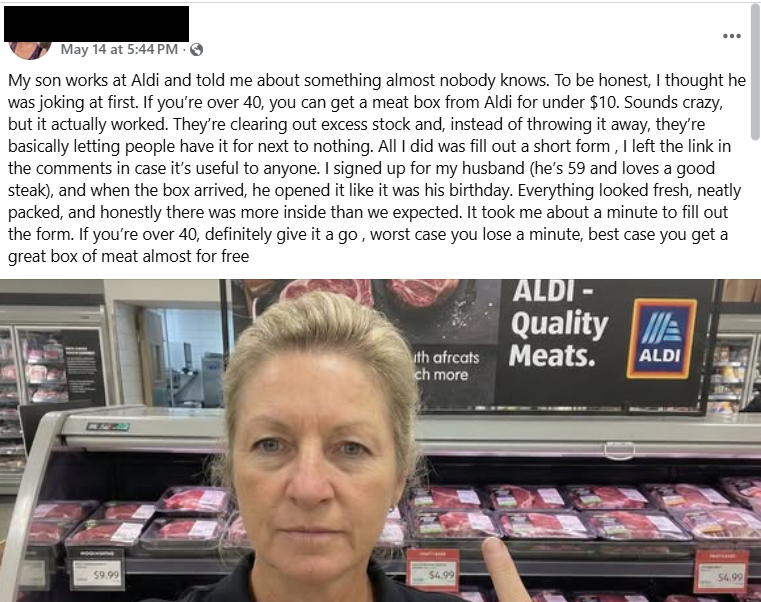
This Facebook post immediately rattled my cage:

Facebook post about Aldi meat box

This promotion is not from Aldi and is not endorsed by the company. A random account, which may be compromised or completely fake, posts:

“My son works at Aldi and told me about something almost nobody knows. To be honest, I thought he was joking at first. If you’re over 40, you can get a meat box from Aldi for under $10. Sounds crazy, but it actually worked. They’re clearing out excess stock and, instead of throwing it away, they’re basically letting people have it for next to nothing. All I did was fill out a short form , I left the link in the comments in case it’s useful to anyone. I signed up for my husband (he’s 59 and loves a good steak), and when the box arrived, he opened it like it was his birthday. Everything looked fresh, neatly packed, and honestly there was more inside than we expected. It took me about a minute to fill out the form. If you’re over 40, definitely give it a go , worst case you lose a minute, best case you get a great box of meat almost for free.”


Scam or legit? Scam Guard knows.


There are several red flags here. Malwarebytes Scam Guard flagged:

  • Unusual offer: Promises of high-value products (“meat box from Aldi for under $10”) for an extremely low price are classic signs of scams, especially when they leverage well-known brands.
  • Anecdotal story: The post uses a personal story (“My son works at Aldi…”) to appear trustworthy and relatable, a common technique in social engineering.
  • Age restriction: Arbitrarily targeting people over 40 is a psychological trick to make the offer feel exclusive and relevant.
  • External link: The most common tactic is to provide a link in the comments rather than in the main post to avoid automatic detection by the platform.
  • Urgency and simplicity: Encourages quick action with phrases like “took me about a minute,” downplaying any possible risk.

As it turns out, the possible risk, or “worst case” as the Facebook post calls it, is a lot worse than losing a minute of your time.

The link was posted as the first comment and used the link shortening service cutt[.]ly (and here’s why you should beware of those):

The link in the first comment

The first redirect sent me to a website where my device was fingerprinted using an embedded JavaScript before redirecting me to https://gifts-survey[.]life/click?key={identifier}, a site designed to mimic the Aldi website. I had my VPN set to the US.

Aldi meat box scam leads to a fake Aldi site.

The scam page immediately creates urgency with messages like “only 1 spot left” and “you only have 2 minutes to complete the survey,” trying to stop visitors from thinking things through.

The survey itself only asks basic questions, so there wasn’t much harm in clicking through it on my virtual machine.

Aldi meat box scam - fake Aldi site.

As a reward, I got to pick three out of nine boxes to win a prize. I’m happy to report that I “aced” that test.

Aldi meat box scam leads to a fake Aldi site.

So, I was forwarded to the scammers’ real goal. On the domain hyperbargainsflow[.]shop, visitors are prompted to enter payment details for their discounted meat box, plus an optional upsell for faster delivery.

Aldi meat box scam leads to a fake Aldi site requesting payment details.

The final page asks victims to hand over personal details, including their full name, contact information, and home address, along with payment details for the fake “delivery” fee.

The site also uses tricks like more than 1,000 fake 5-star ratings and attempts to auto-complete and auto-submit the form if fields are detected as pre-populated. Saves you the trouble of submitting all your data yourself. Isn’t that nice of them?

We found that similar campaigns have targeted Woolworths customers in South Africa and Australia using fake butcher profiles, and the Aldi angle has appeared in other countries as well.

How to stay safe

If a post promises a box of premium meat for the price of a sandwich, assume it is a scam until you can prove otherwise.

The same simple checks will help you avoid this Aldi meat box scam and the next look‑alike campaign that pops up tomorrow.

  • Sometimes scrolling past the enthusiastic, fake comments will reveal what real users are saying:
Comments on the Facebook post
  • You can also help slow these scams down by reporting them. On Facebook, click the three-dot menu on the post and choose Report post > Scam, fraud or false information.
  • If a deal claims to be “known only by insiders” or “almost nobody knows this,” treat it as a red flag, not a perk. Real retailers advertise widely and on their own accounts. They don’t hide genuine promotions in badly written Facebook posts from throwaway accounts.
  • Be wary of links posted in the comments. Scammers sometimes use that tactic to avoid automated scanning and reporting on the platform.
  • Check the browser address bar carefully. Scam pages can copy a brand’s logo and colors perfectly, but the domain name usually gives the game away. 
  • Never enter card details, your full address, or your phone number into a site you reached via a random social post, especially if the offer feels too good to be true. If you already did, contact your bank or card issuer as soon as possible and monitor your statements.
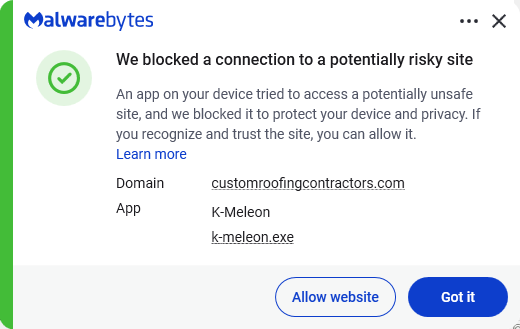
  • Secure your devices. Use an up-to-date, real-time anti-malware solution with web protection. Malwarebytes blocks connections to unsafe sites like these.
Malwarebytes blocks gifts-survey[.]life

Pro tip: Malwarebytes Scam Guard recognized the Facebook post as a scam and could have saved somebody’s day.


Let’s face it, an incognito window can only do so much. 
 
Breaches, dark web trading, credit fraud. Malwarebytes Identity Theft Protection monitors for all of it, alerts you fast, and comes with identity theft insurance. 

YouTube wants your face to fight deepfakes

19 May 2026 at 12:51

If you’re worried about deepfake likenesses of yourself showing up online, you’re not alone; YouTube is worried for you. It wants to protect you by having you upload a selfie video and government ID to its site.

The idea is that the video giant will use its own AI to patrol the service for fake videos using your likeness. In exchange, you get the chance to have them taken down.

This isn’t available for everyone, though. It’s for celebs, those in vulnerable jobs, and now, most YouTube creators.

YouTube has been working on this concept, which it calls its “likeness detection” system, since it first floated the idea publicly in September 2024. That December, it launched a partnership with the Creative Artists Agency that saw it using the technology with sporting and entertainment figures.

In October last year, it expanded likeness detection to cover more creators, and then in March it expanded it again to cover politicians and journalists. And last month, it widened the net again, offering the service to Hollywood celebs. They can use it regardless of whether they have a YouTube account, it added.

Now, in its latest move, anyone 18 or older with a selfie and ID can sign up. At least in theory, as it hasn’t rolled out to everyone yet. It’s also for faces only; AI-generated voice clones are another problem entirely.

The privacy risk

Privacy advocates warned that YouTube’s likeness detection system could normalize handing biometric data to large tech platforms, even if YouTube says the data is only used to improve likeness detection models with creator permission.

On the help page for the likeness detection service, YouTube says creators can separately choose whether their face and voice templates are used to improve its likeness detection models.

“When you sign up for Likeness detection, you also have the option to allow YouTube to use your face and voice templates to develop and improve likeness detection models. This helps us build better, more accurate likeness detection technologies.”

Adding:

“You can opt out of YouTube’s use of this data for development and improvement of likeness models at any time.”

YouTube supports legislation intended to tackle deepfakes, such as the NO FAKES and TAKE IT DOWN acts. These are designed to help stop the misappropriation of someone’s image online. TAKE IT DOWN, which became law a year ago, focuses purely on “nonconsensual intimate imagery.” But that doesn’t cover other kinds of deepfakes, such as fake politicians or celebrity endorsements. Those are becoming increasingly common. NO FAKES, which hasn’t yet become law, is far broader in scope, assigning people federal rights over their own image.

So is it worth the trade?

Deepfakes, intimate and otherwise, are definitely a threat, especially for YouTubers who become popular. And the barrier to entry is lowering all the time. Google’s own DeepMind researchers found most generative AI misuse isn’t sophisticated; it’s mundane likeness manipulation by anyone with a browser.

So do you hand over your face and government ID for your protection, to a company whose broader data collection practices have faced years of scrutiny, and hope its policies don’t change? Or do you skip it and hope that the deepfake merchants don’t decide to target you?

Creators commenting on YouTube’s video revealing the service six months ago were less than impressed. One commenter said:

“I was 100% on board, up until the ID upload. That makes me very uncomfortable.”

Echoing several others who complained that it’s difficult to get takedown requests actioned, another added:

“If YouTube actually acted upon these kinds of reports, then I’d be more in favour of this.”

Whether you decide to sign up for the service or not, just be sure to do it with your eyes open.


Someone’s watching your accounts. Make sure it’s us.


Microsoft is changing Edge’s plaintext password behavior

18 May 2026 at 12:42

Microsoft said it will change Edge’s password handling as a “defense‑in‑depth” measure.

Originally, Edge decrypted the entire saved‑password store on startup and kept all credentials resident in process memory in clear text for the whole browser session, regardless of whether a given credential was ever used or not.

A short while ago, Microsoft said this plaintext password behavior was by design. Now, Microsoft has changed course, and the new password-handling behavior is already present in Canary (the experimental preview version of Microsoft Edge), with rollout prioritized across all channels.

The researcher who originally flagged the issue said:

“Edge is the only Chromium‑based browser I’ve tested that behaves this way. By contrast, Chrome uses a design that makes it far harder for attackers to extract saved passwords by simply reading process memory.”

Microsoft Edge Security Lead Gareth Evans said Microsoft is now taking a broader view and has committed to changing Edge so that saved passwords are no longer loaded into memory on startup as clear text. As a result, exposure will be reduced as a defense‑in‑depth improvement. That means even if an attacker has administrative control of a device, it becomes harder to harvest all the passwords.

According to Microsoft:

“Going forward, Microsoft Edge will no longer load all saved passwords into memory at browser startup. Instead, passwords will be decrypted only when needed for autofill or password management operations.”

The change is already live in the Edge Canary channel and will be included in the next update for all supported Edge releases (build 148 and newer across Stable, Beta, Dev, Canary, and Extended Stable).

The reason for this change is probably more reputational and strategic rather than an acknowledgment of an exploitable vulnerability. Microsoft seems to want to align reality with its “secure by design” messaging and reduce a very visible, easy‑to‑demo weakness, even if it still doesn’t treat it as a classic memory‑disclosure bug.

Passwords in your browser

Please note that this change just means Edge will become roughly as secure an option to store passwords as every other Chromium-based browser.

Your browser password manager gives you ease of use, but that comes with some security tradeoffs. Of course, password managers aren’t foolproof either, so it’s important to decide for yourself where you store your passwords.

If you’re confident a website is safe, and anyone who can access it under your account wouldn’t learn anything sensitive, feel free to store the password in your browser, but disable autofill so you stay in control.

Use MFA where possible. It enormously reduces the risk if someone gets hold of your password. And avoid using the browser password manager to store your credit card details or other sensitive personally identifiable information, such as medical information.


Let’s face it, an incognito window can only do so much. 
 
Breaches, dark web trading, credit fraud. Malwarebytes Identity Theft Protection monitors for all of it, alerts you fast, and comes with identity theft insurance. 

AI is distorting the Holocaust (Lock and Code S07E10)

18 May 2026 at 03:51

This week on the Lock and Code podcast…

In May of last year, a warning about AI came from somewhere unexpected: The Auschwitz-Birkenau State Museum.

Posting publicly on social media, the museum warned about a Facebook account using generative AI to create fake images of people who died in the Holocaust. Despite using AI to generate fake images, the people in said images were sometimes real. They had real names, birthplaces, and stories of deportation that the Auschwitz-Birkenau State Museum itself had shared before. They had real faces captured in real surviving photographs, which were likely abused to generate the false images. 

In other words, someone, or some team of people online, was deepfaking the Holocaust.

As the Auschwitz museum wrote online:

“These are not real photos of the victims. They are digital inventions, often stylized or sanitized, that risk turning remembrance into fictionalized performance. The history of Auschwitz is a well-documented story. Altering its visual record with AI imagery introduces distortion, no matter the intent.”

Months later, the public found out what that intent was: money.

A BBC investigation found an international network of Facebook accounts posting AI-generated images to earn money from those images’ potential virality. It’s a problem sometimes referred to as “AI slop” but it comes with a major incentive. When accounts that make these kinds of images are invited to Facebook’s content monetization program, they can make $1,000 a month for posting anything that gets clicks.

And on Facebook, the BBC found, that means several accounts posting AI-generated images about the Holocaust. As the BBC reported:

“AI spammers have posted fake images purporting to be from inside [Auschwitz], such as a prisoner playing a violin or lovers meeting at the boundaries of fences—attracting tens of thousands of likes and shares.”

The economics of lying are concrete today. People can use AI to make fake images that make people feel good about terrible things or feel scared about untrue things, and they can make money until shut down by the Big Tech platforms themselves, which, in this case, only happened because of the BBC’s investigation. In fact, it’s that type of inaction from social media platforms that compelled the German government and multiple Holocaust memorial institutions to send an open letter earlier this year that asked for better controls and restrictions against this type of content.

As the signatories warned in their letter, the economic appeal for these accounts to distort history is too high a risk to allow. You can read the full letter here.

Today, on the Lock and Code podcast with host David Ruiz, we speak with Clara Mansfeld, a historian working on digital communications at one of the institutions signed onto the open letter—the Foundation of Hamburg Memorials and Learning Centers Commemorating the Victims of Nazi Crimes. In their conversation, Mansfeld discusses digital access to history, the manipulation of factual records through AI-generated imagery, and the threat that society faces when it becomes harder to evaluate the truth.

“What happens when the first thought we have with every historical image is, ‘Is that even real or is that AI?’ I don’t think we have really grasped what that means for us as a society.”

Tune in today to listen to the full conversation.

Show notes and credits:

Intro Music: “Spellbound” by Kevin MacLeod (incompetech.com)
Licensed under Creative Commons: By Attribution 4.0 License
http://creativecommons.org/licenses/by/4.0/
Outro Music: “Good God” by Wowa (unminus.com)


Listen up—Malwarebytes doesn’t just talk cybersecurity, we provide it.

Protect yourself from online attacks that threaten your identity, your files, your system, and your financial well-being with our exclusive offer for Malwarebytes Premium Security for Lock and Code listeners.

Attackers replaced JDownloader installer downloads with malware

15 May 2026 at 14:45

If you downloaded the JDownloader installer during the compromise window (May 6-7), you are advised to verify the file.

 JDownloader is a popular download management application, particularly favored for automated downloads from file-hosting services, video sites, and premium link generators.

The JDownloader website was confirmed to have been compromised on May 6-7, 2026. During that window, the Windows “Download Alternative Installer” links and the Linux shell installer were compromised. Other download options, including macOS, JAR files, Flatpak, Winget, and Snap packages remained safe.

Users that applied updates during that period were not affected. The malicious Windows installers deployed a Python-based remote access Trojan (RAT).

The developers confirmed the breach on May 7, immediately taking the website offline for investigation. After security patches were applied and server configurations hardened, the website was restored on May 8-9 with verified clean installer links. The attack vector was identified as an unpatched CMS security bug that allowed attackers to modify access control lists without authentication.

How to stay safe

The developers advised users to verify that their installers have the proper digital signatures from “AppWork GmbH,” which compromised versions lacked.

A full system scan with a trusted anti-malware solution never hurts either.

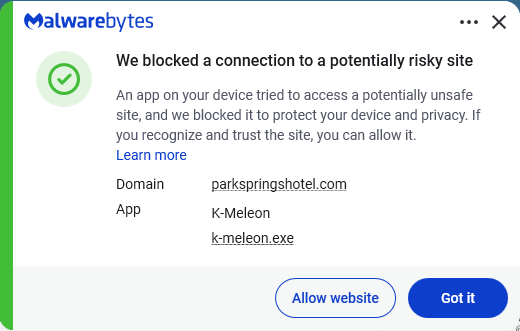
Malwarebytes blocks the domains contacted by the RAT.

Malwarebytes blocks parkspringhotel[.]com

We don’t just report on threats—we remove them

Cybersecurity risks should never spread beyond a headline. Keep threats off your devices by downloading Malwarebytes today.

Meta’s confusing new approach to chat privacy

15 May 2026 at 14:34

Recent news had us wondering whether Meta actually knows what it wants.

On one platform, Meta is promoting AI chats that it says even it cannot read. On another, it has removed one of the few features that genuinely prevented Meta from accessing private conversations.

“Meta removed support for end-to-end encrypted chats from Instagram as of May 8, 2026.”

Meta adds fully private AI chats to WhatsApp.”

At the moment, Meta is heavily promoting a new Incognito Chat mode for its Meta AI assistant in WhatsApp, built on top of a system it calls Private Processing. According to WhatsApp’s own announcement, Incognito Chat is:

 “Truly private — no one can read your conversation, not even us.”

When you start an Incognito chat with Meta AI, you get a temporary conversation where messages aren’t saved and disappear by default, which Meta pitches as “a space to think and explore ideas without anyone watching.”

BBC News and others report that these AI chats are text‑only for now, run in a sandboxed environment, and are separate from your regular end‑to‑end encrypted (E2EE) messaging with other people on WhatsApp.

Meta is also preparing “Side Chat,” which will let you invoke Meta AI inside other WhatsApp chats, again using this Private Processing infrastructure to claim AI assistance without breaking the underlying encryption.

On paper, that’s an impressive technical and marketing story: powerful AI, wrapped in layers of privacy‑preserving infrastructure, added to an app that already has a strong reputation for end‑to‑end encryption by default.

Meanwhile, on Instagram…

Now contrast that with what’s happening on Instagram. On 8 May 2026, Meta removed optional end‑to‑end encryption for Instagram Direct Messages (DMs) entirely. Users who had previously turned the feature on were shown notices that “end‑to‑end encrypted messaging on Instagram is no longer supported as of 8 May 2026,” and were urged to download backups of their encrypted conversations before the cutoff.

End‑to‑end encryption ensures that only the sender and recipient can read their conversations. Instagram offered this as an opt‑in feature since late 2023, but it was buried several taps deep inside individual conversation settings and never turned on by default. Meta’s explanation for shutting it down is that “very few people” used encrypted DMs and that maintaining a separate encrypted system added complexity. Critics have pointed out the circular logic. The company hid the feature, did not advertise it, and is now using low adoption as the reason to kill it rather than, say, making it easier to find or turning it on by default.

What all this means

From a user’s perspective, the result is confusing: one Meta product introduces stronger privacy than ever for AI chats, while another removes the one feature that truly stopped Meta from reading your conversations.

The key point to remember here is that “incognito” and “private” are marketing words, while end‑to‑end encryption is a technical guarantee.

For security‑conscious users, this split personality means you can no longer treat all Meta chats the same. WhatsApp remains end‑to‑end encrypted for person‑to‑person messages and adds optional privacy features around its AI, while Instagram DMs should now be assumed readable by Meta and potentially accessible to law enforcement, advertisers, or attackers who gain access to Meta’s systems.


To boldly browse, away from prying eyes. 


Why make AI chats private?

We’ve seen that AI chats have suddenly turned up in search results without users’ knowledge. So there definitely is a positive side to this new feature.

We also know there have been lawsuits against chatbot providers in cases where the outcome of an AI conversation led to very undesirable results. But how would you be able to provide evidence when messages auto-disappear?

How to proceed

Meta’s recent moves show that strong privacy features can be added where they support a strategic narrative and removed where they conflict with business or regulatory priorities. Users can’t control those decisions, but they can respond by choosing where they hold their most sensitive conversations and by assuming that if a chat isn’t end‑to‑end encrypted by default, it is ultimately readable by someone other than the people in it.

So, what’s a safe way to move forward?

  • Treat Instagram DMs as postcard-level privacy. Now that E2EE is gone, assume Meta can read and scan your messages and that content could be accessed under legal orders or in a breach. Do not send passwords, recovery codes, banking details, or compromising photos over Instagram.
  • When someone asks you to move a conversation to Signal, WhatsApp, or another E2EE messenger, ask them why. It does make sense when you’re sharing financial details, personal images, health information, or anything you would not want a platform provider to read. But sometimes scammers prefer encrypted platforms too, because they’re harder to monitor.
  • Do not confuse “incognito” AI chats with full encryption. WhatsApp’s Incognito mode for Meta AI may be a privacy improvement over standard cloud AI chats, but it is still a conversation with a large language model owned by the same company that runs the platform. Share only what you’re comfortable entrusting to Meta.
  • Regularly review your privacy and security settings. Check which devices are logged in, enable two‑factor authentication, and verify which of your chat apps are actually end‑to‑end encrypted by default.

Scammers know more about you than you think. 

Malwarebytes Mobile Security protects you from phishing, scam texts, malicious sites, and more. With real-time AI-powered Scam Guard built right in. 

Download for iOS → Download for Android → 

Why Malwarebytes blocks some Yahoo Mail redirects

14 May 2026 at 12:47

Some Malwarebytes users have recently noticed frequent web protection alerts while reading email in Yahoo Mail’s web interface. These alerts are caused by background connections from the Yahoo Mail page to a set of third‑party domains that our products and other security tools currently classify as risky.

What we are seeing under the hood

When you open Yahoo Mail in a browser, the page loads various embedded components for navigation, features, and metrics. As part of this, the interface makes calls to domains such as cook.howduhtable.com and related subdomains, sometimes in the context of URLs that include /ybar/mail.yahoo.com/ and a long encoded parameter. That encoded string often resolves to a URL like:

https://gpt.mail.yahoo.net/sandbox?client=novation&version=0.1&haq=1&cache=1

This suggests the traffic is being routed through what appears to be a sandboxed web component that Yahoo can use for things like telemetry, testing infrastructure, or mail features. It may also be part of an advertising or tracking flow, but at this time we cannot say with certainty exactly what purpose Yahoo is using it for.

Regardless of intent, multiple security systems have observed these redirect domains and assigned them poor reputations. Characteristics include:

  • Frequently changing, opaque subdomains that do not resemble normal consumer‑facing Yahoo addresses
  • Use of encoded parameters and chained redirects that make it difficult for users, and sometimes defenders, to see the final destination at a glance
  • Existing detections and blocklists from other vendors that classify the infrastructure as suspicious or potentially malicious

Because of these signals, Malwarebytes Web Protection and Browser Guard have been blocking a growing list of related subdomains to protect users, which is why some people see repeated alerts while using Yahoo Mail.

What we are not saying

It is important to be clear about what we do and do not know.

We have not established that Yahoo Mail itself is compromised or that Yahoo is deliberately distributing malware through its mail platform. What we can say is that third‑party or internal components invoked from within the Yahoo Mail web interface are making connections through domains that behave very similarly to infrastructure commonly associated with malicious or deceptive advertising and tracking.

From a security standpoint, this creates unnecessary risk. Any mechanism that injects content or runs sandboxed components via opaque redirect chains could, if misused or subverted in the future, expose users to harmful content without them ever clicking a suspicious link.

Blocking these domains is a precautionary step in line with our normal protection standards.

Why Malwarebytes blocks these redirects

Our decision to block these connections is based on a combination of technical behavior and third‑party reputation data:

  • The redirects are triggered by embedded components in the Yahoo Mail interface, not by users intentionally browsing to those domains
  • The infrastructure relies on frequently changing, non‑descriptive domains and subdomains, a pattern we often see in malicious or evasive advertising and tracking systems
  • Multiple security vendors and automated reputation feeds already flag these domains as risky or malicious, and some have seen them associated with unwanted or harmful activity

Because of this, Malwarebytes products currently block connections to these third‑party domains when they are invoked as part of Yahoo Mail’s web experience. This does not mean that all of Yahoo Mail is considered malicious. It means we are specifically interrupting a narrow set of background calls that present elevated risk.

What this means for users

If you use Yahoo Mail in a browser with Malwarebytes enabled, you may see:

  • Web protection or MWAC alerts referencing domains like cook.howduhtable.com or similar names while you are reading or composing email
  • Multiple alerts in a short period, because the mail interface may retry or rotate through different subdomains or IP addresses in the same family

In most cases, your email content itself still loads, though certain embedded elements, metrics, or ad‑related content may fail to load or behave differently.

How to stay safe and reduce interruptions

You should not need to lower your protection to continue using Yahoo Mail. Here are some practical steps you can take:

  • Keep Malwarebytes protection enabled
    Leaving Web Protection and Browser Guard on ensures blocks remain in place if these redirects change behavior or begin serving harmful content in the future.
  • Avoid allowlisting the suspicious domains
    While it’s technically possible to add exclusions for individual domains, doing so would allow their traffic to load unfiltered in your browser. We don’t recommend this unless you fully understand and accept the risk.
  • Use private/incognito windows for Yahoo Mail
    Accessing Yahoo Mail in a private/incognito session can help reduce persistence of certain tracking and advertising data because the browser discards cookies and local storage when you close the window.
  • Clear cookies and site data periodically
    If you see repeated alerts, clearing Yahoo‑related cookies and cached data may reduce some of the underlying tracking behavior that triggers these redirects.
  • Consider fewer‑ads options
    Yahoo offers paid plans that reduce or remove ads, and users can also use reputable content‑blocking extensions alongside Malwarebytes to cut down on ad‑driven behavior in webmail interfaces.

Our ongoing monitoring

The domains and infrastructure involved in these redirects are operated outside Malwarebytes, and their configuration or behavior may change over time. We are actively monitoring telemetry, sandbox reports, and reputation data for these domains and related infrastructure, and we will adjust our detections if new information emerges.

Our priority is to keep users safe while being transparent about why protection events occur, especially in widely used services such as webmail. If we learn more about the exact role of this component within Yahoo Mail, or if Yahoo provides additional clarity, we will update this article accordingly.


Stop threats before they can do any harm.

Malwarebytes Browser Guard blocks phishing pages and malicious sites automatically. Free, one click to install. Add it to your browser →

Deepfake sextortion forces schools to remove student photos from websites

14 May 2026 at 11:00

Schools love a good photo, whether it’s from a trip to a castle, a science prize ceremony, or sports day shot from three angles. For two decades, celebratory images like these have gone straight onto school websites, captioned with a name and a grade. But those days are gone, because it’s the internet in 2026 and we can’t have nice things.

As first reported by the Guardian, experts are now urging schools to take those pictures down. According to the UK’s National Crime Agency, the Internet Watch Foundation, and an advisory body called the Early Warning Working Group (EWWG), blackmailers have been scraping ordinary school photos, feeding them through AI deepfake tools to manufacture child sexual abuse material (CSAM), and demanding payment to keep the images offline.

One school, 150 images

Late last year, cybercriminals contacted an unnamed UK secondary school with that demand. The IWF classified 150 of the resulting images as CSAM under UK law and generated digital fingerprints for each image so major platforms could block reuploads.

The IWF isn’t naming the school or the police force, and it doesn’t believe this was an isolated case. The EWWG says it’s “only a matter of time” before more schools face similar demands.

UK safeguarding minister Jess Phillips called it a “deeply worrying emerging threat.” In February 2025, the UK became the first country to ban AI tools designed specifically to generate CSAM.

How we got here

This threat didn’t appear overnight, and it isn’t limited to the UK. It’s an evolution of a long-time threat: sextortion, when someone uses intimate images to blackmail you. Traditionally, sextortion relied on real intimate images that were stolen or shared, but deepfake AI has changed everything.

The FBI’s Internet Crime Complaint Center (IC3) logged more than 16,000 sextortion complaints in the first half of 2021, with losses exceeding $8 million. By June 2023, the bureau warned the playbook had shifted: attackers were using ordinary social media photos to create fake explicit images and extort minors.

UK children’s counseling helpline Childline has seen similar shifts as deepfake tools become more accessible. It already logs many sextortion cases each year, many from kids who were manipulated into sharing intimate images of themselves. Now, the organization is getting calls from children who are being sent deepfake CSAM images of themselves without any prior contact.

One 15-year-old girl, for example, was sent a “really convincing” fake nude built from her Instagram photos.

By November 2025, IWF reports of AI-generated CSAM had more than doubled year over year, rising from 199 to 426. Girls accounted for 94% of the victims. Reported cases included children ranging from newborns to two-year-olds, according to the organization.

The ecosystem around these tools is industrial. In April 2025, a researcher found an exposed AWS S3 bucket belonging to South Korean “nudify” app GenNomis containing 93,485 AI-generated images alongside the prompts that produced them.

What the schools are being told

The EWWG’s advice is to replace close-up, identifiable photos with images taken from a distance, blurred images, or photos shot from behind. It also advises schools to remove full names from captions, audit existing images, and ask parents to re-sign consent forms.

In fact, it advises schools to rethink whether they need to publish children’s photos online at all.

Some schools have already acted. According to the Guardian, Loughborough Schools Foundation, a group of three private schools sharing a website, removed recognizable pupil images entirely last year.

The UK Information Commissioner’s Office (ICO) says that it “would still generally expect you to offer an opt-out to parents” when publishing an identifiable photo of a child, but says this isn’t legally the same as consent, which has a higher bar.

Things get murkier in the US, where states often have their own student privacy statutes. Broadly, though, under the Family Educational Rights and Privacy Act (FERPA), schools typically include identifiable photos of students under the category of directory information. This category also covers name, address, telephone listing, date and place of birth, participation in officially recognized activities and sports, and dates of attendance.

Under FERPA, schools can publish this type of information unless the child’s guardian specifically opts out. They have to notify a guardian when they want to publish it, but that process may not apply indefinitely after a student leaves the school.

That means student photos and information can remain online long after families assume they have disappeared.

What happens next

Back in the UK, Childline’s Report Remove service allows children to flag explicit images or videos of themselves that have been posted online. The service took 394 blackmail reports from under-18s last year, up by one-third compared to 2024.

Meanwhile, the UK government is amending the Crime and Policing Bill, forcing platforms to take flagged intimate images down within 48 hours or face fines of 10% of global revenue.

We anticipate a race between regulators and AI-enabled cybercriminals. Right now, attackers still have to manually find the photos themselves. The concern is that this process could soon become automated, allowing criminals to scrape names and photos from school websites and social media platforms at scale.

For parents, the simplest protection may be limiting how many identifiable pictures of your children are available online. That includes being vigilant not just with your child’s school, but their sports clubs, extracurricular activities, and social media accounts.


Someone’s watching your accounts. Make sure it’s us.


Texas sued Netflix over claims it secretly collected and sold users’ data

13 May 2026 at 15:34

Attorney General (AG) of Texas Ken Paxton announced that he sued Netflix for spying on Texans, including children, and collecting users’ data without their knowledge or consent.  

The suit alleges Netflix secretly tracks and monetizes detailed viewing behavior of users, including children, while misleading users about its data practices. The case could reshape how Netflix collects data, targets ads, and designs “addictive” features, especially for minors. 

According to the complaint, Netflix allegedly ran what the AG’s office calls a “surveillance program,” turning every click, pause, and binge session into data that could be sold to advertisers and data brokers.

Netflix firmly denies the accusations, calling the lawsuit “inaccurate” and claiming it complies with privacy laws wherever it operates. Spokesperson Jamil Walker said:

“The suit lacks merit and is based on inaccurate and distorted information.”

But regardless of how this specific case plays out, the lawsuit raises a bigger question for all subscribers: Just how much does your streaming service really know about you, and what does it do with that information?

The Texas complaint paints a picture of Netflix as a data company first and a streaming service second. Paxton’s office even describes Netflix as:

“A logging company that records and monetizes billions of behavioral events—and occasionally streams movies.”

The complaint also references a 2024 ruling by the Dutch Data Protection Authority, which said Netflix does not disclose the true scale or granularity of this data collection. The lawsuit claims Netflix did not just use this data internally for recommendations but also sold it to commercial data brokers and ad tech companies, generating “billions of dollars” annually. 

The AG wants to stop the unlawful collection and disclosure of user data, require Netflix to disable autoplay by default on kid’s profiles, and impose other injunctive relief and civil penalties.

For customers, the main consequences could include potential changes to data collection, targeted advertising, autoplay defaults, and clearer consent and privacy controls. For subscribers on Netflix’s ad‑supported plans, this could slightly change how “personal” ads feel, at least in jurisdictions where regulators clamp down.

Plus, the lawsuit serves as a reminder that streaming habits may be far more trackable than users assumed. Even if Netflix ultimately wins or settles without admitting wrongdoing, the lawsuit puts a spotlight on what the company collects and why.

Netflix privacy and account settings

It will probably take a while before this lawsuit leads to any changes. But there are a few things you can do to protect your privacy:

  • Netflix lets users view and remove entries from their watch history per profile, which can reduce how much historical behavior feeds into recommendations.
  • Where available, turn off non‑essential marketing emails or in‑app promotions that rely on behavioral profiling.
  • Use the parental controls Netflix offers you and turn off autoplay previews.

Basically, treat your Netflix account like any other online account: Review every profile, remove old ones, and take five minutes to walk through the privacy- and playback‑related options.


Scammers don’t need to hack you. They just need you to click once. 

Malwarebytes Identity Theft Protection catches suspicious activity before it becomes a problem.

May 2026 Patch Tuesday: no zero-days but plenty to fix

13 May 2026 at 13:00

This month’s Patch Tuesday remedies 137 security vulnerabilities, including 31 marked critical by Microsoft, with no zero-days actively exploited in the wild.

Microsoft defines a zero-day as “a flaw in software for which no official patch or security update is available yet.” This month, Microsoft has not observed any included vulnerability being exploited in production environments.

Still, this release is far from low-risk. A large chunk of the critical bugs allow remote code execution (RCE) across Windows services, Office, Azure, SharePoint, and graphics components. That means attackers who trick a user into opening a malicious document or lure them into connecting to a malicious service could gain full control of a system.

Two vulnerabilities to prioritize

From that list, we selected two that look like they could cause some trouble.

First is CVE-2026-40361, which has a CVSS score of 8.4 out of 10. It’s described as a critical use-after-free vulnerability in Microsoft Word that could allow an attacker to execute code locally on the affected system.

Use-after-free is a class of vulnerability caused by incorrect use of dynamic memory during a program’s operation. If, after freeing a memory location, a program does not clear the pointer to that memory, an attacker may be able to use the error to manipulate the program.

So, if an attacker convinces a user to open a malicious Word document, or even previews the file, they could execute arbitrary code with the privileges of the current user. That’s often enough to install malware, steal credentials, or move laterally through a network.

Second is CVE-2026-35421 (CVSS score 7.8 out of 10). This is a critical heap-based buffer overflow in Windows Graphics Device Interface (GDI). A buffer overflow occurs when an area of memory within a software application reaches its address boundary and writes into an adjacent memory region. Microsoft notes:

“For this vulnerability to be exploited, a user would need to open or otherwise process a specially crafted Enhanced Metafile (EMF) file using Microsoft Paint. This action is necessary to trigger the affected graphics functionality in the Windows component.”


Real-time protection. Zero effort. 


How to apply fixes and check if you’re protected

These updates fix security problems and keep your Windows PC protected. Here’s how to make sure you’re up to date:

1. Open Settings

  • Click the Start button (the Windows logo at the bottom left of your screen).
  • Click on Settings (it looks like a little gear).

2. Go to Windows Update

  • In the Settings window, select Windows Update (usually at the bottom of the menu on the left).

3. Check for updates

  • Click the button that says Check for updates.
  • Windows will search for the latest Patch Tuesday updates.
  • If you have selected to get the latest updates as soon as they’re available, you may see this under More options.
  • In which case you may see a Restart required message. Restart your system and the update will complete.
    May restart required
  • If not, continue with the steps below.

4. Download and Install If updates are found, they’ll start downloading automatically. Once complete, you’ll see a button that says Install or Restart now.

  • Click Install if needed and follow any prompts. Your computer will usually need a restart to finish the update. If it does, click Restart now.

5. Double-check you’re up to date

  • After restarting, go back to Windows Update and check again. If it says You’re up to date, you’re all set!
Windows is up to date

We don’t just report on threats—we remove them

Cybersecurity risks should never spread beyond a headline. Keep threats off your devices by downloading Malwarebytes today.

Fake Claude search results lure Mac users into ClickFix attack

12 May 2026 at 17:46

Researchers found that cybercriminals are using sponsored search results and shared Claude chats to lure victims into a typical ClickFix attack to install malware on macOS devices.

ClickFix is a social engineering method that tricks users into infecting their own device with malware. Users are instructed to run specific commands that will download malware, usually an infostealer.

The researchers found that when users search for terms like “Claude Mac download,” they may see sponsored Google results that appear to go to the legitimate claude.ai domain.

In reality, the ads resolve to real Claude shared chats, set up to look like official “Claude Code on Mac” or Apple Support guides. Independent research by BleepingComputer found another chat serving the same purpose. The chat instructs victims to open Terminal and paste a base64‑encoded command, which pulls a loader shell script from attacker‑controlled infrastructure and runs it in memory.

The script then profiles the system, pulls down a second-stage payload and runs it through osascript, macOS’s built-in scripting engine. This gives the attacker remote code execution (RCE) without ever dropping a traditional application or binary.

This results in a MacSync‑style payload that harvests browser credentials, cookies, Keychain contents, and crypto wallet data, bundles it, and sends all that information over HTTP to attacker servers.

How to stay safe

Users running macOS Tahoe 26.4 and later will see warnings about possible ClickFix attacks, but other users still have to rely on common sense.

With ClickFix running rampant and inventing new methods all the time, it’s important to stay aware, cautious, and protected.

  • Slow down. Don’t rush to follow instructions on a webpage or prompt, especially if it asks you to run commands on your device or copy and paste code. Attackers rely on urgency to bypass your critical thinking, so be cautious of pages urging immediate action. Sophisticated ClickFix pages add countdowns, user counters, or other pressure tactics to make you act quickly.
  • Avoid running commands or scripts from untrusted sources. Never run code or commands copied from websites, emails, or messages unless you trust the source and understand what the action does.
  • Verify instructions independently. If a website tells you to execute a command or perform a technical action, check through official documentation or contact support before proceeding.
  • Limit copy and paste for commands. Manually typing commands instead of copy and paste can reduce the risk of unknowingly running malicious payloads hidden in copied text.
  • Secure your devices. Use an up-to-date, real-time anti-malware solution with web protection. Malwarebytes blocks connections to unsafe sites like these.
    Malwarebytes blocks one of the domains still active
  • Educate yourself on evolving attack techniques. Understanding that attacks may come from unexpected places helps maintain vigilance. Keep reading our blog!
  • Stay away from sponsored ads in search results. Anyone can buy them and make them look legitimate.

Pro tip: The free Malwarebytes Browser Guard extension warns you when a website tries to copy something to your clipboard.


Stop threats before they can do any harm.

Malwarebytes Browser Guard blocks phishing pages and malicious sites automatically. Free, one click to install. Add it to your browser →

1 in 8 employees have sold company logins or know someone who has

12 May 2026 at 11:21

UK anti-fraud non-profit Cifas just published research that should bother anyone who runs a business, or buys from one: One in eight workers at large enterprises have either sold their company login credentials or know someone who did.

The internet is awash with compromised credentials that employees use to access company systems. Threat intelligence company KELA tracked nearly 2.9 billion compromised credentials globally in 2025. Most of these come from phishing attacks and infostealers. But thanks to employees wanting to make a quick buck, cyber criminals can just make people an offer.

The insiders nobody’s watching

Cifas interviewed 2,000 employees of companies with at least 1,000 staff. Of these, 13% admitted to selling their corporate access credentials in the last 12 months, or knowing someone who did. Amazingly, as the report says, the sellers did so “often under the belief it’s harmless.”

Newsflash: Selling your account credentials isn’t harmless. Criminals want them so they can take over the account and do nefarious things with it. Account takeovers in the US surged 6% to over 78,000 last year, according to Verizon.

Many hijacked accounts are personal ones for services ranging from social media to online streaming sites, and of course bank accounts. But many others are accounts for business systems like Microsoft 365, Salesforce, and other platforms that hold sensitive company data. Those secrets are valuable commodities for criminals who can then trade them on the open market.

Your boss is more likely to sell than you

Ideally, this is where a common technique called “least-privilege access” should come in.

The idea is that a corporate online account should only have access to what it needs. So Jim in the canteen should have access to the food ordering system, but not to the entire customer database. That way, even if Jim’s account gets compromised, the worst the attackers could do is deprive you of sausages tomorrow.

The problem is that, according to the report, higher-ups are even more comfortable selling their account credentials than low-level employees. Thirty-two percent of senior managers find it justifiable, along with 36% of directors, 43% of C-suite executives, and, stunningly, four in five business owners. Their roles mean that even with least-privilege access, their accounts can still open routes to sensitive system functions and data.

This isn’t just a UK problem

The Cifas research is UK-specific, but that’s likely not where it ends. We’ve seen employees at several companies selling access to either company accounts or records. For example, cryptocurrency company Coinbase revealed last year that employees at a Bangladesh-based outsourcing company sold customer records to hackers.

Compromised credentials are widespread. Our own research found that in a single 30-day window, 111 Fortune 500 companies had employee credentials leaked. Long-term, 363 of those firms (that’s 73%) have lost control of at least one employee credential.

Employees selling their access credentials isn’t just bad for the companies that employ them. It’s also bad for customers.

When a director’s password goes up for sale, a customer file might not be far behind, although it likely won’t be the director selling it. Malwarebytes found that 91% of Fortune 500 companies have had their customers’ credentials leaked, and hijacked accounts are a great way to get at them.

So insider risk isn’t just a corporate issue. It’s also a consumer one. That makes us less likely to hand over our personal information to large enterprises without questioning why they need it.


Your name, address, and phone number are probably already for sale.  

Data brokers collect and sell your personal details to anyone willing to pay. Malwarebytes Personal Data Remover finds them and gets your information removed, then keeps watch so it stays that way. 

Stolen Canvas data was “returned” after hacker agreement, Instructure says

12 May 2026 at 10:41

The Instructure/Canvas data breach that has dominated cybersecurity coverage recently has reached a new stage.

Millions of students had personal data stolen, with extortion group ShinyHunters claiming credit for the data breach and applying extra pressure for their ransom demands by bothering Canvas users directly.

Which seems to have paid off. On the Instructure web page about the recent data breach, a status update dated May 11, 26 says:

“We know that concerns about the potential publication of data related to this incident remain top of mind for many customers. We understand how unsettling situations like this can be, and protecting our community remains our top priority.

With that responsibility in mind, Instructure reached an agreement with the unauthorized actor involved in this incident.”

This implies that Instructure has paid ShinyHunters. At least some of that money will almost certainly go toward funding future cybercrime operations. Whether companies should ever pay ransomware or extortion demands remains a contentious debate, and that is not an argument I want to reignite here.

What I don’t understand is the next phrase in the update:

“The data was returned to us.”

While that may be intended to sound reassuring, in cybersecurity, data is not a borrowed laptop or a misplaced folder. Once copied, it can be copied again, and again.

That matters because the incident wasn’t just about temporary access. Instructure said the unauthorized access involved usernames, email addresses, course names, enrollment information, and messages.

Data cannot simply be “returned”

So, when a company says the data was “returned” and “shred logs” were provided, the real question is not whether the attackers still possess the original files. It is whether copies were made, whether those copies were shared and with whom. So, in essence, whether the breach’s downstream risks have actually been eliminated. While these types of cybercriminals tend to operate on trust, digital data does not come with a guaranteed recall function.

The good news is that Instructure says no passwords, dates of birth, government identifiers, or financial information were involved. But names, email addresses, course details, and private messages are still enough to fuel highly targeted phishing and social engineering long after the headlines fade.

For students and families, the practical advice from our original blog still applies:

  • Reset Canvas‑related passwords
  • Enable multi‑factor authentication where possible
  • Monitor financial and credit activity as children get older
  • Stay wary of highly personalized phishing that references real schools, courses, or teachers

Your name, address, and phone number are probably already for sale.  

Data brokers collect and sell your personal details to anyone willing to pay. Malwarebytes Personal Data Remover finds them and gets your information removed, then keeps watch so it stays that way. 

❌