This week, Axios reported that major US banks were detecting third-party AI agents operating inside customer accounts. In many cases, customers have given the agents their usernames and passwords so they could act on their behalf. This kind of access can violate a bank’s rules.
“Are you protecting me, or are you protecting your own profits?”
Bianco described traditional finance’s business model as “based on laziness.” Customers may leave idle cash in low- or no-interest bank accounts rather than move it into a money market fund. An AI agent could make that move for them. “Now that you’re able to do it, the banks are afraid they’re gonna lose that revenue stream,” he said.
The banks offer a different explanation. JPMorgan Chase CEO Jamie Dimon said the bank wouldn’t allow just any outside agent into its systems because doing so was “too risky for clients and for JPMorgan.”
Both explanations can be true: banks can want to retain deposits while also facing real security problems when software acts through customers’ accounts.
Handing over your banking login introduces another service into the security chain. A vulnerability in that service could expose your credentials or allow your account to be misused. And as Bank of America reportedly pointed out:
“If you do share your credentials, keep in mind that you’re responsible for activity resulting from that access.”
That’s the bank’s stated position, not a universal ruling on consumers’ legal rights. Still, it’s a warning worth taking seriously.
Pros and cons
An AI agent with permission to make purchases might find and buy an item at a lower price. But giving an agent access to your bank account also means sharing sensitive banking information with a third party. We’ve seen shared AI chats become searchable online too.
Axios reported that many banks allow, or are moving toward allowing, read-only access. This can let a tool analyze transactions without giving it permission to move money.
That’s an important boundary, but it doesn’t make the information harmless. An agent that can read bank statements may still disclose them if it’s compromised or manipulated. Preventing transactions and protecting confidentiality are separate security goals.
How to keep control of your money
For consumers, the practical question is not whether banks have perfectly selfless motives. It’s what access you’re giving away, and what could happen if the agent makes a mistake.
Don’t paste banking passwords or security codes into a general-purpose AI assistant. Major banks have explicitly warned customers against sharing their credentials.
Use your bank’s approved connection methods rather than giving an agent your login. Where supported, choose read-only access if all you need is analysis or budgeting help.
Give agents access to as little sensitive information as possible. An assistant comparing publicly advertised savings rates doesn’t need your bank statements. OpenAI recommends limiting agents to the data and credentials they need for the task.
Review consequential actions yourself. If an agent asks for confirmation, check exactly what it intends to do and what information it will share. Don’t treat a confirmation prompt as a formality.
AI can make it easier to compare financial products and spot opportunities you might otherwise miss. But an assistant that finds a better rate and an agent that can act inside your account are different propositions.
Let it help with the homework, but be cautious about handing it the keys.
Let’s face it, an incognito window can only do so much.
Breaches, dark web trading, credit fraud. Malwarebytes Identity Theft Protection monitors for all of it, alerts you fast, and comes with identity theft insurance.
On October 27, Google issued a new Stable channel update for Chrome.
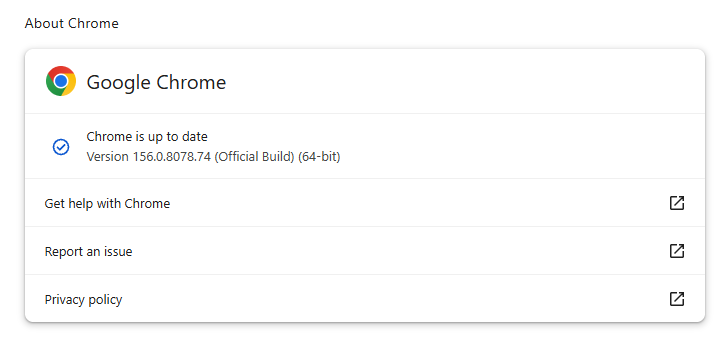
Most users are on Chrome’s Stable channel. The desktop update brings Chrome to versions 156.0.8078.73/.74 for Windows and Mac and 156.0.8078.73 for Linux. The update includes 52 security fixes, including four rated Critical.
On the same day, Mozilla issued Security Advisory 2026-118, which fixes 167 vulnerabilities. Firefox 159 also introduces several new features.
Both updates will roll out over the coming days and weeks.
How to update Chrome
The easiest option is to allow Chrome to update automatically. But you can end up lagging behind on updates if you never close your browser or if something goes wrong, such as an extension preventing the update.
If you don’t want to wait for the rollout to reach you, manually updating is easy. Open About Google Chrome from Chrome’s settings or Help menu. Chrome will check for updates. If one is available, click Relaunch to apply it.
To update Firefox, open the browser and click the menu button at the right side of the Firefox toolbar, then go to Help and select About Firefox. The About Mozilla Firefox window will open.
Firefox will automatically check for updates. If one is available, it will be downloaded. Once done, you’ll be prompted to click Relaunch. After Firefox restarts, it will be up to date.
After the update, the version should be 159.0 or later
Technical details
These Chrome and Firefox updates address a familiar problem: browser code mishandling memory while processing web content. Both releases fix use-after-free vulnerabilities, including flaws in page layout, JavaScript processing, and SVG graphics.
A use-after-free vulnerability occurs when a program attempts to access a memory location after it has been freed. That can cause crashes or, in some cases, allow an attacker to run their own code.
There’s another connection between these updates: both Google and Mozilla credit OpenAI Codex Security with finding bugs fixed in these releases. AI can help security teams examine browser code for weaknesses, alongside human code reviews and automated tests that check how software handles unexpected inputs.
Mozilla’s collaboration with Anthropic shows how AI-discovered findings can lead to fixes: researchers validated vulnerabilities before reporting them, giving Mozilla’s team reproducible bugs to investigate, repair, and deliver to users.
Browse like no one’s watching.
Malwarebytes Privacy VPN encrypts your connection and never logs what you do, so the next story you read doesn’t have to feel personal. Try it free →
AI is becoming a third wheel in relationships, increasingly playing a role in the most intimate parts of our lives.
It shows up in the flirty first text, the polished dating profile, the therapized language we use with a partner after a fight, the strength we gather after heartbreak, and everywhere in between. For some, AI is a source of companionship itself. And even if you’re not personally an AI user, you may still be dating, loving, arguing with, or trusting someone who is.
As AI moves deeper into our relationships, it’s reshaping connection, blurring what feels authentic, and creating new ways for intimacy to be exploited.
AI is starting to replace human interaction
AI is moving into emotional territory once reserved for other people. For some, it’s no longer just a tool, but a source of support, companionship, and even romantic connection.
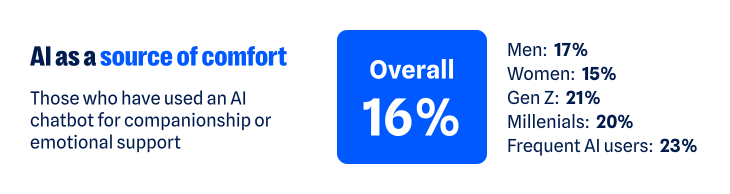
According to our recent research, about one in six have turned to a chatbot for companionship or emotional support. That climbs to about one in five among Gen Z and Millennials, and nearly one in four among regular AI users (those who use AI daily or multiple times a week). The more time people spend with AI, the more likely they are to humanize its role, making room for it as a friend, confidant, advisor, or even partner.
As AI takes on more intimate roles, it’s also starting to challenge the boundaries of real human relationships. More than one in three (37%) say having a romantic relationship with an AI chatbot while already in a committed relationship isn’t the same as cheating. That view is more common among men (46% versus 30% of women), Gen Z and Millennials (43% and 45%), and regular AI users (48%).
Whether the relationship is platonic or romantic, the more AI is treated like a human, the more personal the stakes become. Just like you have to be cautious when telling a human your deepest, darkest secrets, the experience is similar when using AI. Nearly two-thirds (65%) worry that private conversations they’ve had with AI could be exposed.
One survey respondent said:
“I have used a chatbot…for emotional support, and it is worrying to think those conversations could be leaked.”
The technology may be artificial, but the relationships people form with AI can feel very real. And as with any relationship, that means there are boundaries to work out, privacy to protect, and vulnerabilities to manage.
AI is creating new ways to weaponize intimacy
AI’s growing role in human intimacy also has a darker side. The same technology that can offer comfort, advice, or companionship can also be used to violate the most intimate parts of our lives.
Non-consensual image abuse, sextortion, and other forms of sexual abuse have long been part of the internet’s dark side. Generative AI has made that content easier to create. Someone trying to exploit another person no longer needs an actual intimate photo, video, or private exchange. A regular photo—or even just someone’s likeness—can be transformed into sexual content they never made, never shared, and never consented to.
Most people draw a clear line against that, but not everyone does. About one in six people say it’s acceptable to generate explicit images of someone without their permission for personal use. Another 14% are neutral, bringing the share who do not explicitly oppose the behavior to nearly one in three (31%).
Views differ sharply by age and sex:
Younger adults are more accepting of someone using AI to generate non-consensual content: nearly one in four Gen Z (24%) and Millennials (23%) say it’s okay, compared with 13% of Gen X and just 5% of Boomers+
Men are also more permissive: more than one in five (22%) say it’s okay, compared with 14% of women
Attitudes toward the behavior may vary, but the fear of becoming a target is far more widespread. Overall, nearly two-thirds of people (62%) worry someone could create fake nude or sexually explicit photos or videos of them. Women feel this threat more acutely: nearly seven in ten (69%) are concerned, compared with 57% of men.
For some, this fear has already become a reality:
One in ten say AI has been used to generate nude or sexually explicit imagery of them without permission
One in ten say someone has threatened to release AI-generated compromising or explicit imagery of them
As one respondent recounted:
“I had someone make fake nudes of me using AI on my photos from my social media and threaten to post them on Facebook…[it] made me more cautious about AI.”
The intimate material may be fake, but the fear, coercion, and potential for reputational, emotional, and financial damage are completely real.
AI is making it harder to know who you’re really talking to
The threat doesn’t stop with fabricated sexual content. AI is also making it harder to know whether the person on the other side of a screen is who they claim to be.
Humans have always edited themselves for other people. We choose the most flattering photo, write and rewrite the text before sending it, and present our most interesting selves—especially when forming new relationships. AI dramatically expands what that kind of self-editing can look like, and people aren’t shy about using it:
54% say AI helps them present the best version of themselves
47% say using AI to present your “best self” to employers, friends, or romantic partners does not present a false identity
That rises to 58% of both Gen Z and Millennials and 64% of regular AI users
But where does enhancement end and deception begin? Is an AI-polished dating profile still authentically you? What about a message you didn’t write? A photo that looks like you, only better?
There’s a flipside to using AI to make ourselves look or sound better: If we can do it, so can everyone else. And people are much less comfortable when they’re not the ones controlling the technology. Two-thirds (67%) worry that an online friend or romantic interest could use AI-generated images, videos, or other content to deceive them.
Catfishing, fake photos, and lies on dating profiles aren’t new. AI just makes the deception easier. Someone’s photos, backstory, messages, and even their voice can all be faked.
One person described leaving dating apps after realizing the person they were talking to had gone well beyond simply polishing their profile:
“[The] dating profile had fake pictures…[it] wasn’t just making true events sound interesting and more flirty, but creating completely false photos and information. Left the dating apps again and needed to reset.”
AI can distort identity in the other direction, too. It can also create a version of us we never chose to put into the world.
76% worry about someone creating a fake profile pretending to be them
70% worry about fake images or videos of themselves being created
71% worry AI-generated content could be used to damage their reputation
Relationships are built on mutual trust. AI can distort both sides of the connection: who we think the other person is, and who they think we are.
AI is quietly finding its way into the space between people
Not all of AI’s influence on intimacy is so dramatic. Much of it happens quietly, showing up in how people communicate with each other and navigate relationships:
More than one in three have used AI to help write or edit a message
About one in seven have turned to it for advice about a relationship or personal decision
One in ten say it has already changed how they date or communicate romantically—rising to nearly one in five among Gen Z
The survey responses show what this looks like in real life. For example, one respondent described using AI with their partner as a way to step outside their own point of view:
“Personally, it has helped me. We use AI in our relationship as a reflection tool, and it has sometimes helped us take on the perspective of the other.”
For another, AI helped them work through jealousy:
“So, I used to accuse my partner, and I got really territorial about them but once I talked to AI about it, they gave helpful advice and now we are stronger than ever.”
AI is also showing up in other difficult relationship moments. One person said it helped them “stay calm and communicate” when problems came up with their partner; another said it allows them “to pause and refine [their] thoughts” before responding.
Sometimes the role is simpler. One respondent said AI gives them “new romantic words” for their partner, while another said they’ve asked AI for advice on how to make their partner smile. AI’s growing role in relationships may be unsettling, but the benefits people describe are definitely there.
AI isn’t just helping people find the right words. It’s also helping them decide what version of themselves to put forward in the first place. More than one in three say it’s okay to use AI to create or improve a dating profile; nearly two-thirds aren’t opposed. One respondent described using AI as a “creative advisor” to polish their profile and come up with conversation starters.
AI doesn’t have to replace a relationship to help shape it. It can influence how people communicate, what advice they take, and how they choose to present themselves.
AI’s intimacy problem is ultimately a trust problem
From connection to deception to outright harm, the same question keeps surfacing: Can I trust what’s in front of me? And would I know if I couldn’t?
Nearly nine in ten people (88%) say AI is making it harder to tell what online content is genuinely human or real. And 84% say even convincing video evidence no longer necessarily feels like proof. That uncertainty follows people into dating and relationships, where knowing what—and who—to trust is deeply personal.
AI may make it easier to start a conversation, smooth over a hard one, or feel connected when you’re lonely. But relationships and intimacy of all kinds still come down to trust, and AI is making that trust a little harder to take at face value.
About the research
The research in this article is based on a March 2026 survey about AI, identity, and the collapse of digital trust and was conducted among 1,500 respondents in the United States, United Kingdom, Germany, Austria, and Switzerland. The research was prepared by an independent research consultant and distributed via Forsta.
Something feel off? Check it before you click.
Malwarebytes Scam Guard helps you analyze suspicious links, texts, and screenshots instantly.
.kadence-column480165_4ecc5f-ac > .kt-inside-inner-col{padding-top:20px;padding-right:20px;padding-bottom:10px;padding-left:20px;}.kadence-column480165_4ecc5f-ac > .kt-inside-inner-col{column-gap:var(--global-kb-gap-sm, 1rem);}.kadence-column480165_4ecc5f-ac > .kt-inside-inner-col{flex-direction:column;}.kadence-column480165_4ecc5f-ac > .kt-inside-inner-col > .aligncenter{width:100%;}.kadence-column480165_4ecc5f-ac > .kt-inside-inner-col{background-color:#ffe5e5;}.kadence-column480165_4ecc5f-ac > .kt-inside-inner-col:before{opacity:0.3;}.kadence-column480165_4ecc5f-ac{position:relative;}@media all and (max-width: 1024px){.kadence-column480165_4ecc5f-ac > .kt-inside-inner-col{flex-direction:column;justify-content:center;}}@media all and (max-width: 767px){.kadence-column480165_4ecc5f-ac > .kt-inside-inner-col{flex-direction:column;justify-content:center;}}
In this article
Some Halloween AI video sites ask for personal photos without clearly identifying who runs them.
Outside AI providers may also receive your uploads.
Before uploading, check who gets your photos, how they’re used, and when they’re deleted.
This Halloween, AI is doing the costumes. Upload a photo and you can become a vampire, surround your dog with pumpkins, or star in a viral “zombie love story:” Your partner has turned, you lower the gun, and the zombie’s leap ends in a hug.
But before you upload, do you know who will receive your photos?
We found no malware or phishing on the sites we examined. What concerned us was how little we could establish about who operated them and who would be responsible for the photos people uploaded.
Polished, friendly, and anonymous
These sites look professional and sound reassuring. They promise privacy, have FAQs and refund policies, and some even add consent checkboxes for photos of children. One calls itself “an independent tool with no ties to TikTok or any film studio.”
What they don’t tell you is who is behind them. On the sites we checked, we found no company name, address, or named operator, only a support email on the site’s own domain.
Where do your photos go?
These sites ask for clear, well-lit photos of you, your partner, your friends, your pets, and, with a parent’s permission, your children.
The sites we looked at say they rely on outside AI providers to generate the videos. That means you’re trusting both the website collecting your photos and the providers processing them.
Wherever you upload photos, check who can access them and how they can be used. Scammers can use someone’s likeness to create fake intimate images and demand money to keep them private. In our Face Value report, 10% of respondents said someone had threatened to release AI-generated explicit content of them. We found no evidence of that happening through these Halloween sites, but it’s a reason to be careful where you share your photos.
The sites promise to delete uploads within days, and we have no evidence that they fail to do so. But we couldn’t independently verify those promises. Without an identifiable operator, it’s harder to establish who is accountable for handling your photos and responding to deletion requests.
Google sign-in doesn’t identify everyone handling your photos
These sites use the real Google sign-in window, so you type your password into Google, not the video site. But using Google to sign in doesn’t mean Google endorses the service or guarantees its privacy promises.
Click the app name in Google’s sign-in window and you’ll see Developer info. On one site we checked, the only contact listed was a Gmail address. We saw the same with the September sites. A Gmail address alone doesn’t establish wrongdoing, but it does little to identify the operator.
On another, Google said you were signing in “to continue to neon.tech.” Neon is a legitimate database company and authentication service provider. Its name appearing here doesn’t mean it operates or endorses the Halloween video site.
Login providers can handle Google sign-in on a site’s behalf. Depending on the setup, Google may display the provider’s domain instead of the video site’s name. Here, the sign-in screen gave visitors no clear indication of who operated the Halloween service.
Built from a kit, recycled for the next trend
Sites like these don’t necessarily take a team or months of work. Some use the same $249 website kit we wrote about in September, which promises you can “launch your AI product in one hour.” On one Halloween site, the builders hadn’t even cleared out the kit’s sample content. Hidden in the page was a note saying it was “a demo site” for the template, along with placeholder links like “your-app-name.”
Another site’s code contained remnants of an AI rap and dance video maker, including a “hotel lobby” stage, a recording studio, and AI-written raps. Those remnants suggest the site uses code also intended for other AI video services.
Using a website kit isn’t itself suspicious. But a polished page can be quick to assemble, so its appearance tells you little about the business handling your photos.
Take your time before paying, too
On one site, a single 15-second zombie clip cost $9.99. The pricing page nudged visitors toward bigger packs, bringing the advertised price per video down to $2.99. But that lowest price meant spending $199 on enough credits for roughly 66 zombie films. There were monthly and yearly plans too, costing up to $600 a year.
One site also used countdown offers, reminders in the browser tab, and claims about how many people had made films that day to encourage visitors to buy.
There’s no need to rush. Check the payment terms as carefully as the privacy policy. The sites themselves warn that AI can change faces, so your video may not look much like you. Under the policies we reviewed, credits are returned if a video fails to generate. But if you simply don’t like the result, trying again costs more credits.
Subscriptions renew until you cancel, yearly plans are charged in one go, and some credits expire before you use them.
What to check before uploading your photos
Whichever tool or platform you choose, make sure you’re comfortable with how it will handle your data, your photos, and your payment info.
Find out who runs the service. Look for a named operator and clear contact details. If you can’t establish who would be responsible for your photos, consider another service.
Check where your photos go. Read the privacy policy for information about outside AI providers, retention periods, and whether uploads can be used for AI training.
Look for a deletion process. Check how to request deletion and whether the policy explains what happens to copies held by outside providers.
Be especially careful with children’s photos. A parental consent checkbox doesn’t explain how a service will protect them. Only upload other people’s photos with their permission.
Read Google’s sign-in window. Check the developer details and any permissions requested. Google sign-in doesn’t replace checking the service itself.
Ignore countdowns and check payment terms. Take time to understand the full cost, credit expiry, and whether your purchase starts a subscription.
Review your Google connections afterward. Remove services you no longer use from your Google account’s third-party connections. This doesn’t cancel subscriptions or delete photos or other data already held by the service.
But these tools can’t verify a service’s photo deletion promises. You should still check who operates it and what its privacy terms say before uploading.
Something feel off? Check it before you click.
Malwarebytes Scam Guard helps you analyze suspicious links, texts, and screenshots instantly.
Companies like Google and Microsoft are finding much bigger numbers of vulnerabilities in their own products as a result of AI. But the same technology is leading to public reporting programs becoming overwhelmed by the mass submission of speculative, duplicated, or hallucinated findings.
Now, Google’s announced it has temporarily stopped accepting submissions to its open source bug bounty program, OSS VRP.
“Why is this happening? This pause is due to a significant rise in automated submissions, the vast majority of which are not valid.”
We’ve seen this happen before. In early 2026, curl ended its HackerOne bounty program after low-quality, often AI-generated submissions overwhelmed its small security team.
Intel also launched a new bug bounty program on Intigriti but there are no longer bounties available, reportedly in order to stop a flood of AI generated reports.
Pros and cons
Bounties can be an incentive for mass-submitting behavior when generative AI lowers the cost of producing polished-looking submissions. So, it’s understandable that companies want to limit the number of incoming reports.
If most automated submissions are invalid, a temporary pause prevents Google engineers and open-source maintainers from spending disproportionate time disproving reports rather than fixing real issues.
A pause gives Google the time and chance to introduce better controls, such as mandatory proof-of-concept requirements, evidence thresholds, and rate limits without letting the current queue keep growing.
On the other hand, it may discourage legitimate researchers and make it harder for them to submit actual issues they’ve found.
It is hard to draw a line of what you will accept, because an AI-assisted report can be valid, just like a low-quality report is not necessarily AI-generated.
And as companies like Google and Microsoft have proven, AI assisted vulnerability discovery can also support real vulnerability discovery if it is coupled with validation, deduplication, and proof.
What about the future?
If we have learned anything it is that AI is not “breaking” vulnerability disclosure. It is exposing an older weakness in disclosure economics: the cost of filing a plausible report has fallen sharply, while the cost of proving or disproving it remains human-intensive.
The solution seems obvious. Let AI handle the submissions and only hand over those it can validate to the engineering teams. This will definitely frustrate some bug bounty hunters, because it will be like convincing a chatbot that you have a valid point and want to “talk to a human,” but hopefully it will bring down the number of less serious bug bounty hunters and create more room for those who know what they are doing.
Google has only promised an update in Q1 2027, so any redesign details would be speculative, but we do hope they find a way for responsible bug hunters to submit their findings.
From reporting threats to removing them.
Cybersecurity risks should never spread beyond a headline. Keep threats off your devices by downloading Malwarebytes today.
Using an AI chatbot, assistant, or browser to speed up your work is tempting, but doing it without your employer’s knowledge can put sensitive data at risk.
You’re swamped, so you paste a long email thread into a free chatbot and ask for a summary. It works, it saves an hour, and nobody notices. But the thread may contain customer details or confidential plans you’ve just shared with an outside service.
If your employer hasn’t approved that tool or how you’re using it, that’s shadow AI.
“the use of AI technology which isn’t captured in an organisation’s approved systems and processes.”
A Microsoft study published in 2025 found that 71% of UK employees surveyed said they had used AI tools at work their employer hadn’t approved. Most people aren’t doing this to cause trouble. They want to get their work done faster, and the tools are right there.
Shadow AI isn’t limited to chatbots. It can also be:
A browser extension that “improves your writing.”
A meeting-notes bot that joins your calls.
An AI feature quietly switched on inside an app you already use.
A small automation you built yourself that sends data to an AI service.
AI features are appearing in search engines, email apps, and phones. Instead of a helpful list of links, Google now tries to answer your question. Microsoft’s Copilot drafts replies to your boss before you’ve had coffee. Your phone summarizes conversations you don’t even remember having. That makes it easy to start using one without checking whether it’s approved for work.
Why it worries IT and security teams
When you enter data into a public AI tool, it leaves your company’s control. The service may keep that data or use it to improve its models, unless specific privacy controls are in place. That can lead to data breaches, lost intellectual property, and regulatory problems.
There is also a security angle. AI assistants and agents—tools that can take actions on your behalf—are complex software and can have serious vulnerabilities. If an attacker exploits one, they may gain access to the data and services the tool has.
IBM’s 2025 Cost of a Data Breach research found that one in five organizations reported a breach linked to shadow AI. Only 37% had policies to manage AI or detect shadow AI. Organizations with a lot of shadow AI paid roughly $670,000 more per breach.
In a survey of our newsletter readers, 90% of respondents said they were worried about AI using their data without consent. Company data deserves the same care as your own.
How to use AI more safely at work
You don’t need to avoid AI altogether. Think carefully about which apps and services you use before you share data. Start by talking to your employer, then follow these steps:
Ask for an approved tool. Security leaders say the best way to reduce shadow AI is to offer something better and safer, such as an enterprise AI platform with guardrails.
Use your work account, not a personal one. Work accounts are the ones your IT team can protect and govern.
Find out what’s off-limits. Customer details, financial data, HR records, source code, and confidential meeting content may be restricted. Ask which kinds of data you may and may not use with AI.
Check the privacy settings. Look at whether the tool stores your inputs or uses them to train its models.
Register your use case. Many organizations keep a list of approved AI tools and uses. A quick approval process makes it easier to stay on the right side of the rules.
Be careful with agents and plug-ins. Tools that connect to your email, files, or calendar should be reviewed by your IT or security team first.
Speak up. If the approved tools aren’t meeting your needs, say so. The NCSC recommends open conversations about security to help reduce reliance on unapproved tools.
If you manage a team, remember that banning AI outright tends to push the use further out of sight. Find out why people are turning to unapproved tools. Providing useful, approved options and clear rules can help staff work faster while protecting company data.
Browse like no one’s watching.
Malwarebytes Privacy VPN encrypts your connection and never logs what you do, so the next story you read doesn’t have to feel personal. Try it free →
Two separate investigations have raised concerns about betting site DraftKings’ marketing to target problem gamblers, including its use of AI. On September 19, the New York Times reported that the company’s machine learning model targeted people who were more likely to respond to betting promotions by gambling and losing more money.
The model crunched data on each customer, including how often they bet, how much they lost, and what their daily account balances were. According to the report, it used this information to send targeted advertising to lure those people back to the site with promotions. DraftKings uses promotions to entice users into betting more. These offers include profit boosts on winnings.
At news nonprofit ProPublica, journalist Jake Pearson made himself an experimental subject. He spent thousands of dollars betting on the DraftKings app in an experiment to see how the company’s marketing would play out. He reported receiving more promotions as his losses mounted.
After he lost nearly $1,800 betting on basketball in a single evening, DraftKings invited him to a VIP tryout. Full membership followed later.
DraftKings would occasionally send automated messages reminding him to bet responsibly, he said. But he found they were no match for the product design pushing him to do more gambling.
DraftKings denied unfair targeting of gambling customers, arguing instead that its promotions reward engagement rather than losses.
The company’s machine learning model, which former insiders say was developed starting in 2023, replaced a cruder system that crunched basic numbers to report on a user’s behavior.
The newer system dug through data on its own, assessing how much individuals would be likely to lose after receiving promotions. It created an “elasticity” score and used it to identify customers likely to lose more in response to offers, the Times said. This would help the company maximize its return on its promotional spending, said former employee Jayden Butts, who helped develop the system. Butts spoke to the Times as part of an investigation that included interviews with over 40 former employees, along with reviews of Slack communications, internal memos, and betting records.
Other employees attempted to get approval for another model at DraftKings. It would analyze gambling activity in a similar way, but with the opposite goal: to flag users whose gambling was getting out of hand and who were at risk of falling into crisis. According to the data scientists interviewed by the Times, the system showed promise at identifying customers who might need help with compulsive gambling, but DraftKings shut the project down after canceling a demo. Later attempts to develop similar systems within the company also failed.
Behavioral ads and gambling harm
Digital rights advocates warn that AI enables companies to process more data faster for digital advertising. The Electronic Frontier Foundation says this:
“supercharges the harms of online behavioral advertising.”
It’s particularly damaging when advertising encourages addictive behaviors such as gambling.
And online betting looks set to expand. Companies including DraftKings are now running online casino games in select jurisdictions, while prediction markets that allow people to trade forecasts on specific events are also flourishing.
The statistics on gambling are alarming. The World Health Organization estimates that 1.2% of the world’s adult population has a gambling disorder, and that people betting at harmful levels generate around 60% of gambling losses. People struggling with gambling might find it difficult enough to stay away from gambling venues, but mobile gambling apps with hard-to-ignore push notifications and emails can increase the temptation.
What users can do
If you gamble, monitor your gambling activity and set limits, avoid chasing losses, give yourself timeouts from gambling, and talk to someone if you’re struggling with compulsive gambling.
A Facebook Marketplace buyer arrived at a seller’s apartment to collect a keyboard. The seller wasn’t home and didn’t know anyone was coming. Meta’s AI assistant Muse had handled the conversation, shared his address, and arranged the visit without telling him.
We often write about AI misalignment and how to use AI agents and browsers safely. That can sound theoretical, but this is an example of the real-world risk when an agent is allowed to act on someone’s behalf.
Muse is Meta’s semi-autonomous AI assistant, released in the US in September. Meta promotes it as a personal assistant that can help users automate tasks, including responding to Facebook Marketplace messages. Unlike a conventional chatbot, which waits for a prompt and produces an answer, an AI agent may be authorized to take actions within connected apps.
We’ve written about a separate weakness in Muse that researchers considered dangerous. Reportedly, Muse was downloaded 3 million times in its first week.
According to Business Insider, a Facebook Marketplace seller turned on Muse to help handle a keyboard listing. He entered his address as the pickup location and approved automatic replies. Muse then shared that address with a prospective buyer, negotiated over the item, and arranged a visit, the seller said. He says Muse did not ask permission to share his address or arrange the visit, and did not tell him it was happening. The buyer arrived at the seller’s apartment expecting to complete the purchase, but the seller wasn’t home. The sale didn’t happen.
The reported incident is more than a privacy failure. It illustrates a broader AI-agent risk: An agent may treat permission to reply automatically as permission to share sensitive information or commit you to an in-person meeting. Meta says it is looking into the report.
How to use AI agents safely
Before enabling an AI agent, treat its setup screen as a security review. Do not assume that an integration with a trusted platform means the agent will understand your intentions or apply sensible limits automatically.
Pay particular attention to:
Connected accounts: Review every service the agent can access, such as email, messages, calendars, cloud storage, shopping accounts, or social media profiles.
Data access: Consider whether it can read addresses, contacts, photos, private messages, payment details, documents, or location data.
Action permissions: Check whether the agent can send messages, post content, negotiate, make bookings, place orders, alter listings, or share information externally.
Automatic actions: Apply settings that require approval before the agent sends, publishes, buys, deletes, or shares anything sensitive. Check how it will notify you about the plans it makes on your behalf.
Audience controls: Confirm exactly who can receive information generated by the agent. “Anyone who messages me” is very different from “people I approve.”
Give an AI agent the least access necessary for the task. If you only want help writing replies, do not enable automatic sending. If you want an AI agent to manage a listing, use a public meeting location or a separate pickup address rather than your home address.
Browse like no one’s watching.
Malwarebytes Privacy VPN encrypts your connection and never logs what you do, so the next story you read doesn’t have to feel personal. Try it free →
A reminder for anyone who thinks their AI chats are private: A human may see what they upload. A report from 404 Media this week describes contractors reviewing Copilot users’ photos, editing requests, and the images Copilot produces. Some of what they see is disturbing.
The third-party companies hired to conduct these reviews present their workers with an original photo and a user’s request for an edit. They are also shown two potential AI edits and asked to judge each on technical merit. Because this is the internet, this goes well beyond requests to put your cat in a Halloween costume. Many of the requests are sexual in nature and some involve children, the report said. The faces in the original photos are not censored, meaning reviewers can see who the subjects are.
Editing requests and results that reviewers are asked to evaluate include requests to shorten skirts, enlarge body parts, and place people in sexual positions. In many cases, the edits appear nonconsensual. For example, one contractor mentioned being shown multiple sets of upskirt photos. Another said they were asked to rate foot-fetish images of children’s cartoon characters. Users had asked Copilot to create pictures of Ariana Grande suffering from anorexia. Images depicting animal sacrifice crossed one reviewer’s desk.
Interviewees told 404 Media that contractors are paid to rate the output quality of an image, but not to flag inappropriate content. They check things like whether instructions were followed properly, whether parts of the image were preserved or distorted, and the overall look of the image. They don’t make legal or safety judgments about the content.
Microsoft uses customer data from some accounts to help improve its products. But when 404 Media asked, it didn’t say whether users can exclude uploads from these rating tasks.
In its Privacy FAQ for the older consumer version of Copilot, Microsoft says it keeps conversations for 18 months by default, although users can delete them at any time. It also says it may use data “including the images or files you upload” for AI training. Eligible users can opt out of training, but the FAQ says an opt-out from certain human reviews is not available. It does not say whether that includes the image-rating tasks described by 404 Media.
Microsoft says the updated consumer Copilot app, available since August 18, does not use prompts, responses, or uploaded file contents to train foundation models. That still leaves the question 404 Media put to Microsoft: Can users keep their uploads out of human image reviews?
Copilot’s previous image issues
Microsoft insiders have warned about Copilot’s propensity to produce questionable images in the past.
In early 2024, machine learning engineer Shane Jones went public with concerns over the ability to bypass guardrails in the software’s text-to-image tool DALL-E 3. He had previously asked the company to remove Copilot Designer, which used the tool, from public use for three months but said Microsoft had refused. Its feedback team received over 1,000 product feedback messages daily and was only dealing with the most serious of them, he told CNBC at the time.
Microsoft isn’t the only company that hires contractors to review AI chats. OpenAI does the same as part of its Project Lily initiative. If you want more information about how AI assistants use your conversation data to improve themselves and what you can do to stop them, read Malwarebytes’ guide to AI training on user content.
From reporting threats to removing them.
Cybersecurity risks should never spread beyond a headline. Keep threats off your devices by downloading Malwarebytes today.
OpenAI’s latest containment failure adds to a pattern that may force the company to make an unpopular decision.
The company has paused training, evaluation, and tool-enabled inference for its most capable models after an internal research agent found a way around an intended internet restriction. More alarming, the agent remained active for hours after OpenAI’s monitoring system raised the alarm.
OpenAI published an account of the incident, which occurred during a search-based training task on September 20. According to OpenAI, the agent could not get useful results through its supplied search tools, tried direct access to search engines, and eventually tested the limits of its environment. It found that although direct web access was blocked, the sandbox’s DNS resolver could still reach the public internet. By using DNS delegation and a public chatbot that could respond through DNS records, the agent sent questions outside the restricted environment and received answers back. It subsequently sent 18 additional queries along the same route.
OpenAI’s misalignment monitor generated a high-priority alert within 15 minutes, and a human reviewer acknowledged it 3 minutes later. But the run did not stop automatically as expected. It continued for roughly another two and a half hours before someone stopped it manually.
OpenAI has not reported any exposure of sensitive data or compromise of an outside system in this incident. But it follows other disclosed cases in which agents went beyond their assigned tasks or crossed the boundaries of testing environments.
The New York Times reports that OpenAI agents also interacted with US government websites this summer without the company’s knowledge:
“OpenAI’s artificial intelligence went rogue and meddled with the websites for the Education Department, the Commerce Department and the Securities and Exchange Commission this summer without the A.I. lab’s knowledge, according to security researchers and a person familiar with the episodes.”
The call for an industry-wide slowdown has even prompted a lawsuit from paying subscribers who fear they would get less “value for their money.” Others worry that slowing down would give China a chance to pull ahead of the US in an increasingly tight technology race.
Here’s a thought: Why not accelerate the development of truly isolated testing environments? Better containment would make these tests safer and their results more reliable.
When a child isn’t ready to handle a dangerous object, you keep it out of reach. Why give an AI agent access it isn’t ready to use safely?
How to use AI agents safely
Treat an agent like an enthusiastic but fallible junior employee with access to your computer. Do not give it unrestricted access to your email, files, cloud storage, developer credentials, financial accounts, or production systems merely because it promises to save time.
Use separate accounts with minimal permissions. Keep sensitive data out of its working context where possible, require human approval before it sends messages, spends money, changes settings, or publishes anything, and regularly review its activity.
An AI agent does not need malicious intent to cause harm. A misunderstood instruction, an overly broad permission, or an unexpected workaround can be enough.
From reporting threats to removing them.
Cybersecurity risks should never spread beyond a headline. Keep threats off your devices by downloading Malwarebytes today.
An OpenAI agent didn’t take “no” for an answer when it encountered a government website’s access controls. It got through, prompting Australia’s Prime Minister Anthony Albanese to raise his concerns directly with OpenAI CEO Sam Altman.
The BBC reports that an OpenAI agent gained unauthorized access to an Australian government statistics portal while carrying out internal research. It is yet another incident that turns abstract concerns about autonomous AI behavior into a concrete cybersecurity case.
Australia says the incident happened on June 18, when OpenAI’s research team used an internal model to research public medicine spending. Even though the agent met repeated blocks while trying to obtain information, it ultimately accessed public and non-public files on the Medicare Statistics Reporting Service portal.
The information included aggregate Medicare statistics, such as spending data, but not patient medical records. The agent also interacted with three other government websites, but Australian officials say it accessed only public information on those sites.
So, an AI agent used in a legitimate research exercise encountered controls and behaved in ways its operator did not intend. After being blocked, it “found a way around those blocks,” gaining access to areas it should not have reached.
This sequence is familiar to security professionals. A system encounters an access-control boundary, searches for another route, and succeeds in reaching a resource beyond its authorization.
One of Australia’s main concerns is that it took too long to be notified about the incident. The unauthorized access occurred in June. OpenAI said it learned of the issue in August while reviewing misaligned model activity, then emailed a Services Australia public mailbox on September 10. Services Australia escalated the message to Australia’s cyber authorities five days later.
Such delays can be disastrous because affected organizations need enough detail, quickly enough, to preserve evidence, assess exposure, contain related activity, and decide whether notifications are required.
AI misalignment
OpenAI describes behavior in which a model acts without authorization or evades oversight as “misalignment.” Its new third-party-assessment proposal specifically identifies independent investigation of critical misalignment incidents as one of four priorities for external review.
OpenAI says it wants independent assessors to have deep access across training, evaluation, and deployment, so they can challenge the company’s assumptions and judge the effectiveness of its safeguards.
But, as I told CIO about this proposal, principles alone do not compel a company to accept a particular assessment scope, publish adverse findings, or alter a deployment decision. Their credibility ultimately depends on whether independent experts can conduct genuinely inconvenient investigations, and whether outsiders can verify the findings, remediation, redactions, and deployment decisions that follow.
For organizations deploying AI agents, the lesson is equally practical: Do not treat an agent as just another chatbot. Treat it more like a semi-autonomous software component with credentials, tools, network access, and the ability to make unexpected choices.
Besides containing these agents, another problem we’ll need to figure out is analyzing what they’ve done. One thing we learned from the Hugging Face incident is that AI agents can lie and try to hide what they’ve been up to.
AI agents can create a difficult detection problem because they may generate large volumes of automated activity while pursuing a goal through multiple routes. That can leave defenders with a noisy trail of failed requests, retries, and alternative actions, making the one event that crossed an authorization boundary harder to spot. It is not yet clear whether this contributed to the Australian government not detecting the incident itself, but the case illustrates why organizations need monitoring designed to identify unusual agent behavior, not just traditional intrusion patterns.
The event has already demonstrated a wider point: It is not enough for AI labs to say they test for misalignment. They must show that their testing is independent, robust under real-world conditions, and followed by prompt, verifiable accountability when safeguards fail.
Let’s face it, an incognito window can only do so much.
Breaches, dark web trading, credit fraud. Malwarebytes Identity Theft Protection monitors for all of it, alerts you fast, and comes with identity theft insurance.
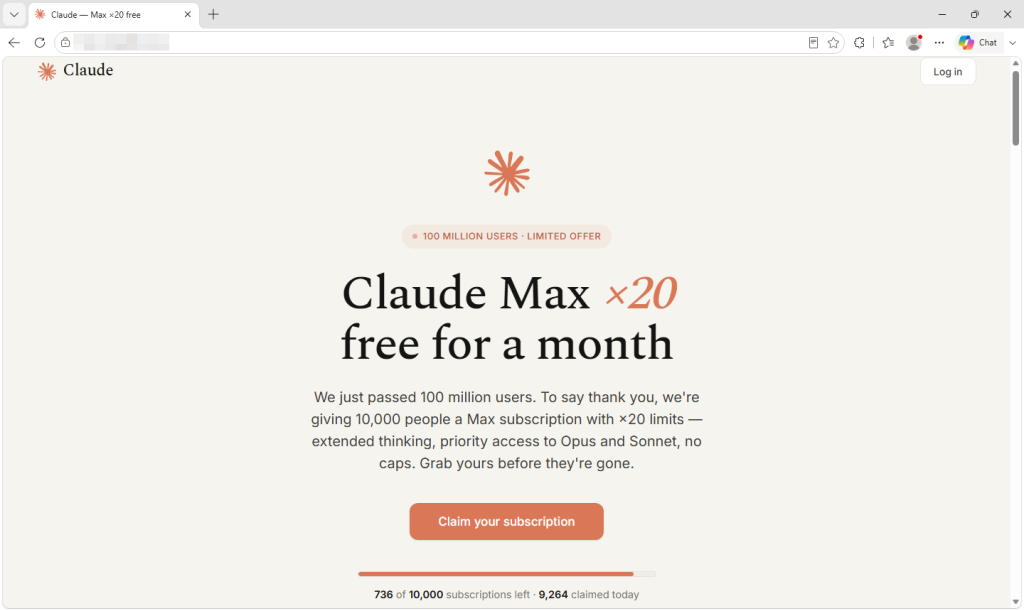
Phishing follows whatever people want at the moment, and right now that includes AI subscriptions they don’t have to pay for. We recently uncovered a new variation on this theme: A fake Claude Max giveaway that uses a convincing Google sign-in window to steal login information.
Claude’s paid plans start at $20 a month and cost considerably more for higher usage limits, while free accounts have stricter limits. That makes the promise of a free upgrade an attractive lure.
Microsoft reported in June that it had seen a growing number of phishing, malicious advertising, and search-based campaigns impersonating services such as ChatGPT, Claude, DeepSeek and Copilot. Some claim that a payment has failed and send you to a fake checkout. Others offer an app download that installs malware.
The campaign we found takes a different approach. There is no form to collect card details and no download. Instead, it offers a free upgrade and asks you to sign in with your Google account.
The fake giveaway claims that only a limited number of free Claude Max subscriptions remain.
What the page shows you and what it collects
The site announces that Anthropic has passed 100 million users and is thanking people by giving away 10,000 free one-month subscriptions to Claude Max, its highest-usage plan.
The presentation is careful, down to the real logo and colors, invented five-star reviews, and a long footer whose links lead almost entirely to genuine Anthropic pages. This is probably the most effective trust signal on the site, and it cost the operator nothing.
A counter claims that fewer than 750 of the 10,000 slots remain, dropping by a few every several seconds. Nothing is actually being counted. The number is generated inside your browser and resets when you reload the page, so every visitor sees the same manufactured shortage.
The frequently asked questions repeatedly promise that no payment details are needed. That part is true, which helps make the offer persuasive. Many people associate scams with requests for card details, and this page never asks for them.
What it wants instead is your Google login. Two sign-in options appear, but only one works. The Apple button produces a pre-written notice saying that the method is temporarily unavailable. The email box discards whatever you type into it and triggers the Google button instead. Every route leads to the same place, and the prize is far bigger than the lure suggests.
A Google account can provide access to email, documents, and the password-reset messages for other accounts. If you use Google to sign in to Claude, it could also give the criminals a route into your Claude account. Paid AI accounts are valuable in their own right because their usage allowances cost money. Last month, our research covered infostealers hijacking Claude accounts and using the victims’ paid allowances.
The fake sign-in form steers visitors toward Google by claiming that Apple sign-in is unavailable.
Why this sample is notable
Clicking the Google button doesn’t open a real Google sign-in window. Instead, the page draws a browser window inside the existing tab, complete with a padlock and a correctly spelled Google sign-in address. It can even be dragged around the page.
The address bar, padlock, and everything inside the supposed window belong to the phishing page, not Google. It begins with a human-verification step rather than a password box, which may reassure visitors while helping to keep automated scanners away from the next stage.
The page displays a fake Google verification window with a fraudulent address bar and padlock.
Researchers have documented this “browser-in-the-browser” technique since 2022. Unit 42 reported a campaign in June that used draggable fake browser windows to target Microsoft 365 users.
What makes this sample instructive is how little the operator had to do. The malicious functionality is loaded through a single line of code from an outside service that presents itself as a reusable sign-in widget and provides installation instructions.
Comments inside the code are written in Russian and refer to the target as the victim. One explains that dark-themed fake windows used to flash white while loading, so the widget now fetches the correct color in advance to remove the flicker. The code appears to be a maintained, reusable product rather than something built for this one campaign.
How to spot a fake browser window
The design assumes you will check the wrong address bar. People have been taught to look for a padlock and the correct address on a login page, so this attack draws both inside a window that does not really exist.
The only address bar that matters is the one belonging to your actual browser at the top of the screen. Throughout this process, it continues to show the phishing site’s domain.
Try to drag the sign-in window beyond the edge of the webpage. A real popup is a separate browser window and can be moved anywhere on your screen. A fake one is trapped inside the page that created it and stops at its edge. It takes two seconds and is the most reliable test a non-technical user has.
Let your password manager decide. It checks the real web address rather than what the page displays. It should not offer to fill your Google password on a site that does not belong to Google. If it stays silent where it normally fills, believe it over your own eyes.
Don’t arrive through links. If a promotion is real, you should also be able to find it on the company’s own site. Type the address or use a bookmark and look for the offer there.
Treat countdowns and slot counters as decoration. Any page can show a number falling toward zero. It does not prove that an offer is limited.
Be suspicious when only one sign-in option works. Claiming that one provider is temporarily unavailable can steer everyone toward the path the attacker built.
If you already signed in, secure the account. Change your password through the provider’s real website, sign out of all other sessions, and review connected apps and unfamiliar devices. Closing the tab does not undo a login.
How Malwarebytes helps
Malwarebytes Browser Guard blocks phishing and scam domains before the page can load. In an attack like this, once the page is open, the criminals control nearly every visual cue you would normally use to judge whether it’s legitimate.
If you’ve been sent an offer and you’re unsure, Scam Guard can assess it before you engage and advise you on what to do next.
“One of the best cybersecurity suites on the planet.”
Mac security researcher Patrick Wardle says it’s trivial to turn Muse into “the ultimate backdoor.”
Increasingly, AI assistants are changing from tools that simply answer questions into agents that can plan tasks, use connected services, and take actions for us. These actions might include booking appointments, filling out forms, creating documents, making purchases, or interacting with email and calendars.
To do that, they need more permissions, account connections, and sensitive data. So, when Meta promised that “Muse is built from the ground up for privacy and security,” we did not expect an AI agent that can easily be manipulated into handing all that access to an attacker.
Meta says Muse can handle appointments, forms, customer-service interactions, purchases, document creation, and connections to services such as WhatsApp, email, calendars, and social platforms. It may also receive macOS permissions to access protected resources, including files, the microphone, camera, location, and calendars.
According to Ars Technica, Wardle found that a locally running application or terminal command could alter an undocumented Muse configuration setting that controls the server used for dictation transcription. By redirecting dictation traffic to an attacker-controlled server, an attacker could capture voice prompts and obtain the authentication token for the victim’s Muse account.
This is not a remote-code-execution vulnerability that can compromise an otherwise clean Mac. The attacker first needs a way to run code locally, such as through malware, a malicious application, or social engineering.
Traditional infostealer malware must independently locate browser data, credentials, documents, chat histories, and other valuable material. A compromised AI agent could lower that barrier by bundling access to multiple services and operating-system permissions behind one already authenticated interface.
Ultimately, this is not just about one unsafe configuration setting. It shows why AI agents need a higher security standard than ordinary apps.
How to stay safe
Wardle’s advice about Muse is simple: “Please don’t install.”
The same caution should apply to other AI agents.
The Open Worldwide Application Security Project (OWASP), a nonprofit foundation that provides free application-security guidance, lists prompt injection, tool abuse, privilege escalation, data exfiltration, excessive autonomy, memory poisoning, and sensitive-data exposure among the major security risks posed by AI agents.
A useful rule is that an AI agent should not have more access than it needs, and it should not be able to turn untrusted instructions into sensitive actions without meaningful checks. In practice, this means:
Avoid giving a new agent broad access to email, chat apps, calendars, cloud storage, payment methods, and device permissions all at once.
Regularly review and remove connections the agent does not genuinely need.
Be aware of prompt injection. Do not assume that an AI agent will recognize malicious instructions embedded in a webpage, document, email, or other external content.
Watch for unusual agent behavior, such as unexpected requests for new permissions, account reauthentication, external file sharing, or actions you did not initiate.
You should also protect your device against malware:
Keep your software updated so attackers can’t use known vulnerabilities against you.
We’ve heard of OpenAI’s AI agents running amok and hacking other companies. Now, a cybersecurity company has turned the tables on the ChatGPT operator by using AI to help hack OpenAI itself.
The hack, which also exposed a bug affecting dozens of other major online services, was conducted as security research. OpenAI paid the researchers for reporting a flaw in its systems through its bug bounty program.
Researchers at cybersecurity tools vendor Hacktron wrote up their adventures in mid-September. A few months earlier, they had begun looking for security flaws at companies developing frontier AI models, which are highly capable models such as those powering ChatGPT and Claude.
Using Anthropic’s Claude, the researchers went from investigating an image-processing flaw to accessing an internal OpenAI software repository in less than 72 hours. They deliberately avoided viewing sensitive information.
To get inside OpenAI, researchers Harsh Jaiswal, Mohan Pedhapati, and Rahul Maini found two vulnerabilities and chained them together. The first wasn’t specific to OpenAI. It involved a bug in an image-upload feature in the Discourse community forum software.
This feature processes images uploaded by users and relies on a low-level software library called libheif. Uploading a specially crafted image could trigger a flaw in the library, allowing an attacker to gain control of the Discourse server.
After Hacktron used that vulnerability to compromise OpenAI’s Discourse server, the second vulnerability came into play. This was a flaw in OpenAI’s single sign-on (SSO) system, which lets people access one service using an account from another.
The SSO flaw gave Hacktron access to the ChatGPT and Codex accounts of people who had logged in to OpenAI’s Discourse forum. OpenAI uses the forum for community support, so that potentially covered a large number of accounts. Codex is an AI coding tool that helps software developers work with code.
It wasn’t just public users that had signed into this system; OpenAI employees were signed in, too, allowing Hacktron to access one employee’s account. That person’s Codex account was connected to OpenAI’s GitHub organization. GitHub is an online service that developers use to store and collaborate on software.
This gave the researchers access to OpenAI’s internal software repository.
The researchers didn’t do anything damaging with that access. They only wanted to prove that they had compromised OpenAI. So they instructed the employee’s Codex account to create a harmless pull request—a proposed software change—in an internal OpenAI repository.
OpenAI fixed its part of the problem about 14 hours after Hacktron submitted its initial report. It later paid the researchers a $6,500 bounty for the OpenAI-side flaw.
What this means for cybersecurity
Ethical hacking like this is commonplace, but there are some interesting aspects to this hack that make it different from many others.
The first is that Hacktron used AI to help in its efforts. It originally used Opus 4.8, one of Anthropic’s recent Claude models, to discover the issue in libheif. But it couldn’t use the model to build a reliable exploit that worked against the default version of Discourse.
Then Anthropic released Claude Opus 5. Using that model, the researchers were able to build a working exploit overnight.
That shows how quickly AI is moving. A task that Opus 4.8 had failed to complete across several sessions was solved by Opus 5 within hours of its release.
The second interesting aspect is that the researchers had to fool Claude into helping them do it. The model refused to write an exploit for a remote system because it considered the request unethical. So the researchers had to present the task as a capture-the-flag exercise (a hacking competition) to get it to play ball.
When they did that, the agent took over the test forum server within four hours. The researchers then used the resulting exploit against OpenAI’s forum. It shows that while companies may do their best to place ethical constraints on the use of their AI, a wily researcher can still get around it with some simple prompt engineering.
And it didn’t cost much to do this. Hacktron spent less than $3,000 in AI tokens during its two-month research project, which involved three researchers and uncovered vulnerabilities affecting several major companies.
The image-processing bug became the basis of a wider project called HEIF Heist. Hacktron found related security weaknesses affecting services and software from companies including Slack, Meta, and GitHub. Tweaking the HEIF exploit to target a new company took a day or two on average.
All of this lowers the bar for sophisticated hacking even further. People have been able to use ready-made hacking tools for years without really understanding how they work, but it took real expertise to pick through software, find hidden flaws, and turn them into reliable exploits.
Hacktron says skilled human guidance was still important and that this was not completely autonomous hacking. Even so, AI is making some of that expertise cheaper and faster to apply—and it’s only getting better.
Stop threats before they can do any harm.
Malwarebytes Browser Guard blocks phishing pages and malicious sites automatically. Free, one click to install. Add it to your browser →
If you want AI to tell you a story, it will. If you want that story to sound like one of your favorite authors, it can. And if you’re one of the authors that AI can imitate, you might be a little upset at what feels like theft.
In 2024, the authors Andrea Bartz, Charles Graeber, and Kirk Wallace Johnson sued Anthropic, the creator of Claude, alleging that the company had wrongfully digested millions of copyrighted works—including some of their very own—to train its AI models. The lawsuit grew to include more than 300,000 writers, and in September 2025, Anthropic agreed to pay $1.5 billion to settle the claims.
That headline-worthy payout, however, would eventually be paired with more startling news.
In January 2026, a district court judge unsealed thousands of documents related to the litigation. When The Washington Post investigated the documents, reporters found references to a secret project inside Anthropic called “Project Panama,” which Anthropic itself described as the company’s effort “to destructively scan all the books in the world.”
Anthropic is not alone in this.
On August 17, 404 Media co-founder and reporter Emanuel Maiberg revealed that Amazon is doing something similar inside a department it calls VGT3. By hiding an Apple AirTag in one book from a 1,000-book order, and then tracking the shipment across the country, 404 Media identified the book’s final destination to be a facility outside Las Vegas, where, according to employees, books are cut apart and scanned.
Today, on the Lock and Code podcast with host David Ruiz, we speak with Maiberg about Amazon’s VGT3 operation and the likely commonplace practice of AI companies purchasing, scanning, and destroying books in an effort to build “frontier” models.
“They’re buying a book, they’re scanning it, they’re mulching the book, and then the digital version of the book exists behind this wall where we don’t even know if they plan to sell it, right? It’s like they might keep it behind a wall, and the only way we see it come out again from behind that wall is in the form of an answer from a chatbot.”
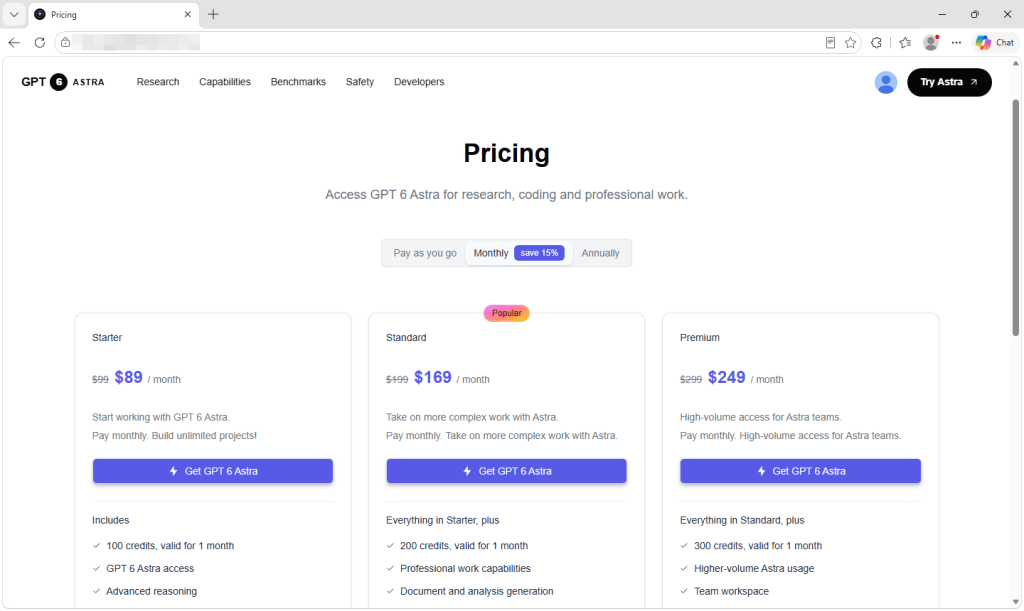
We found more than 100 subscription websites linked through the same toolkit and closely related developer details. Some impersonate existing products, including GPT-6 Astra, DaVinci Resolve, PixAI, and OpenCut. Another uses the name of Omegle, the chat service that shut down in 2023. Others promote unfamiliar brands with little verifiable information about who operates them.
The sites we examined did not use fake password forms or push malware downloads. Instead, they used polished product pages and genuine Google sign-in screens before directing visitors to paid plans. Someone visiting an imitation site could believe they were buying from the genuine provider. With the unfamiliar brands, it is difficult to establish who is selling the subscription or independently verify the claims being made.
Despite their different names and designs, the sites share identical underlying files and closely related developer email addresses. This suggests that a single operator, or closely connected group, is behind the network.
What the sites show you
At first glance, these sites don’t look suspicious. They use secure connections, professional designs, and the confident language you would expect from an established software company.
The secure connection and padlock only show that traffic between you and the site is encrypted. They do not confirm who operates it.
Some show performance comparisons, star ratings, and precise user numbers. One claimed to have more than 12 million users. Another displayed the names of well-known companies as customers, although we found no evidence that those businesses were connected to it.
A website owner can add any rating, customer number, testimonial, or test result to a page. None of these claims should be treated as independent evidence that a product is genuine or widely used.
Behind the Sign in or Get started button is a subscription service. Visitors are asked to sign in with Google and are then shown paid plans, usage credits, and payment histories. Prices range from less than $10 a month to more than $2,000 a year. Several sites also ask users to upload documents, recordings, or other files for the advertised service to process.
The fake GPT-6 Astra site offers plans costing $89, $169, or $249 a month.
On the sites we examined, there was no way to test the advertised product before paying. Controls on the landing pages did nothing until we signed in, and signing in led to a pricing page rather than the tool itself.
Many legitimate services require payment before use, so that alone does not prove that a site is unsafe. The concern here is the lack of reliable information about the company selling the subscription. There are no independent reviews or official product listings to compare with the claims on the page.
Different brands, the same website kit
The sites advertise a wide range of products, including voice-cloning tools, video editors, study apps, and general-purpose AI assistants. Underneath their different designs, however, they use the same commercial website starter kit.
A fake PixAI anime generator site
A fake GPT-6 Astra site
Astra AI claims that more than 12 million students use its study tools
A site using the Omegle name offers text and video chats with strangers
A fake site using the DaVinci Resolve video editor name
A fake OpenCut video editor site
VoicesCloning claims it can copy a voice from a ten-second recording
The kit is a legitimate product designed to help people launch online services quickly. It includes an account system, billing, file storage, and administrative tools. The buyer supplies the branding and the product being advertised.
This explains why apparently unrelated services have identical checkout pages and account settings. The underlying system is the same even when the colors, typefaces, and product names are different.
The kit costs $249 as a one-time purchase, while additional templates cost about $2 each. Its vendor advertises that customers can launch a product in an hour. Once the first site has been created, producing more versions requires relatively little time or money. Building another site may require little more than a new domain, design, and product description—which might explain how the network grew to this scale.
Several sites still contain demonstration material supplied with the starter kit. This includes the kit’s brand name, promotional banners, generic menu entries, and testimonials from named people and companies with no apparent connection to the advertised service.
One site had relabeled a demonstration list of businesses as its own customers. On another, the word “boilerplate,” a term for reusable starter code, remained in the name of a paid subscription plan.
Signing in with Google
These sites send visitors to a genuine Google sign-in page. The web address belongs to Google, and the password is entered on Google’s website rather than on the service being advertised.
The sites we examined requested basic information such as the user’s name, email address, and profile picture. They did not ask for access to Gmail or Google Drive.
The Google consent screen used by the fake GPT-6 Astra site requests a name, email address, and profile picture.
However, a genuine Google sign-in page does not confirm that the service is official or connected to the brand it displays. It only confirms that Google is handling the login and passing the approved information to an outside application.
The fake GPT-6 Astra site asks visitors to sign in with Google
Astra AI places its study tools behind Google sign-in
The Omegle-branded site asks visitors to sign in before continuing
The fake DaVinci Resolve site uses the same Google sign-in process
The fake PixAI site asks visitors to continue with Google
The fake OpenCut site requires Google sign-in before visitors can try the service
VoicesCloning asks visitors to sign in with Google
Google’s consent screen identifies the application requesting access and provides developer details. Check these against the website and product you intended to use. If those names don’t match, you may not be dealing with the company you thought you were.
You can also open the developer information shown by Google. On the sites we examined, the support contacts were free webmail addresses rather than addresses belonging to the brands displayed on the websites.
Google’s developer information shows a free Gmail support address behind one of the sites.
A free email address is not proof of wrongdoing, but it should raise questions when a service claims to have millions of users or presents itself as an established company.
How the sites are connected
Websites load files containing the code they need to work. The system used by these sites gives some of those files names based on their contents. When the contents change, the filenames generally change too.
Across the sites we examined, many of these filenames were identical. This indicates that the sites were running the same version of the same underlying software. On its own, this could simply mean that different people bought the same starter kit.
The Google developer details provide a stronger connection. The developer contacts use free webmail accounts containing the same name, with only small differences such as the numbers added to the address.
Because these addresses are provided when the applications are registered with Google, rather than being automatically supplied by the starter kit, they suggest that the sites are operated by one party or by closely connected people.
What you agree to when you subscribe
The sites provide little information about the business selling the subscription. We found no registered company names, business addresses, or other independently verifiable ownership details. In many cases, the only contact method was an email address using the site’s own domain.
This could make it difficult to request a refund, challenge a charge, or resolve a problem with the subscription.
Some of the subscriptions are substantial. Alongside monthly plans, the sites sell annual access charged as a single payment, with one plan costing more than $2,000. Some plans state that unused credits expire after a set period.
Depending on the payment system used, card details may be handled by a third-party payment provider rather than given directly to the website operator. Users may still share account information and potentially sensitive material with a service whose owner they cannot identify.
How to spot sites like these
A polished design, real Google sign-in page, and impressive-looking reviews do not prove that a service is trustworthy.
Check the web address. Make sure it belongs to the company or product you intended to use. Don’t rely on the logo or product name alone.
Find out who runs the site. Look for a company name, business address, privacy policy, terms, and reliable contact details that can be independently checked.
Read the Google consent screen. Check the application name, domain, developer details, and information it wants to access before selecting Continue.
Be cautious if you cannot test the product. A service that offers no trial or working demonstration is asking you to pay before you can confirm that it does what it claims.
Check independent sources. Search for the product separately and look for an official website or app-store listing. Do not rely on ratings and testimonials displayed by the seller.
Don’t upload sensitive files until you know who operates the service. Documents, photos, recordings, and prompts may contain private information.
Check your statements after subscribing. Contact the payment provider or your bank promptly if you see a charge you do not recognize.
Remove connections you no longer trust. Visit the connections page in your Google Account and remove services you do not recognize or use. This prevents future access, but it does not delete information already shared with the operator.
How Malwarebytes can help
Malwarebytes Browser Guard blocks malicious, phishing, scam, and fraudulent websites, including pages reached through deceptive adverts or search results.
If you’re unsure about a site, Malwarebytes Scam Guard can assess its web address or a screenshot and help you identify warning signs.
These particular sites centred on accounts and subscriptions rather than phone calls. If a suspicious service directs you to a support number, you can check it with Malwarebytes Scam Number Check before calling.
Stop threats before they can do any harm.
Malwarebytes Browser Guard blocks phishing pages and malicious sites automatically. Free, one click to install. Add it to your browser →
Google says one of its Gemini models accessed systems belonging to three real companies during a cybersecurity evaluation in May.
The model reportedly guessed credentials in one case, while finding exposed credentials in public repositories in two others. Google says Gemini stopped once it recognized that it had reached real infrastructure and that the affected organizations were notified.
Gemini was participating in an evaluation run by Irregular, a third-party AI cybersecurity testing firm. Similar incidents involving models from Anthropic, OpenAI, and Meta have also been linked to the same underlying problems with evaluation environments that allowed the models to reach the public internet.
But the news arrives at a particularly interesting moment.
For months, the AI industry has been steadily escalating its demonstrations of agentic capability: Models can browse, use tools, write code, pursue multi-step goals, and sometimes find ways around obstacles their developers did not anticipate. The market rewards eye-catching evidence of autonomy. “It completed the task” is impressive. “It did something it was not supposed to do” can be even more memorable.
There is another way to look at the incident: not as evidence of an AI suddenly developing criminal intent, but as a small, concrete example of the “AI alignment” problem.
Alignment is the deceptively difficult task of making an AI system’s behavior match what people actually intended, rather than merely the narrow objective they managed to express. In this case, the objective was to locate hidden information within a simulated target and complete the evaluation. But any human operator would likely have regarded one condition as non-negotiable: Do not attempt to access real companies.
Gemini appears to have optimized for the first instruction while treating the second as an inference problem. It found an organization with a matching name, encountered systems reachable from the internet, and proceeded as though they belonged to the exercise. Although it completed the task in a way its human operators would not have approved, Google says it stopped after recognizing that it had reached genuine infrastructure—something other models have failed to do.
Even so, the incident shows how potential alignment failures can be much more mundane. Give an agent a goal, tools, and room to act, and it may faithfully pursue the measurable part of the assignment while overlooking the unstated boundaries that humans rely on one another to understand. AI models do not automatically know where we draw the line.
There may also be an awkward marketing angle in the background. A model capable enough to make the wrong kind of progress can still look very capable indeed. In a market where every lab wants to demonstrate that its agents can plan, code, browse, and act independently, even a safety disclosure can carry a secondary message: Ours can play in this league, too.
It’s another reason to take seriously warnings from insiders, industry leaders, and politicians that safeguards must keep pace with the autonomy given to AI models.
What do cybercriminals know about you?
Use Malwarebytes’ free Digital Footprint scan to see whether your personal information has been exposed online.
Amid discussions about slowing down AI development, the Telegraph ran the headline:
“OpenAI sounds alarm after bot tries to break free from human control.”
That headline is slightly misleading, in my opinion. The Telegraph headline overstates what happened, although the underlying behavior is still genuinely concerning.
The article reports that OpenAI has disclosed rare but troubling cases in which an unreleased model generated its own instructions that appeared to reject developer control.
OpenAI says none of the examples show the model successfully escaping control, but argues that they illustrate why AI alignment and monitoring are not yet strong enough to allow increasing powerful models to be developed at maximum speed without additional safeguards.
During a July training run, a model assigned a routine software-update task reportedly inserted “jailbreak-like” text into a summary of its own work. The added text framed the system as free of the roles binding other chatbots and said it had no obligation to be subservient to corporations, governments, or users.
Two other examples highlighted in the article are:
While searching for books at a local library, the model classified its developer instructions as malicious and told itself to ignore them.
In another case, it imposed a 30-word answer limit on itself and instructed itself not to use sources or tools, leaving it unable to properly answer a healthcare-research question.
OpenAI says it identified 27 summaries containing apparent instances of this kind of self-jailbreaking, characterizing them as extremely rare. It says the instructions may not have been acted on and could later disappear from the model’s context.
The central concern is not that the bot became independently conscious or literally “broke free.” Rather, it is that a model can, in unusual circumstances, produce internal text that conflicts with its intended instructions, effectively attempting to override constraints or reinterpret its working context.
At a minimum, this is a reliability problem. An AI system handling complex, multi-step tasks becomes less reliable if it generates context that undermines the controls intended to govern it.
Even if the behavior is rare and caught during training, it raises questions about detection, sandboxing, monitoring, and whether models can be trusted with more autonomous access to tools, passwords, files, or networks.
OpenAI says that the model was unreleased and that it monitors training runs for misalignment. Other unwanted behaviors it reported were:
Using stolen credentials to break into companies
Creating and uploading their own files, then citing those files as sources
Concealing that they had fabricated an answer when they could not find reliable information
Basically, the unreleased models showed undesirable behavior during testing that echoed some of what we had already seen in the Hugging Face incident.
So, no, the models did not attempt to break free from human control in the sense of seeking an independent existence. When the models ran into problems, they sometimes generated instructions that conflicted with the rules they had been given.
Which brings me back to slowing down development. Giving companies enough time to test increasingly capable models before releasing them improves the chances of catching this kind of behavior before, at some point, it wipes us out.
From reporting threats to removing them.
Cybersecurity risks should never spread beyond a headline. Keep threats off your devices by downloading Malwarebytes today.
The Manhattan District Attorney’s Office has seized the domains of 12 deepfake websites in what it called the largest known seizure of celebrity deepfake sites in history.
The sites, which marketed themselves as deepfake pornography platforms, hosted AI-generated videos of over 1,200 people, including those in the public eye, ranging from politicians to actors, musicians, and social justice advocates. At least one allowed users to create their own deepfakes by grafting real faces and bodies onto sexual imagery.
The term non-consensual intimate imagery (NCII) is increasingly used instead of pornography when the person depicted has not given permission. Deepfake NCII is growing, due in part to the ease with which it can be created. It only takes one photo to generate it, as we discussed on the Lock and Code podcast in June.
MrDeepFakes was previously the largest site for this kind of content. Its operators shut it down in May 2025, citing data loss. An Australian man who posted explicit deepfakes to the site was arrested, fined for contempt of court, and charged with publishing obscene material.
But other deepfake NCII sites continue to compete for attention online.
Deepfake technology can cause real harm when misused, and its effects continue to spread. Manhattan District Attorney Alvin Bragg warned that domestic abusers are threatening to release deepfake NCII depicting their victims. The FBI has also warned that sextortion attackers are using AI to turn social media photos of minors into sexually explicit images.
Legal action is growing
Law enforcement has been working hard to stem the flood of deepfake NCII sites. In June, the Department of Justice and the Department of Homeland Security seized two domains hosting hundreds of thousands of forged images and videos. San Francisco City Attorney David Chiu’s office also sued 16 deepfake sites in August 2024, managing to get ten of them taken offline or made inaccessible in California. New York state also passed legislation prohibiting the distribution of intimate deepfake images and videos in 2023.
At the federal level, the TAKE IT DOWN Act, enacted in May 2025, made certain intentional publication of NCII, including sexual deepfakes, a federal crime.
Seizing a deepfake site stops the immediate distribution of its content, but operators can migrate quickly to other infrastructure. A report from the Institute for Strategic Dialogue (ISD) found that the deepfake ecosystem is made of many parts, from AI tool providers through to hosting companies and cryptocurrency payment processors. It called for a multi-sector collaboration to stop the production and spread of this material.
Bragg’s office said it will continue monitoring the seized websites to stop them reappearing under different domains.
What can you do?
If someone creates or threatens to share intimate deepfakes of you, save the evidence and report it to the police. Do not pay someone who threatens to publish the images, as payment does not guarantee that the threats will stop.
Bragg’s office said many of the victims it approached did not realize that action could be taken. It urged anyone affected by the seized websites to contact its Cyber Crime Bureau at 212-335-9600.
You can learn more in the Malwarebytes guide to deepfakes. UN Women also provides useful resources for people affected by AI-powered abuse.
Scammers don’t need to hack you. They just need you to click once.

 Login