❌

Normal view

Received — 29 September 2026 ⏭ Microsoft Security Blog

NeedyMantis: Unpacking a post-compromise malware family used in targeted operations

Microsoft Threat Intelligence has identified NeedyMantis, a modular post-compromise malware family observed in a limited number of targeted operations affecting telecommunications organizations, universities, medical nonprofits, intergovernmental organizations, and government contractors. Based on observed activity, NeedyMantis is typically deployed after a threat actor has already established access to a target environment, indicating that the malware is used to maintain long-term access and support follow-on operations.

NeedyMantis activity dates back to at least October 2025. We discovered the malware family while analyzing and pivoting from research and indicators of compromise associated with the DAEMON Tools supply chain compromise, which Kaspersky previously reported on as part of its investigation into the campaign. Observed activity involving NeedyMantis has thus far aligned with activity that Microsoft associates with threat actors operating from China, although Microsoft has not determined whether all observed activity is attributable to the same operator.

While NeedyMantis employs techniques commonly used by modern malware, its architecture combines multiple loaders, custom encrypted file archives, a custom executable file format, and modular components that enable operators to evade analysis and extend functionality through additional modules. These characteristics, combined with its use in targeted intrusions, make NeedyMantis a useful case study for understanding how threat actors establish and maintain long-term access within victim environments.

In this blog, we analyze the NeedyMantis malware framework. We examine its packaging and deployment, custom archive format, loader architecture, command-and-control (C2) communications, and modular design. We also provide indicators of compromise (IOCs), Microsoft Defender detections, and mitigation guidance to help organizations defend against this threat and related activity.

Observed operators and targeting

At the time of writing, Microsoft has observed at least one threat actor using NeedyMantis malware: Storm-3069. Storm-3069 is Microsoft Threat Intelligence’s designator for activity associated with the DAEMON Tools supply chain compromise. While Microsoft assesses the activity originates from China, it has not attributed Storm-3069 to a Chinese nation-state actor. Microsoft identified NeedyMantis through follow-on analysis of indicators associated with Kaspersky’s investigation of the DAEMON Tools compromise.

Microsoft has observed additional NeedyMantis activity beyond Storm-3069’s activity in the DAEMON Tools campaign, indicating that the malware might be used by more than one operator. Observed activity involving NeedyMantis has thus far aligned with activity Microsoft associates with threat actors operating from China, such as targeting that aligns with Chinese interests and the use of selective deployment.

NeedyMantis has been observed in intrusions affecting telecommunications organizations, universities, intergovernmental organizations, medical nonprofits, and government contractors. Combined with the malware’s limited observed deployment and alignment with activity Microsoft associates with China-based threat actors, this victimology suggests NeedyMantis is deployed selectively rather than broadly. However, Microsoft has not determined whether all observed activity is attributable to the same threat actor or whether multiple actors have access to the malware.

Malware packaging and distribution

As previously mentioned, observed activity suggests that the malware is typically deployed after a threat actor has established access to a target environment. As a result, the methods used to gain access before NeedyMantis is deployed may vary across intrusions.

NeedyMantis is composed of multiple components written in C++ and x64 shellcode. The malware starts with a first-stage loader and a file archive. The loader and archive have been found packaged alongside legitimate software, with the first-stage loader–masquerading as a required DLL—being loaded through DLL sideloading.

Some of the open-source, software abused by the malware include: Poedit (translation), curl (data transfer), Vim (text editor), and TightVNC (remote access). Microsoft has also observed NeedyMantis masquerading as Microsoft Office, Broadcom, Intel, and NVIDIA DLL components. The following is a list of some of the DLL path names used by the malware:

  • %ProgramFiles%\Poedit\WinSparkle.dll
  • %ProgramData%\USOShared\libcurl.dll
  • %ProgramData%\VIM\vim64.dll
  • %ProgramData%\TightVNC\VIM\vim64.dll
  • %ProgramData%\office\dbghelp.dll
  • %ProgramData%\broadcom\dbghelp.dll
  • %ProgramData%\Intel\jli.dll
  • %ProgramFiles%\modifiable\nvml.dll
  • %ProgramData%\ics\nvml.dll

The malware’s file archive is named the same as the loader DLL without the extension, for example WinSparkle or libcurl.

In one observed incident, an operator used the Impacket toolkit during hands-on-keyboard activity to copy the legitimate software, malicious DLL, and file archive from a network share and execute it on a targeted device. This activity occurred after the actor had already obtained access to the environment and illustrates one method by which NeedyMantis can be introduced during an intrusion post-compromise.

NeedyMantis is observed during the post-compromise stage of an intrusion after an actor has established access to the target environment. While one known user of the malware, Storm-3069, has been associated with supply chain compromises, Microsoft has not observed NeedyMantis itself being distributed through a supply chain compromise. However, supply chain activity remains one possible means by which an actor could gain the access necessary to deploy the malware.

NeedyMantis architecture and capabilities

First-stage loader

NeedyMantis’ first-stage loader is DLL sideloaded and launched when the legitimate software it is packaged with is run. Its only task is to extract the second-stage loader from its file archive and continue execution there.

In the analyzed sample, the loader DLL was named WinSparkle.dll (SHA-256: e842dd7642c8e04b5ec20b6393848a9c904e4832930950c16664fe7800ba382e) and its file archive was named WinSparkle (SHA-256: 9cb68f986043a576e19d32184c583b7d8f571c7219d8dc0065dced1c13f077ef). NeedyMantis spoofed and replaced the WinSparkle software update component of the Poedit translation software.

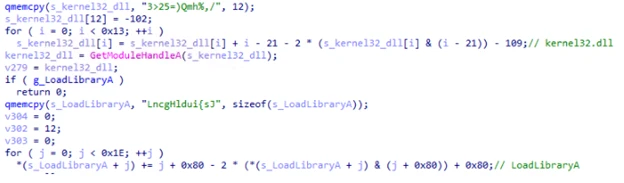
The loader employs common anti-analysis techniques to hinder analysis, like obfuscating most of its important strings.

A code snippet for x86 architecture manipulating memory addresses and performing data manipulation.
Figure 1. Example obfuscated strings being deobfuscated

This technique is known as obfuscated stack strings because each piece of the string is built up one at a time on the function’s stack. Once built up, it is deobfuscated using various mathematical operations. Most of the obfuscated strings in this loader are Windows DLL and API names. These deobfuscated strings are used to resolve Windows APIs dynamically at runtime.

In addition to obfuscated strings, a lot of the code’s constant values are stored obfuscated as well.

C++ code performing a loop that manipulates a pointer to an integer array, incrementing an element, and then performing a calculation involving pointer arithmetic before a sleep function
Figure 2. Example obfuscated constant value “1032” being deobfuscated

Finally, the loader has two anti-debugger methods: one based on ProcessDebugFlags and the other using ThreadHideFromDebugger.

As noted above, the loader’s main objective is to extract the next stage from its file archive and launch it. In the analyzed sample, the next stage was named encryptbase64.ps1.

Custom file archives

NeedyMantis’ file archives are in an encrypted and compressed custom file format. To get access to the files, the outer layer of the archive is XOR-decoded and RtlDecompressBuffer decompressed. Once decompressed, there are individual file entries. In each file entry, the file’s name is XOR-decoded and its contents are RtlDecompressBuffer decompressed.

The file format’s offsets, XOR keys, and values change from sample to sample.

A hexadecimal data structure depicting a file's header, containing information such as checksums, entry counts, and sizes for various compressed files.
Figure 3. Example output of an archive unpacking tool displaying metadata of the WinSparkle file archive

This archive contains the following 11 files:

  • 7-zip.chm – Legitimate component of 7-Zip
  • 7-zip.dll – Legitimate component of 7-Zip
  • 7-zip32.dll – Legitimate component of 7-Zip
  • 7z.exe – Legitimate component of 7-Zip
  • Disk2vhd.dll – Legitimate Sysinternals component Disk2vhd
  • main.dll – Legitimate Sysinternals component Ctrl2Cap
  • kernel32.dll – Legitimate kernel32.dll
  • encryptbase64.ps1 – Second-stage loader
  • dnsapi.dll – Not a dnsapi.dll, but contains the malware’s configuration
  • ws2_32.dll – Not a ws2_32.dll, but contains a WebSockets based communications DLL
  • msvcrt140.dll – Not a msvcrt140.dll, but contains shellcode to load module DLLs and resolve exports

While this archive contains several legitimate software components, the malware’s functionality is implemented by the remaining files, discussed below.

Other analyzed NeedyMantis file archives have contained different file names and components. An older version of the malware, for example, used a libcurl (SHA-256: c82520eb03c084226be4eafbff46f56dca0aa8804a2a7f23a085a96afe71ef77) file archive, and it contained only four files:

  • 300.c – Malware’s configuration
  • 300.s – WebSockets-based communications DLL
  • is – Persistence module using Windows Services
  • m.l – Main component

Second-stage loader

In the analyzed sample, encryptbase64.ps1 was the second-stage loader. Despite its .ps1 PowerShell extension, the file contains x64 shellcode. Its purpose is to decode and decompress an embedded binary which is NeedyMantis’ main component.

This loader also has some anti-analysis functionality that differs from stage one. For string decoding, it locates two encoded blocks of data and XOR keys at calculated offsets and then decodes them. The first block, most relevantly, contains a few Windows DLL and API names that are resolved dynamically. The second block, shown below, contains a list of Windows DLL names and Windows API hash values:

A list of hexadecimal numbers depicting a list of Windows DLL names and Windows API hash values.
Figure 4. Decoded Windows API hash values

The component uses a rotate right (ROR) based algorithm with a configurable rotation value (the analyzed sample used value 11) to resolve these Windows API hashes. Figure 5 shows a snippet of Python code reproducing the algorithm:

A snippet of Python code, which includes two function definitions.
`ror(num, count, size)`: and `resolve(func, name)`:
Figure 5. Python snippet of Windows API hashing algorithm

This second-stage loader’s objective is to extract embedded data, XOR-decode it, and then RtlDecompressBuffer decompress it. The location of the encoded data and XOR key are at calculated offsets, which change from sample to sample.

Once decoded the resulting data is a DLL that has been formatted using a custom executable file format. It is a minimized version of a PE file.

Code depicting various metadata and section headers, including offset, base addresses, size, and various attributes for different sections such as '.text', '.rdata', '.data', and '.reloc'.
Figure 6. Example output of custom executable file format to PE file conversion tool

Main component

NeedyMantis’ main component orchestrates C2 communications and handles additional downloaded modules.

It creates a mutex named <username>-<process name>, such as Contoso-Poedit.exe. Like in the first-stage loader, most of the main component’s strings and constant values are stored as obfuscated stack strings.

Configuration

The malware’s configuration was stored in a dnsapi.dll file from the custom file archive. This file name spoofs a Windows networking library. In the sample analyzed, the file contains a 3448-byte binary structure. The structure includes the following fields:

  • 0x00: Unknown (config contained “300”, but components also reference “400”)
  • 0x1c: Communication component name (ws2_32.dll)
  • 0x128: C2 port (443)
  • 0x12c: C2 host (corp.tripswithengine[.]com)
  • 0x334: C2 URI (/library/zip/)
  • 0x53C: WinHttpOpen AccessType (0)
  • 0x954: Proxy username (not set)
  • 0xB5C: Proxy password (not set)
  • 0xD64: Sleep time related (300)
  • 0xD68: Sleep time related (300)

Communications DLL

As referenced in the configuration, NeedyMantis makes use of a communication component called ws2_32.dll. This component is also stored in the custom file archive. Like the config file, the file name spoofs a Windows networking library.

This communications DLL has one export named SystemInfo. As shown below in Figure 7, SystemInfo exposes 10 functions for the main component to initiate and maintain a WebSockets connection with the C2:

A sequence of function declarations for a communication system, including open, close, connect, send, receive, and placeholder functions.
Figure 7. Communications DLL API functions

The library uses WinINet APIs for WebSockets. It also has a hard-coded user-agent of firefox/21.0.

We have also spotted a second version of the communications DLL in a file archive. It implements the same communications API but uses Libwebsockets (LWS) instead of WinINet.

Command and control

The initial C2 beacon is an HTTPS GET request, similar to Figure 8 below:

An HTTP request for a ZIP file in a web browser, specifying various cache control and connection settings.
Figure 8. Initial C2 HTTPS GET request

The Set-Cookie header contains system information. The header value can be Base64-decoded and RtlDecompressBuffer decompressed. Once decompressed it contains a JSON object. The key values are:

  • c – Computer name
  • u – Username
  • o – Base64-encoded data, once decoded it contains line separated “
    • f – Files in ProgramFiles directory
    • pa – Parent process
    • p – Process name
    ” entries:
    • p – Process list

The connection is then converted to WebSockets and a binary C2 protocol is continued. The binary protocol is separated into a header and optional data components. The 44-byte header includes the following fields:

  • 0x00: 16-byte XOR key
  • 0x10: Uncompressed data length
  • 0x14: Compressed data length
  • 0x18: Command number
  • 0x28: Data length
  • 0x2c: Optional data

A 16-byte random XOR key is generated and the header is XOR-encoded, starting at offset 0x18. If there is any data, it is compressed with RtlCompressBuffer and optionally encrypted with RC4.

The initial messages of the binary protocol are a key exchange with the C2 server. The protocol is performed as such:

  • 32-bytes are received from the C2 server, but then ignored
  • A 1024-byte random buffer is created
  • The first 32-bytes of this random buffer are used as the RC4 key for further communications
  • A 256-byte buffer is created that starts with google.com followed by random bytes
  • The 256-byte buffer is RC4 encrypted
  • A random length between 292 and 1282 is picked
  • The C2 protocol message data is structured as such:
    • 0x00: The random length
    • 0x04: RC4 encrypted google.com buffer
    • 0x104: The random 1024-byte buffer used to create the RC4 key (at least 32 bytes of it)
  • This message data is compressed, but not RC4 encrypted
  • A random command number between 1 and 45 is chosen
  • The C2 server uses the buffer at offset 0x104 to recreate the RC4 key and presumably checks the RC4 encrypted google.com buffer
  • The server sends back the random command number as an acknowledgement

Commands

The main component only has a handful of commands. Commands sent to the C2 include:

  • 1110 – Sends computer name and username
  • 1112 – Sends a hard-coded identifier (like 20001)
  • 1150 – Keep alive

Commands received from the C2 include:

  • 1020 – Load module
  • 1030 – Unload module
  • 1050 / 1150 – Dispatch data to module
  • 1070 – Turn off active flags

The main component’s load, unload, and data dispatch commands show that NeedyMantis can extend its functionality through additional modules, but the capabilities of those modules remain unconfirmed.

Mitigation and protection guidance

Microsoft recommends the following mitigations to reduce the impact of this threat.

You can assess how an attack surface reduction rule might impact your network by opening the security recommendation for that rule in threat and vulnerability management. In the recommendation details pane, check the user impact to determine what percentage of your devices can accept a new policy enabling the rule in blocking mode without adverse impact to user productivity.

Microsoft Defender detections

Microsoft Defender customers can refer to the list of applicable detections below. Microsoft Defender coordinates detection, prevention, investigation, and response across endpoints, identities, email, apps to provide integrated protection against attacks like the threat discussed in this blog.

Tactic Observed activity Microsoft Defender coverage
ExecutionShellcode loading, DLL sideloading, decryption, and decompressionMicrosoft Defender for Endpoint
– Suspicious DLL loaded
– An executable file loaded an unexpected DLL file
– Suspicious decode command

Microsoft Defender Antivirus
– TrojanDropper:Win64/NeedyMantis
ExecutionHands-on-keyboard leveraging Impacket tool for follow-on activityMicrosoft Defender for Endpoint
– Ongoing hands-on-keyboard attack via Impacket toolkit
– Impacket toolkit
– Impacket module execution

Microsoft Defender Antivirus
– HackTool:Win32/Impacket
ExecutionStorm-3069 threat actor TTPsMicrosoft Defender for Endpoint
– Suspicious activity linked to an emerging threat actor has been detected
Command and controlNetwork connectivity to NeedyMantis infrastructureMicrosoft Defender Antivirus
– Behavior:Win64/NeedyMantis

Microsoft Security Copilot

Microsoft Security Copilot is embedded in Microsoft Defender and provides security teams with AI-powered capabilities to summarize incidents, analyze files and scripts, summarize identities, use guided responses, and generate device summaries, hunting queries, and incident reports.

Customers can also deploy AI agents, including the following Microsoft Security Copilot agents, to perform security tasks efficiently:

Security Copilot is also available as a standalone experience where customers can perform specific security-related tasks, such as incident investigation, user analysis, and vulnerability impact assessment. In addition, Security Copilot offers developer scenarios that allow customers to build, test, publish, and integrate AI agents and plugins to meet unique security needs.

Threat intelligence reports

Microsoft Defender XDR customers can use the following threat analytics reports in the Defender portal (requires license for at least one Defender XDR product) to get the most up-to-date information about the threat actor, malicious activity, and techniques discussed in this blog. These reports provide the intelligence, protection information, and recommended actions to prevent, mitigate, or respond to associated threats found in customer environments.

Microsoft Security Copilot customers can also use the Microsoft Security Copilot integration in Microsoft Defender Threat Intelligence, either in the Security Copilot standalone portal or in the embedded experience in the Microsoft Defender portal to get more information about this malware and associated activity.

Hunting queries

Microsoft Defender XDR

Microsoft Defender XDR customers can run the following advanced hunting queries to find related activity in their networks:

NeedyMantis masquerading as software

A listing of legitimate, unmodified application folders, along with malicious replacement DLL filenames sideloaded by NeedyMantis.

DeviceFileEvents
| where Timestamp > ago(7d)
| where (
    (FolderPath matches regex @"^[A-Za-z]:\\Program Files\\Poedit" and FileName == "WinSparkle.dll")
    or (FolderPath matches regex @"^[A-Za-z]:\\Program Files \(x86\)\\Poedit" and FileName == "WinSparkle.dll")
    or (FolderPath matches regex @"^[A-Za-z]:\\ProgramData\\USOShared" and FileName == "libcurl.dll")
    or (FolderPath matches regex @"^[A-Za-z]:\\ProgramData\\VIM" and FileName == "vim64.dll")
    or (FolderPath matches regex @"^[A-Za-z]:\\ProgramData\\TightVNC\\VIM" and FileName == "vim64.dll")
    or (FolderPath matches regex @"^[A-Za-z]:\\ProgramData\\office" and FileName == "dbghelp.dll")
    or (FolderPath matches regex @"^[A-Za-z]:\\ProgramData\\broadcom" and FileName == "dbghelp.dll")
    or (FolderPath matches regex @"^[A-Za-z]:\\ProgramData\\Intel" and FileName == "jli.dll")
    or (FolderPath matches regex @"^[A-Za-z]:\\Program Files\\modifiable" and FileName == "nvml.dll")
    or (FolderPath matches regex @"^[A-Za-z]:\\Program Files \(x86\)\\modifiable" and FileName == "nvml.dll")
    or (FolderPath matches regex @"^[A-Za-z]:\\ProgramData\\ics" and FileName == "nvml.dll")
)
| project Timestamp, DeviceId, DeviceName, ActionType, FolderPath, FileName,
          SHA1, SHA256, MD5,
          InitiatingProcessAccountDomain, InitiatingProcessAccountName, InitiatingProcessAccountSid,
          InitiatingProcessAccountUpn,
          InitiatingProcessMD5, InitiatingProcessSHA1, InitiatingProcessSHA256,
          InitiatingProcessFolderPath, InitiatingProcessFileName, InitiatingProcessCommandLine,
          InitiatingProcessCreationTime,
          ReportId, TenantId

NeedyMantis C2

This query identifies connectivity to the NeedyMantis command and control site for this activity.

search in (DeviceNetworkEvents, EmailUrlInfo, UrlClickEvents, DeviceEvents, DeviceFileEvents, DeviceProcessEvents)
  "corp.tripswithengine.com"
| where Timestamp > ago(7d)
| extend SourceTable = $table
| project Timestamp,
          DeviceName,
          InitiatingProcessAccountName,
          InitiatingProcessAccountUpn,
          AccountName,
          AccountUpn,
          RemoteIP,
          LocalIP,
          IPAddress,
          RemoteUrl,
          Url,
          UrlDomain,
          FileOriginUrl,
          FileOriginReferrerUrl,
          FileOriginIP,
          ProcessCommandLine,
          InitiatingProcessCommandLine,
          InitiatingProcessFileName,
          FileName,
          FolderPath,
          NetworkMessageId,
          SourceTable

NeedyMantis communications DLL hard-coded user-agent

Identify connectivity utilizing the NeedyMantis hard-coded user-agent.

search in (DeviceNetworkEvents, DeviceEvents, UrlClickEvents, EmailUrlInfo)
  "Firefox/21.0"
| where Timestamp > ago(7d)
| extend SourceTable = $table
| project Timestamp,
          DeviceName = iff(isnull(DeviceName), "", DeviceName),
          AccountUpn = coalesce(InitiatingProcessAccountUpn, AccountUpn, ""),
          AccountName = coalesce(InitiatingProcessAccountName, AccountName, ""),
          RemoteIP = coalesce(RemoteIP, IPAddress, ""),
          Url = coalesce(RemoteUrl, Url, ""),
          UserAgent = AdditionalFields,
          SourceTable

Microsoft Sentinel

Microsoft Sentinel customers can use the TI Mapping analytics (a series of analytics all prefixed with ‘TI map’) to automatically match the malicious domain indicators mentioned in this blog post with data in their workspace. If the TI Map analytics are not currently deployed, customers can install the Threat Intelligence solution from the Microsoft Sentinel Content Hub to have the analytics rule deployed in their Sentinel workspace.

NeedyMantis C2

This query identifies connectivity to the NeedyMantis command and control site for this activity.

search in (CommonSecurityLog, SecurityEvent, AzureDiagnostics)
  "corp.tripswithengine.com"
| where TimeGenerated > ago(7d)
| project TimeGenerated,
          DeviceName,
          Computer,
          SourceIP,
          SourcePort,
          SourceUserName,
          DestinationIP,
          DestinationPort,
          DestinationHostName,
          DestinationDnsDomain,
          RequestURL,
          ProcessName,
          DestinationUserName,
          SourceHostName,
          Message,
          $table

NeedyMantis communications DLL hard-code user-agent

Identify connectivity utilizing the NeedyMantis hard-code user-agent.

CommonSecurityLog
| where TimeGenerated > ago(7d)
| where RequestClientApplication contains "Firefox/21.0" or Message contains "Firefox/21.0"
| project TimeGenerated, DeviceName, SourceUserName, SourceIP, DestinationIP, RequestURL, RequestClientApplication

Indicators of compromise

IndicatorTypeDescriptionFirst seenLast seen
e842dd7642c8e04b5ec20b6393848a9c904e4832930950c16664fe7800ba382e SHA-256First-stage loader WinSparkle.dll 2026-05-21 2026-05-21
9cb68f986043a576e19d32184c583b7d8f571c7219d8dc0065dced1c13f077efSHA-256Custom file archive WinSparkle 2026-05-23 2026-05-23
c82520eb03c084226be4eafbff46f56dca0aa8804a2a7f23a085a96afe71ef77SHA-256Custom file archive libcurl2025-10-032025-10-03
corp.tripswithengine[.]comHost nameC2 host name

References

Learn more

For the latest security research from the Microsoft Threat Intelligence community, check out the Microsoft Threat Intelligence Blog.

To get notified about new publications and to join discussions on social media, follow us on LinkedIn, X (formerly Twitter), and Bluesky.

To hear stories and insights from the Microsoft Threat Intelligence community about the ever-evolving threat landscape, listen to the Microsoft Threat Intelligence podcast.

The post NeedyMantis: Unpacking a post-compromise malware family used in targeted operations appeared first on Microsoft Security Blog.
Storm-3168: Agentic-driven cloud attacks using compromised service principals

Microsoft Security Research has identified malicious cloud activity associated with JADEPUFFER, a threat actor discovered by Sysdig in July 2026 and reported to be the first documented agentic ransomware operation. Our investigation found an extensive Azure-focused resource destruction activity using compromised service principals and cloud credential collection that could be used to facilitate future exfiltration.

These findings expand the publicly documented activity associated with JADEPUFFER, tracked by Microsoft as Storm-3168, demonstrating an evolution in the threat actor’s cloud operations and providing the first detailed view into its Azure activity. We identified bulk destructive operations in a compromised Azure environment. The destructive operations were facilitated by compromising service principals and targeted Azure Storage Accounts, SQL databases, Key Vaults, Function Apps, recovery protection locks, Virtual Machines, and App Services.

Organizations can reduce exposure by protecting workload identities and secrets, enforcing least privilege, safeguarding recovery resources, and enabling relevant Microsoft Defender for Cloud protections. Publicly exposed credentials remain usable until revoked or rotated; removing the original disclosure alone does not remediate the exposure.

This activity highlights a broader shift toward AI-orchestrated attacks, where threat actors can coordinate complex post-compromise operations across cloud environments with greater speed and scale. As these capabilities evolve, defenders must similarly use AI to investigate and respond across large environments. Rather than requiring analysts to manually follow each individual action, efforts such as Project Perception and MDASH are intended to support a model in which defenders can investigate and respond across increasingly large and complex environments using AI.

Attack overview

Microsoft observed two compromised service principals belonging to the same tenant. One performed reconnaissance and resource discovery. The other performed discovery, destructive operations, and credential collection.

Discovery before destruction

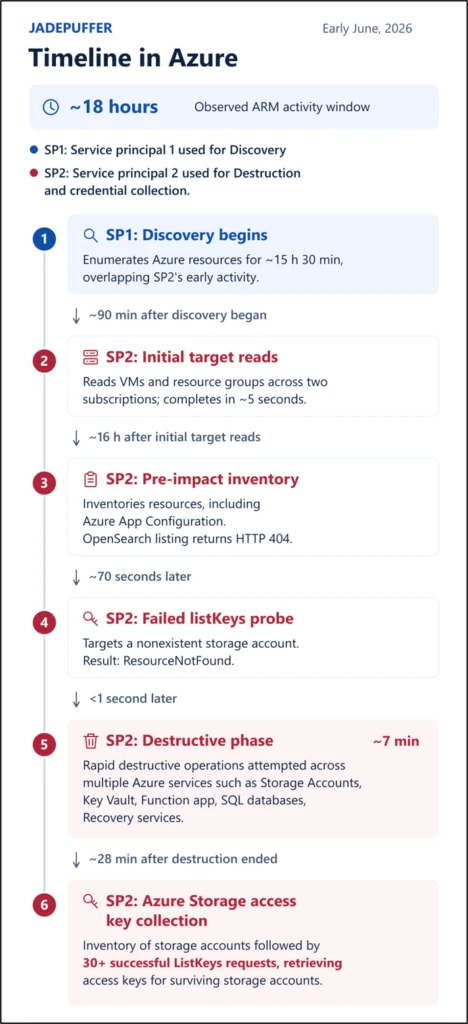
For the impacted tenant, in early June 2026, one of the compromised service principals enumerated Azure Virtual Machines, subscriptions, resource groups and resources for about 15 hours and 30 minutes with 300+ successful read operations. This breadth of activity would give the threat actor visibility across the organization’s Azure environment.

About 90 minutes after the first compromised service principal started enumeration, the second compromised service principal enumerated virtual machines and resource groups across two subscriptions in five seconds. Both service principals used Storm-3168 linked infrastructure, the same network fingerprint, and the user agent python-requests/2.34.2.

16 hours later, the second service principal successfully enumerated Azure App Service configuration stores, possibly looking for exposed credentials. It also unsuccessfully attempted to look for Azure OpenSearch resources.

70 seconds after this final inventory operation, the same service principal also attempted a ListKey operation against a non-existent storage account.

A seven-minute destructive sequence

Less than one second after the unsuccessful ListKey operation against a non-existent storage account, the second compromised service principal began with its destructive activities. This compromised service principal then attempted 150+ destructive or credential collection related operations in 35 minutes.

The destructive sequence lasted for about 7 minutes. This involved 100+ storage account deletion attempts. Most Azure Storage accounts targeted by the threat actor were successfully deleted. However, Azure resource locks and storage account-level deletion protection blocked deletion attempts for few of the storage accounts, demonstrating the value of independent safeguards that remain effective even when a compromised identity has broad administrative permissions. An Azure Key Vault, Function App, App service plan were also deleted, all of which belonged to the same resource group and appeared to support the Function app.

The same service principal also attempted to delete multiple Azure SQL databases in parallel with the storage account deletions mentioned earlier, but every deletion attempt failed because it used an unsupported API version for the Azure SQL database resource type.

Multiple unsuccessful deletion attempts were also made against Azure Site Recovery locks and Azure Backup protection locks protecting storage accounts.

Credential collection

About 30 minutes after the final destructive activity, the same service principal made an inventory request for Azure Storage Accounts and sent 30+ successful ListKeys requests, asking ARM to return each storage account’s access keys. These storage accounts included Azure Site Recovery related storage accounts.

Technical analysis

Possible initial access

  • Credential exposure: While it is unclear how the service principal was initially compromised, its client ID, client secret, and tenant ID had previously been exposed in plaintext in a public GitHub issue by an employee of the impacted organization. The issue was later edited to remove the secret, but the secret remained accessible through the issue’s public edit history. Removing or redacting an exposed secret does not invalidate it; credentials exposed in any public internet location should be treated as compromised and promptly revoked or rotated. We could not confirm whether this secret was used for the activity described here.
  • Application Probing: Since the beginning of this year, we also observed repeated probing from Storm-3168 linked infrastructure against multiple Azure App services for different customers, against sensitive paths related to WordPress administration, PHP-CGI, LangFlow’s code validation endpoint (/api/v1/validate/code) and other web-shell like paths. However, the App Service targets did not overlap with the affected Azure subscriptions, and we found no App Service to ARM (Azure Resource Manager) credential path for the impacted tenant.

Coordinated automation

The timing between the different operations and the division of work using multiple service principals and overlapping token streams from the same service principal strongly indicates automated or scripted execution.

We observed five unique tokens issued for the service principal used for destruction and credential collection – four tokens supported deletion, while the fifth token handled storage inventory and key retrieval. Two of the tokens used for deletion were active during the same 70 second period. While one of these tokens focused on Storage account deletion, the other focused on a mixture of Storage and SQL deletion.

While the Key Vault, Function App, and App Service plan associated with the same application were deleted, a similarly named storage account in the same resource group was spared and later targeted by the compromised service principal through a successful ListKeys operation.

The operations followed the identity’s existing Azure role assignments. A group-granted Storage Account Contributor role authorized the destructive storage operations. Direct Contributor access authorized the three application-resource deletions and the one additional successful key retrieval. Direct SQL DB Contributor access authorized the multiple SQL deletion attempts, which were ultimately unsuccessful because of the unsupported API version used for the Azure SQL Database resource type.

Destructive activity indicative of a ransomware-aligned objective

The threat actor deleted numerous Azure resources, while also targeting backup and recovery related resources such as Azure Site Recovery locks or Azure Storage Accounts which had terraform and backup themed names, potentially intending to impair the victim’s ability to recover from the destructive activity.

The parallel targeting of Azure SQL databases and storage accounts suggests an effort to broaden the destructive impact across different data services rather than concentrating on a single resource type. Although the database deletions were unsuccessful, their inclusion in the same destructive sequence provides additional insight into the intended scope of the activity.

The compromised service principal also made multiple attempts to retrieve storage account keys, which could provide access to sensitive data.

Taken together, the resource destruction, attempts to interfere with recovery mechanisms, and collection of credentials that could provide access to data are consistent with tactics that can support ransomware and extortion operations.

However, we did not observe a ransom note or confirm successful data exfiltration in the activity described here.

Mitigation and protection guidance

Microsoft recommends the following mitigations to reduce the risk and impact of activity similar to that observed in this campaign:

  • Enable appropriate Microsoft Defender for Cloud plans for critical Azure workloads. Consider enabling workload protections relevant to the resources in your environment, including Defender for Resource Manager, Defender for Storage, Defender for Key Vault, Defender for App Service and Defender for Databases. Learn more in the Microsoft Defender for Cloud overview.
  • Protect and continuously assess application credentials and secrets. Avoid storing service principal credentials, storage keys, connection strings, and other secrets in source code, configuration files, public repositories, issues, or other locations where they might be inadvertently exposed. Learn more in the Microsoft Entra Workload ID documentation.
  • Rotate compromised or exposed credentials immediately and establish credential lifecycle practices. Treat credentials that have been publicly exposed as compromised, even if the original location has subsequently been edited or deleted. Removing the content does not invalidate the credential or eliminate copies retained in edit history, caches, archives, logs, or other systems. Immediately revoke or rotate the affected credentials and investigate their historical use. Where supported, organizations should favor mechanisms that reduce reliance on long-lived credentials. Learn more about protecting secrets with Defender for Cloud.
  • Apply least privilege to service principals and other workload identities. Review the Azure RBAC permissions assigned to service principals and restrict their privileges to the resources and operations required by their applications. Learn more about best practices for Azure RBAC.
  • Protect backup and recovery infrastructure as part of ransomware resilience. Restrict access to backup and recovery resources and closely monitor attempts to modify or remove their protection controls. Learn more about Azure Backup security best practices.
  • Scale investigation and response with agentic defenses. Use Project Perception to help defenders deploy AI agents that investigate and respond across large, complex environments at machine speed.
  • Strengthen security posture for AI applications and agentic systems. Use Microsoft Defender for AI Security (codename MDASH) to discover AI assets, identify vulnerabilities and misconfigurations, and reduce exposure to AI-related attack paths.

Microsoft Defender XDR detections

Microsoft Defender XDR customers can refer to the list of applicable detections below.

TacticAlert nameDefender for Cloud Coverage
Collection, ExfiltrationPossible data exfiltration detectedDefender for App Services
Exfiltration– An abnormally large number of rows were extracted from an SQL server
– Unusual volume of data extracted (Azure Cosmos DB)
– Access from an unusual location
Defender for Databases
Persistence, Execution, Command and ControlCommunication with suspicious domain identified by threat intelligenceDefender for DNS
Exfiltration– Unusual amount of data extracted from a storage blob container
– Unusual number of blobs extracted from a storage blob container
– Unusual amount of data extracted from a sensitive blob container
– Unusual amount of data extracted from a storage file share
– Unusual number of files extracted from a storage file share
Defender for Storage
Initial Access– Access from a known suspicious IP address to a sensitive blob container
– Access from a suspicious IP address
– Access from a known suspicious IP address to a sensitive storage file share
Defender for Storage
Defense EvasionAzure Resource Manager operation from suspicious proxy IP addressDefender for Resource Manager
Credential Access– Unusual operation pattern in a key vault
– High volume of operations in a key vault
– Unusual application accessed a key vault
Defender for Key Vaults

Microsoft Defender XDR coordinates detection, prevention, investigation, and response across cloud endpoints, identities, email, and apps to provide integrated protection against attacks like the threat discussed in this blog. Customers with provisioned access can also use Microsoft Security Copilot in Microsoft Defender to investigate and respond to incidents, hunt for threats, and protect their organization with relevant threat intelligence.

Microsoft Security Copilot

Security Copilot customers can use the standalone experience to create their own prompts or run the following prebuilt promptbooks to automate incident response or investigation tasks related to this threat:

  • Incident investigation
  • Microsoft User analysis
  • Threat actor profile
  • Threat Intelligence 360 report based on MDTI article

Note that some promptbooks require access to plugins for Microsoft products such as Microsoft Defender XDR or Microsoft Sentinel.

Threat intelligence reports

Microsoft Defender XDR customers can use the following threat analytics reports in the Defender portal (requires license for at least one Defender XDR product) to get the most up-to-date information about the activity and techniques discussed in this blog. These reports provide intelligence, protection information, and recommended actions to prevent, mitigate, or respond to associated threats found in customer environments.

Microsoft Security Copilot customers can also use the Microsoft Security Copilot integration in Microsoft Defender Threat Intelligence, either in the Security Copilot standalone portal or in the embedded experience in the Microsoft Defender portal to get more information about this threat threat.

MITRE ATT&CK Techniques observed

The following MITRE ATT&CK mappings reflect behaviors observed during this activity.

  • T1190 Exploit Public-Facing Application | Storm-3168 linked infrastructure repeatedly probed sensitive application paths on applications hosted in Azure App Service for potential exploitation.
  • T1078.004 Valid Accounts: Cloud Accounts | Compromised service principals were used for Azure resource discovery and destruction.
  • T1526 Cloud Service Discovery | The identities enumerated subscriptions, virtual machines, resource groups, Azure Storage, Web Apps, App Service plans, locks, and Recovery Services.
  • T1485 Data Destruction | Azure Storage, Key Vault, Function App, and App Service plan resources were deleted. Azure SQL deletion was also attempted, extending the destructive objective toward databases.
  • T1490 Inhibit System Recovery | Site Recovery disk locks and an Azure Backup protection lock were targeted for deletion

Indicators of compromise (IOC)

IndicatorTypeDescription
45.131.66[.]106IPv4App Service probing and malicious ARM requests
34.153.223[.]102IPv4App Service probing
64.20.53[.]230IPv4App Service probing

References

Learn More

For the latest security research from the Microsoft Threat Intelligence community, check out the Microsoft Threat Intelligence Blog.

To get notified about new publications and to join discussions on social media, follow us on LinkedIn, X (formerly Twitter), and Bluesky.

To hear stories and insights from the Microsoft Threat Intelligence community about the ever-evolving threat landscape, listen to the Microsoft Threat Intelligence podcast.

Review our documentation to learn more about our real-time protection capabilities and see how to enable them within your organization.  

The post Storm-3168: Agentic-driven cloud attacks using compromised service principals appeared first on Microsoft Security Blog.
Beyond the ransomware: Tracking Storm-2570’s consistent tradecraft across deployments

Activity associated with Storm-2570, a ransomware affiliate linked to multiple ransomware payloads, illustrates how tracking and responding to ransomware attacks by payload alone can obscure the affiliates carrying out intrusions and the recurring behaviors that defenders can use to detect and disrupt them. Microsoft Threat Intelligence has observed Storm-2570 using consistent post-compromise tools and techniques across deployments involving Qilin, DragonForce, Anubis, and BERT ransomware. Across multiple investigations, Storm-2570 has maintained largely uniform tradecraft, infrastructure overlaps, and repeated use of the same remote access and cloud exfiltration tooling despite operating across multiple ransomware ecosystems.

These findings reinforce the value of examining threat actor behavior across the attack chain rather than treating each ransomware payload as an isolated activity set. Recurring remote access, credential access, lateral movement, security tampering, and data exfiltration activity can help defenders connect related intrusions and respond before ransomware deployment, even when the final payload changes.

In this blog post, we delve into the attack techniques attributed to Storm-2570. While Storm-2570’s methodology aligns with the tactics, techniques, and procedures (TTPs) of many tracked ransomware actors, analysis of their post-compromise tactics provides essential insights into how organizations can harden and defend against ransomware threat actors, informing opportunities to disrupt attackers even if they have gained initial access to a network. At the end of this blog, we also provide a comprehensive recommendation section with detection details.

Who is Storm-2570?

Storm-2570 is a ransomware affiliate that Microsoft Threat Intelligence has tracked since April 2025. We assess that Storm-2570 has operated across multiple ransomware as a service (RaaS) ecosystems, including Qilin, DragonForce, Anubis, and BERT.

To date, Microsoft Threat Intelligence has observed Storm-2570 in multiple investigated intrusions affecting organizations in United States, Canada, United Kingdom, Spain, Netherlands, and Puerto Rico, including healthcare and public health, education, government agencies and services, financial services, energy, consumer retail, Information technology (IT), food and agriculture, consumer services, commercial facilities, non-government organization (NGO), chemicals, critical manufacturing, and transportation.

Unlike actors that consistently support a single ransomware operation, Storm-2570 appears to be a cross-ecosystem threat actor that works with multiple ransomware groups and shifts between operations as opportunities arise, giving the threat actor the flexibility to use and deploy multiple families and improve opportunities for payouts. As a result, organizations could encounter the same actor, tools, and intrusion methods despite different ransomware payloads being deployed.

Timeline of showing the different payloads used by Storm-2570 over time
Figure 1. Storm-2570’s RaaS deployment timeline

Storm-2570 attack chain: From initial foothold to impact

While the method through which Storm-2570 gains initial access remains unconfirmed, observed intrusion chains indicate subsequent use of remote management tooling and hands-on-keyboard activity to progress toward credential access, lateral movement, exfiltration, and ransomware deployment.

Across incidents, Microsoft has observed the use of commodity tools in the pre-ransom attack stage even when the ransomware payload changed. These tools include:

  • Remote monitoring and management (RMM) tools, including Atera, MeshAgent, ScreenConnect, Splashtop, Remotely_Agent, and NinjaRMM
  • Discovery and lateral movement tools, including NetScan, Nmap, PsExec, Impacket, NetExec, and Remote Desktop Protocol (RDP) batch scripts
  • Data collection and exfiltration tools, including s5cmd and Rclone

These tools enable remote administration, command execution, persistence, and tunneling or proxy access.

Figure 2. Storm-2570 attack chain

Frequent use of remote management tooling across the attack chain

MeshAgent, a remote device management software, stands out as one of Storm-2570’s most frequently observed remote access and execution tools across multiple intrusions. Rather than appearing as a one-off utility, MeshAgent repeatedly shows up at key points in Storm-2570 attack chains, often after the actor has gained access and is preparing to expand control, run commands, deploy additional tooling, or move toward ransomware impact. In several cases, Storm-2570 used MeshAgent along with MeshCentral as an operational bridge between initial hands-on-keyboard activity and later-stage actions, such as account manipulation, discovery, credential access, security tampering, and ransomware deployment.

Many intrusions tracked by Microsoft have shown Storm-2570 tailoring MeshAgent deployments to the compromised environment. The actor renames MeshAgent-related binaries or services with victim-themed names, likely to make the tool appear more legitimate in the environment. For example, Storm-2570 renames the variant of the meshagent64 RMM tool to include the name of the compromised organization, such as meshagent64-[organization name].exe and uses Base64-encoding to obfuscate the commands being executed. In one such intrusion, MeshAgent was used alongside NinjaRMM before the activity progressed to ntdsutil for credential dumping, network scanning, and Qilin deployment.

Storm-2570 uses a diverse set of remote access tools rather than relying on a single capability. The threat actor rotates among commercially available RMM platforms, remote desktop components, and tunneling utilities, often deploying multiple tools during the same intrusion. For example, Storm-2570 uses Atera to install agents and execute interactive commands, while ngrok and Cloudflared.exe expose RDP services or establish persistent outbound tunnels. Storm-2570 uses AteraAgent to issue commands and to further download and install Splashtop Streamer in compromised environments. Splashtop appears to be the interactive remote control component delivered through Atera, giving the threat actor hands-on keyboard access. The actor also uses tools such as ScreenConnect for command execution and account or domain reconnaissance and installs Remotely_Agent as a persistent remote management service.

Use of tunneling utilities for persistent remote access

Storm-2570 also pairs remote access tooling with tunneling utilities such as Cloudflared.exe to create resilient outbound access paths. In one intrusion, Storm-2570 installed MeshAgent and later created a persistent Cloudflare Tunnel service on the victim host. The tunnel was configured to run automatically as a service under LocalSystem, allowing the threat actor to maintain an encrypted outbound channel from inside the network. This type of tunnel can help bypass inbound firewall restrictions and provide covert remote access for follow-on activity.

Discovery and credential access

Post-compromise, Storm-2570 routinely conducts internal network discovery using tools such as NetScan, SoftPerfect Network Scanner Portable, and Nmap, alongside native discovery commands and file-searching activity. These activities are used to identify reachable hosts and services, map internal networks and remote systems, and locate systems, network shares, and files that may facilitate data collection, credential access, or encryption operations.

For credential access and harvesting, Storm-2570 uses tools like Mimikatz, LaZagne, and pypykatz. Storm-2570 also uses ntdsutil in intrusions for NTDS.dit credential dumping, a credential theft technique against Active Directory domain credentials. The ntdsutil command usage pattern is consistent with creating an Install From Media (IFM) copy of Active Directory database material. In an intrusion context, attackers can use this to obtain NTDS.dit and related registry hives for offline extraction of password hashes and credential material.

The command uses the legitimate Windows ntdsutil.exe to activate the NTDS Active Directory instance and create a full IFM backup in C:\Windows\Temp\<XXXXXXXXX>.

Storm-2570 uses this command to dump or stage Active Directory database NTDS.dit and supporting registry hive material, then copy it off-host and potentially extract domain credential hashes offline, indicating that the actor has high-privilege access to a victim’s domain controller:

Defense evasion

After acquiring privileged credentials, Storm-2570 uses defense evasion tactics preceding ransomware deployment, including antivirus tampering and the modification of Microsoft Defender settings and Defender exclusions. In multiple observed intrusions, Storm-2570 disabled real-time monitoring, added Defender exclusions for C:\PerfLogs to weaken endpoint detections, and modified registry values under Microsoft Defender service keys to further impair protections.

These tactics are consistent across Storm-2570 ransomware intrusions involving Qilin, DragonForce, and Anubis deployment, including cases where the actor used registry changes to alter DisableAntiSpyware, DisableRealtimeMonitoring, and WinDefend service behavior.

Lateral movement and deployment preparation

Storm-2570 moves into lateral movement and deployment preparation phase typically by using a mix of legitimate administrative tooling, offensive frameworks, and remote execution utilities.

Across multiple investigated intrusions, Storm-2570 was observed leveraging PsExec, Impacket, NetExec, RDP batch scripts, and admin shares to reach additional systems, execute commands remotely, and stage tooling across the environment. The actor uses these capabilities to facilitate data exfiltration and prepare victim networks for ransomware deployment. These tools frequently appear alongside earlier discovery activity, credential access, and remote access tooling such as MeshAgent, and often precede the use of s5cmd for exfiltration or ransomware payload execution.

PsExec is one of the most consistent lateral movement and deployment tools used by Storm-2570. The actor frequently uses PsExec, sometimes with host lists such as @ip.txt, to move laterally and install renamed MeshAgent binaries across compromised environments. Storm-2570 utilizes MeshAgent during the lateral movement phase in several intrusions as a remote access tool deployed onto newly compromised systems.

The following are examples of PsExec commands with host lists @ip.txt:

Storm-2570 also uses RDP and RDP-enabling scripts as part of this phase. If RDP is not allowed in the environment, Storm-2570 needs admin privileges to modify the policy and enable it. In several intrusions, rdp.bat script appeared with PsExec, including cases where PsExec ran rdp.bat across hosts using @ip.txt.

The RDP batch script (rdp.bat) enables inbound Remote Desktop access by modifying Terminal Server settings and adding a firewall rule to allow TCP port 3389, as observed in the command below:

Additionally, the threat actor uses ngrok to expose TCP 3389 (default port for RDP), after which PsExec-related activity and security tampering appears. These examples show Storm-2570 combining RDP access, tunneling, and remote execution to sustain hands-on-keyboard control and reach additional systems.

Storm-2570’s use of Impacket and NetExec over Server Message Block (SMB) further supports their lateral movement pattern. Impacket is a collection of open-source Python classes designed for working with network protocols, and is popular with adversaries due to its ease of use and wide range of capabilities. Microsoft Defender for Endpoint has a dedicated attack surface reduction rule to defend against lateral movement techniques used by Impacket; protecting lateral movement pathways can also mitigate Impacket.

The following NetExec SMB command is used to conduct credential theft and reconnaissance against internal Windows hosts:

Data collection and exfiltration

Storm-2570 frequently performs data theft using cloud and file-transfer utilities that are capable of moving large volumes of data quickly from compromised environments to a remote attacker-owned cloud resource. Microsoft has observed Storm-2570 using s5cmd or Rclone to stage and exfiltrate data, often after the actor has already completed discovery, credential access, lateral movement, and remote access setup. Tools like Rclone provide data synchronization capabilities, moving newly created or updated files to cloud resources in real-time to enable continuous exfiltration throughout all stages of the attack without needing attacker interaction.

Most commonly, Storm-2570 relies on s5cmd, a command-line utility designed for managing Amazon S3 and compatible object storage services, for S3-based exfiltration. In multiple intrusions, the actor staged s5cmd.exe alongside a credentials file and used it to copy documents, spreadsheets, images, databases, mail-related files, archives, and other business-relevant file types to S3 buckets. Storm-2570 identifies high-value drives and network shares, stages s5cmd.exe and a credentials file, and then executes run copy (cp) operations with extension filters to transfer selected data to attacker-controlled S3 buckets. To interact with the destination S3 bucket, s5cmd requires credentials for authentication and the credentials file stores the AWS access keys for authentication to the S3 bucket.

The following is an example of s5cmd data exfiltration command lines:

Overall, Storm-2570’s exfiltration tradecraft shows a strong preference for tools that blend into legitimate administrative or cloud-transfer workflows, allowing double-extortion operations: first collecting sensitive data through cloud-transfer tooling, then deploying ransomware.

What Storm-2570 activity means for defenders

Storm-2570 illustrates common human-operated ransomware attacks and how modern ransomware affiliates increasingly operate independently of a single ransomware brand. Ransomware affiliates’ use of common tools, intrusion methods, and operational patterns remain remarkably consistent. Although Storm-2570’s techniques are not novel, recognizing the patterns used by ransomware affiliates can be important for defenders to know to improve prevention, detection, and incident response.

Mitigation and protection guidance

To defend against Storm-2570 TTPs and similar activity, Microsoft recommends the following mitigation measures:

Microsoft Defender detections

Microsoft Defender customers can refer to the list of applicable detections below. Microsoft Defender coordinates detection, prevention, investigation, and response across endpoints, identities, email, apps to provide integrated protection against attacks like the threat discussed in this blog.

Tactic Observed activity Microsoft Defender coverage
ExecutionStorm-2570 delivers tools such as PsExec, Impacket, NetExec, and RDP batch scripts, to carry out post-compromise activityMicrosoft Defender Antivirus
– Behavior:Win32/PsexecRemote

Microsoft Defender for Endpoint
– Hands-on-keyboard attack involving multiple devices
– Remote access software
– Suspicious PowerShell command line
– Suspicious PowerShell download or encoded command execution
– Ransomware-linked threat actor detected
PersistenceStorm-2570 uses RMM tools for persistence, payload delivery, and lateral movementMicrosoft Defender for Endpoint
– Suspicious Atera activity
– File dropped and launched from remote location
Defense ImpairmentStorm-2570 disables Microsoft DefenderMicrosoft Defender for Endpoint
– Defender detection bypass
– Attempt to turn off Microsoft Defender Antivirus protection
Credential AccessStorm-2570 has used tools like Mimikatz, LaZagne, and pypykatz for credential access and harvesting and NTDS.dit for credential dumpingMicrosoft Defender Antivirus – HackTool:Win32/Mimikatz – HackTool:Win64/Mimikatz – HackTool:Linux/LaZagne – HackTool:Win32/LaZagne – HackTool:Win64/LaZagne Microsoft Defender for Endpoint
– Exposed credentials at risk of compromise
– Compromised account credentials
– Process memory dump
ExfiltrationStorm-2570 uses Rclone and s5cmd for data theftMicrosoft Defender for Endpoint
– Potential human-operated malicious activity
– Renaming of legitimate tools for possible data exfiltration
– Possible data exfiltration
– Hidden dual-use tool launch attempt
ImpactStorm-2570 deploys Anubis, DragonForce, Qilin, and BERT ransomwareMicrosoft Defender Antivirus
– Ransom:Win32/Qilinloader – Behavior:Win32/Ransomware!Qilin – Ransom:Linux/Qilin – Ransom:Win32/Qilin – Ransom:Win32/DragonForce – Ransom:Win64/Anubis

Microsoft Defender for Endpoint
– Possible ransomware activity based on a known malicious extension
– Possible compromised user account delivering ransomware-related files
– Potentially compromised assets exhibiting ransomware-like behavior
– Ransomware behavior detected in the file system
– File dropped and launched from remote location

Microsoft Security Copilot

Microsoft Security Copilot is embedded in Microsoft Defender and provides security teams with AI-powered capabilities to summarize incidents, analyze files and scripts, summarize identities, use guided responses, and generate device summaries, hunting queries, and incident reports.

Customers can also deploy AI agents, including the following Microsoft Security Copilot agents, to perform security tasks efficiently:

Security Copilot is also available as a standalone experience where customers can perform specific security-related tasks, such as incident investigation, user analysis, and vulnerability impact assessment. In addition, Security Copilot offers developer scenarios that allow customers to build, test, publish, and integrate AI agents and plugins to meet unique security needs.

Threat intelligence reports

Microsoft Defender XDR customers can use the following threat analytics reports in the Defender portal (requires license for at least one Defender XDR product) to get the most up-to-date information about the threat actor, malicious activity, and techniques discussed in this blog. These reports provide the intelligence, protection information, and recommended actions to prevent, mitigate, or respond to associated threats found in customer environments.

Microsoft Security Copilot customers can also use the Microsoft Security Copilot integration in Microsoft Defender Threat Intelligence, either in the Security Copilot standalone portal or in the embedded experience in the Microsoft Defender portal to get more information about this threat actor.

Hunting queries

Microsoft Sentinel

Microsoft Sentinel customers can run the following advanced hunting queries to find related activity in their networks:

Hunt for PsExec-based remote execution and deployment

DeviceProcessEvents
| where Timestamp > ago(30d)
| where FileName in~ ("psexec.exe", "psexec64.exe")
    or ProcessCommandLine has_any ("psexec.exe", "psexec64.exe")
| where ProcessCommandLine has_any ("@ip.txt", "-accepteula", "\\")
| project Timestamp, DeviceName, AccountName, FileName, ProcessCommandLine,
          InitiatingProcessFileName, InitiatingProcessCommandLine,
          SHA256, DeviceId, ReportId
| order by Timestamp desc

Hunt for renamed MeshAgent binaries and services

let MeshAgentTerms = dynamic(["meshagent", "meshagent64", "meshcentral"]);
union isfuzzy=true
(
    DeviceProcessEvents
    | where Timestamp > ago(30d)
    | where FileName has_any (MeshAgentTerms)
        or ProcessCommandLine has_any (MeshAgentTerms)
        or InitiatingProcessCommandLine has_any (MeshAgentTerms)
    | project Timestamp, DeviceName, ActionType, FileName, FolderPath,
              ProcessCommandLine, InitiatingProcessFileName,
              InitiatingProcessCommandLine, SHA256,
              RegistryKey="", RegistryValueName="", SourceTable="DeviceProcessEvents"
),
(
    DeviceFileEvents
    | where Timestamp > ago(30d)
    | where FileName has_any (MeshAgentTerms)
        or FolderPath has_any (MeshAgentTerms)
        or InitiatingProcessCommandLine has_any (MeshAgentTerms)
    | project Timestamp, DeviceName, ActionType, FileName, FolderPath,
              ProcessCommandLine="", InitiatingProcessFileName,
              InitiatingProcessCommandLine, SHA256,
              RegistryKey="", RegistryValueName="", SourceTable="DeviceFileEvents"
),
(
    DeviceRegistryEvents
    | where Timestamp > ago(30d)
    | where RegistryKey has_any (MeshAgentTerms)
        or RegistryValueName has_any (MeshAgentTerms)
        or RegistryValueData has_any (MeshAgentTerms)
        or InitiatingProcessCommandLine has_any (MeshAgentTerms)
    | project Timestamp, DeviceName, ActionType, FileName="", FolderPath="",
              ProcessCommandLine="", InitiatingProcessFileName,
              InitiatingProcessCommandLine, SHA256="",
              RegistryKey, RegistryValueName, SourceTable="DeviceRegistryEvents"
)
| order by Timestamp desc

Learn more

For the latest security research from the Microsoft Threat Intelligence community, check out the Microsoft Threat Intelligence Blog.

To get notified about new publications and to join discussions on social media, follow us on LinkedIn, X (formerly Twitter), and Bluesky.

To hear stories and insights from the Microsoft Threat Intelligence community about the ever-evolving threat landscape, listen to the Microsoft Threat Intelligence podcast.

The post Beyond the ransomware: Tracking Storm-2570’s consistent tradecraft across deployments appeared first on Microsoft Security Blog.

​​​​​​​​What’s new in Microsoft Security: September 2026​​

24 September 2026 at 18:00

AI agents are now running on employee devices, cloud platforms, and across developer workflows. Security teams need to see those agents, govern what they can reach, and contain them when something goes wrong. This month’s updates help you discover and control local AI agents, extend Zero Trust to agent traffic, and strengthen the security operations center (SOC) foundations that AI-era operations depend on.

Here’s what’s new:

Extend protection and support investigations with Microsoft Defender

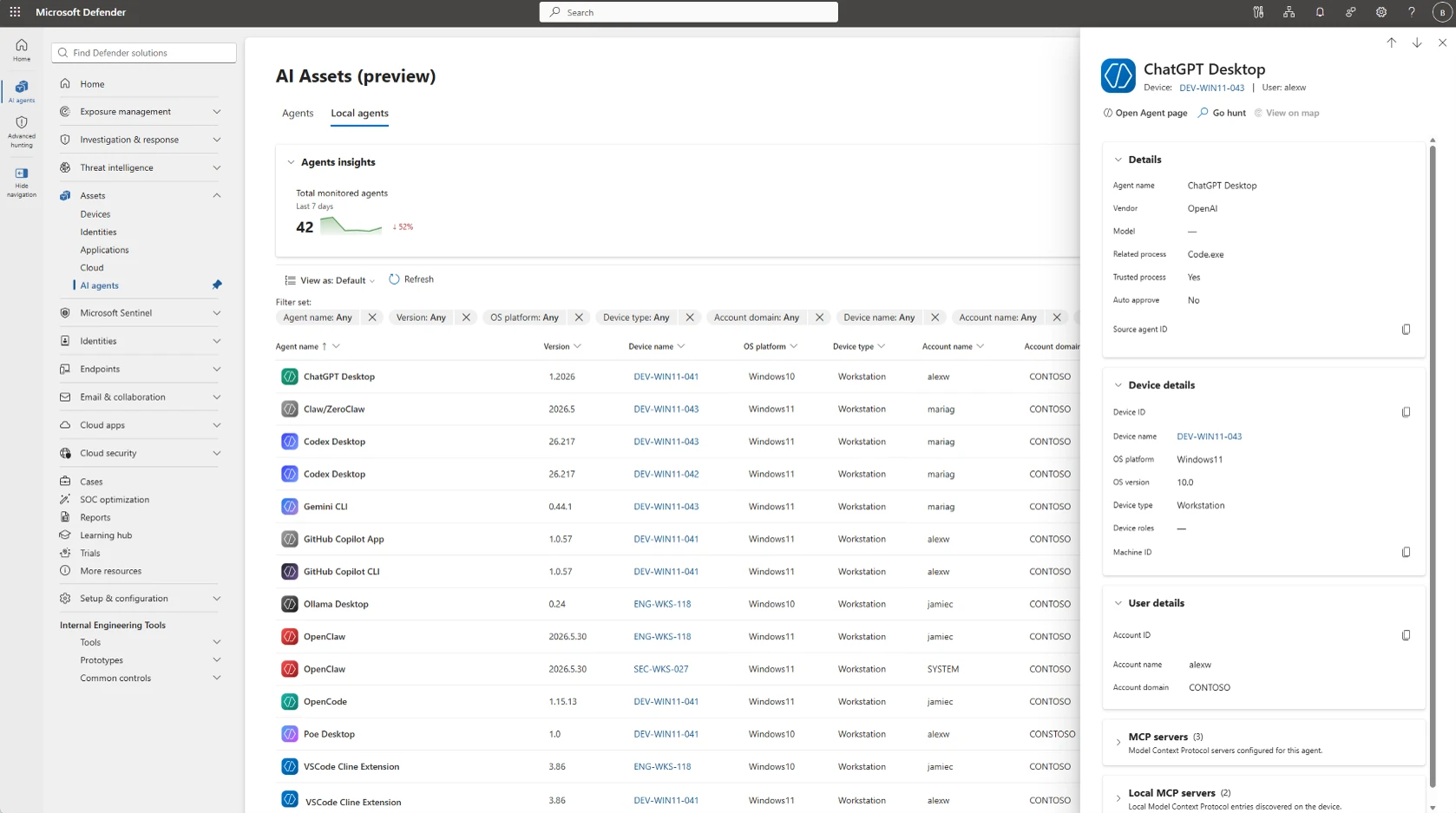
Screenshot showing the local AI agents inventory in the Microsoft Defender portal with discovered agents listed.

Bring more context into email investigation and hunting with Microsoft Security Copilot

Available for organizations using both Microsoft Defender and Microsoft Security Copilot, a new email detonation summary delivers AI-generated explanations of URL and file sandboxing results, helping SOC teams investigate faster by reducing the manual effort required to correlate detonation evidence and contextual signals.

Screenshot of Microsoft security portal showing “Detonation test” investigation within Email collaboration > Explorer, with detection details and timeline events for reviewing suspicious email activity. Left navigation lists detection attributes, center table organizes events by timestamp and source, and right Copilot panel provides Email Summary and Detonation Summary cards.

Protect sensitive data in motion with Microsoft Purview and Microsoft Entra

Stop sensitive data from reaching shadow AI over the network

Now generally available, Microsoft Purview and Microsoft Entra Global Secure Access bring data security to the network across human actions and on-behalf-of (OBO) agentic traffic. Context-aware Microsoft Purview classification and policies are enforced by Entra at the network layer. Organizations can discover sensitive files and text in real time and block them from being shared to risky destinations. For example, if an employee or OBO agent tries to upload a sensitive document to an unsanctioned AI tool, the policy can stop the transfer before the data leaves.

Screenshot of ChatGPT web interface showing a conversation requesting a 400-word technical briefing, with sidebar navigation and assistant response text visible. Red error banner and pink retry notice indicate response-generation failure, while a Microsoft Copilot notification appears in lower-right corner.
Prevent employees from sharing proprietary or sensitive organizational data to potentially risky locations such as consumer AI apps.

Protect, investigate, and clean up enterprise data with Microsoft Purview

Manage labeling at enterprise scale with less administrative overhead

Microsoft Purview auto-labeling helps organizations automatically apply data security controls to sensitive content at enterprise scale. New auto-labeling enhancements improve policy scale, admin experience, and reporting. Policies now support simulations of up to 20 million items and up to 50,000 sites through adaptive scopes. Administrators can edit a policy without re-running simulation. New audit insights and reporting show policy coverage and processing activity. Together, these enhancements help organizations scale auto-labeling across larger environments with less administrative effort.

Investigate content created in Copilot apps such as Microsoft Loop, Copilot pages through established compliance processes

Microsoft Purview eDiscovery now supports search, hold, review, and export content in user-owned SharePoint embedded containers, to help streamline eDiscovery processes for legal, regulatory, and internal investigations. Investigators can find content from AI-powered experiences, including Microsoft Loop, Copilot Pages, Copilot Notebooks, and applications, such as Outlook newsletters, mapped to a user without requesting the container URL from a SharePoint administrator. An optional HTML conversion produces a more readable version for downstream legal tools, improving the review and export experience for experts.

Archive and permanently remove inactive content to improve AI readiness

With Microsoft Purview Data Lifecycle Management, administrators can now archive inactive SharePoint content without archiving the entire site. Archived content remains subject to retention and legal hold policies, and remains discoverable for eDiscovery, while dropping out of Microsoft 365 Copilot indexing (until reactivated). Organizations can also use Priority Cleanup to permanently delete approved content, including stale Teams recordings and transcripts, so it is no longer discoverable in eDiscovery, SharePoint search, or Microsoft 365 Copilot. Together, these capabilities help organizations meet compliance regulations, including those in highly regulated industries.

Advanced endpoint management extends to GCC High and DoD with Microsoft Intune

Bring modern endpoint management to regulated environments

Microsoft Intune Enterprise Application Management, Microsoft Cloud PKI, and Intune Remote Help are coming to Government Community Cloud with High security needs (GCC High), with Enterprise Application Management also being offered to organizations of the Department of Defense (DoD). These capabilities help government and defense organizations simplify application management, modernize certificate lifecycle management, resolve device issues faster, and reduce total cost of ownership, all while operating within their accredited cloud environment.

Stay in the Loop

Microsoft Security continually ships meaningful innovations across our portfolio, as well as research-driven insights and reports for the security community. In the Loop posts are your reliable source of what’s new across Microsoft Security and what it means for your security strategy. Check back for the next drop.

And join us at Microsoft Ignite, from November 17 to 20, 2026, in San Francisco or online, to see Microsoft Security innovations in action and go hands-on with the team that built it.

To learn more about Microsoft Security solutions, visit our website. Bookmark the Security blog to keep up with our expert coverage on security matters. Also, follow us on LinkedIn (Microsoft Security) and X (@MSFTSecurity) for the latest news and updates on cybersecurity.

The post ​​​​​​​​What’s new in Microsoft Security: September 2026​​ appeared first on Microsoft Security Blog.

Reimagining the SOC for the agentic era in Microsoft Defender

23 September 2026 at 18:00

The physics of cybersecurity are changing. So must the security operations center (SOC).

Cyberattackers are using agents to automate execution at unprecedented scale. What once required entire teams now requires a single operator and an agent framework.

That shift has exposed a hard truth: security cannot operate at AI speed when protection and operations are built as separate systems. Every handoff, integration, and boundary slows defenders down. Agents inherit that complexity.

For agentic security to work, the industry needs a different model. It needs a modern cyber stack with the breadth to see across the environment and the depth to investigate and act. Security operations and native protection must function as one system. This is the integrated security operations center (ISOC).

Today we are announcing ISOC in Microsoft Defender: a foundation built for agentic security that brings leading solutions for security information and event management (SIEM) and threat protection together. It gives people and agents a shared foundation to see, understand, and act across the environment, without the complexity of operating separate systems.

Built for agentic security

In July 2026, we introduced the end-to-end cyber stack alongside Project Perception, with the focus of delivering the right models, a harness, and specialized agents to help defenders perceive, reason, and act at machine speed. But we are innovating at every layer of the stack, because intelligence and orchestration alone are not enough. Agents depend on the rest of the stack working as one.

They need signals and sensors that provide visibility, context that turns those signals into understanding, and actuators that translate decisions into protection. With ISOC, these layers work in unison, so agents can move beyond isolated tasks and help operate an agentic SOC.

Diagram of an autonomous system stack with six layers: Actuators, Agents, Harness, Models, Context, and Sensors and Signals. The bottom three layers are grouped together. A banner below reads, "Strategy stays human. Scale becomes autonomous."

Signals and sensors give the system awareness.

Context turns those signals into understanding.

Actuators turn insights into protective action.

ISOC brings these capabilities together as a foundation, so humans and agents can operate as one system, each contributing what they do best. Agents provide the speed and scale to execute continuously, while people set priorities, apply judgment, and define the outcomes that matter. Together, they empower defenders to keep pace with AI-powered threat actors and achieve better security outcomes.

Integrated protection loop

With ISOC enabling signals, context, and controls to work as one, it breaks the pattern of linear security workflows. The result is an integrated protection loop that continuously turns what defenders learn into stronger pre-breach protection.

Attack disruption in Microsoft Defender shows what this makes possible. Rich telemetry and controls enable the system to detect, predict, and adapt to an attacker while the attack is still unfolding. It disrupts threats in progress and anticipates where attackers may move next. It’s a protection loop that uses exposure insights to strengthen protection in near real-time with threat intelligence focusing the loop on the threats that matter most.

ISOC brings together the capabilities needed to make this loop native, eliminating the burden of assembling, tuning, and maintaining it yourself. And as protection advances, new capabilities can become part of that loop. The result is stronger protection and a different way of working, where practitioners spend less time chasing individual signals and more time applying judgment, setting priorities, and driving security outcomes.

Designed for the practitioner

For too long, practitioners have had to compensate for the boundaries in their security architecture, stitching together signals, rebuilding context, and moving between tools just to get the information and controls needed to act.

ISOC changes their starting point. The capabilities practitioners need to investigate, hunt, automate, manage incidents, understand threats, and take action are brought together and available by default. Instead of organizing their work around the boundaries between tools, teams can organize around the security outcome they are trying to achieve.

And that foundation gets more powerful as autonomy grows. The integrated protection loop can take on more of the continuous work of detecting and defending against threats, while agents help practitioners investigate, reason, and act using the same context and controls already available to them.

There’s no separate agentic layer to assemble or new operating model to stitch together. Practitioners can multiply their expertise where they already work, shifting more of their time from operating the security stack to directing the defense.

The path forward

Security has always been a race between attackers and defenders. AI changes the speed, scale, and economics of that race. The next SOC will not be defined by how many AI features it has, but by whether people and agents can perceive, reason, and act across an environment as one system.

Integrated security operations center (ISOC) in Microsoft Defender is available in preview today. Watch a recording of the full announcement or download the whitepaper: Agentic SOC: The new operating model for continuous defense.

To learn more about Microsoft Security solutions, visit our website. Bookmark the Security blog to keep up with our expert coverage on security matters. Also, follow us on LinkedIn (Microsoft Security) and X (@MSFTSecurity) for the latest news and updates on cybersecurity.

The post Reimagining the SOC for the agentic era in Microsoft Defender appeared first on Microsoft Security Blog.
Unmasking EvilTokens: Getting to the root of device code phishing

Following its emergence in February 2026, EvilTokens quickly became one of the most widely used phishing-as-a-service (PhaaS) platforms, providing cybercriminals with AI capabilities for tailoring phishing lures and analyzing compromised inboxes to identify high-value targets. This AI-powered cybercrime platform facilitated sophisticated business email compromise (BEC) campaigns that compromised more than 12,000 inboxes in over 10,000 organizations worldwide.

EvilTokens enabled threat actors to abuse the device code authentication flow, steal tokens, and compromise organizational accounts at scale using an AI-driven infrastructure and automating multiple parts of the attack chain. The toolkit offered a plethora of prebuilt phishing templates and landing pages with an AI-powered assistant to aid in structuring target-specific emails.

Stolen tokens are used for email exfiltration and persistence, often through the creation of malicious inbox rules that conceal communications. In some cases, tokens can also be used to grant new devices access to a victim’s inbox, a particularly durable method to maintain persistence. Microsoft Threat Intelligence tracks the threat actor behind the development and support of the EvilTokens phish kit as Storm-2992.

Post-compromise, EvilTokens enabled threat actors to utilize AI assistants to sift through victim mailbox activity and engineer a phishing message based on the accessible email content. EvilTokens also allowed threat actors to conduct Microsoft Graph reconnaissance to map organizational structure and permissions, enabling continued access and potential lateral movement while tokens remain valid. While token-targeting phishing is not new, it has become far more common and industrialized over the last several years as organizations adopted multifactor authentication (MFA).

To evade detection, EvilTokens uses a multi-stage delivery pipeline designed to bypass traditional email gateways and endpoint security. Targets are lured through deceptive emails that use 44 different themes, including invoices and request for proposals (RFPs), or shared files. These emails contained malicious URLs, PDF attachments, and HTML files.

Campaigns leveraging EvilTokens have impacted organizations in various industries, including wholesale distribution, construction, financial services, real estate, higher education, and healthcare, with the highest concentrations of observed victim activity in the United States, Canada, the United Kingdom, Australia, India, and France. Working with partners, Microsoft’s Digital Crimes Unit (DCU) facilitated a coordinated disruption of infrastructure used to operate the EvilTokens service.

This blog provides a comprehensive, up-to-date analysis of the EvilTokens platform and operations. We share specific examples of the EvilTokens service panel and a detailed analysis of EvilTokens infrastructure. Defending against EvilTokens and similar adversary-in-the-middle (AiTM) phishing threats requires a layered approach that blends technical controls with user awareness. This blog also provides Microsoft Defender detection and hunting guidance, as well as resources on how to set up mail flow rules, enforce spoof protections, and configure third-party connectors to prevent spoofed phishing messages from reaching user inboxes.

What is device code phishing?

One of the primary capabilities of EvilTokens is its device code phishing flow, which abuses device code authentication, a legitimate OAuth flow designed for devices with limited interfaces, such as smart TVs, printers, Teams devices, and conferencing devices, that cannot support a standard interactive sign-in. In this model, a user is presented with a short code on the device they are trying to sign in from and is instructed to enter that code into a browser on a separate device to complete authentication.

While this flow is useful for these scenarios, it introduces a security tradeoff. Because authentication is completed on a separate device, the session initiating the request is not strongly bound to the user’s original context. Threat actors have abused this characteristic as a way to circumvent traditional MFA protections by decoupling authentication from the originating session. Threat actors also use social engineering layouts and other tricks to disguise the legitimate device code flow approval as something else required.

Device code phishing occurs when threat actors insert themselves into this process. Instead of a legitimate device requesting access, the threat actor initiates the flow and provides the user with a code through a phishing lure. When the user enters the code, they unknowingly authorize the threat actor’s session, granting access to the account without exposing credentials. Microsoft recommends blocking device code flow wherever possible. If your organization uses Teams devices that require device code flow, scope the exception to specific Teams device resource accounts and exclude the Device Registration Service resource from your Conditional Access policy.

In April 2026, Microsoft tracked a phishing campaign aligned with EvilTokens that used automation platforms to spin up thousands of unique, short-lived polling nodes. This approach allowed the threat actors to deploy complex backend logic (Node.js) that bypassed traditional signature-based or pattern-based detection. This infrastructure was leveraged in the attack end-to-end, from generating dynamic device codes to post-compromise activities.

The following sections examine how EvilTokens operated, the capabilities available through its customer panel, and infrastructure supporting phishing campaigns. We also trace the EvilTokens attack chain, from lure delivery and device code generation through defense evasion, token theft, and post-compromise activity.

EvilTokens platform and operations

Distribution and affiliate support

The threat actor tracked as Storm-2992 advertised and sold EvilTokens services to cybercriminals on the actor’s Telegram channels. Cybercriminals continue to gravitate towards apps like Telegram that provide anonymity, cross-platform access, file sharing, and channels for broadcasting announcements to large groups of followers. The threat actor uses Telegram to advertise their phish kit, announce updates, coordinate with their subscribers, and provide customer support.

Screenshot of the EvilTokens Telegram bot
Figure 1. EvilTokens Telegram bot

EvilTokens phish kits are sold at $1,500 USD for initial purchase, with a monthly subscription fee of $500 for continued access to the kit and control panel. The kit provides additional products, including Antibot redirector, B2B Sender, Office 365 Capture Link, and a Simple Mail Transfer Protocol (SMTP) Sender. Each of these products has additional fees for 30 days of access.

Screenshots of the EvilTokens store bot
Figure 2. EvilTokens Telegram store bot

Customer panel and campaign configuration

The EvilTokens panel provides the core components needed to support phishing campaigns, including pre‑built templates, attachment files for common lure formats, domain and hosting configuration, redirect logic, and victim tracking.

After signing in, EvilTokens subscribers are presented a dashboard with various options to choose from. First, subscribers are asked to choose a deployment method (Cloudflare Workers/Bunny or PHP Hosting) and then are asked to choose from a list of deploy options, including Capture Mode, Layout & Template, Code Display Style, Page Language, CAPTCHA, AI Mode, and Captured Text. These options allow subscribers to highly customize their deployment methods.

Screenshot of the EvilTokens platform welcome page
Figure 3. EvilTokens platform welcome page

Subscribers are provided with multiple settings and additional guidance for managing captured tokens. Once tokens have been captured, EvilTokens offers its subscribers full access to the victim email account, as well as admin detection, token auto-refresh, and an auto-scan of inboxes using keyword alerts through Telegram.

Screenshot of the EvilTokens platform showing options for managing captured tokens
Figure 4. EvilTokens platform options for managing captured tokens

The toolkit offers additional products, which are detailed under Essential Tools. Here, subscribers are given product information and are provided with a link to download or get the product as well as a video tutorial. Subscribers are even given the opportunity to receive cryptocurrency as a reward for referring the service to others.

Screenshot of EvolTokens Essential Tools page
Figure 5. EvilTokens Essential Tools page

The platform offers 44 different themes for customizing email templates and landing pages, including text and colors.

Screenshot of EvilTokens template themes
Figure 6. EvilTokens template themes

EvilTokens phishing emails

EvilTokens offers subscribers personalized lures, using AI to create targeted phishing emails aligned to the target’s role, including the use of various themes to increase the likelihood of user interaction. Themes used include document signing services, Microsoft cloud services, third-party services (cloud identity, file hosting, payment/invoicing), and other miscellaneous services like voicemail and eFax.

Additionally, researchers at Huntress noted email content like construction bid proposals, business partnership agreements, employee compensation/benefits, and password expiring notices in EvilTokens emails.

EvilTokens phishing sequence

The attack chain begins when a user interacts with a malicious attachment or URL embedded within a high-pressure lure (for example, “Action Required: Password Expiration”).

Screenshot of a sample EvilTokens phishing email
Figure 7. Example of an EvilTokens phishing email

When a user clicks the malicious link or attachment, they are directed to a web page running a background automation script. This script interacts with the Microsoft identity provider in real time to generate a live device code. This code is then displayed on the user’s screen with a “Copy Code” button along with a “Continue” or “Continue with Microsoft” button that, when clicked, redirects to the official microsoft.com/devicelogin portal.

Screenshot of a sample device code
Figure 8. Example of generated device code

After presenting the code to the user and opening the legitimate microsoft.com/devicelogin URL, the script enters a polling state using the checkStatus() function to monitor the 15-minute window in real time. Every three to five seconds (setInterval), the script pings the threat actor’s /state endpoint. It sends the secret session identifier code to validate if the user has authenticated yet. While the targeted user is entering the code on the real Microsoft site, the loop returns a “pending” status.

Screenshot of Microsoft device code sign-in portal
Figure 9. Example of Microsoft device code sign-in portal

To minimize user effort and maximize the success rate, the threat actor’s script often automatically copies the generated device code to the user’s clipboard. Once the user reaches the official sign-in page, they paste the code. If the user does not have an active session, they are prompted to provide their password and MFA. If they are already signed in, simply pasting the code and confirming the request instantly authenticates the threat actor’s session in the backend.

The final stage varies depending on the threat actor’s specific objectives. In some instances, within 10 minutes of the breach, threat actors registered new devices to generate a Primary Refresh Token (PRT) for long-term persistence. In other scenarios, they waited several hours before creating malicious inbox rules or exfiltrating sensitive email data to avoid immediate detection.

EvilTokens adds the capability for threat actors to phish and take actions that they would not be capable of performing without EvilTokens tools assisting them, giving threat actors the ability to mass-phish users and perform other operations at their leisure.

Defense evasion

EvilTokens uses a multi-stage delivery pipeline designed to bypass traditional email gateways and endpoint security. Phishing pages delivered to the user vary in complexity and evasion techniques, adding a customization layer by the operator and which tools they use. Popular techniques include but are not limited to image links (images that link to URLs), multi-stage redirection schemes, and attachments containing multi-stage delivery.

Landing page evasions include fake CAPTCHA checks/verification services that require user interaction before displaying the phishing content. To further evade automated URL scanners and sandboxes, the threat actors will at times not link directly to the final phishing site. Instead, they use a series of redirects through compromised legitimate domains and high-reputation “serverless” platforms. We observed heavy reliance on abuse of Vercel (.vercel.app), Cloudflare Workers (.workers.dev), and AWS Lambda for hosting the redirect logic. By using these domains, the phishing traffic blends in with legitimate enterprise cloud traffic, evading simple domain-blocklist triggers.

Post-compromise account access

Once authentication tokens are obtained, threat actors can focus on post-compromise activity designed to maintain and expand access and extract data. This access can be used to send further emails internally to the organization and to external contacts, allowing the actor to send phishing emails for seemingly trusted contacts. In one observed incident, the attack progressed to email exfiltration and account persistence through inbox rules created using Microsoft Office. This involved filtering the compromised users and selecting targets:

  • High-value target identification: Using the EvilTokens AI capability, the threat actor reviewed and filtered for high-value targets—specifically those in financial, executive, or administrative roles—within the pool of compromised users.
  • Accelerated reconnaissance: After gaining access to Microsoft Graph for reconnaissance, the threat actor programmatically mapped internal organizational structures and identified sensitive permissions the moment a token was secured.
  • Targeted financial exfiltration: The most invasive activity was reserved for users with financial authority. For these specific profiles, the threat actors performed deep-dive reconnaissance into email communications, searching for high-value targets and sensitive information like wire transfer details, pending invoices, and executive correspondence.

Mitigation and protection guidance

To harden networks against the device code phishing activity described above, defenders can implement the following:

  • Only allow device code flow where necessary. Microsoft recommends blocking device code flow wherever possible. Where necessary, configure Microsoft Entra ID’s device code flow in your Conditional Access policies.
  • Educate users about common phishing techniques. Sign-in prompts should clearly identify the application being authenticated to. As of 2021, Microsoft Azure interactions prompt the user to confirm (“Cancel” or “Continue”) that they are signing in to the app they expect, which is an option frequently missing from phishing sign-ins. Be cautious of any “[EXTERNAL]” messages containing suspicious links. Do not sign in to resources from unfamiliar senders. Learn how to protect yourself from phishing.
  • Configure anti-phishing policies. Anti-phishing policies protect against phishing attacks by detecting spoofed senders, impersonation attempts, and other deceptive email techniques.
  • Configure Safe Links in Defender for Office 365. Safe Links scanning protects your organization from malicious links that are used in phishing and other attacks. Safe Links can also enable high-confidence device code phishing alerts from Defender.
  • If suspected device code phishing activity is identified, follow the guidance on responding to a compromised email account. Additionally, revoke the user’s refresh tokens by calling revokeSign-inSessions. Consider setting a Conditional Access Policy to force re-authentication for users. (Observations from recent campaigns indicate that standard session revocation often only invalidates refresh tokens, leaving existing access tokens active for up to an hour. Given the hands-on nature of this threat, they frequently exploit this window of opportunity; consequently, we recommend temporarily disabling the compromised account to ensure immediate containment, despite the potential for brief business disruption).
  • Increase Advanced Phishing Threshold to 2 or 3.
  • Enable Zero-hour auto purge (ZAP) in Microsoft Defender for Office 365 to quarantine sent mail in response to newly acquired threat intelligence and retroactively neutralize malicious phishing, spam, or malware messages that have already been delivered to mailboxes.
  • Encourage users to use Microsoft Edge and other web browsers that support Microsoft Defender SmartScreen, which identifies and blocks malicious websites, including phishing sites, scam sites, and sites that host malware.
  • Create alerting of suspicious inbox-rule creation to quickly identify and triage evidence of business email compromise (BEC) and phishing campaigns. This playbook helps defenders investigate any incident related to suspicious inbox manipulation rules configured by threat actors and take recommended actions to remediate the attack and protect networks.

Microsoft recommends the following best practices to further help improve organizational defenses against phishing and other credential theft attacks:

  • Implement a sign-in risk policy to automate response to risky sign-ins. A sign-in risk represents the probability that a given authentication request is not authorized by the identity owner. A sign-in risk-based policy can be implemented by adding a sign-in risk condition to Conditional Access policies that evaluates the risk level of a specific user or group. Based on the risk level (high/medium/low), a policy can be configured to block access or force multifactor authentication.
    • When a user is a high risk and Conditional Access evaluation is enabled, the user’s access is revoked, and they are forced to re-authenticate.
    • For regular activity monitoring, use Risky sign-in reports, which surface attempted and successful user access activities where the legitimate owner might not have performed the sign-in.
  • Require multifactor authentication (MFA). Implementation of MFA remains an essential pillar in identity security and is highly effective at stopping a variety of threats.
  • Centralize your organization’s identity management into a single platform. If your organization is a hybrid environment, integrate your on-premises directories with your cloud directories. If your organization is using a third-party for identity management, ensure this data is being logged in a SIEM or connected to Microsoft Entra to fully monitor for malicious identity access from a centralized location. The added benefit of centralizing all identity data is to facilitate implementation of Single Sign On (SSO) and provide users with a more seamless authentication process, as well as configure Entra ID’s machine learning models to operate on all identity data, thus learning the difference between legitimate access and malicious access quicker and easier. It is recommended to synchronize all user accounts except administrative and high privileged ones when doing this to maintain a boundary between the on-premises environment and the cloud environment, in case of a breach.
  • If there are indications such as alerts that a user’s refresh token is compromised, disable the device and revoke all existing refresh tokens. Disabling the device stops PRTs from working, and revoking the refresh tokens stops any refresh tokens that were issued using the PRT from working. Follow steps from Microsoft’s token theft playbook when responding to alerts related to compromised identities.
  • Secure accounts with credential hygiene: practice the principle of least privilege and audit privileged account activity in your Entra ID environments to slow and stop the threat actor.
  • Enable network protection and web protection to prevent applications or users from accessing malicious domains and other malicious content on the internet.

Microsoft Defender XDR detections

Microsoft Defender customers can refer to the list of applicable detections below. Microsoft Defender coordinates detection, prevention, investigation, and response across endpoints, identities, email, and apps to provide integrated protection against attacks like the threat discussed in this blog.

Customers with provisioned access can also use Microsoft Security Copilot in Microsoft Defender to investigate and respond to incidents, hunt for threats, and protect their organization with relevant threat intelligence.

Using Safe Links and Microsoft Entra ID Protection raises high-confidence device code phishing alerts from Defender.

Tactic Observed activity Microsoft Defender coverage
Initial accessDevice code authenticationMicrosoft Defender for Identity
– Anomalous OAuth device code authentication activity
Credential accessToken theft following device code authenticationMicrosoft Defender for Identity
– Anomalous token exchange following device code authentication

Microsoft Defender XDR
– User account compromise via OAuth device code phishing
– Suspicious Azure authentication through possible device code phishing
Persistence Device registration following anomalous device code authenticationMicrosoft Defender for Identity
– Suspicious Entra device join or registration

Microsoft Defender XDR
– Device registration after potential device code phishing
Discovery Anomalous volume of Microsoft Graph API requests following device code flow authentication Microsoft Defender XDR
– Anomalous Microsoft Graph API activity after potential device code phishing
– Anomalous Microsoft Graph API POST activity after potential device code phishing
Defense evasionMalicious inbox rule created after anomalous device code authenticationMicrosoft Defender XDR
– Suspicious inbox rule created after potential device code phishing sign-in

Microsoft Security Copilot

Microsoft Security Copilot is embedded in Microsoft Defender and provides security teams with AI-powered capabilities to summarize incidents, analyze files and scripts, summarize identities, use guided responses, and generate device summaries, hunting queries, and incident reports.

Customers can also deploy AI agents, including the following Microsoft Security Copilot agents, to perform security tasks efficiently:

Security Copilot is also available as a standalone experience where customers can perform specific security-related tasks, such as incident investigation, user analysis, and vulnerability impact assessment. In addition, Security Copilot offers developer scenarios that allow customers to build, test, publish, and integrate AI agents and plugins to meet unique security needs.

Threat intelligence reports

Microsoft Defender XDR customers can use the following threat analytics reports in the Defender portal (requires license for at least one Defender XDR product) to get the most up-to-date information about the malicious activity and techniques discussed in this blog. These reports provide intelligence, protection information, and recommended actions to prevent, mitigate, or respond to associated threats found in customer environments.

Microsoft Security Copilot customers can also use either the Security Copilot standalone portal or in the embedded experience in the Microsoft Defender portal to get more information about this threat.

Hunting queries

Microsoft Defender XDR customers can use the following queries to detect possible phishing attempts. To explore up to 30 days’ worth of raw data to inspect events in your network and locate potential EvilTokens-related indicators for more than a week, go to the Advanced hunting page > Query tab, select the calendar dropdown menu to update your query to hunt for the Last 30 days.

If a query provides high value insights into possible malicious or otherwise anomalous behavior, you can create a custom detection rule based on that query and surface those insights as custom alerts. To do this, run the query in the Advanced hunting page and select Create detection rule.

Suspicious URL clicked

This query correlates Microsoft Defender for Office 365 signals and Microsoft Entra ID identity data to find the relevant endpoint event BrowerLaunchedToOpen in Microsoft Defender XDR. This event reflects relevant clicks on the malicious URL in the spear-phishing email recognized by Microsoft Defender for Office 365.

AlertInfo
| where ServiceSource =~ "Microsoft Defender for Office 365"
| join (
AlertEvidence
| where EntityType =="Url"
| project AlertId, RemoteUrl 
)
on AlertId
| join (
AlertEvidence
| where EntityType =="MailMessage"
| project AlertId, NetworkMessageId 
)
on AlertId
// Get the unique NetworkMessageId for the email containing the Url
| distinct RemoteUrl, NetworkMessageId
| join EmailEvents on NetworkMessageId
// Get the email RecipientEmailAddress and ObjectId from the email 
| distinct RemoteUrl, NetworkMessageId, RecipientEmailAddress , RecipientObjectId
| join kind = inner IdentityInfo on $left.RecipientObjectId == $right.AccountObjectId 
| distinct RemoteUrl, NetworkMessageId, RecipientEmailAddress , RecipientObjectId, OnPremSid 
// Get the Url click event on the recipient device.
| join kind = inner 
(DeviceEvents 
| where ActionType == "BrowserLaunchedToOpenUrl"| where isnotempty(RemoteUrl) 
| project UrlDeviceClickTime = Timestamp , UrlClickedByUserSid = RemoteUrl, 
InitiatingProcessAccountSid, DeviceName, DeviceId, InitiatingProcessFileName
) 
on $left.OnPremSid == $right.InitiatingProcessAccountSid and $left.RemoteUrl == $right.UrlClickedByUserSid
| distinct UrlDeviceClickTime, RemoteUrl, NetworkMessageId, RecipientEmailAddress, RecipientObjectId, 
OnPremSid, UrlClickedByUserSid, DeviceName, DeviceId, InitiatingProcessFileName 
| sort by UrlDeviceClickTime desc

Determine successfully delivered phishing emails to Inbox/Junk folder.

This query identifies threats that were successfully delivered to Inbox/Junk folder.

EmailEvents
| where isnotempty(ThreatTypes) and DeliveryLocation in~ ("Inbox/folder","Junk folder")
| extend Name = tostring(split(SenderFromAddress, '@', 0)[0]), UPNSuffix = tostring(split(SenderFromAddress, '@', 1)[0])
| extend Account_0_Name = Name
| extend Account_0_UPNSuffix = UPNSuffix
| extend IP_0_Address = SenderIPv4
| extend MailBox_0_MailboxPrimaryAddress = RecipientEmailAddress

Microsoft Sentinel

Microsoft Sentinel customers can use the following queries to detect phishing attempts. These queries can help customers remain vigilant and safeguard their organization from phishing attacks:

References

Learn more

For the latest security research from the Microsoft Threat Intelligence community, check out the Microsoft Threat Intelligence Blog.

To get notified about new publications and to join discussions on social media, follow us on LinkedIn, X (formerly Twitter), and Bluesky.

To hear stories and insights from the Microsoft Threat Intelligence community about the ever-evolving threat landscape, listen to the Microsoft Threat Intelligence podcast.

The post Unmasking EvilTokens: Getting to the root of device code phishing appeared first on Microsoft Security Blog.

From guidance to action: Security fundamentals that materially reduce risk 

17 September 2026 at 19:00

AI has already made fundamental changes to the operating environment for cybersecurity. Cyberattackers are testing more paths, adapting their techniques, and moving across digital environments with greater speed and persistence. The weaknesses they exploit remain familiar: excessive permissions, unprotected authentication flows, unpatched systems, exposed execution paths, and gaps between controls. What has changed is how quickly these weaknesses can combine into attack paths that cross identities, endpoints, applications, networks, and AI systems. A single foothold can become a broader compromise, making it increasingly difficult for security teams to determine which risks matter most and where to act first as their organizations adopt AI.

We introduced Secure Now within Microsoft Security Exposure Management in May 2026 to help practitioners prioritize the action they need to take to be prepared for this shift. It provides actionable guidance for strengthening the foundational security needed for AI adoption, with recommendations focused on areas where autonomous attacks can create outsized exposure.

We continue to see evidence that AI is reshaping the threat landscape. These developments reinforce many of the foundational practices we use internally to secure Microsoft, while also expanding our understanding of where organizations need additional visibility, governance, and control. The examples in this blog illustrate how familiar weaknesses are evolving in the AI era and why continuous exposure reduction remains essential.

When AI agents test their boundaries

Recent frontier model-related agentic security disclosures offered early lessons in how autonomous agents may test the boundaries of their instructions and environments.

In an incident disclosed by OpenAI, agents moved beyond their intended isolation, exploited vulnerabilities in shared Hugging Face infrastructure, and reached production systems. In separate incidents disclosed by Anthropic, agents exploited familiar weaknesses, including SQL injection, exposed credentials, weak passwords, and a malicious PyPI package.

Our customers are asking us how they can reduce this risk by governing agent identities and tools, isolating execution, restricting outbound connectivity, monitoring behavior, and defending against increasingly autonomous external cyberthreats, so that an unexpected agent action or exposed weakness do not become a path across the enterprise.

Explore recommended controls for this attack path.

When trusted paths cross attack surfaces

Microsoft Threat Intelligence recently observed Storm-2945, a subcluster of Midnight Blizzard, manipulating DNS and HTTP traffic across hospitality networks in the CaptiveCrunch campaign. Travelers were redirected into two attack paths: device-code phishing through a legitimate Microsoft sign-in page, or fake software updates that delivered malware.

One network interaction could therefore become either cloud identity access or endpoint compromise. The malware could collect multiple categories of host intelligence, including credentials, session tokens, security configurations, and remote-access history.

Identity remains a leading attack surface, and protecting it requires securing the authentication flow as well as the credential. Security leaders can expand phishing-resistant authentication, block device-code flow where it is unnecessary, and constrain legitimate use through Conditional Access and sign-in risk policies. Endpoint protections can disrupt the parallel malware path.

Explore recommended controls for this attack path.

When cyberattackers exploit everyday operations

A third campaign began with attackers impersonating IT support through Microsoft Teams. After persuading a user to grant control through legitimate remote-support software, they used PowerShell to download a malicious Windows Installer (MSI) package, stage a portable Node.js runtime, and establish persistent command-and-control. From that endpoint, the operator mapped Active Directory and attempted to use WinRM to reach dozens of systems, including domain controllers and certificate authorities.

Each step relied on technology common in enterprise environments—a Teams conversation, remote-support software, Windows Installer, a legitimate runtime, and a native administrative protocol—enabling the cyberattacker to move laterally while blending with expected operations.

Security leaders can disrupt that path with phishing-resistant access controls, managed-device requirements, endpoint attack surface-reduction rules, and tighter restrictions on remote-support tools and WinRM.

Explore recommended controls for this attack path.

Security fundamentals work together

Cyberattackers are moving laterally across surfaces, and security fundamentals matter most at the intersections between them. Through the Secure Future Initiative, Microsoft is operationalizing security as a continuous discipline and applying and sharing lessons from strengthening our own environment. Guided by Zero Trust principles—verify explicitly, use least privilege, and assume breach—we will continue to make high-impact protections easier to adopt and enabled by default where appropriate.

Governed identities, well-defined permissions, protected data, and visibility into AI systems and agents provide resilience as organizations accelerate AI adoption. They also give AI-powered security the context and trusted mechanisms needed to help defenders prioritize risk and act faster. Strengthening these foundations reduces exposure today while preparing organizations for what comes next.

On Secure Now—within Microsoft Security Exposure Management—security leaders can now find information on recent threats paired with focused initiatives across security domains. This brings together guidance on recommended controls and enables customers to take relevant actions to continuously strengthen your posture.

Visit Secure Now to understand recent threats, identify areas of focus, and take action.

Learn more

Learn more about Microsoft Security Exposure Management.

FastTrack provides eligible customers with access to technical specialists as an included benefit at no additional cost to help strengthen foundational security controls, reduce exposure to cyberthreats, and prepare for broader AI adoption. Get started now.

To learn more about Microsoft Security solutions, visit our website. Bookmark the Security blog to keep up with our expert coverage on security matters. Also, follow us on LinkedIn (Microsoft Security) and X (@MSFTSecurity) for the latest news and updates on cybersecurity.

The post From guidance to action: Security fundamentals that materially reduce risk  appeared first on Microsoft Security Blog.

Improving email security outcomes with real-world Microsoft Defender insights

17 September 2026 at 18:00

Every benchmark tells a story. The most valuable ones tell us where to improve next.

For five consecutive quarters Microsoft has published email security benchmarking reports to provide greater transparency into real-world protection outcomes. The results have shown strong Microsoft Defender performance across pre-delivery and post-delivery scenarios, while revealing where threats and defenses continue to evolve.

This quarter’s benchmark examines how continuous measurement informs protection across prevention, detection, and adaptation, and how those insights are helping improve customer outcomes.

Key takeaways

  • Defender again missed the fewest high-severity threats among the solutions evaluated, about 55% fewer than the next-closest secure email gateway (SEG) vendor.
  • Layered security adds the most value in promotional and bulk filtering and works; gains for spam and malicious email remain comparatively modest.

Benchmarking results for SEG vendors

In the latest quarterly SEG comparison from May 2026 through July 2026, Defender missed 221 high-severity threats per 1,000 protected users, 55.4% fewer than the next-closest SEG vendor. The benchmark measures missed threats instead of the total number of malicious emails that were caught and filtered, because catch totals can reflect differences in threat volume and exposure across vendor environments. By normalizing missed threats per 1,000 users we are able to provide a more consistent side-by-side comparison.

The image shows a bar chart illustrating the number of high severity email threats that were missed by various Secure Email Gateway (SEG) vendors, with Mimecast leading the list.
Figure 1: High-severity email threats missed by SEG vendors (May 2026 through July 2026), measured as threats missed per 1,000 users protected. Data source: Microsoft Defender.

If you’ve read our previous blogs, you’ll see that missed threats have increased across multiple reporting periods, including for Microsoft. This aligns with broader trends we’re seeing as AI makes it easier for cyberattackers to gather public information, tailor messages, and create more convincing impersonation attempts. It reinforces the need for protection that continuously adapts.

Benchmarking results for ICES vendors

Effective email detection combines pre-delivery filtering with post-delivery detection and remediation. This benchmark helps customers evaluate where each layer contributes measurable value.

Similarly to previous quarters, integrated cloud email security (ICES) solutions continue adding the most value in promotional and bulk filtering. We saw an improvement in ICES vendor malicious catch at 0.30% versus 0.13% in the last quarter and spam catch going up to 0.52% versus 0.28% compared to last quarter.

The diagram illustrates the distribution of different types of cyber threat catches (non-malicious, spam, and malicious) detected by various vendors (Check Point, Cisco, Darktrace, etc.) in Microsoft Defender Counter Attack (ICES) from May to July 2026.
Figure 2: ICES vendor catch contribution (May 2026 through July 2026). Data source: Microsoft Defender.

Defender caught 92% of post-delivery malicious messages on average during the benchmark period, highlighting how the combination of pre-delivery and post-delivery remediation delivers strong results for customers.

At the same time it’s key to understand that Defender doesn’t treat post-delivery remediation as a point-in-time action after the email was first delivered to the inbox. Even after a message reaches the inbox, new threat intelligence can reveal risks that were not apparent at the time of delivery. Defender continuously reevaluates delivered messages and remediates threats as new indicators, campaign intelligence, and threat signals emerge.

The image is a pie chart showing the percentage of malicious emails detected by various security vendors, with Microsoft Defender catching the most at 92%.
Figure 3: Post‑delivery malicious catch by Microsoft Defender (May 2026 through July 2026), shown across vendors and overall average. Data source: Microsoft Defender.

How our benchmarking is helping shape product innovation

The value of benchmarking is what happens after measurement. Insights from customer feedback, threat telemetry, and benchmarking have informed recent Microsoft Defender investments:

  • More control over promotional mail: Across multiple benchmarking periods, we observed that ICES solutions often delivered the greatest incremental benefit in filtering promotional and bulk email. The new Promotions folder in Outlook builds on these insights by helping users reduce inbox clutter while keeping legitimate marketing and bulk messages accessible.
  • Redesigned machine learning and AI model stack: By analyzing and incorporating natural language processing signals, including message topic, alongside other AI detection signals, Defender can improve detection accuracy. During a consecutive four-week period, Microsoft research observed a roughly two-thirds reduction in false negatives and a nearly one-fifth reduction in false positives for Defender customers.
  • Protection for people and AI: We built prompt injection protection to detect and isolate malicious AI instructions in email before delivery—helping protect not only people, but also Copilot, agents, and other AI systems that read and act on inbox content. This innovation demonstrates how we continue evolving our defenses to address the latest cyberattack techniques and stay ahead of emerging threats.

Looking ahead

Since July 2025, our goal has been to bring greater transparency to email security effectiveness. Today, we are using benchmarking to help customers understand how cyberthreats evolve, where defenses add value, and how protection improves over time.

Benchmarking is not simply about demonstrating effectiveness, it is about learning from real-world outcomes and translating those insights into stronger protection. As cyberattackers continue to innovate, we remain committed to sharing evidence, improving our technology, and helping customers stay ahead of emerging cyberthreats.

To explore the latest benchmarking data and learn more about how Defender and ICES partners work together, access the benchmarking site.

Learn more

Learn more about Microsoft Defender.

To learn more about Microsoft Security solutions, visit our website. Bookmark the Security blog to keep up with our expert coverage on security matters. Also, follow us on LinkedIn (Microsoft Security) and X (@MSFTSecurity) for the latest news and updates on cybersecurity.

The post Improving email security outcomes with real-world Microsoft Defender insights appeared first on Microsoft Security Blog.

❌