The mission of Microsoft Security’s Frontier Offensive Research & Generative Exploitation (FORGE) Lab is to advance the frontier of autonomous security engineering. We’re building a team that enables AI-native vulnerability research at Microsoft, pushing the boundaries of finding and fixing zero-day vulnerabilities. Four principles guide that work: autonomy over labor, defense through offense, building ecosystems over individual examples, and understanding over findings. This post reflects those principles in practice across Windows, the Linux kernel, and widely used open-source projects.
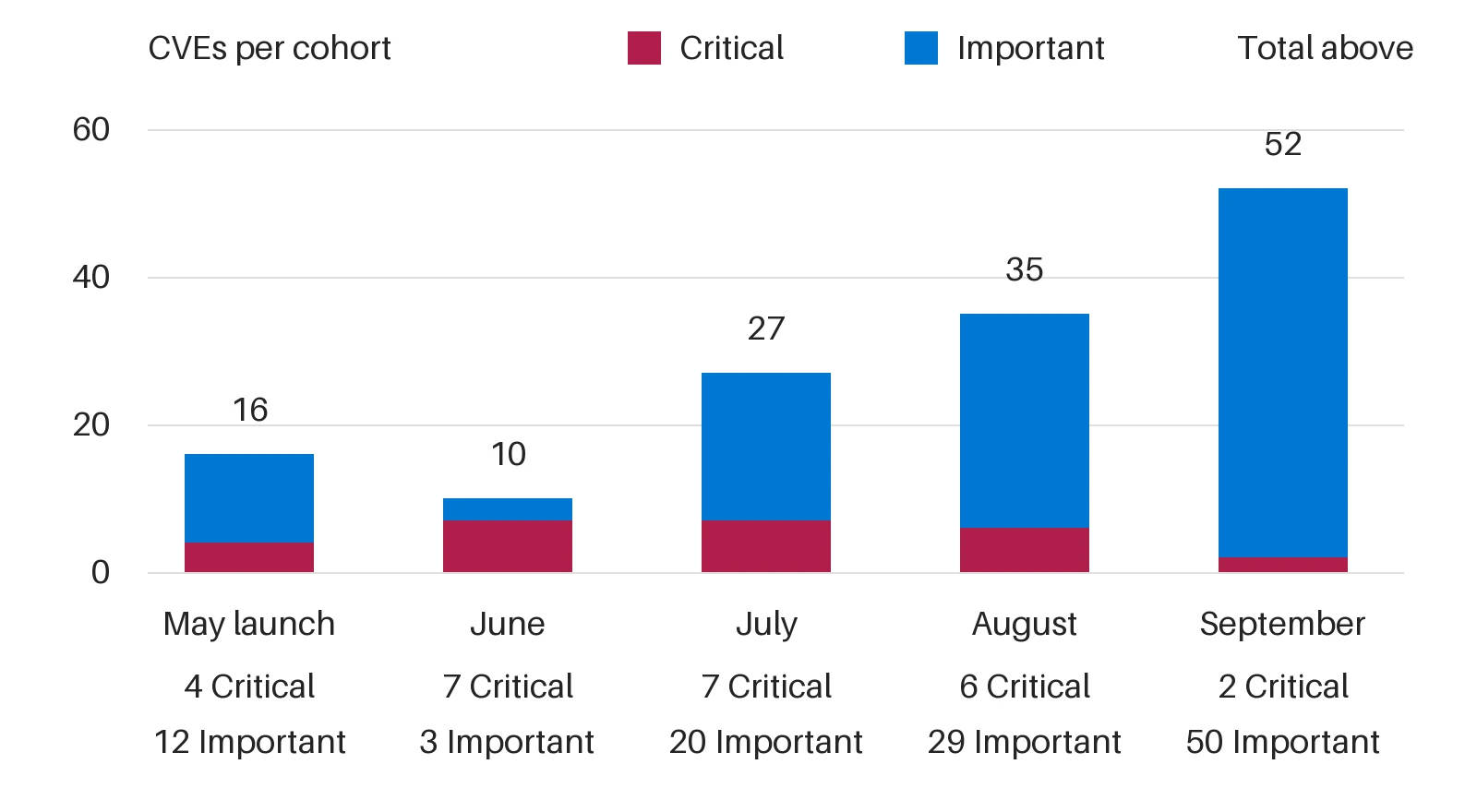
From May 2026 through September 2026, FORGE helped discover Windows vulnerabilities assigned 140 common vulnerabilities and exposures (CVEs), including 52 addressed in September 2026’s security release alone. The work reaches well beyond Windows. FORGE members submitted 155 internally validated reports across 23 open-source projects, including the Linux kernel. And through Akrites, a Linux Foundation initiative that coordinates confidential remediation and disclosure for vulnerabilities in critical open-source software, one of our Linux reports became the first Akrites submission to result in a patch merged into the Linux kernel.
These results demonstrate that agentic discovery can operate at meaningful volume, but they also expose the next constraint. Finding a difficult vulnerability proves an agent’s frontier capability. Repeatedly converting such findings into security updates requires a different kind of system—one that can move credible work through validation, remediation, and release. Discovery creates security value only when validation and remediation can keep pace. For security leaders, the question is no longer only whether AI can find vulnerabilities, but whether an organization can validate and fix them as fast as they are found.
Three lessons follow, each marking a shift in how we approach vulnerability research:
From frontier capability to scale.
From token consumption to reasoning economics.
From isolated discovery to coordinated validation and remediation.
The scarce resource is not always model intelligence. It can be a working build and deployment, a reproducible trigger, or even an engineer’s time.
At FORGE Lab, we use the multi-model agentic scanning harness, codename MDASH, to organize this work. Our May 2026 introduction detailed its design, while the June 2026 update covered pipeline improvements and benchmark analysis. Here, we focus on what those experiences teach us about operating vulnerability research at scale—across Windows and open-source projects.
140 CVEs addressed through Microsoft Patch Tuesday since May 2026. Monthly totals reflect announcement and servicing cohorts, not discovery dates or scan throughput. Source: Microsoft FORGE Lab study, May 2026 to September 2026.
Shift 1. From frontier capability to scale
The frontier question is whether a system can find a bug that demands deep reasoning, as we explored in our early work on the CyberGym benchmark. The scale question is whether it can repeat that result across targets without rebuilding every environment, investigation, and review process from scratch. Better models still matter, especially for difficult or unfamiliar bug classes. But once discovery becomes repeatable, model capability is only one constraint on useful output.
Adding auditors can increase candidate volume without increasing the rate of validated findings or shipped fixes. If reports arrive faster than reviewers—in our case, Microsoft Security Response Center (MSRC)—can resolve them, the immediate result is a growing queue. A larger search budget can even reduce useful throughput when duplicate or poorly supported reports consume attention that stronger findings need.
The unit to optimize, therefore, is neither the scan nor the report. It is a reproducible finding that advances with enough evidence for the next stage to act. Reusable preparation, deduplication, and review capacity are therefore core components of the research system.
As agentic systems produce more candidates, the bottleneck shifts from discovery to determining which reports are real, reachable, and security-relevant. Project-specific automated provers—such as proof of vulnerability (PoV)/proof of concept (PoC) generators, harness builders, and trigger-input finders—turn plausible reports into reproducible evidence that engineers and maintainers can act on. By finding crashing inputs, confirming reachable execution paths, and producing regression-ready triggers within each project’s build and test environment, these tools can help reduce human triage, accelerate remediation, and make vulnerability research sustainable at scale. For example, by leveraging deterministic algorithms such as abstract syntax tree (AST), one of our internal projects reduced about 45% duplicate findings across multiple scans of the same code which reduced the load on the PoC generator and subsequently human triage effort.
More candidates do not create more throughput when the review queue grows faster than fixes ship.
Shift 2. From token consumption to reasoning economics
At scale, every repeated orientation, speculative branch, and redundant debate carries a cost. But minimizing tokens alone is the wrong objective. A short, ambiguous report may be cheap to generate yet expensive to investigate; a longer analysis that establishes the missing execution path may reduce total system cost.
The key question is where the next unit of reasoning will change a decision. If an index can identify callers, asking a frontier model to rediscover them wastes capacity. If the uncertainty is whether two lifetime conditions can coexist across callbacks, deeper reasoning may be warranted. If the question is whether an input triggers the failure, an executable check can provide evidence that more prose cannot.
MDASH combines frontier and distilled models, specialized auditors, and code-analysis tools, enabling work to be allocated by task. That flexibility does not guarantee optimal allocation. Routing routine work to cheaper models, reusing verified context, and escalating unresolved questions to stronger reasoning are hypotheses to test—not efficiency gains to assume.
A useful allocation policy starts by identifying what remains unknown: a caller, a build configuration, a reproducer, or a causal explanation. The next action should close that specific evidence gap. Repeating a review without adding evidence spends more tokens while preserving the same uncertainty. Early filtering can also discard real bugs, so any savings must be measured against coverage and missed findings.
Scan outcomes can also become training data. At scale, vulnerability scanning should become a training loop, not only a discovery pipeline. Each MDASH run produces signals that can improve future models: true-positive and false-positive verdicts, duplicate findings, failed reachability claims, reviewer feedback, verifier results, severity assessments, patch outcomes, and regression-test evidence. Capturing those signals with the code context and causal argument behind each candidate creates the dataset needed for reinforcement learning and fine-tuning specialized cyber models. The goal is for future models to learn not just what a vulnerability looks like, but which findings survive validation, which explanations help humans and provers act, and which patterns lead to useful remediation.
Spend reasoning to remove uncertainty, not simply to produce more analysis.
Shift 3. Validation and remediation as a continuous learning loop
Validation and remediation are not downstream cleanup; they are part of the discovery loop. Each candidate should move through automated verification, human review, patch development, and regression testing, with every stage returning evidence to the system. A reproducible trigger strengthens the report, guides the fix, and can seed a regression test. A failed validation is also useful when it records why: an unreachable path, missing precondition, incorrect build configuration, insufficient attacker control, duplicate report, or incomplete causal explanation.
That evidence is how the system improves. Project-specific provers, harnesses, and trigger generators accumulate operational knowledge about how each target builds, runs, fails, and accepts fixes. Remediation outcomes show the discovery pipeline which evidence changed a decision, which assumptions failed, and which bug patterns warrant more or less attention. The objective is to make every investigation leave reusable capacity behind: a validated trigger, clearer invariant, better harness, stronger regression test, or routing rule that prevents the same mistake.
Human attention remains essential, but it should concentrate where judgment has the highest leverage: assessing security impact, reviewing patches, and determining whether a change restores the component’s intended invariant. Automation can handle the repeatable work of establishing reachability, reproducing behavior, and preserving evidence. Over time, this loop converts individual findings into system knowledge—raising the quality of future discovery while shortening the path from credible report to shipped fix.
A reproducible defect is not yet a serviced fix. To shorten the path from discovery to remediation, MDASH needs to operate as part of the engineering loop: continuously scanning code, connecting findings to the builds and artifacts produced by continuous integration and continuous delivery (CI/CD), and feeding validation results back into development, as described in the Windows team’s blog post. Broad analysis can identify suspicious code paths, but component-specific proving needs the right binaries, symbols, configurations, harnesses, and runtime conditions to reproduce a candidate defect against the version that matters for customers and releases. Each handoff should be both owned and machine-usable: research supplies the candidate claim, causal path, and uncertainty; proving supplies execution evidence from the relevant build artifact; component teams assess the violated invariant, repair strategy, compatibility risk, and related variants; and servicing connects the approved change to release validation. A failed reproduction, rejected finding, incomplete patch, or regression result should feed back into MDASH as structured evidence, not simply move a ticket into another queue. The goal is not to remove human code review or release validation, but to automate the repeatable work around them—finding candidates, selecting artifacts, reproducing behavior, preserving evidence, suggesting related paths, and returning what was learned to the next scan.
The goal is to build an organization-wide system that automates repeatable work while preserving clear engineering accountability.
Transferring security research to help open source projects
In open source, all three constraints apply at once. Each project has its own setup costs, mix of analysis and execution work, and maintainer workflows and review capacity. Within Windows, vulnerability research connects to established component owners and servicing infrastructure. Across open-source projects, reusable methods can reduce repeated setup, but they cannot replace the technical and human context required to move a finding toward a fix.
Open-source vulnerability reporting snapshot
Over three months, FORGE members audited open-source projects spanning kernels, runtimes, networking libraries, container technologies, and media parsers. The team submitted 155 internally validated reports across 23 projects. At the time of writing, 93 reports across 14 projects or project families had documented maintainer acknowledgement or acceptance: apple/container, apple/containerization, curl, Escargot, FFmpeg, Hyperlight, Linux, llama.cpp, Node.js, PyRIT, Rust, SQLite, vLLM, etc.
Since the reports are at different stages of that process, only subsets are publicly disclosed today, such as curl’s CVE-2026-9545 and CVE-2026-13608, Node.js’s CVE-2026-56848, and Linux kernel CVE-2026-64563. Our public CVE index lists the CVEs currently cleared for disclosure, and you can find all our public channel Linux kernel reports through lore.kernel.org query.
Measured costs of automated validation
MDASH surfaced thousands of suspicious locations in the Linux kernel, and our validation agents produced supporting evidences for 627 findings. The figures below summarize automated validation costs for a subset of these efforts. Across 182 confirmed crash findings, generating a PoC averaged $3.61 in model cost and 21.5 minutes. For six selected cases, using automatic exploit generation (AEG) to test local privilege-escalation potential averaged $8.56 and 25.4 minutes.
Average model and time cost for Linux kernel automated validation. Per-case averages reflect all attempts for successful cases using GPT-5.5. Source: Microsoft FORGE Lab Linux kernel automated validation study, 2026.
These evaluations used GPT-5.5, without extensive task-specific tuning of either the model or the harness. These averages include all attempts associated with the successful cases shown, but exclude initial screening, candidates that failed or were filtered out, and human investigation and patch preparation. Within those limits, the results still strongly indicate that automated validation can produce useful results at practical cost and latency, even at Linux-kernel scale. Tighter co-design of models and agent harnesses could improve both validation yield and efficiency. If costs fell by another order of magnitude, for example, 10x or even 50x, the range of findings that could be economically validated would expand substantially, further reshaping vulnerability research.
FORGE OSS Bug Hunt Party: Human coordination at scale (Hackathon)
Looking back to those efforts, technical evidence was only part of the job. Getting it fixed also required understanding and respecting each project’s context and workflow: some required a patch while others did not; some preferred private disclosure while others used public channels; and maintainers sometimes differed on whether an issue crossed a security boundary. In practice, this meant adapting to each project’s submission requirements, working with maintainers to reproduce the issue, and, where applicable, refining and retesting a proposed fix. As AI-assisted discovery increases report volume, open-source security research can scale only if research teams absorb the resulting complexity rather than pass it on to maintainers.
Scaling this work also requires more developers who understand the full security workflow. At Microsoft’s annual Hackathon, we hosted the FORGE Open Source Software (OSS) Bug Hunt Party (Project Sunshine) as a forum where developers across Microsoft could exchange security research practices and gain hands-on experience with vulnerability investigation, validation, and responsible reporting. With MDASH and supporting guidance, 50 participants produced 39 reports across six projects, including Microsoft’s open-source Hyperlight project, Linux, vLLM, Gemini CLI, and llama.cpp. Those 39 reports are included in the 155-report snapshot above. Project Sunshine has continued beyond the Hackathon as a forum for open-source security collaboration within Microsoft.
Akrites: Coordinated effort to remediate vulnerabilities
Akrites is a Linux Foundation initiative that coordinates confidential remediation and disclosure for vulnerabilities in critical open-source software. FORGE has submitted nine Linux findings with internally assessed common vulnerability scoring system (CVSS) scores above 7.0. Together with submissions from other participants, including Google, these cases helped test and refine Akrites’ early Coordinated Vulnerability Disclosure (CVD) workflow. One of those reports was the first Akrites submission to result in a patch merged into the Linux kernel. FORGE will keep contributing to those responsible disclosure efforts.
The work also showed that a systematic approach is not just a larger scan. It is a repeatable path from a finding to an upstream fix and coordinated disclosure. Each case needs reproducible evidence, a clear causal explanation, a severity assessment, and an understanding of which downstream projects may be affected. The right owners and collaborators can then be brought in at the right time and on a need-to-know basis.
What’s next for FORGE Lab?
In a matter of months, FORGE Lab has helped discover Windows vulnerabilities and assigned 140 CVEs, including 52 in September 2026’s security release. Beyond Windows, FORGE submitted 155 internally validated reports across 23 open-source projects—93 of which had documented maintainer acknowledgement or acceptance at the time of writing—and one of our Linux reports became the first Akrites submission to result in a patch merged into the Linux kernel. Our Linux kernel results also indicate that automated validation can work at practical cost, with proofs of concept averaging $3.61 in model cost and 21.5 minutes per successful case. The lesson behind those numbers: once agents can find difficult bugs, progress depends on the system around them, how it scales, where it spends reasoning, and how quickly it turns discoveries into validated fixes.
These three lessons are becoming foundational guidelines for FORGE’s next phase of research:
Moving from frontier capability to scale means measuring the full pipeline, not just the number of findings: candidate arrivals, duplicates, rejected reports, validated defects, queue age, unresolved cases, and time through each stage.
Moving from token consumption to reasoning economics means evaluating model and execution cost alongside human review time, and asking whether each additional pass removes uncertainty, improves coverage, or produces independently validated findings.
Moving from isolated discovery to continuous validation and remediation means tracking reproduction success, patch rework, regression evidence, and elapsed time from validated defect to approved fix and release.
For security leaders evaluating AI-powered vulnerability discovery, these are useful measures too: count validated fixes, not just findings, and weigh model cost alongside the human review time it takes to act on them.
The next advance won’t come from a better model alone. It will come from research systems that combine frontier capability, systems engineering, and reasoning economics, focusing machine reasoning and human attention on turning credible findings into validated fixes.
To learn more about Microsoft Security solutions, visit our website. Bookmark the Security blog to keep up with our expert coverage on security matters. Also, follow us on LinkedIn (Microsoft Security) and X (@MSFTSecurity) for the latest news and updates on cybersecurity.
Since early May 2026, Microsoft Threat Intelligence has observed Storm-2945, a sub-cluster of Midnight Blizzard, conducting widespread but targeted traffic manipulation attacks involving hospitality sector networks served by captive portals worldwide. Despite some tactic, technique, and procedure (TTP) similarities to the Forest Blizzard DNS hijacking operation that we publicly disclosed in April 2026, we attribute this campaign, which we call CaptiveCrunch, to Storm-2945. As reported by ReliaQuest on July 23, a portion of this activity leverages doppelganger domains mimicking Microsoft online services to conduct follow-on adversary-in-the-middle (AitM) phishing operations that abuse the device code authentication flow in Microsoft Entra ID. Microsoft Threat Intelligence has also identified active traffic manipulation attacks leading to the delivery of malware on impacted systems. Microsoft has observed Storm-2945 leveraging AI to support a significant portion of these operations.
Today, we are sharing our findings on these ongoing intrusions to raise awareness of this threat and enable customers to protect their devices, especially while traveling. We provide our assessment of Storm-2945’s relationship to Midnight Blizzard and analysis of the CaptiveCrunch campaign, detailing the malware and tradecraft used in these operations. We also provide mitigation, detection, and hunting guidance to help organizations identify and defend against Storm-2945 and related activity.
Microsoft Threat Intelligence would like to thank our partners at Anthropic and OpenAI for their collaboration and support during this investigation.
The CaptiveCrunch campaign
Since February 2026, Storm-2945 has conducted AI-augmented operations including targeted device code and OAuth code phishing campaigns leading to Entra device registration and subsequent data collection from Microsoft 365. Since early May 2026, Microsoft Threat Intelligence has observed Storm-2945 manipulating DNS and HTTP traffic from networks served by captive portals to redirect user traffic through actor-controlled infrastructure. Although our investigation into the initial compromise vector for the captive portal networks is ongoing, we have observed notable commonalities in the equipment and management systems used across multiple affected networks. These similarities suggest that the activity might not be limited to isolated compromises of individual venues and could reflect access to shared services within portions of the captive portal ecosystem.
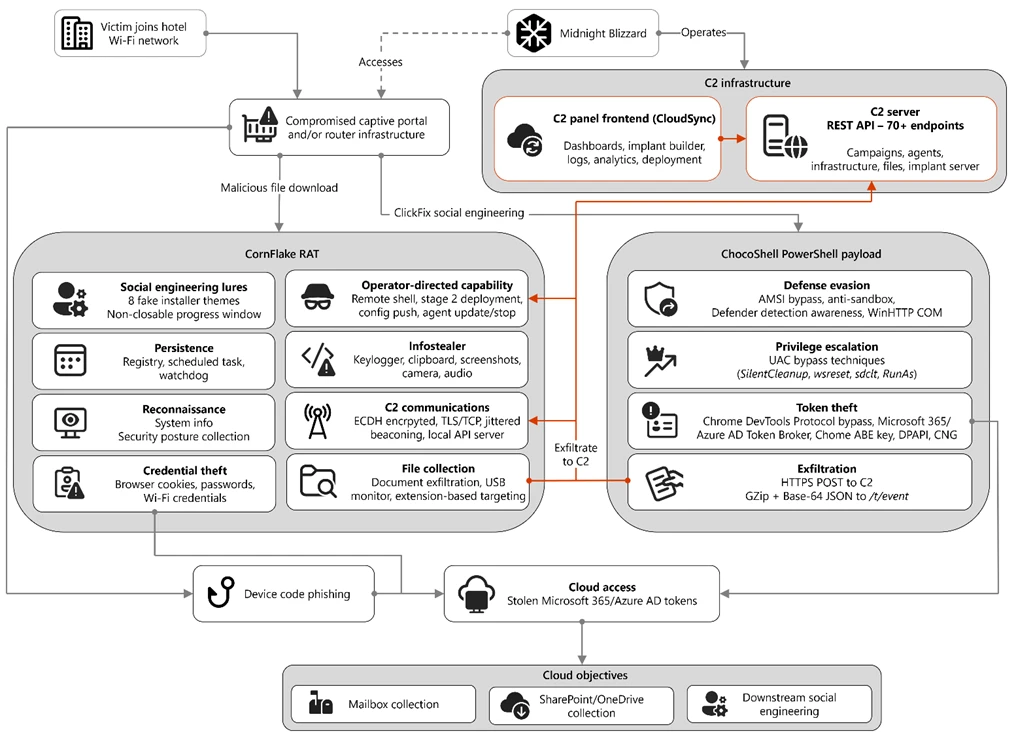
Figure 1. Overview of the CaptiveCrunch attack flow
As part of the CaptiveCrunch campaign, Storm-2945 has leveraged their AitM position to redirect users through actor-controlled phishing infrastructure and has also delivered malware purporting to be browser or operating system updates in response to automated connectivity checks issued by users’ browsers. Multiple variants have been delivered, including fully-featured Windows remote access trojans (RAT) in compiled Golang, with functionality to conduct system enumeration, collect files and keystrokes, steal credentials and session tokens, conduct audio and video surveillance, monitor for removable media, and provide the threat actor a remote shell on infected systems.
The threat actor infrastructure leverages a variety of ClickFix techniques to elicit the user into downloading and executing the malware:
Figure 2. ClickFix prompt with manual user instructionsFigure 3. ClickFix prompt with additional user instructions after verification failure
In addition to variants of malware targeting Windows systems, Microsoft Threat Intelligence is also aware of indications that the threat actor might be targeting Android devices with similar techniques as the ClickFix landings also include instructions for Android devices to download and install an APK file.
To date, Microsoft has identified widespread compromise of Wi-Fi networks at hospitality-related organizations and other networks serviced by captive portal equipment in several countries. ReliaQuest has identified this activity not only at hotels, but also conference centers and other shared venues, and assesses that the goal of this activity is to access the accounts of corporate travelers.
Storm-2945 and Midnight Blizzard
Microsoft Threat Intelligence assesses that Storm-2945 is an operational sub-cluster of Midnight Blizzard based on distinctive technical and operational overlaps. These include technical similarities to Storm-2372, a Midnight Blizzard initial access operations sub-cluster, also notable for their device code and OAuth code phishing operations tracked throughout 2025, Microsoft Graph-based email exfiltration, social engineering delivered via commercial messaging apps, and significant similarities in victimology.
Midnight Blizzard is a Russia-based threat actor attributed by the US and UK governments to the Foreign Intelligence Service of the Russian Federation, also known as the SVR. This threat actor is known to primarily target governments, diplomatic entities, non-governmental organizations (NGOs), and information technology (IT) service providers, primarily in the US and Europe. Midnight Blizzard is consistent and persistent in their operational targeting, and their objectives rarely change. Their focus is to collect intelligence through longstanding and dedicated espionage in support of Russian foreign policy interests.
Midnight Blizzard operations often involve compromise of valid accounts and, in some highly targeted cases, advanced techniques to compromise authentication mechanisms within an organization to expand access and evade detection. They utilize diverse initial access methods, and Midnight Blizzard is also adept at identifying and abusing OAuth applications to move laterally across cloud environments and for post-compromise activity, such as email collection.
CaptiveCrunch tradecraft and tooling
CornFlake: Remote access and infostealer implant
CornFlake is a full-featured Windows RAT written in Go that serves as Storm-2945’s primary persistent implant. Microsoft has observed the threat actor rapidly iterating on this malware layer, which features customizable capabilities from the social engineering user interface and data collection capabilities to anti-detection and evasion techniques.
On initial execution, CornFlake operates in dropper mode: it displays a convincing fake progress window designed to occupy the victim’s attention while the binary copies itself to %APPDATA%\svchost32\svchost32.exe and establishes persistence.
Fake window options configurable by the threat actor at build time:
winupdate — A Windows Update screen displaying “Working on updates… Don’t turn off your computer”
defender — A Windows Security virus scan
directx — A DirectX End-User Runtime Web Installer
vcredist — A Microsoft Visual C++ 2015-2022 Redistributable installer
sysopt — A disk optimization utility
netfix — A Windows Network Diagnostics tool
browser — A browser update prompt
pdfview — A document viewer installer
Figure 4. False update window
CornFlake registers as a Windows service named svchost32 with the display name “Cloud Sync Service” and description “Synchronizes files with the cloud storage provider”, deliberately mimicking the legitimate svchost.exe process. It establishes redundant persistence mechanisms: Windows service registrations, Registry Run keys, named scheduled tasks, and a persistence watchdog routine that runs continuously to restore any persistence mechanism that is removed by defenders or endpoint protection.
For command and control (C2), CornFlake performs an Elliptic Curve Diffie-Hellman (ECDH) P-256 ephemeral key exchange with the C2 server, derives a session key via SHA-256, and communicates over a custom JSON protocol framed within the encrypted channel. This provides an encrypted channel to the C2 server, with each C2 session using a unique ephemeral key, making decryption of captured traffic impossible without the session-specific private key. The runtime configuration file sync.dat supports hot reconfiguration of C2 servers, watched directories, file targeting patterns, and Transport Layer Security (TLS) settings without requiring redeployment.
Once established on a victim system, CornFlake provides the operator with a comprehensive collection toolkit, gated by configuration flags that allow selective activation post-deployment:
Capability
Description
Keylogging
Raw input API-based keylogger capturing all keystrokes, including password fields
Clipboard monitoring
Captures clipboard changes with SHA-256 deduplication and records the active window title at time of capture
Screenshot capture
Idle-triggered and on-demand screenshots with configurable idle threshold
Audio surveillance
Windows Audio Session API (WASAPI)-based microphone capture, encoded as WAV files
Video surveillance
Media Foundation-based webcam capture, encoded as JPEG
Browser credential theft
ChromeKatz-derived module supporting live cookie extraction from process memory (Chromium browsers) and stored password extraction from on-disk databases, including Chrome App-Bound Encryption (ABE) bypass and Firefox NSS/SDR decryption
File exfiltration
Targets files based on file extensions with real-time file system monitoring and an upload throttle (1,000 files or 500 MB per cycle). File extensions are categorized as Documents, Archives, Images, Code, Data, Emails, and Keys
USB drive monitoring
Detects and scans removable media when inserted
Security posture sweep
Collects 18 categories of host intelligence including installed software, antivirus (AV)/endpoint detection and response (EDR) products, Defender exclusions, User Account Control (UAC) level, Remote Desktop Protocol (RDP) history, Office most recently used (MRU) files, and credential hints
Remote shell
Arbitrary command execution via cmd.exe or PowerShell (with -NoP flag to suppress profile-based detection)
CornFlake also exposes a localhost HTTP API server (/upload, /reload, /status) that transforms the RAT into a modular platform: companion or next-stage payloads such as ChocoShell could task file exfiltration, trigger configuration hot reloads or check C2 connectivity using the pre-established secure C2 channel for communication.
ChocoShell: PowerShell infostealer
ChocoShell is the campaign’s Powershell-based infostealer, delivered and executed entirely in-memory. Its primary objective is the high-volume theft of browser session cookies, saved passwords, Microsoft 365 Single Sign-On (SSO) tokens, and Wi-Fi credentials from compromised systems. Where CornFlake provides the operator with a persistent, long-running foothold on the device, ChocoShell is designed to extract the most operationally valuable credentials, giving the operator access to victim cloud environments.
The ChocoShell script was authored with full developer comments that reveal the operator’s intent behind each code decision, including explicit references to Microsoft detection signatures and the reasoning behind specific evasion choices. The consistent coding standard and descriptive commentary suggest the author might have leveraged AI-assisted code generation.
Defense evasion. Upon execution, ChocoShell beacons to a hardcoded C2 server at 213.145.86[.]112 and implements several evasion techniques in sequence. It disables the Antimalware Scan Interface (AMSI) via .NET reflection to prevent ScriptBlock scanning and evades Microsoft behavioral detection that triggers on suspicious PowerShell web request cmdlets. A timing-based sandbox detection check is also employed as a virtual machine (VM) detection mechanism, silently exiting without performing any collection if detected.
C2 communication. ChocoShell communicates with its C2 server using HTTPS with URI paths designed to blend in with legitimate web traffic. Beacons use /t/pixel.gif?m=<status>, mimicking an image tracking pixel. Additional tooling is fetched from /cdn/chunks/polyfill-7e2b.min.js, disguised as a JavaScript polyfill file. This downloaded module is Base64-decoded and executed in memory via [ScriptBlock]::Create(), providing browser encryption key extraction capabilities, SYSTEM token impersonation, and Defender signature locking. Exfiltrated data is sent by POST to /t/event as GZip-compressed, Base64-wrapped JSON.
Privilege escalation. ChocoShell requires administrative privileges for its most impactful capabilities: SYSTEM token impersonation for Chrome ABE decryption, Volume Shadow Copy Service (VSS) shadow copy creation, Defender signature locking. It implements three silent UAC bypass techniques with ordered fallback:
SilentCleanup task hijack: Writes a malicious command to HKCU\Environment\windir, then triggers the built-in SilentCleanup scheduled task, which resolves %windir% from the user’s environment, executing the threat actor’s command at elevated privilege. The registry value is cleaned up after two seconds to avoid cloud detection.
wsreset.exe COM hijack: Creates a COM handler key in HKCU\Software\Classes and launches the auto-elevating Windows Store reset tool.
sdclt.exe folder hijack: Hijacks HKCU\Software\Classes\Folder\shell\open\command and launches the Windows Backup utility with the /KickOffElev flag.
If none of the silent bypasses succeed (for example, the user is not a local administrator), ChocoShell falls back to a visible UAC prompt via Start-Process -Verb RunAs. Notably, the script also contains a variant designed to execute within the WinGet Desired State Configuration (DSC) host process (ConfigurationRemotingServer), suggesting an attack vector through malicious WinGet DSC configuration used in Windows machine provisioning.
Credential and session theft. Once running with elevated permissions, ChocoShell locks Defender signature updates and systematically harvests data from multiple sources. For Chromium-based browsers (Chrome, Edge, Brave, Opera, Opera GX, Vivaldi), it extracts the master encryption key from the browser’s Local State file, handling both the modern ABE scheme (Chrome v127+) and the legacy data protection API (DPAPI)-only scheme. ABE decryption requires SYSTEM-level DPAPI access, which the malware obtains by impersonating a SYSTEM process token borrowed from winlogon.exe, wininit.exe, or services.exe. Locked browser SQLite databases are accessed through three strategies: shared file access, Volume Shadow Service snapshots, and direct copy as a fallback.
As a parallel collection path, ChocoShell launches Chrome, Edge, and Brave with the –remote-debugging-port flag and issues Network.getAllCookies through the Chrome DevTools Protocol (CDP). This completely bypasses ABE, enabling the browser to perform its own internal decryption and returns plaintext cookie values. To handle privilege issues (SYSTEM-launched browsers inherit the wrong token), the malware creates transient scheduled tasks with TASK_LOGON_INTERACTIVE_TOKEN to launch the browser under the signed-in user’s session. After extraction, the browser is stopped and relaunched with –restore-last-session to avoid alerting the user.
For Firefox family browsers (Firefox, Waterfox, LibreWolf, Floorp, Zen), the malware copies unencrypted cookies.sqlite databases from each profile. Additionally, ChocoShell collects Microsoft 365 and Azure Active Directory (AD) access tokens, refresh tokens, and Web Account Manager (WAM) tokens from .tbres files in the Token Broker cache. Collection of these tokens represents a significant threat to enterprise environments, as threat actors could replay SSO sessions without browser cookies. Additionally, Wi-Fi credentials are harvested via netsh wlan show profile with key=clear.
Exfiltration and cleanup. All collected data is aggregated into a JSON structure, GZip-compressed, Base64-encoded, and sent by POST to the C2’s /t/event endpoint. After exfiltration, all collected data variables are nulled, garbage collection is forced, VSS shadow copies are deleted via Windows Management Instrumentation (WMI), temporary elevation scripts are removed, and all UAC bypass registry keys (already cleaned during escalation) are verified removed.
FruitStone: Operator C2 panel
FruitStone is the web-based C2 panel that Storm-2945 operators use to manage the entire CaptiveCrunch campaign infrastructure. Implemented as a single-page application (HTML and JavaScript) serving as the front-end of the C2 server with all functionality exposed without authentication, FruitStone provides a centralized dashboard for managing compromised endpoints, building and deploying new campaign payloads, and reviewing all collected data (such as screenshots, keystrokes, browser credentials).
Operational cover. The panel is branded as “CloudSync Console” with a footer reading “Acuity Systems, Inc. — Cloud Infrastructure Portal v3.2.1,” designed to appear as legitimate enterprise cloud management software if the panel URL is discovered by defenders or hosting providers. This masquerading extends to the CornFlake agent’s service name (Cloud Sync Service) and description (“Synchronizes files with the cloud storage provider”), creating a consistent cover story across the toolchain.
Figure 5. CloudSync Console panel masquerade
Session management and multi-operator support. FruitStone uses JSON Web Token (JWT)-based authentication, session revocation, and rate limiting with IP blocking to prevent brute force attacks against the panel sign in. Multiple operators could be provisioned with individual accounts, and all active sessions are visible with IP address, user-agent, and creation time to enable operational security awareness across the operators.
Agent management. The panel displays all registered CornFlake agents in a dashboard with real-time status updates via Server-Sent Events (SSE). Each agent card shows comprehensive system information including hostname, username, OS version, CPU, RAM, disk usage, screen resolution, timezone, domain membership, and camera/microphone presence, all collected during the CornFlake posture sweep. Agents are grouped by country and subnet, with geographic distribution visualized on a map.
Operators could interact with individual agents through:
Remote shell — Interactive cmd.exe or PowerShell command execution with command history
File system browser — Live directory traversal and arbitrary file download from compromised hosts
Collection tasking — On-demand screenshot, process list, keylog buffer flush, clipboard dump, security posture survey, ChromeKatz cookie/password extraction, camera capture, and audio recording
Configuration push — Live runtime reconfiguration of C2 servers, watch paths, and C2 beacon timing
Agent update — In-place implant update by pushing a new CornFlake build to a running agent
Agent kill — Remote termination of the CornFlake implant
Campaign builder. A step-by-step wizard enables operators to configure and build new CornFlake payloads directly from the panel:
Identity — Campaign ID, C2 host and port, HTTP base URL, executable file name (svchost32.exe by default), and dropper type (C dropper at ~19 KB, Go stub at ~8 MB, or standalone self-installer)
File Paths — Configure targeted directories and file extensions by category (documents, archives, images, code, data, emails, encryption keys)
Figure 8. File paths tab
Evasion — Enable garble symbol randomization (for GoLang payloads), XOR string encoding, GZip upload compression, and debug mode
Figure 9. Evasion tab
Infrastructure management. FruitStone provides management interfaces for three layers of supporting infrastructure:
Proxy relays — Multi-proxy C2 relay architecture with TLS certificate tracking (fingerprint, expiry), health checks, connection counts, bytes forwarded, and rotation capabilities that push updated server lists to all online agents
Beacon profiles — Configurable timing profiles controlling agent sleep intervals, reconnection delays, TLS Server Name Indication (SNI) spoofing (like teams.microsoft.com), and DNS fallback domains
Staging servers — External payload hosting infrastructure with push-to-deploy, file listing, and health monitoring
Figure 10. View of the CloudSync staging servers interface
Device code abuse for cloud access
Since July 16, Microsoft has observed a portion of CaptiveCrunch landing pages redirecting users to device code authentication flow experiences. In these cases, users served these landings might be instructed to enter a device code into a legitimate Microsoft sign-in page, a technique commonly referred to as device code phishing.
Device code authentication is a legitimate OAuth workflow designed for devices that cannot support a traditional sign-in experience. However, threat actors could abuse this flow by initiating an authentication request on behalf of a user then convincing the user to enter an actor-controlled device code into a legitimate Microsoft authentication page. When successful, the victim authenticates the threat actor’s session rather than their own.
This activity is consistent with previously reported device code phishing operations conducted by Midnight Blizzard since August 2024. The observed technique does not appear fundamentally novel; however, integrating device code phishing into captive portal and traffic manipulation operations might increase the likelihood that users perceive the authentication request as legitimate. For additional details on Midnight Blizzard-related device code phishing techniques, see: Storm-2372 conducts device code phishing campaign. To understand other threat actors’ use of device code phishing and associated mitigations, see Inside an AI‑enabled device code phishing campaign.
How to protect against CaptiveCrunch activity
Minimize trust in hospitality and guest networks
When traveling, users should treat hotel, conference, airport, and other guest wireless networks as untrustworthy.
Prefer private connectivity (including mobile hotspots, satellite, and eSIM-based cellular data connections) over public Wi‑Fi whenever practical.
Consider using enterprise-managed travel routers or hotspot devices that establish encrypted tunnels back to trusted corporate infrastructure before accessing sensitive resources.
Avoid downloading software updates, certificates, browser updates, network troubleshooting tools, or security utilities presented through captive portals or other unexpected web prompts.
Verify update requests through trusted operating system mechanisms rather than pop-up messages or website prompts.
Strengthen identity and access controls
Organizations should assume that public and hospitality network infrastructure might not be trustworthy and should adopt controls that limit exposure to traffic manipulation, credential theft, and device code phishing.
Educate users to recognize ClickFix-style prompts, fake verification checks, and paste-and-run instructions as malicious, especially when they invoke command interpreters or script hosts such as cmd.exe, PowerShell, rundll32.exe, or mshta.exe.
Use passwordless solutions like passkeys and implement multifactor authentication (MFA).
Only allow device code flow where necessary. Microsoft recommends blocking device code flow wherever possible. Where necessary, configure Microsoft Entra ID’s device code flow in your Conditional Access policies.
Implement a sign-in risk policy to automate response to risky sign-ins. A sign-in risk represents the probability that a given authentication request is not authorized by the identity owner. A sign-in risk-based policy can be implemented by adding a sign-in risk condition to Conditional Access policies that evaluates the risk level of a specific user or group. Based on the risk level (high/medium/low), a policy can be configured to block access or force MFA.
When a user is a high risk and Conditional access evaluation is enabled, the user’s access is revoked, and they are forced to re-authenticate.
For regular activity monitoring, use Risky sign-in reports, which surface attempted and successful user access activities where the legitimate owner might not have performed the sign-in.
Use a Security Service Edge (SSE) solution like Global Secure Access to secure access to any app or resource using network, identity, and endpoint access controls.
Reduce exposure during captive portal registration
Organizations should review what information employees provide to hospitality providers when connecting to guest networks.
Do not reuse corporate credentials on hotel, conference, or guest-network registration pages.
Where possible, organizations should evaluate whether venue-provided wireless is required for corporate events and conferences.
Organizations should minimize unnecessary disclosure of employee identities, organizational affiliations, and travel details when booking accommodations or registering for guest network access, consistent with corporate policy and applicable local requirements.
Microsoft Defender detections and hunting guidance
Microsoft Defender customers can refer to the list of applicable detections below. Microsoft Defender coordinates detection, prevention, investigation, and response across endpoints, identities, email, apps to provide integrated protection against attacks like the threat discussed in this blog.
Microsoft Defender for Endpoint detects Storm-2945 activity under the detection Suspicious activity linked to a Russian state-sponsored threat actor has been detected. However, these alerts might be triggered by unrelated threat actor activity. The following chart lists Microsoft Defender detections specific to the TTPs utilized by Storm-2945 in this attack.
CornFlake registers a Windows service, a Registry Run key, a scheduled task
Microsoft Defender for Endpoint – Suspicious Scheduled Task Process Launched – Suspicious scheduled task – Suspicious file added to run key – Suspicious service registration
Microsoft Defender XDR – User account compromise via OAuth device code phishing – Malicious sign in from an IP address associated with recognized attacker infrastructure – Suspicious Azure authentication through possible device code phishing
Microsoft Security Copilot is embedded in Microsoft Defender and provides security teams with AI-powered capabilities to summarize incidents, analyze files and scripts, summarize identities, use guided responses, and generate device summaries, hunting queries, and incident reports.
Security Copilot is also available as a standalone experience where customers can perform specific security-related tasks, such as incident investigation, user analysis, and vulnerability impact assessment. In addition, Security Copilot offers developer scenarios that allow customers to build, test, publish, and integrate AI agents and plugins to meet unique security needs.
Threat intelligence reports
Microsoft Defender XDR customers can use the following threat analytics reports in the Defender portal (requires license for at least one Defender XDR product) to get the most up-to-date information about the threat actor, malicious activity, and techniques discussed in this blog. These reports provide the intelligence, protection information, and recommended actions to prevent, mitigate, or respond to associated threats found in customer environments.
Microsoft Security Copilot customers can also use the Microsoft Security Copilot integration in Microsoft Defender Threat Intelligence, either in the Security Copilot standalone portal or in the embedded experience in the Microsoft Defender portal to get more information about this threat actor.
Hunting queries
Microsoft Defender XDR
Microsoft Defender XDR customers can run the following advanced hunting queries to find related activity in their networks:
Detect file creation after Wi-Fi connectivity test on devices
The following query checks for a file creation on a device within two minutes of the device performing built‑in Network Connectivity Status Indicator (NCSI) test, which occurs when network connectivity is established to a Wi-Fi network with a captive portal. This activity might indicate an attacker’s initial access file presence on a device.
Please note that not all files discovered through this query might be malicious or related to this threat activity.
let ncsi_endpoints = dynamic(["msftconnecttest.com","edge-http.microsoft.com","msftncsi.com","captive.apple.com","clients1.google.com",
    "clients3.google.com","clients4.google.com","clients6.google.com","connectivitycheck.gstatic.com","connectivitycheck.android.com",
    "android.clients.google.com","www.gstatic.com","detectportal.firefox.com","detectportal.brave-http-only.com","cloudflareportal.com",
    "cloudflarecp.com","cloudflareok.com","connectivity-check.warp-svc","connectivity.cloudflareclient.com","spectrum.s3.amazonaws.com",
    "nmcheck.gnome.org"]);
let NCSIEvents = DeviceNetworkEvents
    | where Timestamp > ago(7d)
    | where RemoteUrl has_any (ncsi_endpoints)
    | project NCSI_Timestamp = Timestamp, DeviceId, DeviceName, RemoteUrl, NCSI_ReportId = ReportId, NCSI_InitiatingProcessFileName = InitiatingProcessFileName, NCSI_InitiatingProcessCommandLine = InitiatingProcessCommandLine, NCSI_AccountName = InitiatingProcessAccountName;
let FileDownloadEvents = DeviceFileEvents
    | where Timestamp > ago(7d)
    | where ActionType == "FileCreated"
    | where FileName has_any (".exe",".msi",".zip",".rar",".7z")
    | project Download_Timestamp = Timestamp, DeviceId, FileName, FolderPath, Download_ReportId = ReportId, Download_InitiatingProcessFileName = InitiatingProcessFileName, Download_InitiatingProcessCommandLine = InitiatingProcessCommandLine, Download_AccountName = InitiatingProcessAccountName;
NCSIEvents
| join kind=inner (
    FileDownloadEvents
) on DeviceId
| where Download_Timestamp >= NCSI_Timestamp and Download_Timestamp
Detect connectivity to Storm-2945 infrastructure
The following query checks for connectivity to Storm-2945 infrastructure observed in this attack activity.
let target_domains = dynamic(["ms365-device.com", "ms365-live.com", "m365-owa.com", "owa-ms365.com"]);
let target_ips = dynamic(["31.57.243.154", "38.146.28.75", "38.146.28.132", "104.194.159.150", "107.189.26.194", "213.145.86.112"]);
DeviceNetworkEvents
| where RemoteUrl has_any(target_domains) or RemoteIP in (target_ips)
| project
    Timestamp,
    DeviceName,
    DeviceId,
    RemoteUrl,
    RemoteIP,
    LocalIP,
    InitiatingProcessFileName,
    InitiatingProcessCommandLine,
    AccountName = InitiatingProcessAccountName,
    ReportId
Detect CornFlake RAT presence on affected systems
The following query checks for the presence of the CornFlake RAT binary.
The following query checks for the CornFlake RAT Windows service registration.
DeviceRegistryEvents
| where RegistryKey has @"\SYSTEM\CurrentControlSet\Services\svchost32"
| where ActionType == "RegistryValueSet"
| where (RegistryValueName == "DisplayName" and RegistryValueData == "Cloud Sync Service")
    or (RegistryValueName == "Description" and RegistryValueData == "Synchronizes files with the cloud storage provider")
| project
    Timestamp,
    DeviceName,
    DeviceId,
    RegistryKey,
    RegistryValueName,
    RegistryValueData,
    ActionType,
    InitiatingProcessFileName,
    InitiatingProcessCommandLine,
    InitiatingProcessAccountName,
    ReportId
Microsoft Sentinel
Microsoft Sentinel customers can use the TI Mapping analytics (a series of analytics all prefixed with ‘TI map’) to automatically match the malicious domain indicators mentioned in this blog post with data in their workspace. If the TI Map analytics are not currently deployed, customers can install the Threat Intelligence solution from the Microsoft Sentinel Content Hub to have the analytics rule deployed in their Sentinel workspace.
Detect network IP and domain indicators of compromise using ASIM
The following query checks IP addresses and domain IOCs across data sources supported by ASIM network session parser:
//IP list and domain list- _Im_NetworkSession
let lookback = 30d;
let ioc_ip_addr = dynamic(["213.145.86.112"]);
let ioc_domains = dynamic(["213.145.86.112/t/pixel.gif", "213.145.86.112/cdn/chunks/polyfill-7e2b.min.js", "213.145.86.112/t/event"]);
_Im_NetworkSession(starttime=todatetime(ago(lookback)), endtime=now())
| where DstIpAddr in (ioc_ip_addr) or DstDomain has_any (ioc_domains)
| summarize imNWS_mintime=min(TimeGenerated), imNWS_maxtime=max(TimeGenerated),
  EventCount=count() by SrcIpAddr, DstIpAddr, DstDomain, Dvc, EventProduct, EventVendor
Detect web sessions IP and file hash indicators of compromise using ASIM
The following query checks IP addresses, domains, and file hash IOCs across data sources supported by ASIM web session parser:
//IP list - _Im_WebSession
let lookback = 30d;
let ioc_ip_addr = dynamic(["213.145.86.112"]);
let ioc_sha_hashes =dynamic([“918fa52ae45ed60ba7cc8bdc99c3cbe9ab92e0375ec31fc05d0d4513be11c593”, “be99857449d2856dd5a84e21c8a3d5e0e01456adb44062ddec5a6b4970d8d42c”]);
_Im_WebSession(starttime=todatetime(ago(lookback)), endtime=now())
| where DstIpAddr in (ioc_ip_addr) or FileSHA256 in (ioc_sha_hashes)
| summarize imWS_mintime=min(TimeGenerated), imWS_maxtime=max(TimeGenerated),
  EventCount=count() by SrcIpAddr, DstIpAddr, Url, Dvc, EventProduct, EventVendor
Detect domain and URL indicators of compromise using ASIM
The following query checks domain and URL IOCs across data sources supported by ASIM web session parser:
// file hash list - imFileEvent
// Domain list - _Im_WebSession
let ioc_domains = dynamic(["https://213.145.86.112/t/pixel.gif", "https://213.145.86.112/cdn/chunks/polyfill-7e2b.min.js", "https://213.145.86.112/t/event"]);
_Im_WebSession (url_has_any = ioc_domains)
ChocoShell C2 communications
The following query detects ChocoShell communications with its C2 server using HTTPS with URI paths designed to blend in with legitimate web traffic. Beacons use /t/pixel.gif?m=<status>, mimicking an image tracking pixel.
let lookback = 30d;
let ioc_url_artifacts = dynamic(["/t/pixel.gif?m="]);
_Im_WebSession(starttime=todatetime(ago(lookback)), endtime=now())
| where DstDomain  in (ioc_url_artifacts)
| summarize imWS_mintime=min(TimeGenerated), imWS_maxtime=max(TimeGenerated),
  EventCount=count() by SrcIpAddr, DstIpAddr, Url, Dvc, EventProduct, EventVendor
To hear stories and insights from the Microsoft Threat Intelligence community about the ever-evolving threat landscape, listen to the Microsoft Threat Intelligence podcast.
Ransomware that combines robust encryption with rapid lateral movement significantly increases the risk and impact of an attack. The Gentlemen ransomware is a ransomware-as-a-service (RaaS) threat that is distinguished by its ability to pair its strong per-file encryption with an aggressive self-propagation capability designed to enable broad network compromise. In addition to using per-file ephemeral Curve25519 keys with XChaCha20 stream cipher, The Gentlemen ransomware attempts to spread across an environment using series of simultaneous, distinct lateral movement methods, increasing the likelihood of widespread impact once initial access is achieved.
Microsoft Threat Intelligence tracks the operators behind the ransomware as Storm-2697, a financially motivated threat actor that manages the RaaS platform known as “The Gentlemen” while affiliates carry out attacks. Emerging around mid-2025, The Gentlemen initially started as a closed ransomware group then began offering its RaaS to affiliates in September 2025. More recently, The Gentlemen operators established an official partnership with BreachForums, a popular cybercriminal marketplace, to recruit affiliates including penetration testers and initial access brokers. Given that The Gentlemen is already a widely adopted RaaS platform, this partnership may lead to increased activity as the program becomes accessible to a broader pool of threat actors.
The operators behind the ransomware use double extortion tactics, encrypting data while also exfiltrating sensitive information to pressure victims through the threat of public release if the ransom is not paid. The ransomware is written in Go and obfuscated with Garble to target the Windows environment. Microsoft has observed The Gentlemen ransomware impacting organizations across education, transportation, healthcare, and financial industries in North America, South America, Europe, Africa, and Asia.
In this blog, we present a detailed analysis of the Gentlemen ransomware encryptor, including its execution flow, defense evasion behaviors, encryption design, and lateral movement techniques. This research is intended to provide defenders, incident responders, and the broader security community with a better understanding of how the threat operates, from initial argument parsing and defense evasion, through its file encryption internals, to the full lateral movement that enables it to propagate across the network. We also provide mitigation guidance, Microsoft Defender detections, hunting queries, and indicators of compromise (IOCs) to help organizations defend against this threat and similar ransomware activity.
Pre-encryption
Command-line argument processing
The ransomware operator can control The Gentlemen encryptor through command-line arguments. A password is required for execution, and optional arguments allow the operator to specify encryption scope, speed, lateral movement, and post-encryption behaviors.
The binary accepts the following arguments:
Command-line argument
Description
--password <password>
Required access password (build-specific)
--path <list of paths>
Comma-separated list of target directories or file paths
--T <minutes>
Delay in minutes before file encryption begins
--silent
Silent mode. Disable renaming files, changing timestamps after encryption, and setting the desktop wallpaper
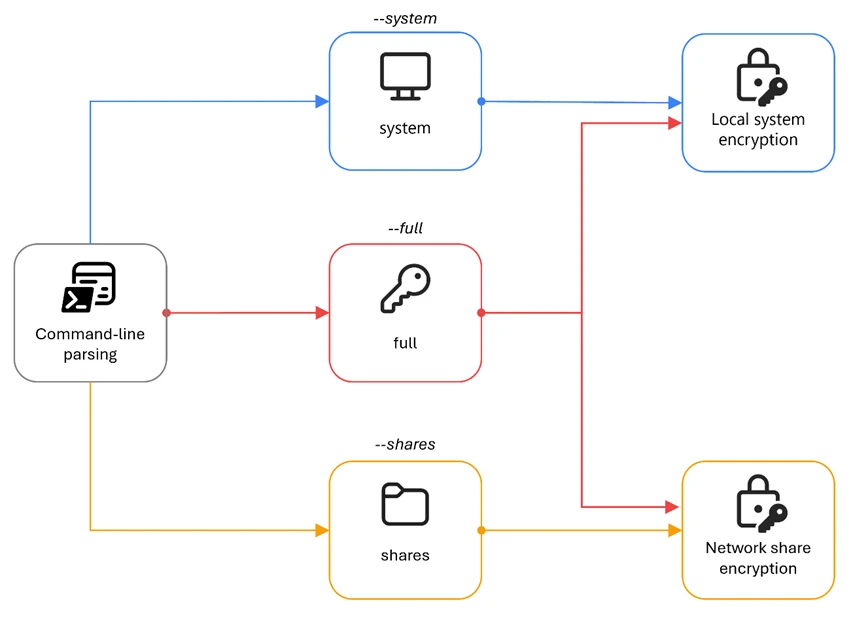
--system
Encrypt files as SYSTEM, targeting only local drives
--shares
Encrypt only mapped network drives and available Universal Naming Convention (UNC) shares
--full
Two-phase encryption by relaunching itself as two separate processes, one with --system for local drives and one with --shares for network shares
--spread <domain/user:password>
Enable self-propagation. Accept credentials for lateral movement. If no credential is provided, the current session token is used for lateral movement.
--ultrafast
Encrypt 0.3% per chunk (~0.9% total for large files)
--superfast
Encrypt 1% per chunk (~3% total for large files)
--fast
Encrypt 3% per chunk (~9% total for large files)
--keep
Disable self-delete after file encryption completes
--wipe
Wipe free disk space after encryption
The --full command-line argument appears to be the intended mode of operation for comprehensive file encryption on the infected device. When this argument is provided, the malware spawns two child processes of itself: one appended with the argument --system to encrypt local volumes under a SYSTEM-privileged scheduled task, and one appended with the argument --shares to encrypt network shares. This separation ensures that the malware can reach both local drives (which might require SYSTEM privileges) and mapped network shares (which are only visible in the user’s session).
Figure 1. Encryption mode command-line arguments
The speed arguments (--fast, --superfast, --ultrafast) are mutually exclusive and control how much of each large file is encrypted. When no speed flag is specified, the default per-chunk percentage is 9%. These flags only affect files that are larger than 1 MB, and small files are fully encrypted regardless of the speed setting.
Usage prompt
When the encryptor is executed with no command-line argument, the malware prints a branded usage banner to the console.
It first executes the following PowerShell commands to render a console header:
This is followed by a detailed usage prompt provided by the malware author that documents all available flags with descriptions and examples:
Figure 2. The Gentlemen ransomware’s usage prompt
It is worth noting that the file size percentages listed in the usage prompt refer to the total file encryption amount. Internally, the malware encrypts three separate chunks, and the per-chunk percentage used in the code is: fast=3%, superfast=1%, ultrafast=0.3%, default=9%.
Password check
Before executing its primary functionality, the malware validates the --password argument against a hardcoded value embedded within the binary. For the sample analyzed in this blog, the expected password is “9VoAvR7G”. If the provided password does not match, the malware outputs bad args and terminates execution.
This password check is a simple operator authentication mechanism, with each build containing a unique embedded password. Its purpose is to restrict execution to authorized operators and reduce the risk of accidental or unauthorized detonation if the binary is recovered or intercepted. However, because this validation relies on a static comparison, it can be easily identified and bypassed through static analysis techniques.
System encryption: Privilege escalation
When the --system argument is provided (either directly or via the --full argument), the malware creates a scheduled task to re-execute itself as SYSTEM. If a delay value is also specified through the --T argument, the scheduled execution time is adjusted accordingly.
To relaunch itself as SYSTEM, it issues the following sequence of commands:
The malware can only perform this task if it’s executed from an account with administrator privilege. It first deletes any existing task named gentlemen_system to avoid conflicts, creates a new one-time task that runs its binary under the SYSTEM account, and finally triggers that task.
This sequence ensures a clean state by first removing any existing task with the same name (gentlemen_system), creating a new scheduled task that executes the ransomware binary with SYSTEM-level privileges before finally triggering its immediate execution.
When running within this scheduled task context, the malware sets the environment variable LOCKER_BACKGROUND=1. This variable functions as an internal execution flag, indicating that the process is operating as a background encryption worker with elevated privileges, rather than as the original operator-invoked instance.
Defense evasion
Before starting file encryption, the malware executes a sequence of commands to disable defensive controls and remove potential forensic artifacts.
Disable Microsoft Defender
The PowerShell commands disable Microsoft Defender real-time monitoring to remove active protection on the infected device. The malware then adds its own executable to the Defender exclusion list to avoid detection. Finally, it excludes the entire C:\ volume from scanning, reducing the likelihood of subsequent detection during file encryption.
Delete shadow copies and event logs
To further impede recovery efforts, the malware deletes all Volume Shadow Copies using both vssadmin and wmic (Windows Management Instrumentation command-line utility). It then clears the System, Application, and Security event logs using wevtutil to remove key audit trails.
Delete forensics artifacts
These commands remove a variety of forensic artifacts, including prefetch files that track program execution, Defender diagnostic and support logs, and Remote Desktop Protocol (RDP) logs.
Additionally, the malware manually deletes PowerShell command history across all user profiles by removing the following file:
This action eliminates evidence of previously executed PowerShell commands, further reducing the visibility of execution history and threat actor activity.
Process and service termination
Process termination
The malware stops a list of running processes using the command:
The table below summarizes the different categories and processes being targeted:
Terminating these processes and services serves two primary objectives:
File access and encryption reliability: Many targeted processes/services, such as databases, Office applications, and backup agents, maintain active file locks. By forcibly terminating these processes, the ransomware ensures that locked files become accessible for encryption.
Defense and recovery disruption: By stopping backup services, endpoint protection agents, and remote access tools, the malware reduces the likelihood of real-time detection and data restoration from backups.
Collectively, these behaviors maximize encryption coverage while hindering the environment’s ability to detect, respond to, or recover from the attack.
Persistence
The encryptor can establish persistence for itself through two mechanisms: scheduled tasks and registry keys.
Figure 3. The Gentlemen ransomware’s persistence mechanism
Scheduled tasks persistence
For establishing persistence with scheduled tasks, the malware executes the following sequence of commands:
These commands first remove any pre-existing tasks with the same names, then create two persistence mechanisms that execute automatically at system startup. The UpdateSystem task launches the payload in the SYSTEM security context, while the UpdateUser task launches it in the currently signed-in user’s context. This design increases the likelihood that the ransomware will run after reboot regardless of privilege level or sign-in state.
Registry keys persistence
For establishing persistence with the registry, the malware executes the following sequence of commands:
The GupdateS value under HKEY_LOCAL_MACHINE (HKLM) provides device-wide persistence that allows the malware to run at startup for all users, while the GupdateU value under HKEY_CURRENT_USER (HKCU) provides user-scoped persistence within the current profile. By writing to both registry hives, the malware establishes redundant autorun paths across both system-level and user-level execution contexts.
Together, the scheduled tasks and Run key modifications create layered persistence, ensuring that the encryptor is re-executed after a reboot in both privileged and user-context scenarios.
Network share traversal
When the command-line argument --shares is provided, the malware initiates network share discovery and enumeration. It begins by probing all drive letters A through Z to identify mapped network drives using the following commands:
This sequence discovers any drives that are already mapped in the current user’s session, which are then added to the encryption target list.
To further enhance visibility into the network environment, the malware enables multiple Windows network discovery services and their associated firewall rules using the following commands:
The services enabled as part of this process include:
Function Discovery Resource Publication (fdrespub): Publishes the host’s resources to the network, allowing other systems to detect it.
Function Discovery Provider Host (fdPHost): Hosts provider components responsible for discovering network resources.
Simple Service Discovery Protocol (SSDP) Discovery (SSDPSRV): Enables discovery of Universal Plug and Play (UPnP) devices.
UPnP Device Host (upnphost): Supports the hosting and management of UPnP devices.
Finally, the malware reinforces this configuration by enabling the Network Discovery firewall rule group. This redundancy ensures that firewall restrictions do not limit its network visibility, further maximizing the number of reachable targets for encryption and propagation.
Volume and directory traversal
To enumerate all available volumes on the system, the malware executes the following PowerShell command sequence:
This command queries Windows Management Instrumentation (WMI) for all mounted volumes with drive letter paths and attempts to enumerate Cluster Shared Volumes (CSVs).
Additionally, the malware performs a secondary enumeration routine by iterating through drive letters A through Z while verifying their existence on disk. This brute-force method ensures broader coverage by identifying volumes that might not be retrieved through WMI queries to maximize visibility into all potential encryption targets.
Directory exclusion list
To maintain system stability and avoid disrupting critical operating system components, the malware excludes a predefined set of directories from traversal and encryption. These directories include core Windows system paths, application directories, and locations commonly associated with security and system management:
Extension exclusion list
The ransomware also excludes a set of file extensions associated with system-critical binaries, configuration files, and executable content:
By avoiding executable files, libraries, scripts, and other system-relevant formats, the malware preserves the integrity of the operating environment. This selective encryption model is a common ransomware design pattern, ensuring that the system remains operational enough for the victim to receive instructions and facilitate ransom payment.
File name exclusion list
The specific file names below are also excluded:
The inclusion of README-GENTLEMEN.txt, the ransomware’s ransom note, prevents it from being encrypted during execution. This ensures that the ransom instructions remain accessible to the victim, which is critical for the operator’s monetization workflow.
Ransom note
During directory traversal, the malware drops a ransom note named README-GENTLEMEN.txt in each scanned directory to provide victim-facing instructions.
The note contains identifiers assigned to the victim, communication channels, and guidance on how to initiate contact with the operators.
Figure 4. Ransom note content
File encryption
File ownership
Before encrypting a file, the ransomware modifies the file ownership and access control settings to ensure it has unrestricted write access to the target. This is achieved through the following sequence of commands:
The takeown command recursively transfers ownership of the specified file or directory to the executing user, overriding existing ownership constraints. The icacls command then grants full control permissions to the Everyone security identifier (SID S-1-1-0), applying inheritance flags to propagate these permissions to all child objects. Finally, the attrib command removes the read-only attributes.
Cryptographic scheme
The Gentlemen ransomware implements a hybrid cryptographic design that combines Curve25519 elliptic-curve cryptography with the XChaCha20 stream cipher to achieve efficient and secure per-file encryption.
For each file, the malware performs the following sequence of operations:
Generates a unique ephemeral Curve25519 key pair, consisting of a randomly generated private key and its corresponding public key
Computes the Elliptic-curve Diffie–Hellman (ECDH) shared secret between the ephemeral private key and the operator’s embedded public key
Uses the resulting shared secret as the XChaCha20 key, and derives the nonce from the first 24 bytes of the ephemeral public key
Encrypts the file contents using XChaCha20 with this key and nonce combination
Appends the Base64-encoded ephemeral public key to the file footer to enable subsequent key reconstruction during decryption
Figure 5. The Gentlemen ransomware’s file encryption mechanism
In this sample, the operator’s public key is hard-coded within the binary as a Base64-encoded value:
This design ensures that each file is encrypted with a distinct key and nonce derived from a per-file ephemeral key exchange, eliminating any possibility of key or nonce reuse across files.
During decryption, the decryptor can use the operator’s Curve25519 private key together with the stored ephemeral public key to reconstruct the ECDH shared secret and recover the XChaCha20 key. The nonce is deterministically reconstructed by extracting the first 24 bytes of the recovered ephemeral public key, making separate nonce storage unnecessary.
Overall, this approach provides strong cryptographic isolation between encrypted files while maintaining operational simplicity and efficiency for the threat actor during both encryption and decryption.
Size-based encryption
The malware uses different encryption strategies based on file size:
File size
Encryption behavior
≤ 1 MB (0x100000 bytes)
The entire file content is encrypted
> 1 MB (0x100000 bytes)
Three chunks are encrypted at distributed offsets
Small files that are less than 1MB in size are fully encrypted. This ensures that documents, configuration files, and other small but critical data are completely corrupted. For larger files such as databases, virtual disk images, archives, full encryption would be time-consuming. Instead, the malware encrypts three data chunks distributed across the file, which is sufficient to corrupt the file structure while dramatically reducing encryption time.
After encryption, each affected file is renamed with the appended extension .umc16h. This extension serves as a quick indicator of files already encrypted by the ransomware.
Large file chunking logic
For files larger than 1 MB, the malware performs partial encryption by dividing the file into three non-contiguous chunks distributed across its contents:
The first chunk begins at the start of the file, the second is positioned near the midpoint, and the third is located toward the end. This distribution ensures that even limited encryption is sufficient to corrupt the file structure while minimizing processing time.
Each chunk is encrypted in 64 KB (0x10000) blocks using XChaCha20. To maintain cryptographic separation between chunks, the malware modifies the nonce on a per-chunk basis. Specifically, the last byte of the 24-byte XChaCha20 nonce is XOR-ed with the chunk index (0, 1, or 2), and a new cipher instance is initialized for each chunk using the modified nonce. As a result, chunk 0 uses the original nonce, while subsequent chunks use deterministically altered variants.
Although all chunks for a given file share the same derived encryption key, this nonce mutation ensures that each chunk is processed under a unique keystream, preventing keystream reuse across different regions of the file.
The encryption percentage for each file is determined by the provided speed command-line arguments:
Argument
Per-chunk percent
Total encrypted percent (3 chunks)
(default)
9%
~27%
--fast
3%
~9%
--superfast
1%
~3%
--ultrafast
0.3%
~0.9%
File footer
After encrypting each file, the malware appends a structured footer containing metadata required for identification and decryption. The footer format differs slightly depending on whether the file was fully or partially encrypted.
Small file encryption (files ≤ 1 MB):
Figure 6. Small file footer example
Large file encryption (files > 1 MB):
Figure 7. Large file footer example
The footer serves three primary functions:
Key and nonce reconstruction: The Base64-encoded ephemeral public key, located after --eph--, allows the decryptor to recompute both the XChaCha20 key (using ECDH shared secret) and the nonce (first 24 bytes of the ephemeral public key).
Identification: The GENTLEMEN marker, located after--marker--, serves as a unique identifier, allowing encryptors/decryptors to quickly determine that the file has been encrypted by The Gentlemen ransomware.
Decryption mode: The optional speed flag marker (only present on large files) tells the decryptor which chunking percentage was used.
Notably, the speed marker is only present for large-file encryption. Files that are ≤ 1 MB do not include a speed marker, and its absence signals that the file was fully encrypted. This implicit encoding in the footer allows the decryptor to distinguish between full and partial encryption modes without requiring additional metadata fields.
Post-encryption
Wallpaper setup
If the --silent argument is not provided, the malware drops the following bitmap image file to %TEMP%\gentlemen.bmp and sets it as the system’s desktop wallpaper.
Figure 8. The Gentlemen ransomware’s wallpaper
This behavior serves as an immediate visual indicator of compromise, signaling to the victim that encryption has completed.
Self-propagation
The self-propagation module is the more distinctive component of The Gentlemen ransomware. When enabled with the --spread argument, it turns the malware from a single-host encryptor into a self-propagating worm that attempts to deploy its encryptor to every reachable system on the network.
The --spread argument accepts either explicit credentials in domain/user:password format for authenticated lateral movement, or an empty string to reuse the current session’s authentication token.
Placeholder legend
The executed commands in this section use the following placeholders:
Placeholder
Meaning
<self>
Host name of the infected device running the malware
<target>
Remote host discovered during network enumeration
<malware_path>
Full local path to the malware executable
<payload_name>
The malware file name
<ps_blob>
PowerShell defense evasion command executed on the remote target
<user>
Username parsed from the provided credentials
<pass>
Password parsed from the provided credentials
<time>
Current time plus two minutes, formatted as HH:MM
Phase 1: Local staging setup
The malware prepares the infected host to act as a distribution point for its binary by executing the following command sequence:
The commands copy the malware executable into C:\Temp, creates a hidden Server Message Block (SMB) share named share$ pointing to that directory, and modifies registry settings to allow anonymous access. With this setup, other systems on the network can retrieve the payload from \\<self>\share$, even when valid credentials are not available.
Phase 2: PsExec drop
The malware binary carries an embedded copy of PsExec and drops it to C:\Temp\psexec.exe on the infected device.
If the embedded PsExec payload cannot be extracted successfully, the malware falls back to downloading PsExec directly from Microsoft’s Sysinternals Live service using the following PowerShell command:
Phase 3: Network enumeration
After dropping PsExec, the malware attempts to enumerate and discover remote systems on the network, including workstations, servers, and domain controllers. Each discovered host becomes a candidate target for propagation.
Phase 4: PowerShell defense evasion blob
Before attempting to run the payload on a remote system, the malware executes the following PowerShell command on the remote target to weaken local defenses and make payload execution more reliable:
This command disables Microsoft Defender real-time monitoring, adds broad Defender exclusions, turns off Windows Firewall across all profiles, shares local drives, grants permissive New Technology File System (NTFS) access, enables SMB1, and loosens anonymous-access restrictions through Local Security Authority (LSA) registry settings. Together, these changes make the remote system significantly more exposed and ready for the payload deployment step.
Phase 5: Payload deployment
For each discovered remote host, the malware attempts a series of independent lateral movement techniques to execute its payload. Notably, these techniques are executed without dependency on prior success, and each method is attempted regardless of whether earlier attempts fail. This execution model of The Gentlemen’s propagation logic can significantly increase the likelihood that at least one execution path succeeds even in secured environments.
5.1: Remote file copy
The malware first stages its payload on the remote system by copying the encryptor binary over the administrative C$ share:
This operation ensures a local copy of the payload is available on the target host, allowing subsequent execution methods to reference a path that does not depend on network shares.
5.2: PsExec-based execution
If PsExec is successfully dropped or downloaded, the malware leverages it to perform a multi-stage execution sequence on the remote host.
First, the malware executes the PowerShell defense evasion payload to weaken host protections:
After a delay to allow defenses to be disabled, the malware executes the payload from the locally staged path C:\Temp under SYSTEM privileges:
After another sleep period, the malware executes the final command to run the payload with the –h flag for elevated token and –c -f to copy and force execution:
5.3: WMIC process creation
The malware uses WMI via wmic.exe to create remote processes:
The first command executes the defense evasion blob, the second runs the payload from the infected host’s SMB share, and the third runs the pre-staged copy from the target’s local C:\Temp directory.
5.4: Scheduled tasks (user)
The malware creates three scheduled tasks under the target user’s context, each running two minutes after the time when they are created:
The scheduled task DefU is set to run the defense evasion blob, UpdateGU executes the payload from the infected host’s SMB share, and UpdateGU2runs the pre-staged copy from the target’s local C:\Temp directory.
5.5: Scheduled tasks (system)
The same three tasks are repeated, running under the SYSTEM account:
By attempting both user-context and SYSTEM-context task creation, the ransomware can improve its chance of propagation across environments with different permission boundaries.
5.6: Service-based execution
The malware executes the following command sequence to create three Windows services on the target host:
Similar to the scheduled tasks, the service DefSvc is set to run the defense evasion blob, UpdateSvc executes the payload from the infected host’s SMB share, and UpdateSvc2 runs the pre-staged copy from the target’s local C:\Temp directory. These services run as SYSTEM by default, which provides another high-privilege execution path for the ransomware payload on the remote system.
5.7: Payload deployment: PowerShell remoting
Using PowerShell remoting, the malware executes commands directly on the target using Invoke-Command:
This method leverages Windows Remote Management (WinRM), providing an alternative execution channel when PsExec or WMIC are unavailable or blocked.
5.8: PowerShell WMI execution
Finally, the malware uses the PowerShell WMI class interface directly to create remote processes with the following command sequence.
This provides functionality equivalent to wmic.exe, but through a different execution path. As a result, it might succeed in environments where the WMIC binary is restricted but WMI access remains available.
Self-propagation summary
Across all techniques, the malware attempts 21 remote execution operations per target host, spanning multiple APIs, privilege levels, and execution contexts. Each method attempts to launch the payload from:
The infected host’s SMB share:\\<self>\share$\<payload_name>
The target host’s locally staged path:C:\Temp\<payload_name>
This redundancy is central to The Gentlemen’s propagation strategy. In secured environments where most lateral movement techniques are mitigated, a single successful execution on a single additional host is sufficient to continue the propagation.
Free space wipe
If the --wipe argument is provided, The Gentlemen ransomware performs an additional post-encryption routine to eliminate recoverable artifacts from disk.
The malware first enumerates all available volume paths on the system. For each volume, it creates a temporary file named wipefile.tmp at the root directory and determines the amount of available free space. It then writes random data to this file in 64 MB blocks until the volume is completely filled. Once the disk space has been exhausted, the temporary file is deleted.
This process effectively overwrites all unallocated disk space with random data, preventing forensic tools from recovering remnants of previously deleted files. This includes cached or temporary versions of original unencrypted data that might still reside on disk. When combined with earlier actions such as Volume Shadow Copy deletion, this behavior reduces the likelihood of data recovery without access to the threat actor’s decryption key.
Self-delete
If the --keep flag is not provided, the malware attempts to remove its executable from disk after completing encryption.
Since a running process cannot directly delete its own binary, the ransomware generates and executes a temporary batch script at <malware_path>.batwith the following contents:
The batch script introduces a short delay by sending three Internet Control Message Protocol (ICMP) echo requests to the local host, pausing execution long enough for the main malware process to terminate. After this delay, the script deletes the original ransomware executable before removing itself. This mechanism helps reduce on-disk artifacts and hinders post-incident forensic analysis by eliminating the ransomware binary from the compromised system.
Defending against The Gentlemen ransomware
Microsoft recommends the following mitigations to reduce the impact of this threat.
Read the human-operated ransomware threat overview for advice on developing a holistic security posture to prevent ransomware, including credential hygiene and hardening recommendations.
Turn on cloud-delivered protection in Microsoft Defender Antivirus or the equivalent for your antivirus product to cover rapidly evolving threat actor tools and techniques. Cloud-based machine learning protections block a huge majority of new and unknown variants.
Enable controlled folder access. Controlled folder access helps protect your valuable data from malicious apps and threats, such as ransomware. Controlled folder access works by only allowing trusted apps to access protected folders. Protected folders are specified when controlled folder access is configured. Apps that aren’t included in the trusted apps list are prevented from making any changes to files inside protected folders.
Run endpoint detection and response (EDR) in block mode so that Microsoft Defender for Endpoint can block malicious artifacts, even when your non-Microsoft antivirus does not detect the threat or when Microsoft Defender Antivirus is running in passive mode. EDR in block mode works behind the scenes to remediate malicious artifacts that are detected post-breach.
Configure investigation and remediation in full automated mode to let Microsoft Defender for Endpoint take immediate action on alerts to resolve breaches, significantly reducing alert volume.
Configure automatic attack disruption in Microsoft Defender XDR. Automatic attack disruption is designed to contain attacks in progress, limit the impact on an organization’s assets, and provide more time for security teams to remediate the attack fully.
Microsoft Defender XDR customers can turn on attack surface reduction rules to prevent several of the infection vectors of this threat. These rules, which can be configured by any user, offer significant hardening against targeted attacks. In observed attacks, Microsoft customers who had the following rules turned on could mitigate the attack in the initial stages and prevent hands-on-keyboard activity:
Microsoft Defender detections and hunting guidance
Microsoft Defender customers can refer to the list of applicable detections below. Microsoft Defender coordinates detection, prevention, investigation, and response across endpoints, identities, email, apps to provide integrated protection against attacks like the threat discussed in this blog.
Microsoft Defender Antivirus
Microsoft Defender Antivirus detects threat components as the following malware:
The following alerts might indicate threat activity associated with this threat. These alerts, however, can be triggered by unrelated threat activity and are not monitored in the status cards provided with this report.
Ransomware-linked threat actor detected
Ransomware behavior detected in the file system
Possible ransomware activity
File backups were deleted
Potential human-operated malicious activity
Possible data exfiltration
Suspicious wallpaper change
The following alerts might indicate threat activity associated with The Gentlemen ransomware if Defender for Endpoint is set to block mode.
‘Gentlemen’ ransomware was detected
‘Gentlemen’ ransomware was prevented
Microsoft Defender for Cloud Apps
The following alert might indicate threat activity associated with this threat. This alert, however, can be triggered by unrelated threat activity and are not monitored in the status cards provided with this report.
Ransomware activity
Microsoft Security Copilot
Microsoft Security Copilot is embedded in Microsoft Defender and provides security teams with AI-powered capabilities to summarize incidents, analyze files and scripts, summarize identities, use guided responses, and generate device summaries, hunting queries, and incident reports.
Security Copilot is also available as a standalone experience where customers can perform specific security-related tasks, such as incident investigation, user analysis, and vulnerability impact assessment. In addition, Security Copilot offers developer scenarios that allow customers to build, test, publish, and integrate AI agents and plugins to meet unique security needs.
Threat intelligence reports
Microsoft Defender XDR customers can use the following threat analytics reports in the Defender portal (requires license for at least one Defender XDR product) to get the most up-to-date information about the threat actor, malicious activity, and techniques discussed in this blog. These reports provide the intelligence, protection information, and recommended actions to prevent, mitigate, or respond to associated threats found in customer environments.
Microsoft Security Copilot customers can also use the Microsoft Security Copilot integration in Microsoft Defender Threat Intelligence, either in the Security Copilot standalone portal or in the embedded experience in the Microsoft Defender portal to get more information about this threat actor.
Hunting queries
Microsoft Defender XDR
Microsoft Defender XDR customers can run the following advanced hunting queries to find related activity in their networks:
Known The Gentlemen ransomware files
Search for the file hashes associated with The Gentlemen ransomware activity identified in this report.
let fileHashes = dynamic(["22b38dad7da097ea03aa28d0614164cd25fafeb1383dbc15047e34c8050f6f67"]);
union
(
   DeviceFileEvents
   | where SHA256 in (fileHashes)
   | project Timestamp, DeviceId, DeviceName, FileName, InitiatingProcessFileName, FileHash = SHA256, SourceTable = "DeviceFileEvents"
),
(
   DeviceEvents
   | where SHA256 in (fileHashes)
   | project Timestamp, DeviceId, DeviceName, FileName, InitiatingProcessFileName, FileHash =
SHA256, SourceTable = "DeviceEvents"
),
(
   DeviceImageLoadEvents
   | where SHA256 in (fileHashes)
   | project Timestamp, DeviceId, DeviceName, FileName, InitiatingProcessFileName, FileHash = SHA256, SourceTable = "DeviceImageLoadEvents"
),
(
   DeviceProcessEvents
   | where SHA256 in (fileHashes)
   | project Timestamp, DeviceId, DeviceName, FileName, InitiatingProcessFileName, FileHash = SHA256, SourceTable = "DeviceProcessEvents"
)
| order by Timestamp desc
Microsoft Sentinel
Microsoft Sentinel customers can use the TI Mapping analytics (a series of analytics all prefixed with ‘TI map’) to automatically match the malicious domain indicators mentioned in this blog post with data in their workspace. If the TI Map analytics are not currently deployed, customers can install the Threat Intelligence solution from the Microsoft Sentinel Content Hub to have the analytics rule deployed in their Sentinel workspace.
Detect web sessions IP and file hash indicators of compromise using Advanced Security Information Model (ASIM)
The following query checks IP addresses, domains, and file hash IOCs across data sources supported by ASIM web session parser:
//IP list - _Im_WebSession
let lookback = 30d;
let ioc_ip_addr = dynamic([]);
let ioc_sha_hashes =dynamic(["22b38dad7da097ea03aa28d0614164cd25fafeb1383dbc15047e34c8050f6f67"]);
_Im_WebSession(starttime=todatetime(ago(lookback)), endtime=now())
| where DstIpAddr in (ioc_ip_addr) or FileSHA256 in (ioc_sha_hashes)
| summarize imWS_mintime=min(TimeGenerated), imWS_maxtime=max(TimeGenerated),
  EventCount=count() by SrcIpAddr, DstIpAddr, Url, Dvc, EventProduct, EventVendor
Detect files hashes indicators of compromise using ASIM
The following query checks IP addresses and file hash IOCs across data sources supported by ASIM file event parser:
// file hash list - imFileEvent
let ioc_sha_hashes = dynamic(["22b38dad7da097ea03aa28d0614164cd25fafeb1383dbc15047e34c8050f6f67"]);
imFileEvent
| where SrcFileSHA256 in (ioc_sha_hashes) or
TargetFileSHA256 in (ioc_sha_hashes)
| extend AccountName = tostring(split(User, @'')[1]),
  AccountNTDomain = tostring(split(User, @'')[0])
| extend AlgorithmType = "SHA256"
To hear stories and insights from the Microsoft Threat Intelligence community about the ever-evolving threat landscape, listen to the Microsoft Threat Intelligence podcast.
In recent years, many sophisticated intrusions have increasingly avoided using noisy exploits, obvious malware, or custom tooling, instead leveraging systems that organizations already trust within their environments. By operating through legitimate and trusted administrative mechanisms, threat actors could more easily blend seamlessly into routine operations and remain undetected.
Microsoft Incident Response investigated an intrusion that followed this pattern. What initially appeared as routine administrative activity was instead found to be a coordinated campaign abusing trusted operational relationships and authentication processes to establish durable access. The threat actor in this incident leveraged a compromised third-party IT services provider and legitimate IT management tools to conduct a stealthy campaign focusing on long-term access, credential theft, and establishing a persistent foothold.
This blog walks through how the intrusion unfolded, why it was difficult to detect, and how trusted systems, including identity infrastructure, operational tooling, and third-party management relationships were leveraged to sustain access. By examining the investigation end to end, we highlight how modern intrusions succeed without reliance on malware-heavy techniques and what defenders can learn from identifying abuse in environments where trust is implicit. We also provide mitigation and protection recommendations, as well as Microsoft Defender detection and hunting guidance to help identify and investigate related activity.
Abuse of trusted relationships as an attack delivery mechanism
Rather than relying on exploits or malware-based delivery, this attack leveraged an existing trusted operational relationship for malicious activity across the environment. The investigation identified HPE Operations Agent (OA), an approved and signed enterprise management tool commonly used for monitoring and administrative automation, as the primary delivery mechanism. Importantly, this did not involve any vulnerability or flaw in HPE OA itself.
Analysis during the incident response process revealed that management of this operational platform had been delegated to a third-party IT services provider, expanding the trust boundary beyond the organization itself. While such arrangements are operationally common, they introduce implicit trust paths that, if compromised, could be leveraged by threat actors to move within the environment using legitimate access and tooling.
By operating through the HPE OA framework, the threat actor executed scripts and binaries in a manner indistinguishable from normal operations, allowing malicious activity to blend seamlessly into expected behavior and delaying detection.
This technique aligns with MITRE ATT&CK T1199 – Trusted Relationship, in which threat actors exploit established trust relationships to extend access. In this case, the threat actor’s ability to operate entirely through trusted systems allowed them to establish a foothold and execute follow-on actions without relying on exploit-driven techniques.
Attack timeline
This timeline provides a high-level summary of the intrusion, highlighting key phases of the attack. A detailed analysis of each stage is presented in the sections that follow.
Figure 1. Attack timeline
Day 1: Initial foothold established
The threat actor gained initial access to the environment by compromising a third-party IT services provider and began operating through trusted systems, enabling execution without triggering immediate alerts.
Days 9–14: Credential access achieved
Credential interception capabilities were introduced on domain infrastructure, allowing the threat actor to harvest and reuse credentials to expand access across devices.
Days 24–32: Web-based persistence established
Persistent access was established on internet-facing servers, enabling the threat actor to maintain repeated access even if individual artifacts were removed.
Days 40–60: Lateral movement and remote access
The threat actor leveraged harvested credentials and covert connectivity to move laterally across devices, including highly sensitive assets.
Days 54–55: Additional credential interception deployed
Credential harvesting was further expanded on domain controllers, ensuring continued access during authentication and password change events.
Days 104–106: Persistence reestablished
Following initial detection, the threat actor returned to previously established access points to reenable persistence and deploy additional tooling.
Day 123: Incident response engagement
Microsoft Incident Response was engaged to investigate the intrusion.
Methods, tools, and access strategies
Initial access
During the investigation, two internet-exposed web servers, WEB-01 and WEB-02, were identified as the earliest known compromised assets. A web shell, Errors.aspx, was discovered on both of these devices; however, there was no indication that the servers had been previously exploited, and the mechanism that deployed the web shells couldn’t be determined.
Using intelligence from Microsoft Threat Intelligence regarding a known malicious domain, Microsoft Incident Response was able to identify a workstation communicating with this infrastructure. This led to the discovery of an execution path involving this domain, which revealed another execution path in which VBScripts (abc003.vbs) were deployed through HPE Operations Manager (HPOM).
HPOM and HPE OA form a distributed IT infrastructure monitoring platform. HPOM functions as a centralized management console for monitoring devices’ health, performance, and availability, while HPE OA is deployed on managed hosts to collect telemetry and execute automated, scheduled, or operator-initiated actions across the environment. In this case, the HPOM was operated by a third-party service provider responsible for managing the customer’s infrastructure.
The threat actor, operating HPOM, executed VBScripts on multiple servers, including the web server and a domain controller. The VBScripts had the following functionality:
System network configuration discovery
Active Directory discovery
External IP address discovery through PowerShell
Figure 2. Performed activities using HPOM
Credential access
After gaining initial access, the threat actor shifted focus to credential harvesting. The threat actor registered a legitimate network provider named mslogon on the domain controller DC01 through the same HP OA to hijack the authentication process. Network providers integrate into the Windows authentication mechanism, allowing the threat actor to capture cleartext user credentials during user sign-in and password changes. By delivering the component through a trusted and legitimate management channel, the threat actor was able to blend in with routine administrative activity and remain undetected for an extended period.
Analysis of the deployed network provider dynamic link library (DLL), mslogon.dll, revealed the deliberate abuse of Windows Credential Manager APIs, specifically NPLogonNotify and NPPasswordChangeNotify. These APIs are designed to notify registered providers during authentication events.
Figure 3. NPLogonNotify and NPPasswordChangeNotify APIs
NPLogonNotify is triggered when a user performs an interactive sign in. When triggered, the DLL captures the submitted username and password in cleartext.
NPPasswordChangeNotify is invoked when a user changes their password using secure attention sequence (Ctrl+Alt+Delete). When triggered, the DLL captured both the old and new credential pairs. These passwords are stored in cleartext under C:\Users\Public\Music\abc123c.d. This file enabled the threat actors to reuse both the current valid credentials and historical passwords for lateral movement.
Figure 4. Flow of credentials to the malicious network provider in the sign-in process
Later in the intrusion, on DC01 and DC02, the threat actor registered a malicious password filter, passms.dll, into the Windows authentication process by adding it to the Local Security Authority (LSA) notification packageconfiguration. Password filters are loaded by the Local Security Authority Subsystem Service (LSASS) on domain controllers and are invoked whenever a password is set or changed. This abused a legitimate Windows extensibility mechanism, which helped the threat actor blend in and remain undetected for an extended period; similar tactics were observed earlier in the intrusion.
During a password change operation, LSASS calls the PasswordFilter() API for each DLL listed under the Notification Packages registry value (Figure 5). The function receives the username and password in cleartext as input parameters. By registering a malicious password filter, the threat actor gained visibility into password modification events at the system level, allowing credential capture during normal authentication workflows.
Figure 5. Suspicious notification package passms on DC01 and DC02
When triggered, passms.dll intercepted the credential data and wrote the output toC:\ProgramData\WindowsUpdateService\UpdateDir\Ipd. The captured data was not stored in cleartext. Instead, it was double encoded, first by using Base64, followed by a custom encoding routine embedded within the DLL.
Figure 6. Reverse engineering of the custom encoding logic enabled recovery of the original values
A second module, msupdate.dll, was created on DC01 and DC02 which operated alongside passms.dll. It was invoked using the following command:
Figure 7. Command invoking msupdate.dll
Once invoked, the module read the contents of the Ipd file and transferred the encoded data over Server Message Block (SMB) to remote shares. The data was written into a file named icon02.jpeg, likely intended to blend with legitimate image assets.
In addition to SMB-based staging, msupdate.dll also contained email exfiltration capabilities. The module could send messages with the subject line “Update Service” using a predefined Simple Mail Transfer Protocol (SMTP) server, recipient address, and credentials retrieved from local files.
Execution
Execution was achieved through the abuse of an existing enterprise automation channel, allowing malicious VBScript and PowerShell scripts to run under the context of trusted system processes. By leveraging HPE OA to launch abc003.vbs, the threat actor performed system, network, and Active Directory discovery, while maintaining a low-noise execution profile.
Figure 8. Snippets of the code for abc003.vbs
On internet-facing web servers, execution was achieved through web shells (Errors.aspx and modified Signoff.aspx), which were used to run PowerShell scripts, deploy binaries, and trigger follow-on activity such as credential access and tunnelling tools.
Persistence
Web shells were the primary persistence mechanisms deployed on internet-facing web servers, WEB-01 and WEB-02. An initial web shell, Errors.aspx,allowed the threat actor to write files to disk. This was later used to modify a legitimate application page, Signoff.aspx, to load a secondary web shell, ghost.inc, from the Windows temporary directory. The secondary web shell provided command execution, file upload, and download capabilities, enabling repeated access even if individual artifacts were removed. This persistence relied on modifying existing application files rather than introducing new services, reducing the likelihood of detection.
Figure 9. Web shell creations and usage
The HPE OA was present on both servers and was highly likely used to deploy the web shell. However, because neither server had endpoint detection and response (EDR) coverage, Microsoft Incident Response was unable to confirm this. As a result, the origin and creation mechanism of the web shell, Errors.aspx, on the web server remain unknown.
Persistence was reinforced through the registration of malicious authentication components on domain controllers, DC01 and DC02, ensuring credential interception continued across reboot and credential reset events.
Prior to establishing persistent access, the threat actor first identified internal servers with outbound internet connectivity that could support tunneling. This discovery led to subsequent deployment of ngrok as a persistence mechanism. Instances of ngrok were launched on these internal servers, exposing them through encrypted tunnels to the threat actor’s infrastructure. These tunnels enabled continued inbound access for Remote Desktop Protocol (RDP) sessions without requiring exposed firewall ports, allowing persistence even in environments with restrictive perimeter controls.
Lateral movement
After establishing credential access, execution, and persistence, the threat actor moved laterally using a combination of valid credentials, remote management protocols, and covert network tunnelling using ngrok.
A compromised high-privileged account was used to initiate RDP sessions across the environment, enabling interactive access to critical devices including SQL servers and domain controllers.
To conceal the true source of these connections, the threat actor deployed ngrok, creating encrypted tunnels that exposed internal devices to the internet while bypassing perimeter-based monitoring. Evidence showed RDP connections originating from the ngrok tunnel hosted on SQL-01, masking the threat actor’s real infrastructure and complicating network-based detection.
Lateral movement was further supported by Windows Management Instrumentation (WMI)-based remote execution, which was used to deploy and launch ngrok on additional devices from compromised web servers.
Compromised credentials harvested using password filter DLLs and malicious network provider DLLs on domain controllers enabled continued access and movement without the need for exploit-based techniques.
Figure 10. Lateral movement using RDP
Campaign conclusion
This campaign demonstrated sustained operational maturity, reinforcing a consistent pattern: long-term access, commonly used tools, and campaigns designed to achieve strategic impact.
A recurring lesson from this activity is the abuse of trusted relationships. Third-party service providers and integrated management tools can become enforcement gaps when visibility is limited or validation is assumed. Threat actors understand this. They leverage legitimate components, trusted update paths, and approved integrations to anchor themselves inside environments that appear compliant on the surface.
Defenders should adopt a posture of deliberate verification. Trust your vendors and tooling but validate their behavior within your environment. Organizations operating in sensitive sectors should assume that threat actors with this level of tradecraft will continue refining third party abuse, credential interception, and stealthy persistence mechanisms to maintain strategic access.
Mitigation and protection guidance
Microsoft recommends the following mitigation measures to defend against such stealthy campaigns described in this blog.
Turn on cloud-delivered protection in Microsoft Defender Antivirus or the equivalent for your antivirus product to cover rapidly evolving attacker tools and techniques. Cloud-based machine learning protections block a majority of new and unknown variants.
Deploy endpoint detection and response (EDR) across all endpoints to strengthen visibility, accelerate detection, and improve response to malicious activity.
Adopt a default-deny egress filtering model so servers only allow explicitly approved outbound traffic, reducing opportunities for communication with malicious command-and-control and data exfiltration.
Remove unnecessary software and tools from systems to reduce the attack surface and limit opportunities for attacker abuse.
Enable detailed logging and monitoring on web servers and actively watch for anomalies (such as unexpected file changes or suspicious web requests).
Implement the enterprise access model to contain privilege escalation and enforce stronger access controls across the environment.
Strengthen security operations center (SOC) monitoring and incident response by addressing detection, response, and operational gaps identified during the incident.
Microsoft Defender detection and hunting guidance
Microsoft Defender customers can refer to the list of applicable detections below. Microsoft Defender XDR coordinates detection, prevention, investigation, and response across endpoints, identities, email, apps to provide integrated protection against attacks like the threat discussed in this blog.
Tactic
Observed activity
Microsoft Defender coverage
Command and Control
Decoding the binary data within the events revealed the hostname WKS, indicating it was likely carrying out suspicious activities, a VBScript abc003.vbs was responsible for reaching out to dREDEACTEDe.net, at least in the form of a DNS request
On internet-facing web servers, execution was achieved through web shells (Errors.aspx and modified Signoff.aspx), which were used to run PowerShell scripts, deploy binaries, and trigger follow-on activity such as credential access and tunnelling tools.
Microsoft Defender for Endpoint – ‘WebShell’ malware was detected and was active – An active ‘Webshell’ backdoor process was detected while executing and terminated
Microsoft Security Copilot
Microsoft Security Copilot is embedded in Microsoft Defender and provides security teams with AI-powered capabilities to summarize incidents, analyze files and scripts, summarize identities, use guided responses, and generate device summaries, hunting queries, and incident reports.
Security Copilot is also available as a standalone experience where customers can perform specific security-related tasks, such as incident investigation, user analysis, and vulnerability impact assessment. In addition, Security Copilot offers developer scenarios that allow customers to build, test, publish, and integrate AI agents and plugins to meet unique security needs.
Hunting queries
Microsoft Defender XDR customers can run the following advanced hunting queries to find related activity in their networks:
Password filters DLL
Look for unsigned / unverified DLLs configured as LSA notification packages.
DeviceRegistryEvents
| where RegistryKey has @"control\LSA"  and RegistryValueName has "Notification Packages" // Filter to LSA registry path
| project DeviceName, RegistryKey, RegistryValueName, RegistryValueData
| extend NotificationPackage = split(RegistryValueData, " ")
| mv-expand NotificationPackage
| extend NotificationPackage = tostring(NotificationPackage)
| extend Path = tolower(strcat(@"c:\windows\system32\", NotificationPackage, ".dll")) // Construct full DLL path in lower-case
| join kind=leftouter (
    DeviceFileEvents
    | extend Path = tolower(strcat(FolderPath)
    | project DeviceName, SHA1, Path
) on DeviceName, Path
| invoke FileProfile(SHA1) // Retrieve file signing information
| where SignatureState in~ ("SignedInvalid", "Unsigned") // Filter for files that are unsigned or have invalid signature
| project-away DeviceName1, SHA11
| distinct *
Network provider DLL
Look for custom network provider DLLs that are not signed and configured for Windows sign in.
let NetworkProviders = DeviceRegistryEvents
| where RegistryKey has @'\Control\NetworkProvider\Order' and RegistryValueName has 'ProviderOrder' // Filtering on 'ProviderOrder' entries
| extend Providers = split(RegistryValueData, ',')
| mv-expand Providers
| extend Providers = trim(@' ', tostring(Providers)) // Trim spaces around each provider name
| where Providers !in~ ('RDPNP','LanmanWorkstation') // Excluding default provider names
| distinct Providers; // Collect unique suspicious provider names
DeviceRegistryEvents
| where RegistryKey has_all (@'\Services\', @'\NetworkProvider') // Only registry keys under a service's NetworkProvider
and RegistryKey has_any (NetworkProviders) and
RegistryValueName =~ 'ProviderPath'
| project DeviceName, RegistryKey, RegistryValueName, RegistryValueData
| extend Path = tolower(replace_string(RegistryValueData, '%SystemRoot%', @'C:\Windows')) // Normalize path: replace environment variable and use lower-case
| join kind=leftouter (
    DeviceFileEvents
    | extend Path = tolower(strcat(FolderPath))
    | project DeviceName, SHA1, Path
) on DeviceName, Path
| invoke FileProfile(SHA1,1000)
| where SignatureState in~ ("SignedInvalid", "Unsigned")
| distinct *
To hear stories and insights from the Microsoft Threat Intelligence community about the ever-evolving threat landscape, listen to the Microsoft Threat Intelligence podcast.

 Login