Normal view

Received — 21 May 2026 Kaspersky official blog

ASCII art in phishing emails | Kaspersky official blog

21 May 2026 at 07:00

We’ve written time and again about how QR codes are used in phishing schemes. Our secure email gateway solution even includes technology to read these codes — not just from emails, but also from attachments — and check the embedded links. Yet, attackers haven’t given up on trying to send QR codes to their victims. Lately, we’ve increasingly seen them use ASCII art for this purpose — images composed of characters. This seems particularly ironic considering that phishers once tried to evade link scanning by hiding links in images, and now they’re trying to dodge image scanning by going back to text. But with a few twists.

The lost art of ASCII, and how attackers use it

It’s hard to believe today, but there was a time when computers couldn’t display graphics. Consequently, the very first computer images were constructed from text characters. Following the adoption of the standard in 1963, characters from the ASCII (American Standard Code for Information Interchange) set were used for this type of artwork to ensure that images looked the same across different computers. Over time, other text symbols (for example, from the extended Unicode set) began to be used to create images, but the name “ASCII graphics” remained the term used to describe this art form as a whole. There were serious artists working in this medium, the earliest websites were designed with ASCII art, and even the first computer pornography was rendered with text characters.

As image display technology evolved, ASCII art began to fall out of fashion. It saw a major resurgence in the 2000s during the heyday of email spam. Back then, spammers primarily used it because it allowed them to disguise blatant spam keywords that could trigger mail filters, while also placing less load on mail servers than images. Additionally, since many users paid for volume of internet traffic at the time, they often disabled image loading in their email clients. Naturally, at that time, we augmented our email security solutions with technology specifically designed to block ASCII art.

Now, ASCII art has been rediscovered — this time by those looking to bypass technology that recognizes QR codes within images.

What does ASCII art phishing look like?

Here’s a recent example. The pretext itself is pretty run-of-the-mill: someone has supposedly sent to victim a confidential document via DocuSign, but to open it the recipient needs to scan the QR code in the email to visit a website and enter corporate login credentials.
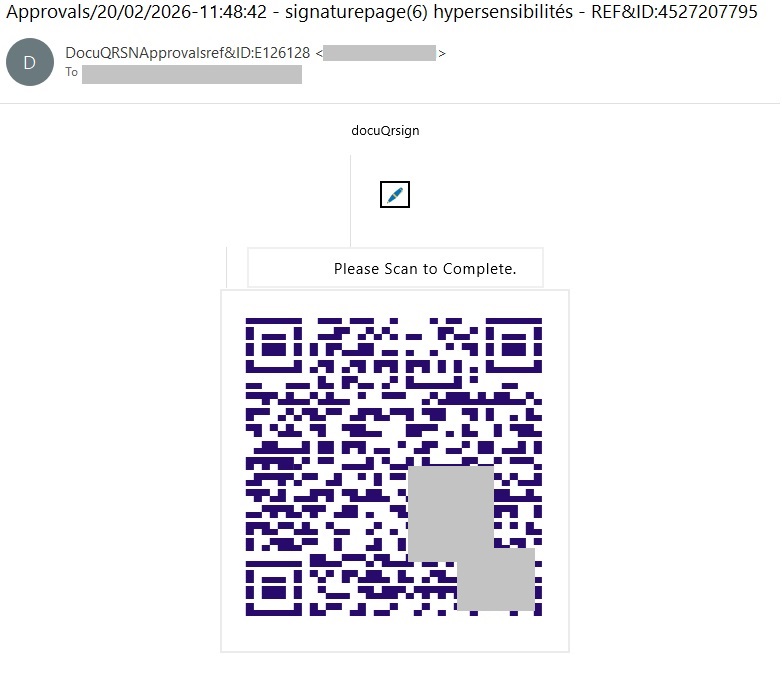
A QR code rendered with ASCII art

A QR code rendered with unicode characters. We’ve blurred out a portion of the code to prevent the malicious link from being scanned.

Admittedly, the code looks weird. This is primarily because it’s drawn piece-by-piece in pseudo-graphic elements, and even the gaps between the lines can be seen. In reality, there’s no actual image in the e-mail message code; the QR code looks something like this behind the scenes:

ASCII art inside the email code

ASCII art inside the email code

As a result, link scanners can’t see the link, and image analysis tools can’t find the URL hidden inside the QR code, so the attackers assume the phishing email is going to reach the victim just fine. Spoiler alert: no, we haven’t forgotten how to block ASCII art.

Is a QR code in an email even normal?

In theory, there are situations where using a QR code makes sense. It’s a fairly convenient way to share contacts, a link to a mobile app, a map location, or a configuration. In other words, it works well whenever information needs to be delivered specifically to the recipient’s mobile device.

However, someone using a QR code to make you enter corporate credentials on a mobile device is an instant red flag. And when that QR code is generated with ASCII art, it’s clearly a phishing attempt or an effort to lure you to a malicious URL. This trick can only have one purpose — an attempt to bypass security controls.

How to stay safe?

To prevent phishing emails — whether containing ASCII art or not — from ever reaching employee inboxes, we recommend using a secure email gateway with advanced anti-phishing capabilities. As an additional layer of defense, install security solutions on all endpoints used to access the internet.

Additionally, we recommend regular security awareness training to educate employees on modern phishing tactics. Specifically, to explain that ASCII art in modern emails can be a telltale sign of an attempted phishing attack.


Malicious TV boxes: how a cheap “SuperBox” turns your home into a proxy node for cybercriminals | Kaspersky official blog

20 May 2026 at 17:35

Netflix, Apple TV+, Disney+, Hulu, Amazon Prime, YouTube Premium… The average law-abiding family today pays for five to 10 subscriptions just to watch their shows of choice, with the monthly bill easily crossing the hundred-dollar mark. It’s no surprise, then, that social media and online marketplaces are seeing a surge in demand for the “magic boxes” that popped up at the end of 2025: Android-powered TV boxes that promise to unlock thousands of channels and every streaming service subscription-free for a one-time purchase.

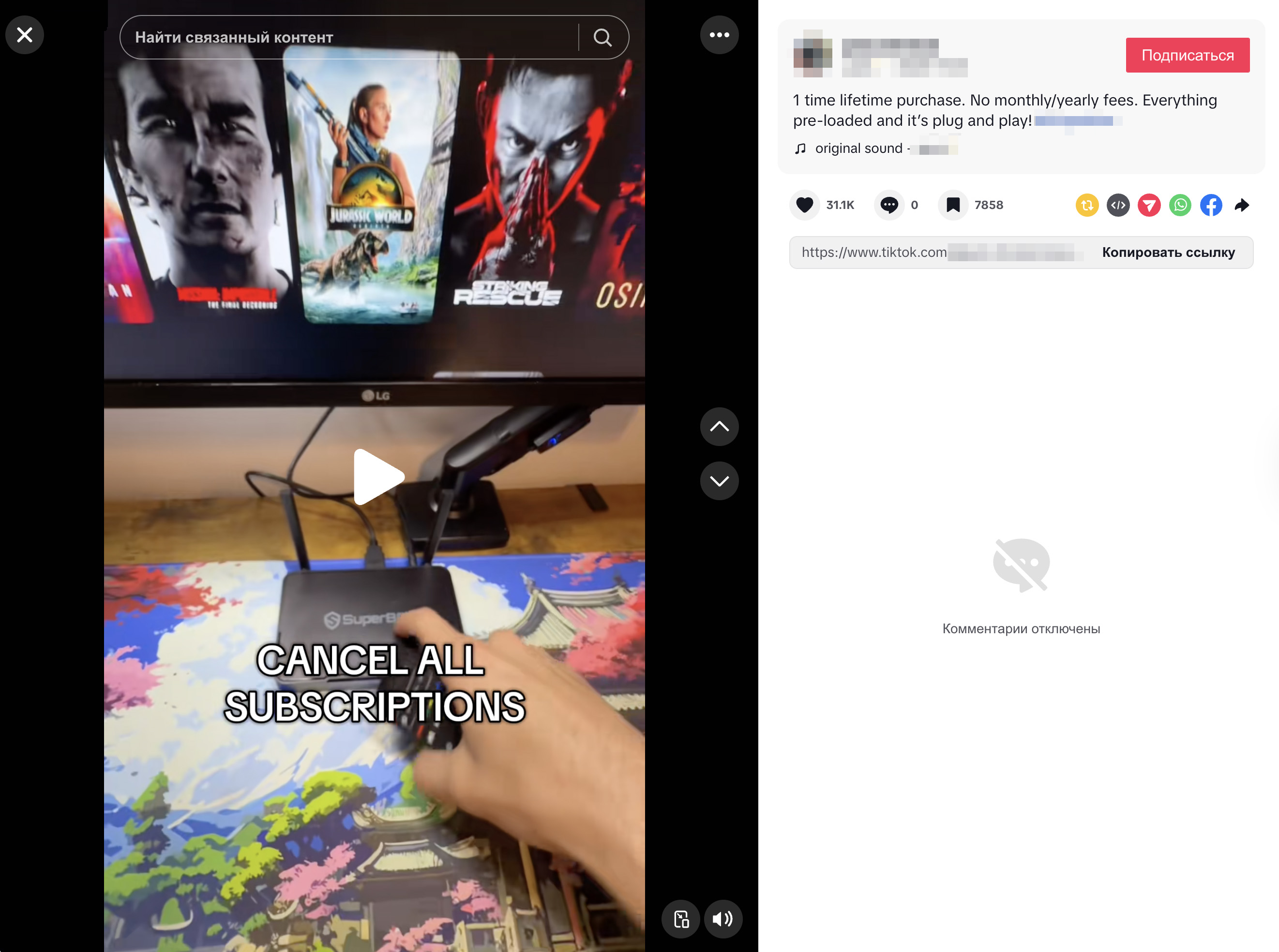
Ads for these devices are flooding TikTok and Instagram: smiling influencers unbox the SuperBoxes, plug them into a TV, and browse endlessly through channels. It looks like the ultimate life hack against subscription fatigue, right? In reality, it’s one of the easiest ways to invite a botnet into your home network.

Screenshot of a TikTok video showing a SuperBox in action

A promotional video on TikTok explaining how great it is when the cheese is free you can just go ahead and cancel all your subscriptions

What’s wrong with these cheap TV boxes?

Stories about malicious TV boxes have surfaced before, but right now, their marketing has reached a truly alarming scale.

At the end of 2025, analysts examined several models of the popular SuperBox device available from major retail stores and online marketplaces. The findings were deeply concerning: immediately upon powering up, the devices began pinging the servers of the Chinese messaging app Tencent QQ, as well as the Grass proxy service — effectively renting out the owner’s internet bandwidth to third parties.

Inside the firmware, researchers discovered applications completely uncharacteristic of a media player: a network scanner, a traffic analyzer, and tools for DNS hijacking. Consequently, the device not only streams pirated content but also scans the local network for other targets (including industrial SCADA interfaces), and stands ready to participate in DDoS attacks. The SuperBoxes were also found to contain folders with the telltale name “secondstage”, a textbook indication of multi-stage malware.

More recently, in April 2026, the Darknet Diaries podcast featured an interview with a security researcher known by the alias D3ada55, who shared plenty of intriguing details about these boxes — including the fact that they were still openly sold on major platforms like Amazon, Walmart, and Best Buy.

The infection chronicles: BADBOX to Keenadu

The SuperBox case is far from the only instance where Android devices have been turned into botnet nodes — or sold infected right out of the box. Here’s a look at the most recent cases:

  • BADBOX 2.0. In July 2025, Google filed a lawsuit against the operators of a botnet that compromised over 10 million Android devices — mostly cheap TV boxes, tablets, and projectors lacking Google Play Protect certification. As we reported earlier, BADBOX 2.0 specifically targets TV boxes, operating simultaneously as a proxy network and an ad fraud engine.
  • Kimwolf. In December 2025, the QiAnXin XLab team uncovered a DDoS botnet that had hijacked around 1.8 million Android devices. The infected hardware included generic models from off-brand manufacturers sporting high-profile names like TV BOX, SuperBox, XBOX, SmartTV, and others. The infection footprint was massive, with compromised devices shipped worldwide. Among the hardest-hit countries were Brazil, India, the U.S., Argentina, South Africa, the Philippines, and Mexico.
  • Keenadu. Our experts discovered this malware lurking in the firmware of brand-new devices back November 2025, though it didn’t gain widespread attention until after we published a study about it in February 2026. Keenadu masquerades as legitimate system components, embedding itself even into facial-recognition unlock apps, potentially granting attackers access to biometrics, banking data, and personal messages.

All of these stories share the same origin: the Triada Trojan, first documented by our researchers back in 2016 and dubbed at the time “one of the most advanced mobile Trojans”. Over the past decade it has evolved from a standard piece of malware into a modular backdoor baked directly into firmware during manufacturing.

How the infection scheme works

Manufacturers of cheap TV boxes cut corners on absolutely everything: Google Play Protect certification, firmware audits, and security updates. Many of these devices run on the Android Open Source Project without any security guarantees whatsoever. Somewhere along the supply chain — whether at the factory, through a middleman, or at a distributor — a backdoor gets injected into the firmware image. Our experts suspect that the manufacturer itself might not even be aware of the compromise.

The sheer scale of the infection turns millions of identical boxes into the perfect foundation for a botnet: every compromised device represents a unique IP address that can be rented out to anyone. Botnet operators like Kimwolf monetize this not only through distributed DDoS attacks but also by reselling the bandwidth of infected smart TVs and streaming boxes.

What this means for you

An infected TV box sits right in your living room, connected to your home Wi-Fi. That means it can see smartphones running banking apps, network-attached storage (NAS) units holding family archives, IP cameras, smart locks, work laptops, and any other the devices connected to your Wi-Fi network.

With this kind of beachhead inside your home network, an attacker can intercept unencrypted traffic, spoof DNS requests, scan ports, and hunt for vulnerabilities on neighboring devices. On top of that, they can use your IP address for fraudulent activity. As a result, in the best-case scenario, your IP will end up blacklisted, and legitimate services will start blocking you for suspicious activity; in the worst-case scenario, law enforcement could come knocking on your door.

How to spot a potentially dangerous gadget

You should be on alert if a device:

  • Is sold under a no-name brand like T95, X96Q, MX10, TV BOX, SuperBox, or some such
  • Promises free lifetime access to paid premium services for a one-time fee
  • Requires you to disable Google Play Protect, or install third-party APK files during the initial setup
  • Lacks Play Protect certification entirely
  • Is promoted through aggressive spam campaigns on social media

How to avoid hosting a botnet node

  • Buy certified TV boxes that feature Google Play Protect, or purchase devices directly from reputable telecom operators and internet service providers.
  • Isolate all smart home devices. Set up a separate Wi-Fi network on your home router for TV boxes, cameras, smart speakers, robot vacuums, and similar gear, while keeping smartphones, NAS units, and computers on the main network. This prevents malware from spreading to your critical gadgets.
  • Regularly update the firmware on all your devices, and don’t forget about your router — it’s another vulnerable link in the chain.
  • Remove any applications from your Android TV box that you didn’t install yourself, especially alternative app stores, Wi-Fi “boosters”, and “system cleaners”.
  • Monitor your traffic. Modern routers and Kaspersky Premium can display which devices are connecting to where. Frequent connections from a media player to servers in China are a major security red flag.
  • Install Kaspersky Premiumon all your devices — it protects against Trojans, and blocks the phishing pages often used to distribute infected APK files.
  • Don’t disable Google Play Protect, and avoid installing APKs from shady sources — this is the primary infection vector that bypasses the official app store.
  • If in doubt, return the TV box. A cheap streaming device isn’t worth risking your biometrics, banking data, or the reputation of your IP address.

Want to know how else to protect your smart home devices? Read more in our related posts:

❌