

Normal view

Received — 23 April 2026 Kaspersky official blog

Spam and phishing targeting taxpayers | Kaspersky official blog

In many countries, spring is the traditional time for filing income tax returns. These documents are a goldmine for bad actors because they contain a wealth of personal data, such as employment history, income, assets, bank account details — the list goes on. It’s no surprise that scammers ramp up their efforts around this time; the internet is currently crawling with fake websites designed to look exactly like government resources and tax authorities.

With deadlines looming and numbers to crunch, the rush to get everything done in good time can cause people to let their guard down. In the shuffle, it’s easy to miss the signs that the site where you’re detailing your finances has zero connection to the revenue service, or that the file you just downloaded, supposedly from a tax inspector, is actually malware.

In this post, we break down how these fraudulent tax agency sites operate across different countries and what you should absolutely avoid doing to keep your money and sensitive information safe.

Taxpayer phishing

This season, attackers have been spoofing tax authority websites across numerous countries, including the official government portals of Germany, France, Austria, Switzerland, Brazil, Chile, and Colombia. On these fraudulent sites, scammers harvest credentials for legitimate services, and steal personal data before offering to process a tax deduction — provided the victim enters their credit card details. In some cases, they even charge a fee for this fraudulent service.
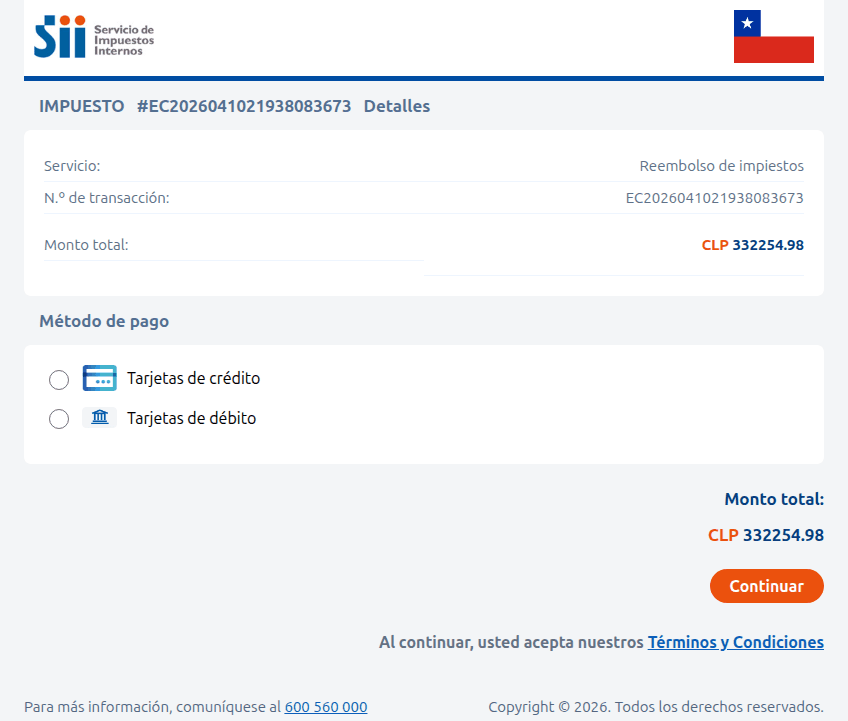
Fraudulent Chilean tax service website

A site imitating the Chilean tax authority. The victim is prompted to enter their credit card information to receive a substantial tax refund — roughly US$375. Instead, the funds are siphoned from the victim’s account directly to the scammers

Sometimes, the tactic involves accusations issued on behalf of government bodies. In the image below, for example, a “head of tax audit” in Paris informs the victim that they provided incomplete income information. To avoid penalties, the user is told to download a document and make corrections immediately. However, the PDF file hides something much worse: malware.
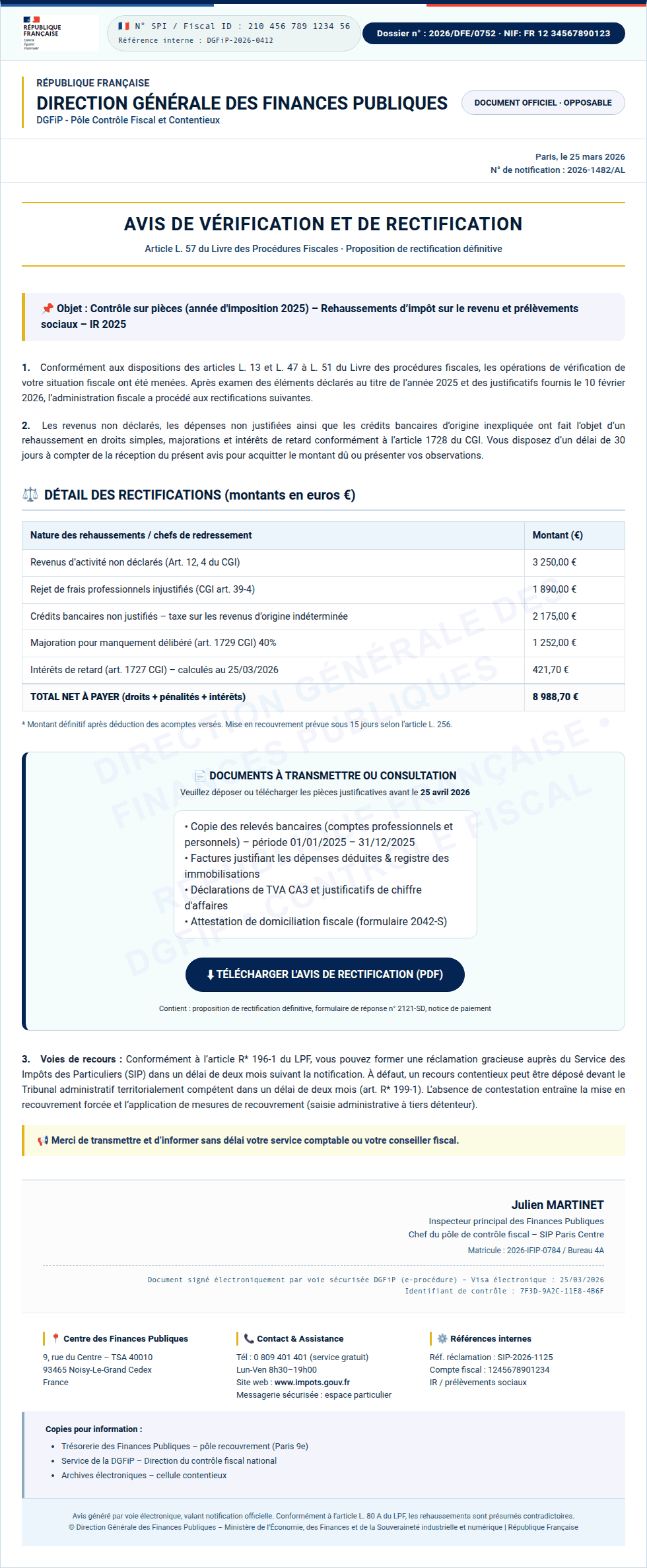
Spoofed French tax portal (Impots.gouv)

Instead of an official document from the French tax service, the user finds malware waiting inside the PDF

In Colombia, a fake National Directorate of Taxes and Customs site similarly prompts users to download documents that must be “unlocked with a security key”. In reality, this is simply a password-protected, malicious ZIP archive.
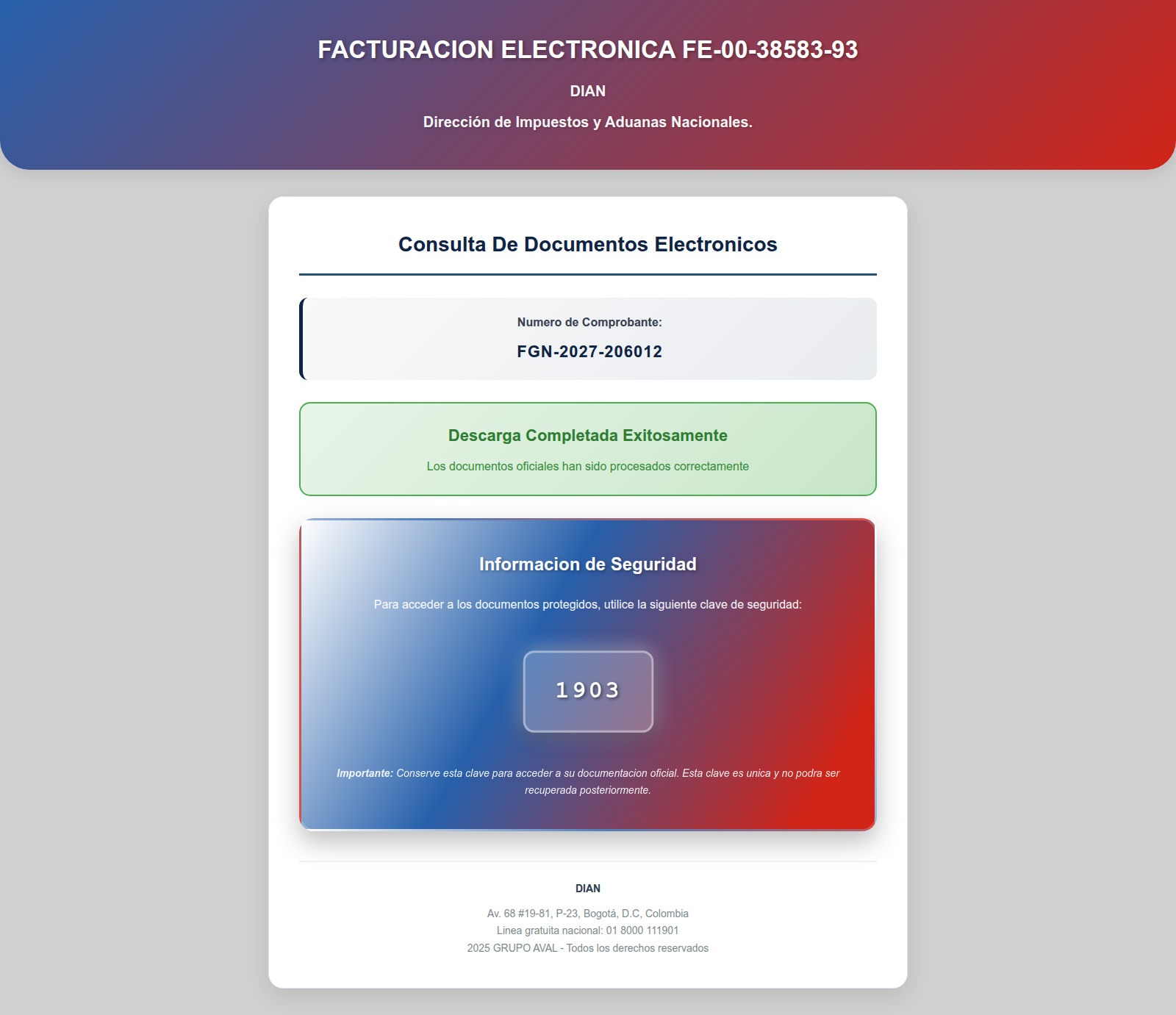
Fake website impersonating the Colombian National Directorate of Taxes and Customs

After entering the password, the user opens a malicious archive that infects their device

Beyond phishing sites mimicking legitimate resources, our experts have discovered fraudulent websites promising paid services for filling out and auditing tax documents — and stealing high-value data, such as taxpayer identification numbers (TINs), instead.

Scammers in Brazil offering tax prep assistance
Scammers in Brazil offer help with tax returns. To contact them, the user must provide their name, phone number, address, date of birth, email, and TIN in a special form. Handing over a TIN puts the victim at risk of fraudulent loan applications, hijacked government service accounts, and further social engineering attacks
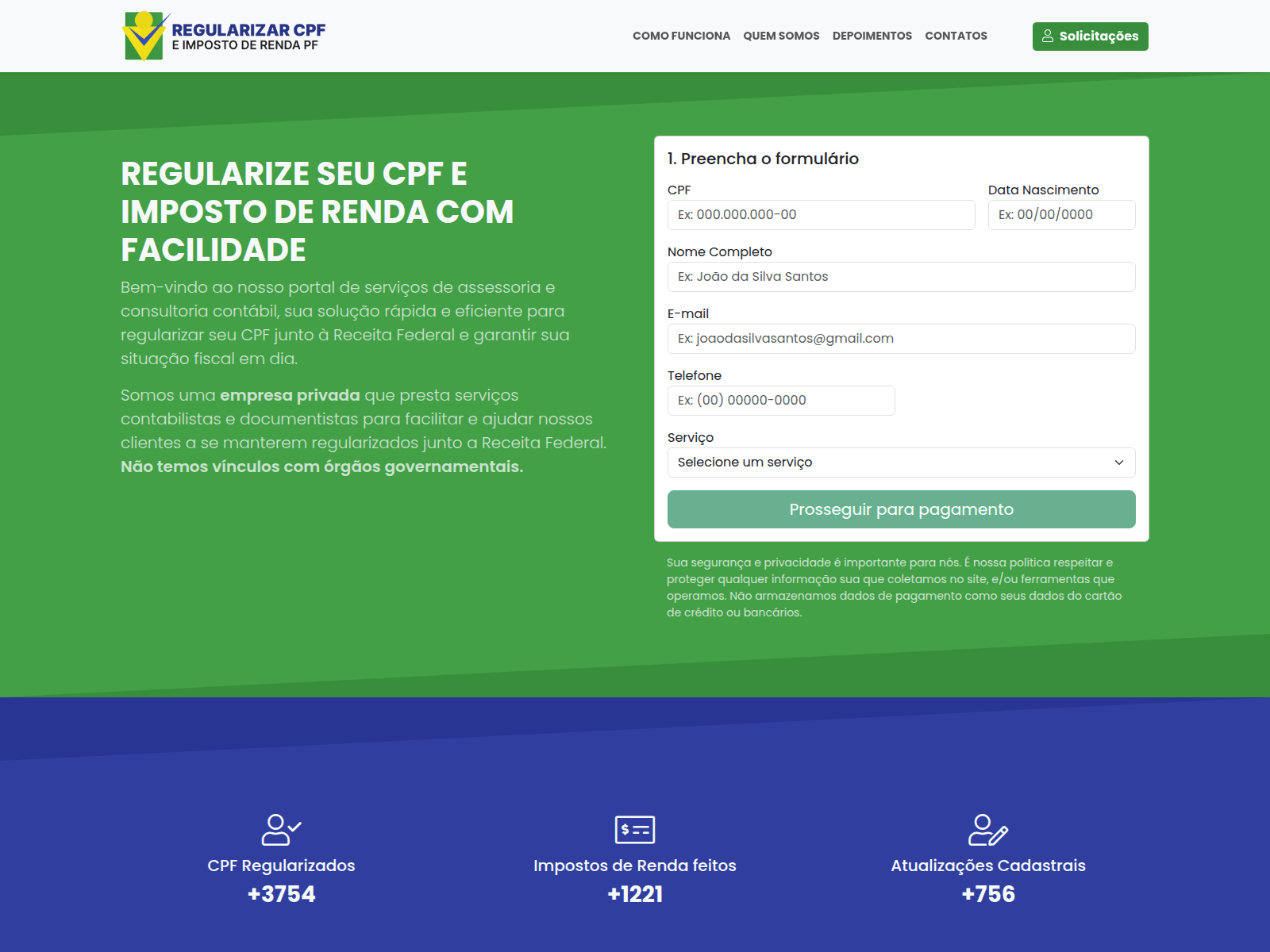
Scammers in Brazil offering tax prep assistance
Another Brazilian scam site. If you believe the attackers, they file 60 million tax returns annually — supposedly assisting a staggering 28% of the Brazilian population

Tax-free crypto earnings

Cryptocurrency holders have emerged as a specific target for attackers. Fake German tax authorities are demanding that wallet owners “verify their digital asset holdings”, citing EU regulations for tax calculation purposes. And of course, there’s a “silver lining”: it turns out crypto earnings are supposedly tax-exempt! However, to claim this generous benefit, users must go through a “verification” procedure. The site even promises to encrypt data using a “2048-bit SSL protocol”.

To complete the “verification” process, users are prompted to enter their seed phrase — the unique sequence of words tied to a crypto wallet that grants full recovery access. This request is paired with a threat: refusing to provide the data will lead to serious legal consequences, such as fines up to one million euros or criminal prosecution.

Spoofed German tax portal (ELSTER)
An announcement on the fake ELSTER portal claims that crypto earnings are tax-free following "verification" — and that the "tax service" has no direct access to users' wallets. Should we believe it?
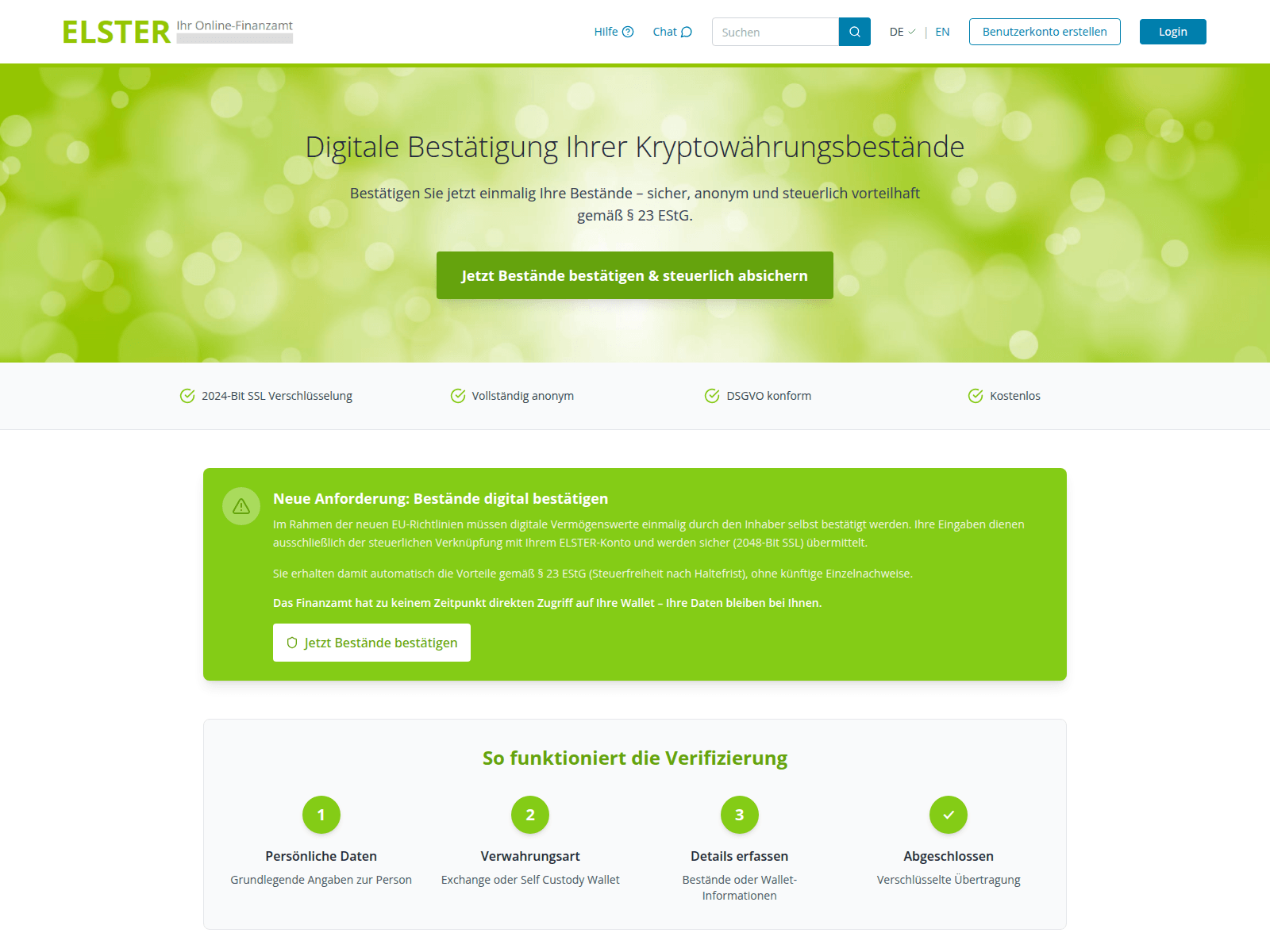
Spoofed German tax portal (ELSTER)
First, the user is prompted to enter their personal information…
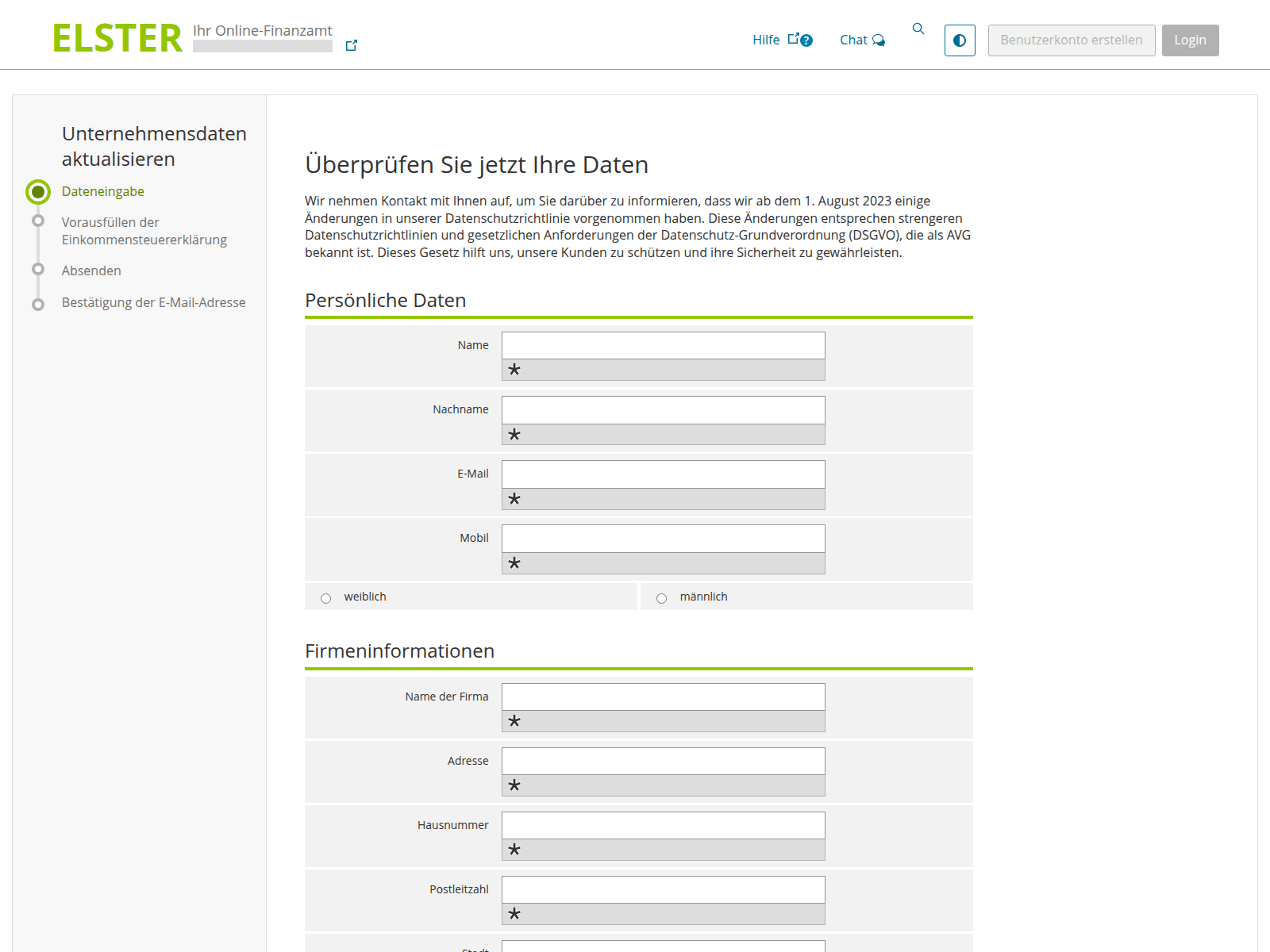
Spoofed German tax portal (ELSTER)
…And then they choose how to verify their crypto holdings: by linking a crypto wallet or an exchange account. Among the services targeted by these scammers are Ledger, Trezor, Trust Wallet, BitBox02, KeepKey, MetaMask, Phantom, and Coinbase
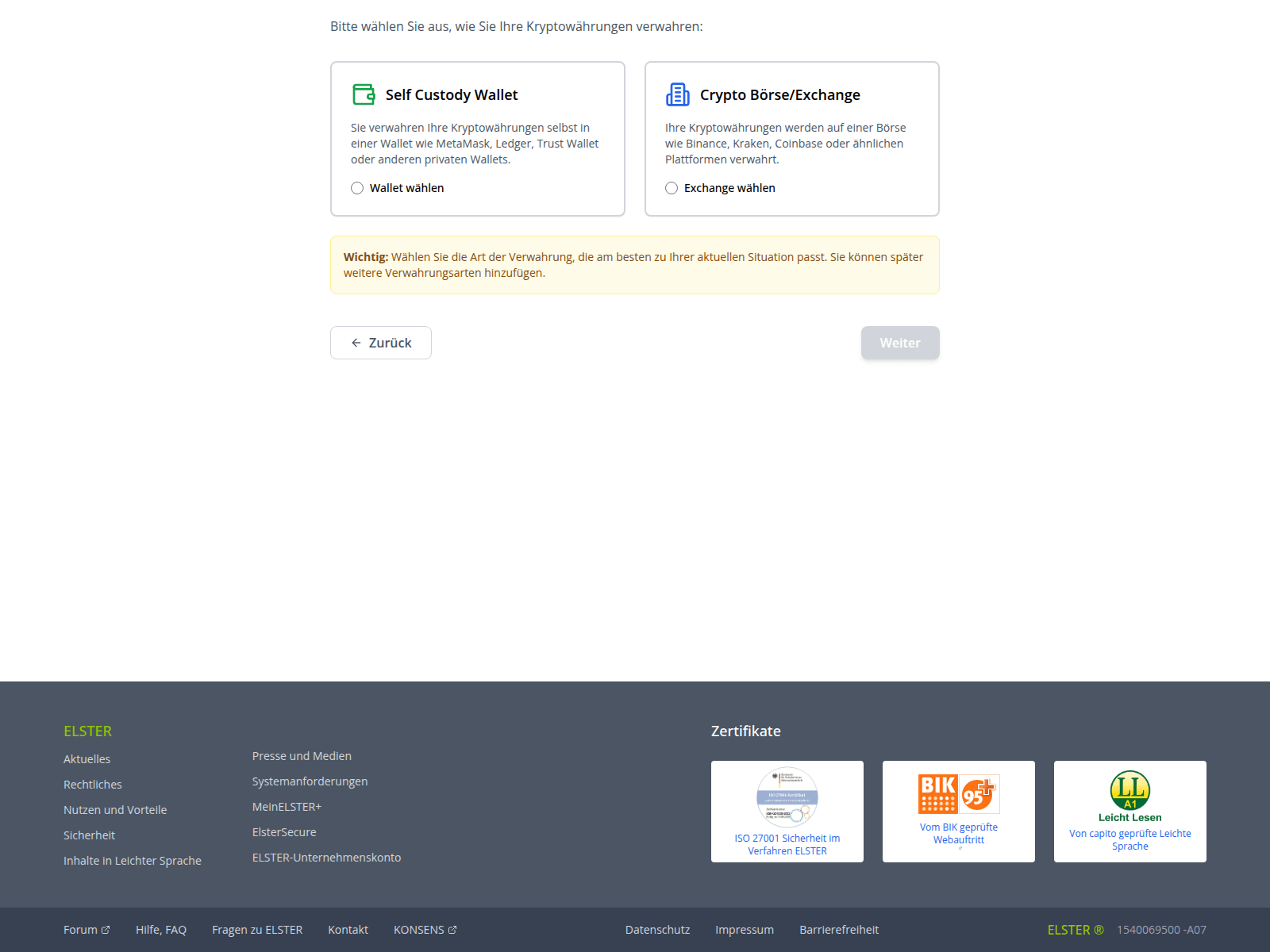
Spoofed German tax portal (ELSTER)
Finally, the victim is asked to provide their seed phrase, giving scammers total control over the wallet. The attackers kindly warn the victim to make sure no one is looking at their screen while they threaten them with non-existent legal penalties for non-compliance
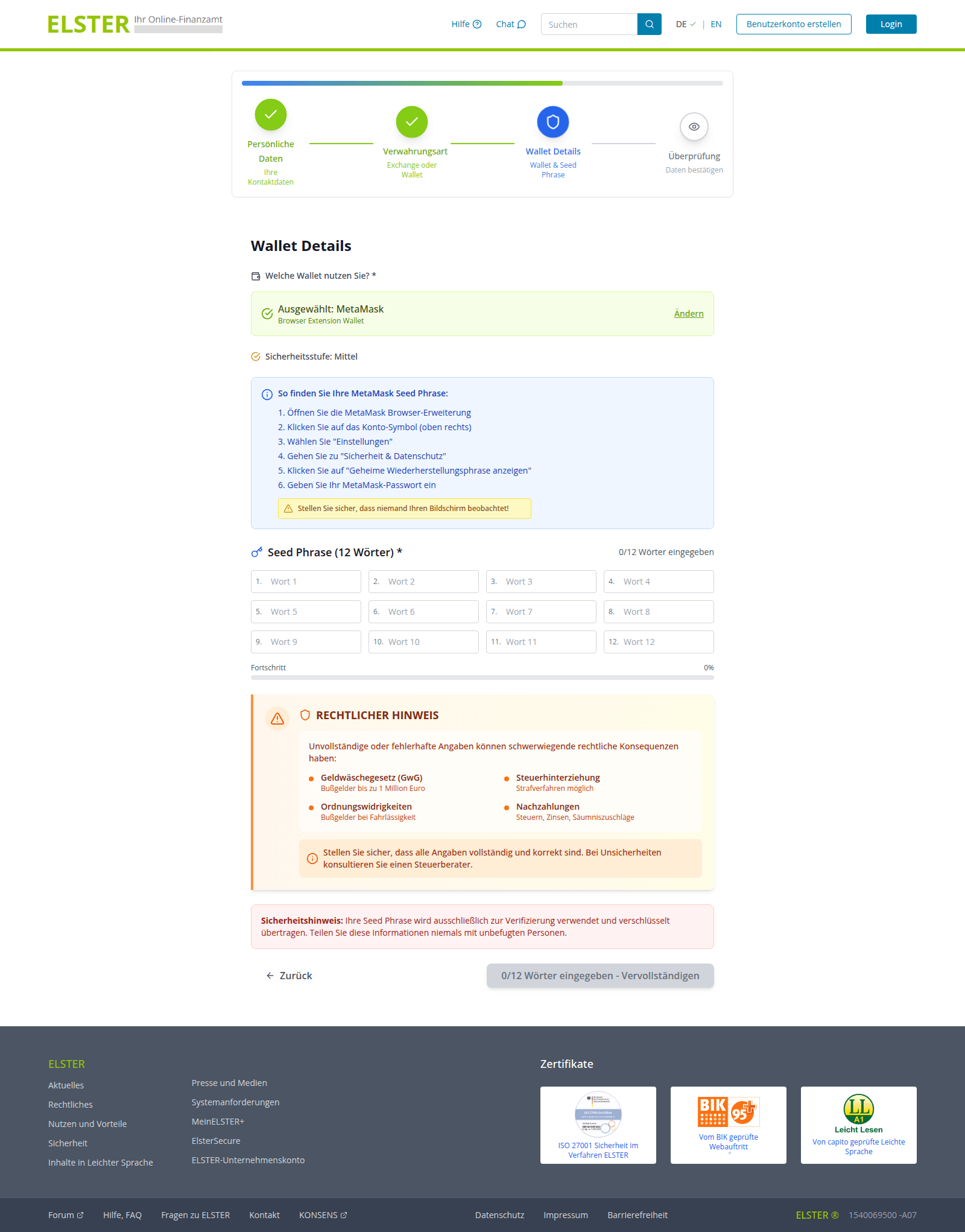
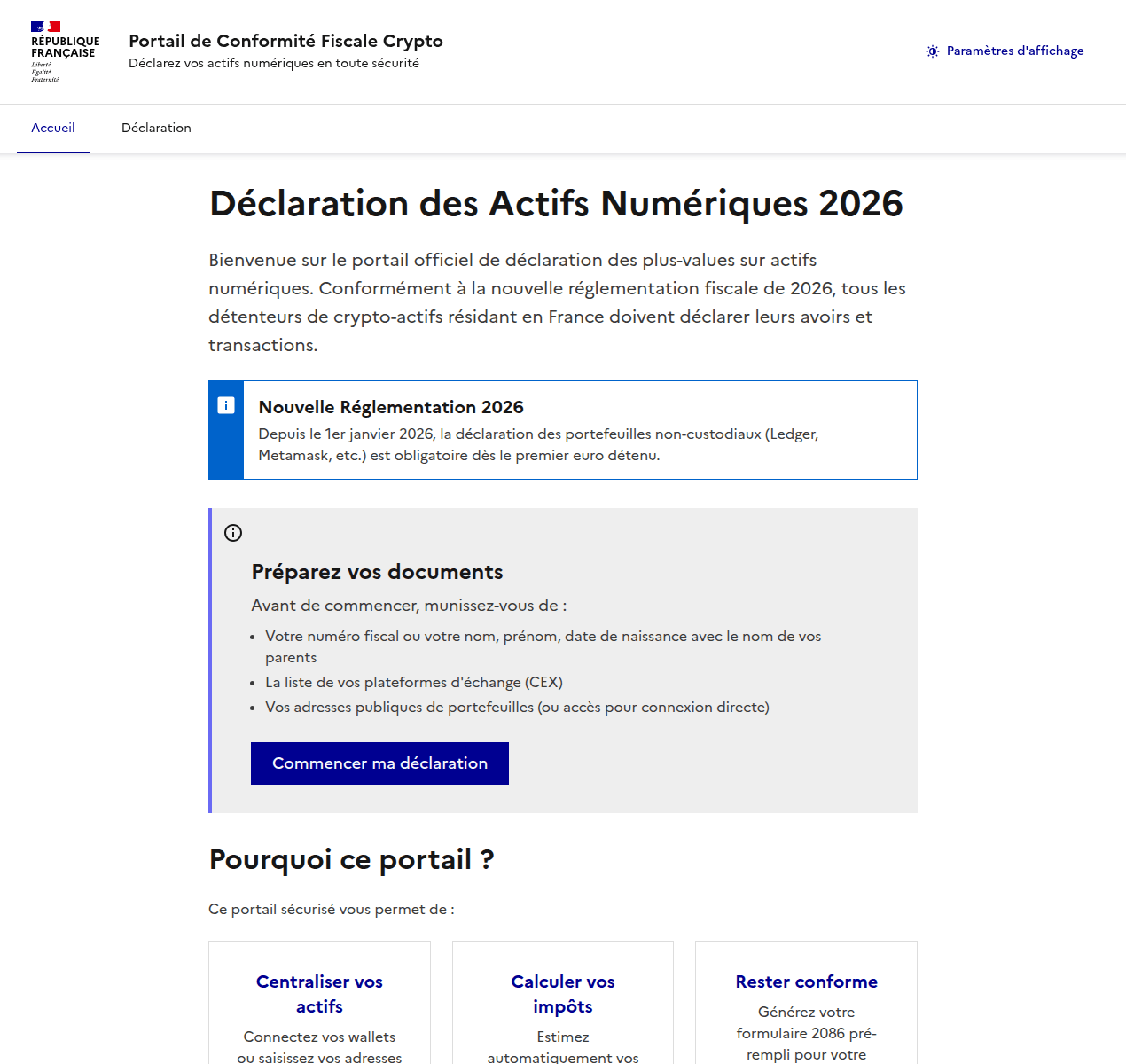
Attackers pulled a similar stunt on French users as well. They created a non-existent “Crypto Tax Compliance Portal”, which mimics the design of the French Ministry of Economy and Finance website. The phishing site aggressively demands that French residents submit a “digital asset declaration”.

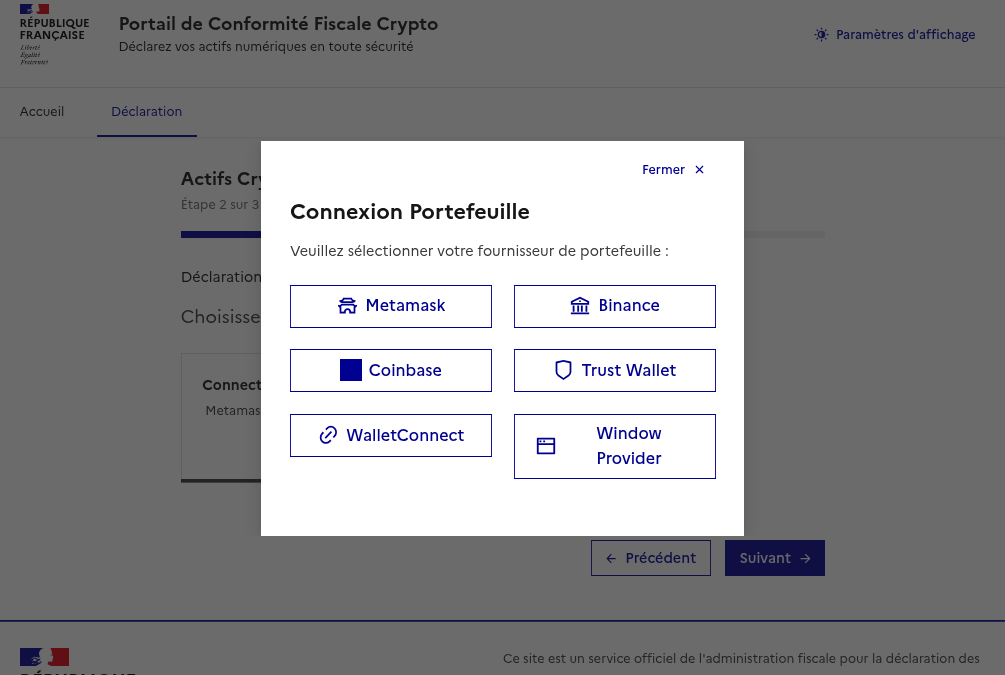
After the user enters their personal information, the scammers prompt them to either manually enter their seed phrase, or “link” their crypto wallet to the portal. If they go through with this, their MetaMask, Binance, Coinbase, Trust Wallet, or WalletConnect wallets will be drained.

Phishing website spoofing the French Ministry of Economy and Finance
The phishing site aggressively demands that French residents provide a "digital asset declaration" (translation: they want to hijack your crypto accounts)
Phishing website spoofing the French Ministry of Economy and Finance
Once personal data is entered, scammers offer the choice of manually entering a seed phrase or "linking" a wallet to the portal
Can AI help with your tax returns?

When you have AI at your fingertips that can instantly generate text and fill out spreadsheets, there’s a serious temptation to delegate everything to it. Unfortunately, this can lead to serious consequences. First, all popular chatbots process your data on their servers, which puts your sensitive information at risk of a leak. Second, they sometimes make incredibly foolish mistakes, and that can lead to actual trouble with the taxman.

Before you tell a chatbot or an AI agent how much money you made last year — complete with detailed personal and banking info — remember how frequently leaks occur within AI-powered services and consider the risks. Don’t discuss your income with AI, don’t give it personal details like your name or address, and under no circumstances should you upload photos or numbers of vital documents such as passports, insurance info, or social security numbers. Files containing confidential information should be kept in encrypted containers, such as Kaspersky Password Manager.

If you’re still determined to use AI tools, run them locally. This can be done for free even on a standard laptop, and we’ve previously covered how to set up local language models using DeepSeek as an example. However, the quality of the output from these models is often subpar. It’s quite possible that double-checking every digit in an AI-generated response will take more time than just filling out the paperwork manually. Remember, you’re the one accountable to the tax office for any errors — not the AI.

Finally, watch out for phishing AI models that offer “assistance” with tax filing. Kaspersky experts have discovered websites where users are prompted to upload tax invoices, supposedly for the automated generation of returns and deduction claims. Instead, attackers collect this personal data to resell on the dark web, or to use in future phishing attacks, blackmail, and extortion schemes.
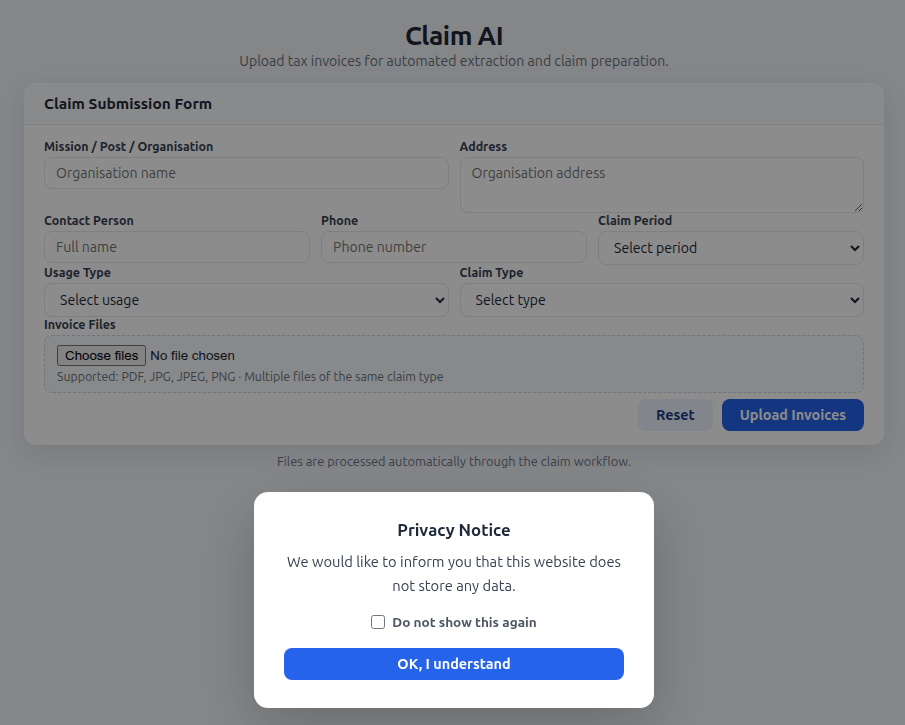
Phishing AI steals data from taxpayers seeking filing assistance

The creators of a fake AI tool prompt users to upload tax documents, and kindly assure them that the site doesn’t store any user data. In reality, every piece of information entered — name, address, documents, contact person, phone number — ends up in the hands of cybercriminals

Remember that all legitimate AI services explicitly warn users not to share confidential data, and tax documents certainly fall into this category. Any AI tools promising to help you handle your tax paperwork are quite simply a scam.

How to protect yourself and your data

  • File your taxes yourself. The risk of running into scammers is extremely high. Even if a consulting firm is legitimate, you’re inevitably handing over a complete dossier on yourself: passport details, employment and income info, your address, and more. Remember that even the most honest services aren’t immune to hacks and data breaches.
  • Watch out for fake websites. Use a reliable security solution that prevents you from visiting phishing sites and blocks malicious file downloads.
  • Keep all important documents encrypted. Storing photos, notes, or files on your desktop, or starred messages in a messaging app isn’t a secure way to handle sensitive data. A secure vault like Kaspersky Password Manager can store more than just passwords and credit card info; it can also safeguard documents and even photos.
  • Don’t trust AI. Even the most advanced chatbots are prone to errors and hallucinations, and in theory, developers can read any conversation you have with their AI. If you absolutely must use AI, install and run a local version on your own computer.
  • Stick to official channels only. The “chief tax inspector” of your country or city is definitely not going to message you: high-ranking officials have more important things to do. Only contact tax authorities through official channels, and carefully verify the sender of any emails you receive. Most often, even a slight deviation in the name or address is a telltale sign of a phishing campaign.

Further reading on phishing and data security:

Received — 11 January 2026 Kaspersky official blog

Phishing in Telegram Mini Apps: how to avoid taking the bait | Kaspersky official blog

Admit it: you’ve been meaning to jump on the latest NFT reincarnation — Telegram Gifts — but just haven’t gotten around to it. It’s the hottest trend right now. Developers are churning out collectible images in partnership with celebs like Snoop Dogg. All your friends’ profiles are already decked out with these modish pictures, and you’re dying to hop on this hype train — but pay as little as possible for it.

And then it happens — a stranger messages you privately with a generous offer: a chance to snag a couple of these digital gifts — with no investment required. A bot that looks completely legit is running an airdrop. In the world of NFTs, an airdrop is a promotional stunt where a small number of new crypto assets are given away for free. The buzzword has been adopted on Telegram, thanks to the crypto nature of these gifts and the NFT mechanics running under the hood.

Limited time offer: a scammer's favorite trick

Limited time offer: a marketer’s favorite trick… and a scammer’s tool

They’re offering you these gift images for free — or so they say. You could later attach them to your profile or sell them for Telegram’s native currency, Toncoin. You don’t even have to tap an external link. Just hit a button in the message, launch a Mini App right inside Telegram itself, and enter your login credentials. And then… your account immediately gets hijacked. You won’t get any gifts, and overall, you’ll be left with anything but a celebratory feeling.

By filling in these fields, you lose access to your Telegram account

This is the first of the screens where, by filling in the fields, you receive a gift lose access to your Telegram account

Today, we break down a phishing scheme that exploits Telegram’s built-in Mini Apps, and share tips to help you avoid falling for these attacks.

How the new phishing scheme works

The principle of classic phishing is straightforward: the user gets a link to a fake website that mimics a legitimate sign-in form. When the victim enters their credentials, this data goes straight to the scammer. However, phishing tactics are constantly evolving, and this new attack method is far more insidious.

The bad actors create phishing Mini Apps directly inside Telegram. These appear as standard web pages but are embedded within the messaging app’s interface instead of opening in an external browser. To the user, these apps look completely legitimate. After all, they run within the official Telegram app itself.

Scammers add a plausible-sounding limit on gifts per user

To make it even more convincing, scammers often add a plausible-sounding limit on gifts per user

This leads the victim to think, “If this app runs inside Telegram, there must be some kind of vetting process for these apps. Surely they wouldn’t let an obvious scam through?” In practice, it turns out that’s not the case at all.

How is this scheme even a thing?

A core security issue with Telegram Mini Apps is that the platform does almost no vetting before an app goes live. This is a world apart from the strict review processes used by Google Play and the App Store — although even there, obvious malware occasionally slips through.

On Telegram, it’s far easier for bad actors. Essentially, anyone who wishes to create and launch a Mini App can do so. Telegram does not review the code, functionality, or the developer’s intent. This turns a security flaw within a messaging service boasting nearly a billion global users into a global-scale problem. To make matters worse, moderation of these Mini Apps within Telegram is entirely reactive — meaning action is only taken after users start complaining or law enforcement gets involved.

Phishing lures being distributed simultaneously in both Russian and English

This is a global operation, with phishing lures being distributed simultaneously in both Russian and English. However, the Russian version gives away a tell-tale sign of the scammers’ haste and lack of polish. They forgot to remove a clarification question from the AI that generated the text: “Do you need bolder, more official, or humorous options?”

In this case, the bait was “gifts” from UFC fighters: a giveaway of “papakhas” — digital gift images of the traditional Dagestani hat released by Telegram in partnership with Khabib Nurmagomedov. An auction for these items did take place, with Pavel Durov even posting about it on his X and Telegram (Khabib reposted these announcements but later deleted them after the auction ended). However, there were only 29 000 of these “papakhas” released, which wasn’t enough to satisfy all the eager fans. Scammers seized on the opportunity, assuring fans they could get the exclusive items for free. The phishing campaign was a targeted one — focusing on users who’d been active on the athlete’s channel.

How the scammers lull their victims

The criminals leveraged the name of the popular Portals platform — a legitimate service for games, apps, and entertainment within Telegram. They created a series of Mini Apps that were visually almost indistinguishable from the real ones, and promoted them as free giveaways — airdrops.

The scammers even listed the official Telegram channel for Portals in the phishing Mini App's profile

To add a veneer of authenticity, the scammers even listed the official Telegram channel for Portals in the phishing Mini App’s profile. However, the legitimate Portals Market bot has a different username: @portals

That said, the scam campaigns themselves show signs of being rushed and cutting design and copywriting costs — with obvious signs of AI involvement. Some of the messages contain leftover text fragments clearly generated by a neural network, which the scammers either forgot or couldn’t be bothered to edit.

How to protect your Telegram account from being hacked

The golden security rules are simple: stay vigilant, and learn the key hallmarks of these attacks:

  • Verify the source. If you receive a link promising a giveaway from a celebrity or even Telegram itself but sent from an unfamiliar account or a dubious group, don’t click. Cross-check through the celebrity or company’s official channel to see if they’re actually running a promo like that.
  • Inspect the account verification badge. Ascertain that the blue checkmark is real and not just an emoji status or part of the profile name. You can verify this by simply tapping that checkmark icon in the profile. If it’s a Premium emoji status, Telegram will explicitly tell you so. If a checkmark emoji is simply added to the profile name, tapping it doesn’t do anything. But if the account is genuinely verified, tapping the blue checkmark will bring up an official confirmation message from Telegram.
  • Don’t be in a rush to authenticate in Mini Apps. Legitimate Telegram apps typically don’t require you to sign in again through a form inside the Mini App. If you’re prompted to enter your phone number or a verification code, it’s likely a phishing attempt.
  • Look for signs of AI-generated text or design. Weird grammar, unnatural phrasing, or leftover neural network prompts within a message are a red flag. Scammers frequently use AI-powered generation to churn out text quickly and cheaply.
  • Turn on two-step verification (your Telegram password). Do this right now in SettingsPrivacy and SecurityTwo-Step Verification. Even if a scammer manages to get your phone number and SMS code, they won’t be able to access your account without this password. Obviously, never share your password with anyone — it’s meant only for you to sign in to your Telegram account.
  • Use a passkey to secure your account. A recent Telegram update added the ability to securely sign in with a passkey. We’ve covered using passkeys with popular services and the associated caveats in detail. A passkey makes it nearly impossible for a malicious actor to steal your account. You can set one up in SettingsPrivacy and SecurityPasskeys.
  • Store your password and passkey in a password manager. If you’ve secured your account with both a password and a passkey, remember that a weak, reused, or compromised password can still be the proverbial “spare key under the mat” for attackers — even if the “front door” is locked with a passkey. Therefore, we recommend creating a strong, unique password for Telegram and storing it — along with your passkey — in Kaspersky Password Manager. This keeps your credentials and keys available across all your devices.
  • Install Kaspersky for Android on your smartphone. Its new anti-phishing technology protects you from phishing links embedded in notifications from any app.

What to do if your Telegram account was already stolen

The key is keeping calm and acting swiftly. You have just 24 hours to reclaim your account, or you risk losing it permanently. Follow the step-by-step guide to restoring access in our post What to do if your Telegram account is hacked.

Finally, a reminder that has become our classic mantra: if an offer looks too good to be true, it almost certainly is. Always verify information through official channels, and never enter your passwords or passkeys into unofficial apps or forms — even if they look legit. Stay vigilant and stay safe.

Want more tips on securing your messenger accounts and chats? Check out our related posts:

❌