Normal view

Received — 20 March 2026 Kaspersky official blog

Predator spyware disables iOS camera and microphone indicators | Kaspersky official blog

20 March 2026 at 12:17

Cybersecurity researchers have taken a close look at the inner workings of the Predator spyware, developed by the Cyprus-based company Intellexa. Rather than focusing on how the spyware initially infects a device, this latest research zooms in on how the malware behaves once a device has already been compromised.

The most fascinating discovery involves the mechanisms the Trojan uses to hide iOS camera and microphone indicators. By doing so, it can covertly spy on the infected user. In today’s post, we break down what Predator spyware actually is, how the iOS indicator system is designed to work, and how this malware manages to disable these indicators.

What Predator is, how it works, and what… Alien has to do with it

We previously took a deep dive into the most notorious commercial spyware out there in a dedicated feature — where we discussed the star of today’s post, Predator, among the others. You can check out that earlier post for a detailed review of this spyware, but for now, here’s a quick refresher on the essentials.

Predator was originally developed by a North Macedonian company named Cytrox. It was later acquired by the aforementioned Intellexa, a Cyprus-registered firm owned by a former Israeli intelligence officer — a truly international spy games collaboration.

Strictly speaking, Predator is the second half of a spyware duo designed to monitor iOS and Android users. The first component is named Alien; it’s responsible for compromising a device and installing Predator. As you might’ve guessed, these pieces of malware are named after the famous Alien vs. Predator franchise.

An attack using Intellexa’s software typically begins with a message containing a malicious link. When the victim clicks it, they’re directed to a site that leverages a chain of browser and OS vulnerabilities to infect the device. To keep things looking normal and avoid raising suspicion, the user is then redirected to a legitimate website.

Besides Alien, Intellexa offers several other delivery vehicles for landing Predator on a target’s device. These include the Mars and Jupiter systems, which are installed on the service provider’s side to infect devices through a man-in-the-middle attack.

Predator spyware for iOS comes packed with a wide array of surveillance tools. Most notably, it can record and transmit data from the device’s camera and microphone. Naturally, to keep the user from catching on to this suspicious activity, the system’s built-in recording indicators — the green and orange dots at the top of the screen — must be disabled. While it’s been known for some time that Predator could somehow hide these alerts, it’s only thanks to this research that we know how exactly it pulls it off.

How the iOS camera and microphone indicator system works

To understand how Predator disables these indicators, we first need to look at how iOS handles them. Since the release of iOS 14 in 2020, Apple devices have alerted users whenever the microphone or camera is active by displaying an orange or green dot at the top of the screen. If both are running simultaneously, only the green dot is shown.

Microphone usage indicator in iOS

In iOS 14 and later, an orange dot appears at the top of the screen when the microphone is in use. Source

Just like other iOS user interface elements, recording indicators are managed by a process called SpringBoard, which is responsible for the device’s system-wide UI. When an app starts using the camera or microphone, the system registers the change in that specific module’s state. This activity data is then gathered by an internal system component, which passes the information to SpringBoard for processing. Once SpringBoard receives word that the camera or microphone is active, it toggles the green or orange dot on or off based on that data.
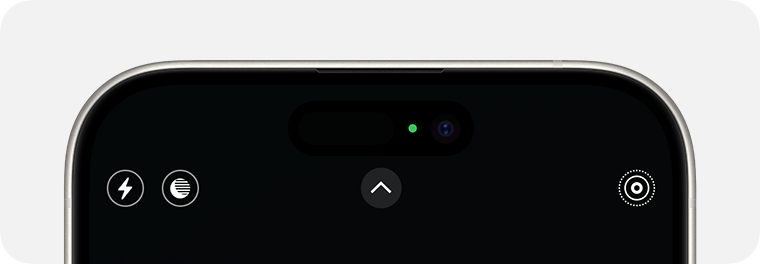
Camera usage indicator in iOS

If the camera is in use (or both the camera and microphone are), a green dot appears. Source

From an app’s perspective, the process works like this: first, the app requests permission to access the camera or microphone through the standard iOS permission mechanism. When the app actually needs to use one or both of these modules, it calls the iOS system API. If the user has granted permission, iOS activates the requested module and automatically updates the status indicator. These indicators are strictly controlled by the operating system; third-party apps have no direct access to them.

How Predator interferes with the iOS camera and microphone indicators

Cybersecurity researchers analyzed a captured version of Predator and uncovered traces of multiple techniques used by the spyware’s creators to bypass built-in iOS mechanisms and disable recording indicators.

In the first approach — which appears to have been used during early development — the malware attempted to interfere with the indicators at the display stage right after SpringBoard received word that the camera or microphone was active. However, this method was likely deemed too complex and unreliable by the developers. As a result, this specific function remains in the Trojan as dead code — it’s never actually executed.

Ultimately, Predator settled on a simpler, more effective method that operates at the very level where the system receives data about the camera or microphone being turned on. To do this, Predator intercepts the communication between SpringBoard and the specific component responsible for collecting activity data from these modules.

By exploiting the specific characteristics of Objective-C — the programming language used to write the SpringBoard application — the malware completely blocks the signals indicating that the camera or microphone has been activated. As a result, SpringBoard never receives the signal that the module’s status has changed, so it never triggers the recording indicators.

How to lower your risk of spyware infection

Predator-grade spyware is quite expensive, and typically reserved for high-stakes industrial or state-sponsored espionage. On one hand, this means defending against such a high-tier threat is difficult — and achieving 100% protection is likely impossible. On the other hand, for these same reasons, the average user is statistically unlikely to be targeted.

However, if you’ve reason to believe you’re at risk from Predator or Pegasus-class spyware, here are a few steps you can take to make an attacker’s job much harder:

  • Don’t click suspicious links from unknown senders.
  • Regularly update your operating system, browsers, and messaging apps.
  • Reboot your device occasionally. A simple restart can often help “lose the tail”, forcing attackers to reinfect the device from scratch.
  • Install a reliable security solution on all the devices you use.

For a deeper dive into staying safe, check out security expert Costin Raiu’s post: Staying safe from Pegasus, Chrysaor and other APT mobile malware.

Curious about other ways your smartphone might be used to spy on you? Check out our related posts:


Received — 12 March 2026 Kaspersky official blog

Mental health apps are leaking your private thoughts. How do you protect yourself? | Kaspersky official blog

10 March 2026 at 16:33

In February 2026, the cybersecurity firm Oversecured published a report that makes you want to factory reset your phone and move into a remote cabin in the woods. Researchers audited 10 popular Android mental health apps — ranging from mood trackers and AI therapists to tools for managing depression and anxiety — and uncovered… 1575 vulnerabilities! Fifty-four of those flaws were classified as critical. Given the download stats on Google Play, as many as 15 million people could be affected. The real kicker? Six out of the ten apps tested explicitly promised users that their data was “fully encrypted and securely protected”.

We’re breaking down this scandalous “brain drain”: what exactly could leak, how it’s happening, and why “anonymity” in these services is usually just a marketing myth.

What was found in the apps

Oversecured is a mobile app security firm that uses a specialized scanner to analyze APK files for known vulnerability patterns across dozens of categories. In January 2026, researchers ran ten mental health monitoring apps from Google Play through the scanner — and the results were, shall we say, “spectacular”.

App Type Installs Security vulnerabilities
High-severity Medium-severity Low-severity Total
Mood & habit tracker 10M+ 1 147 189 337
AI therapy chatbot 1M+ 23 63 169 255
AI emotional health platform 1M+ 13 124 78 215
Health & symptom tracker 500k+ 7 31 173 211
Depression management tool 100k+ 0 66 91 157
CBT-based anxiety app 500k+ 3 45 62 110
Online therapy & support community 1M+ 7 20 71 98
Anxiety & phobia self-help 50k+ 0 15 54 69
Military stress management 50k+ 0 12 50 62
AI CBT chatbot 500k+ 0 15 46 61
Total 14.7М+ 54 538 983 1575

Vulnerabilities found in the 10 tested mental health apps. Source

The anatomy of the flaws

The discovered vulnerabilities are diverse, but they all boil down to one thing: giving attackers access to data that should be under lock and key.

For starters, one of the vulnerabilities allows an attacker to access any internal activity of the app — even that never intended for external eyes. This opens the door to hijacking authentication tokens and user session data. Once an attacker has those, they essentially could gain access to a user’s therapy records.

Another issue is insecure local data storage with read permissions granted to any other app on the device. In other words, that random flashlight app or calculator on your smartphone could potentially read your cognitive behavioral therapy (CBT) logs, personal notes, and mood assessments.

The researchers also found unencrypted configuration data baked right into the APK installation files. This included backend API endpoints and hardcoded URLs for Firebase databases.

Furthermore, several apps were caught using the cryptographically weak java.util.Random class to generate session tokens and encryption keys.

Finally, most of the tested apps lacked root/jailbreak detection. On a rooted device, any third-party app with root privileges could gain total access to every bit of locally stored medical data.

Shockingly, of the 10 apps analyzed, only four received updates in February 2026. The rest haven’t seen a patch since November 2025, and one hasn’t been touched since September 2024. Going 18 months without a security patch is a lifetime in this industry — especially for an app housing mood journals, therapy transcripts, and medication schedules.

Here’s a quick reminder of just how dangerous the misuse of this type of data gets. In 2024, the tech world was rocked by a sophisticated attack on XZ Utils, a critical component found in virtually every operating system based on the Linux kernel. The attacker successfully pressured the maintainer into handing over code commit permissions by exploiting the developer’s public admission of burnout and a lack of motivation to carry on with the project. Had the attack been completed, the damage would have been mind-boggling given that roughly 80% of the world’s servers run on Linux.

What could leak?

What do these apps collect and store? It’s the kind of stuff you’d likely only share with a trusted clinician: therapy session transcripts, mood logs, medication schedules, self-harm indicators, CBT notes, and various clinical assessment scales.

As far back as 2021, complete medical records were selling on the dark web for US$1000 each. For comparison, a stolen credit card number goes for anywhere between US$5 and US$30. Medical records contain a full identity package: name, address, insurance details, and diagnostic history. Unlike a credit card, you can’t exactly “reissue” your medical history. Furthermore, medical fraud is notoriously difficult to spot. While a bank might flag a suspicious transaction in hours, a fraudulent insurance claim for a phantom treatment can go unnoticed for years.

We’ve seen this movie before

The Oversecured study isn’t just an isolated horror story.

Back in 2020, Julius Kivimäki hacked the database of the Finnish psychotherapy clinic Vastaamo, making off with the records of 33 000 patients. When the clinic refused to cough up a €400 000 ransom, Kivimäki began sending direct threats to patients: “Pay €200 in Bitcoin within 24 hours, or else your records go public”. Ultimately, he leaked the entire database onto the dark web anyway. At least two people died by suicide, and the clinic was forced into bankruptcy. Kivimäki was eventually sentenced to six years and three months in prison, marking a record-breaking trial in Finland for the sheer number of victims involved.

In 2023, the U.S. Federal Trade Commission (FTC) slapped the online therapy giant BetterHelp with a US$7.8 million fine. Despite stating on their sign-up page that your data was strictly confidential, the company was caught funneling user info — including mental health questionnaire responses, emails, and IP addresses — to Facebook, Snapchat, Criteo, and Pinterest for targeted advertising. After the dust settled, 800 000 affected users received a grand total of… US$10 each in compensation.

By 2024, the FTC set its sights on the telehealth firm Cerebral, tagging them with a US$7 million fine. Through tracking pixels, Cerebral leaked the data of 3.2 million users to LinkedIn, Snapchat, and TikTok. The haul included names, medical histories, prescriptions, appointment dates, and insurance info. And the cherry on top? The company sent promotional postcards (sans envelopes) to 6000 patients, which effectively broadcasted that the recipients were undergoing psychiatric treatment.

In September 2024, security researcher Jeremiah Fowler stumbled upon an exposed database belonging to Confidant Health, a provider specializing in addiction recovery and mental health services. The database contained audio and video recordings of therapy sessions, transcripts, psychiatric notes, drug test results, and even copies of driver’s licenses. In total, 5.3 terabytes of data, 126 000 files, or 1.7 million records were sitting there without a password.

Why anonymity is an illusion

Developers love to drop the line: “We never share your personal data with anyone.” Technically, that might be true — instead, they share “anonymized profiles”. The catch? De-anonymizing that data isn’t exactly rocket science anymore. Recent research highlights that using LLMs to strip away anonymity has become a routine reality.

Even the “anonymization” process itself is often a mess. A study by Duke University revealed that data brokers are openly hawking the mental health data of Americans. Out of 37 brokers surveyed, 11 agreed to sell data linked to specific diagnoses (like depression, anxiety, and bipolar disorder), demographic parameters, and in some cases, even names and home addresses. Prices started as low as US$275 for 5000 aggregated records.

According to the Mozilla Foundation, by 2023, 59% of popular mental health apps failed to meet even the most basic privacy standards, and 40% had actually become less secure than the previous year. These apps allowed account creation via third-party services (like Google, Apple, and Facebook), featured suspiciously brief privacy policies that glossed over data collection details, and employed a clever little loophole: some privacy policies applied strictly to the company’s website, but not the app itself. In short, your clicks on the site were “protected”, but your actions within the app were fair game.

How to protect yourself

Cutting these apps out of your life entirely is, of course, the most foolproof option — but it’s not the most realistic one. Besides, there’s no guarantee you can actually nuke the data already collected — even if you delete your account. We previously covered the grueling process of scrubbing your info from data broker databases; it’s possible, but prepare for a headache. So, how can you stay safe?

  • Check permissions before you hit “Install”. In Google Play, navigate to App description → About this app → Permissions. A mood tracker has no business asking for access to your camera, microphone, contacts, or precise GPS location. If it does, it’s not looking out for your well-being — it’s harvesting data.
  • Actually read the privacy policy. We get it — nobody reads these multi-page manifestos. But when a service is vacuuming up your most intimate thoughts, it’s worth a skim. Look for the red flags: does the company share data with third parties? Can you manually delete your records? Does the policy explicitly cover the app itself, or just the website? You can always feed the policy text into an AI and ask it to flag any privacy deal-breakers.
  • Check the last updated date. An app that hasn’t seen an update in over six months is likely a playground for unpatched vulnerabilities. Remember: six out of the 10 apps Oversecured tested hadn’t been touched in months.
  • Disable everything non-essential in your phone’s privacy settings. Whenever prompted, always select “ask not to track”. When an app pleads with you to enable a specific type of tracking — claiming it’s for “internal optimization” — it’s almost always a marketing ploy rather than a functional necessity. After all, if the app truly won’t work without a certain permission, you can always go back and toggle it on later.
  • Don’t use “Sign in with…” services. Authenticating via Facebook, Apple, Google, or Microsoft creates additional identifiers and gives companies a golden opportunity to link your data across different platforms.
  • Treat everything you type like a public social media post. If you wouldn’t want a random stranger on the internet reading it, you probably shouldn’t be typing it into an app with over 150 vulnerabilities that hasn’t seen a patch since the year before last.

What else you should know about privacy settings and controlling your personal data online:

CVE-2026-3102: macOS ExifTool image-processing vulnerability | Kaspersky official blog

By: GReAT
2 March 2026 at 16:17

Can a computer be infected with malware simply by processing a photo — particularly if that computer is a Mac, which many still believe (wrongly) to be inherently resistant to malware? As it turns out, the answer is yes — if you’re using a vulnerable version of ExifTool or one of the many apps built based on it. ExifTool is a ubiquitous open-source solution for reading, writing, and editing image metadata. It’s the go-to tool for photographers and digital archivists, and is widely used in data analytics, digital forensics, and investigative journalism.

Our GReAT experts discovered a critical vulnerability — tracked as CVE-2026-3102 — which is triggered during the processing of malicious image files containing embedded shell commands within their metadata. When a vulnerable version of ExifTool on macOS processes such a file, the command is executed. This allows a threat actor to perform unauthorized actions in the system, such as downloading and executing a payload from a remote server. In this post, we break down how this exploit works, provide actionable defense recommendations, and explain how to verify if your system is vulnerable.

What is ExifTool?

ExifTool is a free, open-source application addressing a niche but critical requirement: it extracts metadata from files, and enables the processing of both that data and the files themselves. Metadata is the information embedded within most modern file formats that describes or supplements the main content of a file. For instance, in a music track, metadata includes the artist’s name, song title, genre, release year, album cover art, and so on. For photographs, metadata typically consists of the date and time of a shot, GPS coordinates, ISO and shutter speed settings, and the camera make and model. Even office documents store metadata, such as the author’s name, total editing time, and the original creation date.

ExifTool is the industry leader in terms of the sheer volume of supported file formats, as well as the depth, accuracy, and versatility of its processing capabilities. Common use cases include:

  • Adjusting dates if they’re incorrectly recorded in the source files
  • Moving metadata between different file formats (from JPG to PNG and so on)
  • Pulling preview thumbnails from professional RAW formats (such as 3FR, ARW, or CR3)
  • Retrieving data from niche formats, including FLIR thermal imagery, LYTRO light-field photos, and DICOM medical imaging
  • Renaming photo/video (etc.) files based on the time of actual shooting, and synchronizing the file creation time and date accordingly
  • Embedding GPS coordinates into a file by syncing it with a separately stored GPS track log, or adding the name of the nearest populated area

The list goes on and on. ExifTool is available both as a standalone command-line application and an open-source library, meaning its code often runs under the hood of powerful, multi-purpose tools; examples include photo organization systems like Exif Photoworker and MetaScope, or image processing automation tools like ImageIngester. In large digital libraries, publishing houses, and image analytics firms, ExifTool is frequently used in automated mode, triggered by internal enterprise applications and custom scripts.

How CVE-2026-3102 works

To exploit this vulnerability, an attacker must craft an image file in a certain way. While the image itself can be anything, the exploit lies in the metadata — specifically the DateTimeOriginal field (date and time of creation), which must be recorded in an invalid format. In addition to the date and time, this field must contain malicious shell commands. Due to the specific way ExifTool handles data on macOS, these commands will execute only if two conditions are met:

  • The application or library is running on macOS
  • The -n (or –printConv) flag is enabled. This mode outputs machine-readable data without additional processing, as is. For example, in -n mode, camera orientation data is output simply, inexplicably, as “six”, whereas with additional processing, it becomes the more human-readable “Rotated 90 CW”. This “human-readability” prevents the vulnerability from being exploited

A rare but by no means fantastical scenario for a targeted attack would look like this: a forensics laboratory, a media editorial office, or a large organization that processes legal or medical documentation receives a digital document of interest. This can be a sensational photo or a legal claim — the bait depends on the victim’s line of work. All files entering the company undergo sorting and cataloging via a digital asset management (DAM) system. In large companies, this may be automated; individuals and small firms run the required software manually. In either case, the ExifTool library must be used under the hood of this software. When processing the date of the malicious photo, the computer where the processing occurs is infected with a Trojan or an infostealer, which is subsequently capable of stealing all valuable data stored on the attacked device. Meanwhile, the victim could easily notice nothing at all, as the attack leverages the image metadata while the picture itself may be harmless, entirely appropriate, and useful.

How to protect against the ExifTool vulnerability

GReAT researchers reported the vulnerability to the author of ExifTool, who promptly released version 13.50, which is not susceptible to CVE-2026-3102. Versions 13.49 and earlier must be updated to remediate the flaw.

It’s critical to ensure that all photo processing workflows are using the updated version. You should verify that all asset management platforms, photo organization apps, and any bulk image processing scripts running on Macs are calling ExifTool version 13.50 or later, and don’t contain an embedded older copy of the ExifTool library.

Naturally, ExifTool — like any software — may contain additional vulnerabilities of this class. To harden your defenses, we also recommend the following:

  • Isolate the processing of untrusted files. Process images from questionable sources on a dedicated machine or within a virtual environment, strictly limiting its access to other computers, data storage, and network resources.
  • Continuously track vulnerabilities along the software supply chain. Organizations that rely on open-source components in their workflows can use Open Source Software Threats Data Feed for tracking.

Finally, if you work with freelancers or self-employed contractors (or simply allow BYOD), only allow them to access your network if they have a comprehensive macOS security solution installed.

Still think macOS is safe? Then read about these Mac threats:

Received — 5 February 2026 Kaspersky official blog

SIEM Rules for detecting exploitation of vulnerabilities in FortiCloud SSO

5 February 2026 at 16:58

Over the past two months researchers have reported three vulnerabilities that can be exploited to bypass authentication in Fortinet products using the FortiCloud SSO mechanism. The first two – CVE-2025-59718 and CVE-2025-59719 – were found by the company’s experts during a code audit (although CVE-2025-59718 has already made it into CISA’s Known Exploited Vulnerabilities Catalog), while the third – CVE-2026-24858 – was identified directly during an investigation of unauthorized activity on devices. These vulnerabilities allow attackers with a FortiCloud account to log into various companies’ FortiOS, FortiManager, FortiAnalyzer, FortiProxy, and FortiWeb accounts if the SSO feature is enabled on the given device.

To protect companies that use both our Kaspersky Unified Monitoring and Analysis Platform and Fortinet devices, we’ve created a set of correlation rules that help detect this malicious activity. The rules are already available for customers to download from Kaspersky SIEM repository; the package name is: [OOTB] FortiCloud SSO abuse package – ENG.

Contents of the FortiCloud SSO abuse package

The package includes three groups of rules. They’re used to monitor the following:

  • Indicators of compromise: source IP addresses, usernames, creation of a new account with specific names;
  • critical administrator actions, such as logging in from a new IP address, creating a new account, logging in via SSO, logging in from a public IP address, exporting device configuration;
  • suspicious activity: configuration export or account creation immediately after a suspicious login.

Rules marked “(info)” may potentially generate false positives, as events critical for monitoring authentication bypass attempts may be entirely legitimate. To reduce false positives, add IP addresses or accounts associated with legitimate administrative activity to the exceptions.

As new attack reports emerge, we plan to supplement the rules marked with “IOC” with new information.

Additional recommendations

We also recommend using rules from the FortiCloud SSO abuse package for retrospective analysis or threat hunting. Recommended analysis period: starting from December 2025.

For the detection rules to work correctly, you need to ensure that events from Fortinet devices are received in full and normalized correctly. We also recommend configuring data in the “Extra” field when normalizing events, as this field contains additional information that may need investigating.

Learn more about our Kaspersky Unified Monitoring and Analysis Platform at on the official solution page.

Received — 19 January 2026 Kaspersky official blog

What is the “year 2038 problem”, and how can businesses fix it?

19 January 2026 at 18:22

Millions of IT systems — some of them industrial and IoT — may start behaving unpredictably on January 19. Potential failures include: glitches in processing card payments; false alarms from security systems; incorrect operation of medical equipment; failures in automated lighting, heating, and water supply systems; and many more or less serious types of errors. The catch is — it will happen on January 19, 2038. Not that that’s a reason to relax — the time left to prepare may already be insufficient. The cause of this mass of problems will be an overflow in the integers storing date and time. While the root cause of the error is simple and clear, fixing it will require extensive and systematic efforts on every level — from governments and international bodies and down to organizations and private individuals.

The unwritten standard of the Unix epoch

The Unix epoch is the timekeeping system adopted by Unix operating systems, which became popular across the entire IT industry. It counts the seconds from 00:00:00 UTC on January 1, 1970, which is considered the zero point. Any given moment in time is represented as the number of seconds that have passed since that date. For dates before 1970, negative values are used. This approach was chosen by Unix developers for its simplicity — instead of storing the year, month, day, and time separately, only a single number is needed. This facilitates operations like sorting or calculating the interval between dates. Today, the Unix epoch is used far beyond Unix systems: in databases, programming languages, network protocols, and in smartphones running iOS and Android.

The Y2K38 time bomb

Initially, when Unix was developed, a decision was made to store time as a 32-bit signed integer. This allowed for representing a date range from roughly 1901 to 2038. The problem is that on January 19, 2038, at 03:14:07 UTC, this number will reach its maximum value (2,147,483,647 seconds) and overflow, becoming negative, and causing computers to “teleport” from January 2038 back to December 13, 1901. In some cases, however, shorter “time travel” might happen — to point zero, which is the year 1970.

This event, known as the “year 2038 problem”, “Epochalypse”, or “Y2K38”, could lead to failures in systems that still use 32-bit time representation — from POS terminals, embedded systems, and routers, to automobiles and industrial equipment. Modern systems solve this problem by using 64 bits to store time. This extends the date range to hundreds of billions of years into the future. However, millions of devices with 32-bit dates are still in operation, and will require updating or replacement before “day Y” arrives.

In this context, 32 and 64 bits refer specifically to the date storage format. Just because an operating system or processor is 32-bit or 64-bit, it doesn’t automatically mean it stores the date in its “native” bit format. Furthermore, many applications store dates in completely different ways, and might be immune to the Y2K38 problem, regardless of their bitness.

In cases where there’s no need to handle dates before 1970, the date is stored as an unsigned 32-bit integer. This type of number can represent dates from 1970 to 2106, so the problem will arrive in the more distant future.

Differences from the year 2000 problem

The infamous year 2000 problem (Y2K) from the late 20th century was similar in that systems storing the year as two digits could mistake the new date for the year 1900. Both experts and the media feared a digital apocalypse, but in the end there were just numerous isolated manifestations that didn’t lead to global catastrophic failures.

The key difference between Y2K38 and Y2K is the scale of digitization in our lives. The number of systems that will need updating is way higher than the number of computers in the 20th century, and the count of daily tasks and processes managed by computers is beyond calculation. Meanwhile, the Y2K38 problem has already been, or will soon be, fixed in regular computers and operating systems with simple software updates. However, the microcomputers that manage air conditioners, elevators, pumps, door locks, and factory assembly lines could very well chug along for the next decade with outdated, Y2K38-vulnerable software versions.

Potential problems of the Epochalypse

The date’s rolling over to 1901 or 1970 will impact different systems in different ways. In some cases, like a lighting system programmed to turn on every day at 7pm, it might go completely unnoticed. In other systems that rely on complete and accurate timestamps, a full failure could occur — for example, in the year 2000, payment terminals and public transport turnstiles stopped working. Comical cases are also possible, like issuing a birth certificate with a date in 1901. Far worse would be the failure of critical systems, such as a complete shutdown of a heating system, or the failure of a bone marrow analysis system in a hospital.

Cryptography holds a special place in the Epochalypse. Another crucial difference between 2038 and 2000 is the ubiquitous use of encryption and digital signatures to protect all communications. Security certificates generally fail verification if the device’s date is incorrect. This means a vulnerable device would be cut off from most communications — even if its core business applications don’t have any code that incorrectly handles the date.

Unfortunately, the full spectrum of consequences can only be determined through controlled testing of all systems, with separate analysis of a potential cascade of failures.

The malicious exploitation of Y2K38

IT and InfoSec teams should treat Y2K38 not as a simple software bug, but as a vulnerability that can lead to various failures, including denial of service. In some cases, it can even be exploited by malicious actors. To do this, they need the ability to manipulate the time on the targeted system. This is possible in at least two scenarios:

  • Interfering with NTP protocol data by feeding the attacked system a fake time server
  • Spoofing the GPS signal — if the system relies on satellite time

Exploitation of this error is most likely in OT and IoT systems, where vulnerabilities are traditionally slow to be patched, and the consequences of a failure can be far more substantial.

An example of an easily exploitable vulnerability related to time counting is CVE-2025-55068 (CVSSv3 8.2, CVSSv4 base 8.8) in Dover ProGauge MagLink LX4 automatic fuel-tank gauge consoles. Time manipulation can cause a denial of service at the gas station, and block access to the device’s web management panel. This defect earned its own CISA advisory.

The current status of Y2K38 mitigation

The foundation for solving the Y2K38 problem has been successfully laid in major operating systems. The Linux kernel added support for 64-bit time even on 32-bit architectures starting with version 5.6 in 2020, and 64-bit Linux was always protected from this issue. The BSD family, macOS, and iOS use 64-bit time on all modern devices. All versions of Windows released in the 21st century aren’t susceptible to Y2K38.

The situation at the data storage and application level is far more complex. Modern file systems like ZFS, F2FS, NTFS, and ReFS were designed with 64-bit timestamps, while older systems like ext2 and ext3 remain vulnerable. Ext4 and XFS require specific flags to be enabled (extended inode for ext4, and bigtime for XFS), and might need offline conversion of existing filesystems. In the NFSv2 and NFSv3 protocols, the outdated time storage format persists. It’s a similar patchwork landscape in databases: the TIMESTAMP type in MySQL is fundamentally limited to the year 2038, and requires migration to DATETIME, while the standard timestamp types in PostgreSQL are safe. For applications written in C, pathways have been created to use 64-bit time on 32-bit architectures, but all projects require recompilation. Languages like Java, Python, and Go typically use types that avoid the overflow, but the safety of compiled projects depends on whether they interact with vulnerable libraries written in C.

A massive number of 32-bit systems, embedded devices, and applications remain vulnerable until they’re rebuilt and tested, and then have updates installed by all their users.

Various organizations and enthusiasts are trying to systematize information on this, but their efforts are fragmented. Consequently, there’s no “common Y2K38 vulnerability database” out there (1, 2, 3, 4, 5).

Approaches to fixing Y2K38

The methodologies created for prioritizing and fixing vulnerabilities are directly applicable to the year 2038 problem. The key challenge will be that no tool today can create an exhaustive list of vulnerable software and hardware. Therefore, it’s essential to update inventory of corporate IT assets, ensure that inventory is enriched with detailed information on firmware and installed software, and then systematically investigate the vulnerability question.

The list can be prioritized based on the criticality of business systems and the data on the technology stack each system is built on. The next steps are: studying the vendor’s support portal, making direct inquiries to hardware and software manufacturers about their Y2K38 status, and, as a last resort, verification through testing.

When testing corporate systems, it’s critical to take special precautions:

  • Never test production systems.
  • Create a data backup immediately before the test.
  • Isolate the system being tested from communications so it can’t confuse other systems in the organization.
  • If changing the date uses NTP or GPS, ensure the 2038 test signals cannot reach other systems.
  • After testing, set the systems back to the correct time, and thoroughly document all observed system behaviors.

If a system is found to be vulnerable to Y2K38, a fixing timeline should be requested from the vendor. If a fix is impossible, plan a migration; fortunately, the time we have left still allows for updating even fairly complex and expensive systems.

The most important thing in tackling Y2K38 is not to think of it as a distant future problem whose solution can easily wait another five to eight years. It’s highly likely that we already have insufficient time to completely eradicate the defect. However, within an organization and its technology fleet, careful planning and a systematic approach to solving the problem will allow to actually make it in time.

❌