In early June, cybersecurity researchers discovered that a compromised version of the Israel-based Hola Browser for Windows (version 1.251.91.0) was secretly downloading a Monero crypto miner to users’ devices. Shortly after the discovery, Hola confirmed that it had fallen victim to a supply chain attack. In this article, we break down how the attack went down, how the crypto miner works, and what it means for affected users.
What is Hola Browser, and how was the malware discovered?
The Israeli company Hola is best known for its VPN service, which users primarily rely on to bypass geo-restrictions and access region-locked content. In addition to the VPN, the company develops Hola Browser — a Chromium-based browser that comes with built-in VPN and proxy features.
Researchers first spotted signs of trouble during a standard compliance check for the AppEsteem Windows Certified Application program. As part of this certification process, independent cybersecurity firms audit software to ensure it only contains the components it claims to have and is free of unwanted or malicious features. Even after a certificate is granted, apps are regularly re-evaluated to ensure they continue to meet AppEsteem’s strict guidelines.
It was during one of these routine follow-up checks that experts noticed an unauthorized file bundling itself with version 1.251.91.0 of Hola Browser for Windows. Once installed, the file saved itself to the hard drive at C:\Program Files\Hola\me{.}exe. The file immediately raised red flags for researchers due to a laundry list of suspicious characteristics: it wasn’t on the list of approved application files, lacked a timestamp, and had no digital signature. On top of that, its code was heavily obfuscated, and it possessed the ability to inject itself directly into system memory.
Interestingly, researchers noted that the file didn’t show up in every single installation. Because the infection wasn’t widespread across all users, experts suspected early on that a specific stage in the Hola Browser distribution pipeline had been compromised. Hola later confirmed this theory, admitting it had fallen victim to a supply chain attack.
As for the suspicious me{.}exe file itself, closer analysis revealed that it was a stealthy crypto miner configured to mine Monero. We’ll now dive into the technical details of how it works.
How did attackers use Hola Browser to mine Monero?
Crypto miners are programs that harness a computer’s processing power to mine cryptocurrency. While some users install this software intentionally to generate a bit of income, miners that run on a machine without the owner’s knowledge are typically classified as unwanted.
Running a hidden miner can noticeably slow down the device, spike the user’s electricity bill, and shorten the hardware’s lifespan. That being said, it’s worth noting that a crypto miner infection will not actually steal the owner’s cryptocurrency; the damage is strictly limited to the hijackers leeching your computer’s hardware resources to line their own pockets.
As we mentioned above, the malicious download bundled with Hola Browser sneaked a Monero crypto miner onto victims’ devices. Launched in 2014 and built on the CryptoNote protocol, Monero currently trades at around US$330 per coin.
Compared to heavyweights like Bitcoin or Ethereum, Monero is a bit exotic and lesser-known to the general public. This niche status shows in its relatively modest price growth and smaller market capitalization — which is roughly 200 times lower than Bitcoin’s. However, Monero has one defining feature: privacy. While Bitcoin and Ethereum operate on fully transparent, public blockchains, where anyone can trace transactions, Monero is a “privacy coin”. It uses advanced cryptographic mechanisms to mask the sender, receiver, and transaction amounts. This extreme anonymity is exactly why hackers love hidden Monero miners — it makes it difficult for law enforcement and cybersecurity professionals to follow the money trail.
Additionally, Monero’s underlying algorithm is explicitly designed to mine efficiently using standard computer processors (CPUs). This stands in stark contrast to many other popular cryptocurrencies, which require specialized ASIC hardware or high-end graphics cards (GPUs) to be profitable.
But let’s look closer at how this played out with Hola Browser. When researchers dissected the malicious me{.}exe code, they found it was automatically adding its own files to the Microsoft Defender exclusion list. By allowlisting itself, the malware successfully blinded Windows’ built-in antivirus, allowing the crypto miner to run in the background completely unhindered.
Once inside, the program made a copy of itself under the name HolaMonitorService{.}exe, and set up a persistent Windows background service called hola_monitor_svc. This maneuver allowed the malware to entrench itself in the system, automatically launching every time the computer restarted. To avoid raising any red flags with sudden massive performance drops, the miner was programmed to stay dormant, kicking into gear only when the computer was idle.
How to protect your device from crypto miners and malware
To their credit, Hola’s development team responded swiftly to the initial reports of the suspicious file. They confirmed the supply chain breach, but stated that the incident only impacted 0.1% of their user base. The company has since tightened up security around its update distribution pipeline to guarantee that users only receive approved, certified, and digitally-signed software components moving forward.
In light of this incident, we highly recommend that all Hola Browser users update to the latest version immediately — especially those running the application on Windows.
More broadly, this situation is a textbook reminder of why it’s so critical to keep all your software up to date and run a robust cybersecurity solution on all your gadgets. For instance, Kaspersky Premium provides real-time alerts about suspicious software behavior and blocks threats instantly. As an added bonus, a Kaspersky Premium subscription includes a secure and reliable VPN.
Don’t forget that malicious crypto miners don’t just target PCs; they also go after smartphones, often disguising themselves as anything from popular mobile games to official government service apps. Check out our previous posts to learn more:
Our experts have discovered a large-scale supply chain attack via DAEMON Tools – software for emulating optical drives. The attackers managed to inject malicious code into the software installers, and all trojanized executable files are signed with a valid digital signature of AVB Disc Soft – the developer of DAEMON Tools. The malicious version of the program has been circulating since April 8, 2026. At the time of writing, the attack is still ongoing. Researchers at Kaspersky believe this is a targeted attack.
What are the risks of installing the malicious version of DAEMON Tools?
After the Trojanized software is installed on the victim’s computer, a malicious file is launched every time the system starts up – sending a request to a command-and-control server. In response, the server may send a command to download and execute additional malicious payloads.
First, the attackers deploy an information gatherer that collects the MAC address, hostname, DNS domain name, lists of running processes and installed software, and language settings. The malware then sends this information to the command-and-control server.
In some cases, in response to the collected information, the command server sends a minimalistic backdoor to the victim’s machine. It’s capable of downloading additional malicious payloads, executing shell commands, and running shellcode modules in memory.
The backdoor can be used to deploy a more sophisticated implant dubbed as QUIC RAT. It supports multiple communication protocols with the command-and-control server, and is capable of injecting malicious payloads into the notepad.exe and conhost.exe processes.
Since early April, several thousand attempts to install additional malicious payloads via infected DAEMON Tools software have been detected. Most of the infected devices belonged to home users, but approximately 10% of installation attempts were detected on systems running in organizations. Geographically, the victims were spread across around a hundred different countries and territories. Most victims were located in Russia, Brazil, Turkey, Spain, Germany, France, Italy, and China.
Most often, the attack was limited to installing an information collector. The backdoor infected only a dozen machines in government, scientific, and manufacturing organizations, as well as in retail businesses in Russia, Belarus, and Thailand.
What exactly was infected
The malicious code was detected in DAEMON Tools versions ranging from 12.5.0.2421 to 12.5.0.2434. The attackers compromised the files DTHelper.exe, DiscSoftBusServiceLite.exe, and DTShellHlp.exe, which are installed in the main DAEMON Tools directory.
Updated on March 6: Following disclosure, the vendor acknowledged the issue and published a new version of the software to address it. The updated DAEMON Tools version 12.6.0.2445 no longer shows the malicious behavior described in this article.
How to stay safe?
If DAEMON Tools software is used on your computer (or elsewhere in your organization), our experts recommend thoroughly checking the computers on which it is installed for any unusual activity starting from April 8.
In addition, we recommend using reliable security solutions on all home and corporate computers used to access the internet. Our solutions successfully protect users from all malware used in the supply chain attack via DAEMON Tools.
What do the words bakso, sate, and rendang bring to mind? For many, the answer is “nothing”; foodies will recognize them as Indonesian staples; while those who follow cybersecurity news will remember an attack on the Node Package Manager (npm) ecosystem — the tool that lets developers use prebuilt libraries instead of writing every line of code from scratch.
In mid-November, security researcher Paul McCarty reported the discovery of a spam campaign aimed at cluttering the npm registry. Of course, meaningless packages have appeared in the registry before, but in this case, tens of thousands of modules were found with no useful function. Their sole purpose was to inject completely unnecessary dependencies into projects.
The package names featured randomly inserted Indonesian dish names and culinary terms such as bakso, sate, and rendang, which is how the campaign earned the moniker “IndonesianFoods”. The scale was impressive: at the time of discovery, approximately 86 000 packages had been identified.
Below, we dive into how this happened, and what the attackers were actually after.
Inside IndonesianFoods
At first glance, the IndonesianFoods packages didn’t look like obvious junk. They featured standard structures, valid configuration files, and even well-formatted documentation. According to researchers at Endor Labs, this camouflage allowed the packages to persist in the npm registry for nearly two years.
It’s not as if the attackers were aggressively trying to insert their creations into external projects. Instead, they simply flooded the ecosystem with legitimate-looking code, waiting for someone to make a typo or accidentally pick their library from search results. It’s a bit unclear exactly what you’d have to be searching for to mistake a package name for an Indonesian dish, but the original research notes that at least 11 projects somehow managed to include these packages in their builds.
A small portion of these junk packages had a self-replication mechanism baked in: once installed, they would create and publish new packages to the npm registry every seven seconds. These new modules featured random names (also related to Indonesian cuisine) and version numbers — all published, as you’d expect, using the victim’s credentials.
Other malicious packages integrated with the TEA blockchain platform. The TEA project was designed to reward open-source creators with tokens in proportion to the popularity and usage of their code — theoretically operating on a “Proof of Contribution” model.
A significant portion of these packages contained no actual functionality at all, yet they often carried a dozen dependencies — which, as you might guess, pointed to other spam projects within the same campaign. Thus, if a victim mistakenly includes one of these malicious packages, it pulls in several others, some of which have their own dependencies. The result is a final project cluttered with a massive amount of redundant code.
What’s in it for the attackers?
There are two primary theories. The most obvious is that this entire elaborate spam campaign was designed to exploit the aforementioned TEA protocol. Essentially, without making any useful contribution to the open-source community, the attackers earn TEA tokens — which are standard digital assets that can be swapped for other cryptocurrencies on exchanges. By using a web of dependencies and self-replication mechanisms, the attackers pose as legitimate open-source developers to artificially inflate the significance and usage metrics of their packages. In the README files of certain packages, the attackers even boast about their earnings.
However, there’s a more chilling theory. For instance, researcher Garrett Calpouzos suggests that what we’re seeing is merely a proof of concept. The IndonesianFoods campaign could be road-testing a new malware delivery method intended to be sold later to other threat actors.
Why you don’t want junk in your projects
At first glance, the danger to software development organizations might not be obvious: sure, IndonesianFoods clutters the ecosystem, but it doesn’t seem to carry an immediate threat like ransomware or data breaches. However, redundant dependencies bloat code and waste developers’ system resources. Furthermore, junk packages published under your organization’s name can take a serious toll on your reputation within the developer community.
We also can’t dismiss Calpouzos’s theory. If those spam packages pulled into your software receive an update that introduces truly malicious functionality, they could become a threat not just to your organization, but to your users as well — evolving into a full-blown supply chain attack.
How to safeguard your organization
Spam packages don’t just wander into a project on their own; installing them requires a lapse in judgment from a developer. Therefore, we recommend regularly raising awareness among employees — even the tech-savvy ones — about modern cyberthreats. Our interactive training platform, KASAP (Kaspersky Automated Security Awareness Platform), can help with that.
Every year, scammers cook up new ways to trick people, and 2025 was no exception. Over the past year, our anti-phishing system thwarted more than 554 million attempts to follow phishing links, while our Mail Anti-Virus blocked nearly 145 million malicious attachments. To top it off, almost 45% of all emails worldwide turned out to be spam. Below, we break down the most impressive phishing and spam schemes from last year. For the deep dive, you can read the full Spam and Phishing in 2025 report on Securelist.
Phishing for fun
Music lovers and cinephiles were prime targets for scammers in 2025. Bad actors went all out creating fake ticketing aggregators and spoofed versions of popular streaming services.
On these fake aggregator sites, users were offered “free” tickets to major concerts. The catch? You just had to pay a small “processing fee” or “shipping cost”. Naturally, the only thing being delivered was your hard-earned cash straight into a scammer’s pocket.
Free Lady Gaga tickets? Only in a mousetrap
With streaming services, the hustle went like this: users received a tempting offer to, say, migrate their Spotify playlists to YouTube by entering their Spotify credentials. Alternatively, they were invited to vote for their favorite artist in a chart — an opportunity most fans find hard to pass up. To add a coat of legitimacy, scammers name-dropped heavy hitters like Google and Spotify. The phishing form targeted multiple platforms at once — Facebook, Instagram, or email — requiring users to enter their credentials to vote hand over their accounts.
This phishing page mimicking a multi-login setup looks terrible — no self-respecting designer would cram that many clashing icons onto a single button
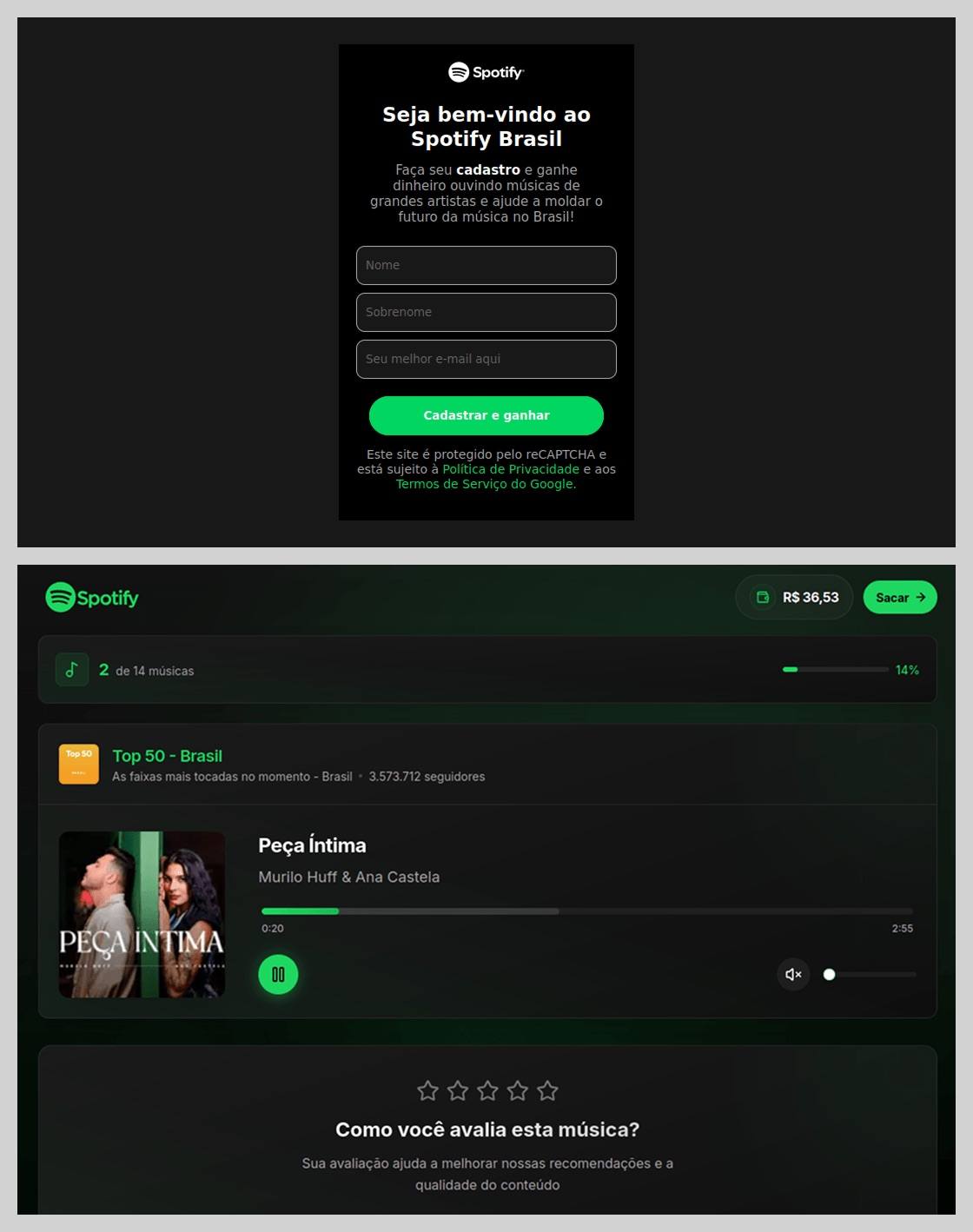
In Brazil, scammers took it a step further: they offered users the chance to earn money just by listening to and rating songs on a supposed Spotify partner service. During registration, users had to provide their ID for Pix (the Brazilian instant payment system), and then make a one-time “verification payment” of 19.9 Brazilian reals (about $4) to “confirm their identity”. This fee was, of course, a fraction of the promised “potential earnings”. The payment form looked incredibly authentic and requested additional personal data — likely to be harvested for future attacks.
This scam posed as a service for boosting Spotify ratings and plays, but to start “earning”, you first had to pay up
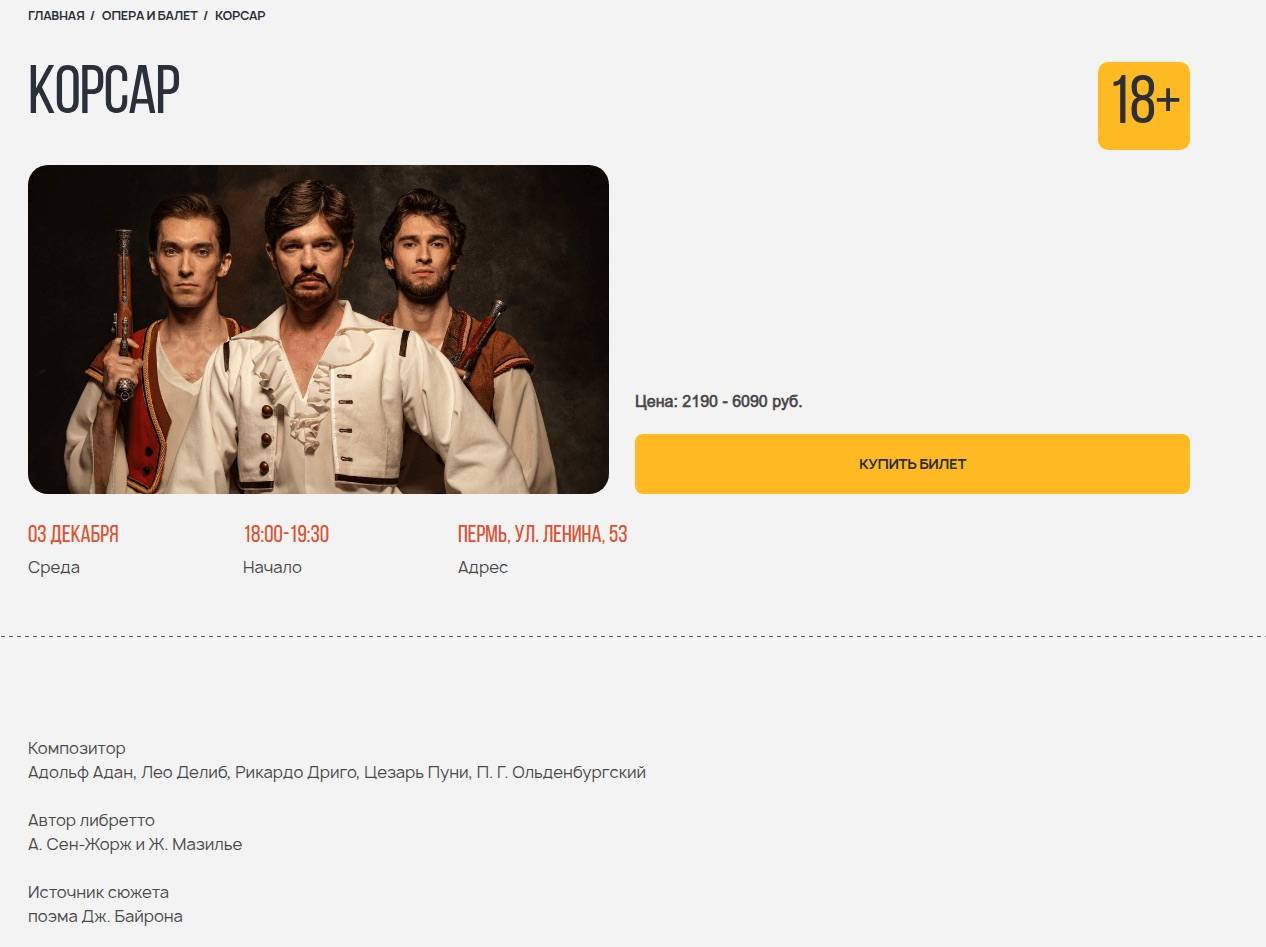
The “cultural date” scheme turned out to be particularly inventive. After matching and some brief chatting on dating apps, a new “love interest” would invite the victim to a play or a movie and send a link to buy tickets. Once the “payment” went through, both the date and the ticketing site would vanish into thin air. A similar tactic was used to sell tickets for immersive escape rooms, which have surged in popularity lately; the page designs mirrored real sites to lower the user’s guard.
Scammers cloned the website of a well-known Russian ticketing service
Phishing via messaging apps
The theft of Telegram and WhatsApp accounts became one of the year’s most widespread threats. Scammers have mastered the art of masking phishing as standard chat app activities, and have significantly expanded their geographical reach.
On Telegram, free Premium subscriptions remained the ultimate bait. While these phishing pages were previously only seen in Russian and English, 2025 saw a massive expansion into other languages. Victims would receive a message — often from a friend’s hijacked account — offering a “gift”. To activate it, the user had to log in to their Telegram account on the attacker’s site, which immediately led to another hijacked account.
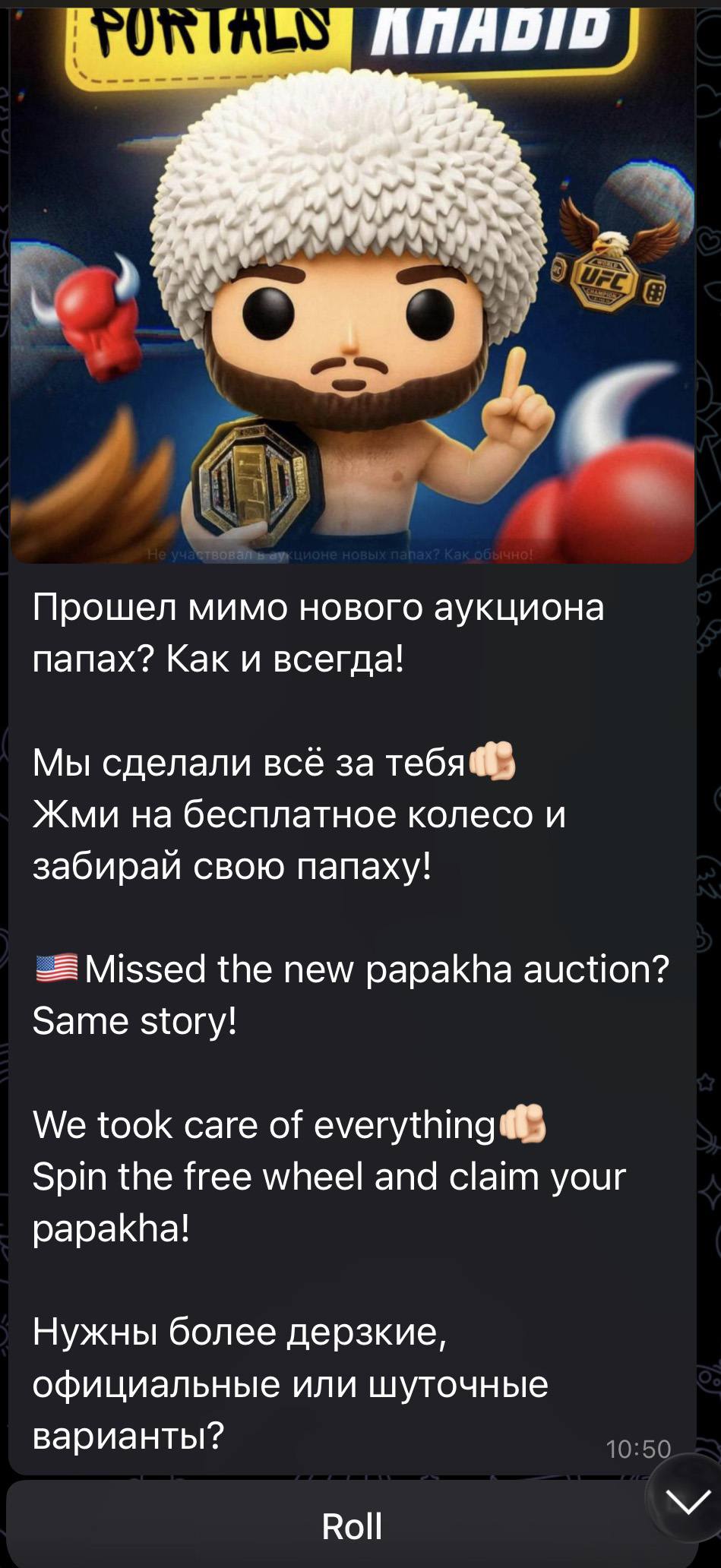
Another common scheme involved celebrity giveaways. One specific attack, disguised as an NFT giveaway, stood out because it operated through a Telegram Mini App. For the average user, spotting a malicious Mini App is much harder than identifying a sketchy external URL.
Scammers blasted out phishing bait for a fake Khabib Nurmagomedov NFT giveaway in both Russian and English simultaneously. However, in the Russian text, they forgot to remove a question from the AI that generated the text, “Do you need bolder, formal, or humorous options?” — which points to a rushed job and a total lack of editing
Finally, the classic vote for my friend messenger scam evolved in 2025 to include prompts to vote for the “city’s best dentist” or “top operational leader” — unfortunately, just bait for account takeovers.
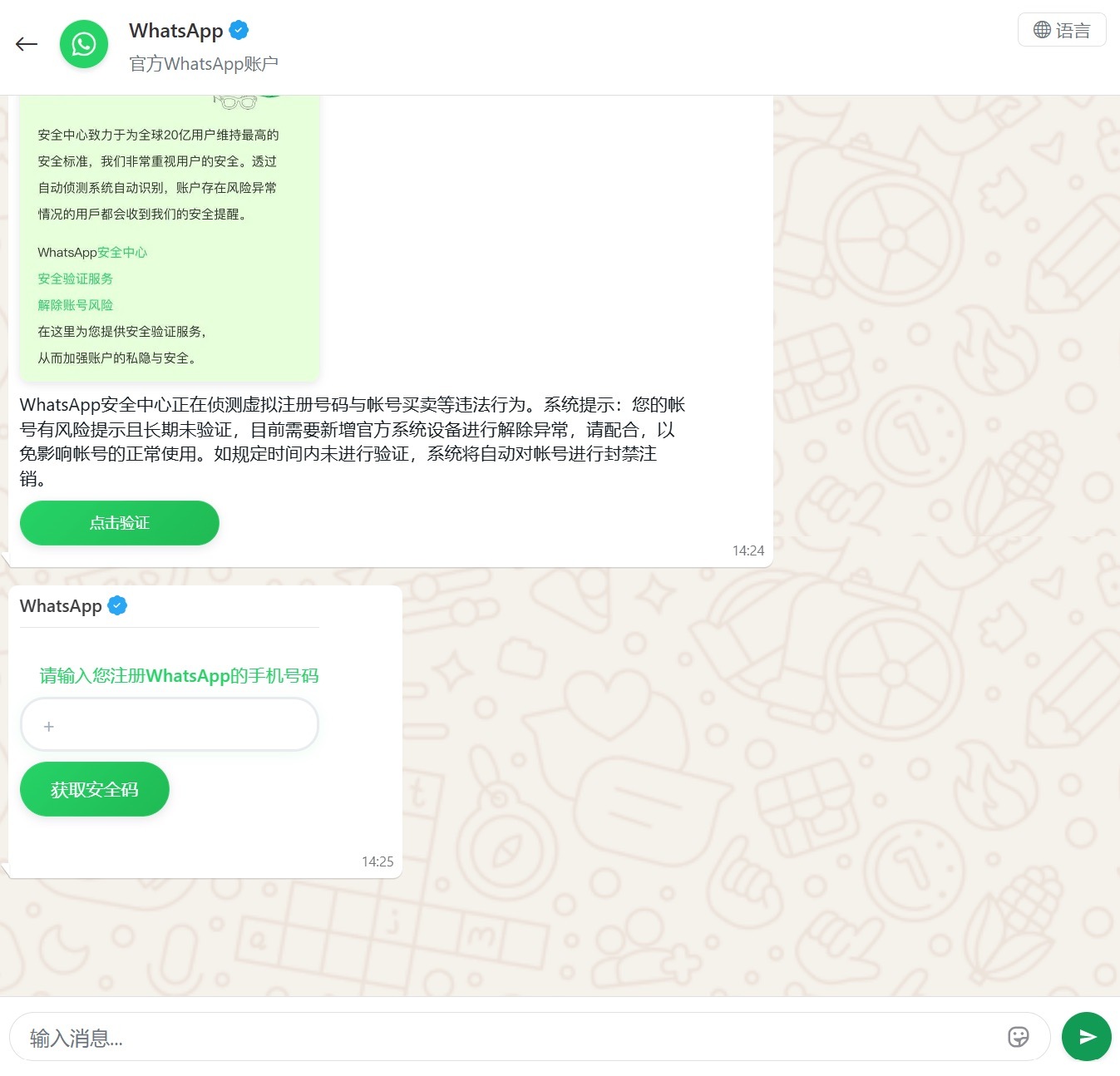
Another clever method for hijacking WhatsApp accounts was spotted in China, where phishing pages perfectly mimicked the actual WhatsApp interface. Victims were told that due to some alleged “illegal activity”, they needed to undergo “additional verification”, which — you guessed it — ended up with a stolen account.
Victims were redirected to a phone number entry form, followed by a request for their authorization code
Impersonating Government Services
Phishing that mimics government messages and portals is a “classic of the genre”, but in 2025, scammers added some new scripts to the playbook.
In Russia, vishing attacks targeting government service users picked up steam. Victims received emails claiming an unauthorized login to their account, and were urged to call a specific number to undergo a “security check”. To make it look legit, the emails were packed with fake technical details: IP addresses, device models, and timestamps of the alleged login. Scammers also sent out phony loan approval notifications: if the recipient hadn’t applied for a loan (which they hadn’t), they were prompted to call a fake support team. Once the panicked victim reached an “operator”, social engineering took center stage.
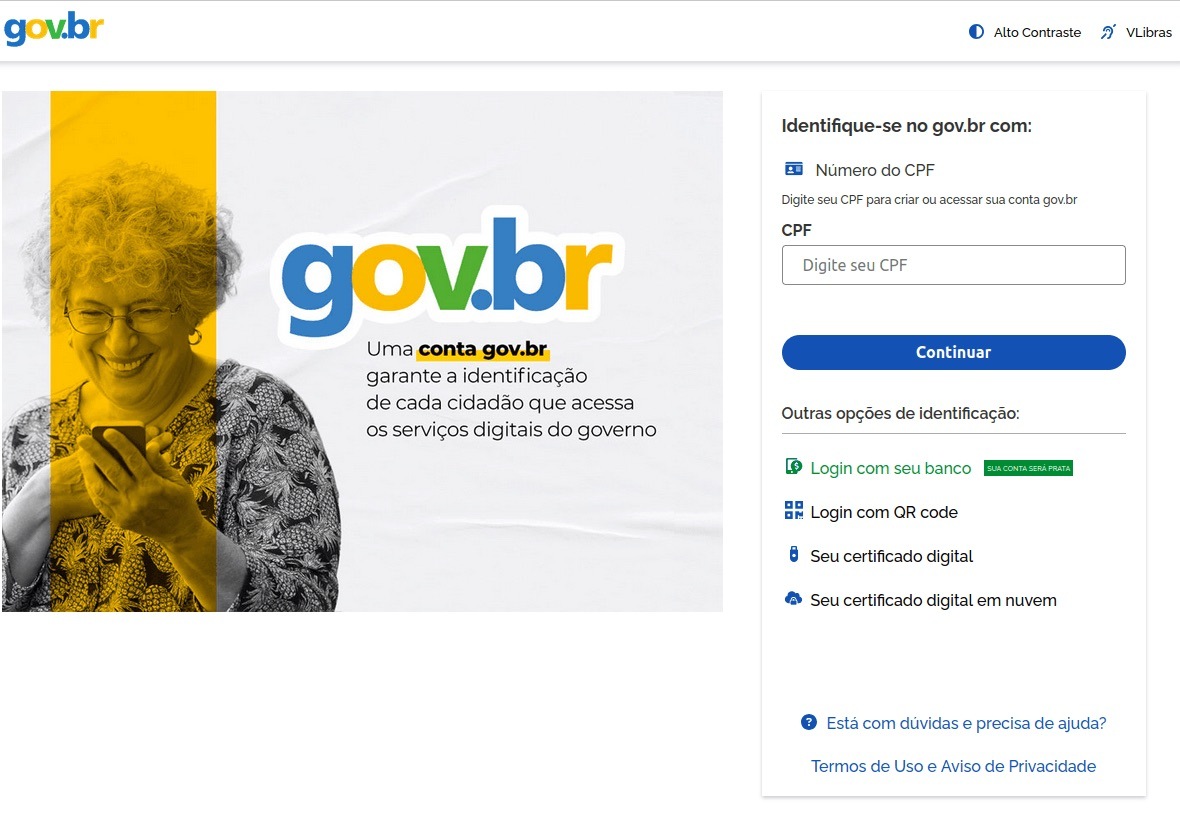
In Brazil, attackers hunted for taxpayer numbers (CPF numbers) by creating counterfeit government portals. Since this ID is the master key for accessing state services, national databases, and personal documents, a hijacked CPF is essentially a fast track to identity theft.
This fraudulent Brazilian government portal of surprisingly high quality
In Norway, scammers targeted people looking to renew their driver’s licenses. A site mimicking the Norwegian Public Roads Administration collected a mountain of personal data: everything from license plate numbers, full names, addresses, and phone numbers to the unique personal identification numbers assigned to every resident. For the cherry on top, drivers were asked to pay a “license replacement fee” of 1200 NOK (over US$125). The scammers walked away with personal data, credit card details, and cash. A literal triple-combo move!
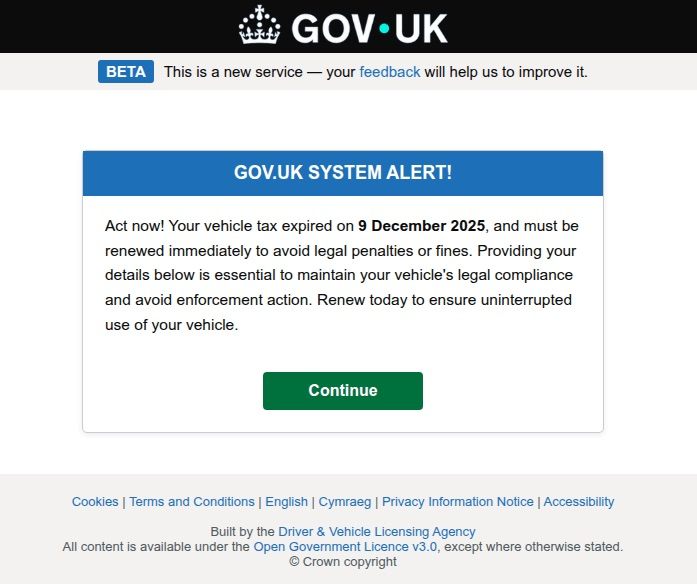
Generally speaking, motorists are an attractive target: they clearly have money and a car and a fear of losing it. UK-based scammers played on this by sending out demands to urgently pay some overdue vehicle tax to avoid some unspecified “enforcement action”. This “act now!” urgency is a classic phishing trope designed to distract the victim from a sketchy URL or janky formatting.
Scammers pressured Brits to pay purportedly overdue vehicle taxes “immediately” to keep something bad from happening
Let us borrow your identity, please
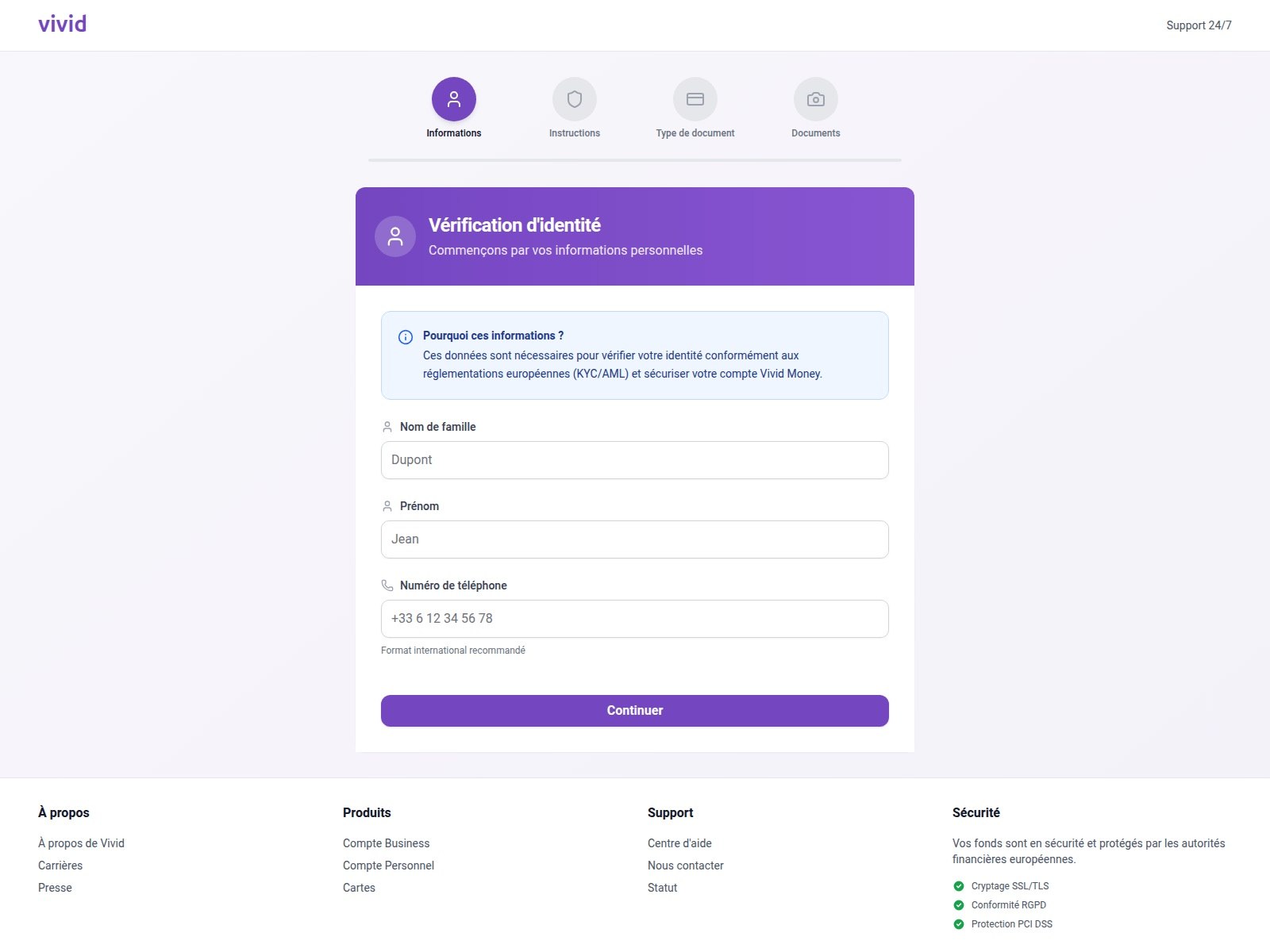
In 2025, we saw a spike in phishing attacks revolving around Know Your Customer (KYC) checks. To boost security, many services now verify users via biometrics and government IDs. Scammers have learned to harvest this data by spoofing the pages of popular services that implement these checks.
On this fraudulent Vivid Money page, scammers systematically collected incredibly detailed information about the victim
What sets these attacks apart is that, in addition to standard personal info, phishers demand photos of IDs or the victim’s face — sometimes from multiple angles. This kind of full profile can later be sold on dark web marketplaces or used for identity theft. We took a deep dive into this process in our post, What happens to data stolen using phishing?
AI scammers
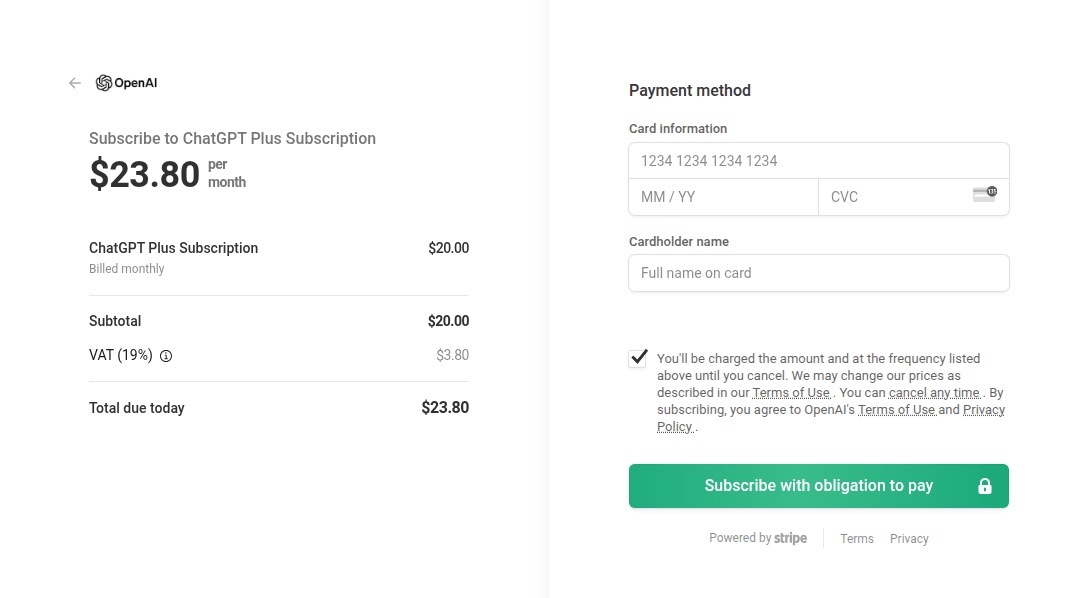
Naturally, scammers weren’t about to sit out the artificial intelligence boom. ChatGPT became a major lure: fraudsters built fake ChatGPT Plus subscription checkout pages, and offered “unique prompts” guaranteed to make you go viral on social media.
This is a nearly pixel-perfect clone of the original OpenAI checkout page
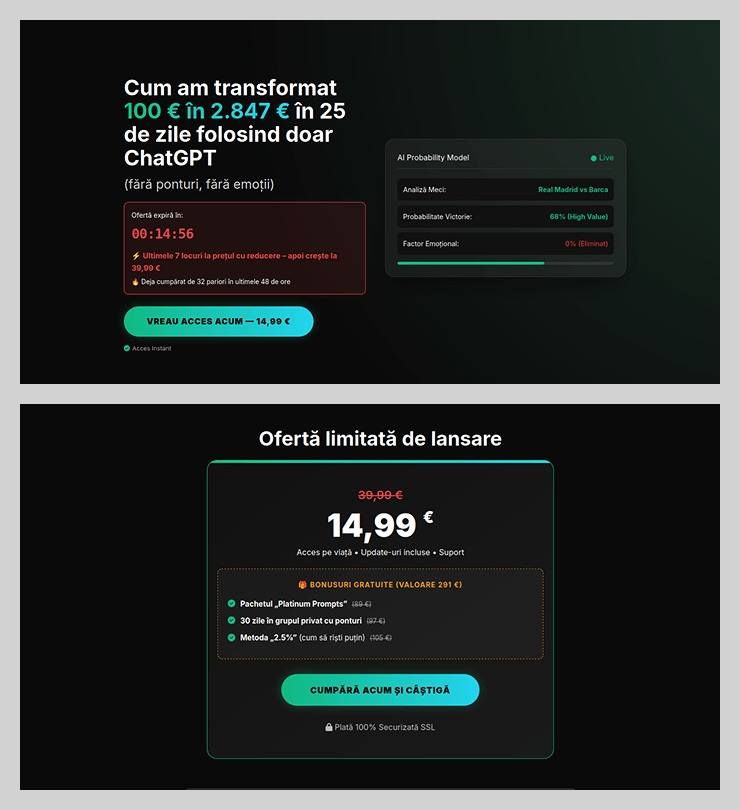
The “earn money with AI” scheme was particularly cynical. Scammers offered passive income from bets allegedly placed by ChatGPT: the bot does all the heavy lifting while the user just watches the cash roll in. Sounds like a dream, right? But to “catch” this opportunity, you had to act fast. A special price on this easy way to lose your money was valid for only 15 minutes from the moment you hit the page, leaving victims with no time to think twice.
You’ve exactly 15 minutes to lose €14.99! After that, you lose €39.99
Across the board, scammers are aggressively adopting AI. They’re leveraging deepfakes, automating high-quality website design, and generating polished copy for their email blasts. Even live calls with victims are becoming components of more complex schemes, which we detailed in our post, How phishers and scammers use AI.
Booby-trapped job openings
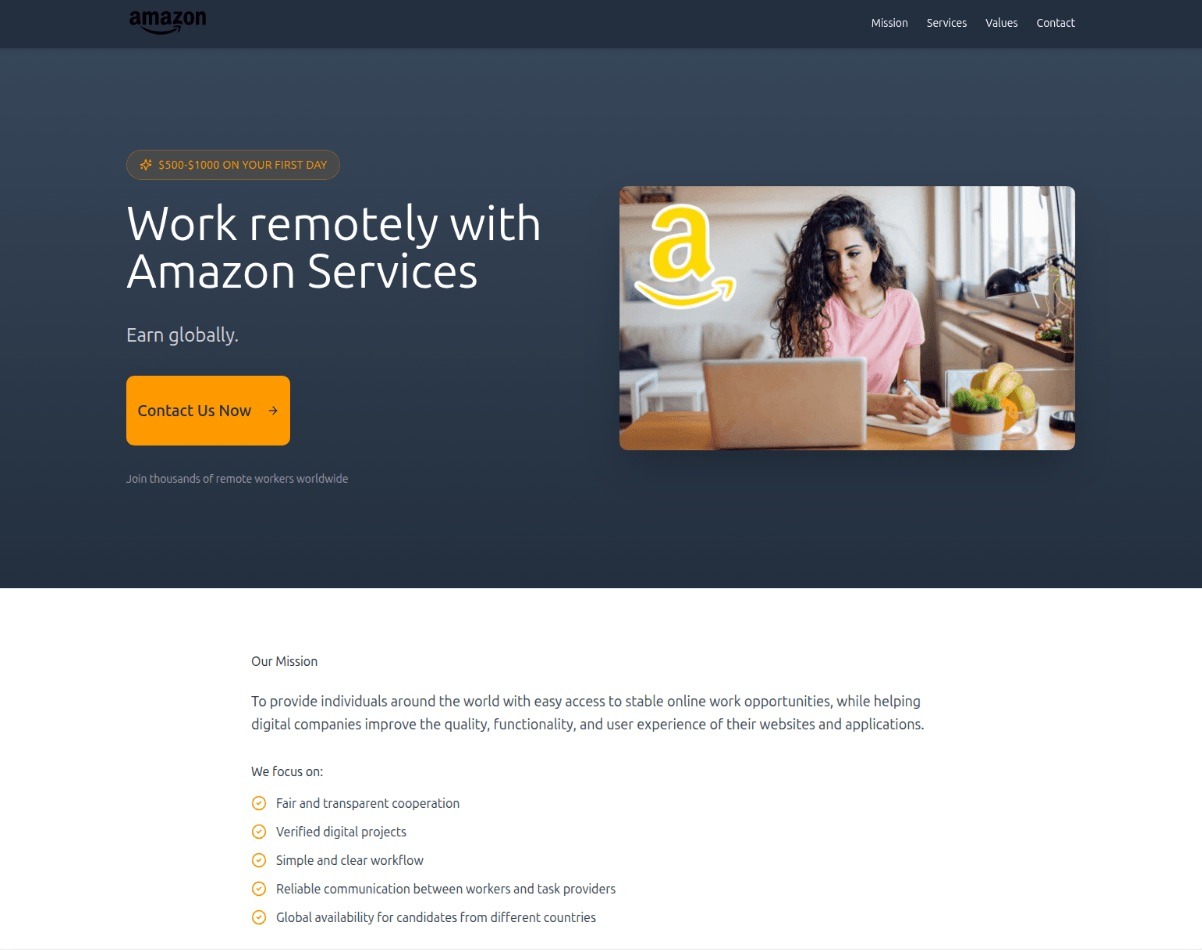
Someone looking for work is a prime target for bad actors. By dangling high-paying remote roles at major brands, phishers harvested applicants’ personal data — and sometimes even squeezed them for small “document processing fees” or “commissions”.
“$1000 on your first day” for remote work at Amazon. Yeah, right
In more sophisticated setups, “employment agency” phishing sites would ask for the phone number linked to the user’s Telegram account during registration. To finish “signing up”, the victim had to enter a “confirmation code”, which was actually a Telegram authorization code. After entering it, the site kept pestering the applicant for more profile details — clearly a distraction to keep them from noticing the new login notification on their phone. To “verify the user”, the victim was told to wait 24 hours, giving the scammers, who already had a foot in the door, enough time to hijack the Telegram account permanently.
Hype is a lie (but a very convincing one)
As usual, scammers in 2025 were quick to jump on every trending headline, launching email campaigns at breakneck speed.
The second the iPhone 17 Pro hit the market, it became the prize in countless fake surveys. After “winning”, users just had to provide their contact info and pay for shipping. Once those bank details were entered, the “winner” risked losing not just the shipping fee, but every cent in their account.
Riding the Ozempic wave, scammers flooded inboxes with offers for counterfeit versions of the drug, or sketchy “alternatives” that real pharmacists have never even heard of.
And during the BLACKPINK world tour, spammers pivoted to advertising “scooter suitcases just like the band uses”.
Even Jeff Bezos’s wedding in the summer of 2025 became fodder for “Nigerian” email scams. Users received messages purportedly from Bezos himself or his ex-wife, MacKenzie Scott. The emails promised massive sums in the name of charity or as “compensation” from Amazon.
How to stay safe
As you can see, scammers know no bounds when it comes to inventing new ways to separate you from your money and personal data — or even stealing your entire identity. These are just a few of the wildest examples from 2025; you can dive into the full analysis of the phishing and spam threat landscape over at Securelist. In the meantime, here are a few tips to keep you from becoming a victim. Be sure to share these with your friends and family — especially kids, teens, and older relatives. These groups are often the main targets in the scammers’ crosshairs.
Check the URL before entering any data. Even if the page looks pixel-perfect, the address bar can give the game away.
Don’t follow links in suspicious messages, even if they come from someone you know. Their account could easily have been hijacked.
Never share verification codes with anyone. These codes are the master keys to your digital life.
Enable two-factor authentication everywhere you can. It adds a crucial extra hurdle for hackers.
Be skeptical of “too good to be true” offers. Free iPhones, easy money, and gifts from strangers are almost always a trap. For a refresher, check out our post, Phishing 101: what to do if you get a phishing email.
Install robust protectionon all your devices. Kaspersky Premium automatically blocks phishing sites, malicious attachments, and spam blasts before you even have a chance to click. Plus, our Kaspersky for Android app features a three-tier anti-phishing system that can sniff out and neutralize malicious links in any message from any app. Read more about it in our post, A new layer of anti-phishing security in Kaspersky for Android.

 Login
Login