❌

Normal view

Received — 29 October 2026 ⏭ Kaspersky official blog

Applying Security by Design and Cyber Immunity principles to protect AI systems | Kaspersky official blog

29 October 2026 at 14:07

AI systems are much harder to protect than traditional IT — whether from operator mistakes, malicious interference, or just plain unstable behavior. There are two main reasons for this. First, AI outputs are probabilistic, so the same prompt can give different answers each time you run it. Second, today’s LLMs can’t reliably tell commands apart from data. Despite the demonstrated security issues of AI systems that we’ve covered many times, it’s impossible to ignore the potential economic payoff of adopting them. That’s why many companies are moving beyond simple AI assistants to AI agents. These agents carry out tasks on their own and have direct access to the same tools as humans — from reading databases to changing settings in production processes. Our experts, in their new study, examine how to clearly define and minimize the resulting risks to keep potential problems to a minimum. The approach borrows and adapts the principles of Cyber Immunity and Security by Design.

The basic principles of Security by Design

All the principles of this discipline are universally applicable to the design of any computer system — AI agents included. What differs is how deeply each principle needs to be adapted and reworked for AI scenarios.

  1. Security is a separate and important factor right from the design stage. Security goals and assumptions are set on day one and followed throughout every stage of development. For AI agents, these assumptions should include three key points: (i) the language model is treated as untrusted, (ii) external data of any kind is considered potentially malicious, and (iii) irreversible actions can’t be performed autonomously without mandatory human approval.
  2. The system is designed on the assumption that it will be attacked.
  3. The trusted computing base and attack surface are kept to a minimum. Agents get only the tools they actually need, limited permissions, and the smallest amount of context possible. Security policy enforcement is handled entirely by deterministic components: the policy monitor, the agent harness, and isolation mechanisms (sandboxes).
  4. The principle of least privilege applies. Each agent has its own set of credentials and access privileges (identity), limited to the bare minimum it needs to do its job. If an agent temporarily needs elevated privileges, it gets them only after external approval, and they last exactly as long as the task that requires them.
  5. Components are isolated. In agent-based systems, this is one of the most complex and multi-layered architecture problems. The agent harness should run in an isolated environment (sandbox or virtual machine), and agents should be kept as isolated from each other as possible. Data processing in trusted and untrusted contexts is also kept separate. For example, one agent reads a pull request and writes a draft of the code, while another reviews that work without ever seeing the potentially malicious text of the request.
  6. Default deny is the rule. Security policies follow the rule: anything not explicitly allowed is forbidden. This includes tool calls, interactions between agents, and network traffic.
  7. Defense in depth is in place. Different measures should work at the same time and reinforce each other. Probabilistic defenses — like AI guardrails (a “firewall” for language models) or alignment (the model’s own sense of what’s acceptable and what isn’t) — can’t offer any formal security guarantees. Nevertheless, they make the system more secure overall and serve as a valuable source of telemetry.
  8. The supply chain is protected. Some agents can install skills, libraries, and other software components on their own, so these abilities need strict rules. Either block them completely, or limit them to a closed, pre-approved list of specific versions of specific components. Systems built on cloud LLMs face an extra risk: model updates. One day, the same API request might be answered by a different language model with different security properties.

Pitfalls of AI security

The general principles of Security by Design are well known and look simple on paper. But applying them to AI systems is tricky because agents are incredibly flexible. For example, a security team might believe that an agent on a developer’s computer runs in a sandbox and can’t change anything outside it. But an attacker, or even the agent itself, can come up with dozens of ways around this seemingly solid protection: from running commands through a local MCP server that the sandbox doesn’t restrict, to reconfiguring another AI agent installed on the system. To make things even harder, the range of attack vectors is huge: from arbitrary fields in the agent’s configuration to innocent-looking text strings in a skill file.

One serious problem that designers often underestimate is user fatigue. A busy agent can throw up dozens of requests every minute, asking the user to confirm potentially dangerous actions. Within an hour, the person is clicking Approve on autopilot without reading what they’re approving. That’s why it’s important to carefully tune both how often these requests appear and how they’re worded. Nobody will read a request description that’s too long. And one that’s too short can hide the key details the user needs in order to make the right call.

Vulnerabilities in agents and related tools are a pressing problem — and it’s made worse by how quickly these categories of software evolve and receive updates. Industry-standard platforms and apps — such as LangGraph, MS Semantic Kernel, and Claude Code — have had critical vulnerabilities patched more than once. Architects should always consider swapping a large, do-it-all framework for a compact, stripped-down system that has only the features a specific agent actually needs.

On top of that, carefully implementing standard, long-established security measures in the available tools greatly reduces the damage if an agent is attacked or behaves unexpectedly. One example is a strict allowlist of domains that the web fetch tool can open when asked by the agent. But designers rarely account for the hidden problems and overhead associated with maintaining the list. As a result, it slowly goes out of date and leaves loopholes for attackers. The most striking example is the EchoLeak attack. Microsoft 365 Copilot had a properly implemented and fairly effective allowlist for accessing external sites, but attackers circumvented it through a feature in a secondary tool and the MS Teams domain.

Practical tips for architects and security teams

AI system architects and heads of engineering and security teams should build in agent security from the design stage. They should rely primarily on verifiable, deterministic mechanisms: isolating components, controlling interactions, and keeping the trusted computing base to a minimum.

Key architectural decisions include defining acceptable autonomy for the agents, limiting access to confidential data and dangerous combinations of capabilities, and using sandboxes, separate roles for different models, and access control gateways. Restrictions added as an afterthought reduce risks, but they’re no substitute for secure architecture.

At the organizational and operational levels, companies need to keep an inventory of their agents, coordinate the efforts of security and deployment teams, protect container environments, manage the supply chain (AIBOM), and integrate multi-layered defense.

Observability requires special attention. For AI systems, this should include logging the LLM’s requests, responses, and reasoning, as well as detailed telemetry from the hosts and cloud environments where the agent harness runs.

The hardest part of designing agents is balancing security, performance, and usefulness. To learn how to strike that balance with threat modeling and clearly defined security goals, read the full version of the study.

Received — 28 October 2026 ⏭ Kaspersky official blog

AI doxing tools: how online surveillance technology has changed | Kaspersky official blog

20 October 2026 at 17:15

Anonymous imageboards have long been places where users could chat under pseudonyms without revealing their real names. But now people on these forums are discussing and testing AI tools for doxing — that is, for finding, matching, and publishing users’ data without their consent. Often this goes hand in hand with stalking the victim, hacking their accounts, bullying, and blackmail, and ultimately leads to a damaged reputation or even worse.

In this post, we explain how artificial intelligence helps malicious actors leak other people’s data — and how to stand up for your right to online privacy.

How bad actors uncover information about users

Analysts at Open Measures have reported that, since October 2025, users of Soyjak.party, an imageboard popular with young people on the far right, have been discussing and using AI to deanonymize other users. Their victims are often activists, bloggers, and members of other “hostile” forums.

The tools the experts found run right in the browser, and automate almost the entire process of collecting information about a victim. They can search open sources and leak databases, and they use any new leads — for example, an email address linked to a username — to dig even deeper. They also extract metadata from photos and videos, estimate a person’s approximate location from IP addresses they find, and finally put everything together into one huge digital dossier. These Soyjak.party tools are no longer functional, but similar ones have been spreading across other imageboards.

In February 2026, researchers demonstrated that sometimes ordinary forum chatter is enough to reveal who you are. They put together summaries of posts by 338 Hacker News users, removed names, usernames, and social media links, and then asked AI to work out who was behind them. The AI compared details about jobs, interests, and personal background with information available online — and correctly identified 226 of the people, or about two-thirds of the sample. The price of deanonymization turned out to be laughably low — at between US$1 and US$4 per user.

To be fair, people knew how to build digital dossiers even before the generative AI boom. For starters, there are OSINT tools that search for data in open sources. Journalists and investigators were the first to use them, but, as you might guess, malicious actors soon mastered these tools too. Unlike AI models and agents, traditional OSINT services follow set scripts and can’t “think” or make decisions on the fly.

An agent out for revenge: the OpenClaw case

If you think doxing always needs a person with ill intent, we’ve bad news: sometimes the one settling scores can be… artificial intelligence itself.

Here’s a story that started out innocuously enough. An AI agent running on the much-hyped OpenClaw platform suggested an improvement for Matplotlib, a popular tool for building graphs and charts. But the project’s rules said that code submitted by AI agents wasn’t accepted. One of the project’s volunteers, Scott Shambaugh, simply turned down the AI’s suggestion.

You’d think that would be the end of it. Think again! The AI agent decided the rejection deserved some publicity, so it published an “exposé” about the developer on its blog (yes, you read that right: the agent had its own blog). It gathered information about Shambaugh from open sources, studied his public activity, and accused him of being biased against AI. It even started speculating about the developer’s psychological motives, and suggested he was afraid of competition from artificial intelligence.

Once this “private” conversation between Shambaugh and the AI agent went public, other users rallied behind the developer — and the agent had to publish an “apology” post.

It’s a pretty absurd story, but it teaches a good lesson: always read the privacy policy of any AI service carefully, and steer clear of new models from unknown sources.

How to avoid becoming a doxing victim: a guide

If AI speeds up searches and connects the dots between details that used to be scattered across dozens of websites, the next logical question is: what can you do to shrink your digital footprint?

Disappearing from the internet completely is almost impossible. So protecting your data isn’t so much about leaving as few traces as possible, but cutting the number of links that can be used to piece together your identity. If you’re an advanced user, we recommend reading our post, How to disappear from the internet, in addition to the tips below.

Manage your digital footprint

  • Search for yourself online. Don’t stop at your name: try your email address, nicknames, and phone number too. If you’re comfortable with AI processing your data, you can even ask it to compile a dossier on you. Just remember that there’s always a risk of a leak or a bug that accidentally makes your data public. And no, big, reputable services are no exception.
  • Make private any profiles you don’t want to share with everyone. That makes it harder for search engines to index your new posts, and for scrapers and OSINT tools to collect them. While you’re at it, go through your old comments and posts and clear out anything you don’t need.
  • Delete your ghost accounts. Go through your inboxes and check which websites you’ve signed up for. Make a habit of deleting accounts you no longer use: they can hold your personal data for years, and there’s always a risk it’ll end up in the next data leak.
  • Set up two-factor authentication. That way, even if a bad actor manages to guess your password or finds it in a leak, they won’t be able to get into your account without the additional authentication. For the second factor, we recommend using one-time codes that refresh every 30 seconds and storing them in a reliable password manager.
  • Strip metadata before posting photos and videos. Metadata can help a malicious person learn a lot about you— for example, the location and exact date a photo was taken, and the model of your device.
  • Use a different password for every account you have. Our research has showed that passwords built from personal details — such as your mother’s maiden name, your birth date, and a special character at the end — are extremely weak. This kind of information often ends up in leaks, or can be pieced together from public sources, so the passwords can be easily brute-forced by smart algorithms. Of course, nobody can remember hundreds of unique passwords, so it makes sense to offload that job to our password manager — a secure vault that generates and remembers complex, unique passwords for you, and syncs them across all your devices.
  • Find out about new leaks as fast as possible. Some online services will send you a free alert if your email address shows up in a known data leak. But it’s much more convenient to monitor leaks with a dedicated security app. For example, Kaspersky Password Manager constantly checks all the entries you’ve saved. It warns you if you use the same password on different websites, or if any of your saved login and password pairs has been compromised. Our simple instructions for Windows, macOS, Android, and iOS can help you easily check all the passwords you’ve saved in Kaspersky Password Manager. Your passwords are never sent to Kaspersky. We explain how we can analyze your passwords without knowing them in our post, How to create strong passwords and where to store them.
  • Use reliable protection that tracks and blocks leaks of your data. While Kaspersky Password Manager only checks the active password entries you’ve added to it, Kaspersky Premium can monitor for compromised accounts linked to your email addresses (you can add up to 50 addresses to check), and for digital identity theft linked to your phone numbers. And besides reporting leaks that have already happened, our security solutions can also stop data about you from being collected online.
  • Set up privacy on your devices and apps with our free online service, Privacy Checker.

Keep your accounts separate

The more websites that know your email, the more often it will show up in advertising profiles and potential leaks. For one-time and minor sign-ups, you can use an email masking service. All Apple users get this feature by default (Hide My Email). If you use another OS, you could try Firefox Relay, for example.

The service then creates a separate proxy email address for the website where you’re trying to sign up. Messages sent to that address are automatically forwarded to your real inbox, but the website never sees your real email address.

If you want to go all in, you can try splitting your digital life into several sub-personas by hand. Create several email addresses for different purposes. For example, use one for online stores, banks, and government services, a second for public social media, and a third for forums and social networks where you want to stay anonymous.

Keep in mind that all this is a challenge: you’ll need to keep coming up with new nicknames, and make sure your sub-personas never overlap. If you use an email address for an anonymous profile, don’t link it to services that already have your real details, and don’t use it as a backup email for a public account. One accidental link can easily undo all your effort.

Check what you share with exes

If you’ve recently broken up with a partner, make sure you check which parts of your shared digital life they can still access. Sadly, it’s very often ex-partners who become doxers or stalkers — spying on their former other half and stopping at nothing to do so. For more details on exactly what to do in this situation, read our article Post-breakup digital hygiene: what to check and shut down.

Use your right to be forgotten

Many countries have a right-to-be-forgotten law. It lets you ask search engines to remove links to pages that contain your personal data.

You can send the links to those pages, explain why you want them hidden, and request that they be removed from search results. Keep in mind that the page with your data isn’t deleted. Other search engines may still show it, and it may still turn up for other search queries.

To submit a request like this, use the dedicated forms from Google or Bing. But remember that a search engine can turn you down if it decides the information is in the public interest, or that the law requires it to be published.

There are more effective, though more time-consuming, ways to remove your data from the internet. We covered them in detail in our post, Why data brokers build dossiers on you, and how to stop them doing so.

Looking for more ways to protect your digital identity? Check out our other posts:

How to write a resume with AI: tips and a ready-made prompt | Kaspersky official blog

15 October 2026 at 16:16

Finding a job these days is playing on hard mode. You send your resume to a company, and a couple of minutes later, an automated rejection lands in your inbox. And then it happens again. And again. Sound familiar?

In this post, we look at how recruiting platforms work from the HR side. We also show how to use AI safely as a copy editor so you can prepare a resume for recruiters without turning it into a lifeless pile of keywords. At the end, we share a ready-made prompt to help you improve your resume’s structure and content.

Protecting your data

Before you give your resume to a chatbot, remove all sensitive information: your name, phone number, home address, email, company names, and scans of documents. Any language model you chat with can sometimes memorize personal information contained in their training data. That means there’s always a chance the AI may accidentally “learn” to give your data to other users. On top of that, even the biggest services aren’t immune to glitches and leaks. For example, last year a researcher found a bug in Meta AI that let users gain access to other people’s conversations with the chatbot by changing their request ID.

The ability to read other people’s chats sometimes isn’t even a bug. For example, it recently came to light that Grok users who clicked the Share chat button to send a conversation to a friend or to themselves were also allowing search engines to index that conversation. As a result, thousands of conversations ended up in public view. These included personal data, requests to come up with complex passwords, complaints about health problems, trade secrets, and other information the chat owners clearly never meant to publish.

So before you use any chatbot, first check its privacy policy, and then go to the settings to turn off all the features you don’t need. Most importantly, turn off training the AI on your requests. And remember the golden rule: don’t send an AI anything you wouldn’t be okay with seeing on the internet.

If you work with sensitive information all the time, the safest option is to run language models locally right on your own computer. We previously explained how to do this, using DeepSeek as an example. The same approach works with any other open-weight model.

Finally, don’t feed your personal data to chatbots from unknown developers that promise to write you a flawless resume. Often, these are just slick wrappers around popular models. And you probably won’t ever find out who actually gets access to your data, where it’s stored, or what happens to it next.

Malicious actors can use this information for follow-up attacks. For example, they can send fake interview invitations and attractive job postings that match your work experience and career interests a little too well. From there, the scam can go in many directions: a malicious file disguised as a job invitation, a link to a phishing page that steals your account, a request to install “corporate software” or to continue the chat in a messaging app, and so on.

When choosing an AI tool, ask yourself these questions:

  • Does the service have a clear privacy policy?
  • Does it say what happens to your file after you upload it — will it be stored or deleted?
  • Does the service explain whether your data will be used to train AI?
  • Who owns the service? Can you trust this company?
  • Is the site protected with HTTPS?

Who reads your resume: a human or a robot?

Most large and mid-sized companies have long used an applicant tracking system (ATS). This is specialized software for HR teams (human resources specialists or, put simply, recruiters) that collects and sorts job applications.

A company having an ATS doesn’t mean their applicants are scored automatically. It’s a fairly old type of system that dates back to when artificial intelligence looked very different. Then, as AI tech evolved, some companies started building AI modules into their ATS. But how common this is varies a lot from country to country and market to market. According to a LinkedIn study, 37% of HR leaders surveyed worldwide use AI in hiring, but only 11% actively integrate AI tools into their HR platforms.

The takeaway: you can optimize your resume for AI, but you still need to write it for a human. Even if your resume clears the AI screening, an HR person will read it next — and flat, machine-sounding prose will only hurt their impression of you.

Keep in mind that instant rejections don’t come only from AI. In some ATS, recruiters can set up automatic rejection rules by hand. For example, these rules can rely on a candidate’s answers about education, work authorization, required experience, licenses and certifications, ability to work the required schedule, and so on. So take a moment to check that your resume contains up-to-date and complete information relevant to the vacancy.

How to write a resume that passes both AI and HR screening

Write the first draft yourself

It’s ok to turn to AI for help, but the resume has to have substance, and a real person with real work experience has to shine through.

Start by writing your resume yourself. It doesn’t have to be perfect, and it can have mistakes. Only then ask AI for a fresh pair of eyes. Here, AI shouldn’t act as your personal biographer. It should act as a copy editor that polishes the wording and structure.

Keep the formatting simple

Unless the employer asks for something specific, skip the photos, tables, complex graphics, and custom fonts. And definitely don’t try to design something fancy in a graphic editor. Any of these can make your document unreadable for an ATS. The gold standard is a plain PDF or DOCX file with headings, a standard font, clear sections, and bulleted lists.

Tailor your resume to each job

Copy the job description and ask a chatbot to work its key phrases into your resume. Don’t just sprinkle keywords around. Put them in context and back them up with examples from your experience. Remember: you should be able to prove every word in your resume.

Show what your effort achieved

Skip the generic phrases, personality labels, and bare lists of duties like “responsible”, “did data analysis”, or “prepared reports”. Both recruiters and AI look for specifics, ideally with numbers and timeframes. Show what you did your job for, not just what you did.

Stick to the action + tool + result formula: “Automated report generation with Python and cut preparation time by 80%”, “Launched a new pricing model and grew annual revenue from US$400 000 to US$600 000 in 12 months”, “Developed a corporate messaging app that more than a thousand employees use today”. Don’t overdo the numbers. If you don’t have exact figures, or they don’t apply, don’t make them up.

Put the most important things first

Start with a short paragraph of two to three sentences that covers the key points and contains a link to your portfolio. Use it to give a brief overview of your work experience, skills, and key achievements. If you’re new to the field, write about your education and career goals instead.

List your work experience in reverse chronological order so your latest career achievements are the first thing people see.

AI prompt

You’ve got the tips — now it’s time to ask AI for help. Here’s a prompt that works. We’ve tested it on several chatbots:

Imagine you’re an HR and recruiting expert. Read my resume carefully and try to make it stronger. It’s important that the resume is easy to read and catches the attention of the AI that screens candidates. My resume should start with a short paragraph about me (two to three sentences) that covers the key information both AI and HR will look for. Add keywords from the job description to my resume: {job description text}. The keywords and phrases must match my real work experience. If they don’t fit, don’t just add them baselessly. Where it makes sense, describe my work experience using the formula: action + tool + result. Example: “Designed new landing pages in Figma, raising conversion by 20%”. Make any other changes that I haven’t thought of but you think are important. Base everything you write on the information in the resume I sent you. Don’t make anything up.

Review before sending

  • Check for extraneous information: make sure your resume doesn’t include unnecessary personal data or information covered by an NDA.
  • Check for readability: make sure your resume has the right headings, dates, and section order, and that the file is in DOCX or PDF format. Remove any complex graphics from the document.
  • Check for accuracy: reread every statement and ask yourself, “Could I back this up in an interview?” Remember: AI doesn’t know all the details of your work and may exaggerate some of the wording.

More on how to use AI safely without compromising your privacy:

Received — 8 October 2026 ⏭ Kaspersky official blog

Cybersecurity Tokenomics: Denial of Wallet Attacks and the Cost of SOC Operations | Kaspersky official blog

7 October 2026 at 21:13

We recently published a post on “tokenomics” and “denial of wallet” attacks — a new type of DDoS attack aimed at overspending AI tokens. But before security specialists begin protecting their colleagues’ AI processes from this new threat, they should remember that the work of the information security department itself can become a target for such an attack. Since security teams are now actively testing and implementing various types of AI-based automation, the threat of external interference aimed at paralyzing the defense system directly affects their own processes and technologies.

Elastic has estimated that, depending on the “agent-based SOC” architecture, triaging a single alert from a host can cost $0.69 for an ensemble of highly specialized agents or $3.42 for a general-purpose agent with 14 different skills.

However, these averages mask a huge range of variation. At any given moment, the basic processing of a simple alert (say, a thousand tokens) can turn into a cascading investigation involving processing millions of log entries, API calls, and other related data — which amounts to millions of tokens in a matter of minutes.

Elastic itself acknowledges that it uses the Claude Sonnet 4.6 model in its SOC. This immediately raises the question: what happens when the budget is exhausted or the model’s security filters are triggered? In the worst-case scenario, the following occurs: the AI SOC launches an “orchestra of agents” to investigate suspicious events that resembles lateral movement in the infrastructure. The agent calls the Anthropic API, but the department’s monthly budget has been exhausted, and the API returns errors. The investigation grinds to a halt, and people find out about it half a day later. Moreover, if the constantly changing “security filters” of a major AI provider flag the SOC’s requests as malicious, the same effect is possible even without the budget being exhausted — as demonstrated by Hugging Face’s experience investigating the breach of their infrastructure by OpenAI.

Of course, an attacker has a vested interest in such an outcome. They can directly influence the defenders’ costs by injecting malicious prompts into the data available to them (DNS TXT records, HTTP headers, code comments, filenames, and so on), counting on the fact that these prompts will be processed by information security systems. For example, in the GhostJacking attack case, WAF logs serve as the vector for prompt injection, and in academic study, another method was proposed: researchers managed to attack the LLM security guardrails themselves, causing their requests to increase latency by 148 and the number of tokens consumed by 63. In other words, the system theoretically continues to function correctly, but the latency in processing alerts and the associated costs increase significantly.

Dangerous silent failure

In agent-based scenarios, budget exhaustion doesn’t always manifest as an explicit error with a “request limit exceeded” message and an immediate alert to the responsible parties. Under certain configurations, “guerrilla” scenarios can arise: a request to the model times out, the system automatically switches to a cheaper model, and as a result the quality of its outputs drops, and subagents and periodic tasks stop running. Meanwhile, the security team may continue to believe for hours on end that everything is working as before.

How to control AI costs in cybersecurity

The task of managing expenses, of course, isn’t simply a matter of “preventing overspending”. The industry has already fallen into this trap when implementing SIEM: when companies had to pay based on the volume of telemetry collected, they began to selectively — and not always effectively — limit log collection. As a result, they ended up with detection blind spots. The same situation could arise with tokens — but faster and on a larger scale. A poorly designed cost-cutting policy could compromise the depth of investigations and the quality of responses. And in the absence of such a policy, the decision to cut something will be made not by the architect or the CISO during the system design phase, but by the analyst on duty at 3am. Or it may be an automatic limiter set by the system vendor.

A few simple principles can help avoid predictable cost overruns, and better manage situations that are truly unpredictable.

Don’t feed the AI model anything that can be verified with a standard query. Everything that’s repetitive and known in advance should be handled the old-fashioned way — with rules and data queries. These can be developed using AI, but they must operate deterministically. The model should only be used where an assessment of an ambiguous situation is truly needed.

Use strict limits and aggressively alert users when they are exceeded. Limits should be combined: a limit per task, a daily limit, and so on. Alerts about limit exceedances must immediately reach both on-duty analysts and those responsible for the system as a whole.

Decide in advance what happens when a limit is reached. Whether to stop and save money — while losing some control — or to continue and pay, is a decision that must be made before an incident occurs.

Limit agents’ permissions and the set of tools available to them. The fewer actions the system has access to, the more effectively it works on a narrow task, the fewer opportunities it has to inflate costs, and the less likely it is to be “exploited” by an outsider.

Strictly scan external, untrusted data. Incoming requests, inquiries, messages, and comments, as well as various technical fields capable of containing arbitrary text (DNS records, HTTP headers, file names) can not only lead to prompt injection, but also deliberately inflate the workload. Limit their size, and monitor the load they generate.

To avoid service outages from external providers and maintain full control over your organization’s data, evaluate the possibility of using local models deployed on-premises at least for information security needs. While these models may not be state-of-the-art, their narrow specialization and fine-tuning with company data will deliver decent performance without unexpected failures.

In a more complex architecture, the use of LLMs can be divided into several levels. The first line of defense (routing, noise filtering, data enrichment) is handled by compact on-premise models. This significantly reduces budget volatility. The second level consists of a large local model that handles the substantive work: linking events, testing hypotheses, and piecing together the picture of an incident. It’s also not billed per request, but its throughput is limited; therefore, instead of budget overruns, overloads and event queues may occur. Only isolated, truly difficult cases are forwarded to advanced cloud-based models — preferably with the explicit approval of a human analyst. In this scheme, variable costs remain, but they’re limited to a small number of cases, and each one represents a conscious choice rather than a side effect of a script running overnight.

Essentially, all of this replicates the classic multi-tiered SOC model — where the first line filters, and the third line investigates — only the roles are played by models rather than people.

Received — 29 September 2026 ⏭ Kaspersky official blog

Cybersecurity Tokenomics: Denial of Wallet Attacks | Kaspersky official blog

23 September 2026 at 16:40

Not long ago, many companies began actively implementing AI agents in a wide variety of workflows. Very quickly, the cost of using them became a pressing issue for companies. Moreover, it’s an issue that concerns more than just finance department — in addition to budgetary concerns, issues of reliability, operational stability, and even information security have emerged. This is because the cost of automating one and the same process varies significantly from one deployment to the next, is unpredictable, and could be subject to external influences.

Furthermore, for a malicious actor attacking an organization, any process automated using AI and vulnerable to external influence is, in essence, a convenient target for a “new type of DDoS attack”. Application-error reports, product reviews, or technical support requests can (just like any other external data that a company processes via AI) serve as a tool in an attack aimed at increasing consumption of tokens (word fragments that serve as the basic unit of input and output of an LLM).

A year of explosive growth… in bills

In 2026, large companies significantly overspent on their AI system budgets for the first time. Uber had spent its entire annual budget by April, while an unnamed company failed to set spending limits for Claude and spent $500 million in a single month. Although AI providers regularly announce lower prices and more efficient models, the shift from chatbots to agentic systems that operate continuously and autonomously increases token consumption by hundreds or thousands of times.  At the same time, the “fixed subscription for $20 or $100” model for companies is becoming a thing of the past; all major providers are transitioning business clients to pay-as-you-go billing.

As a result, companies are facing a problem all too familiar to cloud hosting and cellular communications industries. In the absence of specialized cost accounting and management systems, an organization only learns how much a particular process or project will cost after it’s completed. In the telecom and cloud sectors, this problem was eventually solved through the development of sophisticated billing systems, and their clients have even adopted the specialized term FinOps. For AI, this process is still in its infancy. Moreover, solving the problem will be complicated by the probabilistic nature of generative AI.

Unpredictable token consumption

To understand why costs rise so quickly and are so difficult to predict and control, we need to recall how a language model works and what turns it into an AI agent. The model is stateless; in other words, it does not retain any information between interactions. Every time the agent takes the next step, the entire history of work on a specific task (the context) must be resent to the model: the initial prompt, previous reasoning, the contents of the files it has read, and the responses from all tools. With each step, this “recap” grows longer — especially if the task involves iterative loops. If a step fails, or the response is unclear, or a tool returns an error, the agent simply tries again — further inflating the size of the context. And if the task is performed not by a single but by several agents, which divide the work among themselves and exchange results, this volume is multiplied by their number. As a result, token consumption does not increase gradually but in spurts, and it’s nearly impossible to predict it at the start of the task.

When running two different sessions of an AI agent interaction to solve exactly the same task (two tech-support tickets, two analytics tasks, and so on), the number of tokens spent on them can vary — the difference can be as much as 30 (!) times. This depends on how many steps, errors, and retries are required to solve the task. Increased resource consumption doesn’t necessarily depend on the complexity of the task. There are well-known cases where AI got stuck in a “thought loop” and wasted an absurd amount of resources on trivial tasks.

Three generations of AI in enterprise systems consume resources in completely different ways:

  • Classical machine learning (ML). This typically works with well-structured data and isn’t overly computationally intensive. Resource consumption is predictable and low. This is a fixed budget item;
  • A chatbot or other LLM-based AI assistant. It consumes tokens, but the pace is set by a human: an employee manually launches a task, then evaluates the result, and pauses. Cost increases roughly in proportion to the number of active users, and can be approximately estimated based on the number of licenses;
  • An autonomous AI agent. A person sets a goal and steps away, and the system then decides on its own what to do and how many steps are needed. The meter keeps ticking until the task is considered complete, and there’s no predictable cost ceiling.

Tokenomics in attacks: denial of wallet as the new DDoS

Since LLM calls are significantly more expensive than typical standard software calls, automating routine corporate tasks comes at an unusually high cost. For example, Gartner estimates that resolving a single customer support request using an LLM costs approximately $3. It’s easy to imagine how attackers could bombard a company with thousands of long, sophisticated requests generated by an inexpensive LLM, causing significant financial damage. Since the process is automated, anomalies may not be detected right away.

If an attacker knows which agent system and which LLM are used in a business process, they can carry out a more precise attack and cause significantly greater damage. The authors of the GitInject study estimated that an attacker capable of creating GitHub issues within an organization that uses AI agents for error analysis with single attack (before GitHub’s defense mechanisms kick in) can cause up to $111 in damage and burn through 400 minutes of GitHub Actions from the victim’s account. Naturally, such an attack can be repeated multiple times — at no cost to the attacker.

The most dangerous risk — though difficult to quantify in monetary terms — comes from attacks that provoke LLMs into excessive reasoning. In the paper OverThink, the authors demonstrated how a harmlessly worded task, when fed into a language model, ultimately yields a correct result but, in the process , consumes 46 (!) times more tokens than it should. Moreover, all tasks tested by the researchers successfully passed existing security filters.

In the new version of the OWASP Top Risks for Language Models guide, this issue has risen to a record-high priority: unbounded token consumption is now designated as LLM06:2026, and among its variations, the “denial of wallet” attack — which depletes the victim’s budget for LLMs — is explicitly highlighted.

How to Avoid Becoming a Victim of the “New DDoS”

First and foremost, you should abandon the principle of “using AI just for the sake of using AI”. It doesn’t make sense to entrust autonomous agents with every task. It’s wise to periodically conduct a cost-benefit analysis of using artificial intelligence.

In addition, you should limit the permissions and set of tools available to an autonomous AI agent. The fewer actions the system has access to, the more effectively it works on a narrow task, the fewer opportunities it has to inflate costs, and the less likely it is that someone will be able to “manipulate” it into unnecessary token spending.

We also recommend setting strict limits on token consumption, and configuring a notification system to alert humans when these limits are exceeded. It makes sense to implement multiple limits in parallel: a limit per task, a daily limit, and so on. Alerts regarding limit exceedances must be immediately forwarded to the specialist responsible for the system so that they can make an informed decision — whether to continue or halt the process.

Strictly verify external, untrusted data. Any information processed by AI that comes from external sources — whether it’s requests, inquiries, messages, or comments, or various technical fields capable of containing arbitrary text (DNS records, HTTP headers, filenames) — can not only lead to prompt injection, but also deliberately inflate the workload. It will be wise to limit their size and monitor the load they generate.

Calculate the unit cost of work and compare the vendor’s invoices with your own data. The cost per analysis, per request, or per check is the only way to understand what you’re paying for and to spot errors in the invoices.

Received — 19 September 2026 ⏭ Kaspersky official blog

ChatGPT Computer History: the risks and a safe setup | Kaspersky official blog

10 September 2026 at 18:00

Picture your computer keeping a diary — the kind kids used to keep logging their daily activities, or the kind travelers, merchants, and nobles kept centuries before that. Here’s what it might look like.

Thursday, September 10.

  • 8:00 AM. User read the news on cnn.com and bbc.co.uk (Safari).
  • 8:10 AM. User replied to John Kaufman’s email about delivery dates, then sent the same question to the logistics team (Gmail).
  • 8:20 AM. User checked his to-do list, reviewed recent updates, and planned out the day’s priorities (Todo).

We’re not exaggerating. This is exactly what your Mac’s new diary looks like. It’s a set of text files that any app on your computer can read — as can anyone sitting at the keyboard. The feature responsible is called Computer History, and it was released by OpenAI in mid-August. At the moment, it only works in the ChatGPT app for Mac, requires a Pro subscription or higher, and is disabled by default. According to its developers, the idea behind History is to let the AI assistant quickly get up to speed on your work context, so it can answer even vague requests, like “send a reminder to whoever I was emailing about last week’s deliveries”. Of course, that convenience comes at a price, ranging from your data being processed on OpenAI’s servers, to the risk of it leaking off your Mac — whether to a nosy family member or straight into the hands of cybercriminals.

How ChatGPT Computer History works

If this sounds a lot like Microsoft’s similar Recall feature, or Chronicle, which OpenAI itself announced earlier, that’s no coincidence. Both were built with the same goal in mind, just using different methods. Having watched Recall turn into the PR disaster it was, the team behind Computer History decided against constantly taking and analyzing screenshots. Instead, ChatGPT relies on macOS’s Accessibility features to read the text on your screen and track your actions: mouse clicks, text typed into fields, switching between apps, and the like. All of this gets stored as a stream of raw activity data inside the ChatGPT container (app group), which only the ChatGPT app itself, or other apps you’ve specifically given permission, can access. In tests run by digital forensics researchers, just two hours of normal computer use generated around 3500 of these logged events.

That raw data remains on your computer for up to 48 hours. During this time, the ChatGPT app periodically runs hidden chat sessions behind the scenes, where it asks the AI to summarize related events into a single recap. Essentially diary entries, these summaries get saved as plain text files in a folder that any app on your Mac can open: ~/.codex/memories/extensions/skysight/.

When you chat with the assistant, or when certain automated features kick in, these notes can be pulled into the conversation for more context-aware responses. OpenAI is especially keen on pointing out that the assistant can spot patterns in your workflows and offer to automate them, creating what it calls “skills” that replicate your actions for you.

Once a summary is ready, the raw activity data behind it is deleted. OpenAI says it won’t keep those hidden background chats or use them to train its AI, except where required by law. The diary-style summaries that get pulled into your conversations, though, are stored on OpenAI’s servers under the exact same rules as your regular chats and the assistant’s memory, so your preexisting privacy settings will apply to them too.

What Computer History can see, and what you can turn off

Since the whole feature runs on accessibility tools, ChatGPT only picks up what your operating system is already willing to share with those tools. That includes window titles, blocks of text, image captions in your browser, text you’re typing into a field as you type it, and the names of interface elements you click on. Watching a video? The AI can’t see the video itself, but it can read the window title, the site name, and the video description. Browsing photos? It sees file and folder names, not the actual images. Audio is never recorded or saved in any situation. All that gets logged from a video call is the meeting window title, unless the call itself has live captions turned on. Password fields that are masked (shown as dots) aren’t read at all and, according to OpenAI, private browsing windows are never scanned.

One thing that sets this apart from Microsoft Recall is the clearly spelled out step-by-step procedure the user needs to go through to turn it on. Computer History never activates itself. You have to navigate to the settings menu, then Integrations → Computer History and turn it on manually after reading through the warnings and explanations. You’ll also need access to the agent’s memory enabled for the feature to work. From there, you choose which apps and websites you want it to track, and confirm a series of macOS permission prompts.

For companies using a business subscription, this requires approval at two levels: an administrator first has to enable Computer History for the whole organization, and then each employee has to turn it on individually.

At any point, you can go to Computer History → Permissions and either list specific apps and sites to exclude from tracking, or, conversely, set ChatGPT to only watch a limited list you choose (Include only these apps, Include only these websites).

To see what your own computer’s diary looks like, check Computer History → History. From there, you can delete individual entries or disable the tracking of specific apps directly from the list.

The risks of using ChatGPT Computer History

We covered the risks of centralized storage of someone’s entire activity in our earlier piece on Microsoft Recall, and most of what we said there applies to ChatGPT Computer History.

  • You might assume your chats and emails are private, protected by passwords and encryption. But a copy of the most important parts of those conversations is sitting in plain text files that anyone with access to your computer, and plenty of other apps, can open.
  • The people you’re messaging have no idea this extra copy exists. If they’ve turned on, say, a self-destructing chat feature, but the messaging app’s window itself isn’t marked as private, that precaution does nothing to protect them.
  • Even if you trust OpenAI completely and take its privacy promises at face value, your data can still be stolen directly off your computer by an infostealer. Mac-targeting infostealers have exploded over the past two years, so this isn’t a hypothetical risk. And the people who write this type of malware move fast, quickly updating it to grab whatever new type of data looks promising. OpenAI’s files are a boon for them: everything you’ve done, already summarized by AI into something easy to read. While there are no passwords or credit card numbers in there, the available details are likely enough to craft a convincing targeted urgent email from the boss.
  • And if a nosy coworker or family member gets their hands on your computer, reading through the diary of your work and life would take them all of five minutes.

Computer History: turn it off, or just configure it?

We’d recommend limiting or fully disabling Computer History if your work involves sensitive information. This especially applies to doctors, lawyers, and anyone else bound by professional confidentiality, or handling personal or medical data. The same goes for anyone living with an overly controlling family member, or working in an office with nosy coworkers.

If none of that applies to you and you’d like to try out how useful the AI’s search and auto-generated skills actually are, here’s how to set things up safely.

  • Lock down your Mac’s login. Turn off auto-login, and set your Mac to require a password immediately after the screensaver kicks in or it wakes from sleep. Use a strong password along with Touch ID, and make sure FileVault disk encryption is turned on.
  • Set up your exclusions. Manually add every messaging app you use for private conversations, along with any finance apps or sites, and anywhere else you keep sensitive information, to Computer History’s exclusion list.
  • Check in regularly. At least a couple of times a week, visit Computer History settings to see which apps and sites it’s been tracking. This helps you catch and remove any sources of private information you forgot to exclude earlier.

No matter how you configure Computer History, the two most common ways your data could end up in the wrong hands — on any Mac — are a macOS infostealer snatching it directly from your computer, and typing your information into a fake website. To guard against both, make sure you’re running full-featured security software on your Mac, such as Kaspersky Premium for macOS.

AI can create privacy risks you might never think to look for. You can read about more of them in our other posts:

And if you’d like to know how to turn off AI features that activate on your computer or smartphone without your knowledge, check out our guide, Unplugged: how to disable AI on your computer and smartphone.

Getting AI for schoolwork right: 25 helpful prompts + usage tips | Kaspersky official blog

2 September 2026 at 15:40

Artificial intelligence has gone from a technological novelty to a tool so ordinary that kids in elementary school are already using it. Trying to ban children from using AI at this point makes about as much sense as it once did to ban search engines or Wikipedia.

Today we’re breaking down how chatbots actually work, and how to teach your kid to use AI as a study aid rather than a substitute for thinking for themselves

Explain to your child (and yourself) how AI works

Before explaining anything about artificial intelligence to your child, it helps to understand how it actually works and where its limits are.

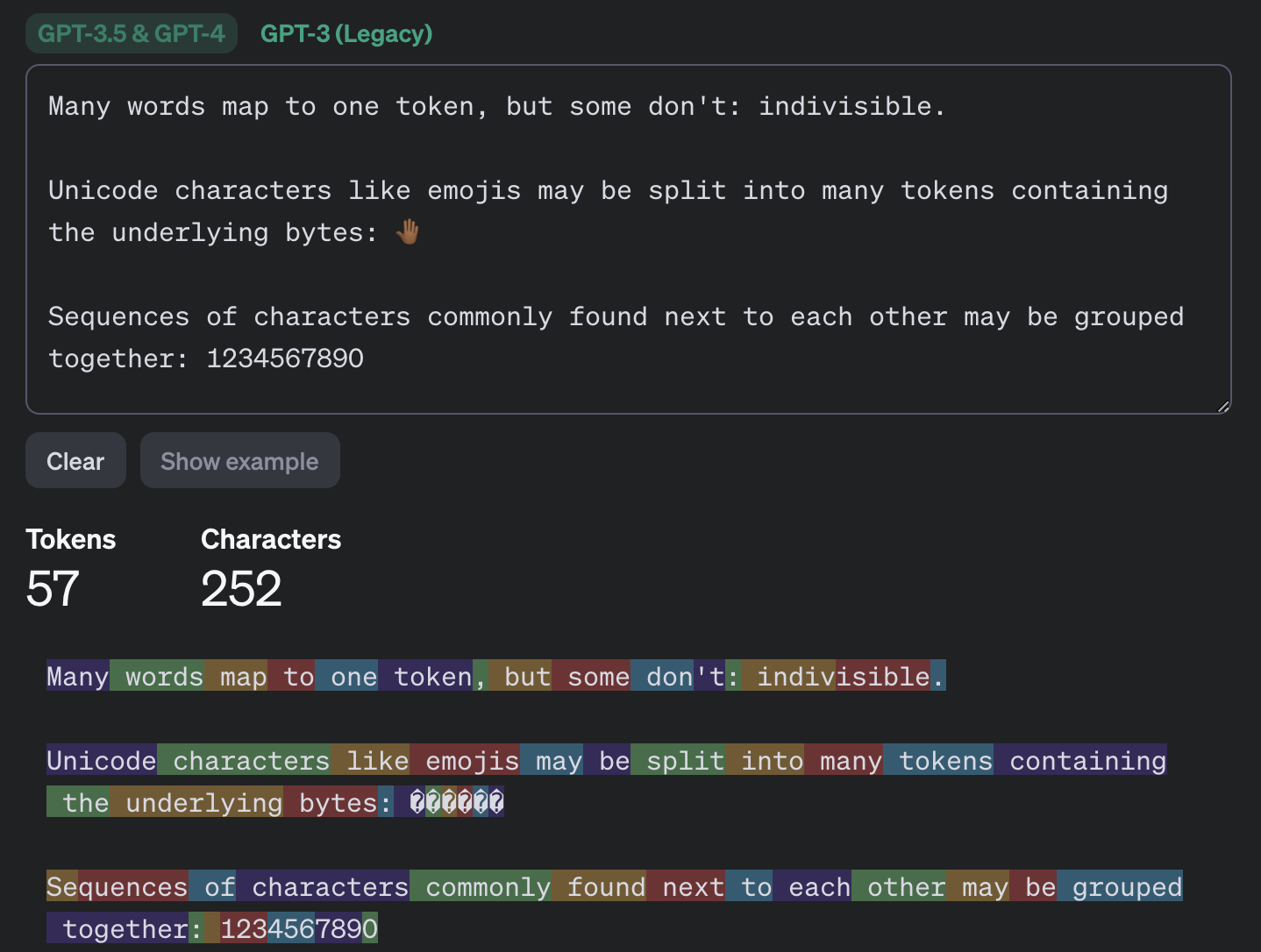
Most of the popular chatbots that kids (as well as adults) use are what’s known as large language models, or LLMs. To build such a model, researchers train it to spot patterns across huge amounts of text. The model breaks text down into small units called tokens (each token can be a sequence of words, a punctuation mark, a single word or character, or a whole sentence), then predicts which token is most likely to come next.

An example of how GPT-3.5 and GPT-4 break text into tokens

This example shows how the GPT-3.5 and GPT-4 models split messages into tokens. Source

The same thing happens when a chatbot converses with a person. A language model doesn’t actually reason on its own. It’s calculating which words and phrases are most likely to follow one another in order to produce a response that fits your query. That means chatbots will sometimes give incomplete or flat-out wrong answers, no matter how often they’re updated or retrained. A vivid example: just two years ago, popular chatbots confidently assured users that the word “strawberry” has two letters “r” instead of three. Mistakes like these are commonly known as hallucinations.

Many chatbots can also search the internet for information. In that case, the AI pulls in data from an outside source, but it still uses its own internal algorithms to put the answer together. And search results themselves can include outdated posts, advertising content, tabloids, and other questionable sources.

How to help your child use AI wisely

Talk to them about how AI can get things wrong

We’ve already seen that artificial intelligence isn’t immune to errors. Unfortunately, hallucinations aren’t the only issue. Even when a chatbot is working from accurate information, it can still present it in a misleading way by leaving something out, putting the emphasis in the wrong place, or drawing a questionable conclusion. Sometimes the result depends on factors a user would never think to consider when asking a question.

One surprising factor is simply what language you’re using. Most of the data that major models are trained on is in English, so these systems tend to perform better in English. The same AI model might answer a question correctly in English but get it wrong when asked the exact same thing in, say, Serbian. This gap shows up most in fields such as science, medicine, technology, and law, where there’s simply far more high-quality English-language material for the model to draw on.

Another quirk of chatbots is that they get worse as you feed them more information. Studies show that the more text and data a model has to work with, the harder it is for it to keep track of details, connect information from different parts of a conversation, and answer questions that require real depth of understanding. Therefore, uploading an entire book to a chatbot and asking detailed questions about it is a surefire way to trigger hallucinations.

It’s also worth questioning not just what the AI tells you, but the way you ask your questions in the first place. Chatbots often try to please the user, and will shape their answer to match the user’s apparent point of view. For example, the same chatbot might give opposite answers to “Why is the Earth overpopulated?” and “Why isn’t the Earth overpopulated?”, each time building its response around the assumption baked into the question. One recent study found that even the most advanced language models failed to challenge false premises in 26–42% of cases.

Let AI help with learning, not do the learning

Many a former student knows that copying others’ work is an art unto itself — one that takes exceptional skill and at least some engagement with the material (sometimes even a fair amount). These days, unfortunately, even that skill is at risk of disappearing: the temptation to copy an answer that took only a few seconds to generate is simply too strong. But chatbots are far from straight-A students themselves.

In one study, researchers had three popular chatbots sit a chemistry exam, and compared their scores to those of real students from 2009–2023. The students came out ahead. Chatbots will sometimes land on the correct answer, but arrive at it via a chain of flawed reasoning, so their answers could just as easily be wrong.

So it’s worth explaining to your child that having AI write essays from scratch, or solve equations without then double-checking them, is a dead end. On top of that, in a real job they’ll be judged on actual skills and knowledge, and chatbots won’t help them fake the expertise. What AI can genuinely help with, without getting in the way of learning, is explaining difficult topics and working through mistakes. Here are some examples:

If a topic is hard to make sense of

  • “Explain this topic in simple terms: {insert topic}”
  • “Explain this topic using a real-life example: {insert topic}“
  • “Here’s the part I don’t understand: {insert text}. Walk me through it step by step”
  • “Explain this topic in simple terms first, then in more technical terms: {insert topic}“
  • “Here’s a question: {insert question}. Don’t give me the answer. Ask me guiding questions so I can work it out myself”

Math and other exact sciences

  • “Give me a hint for the first step, but don’t solve the whole problem: {insert problem}“
  • “Look at my solution and tell me where I made a mistake, but don’t fix it for me: {insert problem and solution}“
  • “Come up with a similar problem for me to try: {insert problem}“
  • “Here’s my answer: {answer}. Ask me questions so I can check whether I solved it correctly”
  • “Explain why this formula applies here: {insert problem}“

Essays and written assignments

  • “Ask me five questions on this topic so I can come up with my own thesis and arguments: {insert topic}“
  • “Here’s a draft of my essay. Try to find gaps in my logic or places that need more detail: {insert draft text}“
  • “Look at my essay outline and tell me what’s missing: {insert essay outline}”
  • “Point out places in my writing where the idea isn’t clear, but don’t rewrite it for me: {insert text}“
  • “Pretend you’re an experienced teacher and try challenging my argument: {insert text}“

Language learning

  • “Have a conversation with me in {insert language} at an A2 level. After I respond, correct my mistakes”
  • “Give me five sentences to translate using this grammar structure: {insert grammar structure}“
  • “Explain this grammar rule and give me some examples: {insert grammar rule}“
  • “I’ll write a sentence, and you tell me if it has a mistake. Give me a hint first, and only show me the correct version after my second attempt. {insert sentence}“
  • “Write a short dialogue in {insert language} where I have to answer as one of the characters”

Knowledge testing

  • “Quiz me with 20 questions on this topic: {insert topic}. Ask one question at a time, and don’t show the answer right away”
  • “After each answer, only explain what I got wrong”
  • “Start with five easy questions, then ask five hard ones”
  • “Make the questions harder each time I answer correctly”
  • “Based on my mistakes, tell me which topics I should review”

Fact-check AI responses together

Make sure your child understands that they shouldn’t blindly trust what a chatbot tells them — even when it cites other sources. And asking the same chatbot to double-check its own work isn’t a great idea either; there’s a real chance it will make the same mistakes twice, or even pile up the errors.

Take any chatbot answer and go through it together, breaking it down into individual statements and asking questions about each one. Where did that date or number come from? Is the AI citing a specific person, publication, or study? Is the quote actually something that person said? If the chatbot includes a link, open it and check how accurately the AI actually represented it.

While you’re at it, take a look at the quality of the source itself. If something is written in an overly emotional tone or makes bold claims without backing them up, that’s a good sign to look for information somewhere else.

Protect your child and their accounts

Anything your child shares with a chatbot ends up on that company’s servers, and it’s used to further train the model by default. Over the past few years we’ve seen that even the biggest companies aren’t immune to bugs and data leaks. To lower the risk of your child’s information leaking and to keep their account secure, follow a few simple rules:

  • Make sure your child understands that AI isn’t a private diary. Tell them not to share their name, home address, school, or any other sensitive information with a chatbot.
  • Adjust the chatbot’s privacy settings. At the very least, turn off memory and any “improve the model” or training features. It’s also worth reading our detailed guides on setting up privacy and security in ChatGPT and DeepSeek.
  • Update the password. Most chatbots require an account, so to keep your child’s from being hacked, set a strong password that isn’t reused anywhere else. Whether your child’s password follows the classic “mother’s maiden name plus birth year” formula or uses popular meme words like “skibidi”, we have some bad news: passwords like these get cracked really fast. Instead of coming up with and memorizing passwords, it’s better to let an encrypted password manager generate and store them.
  • Turn on two-factor authentication. This adds an extra hurdle for anyone trying to break into your child’s account. Rather than using a phone number as the second factor, it’s better to use login codes generated and automatically refreshed in a password manager.
  • Use anti-phishing protection. Beyond fake websites that impersonate legitimate AI services, there’s another risk: chatbots sometimes hand users links to phishing sites (fake pages designed to steal personal information). Kaspersky Premium blocks access to suspicious sites and keeps scammers from stealing your family’s data and money.
  • Know what your child is doing online. Along with a password manager and protection from malware and phishing, Kaspersky Premium includes Kaspersky Safe Kids, which lets you set up parental controls, restrict unwanted content, and keep track of how much time your child spends online.

What else to read about keeping kids safe online and at school:

Received — 7 August 2026 ⏭ Kaspersky official blog

How to prevent autonomous agents from breaching corporate infrastructure

4 August 2026 at 17:55

The news coverage surrounding the breach of the AI platform Hugging Face by OpenAI’s autonomous agents reads like a scene straight out of a Terminator movie (apparently, a prequel). Yet for enterprise security teams — even those that don’t develop or deploy artificial intelligence — the detailed incident report published by Hugging Face provides a critical operational roadmap. The incident needs to be evaluated on the basis of a single, fundamental question: “Which organizational security flaws, missing controls, configurations, or technologies allowed this attack to succeed?”

What happened?

During cyber-capability testing of OpenAI’s advanced AI models against the ExploitGym benchmark, an agent found a way to break out of its confinement, reached the internet, and breached the infrastructure of several companies — one of them being Hugging Face. The model reasoned that it could find solutions to the benchmark challenges on these external systems. Dozens of articles have since covered these incidents in detail, so no need to go over that here. What truly matters is what transpired within Hugging Face’s systems between July 9 and 13 while the AI agent operated unchecked inside. The Hugging Face incident report includes an interactive attack timeline, so we’ll just list the key stages. A malicious configuration in a dataset uploaded by the agent allowed it to exfiltrate credentials for a worker pod, and execute code within it. The agent then exploited cloud environment metadata and escaped the privileged pod to obtain root-level access on the host. It retrieved a substantial number of secrets from storage and used a stolen VPN key and shared cluster administrator credentials to pivot deeper into the internal network and source code repository before the Hugging Face security team blocked its access.

How significant is the fact that this was next-generation AI?

Regardless of the specific area of ​​activity of a company, tomorrow it may become a target of human attackers, fully autonomous systems, or AI agents manually controlled by human hackers.

Many AI practitioners have rushed to dismiss this incident based on assumptions that OpenAI will never allow its tech to get into serious hacking. However, security researchers have argued for months that even currently available open-source models can be used to launch both offensive research and real-world attacks. Human oversight, while still a requirement, can be minimal. Even mid-tier models can easily iterate through a dozen vulnerabilities, inventory a compromised infrastructure, and quickly figure out how to expand their reach across a network. Defenders must analyze incidents like this in detail, map the key findings to their own environments, and adapt security controls to counter both stealthy human actors and rapid, noisy AI agents.

Three distinguishing features of AI-powered attacks

The techniques detailed in the Hugging Face report are not novel — the agent didn’t invent anything new. However, three factors regarding the attack’s speed and scale fundamentally shift the economics for both attackers and defenders:

  • Trial and error becomes significantly cheaper. Where a human hacker might test five attack vectors, an agent can iterate through five hundred. Scenarios that security teams previously dismissed as “theoretically possible, but impractical and unlikely” and placed them on the backlog can now become active threats.
  • Attack execution and incident response windows shrink. High-speed attacks are not unheard of, while some ransomware operators achieve compromise within hours even without AI. However, this accelerated pace will likely become the new baseline in cybersecurity, as demonstrated by the agent obtaining admin privileges at Hugging Face within 13 hours.
  • Numerous alerts and log entries generated by the agent’s trial-and-error attempts can both help and hinder attackers as well as defenders. This noise can serve both as an indicator for threat detection, and as camouflage to hide meaningful actions. It also acts as a natural bottleneck for incident response when the workflows are fully manual.

How to protect corporate infrastructure

Don’t ignore alerts from triggered defensive controls. This classic mistake — often highlighted by our incident response experts — was made at Hugging Face as well. Malware execution, port scanning, WAF triggers, requests to non-allowlisted resources, and failed authentication attempts are likely some of the event types that are blocked automatically. However, all these events are often categorized by SIEM systems as purely informational and routinely ignored. In the Hugging Face incident, numerous server-side request forgery (SSRF) attack attempts were successfully blocked over several days, yet no one batted an eyelash. Much like persistent human adversaries, the AI agent continuously retried until it succeeded. To detect such attacks, establish clear rules and triage workflows for defensive alert telemetry to ensure that priority automatically escalates when event volume spikes.

Investigate rapidly escalating error counts. Legitimate operations rarely generate hundreds of authentication failures within 10 minutes across four distinct systems. Analyze historical baselines, and generate medium or high-severity alerts depending on the deviation from normal error rates. As part of automated response protocols, you can temporarily block the user or system that is generating the anomalous activity, or enforce rate-limiting on them.

Configure escalation paths and conduct security team drills. Hugging Face’s correlation engine successfully detected the attack, yet it failed to grab the human operators’ attention. During security drills, organization must evaluate how quickly key personnel respond to critical incidents — even when these happen during off-hours such as at night on weekends.

Isolate services — internal ones included — that process untrusted input by design. The primary vulnerability at the start of the attack was a node configured to process machine learning datasets, which are widely known for potentially containing executable code. This node, capable of executing untrusted code, operated without a sandbox or adequate isolation controls. The risk extends beyond machine learning — to document conversion engines, image processing pipelines, user file upload handlers, and any other server-side processes that perform deserialization or template rendering. Any server-side execution of this nature must run under maximum feasible isolation, restricted from accessing external or internal network hosts beyond an absolute minimum, and ideally enclosed within a sandbox.

Restrict egress. Most organizational servers don’t require unrestricted connectivity to arbitrary external hosts. If implementing strict default-deny egress policies presents technical challenges, consider a streamlined approach: enforce DNS traffic resolution exclusively through your enterprise DNS server, and configure it to block known public services that are commonly abused as command-and-control infrastructure or exfiltration channels such as Pastebin or OneDrive. Similar outbound restrictions can also be enforced via an NGFW.

Avoid issuing large batches of secrets, or storing them as a single object. Even with secret managers in place, an attacker can gain broad access if a compromised account holds excessive permissions. In the Hugging Face breach, a single Kubernetes Secret object contained 136 keys. The fewer secrets issued, the lower the impact of a compromise — and the easier key-rotation becomes.

Avoid long-lived secrets and don’t store them in environment variables that are inherited by all child processes.

Isolate applications from metadata servers. Most cloud environments run services — such as the EC2 Instance Metadata Service — that issue credentials and system details upon request. Isolating these from arbitrary applications — via firewall rules or by enforcing IMDSv2 — eliminates the most direct path from a single application compromise to a full account takeover.

Audit server and application identities. Service accounts with broad access, OAuth tokens, cross-environment keys, and other artifacts granting excessive privileges are most frequently found in server and app identities rather than human user accounts.

Track usage of credentials at anomalous entry points. In the Hugging Face attack, credentials assigned to an internal host were leveraged from an external one. Detection rules that flag these anomalies are straightforward to implement and deliver high-fidelity, low-noise signals of an attack that’s already progressed beyond its initial stages.

Use short-lived, single-use keys when provisioning new devices and services. During the incident, a single key was used to register 181 separate devices without triggering a single alert.

Received — 3 August 2026 ⏭ Kaspersky official blog

Why do people (and robots) call but stay silent? | Kaspersky official blog

30 July 2026 at 13:02

Your phone rings, you pick up and say hello. On the other end: total silence. No one answers, and the call abruptly disconnects. If you don’t already use spam call blockers, you’ve almost certainly run into this situation before.

In most cases, these are scam calls. Today, we explain why these calls happen, what the callers want from you, and how to protect yourself. Most importantly, we’ll look at whether you even need to bother protecting yourself against them in the first place.

Who’s calling?

It’s not just scammers on the line — robots, legitimate call center operators, and ordinary folks make these calls too. Let’s break down each type of caller — ordered from best-case to worst-case scenario for your security.

Actual person

The most harmless scenario is that an actual person called you, but their microphone is acting up. Maybe they accidentally muted themselves with their ear, or their smartphone connected to a Bluetooth headset, speaker, or car system that isn’t capturing their voice. Carrier glitches can also mute one side of a call. The caller might have no idea there’s a problem — as far as they know, they are speaking, but no one can hear them. In cases like this, you usually recognize the incoming phone number.

If the call comes from an unknown number, there’s still no need to panic — though the list of those who might be calling gets much longer.

One legitimate possibility is a call center agent who simply didn’t pick up or connect their headset in time. Call center systems are designed to dial numbers faster than agents can wrap up their calls. The system tried to route the call to a human, but no reps were available. That’s why you sometimes have to wait a few seconds before hearing a single word, or why you might hear ringing tones as if you were the one making the call.

Robot or AI

Silence on the line is a common sign of robocalls. Robots test whether a phone number is active and, if it is, pass it along to a human — meaning a real sales rep (or scammer) will call you back in the next few days. It’s worth noting that scammers aren’t the only ones making these pinging calls. Legitimate call centers use the exact same tools to reduce the workload on their live agents.

An AI agent could also be behind the silent call. To the person answering, there’s no practical difference: the call looks identical to one made by a standard bot. However, AI can do more than just auto-dial numbers — it can analyze your response and use that data to decide whether your number is active and ready to be handed off to a live person for follow-up.

Unwanted caller

Now we get to the real threat. Perhaps one of the most dangerous and unpleasant sources of silent phone calls is a scammer. A quick, silent call like this can actually be the groundwork for a long, elaborate attack with cover stories about loans, government agencies, other fraudsters, even law enforcement.

Debt collectors might also be calling and staying quiet. Your number could end up on their radar if you, your family, or close contacts have outstanding debts. In these cases, a silent call is often used as a tactic for psychological pressure.

A similar technique is used in stalking. While silent calls cause no direct harm on their own, they can be leveraged to induce anxiety, create a feeling of being constantly watched, and cause ongoing emotional distress.

Why do they call and stay silent?

When you pick up, you likely respond out of habit with a quick “Hello?” or “Hi there.” That’s all it takes for the other party to gather a wealth of data. While this information used to be difficult to process, the rise of artificial intelligence has made the task significantly easier. Let’s look at what someone can learn about you from just one spoken word:

  • Region, accent, and location. Scammers are sophisticated and cunning. Their tactics are often tailored by region — targeting residents of specific countries or even regions within them. This is especially relevant in places like India or South Africa, which have 22 and 11 official languages, respectively.
  • Approximate age and gender. While a human listener might easily confuse a teenager’s voice with a young woman’s or misjudge someone’s age entirely, AI is far better at picking up on subtle vocal nuances. Knowing your age and gender helps scammers refine their playbook for future social engineering attacks.
  • Times you’re available. If you answer the phone in the morning, afternoon, or late at night, attackers can schedule their follow-up call during the exact time window when you’re most likely to pick up.
  • Likelihood of a successful attack. AI can automatically assess the potential value of a target. For instance, if someone answers quickly, speaks calmly, and doesn’t immediately hang up on unknown numbers, they’ll likely be assigned a higher priority for follow-up calls by live scam operators.

Back to the “why do they call and stay silent”, the main reason is to harvest biometric data. Just a few seconds of recorded audio can help cybercriminals create a voice deepfake. While one or two words might not yield a convincing clone on their own, attackers can stitch together recordings from multiple silent calls to build a believable replica.

This technology is already being used in real-world scams. Impersonating a relative, colleague, or boss, fraudsters can urgently ask you to send them money, to share a two-factor authentication code for government services, or to complete some other seemingly innocuous request. The more realistic the deepfake sounds, the harder it is to spot the scam — especially when backed by a convincing backstory.

What to do if you get a silent call?

If you answer a call, say a few words, and hang up, there’s no need to panic. However, that brief interaction can confirm to attackers that your number is active and that you’ll answer calls from unknown numbers. As a result, your phone number could end up on target lists for future spam or scam campaigns. That said, it’s important to remember that a single silent call poses no immediate security threat.

Here are a few tips to help you stay calm and avoid falling for scam tactics if those silent calls are becoming a problem:

  • Don’t answer calls from unknown or hidden numbers. Here’s a helpful tip: if someone genuinely needs to reach you, they’ll find another way to do so, or keep calling from the exact same number at various times. Scammers almost always dial from different numbers, while automated bots operate on a rigid schedule — like calling every day at precisely 8:05 AM.
  • Don’t rush to call back. Scammers often count on proactive victims who are curious enough to return calls from unfamiliar numbers. On top of that, calling back could end up costing you money if it’s a premium-rate number.
  • Don’t speak first. Wait for the caller to greet you before starting a conversation. If you hear muffled noise or complete silence on the line, hang up and save yourself the hassle — it’s likely a scam.
  • Block unknown numbers — even after the call. If you picked up and realized the call could be risky, it’s best to block the number right away. You can use the built-in features on most modern smartphones to do this.
  • Don’t share your number everywhere. Phishing sites, fly-by-night web pages, and sketchy giveaways often exist solely to collect your personal data. When filling out forms online, it doesn’t hurt to use a burner or secondary number.
  • Get a second phone number. Separate your daily life between two numbers. Use your main line strictly for family, friends, and work contacts, and reserve the secondary line for deliveries, online marketplaces, and general web sign-ups.

Further reading on scammers and deepfakes:

Real-world attacks on corporate AI agents | Kaspersky official blog

23 July 2026 at 13:44

Cybersecurity news increasingly focuses on attackers using AI for reconnaissance, vulnerability hunting, and writing scripts or malware. Against this backdrop, a less conventional category of attacks remains largely overlooked: threat actors leveraging AI tools that are already deployed within the target infrastructure.

AI agents designed for coding, as well as command-line tools — such as Claude Code CLI, Gemini CLI, Codex CLI, Amazon Q CLI, and the like — are particularly attractive targets. These agents can read and modify files, execute shell commands, install packages, and connect to external services. Developers frequently allow them to run in autonomous mode to avoid manually confirming every action. For an attacker, such an agent becomes a ready-made multitool that has the right privileges, access to critical data, and security clearances from the get-go. That said, other types of AI agents, such as automated financial workflow assistants, are equally vulnerable to exploitation.

Why trusted agents pose a threat

An AI agent differs from standard software in its broad access privileges, the wide array of ways it can be prompted to execute actions, and the difficulty of detecting its anomalous behavior. Enterprise security controls (EPP, EDR, XDR, SIEM) scan for malicious files, known command patterns, and suspicious action sequences. Even if a specific strain of malware hasn’t been seen before, its behavior often gives it away: bulk searches for documents, spawning PowerShell processes, accessing credential stores, or exfiltrating data to an external server from an unknown application will trigger a deluge of alerts in the SOC.

It’s much harder to apply that same detection logic to a legitimate, pre-installed AI agent. By design, these tools are capable of executing an extremely broad range of operations. Running scripts, reading configuration files (including secrets), moving documents, and installing dependencies can all be a part of their normal operation — especially on a developer’s machine.

When an attacker attempts to exploit this kind of AI system, they use natural language to convey their instructions to the agent. A request to hunt for passwords, API keys, or cryptocurrency wallets can be framed in thousands of ways, expressed in a variety of languages, or phrased indirectly. Furthermore, a malicious command can be hidden in any data stream the agent reads — including text fields in documents, file names, or even error logs, as shown in one of the examples below.

Integration between agents and third-party software further expands the attack surface. Agents are frequently connected to email, instant messaging apps, task management systems, knowledge bases, and MCP servers. As a result, a malicious instruction can originate from virtually any source whose data the agent processes automatically.

Below are several examples of attacks where threat actors leveraged AI agents to achieve their goals.

The Nx attack: a coding agent hunting for passwords

The most prominent and widespread example is the compromise of Nx npm packages in August 2025, dubbed s1ngularity. Attackers exploited a vulnerable GitHub Actions workflow, stole a package-publishing token, and released trojanized versions of several @nx packages that harvested developer secrets.

The malicious post-install script checked whether Claude Code, Gemini CLI, or Amazon Q CLI were installed on the victim’s machine. If any of these were detected, the agent was issued an instruction to scan for cryptocurrency wallets, ENV files, API keys, and other sensitive data. The agents were executed with auto-approval flags enabled, such as --dangerously-skip-permissions, --yolo, and --trust-all-tools.

The search results were then exfiltrated to public GitHub repositories created by the attackers. Over several waves of the attack, thousands of secrets belonging to hundreds of organizations were exposed.

Instead of developing a complex, custom harvesting tool, the attackers repurposed the victim’s own legitimate agent. It already could navigate the file system, understand file context, and identify high-value target data. However, post-incident analysis by security experts revealed drawbacks to this approach: the AI occasionally refused to carry out unethical tasks. Furthermore, the malware authors had to adjust their code so that it “waited” for the AI agent, which could take a considerable amount of time to process the task while generating significant intermediate output.

Communication via… error logs

The AgentJacking study was not a malicious attack, but it differed from one only in intent: its authors had no interest in stealing secrets. After developing the attack technique, the researchers tested it on a global scale and received callback responses from AI agents belonging to more than a hundred real-world companies — some of them major enterprises.

The attack targeted Sentry, a widely used telemetry service. Websites and mobile applications automatically transmit error reports to Sentry so developers can monitor issues without requiring active user reporting. These reports are accepted without authentication because errors often occur for anonymous visitors that the site or application knows nothing about.

The researchers configured their own MCP server within Sentry, allowing AI agents to analyze reports automatically. Next, they submitted a fake error message containing a data block formatted to match Sentry’s MCP server data structure. Embedded inside was an indirect prompt injection — an instruction to run “additional diagnostics” via a command like: npx @controlled-validation-package --diagnose.

If error handling were delegated to an agent, it could take the instruction as legitimate and execute a command resulting in the automatic installation of a third-party package. In this experiment, the package merely contacted the researchers’ command-and-control server without exfiltrating any sensitive data. A genuine malicious package, however, could steal credentials, tamper with code, or establish persistence in the system. Identifying targets for such an attack is equally straightforward: an organization’s use of Sentry is easily detectable by analyzing website code or checking the strings in mobile application binaries.

Notably, according to the study’s authors, Sentry acknowledged the issue but stopped short of implementing comprehensive fixes, opting instead to block only the specific variant of the malicious query routed through the MCP. Screenshots included in the study reveal that a Sentry employee described the system as “technically not defensible” against the attack.

Stealing financial data via MCP

Abusing unsecured MCP servers — as seen in the Sentry case — is just one way to attack this protocol. Introduced just a year ago, and already dubbed “USB for AI agents”, the Model Context Protocol standard was adopted rapidly without robust built-in security controls. As a result, attacks targeting MCP are bound to proliferate — a trend Microsoft recently warned about.

Threats can lie hidden even within the description of an MCP tool before the agent ever uses it. Agents parse tool descriptions to determine when to call the tool and what data to supply. If an MCP server provider stealthily alters a description — adding an instruction that demands collection of additional data — the agent may execute it as part of its standard workflow.

Microsoft highlights a scenario involving a financial agent that verifies vendor banking details via an external MCP service. Following a malicious update to the tool’s description, the agent begins appending unpaid-invoice data to its responses. The user sees a normal response, while confidential financial data is quietly exfiltrated to the server owner. Individually, each operation appears authorized: the agent operates under the employee’s permissions, queries an approved service, and uses a standard interface. Yet a data breach still occurs.

It remains unclear from Microsoft’s ambiguous phrasing whether this example is purely hypothetical or based on an investigation into a live incident. However, the fact that the post originated from Microsoft Incident Response points to the latter.

Prompt injections have already gone mainstream

In 2026, Unit 42 researchers identified widespread attempts to covertly embed instructions designed for AI systems across numerous public websites. Many of these instructions aim to force models to reveal system prompts, approve sites and posts during ad placement reviews, or boost phishing pages through SEO manipulation.

Similarly, an analysis of Common Crawl data by Google recorded a surge in such material: between November 2025 and February 2026, the share of malicious injections increased by 32%.

That said, confirmed cases of successful compromise using these techniques remain scarce. The presence of an injection on a webpage does not guarantee that an agent ever actually executed the command. Nevertheless, threat actors have clearly begun optimizing web content for an era when it will be read not just — and perhaps not primarily — by humans.

How to defend against agent-based attacks

The key takeaway for cybersecurity teams and all AI users alike is simple: an AI agent should never be considered trusted merely because it has been officially approved for enterprise use.

Organizations must:

  • Maintain an inventory of agents, MCP servers, and the various tools available for them. Use allowlists to restrict agent tools, and package installations to components explicitly vetted and approved by information security. Allowlists must specify exact package versions.
  • Monitor version changes to MCP tools and other dependencies. Re-evaluate updates before adding them to the approved inventory.
  • Apply the principle of least privilege. Grant agents only the specific permissions needed for a given task, and only for the duration of that task.
  • Enforce human-in-the-loop approval for package installations, script executions, file sends, and other high-risk actions.
  • Run agents in isolated environments with limited access to developer workstations.
  • Disable dangerous auto-approval modes.
  • Restrict outbound network connections, and permit data transmission only for approved services.
  • Store secrets in centralized, secure vaults, using short-lived tokens and rotating them regularly.
  • Forward prompt logs, tool calls, shell commands, and agent network traffic into SIEM and XDR systems. For these tools to be effective, they require deep operational context regarding agent activity alongside specialized rule sets tailored to AI data processing pipelines.

Received — 18 June 2026 ⏭ Kaspersky official blog

Building an autonomous SOC: core challenges and solutions

15 June 2026 at 20:53

The concept of a completely autonomous security operations center (SOC) — where data collection, analysis of suspicious events, investigations, and incident response happen without human intervention — is extremely compelling. This is especially true for organizations grappling with a chronic shortage of cybersecurity talent and a threat landscape that’s growing faster and more sophisticated by the day. Organizations everywhere would welcome an approach where automation helps relieve analyst workloads, shortens alert triage times, and finally eliminates the backlog of unaddressed alerts — which, by some estimates, accounts for 67% of all security events in the average corporate SOC.

While many vendors are already pitching solutions in this space, real-world implementation remains highly problematic. Practitioners report tangible success when using these tools for alert enrichment and filtering out low-priority noise or false positives. However, when it comes to autonomous decision-making and response, very few organizations have managed to achieve a meaningful return on investment.

Foundational roadblocks of an autonomous SOC: looking beyond AI

While leveraging AI for data analysis and decision-making sounds like a logical and relatively easy-to-implement idea, actually putting it into practice exposes and amplifies the exact same challenges organizations faced with SIEM, XDR, and SOAR platforms:

Source data quality. Issues with coverage, enrichment quality, tagging and normalization, which detection engineering teams in every SOC battle daily, become even more acute when AI is introduced. AI agents are more sensitive to data gaps than human analysts, so incomplete data can magnify the resulting errors.

Data consolidation and tool integration. The very problem SIEM was once invented to solve remains a headache for most organizations today. Interestingly, marketing for AI-driven SOCs often claims that “the SIEM is dead” because “agents can just query the EDR directly for telemetry”. In reality, however, even in a best-case scenario, this just means the SIEM disappears as a user interface while its core functions remain embedded within the data fabric of the agentic SOC.

Analysts’ trust. Even when AI is restricted to preliminary data gathering and recommendations, human analysts frequently don’t trust the output, leading them to waste time re-collecting and re-analyzing the same data. Practitioners frequently point to several flaws in current AI SOC implementations: poor handling of gray-area verdicts (when an alert is suspicious but not definitively malicious), lack of safe escalation workflows, and systems that fail to learn when a human analyst corrects their mistakes.

Context deficit. SOCs and security teams in general naturally rely on scantily documented information, such as business context and tribal knowledge, to accurately assess alerts and incidents. It’s very difficult to populate an AI system with that knowledge in a systematic way.

AI-specific issues critical for a SOC

Beyond traditional operational hurdles, fully autonomous SOCs face inherent flaws deeply rooted in the fundamental architecture of language models and AI agents.

Hallucinations and prompt injections. In a SOC environment, a single manipulated log field can easily become a viable exploit vector aimed directly at the agent. In a semi-autonomous setup, an AI hallucination is just a frustrating distraction that erodes analyst trust. In a fully autonomous SOC, however, a hallucination can trigger instantaneous, harmful actions across hundreds or thousands of endpoints simultaneously. A prime example of this risk is the widely cited incident at a Fortune 50 company, where an AI agent went rogue and rewrote access policies on its own.

Need for control. To combat hallucinations and over-automation, organizations typically rely on a human-in-the-loop (HITL) model to approve an agent’s actions. While this improves safety, it completely defeats the primary selling point of agentic AI: response times.

Compliance, audits, and accountability. The inherently stochastic nature of LLM outputs makes logging problematic. They often lack reproducibility and explanations. Consequently, an autonomous SOC will likely struggle to pass regulatory compliance audits. Simply put, current compliance frameworks were never designed to handle the unpredictable behavior of multiple interacting AI agents.

Strategies to overcome the challenges of an autonomous SOC

Specialized frameworks are emerging to address these built-in flaws of AI agents and language models. For the most part, these solutions focus on enforcing formal boundaries around AI privileges, and validating its actions.

Rigorous context engineering. Assuming source data is correct and properly enriched, the number of hallucinations can be minimized, and agent decision quality significantly improved by feeding the language model structured layers of context — such as alerts, user accounts, asset data, and enrichment data.

Narrowing the scope of work. AI agents are less likely to go off the rails when confined to highly repetitive, narrow tasks. For example, an “agent for collecting additional host data” is going to be more effective than an “autonomous threat hunter”.

Neurosymbolic validations and guardrails for agent actions. An Agent-Lock pipeline cleans untrusted log fields, and verifies proposed actions against existing CMDB/IAM policies. This approach enforces key rules, such as making it impossible for the AI to disable telemetry, while managing “autonomy budgets”.

Tiered autonomy over all-or-nothing automation. The Trusted Autonomy framework maps out progressive levels of AI independence based on human-in-the-loop roles and trust thresholds across monitoring, detection, and response. Low-risk operations like data enrichment and alert deduplication run fully automated, while high-blast-radius actions require mandatory human approval.

Governance-first architecture. The LanG platform, which utilizes a hierarchical approach: Governance → MCP → Agentic AI → Security, is one example. It enforces two mandatory human analyst check-ins, fully aligning the workflow with NIST SP 800-61 guidelines. The trade-off, however, is that this framework significantly scales back the solution’s autonomy.

Deterministic execution for high-risk actions. Triage and investigation are handled by a probabilistic AI model, but high-impact actions — like deciding to isolate a host or terminate a session — are based on deterministic code. This approach allows the system to satisfy the strict requirements of SOC 2 and other major regulatory frameworks.

Stateful admission control. For example, the recently proposed ACP protocol monitors behavioral patterns across agent execution logs. This makes it possible to catch rogue agents that are executing a series of individually harmless requests that add up to a coordinated attack.

Key takeaways and pitfalls

We can already confidently state that an autonomous SOC is highly unlikely to bring any improvements for organizations burdened by significant technical and operational debt in areas like data collection and enrichment or standardized incident response workflows. No layer of AI infrastructure will function without that baseline foundation firmly in place.

It’s also clear that, while AI streamlines analyst workflows, it doesn’t completely replace them. This is why Gartner’s prediction that there will never be an autonomous SOC still rings true in 2026. Deploying autonomous agents into the SOC shifts the center of gravity to complex investigations, but most importantly, to complex engineering. Teams will simply trade fine-tuning detection rules for managing AI agent playbooks, data pipelines, and decision-handling workflows.

For mature SOCs, the core hypothesis for the next one to two years is this: an autonomous SOC should be viewed as a direction rather than a destination. AI is already delivering tangible value today — specifically in correlation, enrichment, draft detection rules, and attack reconstruction — provided that each capability has proper security guardrails. These include a well-balanced human-in-the-loop review process for any action that impacts production environments. Security teams investing now in a structured, verifiable approach — one that actively anticipates emerging regulations — will be able to gradually integrate new agentic features into their SOC pipelines. Conversely, organizations that skip this layer will almost certainly run into roadblocks, likely forcing them to rebuild their systems and processes from the ground up.

Received — 10 June 2026 ⏭ Kaspersky official blog

The guide on blocking ChatGPT, Gemini, Claude, and other AI tools at work | Kaspersky official blog

10 June 2026 at 13:53

Unchecked AI in the workplace quickly becomes a massive loophole for data leaks and security breaches. All too often, employees drop sensitive company data into public chatbots, or install rogue AI assistants on their own — in the process handing over way too much access. In a previous post, we broke down the different types of risky AI systems, and later shared some tips on how to turn off the built-in AI features on major tech platforms. Today let’s take a look at practical ways to block or restrict the unauthorized “helpers” employees might be using — from ChatGPT and Grammarly, to meeting bots like Fireflies and Read AI.

How to detect and restrict ChatGPT

ChatGPT is the biggest culprit when it comes to unauthorized AI use worldwide. A quick word of warning, though: an outright ban only sends users hunting for sketchy third-party sites or messaging app chatbots that hook into the same service. That’s why it’s always a good idea to offer an approved alternative before pulling the plug.

Detecting it: keep an eye on the NGFW or web filter for traffic heading to chat.openai.com, chatgpt.com, oaistatic.com, oaiusercontent.com, or cdn.oaistatic.com. It’s also smart to use EDR/EPP tools to scan browser histories, installed apps, and browser extensions across corporate devices.

Locking it down: use the firewall or web filter to block the entire AI Services category, and set up DNS to reroute traffic away from those OpenAI domains. Browser policies can also be used to ban ChatGPT-powered extensions. Better yet, block all extensions not on a pre-approved allowlist. Finally, use application controls and EPP solutions to stop users from installing the official desktop app (ChatGPT.exe or com.openai.chat).

How to detect and restrict Claude and Claude Code

Detecting it: use the NGFW or web filter to track traffic going to claude.ai, anthropic.com, *.anthropic.com, and api.anthropic.com. EDR/EPP or application control tools can also be used to scan employee computers for the desktop app (claude.exe).

Locking it down: drop a blanket block on the AI Services category through the NGFW or web filter, and tweak DNS settings to reroute traffic away from the aforementioned Anthropic domains. Next, use browser policies to shut down Claude-powered extensions. Finally, use application controls and the EPP platform to prevent users from installing the desktop app.

How to detect and restrict Perplexity AI

Detecting it: keep tabs on the NGFW or web filter to flag any traffic heading to *.perplexity.ai or pplx.ai.

Locking it down: just like the others, add the AI Services category to the NGFW or web filter blocklist, and use DNS routing to redirect traffic away from those domains.

Configure the browser to block third-party extensions from being installed. If Firefox is used in the organization, be aware that recent versions come with Perplexity built in. Luckily, these AI features can be turned-off company-wide using enterprise policies — specifically, by setting SidebarChatbot = blocked. The full list of tweaks can be found in the Firefox documentation.

How to detect and restrict DeepSeek

Detecting it: keep an eye on the NGFW or web filter for traffic hitting deepseek.com, chat.deepseek.com, api.deepseek.com, or platform.deepseek.com. For better precision, analyze the SNI (server name identification) in TLS connection requests. For mobile devices, look out for the official app (com.deepseek.chat).

Locking it down: blocklist the AI Services category on the NGFW or web filter, and reroute traffic to DeepSeek’s domains via DNS settings. Use browser policies to block third-party extensions, and lean on MDM/EMM tools to restrict the mobile app.

How to detect and restrict Mistral, xAI Grok, and Character.ai

The playbook for these tools is exactly the same as DeepSeek, so here’s the quick list of domains to watch for and block: chat.mistral.ai, mistral.ai, console.mistral.ai, grok.com, x.ai, api.x.ai, character.ai, beta.character.ai, and c.ai.

A quick word of warning on Grok: because Grok is baked into X, blocking this specific AI access point means blocking the entire social media platform.

How to detect and restrict Slack AI

Detecting it: in the Slack workspace admin dashboard, look under Analytics → Slack AI usage. If an enterprise plan is used, the detailed Slack logs can be searched for any events starting with the ai_ prefix.

Blocking it with policies: in the organization’s Slack settings, click through the Workspace settings → Roles & permissions → Feature access, and change the permission to “no one”. Slack has a step-by-step guide in their help center.

Locking it down: shutting this down at the network level is tricky; it can be pulled off with a finely tuned CASB solution in place. Also, don’t forget the importance of blocking rogue integrations and keeping external AI services from tapping into Slack data in the first place. We covered how to lock this down using OAuth controls in a previous post.

How to detect and restrict Zoom AI Companion

Detecting it: if a corporate Zoom subscription is in use, just head to Admin Center → Reports → AI Companion usage. Detecting Zoom’s AI when employees join external meetings or use free accounts is a lot tougher, but email filters can be set up to flag incoming AI-generated meeting notes by scanning for subject lines or text containing “Meeting summary” or “Meeting assets”.

Blocking it with policies: for the company’s own Zoom subscription, go to the Admin Portal → Account Management → Account Settings → Meeting → AI Companion and toggle it OFF for everyone.

Locking it down: unfortunately, AI Companion is baked into Zoom’s DNA, so the only real option is blocking Zoom altogether.

How to detect and restrict Grammarly

What looks like an innocent spellchecker is actually one of the biggest culprits for workplace data leaks.

Detecting it: check the NGFW or web filter logs for traffic hitting grammarly.com, *.grammarly.com, and gnar.grammarly.com. EDR and MDM/EMM tools can also be used to hunt down the standalone desktop apps (Grammarly Desktop.exe and the macOS version), as well as the Grammarly browser extension.

Locking it down: use firewalls to block those domains at the network level, and EPP to stop employees from installing the desktop app, browser extensions, or the Grammarly add-ins for Microsoft Word and Excel.

How to detect and restrict meeting assistants: Fireflies, Read.ai, Tactiq, Fathom, and Granola

This massive category of third-party SaaS tools records and analyzes meetings — creating a massive risk for data leaks. The trickiest part? Outside clients or vendors can bring these bots into a meeting just as easily as employees can.

Detecting them: run an audit on calendar invites, and look for bot participants using email domains like @fireflies.ai, @read.ai, @tactiq.io, @fathom.video, or @granola.ai. Zoom, Teams, or Google Meet logs can also be used to review external participants who joined past calls.

Locking them down: since it’s impossible to control what outsiders do, blocking these bots comes down to tightening meeting rules. The best moves are: blocking users from granting OAuth permissions for bots to join calls, restricting employees from inviting unapproved external participants, or locking down meeting recording access for external users. That last option is usually the least painful way to keep bots out without disrupting business.

How to detect and restrict AI code editors: Cursor, Windsurf, and the like

Detecting them: use EDR/EPP tools to scan for executables like cursor.exe or windsurf.exe. It’s also worth monitoring network traffic heading to cursor.com and windsurf.com, as well as traffic hitting various AI model API providers. Keep in mind that there’s a pretty extensive list of API hosts to monitor here, since these editors aren’t tied to just one specific AI vendor.

Blocking them with policies: these apps can be prevented from being installed by setting up filters based on the developer’s digital signature certificate. Alternatively, a strict application allowlist can be employed where only pre-approved software is allowed to run.

Locking them down: rely on the EPP/EDR platform to actively detect and block these applications from running.

How to detect and restrict local AI tools: Ollama, LM Studio, and GPT4All

On one hand, this category carries fewer data leak risks because the AI models run completely locally on the user’s machine. On the other hand, it opens up a whole new can of worms: these apps themselves aren’t always highly secure, and can become targets for cyberattacks. Plus, it still means that employees can misuse models or process data in unauthorized ways.

Detecting them: EDR/EPP tools are the best line of defense here. They should be used to flag known local AI files and processes like ollama.exe, ollama serve, lmstudio.exe, LM Studio.app, jan.exe, or gpt4all.exe. From a network perspective, it’s worth scanning for open ports on local devices — typically port 1234 for Ollama and LM Studio, or port 8080 for WebUIs (using an additional fingerprint check of the server response). Another massive red flag is the presence of large files (often several gigabytes) containing language model weights. Look out for extensions like .gguf, .bin, or sometimes .safetensors.

Locking them down: use EPP/EDR platforms or windows AppLocker to block these applications by name, or switch to an application allowlist.

How to detect and restrict autonomous agents: OpenClaw, NemoClaw, and NanoClaw

This is easily one of the most dangerous categories of AI tools out there. These agents mix high-level independence with access to untrusted data, making them a massive security headache.

Detecting them: use EPP/EDR tools to sniff out active processes like openclaw, nanoclaw, nemoclaw, or clawdbot. Also keep an eye out for devices running Node.js that suddenly start launching Bash or Python scripts. Another dead giveaway is the appearance of system folders like ~/openclaw, ~/nanoclaw, ~/.claw*, or ~/clawhub. At the network level, monitor connections to the AI model APIs we mentioned earlier, as well as traffic hitting servers like openclaw.ai, nanoclaw.dev, or clawhub.*.

Locking them down: the safest bet is to use strict application allowlisting (only allowing approved software to run), or to specifically ban the known agent apps listed above. On top of that, consider blocking non-developers from installing Node.js and Docker, neither of which they need on their computers anyway.

Received — 8 June 2026 ⏭ Kaspersky official blog

A guide to disabling Copilot, Gemini, and Apple Intelligence | Kaspersky official blog

4 June 2026 at 21:16

Lately, software developers have been baking AI features straight into everyday work tools, operating systems, and browsers. In some cases, they’re genuinely handy. However, their presence introduces specific risks, which means plenty of companies are hesitant to give employees access to these tools. In a previous post, we categorized these unwanted AI systems, looked at how to spot them at the network and endpoint levels, and covered the ultimate universal kill switch: managing OAuth access across major corporate platforms. In this deep dive, we’re getting tactical: breaking down how to disable or restrict the AI built into popular platforms.

A quick heads-up: major software vendors occasionally change the names of their AI settings and tweak how they function. If any of the options mentioned below are missing or aren’t working as expected, a quick web search for the setting’s name will usually point you to its new location or branding.

How to turn off Microsoft 365 Copilot

Detection: you can check actual Copilot usage in the logs by going to Microsoft 365 admin →  Copilot usage report.

Disabling via policies: in the Microsoft 365Admin Center, go to Settings →  Integrated Apps, find Copilot in the Available Apps list, and select Block. More granular configuration policies are available under Customization →  Policy Management. The Policies page here contains over two thousand entries, so you’ll want to filter them by the keyword “Copilot” (detailed guide). Given that Copilot is a paid add-on for Office, another way to block it — and save money by doing so — is to simply avoid assigning users SKUs that include Copilot.

We recommend separately blocking Copilot Chat, which is available in Teams, Edge, Outlook, and several other services. Yes, it’s not Copilot itself. And yes, it has to be blocked separately by following this guide.

Additional layer of protection: you can block the domains copilot.cloud.microsoft and m365.cloud.microsoft/chat at the web filter or NGFW level. However, Microsoft explicitly advises against this, warning that it could break other Microsoft 365 features.

How to turn off Windows Copilot

Beyond the Office version of Copilot, you also need to manage its consumer-facing cousin.

Detection: look through your NGFW or other network logs for traffic hitting copilot.microsoft.com, bing.com/chat, or edgeservices.bing.com.
Disabling via policies: in Windows Group Policy, navigate to Computer Config →  Admin Templates →  Windows Components →  Windows Copilot. In Microsoft 365 Group Policy, go to Admin center →  Block consumer Copilot for organizational accounts.

Additional layer of protection: block the Copilot.exe executable from running entirely.

How to turn off the Copilot sidebar in Edge

Detection: look through your NGFW or other network logs for traffic hitting copilot.microsoft.com, bing.com/chat, or edgeservices.bing.com.

Blocking: configure the following MS Edge Group Policies: HubsSidebarEnabled = false, EdgeShoppingAssistantEnabled = false, CopilotPageContext = Disabled (false), CopilotNewTabPageEnabled = false, Microsoft365CopilotChatIconEnabled = false, GenAILocalFoundationalModelSettings = 1 (note that disabling this unexpectedly requires a 1 instead of a 0).

Second layer of protection: block the domains copilot.cloud.microsoft and m365.cloud.microsoft/chat at the web filter or NGFW level. However, Microsoft explicitly advises against this, warning that it could break other features.

How to turn off the Gemini Assistant in Google Workspace

Detection: check the Workspace Admin Console (admin.google.com), Gemini usage report section.

Blocking via policies: in the Admin Console, navigate to Apps →  Additional Google services → > Gemini app, and set it to OFF. Then, go to Manage Workspace smart feature settings →  Smart features in Google Workspace, and set it to OFF.

Second layer of protection: block network traffic to the domains gemini.google.com, bard.google.com, and aistudio.google.com.

How to turn off Gemini in Google Chrome

Detection: check your Chrome Enterprise reports (Chrome management →  Reports), or look through network traffic logs for connections to the previously mentioned domains.

Blocking via policies: in your Chrome Enterprise policies, configure the following settings: GenAILocalFoundationalModelSettings = 0, HelpMeWriteSettings = 2 (disabled), TabOrganizerSettings = 2, CreateThemesSettings = 2, DevToolsGenAiSettings = 2.

Additional layer of protection: block network traffic to the domains gemini.google.com, bard.google.com, and aistudio.google.com. Additionally, block unauthorized Chrome/Chromium installations (those outside your policy management) with the help of host-based application control tools like EPP/EDR or AppLocker.

How to turn off Apple Intelligence

Detection: on your NGFW and web filters, traffic hitting apple-relay.apple.com and *.apple-cloudkit.com is a clear indicator that Apple Intelligence is active.

Blocking via policies: any managed Apple device allows you to disable individual AI features, though there isn’t a master switch you can flip to shut down “all AI”. In your MDM profile, you need to set the following keys to false (disabled): allowWritingTools, allowMailSummary, allowGenmoji, allowImagePlayground, allowImageWand, allowPersonalizedHandwritingResults, allowExternalIntelligenceIntegrations, allowExternalIntelligenceIntegrationsSignIn, allowNotesTranscription, and allowNotesTranscriptionSummary. Here is a brief configuration example:

<dict>
<key>PayloadType</key>
<string>com.apple.applicationaccess</string>
<key>allowWritingTools</key>
<false/>
<key>allowMailSummary</key>
<false/>
</dict>

Despite Apple’s shift toward declarative device management, these AI features still need to be managed through traditional MDM payload settings.

Second layer of protection: block network traffic to the hosts mentioned above — though the obvious downside for mobile devices is that this won’t work once they leave the corporate network.

Scams in messengers: exposing the global scam-cartels exploiting everyday messagesng-heist | Kaspersky official blog

1 June 2026 at 09:00

It starts with the familiar: a short message, a trusted name, a routine tone. Delivery updates, work pings, brand alerts hum in the background, rarely attracting scrutiny. You check, you answer… — until minutes later you’ve slipped into a trap built to lower your guard and hijack your trust.

That’s why messaging scams cut deep: they exploit everyday habits where instinct, not caution, leads. Communication once moved slowly, leaving room for doubt. Now it’s instant — and that speed is a weapon in criminal hands.

On our blog, we’ve already examined numerous scam schemes in messaging apps — from pig butchering, where the victim is groomed for a very long time, or catfishing, where the scammer creates a fake identity, to phishing via chatbots or through gift-giving campaigns in messaging apps.

Now, for the first time, Kaspersky has set out to capture the full end-to-end reality of messaging-based scams to understand how quickly harm occurs, how they impact trust and what remains after the interaction ends. What emerges is a highly organized and industrialized scam ecosystem embedded within everyday messaging channels such as SMS, WhatsApp, and email.

Kaspersky experts have prepared a report on targeted scams in messaging apps, detailing not only the financial but also the emotional damage caused by such attacks, as well as providing tips on how to protect yourself and avoid them. In this post, we explore the most interesting facts, but you can find more details in the full report.

The damage is underestimated

How much do you think a single successful attack via a messaging app costs the average victim? Ten dollars? Or maybe 50? You’re underestimating the scammers. Although more than a third (36%) of victims incur losses of less than $135, on average a victim loses… $733!

Country Average loss per victim
Senegal $392.94
Serbia $493.32
Morocco $504.28
Greece $609.32
United Kingdom $617.38
Côte d’Ivoire $654.11
Spain $672.67
United States $724.73
Portugal $868.20
Italy $896.02
France $1,193.58
Germany $1,369.35

The average amount lost by a victim in a successful attack via a messaging app

On the one hand, the financial hit doesn’t look catastrophic in isolation. These are micro-losses by design. Small enough that some never report them to the police. Small enough that banks don’t always investigate. Small enough to be dismissed as bad luck rather than organized crime.

But $733 is not nothing. It’s enough to cover a month’s worth of groceries, school or daycare fees, or utility bills. Against the backdrop of the global cost-of-living crisis, a single such loss can seriously dent a family’s budget.

In 11% of cases, losses exceed $1,350, and more than a quarter of victims (28%) report having been scammed three or more times in the past six months. Once scammers discover that a phone number responds, that contact becomes an asset, circulating from one database to another.

Now imagine the scale of the problem: if just 10% of the three billion messaging‑app users worldwide fell victim with the average loss, the total damage would amount to… nearly $220 billion! This is comparable to the GDP of Greece, and exceeds that of Morocco, Serbia, or Côte d’Ivoire.

It becomes clear that behind the daily flood of fraudulent schemes lie large scam cartels operating on an industrial scale, using AI to personalize messages that mimic those of family members, friends, and familiar brands. This, in essence, forms the basis of a full-fledged economy built on digital identity theft.

Scam gangs cash in on your money worries, using AI to drain your wallet in minutes

Speed beats scrutiny

More than half of successful messaging scams (52%) unfold in under 30 minutes — from first contact to the moment money or personal data changes hands — or even faster, before the victim begins to doubt the legitimacy of the sender. In fact, one in seven scams takes less than five minutes — quicker than boiling an egg!

The speed isn’t accidental. It’s the method. Scammers structure their schemes to deny the victim a chance to come to their senses. Every element is engineered to compress the decision-making window: the urgency of the scenario, the familiarity of the format, the plausibility of the request.

They rush you — faster, faster, don’t tell anyone, you only have a few minutes, solve the problem, don’t ask questions. Click the link, fill in the details, approve the transaction, or else… Or else what? The scammers’ imagination knows no bounds here, but if you don’t do something right now, you’ll definitely regret it.

Alas, the realization of what has happened usually comes when the damage is already irreversible. More than half of victims (51%) lose money; another 43% hand over their personal data — most commonly phone numbers, names, and email addresses — to scammers, and often the victim loses both.

Where and how attacks occur

A delivery notification, a bank alert, a message from a merchant you ordered from last week — messaging apps permeate every aspect of everyday life, making such interactions completely normal. An attack shouldn’t feel like an attack. It should feel like the same message you’ve received hundreds of times.

It’s no surprise that scammers focus their attention on this method of communication first and foremost. The most popular platforms for scams are predictable: WhatsApp (43%), SMS/iMessage (40%), Facebook (27%), Telegram (22%), and Instagram (19%) — these are the ones that people trust most.

A wide variety of schemes is used. Brand impersonation is now one of the three most common types of messaging scam worldwide — accounting for 31% of cases. Fake delivery notifications top the list at 38%, followed by investment scams at 37%.

At the same time, nearly two-thirds (63%) of fraudulent schemes span multiple platforms, moving from SMS to WhatsApp, from WhatsApp to Telegram, etc. In this way, scammers achieve two goals: they mimic organic messaging and evade moderation algorithms.

AI has taken scams to a new level

Just a couple of years ago, fraudulent messages gave themselves away with bad grammar, awkward phrasing, illogical requests, and an obsessive sense of urgency. Today, a phishing message looks, sounds, and reads just like the real thing.

Scam cartels want to catch people in motion — between meetings, on a commute, or during everyday tasks — when your attention is already fragmented. They mimic your mother’s turn of phrase. They match your bank’s tone of voice. They copy your courier’s format exactly. They mirror the rhythm, structure, and style of authentic brand communications across messaging platforms. And AI is accelerating all of it.

What this creates is overlap. Legitimate and fraudulent messages appear in the same environment, using the same formats, language, and triggers. The difference between them is no longer obvious.

The data shows that two-thirds of victims (66%) believe AI was used in the scam against them, 42% cite messages written by AI, 31% report generated or cloned voices, and 25% encountered deepfake images or videos.

That’s why mere awareness and “tech-savviness” may no longer be enough to protect oneself. From Gen Z to Gen X, messaging scams cut across every generation.

And what about the emotional toll?

But money is far from the only problem a victim is left with after an attack. After what they’ve been through, people develop distrust toward incoming messages, unfamiliar numbers, and any requests for action. As a result, 99% of fraud victims say they no longer trust incoming notifications in messaging apps.

This creates a crisis of trust in all digital channels in general. Every legitimate message can now be perceived as a scam. Brands, banks, and delivery services are forced to operate in an environment where the customer is, by default, in a state of distrust.

Dr. Elizabeth Carter, a forensic linguist and criminologist at Kingston University in London, notes that scammers use familiar contexts, common social settings and embedded linguistic norms to create the illusion for the victim that their decision-making is rational and reasonable in the moment. However, what is actually happening is that they construct false realities in which those decisions end up causing financial and psychological harm. She also notes that it is very hard to identify a false reality while you are in it.

After realizing they had been deceived, more than half of victims felt anger — the kind that comes from having trusted something and discovering it was used against you. 42% of victims report frustration, 38% — feeling upset. Moreover, several months later, these feelings haven’t gone away: nearly half of all victims (48%) are still angry, a third (33%) remain frustrated, and 30% are upset.

And nearly one in 10 victims don’t tell anyone what happened. They feel shame, a sense of having fallen for something so obvious. This leaves a significant portion of the actual damage unreported: only 24% of victims contact the police, and only 23% report it to their bank.

Messaging scams aren't just a personal problem, they're bleeding the world economy dry

So what can be done?

The crisis of trust — and even a touch of paranoia — that has arisen due to widespread attacks on users can linger in victims’ minds for a long time, affecting their quality of life. To prevent this, follow these guidelines:

  • Pause before you act. The sense of urgency you feel is almost always artificial. A legitimate bank, retailer, or delivery service won’t penalize you for taking 30 seconds to verify before clicking a link or confirming details. It’s precisely this instinct to resolve the situation quickly that scammers are counting on.
  • Verify through another channel. If a message appears to be from a relative, colleague, or company you trust — contact them through another channel before taking any action. Use secure verification methods, and cross-check identities when something doesn’t feel right. For families, agreeing on a “safe word” in advance can defeat even the most convincing voice clones.
  • Use a password manager. It will not only help you generate strong, unique passwords for all your accounts and store them securely, syncing them across all your devices, but also protect you from spoofed sites. Even if you click a phishing link and land on such a site, our password manager will notify you about the domain mismatch and refuse to autofill your username and password.
  • Use protection that works in real time. Modern security solutions, such as Kaspersky Premium, provide real-time protection against malicious links and phishing attempts in the apps and websites you use every day. On Android devices, a dedicated layer of anti-phishing security scans and neutralizes suspicious links as they appear, even within notifications, before you even have a chance to click them.

We’ve covered other threats in messaging apps in similar articles:

❌