❌

Normal view

Received — 28 October 2026 ⏭ Kaspersky official blog

Cybersecurity in Christopher Nolan’s The Odyssey | Kaspersky official blog

26 October 2026 at 14:32

We’ve looked at information-security cases and technologies through the lens of famous movies, popular book series, and even fairy tales more than once before. Next up it’s the turn of Christopher Nolan’s adaptation of The Odyssey (based on the ancient Greek epic poem), which, incidentally, inspired the works of Tolkien, various movies and series in the Star Wars franchise, and much more.

Homer’s Odyssey doesn’t just describe classic plots and archetypes. It also covers key technologies and principles of digital hygiene — albeit in veiled form. The hero’s journey was a risky business — and so, for that matter, is watching The Odyssey itself, but we’ll get to that at the end of this post. For now, let’s see how to safely sail the vast internet Hellenic seas in search of Ithaca.

Administrator Penelope and 108 attackers

Nolan has reshaped the poem’s structure quite a bit, but the film still opens on the island of Ithaca. There, Penelope and Telemachus, the wife and son of Odysseus, king of Ithaca, wait for him to return from the Trojan War. Meanwhile, a mob of 108 suitors is running riot in Odysseus’ house. They’re all courting Penelope and dreaming of the throne, and the whole kingdom is on the brink of collapse.

In essence, this is an attack on digital infrastructure by a group of malicious actors. Penelope, an advanced user with admin rights, does everything she can to block attempts to hack the root account take Odysseus’ place. Her trick: she’s promised to choose a husband only after she finishes weaving a burial shroud for Odysseus’ father, Laertes. By day, she weaves in front of everyone. By night, she unravels everything she’s done: clearly a daily factory reset.

Nolan gives Penelope even more authority than Homer did. This helps highlight the coming-of-age story of Telemachus, who starts out as a beginner user. His storyline is about searching for his father and recognizing him: the ancient Greek version of multi-factor authentication. Following the tradition set by James Joyce, Nolan focuses on the tragedy of Telemachus, who can’t remember Odysseus, since his father last connected to the server left Ithaca so long ago.

Root account Odysseus, Trojan Horse, and Ram VPN

Meanwhile, Odysseus is on the island of the nymph Calypso. She feeds him lotus flowers that make him gradually lose his memory — clearly the classic playbook of ransomware. But in seven years, Calypso never manages to fully encrypt wipe his memory. Odysseus longs for home, and the hapless ransomware operator ends up helping him partly recover the encrypted data remember his story. Odysseus remembers how, after ten years of war outside the walls of Troy, he came up with a cunning scheme that became the basis for all Trojan horses ever since…

The Greeks left a malicious file huge wooden horse on the shore and sailed away. A spy who stayed behind convinced the Trojans that it was a very useful thing an offering to Athena, and they dragged the horse into the city. At night, once the people of Troy had gone into sleep mode, the malicious modules soldiers led by Odysseus hidden inside the horse added themselves to Defender’s exclusions opened the gates. The Greeks returned and captured Troy, then stole data and cryptocurrency burned and looted the city. Only after that did they finally head home.

But the road to Ithaca was long and dangerous. After landing on an unfamiliar island, Odysseus got overconfident. Instead of leaving the suspicious site stocking up and sailing away, he went off to explore the infrastructure, and ended up trapped with his men in the cave of a giant Cyclops, known online as Polyphemus. The Greeks managed to blind the Cyclops, though not without losses, and Odysseus figured out how to get out of the cave: by hiding under the bellies of the rams. The blinded Cyclops felt the rams’ wool but never noticed the Greeks — a textbook example of how a VPN works.

But once he’s out of the cave, Odysseus gets cocky and fires an arrow at Polyphemus. That gives away his real IP address location, and his crew has to flee in a hurry from the furious Cyclops. In the end, the ships are knocked off course and get lost at sea.

Interestingly, unlike in the film, Homer’s poem has a group of OLYMP experts constantly steering the course of events. For example, Odysseus’ ships lost their way because of the interference of Poseidon, OLYMP’s chief expert in maritime technology. As we know from the poem, Odysseus first logged in to Polyphemus’ place as “Nub_Oddy”, but later, in a fit of arrogance, changed his username to “Odysseus_Son_of_Laertes_King_of_Ithaca”. With Odysseus deanonymized, the Cyclops used the Pray messaging app to send Poseidon a voice request to launch targeted attacks on Odysseus’ crew. In Nolan’s version, though, Poseidon doesn’t appear as a character. Instead, he becomes a metaphor for an APT a destructive force of nature.

Expert Circe, APT group Sirena, Scylla, and Charybdis malware

Odysseus’ ships drift across the vast Web seas, and every so often they land on unsafe sites shores. First comes the bay of Lamos, where the giant Laestrygonians launch a DDoS attack, hurling requests rocks at the Greeks and wiping out nearly all of Odysseus’ infrastructure crew. Only he and a small group survive.

Next, the heroes land on the island of a lone cybersecurity professional known as Circe, who puts them through harsh cybersecurity training. She lures Odysseus’ warriors to dinner with a social engineering scheme known as pig butchering and turns them into… yes, you guessed it, pigs. But the protagonist doesn’t fall for her tricks, so Circe agrees to help him and gives his crew their human form back. She also advises Odysseus to run an analysis in an isolated environment descend into Hades’ underworld and find the blind Tiresias, whom the OLYMP experts promoted to threat intelligence analyst gifted with foresight.

Tiresias tells Odysseus that he is the only one with enough cybersecurity knowledge strength to reach Ithaca. But Odysseus is determined to save his crew. He learns that they’ll have to face a very dangerous APT group, the Sirens. They use advanced social engineering (singing) to lure sailors to their doom. So Odysseus orders his men to put in solid protection against voice spam: wax earplugs. The film never lets us hear what the Sirens actually sing. They may well be posing as bank employees, law enforcement, or government officials, but the anti-spam trick keeps the crew safe.

Then far more destructive malware hits the ship: Scylla and Charybdis. From Tiresias’ beginner course in infosec, Odysseus knows that Scylla has six heads, and can hit no more than six users at a time. But dodging her attack means running straight into Charybdis, who will deal critical damage drag the whole ship into a whirlpool. This is the first historical mention of an ethical thought experiment that would later become known as the “trolley problem” — and Odysseus picks Scylla.

Having passed these threats, the remaining crew members land on the island of Thrinacia. That cluster allows initial login with a standard access level for regular users, on one condition: don’t touch the island’s critical resource, the sacred bulls of Helios — chief expert in solar technology. But the warriors ignore Odysseus’ instructions, break the rule, and use that resource to mine food. This triggers a defense system built by OLYMP’s leader, nicknamed Zeus, which permanently blocks strikes down the ship and Odysseus’ crew. Odysseus himself barely survives and reaches Calypso’s island.

Return of root

Once his memory is back, Odysseus builds a raft and charts a course, thanks to Calypso. Athena, the wisest of the OLYMP experts, helps him reach the shores of Ithaca against all odds. He then slips into the city disguised as a beggar.

There, Odysseus passes several steps of multi-factor authentication:

  • His old dog Argus sees his master, wags his tail, and dies.
  • Telemachus sees this and realizes the poor wanderer is his father.
  • His elderly nurse Eurycleia recognizes the man she raised by a unique code the scar on his leg.

But that isn’t enough to restore his root access. So with Telemachus’ help, Odysseus has to enter the palace using the account of one of his former companions, where he meets the administrator, Penelope. Nolan added an important twist here. At this moment, Odysseus regrets creating the first Trojan, which destroyed the infrastructure of an entire city. He also realizes that the malicious suitors’ constant attempts to guess the root password put Ithaca’s infrastructure at risk of the same decline.

Penelope begins to guess who is standing in front of her from his digital footprint indirect signs. She then sets a condition for the would-be root account owners her suitors: she’ll marry the one who can shoot an arrow through the rings of 12 axes with Odysseus’ bow. The bow is essentially a passkey with biometrics, which nobody knew how to fake back in those ancient times. So the bad actors fail one after another. Only Odysseus draws the bowstring and sends an arrow through every axe’s ring. Thanks to the successful biometric authentication, everyone accepts him as the true root king of Ithaca.

The rest is simple: the malware villains are neutralized, the kingdom is saved, and peace and information security return to Ithaca.

Why watching The Odyssey can be dangerous

In the window between the movie stopping being shown in cinemas and its release on digital media, our experts discovered a new multi-stage malicious campaign that had been running since mid-August. Malicious actors are spreading a previously unknown piece of malware called MovieReaper through compromised torrent trackers. They disguise it as downloads of popular movies — first and foremost The Odyssey, one of the biggest premieres of the summer. Scammers use this irresistible bait to make people more likely to download their file. The malware itself is as treacherous as the Sirens. It can hide from detection, give attackers remote access to the victim’s device, and deploy extra modules to stay in the system even after it’s removed. Read the full technical breakdown of MovieReaper on our expert blog, Securelist. Victims of this attack have been found all over the world. This is one more reminder of how important it is to be careful online — especially when downloading files.

Practical lessons from The Odyssey

So what can we learn from the story of the cunning king of Ithaca?

  • A good offense isn’t the best defense. Instead of developing software to attack other users, focus on your own information security.
  • Keep an eye on your personal data. It can fall into the hands of bad actors, which can lead to targeted attacks.
  • Set up multi-factor authentication. It lowers the risk of being hacked, and helps you regain access to your accounts safely.
  • Set up reliable protection (and don’t ignore it), because you should beware Greeks bearing gifts!

We love watching movies and breaking them down from a cybersecurity perspective. Read our other top reviews and analyses:

 

Received — 19 September 2026 ⏭ Kaspersky official blog

This Android malware steals banking credentials even without an internet connection | Kaspersky official blog

31 August 2026 at 19:18

Cybersecurity researchers have discovered a new family of Android malware, and it goes by the name of Manic. It lets criminals spy on their victims, steal banking credentials, and take remote control of infected devices.

But its most unusual trick is this: Manic can send stolen data back to attackers even when the given device has no internet connection. Apparently, random mobile internet outages seem to get in cybercriminals’ way just as much as anyone else’s, so the actors behind Manic came up with an unusual workaround.

People across a wide range of European countries are at risk, from Russia to the United Kingdom. In this post, we walk through what this Trojan can actually do, how it smuggles stolen data out to attackers, and how you can protect your Android device from Manic and other similar threats.

How Manic spreads, and who’s at risk

Researchers haven’t yet pinned down exactly how attackers are getting Manic onto people’s devices. Typically, malware like this spreads through channels like:

  • Infected apps on legitimate app stores
  • Malicious APK files shared on pirate websites
  • Download links sent through messaging apps and email
  • Scam sites

Google has told journalists it hasn’t found any trace of Manic spreading through apps on the Google Play Store. That suggests people are most likely installing infected apps from unofficial sources.

Experts have traced the beginnings of the attackers’ infrastructure for this campaign to February 2026. The earliest samples of the malware itself turned up in late May of this year. Since then, the criminals behind the Trojan have refined the ways it hides from detection on a victim’s device.

Manic currently combines the powers of a banking Trojan, spyware, and a remote-access tool that lets an attacker control the device. Attackers are especially interested in data from sources like:

  • Banking apps and payment services
  • Official government apps
  • Crypto wallets and cryptocurrency exchanges
  • Two-factor authentication apps
  • Text messages and notifications: mainly the one-time codes used to verify logins or approve transactions

By looking at which banking apps Manic targets, researchers have been able to work out which countries it has in its sights. It turns out its reach is broad, covering Austria, the Czech Republic, Estonia, France, Germany, Lithuania, the Netherlands, Poland, Russia, Slovakia, Spain, Ukraine, and the United Kingdom.

Stolen passwords, intercepted codes, remote control: what Manic can actually do

Let’s look at exactly what information Manic steals, and how it manages to get it. The malware’s main trick relies on abusing Android’s Accessibility services, a set of built-in features designed to help users with visual impairments. Used as intended, these features are genuinely helpful for people with vision loss. But criminals have long been quietly exploiting the very same tools for their own purposes.

Once a user grants an app permission to use Accessibility services, that app can “see” the text and buttons on the screen, interact with them, scroll through pages, and carry out actions automatically — all as if a user were doing it themselves. Attackers use this to read messages on screen, quietly grant the malware extra permissions, interfere with attempts to uninstall it, switch off security protections, or control other apps without the victim ever noticing.

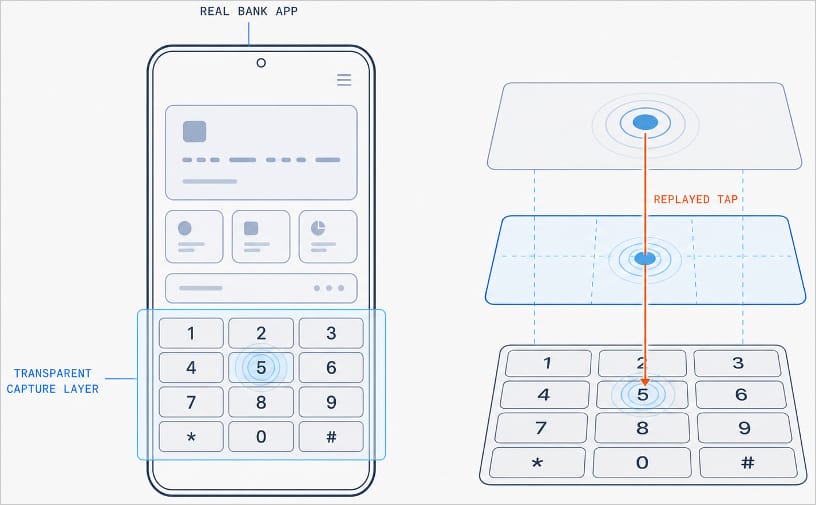
With Manic, this abuse of Accessibility services is paired with the Trojan’s own advanced capabilities. It can generate an invisible keyboard that overlays the phone’s real one. When a user types their password to log in to a banking app, Manic records exactly which keys they pressed. Then it uses Accessibility services to instantly replay that same keystroke on the actual app keyboard.

Manic generates a transparent capture layer that covers the phone's keyboard

Manic generates a transparent capture layer that covers the phone’s keyboard, recording each tap and relaying it to the real keyboard. Source

This means attackers don’t have to build a fake login screen for every single app they want to target. Because Manic works as an invisible layer sitting on top of the genuine app, everything looks and behaves as usual, so a phone owner has no reason to suspect they’re handing over their PIN or password to a criminal.

Manic doesn’t simply log everything a user types, either. It automatically recognizes what kind of information it has just captured and sorts it into categories: passwords, email logins, four-to-six-digit SMS codes, strings of characters that look like crypto wallet seed phrases, and phone unlock codes or pattern locks. Alongside the captured text itself, Manic also records which app it came from, when it was entered, whether the user typed it manually or used autofill, and whether that app is on its hit list.

Manic’s abilities don’t stop at collecting information. Using Accessibility services once again, it also lets attackers take remote control of an infected device. To conceal this activity, Manic can show a black screen or fake a system update.

On top of Accessibility services, the malware also asks for permission to read text messages and notifications. That lets attackers intercept two-factor authentication codes and one-time verification codes before a victim even has a chance to type them into the app.

Put together, this hands attackers not just passwords, banking credentials, and verification codes, but the ability to remotely control the victim’s phone as well.

Even being offline won’t save you from data theft

Manic’s original method for relaying stolen data off the device and back to the attackers deserves a separate mention. Even today, devices get knocked offline more often than people might expect, and Manic’s creators built a workaround specifically for such situations.

Normally, malware like this collects information on the device and sends it straight to a server controlled by the attackers. But what happens when the infected device has no direct internet access, or can’t reach the command-and-control server for some other reason?

In that case, Manic simply stores the stolen data on the device and starts scanning nearby for other infected phones it can reach over Wi-Fi or Bluetooth. If it finds one with internet access, it hands over the encrypted data to that phone, which then forwards it on to the attackers’ server.

But it doesn’t stop there. Data can hop across a chain of infected devices. By default, Manic allows up to four of these relay devices in the chain. If no suitable device is nearby, the data simply stays on the original phone, and Manic tries again later.

How to protect your phone from Manic and other banking Trojans

Android malware keeps getting more sophisticated. That makes it worth remembering — and actually following — a few basic digital hygiene habits for Android phone and tablet users:

  • Avoid installing apps from unofficial sources.
  • Don’t grant apps permission to use Accessibility services unless this is absolutely necessary and you understand exactly why they need it.
  • Install reliable security software on all your devices, run scans regularly, and take its warnings and recommendations seriously. We recommend Kaspersky for Android. Our Android security apps are temporarily unavailable on the Google Play Store, so to install them on an Android device we recommend using an alternative app store or installing the APK file manually from our website. A full step-by-step guide is available in our post, How to install or update Kaspersky apps for Android in 2026.

Malware doesn’t just target smartphones; it feels at home on other Android-powered devices too — from streaming boxes to… cars. Check out the details in our related posts:

Received — 3 August 2026 ⏭ Kaspersky official blog

How to protect your data after a breakup | Kaspersky official blog

20 July 2026 at 14:45

A breakup is a major upheaval — the kind that turns life upside down. The familiar order of things, where two people shared the same interests, moments, and often even the same physical space, collapses in an instant, leaving each of you in a world of your own.

Besides that, couples are connected not just in real life, but digitally too. Shared subscriptions, saved addresses and passwords, access to joint cloud storage — all of that used to be woven into your day-to-day life. Moving on emotionally can take a long time, sure, but there are steps you can take right now that will tighten up your security — even if they won’t help you get over your ex.

Here’s what you need to check after a breakup, which services to disconnect, and why you should do it even if the split was amicable.

Digital hygiene: your insurance policy

Cutting off your ex’s access to your online accounts isn’t paranoia — it’s looking out for your own security. A breakup doesn’t automatically sever your digital ties: any access you granted each other during the relationship stays active until someone manually shuts it down. Most of the time, nobody’s plotting to actually exploit it, yet it can still lead to anything from awkward moments to a genuine risk of being tracked.

Take Aleta Dignard-Fung, of Las Vegas, who told NPR that after breaking up with her boyfriend, it didn’t immediately occur to her that he still knew her Spotify password. One day, in the shower with music playing, she noticed her playlist suddenly switch. Her ex had logged in from another device and started playing his own chosen tracks. “It was just kind of like the Spotify wars, and we’d just spend like 10 minutes trying to override each other’s songs,” she admitted. But the fallout isn’t always this lighthearted.

Relationship coach Susan Winter shared a case from her own practice in that same interview. One of her clients simply couldn’t let go of his ex-girlfriend after their breakup. The two had shared an OpenTable account — the restaurant reservation service — and she’d never revoked his access. He started tracking her bookings: where she was going, what time, how many people. That’s how he kept tabs on whether someone new had entered her life.

These two stories, while showing very different behavior from the exes involved, both trace back to the same root cause: accounts that were never properly locked down. In the former case, it led to an awkward moment. In the latter, it led to anxiety and a real sense of being watched. To make sure neither scenario happens to you, it’s worth running through a quick checklist.

Terminate your partner’s sessions

In the settings for your social media, messaging apps, email, and other key services, pull up the list of active sessions and log out everything except your current devices.

Change your passwords

Update the passwords to any key accounts your partner might have known — say, if you used a meaningful date as your password. If you reused the same password across multiple services, change it everywhere. While you’re at it, review your security questions and your backup email or phone number for account recovery — neither should still be tied to your ex. To skip the hassle of memorizing new credentials while still leveling up your security, we recommend using a password manager — it’ll generate a unique, strong password for every account, and save and sync it across all your devices; the only thing you need to remember is a single main password.

Check two-factor authentication and trusted devices

Make sure verification codes only go to your own device. Remove your partner’s devices from your trusted list — you can do this in your Apple and Google account settings.

Split up your shared Apple/Google accounts

If you shared an Apple or Google account, sign out of that. Turn off Family Sharing, iCloud, and backups. Check your shared photo albums too — anything that lands there automatically is visible to your ex as well.

Review your subscriptions

If you shared subscriptions — streaming services, family plans, that kind of thing — cancel them or set up new ones and link your own card.

Check your bank cards

If your ex’s card is linked to a marketplace, delivery app, or rideshare service account you own, remove it from your saved payment methods. If your card is linked to their account and you no longer have access to it, the safest move is to just get your card reissued.

Revoke smart home access

Cut off your ex’s access to cameras, video doorbells, GPS trackers, and smart speakers. If the devices were on a shared account, change the password or move them over to your own personal account.

Review your privacy settings

Check the privacy settings across your accounts on various services and social media using our free online tool, Privacy Checker. It walks you through a privacy configuration tailored to your operating system, platform, and even your browser.

If you notice signs of stalking

Reach out to advocacy or legal aid organizations — they can help you map out the best course of action. It’s also worth leaning on family and close friends who can support you through a tough situation. On Android devices, you can use our security suite with the Who’s Spying on Me feature. It’s designed to help you detect tracking and stalking so you can take the right steps to protect yourself. The feature includes:

  • Stalkerware Detection. Flags apps designed to secretly monitor your life and collect data you’d never want shared with anyone else.
  • Device Scanner. Finds planted trackers that let someone follow your movements and always know where you are.
  • Permissions Control. Shows which apps have access to permissions that could make it easier for someone to spy on you or compromise your privacy.

What can actually help — and what might make things worse — during this difficult time? Check out our other posts:

Email hijacking via OAuth | Kaspersky official blog

17 July 2026 at 18:18

When targeting an organization to steal information, maintaining a low profile is critical for attackers. They typically aim for long-term persistence, which requires avoiding security alerts while preserving access in case they’re detected and the organization initiates incident response or routine password resets. Malware such as infostealers or ostensibly legitimate remote monitoring and management (RMM) tools fail the first requirement: their use triggers EDR and generates suspicious events in SIEM consoles. Relying on stolen credentials conflicts with the second requirement: the moment the security team suspects a compromise, passwords can be changed immediately — terminating access. If attackers attempt to steal browser cookies instead of passwords, they face a different challenge: many online services now correlate device characteristics with the expected session cookie and block access if the cookie is used on an unrecognized device. Furthermore, cookie theft protection mechanisms implemented in Chromium-based browsers (such as Chrome, Edge, and Opera) this year have made this approach significantly more difficult.

To address this persistence challenge, the ToddyCat APT — whose main game is spying — developed a novel technique. Kaspersky experts discovered this method during an incident investigation and named it Shadow Token via Remote Debug (STRD). This technique allows the attackers to establish reliable, persistent access to a victim’s mailbox and other resources in Google Workspace. With minor adjustments, the same approach could potentially be adapted to target other services that grant third-party application access via OAuth 2.0 authentication.

How an STRD attack works

First, the attackers must compromise the victim’s system with malware. In past campaigns, ToddyCat gained initial access to organizations by exploiting known vulnerabilities in server software and distributing malicious loaders via messaging apps. The specific employee targeted by the attackers might not notice the intrusion at all. This can occur, for example, if the adversary first obtains privileged administrative credentials and uses them to deploy the malware onto targeted machines remotely. Crucially, the deployment and execution of this malware mustn’t trigger immediate security alerts.

Once active, the malware executes an STRD attack, connecting the attackers’ remote service to the victim’s mailbox using the OAuth 2.0 protocol. This process requires no user interaction and shows no visible activity on the screen. To the cloud environment (Google Workspace, in the case at hand), the activity appears as if the user has legitimately authorized a third-party app for email access or data backup.

After that, the malware can terminate its operations and even delete itself from the system. The adversary retains direct access to the mailbox using the acquired OAuth token — and they need no connection to the victim’s endpoint or to the corporate network for that. Depending on the organization’s Google Workspace configuration, this access can persist for an extended period and survive subsequent password resets.

The core concept of Shadow Token via Remote Debug

At the heart of this attack is a connection to Google Workspace services via OAuth 2.0. This is a legitimate workflow used whenever a third-party application requests access to calendar data, emails, or Google Drive files. For example, to display calendar meetings in Zoom and automatically generate conference links, a user must authorize Zoom to access Google services. Similarly, configuring a third-party email client or calendar app requires granting permission. During this authorization process, the service requesting access opens a new browser window. In this window, Google Workspace first prompts the user to select the appropriate account. Once the account is chosen, the subsequent screen displays the specific permissions requested by the third-party app, allowing the user to either approve or deny access. For this scenario to proceed seamlessly, the user must already be authenticated to Google services in their browser — which is typically the case in organizations using Google Workspace. If the user isn’t authenticated, additional steps for entering credentials and completing multi-factor authentication are introduced into the sequence.

The ToddyCat hackers developed a malicious tool called Umbrij to facilitate a two-step covert authorization process when the user is already authenticated in Google. First, the malware identifies the browsers installed on the system, and locates the specific folder storing the user’s active profile for each. The attackers target Chrome and Edge, as these are the browsers most likely serving as the primary ones within the organization.

Next, Umbrij copies the entire user profile folder to a different directory on the machine. It then launches an instance of the browser, specifying the path to the duplicated profile via the command line. Because this duplicate profile contains the user’s session cookies, websites with saved credentials won’t prompt for re-authentication. Furthermore, since this occurs on the exact same computer where the primary browser is running, online services detect no anomalies. The browsing history for this newly launched instance is isolated within the new folder, keeping it hidden from the user’s main account activity.

Crucially, the browser is launched in a dedicated debugging mode typically reserved for web development. The browser window and user interface don’t appear on the screen at all (headless mode). Instead, the browser can be controlled through a debugging port using the DevTools protocol, allowing the malware to issue commands and read the state of the screen. To orchestrate these actions, Umbrij leverages Puppeteer, a legitimate automation library.

After verifying that the debugging browser instance has launched successfully, Umbrij opens a legitimate Google Workspace OAuth screen within it. The request sent to Google is engineered to bypass additional security checks while requesting maximum access privileges. For the application ID — the identity supposedly requesting these extensive permissions — the malware impersonates one of two legitimate tools: Google Workspace Migration for Microsoft Outlook (GWMMO), or Google Workspace Sync for Microsoft Outlook (GWSMO).

When Google opens the window within the headless browser, Umbrij uses debugging tools to programmatically click on the corporate account name and the confirmation buttons. As a result, Google generates an authorization code for the app. Umbrij extracts and saves this code, subsequently forwarding it to the attackers’ command-and-control server. Finally, operating entirely within their own infrastructure rather than on the victim’s computer, the attackers exchange this authorization code for an OAuth access token. This single token is all they need to maintain long-term unrestricted access to the mailbox.

How to protect against OAuth token theft

If a Google Workspace account is compromised, incident response measures must include the following steps after collecting the necessary logs and other forensic data for investigation:

  • Resetting the affected user’s password
  • Terminating all active web sessions for the user
  • Revoking OAuth tokens and third-party app permissions
  • Reviewing and removing access granted through legacy App Passwords

In addition, security and IT teams must systematically audit issued OAuth permissions, revoke unjustifiable access rights, and restrict capabilities that allow excessive or unauthorized permission grants. We covered this topic in detail in our article on blocking unwanted AI assistants.

How to prevent exploitation of Shadow Token via Remote Debug

While Kaspersky users are protected against the Umbrij tool, security teams should proactively implement policies that prevent standard users from launching browsers in debugging mode. This functionality is intended exclusively for website and web app developers. This restriction can be enforced through the DeveloperToolsAvailability group policy (available for both Chrome and Edge).

Additionally, configure monitoring within your SIEM/XDR to track the launch of browser instances with an active debugging port. This event serves as a strong indicator of this specific attack technique.

❌