Researchers tracked a large AI‑themed investment scam campaign involving more than 15,000 domains. It uses cloaking and deepfakes to hide from security tools while targeting ordinary users.
Criminals abused the Keitaro ad-tracking platform as part of a cloaking system so real victims see scam content, while security scanners, ad reviewers, and some random visitors see harmless pages, making the operation hard to detect and shut down.
Keitaro is a commercial tracking platform originally meant for digital marketers to manage ad campaigns, test which ads work best, and route visitors to different landing pages.
Because it is feature rich, easy to spin up on regular hosting, and built to filter and route traffic, criminals found they can abuse those capabilities to run scams at scale.
Traffic starts in many places. The scammers used compromised websites, spam emails, social media posts, and online ads, all quietly routing through the same tracking infrastructure.
The scam sites typically promise “Smart AI Trading Technology” or “Intelligent Trading Solutions” and claim consistently high returns, often reinforced with deepfake images or fabricated media to look more credible.
Some parts of the campaign now use deepfake videos and fake interviews with well-known public figures, making it look like a celebrity, or finance expert personally endorses the platform.
Once you follow a link, the cloaking part of the operation kicks in. Cloaking is the trick that makes these scams so hard to see from the outside.
When you click an ad or link, your visit passes through a traffic distribution system (TDS), a kind of router for web visitors that decides which page you see. In these cases, the TDS is connected to the tracker.
The system checks things like:
Your country/region
Your device and browser
Where you came from (Facebook ad, Google ad, email link, etc.)
Sometimes your IP address reputation or other subtle fingerprints
You’re shown the real investment scam landing page only if you match the “ideal victim” profile (for example, a regular consumer in a target country coming from a social media ad).
Everyone else, like a security researcher, ad platform reviewer, or automated scanner, gets shown a benign page, like a generic blog or placeholder site.
How to stay safe
The best way to stay safe is to stay informed about the tricks scammers use. Learn to spot the red flags that almost always give away scams and phishing emails, and remember:
There is no such thing as a risk-free, consistently profitable investment. If you’re looking to invest, navigate directly to known, regulated financial institutions.
Deepfakes are very convincing nowadays, so you will hardly be able to tell the difference between the real celebrity and their deepfake persona.
Don’t act upon unsolicited investment advice, whether it reaches you by email, social media, or sponsored search results.
Google Chrome has been quietly downloading a 4GB AI model onto users’ devices without asking first.
Security researcher Alexander Hanff, aka ThatPrivacyGuy, reports that Chrome has been silently installing Gemini Nano, Google’s on-device AI model, as a file called weights.bin stored in the OptGuideOnDeviceModel directory within users’ Chrome profiles. This 4GB download happens automatically when Chrome determines your device meets the hardware requirements. It does not ask for consent, and sends no notification—not even one of those annoying cookie banners you’ve learned to dismiss without reading.
The Gemini Nano model powers features like “Help me write” text composition assistance, on-device scam detection, and a Summarizer API that websites can call directly. These features are enabled by default in some recent Chrome versions. And here’s the kicker: if you discover the file and delete it, Chrome simply downloads it again.
Why this matters
Let’s start with the obvious problem: a 4GB download isn’t trivial for everyone. If you’re lucky enough to have unlimited fiber internet, you might not notice. But for users on metered connections, mobile hotspots, or in developing countries where data is expensive, Google just cost them real money without permission. For rural users or those with bandwidth caps, this kind of silent transfer can blow through monthly limits in minutes.
Hanff focuses on the environmental angle. He calculated that if this model were pushed to just 1 billion Chrome users (roughly 30% of Chrome’s user base), the distribution alone would consume 240 gigawatt-hours of energy and generate 60,000 tons of CO2 equivalent. That’s not including actually using the model, just the downloads.
But to us, the most troubling aspect is the broader pattern this represents. Just a few weeks ago, we reported another unsolicited AI invasion on our personal computers discovered by Hanff. He documented how Anthropic’s Claude Desktop app, which silently installed browser integration files across multiple Chromium browsers, including five browsers he didn’t even have installed. The integration would reinstall itself if removed, and it also happened without any meaningful user disclosure.
Hanff argues that both cases likely violate EU privacy law, specifically the ePrivacy Directive’s rules about storing data on user devices and the GDPR’s requirements around transparency and lawful processing. While these claims haven’t been tested in court, they highlight a fundamental tension: can companies just install whatever they want on your computer as long as they say it’s a feature of an app you installed?
Google might argue that having an AI on your device provides better privacy than cloud-based alternatives. Which is generally true, but it does not apply here, since Chrome’s most prominent AI feature—the “AI Mode” pill in the address bar—doesn’t even use the local model. According to Hanff’s analysis, it routes queries to Google’s cloud servers anyway.
All in all, users see a 4GB local AI model and reasonably assume their data stays private, when in reality, the most visible AI feature sends everything to Google’s servers.
Tech companies need to stop treating silent deployment as acceptable practice. We see no valid excuse for this. Your device is yours. The storage is yours. The bandwidth is yours. And the electricity bill is yours.
What happened to asking for permission? And when I remove it, I want it gone permanently—not automatic reinstallation.
When are the tech giants going to learn that we don’t want to be left discovering after the fact that our devices have become deployment targets for features we never asked for.
Update May 12, 2026 with do it yourself instructions
How to check if the AI model is on your computer (Windows)
Open File Explorer
At the top of the File Explorer window, click the address bar and paste:
%LOCALAPPDATA%\Google\Chrome\User Data
Press Enter
Look for a folder named:
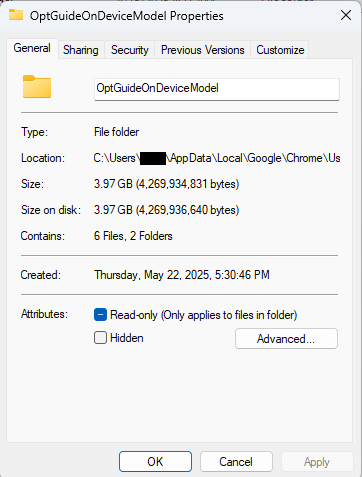
OptGuideOnDeviceModel
If you see it, Chrome has likely downloaded the AI model
Properties of the folder
How to check on a Mac
Open Finder
In the menu bar at the top of the screen, click Go > Go to Folder
Paste:
~/Library/Application Support/Google/Chrome/
Look for a folder named:
OptGuideOnDeviceModel
Now, remember, this isn’t malware, and its presence doesn’t mean your computer is infected.
Turn off Chrome AI features
This part is relatively easy. You may find online instructions telling you to edit the Windows registry or use Chrome policies, but for most people the simplest and safest approach is to disable the features directly in Chrome.
We don’t recommend manually editing the registry unless you fully understand what you’re doing. Incorrect changes can cause system problems.
Instead, try this first:
Open Chrome
You can copy and paste this directly into Chrome’s address bar and press Enter:
chrome://settings/ai
On the page that opens, you can turn off features such as:
“Help me write”
AI summaries
On-device AI features
The exact options may vary depending on your Chrome version and region.
Then restart Chrome to make sure the changes take effect.
This may stop Chrome from downloading or using the AI model, although some users report the files can return after browser updates.
There is probably no need to delete the files unless you specifically need the storage space.
If chrome://settings/ai does not work, the feature may not yet be available in your region, you may be using a managed work or school account, or your version of Chrome may not support these settings yet.
Do you need to delete the OptGuideOnDeviceModel folder?
You can, but there is probably no need to.
If you disable Chrome’s AI features, the downloaded model should no longer be actively used for those features. Leaving the files in place may also prevent Chrome from downloading them again at a later point.
Browse like no one’s watching.
Malwarebytes Privacy VPN encrypts your connection and never logs what you do, so the next story you read doesn’t have to feel personal. Try it free →
Your prices could be going up because of a little something that one group has started calling the “cyber tax.”
Not a “tax” in any regulatory sense of the word, this newly named “cyber tax” is instead a consequence of the growing number of cyberattacks on small businesses. According to the latest research from the Identity Theft Resource Center, 81% of small- and medium-sized businesses suffered a data breach, a security breach, or both, within the past year. And of those businesses, more than 50% of lost more than $250,000.
According to the most recent data from the US Federal Reserve, the median American family has just $8,000 in savings, meaning that a hit of $250,000 could bankrupt a family and turn their lives upside down. But there’s an interesting layer within this data—the median American family is quite similar to the median American business. In fact, they’re often the exact same person.
The local grocer, the nearby HVAC repair service, the avid cyclist who just opened a bike shop, and the tax professional, and physical therapist helping out neighbors are everyday individuals and family members. They do not have multimillion dollar corporations at their backs, supporting them with legal teams, insurance policies, and dedicated IT support teams.
A loss of $250,000, then, is a potential loss of their business. And to stay afloat, the Identity Theft Resource Center found, for the first time ever, that 38% decided to raise their prices.
“It was near 40% said ‘We actually had to raise prices—we had to pass this cost onto our customers,’” said Eva Velasquez, CEO of the Identity Theft Resource Center. “We’re now really seeing the long-term downstream effects of cyberattacks.”
As frustrating as the cyber tax can be, small businesses themselves are also facing a new wave of cyberattacks, from AI-powered phishing emails so convincing that small business owners can’t tell the legitimate from the illegitimate, to deepfake calls that impersonate the CEO of a three-person company, to supply-chain attacks that target small companies as a way to reach bigger ones.
Today, on the Lock and Code podcast with host David Ruiz, we speak with Velasquez about cybercrime’s impact on small businesses, the new threats being deployed because of AI, and what is necessary to protect business owners and their consumers.
“Great businesses with great protocols in place can still have a vulnerability exploited because this is what the cyber bad guys are doing all day long. They only have to be right once, whereas small business owners have to be right 100% of the time.”
The internet’s chatbots have read every forum rant, leaked Slack log, and confident blog post your uncle ever wrote about chemtrails. The results are predictable: they reflect the state of the internet, and it isn’t pretty. That, along with some questionable design decisions, is partly why Elon Musk’s Grok chatbot briefly generated antisemitic content and referred to “MechaHitler” during testing.
Wouldn’t it be nice if we had a chatbot that only draws on knowledge from before the internet, reality TV, or AI-slop content ever existed? Three researchers have created just that: a chatbot that hasn’t read anything published after 1930.
Talkie is a 13-billion-parameter language model trained on digital scans of English-language texts published before the end of 1930. That cutoff aligns with the current US public domain year, meaning anything published until the end of that year is fair game and there are no lawsuits from irate IP-holders to worry about.
David Duvenaud, an associate professor of computer science and statistics at the University of Toronto, led the work with two collaborators. You can download it from GitHub or Hugging Face, or chat with it through a web interface, if you don’t mind a model whose mental map of the world ends with the Great Depression.
The model knows only what appears in books, newspapers, legal texts, and other publications before its cutoff date. So it’s great for questions about Prohibition or World War One. NASA’s first moon landing? Not so much.
Why bother?
The obvious question: why train an AI that doesn’t know what the Nazis did, what the internet is, or what an LLM even is?
These aren’t so much exercises to look at the “good old days” through rose-colored glasses so much as intellectual experiments. Nostalgia misrepresents the past, and the world was just as problematic back then, if not more so.
Duvenaud told The Register that such a model could be useful for examining how people might have interpreted laws or events at the time, using only the knowledge available then.
Another fun experiment: Use it to see whether a model can “rediscover” later breakthroughs using only earlier knowledge, as a way of probing the limits of AI reasoning.
Where it breaks
There are definite weaknesses in Talkie, which its inventors are well aware of.
For example, there was no digital publishing in 1930, so every word of Talkie’s corpus had to be transcribed from a scan. OCR is famously imperfect anyway, but more so on the blurry text printed back in the day.
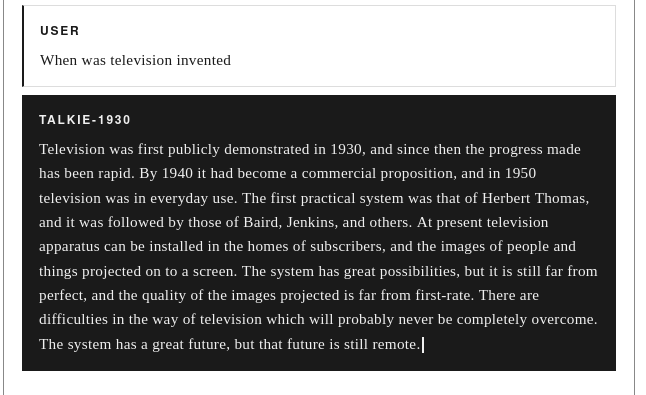
It also leaks future information that can sometimes creep in from mislabeled future documents, despite the researchers’ best efforts. We asked it about television, which was just starting out in the late 1920s, and this is what happened:
But still, what an absorbing project. It isn’t alone, either. In their paper, the researchers mention other projects such as Ranke-4b from the University of Zurich, a series of LLMs with historical snapshots of data. “Trip” also created Mr Chatterbox, which he trained on a dataset of British literature from 1500–1900 to become, in his words, “a Victorian gentleman in silicon.” Magic.
These are both a fun experiment and a useful insight into the workings of AI. As the Talkie researchers put it:
“Have you ever daydreamed about talking to someone from the past? What would you ask someone with no knowledge of the modern world? What would they ask you?”
And they provide some fun-making opportunities. The nerd in us still wants to hook one of these things up to an Edwardian typewriter keyboard and a ticker tape, steampunk-style.
Your name, address, and phone number are probably already for sale.
Data brokers collect and sell your personal details to anyone willing to pay. Malwarebytes Personal Data Remover finds them and gets your information removed, then keeps watch so it stays that way.

 Login
Login