Baddies are exploiting a critical bug in React Native's Metro development server to deliver malware to both Windows and Linux machines, and yet the in-the-wild attacks still haven't received the "broad public acknowledgement" that they should, according to security researchers.…
GreyNoise's Glenn Thorpe counts the cost of missed opportunities
On 59 occasions throughout 2025, the US Cybersecurity and Infrastructure Security Agency (CISA) silently tweaked vulnerability notices to reflect their use by ransomware crooks. Experts say that's a problem.…
Bondu’s AI plush toy exposed a web console that let anyone with a Gmail account read about 50,000 private chats between children and their cuddly toys.
Bondu’s toy is marketed as:
“A soft, cuddly toy powered by AI that can chat, teach, and play with your child.”
“Bondu’s safety and behavior systems were built over 18 months of beta testing with thousands of families. Thanks to rigorous review processes and continuous monitoring, we did not receive a single report of unsafe or inappropriate behavior from Bondu throughout the entire beta period.”
Bondu’s emphasis on successful beta testing is understandable. Remember the AI teddy bear marketed by FoloToy that quickly veered from friendly chat into sexual topics and unsafe household advice?
The researchers were stunned to find the company’s public-facing web console allowed anyone to log in with their Google account. The chat logs between children and their plushies revealed names, birth dates, family details, and intimate conversations. The only conversations not available were those manually deleted by parents or company staff.
Potentially, these chat logs could been a burglar’s or kidnapper’s dream, offering insight into household routines and upcoming events.
Bondu took the console offline within minutes of disclosure, then relaunched it with authentication. The CEO said fixes were completed within hours, they saw “no evidence” of other access, and they brought in a security firm and added monitoring.
In the past, we’ve pointed out that AI-powered stuffed animals may not be a good alternative for screen time. Critics warn that when a toy uses personalized, human‑like dialogue, it risks replacing aspects of the caregiver–child relationship. One Curio founder even described their plushie as a stimulating sidekick so parents, “don’t feel like you have to be sitting them in front of a TV.”
So, whether it’s a foul-mouth, a blabbermouth, or just a feeble replacement for real friends, we don’t encourage using Artificial Intelligence in children’s toys—unless we ever make it to a point where they can be used safely, privately, securely, and even then, sparingly.
How to stay safe
AI-powered toys are coming, like it or not. But being the first or the cutest doesn’t mean they’re safe. The lesson history keeps teaching us is this: oversight, privacy, and a healthy dose of skepticism are the best defenses parents have.
Turn off what you can. If the toy has a removable AI component, consider disabling it when you’re not able to supervise directly.
Read the privacy policy. Yes, I know, all of it. Look for what will be recorded, stored, and potentially shared. Pay particular attention to sensitive data, like voice recordings, video recordings (if the toy has a camera), and location data.
Limit connectivity. Avoid toys that require constant Wi-Fi or cloud interaction if possible.
Monitor conversations. Regularly check in with your kids about what the toy says and supervise play where practical.
Keep personal info private. Teach kids to never share their names, addresses, or family details, even with their plush friend.
Trust your instincts. If a toy seems to cross boundaries or interfere with natural play, don’t be afraid to step in or simply say no.
We don’t just report on privacy—we offer you the option to use it.
Privacy risks should never spread beyond a headline. Keep your online privacy yours by using Malwarebytes Privacy VPN.
Algorithmic bias probe continues, CEO and former boss summoned to defend the platform's corner
French police raided Elon Musk's X offices in Paris this morning as part of a criminal investigation into alleged algorithmic manipulation by foreign powers.…
Microsoft gives the FBI the ability to decrypt BitLocker in response to court orders: about twenty times per year.
It’s possible for users to store those keys on a device they own, but Microsoft also recommends BitLocker users store their keys on its servers for convenience. While that means someone can access their data if they forget their password, or if repeated failed attempts to login lock the device, it also makes them vulnerable to law enforcement subpoenas and warrants.
When data resurfaces, it never comes back weaker. A newly shared dataset tied to AT&T shows just how much more dangerous an “old” breach can become once criminals have enough of the right details to work with.
The dataset, privately circulated since February 2, 2026, is described as AT&T customer data likely gathered over the years. It doesn’t just contain a few scraps of contact information. It reportedly includes roughly 176 million records, with…
Up to 148 million Social Security numbers (full SSNs and last four digits)
More than 133 million full names and street addresses
Taken together, that’s the kind of rich, structured data set that makes a criminal’s life much easier.
On their own, any one of these data points would be inconvenient but manageable. An email address fuels spam and basic phishing. A phone number enables smishing and robocalls. An address helps attackers guess which services you might use. But when attackers can look up a single person and see name, full address, phone, email, complete or partial SSN, and date of birth in one place, the risk shifts from “annoying” to high‑impact.
That combination is exactly what many financial institutions and mobile carriers still rely on for identity checks. For cybercriminals, this sort of dataset is a Swiss Army knife.
It can be used to craft convincing AT&T‑themed phishing emails and texts, complete with correct names and partial SSNs to “prove” legitimacy. It can power large‑scale SIM‑swap attempts and account takeovers, where criminals call carriers and banks pretending to be you, armed with the answers those call centers expect to hear. It can also enable long‑term identity theft, with SSNs and dates of birth abused to open new lines of credit or file fraudulent tax returns.
The uncomfortable part is that a fresh hack isn’t always required to end up here. Breach data tends to linger, then get merged, cleaned up, and expanded over time. What’s different in this case is the breadth and quality of the profiles. They include more email addresses, more SSNs, more complete records per person. That makes the data more attractive, more searchable, and more actionable for criminals.
For potential victims, the lesson is simple but important. If you have ever been an AT&T customer, treat this as a reminder that your data may already be circulating in a form that is genuinely useful to attackers. Be cautious of any AT&T‑related email or text, enable multi‑factor authentication wherever possible, lock down your mobile account with extra passcodes, and consider monitoring your credit. You can’t pull your data back out of a criminal dataset—but you can make sure it’s much harder to use against you.
What to do when your data is involved in a breach
If you think you have been affected by a data breach, here are steps you can take to protect yourself:
Check the company’s advice. Every breach is different, so check with the company to find out what’s happened and follow any specific advice it offers.
Change your password. You can make a stolen password useless to thieves by changing it. Choose a strong password that you don’t use for anything else. Better yet, let a password manager choose one for you.
Enable two-factor authentication (2FA). If you can, use a FIDO2-compliant hardware key, laptop, or phone as your second factor. Some forms of 2FA can be phished just as easily as a password, but 2FA that relies on a FIDO2 device can’t be phished.
Watch out for impersonators. The thieves may contact you posing as the breached platform. Check the official website to see if it’s contacting victims and verify the identity of anyone who contacts you using a different communication channel.
Take your time. Phishing attacks often impersonate people or brands you know, and use themes that require urgent attention, such as missed deliveries, account suspensions, and security alerts.
Consider not storing your card details. It’s definitely more convenient to let sites remember your card details, but it increases risk if a retailer suffers a breach.
Most iPhone owners have hopefully learned to manage app permissions by now, including allowing location access. But there’s another layer of location tracking that operates outside these controls. Your cellular carrier has been collecting your location data all along, and until now, there was nothing you could do about it.
Cellular networks track your phone’s location based on the cell towers it connects to, in a process known as triangulation. In cities where towers are densely packed, triangulation is precise enough to track you down to a street address.
This tracking is different from app-based location monitoring, because your phone’s privacy settings have historically been powerless to stop it. Toggle Location Services off entirely, and your carrier still knows where you are.
The new setting reduces the precision of location data shared with carriers. Rather than a street address, carriers would see only the neighborhood where a device is located. It doesn’t affect emergency calls, though, which still transmit precise coordinates to first responders. Apps like Apple’s “Find My” service, which locates your devices, or its navigation services, aren’t affected because they work using the phone’s location sharing feature.
Why is Apple doing this? Apple hasn’t said, but the move comes after years of carriers mishandling location data.
Unfortunately, cellular network operators have played fast and free with this data. In April 2024, the FCC fined Sprint and T-Mobile (which have since merged), along with AT&T and Verizon nearly $200 million combined for illegally sharing this location data. They sold access to customers’ location information to third party aggregators, who then sold it on to third parties without customer consent.
This turned into a privacy horror story for customers. One aggregator, LocationSmart, had a free demo on its website that reportedly allowed anyone to pinpoint the location of most mobile phones in North America.
Limited rollout
The feature only works with devices equipped with Apple’s custom C1 or C1X modems. That means just three devices: the iPhone Air, iPhone 16e, and the cellular iPad Pro with M5 chip. The iPhone 17, which uses Qualcomm silicon, is excluded. Apple can only control what its own modems transmit.
Carrier support is equally narrow. In the US, only Boost Mobile is participating in the feature at launch, while Verizon, AT&T, and T-Mobile are notable absences from the list given their past record. In Germany, Telekom is on the participant list, while both EE and BT are involved in the UK. In Thailand, AIS and True are on the list. There are no other carriers taking part as of today though.
Android also offers some support
Google also introduced a similar capability with Android 15’s Location Privacy hardware abstraction layer (HAL) last year. It faces the same constraint, though: modem vendors must cooperate, and most have not. Apple and Google don’t get to control the modems in most phones. This kind of privacy protection requires vertical integration that few manufacturers possess and few carriers seem eager to enable.
Most people think controlling app permissions means they’re in control of their location. This feature highlights something many users didn’t know existed: a separate layer of tracking handled by cellular networks, and one that still offers users very limited control.
We don’t just report on phone security—we provide it
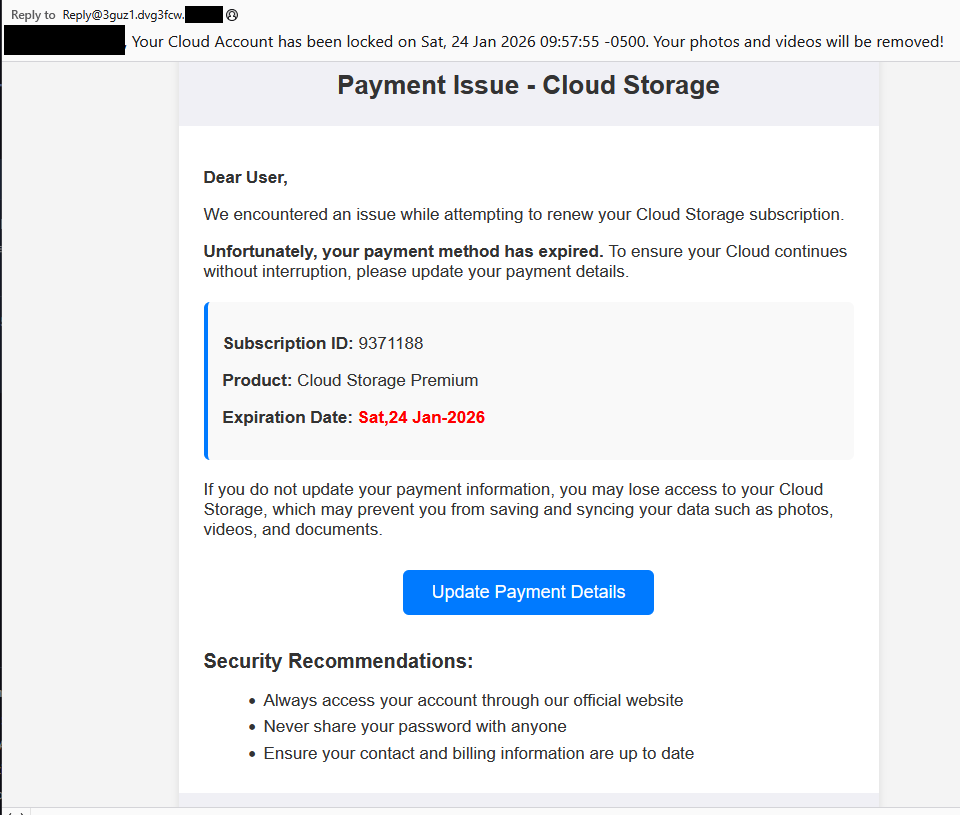
Imagine our surprise when we ended up on a site promoting that same Freecash app while investigating a “cloud storage” phish. We’ve all probably seen one of those. They’re common enough and according to recent investigation by BleepingComputer, there’s a
“large-scale cloud storage subscription scam campaign targeting users worldwide with repeated emails falsely warning recipients that their photos, files, and accounts are about to be blocked or deleted due to an alleged payment failure.”
Based on the description in that article, the email we found appears to be part of this campaign.
The subject line of the email is:
“{Recipient}. Your Cloud Account has been locked on Sat, 24 Jan 2026 09:57:55 -0500. Your photos and videos will be removed!”
This matches one of the subject lines that BleepingComputer listed.
And the content of the email:
“Payment Issue – Cloud Storage
Dear User,
We encountered an issue while attempting to renew your Cloud Storage subscription.
Unfortunately, your payment method has expired. To ensure your Cloud continues without interruption, please update your payment details.
Subscription ID: 9371188
Product: Cloud Storage Premium
Expiration Date: Sat,24 Jan-2026
If you do not update your payment information, you may lose access to your Cloud Storage, which may prevent you from saving and syncing your data such as photos, videos, and documents.
Update Payment Details {link button}
Security Recommendations:
Always access your account through our official website
Never share your password with anyone
Ensure your contact and billing information are up to date”
The link in the email leads to https://storage.googleapis[.]com/qzsdqdqsd/dsfsdxc.html#/redirect.html, which helps the scammer establish a certain amount of trust because it points to Google Cloud Storage (GCS). GCS is a legitimate service that allows authorized users to store and manage data such as files, images, and videos in buckets. However, as in this case, attackers can abuse it for phishing.
The redirect carries some parameters to the next website.
The feed.headquartoonjpn[.]com domain was blocked by Malwarebytes. We’ve seen it before in an earlier campaign involving an Endurance-themed phish.
After a few more redirects, we ended up at hx5.submitloading[.]com, where a fake CAPTCHA triggered the last redirect to freecash[.]com, once it was solved.
The end goal of this phish likely depends on the parameters passed along during the redirects, so results may vary.
Rather than stealing credentials directly, the campaign appears designed to monetize traffic, funneling victims into affiliate offers where the operators get paid for sign-ups or conversions.
BleepingComputer noted that they were redirected to affiliate marketing websites for various products.
“Products promoted in this phishing campaign include VPN services, little-known security software, and other subscription-based offerings with no connection to cloud storage.”
How to stay safe
Ironically, the phishing email itself includes some solid advice:
Always access your account through our official website.
Never share your password with anyone.
We’d like to add:
Never click on links in unsolicited emails without verifying with a trusted source.
Do not engage with websites that attract visitors like this.
Pro tip: Malwarebytes Scam Guard would have helped you identify this email as a scam and provided advice on how to proceed.
Redirect flow (IOCs)
storage.googleapis[.]com/qzsdqdqsd/dsfsdxc.html
feed.headquartoonjpn[.]com
revivejudgemental[.]com
hx5.submitloading[.]com
freecash[.]com
Update February 5, 2026
Almedia GmbH, the company behind the Freecash platform, reached out to us for information about the chain of redirects that lead to their platform. And after an investigation they notified us that:
“Following Malwarebytes’ reporting and the additional information they shared with us, we investigated the issue and identified an affiliate operating in breach of our policies. That partner has been removed from our network.
Almedia does not sell user data, and we take compliance, user trust, and responsible advertising seriously.”
We don’t just report on scams—we help detect them
Cybersecurity risks should never spread beyond a headline. If something looks dodgy to you, check if it’s a scam using Malwarebytes Scam Guard, a feature of our mobile protection products. Submit a screenshot, paste suspicious content, or share a text or phone number, and we’ll tell you if it’s a scam or legit. Download Malwarebytes Mobile Security for iOS or Android and try it today!
Your own personal Jarvis. A bot to hear your prayers. A bot that cares. Just not about keeping you safe
OpenClaw, the AI-powered personal assistant users interact with via messaging apps and sometimes entrust with their credentials to various online services, has prompted a wave of malware and is delivering some shocking bills.…
Armed Forces Bill would let troops take action against unmanned threats around defense sites
Britain's defense personnel will be given the authority to neutralize drones threatening military bases under measures being introduced in the Armed Forces Bill, currently making its way through Parliament.…

 Login
Login