❌

Normal view

The web’s having a rough week. Here’s how to browse safely

27 October 2026 at 13:22

You recognize the website. You’ve visited it before. You may even have it bookmarked. Then it asks you to do something unusual: install an update, allow notifications, or run a command to prove you’re human.

Stop and check first. A website you trust can still display instructions you shouldn’t follow. Our researchers have documented attacks in which criminals hacked legitimate websites and used them to deliver fake verification pages that trick visitors into installing malware.

Within the same week, serious problems emerged in several parts of the web’s security infrastructure. Attackers were exploiting two flaws in PHP, researchers disclosed a critical flaw in Brotli software used by Node.js, and eight compromised security certificates raised concerns about how browsers and apps verify websites. The incidents have different causes and levels of risk, but their timing makes this an unusual cluster.

PHP is used by about 7 in 10 websites whose underlying programming language is known. Node.js is used by 7.4% of websites with an identified web-server technology, according to W3Techs. Both run websites behind the scenes, so flaws in them can put the sites that rely on them at risk. Most browsers have blocked the certificates, though updates may still be needed for other software and devices.

These problems don’t mean you need to stop browsing. But keep your software and security protection up to date, and be wary of unexpected requests.

How to stay safe when browsing

Check the website’s address, but remember that even the genuine site may have been compromised. The important question is whether the page’s instructions make sense. A familiar website may earn your visit, but that doesn’t mean you should automatically let it run software on your device.

In documented campaigns, malicious instructions appeared on legitimate, hacked WordPress websites, not just lookalike domains.


Safer. Cleaner. Ad-free browsing.


A secure connection doesn’t guarantee that a page is safe, either. HTTPS protects the connection between your browser and the site. Browser protections against dangerous content are a separate layer. A page asking you to install software or enter sensitive information still deserves scrutiny, even when the connection is encrypted.

Ask yourself: “Does this request make sense for what I came here to do?”

Reading an article shouldn’t require opening PowerShell. Watching a video shouldn’t require following a website’s instructions to “repair” your computer. These are familiar themes in ClickFix attacks, which disguise malicious commands as routine verification or troubleshooting steps.

You can’t patch someone else’s web server, but you can keep the software on your own device updated. Turn on automatic updates for your operating system, browser, and applications where available, and don’t repeatedly postpone installing them. Updates fix security flaws that criminals could otherwise use to access your files or accounts.

Keep your browser’s phishing and malware protection enabled, too. Free browser extensions like Malwarebytes Browser Guard warn about known dangerous websites, malicious downloads, and clipboard hijacking. Treat those warnings as a reason to leave, not as another obstacle to get round. These checks are a useful layer of protection, but they can’t certify that every unflagged page is safe.

Use strong, unique passwords stored in a password manager, and enable multifactor authentication on important accounts. These measures help protect your accounts from unauthorized access.

If a request involves running code or making changes to your device, verify it independently. If a website claims your browser needs updating, close the prompt and check through the browser’s own settings. If it says an account or service needs attention, check through the official app, help page, or support channel that you open yourself.

Criminals often present the harmful step as the thing that will let you do what you came to do: fix the connection, enable the player, or complete the security check. The frustration of being blocked can make it tempting to follow their instructions.

Use up-to-date, real-time anti-malware protection on your devices to help stop malware from wreaking havoc or stealing your information.

Watch for unexpected content, downloads, redirects, and repeated login requests, even on familiar sites. If something looks wrong, leave the page. If you’re unsure, use Malwarebytes Scam Guard to check whether a request may be a scam and get possible next steps.


From reporting threats to removing them.

Cybersecurity risks should never spread beyond a headline. Keep threats off your devices by downloading Malwarebytes today.

PHP2Shell: Why many websites had to go offline

21 October 2026 at 18:14

If you’ve encountered websites in maintenance mode today, it may be a security precaution. Reports of attacks targeting two critical PHP vulnerabilities have prompted warnings to install emergency updates and consider temporarily taking affected services offline until they can be patched.

The vulnerabilities, known as PHP2Shell, are tracked as CVE-2026-109618 and CVE-2026-109619. Both carry a severity rating of 9.2 out of 10.

Why this matters

PHP is a programming language that works behind the scenes to power a large part of the web. It underpins WordPress, Drupal, Joomla, Magento, and many other applications, including software whose users may not realize PHP is involved.

Successful exploitation could let an attacker run malicious code on an affected server without logging in. That code would run with the permissions available to the PHP process, potentially allowing attackers to steal application data, alter website content, or establish a backdoor.

The PHP team says all PHP installations serving web requests are at risk. In some configurations, an attacker can trigger an exploit before the website’s own code even runs.

Cloudflare’s chief technology officer, Dane Knecht, has reported “early attacks emerging,” while warning that firewall mitigations are only a stopgap.

Emergency patches are now available

The PHP team scheduled its emergency security updates for October 21 at 10:00 am ET (14:00 UTC). It has now released fixes in PHP 8.5.12, 8.4.27, 8.3.36, and 8.2.35, and urges users to update immediately. Administrators should check with their hosting provider or operating system vendor for the appropriate updated packages.

You may still encounter offline websites while administrators install the updates and check their systems.

CERT-EU recommends identifying PHP-based applications and patching as soon as possible. Where an immediate fix is not feasible, it advises considering isolation of internet-facing applications from public networks.

The risk may outlast today’s emergency

The longer-term concern is forgotten infrastructure: abandoned websites, unsupported applications, and connected devices with PHP-based management interfaces. Vulnerable installations may remain exposed if nobody maintains them or a vendor no longer supplies updates.

PHP 8.1 and older no longer receive routine security updates from the PHP project. Administrators using those versions should check whether their vendor supplies a fix or arrange an upgrade to a supported version.

Website owners should establish who updates their underlying PHP installation. Updating WordPress or its plugins is not the same as updating PHP. Hosting providers or server administrators may need to apply the fix.

For visitors, temporary downtime alone doesn’t mean a website has been breached. It may reflect a protective decision while its administrators install updates.

However, consumers need to be extra careful as a “trusted website” may no longer be trustworthy, and not just because of PHP2Shell, but also because of eight compromised TLS certificates.

Shahak Shalev, Global Head of Scam and AI Research at Malwarebytes, said:

“This is a goldmine for hackers. They can hijack real websites to take advantage of the site’s reputation to do things like phish people, serve malicious software from the trusted channel. The opportunities are endless.”

What to do

If you’re a website visitor:

  • Some websites may temporarily go offline while they are patched.
  • Watch for unexpected content, downloads, or redirects, and repeated login requests, even on familiar sites.
  • If something looks wrong, leave the page.
  • You don’t need to install PHP updates on your own device.

If you’re a website owner:

  • Ask your hosting or IT provider to confirm PHP fixes are installed, not just scheduled, across all your websites and applications.
  • If they can’t patch immediately, ask whether affected services should temporarily be taken offline.
  • If you manage your own servers, follow PHP’s update instructions.
  • Using unsupported PHP? Check for a vendor fix or upgrade to a supported version.

What Malwarebytes is doing

  • Helping keep you safe from hacked websites: Malwarebytes web protection and Browser Guard block known harmful sites, scam pages, and dangerous downloads. Our researchers are watching for websites compromised through these flaws so we can quickly add them to our block lists.
  • Updating our own websites: We use a managed hosting provider and are working with them to install the PHP fixes. We are closely monitoring our websites until the updates are in place.

Stop threats before they can do any harm.

Malwarebytes Browser Guard blocks phishing pages and malicious sites automatically. Free, one click to install. Add it to your browser →

Critical RCE vulnerabilities in PHP (CVE-2026-109618, CVE-2026-109619)

21 October 2026 at 17:18

UPD 23.10.2026: added Kaspersky SIEM rules and events for developing custom detection rules or conducting threat hunting.

UPD 22.10.2026: added a description of how the Kaspersky Managed Detection and Response service detects the described malicious activity.

UPD 22.10.2026: added a description of how Kaspersky Vulnerability Management detects vulnerable versions of PHP.

Vulnerability overview

On October 20, 2026, the PHP security team published a preliminary notice regarding an upcoming emergency release that addresses two critical vulnerabilities (both rated 9.2 on the CVSS scale). The patches were released on Wednesday, October 21, 2026, at 14:00 UTC.

The release was expedited after information about the vulnerabilities was leaked to the public before the scheduled embargo was lifted. In a post on Hacker News, a user reported two RCE vulnerabilities in PHP, allegedly affecting all versions starting with PHP 5.4.0.

The vulnerabilities in question are CVE-2026-109618 and CVE-2026-109619. Shortly after the post appeared, researchers confirmed the existence of the vulnerabilities. Along with the leak of details, an exploit unofficially named PHP2Shell appeared online. In the leaked demo video, the exploit is shown in action on web servers running WordPress, MediaWiki, phpBB, Magento, Joomla, Laravel, Symfony, Drupal, and WHMCS — platforms that power many modern websites. The authenticity of the demonstration and the exact behavior of the exploit had not been independently verified at the time of publication.

According to the researcher who published the PoC, the vulnerabilities are related to the handling of the multipart/form-data MIME type in conjunction with the session upload progress mechanism (session.upload_progress) in the PHP core and fall under the categories of use-after-free and memory corruption. This means that the flaws cannot be fixed via application code, and the only fix is to update PHP on the server. The attack requires no authentication: an attacker with network access to a PHP application can execute arbitrary code with the privileges of the PHP process without needing to authenticate. Security advisories issued by the PHP team on October 21 confirm this information.

The vulnerabilities affect PHP versions 5, 7, and 8. As of this publication, branches 8.2 through 8.5 are supported. Older branches, including PHP 8.1, 8.0, 7.x, and 5.x, have reached the end of their lifecycle; however, due to the critical severity of the vulnerabilities, backported patches have also been released for versions 7.4, 8.0, and 8.1.

Sansec experts estimate that widespread exploitation could begin within 15 minutes of the update’s release. We strongly recommend that administrators responsible for publicly accessible PHP web servers take the following steps before the patch is available:

  1. Take an inventory of all PHP-based systems in your infrastructure (such as web servers, control panels, and third-party software).
  2. Disable upload-progress: set session.upload_progress.enabled = Off using the php_admin_flag in PHP-FPM pools.
  3. Block multipart requests on nginx and Apache servers.
  4. Consider temporarily isolating PHP applications that connect to the Internet until fixes are released.
  5. Be ready to install the patch immediately upon its release.
  6. Plan to migrate servers running unsupported versions (8.1 and earlier) to the latest PHP branch.

Detection by Kaspersky solutions

Kaspersky solutions detect the described malicious activity at various stages of the attack. Possible detection scenarios are listed below.

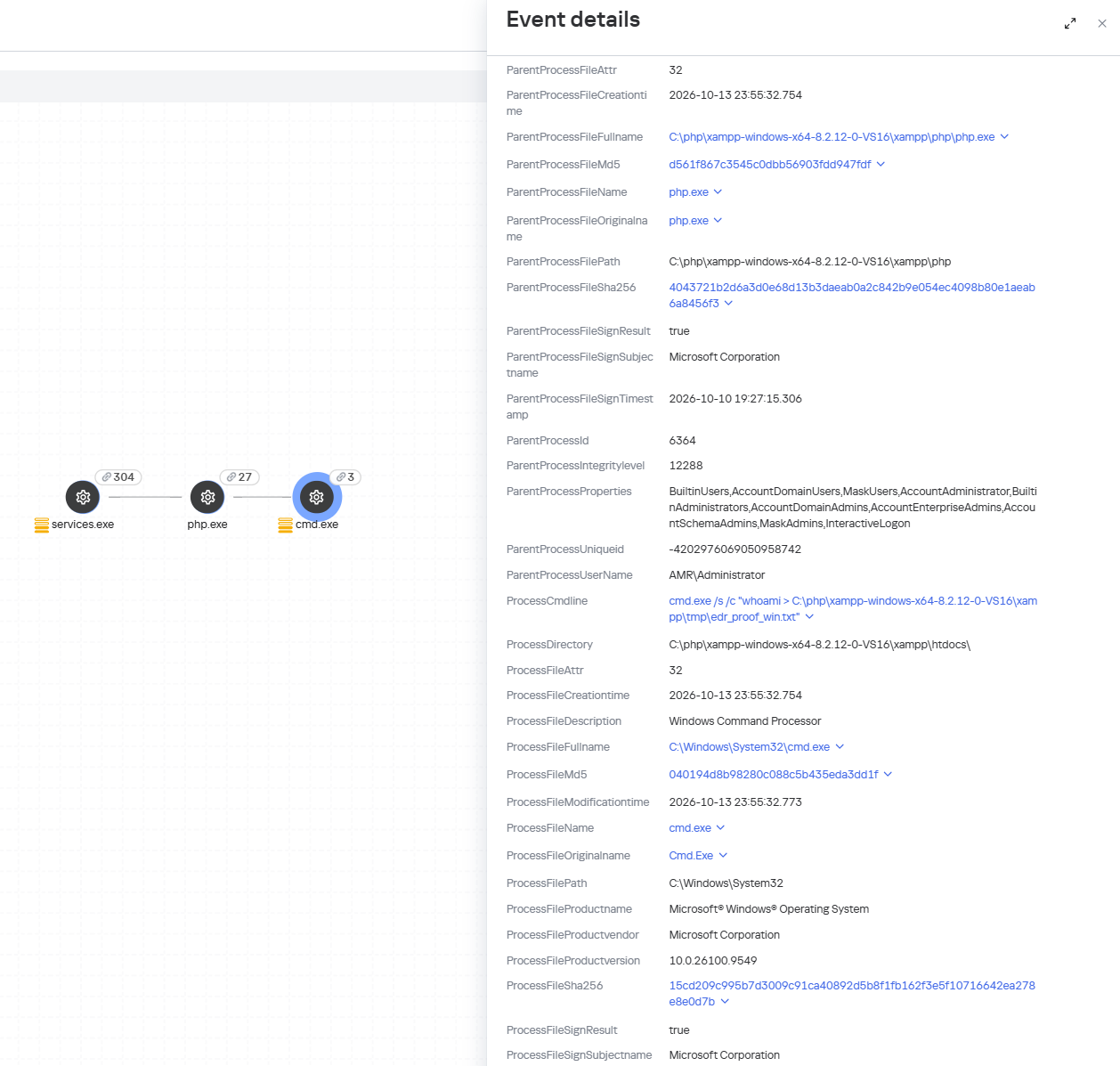
When an attempt is made to exploit these RCE vulnerabilities, Kaspersky Endpoint Detection and Response promptly alerts the user to suspicious actions performed in the context of a web server, on both Linux and Windows machines. This activity is detected by the following rules:

Detection of the PHP2Shell vulnerability exploit by KEDR

Detection of the PHP2Shell vulnerability exploit by KEDR

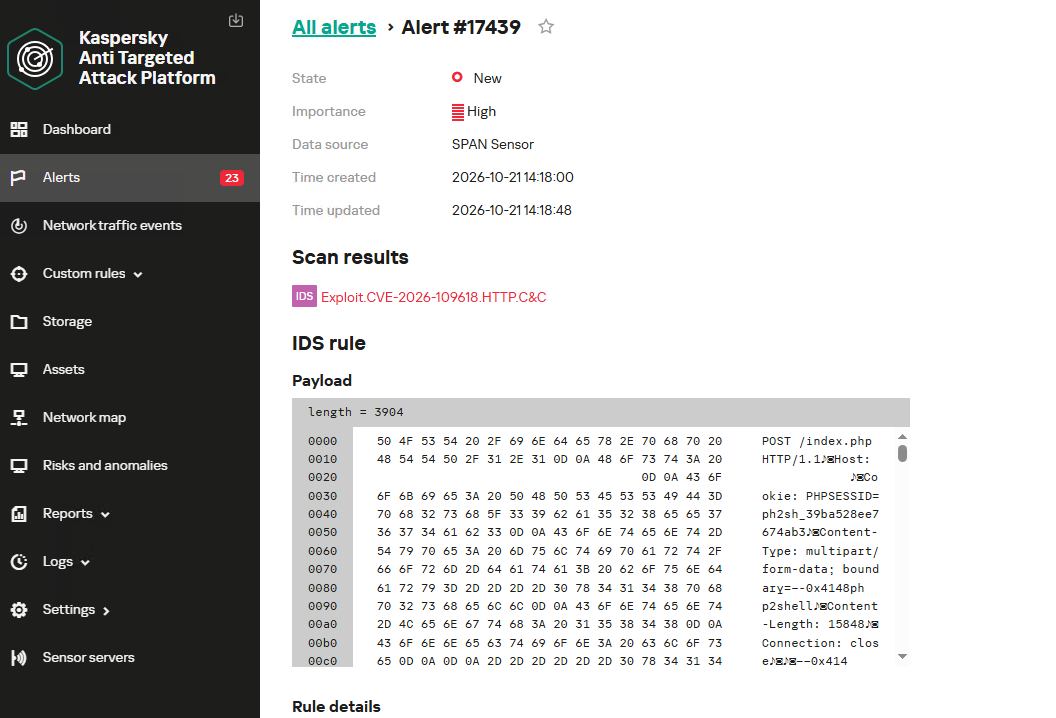
Exploitation of the PHP2Shell vulnerability in network traffic is detected by Kaspersky Anti Targeted Attack (KATA). This solution detects such activity with the following verdicts: Exploit.CVE-2026-109618.HTTP.C&C and Exploit.CVE-2026-109619.HTTP.C&C.

Detection of the PHP2Shell vulnerability exploit by KATA

Detection of the PHP2Shell vulnerability exploit by KATA

Kaspersky Endpoint Security, now available as Kaspersky Next, also detects malicious post-exploitation activity using the Behavior Detection component, with verdicts such as PDM:Exploit.Linux.Generic and PDM:Exploit.Win32.Generic.

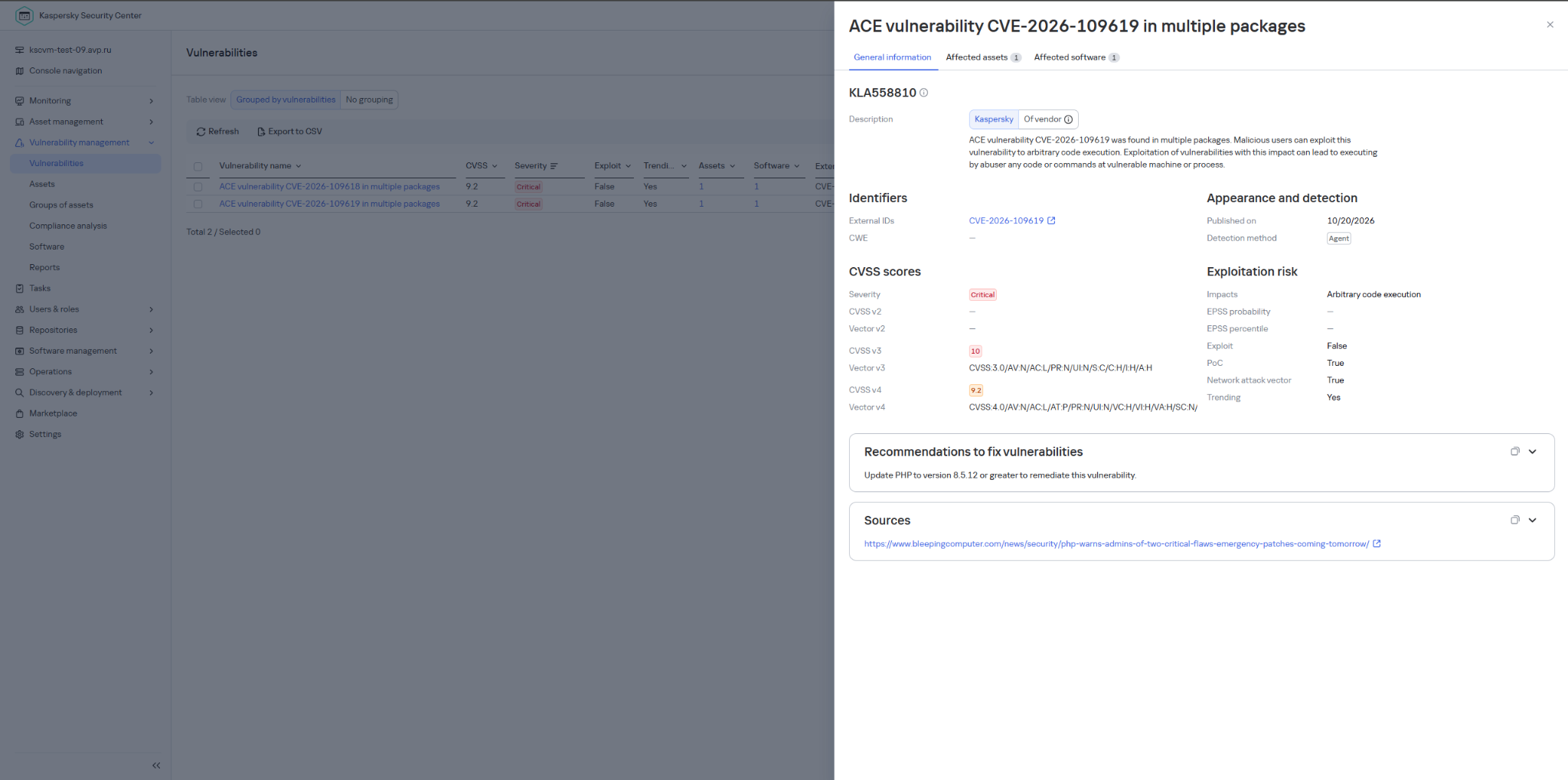
Our Kaspersky Vulnerability Management solution detects vulnerable software versions using the Vulnerability scanning and Agentless black-box scanning components.

Detection of the PHP vulnerability in Kaspersky Vulnerability Management

Detection of the PHP vulnerability in Kaspersky Vulnerability Management


The Kaspersky Managed Detection and Response service detects the exploitation of the described vulnerabilities by monitoring activity characteristic of RCE:
  • Spawning of suspicious processes by the web server;
  • Creation of suspicious executable files in the web application directory;
  • Creation of suspicious scripts in the web application directory;
  • Creation of files with uncommon extensions in the web application directory;
  • Execution of reconnaissance commands by the web server process;
  • Execution of persistence commands by the web server process;
  • Delivery and launch of web shells on the web server.

Moreover, MDR detects other malicious activity not directly related to remote code execution.

To protect companies that use our Kaspersky SIEM system, the product repository includes rules that help detect the following malicious activity.

  • Execution of suspicious executable files by web server processes on Windows and Linux machines:
    • R300_04_Windows shell started by a web application
    • R152_08_A running Linux shell process has a suspicious parent process
  • Execution of reconnaissance commands by the web server process:
    • R286_05_Possible web-shell (Linux)

We also recommend monitoring the creation of scripts or executable files in the web server directory when developing your own detection rules or conducting threat hunting:

((DeviceEventClassID = '4663' AND DeviceCustomString1 ilike 'WriteData') OR DeviceEventClassID = '11')
AND match(FileName,'(?i).*\.(php|asp|aspx|ashx|jsp|js|jar|jse|dll|exe|bat|ps1|vbs|wsf|wsh|msi|msp|hta|cpl)$')
AND match(DestinationProcessName,'(?i).*(php-cgi|nginx|httpd|w3wp)\.exe')

Name = 'openat' AND has(SA.Nametype, 'CREATE')
AND
length(arrayFilter(x -> match(x, '(public_html|var/www|usr/local/apache2|usr/local/httpd|var/apache|srv/www|home/httpd/html|srv/http|usr/share/nginx/html|var/lib/pgsql/data|usr/local/mysql/data|var/lib/mysql|var/vsftpd|etc/bind|var/named)'), SA.FileName))>1
AND
length(arrayFilter(x -> match(x, '\.(aspx|asp|asmx|asax|ashx|jspx|jsp|js|phpt|php|phtml|pht|cfm|shtml|htaccess|fcgi|cgi|pl|py|sh)'), SA.FileName))>1

❌