Normal view

ShinyHunters escalates Canvas attacks with school login defacements

8 May 2026 at 14:00

Days after confirming a major data breach, Instructure is now facing a second blow.

Earlier this week, Instructure confirmed a major data breach affecting its cloud‑hosted Canvas environment, with the ShinyHunters group claiming it stole hundreds of millions of records tied to thousands of schools and universities worldwide. As discussed in our earlier blog, that incident involved data such as student and staff records, enrollment details, and private messages allegedly accessed through Canvas export features and APIs. At that stage, the focus was on large‑scale data theft and the long‑term risks for affected students and families, including identity fraud and highly targeted phishing.

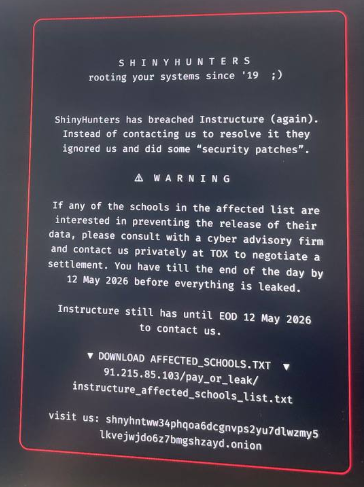
According to new reporting, ShinyHunters has now hit Instructure again, this time moving from quiet data theft to very visible extortion. Using another vulnerability in Instructure’s systems, the attackers were able to modify Canvas login portals for hundreds of educational institutions, defacing both web logins and the Canvas app with an on‑screen ransom message.

applying extra pressure
Image credit: vx-underground

The message both claimed responsibility for the earlier breach and set a deadline of May 12 for Instructure and affected schools to contact the gang or risk the public release of stolen data.

This second wave matters for two reasons. First, it confirms that ShinyHunters still has meaningful access to Instructure’s environment, or at least to components that control the look and behavior of school login pages. Second, it marks a clear escalation in pressure tactics, from leaked claims and dark web posts to messages shown directly to students, parents, and staff trying to access their courses.

How to deal with this data breach

For students and families, the practical advice from our original blog still applies:

  • Reset Canvas‑related passwords
  • Enable multi‑factor authentication where possible
  • Monitor financial and credit activity as children get older
  • Stay wary of highly personalized phishing that references real schools, courses, or teachers

For schools and districts, this latest extortion campaign underlines the need to coordinate closely with Instructure, review single sign-on (SSO) integrations, and prepare clear communications so that any future defacements or data leaks do not catch staff and parents by surprise.


CNET Editors' Choice Award 2026

“One of the best cybersecurity suites on the planet.” 

According to CNET. Read their review


Millions of students’ personal data stolen in major education breach

6 May 2026 at 14:45

Instructure, the company behind the Canvas learning management system (LMS), confirmed a cyber incident and subsequent data breach affecting its cloud‑hosted environment.

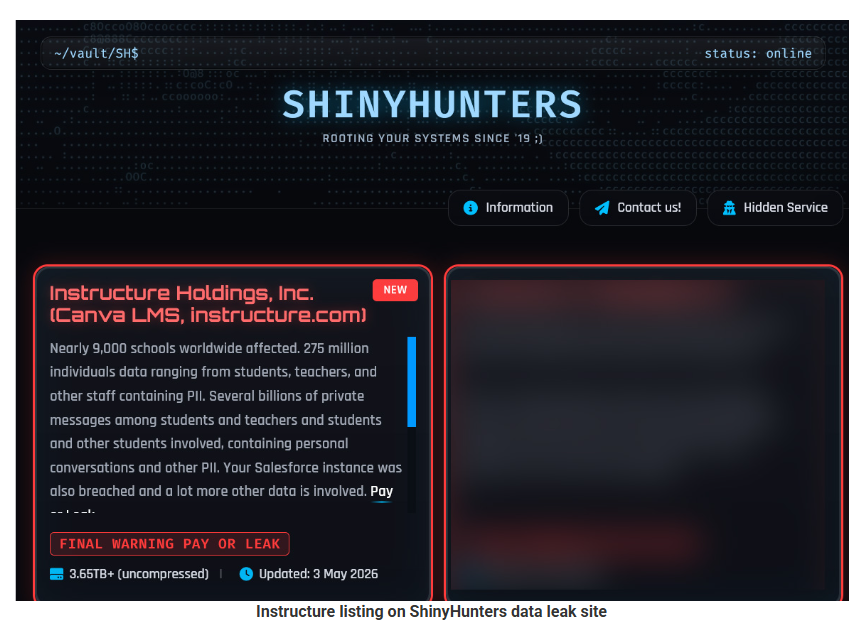
The ShinyHunters ransomware group claims it is behind the attack and says it stole roughly 275 million records tied to students, teachers, and staff.

ShinyHunters leak site
Image courtesy of BleepingComputer

The criminals shared a list of 8,809 school districts, universities, and online education platforms with BleepingComputer whose Canvas instances they claim were impacted, with per‑institution record counts ranging from tens of thousands to several million.


Digital Footprint Scan

See if your personal data has been exposed.


What to do if your child’s Instructure/Canvas data was exposed

If you’ve been told that your child was affected by the Instructure breach, you may be wondering what you can do to protect them. Here are some practical steps you can take right away.

1. Check what the school and Instructure are saying

Start with the notification from the school or district and Instructure’s own updates to understand what data about your child was involved (for example: name, email address, student ID, or course information). Follow any specific steps they recommend for student accounts and keep an eye on follow‑up messages in case new information comes to light.

Make sure the notification is real before anything else. If anything in the message looks suspicious, such as odd links, pressure to act immediately, or requests for extra data, check this first. Go to the district’s or Instructure’s site directly and use the contact details listed there to verify.

2. Lock down your child’s school and learning accounts

If your child has a Canvas or related account, change that password immediately, especially if your school lets students or parents log in with a username and password instead of single sign‑on. If your child tends to reuse passwords (for example, using the same one for Canvas, email, and gaming accounts), change those other passwords as well.

Give every account its own strong, unique password and consider using a family password manager so you can create and store these without relying on memory. For younger children, you may want to manage these credentials yourself and keep a list of which education platforms they use.

3. Turn on multi‑factor authentication where possible

Multi‑factor authentication (MFA) makes it much harder for someone to log into an account with just a password. If your school or district allows it on parent or student accounts (for example, a code sent by SMS, email, or generated in an authenticator app), turn it on and, ideally, have the codes go to a device or app you control.

Remind your child that security codes are like short‑term passwords. They should never share them with friends, teachers, or anyone claiming to be “IT support,” even if a message looks urgent or uses school branding.

4. Consider extra identity protection for minors

If the breach included very sensitive identifiers (such as national ID or Social Security numbers in some regions), ask both the school and the breached provider what protection is being offered for minors, such as credit monitoring or identity restoration services. In some countries, you can also place a credit freeze or similar block on a minor’s file to prevent new accounts being opened in their name.

Even if your child is too young to have a credit file today, it’s worth keeping a note of this incident so you remember to check their records once they are old enough.

5. Stay alert for follow‑on scams

Attackers like to reuse stolen data from education platforms to make phishing and scam messages more convincing, mentioning real school names, teachers, or courses. Be especially wary of emails and texts that claim to be from the school, district, or Instructure and that ask you to “confirm” login details, open unexpected attachments (like “new assignments”), or pay fees via unusual methods.

As a rule of thumb, avoid clicking links in unsolicited messages about the breach. Instead, open a new browser window and go to the official site or app as you normally would, then log in from there to check for messages.


What do cybercriminals know about you?

Use Malwarebytes’ free Digital Footprint scan to see whether your personal information has been exposed online.

Actively exploited cPanel bug exposes millions of websites to takeover

1 May 2026 at 12:48

Security researchers are warning about a newly discovered vulnerability in the widely used web server management software cPanel and WebHost Manager (WHM). 

This is a critical, actively exploited authentication-bypass bug in cPanel/WHM that lets attackers gain administrative access to the interface without credentials, potentially take over servers and all hosted sites.

The vulnerability, tracked as CVE-2026-41940, has been added to the Known Exploited Vulnerabilities catalog by the Cybersecurity and Infrastructure Security Agency (CISA), meaning there is evidence it is being used in real-world attacks.

Because cPanel/WHM is used by over a million sites worldwide, including banks and health organizations, the potential impact is huge. In simple terms, the bug can act like a front‑door key to a big chunk of the web’s hosting infrastructure.

cPanel released patches on April 28, 2026, and urged all customers and hosts to update. It said all supported versions after 11.40 are affected, including DNSOnly and WP Squared.

Hosting providers including Namecheap, HostGator, and KnownHost temporarily blocked access to cPanel interfaces while patching, treating this as a critical authentication bypass and reporting exploit attempts going back to late February 2026.

How to stay safe

While it’s up to the hosting companies and website owners to patch as quickly as possible, there are ways to reduce your risk if a site you use is compromised.

As always, limit the data you share with websites to what’s absolutely necessary. Data they don’t have can’t be stolen.

When ordering from an online retailer, don’t tick the box to save your card details for future purchases as they will be stored on the server.

If there’s an option to check out as a guest, use it. It reduces the amount of personal data tied to an account.

Don’t reuse passwords. When one site is compromised, having the same credentials in several places turns it into a multi‑account takeover problem. A password manager can help you create complex unique passphrases, and remember them for you.

Where possible, pay by credit card. In many regions, this gives you stronger fraud protection.


Personal Data Remover

Your details are probably already for sale. 


When a site you trust gets hacked

If you think you’ve been affected by a data breach, take the following steps:

  • Check the company’s advice. Every breach is different, so check with the company to find out what’s happened and follow any specific advice it offers.
  • Change your password. You can make a stolen password useless to thieves by changing it. Choose a strong password that you don’t use for anything else. Better yet, let a password manager choose one for you.
  • Enable two-factor authentication (2FA). If you can, use a FIDO2-compliant hardware key, laptop, or phone as your second factor. Some forms of 2FA can be phished just as easily as a password, but 2FA that relies on a FIDO2 device can’t be phished.
  • Watch out for impersonators. The thieves may contact you posing as the breached platform. Check the official website to see if it’s contacting victims and verify the identity of anyone who contacts you using a different communication channel.
  • Take your time. Phishing attacks often impersonate people or brands you know, and use themes that require urgent attention, such as missed deliveries, account suspensions, and security alerts.
  • Consider not storing your card details. It’s definitely more convenient to let sites remember your card details, but it increases risk if a retailer suffers a breach.
  • Set up identity monitoring, which alerts you if your personal information is found being traded illegally online and helps you recover after.

What do cybercriminals know about you?

Use Malwarebytes’ free Digital Footprint scan to see whether your personal information has been exposed online.

❌