Normal view

Variations of the ClickFix | Kaspersky official blog

25 February 2026 at 16:14

About a year ago, we published a post about the ClickFix technique, which was gaining popularity among attackers. The essence of attacks using ClickFix boils down to convincing the victim, under various pretexts, to run a malicious command on their computer. That is, from the cybersecurity solutions point of view, it’s run on behalf of the active user and with their privileges.

In early uses of this technique, cybercriminals tried to convince victims that they need to execute a command to fix some problem or to pass a captcha, and in the vast majority of cases, the malicious command was a PowerShell script. However, since then, attackers have come up with a number of new tricks that users should be warned about, as well as a number of new variants of malicious payload delivery, which are also worth keeping an eye on.

Use of mshta.exe

Last year, Microsoft experts published a report on cyberattacks targeting hotel owners working with Booking.com. The attackers sent out fake notifications from the service, or emails pretending to be from guests drawing attention to a review. In both cases, the email contained a link to a website imitating Booking.com, which asked the victim to prove that they were not a robot by running a code via the Run menu.

There are two key differences between this attack and ClickFix. First, the user isn’t asked to copy the string (after all, a string with code sometimes arouses suspicion). It’s copied to the exchange buffer by the malicious site – probably when the user clicks on a checkbox that mimics the reCAPTCHA mechanism. Second, the malicious string calls the legitimate mshta.exe utility, which serves to run applications written in HTML. It contacts the attackers’ server and executes the malicious payload.

Video on TikTok and PowerShell with administrator privileges

BleepingComputer published an article in October 2025 about a campaign spreading malware through instructions in TikTok videos. The videos themselves imitate video tutorials on how to activate proprietary software for free. The advice they give boils down to a need to run PowerShell with administrator rights and then execute the command iex (irm {address}). Here, the irm command downloads a malicious script from a server controlled by attackers, and the iex (Invoke-Expression) command runs it. The script, in turn, downloads an infostealer malware to the victim’s computer.

Using the Finger protocol

Another unusual variant of the ClickFix attack uses the familiar captcha trick, but the malicious script uses the outdated Finger protocol. The utility of the same name allows anyone to request data about a specific user on a remote server. The protocol is rarely used nowadays, but it is still supported by Windows, macOS, and a number of Linux-based systems.

The user is persuaded to open the command line interface and use it to run a command that establishes a connection via the Finger protocol (using TCP port 79) with the attackers’ server. The protocol only transfers text information, but this is enough to download another script to the victim’s computer, which then installs the malware.

CrashFix variant

Another variant of ClickFix differs in that it uses more sophisticated social engineering. It was used in an attack on users trying to find a tool to block advertising banners, trackers, malware, and other unwanted content on web pages. When searching for a suitable extension for Google Chrome, victims found something called NexShield – Advanced Web Guardian, which was in fact a clone of real working software, but which at some point crashed the browser and displayed a fake notification about a detected security problem and the need to run a “scan” to fix the error. If the user agreed, they received instructions on how to open the Run menu and execute a command that the extension had previously copied to the clipboard.

The command copied the familiar finger.exe file to a temporary directory, renamed it ct.exe, and then launched it with the attacker’s address. The rest of the attack was the same as in the abovementioned case. In response to the Finger protocol request, a malicious script was delivered, which launched and installed a remote access Trojan (in this case, ModeloRAT).

Malware delivery via DNS lookup

The Microsoft Threat Intelligence team also shared a slightly more complex than usual ClickFix attack variant. Unfortunately, they didn’t describe the social engineering trick, but the method of delivering the malicious payload is quite interesting. Probably in order to complicate detection of the attack in a corporate environment and prolong the life of the malicious infrastructure, the attackers used an additional step: contacting a DNS server controlled by the attackers.

That is, after the victim is somehow persuaded to copy and execute a malicious command, a request is sent to the DNS server on behalf of the user via the legitimate nslookup utility, requesting data for the example.com domain. The command contained the address of a specific DNS server controlled by the attackers. It returns a response that, among other things, returned a string with malicious script, which in turn downloads the final payload (in this attack, ModeloRAT again).

Cryptocurrency bait and JavaScript as payload

The next attack variant is interesting for its multi-stage social engineering. In comments on Pastebin, attackers actively spread a message about an alleged flaw in the Swapzone.io cryptocurrency exchange service. Cryptocurrency owners were invited to visit a resource created by fraudsters, which contained full instructions on how to exploit this flaw, which can make up to $13,000 in a couple of days.

The instructions explain how the service’s flaws can be exploited to exchange cryptocurrency at a more favorable rate. To do this, a victim needs to open the service’s website in the Chrome browser, manually type “javascript:” in the address bar, and then paste the JavaScript script copied from the attackers’ website and execute it. In reality, of course, the script cannot affect exchange rates in any way; it simply replaces Bitcoin wallet addresses and, if the victim actually tries to exchange something, transfers the funds to the attackers’ accounts.

How to protect your company from ClickFix attacks

The simplest attacks using the ClickFix technique can be countered by blocking the [Win] + [R] key combination on work devices. But, as we see from the examples listed, this is far from the only type of attack in which users are asked to run malicious code themselves.

Therefore, the main advice is to raise employee cybersecurity awareness. They must clearly understand that if someone asks them to perform any unusual manipulations with the system, and/or copy and paste code somewhere, then in most cases this is a trick used by cybercriminals. Security awareness training can be organized using the Kaspersky Automated Security Awareness Platform.

In addition, to protect against such cyberattacks, we recommend:

I bought, I saw, I attended: a quick guide to staying scam-free at the Olympics | Kaspersky official blog

12 February 2026 at 16:30

The Olympic Games are more than just a massive celebration of sports; they’re a high-stakes business. Officially, the projected economic impact of the Winter Games — which kicked off on February 6 in Italy — is estimated at 5.3 billion euros. A lion’s share of that revenue is expected to come from fans flocking in from around the globe — with over 2.5 million tourists predicted to visit Italy. Meanwhile, those staying home are tuning in via TV and streaming. According to the platforms, viewership ratings are already hitting their highest peaks since 2014.

But while athletes are grinding for medals and the world is glued to every triumph and heartbreak, a different set of “competitors” has entered the arena to capitalize on the hype and the trust of eager fans. Cyberscammers of all stripes have joined an illegal race for the gold, knowing full well that a frenzy is a fraudster’s best friend.

Kaspersky experts have tracked numerous fraudulent schemes targeting fans during these Winter Games. Here’s how to avoid frustration in the form of fake tickets, non-existent merch, and shady streams, so you can keep your money and personal data safe.

Tickets to nowhere

The most popular scam on this year’s circuit is the sale of non-existent tickets. Usually, there are far fewer seats at the rinks and slopes than there are fans dying to see the main events. In a supply-and-demand crunch, folks scramble for any chance to snag those coveted passes, and that’s when phishing sites — clones of official vendors — come to the “rescue”. Using these, bad actors fish for fans’ payment details to either resell them on the dark web or drain their accounts immediately.

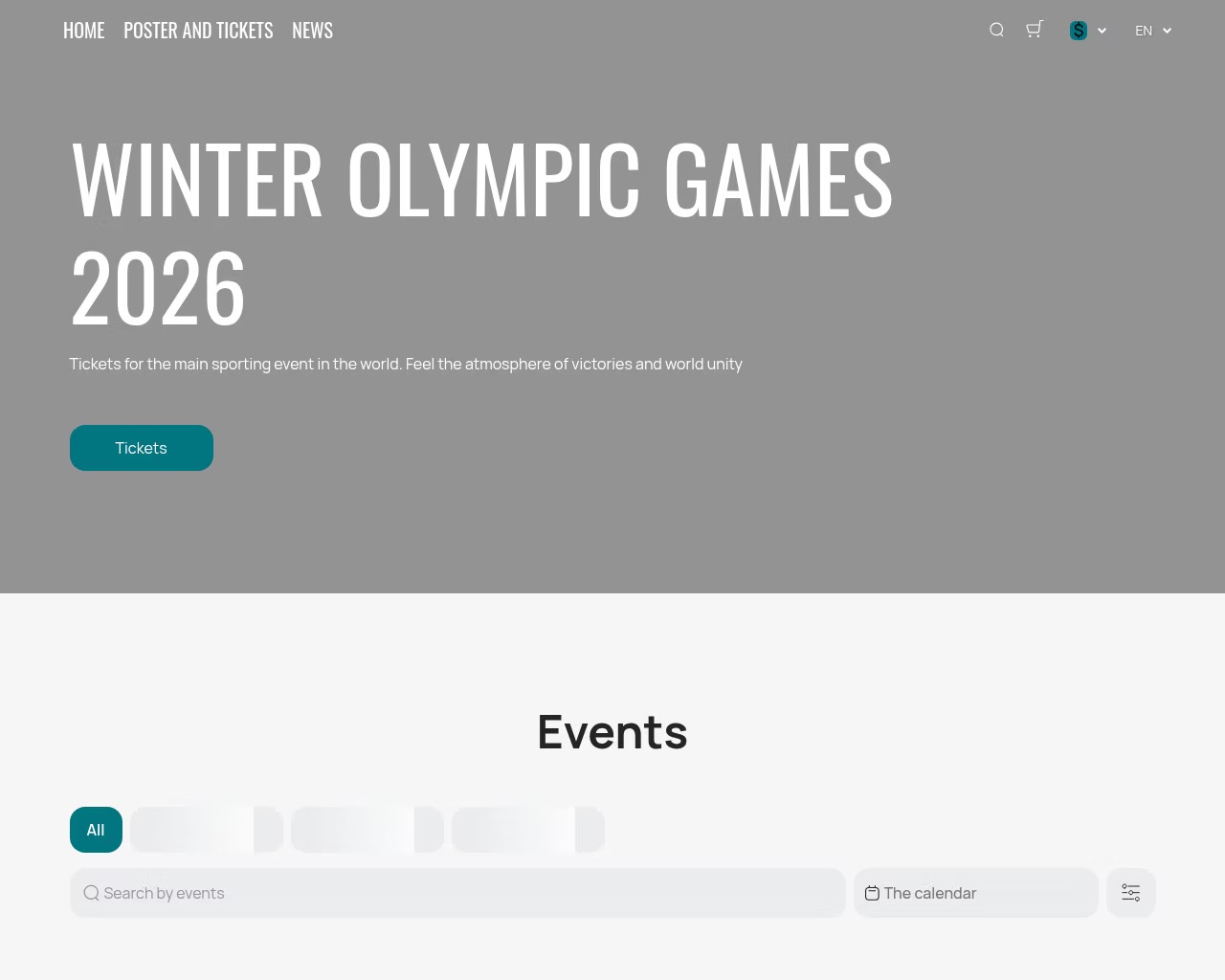
This is what a fraudulent site selling fake Olympic tickets looks like

This is what a fraudulent site selling fake Olympic tickets looks like

Remember: tickets for any Olympic event are sold only through the authorized Olympic platform or its listed partners. Any third-party site or seller outside the official channel is a scammer. We’re putting that play in the penalty box!

A fake goalie mitt, a counterfeit stick…

Dreaming of a Sydney Sweeney — sorry, Sidney Crosby — jersey? Or maybe you want a tracksuit with the official Games logo? Scammers have already set up dozens of fake online stores just for you! To pull off the heist, they use official logos, convincing photos, and padded rave reviews. You pay, and in return, you get… well, nothing but a transaction alert and your card info stolen.

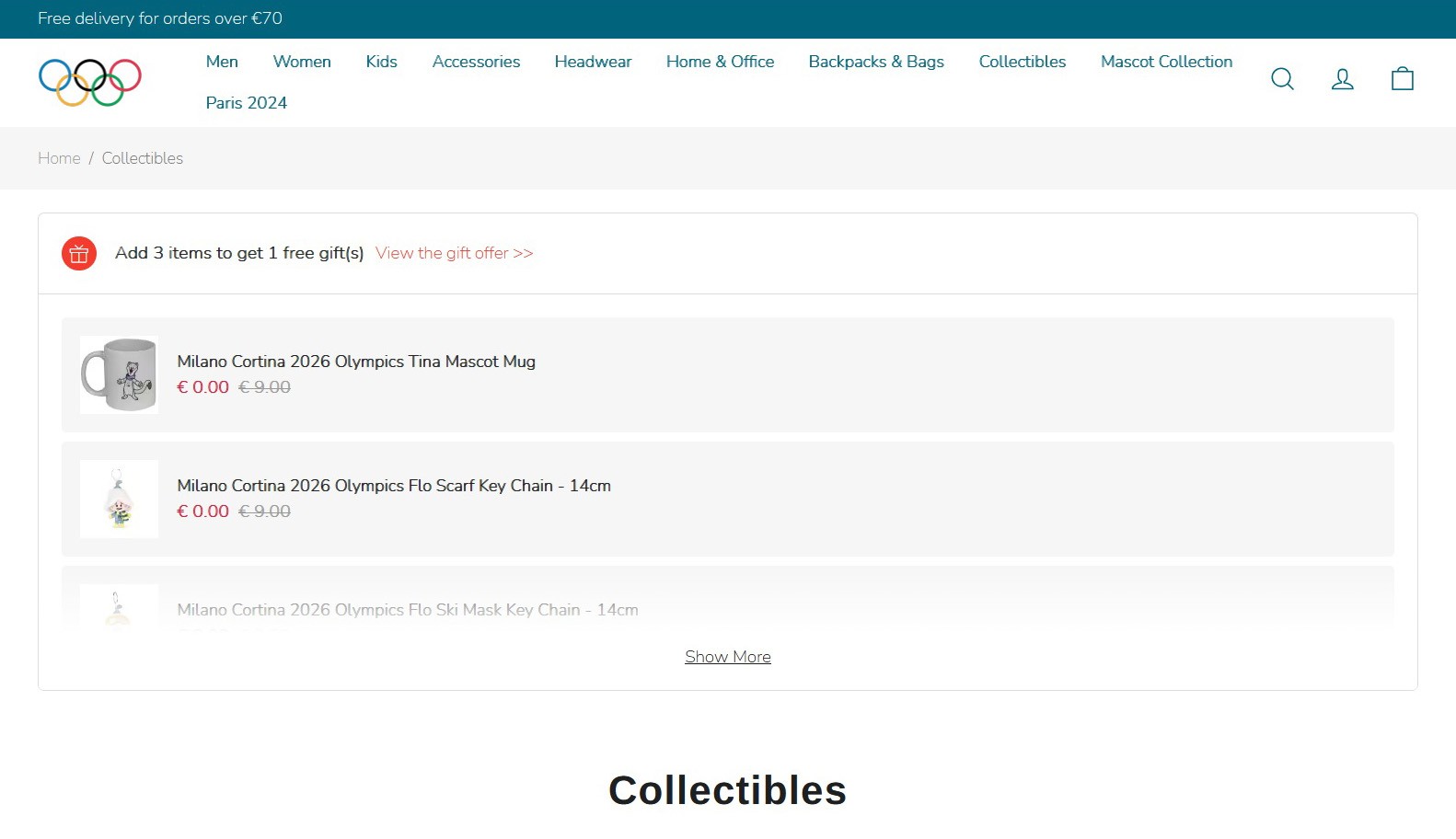
A fake online store for Olympic merchandise
Naive shoppers are being lured with gifts:
Naive shoppers are being lured with gifts: "free" mugs and keychains featuring the Olympic mascot
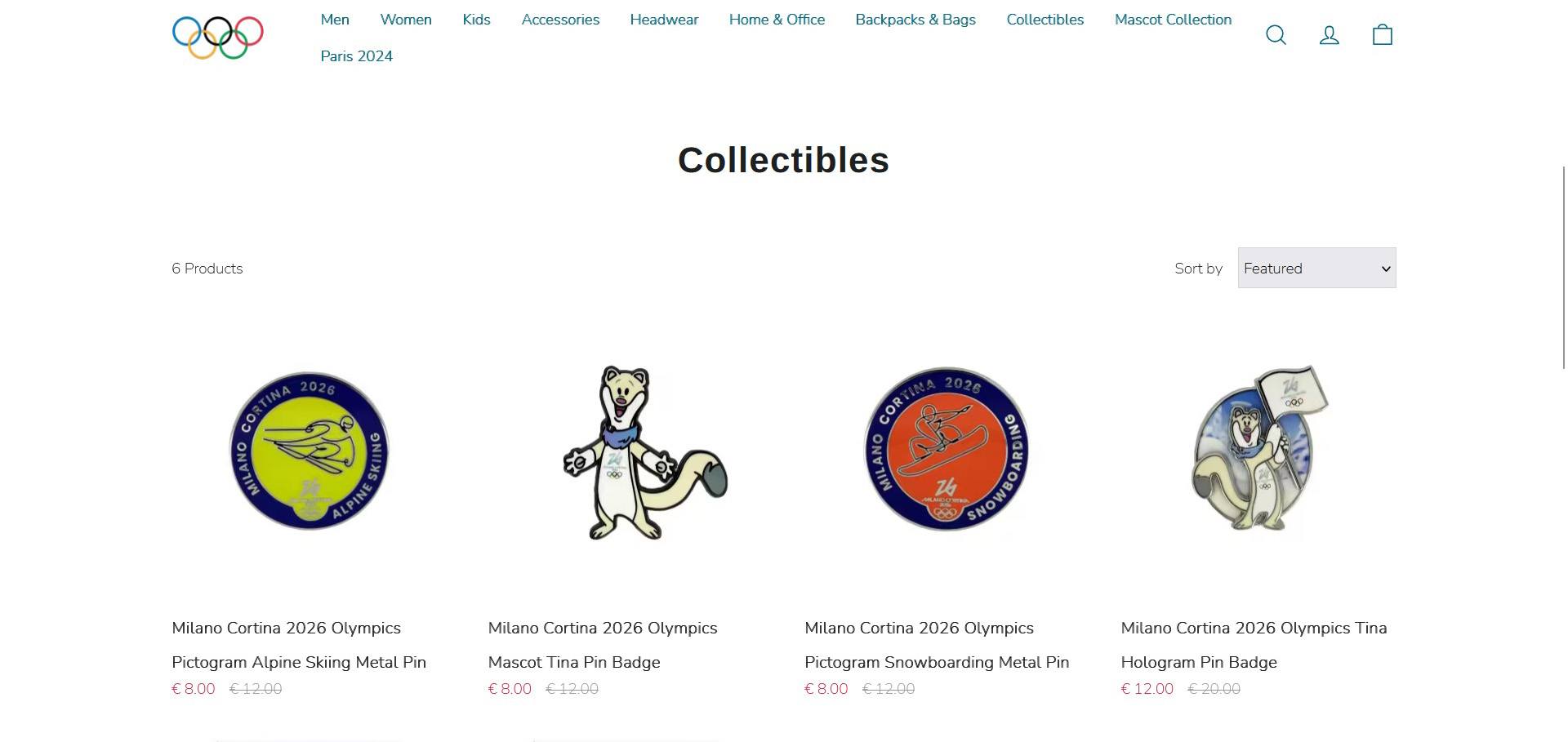
And a hefty
And a hefty "discount" on pins

I want my Olympic TV!

What if you prefer watching the action from the comfort of your couch rather than trekking from stadium to stadium, but you’re not exactly thrilled about paying for a pricey streaming subscription? Maybe there’s a free stream out there?

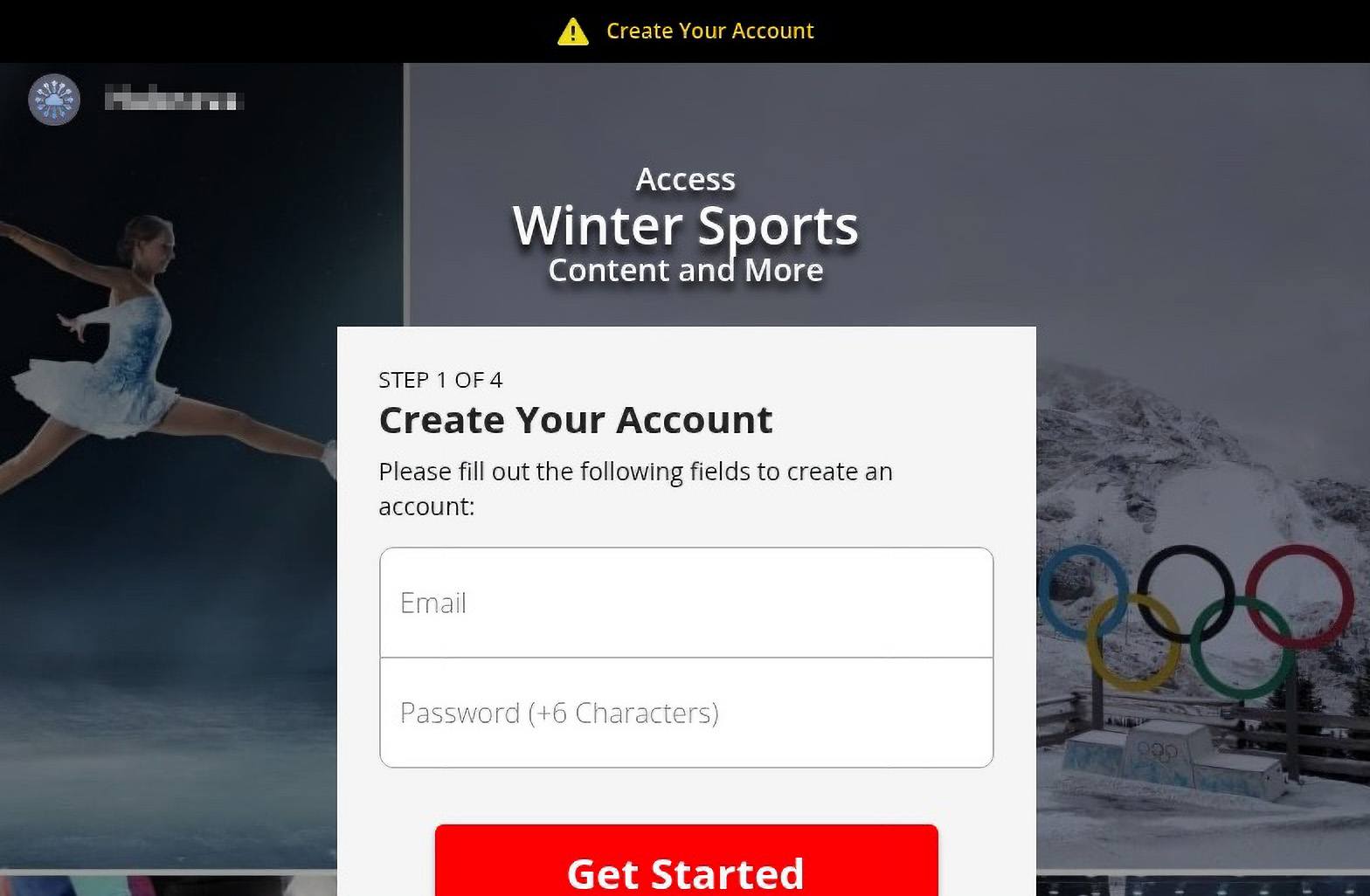
The bogus streaming service warns you right away that you can't watch just like that — you have to register. But hey, it's free!
Another
Another "media provider" fishes for emails to build spam lists or for future phishing...
...But to watch the
...But to watch the "free" broadcast, you have to provide your personal data and credit card info

Sure thing! Five seconds of searching and your screen is flooded with dozens of “cheap”, “exclusive”, or even “free” live streams. They’ve got everything from figure skating to curling. But there’s a catch: for some reason — even though it’s supposedly free — a pop-up appears asking for your credit card details.

You type them in and hit “Play”, but instead of the long-awaited free skate program, you end up on a webcam ad site or somewhere even sketchier. The result: no show for you. At best, you were just used for traffic arbitrage; at worst, they now have access to your bank account. Either way, it’s a major bummer.

Defensive tactics

Scammers have been ripping off sports fans for years, and their payday depends entirely on how well they can mimic official portals. To stay safe, fans should mount a tiered defense: install reliable security software to block phishing, and keep a sharp eye on every URL you visit. If something feels even slightly off, never, ever enter your personal or payment info.

  • Stick to authorized channels for tickets. Steer clear of third-party resellers and always double-check info on the official Olympic website.
  • Use legitimate streaming services. Read the reviews and don’t hand over your credit card details to unverified sites.
  • Be wary of Olympic merch and gift vendors. Don’t get baited by “exclusive” offers or massive discounts from unknown stores. Only buy from official retail partners.
  • Avoid links in emails, direct messages, texts, or ads offering free tickets, streams, promo codes, or prize giveaways.
  • Deploy a robust security solution. For instance, Kaspersky Premium automatically shuts down phishing attempts and blocks dangerous websites, malicious ads, and credit card skimmers in real time.

Want to see how sports fans were targeted in the past? Check out our previous posts:

How to Combat Check Fraud: Leveraging Intelligence to Prevent Financial Loss

Blogs

Blog

How to Combat Check Fraud: Leveraging Intelligence to Prevent Financial Loss

Criminals increasingly steal checks and sell them on illicit online marketplaces, where check fraud-related services are common. Intelligence is helping the financial sector fight back

SHARE THIS:
Default Author Image
May 18, 2023

Stolen checks and the impact of Covid-19

Checks are one of the most vulnerable legacy payment methods. Check fraud can actively affect the bottom lines (and reputations) of banks, financial services organizations, government entities, and many other organizations that utilize checks. According to the Financial Crimes Enforcement Network (FinCEN), fraud—including check fraud—is “the largest source of illicit proceeds in the US” as well as “one of the most significant money laundering threats to the United States.” 

Targeting the mail

Criminals target the US mail system to steal a variety of checks. In fact, there is a nationwide surge in check fraud schemes targeting the US mail and shipping system, as threat actors continue to steal, alter, and sell checks through illicit means and channels. 

This includes personal checks and tax refund checks to government or government assistance-related checks (Social Security payments, e.g.). Business checks are also a primary target because they are often written for larger amounts and may take longer for the victim to identify fraudulent activity.

In 2022 alone, US banks filed 680,000 check fraud-related suspicious activity reports (SARs). This represents a nearly two-fold increase from 2021 (which itself represents a 23 percent YoY increase from 2020). This surge in check fraud has been exacerbated by Covid-19 Economic Impact Payments (EIPs) under the CARES Act, which presented threat actors with a new avenue to attempt to commit fraud.

Related Reading

This Is What Covid Fraud Looks Like: Targeting Government Relief Funding

Read now

Check fraud: A mini use case 

In order to mitigate and ultimately prevent check-fraud-related risks, it’s crucial for financial intelligence and fraud teams to understand what threat actors seek, how they work, and where they operate. 

This begins, as we detail below, with intelligence into the communities, forums, and marketplaces where check fraud occurs as well as the tools that enable deep understandings, timely insights, and measurable action. 

Below is an intelligence narrative, in three acts, that tells the story of how transactions involving some of the above examples could play out.

Act I: Obtain

Threat actors are known to remove mail from individuals’ mailboxes and parcel lockers using blue box “arrow” master keys. These arrow keys are often stolen from USPS employees, which has led to numerous incidents of harassment, threats, and even violence. Generally, arrow keys are sold within illicit community chats and/or the deep and dark web, often fetching upwards of $3,000 per key.

In general, when it comes to check fraud, threat actors may sell or seek: 

  • Mailbox keys
  • Stolen checks
  • Check alteration services (physical and digital)
  • Synthetic identity provisioning
  • Drop account sharing
  • Counterfeit check creation
  • Writing a check with insufficient funds behind it
  • Insider access
A screenshot of Flashpoint’s Ignite platform, showing the results of an OCR-driven search for stolen checks.

Act II: Alter

Check alteration comes in two forms: “washing” and “cooking.” 

Washing refers to the process of altering a check by chemically removing ink and replacing the newly empty spaces with a different value, recipient name, or another fraud-enabling alteration. 

Cooking involves digitally scanning the check and altering text or values through digital means.

Act III: Monetize

Threat actors will deposit the fraudulent check and rapidly withdraw the funds from an ATM, or sell a stolen or altered check on an illicit marketplace or chat group, and then receive payment, often via cryptocurrency.

Four key elements of actionable check fraud intelligence

Financial institutions should rely on four essential intelligence-led technologies, tools, or capabilities to effectively combat check fraud.

1) Visibility and access to illicit communities and channels

To prevent check fraud, organizations should focus on a few key places. Financially motivated threat actors operate and share information on messaging apps like Telegram and other open-source channels, as well as illicit marketplaces on the deep and dark web. Therefore, it is imperative for financial intelligence and fraud teams to have access to the most relevant check fraud-related threats across the internet. 

Keep in mind, however, that accessing these communities is not always straightforward and, if done frivolously, can compromise an investigation.

2) Timeliness and curated alerting

Intelligence is often only as good as it is relevant. Flashpoint enables security and intelligence practitioners to bubble the most important, mission-critical intelligence through our real-time alerting capability, which allows users to receive notifications for keywords and phrases that relate to their mission, such as check fraud-related lingo and activity. 

Essential Reading

The Flashpoint Guide to Card Fraud for the Financial Services Sector

Read now

In addition to real-time alerts, analysts can rely on curated alerting and saved searches to track topics of long-term interest. Flashpoint Ignite enables analysts to research particular accounts and their recent activity and matches transactions to their respective ATM slips and institution address. This helps to ensure the accuracy of the information found within these communities and marketplaces before raising any alarms, as many scammers post false content. 

This approach is particularly valuable as check fraudsters often share crucial information such as preferred methodologies, social media handles, and geolocations that can aid in identifying malicious activities. In addition, by closely observing newly emerging trends, such as the evolution of pandemic relief fraud to refund fraud to check fraud, analysts can proactively develop robust preventative measures to mitigate risks before these tactics become widespread.

3) Actionable OCR and Video Search

In order to provide “material proof,” cyber threat actors will often tout and post an image of a check in a chat application or marketplace in hopes of increasing the likelihood of a successful transaction. Optical Character Recognition (OCR) technology can capture important information about check fraud attempts, since actors often share images of the fraudulent check or subsequent monetization transactions. OCR alerts are customizable with the financial institution’s name and common phrases used on checks to enhance accuracy.

Images of fraudulent checks provide valuable insights into the fraud attempt, including the check’s unique identifier, the account holder’s name, the bank’s name and address, and the endorsement signature. By analyzing these details, financial institutions and law enforcement agencies can identify patterns and leads that can help them track down the perpetrators and prevent future fraudulent activity.

Related Resource

The Risk-Reducing Power of Flashpoint Video Search

Read now

Moreover, ATM withdrawal slips can offer critical information about the transaction, such as the location of the ATM, the time of the deposit, and the type of account used. This data is useful when taking appropriate measures to prevent similar attempts and protect customers’ assets. With the help of advanced technologies like Flashpoint’s OCR, institutions can quickly extract and analyze this information to generate real-time alerts and take prompt action to prevent monetary losses.

An essential investigative component, Flashpoint’s industry-first video search technology, like its OCR capability, enables fraud and cyber threat intelligence (CTI) teams to surface logos, text, explicit content, and other critical intelligence to enhance investigations.

Combat check fraud with Flashpoint

Flashpoint delivers the intelligence that enables financial institutions to combat check fraud at scale. With timely, actionable, and accurate intelligence, financial institutions can mitigate and prevent financial loss, protect customer assets, and track down perpetrators. Get a free trial today to learn how:

  • A financial services customer detected more than $4M in illicitly marketed assets, including checks and compromised accounts, using Flashpoint’s OCR capabilities. 
  • A customer received 125 actionable alerts in a single month equated to over $15M in potentially averted losses.
  • An automated alert enabled a customer to identify a threat actor’s specific operations, saving them over $5M.

Request a demo today.

Lawrence’s List 090216

By: BHIS
2 September 2016 at 19:14

Lawrence Hoffmann // Election fraud is something I’ve mentioned here recently. The reality we must face here is that any time a digital system is used for voting there is […]

The post Lawrence’s List 090216 appeared first on Black Hills Information Security, Inc..

❌