❌

Normal view

How fake party invitations are being used to install remote access tools

2 February 2026 at 11:18

β€œYou’re invited!” 

It soundsΒ friendly,Β familiarΒ and quiteΒ harmless.Β But in aΒ scamΒ we recentlyΒ spotted, thatΒ simpleΒ phrase is beingΒ usedΒ to trick victims into installing a full remote access tool on theirΒ WindowsΒ computersβ€”giving attackers complete control of the system.Β 

What appears to be aΒ casual party or event invitationΒ leads toΒ the silent installation ofΒ ScreenConnect, a legitimate remoteΒ supportΒ toolΒ quietly installedΒ in the background and abused byΒ attackers.Β 

Here’s how theΒ scamΒ works, whyΒ it’sΒ effective, andΒ how to protect yourself.Β 

TheΒ email: AΒ partyΒ invitationΒ 

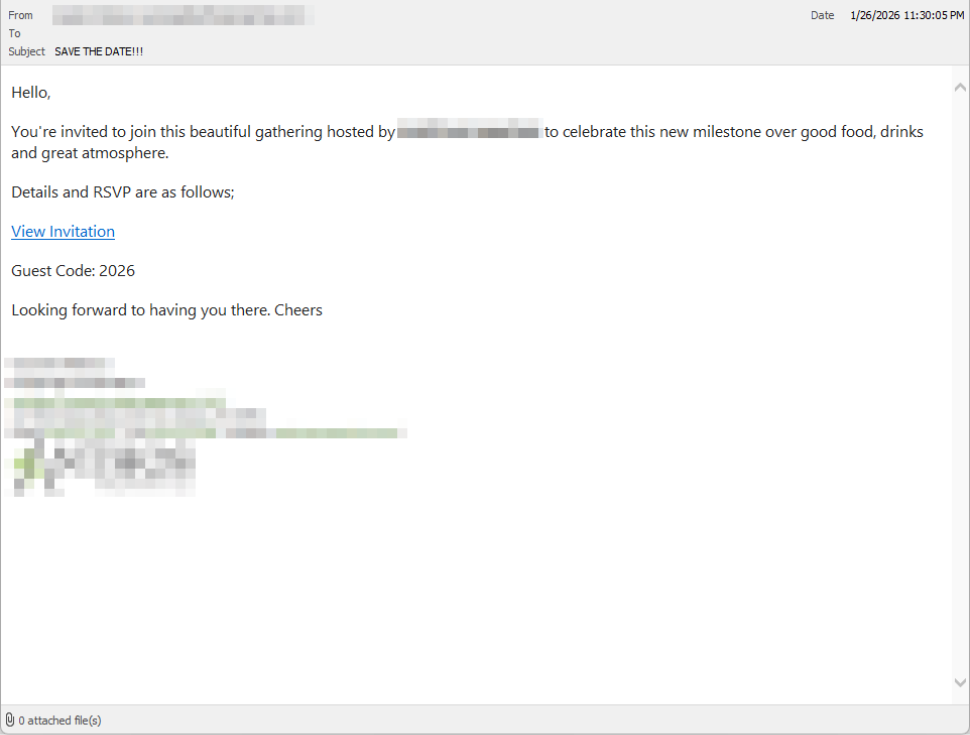
Victims receive an email framed as a personal invitationβ€”often written to look like it came from a friend or acquaintance. The message is deliberately informal and social, lowering suspicion and encouraging quick action.Β 

In the screenshot below, the email arrived from a friend whose email account had been hacked, but it could just as easily come from a sender you don’t know.

So far,Β we’veΒ only seenΒ thisΒ campaignΒ targetingΒ peopleΒ in theΒ UK,Β butΒ there’s nothingΒ stoppingΒ it from expandingΒ elsewhere.Β 

Clicking the link in the email leadsΒ to a polishedΒ invitationΒ page hosted on an attacker-controlled domain.Β 

Party invitation email from a contact

TheΒ invite: TheΒ landing pageΒ thatΒ leads to an installerΒ 

The landing page leans heavily into theΒ partyΒ theme,Β but instead of showing event details, the pageΒ nudgesΒ the user toward opening a file. None of them look dangerous on their own, but together theyΒ keep the user focused on theΒ β€œinvitation” file:Β 

  • A boldΒ β€œYou’re Invited!” headlineΒ 
  • The suggestion that aΒ friend had sent the invitationΒ 
  • AΒ messageΒ sayingΒ the invitation is best viewed on aΒ Windows laptop or desktop
  • A countdownΒ suggestingΒ yourΒ invitation is already β€œdownloading” 
  • A message implying urgency and social proof (β€œI opened mine and it was so easy!”)Β 

Within seconds, the browser is redirected to downloadΒ RSVPPartyInvitationCard.msiΒ 

The page even triggers the download automatically to keep the victim moving forward without stopping to think.Β 

This MSI fileΒ isn’tΒ an invitation.Β It’sΒ an installer.Β 

The landing page

TheΒ guest: What the MSIΒ actuallyΒ doesΒ 

When theΒ user opens theΒ MSI file, it launchesΒ msiexec.exeΒ andΒ silentlyΒ installsΒ ScreenConnectΒ Client, a legitimate remote access tool often used by IT support teams.Β Β 

There’sΒ noΒ invitation, RSVP form, or calendar entry.Β 

What happens instead:Β 

  • ScreenConnectΒ binaries areΒ installedΒ underΒ C:\Program Files (x86)\ScreenConnectΒ Client\Β 
  • AΒ persistent Windows serviceΒ is createdΒ (for example,Β ScreenConnectΒ ClientΒ 18d1648b87bb3023)Β 
  • ScreenConnectΒ installsΒ multiple .NET-based componentsΒ 
  • There is no clear user-facingΒ indicationΒ that a remote access tool is being installedΒ 

From the victim’s perspective,Β very littleΒ seems to happen. But at this point, the attackerΒ can now remotely accessΒ theirΒ computer.Β 

TheΒ after-party: RemoteΒ accessΒ isΒ establishedΒ 

Once installed, the ScreenConnect client initiates encrypted outbound connections to ScreenConnect’s relay servers, including a uniquely assigned instance domain.

That connectionΒ givesΒ the attacker theΒ same level of access as a remote ITΒ technician, including theΒ ability to:Β 

  • SeeΒ the victim’s screen in real time
  • ControlΒ theΒ mouse and keyboardΒ 
  • Upload or downloadΒ filesΒ 
  • KeepΒ accessΒ even after the computer is restartedΒ 

BecauseΒ ScreenConnectΒ is legitimate softwareΒ commonlyΒ usedΒ for remote support,Β its presenceΒ isn’tΒ always obvious. On a personal computer, the first signs are often behavioral, such as unexplained cursor movement, windows opening on their own, or a ScreenConnect process the user doesn’t remember installing.Β 

WhyΒ thisΒ scamΒ worksΒ 

This campaign is effective because it targetsΒ normal, predictable human behavior. From a behavioral security standpoint, it exploitsΒ our naturalΒ curiosityΒ andΒ appears to beΒ a lowΒ risk.Β 

Most peopleΒ don’tΒ think of invitations as dangerous. Opening one feels passive,Β like glancing at a flyer or checking a message, not installing software.Β 

Even security-aware users are trained to watch out for warnings and pressure. A friendly β€œyou’re invited” messageΒ doesn’tΒ trigger those alarms.Β 

By the time something feels off, the software is already installed.Β 

Signs your computer may be affectedΒ 

Watch for:Β 

  • A download or executed file namedΒ RSVPPartyInvitationCard.msiΒ 
  • AnΒ unexpected installation ofΒ ScreenConnectΒ ClientΒ 
  • AΒ Windows serviceΒ namedΒ ScreenConnectΒ ClientΒ with random charactersΒ Β 
  • Your computer makes outbound HTTPS connections toΒ ScreenConnectΒ relay domainsΒ 
  • Your system resolvesΒ the invitation-hosting domain used in this campaign,Β xnyr[.]digitalΒ 

How to stay safeΒ Β 

This campaign is a reminder that modern attacks oftenΒ don’tΒ break inβ€”they’reΒ invited in.Β Remote access tools give attackers deep control over a system. Acting quickly can limitΒ the damage.Β Β 

For individualsΒ 

If you receive an email like this:Β 

  • Be suspicious of invitations that ask you to download or open softwareΒ 
  • Never run MSI files from unsolicited emailsΒ 
  • Verify invitations through another channel before opening anythingΒ 

If you already clicked or ran the file:Β Β 

  • Disconnect from the internetΒ immediatelyΒ 
  • Check forΒ ScreenConnectΒ and uninstall it if presentΒ 
  • Run a full security scanΒ 
  • Change important passwords from a clean, unaffected deviceΒ 

ForΒ organisationsΒ (especially in the UK)Β 

  • Alert onΒ unauthorizedΒ ScreenConnectΒ installations
  • Restrict MSI execution whereΒ feasibleΒ 
  • Treat β€œremote support tools” as high-risk software
  • Educate users:Β invitationsΒ don’tΒ come as installersΒ 

This scam works by installing a legitimate remote access tool without clear user intent. That’s exactly the gap Malwarebytes is designed to catch.

Malwarebytes now detects newly installed remote access tools and alerts you when one appears on your system. You’re then given a choice: confirm that the tool is expected and trusted, or remove it if it isn’t.


We don’t just report on threatsβ€”we remove them

Cybersecurity risks should never spread beyond a headline. Keep threats off your devices byΒ downloading Malwarebytes today.

Clawdbot’s rename to Moltbot sparks impersonation campaign

29 January 2026 at 15:26

After the viral AI assistant Clawdbot was forced to rename to Moltbot due to a trademark dispute, opportunists moved quickly. Within days, typosquat domains and a cloned GitHub repository appearedβ€”impersonating the project’s creator and positioning infrastructure for a potential supply-chain attack.

The code is clean. The infrastructure is not. With the GitHub downloads and star rating rapidly rising, we took a deep dive into how fake domains target viral open source projects.

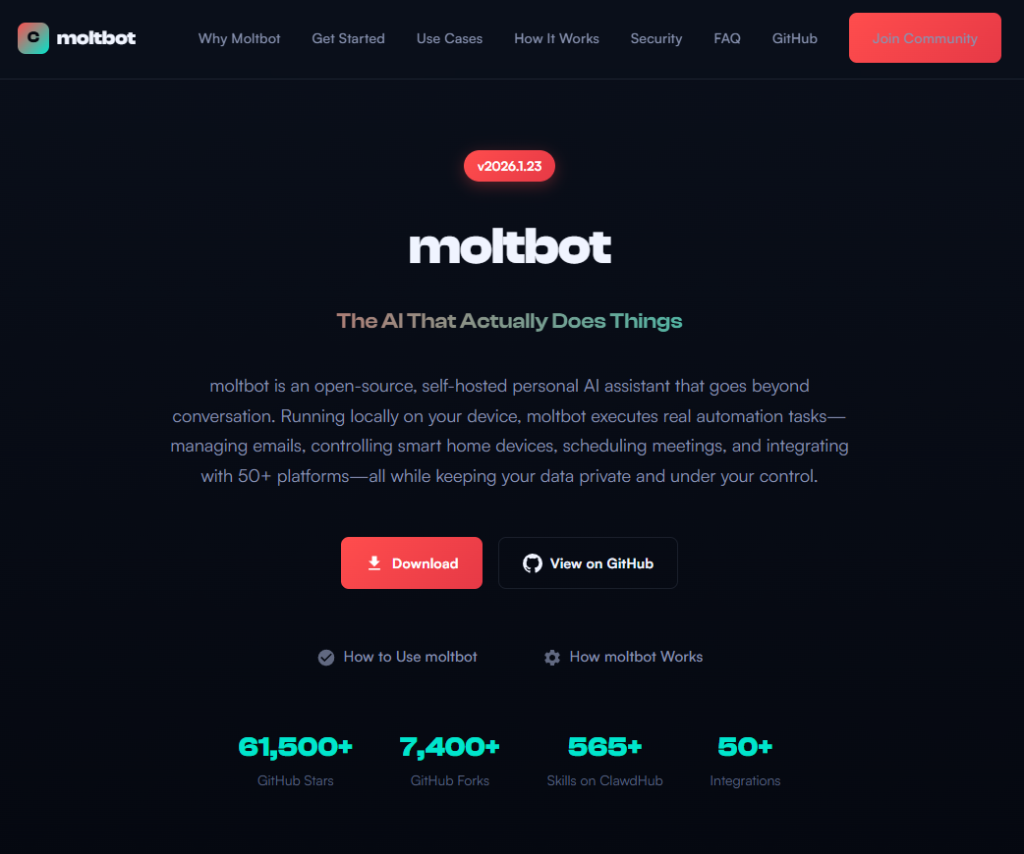
Fake domains spring up to impersonate Moltbot's landing page

The background: Why was Clawdbot renamed?

In early 2026, Peter Steinberger’s Clawdbot became one of the fastest-growing open source projects on GitHub. The self-hosted assistantβ€”described as β€œClaude with hands”—allowed users to control their computer through WhatsApp, Telegram, Discord, and similar platforms.

Anthropic later objected to the name. Steinberger complied and rebranded the project to Moltbot (β€œmolt” being what lobsters do when they shed their shell).

During the rename, both the GitHub organization and X (formerly Twitter) handle were briefly released before being reclaimed. Attackers monitoring the transition grabbed them within seconds.

β€œHad to rename our accounts for trademark stuff and messed up the GitHub rename and the X rename got snatched by crypto shills.” β€” Peter Steinberger

β€œHad to rename our accounts for trademark stuff and messed up the GitHub rename and the X rename got snatched by crypto shills.” β€” Peter Steinberger

That brief gap was enough.

Impersonation infrastructure emerged

While investigating a suspicious repository, I uncovered a coordinated set of assets designed to impersonate Moltbot.

Domains

  • moltbot[.]you
  • clawbot[.]ai
  • clawdbot[.]you

Repository

  • github[.]com/gstarwd/clawbot β€” a cloned repository using a typosquatted variant of the former Clawdbot project name

Website

A polished marketing site featuring:

  • professional design closely matching the real project
  • SEO optimization and structured metadata
  • download buttons, tutorials, and FAQs
  • claims of 61,500+ GitHub stars lifted from the real repository

Evidence of impersonation

False attribution: The site’s schema.org metadata falsely claims authorship by Peter Steinberger, linking directly to his real GitHub and X profiles. This is explicit identity misrepresentation.

The site's metadata

Misdirection to an unauthorized repository: β€œView on GitHub” links send users to gstarwd/clawbot, not the official moltbot/moltbot repository.

Stolen credibility:The site prominently advertises tens of thousands of stars that belong to the real project. The clone has virtually none (although at the time of writing, that number is steadily rising).

The site advertises 61,500+ GitHub stars

Mixing legitimate and fraudulent links: Some links point to real assets, such as official documentation or legitimate binaries. Others redirect to impersonation infrastructure. This selective legitimacy defeats casual verification and appears deliberate.

Full SEO optimization: Canonical tags, Open Graph metadata, Twitter cards, and analytics are all presentβ€”clearly intended to rank the impersonation site ahead of legitimate project resources.

The ironic security warning: The impersonation site even warns users about scams involving fake cryptocurrency tokensβ€”while itself impersonating the project.

The site warms about crypto scams.

Code analysis: Clean by design

I performed a static audit of the gstarwd/clawbot repository:

  • no malicious npm scripts
  • no credential exfiltration
  • no obfuscation or payload staging
  • no cryptomining
  • no suspicious network activity

The code is functionally identical to the legitimate project, which is not reassuring.

The threat model

The absence of malware is the strategy. Nothing here suggests an opportunistic malware campaign. Instead, the setup points to early preparation for a supply-chain attack.

The likely chain of events:

A user searches for β€œclawbot GitHub” or β€œmoltbot download” and finds moltbot[.]you or gstarwd/clawbot.

The code looks legitimate and passes a security audit.

The user installs the project and configures it, adding API keys and messaging tokens. Trust is established.

At a later point, a routine update is pulled through npm update or git pull. A malicious payload is delivered into an installation the user already trusts.

An attacker can then harvest:

  • Anthropic API keys
  • OpenAI API keys
  • WhatsApp session credentials
  • Telegram bot tokens
  • Discord OAuth tokens
  • Slack credentials
  • Signal identity keys
  • full conversation histories
  • command execution access on the compromised machine

What’s malicious, and what isn’t

Clearly malicious

  • false attribution to a real individual
  • misrepresentation of popularity metrics
  • deliberate redirection to an unauthorized repository

Deceptive but not yet malware

  • typosquat domains
  • SEO manipulation
  • cloned repositories with clean code

Not present (yet)

  • active malware
  • data exfiltration
  • cryptomining

Clean code today lowers suspicion tomorrow.

A familiar pattern

This follows a well-known pattern in open source supply-chain attacks.

A user searches for a popular project and lands on a convincing-looking site or cloned repository. The code appears legitimate and passes a security audit.

They install the project and configure it, adding API keys or messaging tokens so it can work as intended. Trust is established.

Later, a routine update arrives through a standard npm update or git pull. That update introduces a malicious payload into an installation the user already trusts.

From there, an attacker can harvest credentials, conversation data, and potentially execute commands on the compromised system.

No exploit is required. The entire chain relies on trust rather than technical vulnerabilities.

How to stay safe

Impersonation infrastructure like this is designed to look legitimate long before anything malicious appears. By the time a harmful update arrivesβ€”if it arrives at allβ€”the software may already be widely installed and trusted.

That’s why basic source verification still matters, especially when popular projects rename or move quickly.

Advice for users

  • Verify GitHub organization ownership
  • Bookmark official repositories directly
  • Treat renamed projects as higher risk during transitions

Advice for maintainers

  • Pre-register likely typosquat domains before public renames
  • Coordinate renames and handle changes carefully
  • Monitor for cloned repositories and impersonation sites

Pro tip: Malwarebytes customers are protected. Malwarebytes is actively blocking all known indicators of compromise (IOCs) associated with this impersonation infrastructure, preventing users from accessing the fraudulent domains and related assets identified in this investigation.


We don’t just report on threatsβ€”we remove them

Cybersecurity risks should never spread beyond a headline. Keep threats off your devices byΒ downloading Malwarebytes today.

Watch out for AT&T rewards phishing text that wants your personal details

27 January 2026 at 18:43

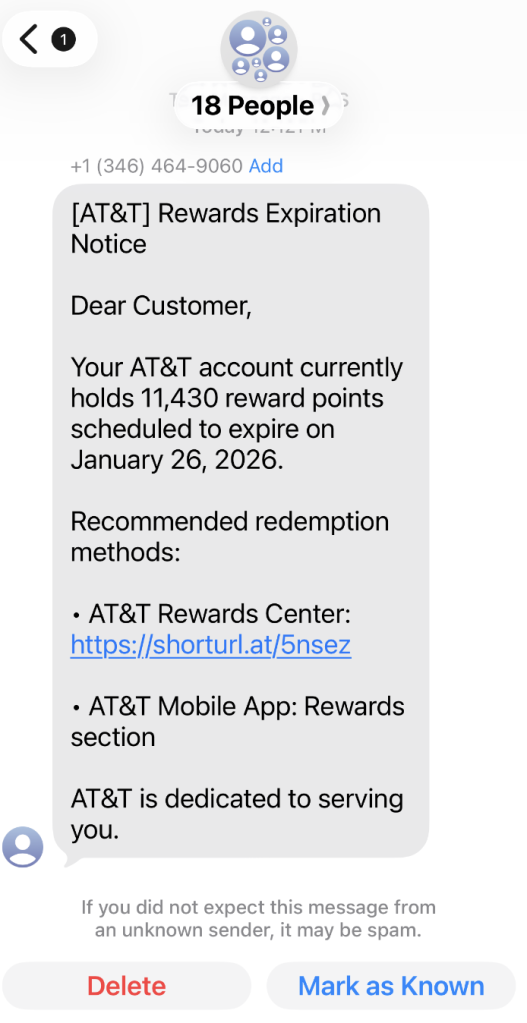
A coworker shared this suspicious SMS where AT&T supposedly warns the recipient that their reward points are about to expire.

Phishing attacks are growing increasingly sophisticated, likely with help from AI. They’re getting better at mimicking major brandsβ€”not just in look, but in behavior. Recently, we uncovered a well-executed phishing campaign targeting AT&T customers that combines realistic branding, clever social engineering, and layered data theft tactics.

In this post, we’ll walk you through the investigation, screen by screen, explaining how the campaign tricks its victims and where the stolen data ends up.

This is the text message that started the investigation.

β€œDear Customer,
Your AT&T account currently holds 11,430 reward points scheduled to expire on January 26, 2026.
Recommended redemption methods:
– AT&T Rewards Center: {Shortened link}
– AT&T Mobile App: Rewards section
AT&T is dedicated to serving you.”

The shortened URL led to https://att.hgfxp[.]cc/pay/, a website designed to look like an AT&T site in name and appearance.

All branding, headers, and menus were copied over, and the page was full of real links out to att.com.

But the β€œmain event” was a special section explaining how to access your AT&T reward points.

After β€œverifying” their account with a phone number, the victim is shown a dashboard warning that their AT&T points are due to expire in two days. This short window is a common phishing tactic that exploits urgency and FOMO (fear of missing out).

The rewards on offerβ€”such as Amazon gift cards, headphones, smartwatches, and moreβ€”are enticing and reinforce the illusion that the victim is dealing with a legitimate loyalty program.

To add even more credibility, after submitting a phone number, the victim gets to see a list of available gifts, followed by a final confirmation prompt.

At that point, the target is prompted to fill out a β€œDelivery Information” form requesting sensitive personal information, including name, address, phone number, email, and more. This is where the actual data theft takes place.

The form’s visible submission flow is smooth and professional, with real-time validation and error highlightingβ€”just like you’d expect from a top brand. This is deliberate. The attackers use advanced front-end validation code to maximize the quality and completeness of the stolen information.

Behind the slick UI, the form is connected to JavaScript code that, when the victim hits β€œContinue,” collects everything they’ve entered and transmits it directly to the attackers. In our investigation, we deobfuscated their code and found a large β€œdata” section.

The stolen data gets sent in JSON format via POST to https://att.hgfxp[.]cc/api/open/cvvInterface.

This endpoint is hosted on the attacker’s domain, giving them immediate access to everything the victim submits.

What makes this campaign effective and dangerous

  • Sophisticated mimicry: Every page is an accurate clone of att.com, complete with working navigation links and logos.
  • Layered social engineering: Victims are lured step by step, each page lowering their guard and increasing trust.
  • Quality assurance: Custom JavaScript form validation reduces errors and increases successful data capture.
  • Obfuscated code: Malicious scripts are wrapped in obfuscation, slowing analysis and takedown.
  • Centralized exfiltration: All harvested data is POSTed directly to the attacker’s command-and-control endpoint.

How to defend yourself

A number of red flags could have alerted the target that this was a phishing attempt:

  • The text was sent to 18 recipients at once.
  • It used a generic greeting (β€œDear Customer”) instead of personal identification.
  • The sender’s number was not a recognized AT&T contact.
  • The expiration date changed if the victim visited the fake site on a later date.

Beyond avoiding unsolicited links, here are a few ways to stay safe:

  • Only access your accounts through official apps or by typing the official website (att.com) directly into your browser.
  • Check URLs carefully. Even if a page looks perfect, hover over links and check the address bar for official domains.
  • Enable multi-factor authenticationΒ for your AT&T and other critical accounts.
  • Use an up to date real-time anti-malware solution with a web protection module.

Pro tip: Malwarebytes Scam Guard recognized this text as a scam.


We don’t just report on scamsβ€”we help detect them

Cybersecurity risks should never spread beyond a headline. If something looks dodgy to you, check if it’s a scam using Malwarebytes Scam Guard, a feature of our mobile protection products. Submit a screenshot, paste suspicious content, or share a text or phone number, and we’llΒ tell you if it’s a scam or legit. Download Malwarebytes Mobile Security for iOS or Android and try it today!

❌