❌

Normal view

This Android malware steals banking credentials even without an internet connection | Kaspersky official blog

31 August 2026 at 19:18

Cybersecurity researchers have discovered a new family of Android malware, and it goes by the name of Manic. It lets criminals spy on their victims, steal banking credentials, and take remote control of infected devices.

But its most unusual trick is this: Manic can send stolen data back to attackers even when the given device has no internet connection. Apparently, random mobile internet outages seem to get in cybercriminals’ way just as much as anyone else’s, so the actors behind Manic came up with an unusual workaround.

People across a wide range of European countries are at risk, from Russia to the United Kingdom. In this post, we walk through what this Trojan can actually do, how it smuggles stolen data out to attackers, and how you can protect your Android device from Manic and other similar threats.

How Manic spreads, and who’s at risk

Researchers haven’t yet pinned down exactly how attackers are getting Manic onto people’s devices. Typically, malware like this spreads through channels like:

  • Infected apps on legitimate app stores
  • Malicious APK files shared on pirate websites
  • Download links sent through messaging apps and email
  • Scam sites

Google has told journalists it hasn’t found any trace of Manic spreading through apps on the Google Play Store. That suggests people are most likely installing infected apps from unofficial sources.

Experts have traced the beginnings of the attackers’ infrastructure for this campaign to February 2026. The earliest samples of the malware itself turned up in late May of this year. Since then, the criminals behind the Trojan have refined the ways it hides from detection on a victim’s device.

Manic currently combines the powers of a banking Trojan, spyware, and a remote-access tool that lets an attacker control the device. Attackers are especially interested in data from sources like:

  • Banking apps and payment services
  • Official government apps
  • Crypto wallets and cryptocurrency exchanges
  • Two-factor authentication apps
  • Text messages and notifications: mainly the one-time codes used to verify logins or approve transactions

By looking at which banking apps Manic targets, researchers have been able to work out which countries it has in its sights. It turns out its reach is broad, covering Austria, the Czech Republic, Estonia, France, Germany, Lithuania, the Netherlands, Poland, Russia, Slovakia, Spain, Ukraine, and the United Kingdom.

Stolen passwords, intercepted codes, remote control: what Manic can actually do

Let’s look at exactly what information Manic steals, and how it manages to get it. The malware’s main trick relies on abusing Android’s Accessibility services, a set of built-in features designed to help users with visual impairments. Used as intended, these features are genuinely helpful for people with vision loss. But criminals have long been quietly exploiting the very same tools for their own purposes.

Once a user grants an app permission to use Accessibility services, that app can “see” the text and buttons on the screen, interact with them, scroll through pages, and carry out actions automatically — all as if a user were doing it themselves. Attackers use this to read messages on screen, quietly grant the malware extra permissions, interfere with attempts to uninstall it, switch off security protections, or control other apps without the victim ever noticing.

With Manic, this abuse of Accessibility services is paired with the Trojan’s own advanced capabilities. It can generate an invisible keyboard that overlays the phone’s real one. When a user types their password to log in to a banking app, Manic records exactly which keys they pressed. Then it uses Accessibility services to instantly replay that same keystroke on the actual app keyboard.
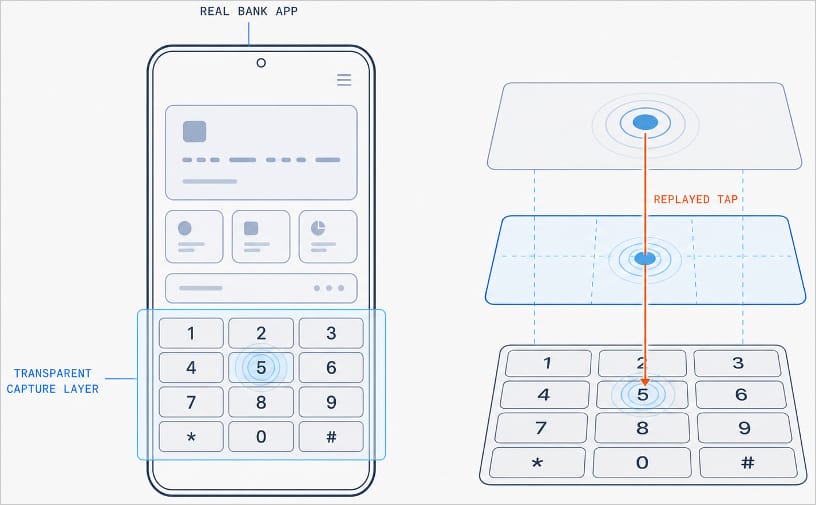
Manic generates a transparent capture layer that covers the phone's keyboard

Manic generates a transparent capture layer that covers the phone’s keyboard, recording each tap and relaying it to the real keyboard. Source

This means attackers don’t have to build a fake login screen for every single app they want to target. Because Manic works as an invisible layer sitting on top of the genuine app, everything looks and behaves as usual, so a phone owner has no reason to suspect they’re handing over their PIN or password to a criminal.

Manic doesn’t simply log everything a user types, either. It automatically recognizes what kind of information it has just captured and sorts it into categories: passwords, email logins, four-to-six-digit SMS codes, strings of characters that look like crypto wallet seed phrases, and phone unlock codes or pattern locks. Alongside the captured text itself, Manic also records which app it came from, when it was entered, whether the user typed it manually or used autofill, and whether that app is on its hit list.

Manic’s abilities don’t stop at collecting information. Using Accessibility services once again, it also lets attackers take remote control of an infected device. To conceal this activity, Manic can show a black screen or fake a system update.

On top of Accessibility services, the malware also asks for permission to read text messages and notifications. That lets attackers intercept two-factor authentication codes and one-time verification codes before a victim even has a chance to type them into the app.

Put together, this hands attackers not just passwords, banking credentials, and verification codes, but the ability to remotely control the victim’s phone as well.

Even being offline won’t save you from data theft

Manic’s original method for relaying stolen data off the device and back to the attackers deserves a separate mention. Even today, devices get knocked offline more often than people might expect, and Manic’s creators built a workaround specifically for such situations.

Normally, malware like this collects information on the device and sends it straight to a server controlled by the attackers. But what happens when the infected device has no direct internet access, or can’t reach the command-and-control server for some other reason?

In that case, Manic simply stores the stolen data on the device and starts scanning nearby for other infected phones it can reach over Wi-Fi or Bluetooth. If it finds one with internet access, it hands over the encrypted data to that phone, which then forwards it on to the attackers’ server.

But it doesn’t stop there. Data can hop across a chain of infected devices. By default, Manic allows up to four of these relay devices in the chain. If no suitable device is nearby, the data simply stays on the original phone, and Manic tries again later.

How to protect your phone from Manic and other banking Trojans

Android malware keeps getting more sophisticated. That makes it worth remembering — and actually following — a few basic digital hygiene habits for Android phone and tablet users:

  • Avoid installing apps from unofficial sources.
  • Don’t grant apps permission to use Accessibility services unless this is absolutely necessary and you understand exactly why they need it.
  • Install reliable security software on all your devices, run scans regularly, and take its warnings and recommendations seriously. We recommend Kaspersky for Android. Our Android security apps are temporarily unavailable on the Google Play Store, so to install them on an Android device we recommend using an alternative app store or installing the APK file manually from our website. A full step-by-step guide is available in our post, How to install or update Kaspersky apps for Android in 2026.

Malware doesn’t just target smartphones; it feels at home on other Android-powered devices too — from streaming boxes to… cars. Check out the details in our related posts:

New Android malware uses AI to steal bank logins and PINs

18 September 2026 at 17:37

Researchers at Zimperium’s zLabs have analyzed an Android Trojan that uses an automated, multi-stage infection process.

What’s new is that RatHat gives a live AI assistant the keys to the accessibility tree of the infected device and uses it to determine where to tap or scroll, rather than following a hardcoded script.

The variable attack path makes it harder for signature- and rule-based mobile security tools to detect this Trojan.

It also abuses Android Debug Bridge (ADB), a legitimate tool that lets a computer communicate with an Android device. By turning on Wireless Debugging, RatHat can escape the normal app sandbox.

The attack

The infection chain is unusually elaborate for a mobile threat, combining social engineering, accessibility abuse, and remote AI decision-making into a single pipeline.

  • Victims are lured through smishing (SMS phishing) texts and malicious ads that lead to fake download pages, sometimes disguised as a popular streaming app or even a browser like Chrome. These pages trick people into sideloading a malicious APK (Android Package Kit).
  • Once installed, the app pressures the user into enabling Android’s Accessibility Service, using a fake “network restriction” excuse or bogus financial incentive. Accessibility services run in the background and can inspect screen content and interact with apps on the user’s behalf.
  • With accessibility access, the malware silently taps through Developer Options, turns on Wireless Debugging, and reads the six-digit pairing code straight off the screen. It then pairs with the infected device without a person or computer to complete the process. This is a known, legitimate Android feature (normally used by app developers to test on a phone over Wi-Fi) that RatHat repurposes for self-escalation.
  • That self-pairing gives the malware a shell-level ADB session, which it uses to drop two disguised native binaries: A Go-based “agent” that runs system commands with elevated privileges, and a reverse-proxy client that opens a persistent tunnel back to the attacker’s server, bypassing firewalls and NAT (Network Address Translation).
  • To steal login credentials, the Trojan creates overlays for targeted apps, most of which are financial. These overlays can also steal one-time passwords (OTPs) and multi-factor authentication (MFA) codes.
  • Perhaps its most novel capability records raw touch coordinates (where the finger touches the screen) directly from the input driver. It then matches those coordinates against a database of known keypad and pattern-lock layouts to reconstruct PIN codes and unlock patterns, completely bypassing protections against screen-reading.

Other capabilities include intercepting SMS messages, a form of semi-autonomous device control provided by the AI service, and the ability to restore the malicious app after it has been uninstalled using a hidden background program.

How to stay safe

Most of RatHat’s tricks depend on convincing someone to sideload an app and grant it accessibility permissions, which means the usual mobile security advice remains the strongest defense.

  • Only install apps from Google Play or another trusted official store. This does not guarantee safety, but it significantly reduces the risk.
  • Be suspicious of any app that asks you to enable Accessibility Service for reasons unrelated to accessibility. Consider Android’s Advanced Protection Mode, which Google has started using to restrict which apps can request accessibility permissions in the first place.
  • Never enable Developer Options or Wireless Debugging unless you understand why you need them. Legitimate apps have no reason to ask for them.
  • Use an up-to-date, real-time anti-malware solution for your device. Malwarebytes for Android detects RatHat as Android/Trojan.Exploit.RatHat.

If your device is infected with RatHat, you will need to perform a factory reset because its persistence mechanism can survive normal app removal.


Scammers know more about you than you think. 

Malwarebytes Mobile Security protects you from phishing, scam texts, malicious sites, and more. With real-time AI-powered Scam Guard built right in. 

Download for iOS → Download for Android → 

Rokarolla Android malware can take over your phone and steal banking logins

17 June 2026 at 17:34

Researchers have analyzed a new Android banking Trojan called Rokarolla. It can effectively take over a device, steal banking and crypto login details from more than 200 apps, and quietly monitor much of what you do on your phone.

On an infected device, Rokarolla steals banking and crypto login details. It also uses fake lock-screen overlays to capture your PIN, pattern, or password.

When you open one of the banking or crypto apps on Rokarolla’s target list, the malware downloads and displays a matching fake login page over the real app. Anything you type into the fake page, including usernames, passwords, and card numbers, is sent to the attackers.

Separately, Rokarolla abuses Android’s Accessibility features to monitor activity across the device. It can recognize WhatsApp screens by looking for familiar labels such as “Chats” and “Calls,” extract contact information, read SMS messages, and send new ones. These capabilities can help it intercept one-time passwords (OTPs) and two-factor authentication (2FA) codes.

Rokarolla can take control of text messages and phone calls, helping it block security alerts and hide signs of fraud.

It can also record everything you type and see on the screen. If you copy and paste a cryptocurrency wallet address, the malware can secretly replace it with one belonging to the attackers.

Other features help the malware stay hidden, including the ability to hide its icon, silence the device, turn off Google Play Protect, and prevent the screen from going to sleep.

How it spreads

Rokarolla is distributed through rogue websites, where it is offered as fake versions of popular apps like TikTok or Chrome.

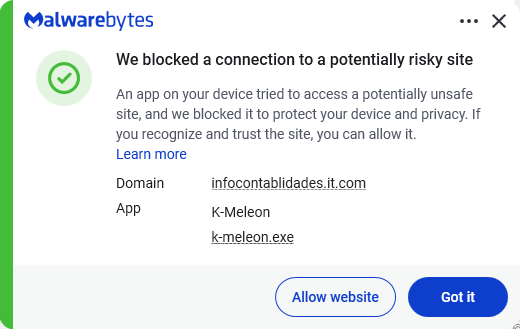
Malwarebytes blocks the download site

Instead of sending you to the official Google Play Store, these malicious sites push you to download the app directly, a process known as sideloading. After you install it, the fake app poses as Google Play Protect and quietly downloads and installs the malware that carries out the attack.

To gain the access it needs, the fake app asks for powerful permissions, including Accessibility access, the permission to read SMS messages, and access to notifications. Because these requests can look legitimate, many users may approve them without realizing the risks.

How to stay safe

To avoid banking Trojans like Rokarolla, there are a few guidelines you should follow:

  • Don’t trust apps that claim to be Google Play Protect or another system component. You should never need to install these manually.
  • Use up-to-date, real-time anti-malware protection with web protection on your devices.
  • Don’t sideload apps that are available on the Google Play Store. While malware can sometimes slip into official stores, the risk is much greater elsewhere.
  • Deny powerful permissions to apps downloaded from links or websites, especially if they ask for Accessibility access, SMS permissions, or the ability to handle calls, even though that doesn’t match their stated purpose.
  • In fact, any request for Accessibility access should be treated with caution. If an app that is not clearly an accessibility tool asks for it, deny the request and reconsider whether you trust the source.
  • Scrutinize banking and crypto login screens. If something looks off, or you see multiple login prompts, close the app and relaunch it from its official icon.

Scammers know more about you than you think. 

Malwarebytes Mobile Security protects you from phishing, scam texts, malicious sites, and more. With real-time AI-powered Scam Guard built right in. 

Download for iOS → Download for Android → 

❌