Normal view

Caching KMS data keys in multi-thread environments: Per-tenant encryption for event-driven systems at scale

6 August 2026 at 18:16

This post assumes familiarity with envelope encryption and the AWS Encryption SDK.

When your encryption system generates millions of duplicate API calls per hour, costs spiral and performance degrades. That’s exactly the challenge NICE Actimize faced while operating their global-scale, event-driven financial crime detection platform on Amazon Web Services (AWS).

NICE Actimize, a leading provider of financial crime, risk, and compliance solutions, processes millions of encrypted messages daily across hundreds of tenants. By rethinking how they cache encryption keys, they reduced their AWS Key Management Service (AWS KMS) costs by 77% while maintaining strict security guarantees and per-tenant encryption isolation.

In this post, we explore the cache stampede problem that emerges when envelope encryption meets high-concurrency, multi-tenant architectures. We walk through two solutions: the AWS-recommended hierarchical keyring pattern and a custom caching approach that NICE Actimize built for their regulated environment. These patterns apply to multi-tenant software as a service (SaaS) environments and high-throughput systems where per-tenant encryption generates significant KMS API volume.

Why per-tenant encryption matters

Financial services systems operate under strict regulatory requirements. You must encrypt data at rest and in transit. For multi-tenant SaaS providers, this requirement might go further: each tenant’s data must be encrypted with separate keys to provide complete cryptographic isolation. If one tenant’s key is compromised, no other tenant’s data is at risk.

Consider an enterprise SaaS environment built on an event-driven architecture using Amazon Managed Streaming for Apache Kafka (Amazon MSK), with many different databases for storing data and Amazon Simple Queue Service (Amazon SQS) for messaging. Messages flow continuously between producers and consumers, and each message must be encrypted with the correct tenant-specific key. At scale with millions of messages daily across hundreds of tenants, this creates a massive volume of encryption and decryption operations.

To handle this volume efficiently, the standard approach is envelope encryption: a two-tier model where an AWS KMS key encrypts short-lived data keys, and those data keys encrypt the actual data. Your application can encrypt large volumes of data locally without calling AWS KMS for every operation, reducing latency and costs.

The cache stampede problem

Envelope encryption reduces AWS KMS calls, but it doesn’t eliminate them. Each encrypt operation still requires a data key, either generated fresh using GenerateDataKey or retrieved from a cache, and each decrypt operation must unwrap an encrypted data key (EDK) by calling Decrypt. In high-throughput systems processing millions of messages, these calls add up quickly.

The AWS Encryption SDK provides a built-in solution for this: the CachingCryptoMaterialsManager. This component caches data encryption materials (data keys) locally, so your application can reuse them across multiple operations without calling AWS KMS each time. You configure a time-to-live (TTL), a maximum message-use limit, and a local cache, and the SDK handles the rest.

This approach works well under moderate load when you partition the cache by tenant AWS KMS key Amazon Resource Name (ARN) so that each tenant’s encryption materials remain cryptographically isolated. However, a critical problem emerges as concurrency scales to hundreds of threads processing millions of encrypted messages in parallel: the cache stampede, also known as the thundering herd problem.

How the stampede occurs

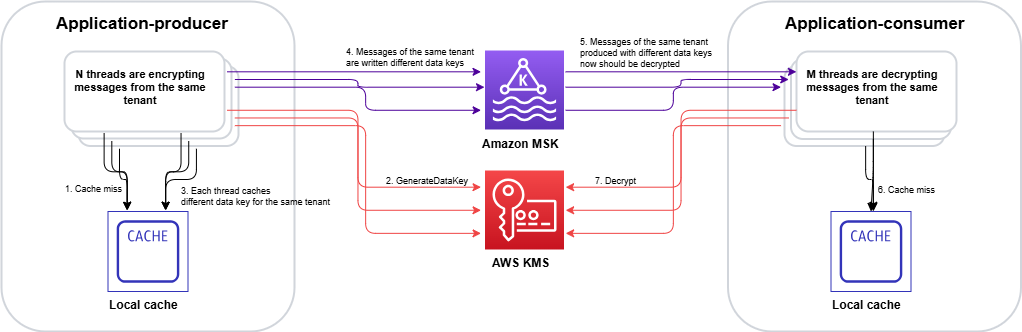
The CachingCryptoMaterialsManager caches the result of the SDK’s internal getMaterialsForEncrypt and decryptMaterials calls at the materials level. The cache stampede, however, happens at the KMS API call level. When a cached data key expires or a new, previously-unseen EDK arrives, the following sequence unfolds:

  1. On encrypt – data key explosion: Multiple threads simultaneously call encrypt() for the same tenant. Each thread finds the cache entry expired and independently calls GenerateDataKey against AWS KMS. Instead of one thread generating a data key while others wait, N threads create N distinct data keys. Each new data key produces a unique EDK, which inflates the EDK cardinality across the system.
  2. On decrypt – redundant unwrap calls: Those extra unique EDKs propagate downstream. When consumers later read encrypted records, each distinct EDK is a separate cache key. Multiple threads encountering the same EDK simultaneously each trigger an independent Decrypt call to AWS KMS because the cache has no coordination mechanism to make competing threads wait for a single in-flight request.
  3. Compounding effect: The encrypt-side stampede creates excess EDK cardinality, which degrades the decrypt-side cache hit ratio, which triggers more KMS calls, which drives up costs further. In the NICE Actimize case, this produced a ratio of 30% unique data keys to data records in DynamoDB tables, meaning nearly one in three records was encrypted with a different data key.

At enterprise SaaS scale, this compounding effect can generate millions of redundant AWS KMS GenerateDataKey and Decrypt calls per hour, even with the SDK’s built-in caching enabled. The following figure shows the pattern leading to a stampede.

Figure 1: Cache stampede – multiple threads independently calling AWS KMS for the same encrypted data key, creating duplicate requests

Figure 1: Cache stampede – multiple threads independently calling AWS KMS for the same encrypted data key, creating duplicate requests

The stampede follows this sequence on the encrypt side:

  1. Multiple threads call encrypt() for the same tenant concurrently.
  2. Each thread checks the CachingCryptoMaterialsManager and finds the cache entry expired.
  3. With no coordination mechanism, each thread independently calls GenerateDataKey.
  4. AWS KMS returns N distinct data keys (one per thread).
  5. Each data key produces a unique EDK, inflating cardinality across the system.

On the decrypt side, the inflated EDK cardinality compounds the problem:

  1. Consumer threads encounter unique EDKs that were never cached.
  2. Multiple threads hitting the same EDK simultaneously each trigger a separate Decrypt call. AWS KMS returns the same plaintext data key N times, doing redundant work.

Two paths forward

We evaluated two approaches to solve the cache stampede problem. Each fits different architectural requirements and regulatory constraints.

Option A: Hierarchical keyring with DynamoDB (AWS-recommended)

AWS addresses the cache stampede challenge through the hierarchical keyring pattern, which introduces an additional level of key hierarchy that significantly reduces how often cache stampedes occur.

In this architecture, branch keys serve as intermediate wrapping keys stored in a DynamoDB table. This DynamoDB table acts as a shared cache layer that coordinates across all instances in your distributed fleet.

Figure 2: Hierarchical keyring architecture – branch keys in DynamoDB coordinating across distributed instances

Figure 2: Hierarchical keyring architecture – branch keys in DynamoDB coordinating across distributed instances

The architecture (shown in Figure 2) works as follows:

  1. The application requests encryption through the hierarchical keyring.
  2. The keyring checks the local cache for the tenant’s branch key.
  3. On a cache miss, it queries the DynamoDB Key Store table for the active branch key.
  4. AWS KMS decrypts the branch key (this is the only KMS call in the flow).
  5. The decrypted branch key is returned to the keyring.
  6. The keyring stores the branch key in the local cache for subsequent requests.
  7. The keyring derives a unique wrapping key from the branch key and generates the data key locally.

The key insight is that the cache is thread-aware. When the cache expires, threads coordinate to make a single request to refresh the cache. Only a single thread is used to make a call to the branch key, rather than all the threads acting independently. Additionally, by adding an additional key into the key hierarchy, branch keys don’t live within AWS KMS. This means cache misses and the stampedes they trigger interact with the branch key, and don’t make as many calls to the AWS KMS service at the top of the hierarchy:

  • Without hierarchical keyrings: Your local cache needs to store all the data encryption keys, and has constant misses as new, unique data keys arrive with each encrypted message. A miss can trigger a stampede.
  • With hierarchical keyrings: The same branch key wraps thousands or millions of data keys. A cache miss only occurs when a branch key expires or is first requested, which happens orders of magnitude less frequently than without hierarchical keyrings.

The DynamoDB table acts as a coordination point. The first thread to request a missing branch key retrieves it from AWS KMS and stores it in DynamoDB (the Key Store table). Subsequent requests from instances in the fleet retrieve the cached branch key from DynamoDB instead of making duplicate AWS KMS calls.

Beyond reducing cache miss frequency, the hierarchical keyring provides built-in stampede protection within its local cache implementation. The SDK offers multiple cache types, and the Default cache, designed for heavily multi-threaded environments, prevents multiple threads from calling AWS KMS on cache expiry by notifying a single thread that the branch key materials entry is about to expire 10 seconds in advance. That one thread refreshes the cache while all other threads continue serving requests using the still-valid entry.

This solution integrates with the AWS Encryption SDK and requires minimal code changes to existing applications. For event-driven architectures processing encrypted Kafka streams, this approach reduces KMS call volume by orders of magnitude while preserving per-tenant cryptographic isolation.

Option B: Custom KMS client caching – Solving the stampede at the API layer

While the hierarchical keyring (Option A) addresses the stampede by reducing how often cache misses occur, there’s a complementary approach: eliminating the stampede at its source by caching KMS API responses directly, using atomic, single-flight cache loading that prevents concurrent threads from issuing duplicate calls. This is the path NICE Actimize took.

The IClientSupplier extension point in AWS Encryption SDK v3

In the AWS Encryption SDK v2, decorating the AWS KMS client on a per-request basis was possible through the RegionalClientSupplier interface, but it was an advanced and undocumented use case. Without explicit guidance or a supported pattern, caching strategies typically operated above the SDK layer, making it difficult to prevent duplicate KMS calls at their source. The AWS Encryption SDK v3 introduced the IClientSupplier interface, which the AwsKmsMrkMultiKeyring accepts at construction time. This interface is called by the SDK whenever it needs a KMS client for a given AWS Region, and you control what it returns, making it possible to insert a caching layer between the SDK and AWS KMS.

Architecture: A decorated KMS client with two Caffeine caches
The solution is a CachedKmsClient—a decorator that wraps the standard AWS SDK KmsClient and interposes two Caffeine LoadingCache instances between the application and AWS KMS:

Cache Key Value Purpose
GenerateDataKey cache GenerateDataKeyRequest (tenant KMS key ARN and key spec) GenerateDataKeyResponse (EDK and plaintext data key) Ensures encrypt operations on the same node reuse the same data key for a given tenant KMS key during the cache window
Decrypt cache DecryptRequest (EDK and key ARN) DecryptResponse (plaintext data key) Ensures decrypt operations for the same EDK share a single KMS call result

Both caches are configured with refreshAfterWrite (default: 1 hour, configurable), which means:

  • During the refresh window, concurrent threads receive the cached response instantly resulting in zero KMS calls.
  • When a cache entry expires, Caffeine’s LoadingCache.get() guarantees that exactly one thread executes the loader function (the actual KMS API call), while all other concurrent threads block and wait for that single result. This is the atomic, single-flight property that eliminates the stampede.

Security consideration: Caching plaintext data keys in memory means the keys exist in process memory for the duration of the cache TTL. The TTL acts as a security control: shorter TTLs reduce the window of exposure in the event of a memory dump, while longer TTLs reduce KMS call volume. Choose a TTL that balances your security requirements with your cost and performance goals. Key rotation at the KMS key level remains unaffected by the cache, because rotated keys produce new data keys on the next cache refresh.

Integration with the AWS Encryption SDK v3

The integration is minimal. The IClientSupplier AWS Lambda function returns a CachedKmsClient singleton for each AWS Region, this singleton is passed into the AwsKmsMrkMultiKeyring at keyring construction time. From that point forward, each GenerateDataKey and Decrypt call the SDK makes flows through the caching decorator transparently, with no changes to the encrypt or decrypt call sites.

The CachedKmsClient is a singleton per Region (managed using a ConcurrentHashMap), so all tenants on the same node share the same caching layer but their data keys remain fully isolated because the cache keys include the tenant-specific AWS KMS key ARN.

Why Caffeine?

Caffeine is a high-performance, near-optimal Java caching library well-suited for this pattern for several reasons:

  • Atomic loading: LoadingCache.get() guarantees that on a cache miss, only one thread executes the loader while others wait. This is the core property that eliminates the stampede.
  • refreshAfterWrite semantics: Unlike expireAfterWrite (which blocks all threads during refresh), refreshAfterWrite allows one thread to asynchronously reload the entry while other threads continue to serve the stale-but-valid cached value. This eliminates latency spikes during key rotation.
  • Observability: Cache eviction listeners and Micrometer metric counters can be wired in to track actual KMS call volume per tenant KMS key, enabling real-time cost monitoring.

Choosing between the two options

The hierarchical keyring with DynamoDB (Option A) is a production-ready, AWS-recommended solution that reduces stampede frequency by introducing longer-lived branch keys. It’s the best choice for most organizations. Particularly when starting fresh or when the operational overhead of an additional data store is acceptable.

NICE Actimize chose the custom caching approach (Option B) for a pragmatic reason: it avoided introducing a new infrastructure dependency into the encryption critical path. Their platform already operated at scale across hundreds of tenants, and adding a DynamoDB table as a key coordination layer would have meant taking on additional operational responsibility: provisioning, monitoring, backup, access control, and ensuring high availability for a component that sits directly in the encrypt/decrypt hot path. In a regulated financial services environment, each new stateful component in the security chain requires its own resilience planning, failure-mode analysis, and compliance review. The Caffeine cache used in Option B, by contrast, is an in-process library (a JAR on the classpath). It is stateless, requires no network calls, no provisioning and no operational overhead. It makes a lighter dependency than a managed cloud resource in the critical path. There is no shared state to lose, no additional infrastructure to protect, and no new failure mode beyond what already exists with AWS KMS itself. If a node restarts, the cache rebuilds on the next KMS call.

Results

By implementing a rotation policy with the optimized caching approach, NICE Actimize achieved the following results:

  • 77% reduction in AWS KMS costs – Eliminating millions of redundant API calls translated directly into significant cost savings.
  • Maintained strict per-tenant isolation – Per-tenant encryption isolation remained fully intact, with no compromise to their security posture.
  • Improved system performance – Removing the stampede of duplicate AWS KMS calls reduced latency and freed up system resources for core processing.
  • Simplified operations – A coordinated caching layer replaced fragmented, per-thread caching, reducing operational complexity.

Conclusion and next steps

The cache stampede problem compounds in multi-tenant encryption systems: excess data key generation on the encrypt side degrades cache hit ratios on the decrypt side, creating a feedback loop of redundant KMS calls. The AWS-recommended hierarchical keyring pattern with DynamoDB provides a production-ready solution that integrates with the AWS Encryption SDK with minimal code changes. For regulated environments requiring additional control, a custom caching approach can deliver similar results.

If you operate a multi-tenant SaaS platform or a high-throughput system with per-tenant encryption requirements, consider these patterns to optimize your encryption costs and performance.

To get started, explore the following resources:

If you have questions or feedback about this post, leave a comment in the Comments section.


Maria Gutovsky

Maria Gutovsky

Maria is a Solutions Architect at AWS, based in Tel Aviv, Israel. She is part of the Database and Analytics Technical Field Community. In her free time, you will probably find her building a new character for a Dungeons and Dragons campaign.

Hemmy Yona

Hemmy Yona

Hemmy is a Solutions Architect at AWS, based in Israel. With 20 years of experience in software development and group management, Hemmy is passionate about helping customers build innovative, scalable, and cost-effective solutions. Outside of work, you’ll find Hemmy enjoying sports and traveling with family.

Contributor

Special thanks to Devora Roth Goldshmidt, Head of X-Sight Architects at NICE Actimize, who made a significant contribution to this post.

AWS KMS or AWS CloudHSM: Choose the right key management solution

28 July 2026 at 20:55

Choosing the right cryptographic key management service on Amazon Web Services (AWS) starts with understanding the difference between AWS Key Management Service (AWS KMS) and AWS CloudHSM. Both provide key storage backed by a hardware security module (HSM) but serve very different needs. AWS KMS is a fully managed service that integrates with all AWS services and all AWS Regions, making it the right choice for most key management workloads. AWS CloudHSM is a specialized option for use cases where you have strict requirements for dedicated HSM instances or must support legacy applications built around traditional HSM interfaces.

Quick comparison

The following table shows the pricing, AWS Region availability, algorithms, and AWS service integrations as of July 2026.

Criteria AWS KMS AWS CloudHSM
Best for Most cloud-based key management needs Lift-and-shift from on-premises applications and use of legacy algorithms
Deployment AWS managed HSMs, accessed through API endpoints Customer managed HSMs, accessed through an Elastic Network Interface (ENI) in your virtual private cloud (VPC)
Cost Pay per use (symmetric and RSA 2048 operations): $1 per key plus $0.03 per 10,000 requests per month Pay by the hour (us-east-1): $1.60 per HSM instance per hour
AWS integration All AWS services Custom integration with AWS services
Region coverage All AWS Regions 32 Regions

Quick decision guide

Choose AWS KMS for most use cases. Choose AWS CloudHSM only if you require:

  • Direct integration with third-party tools such as Microsoft SignTool, Nginx, and HAProxy that rely on traditional HSM interfaces, including: PKCS#11, Java Cryptographic Extension (JCE), OpenSSL Provider, and Key Storage Provider (KSP). These interfaces are required when your application is built to communicate with an HSM directly rather than through a cloud API.
  • Deprecated algorithms such as 3DES and PKCS#1 v1.5 with RSA. If you need to run less commonly used operations not supported by AWS KMS such as AES key wrapping and AES with CTR or CBC modes.

Shared benefits

AWS KMS and AWS CloudHSM both provide robust encryption key management capabilities that help organizations meet their security and compliance requirements. While each service offers distinct features tailored to different use cases, they share several core benefits that make them valuable tools for protecting sensitive data in the cloud.

Security

AWS KMS and AWS CloudHSM both provide tamper-resistant, HSM-based key management with physical data center controls. They secure administration and workloads with Transport Layer Security (TLS). Neither service allows AWS employees to access your key material. Both services deliver equivalent security through Federal Information Processing Standard (FIPS) 140-3 Level 3 validated hardware and enforce strict cryptographic isolation of customer keys. Compliance frameworks such as the ones listed below validate security based on cryptographic boundaries rather than hardware or partition dedication. The multi-tenant architecture of AWS KMS provides the same security guarantees as the single-tenant model used by AWS CloudHSM while reducing operational complexity and cost. Customer security teams consistently approve AWS KMS adoption after confirming that cryptographic isolation meets their single-tenant security and compliance requirements.

Regulatory compliance

AWS KMS and AWS CloudHSM meet major compliance certifications, including:

  • Federal Information Processing Standard (FIPS) 140-3 Level 3
  • Payment Card Industry Data Security Standard (PCI-DSS)
  • Health Insurance Portability and Accountability Act (HIPAA)
  • Federal Risk and Authorization Management Program (FedRAMP)

Both services protect data including personally identifiable information (PII) and Protected Health Information (PHI).

Standard algorithms

AWS KMS and AWS CloudHSM support standard cryptographic operations including AES-256, RSA, ECDSA, Ed25519, ECDH, ML-DSA, SHA-2, and HMAC. Both services are actively investing in post-quantum cryptography (PQC) to help customers prepare for future quantum computing threats and are committed to expanding PQC algorithm support as National Institute of Standards and Technology (NIST) standards are finalized.

Performance

AWS KMS supports a default request rate for cryptographic operations ranging from 10,000 transactions per second (TPS) to 100,000 TPS per account based on Region. You can request quota increases beyond the default limits. AWS CloudHSM requires explicit provisioning of additional instances for higher throughput. Customers typically provision at least one additional HSM instance to handle peak activity, which can be difficult to predict due to lack of utilization metrics.

Operational support

AWS KMS and AWS CloudHSM both support high availability, durability, automatic backup, and software patching. AWS KMS is a Regional service with high availability and durability provided without any customer management required. AWS CloudHSM is a zonal service with customers required to manage high availability and durability.

Given these shared capabilities, the choice of which service to use depends on your specific requirements. The following sections outline decision points to help you choose.

When to choose AWS KMS

AWS KMS offers a fully managed service that simplifies key management operations and reduces operational overhead compared to AWS CloudHSM. Organizations choose AWS KMS when they need seamless integration with AWS services, automatic key rotation, and a cost-effective solution that doesn’t require dedicated HSM management.

AWS integration

AWS KMS integrates with all AWS services across all major categories. These include AI platforms, storage, databases, and compute services. Most of these services support AWS KMS customer managed keys, giving you full control over the key using policies and access controls. For customers that value convenience over control, AWS services provide transparent encryption using AWS owned keys, eliminating the cost and lifecycle management overhead of customer-owned keys. Both customer managed and AWS owned keys are AWS KMS keys. AWS Identity and Access Management (IAM) enables least-privilege access controls, key policies to control access, and auditing all key usage through AWS CloudTrail.

Operational simplicity

AWS KMS handles all operational tasks including HSM instance provisioning and maintenance, automatic key rotation, auto-scaling, disaster recovery, and comprehensive audit logging. This eliminates the operational overhead required to maintain a solution based on AWS CloudHSM.

Cost considerations

AWS KMS costs $1 per month per key plus $0.03 per 10,000 requests (symmetric and RSA 2048 operations). AWS CloudHSM costs approximately $1.60 per hour per HSM (approximately $1,152 per month), excluding the operational overhead for staff to manage the cluster—which further favors AWS KMS for most workloads.

Break-even analysis:

  • Less than 500 million operations per month: AWS KMS typically costs 35–99% less
  • 500 million–1 billion operations per month: Costs are comparable
  • More than 1 billion operations per month: AWS CloudHSM might be more cost-effective.

Note: Many AWS services cache Data Encryption Keys (DEKs) locally, significantly reducing the number of AWS KMS API calls. Actual AWS KMS costs at scale are often much lower than raw operation counts suggest. For example: A workload with 100 keys and 100 million monthly operations using two HSMs for high availability:

  • AWS CloudHSM: Approximately $2,304 per month for two HSMs plus operational costs
  • AWS KMS: $100 per month (keys) plus $300 per month in operational costs for a total of $400 per month
  • Savings using AWS KMS: $1904 per month (83% reduction)

Region coverage

AWS KMS operates in every AWS Region, including all commercial Regions, GovCloud, China Regions, and the European Sovereign Cloud Region. AWS CloudHSM operates in 34 Regions, and AWS evaluates each new Region individually for AWS CloudHSM support.

When to choose AWS CloudHSM

AWS CloudHSM provides HSM-specific interfaces and support for legacy cryptographic algorithms that aren’t available from AWS KMS.

Lift-and-shift on-premises workloads

AWS CloudHSM supports traditional HSM interfaces such as PKCS#11, JCE, OpenSSL, and KSP, simplifying migration to AWS with minimal application changes. AWS is actively expanding AWS KMS integration options for these workloads. Contact AWS Support to discuss current alternatives.

Legacy cryptographic algorithms

AWS CloudHSM supports deprecated algorithms such as 3DES and PKCS#1 v1.5 padding with RSA. It also supports less commonly used operations such as AES key wrapping and AES with CTR or CBC modes.

Conclusion

For most organizations, AWS KMS delivers enterprise-grade security with lower costs and zero operational overhead. Choose AWS CloudHSM only if you have specific requirements for traditional HSM interfaces or less commonly used algorithms and can justify the additional cost and operational complexity.

Ready to get started? Use these guides to implement your chosen solution:

If you have feedback about this post, submit comments in the Comments section below.


Derek Tumulak

Derek Tumulak

Derek Tumulak is a seasoned cybersecurity leader and Principal Product Manager at Amazon Web Services. With over 20 years of experience, he has held executive roles at Thales and Vormetric. A University of Waterloo graduate, Derek is a recognized expert in data security and encryption, frequently advising Silicon Valley organizations on advanced technical strategies and product innovation.

Threat tactic spotlight: Subdomain takeover

16 June 2026 at 19:53

In this blog post you’ll learn how to detect and prevent subdomain takeover – a tactic where threat actors exploit dangling DNS records to redirect traffic to attacker-controlled resources. We’ll explain the issue, how the situation arises, and how you can use various AWS features and services to help mitigate the impact of this tactic.

Under the shared responsibility model, securing configurations in the cloud is your responsibility. AWS supports you through strong defaults, guidance in the Security Pillar of the Well-Architected Framework, and security services to help you meet that responsibility. The AWS Customer Incident Response Team (AWS CIRT) also monitors for new and trending tactics that threat actors use to exploit specific customer configurations, so that you can make informed design decisions and improve your response plans.

AWS CIRT has observed threat actors actively scanning for public DNS CNAME records that point to resources that no longer exist, looking for subdomain takeover opportunities.

Note: The subdomain takeover tactic does not leverage vulnerabilities of AWS services. It exploits a dangling DNS record to redirect traffic to an attacker-controlled resource.

Quick DNS Primer

CNAME Records: A CNAME (Canonical Name) record is a DNS entry that points one domain name to another. For example, api.example.com can be configured to point to api.example.s3-website-us-east-1.amazonaws.com. This feature of DNS enables users to configure a memorable, human-friendly domain name while the actual resource lives at a longer, machine-generated AWS hostname. A security issue emerges when the target resource is deleted but the CNAME record pointing to it remains – creating a “dangling” record.

Dangling Records: When a resource (like an S3 bucket) is deleted but the DNS record pointing to it is left behind, that DNS record becomes “dangling”, pointing to a resource that no longer exists. For resources in globally shared namespaces, threat actors can potentially reclaim the name of your deleted resource and serve malicious content through your DNS record.

What is subdomain takeover?

A subdomain is a prefix added to a domain that allows you to organize access to your resources. A subdomain takeover occurs when you delete the underlying resource and a threat actor creates a new resource with the same name to take advantage of the DNS records still pointing to it.

A subdomain takeover is possible when a CNAME record points to an AWS resource that uses a globally shared DNS namespace where the resource name can be chosen by any AWS customer. The following AWS resources meet these criteria:

Amazon S3 (global namespace): Bucket names like mybucket.s3.amazonaws.com are globally unique and can be claimed by any account if the bucket is deleted. Note: S3 buckets created with account regional namespaces (launched March 2026) are scoped to your account and are not subject to this issue.

Amazon CloudFront: Distribution domain names like d111111abcdef8.cloudfront.net are assigned by AWS and cannot be chosen by an attacker. However, if you delete a distribution and another customer creates one that happens to receive the same domain name, a dangling CNAME could resolve to their content.

AWS Elastic Beanstalk: Environment names like myapp.elasticbeanstalk.com are globally unique and can be claimed by any account if the environment is terminated.

Resources like Amazon VPC, Amazon EC2 instances, or private hosted zones are not subject to this tactic because they do not expose globally claimable DNS namespaces.

MITRE ATT&CK classifies this technique under T1584.001: Compromise Infrastructure – Domains.

Analyzing an example scenario

Consider the following scenario:

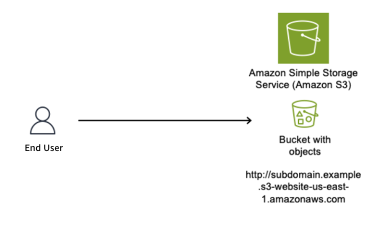
You create a DNS CNAME record pointing to your S3 website endpoint. The subdomain subdomain.example.com now resolves to subdomain.example.s3-website-us-east-1.amazonaws.com, which serves content from the S3 bucket named subdomain.example. If your team deletes the bucket and forgets to delete the DNS record, users that navigate to the site will see an error stating that the bucket doesn’t exist. However, at this point, if a threat actor sees this error and moves in to claim the bucket name, they will be able to set up their own site that users will see when they navigate to the subdomain.example.com site.

Figure 1 shows an S3 bucket named subdomain.example (a globally unique bucket name) configured to host a static website, with the S3 website endpoint subdomain.example.s3-website-us-east-1.amazonaws.com.

Figure 1: S3 bucket configured as a static website

Figure 1: S3 bucket configured as a static website

As shown in Figure 2, we use Amazon Route 53 to create a CNAME record to resolve to our Amazon domain name; to give users a friendly name and so they do not have to remember the long S3 website name in URLs.

Figure 2: DNS Resolver configured with CNAME record pointing to origin bucket

Figure 2: DNS Resolver configured with CNAME record pointing to origin bucket

The customer’s AWS administrator decides to stop serving content from the S3 bucket and deletes it, as shown in Figure 3.

Figure 3: Resource deleted without removing the CNAME record

Figure 3: Resource deleted without removing the CNAME record

With the S3 bucket deleted and the CNAME record still in place, the DNS record is now dangling. A threat actor identifies this situation and creates a new S3 bucket with the same global name subdomain.example in an AWS account that the threat actor controls, as shown in Figure 4. The threat actor can now serve content from this new bucket, including potentially malicious content. End users remain unaware of this switch and continue to access subdomain.example.com, trusting the content because it appears to originate from a URL they recognize.

Figure 4: Subdomain takeover happens

Figure 4: Subdomain takeover happens

Potential impacts of a sub-domain takeover

Consider these potential impacts:

Reputation risk: There is a potential risk to your organization’s reputation, because you don’t control the content being served from the threat actor’s site that your DNS record points to.

Potential exposure to phishing campaigns: Users within your organization might have the subdomain bookmarked in their browser, not knowing the resource is no longer available, then unsuspectingly navigate to the site that now hosts malware or is used to phish user credentials.

Blocking: If the subdomain is flagged by security vendors for malicious activity, it could impact your business operations.

Financial loss: Subdomain takeover incidents can result in a financial impact due to the potential disruption to service delivery as you deal with the event.

Proactive detection

AWS Config for proactive detection

For proactive detection, you can use AWS Config to continuously monitor your Route 53 CNAME records and verify that the target resources exist in your account.

Prerequisite: This approach requires AWS Config recorder to be enabled for the resource types you want to monitor (S3 buckets, CloudFront distributions, Elastic Beanstalk environments). If Config isn’t recording a resource type, it won’t appear in the inventory check. For more information, see Setting up AWS Config with the console.

Why use AWS Config inventory instead of DNS resolution checks?

A common approach is to check whether a CNAME resolves to a valid endpoint. However, this method has a critical flaw: if an attacker has already claimed the resource, DNS resolution will succeed – to their resource, not yours. You would have no indication that you don’t own what’s responding.

By querying AWS Config’s recorded configuration items, you’re checking whether the resource exists in your account inventory, not just whether something responds at that DNS name. This approach correctly identifies dangling CNAMEs even after a takeover has occurred.

Implementation approach:

Account-level vs. organization-level scope

The reference implementation queries AWS Config inventory within a single account. This means that if a CNAME record in Account A points to a resource that legitimately exists in Account B within the same AWS organization, the rule will flag it as NON_COMPLIANT.

For organizations that share resources across accounts, you can modify the solution to use an AWS Config Aggregator, which queries resource inventory across all accounts in your organization. This is similar to how IAM Access Analyzer supports both account-level and organization-level scopes. To use this approach, you need an organization-level Config Aggregator already configured, and the Lambda function’s IAM role needs the config:SelectAggregateResourceConfig permission.

We recommend starting with account-level scope for simplicity, then expanding to organization-level if your environment includes cross-account resource sharing.

The main idea is to create a custom AWS Config rule that queries your Route 53 hosted zones for CNAME records, then parses each CNAME target to determine whether it points to a known AWS resource pattern such as S3, CloudFront, or Elastic Beanstalk. For each match, the rule cross-references the target against your AWS Config inventory to verify that the resource actually exists in your account. If the resource isn’t found, the rule marks the CNAME record as NON_COMPLIANT, surfacing it for review.

The Config rule should focus on known AWS resource patterns:

  • S3: *.s3.amazonaws.com, *.s3-website-<region>.amazonaws.com
  • CloudFront: *.cloudfront.net
  • Elastic Beanstalk: *.elasticbeanstalk.com

Note: CNAME records pointing to external third-party services are outside the scope of this detection mechanism, as those resources won’t appear in your AWS Config inventory.

NON_COMPLIANT findings from your Config rule can be routed to AWS Security Hub for centralized visibility, or trigger SNS notifications to alert your security team.

Figure 5: Dangling DNS Detection Solution

Figure 5: Dangling DNS Detection Solution

Reference implementation:

We’ve published a complete implementation of this detection approach as an open-source solution. The solution deploys a Lambda function that discovers CNAME records across all your Route 53 hosted zones and uses pattern matching to identify targets pointing to S3, CloudFront, and Elastic Beanstalk. It then queries your AWS Config inventory to verify whether each target resource still exists in your account. When a dangling record is detected, the solution generates a HIGH severity finding in Security Hub and can optionally send SNS notifications to alert your security team. A CloudWatch metrics dashboard is also included for ongoing compliance tracking.

Deployment:

# Clone the repository
git clone https://github.com/aws-samples/sample-dangling-dns-detection
cd sample-dangling-dns-detection

# Build the Lambda deployment package
./scripts/package.sh

# Upload to S3
aws s3 cp dist/dangling-dns-detection.zip s3://YOUR_BUCKET/

# Deploy the CloudFormation stack
aws cloudformation deploy \
  --template-file infrastructure/template.yaml \
  --stack-name dangling-dns-detection \
  --parameter-overrides \
      LambdaCodeS3Bucket=YOUR_BUCKET \
      EvaluationFrequency=TwentyFour_Hours \
  --capabilities CAPABILITY_NAMED_IAM

The stack creates an AWS Config custom rule that runs on your specified schedule (default: every 24 hours), evaluating all CNAME records and reporting compliance status.

Mitigating the effects

Mitigating subdomain takeover requires both preventive procedures and responsive capabilities.

Prevention: Standard operating procedure

The most effective mitigation is a standard operating procedure for resource deprovisioning that ensures DNS records are removed before the underlying resource:

  1. Within your DNS zone, delete the CNAME record that points to the fully qualified domain name (FQDN) of the resource that you plan to deprovision.
  2. Wait for the DNS TTL to expire before deleting the resource. DNS resolvers cache records for the duration of the TTL (for example, a TTL of 3600 means resolvers may serve the old record for up to one hour). If you delete the resource before the TTL expires, a threat actor could claim the resource name while cached CNAME entries are still directing traffic to it.
  3. Deprovision the resource that you no longer want to use.
  4. Run a DNS check of the CNAME record that you removed to verify that the resource is no longer resolving.

Key principle: Always delete DNS first, wait for the TTL to expire, then delete the resource. This order eliminates the window where a dangling record could be exploited.

Prevention: S3 account regional namespaces

As mentioned earlier, AWS introduced account regional namespaces for Amazon S3 general purpose buckets in March 2026. While this is a meaningful step toward mitigating the S3-specific takeover vector, there are important operational limitations to be aware of:

Existing buckets are unaffected. Buckets already created in the global namespace cannot be migrated to an account regional namespace. The bucket names remain globally unique and claimable by anyone if the bucket is deleted.

Global namespace is still the default. When creating a new bucket through the console, CLI, or SDK, the global namespace remains the default selection. Users who aren’t aware of the new option will continue creating globally-scoped buckets.

Existing IaC templates require updates. Existing infrastructure-as-code templates (CloudFormation, CDK, Terraform) that don’t explicitly opt in to the account regional namespace will continue provisioning buckets in the global namespace. For CloudFormation, this means setting the BucketNamespace property to account-regional. For other IaC tools, consult their documentation for the equivalent configuration. Organizations need to audit and update their templates to opt in.

For these reasons, the dangling DNS detection approach described in this post remains critical – particularly for organizations with existing S3 infrastructure, and for CloudFront, and Elastic Beanstalk resources where no equivalent namespace scoping exists.

Response: Notification and remediation

When a dangling DNS record is detected, the reference solution described in the Detection section automatically creates a HIGH severity finding in AWS Security Hub and reports the CNAME record as NON_COMPLIANT in AWS Config. If you provide an SNS topic ARN during deployment, the solution also sends notifications to alert your security or operations team via email, Slack, or other channels. For production environments, consider a human-in-the-loop workflow where these notifications are reviewed by a team member who approves the DNS record deletion before it’s executed. This prevents accidental deletion of legitimate records during transient issues.

The reference solution also includes a CloudWatch dashboard for tracking compliance status and evaluation metrics over time, giving your team ongoing visibility into DNS health across your hosted zones.

Note: Fully automated remediation (auto-deleting DNS records) carries risk – a false positive could disrupt legitimate services. We recommend starting with detection and notification, then evaluating automation based on your detection accuracy and operational maturity.

Conclusion

Subdomain takeover is a preventable misconfiguration that can have significant impact on your organization. A layered defense approach provides the best protection:

Prevention: Implement a standard operating procedure that deletes DNS records before deprovisioning the underlying resource.

Detection: Use AWS Config custom rules to proactively identify CNAME records pointing to resources that no longer exist in your account.

Response: Configure notifications through SNS or Security Hub so your team can respond quickly when dangling records are detected.

Monitoring: Maintain ongoing visibility through CloudWatch dashboards to track DNS health and compliance status.

The key insight is that good DNS hygiene – knowing when your CNAME records point to a nonexistent resource – is your first line of defense. Automated detection through AWS Config provides a safety net when operational procedures fail. And if you detect an issue, having a playbook ready to enact your response can lower the impact and your mean time to recovery.

If you have feedback about this post, submit comments in the Comments section below.


Matt Gurr

Matthew Gurr

Matthew is the Senior Incident Response lead in the Asia-Pacific region for the AWS Customer Incident Response Team (AWS CIRT). He has a passion for helping customers proactively prepare for a security event. In his spare time, he enjoys cycling, music, and reading.

Luis Pastor

Luis Pastor

Luis is a Senior Security Solutions Architect at AWS leading the Infrastructure Security and Compliance Technical Field Communities. He drives security architecture for enterprise customers across financial services, healthcare, and retail, specializing in cloud security transformation and regulatory compliance frameworks. Before AWS, Luis architected security solutions in hybrid cloud environments.

Geoff Sweet

Geoff Sweet

Geoff has been in industry since the late 1990s. He began his career in electrical engineering. Starting in IT during the dot-com boom, he has held a variety of diverse roles, such as systems architect, network architect, and, for the past several years, security architect. Geoff specializes in infrastructure security.

Ariam Michael

Ariam Michael

Ariam is a Solutions Architect at AWS. She has supported various customers in the Worldwide Public Sector, specifically SLG and Federal Civilian customers. She is passionate about security, specifically Data Protection helping customers implement encryption and best practices.

Identify unused AWS KMS keys and prevent accidental key deletions

2 June 2026 at 21:01

As you scale your use of Amazon Web Services (AWS), managing KMS keys becomes increasingly important. Whether you manage a handful of keys or thousands across multiple AWS accounts and AWS Regions, there’s often a need to audit key usage to help you meet compliance requirements, evaluate your risk posture, and optimize key management costs. However, determining which keys are actively in use and which have been sitting idle can be a time consuming and complex task.

To help with this, AWS Key Management Service (AWS KMS) has launched the GetKeyLastUsage API, a new feature that you can use to quickly determine when each key was last used for a cryptographic operation, significantly enhancing your audit capabilities and key lifecycle management. For more information, see Determine past usage of a KMS key.

Before this launch, the primary way to audit key usage was through AWS CloudTrail logs. CloudTrail captures every cryptographic operation by default, so the data is available. The difficulty is turning that data into actionable insight. You need to identify which keys to examine, query the right logs, and repeat that process frequently enough to maintain an accurate view. For the most recent 90 days, CloudTrail event history makes this manageable. Beyond that, you need to create a dedicated trail to deliver logs to Amazon Simple Storage Service (Amazon S3) for long-term retention, then query those logs using tools such as Amazon Athena to determine when a key was last used.

Determine when a key was last used

AWS KMS now provides a direct way to see when a key was last used for cryptographic operations. You can also see this information using the AWS Management Console for AWS KMS and the AWS Command Line Interface (AWS CLI).

The GetKeyLastUsage API returns the date and time of the most recent cryptographic operation performed with a KMS key, without requiring you to search through CloudTrail logs. The API returns the date and time of the last key operation, the type of operation performed, CloudTrail event ID, and KMS request ID. You can access this information for all customer-managed keys and AWS managed keys irrespective of key spec, key origin, key store, or key usage type.

In addition, you can restrict a key from being disabled or scheduled for deletion if it was recently used, by incorporating this usage information as a condition within the KMS key policy. See the Preventing accidental key deletion with policy controls section for implementation details.

About the tracking period

One of the important concepts you must understand before relying on the last usage information reported on a KMS key is the tracking period. The tracking period is the date from which AWS KMS began tracking cryptographic activity for the key. Tracking began on April 23, 2026, for most AWS Regions. Understanding the tracking period is critical because it determines whether the absence of usage information means a key has never been used or only hasn’t been used since tracking started.

For example, if you have a key created on January 1, 2026, and you check its usage, any cryptographic operations that occurred between January 1 and April 22 wouldn’t be captured in the usage information. Thus, you can’t conclude that it’s never been used, because it might have been used in the months before tracking began.

Getting started

There’s nothing to enable or additional configuration required to view usage information on last cryptographic operation performed on your KMS keys.

To view KMS key usage:

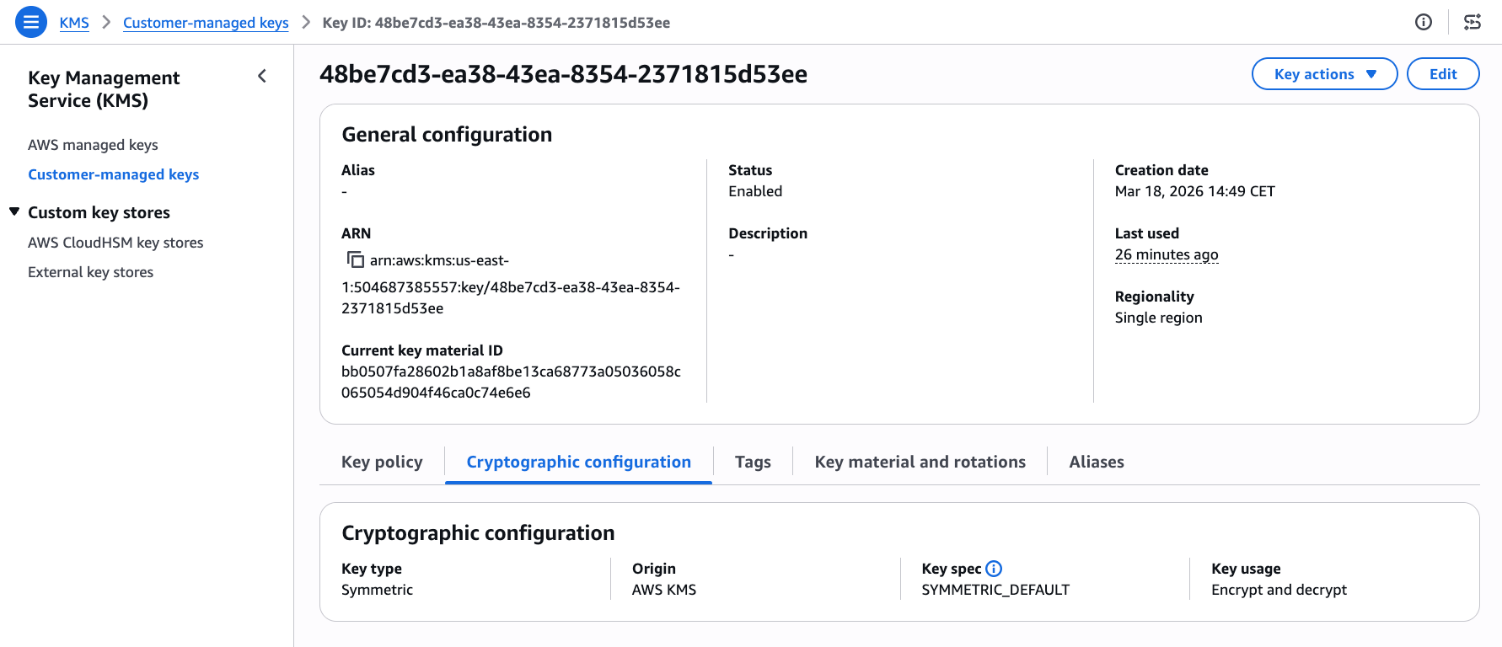
  1. Go to the AWS KMS console and choose Customer-managed keys in the navigation pane and select a key. Look for Last used on the general configuration.
    Figure 1: KMS key general configuration page

    Figure 1: KMS key general configuration page

  2. Choose the link under Last used to see additional details such as Timestamp, Operation, and the CloudTrail event ID.
    Figure 2: View last used details including timestamp, operation, and event ID

    Figure 2: View last used details including timestamp, operation, and event ID

  3. The Last used column is also shown when you attempt to schedule key deletion, so that you can make informed decisions.
    Figure 3: Scheduled key deletion warning

    Figure 3: Scheduled key deletion warning

API reference

See the following examples for ideas on how to use the GetKeyLastUsage API to better understand KMS key usage.

Use case 1: Cost optimization through unused key cleanup

If you manage thousands of AWS KMS keys distributed across multiple AWS accounts, you might have keys that have remained unused since creation or keys that are no longer needed. By cleaning up these keys, you can reduce operational costs and minimize your security footprint. However, without visibility into which keys are actively performing cryptographic operations, it can be difficult to distinguish between keys protecting critical workloads and those that can be safely decommissioned.

Note that there are some precautions that you should take before scheduling key deletion. While the last usage information can help identify unused keys, it shouldn’t be the only factor in deciding whether to delete or disable a key. The last usage information tells you when a key was last used, not whether it will be needed in the future. A key might be unused for months but still required to decrypt files, for compliance scenarios or disaster recovery as shown in figure 4.

When you identify a potentially unused key, first disable it using DisableKey and monitor your applications and services for any encryption or decryption failures.

Figure 4: A use case where GetKeyLastUsage doesn’t accurately reflect whether a KMS key is still required

Figure 4: A use case where GetKeyLastUsage doesn’t accurately reflect whether a KMS key is still required

As an example, Amazon EBS volumes only interact with KMS keys during specific lifecycle events like volume creation, attachment, and detachment. After a volume is attached to an Amazon Elastic Compute Cloud (Amazon EC2) instance, the plaintext data encryption key is cached in the Nitro Card hardware, and all subsequent read/write operations use this cached key without any further AWS KMS API calls. This means a production volume running continuously for months or years will show no KMS activity during that entire period. However, the volume remains completely dependent on that KMS key for any future operations like instance restarts, volume reattachments, or disaster recovery scenarios. If someone deletes the KMS key, the encrypted data key stored with the volume can never be decrypted again, making the volume’s data permanently and irreversibly inaccessible. Before deleting any KMS key, you must verify it has no associated EBS volumes or snapshots, regardless of how long ago the last KMS API call occurred.

AWS provides a mechanism where you can create a CloudWatch alarm that notifies you if a key pending deletion is being accessed, giving you an opportunity to cancel the deletion before data becomes inaccessible.

Solution with GetKeyLastUsage API

Here’s a sample script that scans all customer-managed keys in an account and retrieves each key’s last usage date through the GetKeyLastUsage API. It accepts two optional inputs: a threshold in days and an AWS Region. The script filters and displays only keys that haven’t been used within the specified period, presenting results in a table with the key name, AWS account ID, AWS Region, and last usage date. This can help you identify unused encryption keys.

The following is an example to scan all keys that haven’t been used in the last 180 days in the us-east-1 Region:

./script.sh 180 us-east-1
#!/bin/bash
DAYS=${1:-90}
REGION=${2:-$(aws configure get region)}
CUTOFF=$(date -v-${DAYS}d +%s 2>/dev/null || date -d "-${DAYS} days" +%s)
ACCOUNT_ID=$(aws sts get-caller-identity --query Account --output text)
printf "Showing keys not used in the last %s days (Region: %s)\n\n" "$DAYS" "$REGION"
printf "%-50s %-15s %-20s %-15s\n" "Key Name" "Account ID" "Region" "Last Usage Date"
printf "%.0s-" {1..100}
printf "\n"
for key_id in $(aws kms list-keys --region $REGION --query 'Keys[*].KeyId' --output text); do
key_manager=$(aws kms describe-key --region $REGION --key-id $key_id --query 'KeyMetadata.KeyManager' --output text)
if [ "$key_manager" = "CUSTOMER" ]; then
last_usage=$(aws kms get-key-last-usage --region $REGION --key-id $key_id)
timestamp=$(echo $last_usage | jq -r '.KeyLastUsage.TimeStamp // empty')
if [ -z "$timestamp" ]; then
last_epoch=0
else
last_epoch=$(date -jf "%Y-%m-%dT%H:%M:%S" "$(echo $timestamp | cut -d. -f1)" +%s 2>/dev/null || date -d "$timestamp" +%s)
fi
if [ "$last_epoch" -lt "$CUTOFF" ]; then
key_alias=$(aws kms list-aliases --region $REGION --key-id $key_id --query 'Aliases[0].AliasName' --output text)
key_name=${key_alias:-$key_id}
[ "$key_name" = "None" ] && key_name=$key_id
if [ -z "$timestamp" ]; then
tracking_date=$(echo $last_usage | jq -r '.TrackingStartDate' | cut -d'T' -f1)
last_used="${tracking_date}*"
else
last_used=$(echo $timestamp | cut -d'T' -f1)
fi
printf "%-50s %-15s %-20s %-15s\n" "$key_name" "$ACCOUNT_ID" "$REGION" "$last_used"
fi
fi
done
printf "\n* = No operations performed since tracking started\n"

Use case 2: Preventing accidental key deletion with policy controls

Organizations frequently face the risk of accidental key deletions, which can have severe operational consequences. Despite precautions and safety measures, accidents can happen. A key might be deleted because someone believes it’s no longer in use, only to discover that critical applications or workloads depend on it. This results in data access failures, application downtime, and emergency recovery procedures. Without visibility into recent key usage, teams lack the information needed to make safe disable decisions or implement effective safeguards.

Solution with policy based controls

To prevent KMS keys from being accidentally Disabled or Deleted use the kms:TrailingDaysWithoutKeyUsage condition key in key policies to automatically block deletion or disabling of recently used keys:

  1. Open the AWS KMS console and choose Customer managed keys in the navigation pane.
  2. Select the key you want to protect.
  3. In the Key policy tab, choose Edit.
  4. In the policy editor, add the following statement:
{
  "Sid": "PreventDeletionOfRecentlyUsedKeys",
  "Effect": "Deny",
  "Principal": "*",
  "Action": [
    "kms:ScheduleKeyDeletion",
    "kms:DisableKey"
  ],
  "Resource": "*",
  "Condition": {
    "NumericLessThanEquals": {
      "kms:TrailingDaysWithoutKeyUsage": "365"
    }
  }
}
  1. Choose Save changes.

The policy prevents deletion or disabling a key if it was used within the past 365 days. You can adjust the threshold to match your organization’s requirements. For more information about the condition key, see kms:TrailingDaysWithoutKeyUsage.

Important considerations

When reviewing key usage for possible deletion, consider the following:

  • Key deletion is irreversible and makes encrypted data unrecoverable. AWS enforces a 7–30 day waiting period. During this time, monitor usage attempts and cancel the deletion if necessary. Delete a key only if you’re certain that no data has been encrypted or will be encrypted with it. Consider disabling the key first to test the impact of unavailable keys.
  • CloudTrail remains authoritative because it provides the full audit trail. GetKeyLastUsage quickly tells you when and what operations occurred, but CloudTrail shows you who made the request and with what parameters. Learn more about logging KMS API calls with CloudTrail.

Conclusion

The GetKeyLastUsage API enhances your KMS key management capabilities by providing immediate access to usage data that was previously only present in CloudTrail logs. Start by opening the AWS KMS console and checking the Last used field for any customer-managed keys and AWS managed keys to see this information in action. For broader key auditing, integrate the API into your existing automation scripts using the AWS CLI examples provided.

If you have feedback about this post, submit comments in the Comments section below.


Andrea Rossi

Andrea Rossi

Andrea is the Solutions Architect who always asks “but is it secure?” one more time. Based in Milan, Italy, he works with customers to architect cloud solutions where security is foundational, not an afterthought, from network-level hardening to integrating Generative AI workloads into compliant environments.

Poojil Tripathi

Poojil Tripathi

Poojil is a Solutions Architect based in Austin, TX, who would like to remind you that you should never click on links. He works with customers to design secure-by-design cloud solutions on AWS, specializing in encryption and healthy paranoia.

❌