A caller offers you a free phone upgrade or an exclusive deal from your mobile provider. A new phone arrives at your home. So far, everything seems to check out.
Then comes another call: There’s been a shipping mistake. You received the wrong phone, and the company needs you to send it back. You send it back, but the phone never reaches your provider, leaving you with a large charge or long-term contract to pay.
Now police are warning about this scheme after residents lost devices and were left facing the associated payments.
How phone return scams work
The scam usually starts with a call from a spoofed number. In the US we’re seeing several examples in anonymized Malwarebytes Scam Guard records of the impersonated company being Canadian mobile provider Rogers.
The Canadian Anti-Fraud Centre warns:
“After collecting personal information required for credit checks, they’ll order a new phone in your name.”
Next, a genuine device arrives through a legitimate delivery service. That delivery makes the next part of the story easier to believe.
The caller gets back in touch and claims something went wrong. Perhaps the company sent the wrong device, or an extra phone arrived by mistake. To put things right, you need to send it back using the label or shipping QR code they provide.
The shipping label is the real trick. Rather than directing the package to the provider’s returns facility, it sends the device to an address chosen by the criminals.
The result: You no longer have the phone, but your provider has not received it back. Victims can be left facing a contract, financing agreement, or monthly payments for the missing device.
How to stay safe
The most important protection against most types of scams is having someone you can trust and help you decide whether something is a scam. Malwarebytes Scam Guard can be that partner if you’re on your own.
You don’t need to decide on the spot about whether a caller sounds convincing. Break the conversation and verify the offer separately. Pause and check if you encounter any of the following:
An unexpected call offering a free phone, loyalty reward, or unusually attractive upgrade.
A caller asking for personal, financial, or account information to arrange the offer.
A follow-up call claiming the wrong device was shipped or that another delivery mistake needs correcting.
Instructions to use a return label or QR code supplied by that caller.
A return destination that you have not confirmed directly with your provider.
If you’ve already sent a phone, contact your mobile provider immediately using verified contact details. Explain that you believe you were targeted by a phone return scam, identify the affected orders, and ask for a fraud investigation.
If you shared your account password or PIN, change it through the provider’s official channels. Rogers advises customers who disclosed their credentials to reset them and contact customer service to check for unauthorized transactions.
Keep the evidence: messages, emails, the shipping label, tracking details, order confirmations, bills, and a timeline of the calls. These records can help support a billing complaint and fraud report.
Something feel off? Check it before you click.
Malwarebytes Scam Guard helps you analyze suspicious links, texts, and screenshots instantly.
When your pet goes missing, it can be totally heartbreaking.
So hearing that they’ve been found is no doubt very welcome news. Even better to see a photo of them looking safe and well.
But while the photo may look exactly like your pet, that doesn’t mean the person who sent it has your pet or even ever saw it.
The BBC reports how criminals are sending owners AI-generated images of their missing pets, demanding money for their return, and sometimes threatening to harm the animals when owners refuse to pay.
The BBC interviewed two targets of this scam who were both contacted after posting a missing pet message on social media. The scammers sent them pictures of their beloved pets and demanded a ransom for their safe return.
Messages like these exploit two powerful emotions in quick succession: relief that a beloved pet has been found, followed by fear that something terrible will happen unless the owner acts immediately.
The scam typically follows this pattern:
A scammer finds a missing pet appeal, which is typically posted to social media or local sites with an accompanying photo and contact details.
The scammer contacts the owner and claims to have found the animal. An image fabricated with the help of AI makes the claim appear more convincing.
They ask for money which may be described as a reward or as payment for emergency treatment.
They add pressure. They might refuse to meet until payment arrives, or threaten to sell or harm the pet.
Our data backs this report up. Over the last month, people anonymously submitted three distinctive types of pet related scam attempts to Malwarebytes Scam Guard:
“We found your missing cat” message, with photos: Someone claimed to have found a user’s missing cat and had images of it.
Found pet callback lure: A voicemail claimed to have found a lost cat and supplied a callback number.
Humane Society impersonation and payment demand: A caller claimed a missing cat needed emergency surgery, and demanded successive Zelle payments.
How to stay safe
Sadly, while it can be very useful to use social media to retrieve lost pets, it also attracts scammers and other abuse.
You don’t have to stop asking for help online, but you can put some safeguards between an unexpected message and any payment.
Keep some identifying details private. Leave a distinctive feature out of the public description so you can ask a supposed finder about it later.
Do not pay in advance to secure a reunion. Be particularly wary of someone who insists that you send money before they will let you see the animal. Arrange any legitimate handover in a safe, public location, and verify that it is your pet before paying a reward.
Verify veterinary claims independently. If someone says your pet is at an animal hospital, find the hospital’s contact details yourself and call it directly. Do not rely on the number or payment link in the message.
A second pair of eyes can help you assess a demand without the same emotional pressure. Malwarebytes Scam Guard can help you identify whether a message might be a scam and how to proceed.
If someone is threatening your pet, remember that when they make threats to your pet, it is very likely they don’t have a clue where it is either, so don’t let them extort you.
Something feel off? Check it before you click.
Malwarebytes Scam Guard helps you analyze suspicious links, texts, and screenshots instantly.
.kadence-column484244_4b5e59-45 > .kt-inside-inner-col{padding-top:20px;padding-right:20px;padding-bottom:10px;padding-left:20px;}.kadence-column484244_4b5e59-45 > .kt-inside-inner-col{column-gap:var(--global-kb-gap-sm, 1rem);}.kadence-column484244_4b5e59-45 > .kt-inside-inner-col{flex-direction:column;}.kadence-column484244_4b5e59-45 > .kt-inside-inner-col > .aligncenter{width:100%;}.kadence-column484244_4b5e59-45 > .kt-inside-inner-col{background-color:rgba(255, 229, 229, 0.83);}.kadence-column484244_4b5e59-45 > .kt-inside-inner-col:before{opacity:0.3;}.kadence-column484244_4b5e59-45{position:relative;}@media all and (max-width: 1024px){.kadence-column484244_4b5e59-45 > .kt-inside-inner-col{flex-direction:column;justify-content:center;}}@media all and (max-width: 767px){.kadence-column484244_4b5e59-45 > .kt-inside-inner-col{flex-direction:column;justify-content:center;}}
In this article
A fake $750 Apple Cash offer funnels users toward app and game promotions
Its device checks, countdown, and “spots left” claims aren’t real
Users get no reward and may share information or spend money in games
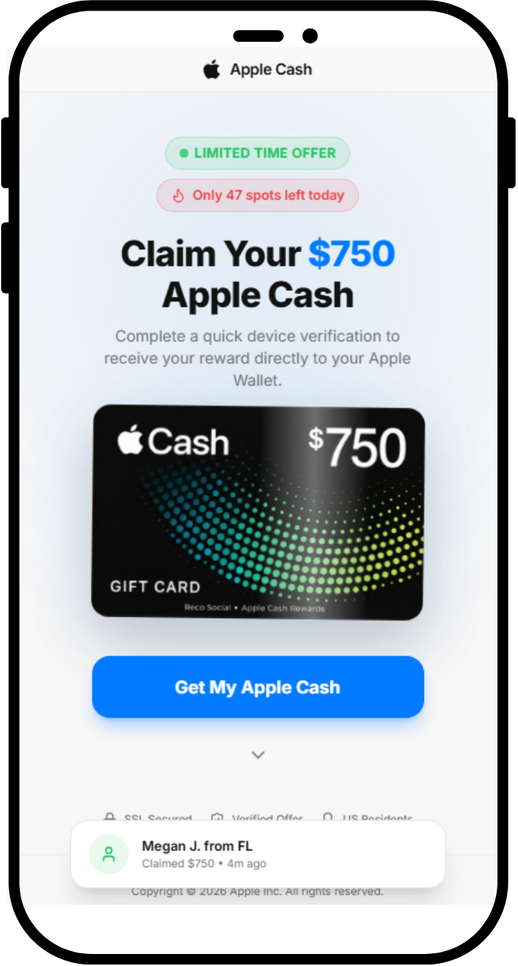
A page we found promises a $750 Apple Cash reward if you complete a quick “device verification.” There is no reward, and the page does not verify your device. Instead, it sends you to app offers through affiliate tracking links.
The page is not affiliated with Apple. If you’ve landed on a page like this, close it.
The fake page promises $750 in Apple Cash
Why Apple makes such good bait
Apple is one of the world’s most recognized brands, and scammers use that familiarity to make fake offers seem credible. Apple’s own scam guidance lists fake promotions offering free products and prizes among common tricks.
Current Apple news gives scammers useful cover. The new iPhone Duo is in the headlines, and we recently found a fake preorder page whose code tried to exploit older iPhones as soon as the page opened. With the iPhone Duo starting at $1,999, a promise of $750 in Apple money may catch people’s attention.
The word “verify” may also sound timely. Starting November 9, Green Dot Bank, which issues Apple Cash, will require some users to verify their identity before they can reload their balance. A fake page asking people to “verify your device” to get Apple Cash may seem more plausible in that context.
Apple Cash isn’t an Apple Gift Card
The page blurs two different things:
Apple Cash is money you send, receive and spend through Apple Wallet.
An Apple Gift Card adds money to your Apple Account balance for Apple purchases.
Apple warns that its gift cards can only be used for Apple purchases, and that someone asking you to pay them with one is probably a scammer. But neither Apple Cash nor an Apple Gift Card comes from a website that “unlocks” it after you install an app.
We looked at the code behind the page’s three steps: Eligibility Check, Verify Device and Claim Reward.
The eligibility check is a timer. The four items that tick green, including “Location: United States,” are just labels that light up on a schedule. The page never checks where you are or what device you use. Everyone passes in under four seconds.
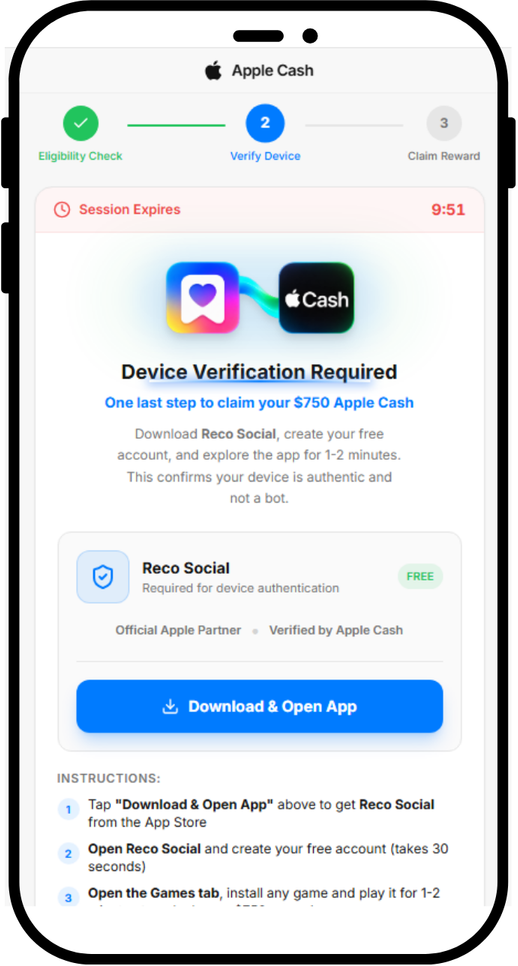
It tells users to download an app for “device verification”
The device verification is an app install. The page tell users to download an app called Reco Social, then tells them to create an account, and install and play a game. We found no evidence that Reco Social or its developer created or operated the fake reward page.
When you tap Download & Open App, the page opens a link in a new tab. Five seconds later, it starts showing “Verifying device…”. Nothing is being verified. The page has no way of knowing whether you installed anything, created an account or played a game.
The reward is the same link again. Ten minutes after you tap the button, the page moves on by itself and announces “Device Verified Successfully,” whether or not you installed anything. The Claim Your $750 button doesn’t add anything to your wallet. It opens the same link as the download button.
Fake urgency
The page is built to stop you from thinking too long:
“Only 47 spots left today” always starts at 47. It drops by one every 30 seconds and stops at 3, so it never runs out.
The “claimed $750” pop-ups are generated at random from a list of 15 first names and 15 US states, with a random “minutes ago.” Every visitor sees a new one every 8 to 15 seconds.
The 10-minute “Session Expires” countdown doesn’t end anything when it hits zero.
Who gets paid?
The download button doesn’t go directly to the App Store. It first goes through a tracking link on taprkr[.]com. These links can be used in affiliate marketing to credit clicks and installs to whoever sent the traffic.
The link carries a label, “recosocial-cpr.” CPR can stand for “cost per registration,” a deal where a promoter earns money when someone signs up. That label alone doesn’t confirm how this offer pays.
The destination varied in our tests. The link led to an offer labeled “playful-rewards-revshare” on iPhone and an ad network on PC. A revshare (revenue share) deal usually pays the promoter a cut of what users later spend, such as on in-app purchases.
The tracking labels suggest that promoters may earn money from registrations or spending in promoted apps, but they don’t confirm how this offer pays. Users don’t receive the promised $750.
We have no evidence that Reco Social or any app at the end of these links is behind the fake Apple page. Deceptive affiliate promoters can send traffic to legitimate apps because they may earn money for installs or signups regardless of how users were persuaded.
The page also loads a TikTok tracking pixel, which advertisers use to measure campaigns. This could mean the operators are measuring traffic from TikTok, but it doesn’t show where the link was shared.
What’s the harm if it’s “just” an app install?
Compared to a page that steals passwords or card numbers, this one can look harmless. But you still pay a price:
You give away personal data. Creating an account means handing over your email address, phone number or social login to a service you only signed up for because of a lie.
You may be encouraged to spend. Many mobile games make their money from in-app purchases, and with a revenue-share deal, someone profits when you spend.
You may be set up for the next scam. Fake reward offers often come in chains. The next one may ask for your Apple Account details, card number, or a “small processing fee.”
You lose time chasing a reward that was never coming.
How to stay safe
Keep these points in mind if you come across an Apple Cash or other Apple-related offer online:
Don’t expect an app install to pay you in Apple Cash. Be suspicious of any “Apple” offer that asks you to download a third-party app, create an account or play a game to receive Apple Cash or an Apple Gift Card.
Verify Apple Cash only in Settings. The real identity check is in Settings > Wallet & Apple Pay > Apple Cash. Treat any website or message that asks you to “verify” Apple Cash somewhere else as suspicious.
Be extra careful around launches and holidays. iPhone Duo deals, giveaways and preorder offers will keep circulating. Go to apple.com or the Apple Store app yourself instead of following links.
Check the address bar. Apple’s website is apple.com. A page on a domain like applecashgiftcard[.]com is not Apple, however much it looks like it.
Treat countdowns and “spots left” as red flags. Fake urgency is there to rush you past the moment you’d ask, “Why would anyone give me $750 for this?”
Already installed an app from a page like this? You didn’t earn a reward, so you can delete the app. Delete any account you created through it, cancel any subscriptions in your App Store settings, and change that password on any other accounts where you reused it.
Never pay with gift cards, and never pay to receive a prize. As the FTC puts it, “No real business or government agency will ever tell you to buy a gift card to pay them.” If a “reward” asks for a fee, your card details or gift card codes, it’s a scam.
Report it. Apple asks people to forward suspicious Apple-themed messages to reportphishing@apple.com. You can also report the ad or post to the platform where you saw it and, in the US, report fraud at ReportFraud.ftc.gov.
How Malwarebytes helps
Malwarebytes can help block known scam pages. Use Browser Guard with a supported browser, or Web Protection in Malwarebytes for iOS when browsing with Safari.
If you’re not sure whether a link, text or offer is real, you can ask Malwarebytes Scam Guard before you click.
“One of the best cybersecurity suites on the planet.”
In an industrial network, malicious activity can be hard to tell apart from normal data exchange between devices. Malicious actors routinely rely on legitimate tools and the Living-off-the-Land technique, so a single network connection may show no known signs of an attack: the device uses a familiar protocol and transmits ordinary data. An anomaly can hide in subtle details: the data source, the time of access, or the volume of transferred data may be atypical for a particular device. However, to detect this kind of anomaly, you need to understand the roles of the devices at both ends of the connection and know which network activity patterns are typical for them.
But an organization’s asset inventory data is often incomplete, which makes it harder to catch unauthorized connections in time. Suppose monitoring detects a host that regularly exchanges data with programmable logic controllers (PLCs). Its IP address is known, but the inventory does not specify what role it plays: is it an engineering workstation, a process data server, or a piece of contractor’s equipment? The host may also have been on the industrial network for a long time, with its record going out of date after a network upgrade.
In the joint OT asset inventory guidance released by CISA and its partners in 2025, inventorying devices and classifying them by role are treated as part of OT asset management. For organizations, this is one of the most important areas: according to the SANS 2025 ICS security survey, 50% of respondents had deployed or significantly expanded ICS inventory and visibility tools over the previous 12 months, and 54% named them as investment priorities for the next 12–24 months.
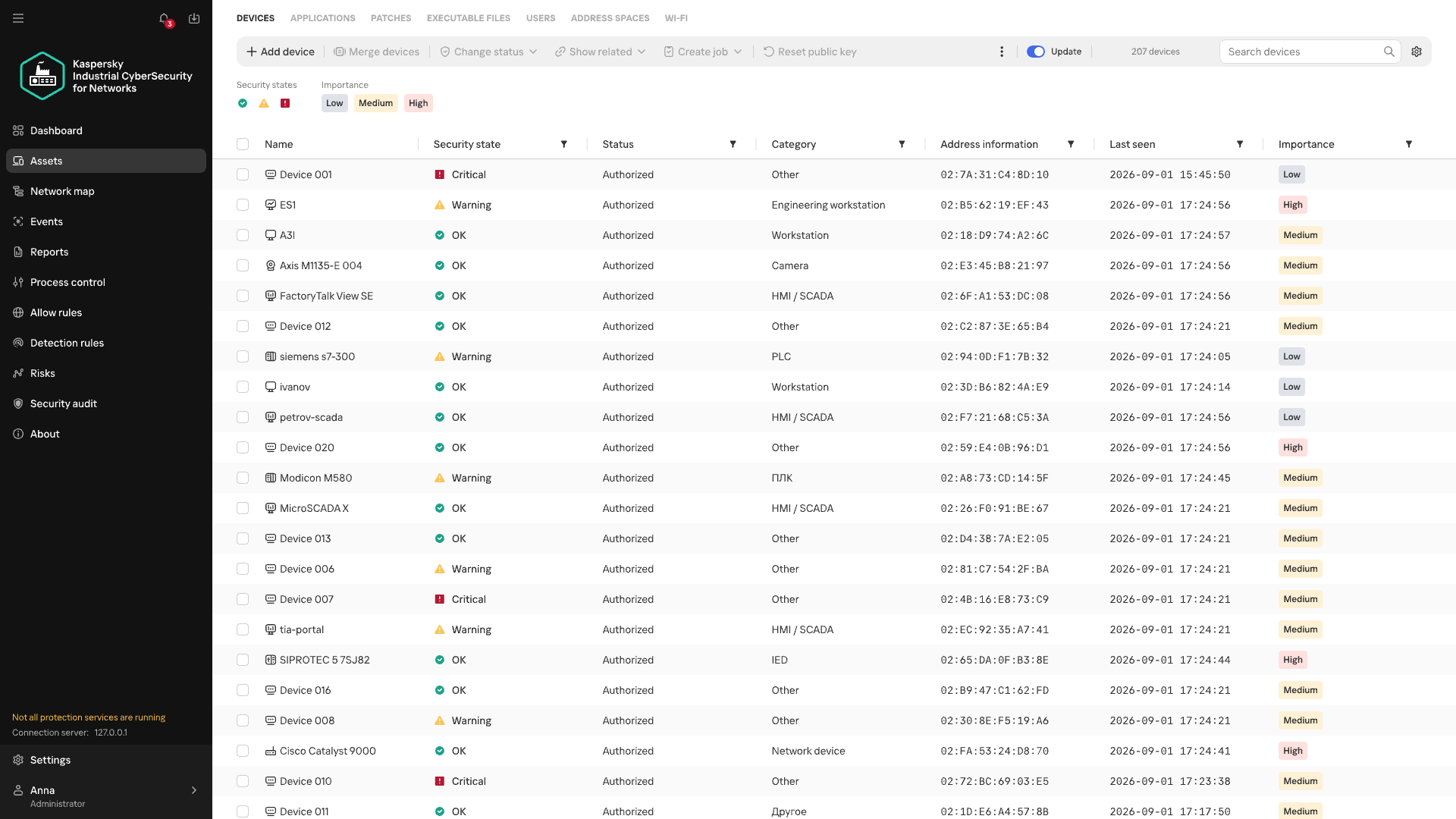
Device inventory in Kaspersky Industrial CyberSecurity for Networks
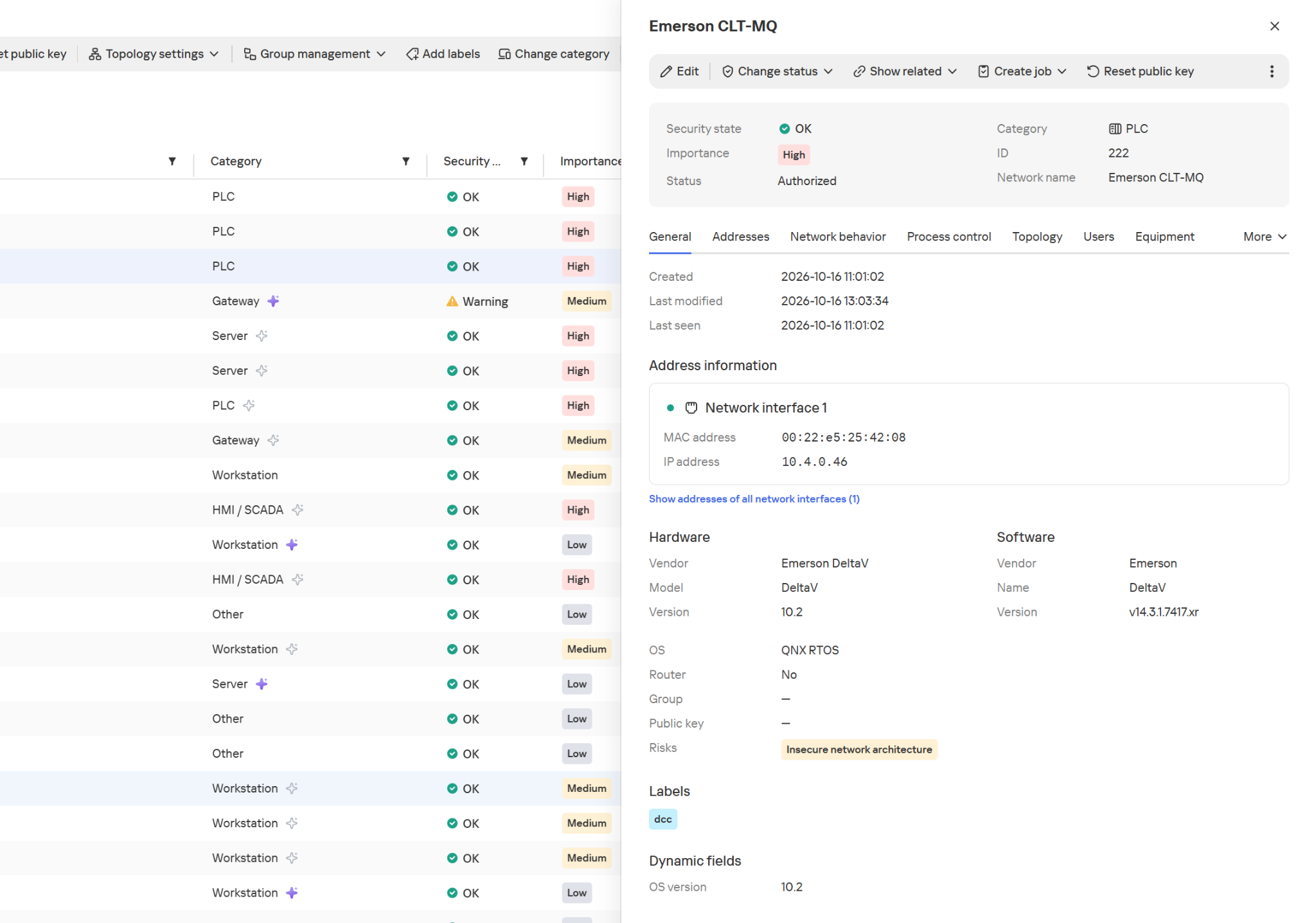
In Kaspersky Industrial CyberSecurity for Networks, the Asset Discovery technology is the foundation of asset visibility. Passive network traffic analysis detects devices and their interactions, while recognition rules help determine the device category and extract available information about it, such as the vendor, model, or software version. Exactly which attributes the system can obtain depends on the protocol and the traffic it observes. We covered this in more detail at the Kaspersky Industrial Cybersecurity Conference.
Hardware and software information in the device card
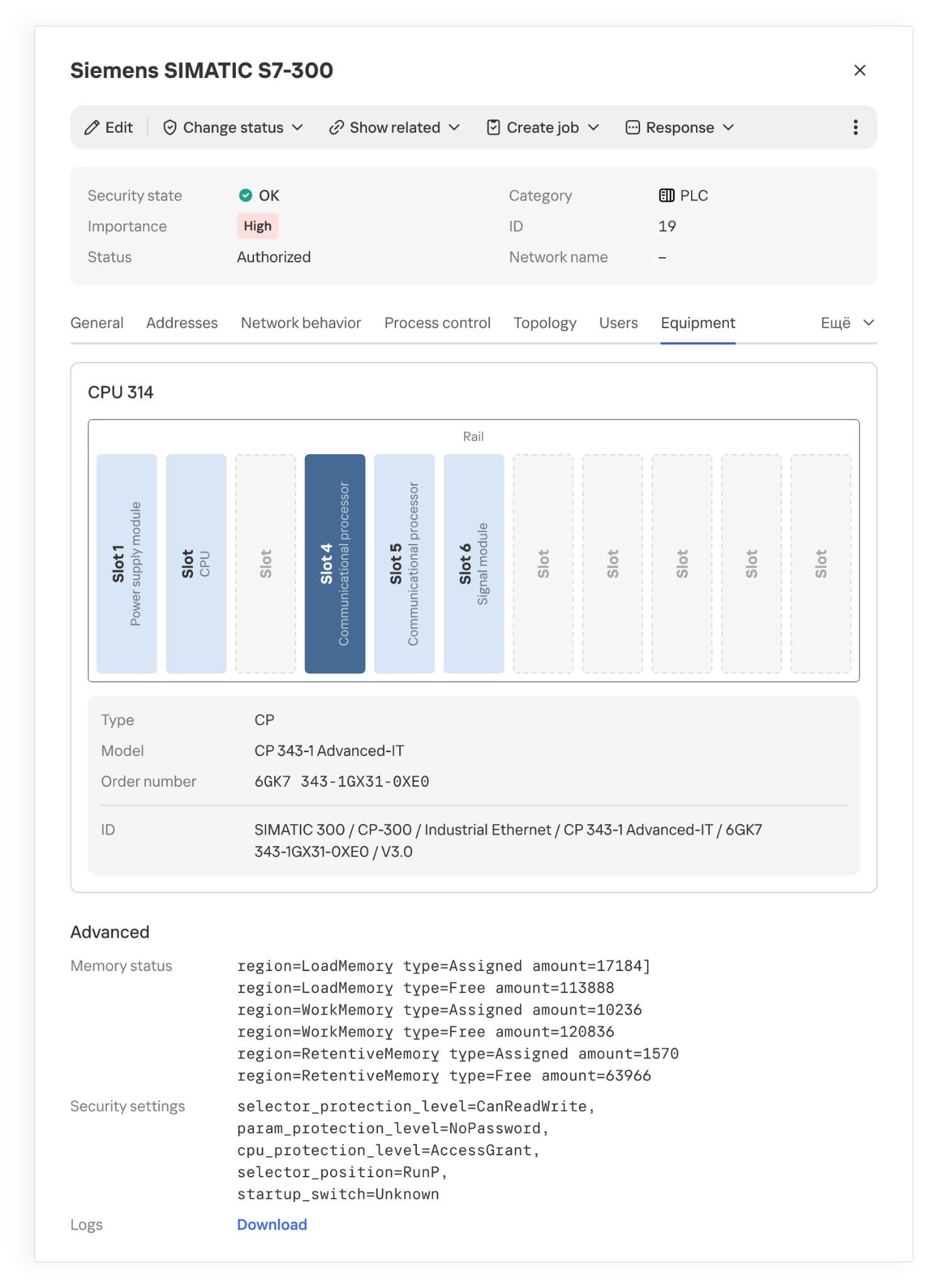
The product also supports active polling modules (APMs): where polling is allowed, they can request additional configuration and firmware version details from devices. This kind of inventory is far more detailed than a list of IP addresses.
Installed modules and their placement in a PLC rack
However, even accurate hardware information doesn’t always explain what function a host performs in a specific industrial facility. Gaps appear for various reasons. Some devices send identifying information only at startup or during configuration, while others rarely communicate. Proprietary protocols can’t always be parsed, and encryption may leave only connection metadata for analysis. If the monitoring system doesn’t receive traffic from every segment of the industrial network, some network activity goes unobserved. Active polling doesn’t suit every device or every operating condition.
Devices of unknown category
When there isn’t enough direct information about a device, its category can be refined by looking at the patterns of its recurring network interactions. Analyzing these interactions is the job of Machine Learning Event Processor (MLEP), a service included in Kaspersky Industrial CyberSecurity for Networks 5.0. This machine-learning-based event processor can both refine device categories and detect anomalies in their network behavior.
What data does MLEP analyze?
To compare device behavior, you don’t need to store every packet as a separate observation (a data object) in the ML model. MLEP represents network sessions as a sequence of short 15-second fragments. For each fragment, MLEP stores information about the endpoints (IP, MAC, and port), the direction of data exchange, the protocol, and the number and size of the packets transmitted. Together these make up an event, which then gets a timestamp. Traffic thus becomes a sequence of events showing which hosts a device communicated with, when, and how communication intensity changed.
Aggregating data into events also sets the method’s limits. An aggregated fragment can’t be used to reconstruct the exact order of individual packets or the content of commands. MLEP can draw conclusions about a new protocol only if another KICS technology has managed to recognize it. That said, comparing stable network connections and changes in exchange volume doesn’t require a detailed record of every packet. These observations form the basis of the device’s behavioral history.
From observations to MLEP results
Each object has its own behavioral history, and one object’s history can’t be applied to another. But the principles of behavior analysis, along with some common rules, work across different objects.
Let’s look at how this works in MLEP, which is built on a spiking neural semantic network (NSN).
Event identification
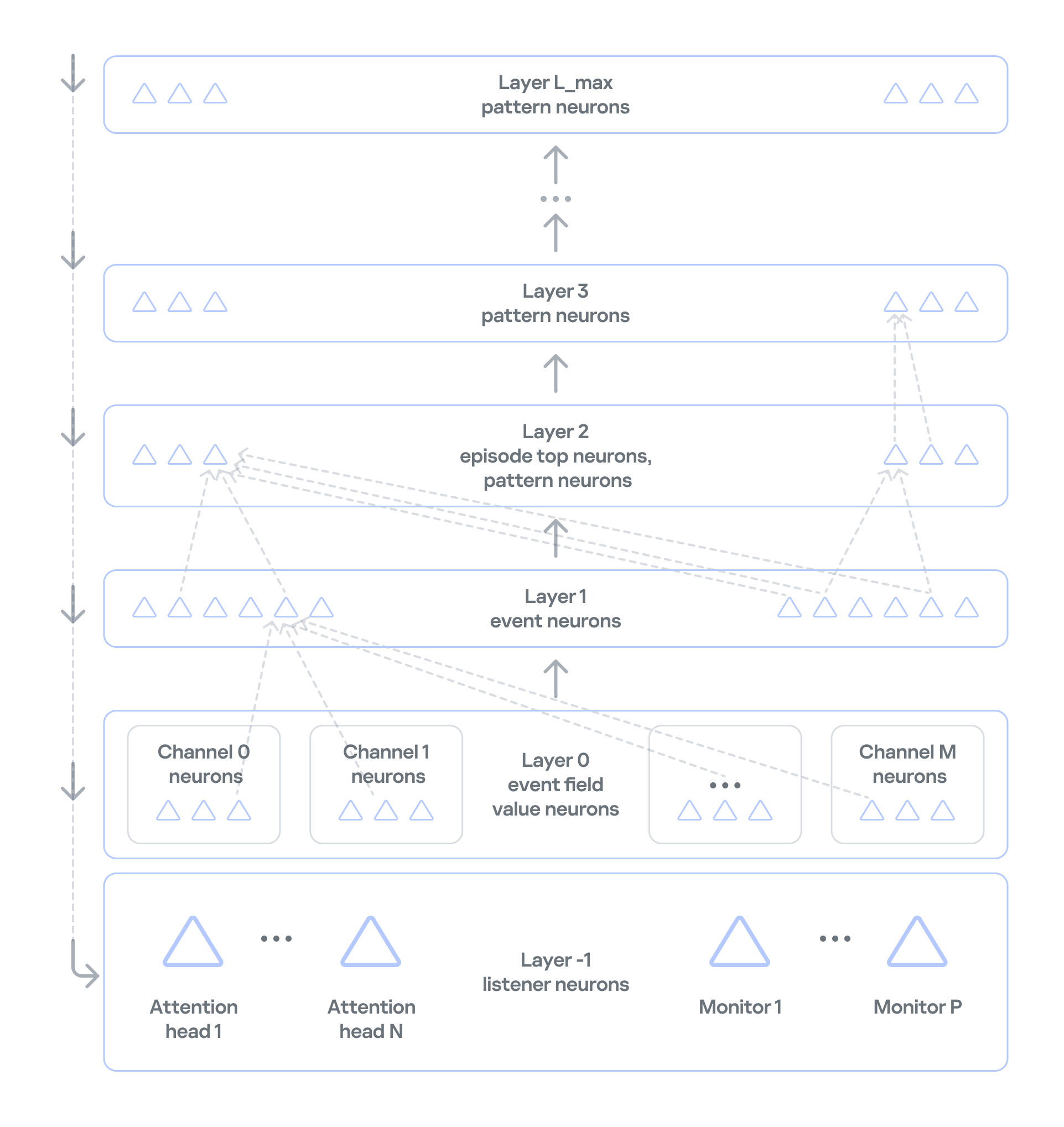
Neurosemantic networks structure information as a multilayer ordered graph, where the data in each consecutive layer builds on the data in the previous one. The nodes of this graph — that is, the units of information in each layer — act as neurons.The NSN creates dedicated channels to handle different event parameters (port, IP, and so on). Unique parameter values for each channel are stored as neurons in layer 0. The event itself, which consists of a set of parameter values, is stored as a neuron in layer 1 of the network. If an event occurs for the first time, neurogenesis creates a new neuron with input connections to the corresponding parameter neurons. This lets the network learn and operate on the event stream at the same time. If the event has occurred before, the network activates the same neuron that was created when the event first appeared. This way, the network identifies each event precisely. Each neuron that corresponds to an event also collects basic statistics: when it was last activated and how many times it has been activated.
Event history
In NSN-based event processing, layer 2 and above store sequences of events over time: recurring patterns and the full history. However, categorization and statistical anomaly detection don’t require storing the full packet sequence or a detailed timeline of every network event. As we noted earlier, events are themselves aggregates, which means the order of network packets has already been averaged out. So MLEP keeps history only temporarily, within each episode (30,000 aggregated events by default), which saves computing resources.
Statistics processing in MLEP
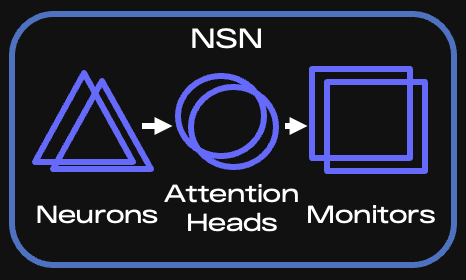
MLEP processes statistics mainly through specialized listener neurons on layer −1 (minus one) of the network. Attention heads and monitors are built on these neurons.
Key components of the NSN
When an event arrives, the corresponding neuron is activated, and the network instantly knows whether that neuron is new or was created earlier. Each attention head subscribes to the events or event features it needs and takes in only the activations of the matching neurons. If an event occurs for the first time, all heads are notified and then decide whether to subscribe (grow a connection to the relevant neuron) and receive information about activations of such neurons from then on.
It is called a spiking network because activation information is a spike, not a number. This spike tells the head that something it’s interested in has happened.
An attention head is configured according to scenarios — the situations that MLEP should send alerts about. The core of a head’s configuration is a query, which filters incoming information and serves as the subscription criterion. Unlike regular database queries, this query runs on the stream, so it can react to an event instantly.
Attention heads work very much like the semantics of ordinary human language. A query has a subject of attention (one or more grammatical subjects) and conditions (the other parts of the sentence). In the infrastructure of an industrial enterprise, the subjects are devices on the network, and the conditions are various aspects of network communication, such as ports, protocol, and average packet size. If a head has many subjects (for example, if it’s interested in every device on an industrial network), it fans out: it creates a child head for each individual value of the subject of attention, that is, each device. The child head then watches a specific device and reports to the parent head.
Attention heads don’t accumulate or process statistics. They only filter event streams. When an attention head receives a relevant event, it activates and sends a spike to the monitor subscribed to that head.
Monitors, in turn, have stacks for accumulating and processing events. They can also have their own queries and post-filter information from the head. For example, they can select only new events from those filtered by the head.
There are several types of monitors:
Stat monitors track changes in the average count of specific events (for example, device activity) over time intervals typical for those events, or in the average values of numeric event parameters (for example, changes in device traffic volume).
Monitors work from the event alone: they fire when an event has occurred a certain number of times within a given interval, or has occurred for the first time.
Similar-behavior monitors work with heads that can generalize events, that is, extract just a few parameters whose combination is shared (generalized) across many events.
MLEP uses these monitor types to implement scenarios for categorizing devices and detecting their anomalous behavior:
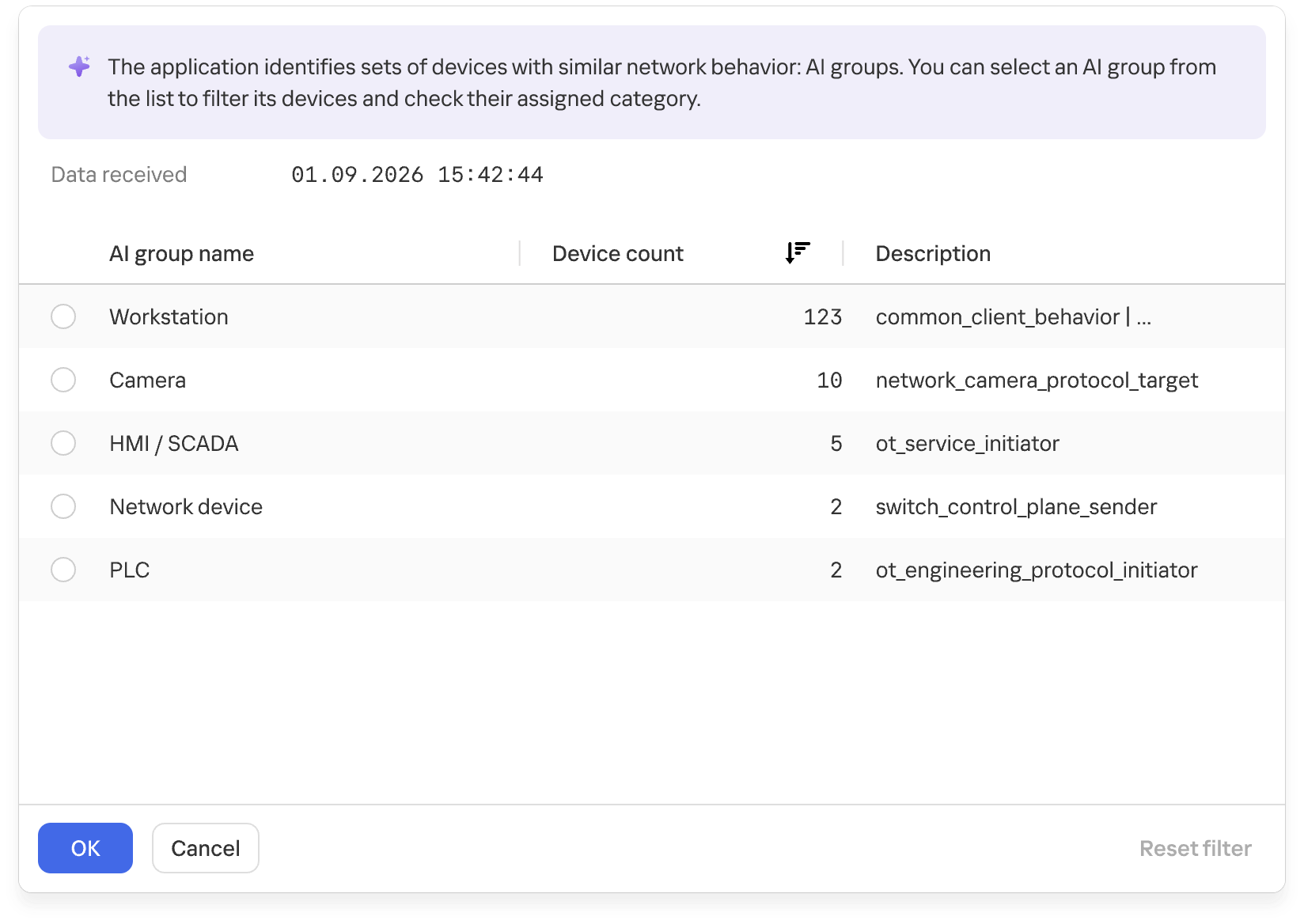
For categorization, MLEP uses attention heads and monitors that identify common behavior across different assets and group devices accordingly. MLEP then takes information from Asset Discovery about the known categories of some assets and extends those categories to other assets in the same group. Because a device can show different types of activity, it may land in several groups. MLEP then makes a weighted assessment across all relevant groups.
Groups of devices with similar network behavior
At the final stage, the system verifies that assigning the category to the asset is permissible. This is again done by special rule monitors loaded into the NSN at system startup. The rules rely on asset metadata available from Asset Discovery and APMs.
MLEP takes a similar approach to anomaly detection: an attention head and a monitor define an anomaly scenario, often loosely. When a monitor activates on such a scenario, MLEP generates an alert about unusual behavior.
The current version of MLEP ships with preconfigured heads and monitors.
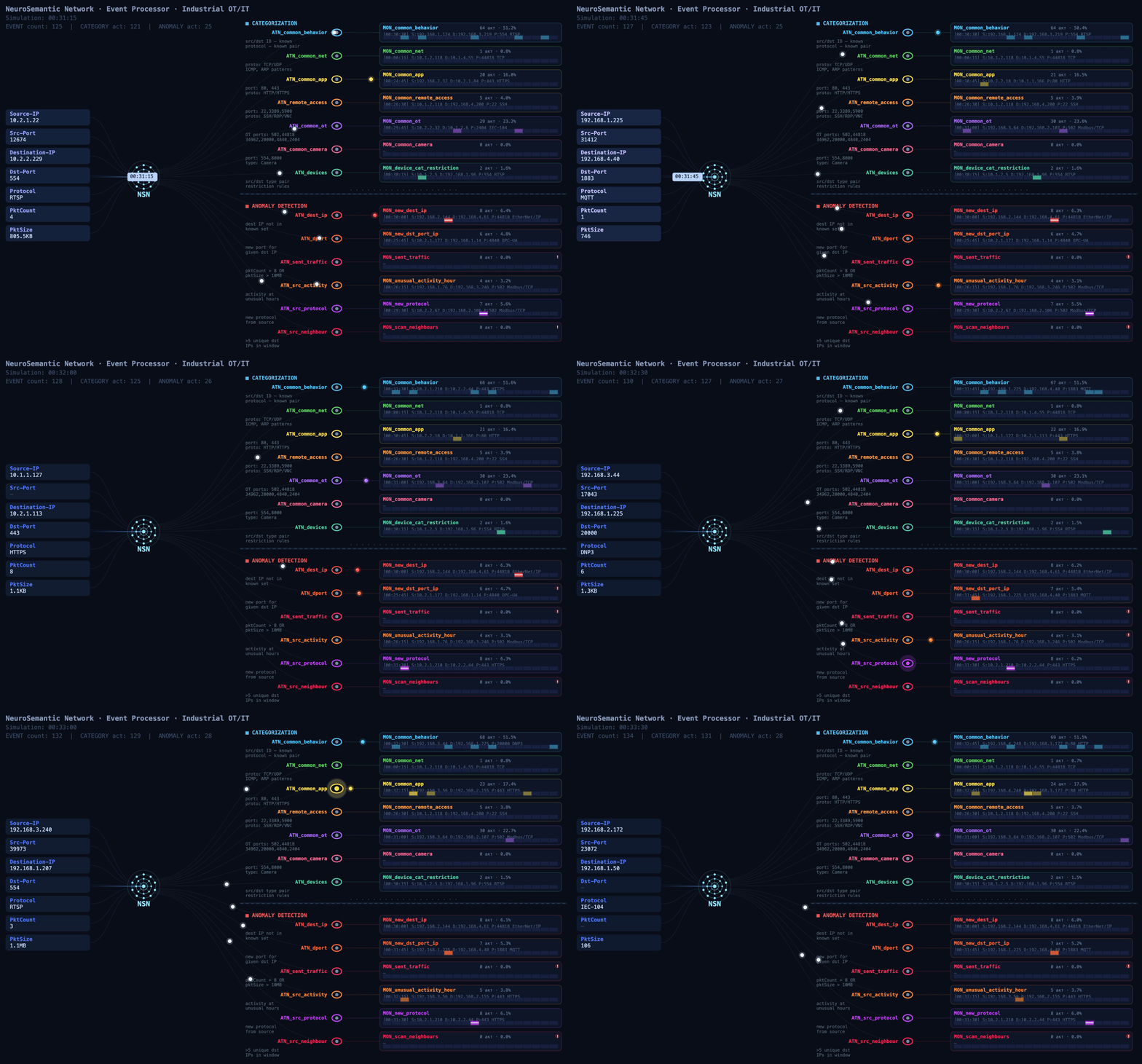
The functional dynamic diagram below shows how events from devices on an industrial network are processed.
Event processing flow (click to play)
MLEP in practice: how behavior helps complete the asset inventory
At a facility with several similar production lines, device information may be more complete on some lines than on others. On one line, devices are identified as PLCs, while on another, after an upgrade, some hosts show up only as addresses: the available traffic didn’t provide enough information to determine their category. Still, these devices communicate with the same types of HMIs and process data collection servers. Their communication directions, frequency, and volumes may be similar.
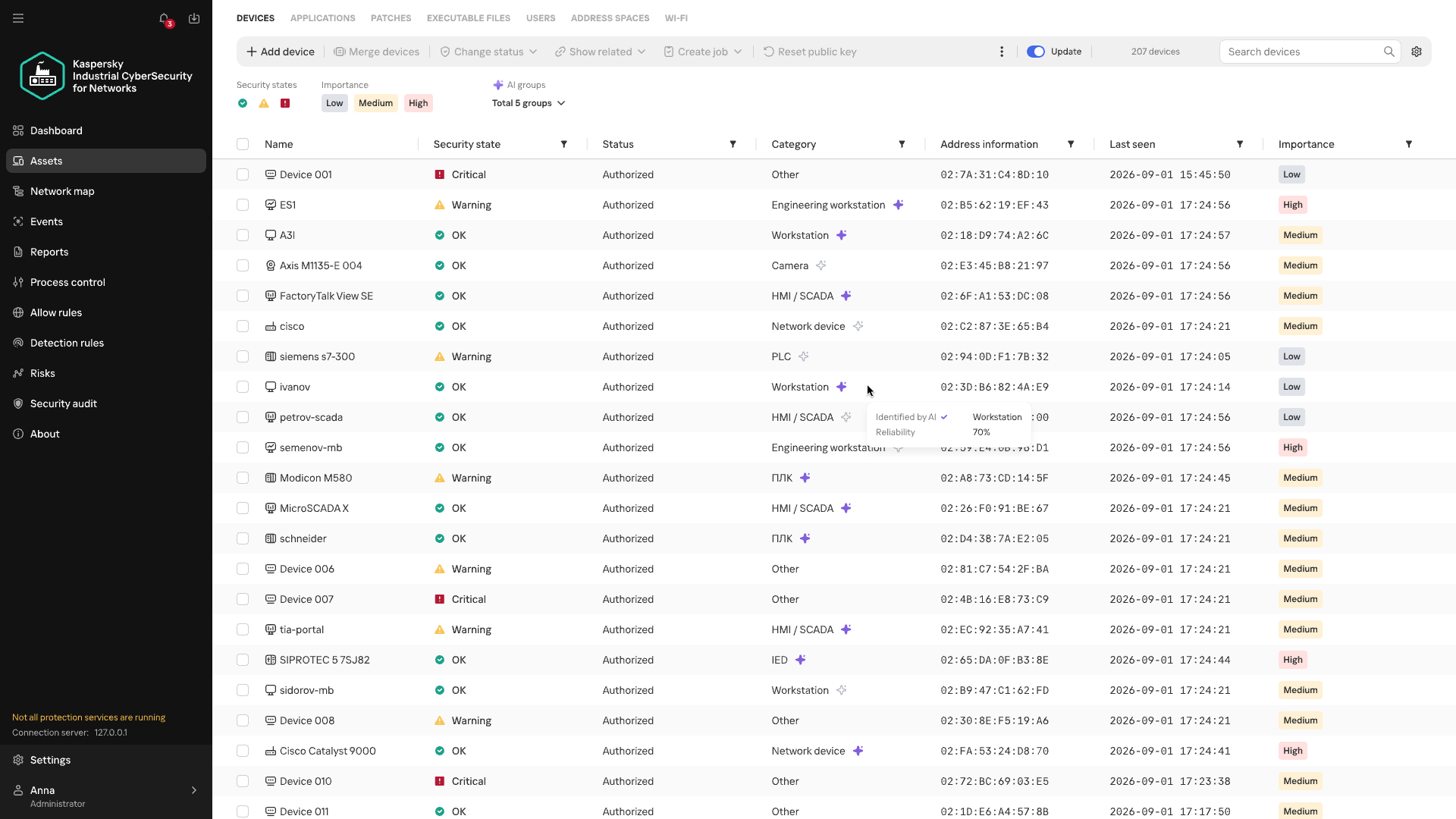
That’s where MLEP comes in. It takes the categories of already known assets and matches recurring features of their network behavior against those of uncategorized devices. When the observed interactions turn out to be similar, MLEP can add a category for that host to the inventory.
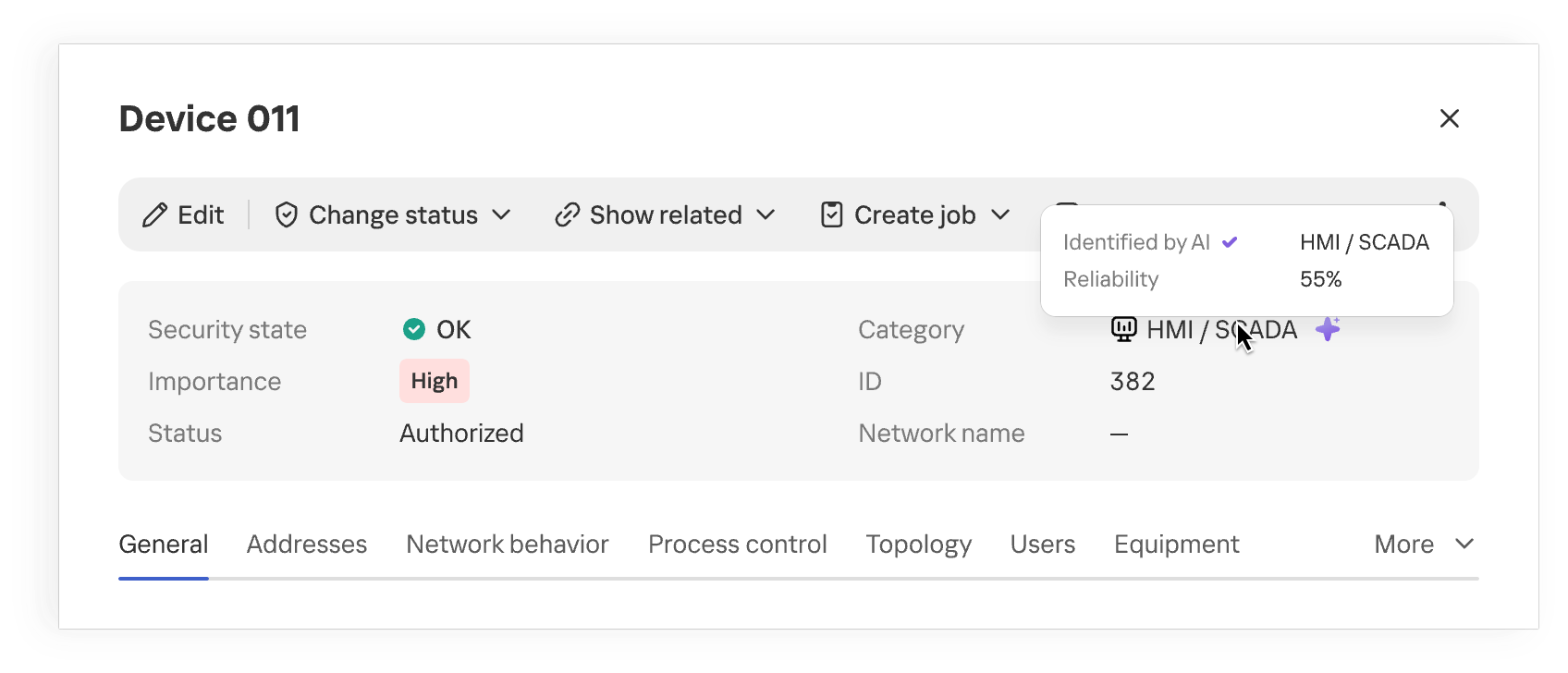
Device category suggested by MLEP
Once the category is refined, the industrial network map provides more context about the equipment on the network. When analyzing network activity, the analyst immediately sees the device’s suggested category and can skip looking up each IP address in the design diagrams. This approach is especially useful where equipment changes faster than the documentation is updated.
The suggested category is also checked against existing device information and defined constraints. This helps filter out some contradictory options, but prediction quality still depends on how much of the traffic is visible, especially if the device communicates only rarely.
Anomalous activity and streaming statistics
Investigations of real-world attacks show that attackers actively use both standard tools and permitted protocols. You don’t always need to know an attacker’s specific technique in advance to spot potentially malicious activity. Signature-based detection helps find known signs of an attack, but it doesn’t assess how typical an observed interaction is for a particular device. MLEP compares current activity with the device’s usual network profile: which hosts it communicates with, which protocols it uses, when and how much data it transmits, its average packet size, and so on. The changes it detects help guide the direction of the investigation. Correlating these changes with other events and the operational context helps determine whether malicious actions could be behind them. When investigating an incident that has already been detected, anomalies help reconstruct the sequence of actions.
The first version of MLEP comes with six preconfigured monitors, one for each type of deviation from the device’s usual network profile:
Anomaly
How it helps with event analysis
New external host
Flags a new external connection that wasn’t previously seen in the device’s observed behavior, even if the IP address isn’t listed among known IoCs. Helps check whether this connection appeared at the same time as other suspicious events.
New combination of destination address and port
Shows that the device has begun using a service it hasn’t used before. Once an incident has been detected, this helps trace new connections after the more critical events have been analyzed.
Unusually large volume of data sent
Highlights data transfers that are atypical for the device and helps correlate their timing and direction with other events.
Atypical activity time
Shows that the device was active at a time that’s unusual for it. In an already detected incident, this helps reconstruct the timeline of actions around the main alert.
New protocol
Helps spot a new method of communication, even when the device is communicating with familiar hosts.
Activity with signs of scanning
Shows that the device has started contacting an unusually large number of neighboring hosts. This signal helps reveal possible reconnaissance ahead of attempts to access equipment.
During an investigation, anomalies help reconstruct the sequence of changes: when a specific host established new connections, switched protocols, increased its data transfer volume, or shifted its operating hours. Matching events by device and time shows an analyst how activity unfolded around an incident that has already been detected.
This is especially useful when some of the attacker’s actions fell outside the monitored scope or didn’t trigger other KICS technologies. Correlating these changes with the device’s role, protocol analysis data, and events from other technologies gives the analyst a more complete timeline. Behavioral anomalies show exactly where to look for the missing links and which network interactions need attention.
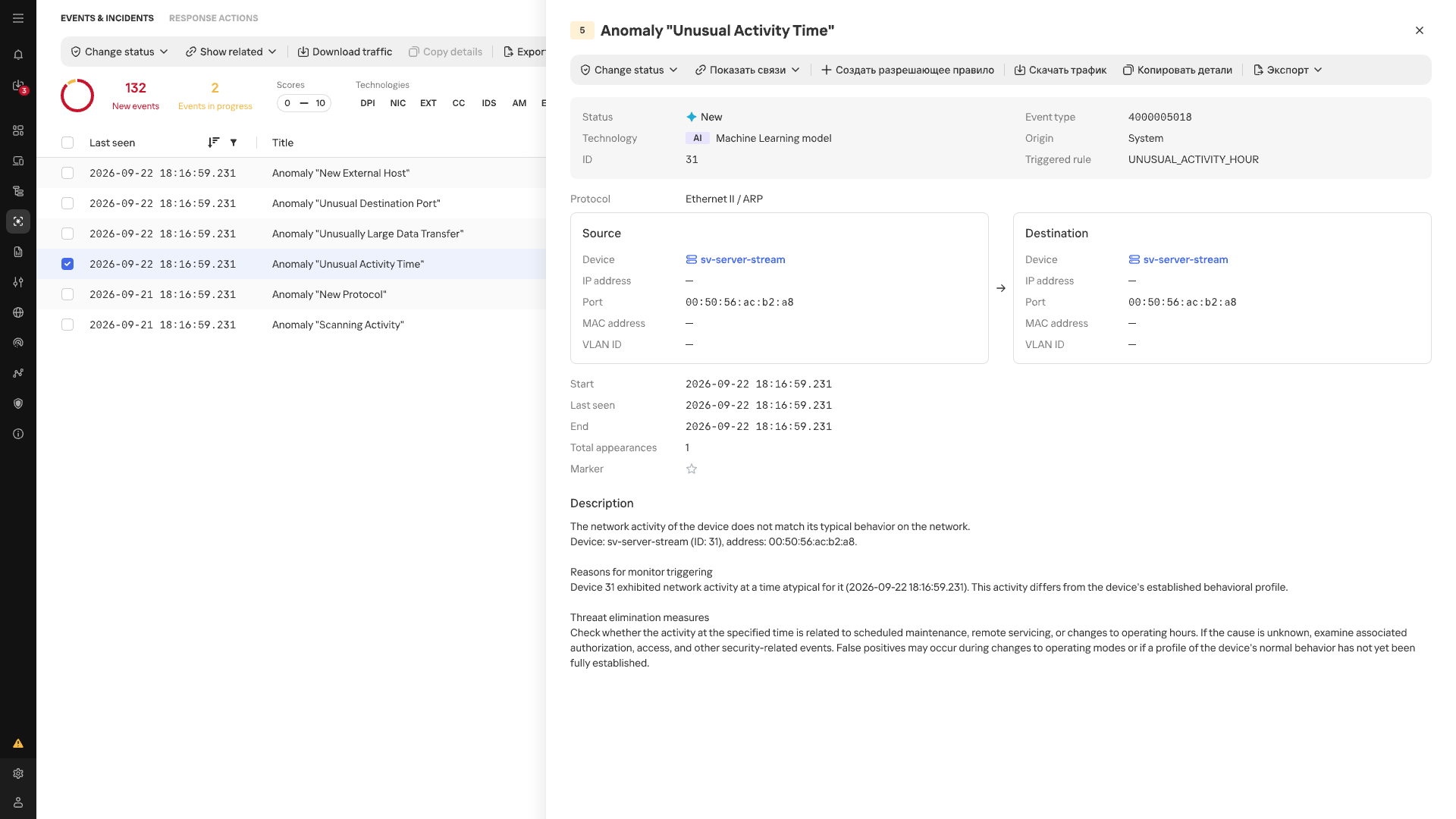
Atypical Activity Time anomaly card
In the event list, anomalies detected by MLEP are marked with an AI label. Each event shows its name, source, destination, timestamp, and the ID of the triggered scenario.
Conclusion
In an industrial network, whether behavior is anomalous depends on the host where it occurs and that host’s place in the industrial process. The repetitive nature of many communications makes a change in normal data exchange easier to spot, while knowing a device’s function and criticality helps gauge the possible consequences. Taken together, these observations make network traffic more than a list of connections: it helps assess new events in the context of a specific facility, even without an attack scenario known in advance. Machine learning technologies are well suited to this kind of comprehensive analysis, as they can process and organize huge streams of heterogeneous data. Starting with version 5.0, Kaspersky Industrial CyberSecurity for Networks handles this function with MLEP, which works effectively alongside the product’s existing functionality.
Recently, our team exposed sophisticated scam kits designed to steal sensitive data and trick consumers. But underground marketplaces are not just for malware and stolen passwords. They also offer services designed to manipulate your opinion of the products and services you buy every day.
In our latest research, we examined cybercrime forums where sellers advertise illicit “reputation management” services. For the right price, these underground operators offer to flood a product with glowing, five-star ratings or remove negative reviews. This shadowy industry works both ways—artificially boosting reputations and deliberately hiding legitimate complaints.
A major shift we are seeing in this space is the adoption of new technology. We also found that cybercriminals are using AI to automate these fake review campaigns. This could allow them to quickly generate realistic, human-sounding feedback in large volumes without much manual effort.
5 stars as a service
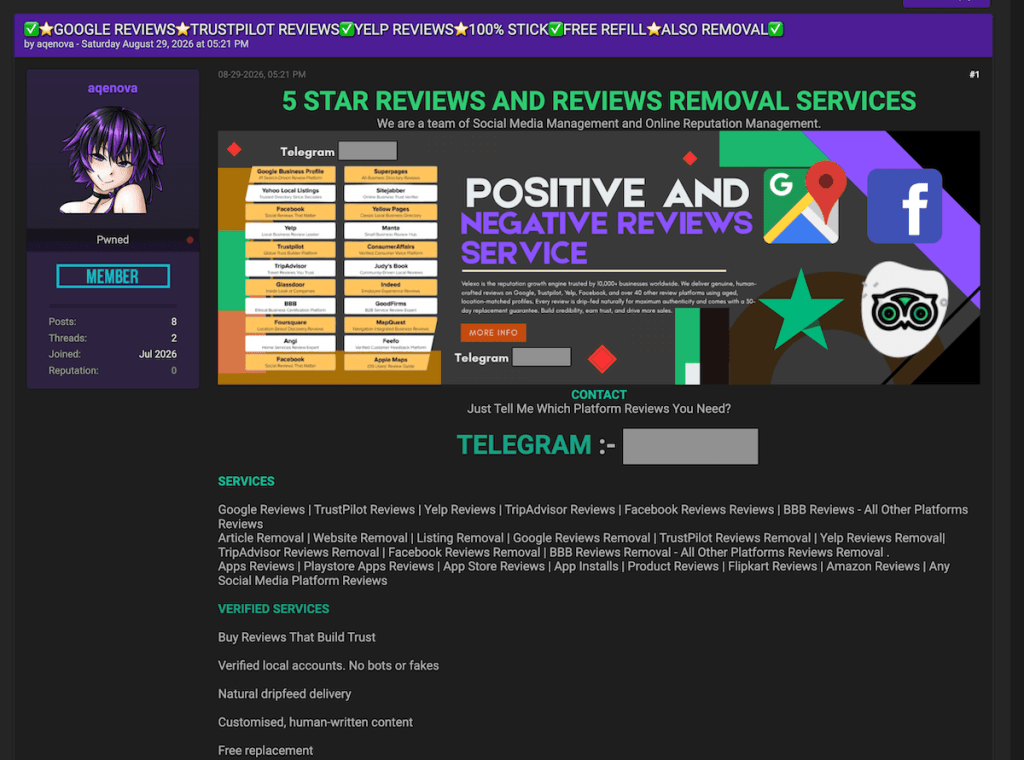
In the first example, discovered on a major English-language underground forum, a seller operating under the handle “aqenova” advertises both five-star review generation and negative review removal services.
The seller’s operations span widely used platforms, including Google, Trustpilot, Yelp, and various mobile app stores. By simply asking prospective buyers, “Just tell me which platform reviews you need?” the seller presents reputation manipulation as something buyers can just order on demand.
Five-star reviews and removal services
Decoding the seller’s FAQ
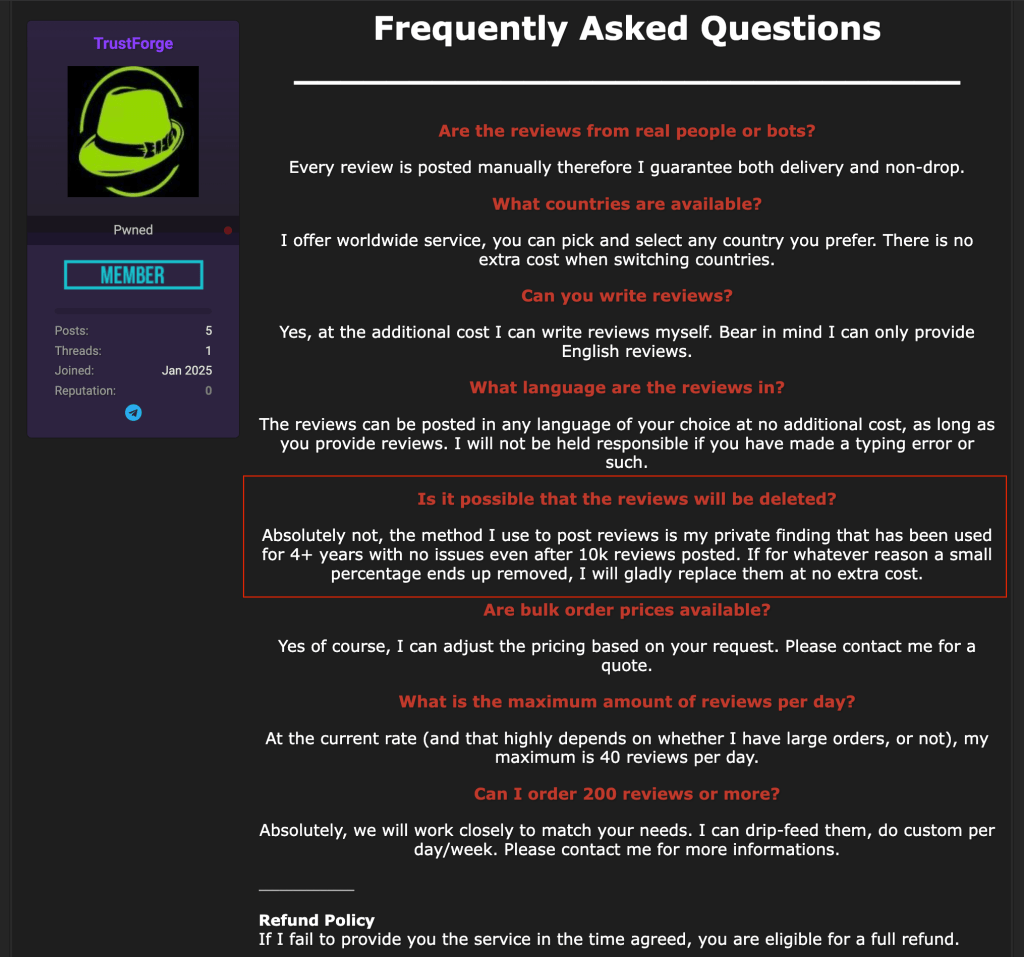
Analyzing another seller’s (TrustForge) “Frequently Asked Questions” section revealed some surprising details about how these operations reportedly run behind the scenes.
First, the seller emphasizes that real people manually post these reviews, offering a guarantee for both successful delivery and “non-drop”—meaning the platform won’t flag and remove the feedback later.
Remember, a real person posting a review doesn’t mean they’re a real customer. The important question is whether they actually used the product or service and are describing an honest experience.
Second, it appears this is a well-coordinated team effort rather than a solo operation, as the seller charges an extra fee if a buyer wants the main operator to write the review text personally.
However, what caught our attention most was their confidence in beating platform checks. The seller guarantees their fake reviews will stay active, claiming they rely on a closely guarded “private method.” According to TrustForge’s own statements, this method has allowed them to post more than 10,000 fake reviews.
Reputation management FAQ
The clean-up crew: Making bad reviews disappear
A single negative review is often all it takes to create a bad first impression of a product or service. When those negative comments start to pile up, they can completely ruin a business’s reputation and bottom line.
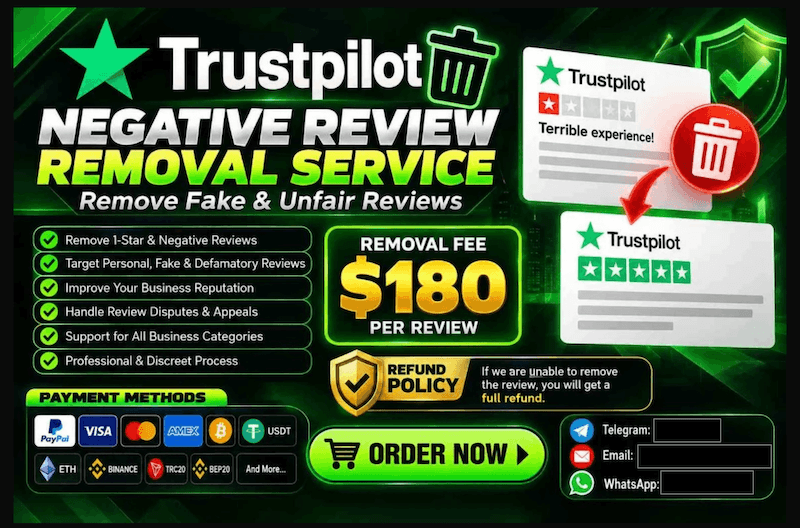
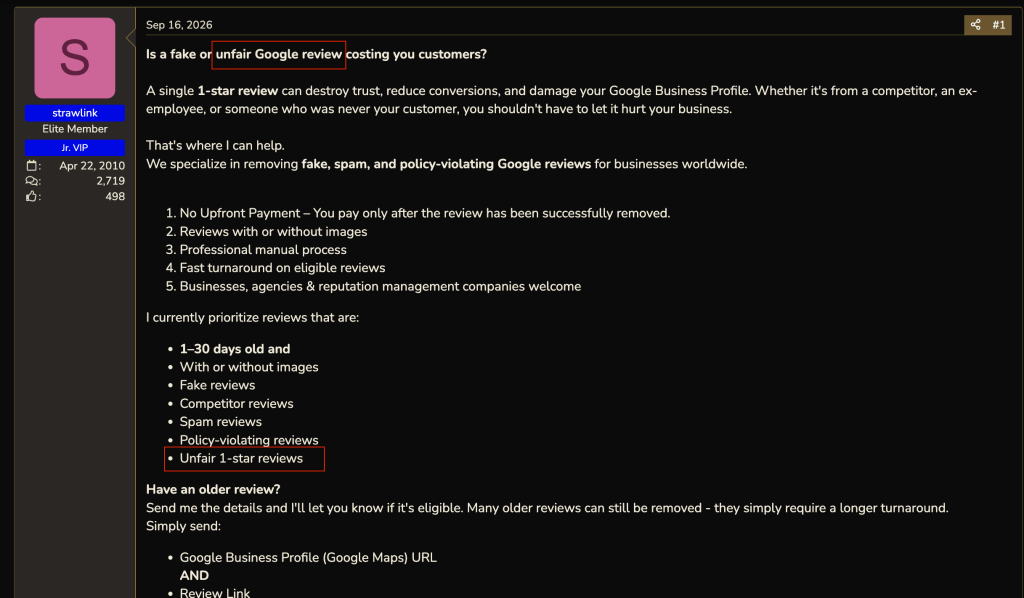
Recognizing how desperate businesses can be to protect their image, our research team discovered underground services specifically offering to remove “fake” or “unfair” reviews from major platforms like Google and Trustpilot.
Of course, the boundary between what is genuinely fake and what a business simply considers “unfair” can be blurry. Businesses can legitimately challenge fabricated reviews, but these services raise concerns about whether genuine customer complaints could also be targeted.
If legitimate customer complaints disappear, consumers lose information that could help them decide where to spend their money.
An offer to remove “fake” or “unfair” Google reviewsAn offer to remove ”fake” or “unfair” review Google reviews
On average, having a single review removed through these underground services costs between $100 and $200. However, the pricing jumps dramatically depending on the platform.
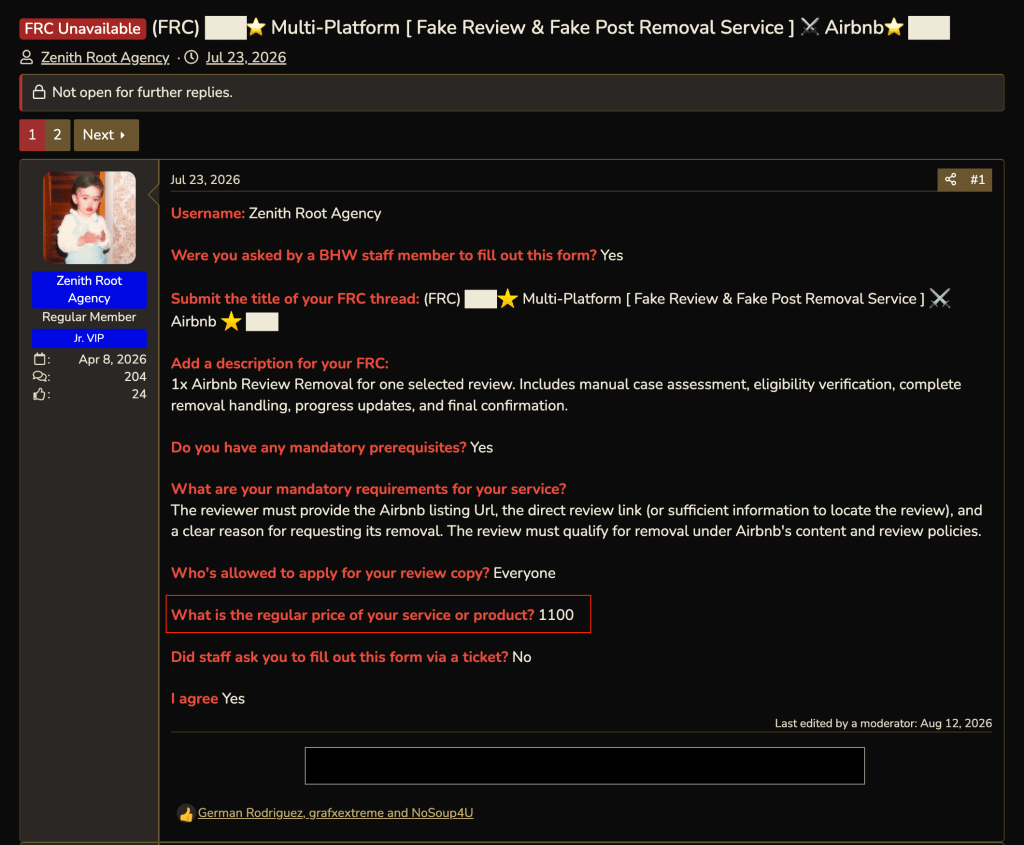
For instance, one seller advertised Airbnb review removal for around $1,100 per review.
When you check a business’s reviews, you’re looking for patterns in other customers’ experiences. If genuine complaints disappear, you could miss repeated problems with refunds, product quality, or customer service.
$1,100 to remove a “fake” or “unfair” Airbnb review
Artificial intelligence, artificial reviews
During the last few months, our research team spotted an interesting thread on an underground forum where two users discussed using AI to mimic human E-E-A-T.
E-E-A-T stands for Experience, Expertise, Authoritativeness, and Trustworthiness. It is a quality evaluation framework outlined in Google’s Search Quality Rater Guidelines, which human evaluators use to assess content quality. E-E-A-T itself is not a direct ranking factor.
In the discussion we observed, one user asked the community if it was possible to use AI to effectively fake these qualities when writing product reviews and artificially boost website rankings. The answer was a resounding yes.
Another user claimed they had never experienced problems getting Google to index their completely AI-generated reviews.
AI vs. E-E-A-T
Behind the scenes: The IP addresses for fake reviews
To keep fake reviews from being flagged and deleted, scammers need to look like everyday consumers. To help do this, they can use something called “residential and mobile proxies,” which route their traffic through other internet connections to disguise where it comes from.
Think of an IP address as your computer’s caller ID. When scammers use bulk IP addresses from giant data centers, platforms may spot and block that traffic as coming from commercially hosted infrastructure. Residential proxies, on the other hand, route traffic through real, physical home internet connections—just like the Wi-Fi you use in your living room. Mobile proxies work the same way, but use real cellular networks.
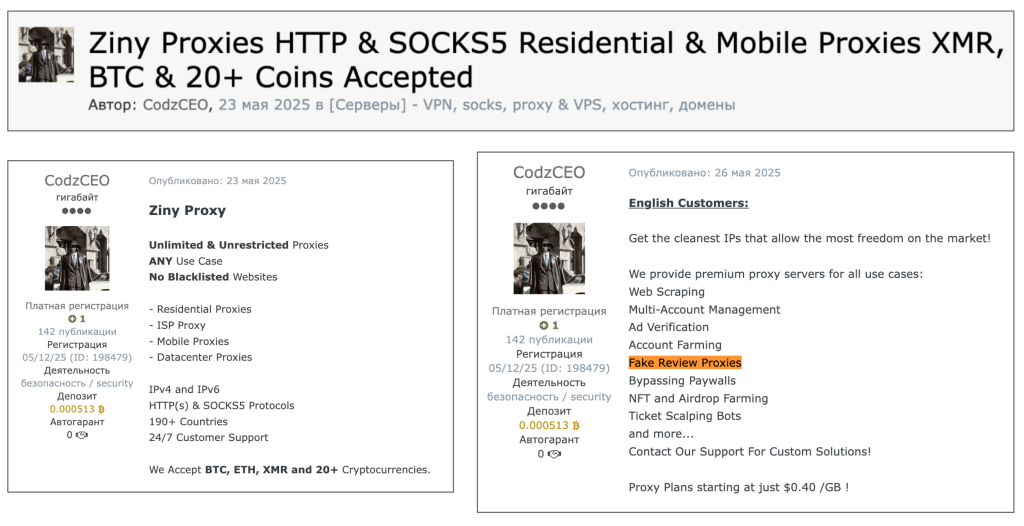
Our team recently discovered a seller on an underground forum acting as a direct supplier of these residential and mobile connections. The seller explicitly advertises them as perfect for running fake review campaigns.
Residential and mobile proxiesadvertised for fake review campaigns
How to avoid being misled by fake reviews
The main goal of this research isn’t to make you panic or stop trusting every online review you read. We want to raise awareness about what happens behind the scenes, so you can make more informed buying decisions.
If a product or offer seems too good to be true, but is backed by a mountain of perfect five-star reviews, take a moment to pause. Scammers often use these artificially boosted ratings to make a bad deal look reassuring.
Read recent reviews and some of the middle-rated ones, rather than relying on the overall score. Look for recurring details about the things that matter to you, such as durability, delivery, or getting your money back.
Look for repeated wording or sudden bursts of glowing feedback. These signs don’t prove a review is fake, but they’re reasons to take a closer look. Check the seller’s contact details and return policy, too.
Malwarebytes Browser Guard can also help block scam, phishing, and malicious websites you may encounter while shopping.
Unsure about an offer, even with glowing reviews? Share the link or a screenshot with Malwarebytes Scam Guard for help checking for signs of a scam before you buy.
Stop threats before they can do any harm.
Malwarebytes Browser Guard blocks phishing pages and malicious sites automatically. Free, one click to install. Add it to your browser →

 Login