 Login
Login
Hackers breach govt webmail while running parallel crypto fraud
The Jewelbug hacker group has been carrying out espionage operations targeting governments and militaries while also engaging in cryptocurrency fraud. [...]


Ransomware kept its grip on organizations through the second quarter of 2026, and the headline number barely moved. What changed underneath that number is more interesting: new research gave us a rare look inside a top tier operation as it was being built, and it revealed just how little it now takes for a small and skilled group to reach the top of the field. Here’s what the quarter actually showed, and what it means for how you defend against it. Key takeaways Data leak sites recorded 2,139 ransomware victims in Q2 2026, essentially flat versus Q1 and up 33% […]
The post Ransomware Didn’t Slow Down in Q2 2026. It Just Spread Out. appeared first on Check Point Blog.
When you build a new application or capability on Amazon Web Services (AWS), you want to focus on what you’re building. Getting a service running almost always begins with AWS Identity and Access Management (IAM). Many AWS services that act on your behalf need an IAM role, an identity the service assumes to access your resources with a defined set of permissions. You then author a trust policy so the service can assume the role, choose the permissions the workload needs, and attach it. Configuring roles and policies for common patterns is repeatable work that doesn’t need to be manual.
IAM role manager does that work for you. When role manager is enabled, AWS creates and configures the IAM roles as you build in supported service consoles, so you can start using a service and let AWS handle the role behind it. You create the resource you want, and role manager provisions and attaches the role you need as part of the same flow, so you can build now and refine permissions as your workload matures.
With that step automated, getting started takes minutes. You can create an AWS Lambda function and start running your code, with its execution role already created and attached, without switching context to set one up. Role creation becomes an automated part of building your application rather than a separate step.
Role manager is especially useful when you’re getting started: the moments when you want to stand up a service or get a proof of concept running and want to defer role configuration until later in your development process. You don’t need prior IAM experience to get started. You keep full control of what it creates, because the roles are ordinary IAM roles that you can view, edit, or delete like any role you author yourself. When you want to tighten a role, AWS IAM Access Analyzer reviews how it has been used and recommends a policy scoped to only the permissions it needs.
Role manager has two states, enabled and disabled. Enabling it for an account authorizes AWS to create roles in that account. In an organization, administrators can use a service control policy (SCP) to control whether member accounts can enable or use role manager. To enable it:
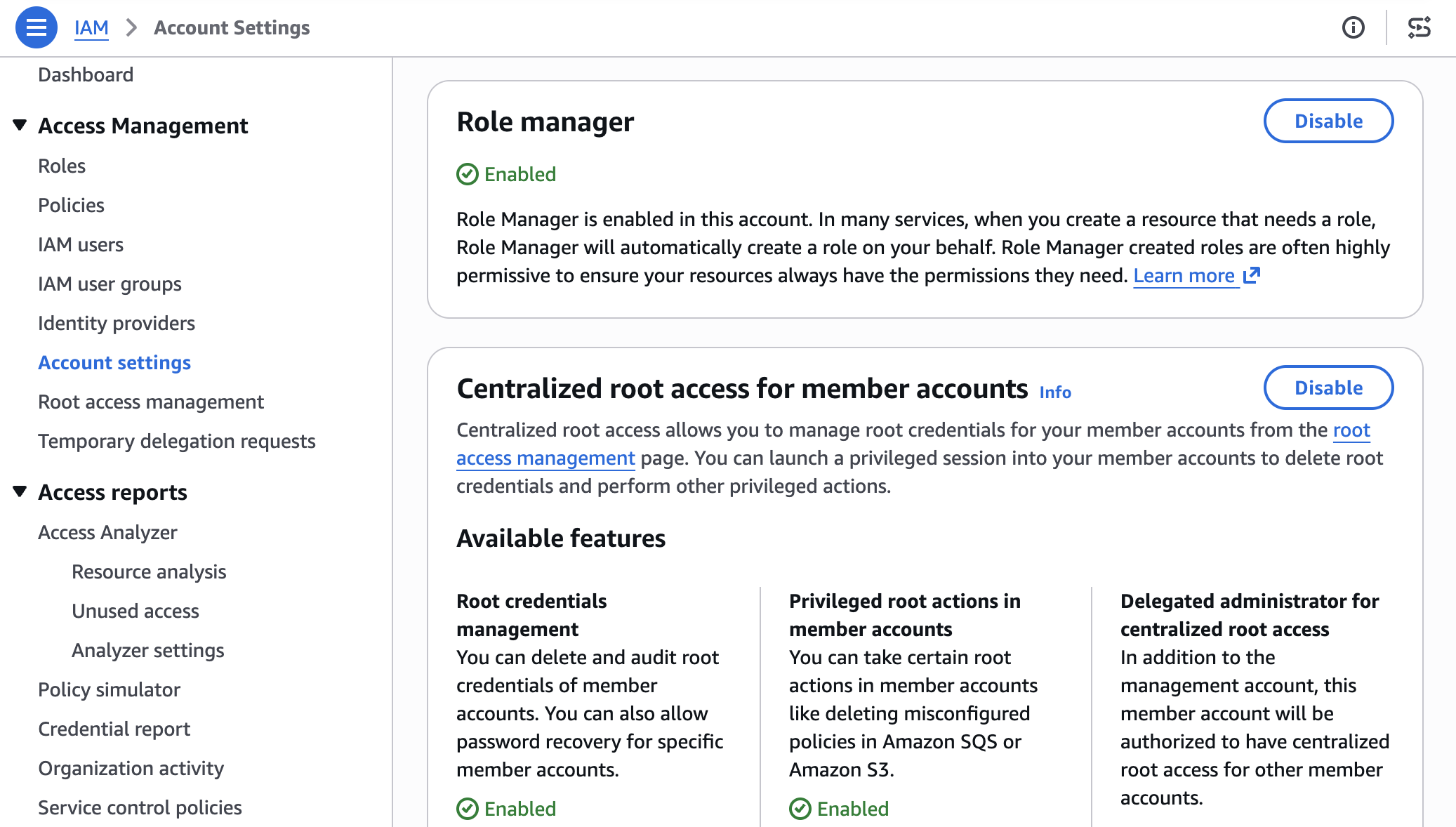
Figure 1: Enable Role Manager
Some AWS services already create a role for you when you create a resource that needs one. Role manager doesn’t change that: those services keep creating roles automatically, and roles you already created keep working. What role manager adds is a single account-level control, and coverage for a case that built-in flows can’t handle: tasks whose permissions AWS can’t determine in advance, such as running your own code. For those tasks, role manager provisions a role that you can narrow later.
Start with a common task: an Amazon EventBridge rule that invokes a target, such as an Amazon Simple Queue Service (Amazon SQS) queue or an Amazon Simple Notification Service (Amazon SNS) topic. Without role manager, you would pause here to create a role that lets EventBridge invoke the target, write the role’s trust policy, attach the required permissions, and then return to finish the rule. With role manager enabled, you define the rule and its target, choose Create, and role manager provisions the role and attaches it for you. The EventBridge console shows the rule created and ready, and you never open the role-creation flow.
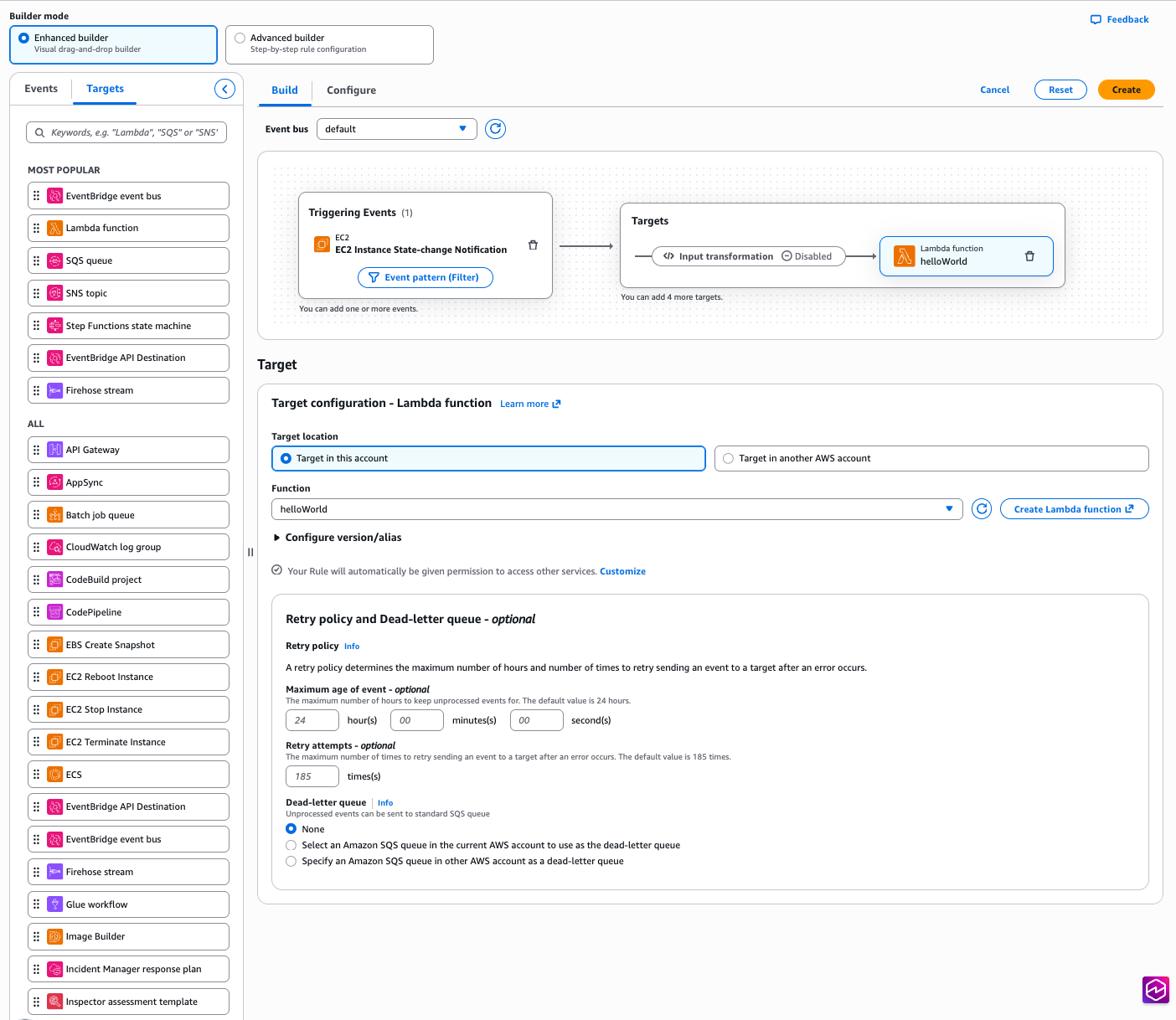
Figure 2: Creating an EventBridge rule with no manual role setup
The role comes from an AWS managed role template: a definition AWS builds and maintains for a specific task, with the trust policy and permissions already worked out. The console calls a new IAM API, AcquireRole, which finds the matching template, provisions the role from it, and returns it to EventBridge. Depending on the service, AcquireRole either creates a new role or reuses one that already fits, so an account does not fill up with duplicate roles for the same task.
Role manager creates the role using your own IAM permissions, not a separate role-manager permission. To provision a new role, you need permission for the actions the template performs: at minimum, you need permissions to create and attach roles. When AcquireRole reuses an existing role instead of creating one, it needs only iam:GetRole and iam:GetRoleTemplateVersion. If you’re missing either of these permissions, the console tells you which one is needed rather than creating the role.
Not every task has a set of permissions AWS can define in advance. When a role runs your own code, such as a Lambda function, AWS has no way of knowing which services that code will call. Role manager covers this case too: create a Lambda function with role manager enabled, and it attaches an execution role that your code can use right away and that you can narrow once you know what the function calls.
Because the permissions your code needs aren’t known up front, role manager attaches the AWS managed policy PowerUserAccess to the role. PowerUserAccess grants access to AWS services so your function can call what it needs. By design, it doesn’t grant permission to manage IAM, AWS Organizations, or account settings. The template also configures the role to trust only the Lambda service.
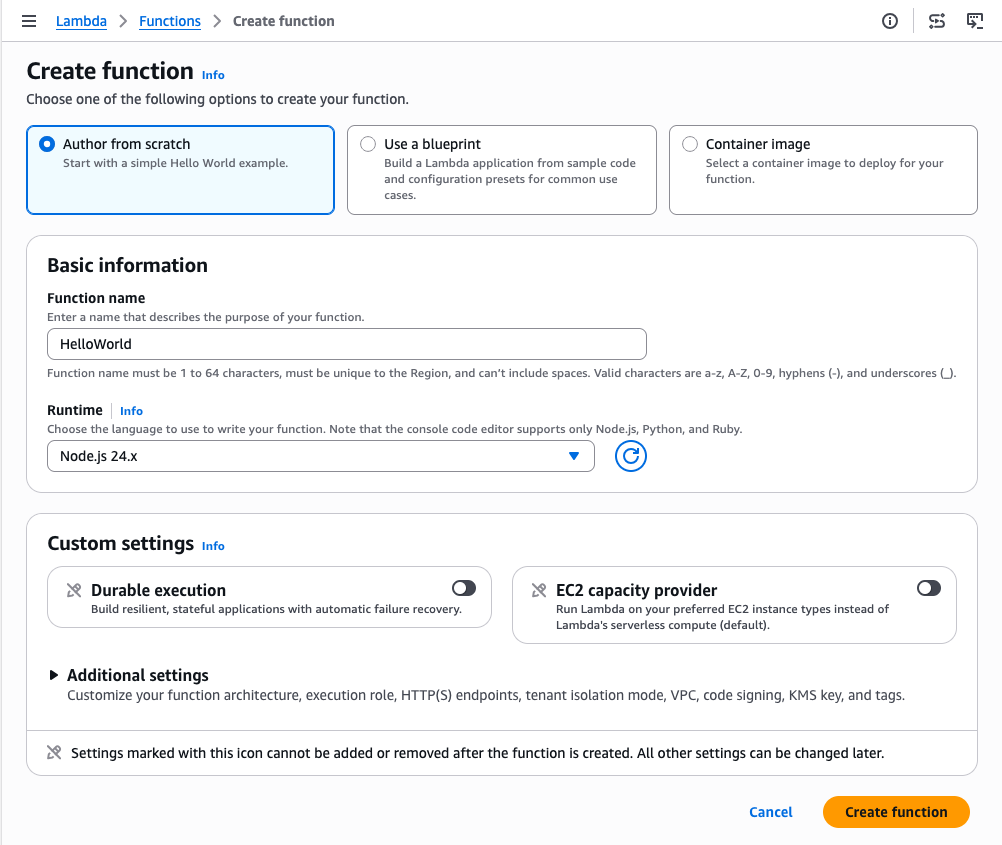
Figure 3: Create an AWS Lambda function with no manual role setup
Role manager attaches an execution role, and your function is ready to run. Figure 4 shows the Execution role panel on the function’s Configuration tab, with the role that role manager attached.
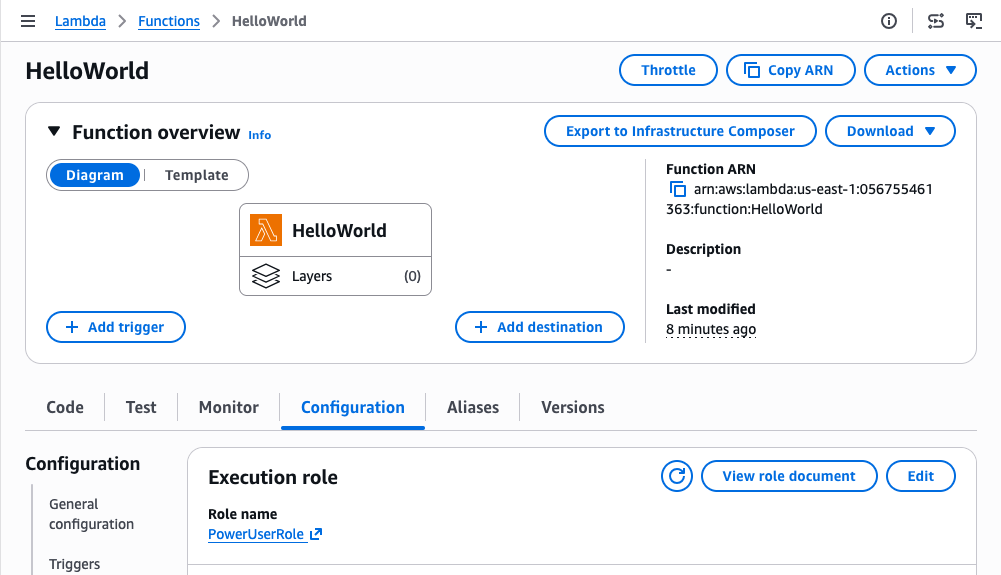
Figure 4: Role manager provides a role automatically to an AWS Lambda function
You can open the role in the IAM console to review its permissions. Figure 5 shows the role’s Permissions tab with the PowerUserAccess policy attached.
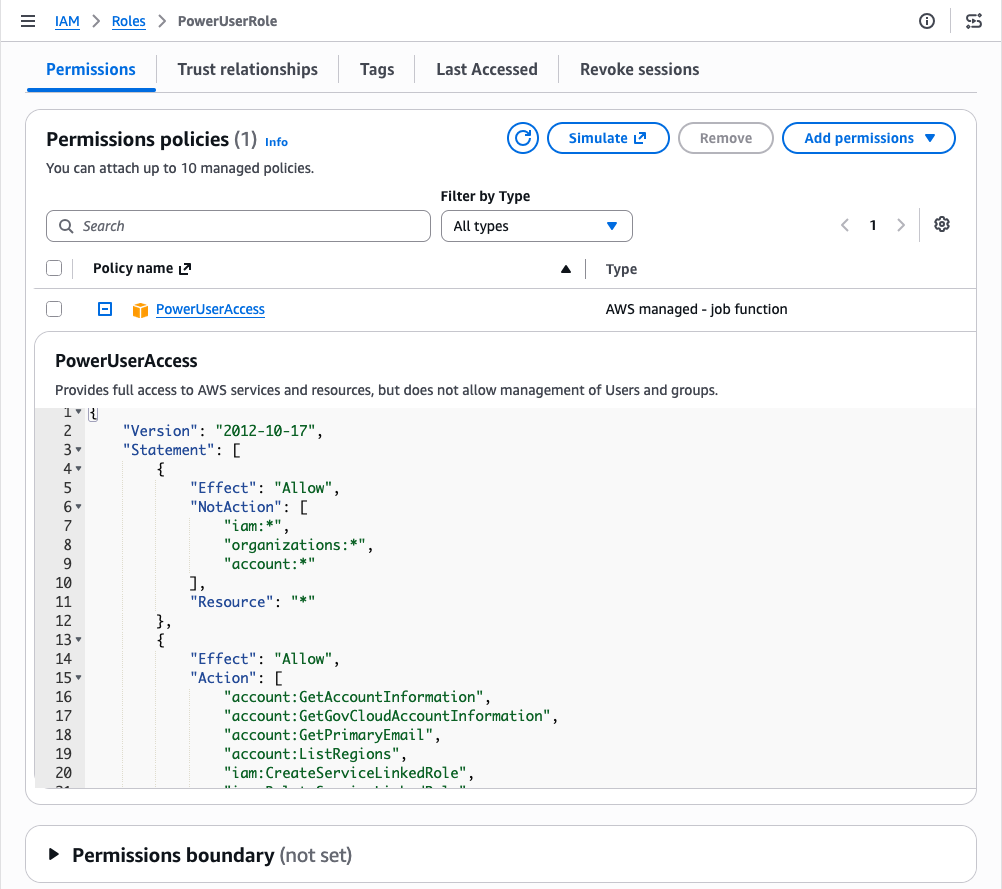
Figure 5: Permissions of the role provided by role manager for an AWS Lambda function
You keep full visibility into what role manager creates. Every role it creates records the role template it came from, and both GetRole and ListRoles return that template reference. You can inspect any role in your account and tell which were created by role manager. You read a role’s trust policy and permissions the same way you would for a role you authored, and AWS CloudTrail records each role’s creation.
As your workloads mature, refine the roles that role manager created to follow least privilege. When you’re ready, you can disable role manager and get IAM Access Analyzer unused access analysis at no additional cost for 90 days. Access Analyzer looks at how each role has been used and recommends a policy you can apply that keeps only the permissions the role needs. Start with the roles attached to your most critical workloads and work outward.
Disabling role manager doesn’t disrupt anything already running: your resources keep the roles they have, those roles stay in your account until you change them, and from that point you author new roles yourself, the same as before. If you would rather narrow a single role than the whole account, editing that role removes it from role manager’s control and it becomes a standard customer-managed role, with your changes preserved. In sandbox or development accounts, keeping role manager enabled saves time. For production workloads, disable role manager and refine the roles it created to least privilege before going live.
Role manager automates IAM role setup so you can focus on building from the start. When you enable it, AWS creates and attaches the IAM roles your resources need as you build, so you can start in minutes without prior IAM experience. Because these are IAM roles that you fully control, you keep the same visibility and the same tools you already use. Keep role manager enabled while you build, and refine the roles it created as your workloads mature.
To get started, enable role manager in the IAM console and create a resource in a supported service. To learn more, see IAM role creation and the list of supported services in the IAM User Guide.
If you have feedback about this post, submit comments in the Comments section below.

Key takeaways Weekly cyber attacks reached 2,336 per organization in July 2026, up 3% from June and 16% year over year Education remained the most attacked industry, averaging 4,848 weekly attacks per organization Latin America recorded the highest regional attack volume, while Europe saw one of the sharpest increases at 18% year over year GenAI adoption continued to expand, with organizations using an average of 8 tools and 1 in 36 prompts carrying a high risk of sensitive data exposure Email remained a key entry point, with 1 in every 128 emails classified as phishing and another 20% falling into […]
The post July 2026 Cyber Threats Surge: Ransomware Attacks Double Year over Year as GenAI Data Exposure Widens appeared first on Check Point Blog.
Organizations operating in Germany and across Europe increasingly need to demonstrate cloud security compliance under the Cloud Computing Compliance Criteria Catalogue (C5:2020), published by Germany’s Federal Office for Information Security (BSI). Last year, we introduced Landing Zone Accelerator on AWS support for digital sovereignty and today we’re announcing the availability of a new independent assessment report available on AWS Artifact which evaluates how the Landing Zone Accelerator (LZA) on AWS solution provides enhanced coverage for C5:2020 requirements by implementing nearly 200 native security controls. LZA is available using a standard multi-account configuration or as a container-based deployment option in the AWS European Sovereign Cloud, enabling customers with data residency requirements to use the same security configuration baseline.
Security and compliance are a shared responsibility. LZA takes on part of this responsibility by defining a security architecture baseline and automatically provisioning your AWS environment that scales as your organization grows. Where AWS already provides C5 Type 2 attestation reports for “security of the cloud”, the LZA assessment report offers an independent opinion of how the security baseline LZA provisions aligns with C5:2020 criteria for “security in the cloud”. Instead of starting from scratch, you can deploy with LZA, evaluate the scope of coverage from the report, and use the LZA Compliance Workbook to build on and customize for your organization’s unique use case. These resources can help you reduce time in architecture design, evidence collection, and preparation for C5:2020 assessments. The free LZA Compliance Workbook available on AWS Artifact and open source Universal Configuration GitHub repository are also excellent sources to add to a knowledge base, enabling you to create a security compliance chat agent with Bedrock to assist your governance or assurance teams.
AWS Partner Schellman, an independent third-party assessor, evaluated the LZA Universal Configuration architecture and security control baseline, which maps to C5:2020 controls in the LZA Compliance Workbook, to determine how the LZA infrastructure aligns to C5:2020 technical requirements. The report concluded that LZA can help implement 325 security controls in aggregate, aligning to technical requirements from eight C5:2020 control areas. It also describes the LZA architecture design, security best practices, and scoping considerations for C5:2020 assessments. This is the first installation of the independent C5 report for LZA, which will be updated in 2027 to evaluate coverage for the pending C5:2026 revision.
In addition to the LZA C5:2020 report, you can also find the LZA Compliance Workbook available on AWS Artifact. It maps C5:2020 requirement identifiers to security implementation statements, giving you a starting point from which you can customize and enhance your compliance documentation for your unique workloads or operational practices after deploying LZA.
To learn more, submit a question to a LZA team member or contact your AWS account representative.
If you have feedback about this post, submit comments in the Comments section below.
Amazon Web Services (AWS) is pleased to announce that the Summer 2026 System and Organization Controls (SOC) 1 report is now available. The reports cover 185 services over the 12-month period from July 1, 2025–June 30, 2026, giving customers a full year of assurance. These reports demonstrate our continuous commitment to adhering to the heightened expectations of cloud service providers.
Customers can download the Summer 2026 SOC 1 report through AWS Artifact, a self-service portal for on-demand access to AWS compliance reports. Sign in to AWS Artifact in the AWS Management Console, or learn more at Getting Started with AWS Artifact.
AWS strives to continuously bring services into the scope of its compliance programs to help customers meet their architectural and regulatory needs. You can view the current list of services in scope on our Services in Scope page. As an AWS customer, you can reach out to your AWS account team if you have any questions or feedback about SOC compliance.
To learn more about AWS compliance and security programs, see AWS Compliance Programs.
Amazon Web Services (AWS) is pleased to announce its successful completion of the 2025-26 NHS Data Security and Protection Toolkit (NHS DSPT) assessment audit and achieving a status of Standards Exceeded.
The NHS DSPT is an assessment that allows organizations to measure their performance against the National Data Guardian’s 10 data security standards. All organizations that access NHS patient data and systems are expected to use the toolkit to demonstrate their compliance with safe data security standards. NHS DSPT covers standards regarding Personal Confidential Data, Continuity Planning, IT Protection, and more. AWS undergoes the assessment to provide customers with assurance that we are practicing good data security.
The AWS NHS DSPT assessment status is valid until June 30, 2027, and a certificate that confirms our compliance is available on the NHS England website and in AWS Artifact. AWS Artifact is a self-service portal for on-demand access to AWS compliance reports. Sign in to AWS Artifact in the AWS Management Console, or learn more at Getting Started with AWS Artifact.
Security and compliance is a shared responsibility between AWS and the customer. When customers move their computer systems and data to the cloud, security responsibilities are shared between the customer and the cloud service provider. For more information, see the AWS Shared Security Responsibility Model.
To learn more about our compliance and security programs, see AWS Compliance Programs.
As an AWS customer, you can reach out to your AWS account team if you have any questions or feedback.
If you have feedback about this post, submit comments in the Comments section below.

